ARCHIVE CORPORATION SC-499 TAPE CONTROLLER
Information Guide
PARAGRAPH
1 • 1 1 .2
1.3
1 .4
1.5
1 .5. 1
1.6
1 .7
1 .8
1 .8. 1
1.9
1 • 10
1 • 11 1.12 1.13 1.13.1 1.13.2 1.13.3 1.13.4
bt/t
C
~L/
,u/[{
9
tJ1'
!J1vll£
ki'~4
jV)GL
TABLE OF CONTENTS
INTRODUCTION •••••••••••••
.
.
.
.
.
. .
. .
.
.
. .
.
. . .
.
.
. . . .
HANDLING •••••••••••••••••.
.
.
.
. .
. . .
.
.
. . .
.
.
. . .
.
UNPACKING AND INSPECTION •••••••••••••••••••••••• JUMPER-SELECTABLE OPTIONS ••••••••••••••••••••••• JUMPER CONFIGURATION •••••••••••••••••••••••••••• CONTENTION. eo • • • • • • • • • • • • • • • • • • • • • • • • • • • • • • • • • • • • ELECTRICAL SIGNAL DESCRIPTION ••••.
. .
. .
.
. . .
. .
.
.
.
.
INTERFACE CONNECTIONS ••••••••••••••••••••••••••• INSTALLATION ••••••••••••••••••••••••••••••••••.
.
POWER-ON CONFIDENCE (POC) TEST..
.
. .
.
.
. .
.
. . .
.
.
.
. .
I/O STRUCTURE ••••••••••••••••. . . .
.
.
.
.
. . .
.
.
.
. . .
.
.
INTERRUPTS ••••••••••••••. . .
.
.
.
.
.
. . .
. .
.
. . . .
. .
.
.
.
.
DMA ••••••••••••••••••••••••••••••••••••••••••••• RESETS •••••••••••••••••••••••••••••••••••••••••• PROGRAMMING ••••••••••••••••••••••••••••••••••••• QIC-02 COMMAND DESCRIPTIONS ••••••••••••••••••••• INTERFACE TIMING •••••••••••. .
.
.
.
.
.
. .
.
.
.
.
. .
.
.
.
. .
.
COMMAND FLOW CHARTS ••••••••••••••••••••••••••••• PC IT/AT TIMING SPECIFICATION •••••••••••••••••••FIGURE
1-1
1-2
1-3
1-4
TABLE
1-1
1-2
1-3
1-4
LIST OF ILLUSTRATIONS
TITLE
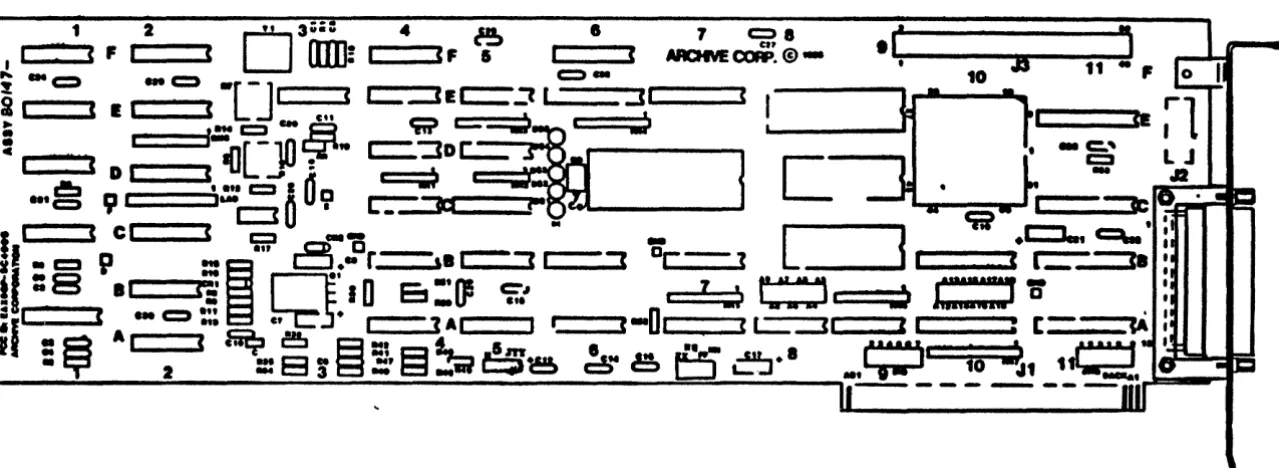
SC-499 Tape Controller PCB Assembly
SC-499 Jumper, Indicator, and Connector Locations
PC Cover Removal
PC Expansion Slots
LIST OF TABLES
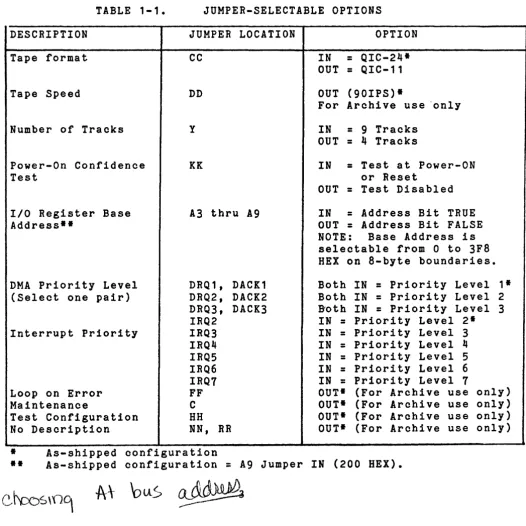
Jumper-Selectable Options
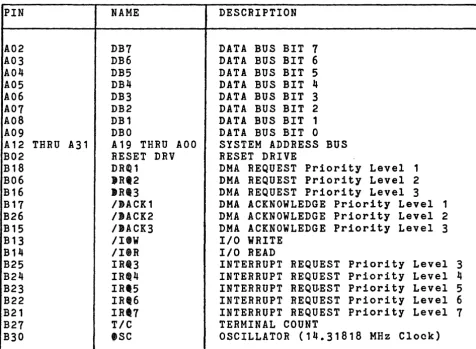
Connector J1 Pin Assignments/ Signal Descriptions
Connector J2/J3 Pin Assignments/ Signal Descriptions
SC-499 Power Requirements
PAGE
2
5
9
10
PAGE
3
7
SC-499 TAPE CONTROLLER
Information Guide
1.1 INTRODUCTION
The SC-499 Tape Controller (Figure 1-1) is designed to interface
streaming 1/4-inch cartridge tape drives to the IBM Personal
Computer (PC), XT, AT and compatible systems.
The SC-499 is compatible with the IBM PC XTIAT IIO structure,
uses DMA for data transfer, and responds to the standard QIC-02
command set. Controller interface with the tape drive is through
the QIC-36 industry interface standard. The SC-499 also supports
the QIC-24 tape format standard. (Both QIC-36 and QIC-24 are
standard features of Archive FasTape and Scorpion tape drives).
Operation with 4 or 9 track drives is jumper-selectable.
The tape controller consists of a single printed circuit
which plugs directly into the PC expansion board. Two
interface connectors on the controller board provide the
of mounting the tape drive internally or externally to the System Unit.
board drive option IBM PC
The following paragraphs provide the SC-499 unpacking and
handling instructions, jumper-selectable options, installation
instructions, and interface information.
1.2 HANDLING
Industry standard procedures for the handling of electronic
equipment are sufficient for handling the SC-499. The user
""
.. '....
1 2
03;;: ..
~I ' ( F I (
()JI]! ,
'F I~ ... c:::::» ... c::::;)
-[-J
I ,~ I ( I I ( en
• ... c:::::I eM ..E3
!
i , . .[-lO
t:jp-l e D I (
II]
. J :I
r-I!!::t ' ... c:::::I I It a
L-. L-. , C )
9 •
.uec:J
0
U •~----'
I=rr: .
I
I ( C I ( c::::J - - -L
f
.t::J..
~:
I
.n
...a.
0 r - ,-.., ...-..,
D ... - . , ... - -. .r---..
II .. c:J
P
...
~ l:::I." ,. • ! . . - . ! - -. . . . ' , , - - - ' .t
I :
8
.'
~
r--l='
IDE! :
()!
tf.:
'
l : j p....It'; ... ; ... ) c : ' :::::::)::)J:=:'
W
. :
=
L l ... c:::::»."~5·'--1
(-0,
(
'-=-::3-"'---"
I :[-~
Iil
=
a
A, ,".~
e,C!JE3::t
I::3t'
11ft' ' . . .~
! ' _ ... .• cr
2=
8
!
E3 ::.'
t::t~'ia
6 8
c!,"e
t:J
~:,.'
... '
10~, 1~.
I ...~~
"---:.---=---~~---=-:---.,
. .--. -- - -- - .., .. -
...I==I~'" "-"' __ 3' ... --~{....---.-.
::.
e
.I~
_ _
-.
_ _
"'!'"'!'-~I , J3 11 - ,10
•
•
• - c:." c:::I
..
[image:5.795.70.710.194.428.2]1.3 UNPACKING AND INSPECTION
The SC-499 has been packaged for maximum protection from shipping
damage. still, an inspection of the board and components should
be performed upon receipt to assure that no damage has occured.
If damage is detected notify the manufacturer and the common
carrier immediately. If practical, save all containers and
packing materials for reshipment or storage.
1.4 JUMPER-SELECTABLE OPTIONS
The jumper-selectable options given in Table 1-1 are available on the SC-499.
TABLE 1-1.
DESCRIPTION
Tape format
Tape Speed
Number of Tracks
Power-On Confidence Test
I/O Register Base Address··
DMA Priority Level (Select one pair)
Interrupt Priority
JUMPER-SELECTABLE OPTIONS
JUMPER LOCATION
CC
DD
y
KK
A3 thru A9
DRQ1, DACK1 DRQ2, DACK2 DRQ3, DACK3 IRQ2 IRQ3 IRQ4 IRQ5 IRQ6 IRQ7 OPTION
IN
=
QIC-24· OUT=
QIC-11OUT (90IPS)·
For Archive use 'only
IN
=
9 Tracks OUT=
4 TracksIN
=
Test at Power-ON or ResetOUT
=
Test DisabledIN
=
Address Bit TRUE OUT=
Address Bit FALSENOTE: Base Address is
selectable from 0 to 3FB HEX on B-byte boundaries.
Both IN
=
Priority Level Both IN=
Priority Level Doth IN=
Priority Level IN=
Priority Level 2. IN=
Priority Level 3 IN=
Priority Level 4 IN=
Priority Level 5 IN=
Priority Level 6 IN=
Priority Level 71· 2 3
Loop on Error Maintenance
FF OUT· (For Archive use only)
Test Configuration No Description
C
HH NN,
• As-shipped configuration
OUT· (For Archive OUT· (For Archive
RR OUT· (For Archive
=
[image:6.615.74.600.234.760.2]15. JUMPER CONFIGURATION
The tape oontroller jumpers are installed at the faotory and the
110 board oonneotors are shown in Figure 1-2.
NOTE: Jumper location Y is open on the 4-track oontroller.
1.5.1 Contention
The as-shipped oonfiguration (Base Address
=
200 HEX, DMA Channel=
1, Interrupt Priority=
2) of the SC-499 providescontentionless operation for the majority of the system users,
though a oontention problem can arise between the tape oontroller
and certain other options if both are installed. ___________ ~
NOTE: Be advised that most IBM PC models use DMA Channel 2 f r
?
the floppy disk drive and DMA Channel 3 for the hard disk drive.
However, the AT does not use DMA Channel 3 for the hard disk
drive. It is handled through 110.
e
CONNECTOR . . . . 1 110 'OR '''TI''NALLY-LOCATID TAP. D"'YI
DIAGNOITIC INDIC ATORe
1 2
OU
3~ 4 ~:::=::::<
F«
lWJi ---.C, I ; ... «:::).1.
c::::)-[-J
I (~ I « I I
«
.tt
• •• t. c:::J c .. ..9
!
" . .
[-10
Cjf'''I
1
D I<a(]....:
c!:I • ... t::2 : ~
a
. . . c:::::) D , "..
0
U •• c::3
r.-_~(
I
c:::::=:;)
I ..
, - ....
cc.
«
r::::J-il ..
c::tp
...."
a.c.Dr-,.c=='
~_...a
tl :
8
.'
tE
~
Q'
10
E:s
:1J5
c;;.'
:. I ( . . . - •• , •
_'" - - .,. c,
,-=1
AI
:~
AI 2«
~:::~!~UH3~
•
CO""ICTO" .I, .1 IY8'T'IM 110
.. UMP.R LOCAT.O".
CONNICTOR . . . . 1 110 ·'0" IXTI"NALLY-LOCATID TAP.
0'''.1
[image:8.809.48.750.108.475.2]1.6 ELECTRICAL SIGNAL DESCRIPTION
All voltage measurements are taken at the controller connector (J2 or J3) with terminators installed. Standard TTL levels are used on signal lines to the drive as follows:
FALSE - Logic 0 (HIGH)
=
2.4 to 5.25 VDC TRUE - Logic 1 (LOW)=
0.0 to 0.55 VDCStandard TTL levels are required on signal lines to the controller as follows:
1.7 INTERFACE CONNECTIONS
The SC-499 pin assignments and signal descriptions for the IBM PC bus interface connector, J1, are listed in Table 1-2.
Table 1-3 lists pin assignments and signal descriptions for both
drive-interface connectors, J2 and J3. At the external interface
connector J2, pins 3, 4. 8. 15 and 19 are signal returns
connected to Signal ground at the controller. The cable shield
connects to the connector housing only. At the internal
interface connector J3, all odd-numbered pins are signal returns
connected to Signal ground at the drive
TABLE 1-2 CONNECTOR J1 PIN ASSIGNMENTSISIGNAL DESCRIPTION
PIN A02 A03 A04 A05 A06 A07 A08 A09
A12 THRU A31 B02 B18 B06 B16 B17 B26 B15 B13 B14 B25 B24 B23 B22 B21 B27 B30 NAME DB7 DB6 DB5 DB4 DB3 DB2 DB1 DBO
A19 THRU AOO RESET DRV
DR~1 )R'2 IRI3 IIACK1 IIACK2 IJACK3 IIIW IIIR IRt3 IRt4 IRt5 IRt6 IRt7 TIC eSC DESCRIPTION
DATA BUS BIT 7
DATA BUS BIT 6 DATA BUS BIT 5 DATA BUS BIT 4 DATA BUS BIT 3 DATA BUS BIT 2 DATA BUS BIT 1 DATA BUS BIT 0 SYSTEM ADDRESS BUS RESET DRIVE
DMA REQUEST Priority Level 1 DMA REQUEST Priority Level 2 DMA REQUEST Priority Level 3 DMA ACKNOWLEDGE Priority Level 1 DMA ACKNOWLEDGE Priority Level 2 DMA ACKNOWLEDGE Priority Level 3
1/0 WRITE
1/0 READ
INTERRUPT REQUEST INTERRUPT REQUEST INTERRUPT REQUEST INTERRUPT REQUEST INTERRUPT REQUEST TERMINAL COUNT
Priority Priority Priority Priority Priority
Level 3
Level 4 Level 5 Level 6
Level 7
[image:10.617.81.558.252.601.2]TABLE 1-3 CONNECTOR J2/J3 PIN ASSIGNMENTS/SIGNAL DESCRIPTIONS
PIN
J2 J3
13 02 25 04
12 06
24 08
11 10
23 12
10 14
22 22
09 24
21 26
20 28
07 30
06 34
18 36
05 38
17 40
16 42 02 46
14 48
01 50
NAME GO- REV- TR3- TR2- TR1- TRO- RST- DSO- HC- RDP- UTH- LTH- CIN- USF- TCH- WDA-WDA+ HSD- WEN-
EEN-.C
=
Controller D=
DriveTO* D D D D D D D D D
c
C C C C C D D D D D DESCRIPTIONGO. Motion Control for capstan servo.
REVERSE. Direction control for capstan servo. TRACK SELECT Bit 3 (MSB).
TRACK SELECT Bit 2. TRACK SELECT Bit 1.
TRACK SELECT Bit 0 (LSB).
RESET. Cause drive to perform initialization
and head recalibration. DRIVE SELECT
HIGH CURRENT. Enables operation with
alternate tape type (DC600A).
READ DATA PULSE. Read data is present at the drive interface.
UPPER TAPE HOLE. LOWER TAPE HOLE.
CARTRIDGE IN. Tape cartridge in place.
UNSAFE. Safe plug on cartridge is in the unsafe position, i.e. writing is enabled.
TACHOMETER. Capstan tachometer pulses.
WRITE DATA.
Inverse of WRITE DATA signal.
HIGH SPEED DRIVE. Tape speed
=
90 ips. WRITE ENABLE. [image:11.621.80.583.116.495.2]1.8 INSTALLATION 1
("-
/The SC-499 fits and functions in aty expansion slot in the IBM PC
System Unit except slots 7 and 8. Power requirements from the
System Unit are given in Table 1-4.
TABLE 1-4. SC-499 POWER REQUIREMENTS
~OLTAGE CURRENT MAXIMUM RIPPLE
~5V+/-5' including 1.0A (typ) 100 mv
ripple
1.25A (max)
~12+/-5' including 65ma (typ) 500 mv to 10KHz;
~ipple
125ma (max) 200 mv beyond
10KHz
To install controller:
1. Set all external power switches to OFF, and unplug the external power cord(s) from their power source.
NOTE
Steps 2 thru
7
are for mounting the SC-499 in a System Unit expansion slot.2. Disconnect any interface cabling which may obstruct cover
removal. Remove the System Unit cover (Figure 1-3) to gain access to the interior (see Figure 1-4).
3. Connect the tape drive interface cable to controller connector J3 (see Figure 1-2), which is a 50-pin (male) header connector.
Figure 1.3
[image:12.617.76.572.76.755.2] [image:12.617.72.592.132.323.2]FIGURE 1-4. PC Expansion Slots
4. Choose any available expansion slot (except 1 and 8) and remove the cover plate from the rear panel access to that slot. Save the retaining screw and cover.
CAUTION
The tape controller PCB may be shorted to the IBM PC system speaker if the controller is used in expansion slot 1.
5. Carefully, but firmly, press the controller board into the slot.
6. Align the hole in the board's retaining bracket with the hole in the System Unit rear panel, and replace the retaining screw.
1. Replace the System Unit cover and reconnect all cables.
8. If the tape drive is mounted outside of the System Unit, connect the tape drive interface cable to
controller connector J2 (see Figure 1-2), which is a
25-pin (female) D-type, subminiature connector. J2
is accessible from the System Unit rear panel.
NOTE: Interface cable length should not exceed 12 inches (1.8 meters).
[image:13.620.194.411.60.213.2]1.8.1 Power-On Confidence (POC) Test
A POC test occurs automatically when power is applied or when a
reset command is issued. This test includes sub-tests of the
following:
-Microprocessor internal RAM and basic instructions
-LSI controller operation
-16K RAM IC
-Data separator logic (discrete)
~Successful completion of the above tests are reported to the
by the assertion of EXC-within five seconds. If EXC- is
asserted within this time a failure is indicated.
host _._! 0'(\ \
not hJ. ~;.. j~ • '
- \ \,,(,'\fC{
Each logic group except the microprocessor has an associated diagnostic indicator as follows:
-DS1-LS1 controller chip
-DS2-16K RAM buffer logic
-DS4,DS5 - not used
LED
~~
Successful completion of all tests is indicated by a single blink of all five LED's following the off period during which the tests
are performed. Each time a test fails the associated LED blinks
and the test is repeated; hence, a blinking indicator is a visual
indication of the area of failure. If the microprooessor fails
1 \
\
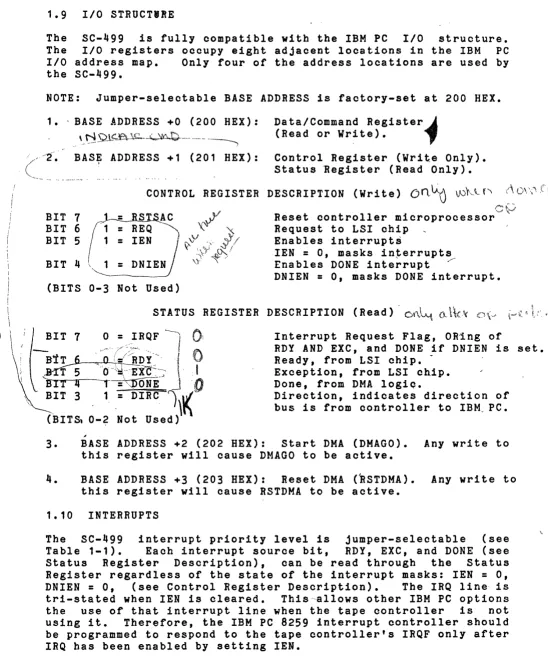
1.9 I/O STRUCTIRE
The SC-499 is fully oompatible with the IBM PC I/O structure.
The I/O registers ocouPY eight adjaoent locations in the IBM PC I/O address map. Only four of the address locations are used by the SC-499.
NOTE: Jumper-seleotable BASE ADDRESS is factory-set at 200 HEX.
1. ,BASE .'DDRESS +0 (200 HEX):
\ N _ .... -,,-.-.~-Ql<"f~\C--~W~.-... --_ ....
Data/Command Register~
(Read or Write). ..,
~~ BAS, ADDRESS +1 (201 HEX): Control Register (Write Only).
Status ~egister (Read Only).
CONTROL REGISTER DESCRIPTION (Wri te)
on
~ VJf<t, {''I (\ 0\\"'1BIT 7
BIT 6
BIT 5
BIT 4
(BITS 0-3 Not Used)
f"'"
Reset controller microprocessor~
Request to LSI chip Enables interrupts
lEN
=
0, masks interrupts , /Enables DONE interrupt
DNIEN
=
0, masks DONE interrupt.STATUS REGISTER DESCRIPTION (Read) -C)\"'}~ a"
,
Interrupt Request Flag. OR~ng of
RDY AND EXC, and DONE if DNIEN is set. Ready, from LSI ohip.
-Exception, from LSI chip. Done, from DMA 10giQ.
Direction, indicates direction of bus is from controller to IBM. PC.
3. BASE ADDRESS +2 (202 HEX): Start DMA (DMAGO). Any write to
this register will cause DMAGO to be active.
4. BASE ADDRESS +3 (203 HEX): Reset DMA (BSTDMA). Any write to
this register will cause RSTDMA to be active.
1.10 INTERRUPTS
The SC-499 interrupt priority level is jumper-selectable (see
Table 1-1). Each interrupt source bit, RDY, EXC, and DONE (see
Status Register Description), can be read through the Status
Register regardless of the state of the interrupt masks: lEN
=
0,DNIEN
=
0, (see Control Register Description). The IRQ line, istri-stated when lEN is cleared. This-~llows other IBM PC options
[image:15.613.35.583.64.721.2]1.11 DMA
The tape oontroller uses the IBM PC 8237 DMA oontroller
transfer data to and from the IBM PC main memory. The
ohannel is also jumper-seleotable (see Table 1-1).
The tape-oontroller DMA logic can be initialized by writing
address location BASE+3 (RSTDMA). RSTDMA initializes the
sequencer, clears all Control Register bits to 0, and sets
to 1 (power-on reset from the IBM PC performs the
funotions). The following sequence may be used to start
transfer: '
1 •
2.
3.
r
Issue a transfer command to the tape controller.
Set up the 8237 DMA controller's register (but ~
leave the mast bit set). "~
Write (any value) to the tape oontroller register at BASE ADDRESS+2 (DMAGO).
to DMA to DMA DONE same DMA \
(j.
~\
A~4.
b\O
.'Q5V
\.V
5.I
Clear the mask bit in the 8237 DMA oontroller.
11
,~~,
Repeat above from step 2 for each subsequent block.
ry("
l\ /'
"",; \ r:J:7
1 • 12 RESETSFour reset Signals (two DMA resets, and two mioroprocessor/tape
drive resets) are available on the SC-499.
1. DMA Resets:
• RSTDMA. (RSTDMA is discussed in the DMA paragraph above).
• RESET DRV. This is the power-on reset from the IBM PC power supply, and performs the same funotions as RSTDMA~
2. Microprocessor and Tape Drive Resets:
• Mioroprocessor RESET. Reset the controller microprocessor
when any of the following conditions oocur:
a. The +5V supply drops below 4.6v. b. The +12V supply drops below 9V. c. RSTSAC is set.
NOTE
Mioroprocessor RESET will also cause a tape drive reset •
• RSTSAC. Activated by writing a 1 to Control Register B~
7. RSTSAC must be set held for more 25 usee then
lf
l.'/
,I. '
I
1.13 PROGRAMM'ING SECTION • (Technically
The SC-499 controller is designed to accept
The S~-J99 shall utilize the QIC-02 standard
the QIC-02 command set.
command set as follows:
~-'XV \"'"
~-
SELECT, SOFT LOCK OFFr/)().
~'\.
~ ~ SELECT, SOFT LOCK ON~ ,0 .t~~ BOT
~e. '_fi}~ vERASE
~ .>,.~ /RETENSION
b'-
~ SELECT Q11 FORMAT-- SELECT Q24 FORMAT "WRITE
·WRITE FILE MARK (WFM) READ
READ FILE MARK (RFM) READ STATUS
H'2.7"
H'40~
H'60'
H'SO' H'AO'
H t CO' :r, f'J. ,-::;r'OJ
ill) D v,,_V
The SC-499 shall discriminate between DC300XL and
by measurement of BOT to LOAD POINT distance
appropriate basic drive write current.
1.13.1 STANDARD COMMAND DESCRIPTIONS
4t'P<01)
SELECT, SOFT LOCK OFF (0000 0001)coco
O't.·
DC600A cartridges
and shall select
The SELECT command selects the tape drive. The drive shall
remain selected until changed by another SELECT command or RESET.
u{t
2} SELECT, SOFT LOCK ON (0001 0001)~
\6o,(:::y\ro
()::t9.
(],/('r\{:)This command is identical in function to the SELECT, SOFT LOCK
OFF command and additionally provides a SOFT LOCK on the cartridge.
Execution of the SELECT command or RESET unlocks the cartridge.
S~
3) BOT COMMAND (0010 0001)The BOT command positions the tape in the cartridge in the
selected device to BOT (beginning of tape).
S--r.P
4) RETENSION COMMAND (0010 0100) \-==vy\tt-~
l ZA1'lCJY\, GVY'\ \JThe RETENSION command shall be used in accordance with cartridge
tape manufacturer's instructions. The RETENSION command moves the
tape in the device to BOT, then to EOT and then back to BOT.
~rf
5) ERASE COMMAND (0010 0010)The ERASE command completely erases the tape in the selected
drive. The ERASE command moves the tape in the device to BOT,
activates the erase head and moves to EOT, deactivates the erase head
.Users should familiarize themselves with the QIC-02 REVD intelligent
and moves the tape back to BOT. The ERASE command also fulfills the requirements of initialization.
6) WRITE COMMAND (0100 0000)
When the WRITE command is issued the device requests and
transfers data. The READY line is activated when the device is ready for a data block transfer. When the READY line is active, the host
terminates transfer of write data by issuing a WRITE-FILE-MARK
command. NOTE: A write command following cartride insertion or
RESET shall commence recording at BOT end of tape, otherwise,
recording shall commence at the curre~t tape position. NOTE: If the
host starts transfer between blocks before READY is asserted, READY
may not be asserted when the early warning hole of the last traok is detected by the devioe, thus the device ceases to transfer additional
data blocks from the host. The device terminates the WRITE command
and reports END OF MEDIA by means of an EXCEPTION and.READ STATUS.
7) READ COMMAND (1000 0000)
When the READ command is issued the device transfers data. The
READY line is activated when the devlce is ready for a data block
transfer. The READ command shall be terminated by the device if a
file mark is detected. The host is informed by means of an EXCEPTION
and a READ STATUS sequence. When READY is true, the host may
alternatively terminate the READ command by issuing a READ-FILE-MARK
command. If a READ command is issued, the command is accepted and
the drive continues reading. NOTE: A READ command following
cartridge insertion or RESET shall commence at BOT, otherwise the
read command commences from the current tape position. NOTE; If the
host starts transfer between blocks before READY is asserted, READY
MAY NOT BE ASSERTED.
8) WRITE-FILE-MARK COMMAND (0110 0000)
The WRITE-FILE-MARK (WFM) command causes a file mark to be
written on the tape in the selected drive. NOTE: a WFM command
following cartridge insertion or RESET shall commence recording at
BOT end of tape, otherwise, recording shall commence at the current
tape position.
~~ 9) READ-FILE-MARK COMMAND (1010 0000)
The READ-FILE-MARK (RFM) command causes the tape in the selected
drive to be moved to the next FILE MARK. NOTE: A RFM command
following cartridge insertion or RESET shall commence reading at the
BOT, otherwise, reading shall commence at the current tape position.
~10)
READ STATUS COMMAND (1100 0000)The READ status command provides the host with information about
the selected device. The host issues the READ STATUS oommand. The
J
11) SELECT Q11 FORMAT COMMAND (0010 0110)
The SELECT Q11 format command selects the Q 11 format as the rrent format.
12) SELECT Q24 FORMAT COMMAND (0010 0111)
The SELECT Q24 format command selects the Q24 format as the current format.
1.13.2 INTERFACE TIMING
Timing specif - defined at the driven end. Requirements involving deskew hall be the responsibility of the receiving end. Interface s timing shall be outlined in the following diagrams.
FIGURE
DATA TRANSFER
Write O p e r a t i o n . . . 1-5 Read O p e r a t i o n . . . 1-6
COMMAND TRANSFER
Ready A s s e r t e d . . . 1-7 Exception A s s e r t e d . . . 1-8 Direction Deasserted... 1-9
REOUEST
I
---
..
I
~
,.
I
READY
/
I
I
EXCEPTION
...
DATA
BUS
lTd<
1ST DATA OCTO~
TRANSrER
"
ACKNO£.JL(OGE
I
,~
A;-/
I
DIRECT
JON...
I
-RESET
...
,1ptly1ty
T1-Device Asserta READY
(Device READY
tor
Firat Data Slock) T2-Controller Asserta TRANSFER !3-Data Sus 'alidT4-Device Deasserts READY !S-Device Asaerts ACKNOWLEDGE T6-Controller Deaaaerta TRANSFER !7-Bus Data Iavalid
fa-Device Deaaserta ACKNOWLEDGE T9-Controller Aaserta TRANSFER TlO-Data Sus 'alid
T1'-Device Asserts ACKNOWLEDGE T12-Controller DeesBerta TRANSFER !13-Bus Data Invalid
T1_-Device Deaaserts ACKNOWLEDGE T1S-Device Asserts READI
(Device READY For .ext Data Slock)
I
I
I
I
I
I'IS~
I
I
/n':J
""ST '~}77nf¥LA.
DATA OCTnNLLL4
'""
'.2/
I
I
I
I
I
tim
lns
o
us.<
,T1----)12T2---->13 < _0 as.
o
us. (T2----)T_<
1 us. 0.5 us. < T2---->T5 <100 us.o
us.<
1'5--->'1'6o
us ~<
1'5---->1'7o
us. < T6---->T8<
3 us.o
us.<
T8--->191'9----)T10
<
_0
DS.0.5 us.
<
1'9---->T11 (100 us.o
us. < T11---)T12o
us:<
T11---)T13D
us.<
1'12---)T1_<
3 us.TOO us.
<
T1---->115'Hote: It the Controller asserts TRANSFER before the device
.Bse~t8
READY, then the behavioror
READY is device dependent. READY ahall Dot be asserted tor an EXCEPTIONREOUEST
READY
I
~---~I I~---~I
.-~.-~
--
~
I---~~I
.
~,. .
'I~[XCEPTJON
DATA BUS
TRANSfER
I
I I
I
- - - , . Y . w 4 '
b7J
IIST DII'"~
b7n:J
IST OCTETJCL~,
OCTETW'$!'%
~,
I.. 114I
I
,IS
R
I
'I~
/~lS
ACKNO'-JLEOGE
OlRECTJON
~
I
RESET.
.
----.-fl-Device Chanses DIRECTION f2-Device Asserta READY
f3-Device Asserts AC[NOWLEDGE
T~-Bus Data Valid
fS-Controller Asserts TRANSFER T6-Device Deasserts READY
fT-Device Deasserta ACKNOWLEDGE fS-Bus Data Invalid
T9-Controller Deaaserta TRANSFER flO-Device Asserta ACENOWLEDGE T1'-Bus Data Invalid
f12-Controller Asserta TRANSFER !13-Device Deaaaerts AC[NOWLEDGE
T1~-Bus Data Invalid
!15-Controller Deaaaerts TRANSFER T16-Dev1ce Asserta READY
T17-Device Assert a ACKNOWLEDGE !lS-Bua Data 'alid
I f
I f
!'13 f,7
I
I
f3---->T~ <'0
us.
o
us.
<
!t----)T~o
us.<
T~--->rso
us.<
TS----)T6
< ,
us.0.5
us.<
TS---->!7<
3
us.o
us.
<
TS----)TS
o
us.<
T7----)Tg
fl0---)Tl1
<
'0
DS.o
us.<
T1,---)T12
0.5
us.<
T12---)T13<
3
us.o
uS.,<Tt2---)Tt'
o
us.
<
T13---)T1S
T17---)T18
<
'0
DB. -Note: It the Controller asserta TRANSFER betore the device asaerts READY, then the behavioror
READY is device dependent. READY aball Dot be assertedtor
an EXCEPTION conditioD."!pre 1-6 Data fraut.,.,
.
REOUEST
I
~J'v
READY
I
4.
~
I
EXCEPTJON
..
_
..
DRTA BUS
f$<
~I
TRANsr£R
..
_
..
ACKNOI.JL£DG£
I
. f .
DJRECT
JON.I •• _ ••
RESET
I
.----Agt1y1ty
t1-Bus Data 'altd
!3-Controller 'aaerts REQUEST t~-Dev1ce Deasaert. IEADY !5-Device 'aaerts READY
!6-Controller Dealsert. REQUEST !7-Sus Data Invaltd
!8-Device Deaaaerta IEADY
I
, r
I
n I
~$~
DCVlceI
STMTSCICCUTION
I
I
I
tWins
o
ua. <Ti----)T3
o
ua.<
t3-)Tj&< ,
ua.'.---)T5
<500
~.~ us.
<
!5--)!6o
ua.<
1'6--)T720 ua.
<
1'6-)T8 (100 us.PJ.&ure 1-'
C: M rrauter,R&D! Aaaerted
D
~~ ... t _ _ _ _nor
hJ~+---I\d'} (
-
~t·--.uP_ 506~;"~~~,..-,' ~ .I
REOUEST
I
~~READY
I
"t4
rXCEPTJON
I
"/
DATA BUS
~X
•
I
TRANSF"(R
,
ACKNOWLEDGE
.-
...
-I
DIRECTJON
..
~-.I
•
RESET
...
',-Bus Data Valid
T2-Controller Asserts REQUEST '3-Devlce Deaaaerts EICEPTIOH '.-Device Asserte READY
'5-Controller Deaaeerta REQUEST T6-Bus Data Invalid
'7-Devlce Deasserts READY
~
tv
I
"/
I
I
" I
X000//7/7/ff//~
o
us.<
"--)1'2o
us.<
'2--->13
~10 \'\s.
<
1'3--)1"
o
us.<
1'''---)1'5<o
us.<
1'5--->16
20
us.<
1'5---)17 (
100 us.I
I
I
I
P1pre1-8 'C: nd rruate .. ,
REOUEST
READY
I
".,
~____________
-Jn~I
EXCEPTION
DATA
BUS
TRANSrER
,
I
fl / f J
DIRECTION,
.... _ _ _
--'/14i
RESET
• ___ _
Apt1y1ty
T1-READY Asserted
T2-Controller 'sserta REQUEST
!3-Device Deaaaerted READY !4-Device Deasaerta DIRECTION T5-Bus Data 'alid
!6-Dev1ce , Asserts READY
!7-Controller Deaaserts REQUEST !8-Bus Data Invalid
'9-Device Deaaserts ACKNOWLEDGE !10-Device Deaaaerts READY
f"~
__
--,/'I'
I
I
I
I
I
tim
ins '-o
us.<
T1---)'1'2o
us •.
T2--)'1'3- 0
us.
<
T3---)'1'_<
150us.
'_---)T5<
1us.
'.---)T6
<
500
ua.o
us.
<
'6--)'1'1o
us.
<
TT--)T8o
us.
<
T9---)T10
20
us.
<
TT--)T10<
100us.
PJ.sure 1-9 Cc ncS 1'rauter,
REQUEST
,
~4,y-/ICIO
KN'IHJHG~
J 112'T"TUS
READY
"Byte.EXCEPTION
I
I
I
I
~n
~
TI I'''TUS TI2 IDATA BUS
><
ST"TUS~~t
il~><ByteXWY~
TRANsrER
I
ACKNOl.JL(OGE
I
DIRECTION
.
~I
.
I
RESET
---Agt1y1tx
'1'1-Device Changes Bus DIRECTION '1'2-Bus Data Valid
T3-Dev1ce Aaserta READY
'1'.-Controller Aaserts REQUEST !S-Device Deaaserts
READY
!6-Bua Data Invalid!7-Controller Deaaserta
IEQOEST
!8-Bua Data 'al1dtg-Device Aaaerta READY
'1'10-Controller Aaaerta REQUEST '1'1'-Device Deaaaerts
READY
'1'12-Bus Data Invalid
'1'13-Controller »eaaaerts REQUEST
I
I
I
I
I
I
I.
I
I
I
I
I
"imiag
o
us.<
'1'1----)T2o
ua.<
,2----)13o
ua.<
'1'3---->'1'_o
ua.<
'1'.-)T5<,
us.o
ua.<
T5----)'1'6 20 us.<
,.----)'1"1
o
ua.<
!1----)T8
20 us. ( T7---)T9o
us.<
'9----)T10o
ua. ('1'10----)T11< ,
us.o
us. (110----)T1220 us. <T10----)T13
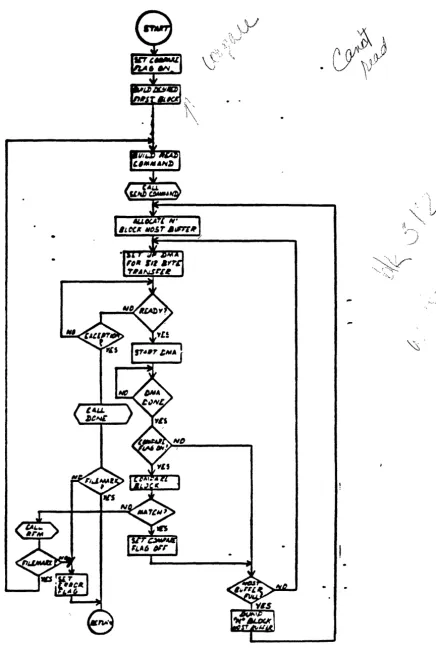
1.13.3 PROGRAMMING FLOW CHART
The following diagrams depict the flow of the command structures.
These flow charts are helpful for any software engineer who is
designing a software driver. The flow charts shall be specified in
the following diagrams.
DESCRIPTION FIGURE
READ NTH FILE FLOW DIAGRAM ••••••••••••••••••••••••••••••••• 1-11
READ FILE WITH SPECIFIC 1st BLOCK ID FLOW DIAGRAM ••••••••••
V" APPEND FILE FLOW DIAGRAM •••••••••••••••••••••••••••••••••••
/
READ FILE FLOW DIAGRAM •••••••••••••••••••••••••••••••••••••
/wRITE FILE FLOW DIAGRAM ••••••••••••••••••••••••.••••••••••••
t/
READ FILE MARK FLOW DIAGRAM ••••••••••••••••••••••••••••••••~WRITE
FILE MARK FLOW DIAGRAM •••••••••••••••••••••••••••••••1-12
1-13
1-14
1-15
1-16
1-17
~ERASE
COMMAND FLOW DIAGRAM ••••••••••••••••••••••••••••••••• 1-18~ITIALIZE CARTRIDGE COMMAND FLOW DIAGRAM ••••••••••••••••••
~BOT
COMMAND FLOW DIAGRAM •••••••••••••••••••••••••••••••••••~
SELECT, SOFT LOCK COMMAND FLOW DIAGRAM •••••••••••••••••••••~
SELECT FORMAT COMMAND FLOW DIAGRAM •••••••••••••••••••••••••/ RESET FLOW DIAGRAM •••••••••••••••••••••••••••••••••••••••••
DONE
/ ' READ
SEND
FLOW DIAGRAM ••••••••••••••••••••••••••••••••••••••••••
STATUS FLOW DIAGRAM •••••••••••••••••••••••••••••••••••
COMMAND FLOW DIAGRAM ••••••••••••••••••••••••••••••••••
1-19
1-20
1-21
1-22
1-23
1-24
1-25
READ NTH FILE FLOW DIAGRAM
NO
Figure 1-11
::
SET ERROR
[image:27.618.146.517.74.740.2]READ FILE WITH SPECIFIC 1ST BLOCI ID FLOW DIAGRAM
[image:28.618.127.563.112.761.2]APPEND FILE FLOW DIAGRAM
[image:29.612.95.536.70.739.2]WRITE FILE FLOW DIAGRAM
•
[image:31.618.63.577.99.731.2]READ FILE MARK FLOW DIAGRAH
[image:32.617.203.350.206.706.2]WRITE rILE MARX FLOW nIAGRAM
[image:33.629.214.352.149.700.2]ERASE COMMAND FLOW DIAGRAM
[image:34.617.228.370.211.637.2]INITIALI2E CARTRIDGE COMMAND FLOW DIAGRAM
BUILD
RETENSION
COMMAND
[image:35.620.183.374.212.664.2]BOT C()M)'.ANI) FLOW DIAGRAM
[image:36.612.202.358.186.572.2]SELECT, SOFT LOCI COMMAND FLOW DIAGRAM
BUILD SELE
SOFT LOCK COMMAND
[image:37.615.203.359.272.629.2]SELECT FORMAT COMMAND FLOW DIAGRAM
BUILD SELECT FOP.MAT
COMMAND
[image:38.613.213.367.231.597.2]RESET FLOW DIAGRAM
[image:39.627.183.377.123.733.2]DONE FLOW DIAGRAM
(
[image:40.623.48.478.81.745.2]aEAD STATOS PLOW »IAGRAK
BEAD
STATUS
CDt9.ND
Figure 1-25
MAD
I>ATA BUS
ASSER'!'
[image:41.612.66.507.139.719.2]SEND COMMAND FLOW DIAGRAM
Figure 1-26
-.
{- 0)D6 -
~a.}L
otllcNf' .
.ex(--~
~lAbt
tl/IU-DtAT
~e\\l
J1ef):J
f, •
\ /
[image:42.623.90.579.82.737.2]