FutureGrid Image Repository: A Generic Catalog
and Storage System for
Heterogeneous Virtual Machine Images
Javier Diaz, Gregor von Laszewski, Fugang Wang, Andrew J. Younge and Geoffrey Fox
Pervasive Technology Institute, Indiana University
2729 E 10th St., Bloomington, IN 47408, U.S.A.
Email: [email protected], [email protected]
Abstract—FutureGrid (FG) is an experimental, high-performance testbed that supports HPC, cloud and grid com-puting experiments for both application and computer scientist. FutureGrid includes the use of virtualization technology to allow the support of a wide range of operating systems in order to include a testbed for various cloud computing infrastructure as a service frameworks. Therefore, efficient management of a variety of virtual machine images becomes a key issue. Current cloud frameworks do not provide a way to manage images for different IaaS frameworks. They typically provide their own image repositories, but in general they do not allow us to store the needed metadata to handle other IaaS images. We present a generic catalog and image repository to store images of any type. Our image repository has a convenient interface that distinguishes image types. Therefore, it is not only useful for FutureGrid, but also for any application that needs to manage images.
I. INTRODUCTION
FutureGrid (FG) [1] provides a testbed that makes it pos-sible for researchers to tackle complex research challenges in Computer Science related to the use and security of grids and clouds. These include topics ranging from authentication, authorization, scheduling, virtualization, middleware design, interface design and cybersecurity, to the optimization of grid-enabled and cloud-enabled computational schemes for researchers in Astronomy, Chemistry, Biology, Engineering, Atmospheric Science and Epidemiology. FG provides a new experimental computing grid and cloud test-bed to the re-search community, together with user support for third-party researchers conducting experiments on FutureGrid.
Recently, cloud computing has become quite popular and a multitude of middleware has been developed. However, it is not at all clear at this time which of the cloud toolkits users should choose. One of the goals of the project is to understand the behavior and utility of cloud computing approaches. In this sense, FutureGrid provides the ability to compare these frameworks with each other while considering real scientific applications. Hence, researchers will be able to measure the overhead of cloud technology by requesting linked experiments on both virtual and bare-metal systems. Due to the rapid development of new tools, services, and frameworks within the grid and cloud communities, it is important to facilitate a multitude of such environments. This includes access to Infrastructure as a Service (IaaS) frameworks such as
Nimbus [2], Eucalyptus [3], OpenNebula [4], OpenStack [5]; Platform as a Service (PaaS) frameworks such as Hadoop [6] and Dryad [7]; and additional services and tools like Unicore [8] and Genesis II [9], that are provided and supported by the FutureGrid team members. Thus, users will have the ability to investigate a number of different frameworks as part of their activities on FutureGrid.
Since we are not only interested in offering pre-installed frameworks exposed through endpoints, we must provide additional functionality to instantiate and deploy them on-demand. Therefore, we need to offer dynamic provisioning within FutureGrid not only within an IaaS framework, such as Nimbus [2], Eucalyptus [3] or OpenStack [5], but allow the provisioning of such frameworks themselves. However, we use the term “raining” instead of just dynamic provisioning to indicate that we strive to dynamically provision even the IaaS framework or the PaaS framework. Thus, this provisioning subsystem is called RAIN [10].
fitting their needs, and find their location in the repository using the catalog interface. In addition, users can also register customized images, share them among other users, and choose any of them for the provisioning subsystem [10]. Through this mechanism we expect our image repository to grow through community contributed images.
One of the most important features in our design is that we are not simply storing an image but rather focus on the way an image is created through templating. Thus it is possible at any time to regenerate an image based on the template that is used to install the software stack onto a bare operating system. In this way, the development of a customized image repository not only provides functional advantages, but it also provides structural advantages aimed to increase efficient use of the storage resources. Furthermore, we can maintain specific data that assist in measuring usage and performance. This usage data can be used to purge rarely used images, while they still can be recreated with the use of templating. This will obviously lead to a significant amount of space saving. Moreover, the use of image templating will allow us to automatically generate images for diverse environments including a variety of hypervisors and hardware platforms. In this process, we will include mechanisms to verify that these requirements are reasonable like for example if the required IaaS is compatible with the requested hypervisor. In general, we can employ simple rules such as (a) if we find the image, we just provide it to the user (b)If not, we generate a new image to provide that to the user and store it in the image repository (c) if an image is rarely used it may get purged and we only keep the image generation template. Obviously, plugins for the various repositories can be provided in addition to delivering an AWS style interface.
The rest of the paper is organized as follows. In Section II, we present an overview of image repositories provided by different cloud frameworks and storage systems. In Section III we describe briefly the FutureGrid software architecture. In Section IV, we present the FG Image Repository by focusing on its requirements, the design and implementation details. Section V describes the tests performed to compare the different storage systems supported by the image repository and Section VI collects the results of these tests. Finally, we present the conclusions in Section VII and future directions in Section VIII.
II. BACKGROUND
As previously commented, the images are a key component in cloud technologies. Therefore, any cloud framework provid-ing IaaS or PaaS has to manage them. Due to the particularities of each framework, each one has developed its own image repository adapted and optimized to its particular software. In general, IaaS frameworks provide the possibility to interact with the image repository, while PaaS frameworks hide all these details to the users. Next, we present an overview of the image repositories implemented by the most important frameworks to manage their images.
Nimbus [2], [11] is a set of open source tools that together provide an Infrastructure as a Service (IaaS) cloud computing
solution. Since version 2.5, Nimbus introduced a storage cloud implementation called Cumulus [12] as part of its image repository solution. Cumulus is compatible with the Amazon Web Service S3 REST API [13] and can be used standalone as cloud storage. Currently, it is implemented using the POSIX file system as storage back-end, but the plan to provide access to distributed file systems.
Eucalyptus [3], [14] is open source software to deploy IaaS private and hybrid clouds. Eucalyptus provides a distributed storage system called Walrus which implements Amazon’s S3-compatible SOAP and REST interface. It is designed to be modular such that the authentication, streaming and back-end storage subsystems can be customized. Walrus is used as storage for user data and images.
OpenNebula [4], [15], [16] is an open source toolkit which allows to transform existing infrastructure into an IaaS cloud with cloud-like interfaces. OpenNebula implements an image repository with catalog and functionality for image manage-ment. The image repository relies in the POSIX file system to store the images, and includes compatibility with Network File System (NFS) and Logical Volume Manager(LVM).
Amazon Web Services (AWS) [17] is a commercial platform to provide infrastructure web services in the cloud. Amazon provides a large set of resources, among them it maintains an abundant number of images covering popular OSs and architectures. Also, any 3rd party can provide images which are managed and could be used in similar say. In addition, users could generate and store their own customized images which then could be used by themselves or shared with others. Amazon maintains the image repository using its storage systems called S3 (Simple Storage Service) and EBS (Elastic Block Storage).
OpenStack [5] is a collection of open source technologies to deliver public and private clouds. These technologies are OpenStack Compute (called Nova), OpenStack Object Storage (called Swift), and the recently presented OpenStack Imaging Service (called Glance). The last one, Glance, is a lookup and retrieval system for virtual machine images. It supports different back-end configurations: using OpenStack Object Store, using Amazon S3 or using Amazon S3 with OpenStack Object Store as intermediate.
Windows Azure platform [18], [19] is a group of cloud technologies (SQL Azure and Windows Azure including App-Fabric and Marketplace), each providing a specific set of services to application developers. Our interest is in Windows Azure [20], which provides developers with cloud capabilities through Microsoft datacenters. Since Windows Azure is a platform as a service (PaaS), it keeps the image repository hidden behind the scene and invisible to end users. However, they introduced the possibility to manage an image repository through Windows Azure applications and the virtual machine (VM) role, recently. The main difference between both repos-itories is that in the first one, Microsoft will patch and update the operating system for you, but with the VM role it is up to you.
en-vironments. Abiquo maintains a public repository where users can download images. However, it also provides appliance repositories that can be defined by users. This repository is a simple NFS shared folder that is mounted by the Abiquo platform and all the nodes that compose the cloud infrastruc-ture.
xCAT (Extreme Cloud Administration Toolkit) [22] is a scalable distributed-computing management and provisioning tool that provides a unified interface for hardware control, discovery, and OS disk-full/diskless deployment. xCAT man-ages imman-ages/packman-ages in a central repository at the Man-agement Node (and also at the Service Nodes when using hierarchical configuration). The images can be generated, configured, stored, and accessed from compute nodes via various command line tools provided. Although this is not a cloud technology, it is of our interest due to its ability managing images.
On the other hand, a very important detail to consider in the development of an image repository is the storage system because it is essential to provide scalable and fault tolerant applications. Some of the previous frameworks pro-vide interesting storage systems like Cumulus [2], Walrus [3] or Swift [5]. However, there are other tools that can also be used to store information in distributed systems. In this sense, we have Google File System (GFS) [23] that was the first storage system to operate at cloud-scale. GFS is a proprietary storage system designed and used by Google. This is an scalable distributed file system for large distributed data-intensive applications. It provides fault tolerance and delivers high aggregate performance to a large number of clients. GFS started a new technology trend that was quite well accepted by the community. In fact, Hadoop Distributed File system (HDFS) [6], [24], an open source distributed file system inspired in GFS, has became very popular. HDFS is highly fault-tolerant and is designed to be deployed on commodity hardware. It provides high throughput access to application data and is suitable for applications that have large data sets. We can also consider, as storage systems, various NoSQL databases [25]. These databases that may not require fixed table schemas, typically scale horizontally and are designed to manage huge amounts of data. Moreover, some of them also allow to store BLOBS (Binay Large Objects). The first NoSQL database was developed by Google and called BigTable [26]. BigTable is a proprietary, scalable database system for man-aging structured data that is designed to scale to a very large size. In [25] we can find a list of the most important NoSQL databases ordered by type. Among them, we would like to highlight MongoDB [27], CouchDB [28] and Riak [29] as they support large files and are open source tools. MongoDB is a document-oriented database that manages collections of JSON-like documents [30]. MongoDB includes an special component, called GridFS, designed to store files of any size in BSON format [31]. CouchDB is another document-oriented database that store the information in JSON and the large files are managed as attachments encoded in base64. On the other hand, Riak is a Dynamo-inspired key/value store [32]. It can manage large files using Luwak, an application built on top of Riak, which is bundle with Riak but disabled by default.
Finally, we would like to mention more traditional ap-proaches used to provide networked and distributed file sys-tems. Here, early examples are NFS [33] and AFS [34] with centralized client-server design. More recent approaches focused on HPC are LUSTRE [35] and PVFS (Parallel Virtual File System) [36], [37]. Both are parallel distributed file system, generally used for large scale cluster computing.
III. FUTUREGRIDSOFTWAREARCHITECTUREOVERVIEW
As mentioned earlier, FutureGrid (FG) provides an experi-mental grid, cloud, and HPC testbed [1]. However, there are important details that make FutureGrid different from tradi-tional compute centers such as TeraGrid [38] or well known IaaS offerings platforms, such as Amazon Web Services.
A big distinction between TeraGrid and FG is that FG pro-vides a greater breadth of services. Traditional supercomputing centers, like those that are part of TeraGrid, are focused on large-scale high performance computing applications while providing a well-defined software stack. The access to this systems is based on job management and traditional parallel and distributed computing concepts. Furthermore, virtual ma-chine staging on TeraGrid has not yet deemed to be a major part of its mission. Thus, FG is more flexible in providing user defined software on-demand.
In contrast to Amazon, FG provides alternatives to the IaaS framework. The biggest benefit of FG stems from two unique features:
• Resource awareness. Within FG we intend to allow the
mapping of specific resources as part of the service instantiation. Thus, we can measure more realistically performance impacts of the middleware and the services developed by FG testbed user.
• Dynamic provisioning of distributed raw appliances.
Au-thorized users will have a much greater level of access to resources by allowing the creation and dynamic pro-visioning of images that can not only be placed in a VM but also be run on the bare metal. We name such bare metal images distributed raw appliances.
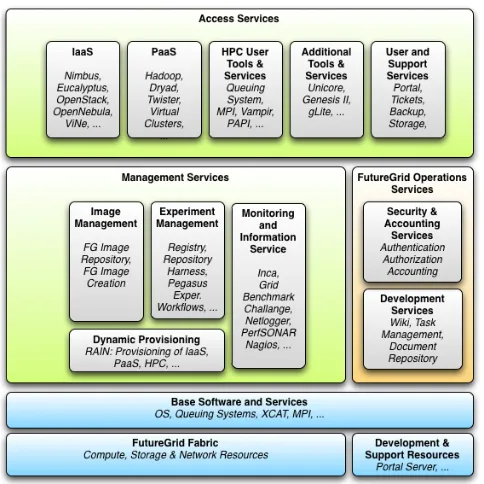
To support the FG infrastructure, the software architecture has been designed to allow expandability by integrating new resources and services. A simplified architecture view is depicted in Figure 1. It is based on conceptual layers enabling us to gradually introduce new features to the users over time and to assure that development can be conducted by teams in parallel. Next, we will give an overview of each of the components that constitute this architecture.
Fig. 1. FutureGrid Software Architecture.
OS. This category of services will enable us to build exper-iment management systems utilizing dynamic provisioning. In the next layer we find the Management Services. These services are centered around FG experiments and the overall system integration, including information services and raining [10]. This layer also contains the FG Image Management
Components, which manages and provides images to both
users and other FG services. At the same level we have the
Operations Services, which are useful to communicate and
conduct development efforts in FG. Above this we provide a variety ofAccess Services including IaaS, PaaS, and classical libraries that provide a service as an infrastructure to the users such as accessing MPI and others. Moreover, as part of the additional services box, we have the User Contributed Services which are not included in the Figure 1 as it can take place on any of the different services within the access level. The only difference to these services may be the level of support offered in contrast to other FG services.
IV. FUTUREGRIDIMAGEREPOSITORY
The image repository is one of two important services within our image management. The other component is our image generation tool [10] which deals with the generation of template images that can be rained onto FG. We have applied the typical development life cycle to the FG image repository. Thus, in the following subsections we will talk about the different phases namely requirements, design and implementation.
A. Requirements
To specify our requirements for the image repository we have considered mostly the following four user groups:
• A single user. Users create images that are part of
experiments they conduct on FG [10]. An image repo-sitory helps to manage their images, to share them or to create new images from existing ones adding additional packages configurations through scripts as part of the experiment environment.
• A group of users.An additional typical use case includes a group of scientific collaborators that work together in the same project and images are shared within the group instead of each collaborator creating an identical image.
• System administrators.They maintain the image
reposi-tory ensuring backups and preserving space. They also may use it for the distribution of the HPC image that is accessible by default.
• FG services and subsystems [10].Different FG services
and subsystems like our rain framework will make use of the image repository to integrate access and deployment of the images as part of the rain workflow.
Based on our consideration for the target audience we have identified a number of essential requirements that we need to consider in our design:
• Diverse access. The image repository must be
accessi-ble through a variety of access mechanisms such as a command line, a portal, an API, and a REST service. • Simple.The image repository must be simple and intuitive
to use by users that are not experts in virtualization technologies and distributed systems.
• Unifying and integrated. We must provide a unifying
interface to manage various types of image for different systems. These systems may have their own repositories and we must be able to integrate with them in some fashion.
• Extensible. The image repository subsystem must be
extensible. One aspect is to be able to include different back-end storage systems. Another aspect is to provide an API to offer the image repository to those cloud frame-works which allow the use of external image repositories.
• Informative.We must provide easy and meaningful access
of information managed through the repository. Users should be able to query and report the status and attributes of the stored images.
• Accountable. We need to keep track of the usage of the
images in order to optimize the space needed by removing unused images.
• Secure.The image repository security must be integrated in the FG security architecture. Moreover, in case a security issue is detected in an image, all cloned images from this image can be easily identified. Information associated with the repository and its images are protected through authorized access.
• Fault tolerant. To avoid that the repository is a single point of failure and presents a performance bottleneck, the storage mechanism should be distributed.
B. Design
interface. In Figure 2, we present its architecture as part of a layered architectural view.
Clients
Image Repository Service Interface
Image Repository Core
Image Repository Storage Access
F G Se c u ri ty Se rv ic e s In te rfa c e to o th e r F G Se rv ic e s Ima g e G e n e ra ti o n , R AI N , Pe rf o rma n ce , .. .
Rest API Python API PHP API
Accounting Image & MetadataManagement CLI
Swift
(OpenStack) Cumulus(Nimbus) MongoDB Filesystem
Portal Shell
[image:5.612.55.292.93.270.2]Triggers
Fig. 2. FutureGrid Image Repository Layers.
To address extensibility in a flexible and modular way, we have integrated a framework independent Storage and Access layer. This layer defines an interface to create transparent plugins in support of different storage systems. Hence, a bridge between the storage systems and the image repository core functionality is provided. The Image repository Core contains the solutions to accounting including usage and quota management, image management, metadata management. The image management is focused on managing the image files and the associated information (metadata) in order to provide a consistent, meaningful and up to date image catalog. The separation of this information is done on purpose in order to support a variety of different storage systems that may be chosen by the site administrator due to functionality or integration requirements. Important to note is that the core also registers the image usage and access. This allows the repository to record information such as how many times an image was accessed and by whom. Internally this data may be used by atrigger servicethat cleanses the repository from faulty or less frequently used images. It also allows us to generate images from templates in case an image is requested with certain functionality that does not yet exist. Thus instead of having a passive image repository we move towards an active image repository that can be augmented with a number of triggers that get invoked dependent on the data that is collected within the repository. Thus not only can we trigger events such as enforcing quota, but automatically updating, or even distributing images based on advanced reservation events forwarded to us by the rain service. To access this functionality, we provide a variety of service interfaces such as an API, a command line interface, and REST services. These interfaces are part of the Image Repository Service Interface layer. Through these interfaces we can easily create higher-level image repository clients. In particular, we are immediately interested in provide access through the FG portal and the FG command line tool. Through the FG command line tool we can also integrate the repository commands as
workflow scripts. The integration with a Web portal will be facilitated through REST services. An API library is available in python, and we intend to provide an API for PHP via the rest services. We are also designing plugins to allow other FG services to use the image repository and expose its use through such integration efforts to authorized users as part of raining images, IaaS, and PaaS onto the FG resources. The image repository can be monitored as part of the monitoring and information services [10]. Other cloud frameworks could integrate with this image repository by accessing it through a standard API such as S3 or the development of a back-end interface that directly accesses the images within our repository without knowledge to the user of these frameworks. Finally, the security aspect is an essential component to be considered in the design. Thus, the image repository will provide the security functionality needed to integrate the authentication and authorization with the FG ones (based on LDAP). Using this approach we reach two important objectives. On the one hand, we increase the security, because the FG security is being developed by a group of experts in the field. On the other hand, we contribute to maintain a single sign on system for FG, avoiding the duplication of services and user databases.
C. Implementation
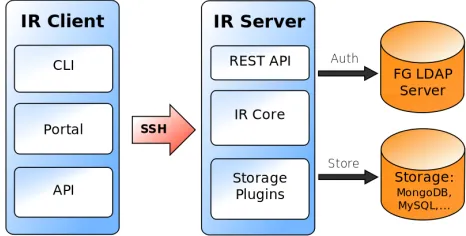
We are gradually implementing the features that are outlined in our design. The implementation is based on a client-server architecture like the one shown in Figure 3. This implementa-tion targets a variety of different user communities including end users, developers, administrators via web interfaces, APIs, and command line tools. In addition, the functionality of the repository is going to be exposed through a REST interface, which will enable the integration with Web-based services such as the FutureGrid portal. Hence, users will be able to initiate the creation and storage of images through the FutureGrid portal.
Fig. 3. Image Repository Client-Server Architecture.
[image:5.612.318.551.514.632.2]TABLE I
IMAGEREPOSITORYCOMMANDLINEINTERFACE. ARGUMENTS BETWEEN BRACKETS ARE OPTIONALS.
Option Shortcut Arguments Description
--help -h Get help information
--auth -l Authentication/Login
--search -s [queryString] Get list of images that meet the criteria --access -a <imgId><permissionString> Set image access permission
--get -g <img OR uri><imgId> Get the image file or only the URI --put -p <imgFile><metaString> Upload/register an image
--modify -m <imgId> <metaString> Update image information
--remove -r <imgId> Remove an image from the repository --info --img -ii [imgId] Get usage info of the images
--info --user -iu [userId] Get usage info of the users --user --add -ua <userId> Add user
--user --del -ud <userId> Remove user
--user --list -ul List of users
--user --quota -uq <userId> <quota> Update disk quota of a user --user --role -ur <userId> <role> Update user role
--user --status -us <userId> <status> Update user status
We have already created a Command Line Interface (CLI) to manage the image repository called “fg-repo”. Table I summarizes the main options to the command. Next, we illustrate the image repository functionality by showcasing the commands that are listed in Table I.
a) User Management and Authentication: First, users
will have to authenticate to the image repository to access it (see option--auth). The access is based on roles and project/-group memberships. As FG provides much of this information as part of an integrated portal and LDAP server, we can utilize it to provide authorization to access the repository while querying the FG account management services for the needed meta data on project memberships and roles.
As part of the user management, we maintain information related with users such as the quota determining the amount of disk space available for a particular user, the user status (pending, activated, deactivated) and the user role (admin or user). Thus, we have detailed user-based and role-based access control.
Users can be administered with the --user option which his only accessible to repository administrators allowing them to add, remove and list users. It also includes the ability to update the user quota, the users role, and the user status.
b) Image Management: To manage the images we
main-tain a rich set of information associated with each image (metadata). This includes the operating system, architecture, or image type. The current set of metadata information is shown in Table II including default values where applicable. It also shows which fields can be modified by users.
We provide the ability to upload an image using the --put option while its arguments define the location of the image and its associated metadata. Defaults are provided in case the values are not defined. The metadata includes also information about access permissions by users. We can define if an image isprivate to the user uploading the image, or shared with the
public. Additionally, we are going to implement the ability to share an image with a selected number of users or a group/projectas defined through the FutureGrid portal.
Modifications to the metadata can be accomplished by authorized users with the--modifyand specifying new values. Some metadata however cannot be changed by the user, such as the last time an image was accessed, modified, and used.
To retrieve the image from the repository we are using the option --get. We can get images by name or by Uniform Resource Identifier (URI). Nevertheless, as some of our back-ends may not support URI’s, such as MongoDB [27], the URI based access is not supported uniformly.
To remove an image we can use the --removeoption. Users can also query the image repository using the
--search option. It uses SQL style queries to retrieve a list
of images matching the query. Currently, we provide a very simple interface that allows us to conduct searches on the to the user exposed metadata with regular expressions. For example, to retrieve a list of images that match the OS to be Redhat and it is tagged with hadoop, we can use the query string * where os=redhat, tag=hadoop. Additionally, we can restrict the attributes of the returned metadata by using queries such as field1,field2 where field3=value, which returns only field1 and field2 of all images where field3 equals to thevalue. To return all information, users can simply pass a*, which is also the default in case no search string is provided. The use of this query language allows us to abstract the back-end system delivering a uniform search query across the different systems. One additional very important property is the ability to sup-port an accounting services while monitoring image repository usage. Usage data is accessed through the --info option and is available for users and images (e.g. --info --img and
--info --user options). Important information that is returned
TABLE II
INFORMATION ASSOCIATED TO THE IMAGES(METADATA).
Field Name Type Predefined Values Description Access
imgId String Unique identifier Read-Only
owner String Image’s owner Read-Only
os String Operating system Read-Write
description String Description of the image Read-Write
tag String list Image’s keywords Read-Write
vmType String none, xen, kvm, virtualbox, Virtual machine type Read-Write vmware
imgType String machine, kernel, eucalyptus, Aim of the image Read-Write nimbus, opennebula, openstack
permission String public, private Access permission to the image Read-Write imgStatus String available, locked Status of the image Read-Write
imgURI String Image location Read-Only
createdDate date Upload date Read-Only
lastAccess date Last time the image was accessed Read-Only
accessCount long # times the image has been accessed Read-Only
ttl date Date when the image will be completely Read-Write
deleted
ttg date Date when the image will be replaced
by its generation description
size long Size of the image Read-Only
number of images registered by each user, disk space used by each user. Additionally we are going to implement automatic triggers that react upon certain conditions associated with the metadata. This includes the time to live (ttl) and the time to (re-)generate (ttg). The ttl specifies a time that allows users to automatically remove the image from the repository entirely. The ttg specifies when the image should be removed, but the metadata and the way the image is generated is preserved in the repository so that it can be recreated upon request. This feature will be helpful to manage many images by lots of users.
c) Command Shell: Finally, we have also developed a
command shell for FutureGrid to unify the various commands and to provide a structured mechanism to group FG related commands into a single shell. Shells are very important as part of the scientific program development and have been popular with tools such as R, matlab, and mathematica. Hence, in addition to just exposing a single command line tool. We also provide a shell through fg-shell. The shell provides the advantage of defining more easily a set of commands in a script that need to be invoked to manage images and other FG related activities. It also provides the ability to log experiments conducted within the shell for replication. Thus, users will obtain a convenient mechanism to manage their own experiments and share them with other users through the FutureGrid shell. As scripts, pipes and command line arguments can be used to pass commands into the shell, it provides a very convenient way to organize simple workflows as part of experiments within FutureGrid.
To reduce the amount of typing we have included the
concept of a command context. With the use command we
can load a particular command context allowing subsequent command lines to be executed within the command that has been loaded. Additionally, it allows us to support just in time loading of features in the shell and making it an extensible framework. To illustrate this concept let us inspect a typical session in the shell as depicted in Figure 4. Here, a user uploads a new image and then queries the repository. All options provided as part of the “fg-repo” command, listed in Table I, are also available in the shell in a much more convenient form.
fg> use repo
fg-repo> auth gregor
Passphrase: ************** logged in as administrator. ok
fg-repo> put /home/gregor/myimage.img \
imgtype=opennebula & vmtype=kvm & \
description=one image
Checking quota
Registering the Image
The image has been uploaded and registered with id 4dc07d9ea79ea25aef000000
fg-repo> search * where vmType=kvm
1 image found
imgId=4dc07d9ea79ea25aef000000, os=, arch=, owner=gregor, description=one image, tag=, vmType=kvm, imgType=opennebula, permission=private, status=available
V. METHODOLOGY
Since the image repository supports different storage tems, we need to know the expected performance of each sys-tem while working with the image repository. Therefore, we have conducted several performance tests to evaluate all these storage back-ends for the image repository. The back-ends include MongoDB, Swift, Cumulus, MySQL and an ext4 file system. To distinguish the setup in our Results’ Section, each configuration is labeled as image storage+metadata storage. With this convention we have seven configurations: Cumu-lus+MongoDB (Cumu+Mo), Cumulus+MySQL (Cumu+My), Filesystem+MySQL (Fs+My), MongoDB with Replication (Mo+Mo), MongoDB with No Replication (MoNR+MoNR), Swift+MongoDB (Swi+Mo) and Swift+MySQL (Swi+My).
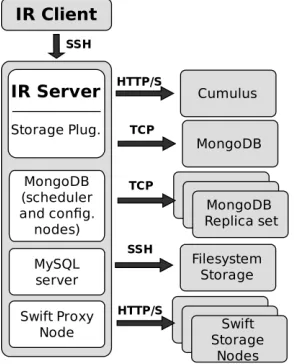
Figure 5 shows how we have deployed the image repository (IR) and the storage systems for our experiments. Within the experiments we have used 16 machines that are equipped with the image repository client tools. The image repository has been configured on a separate machine containing services such as the IR server, the Swift proxy, MySQL server and the MongoDB scheduler and configuration services (only used by MongoDB with replication). We have also used three additional machines to store the images and to create a replication mechanism. However, only Swift and MongoDB made use of the three machines, because they are the only ones that support replica service. In the case of Cumulus and the normal file system, we have only used one machine to store the images. Moreover, to allow comparison, we have also deployed MongoDB using a single machine without the replication service and therefore without the scheduler and configuration services. This deployment is labeled with MoNR+MoNR. However, in the case of Swift we could not avoid the use of replication since it needs a minimum of three replicas.
Fig. 5. Test deployment Infrastructure. Each gray box is a different machine.
We have considered five different image sizes: 50MB, 300MB, 500MB, 1GB and 2GB in order to covers realistic image sizes in use by FutureGrid users. We have compared both read and write performance for each storage system by uploading and retrieving images using a single client. In
addition, we have tested a distributed scenario that involves 16 clients retrieving images concurrently. We have measured the average time that the clients need to retrieve or upload their images while running the test five times.
Tests have been carried out on FutureGrid while using the FG Sierra supercomputer at UCSD (University of California, San Diego). This cluster is composed by 84 machines with quad-core Intel Xeon processors and 32GB of memory. The cluster is connected using Infiniband DDR and 1 Gb Ethernet networks. The operating system is RHEL 6 and the file system format is ext4. The software used is Cumulus from Nimbus 2.7, Swift 1.4.0 (OpenStack Object Storage), MongoDB 1.8.1, and MySQL 5.1.47. Since the image repository is written in python, we use the corresponding python APIs to access to the storage systems. Thus, we use Boto 2.0b4 to access Cumulus [39], Rackspace cloudfiles 1.7.9.2 for Swift [40], Pymongo 1.10.1 for MongoDB [41], and pymysql 0.4 to access MySQL [42].
VI. RESULTS
First, we uploaded images to the repository to study the write performance of each storage system. The results are shown in Figure 6. We observe that the Cumulus configura-tions offer the best performance, which is up to 4.5% and 54% better than MongoDB with no replication (MoNR+MoNR) and Swift, respectively. Unfortunately, Cumulus does not provide any data-scalability and fault tolerance mechanism, which was in our experiments not a notable drawback. On the other hand, if we use MongoDB with replication (Mo+Mo), its performance degrades significantly resulting in a 70% worse performance for the 2GB case. This is due to two main factors, (a) the needed to send the same file to several machines and (b) the large amount of memory that this software requires. In fact, doing the same tests in machines with only 8GB of memory, the performance started to decrease even in the 300MB case. The reason of this performance degradation is that the memory usage is that MongoDB uses memory-mapped files to access data and is naturally memory bound. Once we hit the memory limitation, performance drastically declines. Finally, we had many problems with Swift due to errors when trying to upload larger files. In fact, starting with the 600Mb case, the failure rate was more than 50% and for the 2GB case we were not able to upload a single image using the Python API. For this reason, we performed the last two tests by calling directly the command line tool included in Swift calledst. It demonstrated that the documentation of the API is not yet sufficient and that the utilization of the provided command line tools is at this time a preferred choice for us.
Next, we study the performance of the different storage systems retrieving images. Since this is the most frequent use case for our image repository, we have performed two set of tests involving one or multiple clients.
[image:8.612.100.247.476.658.2]Fig. 6. Upload Images to the Repository. Asterisks mean that those tests were done using the command line tool instead of the Python API.
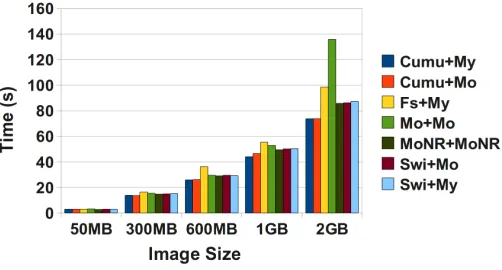
[image:9.612.267.552.54.183.2]around a 30% due to the higher complexity of the deployed infrastructure. Finally, we can see that Swift performs quite well considering that it has to manage a more complex infrastructure involving replication and it is only 15% worse than Cumulus.
Fig. 7. Retrieve Images from the Repository.
The last set of tests shows the average time that each of the 16 clients spent to retrieve an image from the repository, see Figure 8. In this case, the Fs+My configuration has the best performance which is up to 53% better than any of the others. This is because Fs+My, unlike the other implementations, does not suffer form any performance degradation due to the overhead introduced by the software itself. We observe that the performance of Cumulus degrades when requesting the largest files. Hence, Swift provides a better performance in this case. However, Swift experienced significant reliability problems resulting in 31% and 43% of the clients not to receive their images. With respect to MongoDB, both configuration (MoNR+MoNR and Mo+Mo) had problems to manage the workload and in the 2GB case any client got the requested image due to connection errors. Therefore, only Cumulus and the Filesystem+MySQL configurations were able to handle the workload properly.
A. Discussion about the implemented Storage Back-ends
We implemented four different storage systems based on MySQL, MongoDB, Cumulus and Swift, respectively and
Fig. 8. Retrieve Images from the Repository using 16 client concurrently.
discuss the advantages and disadvantages of each approach next.
d) Filesystem+MySQL approach.: MySQL is mature
database and provides good security, scalability and reliability. The problem of relational databases is that they offer a rigid data model and we cannot provide solutions where each register has a different number of parameters. Moreover, since this approach uses the file system to store the images, it requires additional effort to explicitly provide mechanisms that ensure replication and fault tolerance. However, using the file system as storage back-end, we can potentially obtain good scalability and performance as we could use one of the HPC storage solution mentioned in Section II.
e) MongoDB approach.: MongoDB has implemented a
sharing feature that distributes the database among different machines while maintain replicas in other machines. Through this mechanism, it provides good horizontal storage scalability and fault tolerance, although, in our tests, it degraded the performance due to resource starvation when reaching mem-ory limitations. In addition, since MongoDB is a document-oriented database, it allows us to store documents containing different number of fields. Thus, we could offer users the possibility to enhance the metadata by including their own fields. Another advantage of MongoDB is that we can use a single framework to store both metadata and image files. Nevertheless, MongoDB has some drawbacks. It stores binary files in BSON format and therefore the serialization procedure could be one of the responsible of the low performance offered in some cases. Finally, as we commented in Section VI, MongoDB uses large amounts of memory which strongly determines its performance when replication is used.
f) Swift approach.: Swift is a new framework as part of
the OpenStack project designed to be highly scalable and fault tolerant. Its design is is specifically aimed to object storage in the cloud. However, we observed that the Python API needs to be improved to get a better reliability and is better documented. Additionally, we need to use an external database to store the metadata associated to the images, because Swift does not allow to store it.
g) Cumulus approach.: The Nimbus Cumulus cloud
[image:9.612.50.301.313.448.2]mechanisms to address good scalability and fault tolerance. For this reason, the Nimbus team is working to provide compatibility with other storage systems that will bring these features to Cumulus. Moreover, plans of developing a cloud database to allow data storage are underway. If these features are made available to us the need to use an external databases to store the metadata associated to the images would be eliminated.
VII. CONCLUSIONS
In this paper we have introduced the FutureGrid Image Repository. We focused on the requirements and design to establish the important features that we have to support. We present a functional prototype that implements most of the designed features. We consider that a key aspect of this image repository is the ability to provide a unique and common interface to manage any kind of image. Its design is flexible enough to be easily integrated not only with FutureGrid but also with other frameworks. The Image Repository features are enclosed and offered through a command line interface to provide an easy access to them. Additionally, we provide an API to develop applications on top of the image repository.
We have studied the performance of the different storage back-ends to support storage needs by the image repository and to determine which one is the best for our users in FutureGrid. Although none of them was a perfect match because of performance problems and high memory use in the case of MongoDB, too many errors in Swift or missing fault tolerance/scalability like in Cumulus. Despite of the previous problems, we think that the candidates to be our default storage system are Cumulus because is still quite fast and reliable and Swift because has a good architecture to provide fault tolerance and scalability. Furthermore, we have an intense relationship with the Cumulus group as they are funded in part by FutureGrid and we can work with them to improve their software. We will have to monitor the development of swift closely due to the rapid evolution of OpenStack as part of a very large open source community. Our work also shows that we have the ability to select different systems based on future developments if needed.
VIII. ONGOINGWORK
We are presently developing a REST API to the image repository and are integrating the automatic image generation. We would also like to provide compatibility with the Open Virtualization Format (OVF) to describe the images using this format.
ACKNOWLEDGMENT
This material is based upon work supported in part by the National Science Foundation under Grant No. 0910812 as part of FutureGrid.
REFERENCES
[1] “FutureGrid Portal,” Webpage. [Online]. Available: http://portal. futuregrid.org
[2] “Nimbus Project,” Webpage. [Online]. Available: http://www. nimbusproject.org
[3] “Open Source Eucalyptus,” Webpage. [Online]. Available: http: //open.eucalyptus.com/
[4] “OpenNebula,” Webpage. [Online]. Available: http://www.opennebula. org/
[5] “OpenStack,” Webpage. [Online]. Available: http://openstack.org/ [6] “Apache Hadoop!” Webpage. [Online]. Available: http://hadoop.apache.
org/
[7] “Microsoft Dryad,” Webpage. [Online]. Available: http://research. microsoft.com/en-us/projects/dryad/
[8] “UNICORE,” Webpage. [Online]. Available: http://www.unicore.eu/ [9] “Genesis II Project,” Webpage. [Online]. Available: http://www.cs.
virginia.edu/∼vcgr/wiki//index.php/The Genesis II Project
[10] G. von Laszewski, G. C. Fox, F. Wang, A. J. Younge, A. Kulshrestha, G. G. Pike, W. Smith, J. Voeckler, R. J. Figueiredo, J. Fortes, K. Keahey, and E. Delman, “Design of the futuregrid experiment management framework,” inGCE2010 at SC10, IEEE. New Orleans: IEEE, 2010. [11] K. Keahey, I. Foster, T. Freeman, and X. Zhang, “Virtual workspaces: Achieving quality of service and quality of life in the grid,”Scientific Programming Journal, vol. 13, no. 4, pp. 265–276, 2005.
[12] J. Bresnahan, K. Keahey, T. Freeman, and D. LaBissoniere, “Cumulus: Open source storage cloud for science,”SC10 Poster, 2010.
[13] “Amazon Web Services S3 REST API,” Webpage. [Online]. Available: http://awsdocs.s3.amazonaws.com/S3/latest/s3-api.pdf
[14] D. Nurmi, R. Wolski, C. Grzegorczyk, G. Obertelli, S. Soman, L. Yous-eff, and D. Zagorodnov, “The eucalyptus open-source cloud-computing system,”9th IEEE/ACM Int. Symp. on Cluster, Cloud and Grid Com-puting, pp. 124 – 131, 2009.
[15] B. Sotomayor, R. S. Montero, I. M. Llorente, and I. Foster, “Virtual infrastructure management in private and hybrid clouds,”IEEE Internet Computing, vol. 13, no. 5, pp. 14–22, 2009.
[16] I. M. Llorente, R. Moreno-Vozmediano, and R. S. Montero, “Cloud computing for on-demand grid resource provisioning,” Advances in Parallel Computing, vol. 18, no. 5, pp. 177–191, 2009.
[17] “Amazon Web Services,” Webpage. [Online]. Available: http://aws. amazon.com/
[18] “Microsoft Azure,” Webpage. [Online]. Available: http://www.microsoft. com/windowsazure/
[19] D. Chappell, “Introducing the windows azure platform,”David Chappell & Associates White Paper, 2010.
[20] ——, “Introducing windows azure,”David Chappell & Associates White Paper, 2010.
[21] “Abiquo Project,” Webpage. [Online]. Available: http://www.abiquo. com/
[22] “xCAT Extreme Cloud Administration Toolkit,” Webpage. [Online]. Available: http://xcat.sourceforge.net/
[23] S. Ghemawat, H. Gobioff, and S.-T. Leung, “The google file system,”
19th ACM Symp. on Operating Systems Principles (SOSP03), 2003. [24] “Hadoop Distributed File System,” Webpage. [Online]. Available:
http://hadoop.apache.org/hdfs/
[25] “NoSQL Databases,” Webpage. [Online]. Available: http: //nosql-database.org/
[26] F. Chang, J. Dean, S. Ghemawat, W. C. Hsieh, D. A. Wallach, M. Bur-rows, T. Chandra, A. Fikes, and R. E. Gruber, “Bigtable: A distributed storage system for structured data,” 7th Symp. on Operating System Design and Implementation (OSDI’06), 2006.
[27] “MongoDB,” Webpage. [Online]. Available: http://www.mongodb.org/ [28] “Apache CouchDB Project,” Webpage. [Online]. Available: http:
//couchdb.apache.org/index.html
[29] “Basho Riak,” Webpage. [Online]. Available: http://www.basho.com/ Riak.html
[30] “Introducing JSON,” Web Page, 2009. [Online]. Available: http: //www.json.org/
[31] “BSON - Binary JSON,” Webpage. [Online]. Available: http: //bsonspec.org/
[32] G. DeCandia, D. Hastorun, M. Jampani, G. Kakulapati, A. Lakshman, A. Pilchin, S. Sivasubramanian, P. Vosshall, and W. Vogels, “Dynamo: Amazon’s highly available key-value store,” Proc. of the 21st ACM Symp. on Operating Systems Principles, 2007.
[33] R. Sandberg, D. Goldberg, S. Kleiman, D. Walsh, and B. Lyon, “Design and implementation or the sun network filesystem,”Proc. of the Summer 1985 USENIX Conference, pp. 119–130, 1985.
[35] “LUSTRE ,” Webpage. [Online]. Available: http://www.lustre.org/ [36] W. Ligon and R. Ross, “Implementation and performance of a parallel
file system for high performance distributed applications,”Proc. of the 5th IEEE Int. Symp. on High Performance Distributed Computing, 1996. [37] “PVFS,” Webpage. [Online]. Available: http://www.pvfs.org/
[38] “TeraGrid,” 2001. [Online]. Available: http://www.teragrid.org/ [39] “Boto: python interface to Amazon Web Services,” Webpage. [Online].
Available: http://code.google.com/p/boto/
[40] “Rackspace interface for Swift,” Webpage. [Online]. Available: https://github.com/rackspace/python-cloudfiles
[41] “MongoDB python API,” Webpage. [Online]. Available: http://api. mongodb.org/python/