Microtask Work Environments
.
White Rose Research Online URL for this paper:
http://eprints.whiterose.ac.uk/120946/
Version: Accepted Version
Article:
Gadiraju, U., Checco, A., Gupta, N. et al. (1 more author) (2017) Modus Operandi of
Crowd Workers : The Invisible Role of Microtask Work Environments. Proceedings of the
ACM on Interactive, Mobile, Wearable and Ubiquitous Technologies (IMWUT), 1 (3). 49.
https://doi.org/10.1145/3130914
[email protected] Reuse
Unless indicated otherwise, fulltext items are protected by copyright with all rights reserved. The copyright exception in section 29 of the Copyright, Designs and Patents Act 1988 allows the making of a single copy solely for the purpose of non-commercial research or private study within the limits of fair dealing. The publisher or other rights-holder may allow further reproduction and re-use of this version - refer to the White Rose Research Online record for this item. Where records identify the publisher as the copyright holder, users can verify any specific terms of use on the publisher’s website.
Takedown
If you consider content in White Rose Research Online to be in breach of UK law, please notify us by
Modus Operandi of Crowd Workers: The Invisible Role of Microtask Work
Environments
UJWAL GADIRAJU,
Leibniz Universität HannoverALESSANDRO CHECCO,
University of SheffieldNEHA GUPTA,
University of NottinghamGIANLUCA DEMARTINI,
University of SheffieldThe ubiquity of the Internet and the widespread proliferation of electronic devices has resulted in flourishing microtask crowdsourcing marketplaces, such as Amazon MTurk. An aspect that has remained largely invisible in microtask crowdsourcing is that ofwork environments; defined as the hardware and software affordances at the disposal of crowd workers which are used to complete microtasks on crowdsourcing platforms. In this paper, we reveal the significant role of work environments in the shaping of crowd work. First, through a pilot study surveying the good and bad experiences workers had with UI elements in crowd work, we revealed the typical issues workers face. Based on these findings, we then deployed over 100 distinct microtasks on CrowdFlower, addressing workers in India and USA in two identical batches. These tasks emulate the good and bad UI element designs that characterize crowdsourcing microtasks. We recorded hardware specifics such as CPU speed and device type, apart from software specifics including the browsers used to complete tasks, operating systems on the device, and other properties that define the work environments of crowd workers. Our findings indicate that crowd workers are embedded in a variety of work environments which influence the quality of work produced. To confirm and validate our data-driven findings we then carried out semi-structured interviews with a sample of Indian and American crowd workers from this platform. Depending on the design of UI elements in microtasks, we found that some work environments support crowd workers more than others. Based on our overall findings resulting from all the three studies, we introduceModOp, a tool that helps to design crowdsourcing microtasks that are suitable for diverse crowd work environments. We empirically show that the use ofModOp
results in reducing the cognitive load of workers, thereby improving their user experience without effecting the accuracy or task completion time.
CCS Concepts:•Information systems→World Wide Web; Crowdsourcing;
Additional Key Words and Phrases: Crowdsourcing, Microtasks, User Interface, Work Environment, Design, Performance, Crowd Workers, Human Factors
ACM Reference format:
Ujwal Gadiraju, Alessandro Checco, Neha Gupta, and Gianluca Demartini. 2017. Modus Operandi of Crowd Workers: The Invisible Role of Microtask Work Environments. PACM Interact. Mob. Wearable Ubiquitous Technol.1, 1, Article 1 (February 2017), 27 pages.
DOI: 10.1145/nnnnnnn.nnnnnnn
Author’s addresses: U. Gadiraju, L3S Research Center, Leibniz Universität Hannover, Germany; A. Checco and G. Demartini, Information
School, University of Sheffield, United Kingdom; N. Gupta, University of Nottingham, Nottingham, United Kingdom.
©2017 2474-9567/2017/2-ART1 $15.00
1 INTRODUCTION
“Sometimes the Internet fee is greater than the rewards I earn (due) to images, audios or videos in tasks.”
– CrowdFlower Worker from India
We are currently in an age of pervasive computing where various kinds of sensors facilitatesmartenvironments at home or work, improving our lives in numerous ways [76]; ranging from optimizing energy consumption [52] to facilitating structural health monitoring [46]. Recent work has showcased how visual sensors (in the form of CCTV cameras) and social sensors (such as Twitter feeds) can be combined to improve event detection and aid in understanding the evolution of situations [70]. The rapid growth and ubiquity of mobile devices has resulted in making participatory sensing feasible on a large scale [7]. Such opportunities of using people as sources of sensory information allows us to build useful applications that have implications on urban mobility [73], environment [38], personal health monitoring [58], and so forth. An effective way to use people as sources of sensory information is to collect data from them directly [43]. Online marketplaces like Amazon’s Mechanical Turk1 (AMT) or
CrowdFlower2provide a large and diverse workforce of people accessible around the clock and on demand, for
participation in return for monetary rewards.
Microtask crowdsourcing is being used widely these days to solve a multitude of problems that go beyond the capability of machine intelligence. Over time, crowdsourcing platforms like AMT have been used for diverse purposes including content creation and running surveys [12]. The potential to reach thousands of people around the globe at will and on demand [33] has led to innovative and unprecedented solutions to problems in the space of ubiquitous and pervasive computing [32, 51, 61]. On the other hand, the ubiquity of the Internet and rise in prevalence of electronic devices have led to the rise of applications centered on mobile crowdsourcing [15, 18, 24, 54, 74]. Recent work by Laput et al. that introducedZensors, leverages real-time human intelligence from online crowd workers to create robust, adaptive and intelligent sensors for any visually observable property [44]. This is a great example of how human input and intelligence can play a pivotal role in pervasive computing. An important aspect at the core of crowd-powered solutions (especially those based on the microtask crowdsourc-ing paradigm) is controllcrowdsourc-ing the quality of work that is produced by workers. Several research works have focused on improving the quality of crowdsourcing results by using a variety of techniques ranging from worker pre-screening methods and effective crowdsourcing task design [42], to using gamification and incentive mechanisms [19, 59], and answer aggregation methods [67]. Due to the low entry barrier, crowdsourcing has become truly ubiquitous [68]. Prior ethnographic works have also shown that workers who participate in microtask crowdsourcing are embedded in diverse environmental contexts that impact their work routines [26, 48]. A considerable amount of research effort has focused on themotivationsbehind worker participation in crowdsourced microtasks [8, 39]. Yet, little is understood about thetoolsthat support and drive such worker participation. While some previous works have focused on the question ofwhycrowd workers spend time and complete tasks on crowdsourcing platforms, in this work we focus on the question ofhowcrowd workers complete tasks, and investigate the affect of different work environments on worker performance.
In this paper we draw attention to the less addressed realm of themodus operandiof workers in crowdsourcing microtasks. How exactly do workers participate and contribute to crowd work? We are particularly interested in the work environments that influence the observable behavior of crowd workers. We aim to understand how the different
work environments, defined and characterized by the hardware and software that enable worker participation in
crowd work, affect the quality of work that is produced. With the rampant increase in mobile device use around the world3, do crowd workers use mobile devices more commonly than laptops and PCs? Are some devices more
suitable to specific task types than others? How up-to-date are crowd workers with the available software and
1http://www.mturk.com
2http://www.crowdflower.com
hardware? How do UI elements and work environments interact while facilitating crowd work? By ‘suitability’, we refer to the quality of being appropriate in supporting workers complete a given task at hand. For example, a work environment that is characterized by low Internet connection bandwidth may impede workers in completing tasks that contain high resolution images or videos, as opposed to a work environment that is characterized by a high Internet connection bandwidth. Similarly, some devices may be more appropriate in supporting workers complete tasks. For example, desktops or laptops are intuitively more appropriate for tasks that involve searching the web and retrieving information than mobile phones. Even in a novel system such asWearWrite[55], that enables users to write documents from their smartwatches, crowd workers who tested the system found issues with the interface such as its complexity and language. To elucidate, one user said “I don’t know what a bullet point is”, with one of the recommendations being better support in providing a cross-device functionality so workers can work on smartwatches, mobile phones or desktop computers. Understanding how crowd workers operate during their participation in microtasks can help us in the following ways:
• Improve crowdsourcing task design by facilitating better interaction of crowd workers with the tasks. • Develop quality enabling and control mechanisms which leverage known affordances that workers rely on.
To this end, we carried out three studies. In the first study, we gathered responses from 100 distinct workers on CrowdFlower, in a survey regarding common issues with UI elements that workers faced while completing tasks in this microtask marketplace. Based on our findings, we ran a large-scale study to investigate the influence of work environments on worker performance across different task types, and the interplay with UI elements in tasks. We compared the impact of work environments on the quality of work produced by workers from India and USA, leading to several novel observations. In the third study, we carried out semi-structured interviews with Indian and American workers to validate the data-driven observations from the second study and to further understand the role of work environments in shaping the quality of crowd work. Based on the presented research findings, we developed a software tool for requesters to checks microtask for UI design issues and suggests ways to improve them before they are run on a crowdsourcing platform.
2 RELATED LITERATURE
“Ubiquitous computing is a method of enhancing computer use by making many computers available throughout the
physical environment, but making them effectively invisible to the user... They weave themselves into the fabric of
everyday life until they are indistinguishable from it.”
– The most basic fundamentals of ubiquitous computing as described by Mark Weiser (1991, 1993)4
2.1 Crowdsourcing for Ubiquitous and Pervasive Computing
Over the last decade, many parallels have been drawn between crowdworkers and artificial intelligence systems; crowdsourcing even being called artificial artificial intelligence [34], making the worker and their work invisible, an issue that the field of ‘Social Computing’ has been trying to tackle over the years.
Prior work in participatory sensing [14, 63] have identified issues with usability in the design of crowd applica-tions that could lead to significant data quality issues. For instance, Ding et al. have studied the issues with using crowd-based personal spectrum sensors (such as through smartphones and in-vehicle sensors) where the sensing data may have been unreliable or untrustworthy due to unexpected equipment failures or malicious behaviors, amounting to some abnormal data, and, making crowd-sensing schemes ineffective [14]. They discussed reactive measures to robustly cleanse out abnormal data components from the original corrupted sensing data. Hara et al. identified that heterogeneous devices come to be involved in crowdsourcing environments [27]. While finding generic infrastructures can be very difficult, they think having a generic reusable platform to support development
of crowdsourcing applications would help in supporting heterogeneous mobile devices as well as manage large numbers of users. Chatzimilioudis et al. discuss multiple crowdsourcing applications by the use of smartphones [9]. They deliberate on the issues of running crowdsourcing applications with smartphones such as different Internet connection modalities (2G, 3G, 4G) each with different energy and data transfer rates.
In contrast to these previous works, we investigate the affect of (i) UI element design choices, and (ii) role of work environments (characterized by the software and hardware affordances at the disposal of workers) on the quality of work that is produced by workers. We also explore how bothgoodandbaddesigns interact with the work environments. Thus, we shed light on the ‘invisible’ aspects of crowd work environment - a key component for participation in microtasking.
2.2 Task Types in Microtask Crowdsourcing
In our work we focus on the impact of crowd work environments and investigate their effects on different types of tasks. A taxonomy of task types in microtask crowdsourcing platforms has been developed in [21] where a two-level structure with 6 categories at the top level has been proposed. In our work we leverage such top level categorization to compare the effects of work environments on different types of tasks.
In our previous work we ran a large scale supervised classification job to analyze 130 million HITs published on Amazon’s Mechanical Turk (AMT) over 5 years with the goal of understanding patterns in task type changes over time [12]. We observed, for example, that content creation tasks (i.e., where workers are asked to generate some content like an audio transcription or a document summarization task) are the most popular on AMT, and in our experiments, are the ones in which workers performed poorly (See Table 6). Another popular task type on AMT are surveys [12], as a crowdsourcing platform allows easy and immediate access to large populations of participants.
2.3 Worker Differences & Participation Bias
Crowd workers are not all the same. For example, different workers have different skills and interests. In [13] we previously showed that it is possible to profile workers based on their social network activities and assigned tasks based on such profiles which model their interests, to increase the accuracy of crowd work.
Other types of differences in the crowd that participates and completes specific tasks are caused by incentive schemes. For example, different reward levels may attract different types of workers [16] thus creating a participation bias in a study run on platforms like AMT. Jiang et al. analyzed the perceived benefits of participation in crowd work, and found that American and Indian workers differed in their perceptions of non-monetary benefits of participation. Indian workers valued self-improvement benefits, whereas American workers valued emotional benefits [36]. Hsieh and Kocielnik showed how different reward strategies (e.g., lottery-based reward models) result in different types of crowd workers deciding to participate and complete the available tasks. They highlighted the consequent difference in the crowdsourced task results [31]. Along the same line, in [28] authors showed that rewarding workers when they quit their participation in a batch of HITs allows to filter out low-quality workers early, thus retaining only highly accurate workers. Recently, Findlater et al. showed that results of online HCI experiments are similar to those achieved in the lab for desktop interactions, but this was less so in the case of mobile devices [20].
2.4 Crowd Work Context and Barriers
Recently, ethnography-based research has been carried out to understand the contexts in which crowd workers are embedded. Authors of [49] focused on the Indian and US worker communities and highlighted the effects of current crowdsourcing platforms and marketplaces on crowd worker experience. In [48], authors studied how crowd workers on AMT use web forums to create communities where they share experiences and voice crowd work-related problems. McInnis et al. report on the qualitative analysis of 437 comments where AMT workers were asked to comment on parts of the AMT participation agreement through an online discussion website [50]. They indicate ‘unfair rejection’ as a major issue for workers, and identify risk factors that lead to this issue. Workers discuss ‘flaws in task or interface design’ as a key factor, while the authors suggest sounding an alarm through various tools to intimate requesters about a broken task.
Narula et al. noted that microtask marketplaces were often inaccessible to workers in developing countries, and introduced a mobile-based crowdsourcing platform called Mobileworks for OCR tasks, thereby lowering a barrier for participation [54]. Khanna et al. studied usability barriers that were prevalent on AMT, which prevented workers with little digital literacy skills from participating and completing work on AMT [40]. Authors showed that the task instructions, user interface, and the workers’ cultural context corresponded to key usability barriers. To overcome such usability obstacles on AMT and better enable access and participation of low-income workers in India, the authors proposed the use of simplified user interfaces, simplified task instructions, and language localization. Vasantha et al. report an initial study of the demographic of 22 rural homeworkers in Scotland including computer skills, views on rural infrastructure and their skills in solving spatial visualization tests [66]. The authors present results equivalent to survey-based studies conducted in the past, and suggest that the homeworkers can solve knowledge-intensive industrial spatial reasoning problems with minimum training. They asked participants to report on their computer and Internet skills, to which most participants reported ‘good’, while some reported ‘fair’. In their work, the authors also call for more research on rural infrastructure (such as Internet connection and road connectivity) that support crowdsourcing work, as most participants expressed satisfaction with their infrastructure yet a few did not find them adequate for crowdwork. Jones et al. explored what it means to be a mobile phone user situated at the lower end of the socio-economic ladder in developing economies like India, South Africa and Kenya to own and operate digital and mobile devices with almost no access to computers [37]. The authors suggest to engage with such users to help sketch out a technology road-map that will lead to devices and services which will be of value in the near future.
Several prior works have stressed the positive impact of good task design, clear instructions and descriptions on the quality of work produced [41, 47, 62]. However, as pointed out by Kittur et al. task interfaces are often poorly designed or even have bugs that make it impossible to complete tasks [42]. Poor quality work often arises from poorly designed crowdsourcing tasks. Morris et al. discuss the value of subcontracting microtask work and present value propositions for doing so [53]. In that they hypothesize a contracting model specifically based upon the need for task improvement such that workers can fix issues with user interface components and task structure amongst other things, which currently takes place by way of informal back-channels [23, 35].
In contrast to previous works, we aim to investigate the unexplored interaction between task design (through UI elements) and work environments (characterized by the technical hardware and software infrastructures that crowd workers use). We study the impact of these aspects on worker performance and advance the current understanding of the contexts in which crowd work takes place.
3 STUDY I : UI ELEMENTS
platform. Recent work that analyzed 5 years of crowd work on AMT [12], found that there is an organic growth in the number of new requesters (over 1,000 new requesters each month in 2013, 2014). Such new requesters are typically unfamiliar with the process of task design and may put less effort to ensure adequate UI design before deployment. Even experienced requesters do not necessarily consider the work environments in which crowd workers contribute to piecework. Prior studies have highlighted the importance of appropriate task presentation, reflecting on the impact it has on a worker’s perception of task complexity, cognitive load, and eventually on worker performance within the task [2]. Recently, Yang et al. investigated the role oftask complexityin worker performance, with an aim to better the understanding of task-related elements that aid or deter crowd work [75]. In this paper, we study the interplay between task design (in terms of the UI elements) and work environments (i.e., the context and differing conditions that crowd workers are embedded in). To this end, Study-I plays an important role to understand the typical issues that workers confront on a regular basis in crowd work.
3.1 Methodology and Survey Design
We designed a survey5asking workers about the issues that they typically faced with during their contributions in previous crowdsourcing tasks. The survey consisted of a few background questions, followed by questions corresponding to worker experiences while dealing with various UI input elements (input boxes,text areasspanning multiple lines,checkboxes,dropdown menus,radio buttonsandsubmit buttons). Questions also covered other UI aspects such asexternal navigation, use ofcolors, experiences withaudio/videocontent. To avoid misinterpretation, we presented workers with pictorial examples of each UI element. Finally, we provided workers with an opportunity to raise UI issues that were not addressed by the preceding questions in an open text field. We deployed the survey on CrowdFlower6and gathered responses from 100 distinct crowd workers. On average, each worker took just
over 5 minutes to complete our survey and was compensated according to a fixed hourly rate of 7.5 USD on task completion. To detect untrustworthy workers and ensure reliability of the responses received, we followed the recommended guidelines for ensuring high quality results in surveys [22]. To this end, we interspersed two attention check questions within the survey. We also used the filter provided by CrowdFlower to ensure the participation of high quality workers only (i.e.,level 3crowd workers as prescribed on the CrowdFlower platform). We flagged 7 (out of 100) workers who failed to pass at least one of the two attention check questions and do not consider them in our analysis.
3.2 Survey Results
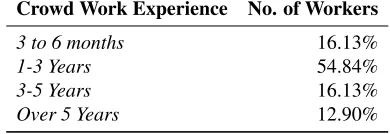
We found that 43% of the workers who participated in the survey identified themselves as females (and 57% were males). Crowdsourcing microtasks served as a primary source of income for 42% of the workers. Table 1 presents the distribution of workers according to their age groups. We note a fairly even distribution of workers with respect to their age. As shown in Table 2, the workers who participated in the survey were also highly experienced in crowdsourcing work.
Based on the responses from workers, we observe that the issues raised can be distinguished between those that are a result of work environment constraints, and those that are a result of task design choices. By manually analyzing and aggregating the open-ended responses from workers and the responses to questions regarding different aspects of UI elements, we make the following key observations.
(1) Input Boxes&Text Areas– We found that 36% of workers raised issues that they faced with input
boxes and text areas. 64% of the workers suggested that they did not experience problems in this regard. A recurring issue cited by workers with respect to input boxes and text areas was that the size of the input box
5https://sites.google.com/site/crowdworkenvironments/
Table 1. Distribution of workers accoding to their age
Age No. of Workers
18 - 25 Years 17.20%
26 - 35 Years 29.03%
36 - 45 Years 29.03%
46 - 55 Years 20.43%
Older than 55 Years 4.30%
Table 2. Experience of workers
Crowd Work Experience No. of Workers
3 to 6 months 16.13%
1-3 Years 54.84%
3-5 Years 16.13%
Over 5 Years 12.90%
and character limit were disproportionate, often leading to only a part of the entered text being visible upon entry (mentioned by 5% of the workers). The following is an excerpt from a worker who raised this issue:
‘Usually, text fields just work well as I can put things that I want in the list. The only big issue is when people want a long text answer like this one expect me to fit it into that small text field. It’s so much harder to type what I want in and to proofread and edit my typed out text in a small text field. I could probably do my typing in an external text editor but why should I go through all that trouble when I can do all my typing in the browser. In general these things just work, though wrong usages like wanting large text in that small field is just terrible design.’
Over a decade ago, researchers suggested that matching the size of input boxes to the expected length is an important guideline to follow when designing forms on the Web [10, 11, 72]. Another issue cited by workers was that ofinput format validationandauto-correction. Workers described occasions where text that was input was not accepted due to flawed format validation (especially, in case of URLs). These issues were cited by 15% of the workers. In other cases, input text was unfavorably auto-corrected, thereby hindering workers (mentioned by 6% of workers). Yet again, we found that a guideline that was suggested years ago with respect to accurate format validation [4] is sometimes violated by requesters during task design. Workers also reported that sometimes default text in the input field gets appended to the text that is entered, instead of disappearing on input. Finally, workers brought to light that input fields are not enabled sometimes, leading to a situation where it is not possible for workers to enter any response (mentioned by 6% of workers).
(2) Checkboxes, Radio Buttons & Dropdown Menus – We found that nearly 70% of the workers on average claimed to never have faced issues with checkboxes, radio buttons and dropdown menus. A recurring issue with checkboxes, radio buttons and dropdown menus was cases with too many options (mentioned by 10% of workers on average). This is a well-studied issue in UX design on the Web [3, 5]. Another common problem was found to be the small size of checkboxes, radio buttons or the dropdown menu icon (mentioned by 6% of workers on average). Several workers referred to issues with selecting checkboxes and radio buttons due to the active region not including the corresponding text, or multiple clicks being required for selection (mentioned by 10% of workers on average). The following is an excerpt from a worker who raised this issue corresponding to checkboxes:
‘It’s easier to mark a checkbox when not only the checkbox itself is [an active region], but a
region around it too, because sometimes it’s difficult to put the cursor in a region a little bit
[image:8.612.310.505.137.204.2]thinking of us this way, but I think it would be a good practice if did always, better for you and us too.’
Finally, some workers (approx. 5% on average) reflected on the difficulty to scroll within dropdown menus due to the small active region that disappears if the cursor moves outside the menu.
(3) Audio&Visual Content– 40% of the workers raised issues that they faced with tasks involving audio
or visual content. Workers primarily raised issues related to the poor resolution and quality of audio and visual content within some tasks (mentioned by 25% of workers on average). The position and size of the visual content, loading and buffering times of the audio/visual content were other commonly cited problematic aspects (mentioned by 15% of workers on average). Some excerpts from the responses of workers that reflect these issues are presented below.
‘Slow loading, waiting very long for the audio/video to load completely.’
‘I’ve faced multiple. Most issues are with the sound quality. Sometimes things are too quiet or have too much static which makes it hard to hear. With these issues I can’t hear what I’m supposed to hear and can’t really work with it. A lack of volume control is also a bit of a problem when sounds are of varying volumes and I want to not blow my ears out... Waiting to hear multiple sound files and do work on them is not so fun at all as it wastes time when I want to swiftly do work at my pace.’
(4) External Links& Navigation– Over 50% of the workers reported issues they typically faced with external links and navigation. A recurring issue with external links was found to be the resolution of links tohttpURLs instead ofhttpsURLs on clicking. This results in warnings on some browsers and workers are often unsure about proceeding thereafter (nearly 25% of workers mentioned issues related to this). Other issues include opening links in the same tab instead of a new window or tab on clicking, broken links, and the loading time of the new page (nearly 20% of workers mentioned at least one such issue). Some excerpts from the responses of workers that reflect these issues are presented below.
‘many dead links, many old test questions linking to sites that have been changes so the test question is no longer valid’
‘Some links don’t work, pages never open, by the way, i lost a level 3 badge with a problem like this.’
(5) Colors Used&Submit Button– We found that 80% of the workers did not typically face issues with
the colors used in tasks. Some workers however, pointed out that poor color contrasts used in interfaces sometimes makes it hard to read the content of given tasks (nearly 15% of workers mentioned related problems). Around 50% of the workers claimed to have faced problems with the submit button. A common issue raised regarding the submit button was the poor positioning of the button (mentioned by 5% of the workers). Workers also complained that in some cases, the submit button was not enabled or had to be clicked multiple times (mentioned by 20% of the workers); another design violation [45]. Other issues pointed out include missing or unresponsive submit buttons and errors on clicking. Some excerpts from the responses of workers that reflect these issues are presented below.
‘For me, some colors applied to data make it difficult to read the data - e.g., light grey.’
‘when you hit the keyboard ’enter’ the task is automatically submit your work, even though you’re not yet done.’
At first glance from a crowd worker’s perspective, some of the issues raised might appear to be trivial to resolve or overcome through trial and error. However, prior ethnographic work has rightly stressed on the importance of considering the environmental context of crowd workers [26, 48]. It is also well understood that a fair portion of workers are not entirely familiar with using computers and other devices which play a crucial role in their participation on crowdsourcing platforms [40]. We thereby believe that these issues play an important role in shaping the quality of crowd work and the fluidity with which it is completed.
Next, we present the results of a study aimed at understanding what are the affects of the UI design issues identified so far in this first study on crowd work effectiveness.
4 STUDY II : WORK ENVIRONMENTS
The aim of this study is to understand how workers deal with UI design choices made by crowdsourcing requesters during the course of their work. We also investigate how the crowd work environments interact with the design choices and influence quality of the work produced. Thus, we address the following research questions.
RQ#1 :How is the performance of crowd workers influenced by design choices made by requesters with respect to UI elements in crowdsourcing microtasks?
RQ#2 :How do microtask crowdsourcing work environments influence the quality of work produced by crowd workers?
4.1 Methodology and Task Design
Based on responses from Study-I, we identified important aspects and design choices related to UI elements that crowd workers often encounter in microtasks. The companion webpage7presents these variations which either aid or hinder workers during the course of task completion. Depending on whether particular variations help workers or obstruct their work, we classify them as eitherGoodorBad, implying a good or bad experience as cited by workers in Study-I. In some cases, for the sake of completeness we additionally consider other extremities not mentioned by workers. For example, workers pointed out that disproportionately small text-areas (ta_smallSize) are troublesome to type into; we also consider the other extremity, that of disproportionately large text-areas (ta_largeSize). In other cases, catering to an extremity was deemed to be unnecessary owing to an unrealistic scenario. For example, UI elements with disproportionately large active regions such that options get selected by clicking anywhere on the window is an unrealistic extremity.
To analyze the influence of different design considerations with respect to UI elements on worker performance, and their interplay with varying worker environments, we manually created a batch of 129 microtasks accounting for each of the 43 variations (each variation×3 tasks), shown in the table on the companion webpage.These tasks
consist of different types;information finding,verification and validation,interpretation and analysis,content
creation,surveysandcontent access[21]. The table in the companion page also presents sample tasks that we
created corresponding to each of the UI element variations; these tasks are noticeably designed to reflect real-world microtasks that have previously been deployed on crowdsourcing platforms.
Since understanding work environments would be a crucial part of this study, we deployed two identical batches of the 129 tasks on CrowdFlower, one addressing workers based in USA and the other addressing workers based in India. We considered USA and India since they represent two of the largest populations of crowd workers [33], and due to the potentially different work environments they entail. In both cases, we used the inbuilt CrowdFlower feature to restrict participation to only the highest quality level of the crowd. We gathered 50 distinct judgments from workers in response to each of the 129 tasks in the batch, resulting in 6,450×2 responses (from USA and
India workers). Workers were randomly assigned to tasks in the batch and the order of tasks was also randomized. Workers were compensated in proportion to the amount of work completed at a fixed hourly piece-rate of 7.5 USD. While workers completed tasks, we recorded work environment related aspects in the background: the screen resolution of devices used by the workers, the CPUspeedof machines used by workers, and theuser-agent stringusing JavaScript embedded in the tasks. Note that CPUspeedis computed by means of a Javascript benchmark using loops, hashing and random number generator functions, obtaining a score where the speed can be directly compared to that of a reference fast machine. To investigate further affordances at the disposal of workers such as input devices (keyboards or touchpads), mouses or mousepads and so forth, we implemented mousetracking using Javascript and the JQuery library, and logged user activity data ranging from mouse movements to keypresses. Our analysis regarding the hardware aspects of work environments are limited to these. We plan to extend the hardware features considered in the future.
4.2 Results and Analysis
Note that we report our results including the test statistic, degrees of freedom and effect sizes (Cohen’sd, Hedge’sg) for statistically significant findings. We acquired responses from 90 Indian and 95 American workers. The overall comparison between the two groups of workers is presented in Table 3. We did not find significant differences between Indian and American workers in terms of their overall accuracy or retention rate (i.e., number of HITs completed by each worker). However, we found that the American workers were significantly faster in completing the tasks, with an average task completion time (TCT) of 0.89 mins compared to the Indian workers (1.39 mins);
t(183)=3.06, p<.05, Cohen’s d=.45.
Table 3. Overall comparison between workers from India and USA. The asterix (‘*’) indicates a statisti-cally significant difference between the two groups.
INDIA USA
No. of Workers 90 95
Avg. Accuracy of Workers (in%) 81.56 78.41
Avg. TCT (in mins) 1.39 0.89* Avg. Retention Rate (in %) 55.56 52.63
Table 4. Overall comparison between workers from In-dia and USA with respect togoodandbadvariations of UI elements. The asterix (‘*’) indicates statistically significant differences between thegoodandbad vari-ations for a group.
INDIA USA
Avg. Accuracy (in%)Good 82.93* 79.51
Avg. Accuracy (in%)Bad 73.82 75.07
Avg. TCT (in mins)Good 1.49 0.76* Avg. TCT (in mins)Bad 1.23 1.01
We also investigated the overall differences in the average accuracy and task completion times of Indian and American workers ongood andbadvariations. Table 4 presents our findings. By using multiple t-tests with Bonferroni correction, we note that there are statistically significant differences between the accuracy of Indian workers on tasks withgoodversusbadvariations;t(178)=2.15, p<.05, Cohen’s d=.36. On the other hand, we found that American workers exhibited a significant difference in the task completion time acrossgoodandbad
variations;t(188)=3.66, p<.001, Cohen’s d=.29, requiring significantly less time to complete tasks withgood
design variations as intuitively expected. We also observe that workers from USA take less time to complete tasks (see Table 3) than workers from India (independently from thegoodorbaddesign). In summary, this suggests that American workers deal better with tasks that are poorly designed.
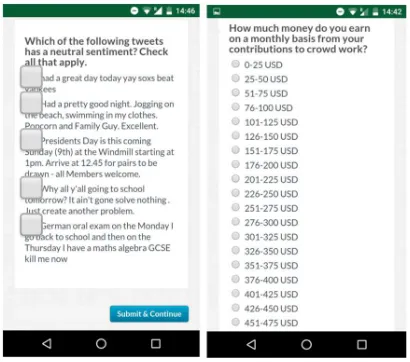
Fig. 1. Left– Aninterpretation and analysistask with large checkboxes (cb_largeSize); Right– Asurveytask with many radio buttons (rb_manyOptions), as rendered on an Android mobile phone and viewed on a Chrome browser.
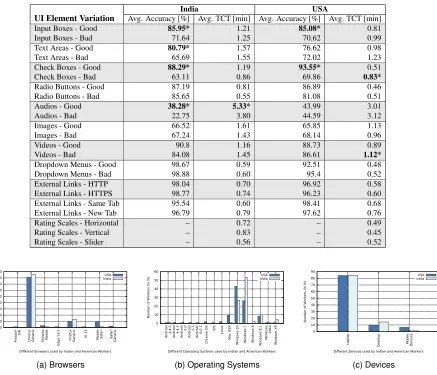
Statistical Significance –We computed the statistical significance of our observations in Table 5, using multiple
t-tests. To control for Type-I error inflation in our multiple comparisons, we use the Holm-Bonferroni correction for family-wise error rate (FWER) [30], at the significance level ofα < .05. Statistically significant differences between tasks withgoodandbadUI element variations are marked with an asterix (*).
• Input Boxes– Both Indian and American workers performed considerably better in tasks havinggood
variations of input boxes, in comparison tobadvariations. Further investigation revealed that dispropor-tionately large input boxes (ib_largeSize) corresponded to the least accuracy: 30.67% in the case of Indian workers and 34.67% in the case of American workers. We did not find significant differences in the average task completion time (TCT) for both Indian and American workers between the two variations. This indicates that workers spent roughly the same amount of time on tasks withbaddesign variations despite the potential hindrance, reflecting their genuine attempt to provide high quality responses.
• Text Areas– In the case of tasks corresponding to text areas, Indian workers depict a better performance
in thegoodvariations when compared to thebadvariations. No significant differences were observed for American workers. We found that both groups of workers performed with the least accuracy in the (ta_smallSize) variation where the visible size of the text area is small, making it inconvenient for workers to see all the text that is entered. Similar to our findings with respect to tasks with variations of input boxes, we did not find significant differences in the average TCT of workers between thegoodand
badvariations.
• Checkboxes– We found that both Indian and American workers performed much better in tasks with
good variations of checkboxes than in bad variations. An example of a bad variation is shown in Figure 1. In contrast to Indian workers where we found no significant difference in their average TCT, the American workers were faster in tasks withgoodvariations. Further investigation revealed that the (cb_manyOptions) variation corresponded to the least accuracy among both Indian and American workers in tasks with checkbox variations.
• Radio Buttons– Tasks with variations of radio buttons correspond to better performance from both Indian
higher (Indian workers: t(125)=6.452, p<.001, American workers: t(163)=4.805, p<.001). This is explained by the simpler nature of radio buttons, where questions are modeled to accept a single response (even in case there are many options; as inrb_manyOptions) (an example is shown in Figure 1).
• Audios –In tasks with audio variations, we note that compared to other tasks, the overall level of accuracy
drops in the case of Indian and American workers, both in thegoodandbadvariations. We attribute this drop in accuracy to the inherently more complex nature of audio transcription tasks [57], where work environment specifics (such as device volume, headsets or other equipment) may play a role. This is exacerbated in the case of audios with poor quality (audio_poorQuality). We found that Indian workers perform considerably better in audio transcription tasks with good quality variations when compared to the poor quality variations. They also take more time on tasks with theaudio_goodQualityvariations. On further scrutiny, we found that in tasks with poor audio quality, several Indian workers gave up after trying to transcribe the audio, condemning the poor quality of the audio in their responses. In contrast, we found that American workers performed similarly in both thegoodandbadvariations, without a significant difference in the average TCTs.
• Images –We found that Indian and American workers performed similarly in the tasks with eithergoodor
badimage variations, without significant differences in TCTs between the two variations. Across both groups of workers we found that theimg_smallSizevariation corresponded to the lowest accuracy of workers in image variation tasks.
• Videos –In case of tasks with videos, we note that both Indian and American workers do not exhibit a
significant difference in their performance between thegoodandbaddesign variations. We found that American workers took less time to complete the tasks withgoodvariations as opposed tobadvariations (i.e., tasks with thevideo_poorQualityvariation).
• Dropdown Menus –In the case of tasks with dropdown menu variations (related to active region and icon
size), we found that both Indian and American workers perform with similar accuracy and take similar amounts of time in both thegoodandbadvariations.
External Links –We found no effect on the accuracy of Indian and American workers or their task completion times based on the type of external links (elink_HTTPorelink_HTTPS), or whether the links opened in the same or new tab (elink_sameTaborelink_newTab).
• Rating Scales –Due to the subjective nature of rating scales, we only consider the TCT of workers as a
measure of performance. We did not find significant differences across different rating scales.
4.3 Role of Work Environments
In the earlier section, we presented our findings with respect to the performance of workers in tasks with different UI element variations and found several differences when comparing American and Indian workers. With an aim to understand whether work environments influence the performance of workers, we investigated the aspects that characterize the work environments of the Indian and American workers in our studies.
Table 5. Performance of Indian and American workers corresponding to each of the UI elements, grouped intogoodand badvariations. Statistically significant differences between tasks withgoodandbadUI element variations are marked with an asterix (*).
India USA
UI Element Variation Avg. Accuracy [%] Avg. TCT [min] Avg. Accuracy [%] Avg. TCT [min]
Input Boxes - Good 85.95* 1.21 85.08* 0.81
Input Boxes - Bad 71.64 1.25 70.62 0.99
Text Areas - Good 80.79* 1.57 76.62 0.98
Text Areas - Bad 65.69 1.55 72.02 1.23
Check Boxes - Good 88.29* 1.19 93.55* 0.51
Check Boxes - Bad 63.11 0.86 69.86 0.83*
Radio Buttons - Good 87.19 0.81 86.89 0.46
Radio Buttons - Bad 85.65 0.55 81.08 0.51
Audios - Good 38.28* 5.33* 43.99 3.01
Audios - Bad 22.75 3.80 44.59 3.12
Images - Good 66.52 1.61 65.85 1.13
Images - Bad 67.24 1.43 68.14 0.96
Videos - Good 90.8 1.16 88.73 0.89
Videos - Bad 84.08 1.45 86.61 1.12*
Dropdown Menus - Good 98.67 0.59 92.51 0.48
Dropdown Menus - Bad 98.88 0.60 95.4 0.52
External Links - HTTP 98.04 0.70 96.92 0.58
External Links - HTTPS 98.77 0.74 96.23 0.60
External Links - Same Tab 95.54 0.60 98.41 0.68
External Links - New Tab 96.79 0.79 97.62 0.76
Rating Scales - Horizontal – 0.72 – 0.49
Rating Scales - Vertical – 0.83 – 0.45
Rating Scales - Slider – 0.56 – 0.52
0 10 20 30 40 50 60 70 80 90 Ama z o n S il k C h ro me G e n e ri c C h ro me M o b il e E d g e 1 3 .0 F ire fo x G e n e ri c IE 1 1 M o b il e S a fa ri S a fa ri G e n e ri c Nu mb e r o f W o rke rs (i n % )
Different Browsers used by Indian and American Workers USA India (a) Browsers 0 10 20 30 40 50 60 An d ro id 4 .4 .2 An d ro id 4 .4 .3 An d ro
id 5.0
An
d
ro
id5.1
An d ro id 6 .0 .1 C h ro me OS iOS Li n u x M a c OS X W in d o w s 1 0 W in d o w s 7 W in d o w s 8 W in d o w s 8 .1 W in d o w s Vi s ta W in d o w s XP Nu mb e r o f W o rke rs (i n % )
Different Operating Systems used by Indian and American Workers USA India
(b) Operating Systems
0 10 20 30 40 50 60 70 80 90 La p to p De s kto p M o b il e De v ic e s Nu mb e r o f W o rke rs (i n % )
Different Devices used by Indian and American Workers USA India
(c) Devices
Fig. 2. Distribution of Indian and American workers in the 129 tasks according to their browser, operating system and devices used.
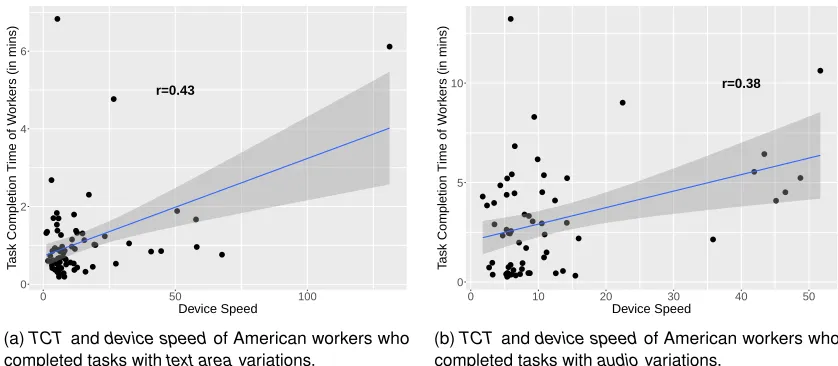
4.3.2 Impact of Device Speed.We investigated the relationship between the speed of devices that Indian and American workers used, and their accuracy and TCTs across different tasks. Figure 3 presents the statistically significant relationships that we found.
r=0.43
0 2 4 6
0 50 100
Device Speed
T
ask Completion Time of W
or
k
ers (in mins)
(a)TCT anddevice speedof American workers who completed tasks withtext areavariations.
r=0.38
0 5 10
0 10 20 30 40 50
Device Speed
T
ask Completion Time of W
or
k
ers (in mins)
[image:15.612.95.514.102.285.2](b)TCTanddevice speedof American workers who completed tasks withaudiovariations.
Fig. 3. Impact of device speed on different types of tasks (only statistically significant linear relationships are presented).
in their task completion times (the coefficient of determination,R2=0.184). Further scrutiny revealed that faster devices led to American workers providing more tags as well as more unique tags in the tagging task (see Table 1 in the companion webpage) corresponding to text areas. We investigate and discuss these findings further in a follow-up qualitative study described in Section 5.
Similarly, in tasks involving audio media, we found a moderate positive correlation between the task completion time of American workers and the speed of the devices used (see Figure 3b);r(62)=.38,p<.001. Accordingly, the speed of the devices used by American workers in tasks with audio variations accounted for nearly 14.5% of the variances in their task completion times (the coefficient of determination,R2=0.144). We did not find significant correlations with respect to the devices used by Indian or American workers across other task variations.
4.3.3 Impact of Devices on Worker Performance. Next, we investigated the impact of devices used on the performance of Indian and American workers (i.e., their accuracy and task completion time) across the different UI element variations.
In the case of Indian workers, we found that workers who used desktop computers needed significantly more time to complete tasks (M=1.55, SD=.99) when compared to those who used laptops (M=1.18, SD=.76) in tasks
withinput boxes;t(78)=1.528,p< .05, Hedge’sg=.46. On investigating why this was the case, we found that the
speeds of the desktop computers used by the Indian workers was significantly lower (M=5.96, SD=19.36) than the laptop computers, probably indicating that desktops are older machines (M=20.05, SD=27.34);t(78)=1.768, p<.05, Hedge’sg=.54. Indian workers who used laptops exhibited a significantly higher accuracy(M=68.45, SD=20.00)
than those workers who used desktops to complete tasks withcheck boxes (M=79.48, SD=16.73);t(78)=2.043,
p < .05, Hedge’sg=.64. We did not observe a significant impact of devices used by Indian workers on their performance in tasks with other UI element variations.
American workers who used laptops completed tasks withtext areasin a significantly faster time(M=1.09,
SD=1.13)than those who used desktops(M=1.92, SD=1.40);t(80)=1.829,p< .05, Hedge’sg=.72. On investigating
workers who used laptops performed more accurately(M=89.95, SD=20.37)than those who used desktops in tasks
withvideos (M=72.86, SD=34.82);t(80)=1.947,p< .05, Hedge’sg=.78.
Our findings regarding the impact of devices on worker performance are further explored and discussed in Section 5, through follow-up individual interviews with Indian and American workers.
4.3.4 Impact of Screen Resolution.We analyzed the screen resolution of devices used by Indian and American workers to investigate the potential influence of screen resolution on worker performance in tasks with different UI element variations.
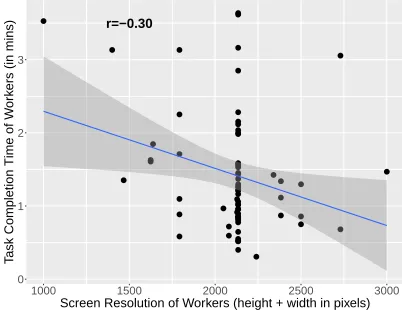
r=−0.30
0 1 2 3
1000 1500 2000 2500 3000
Screen Resolution of Workers (height + width in pixels)
T
ask Completion Time of W
or
k
[image:16.612.204.405.206.361.2]ers (in mins)
Fig. 4. Relationship betweenscreen resolutionandTCTof Indian workers who completed tasks withimagevariations.
We found that most Indian and American workers used devices with a high screen resolution; many reporting a
HDscreen resolution of 720×1280 or higher. 84 out of the 90 Indian workers were found to be using devices with
HD or higher screen resolutions, while 85 of the 95 American workers did the same.
We found a weak negative correlation between the screen resolution and the task completion time of Indian workers in tasks with UI element variations corresponding to images (see Figure 4);r(88)=-.30,p<.001. This indicates that lower screen resolutions can hinder workers in tasks that involve images, resulting in longer task completion times. Accordingly, the screen resolution of Indian workers accounted for 9% of the variance in their task completion times (the coefficient of determination,R2=.09). We did not find significant correlations with screen resolution of devices across other UI element variations.
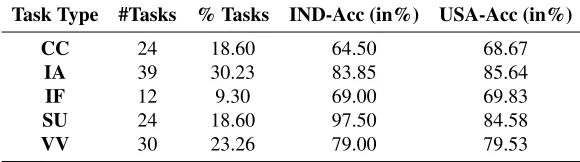
4.3.5 Impact on Different Task Types.Based on the taxonomy of microtasks proposed in [21], we analyzed the impact of work environments on the different task types;information finding(IF),interpretation&analysis(IA),
verification&validation(VV),content creation(CC),surveys(SU) andcontent access(CA). Table 6 presents the
distribution of the 129 tasks according to the taxonomy, and the overall average work accuracy of Indian (IND-Acc) and American (USA-Acc) workers corresponding to each task type. While we found differences in accuracy within each group across the different task types, we did not find statistically significant differences in worker performance between Indian and American workers across the task types.
Table 6. Distribution of the tasks deployed according to their type.
Task Type #Tasks % Tasks IND-Acc (in%) USA-Acc (in%)
CC 24 18.60 64.50 68.67
IA 39 30.23 83.85 85.64
IF 12 9.30 69.00 69.83
SU 24 18.60 97.50 84.58
VV 30 23.26 79.00 79.53
on a laptop or desktop computer, as opposed to a mobile device (considering that it is easier to deal with active regions corresponding to input boxes and text areas on laptops and desktops). In the case of information finding tasks, workers are typically required to search the Web, return to the task, and provide their responses. We reason that such toggling between tabs or windows is easier to accomplish on desktops and laptops in comparison to mobile devices.
In our final study, presented next, we aim at validating such hypotheses we draw based on the analysis of collected data on the affect that work environments have on the performances obtained by workers.
5 STUDY III : FOLLOW-UP PERSONAL INTERVIEWS
In Study I, we investigated the typical problems that crowd workers faced owing to UI element design in tasks. In Study II, we revealed how work environments of crowd workers interacted with various UI element design considerations. We analyzed the consequent impact on the quality of work produced by American and Indian workers in different types of tasks. With an aim to understand our findings in Study II better, and whether or not the observed correlations between work environmental aspects and the quality of work produced can be supported by further evidence, we conducted a follow-up study (Study III) involving personal interviews of American and Indian workers from CrowdFlower.
5.1 Methodology
To better understand the influence of work environments on crowdsourced microtasks, we conducted 7 semi-structured interviews with CrowdFlower workers [65] who completed all tasks in the batches described earlier in Study II.
We randomly selected 20 American and 20 Indian workers who completed all the tasks, and contacted them via e-mail requesting their participation in a follow-up interview over Skype or Google Hangout. In the email8, workers were notified about the purpose and nature of the interview, the participation reward and mode of compensation (i.e., a bonus payment on CrowdFlower according to the hourly-rate of 7.5 USD), and an assurance of anonymity. We sent out the recruitment emails to workers nearly 3 months after their participation in Study II, to avoid any bias in their responses and perception of tasks stemming from the recency of participating in our batch of tasks withgood
andbadvariations. 5 American and 10 Indian workers showed interest to participate in the interviews. Of these, 2 American and 5 Indian workers scheduled and completed the interviews. Table 7 presents some characteristics of the interview participants in Study III.
Two of the authors conducted semi-structured interviews with the interested workers. Participants were first briefed about the identity and work of the authors, and the structure of the interview. They were informed that, with their consent, the interviews would be audio recorded and transcribed. After receiving a verbal consent, workers were asked a series of questions ranging from their general background, experience and motivation for participation
Table 7. Characteristics of American (AW) and Indian (IW) Interview Participants
ID Gender Age Education Experience #Tasks Completed Income AW1 F 50 Some college, no degree 4.5 years >200,000 Secondary
AW2 F 63 Bachelor’s degree 5 years >4,000 Secondary
IW1 M 41 Post-graduate diploma 7 months >1,000 Secondary
IW2 M 24 Bachelor’s degree 1.5 years >50,000 Primary
IW3 M 32 Master’s degree 2 years >10,500 Secondary
IW4 M 37 Bachelor’s degree 5 months >5,000 Secondary
IW5 M 32 Bachelor’s degree 9 months >4,000 Primary
in crowd work, to details about their work environment. The wordings of questions were made intentionally neutral to elicit responses from participants without being influenced by the interviewer. Some of the questions asked during the interviews are presented below.
A sample of questions asked during the interviews with participants.
• Since when have you been using computers? How often do you make software/hardware upgrades? • Which platforms or websites do you use to participate and contribute to crowd work?
• What type(s) of device(s) do you use for your participation in crowd work? • Do you switch between devices? If yes, when and why?
• Based on your experience, what are your thoughts on the suitability of devices to different types of
tasks that you encounter?
• What type of Internet connection do you have? How much do you pay for it on a monthly basis?
How would you describe your Internet connection in the context of the tasks you typically complete on crowdsourcing platforms?
• What are your most memorable experiences with different UI elements and media types (input/text
boxes, checkboxes, radio buttons, images, audios, videos) that you encounter in tasks?
• Based on your experience, how would you describe the importance of being proficient in the
English language for participating in crowd work?
Interestingly during the participant recruitment phase, far more Indian workers were willing to participate in the Study III than American workers, given the quick and robust response to the survey study. These interviews were used to elicit details about the worker that were beyond the scope of Study II such as determining language proficiency of the workers, and their own perspectives regarding the effectiveness of their work environments. Study III also provided an opportunity to gather further personal and subjective data, such as to questions: what did workers do when their broadband was slow, or when they had issues with a task which they were unable to solve from their end. In the next section we share the results from this qualitative study with supporting anecdotes from the participants, as well as highlight the themes that were interesting.
5.2 Results and Findings
unearth the following prevalent details regarding work environments and their influence on the quality of work produced. We summarize the results concerning work environments under three main themes below: (1) Device usage by individuals (2) Internet, device speed and screen resolution (3) Language proficiency. We then discuss what the participants’ perspectives were regarding dealing with poor design.
5.2.1 Work Environments – Device Usage. Through our interviews we found an interesting mix of rationale behind the choice of devices being used by workers for participation in microtasks. 4 of the Indian workers (IW1,
IW2,IW3,IW5) claimed to use multiple devices for participating in crowd work.IW1said he switches between a laptop and a desktop, depending on where he is in his 2-storey house.IW2claimed to switch between using his laptop and mobile phone depending on the type of the task; he said that some tasks are convenient to complete on his mobile phone, such as image validation or sentiment analysis. In those cases, he lies down and uses his mobile phone. Otherwise,IW2sits at a desk and uses his laptop.IW3uses his laptop for participating in crowd work when he is at home. When he is at work or traveling, or completing microtasks during his free time, he uses his tablet. Similarly,IW5uses his desktop while participating from home, and uses his laptop when outside.
In contrast to these workers,IW4,AW1andAW2reported the usage of a single device to complete crowdsourced microtasks.IW4uses an assembled desktop computer,AW1uses a laptop, andAW2uses a desktop.AW1indicated her preference to use her laptop by saying, “I only use my laptop. I think mobile devices are too small, (my) laptop
is big. I like to be able to see what I’m doing. So there we go!”.AW2indicated her preference to use her desktop
since most of the tasks she completes involve typing, and she is better at typing on a desktop with a keyboard. She also said, “I can see the screen better on my desktop”.
Workers differed in their views on the potential influence of device type on their performance.IW1feels that there is no difference in the way he performs using either his laptop or desktop. He added, “I don’t think there is
much impact of type of tasks on the device I choose to use”.IW2believes that some tasks are more suitable to
complete on laptops or desktops. He said, “(In) 90% of the tasks I have to use my laptop. Because sometimes it is easy to copy-paste when I have to find business profiles or (such) related tasks. I have to constantly go to Google
and find some information related to the tasks”.IW5expressed a preference to use a desktop, saying that “Desktop
is more convenient because of the keyboard and mouse”.
5.2.2 Work Environments – Internet Connection, Device Speed & Screen Resolution.We asked workers about the quality of their Internet connections as well as their devices.IW1reported having a 2 MBPS unlimited broadband connection. His desktop is 10 years old, and his laptop is 2 years old.IW1said he experienced issues due to bandwidth limitations in tasks that contained images.IW2mentioned that his laptop is 2 months old, and that he replaced the old one due to the slow processor, and small screen size and keypad. He reported that he bought a new laptop to mainly do CrowdFlower tasks and described his Internet connection as follows; “In the past I had a very slow Internet connection. But now I have high-(speed) and unlimited Internet connection and
everything is fine. New laptop is making a huge difference in speed and especially helping my accuracy”. However,
he cited having issues with loading tasks that contain media such as images, audios/videos.IW3also reported having an unlimited broadband connection. He explained that despite his high speed connection, he faced problems with tasks containing videos, “Sometimes I feel a bit odd, some videos might not be like buffering fast and I have
to wait and wait for sometime. And yesterday I did some tasks and the videos were buffering, so too slow. I got
a bit frustrated. I think it was a problem with that task actually. It’s not happening with all the tasks, but some
tasks, videos are not opening, its taking time to buffer, even though my Wi-Fi has speed but its taking time, buffering
buffering buffering. I just pressed the play button and went to the kitchen and did my cooking and then yeah, came
back and started doing the task. Luckily had enough time to do that. It’s a bit more time-consuming. I have to be
looking into it, let it buffer, it takes time. So I am losing time, time is money. If I can do it fast I can go for the next
task. It’s money”.IW4reported having a dial-up connection that he uses via a modem. He said, “Sometimes the
before the task ends”.IW5uses a data card. Referring to the slow speeds he deals with, he said “The service is pathetic, very slow Internet. The network drops often, sometimes in the middle of task and this means a lot of time
and effort wasted”. In contrast,AW1affirmed that she has no issues with her Internet connection. She said, “I have
high bandwidth, the highest you can get”.AW2also claimed to have a high-speed Internet connection and said she
did not face any problems due to her Internet connection.
The workers were divided in their opinions on the importance of screen resolution in enhancing their performance. Most workers believed that they did not face problems, and that their performance was not hindered due to their screen resolutions (IW1, IW4, IW5, AW1). A few workers indicated that high screen resolution can help improve performance (AW2, IW2, IW3).IW2said, “I totally think screen resolution also makes a difference. With a better
resolution you can do the task more easily”.IW3said, “I always set the background to proper color. I always set
brightness for each task. Some (tasks) have pictures or some (tasks) have videos. So, I always set the background
to adjust my view and get that clarity”. The data collected during Study-II showed that lower screen resolutions can
hinder workers in tasks that involve images.
5.2.3 Language Proficiency.Previous works [25, 40] have studied how work is completed within different crowdsourcing tasks on AMT and establish that there are language proficiency differences amongst workers. These differences where shown to range from bare-minimal functional knowledge of English to highly sophisticated, contextual use of the language. Language proficiency can have a large impact in tasks with poorly designed UI elements, creating amplified difficulties for workers. For example in tasks with poor audio or large interface elements that hide text, workers who are highly proficient in the language have a better chance of guessing unclear words and providing accurate transcriptions and responses. The range in proficiency became apparent in Study III as we asked participants questions about their use of digital devices for personal use in the day to day, and gauged their effective use of English during the interviews. For example, workerIW4who has a degree in Homeopathic Science and ran a Homeopathic clinic in a small town operating in a regional language in India, acquired a basic education of English but hardly used the language on a daily basis except for when he worked on CrowdFlower.
Most workers suggested that language proficiency can aid in quick and accurate completion of tasks (IW1,
IW2,IW5,AW1,AW2).IW1believed that he is proficient in English, and that this gives him an edge over other workers. He said language proficiency can improve speed and accuracy in tasks; he can grasp things faster while working on different types of tasks.IW2said, “Instructions are very simple usually. But you need to be very good at English, otherwise you cannot do the tasks properly. For me the instructions are very simple. But you need to have a grasp over English. If your English is not that good, it will take longer to complete the task. Even if you are a new contributor it takes time. If you are experienced you will see the same tasks repeatedly and you won’t
have to read the instructions again”. Similarly,IW5believed that experienced workers can overcome language
related impediments. He said, “Language fluency does affect your performance. But it is a one time thing, and not much of an issue. I can take the blame for it sometimes, where maybe I don’t understand the task correctly because
English is not my native (language)”.AW2said, “Language fluency helps speed. It definitely is an advantage over
non-English speakers”.AW1said, “Sometimes there are issues with how the directions are explained. This doesn’t
happen very often. But this may also be due to how experienced I am. If I feel something is not right, I don’t do those tasks. I’ve done tasks for 4 years now. So I know which tasks I should avoid. In some tasks you definitely need a better grasp over English than others. Maybe in about 50% of tasks if you have a good grasp over English
you can be faster in completing the tasks. Half the times you can benefit if you’re fluent”.
5.2.4 Dealing with Issues Emerging from Poor Task Design. Participants gave us examples of practices they followed to deal with poor task design.IW2said, “Some tasks can be time consuming. Sometimes the instructions
are very difficult to understand, other times they are very lengthy...takes 30 mins just to read and understand. But
I still do them when I really need the money. But these days I try to find tasks which pay well”.IW5followed a
other tasks are available”.IW4said, “I try to understand what the task is and then do it, and do it in good time. I
set no targets...try to finish the task before the completion time that’s all”. In contrast,AW1andAW2said that they
tend to skip tasks that are poorly designed or unclear.
5.2.5 Summary of Insights from Study III.Summing up the key points from Study III, workers use multiple digital devices, often switching between them, to carry out microtasks based on their social contexts and personal needs, for example, a larger screen for tasks that require a fair amount of reading. There are important implications of this on microtask design; requesters need to be mindful of device usage and switching to enable better interactions and improve the quality of work.
The Internet connections that workers used varied from very slow 56K dial up modems to 2 MBPS broadband, high-speed unlimited download. We also found a variety of devices and screen resolutions: traditional mobile phones, second-hand desktop computers to smart phones and laptops via different browsers, running on varying versions of operating systems and document editing suites. These insights calls upon requesters to be more mindful about the resources and work environment of their workers when designing and allocating tasks, since this directly affects the quality of work.
Poor language proficiency aggravates the difficulty in successful task completion for workers, especially for novice workers who do not have a deep, contextual knowledge of the English language. Instructions given in a task work hand in hand with the UI design and flow of the task, and hence need to be consistent and complementary to each other. Poorly designed UI elements can exacerbate language proficiency related constraints that workers may have, adversely affecting their quality of work.
Based on the studies we described above, the next section discusses the implications of our findings. We introduce a new tool,ModOp, to help requesters design tasks that consider how UI elements interact with the varied work environments we found during our research.
6 MAIN FINDINGS AND IMPLICATIONS
Based on the three studies presented so far, we list some of the key and novel findings presented in this paper.
General Insights–
(1) Prime examples of poorly designed UI elements that negatively impact crowd worker performance are large input boxes, disproportionately small text areas, and multiple-choice questions having many radio buttons/check boxes.
(2) In information finding and content creation tasks, workers using mobile devices required significantly more time for task completion in comparison to those using laptops or desktops.
American Workers versus Indian Workers–
(1) American workers on average were faster and performed better in tasks with poorly designed UI elements compared to Indian workers across all task types and considering all work environments.
(2) American workers outperformed Indian workers in audio transcription tasks (performing well in tasks with poor quality audio as well).
(3) More variety was observed in the work environments of American workers than Indian workers. This variety was also concomitant with more recent technology (latest operating systems, browsers) in the case of American workers.
American and Indian Workers : Finer Details–