OGC Compatible
Geographical Information Systems
Web Services
Indiana University Computer Science Department,
Bloomington, IN, 47405
Ahmet Sayar, Marlon Pierce and Geoffrey Fox
{ asayar, mpierce, gfc}@cs.indiana.edu
Abstract
The Open Geospatial Consortium (OGC) defines a number of standards, both for data models and for online services, that has been widely adopted in the Geographical Information System (GIS) community. This has lead to a number of software development efforts, online data archives, and application communities. We survey these in the first part of this report. We furthermore find that the OGC standards are very compatible with Web Services standards, although they are not technically implemented this way. We therefore, in the second part of this report, describe our group's efforts to reimplement OGC standard services as web services. We focus particularly on the Web Map Service.
1 Introduction
Geographical Information Systems (GIS) introduce methods and environments to visualize, manipulate, analyze and display geographic data. These methods and environments have some interoperability problems. Different organizations and commercial vendors develop their own data models and storage structures. If GIS services are not interoperable, GIS services can not interact with each other even though they are in the same organization or they belong to same commercial vendor. The nature of the geographical applications requires seamless integration and sharing of spatial data from a variety of providers. Interoperability is a main goal for GIS. [12]
To solve the interoperability problems, the Open Geospatial Consortium (OGC) has introduced some standards by publishing specifications for the GIS services. OGC is a non-profit, international standards organization that is leading the development of standards for geographic data related operations and services. OGC has variety of contributors from different areas such as private industry and academia to create open and extensible software application programming interfaces for GIS [1]. OGC formed Open Geographic Information Systems (OpenGIS) to lead the development of geoprocessing interoperability.
This document gives the details about the design and architecture of our Web Service oriented OGC compatible GIS project [2]. Originally OGC specifications are not designed to be Web Service compatible. In this document we will first give brief explanation about the GIS technology and related work on this area. Under this title, we will give the definitions of some commonly used terms in the GIS. Related work will be grouped into three categories. These are GIS software implementation efforts, academic GIS application efforts and centers, and other non-OGC efforts. In the next chapter we will describe the compatibility requirements of the OGC’s OpenGIS Specifications for the Web Map Services (WMS) and other GIS services (Web Feature Services and Catalog Services) that WMS depend upon to fulfill its requirements. In the next chapter we will mention about the Web Services and how to apply it to the OGC compatible WMS. We will be mentioning about the conflicts encountered during the implementation between OGC compatibility and Web Services. We will also mention how Web Service technologies can be applied to the area of geospatial information systems (GIS) while maintaining the OGC compatibility. We will also mention about how to create valid requests to WMS in case of using Web Services. The next chapter will give the architecture and design details. In this chapter we will explain the implementations of services according to specifications defined in Chapter 3.1 with the Web services approach. After that the document is going to give information about the future work. Future work is grouped into three subsections. These are the current status, near future and future sections. Tasks in the near future section have higher priority than those in the future section. The last chapter will be conclusion
2 GIS Technology and Related Work
2.1
Technology and Terms and Definitions
Geographic Information System (GIS) is a collection of methods to visualize, manipulate, analyze, and display geographically referenced data or geospatial data. The sources of geospatial data are digitized maps, aerial photographs, satellite images, statistical tables and other related documents. GIS visualization services enable maps, these maps links databases to the maps. These databases keep geospatial data in the predefined form such as binary, xml, string etc. Explaining geographic data by pictures (maps) is much more powerful than explaining same thing by numbers.
GIS relates different information represented in spatial context. For example state boundary lines data can be analyzed and produce a map. By the same way, fault data can be analyzed and produce a map. GIS relates these two data sets by overlaying these two maps produced from the corresponding data and reach a conclusion about this relationship.
Below we list and give the definitions of some commonly used terms in the GIS. We will be using these terms often in the following chapters.
SPATIAL DATA:
Spatial data are a kind of data that pertains to the space occupied by objects. Example spatial data from the real world are cities, rivers, roads, states, crop coverage, mountain ranges etc. In the implementation these are represented by points, lines, rectangles, surfaces, volumes and etc. Spatial data have some common characteristics. These type of data are geometric data and in high dimensions. These data can be either discrete (vector) or continuous (raster). GIS applications are applied on these types of data.
GEOSPATIAL DATA:
Geospatial data are spatial data associated with a location relative to the Earth.
FEATURE:
A feature is an abstraction of a real world phenomenon. A digital representation of the real world can be thought of as a set of features.
GEOGRAPHIC FEATURE:
A geographic feature is a feature associated with a location relative to the Earth. Geographic features are those that may have at least one property that is geometry-valued. [7]
VECTOR DATA:
Vector data deals with discrete phenomena, each of which is conceived of as a feature. The spatial characteristics of a discrete real world phenomenon are represented by a set of one or more geometric primitives (points, curves, surfaces, or solids). Other characteristics of the phenomenon are recorded as feature attributes. [27] Usually, a single feature is associated with a single set of attribute values.
RASTER DATA:
is usually associated with a method for interpolating values at spatial positions between the points or within the cells. [27]
COVERAGE – COVERAGE DATA:
OGC uses the term “coverage” to refer to any data representation that assigns values directly to spatial position. A coverage is a feature that associates positions within a bounded space (its spatiotemporal domain) to feature attribute values (its range). Examples include a raster image, a polygon overlay, or a digital elevation matrix. [27]
The spatio-temporal domain of a coverage is a set of geometric objects described in terms of direct positions. Commonly used spatio-temporal domains include point sets, grids, collections of closed rectangles, and other collections of geometric objects.
SPATIAL REFERENCE SYSTEM:
A spatial reference system is a function which associates locations in space to geometries of coordinate tuples in a mathematical space, usually a real valued coordinate vector space, and conversely associates coordinate values and geometries to locations in the real world. [28]
TEMPORAL REFERENCE SYSTEM:
A temporal reference system is a function that associates time to a coordinate (usually one dimensional points and intervals) and conversely associates coordinate geometries to real world time. [28]
SPATIAL-TEMPORAL REFERENCE SYSTEM:
A spatial temporal reference system is an aggregation of a spatial system and a temporal system that it uses to associate coordinate geometries to locations in space and time. Normally, the aggregation uses orthogonal coordinates to represent space and time, but this is not necessarily the case in more complex, relativistic environments. [28]
2.2 Related
Works
2.2.1 GIS software implementation efforts
2.2.1.1 Server Efforts
(Service providers for the OGC compatible GIS services)
This chapter lists some OGC Compatible servers that they implemented OGC Approved Specifications [37]. Some of the specifications are abstract some of them are just discussion papers. We have not mentioned from them in this chapter.
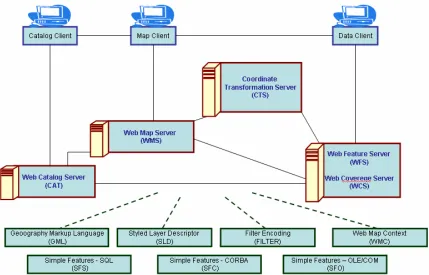
Here you will see some application efforts implementing OGC approved GIS specifications shown in Figure 1 as red lined boxes.
AskTheSpider:
AskTheSpider is the OGC Catalog, where you can submit new server URL and discover OGC Services by box, keywords, taxonomies and more. More than 1500 layers are already discoverable. Available at http://www.askthespider.comcompliant OGC resources (WMS, WFS, Context). AskTheSpider is build with IONIC RedSpider Studio on top of IONIC RedSpider Catalog. Available at
http://www.askthespider.com/?
Cadcorp GeognoSIS.NET:
MassGIS data (www.state.ma.us/mgis) served using Cadcorp GeognoSIS.NET Web Feature Service. MassGIS data (www.state.ma.us/mgis) served using Cadcorp GeognoSIS.NET Web Map Service. Available athttp://www.cadcorp.com
CCRS GeoGratis Warehouse:
The Canada Centre for Remote Sensing (CCRS) Web Map Service (WMS) provides an OpenGIS Consortium (OGC) compliant Web Map Service interface as an online web mapping service of various projects, such as GeoGratis, GeoBase, and other CCRS information holdings. The CCRS WMS also allows for custom cartographic styling through the OGC Styled Layer Descriptor (SLD) Specification. Available athttp://demo.cubewerx.com/demo/cubeserv/cubeserv.cgi
CubeWerx CubeSERV WMS:
CubeWerx Cascading Map Server with world-wide VMap Level 0 and other data stores. CubeWerx Cascading Map Server (CubeSERV) supports all versions of OGC WMS specifications (1.0.0, 1.0.8, 1.1.0, 1.1.1, 1.1.2 and 1.1.3) and can chain map requests to WMSs from other vendors using any or all of these specifications. CubeSERV also supports the SLD specification version 1.0.0 and 1.0.20. Available athttp://demo.cubewerx.com/demo/cubeserv/cubeserv.cgi
Client:
CubeWerx CubeXPLOR WMS viewer client accessing CubeWerx cascading map server. Available at http://demo.cubewerx.com/demo/cubexplor/cubexplor.cgiDeegree:
Deegree is a Java framework for geospatially-enabled solutions. It is based on common GI standards and allows building applications with spatially referenced content. Deegree components can be used to either develop a standalone desktop mapping solution to be locally installed on a user's machine, or to set up a highly distributed and service-based infrastructure. As the whole architecture of deegree is based on OGC specifications and concepts, there are no problems to integrate standardized products of other vendors (e.g. ArcIMS by ESRI(c)). Available at http://deegree.sourceforge.net/Client:
Available at http://demo.deegree.org/FEMA Q3 Flood Data:
This WMS service provides the nation-wide FEMA Q3 Flood Map. The Q3 Flood Data are derived from the Flood Insurance Rate Maps (FIRMs) published by the Federal Emergency Management Agency (FEMA). The file is georeferenced to the earth surface using the EPSG:4326 (latitude/longitude coordinate system). Specifications for the horizontal control of Q3 Flood Data files are consistent with those required for mapping at a scale of 1:24000. The map service is for advisory purposes only. Available athttp://www.hazardmaps.gov/wmsRequest.php
GeoServer:
The GeoServer project is a Java implementation of the OpenGIS Consortium's Web Feature Server specification. It is free software. Available athttp://geoserver.sourceforge.net/html/index.php
well as functions for gazetteer clients, catalog clients or WFS clients. Available at
http://deegree.sourceforge.net/src/demos.html#client
JUMP:
The Java Unified Mapping Platform (JUMP) is a GUI-based application for viewing and processing spatial data. It includes many common spatial and GIS functions. It is also designed to be a highly extensible framework for developing and running custom spatial data processing applications. JUMP supports important industry standards such as GML and the OpenGIS Consortium spatial object model. Available at http://www.vividsolutions.com/jump/MassGIS Shared Services Geocoder:
MassGIS Shared Services Geocoder provides statewide address geolocation through a WFS 1.0.0 GetFeature interface. Available at http://www.mass.gov/mgis/Client:
Oliver - Java Web Start application for browsing maps and metadata from the MassGIS holdings. Also provides access to gazetteer of place names, geocoding services, and custom extraction of geodata. Available at http://www.mass.gov/mgis/mapping.htmMySQL Spatial:
"MySQL implements spatial extensions following the specification of the Open GIS Consortium (OGC). Available athttp://dev.mysql.com/doc/mysql/en/Spatial_extensions_in_MySQL.html
National Atlas of The United States – WMS:
Over 400 data layers covering geological, hydrological, biological, geographical, demographic, and agricultural geospatial information. Available at http://nationalatlas.gov/natlas/wmsprocess.aspClient:
Available at http://nationalatlas.gov/natlas/natlasstart.aspOpenMap:
BBN Technologies' OpenMap package is a JavaBeans based programmer's toolkit. Using OpenMap, you can quickly build applications and applets that access data from legacy databases and applications. OpenMap provides the means to allow users to see and manipulate geospatial information. This is OGC WMS compatible project. Available athttp://openmap.bbn.com/
PyOGCLib:
PyOGCLib aims to develop and distribute a Python based library for the implementation of the OpenGIS® specifications, notably Web Map Server (WMS) and Web Feature Server (WFS). By basing the project on Sourceforge, we hope to attract user and developers who are interested in improving and expanding implementation of the OpenGIS® specifications in a lightweight, purely Python fashion, prioritizing conformance, simplicity, portability and ease of use and maintenance. Available at http://pyogclib.sourceforge.net/USGS_WMS_XXX: (
XXX: WMS services listed below)BTS_Roads() : Bureau of Transportation Statistics, transportation dataset. Served by the USGS EROS Data Center.
http://gisdata.usgs.net/servlet/com.esri.wms.Esrimap?servicename=USGS_WMS_BTS_Road s&
LANDSAT7: USGS LandSAT7 imagery
http://gisdata.usgs.net/servlet/com.esri.wms.Esrimap?WMTVER=1.1.0&ServiceName=USG S_WMS_LANDSAT7
NED: USGS National Elevation Dataset - Shaded Relief
NHD : USGS National Hydrography Dataset (NHD) including NHD Waterbodies, NHD Waterbody Reaches, NHD Transport Reaches and NHD Networks
http://gisdata.usgs.net/servlet/com.esri.wms.Esrimap?servicename=USGS_WMS_NHD&
NLCD : USGS NATIONAL LandCover Database
http://gisdata.usgs.net/servlet/com.esri.wms.Esrimap?servicename=USGS_WMS_NLCD&
REF : Series of layers from USGS that can be used as basemaps
http://gisdata.usgs.net/servlet/com.esri.wms.Esrimap?servicename=USGS_WMS_REF&
2.2.1.2 Client Efforts
(Service requestor for the OGC compatible GIS services)
By the Clients we mean Catalog Client, Map Client, and Data Client. Please see the Figure 1.
Chameleon:
Chameleon is a distributed, highly configurable, environment for developing Web Mapping applications. It is built on OGC standards for Web Mapping Services (WMS) and WMT Viewer Contexts. Available at http://www.maptools.org/chameleon/Fulcrum:
Fulcrum is a free Java library that includes user interface components, data models, and utilities useful to Java developers building distributed mapping applications. While the Fulcrum libraries may be useful for other purposes, it is currently targeted at creating applications that need to consume map data over a network. The source of the data can come from stand-alone open source or commercial map servers or from something more complex such as the OpenGIS Consortium (OGC) Web Services. Available athttp://fulcrum.traversetechnologies.com/
GIServer:
The GIServer is an initiative from the inovaGIS project that gives free access to GIS functions through the Internet.GIServer is compliant with the OGC WMS
specs 1.0 to 1.1.
Available at http://www.inovagis.org/giserver/index.aspIntergraph WMS Viewer:
Geospatial Intelligence portal with WRS search and Context capability. Can use Intergraph WRS or OGC Geospatial portal WRS implemented by Compusult. Available at http://ogc.intergraph.com/webmapviewer/main.aspJ2ME OGC WMS Client:
J2ME OGC WMS Client is a program for accessing OGC Web map services from Java enabled mobile phone or PDAs. It accesses the OGC WMS according to WMS 1.1.0 and 1.1.1 specifications and supports zooming and panning in the Map, WMS sublayers, and a bookmark management system for quick access. Available athttp://www.boege.net/wmsclient_en.html
Mapbender:
The Mapbender Client Suite software package provides user interfaces for displaying, navigating and querying OGC WMS compliant map services. The Mapbender Client Suite software furthermore contains interfaces for user and group administration and provides management functionality for accessing maps rendered by Web Map Services. Available at http://www.mapbender.org/NASA Web Map Viewer:
Basic HTML-only WMS client. Available atOwsview Viewer Client Generator :
Owsview is a web-based thin client which supports discovery, access and visualization of supported specifications of the OpenGIS Consortium (OGC) and Canadian Geospatial Data Infrastructure (CGDI) endorsed specifications, such as Web Map Service (WMS), Web Feature Service (WFS), Web Coverage Service (WCS), Styled Layer Descriptor (SLD), Web Registry Service (WRS), Web Map Context Documents, Catalog Service, Gazetteer Service, Sensor Collection Service (SCS) and the GeoConnections Discovery Portal API (searching for products and services). owsview also exemplifies the benefits of a standards based services for chaining between services for discovery, access and visualization of information holdings. Available athttp://cgdi-dev.geoconnections.org/prototypes/owsview/index.html
QuickWMS:
JavaScript classes for creating Web Map clients and interfacing WMS servers according to OpenGIS Web Mapping Specification (versions 0.7 to 1.1). The goal of this project is to enable the fast creation of web mapping clients using javascript. The target browsers are Internet Explorer (version 5.5 and up) and Netscape (7.00 and up) both for Windows, Mac and Linux. Available at http://www.inovagis.org/quickwms/2.2.2 Academic GIS application efforts and centers
Indiana University - GIS at Indiana University:
Aerial photos and data for counties, cities, and localities. Miscellaneous vector data are provided. Interactive state maps to download data and topographic maps. Available at http://www.indiana.edu/~gis/ andhttp://www.indiana.edu/%7Egisdata/
MIT - MITOrthoServer:
The MIT OrthoServer is a set of components that serve large collections of geo-image libraries online, in a seamless, multi-resolution fashion. OGC OpenGIS compatible. Available at http://tull.mit.edu/orthoserver/Ohio State University - Center for Mapping
: The Center for Mapping's mission includes research in the following topic areas: theoretical frameworks for GIS and spatial information, automated cartography, GIS representation, multi-media visualization, quality control, sensor integration/orientation, GPS/IMSU-based navigation, mobile mapping, photogrammetry, data fusion, experimental instrumentation, image processing, and image understanding. Available at http://www.cfm.ohio-state.edu/Penn State University:
The geospatial Information System Councils. GIS council facilitate GIS-related educational and research activities, provides state’s spatial data. Available at http://www.gis.psu.edu/Purdue University - CAAGIS:
CAAGIS (Center for Advanced Applications in Geographic Information Systems). Provides Indiana state’s topographic maps, aerial photos, digital elevation maps (DEMs) and provides interactive maps for the States spatial data. Available at http://danpatch.ecn.purdue.edu/~caagis/University of California at Berkeley - GISViewer:
GIS Viewer is a web-based Java tool for displaying and manipulating layers of geographical points and vectors, and raster data such as maps and images. Available at http://elib.cs.berkeley.edu/gis/University of California at Santa Barbara – Alexandria Digital Library:
The Alexandria Digital Library (ADL) is a distributed digital library with collections of georeferenced materials. ADL includes the operational library, with various nodes and collections, and the research program through which digital library architectures, gazetteer applications, educational applications, and software components are modeled, prototyped, and evaluated. ADL provides HTML clients to access its collections and gazetteer, and provides specific information management tools, such as the Feature Type Thesaurus for classing types of geographic features, as well as downloadable software code.
University of Minnesota - Mapserver:
MapServer is a CGI-based application for delivering dynamic GIS and image processing content via the World-Wide Web (WWW). The package also contains a number of stand alone applications for building maps, scale bars and legends offline. Access to the development environment of MapServer is possible with a number of different programming languages. MapServer supports several Open Geospatial Consortium web specifications: WMS (client/server), non-transactional WFS (client/server), WCS (server only), WMC, SLD, GML and Filter Encoding. OGC OpenGIS compatible. Available at http://mapserver.gis.umn.edu/University of Wisconsin-Madison - Paradise:
A Parallel Database System for GIS Applications. The objective of the Paradise project is to design, implement, and evaluate a scalable, parallel geographic information system that is capable of storing and manipulating massive data sets. Available at http://www.cs.wisc.edu/paradise/York University - OGC 3D Client:
Developed by GeoICT Lab at York University, OGC 3D Client has been successfully applied in OGC CIPI-1 initiative. As an server- and platform- independent client, its key features include: Pure Java Client, Compliance with OGC WMS and WCS, Accessing and operating DEM, Image and vector data through OGC WMS, WCS and XML, 2D zoom, pan, query, overlap, 3D zoom, rotation, query, profile, flood, etc. Available at http://www.geoict.net/GSN_main_ogc.htm2.2.3 Other non-OGC efforts
ESRI:
ESRI produces tools and software packages that enable you to build intelligent geographic information systems. Some of them are for GIS Clients such as ArcReader, ArcView, ArcEditor, ArcInfo, and some of them for GIS servers such as ArcIMS, ArcGIS, ArcSDE, GIS Portal Toolkit. Available at http://www.esri.com/Geographic information / Geomatics:
This is standardization in the field of digital geographic information. This work aims to establish a structured set of standards for information concerning objects or phenomena that are directly or indirectly associated with a location relative to the Earth. These standards may specify, for geographic information, methods, tools and services for data management (including definition and description), acquiring, processing, analyzing, accessing, presenting and transferring such data in digital/electronic form between different users, systems and locations.Available at http://www.isotc211.org/
GRASS:
GRASS GIS (Geographic Resources Analysis Support System) is an Open Source Geographical Information System (GIs) with raster, topological vector, image processing, and graphics production functionality that operates on various platforms through a graphical user interface and shell in X-Windows. This is related to Base GIS Visualization, Remote Sensing, Flights, File-format conversion, Projection conversion, Customizable with Add-ons. Available at http://grass.itc.it/index.phpGeoTools:
Geo Tools is a free Java based mapping toolkit that allows maps to be viewed interactively on web browsers without the need for dedicated server side support. Available athttp://www.geotools.org/
GISToolKit:
The GISToolkit software is a java toolkit for building spatially enabled applications. It has some ability to read data from a variety of data sources, and to display that data. It can directly edit geographic features stored in databases to which it has access. Available at http://gistoolkit.sourceforge.net/GML4J:
GML4J is a Java API for facilitating work with the Geography Markup Language (http://www.gmlcentral.com). GML is an XML-based framework for encoding geography information adopted as a recommendation paper by OGC. Currently only support read access. This service is related to file format conversion services. Available athttp://gml4j.sourceforge.net/
KDEM:
kdem is a program for displaying United States Geological Survey (USGS) Digital Elevation Models (DEMs). This is related to Visualization, Interactive Viewing. Available athttp://www.mindspring.com/%7Ejamoyers/kdem/
Mapyrus:
Mapyrus is software for creating plots of points, lines, polygons and labels to PostScript, PDF and web image output formats. The software combines the following three components: A Logo or turtle graphics language, reading of GIS datasets and RDBMS tables, running as a stand-alone program or as a web-server. Available athttp://mapyrus.sourceforge.net/
NetMaps:
NetMaps is a Java applet that allows one to view vectorial maps in any Java enabled browser. NetMaps can load and display ArcInfo shapefiles (SHP/DBF) and MapInfo MIF/MID files. This is basically web mapping project. Available athttp://www.sitex.ro/netmaps/
Thuban:
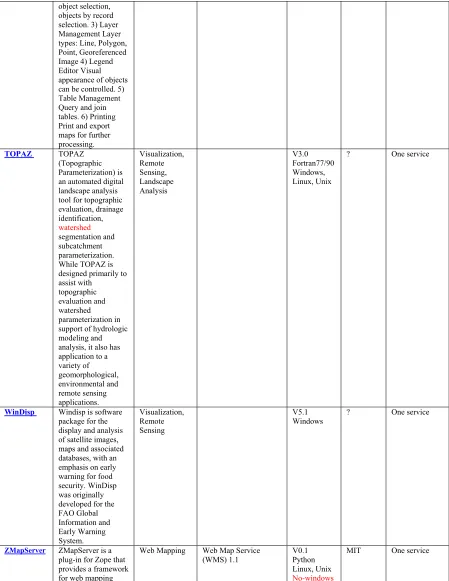
Thuban is an Interactive Geographic Data Viewer with the following features: 1) Navigation Zoom In/Out, Pan 2) Identify Attributes by object selection, objects by record selection. 3) Layer Management Layer types: Line, Polygon, Point, Georeferenced Image 4) Legend Editor Visual appearance of objects can be controlled. 5) Table Management Query and join tables. 6) Printing Print and export maps for further processing. Available athttp://thuban.intevation.org/
Terralib:
TerraLib is a GIS classes and functions library, allowing a collaborative environment and its use for the development of multiple GIS tools. TerraLib aims to provide a large set of data structures and algorithms for GIS developers. Available athttp://www.terralib.org/
USGS (US GEOLOGICAL SURVEY):
is responsible for building, maintaining, and applying The National Map. USGS provides scientific information to describe and interpret America's landscape by mapping the terrain, monitoring changes over time, and analyzing how and why these changes have occurred. USGS behaves as a geographic data provider for the other GIS projects and applications. Available at http://store.usgs.gov/WinDisp:
Windisp is software package for the display and analysis of satellite images, maps and associated databases, with an emphasis on early warning for food security. WinDisp was originally developed for the FAO Global Information and Early Warning System. Available at http://www.fao.org/giews/english/windisp/windisp.htm3 OGC OpenGIS Specifications
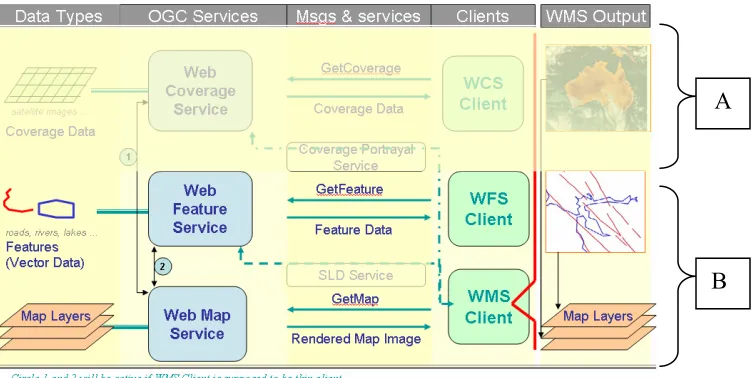
OpenGIS is the activity pursued by the OGC to form bases of the interoperability between GIS services such as mapping services, data services, and portrayal services. OpenGIS tries to achieve its interoperability aims by providing a rich suite of open interface and implementation specifications. Some of these specifications are used in our GIS project and explained in Chapter 3.1 in detail but the other approved specifications will be mentioned in this chapter roughly. These interface specifications will enable GIS developers to create interoperable components.
Figure 1 : Approved OpenGIS Specifications. Figure is created from the specification definitions at http://www.opengeospatial.org/specs/?page=specs
Web Catalog Server: Defines a common interface that enables diverse but conformant applications to perform discovery, browse and query operations against distributed and potentially heterogeneous catalog servers. Please see the Chapter 3.1.3.3 for more information [16].
Coordinate Transformation Server: Provides interfaces for general positioning, coordinate systems, and coordinate transformations. [34]
Geography Markup Language: The Geography Markup Language (GML) is an XML encoding for the transport and storage of geographic information, including both the geometry and properties of geographic features. Please see the Chapter 3.1.3.1 for more information. [10]
Simple Features - CORBA : The Simple Feature Specification application programming interfaces (APIs) provide for publishing, storage, access, and simple operations on Simple Features (point, line, polygon, multi-point, etc). [32]
Simple Features – OLE/COM: The Simple Feature Specification application programming interfaces (APIs) provide for publishing, storage, access, and simple operations on Simple Features (point, line, polygon, multi-point, etc). [31]
Styled Layer Descriptor : The SLD is an encoding for how the Web Map Server (WMS 1.0 & 1.1) specification can be extended to allow user-defined symbolization of feature data. [6]
Web Coverage Server: Extends the Web Map Server (WMS) interface to allow access to geospatial "coverages" that represent values or properties of geographic locations, rather than WMS generated maps (pictures). [13]
Web Feature Server: The purpose of the Web Feature Server Interface Specification (WFS) is to describe data manipulation operations on OpenGIS® Simple Features (feature instances) such that servers and clients can “communicate” at the feature level. Please see the Chapter 3.1.3.2 for more information. [7]
Web Map Context: Create, store, and use "state" information from a WMS based client application. [33]
Web Map Server: Provides three operations protocols (GetCapabilities, GetMap, and GetFeatureInfo) in support of the creation and display of registered and superimposed map-like views of information that come simultaneously from multiple sources that are both remote and heterogeneous. Please see the Chapter 3.1.1 for more information. [4]
Filter Encoding: A filter is a construct used to describe constraints on properties of a feature class for the purpose of identifying a subset of feature instances to be operated upon in some way. [35]
In addition to these Approved Specifications [37] there are other Abstract Specifications [38], Recommendation Papers [39], and Discussions Papers [40].
3.1
OGC OpenGIS Specifications we have been using
in our GIS project
In Chapter 3 we give general information about the OGC OpenGIS specifications. Here in this chapter there will be more detailed information about the specifications which we have been using in our GIS project.
3.1.1 WMS Specifications
Basically there are two types of WMS defined in the specifications. These are basic WMS and SLD-enabled WMS. For the basic WMS, there are three operations defined. These are getCapabilities, getMap, GetFeatureInfo. For the detailed explanations about the descriptions and compatibility requirements for these requests please see Chapter 3.1.2. If the WMS is SLD-enabled then there will be four more operations supported, describeLayer, getLegendGraphics, getStyles and putStyles. DescribeLayer is used for asking an XML description of a map layer [5]. GetLegendGraphics is used for acquiring the legend symbols. GetStyles is used for retrieving user-defined styles from WMS. PutStyles is used for storing user-defined styles into WMS. In this document, from now on, we will be just mentioning about the basic WMS. Unless we say SLD-enabled all the word WMS used in this document represent for basic WMSs.
The distributed computing platform supported by the OGC WMSs is HTTP. HTTP supports two request methods, GET and POST. One or both can be supported by the WMS and at each case URL format changes. Support for the GET method is mandatory but support for the POST method is optional. WMS operations are invoked by submitting requests in the form of Uniform Resource Locators (URLs). The content of these URLs depends on the operations and the parameters of the requests. Detailed parameter lists, parameter types and sample parameters are given in Chapter 3.1.2.
WMS publishes its ability and data holdings in its capabilities document. This document is encoded in XML. WMS classifies its geographic data holdings in the “Layers” and gives information about the styles available for these Layers. Each layer can have sub layers and the sub layers can have different styling defined for them. [4]
3.1.2 WMS Client
There is no official specification defined for the Web Map Client. Clients are thin clients and just invoke WMS operations by submitting requests in the form of Uniform Resource Locators (URLs). Users can set the required parameters by getting the values from the users by using user interface created for them. User interfaces can be created using jsp, JavaScript etc.
There are three operations defined by WMS specifications. GetCapabilities and GetMap are required and GetFeatureInfo is optional. For the detailed information about WMS and its operations please see Chapter 3.1.1 and/or OGC WMS specifications [4]. WMS clients interact with the existing WMSs by using these interfaces which are implemented as Java Servlets. Interfaces, operations and requests for these operations are well defined in the OGC specifications. Requests should have some parameters in defined formats and numbers. Below we will explain the requests for these three operations briefly in tabular fashion.
GetCapabilities Request:
OGC Required Parameters Description Example Value
VERSION Requested Version 1.1.1
SERVICE Service Type WMS
REQUEST Request Name getCapabilities
FORMAT Output format of service metadata text/plain
UPDATESEQUENCE* Sequence Number or string for
cache control Any string value
Table-1: The Parameters of the GetCapabilities Request. (*) values are not implemented in our project
Sample GetCapabilities request:
http://toro.ucs.indiana.edu:8080/deegreewms/wms?REQUEST=GetCapabilitie s&VERSION=1.1.1&SERVICE=WMS
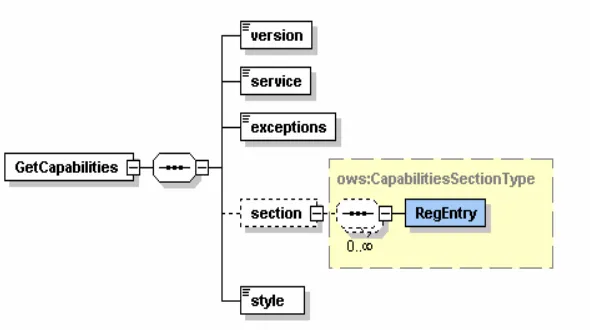
Please see Chapter 4.2 and Figure 2 to see how to invoke getCapabilities operations when WMSs are implemented as Web Services.
GetMap Request
It basically returns a map in specified format. Format is specified in getMap request by the WMS Client. Upon receiving getMap request WMS either sends a map or an exception.
OGC Required Parameters
Description Example Value
VERSION Request version 1.3.0
REQUEST Request name getMap
LAYERS Comma-separated list of one or more map layers layer_list (Indiana:rivers) STYLES Comma-separated list of one rendering style per
requested layer.
Style_list(user-defined) (ex:Blue-broken)
CRS Coordinate reference system namespace:identifier
(ex:EPSG:4326) BBOX Bounding box corners (lower left, upper right) in
CRS units
minx,miny,maxx,maxy (ex:3,4,78,45)
WIDTH Width in pixels of map picture 300
HEIGHT Height in pixels of map picture 400
FORMAT Output format of map Image/jpeg
TRANSPARENT Background transparency of map (default=FALSE).
true
BGCOLOR Hexadecimal red-green-blue color value for the
background color (default=0xFFFFFF) 0xfff8ff EXCEPTIONS* The format in which exceptions are to be
reported by the WMS (default=XML).
application/vnd.ogc.se_inima ge
TIME* Time value of layer desired 20030409
ELEVATION* Elevation of layer desired 1000
Other sample dimension(s)
Value of other dimensions as appropriate
Sample GetMap request:
http://toro.ucs.indiana.edu:8080/deegreewms/wms?service=WMS&VERSION=1.1.1&REQUES T=GetMap&LAYERS=Indiana:county83,Indiana:railroad83&STYLES=default&SRS=EPSG:432 6&BBOX=528343.087726371,4434873.868501969,564476.4342992618,4478218.803239176 &WIDTH=400&HEIGHT=300&FORMAT=image/jpg&BGCOLOR=0xfff8ff&TRANSPARENT=tru e&EXCEPTIONS=application/vnd.ogc.se_inimage
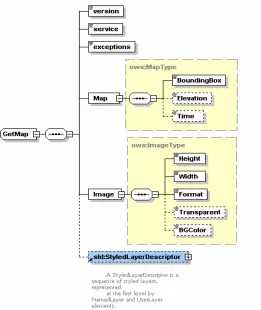
Please see Chapter 4.2 and Figure 3 to see how to invoke getMap operations when WMSs are implemented as Web Services.
GetFeatureInfo Request
GetFeatureInfo is an optional operation. This operation is supported for only the layers whose attribute ‘queryable’ set to 1. A client can not make GetFeatureInfo request for the other layers. Clients need this operation to get more information about the feature displayed as a map on the screen. Returned format is defined in WMS capabilities document. Table-3 gives you more information about the getFeatureInfo request and its parameters.
OGC Required Parameters
Description Example Value
VERSION Request version 1.3.0
REQUEST Request name GetFeatureInfo
map request part Partial copy of the Map request parameters that generated the map for which information is desired
From getMap request
QUERY_LAYERS Comma-separated list of one or more layers to be queried
layer_list
(ex: Indiana:county83 INFO_FORMAT Return format of feature information (MIME
type). text/xml
FEATURE_COUN T
Number of features about which to return information (default=1).
1
I coordinate in pixels of feature in Map CS 34
J coordinate in pixels of feature in Map CS 67
EXCEPTIONS* The format in which exceptions are to be reported by the WMS (default= XML).
application/vnd.ogc.se_inimage
Table-3: The Parameters of the GetFeatureInfo Request
(*) values are not implemented in our project. The others are not completed totally.
Sample GetFeatureInfo request:
http://toro.ucs.indiana.edu:8080/deegreewms/wms?REQUEST=GetFeatureInfo &WIDTH=640&HEIGHT= 480&BBOX=-110.,40.,-80.,30.&VERSION=1.1.1&SRS=EPSG: 4326&QUERY_LAYERS=Indiana:county83&X=12&Y=165
3.1.3 Other OGC Specifications
In this chapter, there will be brief explanations about three different specifications defined by the OGC. These are Geographic Markup Language (GML) Specifications, Web Feature Service (WFS) specifications, and Catalog Services (CAT) specifications. The reason that we are explaining these three specifications in a WMS related document is that they have some interconnections with WMS. In this section we will mention about the OGC requirements for these services. Interactions of these services with the WMS will be explained in the section 5.1.3.
3.1.3.1 Geographic Markup Language (GML) Specification
GML is an XML encoding for the transport and storage of geographic information, including both the spatial (attributes) and non-spatial (geometric) properties of geographic features. XML feature instances which are compliant to this specification shall validate against a conforming application schema. A conforming application schema shall import the Geometry schema (geometry.xsd) the Feature Schema (feature.xsd) and the XLinks schema (xlinks.xsd) as base schemas. [10]
A feature is an abstraction of a real world phenomenon; it is a geographic feature if it is associated with location relatives to the earth such as faults, rivers, roads, lakes. All the feature instances should be created according to these schema files and encoded in GML.
WMS requests feature data from the WFS in the form of GML. WFS store and serve the geospatial data encoded in GML. Since these schema files are too long we did not put them in this document. To give an idea about how to visualize a simple feature we just documented geometry.xsd to some degree of detail in APPENDIX-6
For the schema files please see the GML specification document. [10]
3.1.3.2 Web Feature Service (WFS) Specifications
WFS store and serve the geospatial data encoded in GML. The WFS operations support INSERT, UPDATE, DELETE, QUERY and DISCOVERY operations on geographic features using HTTP as the distributed computing platform. You can create, delete or update a feature instance, get or query features based on spatial and non-spatial constraints.
WFS services are grouped into two categories, Basic WFSs and Transaction WFSs.
Basic WFSs provide GetCapabilities, DescribeFeatureType and GetFeature operations. These operations are explained below.
GetCapabilities: A web feature service must be able to describe its capabilities. Specifically, it must indicate which feature types it can service and what operations are supported on each feature type.
DescribeFeatureType: A web feature service must be able, upon request, to describe the structure of any feature type it can service.
properties to fetch and should be able to constrain the query spatially and non-spatially. [7]
Transaction WFSs support all the operations of Basic Web Feature Services and implement transaction operations. Transaction WFSs can also implement LockFeature operation optionally. These additional operations are described below.
Transaction: A web feature service may be able to service transaction requests. A transaction request is composed of operations that modify features; that is create, update, and delete operations on geographic features.
LockFeature: A web feature service may be able to process a lock request on one or more instances of a feature type for the duration of a transaction. This ensures that serializable transactions are supported. [7]
We have been implementing just Basic WFS. From now on by the WFS we
will mean Basic WFSs.
3.1.3.3 Catalog Services (CAT) Specifications
Catalogue services support the ability to publish and search collections of descriptive information (metadata) for data, services, and related information objects. Metadata in catalogues represent resource characteristics that can be queried and presented for evaluation and further processing by both humans and software. Catalogue services are required to support the discovery and binding to registered information resources within an information community. [16]
4 Applicability of Web Service Architecture on to
OGC GIS Services
We have implemented standard three operations of OpenGIS as Web Services. These are getCapabilities service, getMap service and getFeatureInfo service.
Web Services give us a means of interoperability between different software applications, running on a variety of platforms. A Web Services support interoperable machine-to-machine interaction over a network. It has an interface described in a machine-processable format. Web Service interface are described in a file called Web Service Description Language (WSDL) [23] file. Other systems interact with the Web Service in a manner as described in WSDL using Simple Object Access Protocol (SOAP) messages.
SOAP [22] is an access protocol for exchanging the information in distributed environment. It is an XML based protocol and has three parts for message exchange. These are the envelope, the encoding rules and the Remote Procedure Call (RPC) convention. SOAP can be used in combination with some other protocols such as HTTP. OGC compatible Web Services will be using SOAP over HTTP.
WSDL files are written as XML documents. WSDL is used for describing and locating Web Services. Web Services are defined by four major elements of WSDL, “portType”, “message”, “types” and “binding”. Element portType defines the operations provided by the Web Services and the messages involved for these operations. Element message defines the data elements of the operations. Element types are data types used by the Web Service. Element binding defines the communication protocols.
We have used Apache Axis for creating and publishing the Web Service. Axis takes care of the SOAP communication between server and the client. Axis 1.1 has proven itself to be a reliable and stable base on which to implement Java Web Services.
The premise of the SOAP experiment is the belief that porting OGC services to Web Services will offer several key benefits, including:
Distribution: It will be easier to distribute geospatial data and applications across platforms, operating systems, computer languages, etc.
Integration: It will be easier for application developers to integrate geospatial functionality and data into their custom applications.
Infrastructure: The GIS industry could take advantage of the huge amount of infrastructure that is being built to enable the Web Services architecture – including development tools, application servers, messaging protocols, security infrastructure, workflow definitions, etc. [15]
4.1
OGC Compatibility with the Web Services
The WMS OpenGIS Specification specifies the implementation and use of the WMS operations (GetCapabilities, GetMap and GetFeatureInfo) in the Hypertext Transfer Protocol (HTTP) Distributed Computing Platform (DCP). Web Map Service operations can be invoked using a standard web browser by submitting requests in the form of Uniform Resource Locators (URLs). In the specification it is also said that future version may apply to other Distributed Computing Platforms such as web-services. But they have not added this capability into their specification documents yet.
Web Services use SOAP for messaging. SOAP is an XML protocol. SOAP provides an envelope that encapsulates XML data for transfer through the web infrastructure (e.g. over HTTP, through caches and proxies), with convention for Remote Procedural Calls (RPCs) and a serialization mechanism based on XML Schema data types. SOAP is being developed by W3C in cooperation with the Internet Engineering Task Force (IETF). [17]
In the current version of the WMS, requests are done by the user with HTTP GET and POST, and Web Map Server has main java Servlet to respond these requests. Since our distributed computing platform will be SOAP over HTTP we will be implementing map services as Web Services. It seems that it is a conflict but without violating the specification we solved this conflict and explained the architecture details in this document. This is a partial solution and we used cascading WMS concept defined in OGC Specifications.
In addition to fundamental conflict encountered above, we had encountered some minor technical problems.
For the efficiency we made a decision about using the castor source files to manipulate all the XML files in the project. Data binding frameworks such as Castor [20] or XMLBeans [21] take XML Schemas as input and produce java sources. But one major problem with these frameworks is that sometimes it is not easy to find an object oriented correspondence of the XML Schema constructs. In such cases either the source codes can not be generated or generated source codes may not produce correct XML instances.
Some of the XML Schema types -such as substitutions and abstract types- used in OGC Schemas are currently not supported by Castor. We had to make several changes to make these schemas compatible with Castor Source Generator. Modifications are done just for the latest versions of the schema files of the GIS services. These modifies schemas are available at http://complexity.ucs.indiana.edu/~asayar/ogc/modified/.
4.2
How to create valid requests to WMS in case of
using Web Services
Invoking WMS operations should be according to specifications. OGC compatible requests to WMS are well defined in the WMS specifications and we mentioned from them in Chapter 3.1. Requests must have some parameters whose names, numbers, and values assigned to them should obey the rules defined in the specifications to be OGC compatible. In this chapter we have tried to define these requests in the schema files to use them in accordance with the GIS services implemented as Web Services.
These schema files are created to be used during the invocation of operations implemented as Web Services at the WMS side. [15] Requests are created at the WMS Client side. Clients create these requests after getting required parameter from the user. When request is ready, client sends this request to WMS. WMS has deployed Web Services for each service, getMap, getCapabilities and getFeatureInfo. Clients use client stubs created before to invoke these specific Web Services. All these services in WMS take one String parameter. This String parameter is request itself. These requests are actually xml documents in String format.
Below schema files are created with the help of Altova XmlSpy.
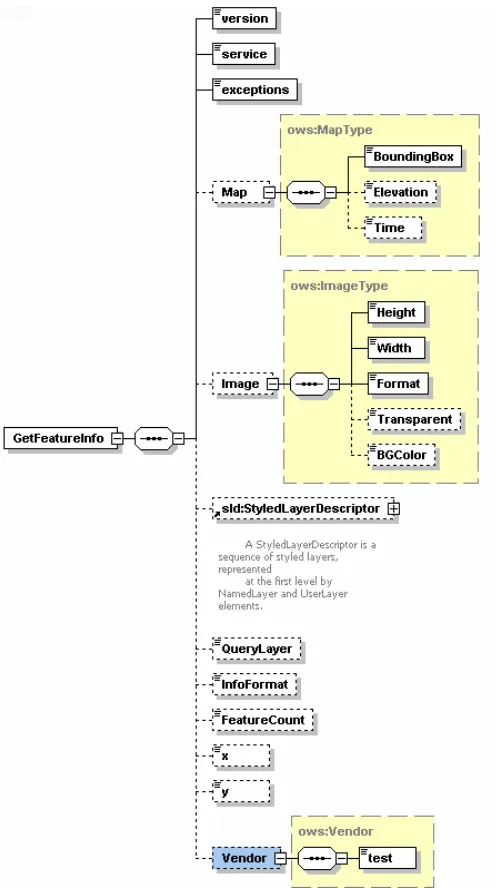
[image:21.612.118.413.391.556.2]To see the sample Requests according to Figure 2, Figure 3 and Figure 4 please see APPENDIX-3.
Figure 3 : GetMap Request Schema (GetMap.xsd)
GetMap request is created for our WMS implementation. We have not implemented Styling capability yet. Styling capability will be added soon, for the current status and the future works please see the Chapter 6. WMS supporting styling are called SLD-enabled WMS. The Open GIS Consortium (OGC) Styled Layer Descriptor (SLD) specification [6] defines a mechanism for user-defined symbolization of feature. An SLD-enabled WMS retrieves feature data from a Web Feature Service [7] and applies explicit styling information provided by the user in order to render a map.
5 Developing Web Service Compatible Versions
of OGC Services
We have tried to combine our Web Services based implementation of GIS systems with the third party GIS systems. Third party systems use HTTP as distributed computing platform. This chapter explains the implementation details of the OGC specifications mentioned in Chapter 3.1.
5.1
Implementation of OGC Specs
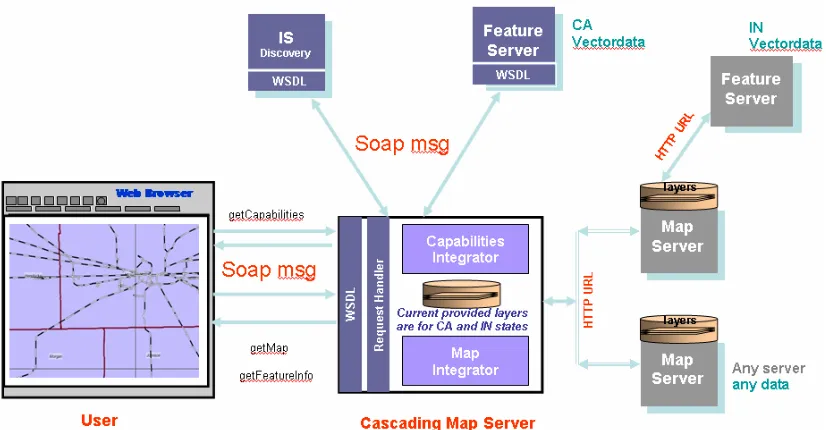
[image:24.612.119.532.351.566.2]This section is a kind of explanation of Figure 5. OGC specifications are roughly described in chapter 3.1. In this chapter we will describe all the functionalities of the elements in Figure 5.
5.1.1 WMS Implementation
WMS gets three different requests. We tried to explain what it does when it gets these requests. We also tried to explain how, when and why it needs operations of other OGC Services such as Web Feature Services and Catalog Services. All the functionalities of our OGC compatible WMS applications are grouped into different categories by the questions below.
What does WMS do when it receives
1- getCapabilities Request?:
WMS keeps its capability document in local file system. When a getCapability request comes, WMS reads its capability document from a file into a String object and returns it back to WMS client. An example of a WMS capabilities file is given in APPENDIX-5. This part of implementation is totally completed.
2-
getMap request?:
WMS first parses the parameters and their values from getMap request coming from WMS Client. Depending on these parameters it might need to make some other requests to some other GIS services (see Chapter 5.1.3). WMS first defines what layers are requested in which boundingbox in which form etc. After defining all the request parameters, it makes find_service and getAccess_point requests to IS to determine the WFS providing requested feature data. These requests are IS Web Service requests. To be able to call IS services we should first create service client stubs. getAccess_point returns the wsdl address of the WFS that provides the requested feature. WMS makes getFeature request to this WFS and gets the requested feature data in GML format. If the format parameter in getMap request is Scalable Vector Graphics (SVG), then WMS creates SVG from returned feature data by using its geometry elements. After creating SVG file, we can easily convert the SVG file into any other image formats such as png, giff, jpeg etc. Apache Batik provides libraries for this conversion. Batik is a Java(tm) technology based toolkit for applications or applets that want to use images in the SVG format for various purposes, such as viewing, generation or manipulation. Creating an SVG file from geometry elements of the received feature data is a little hard. Schema files for the geometry elements are well defined. By using these schema files we created elements to visualize the feature data. These elements are basically Point, Polygon, LineString, LinearRing, MultiPoint, MultiPolygon, MultiGeometry etc.
approach mostly. Below you will see a sample code for giving some idea how to overlay two different layers from two different WMSs.
Note: This is not a real code!:
URL url = new URL( http://www.demis.nl/mapserver/request.asp?REQUEST= map&WMTVER=1.0.0&BBOX=-124.85,32.26,113.56,42.75&SRS=EPSG:4326 &HEIGHT= 300&WIDTH=400&FORMAT=JPEG&BGCOLOR= 0xFFFFFF& LAYERS=Bathymetry,Countries,Topography&STYLES=,,&TRANSPARENT=TR UE );
BufferedImage im = ImageIO.read(url); Graphics2D g = im.createGraphics(); …
if(istherePoint)
String[] points = getPointsFromFeatureData(); if(isthereLineString)
String [] LineStrings = getLineStringFromFeatureData(); if(isthereLineRing)
String [] LineRings = getLineRingFromFeatureData(); if(istherePolygon)
String [] polygons = getPolygonsFromFeatureData(); …
…
if(polygons!=NULL){
for(int i=0; i<polygons. length; i++){
int [][] xypoints = wm.getXYpoints(polygons[i]); g.setColor(Color.darkGray);
g.drawPolygon(xypoints[0], xypoints[1], xypoints[0].length); }
}
if(LineRings!=NULL){
for(int i=0; i< LineStrings. length; i++){
int [][] xypoints = wm.getLinesInStr(LineStrings[i]); g.setColor(Color.darkGray);
g.drawPolyline(xypoints[0], xypoints[1], xypoints[0].length); }
} … g.dispose(); …
Sample output:
Check all the geometry data of the feature, Point, LineString Polygon etc.
If you find any geometry data above such as Points, LineStrings, convert the numbers in the GML file for the feature data into appropriate format to draw shapes for representing these geometry elements and display them by using graphics2D object. If you use
the same grpahics2D data the
This code shows how to put two layers on each other by using cascading WMS approach defined according to OGC WMS specification. Here we are putting state boundaries layer over California Base map.
WMS gets ‘state boundaries’ data from our implementation of WFS. WFS provides feature data in vector format. This data is encoded in GML. California base map is created from coverage data. Since we have not implemented WCS (Web Coverage Service) so far, we are using third party WMS (from demis.nl)[25] to get maps crated from coverage data. Cascaded WMS returns image in specified format as defined in the getMap request above. Since these two different layers from different WMSs have same boundingbox values and same width and height, they can be overlayed. (Please note there are lots of details not shown in this code.)
Since we have not implemented SLD-enabled WMS we have been using hard coding whenever we needed styling for the geographic data. For example for the river data we have used blue as color of the river data and for the boundary-lines feature data we have used darkGrey. You can see a simple example in the above code about how to make styling by using graphics2D libraries. When we implemented our WMS as SLD-enabled we will use more complex styling facilities and operations of the graphics class and graphics2D objects.
Most of the implementation is done but as described in WMS specification there are lots of details that should be handled. To make our WMS 100% compatible to OGC we need to handle these implementation details. We have finished almost 70% of the details mentioned in the specification. As we noted at Chapter 3.1.2 and Table2, there are some parameters in the getMap request that are not handled. Since these are not crucial elements (and not mandatory) in the request and most of the WMSs and WMS Clients do not use these parameters we postponed the implementation of these parts.
3-
getFeatureInfo request?
We have not finished implementation yet but we are still working on it. We have finished almost 40% of the implementation. For the time being we are just getting the feature data as it is in the form of GML and display on the screen as a text. We are working on creating XSL (Extensible Stylesheet Language) [19] file to convert geographic data in the form of GML into appropriate good looking output.
a string encoded in GML from WFS, WMS sends it to WMS Client in a format that is defined in the getFeatureInfo request.
When does WMS make
1-
getFeature request? (TO WFS):
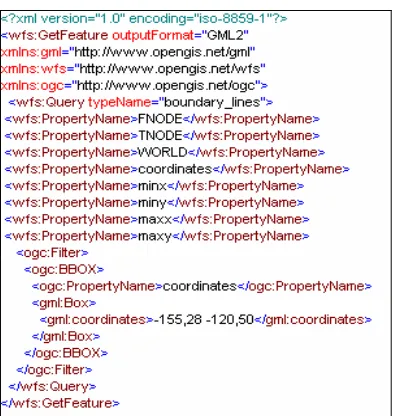
When WMS Client make a request for a layer which consists of vector data or simple feature data then WMS needs this data before starting to draw an image. To get this data it should make a getFeature request to WFS. WFS addresses are defined in the WMS capabilities document. Or if you use our IS implementation as catalog service, you can find WFS addresses by making find_service and getAccess_point requests to IS. In short, WMS makes this request to WFS when it receives getFeatureInfo and getMap request from the WMS Client.
2-
describeFeatureType request? (TO WFS):
To be able to respond getFeatureInfo requests from WMS Clients, WMS should make a describeFeatureType requests to WFS. WMS makes this request to WFS to get schema of the specific feature data. After getting schema file WMS knows how to parse and get the information from the feature data encoded in GML.
3-
find_service request? (TO IS):
When WMS Clients make getFeatureInfo or getMap request to WMS, WMS needs to find out which WFSs provide the requested geographic data. When WMS needs to find out specific WFS service address, WMS makes find_service request. WMS search the WFS service address by using the geographic data name as search criteria. To do that WMS sends its search request to IS. Search request includes search criteria. Search criteria can be just one property or more than one property. So far we have been using just one property. It is called as “feature_name”. By giving feature name we search the catalog in IS and IS returns the WFS wsdl URL value providing this feature data. For example if we set the search criteria as feature_name and give the value as “Indiana” IS is going to return WFS address for the this feature data. If there is more than one WFS providing any geographic data that their feature names include “Indiana” IS is going to return them in the String array.
5.1.1.1 Cascading WMS
Having a cascading WMS would give an abstraction level towards the client and make it easy to change the system infrastructure behind the WMS server, through which the client has connection. Without the knowledge of the client, WMS and WFS servers can be added or removed. In the same way, WFS servers are possible to cascade. We have not implemented this kind of cascading yet.
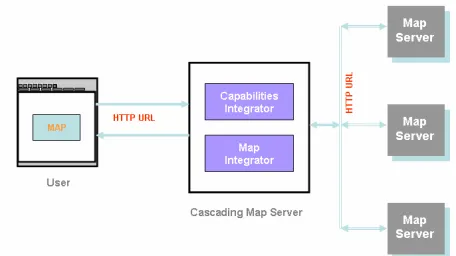
A Cascading Web Map Server is a WMS which aggregates the contents of several individual WMSs into one service that can be accessed by clients. Cascading WMS acts like a client to the other WMSs and as a server to the clients.
When two or more maps are produced with the same Bounding Box, Spatial Reference System, and output size, the results can be accurately layered to produce a composite map. The use of image formats that support transparent backgrounds allows the lower Layers to be visible. Furthermore, individual map Layers can be requested from different Servers. The WMS GetMap operation thus enables the creation of a network of distributed map servers from which WMS clients can build customized maps.
A particular WMS provider in a distributed WMS network need only be the steward of its own data collection (In our application California data). This stands in contrast to vertically-integrated web mapping sites that gather all of the data in one place that is to be made accessible by their own private interface.
[image:29.612.119.347.428.556.2]A cascading map server reports the capabilities of other WMS server(s) as its own and aggregates the contents of several distinct WMS servers into one service. In most cases, the cascading map server can work on different WMS servers that cannot serve particular projections and formats themselves. [5]
5.1.2 WMS Client Implementation
There are two different map sets defined in the WMS capabilities document. These are California and Indiana. When client first time opened the client interface page, these two map sets are defined and listed in the "Select Layers for [Dropdown List]". Dropdown lists all this general map sets that cascading WMS provides. Under these general map sets there are some layers to be used creating maps. For the sample Capabilities file for the actual WMS please see APPENDIX-5.
When you select California map from the dropdown list, WMS client makes a new getCapabilities request to WMS. WMS sends all the available layers for these California map set. These layers are listed as select options, by selecting these layers you can overlay on each other and create different maps. Every time you add or remove a layer/ layers you should "Redraw map!”.
Since we have been implementing thin clients for the regular users all the heavy tasks are assigned to WMS, especially cascading WMS. Cascading is a kind of proxy; gets requests from the users (WMS clients) interprets and handles the requests. WMS client even do not make rendering of the images. Images are sent by WMS in the ready to display format. I mean png, jpeg, giff or bmp. All these types are supported by the html to be shown on the screen. WMS Client just prepares valid requests according to specifications and wrap them in the SOAP messages (Please see Section 4.2) and waits WMS for its responses to these requests. Return types are defined in WMS capabilities document. All the requests and responses are over the SOAP and all the actions triggered by WMS client causes invoking a Web Service deployed on WMS.
To be able to create requests after getting required parameters from the users, WMS client is implemented by using jsp, JavaScript, cascading style sheets. Creating, parsing and editing capabilities documents, we have been using DOM and SAX. Since WMS clients use SOAP as Distribute Computing Platform, they prepare their requests as parameters for the remote service. Remote services are deployed as Web Services. Each type of request should comply with standards defined in specifications for these requests. To make verifying easy we have implanted requests in xml format. By encoding requests in xml, verifying will be easy. All the getCapabilities, getMap and getFeatureInfo requests should be created according to defined schema. These schemas created according the OGC specifications (Please see Section 4.2). Web Services for OGC compatible operations are deployed at
http://toro.ucs.indiana.edu:8086/deegreewmstest/services/WMSServices
To be more familiar with the user interface please go to APPENDIX-4.
When does WMS Client make
1- getCapabilities request?:
data). This request is done for defining sub layers under the parent layer which is map set. This sub layers are listed as options on the screed. User can select one or more than one layer to create a new map on the screen. GetMap request is created as an xml instance complies with the getMap request schema defined (Please see Section 4.2). To extract request parameters WMS and WMS client uses DOM libraries.
2- getMap request?:
All the actions except "Select Map Size", "Select Layers for …." and calculating distance between two points on the map cause a getMap request with different parameters. For example, selecting different layers to be overlaid causes change in LAYER parameter, selecting zoom in, zoom out or panning map tools cause change in BBOX parameter in getMap request. If client does not change anything else the other parameters will be same. GetMap request is created as an xml instance complies with the getMap request schema defined (Please see Section 4.2). To extract request parameters WMS and WMS client uses DOM libraries.
3- getFeatureInfo request?:
This service is not mandatory. We started to implement but not finished yet. Two actions cause getFeatureInfo, 'i' in "Select Map Tool" and 'i' at the beginning of each name of sub layers. To understand what ‘i’ means please see the APPENDIX-4. The boolean attribute “queryable” indicates if the server supports getFeatureInfo operation on that layer.
GetFeatureInfo request is created as an xml instance complies with the getMap request schema (Please see Section 4.2). To extract request parameters WMS and WMS client uses DOM libraries.
What does WMS Client do when it receives response to its
1- getCapabilities request?:
It first makes some interoperability checking and determines if there is a version conflict. If everything is ok then tries to get list of available layers and sub layers of each parent layer (map set). When client gets response its capabilities request for the layers it parses the capabilities document and extract the layer information.
2- getMap request?:
Since getMap operation is implemented as a Web Service, client gets map as an attachment to SOAP message returned as a response to getMap request. When client get the response it creates a map file from the attachment and move it to the public directory to be shown on the screen. Client just gives the name of the map file in the html page.
3- GetFeatureInfo request?:
XML document into another XML document, or another type of document that is recognized by a browser, like HTML and XHTML. For this, client should create its own XSL file to create html page from returned xml file. If we implement this transformation in WMS transformation might be much easier. To be able to transform any feature into an html we also need to figure out the schema file for this feature type. We need to make one more request to get schema file. This request is done to WFS and it is called “describeFeatureType”. We will thing the implementation details later.
5.1.3 WMS Interactions in a Comprehensive GIS System
WMS depends upon WFS and IS to accomplish its required tasks. These two services are being implemented by Galip Aydin and Mehmet Aktas correspondingly. They are working in CGL (Community Grids Lab.). This chapter will just mention what WMS requires from these two GIS services and how WMS interconnect with them.
5.1.3.1 WFS
WFSs keep geographic data and serves on request from clients. Clients to WFSs are Web Map Servers and other WFSs (in case of cascading WFS). WFSs provide vector data (not picture). Vector Data are encoded in GML (Geographic Markup Language). [10]. GML is an XML encoding for the transport and storage of geographic information, including both the geometry and properties of geographic features.
According to OpenGIS WFS specification, basic Web Feature Services are getCapabilities, describeFeatureType and getFeature. If Web Feature Server is transactional than this WFS provides two more services. These are transaction and lockFeature services.
Since we have implemented basic WFS, WMS will be using basic WFS services, getCapabilities, describeFeatureType and getFeature. WMS sends a getCapabilities requests to learn which feature types it can service and what operations are supported on each feature type. Since I have been using IS service, I do not need to make a getCapabilities request. WMS makes its request to IS to get a specific WFS address that provides needed feature. Please see 3.2.3.2 for the details about the interconnection between WMS and IS.
Figure 7 : Sample GetFeature request from WMS to WFS.
5.1.3.2 IS (Information-Discovery Services) corresponds to OGC Catalog Services (CAT)
An OGC Catalog is a collection of descriptive information (metadata) regarding the data stored in a geographic database (see Chapter 3.1.3.3). OGC catalog service is too specific to OGC domain. Each GIS Service provides access to geographic data. An important factor that characterizes GIS Services is the metadata about the data. Thus, metadata act as properties that can be queried and requested through catalog services. A Catalog Service provides discovery of GIS services through the metadata of the data that these services provide. These features of OGC Catalog service is good, however it is only scalable for data services. For instance, a registry should also allow discovery of services based on non-functional requirements of services such as Quality of Service attributes. Also, OGC Catalog Service is not consistent with other existing registry models such as UDDI or ebXML.
To overcome these limitations, we utilize a Registry model which is being developed in CGL as a general Registry model for Web Services, Fault Tolerant High Performance Information Services (FTHPIS). An Information Service (IS) is a general Service Registry & Discovery model based on UDDI Specifications. UDDI is WS-I approved specifications, in other words, it is inter operable with other Web Service based standards. An IS provides both publishing and discovery services for of Web Services and (WS-Context) [36] contextual information of GIS Services. Since ISs stores both functional metadata (metadata about GIS data) and non-functional metadata (metadata about Quality of Services of data, such as high throughput), it provides more complex query abilities when discovering GIS services.
A map server interacts with Information Services to dynamically discover available Web Feature Services. We can summarize the interaction between an Information Service, Web Feature Service and Web Map Server as following.