CONTr:NTS
Editorial Note 2
Using Computercards is Hrong 3
Present Availability of PASCAL Compilers 13
Installation Notes 20
Statistics of Computing Installation, September 21
Utilisation by Objectives & Accounts, September 22
Statistics of Batch Processing, September 23
Histogram of Equivalent Time Usage 23
EDITORIAL NOTE.
The Computing Centre Newsletter is publisl1ed monthly exceryt for August and December.
It describes developments, modifications and specific topics in relation to the use of the computing installations of the ,Taint Research Centre, Ispra Establishment.
The aim of the Newsletter is to provide information of importance to the users of the computing installations, in a form which is both interesting and readable.
The Newsletter also includes articles which are of intellectual and educational value in order to keep the users informed of new advances in co~puter science topics.
The Editorial Board is composed as follows:
J. Pire. Responsible Editor. H . Dowel!. Technical
c.
• Pigni.Editors. H. de Wolde.
Administration and contact address: Us. A. Cambon (tel. 7 30) Support to Computing
Building 36
J.R.C. Ispra Establishment 21020-ISPRA (Varese)
LEGAL 1~0TICE:
Editor.
USING COMPUTERCARDS IS WRONG H. I. da Wolde
As explained
in
a previous issue, the exte~sive use of computercards is wrong, dangerous, old fashionsd, costly, and bears many perils.The present computing facilities, although not representing the latest developments in the field, offer an extensive number of tools by which the use of punchcards may be avoided.
This article does not contain any new information~
it
just gives, on request of some users, one of the possible solutions towards program development wi~~ a very li~ited use of punchcards.Suppose we have to develop a large P.ORTRAN program which requires many input data parts.
Furthermore, we have access to a TSO terminal, preferably a video.
Librarian
we
cho~e the Librarian for the storage of the basic material, because this system is very well protected against loss or destruction of information, providing that the masterfile manager makes adequate security copies of the information. Secondly the disk space utilization is very economical and the material is accessible under TSO and from batch jobs.If you do not yet have access to a masterfile, you may create one by using the information presented
in
example 1.The description of the available options and the composition of the reservation card may be found
in
the Green Book on Librarian.It is strongly recommended not to create different masterfiles for each development but to share the·use of tl1ese files. This enables the users to have sensible procedures for back-up and compress and to make the most economic use of the available space.
For the intended task, we need to create two modules
in
the masterfile:- Source program - Input data
A card input deck may be loaded by the job in batch as shown in
example 2.
Immediately after a back-up of the file has been
made by the master file manager, the deck should be destroyea.
Otherwise you rnig!1t rely too much
on the presence of a
card
input deck and cause confusion with new versions of the module.
The equivalent job is performed under TSO by the creation of a
file, under EDIT
control,
and successively transfer to the
masterfile as the example
3.Execution
The composition of the deck for the execution of the job is
given in example 4.
Such a deck may
be punched and brought into the input stream by
means of the card reader.
However, a TSO SUBMIT can perform the
same task and has some advantages.
For example, different types
of errors are detected and reported before the job submission is
accepted by the system.
This may save you considerable time.
Now we suppose that you have already created a partitioned data
set, named for example TSOPROC.CNTL, in which only the qualifier
a~TL is obligatory, the first part of ti1ename
may
be
cho~enfreely.
If you don't have such a
data set consult the HELP
procedure CREARES.
Create a
new member named for example EXEC, of the partitioned
data set using of the Editor:
composition from example 4 but omit
the-~nd-t~•
To place the job in the input stream, i t is sufficient to give
the command:
SUBMIT TSOPROC.CNTL(EXEC)
Updating
The updating and extension of a
and quicker to perform than
form.
Again, many small errors
is placed in the input stream,
the average turn around time.
program under TSO is much easier
the same operation in punchcard
may be detected before the
job
After the LOGON procedure the commands are arranged as follows: LIBGET PROGA DS('SYSU.name')
EDIT PROGA fortgi @i ting commands~)
SAVE
~--END LIBSAVE
*
In \'IThich PROGA is the assumed ;1arne of the Librarian module. :'le strongly advise users to issue frequ~ntly o SAVE command during editing and possibly a r.IBSAV'.?, followe:l by a LIBGET i:1struction to store the corrections already performed. In case of an unexpected shut down of the computer this will save you a great deal of work. The LIBSAVE command cancels the working copy of the module, so i t has to be f.ollmve:i by a LIBGET command to continue the updating.
Private Libraries
If you are developing a large program, i t is very useful to store the completed and tested subroutines separately in the masterfile and as a load module in a private library. In this way, the active source part of the proqram remains smaller and might give a considerable saving in CPU time and channel traffic.
A completed subroutine may be extracted fro~ the source deck, installed as a separate module and loaded to your private library, named SYSi.LIBxxxxx, in which xxxxx are characters which may be chosen by the user. This is performed using the information given in example 5.
If SUBR1 existed already in the Private Library, the old version will be substituted by the new one. The most flexible and economic way of using this procedure is to load i t in the same partitioned data set as mentioned earlier. ?or exa~ple with the
name
TSOPROC.CNTL(LOAD).Before the submission of this job you have only to modify (under EDIT control), the name of the subroutine and the related record numbers.
Then the following command should be given: SUBHIT TSOPROC.~NTL(LOAD)
After the successful execution records n throuqh m in module and because they are safely SUBR1.
Example 6 describes a situation in which the mounting of a tape is required. The whole procedure may be stored as a member of a partitioned data set and the following tasks are executed:
- The retrieval of the updated parts of the source program, called PROGA.
- The retrieva·l of the input data, called DATA. - The compilation of the source.
- The link-editing to include the subroutine .load modules. - The request for tape mounting.
Example 1
IIJOBLIB DD DSN=LIBP.A75,DISP=(SHR,KEEP),UNIT=DISK,
11
VOL=SER=COPICBIISTEP1 EXEC PGM=$$URI~~
//SYSPRINT DD SYSOUT=A
//~ffiSTER DD UNIT=DISK,VOL=SER=USERnn,DSN=SYSU.name,
11
DCB= (BLKSIZE=6444 ,DSORG=DA) ,DISP= (NEl'i',CATLG,DELETE) ,11
SPACE= (CYL, (k))IISYSIN DD *
-OPT UNIT,DISK,options
I*
IISTEP2
EXEC EURDR,U=DISK,V=USERnn IIGO.SYSIN DD*I*
~eservation card:>In which:
nn indicates a diskpack of the USER series name is the second part of the masterfile name
k is the number of cylinders. One cylinder may contain about 6000 records of mixed nature.
Options
-OPT is a Librarian command card. The ootions at initializing a masterfile are the default definiti~ns for the whole file. At the subsequent loading of modules into the file one may change these default values and define new ones for the single module.
The most common form is:
-OPT INIT,DISK,NORESEQ,SEQ=I73,8~10,101,NOLIST,NOPUNCH,NOEXEC
The records are· numbered starting in column 73 width of 8 columns. The first sequence increased each time by 10. The modules of are not automatically renumbered after each expect to have input records with 80 columns you may write:
with a field number is 10 this masterfile run. If you of information SEQ=I81,8,10,10I, but this may also be done at the module level.
The reservation card is composed as follows:
colu."'liils 1-7 the number of the "fiche d'activite" 9-12 the number of authorization
14-17 the n~er of the programmer (masterfile manager)
19-24 the expiration date
26-69 the masterfile name, left adjusted 8,13,18,25 must be left blank
Space on users disks may be reserved only half a year in advance. To renew the reservation it is sufficient to run the next job:
//STEP1 EXEC EURDR,U=DISK,V=USERnn //GO.SYSIN DD
*
new reservption card
I*
example 2:
Librarian: Load a module by cards
// EXEC LIBRAP,A='SYSU.name',E='USERnn' //SYSIN DD
*
-OPT
-ADD mname,LIST -DESC ••••• -PGMR •••••
cards
-EMOD -END
/*
In which:
Example 3:
Example of the tra.'lsfer of a new module to the Librarian masterfile( using TSO ) •
LIBSAVE mname FORT DS('SYSU.name') PGMR(author) DBSC(' ••••• ') In which:
mname is the module name without qualifiers name is the second part of the masterfil~ nama author is the name of the programmer. (Don't forget
to always use the same notation!)
DESC(' ••• ') specifies up t0 36 characters of description. The masterfile name and the description must be enclosed
wi~~in apostrophes.
Once the source program and the input data have been loaded, we may execute the program, assuming that we do not yet need tapes or additional files.
Example 11:
Librarian: deckcomposition for compilation and execution / / •••• JOB ••••
$
Tnm
--$ LINES --$ CLASS 2
//STEP1 EXEC LIBRAP,A='SYSU.name',E='USERnn' //SYSIN DD *
-OPT
-SEL,PROGA,EXEC -EMOD
-END
I*
//STEP2 EXEC LIBRAP,A='SYSU.name',E='USERnn' //SYSIN DD *
-OPT
-S~L DATA,EXEC -EMOD
-END
I*
//STEP3 EXEC FTG1CLG
//CMP.SYSIN DD DSN=*.STEP1.INS.OSJOB,DISP=(OLD,DELETE) //GO.SYSIN DD DSN=*.STEP2.INS.OSJOB,DISP=(OLD,DELETE) In which:
PROGA is the name of the source module DATA is the name of the data module
Example 5:
Load a subroutine from Librarian into the Private Library // •••• JOB CARD ••••
$ TIME --$ LINES --$ CLASS 2
//STEP1 EXEC LIBRAP,A='SYSU.name',E='USERnn' //SYSIN DD
*
-OPT UTILITY -OPT
-ADD SUBR1,EXEC -DESC ••••• -PGMR ••••• -INC PROGA,n,m -EMOD
-END
I*
//STEP2 EXEC LIBRAP,A='SYSU.name',E='USERnn' //SYSIN DD DSN=*.STEP1.INS.OSJOB,DISP=(OLD,DELETE) //STEP3 EXEC FTG1C
//CMP.SYSIN DD DSN=*.STEP2.INS.OSJOB,DISP=(OLD,DELETE) //STEP4 EXEC FTL,NC=NCAL
//liKED-.SYSLMOD DD DSN=SYS1.LIBxxxxx,UNIT=DISK, //- VOL=SER=USERkk,DISP=(OLD,KEEP) //LKED.SYSLIN DD DSN=&~OADSET,DISP=(OLD,DELETE)
// DD
*
NAME SUBR1 (R)
I*
In which:
SUBR1 is the name to be given to the subroutine which to be added to the private library
PROGA is the name of the source mOdule containing program
has the n,m are respectively the first and the last record number
of SUBR1 in the program module PROGA USERnn is the program module PROGA 1
USERkk is the volume where the private library resides name is the second part of the masterfile ~ame
Example 6:
·Source from Librarian, compile and link with Private Library. // •••• JOB CARD ••••
$ TIME --$ LINES
--$ CLASS
--,$0C TP9=EUtttt,yyy
,zzz
//STEPL_ EXEC LI-BRAP-,A=.LSYStJ;name-. ,E='USERnn' //SYSIN DD *
-OPT
-SEL PROGA,EXEC -EMOD
-END
I*
//STEP2 EXEC LIBRAP.A='SYSU.name',E='USERnn' //SYSIN DD *
-OPT
-SEL DATA,EXEC -EMOD
-END
I*
//STEP3 EXEC FTG1CLG,P~~=xxxxx,VLB=USERkk,ULB=DISK
//CMP.SYSIN DD DSN=*.STEP1.INS.OSJOB,DISP=(QLD,DELETE)
I
/GO.FTaaFoo1 DD ~~aoe descriptiol'l)//GO.SYSIN DD
~.STEP2.INS.oSJOB;DISP=(OLD,DELETE)
In which:EUtttt yyy
zzz
SYSU.name USERnn PROGA DATA XXX XX USERkk a ais the tape volume serial number is SL or NL
is Y or N (file protection ring) is the name of the masterfile
is the volume where the masterfile resides is the source module name
is the data module name
is the last part of the name of the private library which has full name SYS1.LIBxxxxx
is the volume where the private library resides is the FORTRAN unit name definition.
When the us~r stores this procedure as a member of a partitioned data set for example: TSOPROC.CNTL(EXEC), one single command will put the job in the input stream:
References:
1] ·T. S. 0.
HELP procedures
2]
Installation Notes (JER)
3]
Green Book:
Librarian
11]
Newsletter--No
2 i>fi-vat.e--l'rogram....Li.brari.esNo
111IBM Time Sharing option,
concepts features
& facilities
No
21The Librarian TSO interface
now
PRESENT AVAILABILITY OF PASCAL CQr'!PILERS A. A. Pollicini
There has been a PASCAL compiler installed on t:1e ra~~ 370/165 of the JRC-Ispra Computing Centre since Septe~er 1977.
This compiler originated from the Inforrnatics Departnent of !REP at Grenoble University.
The release at present installed is H2.04.00, update (78 •• 33). [ 1]
The compiler can be accessed in batch by invoking one of the following catalogued procedures and requires 300 kbytes of core. A) Compilation and module editing
//LOAD EXEC PASCL //CMP.INPUT DD
*
source program
/*
//LKED.SYSLMOD DD UNIT=DISK,VOL=SER=USERxx,DISP=MOD, / / DSN=MYLIB(MYPROG)
Where the generic names "MYLIB" and "MYPROG" stand for a user library and a user program respectively.
USERxx should be replaced by the name of the appropriate user volume on which the library U-iYLIB) is stored.
The user program is now stored ~n load form on the library and may be executed as follows:
//XPR EXEC PGM=MYPROG
//STEPLIB DD UNIT=DISK,VOL=SER=USERxx, / / DSN=MYLIB,DISP=SHR
//OUTPUT DD SYSOUT=A,DCB=(RECFH=FA,BLKSIZE=133) //INPUT DD
*
input data
I*
B) Compilation, module editing and execution //RUN EXEC PASCLG
//C~.INPUT DD
*
source programI*
A new PASCAL compiler for IBM computers was obtained this year from the Australian Atomic Energy Commission [2] and has recently been installed.
Two catalogued procedures have been designed to access the compiler in batch. The core requirement is 200 kbytes.
AA) Compilation only //COMP EXEC APASC //CMP.SYSIN DD
*
source program
/*
BB) Compilation, module editing and execution //RUN EXEC APASCLG
//CMP.SYSIN DD
*
source program //GO.SYSIN DD*
input data
I*
Notice that the compiler returns a completion code greater than zero only if i t cannot compile the source. Therefore, in the case of syntax errors the returned code is zero (as well as in the case of successful compilation). For this reason during program development i t is advisable to use the procedure APASC.
•
GENERAL CONSIDERATIONS
Unfortunately, in the PASCAL world, portability problems are more important than users might expect for such a widely
available programming language.
Although the original definition of pro£. Wirth [3] was always a fixed reference for any implementor, the standardization of the language by official bodies has only been recently started. The first draft was published this year [4]. This may explain why the two implementations present a number of incompatibiiities reviewed in the following:
The first point
is
related to a different use of some special characters.In fact the original character set of the language includes some symbols outside the ones allowed by the EBCDIC set: It is usual to replace them by combination of symbols, but 1n some case there is a lack of uniformity as shown .. in table I.
'
PASCAL !REP AAEC USE
REPORT Compiler Compiler
f
J
(* *l (* *l Comments[
l
( ) (a) (..
) Arrays (a) and orI<
>I
Cbl sets (b)t
"
@
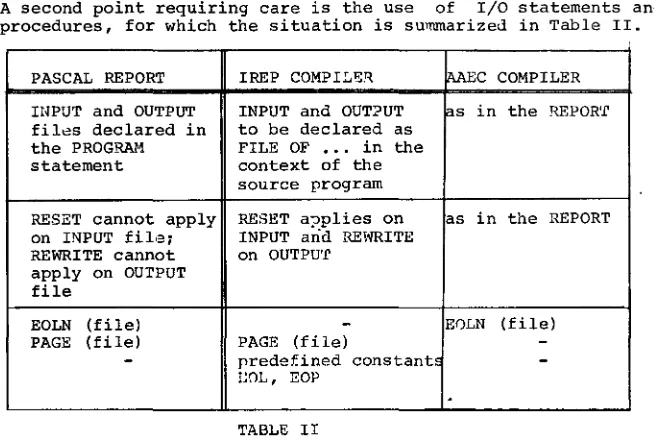
pointersA second point requ~r~ng care is the use of I/O statements and procedures, for which the situation is su>nmarize:J. in Table II.
PASCAL REPORT IREP COMPI~l!:f.l.
fillEc
COMPILER INPUT and OUTPUT INPUT and OUTPUT as in the REPOR'f fil8S declared in to be declared asthe PROGRAM. FILE OF
...
in the statement context of thesource program
RESET cannot apply RESET a::>plies on as in the REPORT on INPUT fil·3~ INPUT and REt~ITE
REWRITE cannot on OUTPU'f apply on OUTPUT
file
EOLN (file)
-
E0LN (file)PAGE (file) PAGE (file)
--
predefined constant~-I~OL' EOP
.
TABLE II
As an example, write COLil.'Tiands on a line printer may occur in one among the following alternatives.
IREP compiler A_a.::;C compiler WRlTELN ( ••• ) ~ "I'TRITEL~~ ( ••• ) ~
WRITE ( ••• ,EOL) ~ WRITELN ( ••• ) ~
WRITE( ••• ) ~WRITE (EOL) ~ WRITE ( ••• ) ~WRITELU~
Moreover, the control of pagination is performed in the IREP implementation in the following ways:
WRITE( ••• , ••• ,EOP)~ or WRITE( ••• , •.• ) ~PAGE(OUTPUT)~
[image:18.422.46.373.77.295.2]These comparisons do not cover all the differences between e1e
two implementations, but are given to warn users about the need
for careful reading of e1e specific reference manuals, before
using either of the compilers.
As
a conclusion of _ the present announcement a
short example
coded accordingly to the AAEC
implementation is shown in
Appendix 1.
REFERENCES
[1] FAUCHE,JP.; HENNERON,G.; TASSART,G.
Complements au
"PASCAL User Manual
and Report" concerna"nt
l'implem~ntation du Compilateur PASCAL, realisee par l'IREP.
!REP - Universite des Sciences Sociales de GRENOBLE (1977)
[2] COX,G.W.; TOBIAS,J.M.
PASCAL 8000 IBM 360/370 version for OS and VS environments.
Version 1.2 Reference Manual
Australian Atomic Energy Commission (1978)
[3] JENSEN,K.; WIRTH,N.
PASCAL User Manual and Report
Springer-Verlag (2nd edition) (1978)
[4] ADDYMAN,A.M.
et al.
A DRAFT DESCRIPTION OF PASCAL
Software practice and Experience -
Vol. 9,
n. 5 (May 1979)
APPENDIX 1.
Exruuple of a PASCAL program according to implementation
PROGRAM WHATi>AY (INPUT,OUTPUT )1
(* THE INTENT OF THIS PASCAL PROGRAM IS
the
TO S A Y W H A T D A Y OF THE WEEK IS ASSOCIATED TO
A
DATE SPECIFIED BY THREE INTEGERS IN THE ORDER I DAY I I MONTH I I YEAR I •AAEC
EACH DATE IS EXPECTED ON A SEPARATE INPUT RECORD. *) CONST NULL = 0 1
TYPE DAYOFWEEK =PACKED ARRAY(.1 •• 9.) OF CHAR1 VAR DAY: DAYOFi'lEEK1
DATE,MONTH,YEAR,MM,YY,CC:.INTEGER1 PROCEDURE FINDDAY1
(* PLEASE DON'T WORRY ABOUT THIS OBSCURE ALGORITHM! *) VAR PRM1,PRM2,PRM3,PRM4,0RDER: INTEGER1
BEGIN
PRM1:= (13*MM-1) DIV S1 PRM2:= YY DIV 41
PRM3:= CC DIV 41
PRM4:= Pffi11+PRM2+PRM3+DATE+YY-2*CC1 ORDER:= PRM4 MOD 71
IF ORDER<NULL THEN ORDER:= ORDER+71 CASE ORDER OF
END
0 DAY:= 'SUNDAY '1 1 DAY:= 'MONDAY '1 2 DAY:= 'TUESDAY '1 3 DAY:= 1WEDNESDAY11
4 D~Y:= 'THURSDAY '1 5 DAY:= 'FRIDAY I 1
6 DAY:= 'SATURDAY I
END1 (* FINDDAY *) BEGIN
WHILE NOT EOF(INPUT) DO BEGIN
READLN( DATE,MONTH,YEAR )1
CC:= YEAR DIV 1001 YY:= YEAR MOD 1001 IF MONTH)2 THEN MM:= HONTH-2
ELSE BEGIN MM:= MONTH+101
IF YY>NULL THEN YY:= YY-1
ELSE BEGIN CC:= CC-11 YY:= 99 END END1
FINDDAY1
WRITELN ( 1 0 THE DAY ASSOCIA'rED TO 1 ,
EXAMPLE DATA.
12 10 1492 9 5 1956 7 4 1959 29 2 1980
RESULTS.
INSTALLATION NOTES (JOB REQUESTS STATEl{BNTS).
In order to reflect the introduction of the new
$OC control
cards in the HASP system(see Newsletter 34
-September 1979 for
details), one new section for the installqtion notesCJER) has
been added and two of the existing sections(INFO and UTIL) have
been updated.
To
obtain copies of these installation notes
users should consult the information in Newsletter 28 - February
1979 pages 6 and 7.
To
list the JER(Job Execution Requirements)
section it is
necessary to request only 1000 lines of printed output(i.e
111should be 001 ).
An
example of the job necessary to list the JER notes is given
below:
// ••••••••• JOB(your job card) •••
$
LINES 001
Statistics of computing installation utilization. Report of computing installation exploitation for the month of September 1979.
Yi'!AR 1978 YI!AR 1979 General
Number of working days
Work hours from 8.00 to 24.00 for Duration of scheduled maintenance Duration of unexpected mainten.;nce Total maintenance time
Total exploitation time CPU time in problem mode
ilatch Processing Number of jobs
Number of cards input Number of lines printed Number of cards punched CPU time
Number of I/O {Disk)
Number of I/O {Magnetic tape)
T.S.O
Number of LOGON's
Number of messages sent by terminals Number of mess<t'J'"; receiv9d by terminals CPU time
Number of I/O {Disk) Connect time
~
Total time service is available CPU time
Number of I/O {Disk)
21 d 16.0011 18.00h 3.91h 21.91h 314.09h 138.85h 7914 1919000 25387000 121000 132.11h 15012000 3841000 1313 551i11 285194 4.82h 687000 631.34h 381.40h 1. 92h 336000
Utilisation of computer centre by objectives and appropriation accounts for the month of September 1979
IBH 370/165 equivalent time in hours 1.20.2 General Services- Administration- Ispra
1.20.3 General Services- Technical- Ispra 1 • 30. 3 Central Workshqp
1.30.4 L.M.A. 1.90.0 ESSOR
1.92.0 Support to the Commission 2.10.1 Reactor Safety
2.10.2 Plutonium Fuel and Actinide Research 2.10.3 Nuclear Materials
2.20.1 Solar Energy 2.20.2 Hydrogen
2.20.4 Design Studies on Thermonuclear Fusion 2.30.0 Environment and Resources
2.40.0 METRE 2. 50. 1 Infor::natics
2.50.~ Training 2.50.] Safeguards
TOTAL 1.94.0 Servic~s to External U~qrs
TOTAL
31.62 0. 11 2. 17
41.39 2.43 98.82
13. 17 0.07 0.25 18.52 22.11 2.60 35.86
BATCH PROCESSING DIST;U3:JT3;:J BY REQUESTED CORE MEMORY SIZE 100 200 300 1100 6·JO 800 1000 12:).) 11100
'>
140 0 No. of jobs 1752 2052 10111Elapse;i time 76 127 127 CPU ti"le 3.3 17.5 22.6 ".C:quiv" ti::ne 23 39 116 "Turn" time 0.11 1.0 1.5 I/0 (disk) 2014 2055 3266 I/0 tape) 1987 381 202
NOTE.
All times are in hours. "Equiv" means equivalent. "Turn" means turn around.
820 319 25 153 95 13 24.1 29.7 ll.'l
63 38 6 2.11 3.3 3.2 5271 11111 207 600 3
-All I/O transfers are measured in 1JOO's.
PERCE.:l'l'AGE OF JOi:lS FINISHED IN LESS THAl~'
11 18 22 10 13 9
,
..
:) 11.2 2.7 5 7 4 6.2 4.3 4.0 211 335 1811-
18 2T _,u:; 15rm 30mn 1hr 2hrs 4hrs 8hrs 1day 2day 3day 6da.z %year 1973 311 52 69 811 96 98 99 100 100 100
- - ·
%year 1C!79 35 1 32 ~5 80 93 99 100 10J 101) 100
'1ISTOGRI:l!1 or TOTAL [QUIVALEN'!' '!'It1Et'iRSl
iSO
==:I
-.!Ill fEll 'RIIP.IIIIYJIIIJlLIIJFliEI'OCTIItii!JU:
Projected total for 1979 = 3245 hours (using avera·:p). Total for 1978 was = 3253 hour~.
-iillFEREHCES TO THE PERSONNEL/FUIICTIONS OF THE COUPUTING CENTRE.
~lanaqer of The Computing Centre Responsible for User Registration Operations Sector
Responsible for the Computer Room Substituted in case of abscence by: Responsible for Peripherals
Systems Group
Responsible for the group
Substituted in case of abscence by:· Responsible for TSO Registration
J.Pire Ms. G.Rambs
A.Binda-Rossetti G.Nocera
o.Konig P.A.Moinil C.Daolio
Room Tele. Informatics Support Sector
Responsible for the Sector (f.f.-} H.de ~volde 1833 1259
Secretary Hrs. G.Hudry 1873 787
Responsible for User Support H.de Wolde 1883 1259 General Inf./Support Library ltrs. A.Cambon 1~71 730 Advisory Seryice/List of Consultants(See Uote 1) 1870 730
A.Inzaghi A.A.Pollicini
H.I. de Wolde
R.Meelhuysen M.Dowell
NOTE 1. The advisory service is available in. the same room ~s
the Computing Support Library(room 1870). Exact details of the advisory service times for a specific week can be found at tae head of any output listing(for t~at week).
Any informatics problem may be raised. However, the service is not designed to help users with problems which are their sole responsibility. For example, debugging of the logic of programs and requests for info~tion which can easily be retrieved from available documentation. ·
If necessary, other competent personnel from the informatics division ma~ be contacted by the consultant but not directly by the users.
HOW TO BECOME A REGULAR READER OF Till! NEWSLE'l'TER.
Persons intere~;~ted in receiving regularly the "Computing Centre Newsletter" are requested to fill in the following for.u and send i t to
:-Ms. A. Cambon Support To Computing Building 36
Tel. 730.
Please add me to the Newsletter mailing list.
NAHE
ADDRESS