11-1-2011
An Analysis of open security issues of Android
interfaces to cloud computing platforms
Corey Beres
Follow this and additional works at:http://scholarworks.rit.edu/theses
This Thesis is brought to you for free and open access by the Thesis/Dissertation Collections at RIT Scholar Works. It has been accepted for inclusion in Theses by an authorized administrator of RIT Scholar Works. For more information, please [email protected].
Recommended Citation
Interfaces to Cloud Computing Platforms
by
Corey Andrew Beres
A Thesis Submitted in Partial Fulfillment of the Requirements for the Degree of Master of Science
in Computer Engineering
Supervised by
Associate Professor Dr. Shanchieh Jay Yang Department of Computer Engineering
Kate Gleason College of Engineering Rochester Institute of Technology
Rochester, New York November 2011
Approved by:
Dr. Shanchieh Jay Yang, Associate Professor
Thesis Advisor, Department of Computer Engineering
Dr. Andres Kwasinski, Assistant Professor
Committee Member, Department of Computer Engineering
Dr. Roy Melton, Senior Lecturer
Title:
An Analysis of Open Security Issues of Android Interfaces to Cloud Computing Platforms
I, Corey Andrew Beres, hereby grant permission to the Wallace Memorial Library to reproduce my thesis in whole or part.
Corey Andrew Beres
c
Acknowledgments
I would like to thank my parents who drove me to and from school too many times. Without their support none of this would have been possible. I am grateful for the help of
Abstract
An Analysis of Open Security Issues of Android Interfaces to Cloud Computing Platforms
Corey Andrew Beres
Supervising Professor: Dr. Shanchieh Jay Yang
Smartphone usage is on the rise and some may argue that these devices are ubiquitous in today’s society, even among non-technical users. To remain competitive, mobile devices and applications need to quickly perform tasks with as minimal as possible impact on battery life. The emergence of cloud computing, open-source cloud platforms, and cloud-supported ventures such as Apple iCloud and Amazon Silk provide new and promising methods to improve device and application performance. However, little work has been done to examine the security of offloading processing from mobile devices to cloud services and the performance effects of implementing security features. This work aims to answer the questions that arise in securing mobile applications that communicate with the cloud.
Contents
Acknowledgments . . . iv
Abstract . . . v
1 Introduction. . . 1
2 Related Work . . . 6
2.1 Cloud security . . . 8
2.2 Android security . . . 9
3 Methodology . . . 17
3.1 Application . . . 17
3.2 Implementation . . . 18
3.3 Security features . . . 23
4 Evaluation. . . 29
4.1 Experiments . . . 29
4.2 Test setup . . . 31
4.3 Results . . . 33
5 Conclusions . . . 43
Bibliography . . . 44
A Image retrieval source . . . 50
B Cloud worker client source . . . 55
C Result manager source . . . 64
List of Tables
2.1 Summary of cloud vulnerabilities . . . 10
2.2 Android security features . . . 11
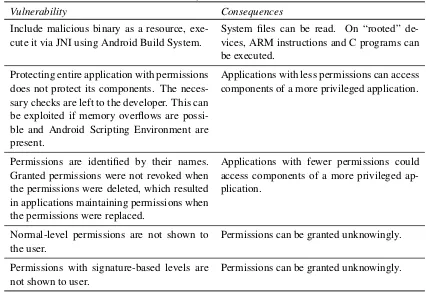
2.3 Summary of Android vulnerabilities . . . 16
3.1 Known vulnerabilities addressed in this work . . . 24
3.2 Summary of vulnerabilities encountered through development of this project. 27 3.3 Summary of vulnerabilities encountered through development of this project (continued). . . 28
4.1 Comparison of cloud-supported applications by security features (118 800-px by 600-800-px images) . . . 39
4.2 Comparison of effects on phases of execution (↑denotes an impact, and↔ denotes no impact) . . . 42
List of Figures
1.1 Amazon EC2 instances launched per day as observed by RightScale [1] . . 1
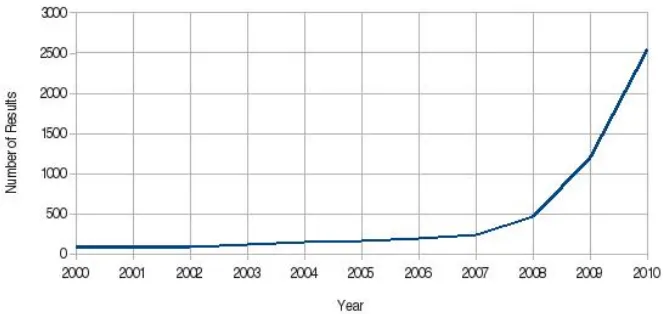
1.2 Academic interest in cloud computing according to the number of search results for “cloud computing” on IEEE Xplore . . . 2
1.3 Smartphone adoption by market [2] . . . 3
1.4 Growth in malware on mobile platforms [3] . . . 4
1.5 Breakdown of malware by mobile platforms, Q2 2011 [3] . . . 4
2.1 Security decisions encountered if application A attempts to start application B 12 2.2 Security decisions encountered if application A attempts to start any appli-cation that matches specified criteria . . . 13
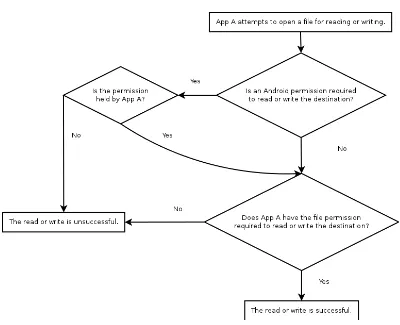
2.3 Security decisions encountered if application A attempts to open or save a file . . . 14
3.1 CloudSmart system architecture . . . 19
3.2 Screenshots of the Android interface as the program transitioned through three phases of execution. Th application began in an idle state waiting for information on the cloud from the user (left). After the user pressed the button, the work request was delivered, and the interface was updated accordingly (center). The application stayed in this state until the final result was received, at which point it was displayed (right). . . 22
4.1 Average memory usage in the local-processing application over ten execu-tions with 118 images and 800x600 ray-traced images. RT indicates the ray-tracing portion of execution while IR indicates image retrieval. . . 30
4.2 Memory statistics from one representative execution of the local-processing application with 118 images and 800x600 ray-traced images. . . 31
4.5 Average execution time in the local-processing application and the cloud-supported application over ten or more executions with 800x600 ray-traced images and a varying number of library images. RT indicates the ray-tracing portion of execution while IR indicates image retrieval. . . 34 4.6 Average execution time in the local-processing application and the
cloud-supported application over ten or more executions with 118 library images and a varying pixel resolution. RT indicates the ray-tracing portion of exe-cution while IR indicates image retrieval. . . 34 4.7 Average battery usage per execution in the local-processing application and
the cloud-supported application over ten or more executions with 800x600 ray-traced images and a varying number of library images. RT indicates the ray-tracing portion of execution while IR indicates image retrieval. . . . 35 4.8 Average battery usage per execution in the local-processing application and
the cloud-supported application over ten or more executions with 118 li-brary images and a varying pixel resolutions. RT indicates the ray-tracing portion of execution while IR indicates image retrieval. . . 36 4.9 Average memory usage in the local-processing application and the
cloud-supported application over ten or more executions with 800x600 ray-traced images and a varying number of library images. RT indicates the ray-tracing portion of execution while IR indicates image retrieval. . . 37 4.10 Average memory usage in the local-processing application and the
cloud-supported application over ten or more executions with 118 library images and a varying pixel resolutions. RT indicates the ray-tracing portion of execution while IR indicates image retrieval. . . 37 4.11 Average execution time in the local-processing application with 118 library
images and 800x600 ray-traced images compared to the average time re-quired for ray tracing (denoted by “RT”) and the difference between the two times. The number of objects placed in the scene was varied. . . 38 4.12 Average execution time in the local-processing application over ten or more
executions with 800x600 ray-traced images and 118 library images. The amount of background traffic was varied. . . 40 4.13 Average rates of transmission for data received by user applications that
Chapter 1
Introduction
[image:11.612.135.486.363.603.2]Today’s IT industry is witnessing the unfolding of a very interesting scenario. Public cloud usage is on the rise; in November 2006, merely 1,000 Amazon EC2 instances were launched per day. By September 2009, the number was estimated to have risen to over 40,000 instances launched per day [1]. This trend is shown in Figure 1.1. Academic in-terest in cloud computing has increased exponentially as well, as shown in Figure 1.2. In addition to the growing acceptance of public cloud computing, the release of open-source private cloud computing platforms such as Eucalyptus and Nimbus have created the possi-bility of installing a cloud even in a home.
Figure 1.1: Amazon EC2 instances launched per day as observed by RightScale [1]
Figure 1.2: Academic interest in cloud computing according to the number of search results for “cloud computing” on IEEE Xplore
In some European countries, the numbers are much higher. Spain’s adoption rate rose to 38 %, up from 27 % the previous year. These trends are shown in Figure 1.3.
As smartphone usage grows, the resources available to such devices remain limited. Even as battery technology improves, clock speeds rise, and applications access the Internet for new purposes, limiting the amount of time a device can be used without external power. Conveniently, cloud computing is becoming increasingly available. The technology and motivation exist to offload work from smartphones with limited resources to the energy-and processor-rich cloud.
Several existing mobile applications take advantage of the cloud. Microsoft’s Project Hawaii [5] is a software development kit targeted to students that allows developers to leverage services including a relay service, a rendezvous service, optical character recogni-tion, and speech-to-text in the cloud. Access to Microsoft’s Windows Azure cloud platform is also supported. Currently the project supports only Windows devices.
In May 2011, Apple unveiled its own cloud venture, iCloud [6]. The service allows users to store data in the cloud, including music, photographs, documents, books, and contacts. The data can be retrieved by supported Apple devices.
Figure 1.3: Smartphone adoption by market [2]
However, there are many areas for vulnerabilities to develop when a smartphone and a cloud interact. These include storage of possibly secure data once it arrives on mobile de-vices, storage of possibly secure data on the cloud, and secure transmission of data between the cloud and devices. Additionally, there are many instances of malware that threaten se-curity of mobile devices. Figure 1.4 shows the growth in malware on mobile platforms from 2009 to 2011 (over which time the amount of malware has doubled) as recorded by McAfee [3]. Figure 1.5 shows the breakdown of malware by mobile platform; Android was a target for the majority of malware considered in the survey. Additionally, there have been numerous instances of impropoper management of private data by applications as in [9] and [10].
The scenario of cloud-smartphone interaction opens many uncertainties, such as the vulnerabilities that arise when a smartphone and a cloud commingle. Very little research exists on this topic, and the specific vulnerabilities have not been concretely defined. As such, no answers have been offered as to whether security needs to be improved and what specific security features need to be added and expanded. This thesis is mainly concerned with the Android operating system.
In an effort to clarify those uncertainties, CloudSmart was created. This software sys-tem tied together an Android smartphone with a Eucalyptus private cloud. The syssys-tem provided an interface on the smartphone, offloaded work to a cloud, and assembled and returned the results from the cloud to the smartphone. A specific situation in which the cloud would be very advantageous was imagined, and it proceeds as follows:
1. Ray trace a scene.
Figure 1.4: Growth in malware on mobile platforms [3]
[image:14.612.186.434.438.618.2]to Android devices, the cloud, and users were identified. Similarly, vulnerabilities in the applications were identified. Vulnerabilities that posed substantial risks were identified, allowing them to be addressed with future research. For those goals, a stronger focus was placed on the Android end of the spectrum rather than the cloud end. The work presented here is not intended to be a comprehensive security solution.
With risks identified, methods of exploitation described, and solutions proposed, the results of the work will facilitate the development to better and more comprehensive An-droid and cloud security models. Proposed solutions can be implemented and improved, and the results will exist for future researchers interested in the critical areas that might pose security threats.
Chapter 2
Related Work
The concept of a cloud-computing interface for a smartphone is relatively new. Amazon EC2 and Eucalyptus were officially released in 2008, while the Amazon Web Services SDK for Android was unveiled at the end of 2010. As of October 2011, Eucalyptus lacks an Android interface. However, there are some projects in which the security of Android and the cloud was addressed.
Two similar projects with intentions to secure the Android landscape are Saint [11] and Kirin [12]. According to its authors, Saint is a framework for developers that allows for “ap-plications to protect themselves.” This goal was accomplished by adding developer-defined installation-time and run-time policies. A main benefit of Saint is that it can add dynamic protection for applications, whereas most built-in security features provide static behavior. The installation-time protection included signature-based policies and configuration-based policies. The former allows applications that declared permissions to grant their permis-sions based on signatures of requesting applications, while the latter performs the same feat based on the requesting applications’ configurations (e.g.the permissions requested and its version). At run-time, the previous two policies are in effect along with a context-based policy, which limits the inter-process communication (IPC) between two applications based on the state of the phone, (i.e.what hardware is active). At run-time, a signature-based pol-icy would limit IPC based on the signatures of applications, while a configuration-based policy would limit IPC based on the configurations of the applications in question. For run-time protection, Saint acts as a middle-man for IPC.
According to the authors, “Saint was implemented as a modification to the Android 1.5 OS.” Requiring modifications to Android is the main limiting factor to the adoption and usefulness of Saint. Also, the Saint package installer requires Android’s PackageParser
class, which is hidden. In addition, the application would most likely require the IN-STALL PACKAGES permission, which is not available to applications installed from the Android Market. Even if Saint were added to the Android OS, the additional restrictions would be up to developers to define; thus its use would be optional.
components.
• Only system applications can interface with hardware and process outgoing calls.
• Applications that can record audio cannot have Internet access and cannot pass data to applications that have Internet access.
• Applications that can access WiFi or a device’s network state must have the Internet permission.
• Applications can receive SMS updates and location updates only from trusted system components.
Kirin addressed several deficiencies present in Android, and, combined with compulsory and wise use of Saint, it would lead to a more secure Android environment. However, Kirin suffers from the same downfalls of Saint: notably the requirement of classes hidden from the SDK. Additionally, the authors of Kirin and Saint did not specifically address cloud interaction.
The creators of [13] aimed to identify when a device was compromised as quickly as possible while maintaining the efficiency of this detection. The project was named Paranoid Android, and it was accomplished by emulating Android devices in the cloud. The authors’ example implementation detected intrusions with tamper-evident secure storage, detection of software errors in Android, memory analysis, open-source antivirus software, and methods to scan memory for malicious code, but they maintained that any check could be implemented, with the detection time proportional to the number of checks performed. While the project’s goals differ from this project’s goals, its usefulness in monitoring the security of smartphones connected to the cloud is intriguing.
A project with similar goals to this project but with a different means and focus is described in [14]. The goal of CloneCloud was to offload work automatically for any application from smartphones to the cloud. This was accomplished by a method similar to that of Paranoid Android. Devices were emulated and “cloned” to run in the cloud. Threads of execution were automatically migrated by the CloneCloud framework to the cloud, where they executed and took advantage of the hardware of much more powerful servers until the threads were merged back into the original process. This project was based on an early version of the Android mobile operating system.
2.1
Cloud security
Cloud security has been studied in many projects, including [15] in which the evolution and modern applications of security features were explained, and [16] in which modern security features like WS-Security and Transport Layer Security (TLS) were explained. As described in those projects, security in the cloud includes those features found in the desktop and server realms. Users are isolated from each other and have limited permissions. Virtual machines isolate running software and memory within a physical machine. A more interesting case results when protecting access to a cloud.
WS-Security, short for Web Services Security, is an extension to SOAP that defines “how to provide integrity, confidentiality and authentication for SOAP messages” [16]. SOAP, or Simple Object Access Protocol, is a protocol that defines how to transfer infor-mation between Web services. It relies on the XML standards XML Signature and XML Encryption, and it defines the X.509 certificate. XML Signature defines how XML markup can be signed to authenticate messages. Very simplified, the standard works by hashing message parts, signing an element, and storing the result of the signature in another ele-ment, which is included in the security header. XML Encryption allows for XML markup to be encrypted. The encrypted markup is separated into two elements, the encrypted data and the key used for the encryption, which is also encrypted, this time using the public key of the recipient.
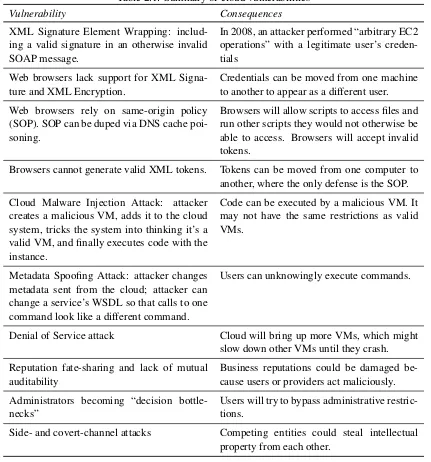
Transport Layer Security consists of two parts: the Record Layer encrypts data, and the Handshake is responsible for authenticating servers and clients. The most common usage of TLS begins with a server outfitted with an X.509 certificate issued from a trusted certificate authority. During the handshake, the client receives the certificate from the server and verifies its contents. If the certificate cannot be verified, the user is prompted to accept or reject the certificate. The vulnerabilities begin here, as users may quickly click “Accept” and “Okay” to reach their desired content without understanding the risks that were taken. Attacks to circumvent these cloud security mechanisms exist, and they are described in [16]. XML Signature Element Wrapping involves stealing a signed SOAP message body and placing it inside the SOAP header of a new message. The body of the new message describes the action the attacker wants to perform. This allows an attacker to perform his own actions with the credentials of a different, legitimate user. The attack was used in 2008 to exploit Amazon EC2. Another attack is a metadata spoofing attack in which a Web Service’s metadata is altered, resulting in unintended execution of commands different from the commands they intended to execute. This attack can happen after a user happens upon this invalid metadata. A final attack comes in the form of the classic denial of service attack, which, due to the elastic nature of the cloud, could potentially bring down an entire cloud as exponentially more resources are provisioned to endure the attack.
of mutual auditability, the possibility that administrators are seen as “decision bottlenecks” as they enforce tighter restrictions upon users who seek immediate access, and side- and covert-channel attacks as potentially competing entities run their software on possibly the same machine within the cloud. The previously described vulnerabilities are summarized in Table 2.1.
2.2
Android security
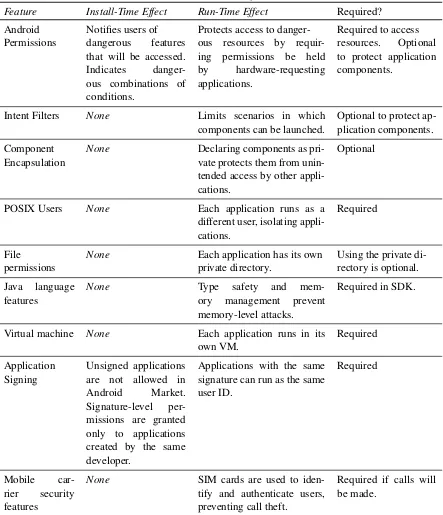
As described in [17] and [18], the security situation with Android is similar to that of cloud computing in that a number of security features are inherited from the desktop realm along with several additional attributes that tighten the security model. These mechanisms are summarized in Table 2.2. Features found in desktops include POSIX users, file permis-sions, virtual machines, and the Java language. The first three isolate applications from each other. POSIX users have been adapted to Android such that each application runs as its own user; thus it can save files that only the application can access, and it cannot access the private files of other applications. Virtual machines have also been adapted to Android: each application runs in its own virtual machine in order to isolate memory . Finally, the Android SDK supports only Java, which forces users to take advantage of Java’s type safety and memory management that prevent memory-level attacks.
The most prominent security feature unique to Android is the permissions system [19]. Permissions are defined such that dangerous mechanisms within Android are protected, including hardware resources like Bluetooth, WiFi, the phone, microphone, and external storage. Applications must have the necessary permissions granted to them when they access such resources. These permissions are granted by the user upon installation of ap-plications, and they cannot change. An application cannot be installed if any permissions are rejected. Finally, applications can also be protected with permissions. An application can require that the applications that launch it hold certain permissions. The benefits of the permissions system are that users know what critical resources an application will access and users can identify dangerous combinations of resources.
Table 2.1: Summary of cloud vulnerabilities
Vulnerability Consequences
XML Signature Element Wrapping: includ-ing a valid signature in an otherwise invalid SOAP message.
In 2008, an attacker performed “arbitrary EC2 operations” with a legitimate user’s creden-tials
Web browsers lack support for XML Signa-ture and XML Encryption.
Credentials can be moved from one machine to another to appear as a different user.
Web browsers rely on same-origin policy (SOP). SOP can be duped via DNS cache poi-soning.
Browsers will allow scripts to access files and run other scripts they would not otherwise be able to access. Browsers will accept invalid tokens.
Browsers cannot generate valid XML tokens. Tokens can be moved from one computer to another, where the only defense is the SOP.
Cloud Malware Injection Attack: attacker creates a malicious VM, adds it to the cloud system, tricks the system into thinking it’s a valid VM, and finally executes code with the instance.
Code can be executed by a malicious VM. It may not have the same restrictions as valid VMs.
Metadata Spoofing Attack: attacker changes metadata sent from the cloud; attacker can change a service’s WSDL so that calls to one command look like a different command.
Users can unknowingly execute commands.
Denial of Service attack Cloud will bring up more VMs, which might
slow down other VMs until they crash.
Reputation fate-sharing and lack of mutual auditability
Business reputations could be damaged be-cause users or providers act maliciously.
Administrators becoming “decision bottle-necks”
Users will try to bypass administrative restric-tions.
Side- and covert-channel attacks Competing entities could steal intellectual
Table 2.2: Android security features
Feature Install-Time Effect Run-Time Effect Required?
Android Notifies users of Protects access to danger- Required to access
Permissions dangerous features
that will be accessed.
Indicates
danger-ous combinations of conditions.
ous resources by
requir-ing permissions be held
by hardware-requesting
applications.
resources. Optional
to protect application components.
Intent Filters None Limits scenarios in which
components can be launched.
Optional to protect ap-plication components.
Component None Declaring components as pri- Optional
Encapsulation vate protects them from
unin-tended access by other appli-cations.
POSIX Users None Each application runs as a
different user, isolating appli-cations.
Required
File None Each application has its own Using the private
di-permissions private directory. rectory is optional.
Java language
features
None Type safety and
mem-ory management prevent
memory-level attacks.
Required in SDK.
Virtual machine None Each application runs in its
own VM.
Required
Application Signing
Unsigned applications are not allowed in
Android Market.
Signature-level per-missions are granted only to applications created by the same developer.
Applications with the same signature can run as the same user ID.
Required
Mobile
car-rier security
features
None SIM cards are used to
iden-tify and authenticate users, preventing call theft.
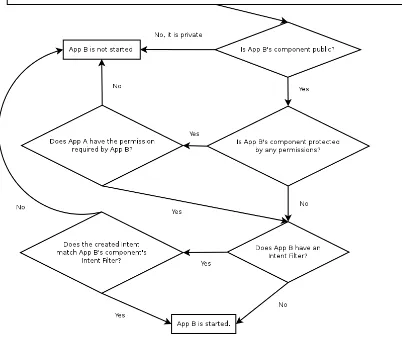
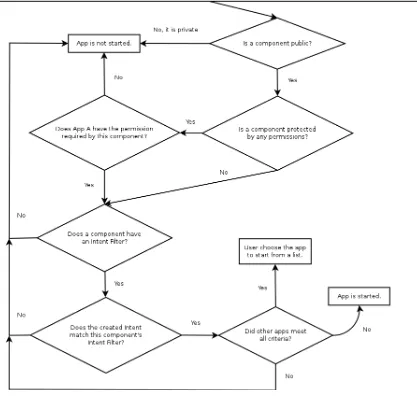
The interplay of various security features can be difficult to understand. Figure 2.1 shows the process of decisions that Android makes when one attempts to start a specific application. Figure 2.2 shows the decisions made when an application attempts to start any application that matches specified criteria. Finally, Figure 2.3 shows the process of resolution when an application attempts to open or save a file. The information in the figures was not gathered from review of actual Android source code. Rather, it was gained through understanding documentation in the Android SDK; thus the order in which the individual checks are presented may not reflect the actual order in which Android performs the checks.
Figure 2.1: Security decisions encountered if application A attempts to start application B
addressed in Android. The authors also noted the inclusion of arbitrary levels of permis-sion to denote critical nature (e.g.“normal” compared to “dangerous”), that allow certain permissions to be hidden from the user upon installation.
Furthermore, applications that are granted dangerous permissions do not need to be protected by those same permissions, which lets developers create backdoors that can be opened by other applications. For instance, a malicious developer could create an audio recording application that has permissions to record audio and write to external storage, and that is not protected by either of those permissions. A service could be added to the application that records audio and saves it in a public location with no user notification. A separate application with permission to access the Internet could launch the service to record audio and then upload resulting files to the Internet, again with no user notification. This flaw was addressed by [12], but only by modifying the Android operating system. The backdoor could be unnecessary as any application with the Internet permission can upload existing public files to a remote server while the user remains completely unaware.
Table 2.3: Summary of Android vulnerabilities
Vulnerability Consequences
Include malicious binary as a resource, exe-cute it via JNI using Android Build System.
System files can be read. On “rooted” de-vices, ARM instructions and C programs can be executed.
Protecting entire application with permissions does not protect its components. The neces-sary checks are left to the developer. This can be exploited if memory overflows are possi-ble and Android Scripting Environment are present.
Applications with less permissions can access components of a more privileged application.
Permissions are identified by their names. Granted permissions were not revoked when the permissions were deleted, which resulted in applications maintaining permissions when the permissions were replaced.
Applications with fewer permissions could access components of a more privileged ap-plication.
Normal-level permissions are not shown to the user.
Permissions can be granted unknowingly.
Permissions with signature-based levels are not shown to user.
Chapter 3
Methodology
3.1
Application
The specific application to demonstrate cloud-smartphone interaction involved ray tracing a scene and performing image retrieval with the output of the ray tracer. This application was chosen because of the large amount of processing that was necessary and the size of results, which the user would likely wish to save to his or her device. Because of these details, the application benefitted from cloud support, and it required use of several Android and cloud security mechanisms. The specific application is described below.
1. Ray tracing: ray trace a scene. In this case, the classic Turner Whitted scene described in [23] was chosen. Advanced features of the ray tracer included rendering images with variable pixel resolutions, performing rotated-grid supersampling, and rendering a variable number of objects in the scene.
2. Library compilation: retrieve images from a local cache. This step was done to sim-plify the implementation, as similar images could be injected into the image library so a match would always be found. Images could have also been downloaded dynam-ically from the Web.
3. Image retrieval: compare the ray-traced scene to the images in the image library and find the closest match via an algorithm [24] provided by OpenCV [25].
Given the description, one could imagine its uses as a real-world solution, as a more flexible ray tracer would allow users to quickly describe an image or object (without an image of the actual object required) and find images that match from the Internet. The spe-cific steps for image retrieval are described below. The actual steps performed are important because they affect performance.
1. Ray-traced (source) image was loaded as a format that was understood by the OpenCV library.
a perfect match. Then, [24] was used to compare the library images to the source image.
3. Image resources were freed after the comparison. If a new best image was found, the filename of the best image was saved to memory.
It should be noted that this method of image retrieval may not have been the most efficient. Retrieval could possibly have been completed more quickly and more accurately if, for each comparison, either the source or target image were resized to the pixel resolution of the smaller image. However, the images from the library were always resized to the pixel resolution of the ray-traced image. This allowed for more consistent statistics that showed the effects of pixel resolution even as the images in the library were changed. The code in the cloud software that performed image retrieval is shown in Appendix A.
3.2
Implementation
The cloud-smartphone system consisted of two distinct parts: a cloud application and an Android application. A visualization of the entire system architecture is shown in Fig-ure 3.1. The Android application required two permissions: INTERNET and WRITE EXTERNAL STORAGE. The application consisted of three main components. A main ac-tivity was launched initially when the user opened the application. It included options for a username, a password, and the IP address of the server (described later). An asynchronous task was included that handled the connection to the cloud and ran in the background while the application waited for results from the cloud. Finally, a result activity was added that displayed the result returned from the cloud and it allowed the user to save it to external storage. Screenshots of the application as it transitioned through each activity are shown in Figure 3.2.
After the user entered the required information and requested a connection, the applica-tion sent a request to the cloud for a descripapplica-tion of available cloud instances. If an instance with the expected cloud instance ID and the supplied IP address was found to be running, the application attempted to connect to it. These steps helped to ensure that connections were made only with valid servers. The code for the main loop of the Android application, in which the application authenticated its user with the server, sent its work request to the cloud, and received an intermediate result, is shown in Appendix D.
requests. However, with the inclusion of the Intent filter, the component was available for other applications to launch to display images.
The cloud application consisted of two distinct parts: a client (also referred to as a worker and a worker client in this document), which performed work offloaded to the cloud, and a server, which managed connections to the cloud and served as an intermediate point for communication between the end user and worker clients. The server, which was limited to a single instance in the system, accepted (or rejected) new users and clients, removed disconnected users and clients, and forwarded communication from users to each client.
The server contained two subcomponents to perform these actions. The server launched a client handler for each connected worker client. Each of these handlers listened for com-munication from a single client and sent data to that client. Each handler executed within its own thread. Similarly, the server launched user handlers for each end user. Each of these handlers listened for communication from a single end user and sent data to that user. Like the client handlers, each user handler executed within its own thread. If no worker clients were connected, the user handler would perform any work offloaded to the cloud.
On the other hand, each worker client would perform any work offloaded to the cloud by any user. Clients performed their work independently and did not cooperate with each other. However, each client could be given different data with which to work. In the exam-ple application, each client could start with a different set of images in its library. After the completion of its work, each worker sent its results to the server, where the server would select the best result, save it, and forward it to the end user. The results were saved in case their transmissions to end users failed. It was important that saved files were managed cor-rectly. The files always remained private, and they were deleted when they were no longer needed. The complete source code for the worker client class is shown in Appendix B.
Worker clients did not communicate directly with the end user. The server acted as an intermediate point for all communication between workers and end users. This design decision isolated mobile users and worker clients, and it allowed messages to be filtered in a centralized location before prior to communication with worker clients.
CBC, which stands for cipher-block chaining, adds additional complexity because the out-put for each block depends upon the previous block. OpenSSL [27] was used for the C++ cloud server and client. Android’s implementation of Java Cryptography Extension (JCE) [28] was used in the Android application. Keys were created by the algorithm described in [29] with an eight-byte salt and the concatenation of each user or client’s username and hashed password as the key data. This selection of the key data ensured that keys used for each user would be unqiue. The key data was hashed five times with SHA-1 before its encryption with 256-bit CBC AES to obtain the key and initialization vector. The CHAP handshake used a predefined text string as the key data, but all other communication used the username and password hash string for the key data in order to obtain a unique key for each user, which prevented one user from deciphering another user’s data. It should be noted that this method is susceptible to replay attacks; a remedy is explained in the next section.
An example execution of the application begins with a user’s entering the required information on the Android interface. The application uses the information to authenticate itself with the cloud server. Upon successful authentication, the request is sent to the server at the specified IP address. If successful, the server creates a user handler. The Android application would then automatically send a work request to be received by the user handler. If no worker clients are connected, the user handler performs the work for the end user and immediately returns the result to the end user. Otherwise, the user handler forwards the request to any connected worker clients via their client handlers. Each client ray traces the scene and compares its ray-traced image to its library of images. Each comparison yields a number, referred to as a score, which corresponds to the relation between the ray-traced and library images. When the image retrieval completes, each worker sends its best score to the server, which passes the result to the corresponding user handler.
After the reception of each result, the user handler determines if it received enough results to choose the best one. If enough results have been received, the best one is selected and its source is noted. Finally, the user handler asks that source for its final result (the best-matching image, in the example application) and it receives the final result. The server could operate under two modes. If one more than half of the connected worker clients returned the same score, the user handler then requests the final result from one of the clients with that score. If no majority decision was reached, the user handler waits for all results to arrive and simply chooses the best score (this alone is the second mode). This code, implemented for the Android application, is shown in Appendix C. To get the best result, the user handler creates a request and passes it to the server component, which sends the request to the intended client. The client sends its result back to the server, which passes the result to the user handler, which saves the file to a private directory. This program flow as seen from the Android interface is shown in Figure 3.2.
Figure 3.2: Screenshots of the Android interface as the program transitioned through three phases of execution. Th application began in an idle state waiting for information on the cloud from the user (left). After the user pressed the button, the work request was delivered, and the interface was updated accordingly (center). The application stayed in this state until the final result was received, at which point it was displayed (right).
until no clients are connected, at which point the user handler performs the work itself. The specific implementation of this feature was not perfect, and, under certain circumstances, the user handler would wait forever for a disconnected client to return a result. To combat this possibility, a reliable, low-cost watchdog as proposed in [30] and [31] could have been used to update client statuses and ensure result delivery.
As worker clients handled work for multiple users, it was necessary to ensure that users could not retrieve other users’ results. Thus, each result was saved along with the ID of the user that requested it. IDs were managed only on the server. Additionally, clients com-municated only with the server and did not accept any other incoming traffic. These two items combined with the authentication protocol ensured that no user could masquerade as another user to steal his or her results.
When the user received his or her result on his or her mobile device, the result was saved to the application’s private storage folder. This protected the file from access by other applications that otherwise could upload the file to a server. An export option was available in the result activity that allowed a user to save results to external storage, where the files would be public and available to all applications on the device. Under normal circumstances, the application’s private directory remains inaccessible even to the owner of the device. However, this is not the case on “rooted” devices. Thus, for additional security, files should be encrypted when saved to the private directory. However, it was not an option to save an encrypted file: if the application were uninstalled or the file were removed from the external storage, then the file would become unusable.
the ray-traced image. From these intermediate results, the application on the mobile user’s device could choose the best result. The advantage with this configuration was that the redundancy allowed the application to ignore artificial results. This version also circum-vented the server in its usual role, which was a single point of failure if compomised.
3.3
Security features
With the Android application and cloud software developed, the system needed to be se-cured. This process required a selection of vulnerabilities to address. The most obvious choice of vulnerabilities to address included those that could be solved merely with design choices. This selection included basic methods to secure private data and to ensure ex-pected operation. For instance, when saving a file to a directory, a handle to that directory must be opened. The design choice is whether it is better to save to a public directory or to a private directory. The next step in selecting security features was to select features that needed to be implemented, or those features that required more effort than simple de-sign decisions. It was decided that these features should impact the same vulnerabilities addressed in the previous step. Of course, there were countless options for this stage of ac-tion, but several options could be considered obvious, such as the need for encryption and authentication. No effort was placed on patching exploits; even as one exploit is patched, many more exploits will be discovered, and the technologies in use will become obsolete. Rather, effort was placed on defining a secure foundation upon which future work can build. Certain vulnerabilities described in related work influenced the selection of vulnerabilties addressed in this work. These issues are summarized in Table 3.1.
A number of best practices were determined from this project’s implementation. Cer-tain practices are specific to Android. All private information including personal files and account data should be saved in private directories to protect it from rogue applications. An-droid provides Context.openFileOutput(String, int) [32], which opens a handle to a private directory. As previously detailed, files saved in private directories may not remain private if a device is “rooted.” Thus, private files should be encrypted when saved, including any credentials, such as passwords and cloud credentials. For encryption, AES has been proven to be resilient against attacks [33]. Data sent over the air should be encrypted as well, as encryption is not performed automatically. Along with AES, RSA is a suitable candidate for these applications [34]. As part of CloudSmart, files were not encrypted when saved, but all communication was encrypted.
Table 3.1: Known vulnerabilities addressed in this work
Specific Vulnerability Actions Taken to Address
Web browsers lack support for XML Signa-ture and XML Encryption, allowing creden-tials can be moved from one machine to an-other to appear as a different user.
Save files to private storage [32].
Cloud Malware Injection Attack Use multiple instance to provide redundancy
[40] and avoid single points of failure.
Developers cannot enforce that called appli-cations hold or do not hold certain permis-sion. Similarly, developers cannot ensure that launched applications will not handle sup-plied data maliciously [46] [11].
Remain open issues. Can mitigate by call-ing applications my name only and refrain-ing from passrefrain-ing sensitive data betwen apli-cations.
Applications that hold dangerous permissions can create backdoors for unprivileged appli-cations [12].
Remains an open issue.
Regarding interactions between applications, permissions [19] should be required where necessary. These are used to notify users of applications that may perform dangerous ac-tions. No permissions were required for this project as no public components performed dangerous actions. Also, meaningful Intent filters [20] should be defined for all public components. Intent filters limit the ways in which activities and services can be launched. The Intent filters created in this project were described in the pervious section.
Other practices relate to overall systems. Secure authentication methods should be used for systems in which multiple users must be remembered by the system. Such systems should be resistant to many different attacks and help to secure users’ privacy. The project described here used the protocol described in [26]. TLS [39] should be used to authenticate any servers, which allows users to be confident that they connect to the correct servers. TLS was not implemented for this project as the expected complexity of implementation was thought to be quite high. Finally, if instances are compromised or malicious instances are inserted into a system, they can send invalid results to users. Thus, multiple clients should be used to provide redundancy to confirm results as in [40]. For the same purposes and also for reliability, single points of failure should be avoided. Redundancy was accomplished in CloudSmart with the additional feature of the software that allowed the Android application to select the best result from multiple servers.
with the option provided to users to export their data to public directories, such as external storage. It is wise to add this option as users may wish for personal data, such as audio recordings and pictures, to remain private to the application that created it. The extra option is especially beneficial if rogue applications are present on users’ devices. Also, as the user is unaware of most functions by default, users should be notified of any important events, such as saving data to public directories and uploading or downloading files to or from the Internet. Android provides the Toast class [43], which is an option for quick notifications that was used in CloudSmart.
Finally, cloud commands such aseuca-describe-instances[44] andec2-describe-instances
[45] can be used to verify instances on which servers reside. These functions are benefi-cial because every cloud instance on which servers reside has an image ID and an instance ID. The instance ID for each server in a system may change, but its image ID will not change. Thus, if a server’s image ID (or possibly its instance ID, depending on the system) is different than expected, then the user should ignore the server. While these methods can be useful, TLS remains an Internet standard as it has been proven to be effective. In CloudSmart, theeuca-describe-instancescommand was used to validate instances.
Larger security gaps exist as well. One such vulnerability is that developers and users cannot prevent other applications from uploading public files to remote servers. This is a concern especially on Android devices, in which private files, such as photographs and au-dio recordings, are very likely to be present and saved in predictable locations. A number of issues contribute to this vulnerability. It is not possible to ensure that launched applica-tions will not handle supplied data maliciously, such as saving data to public locaapplica-tions or calling other applications to handle data. Similarly, developers cannot enforce that called applications hold or do not hold certain permissions [46]. For instance, an application that passes its data to an unspecified third-party application cannot ensure that the application does not hold the INTERNET permission, which would allow the application to upload the data anywhere. This vulnerability was addressed with Saint [11], but its solution requires modifications to Android that have not yet been implemented. One suggestion is that only trusted applications should be called. Finally, files saved in public locations can be silently uploaded by any application with the INTERNET permission. There is currently no method to avoid this vulnerability short of saving data to private directories, but private directories prevent users from accessing the data without the application that saved it. The previous suggestion to save data to private directories initially while allowing users to export their data to external storage may be helpful here. If files are saved to public directories by default, it is recommended that obvious naming schemes for such files are avoided.
Android’s security model. Thus, the only real solution is to build antivirus features into an application. However, this adds to the size of applications, and it increases the overhead for developers as they would need to integrate antivirus frameworks into their applications. An interesting solution is to avoid local antivirus checks and offload this work to the cloud. Applications that hold dangerous permissions can create backdoors for unprivileged applications. This vulnerability undermines the permissions system in that even if an ap-plication requires that calling apap-plications hold certain permissions, an apap-plication that holds those permissions can create activities and services that can be called by other ap-plications with no permissions. This vulnerability was addressed by Kirin [12], but that project required modifications to Android that have not been implemented. A solution that can be employed by an developer for his or her applications has yet to be introduced.
Data received over the air can crash applications if they are invalid. As previously men-tioned, return values of functions should be checked. In addition, Android offers features that can be used to validate input, such as the InputFilter interface [47] and the inputType
Table 3.2: Summary of vulnerabilities encountered through development of this project.
Vulnerability Solutions Open Issues
Any public file can be silently uploaded to remote servers by any application with the INTER-NET permission.
Save files to private storage [32]. No solution for public files.
Cannot ensure that launched ap-plications will not handle sup-plied data maliciously.
Saint [11], but it is not imple-mented in Android. Can miti-gate by calling applications by name only and refraining from passing sensitive data betwen aplications.
No current method to limit called application privileges.
Developers cannot enforce that called applications hold or do not hold certain permissions [46] [11].
Saint [11], but it is not imple-mented in Android. Can miti-gate by calling applications by name only and refraining from passing sensitive data betwen aplications.
No method to limit called application privileges.
Opening files from remote
clients can be dangerous.
Build antivirus functionality into an application.
Building antivirus func-tionality into each ap-plication creates unneces-sary complexity.
Applications that hold danger-ous permissions can create back-doors for unprivileged applica-tions.
Kirin [12], but it is not imple-mented in Android.
No current method to pre-vent such backdoors.
Invalid data can crash applica-tions.
ResultCode should always be checked for activities that return results [35]. Function return val-ues as with [36], [37], and [38] should always be checked. An-droid provides IntentFilter [47] andinputType.
IntentFilter andinputType
[48] are useful for UI
fields only. No data
validation frameworks
are targeted specifically to Android.
Files saved in private directories may not remain private if a de-vice is “rooted.”
Encryption such as AES can be used [33].
Table 3.3: Summary of vulnerabilities encountered through development of this project (continued).
Vulnerability Solutions Open Issues
Access to dangerous features needs to be protected.
Android permissions system
[19] should be used.
Applications that hold
permissions can create
backdoors (see above).
Access to public application components needs to be limited.
Android provides Intent filters [20].
None.
There is no automatic notifica-tion of important acnotifica-tions such as uploading files or saving files to public locations.
Toasts [43] are convenient and simple.
None.
Personal information can be read in system logs by other applica-tions and users.
Disable logging prior to applica-tion release [41].
None.
Data in systems with multiple users needs to be kept private.
Use an authentication system that is resistant to various types of attacks such as CHAP [26].
None.
Server identities need to be veri-fied.
TLS can be used to verify servers [39]. Cloud commands like [44] and [45] can be helpful.
Vulnerabilities are present within TLS.
Invalid cloud instances can poi-son results.
Use multiple instance to provide redundancy [40]. Avoid single points of failure.
Chapter 4
Evaluation
4.1
Experiments
Performance of the developed software was evaluated with regard to execution time, battery usage, and memory usage. An Android application was developed as a foil to the supported software, and its performance was evaluated in the same areas as the cloud-supported application in order to provide a baseline for performance. It performed the ray tracing and image retrieval tasks using the same algorithms that the cloud-supported application performed, but with only the mobile device for processing. The application’s library of images for image retrieval was located on the smartphone’s external storage.
To measure execution time and memory usage, at least ten trial executions of the ap-plications were completed. Execution time was measured as the delay between the trans-mission of the initial request to offload work and the reception of the final result by using Android’s SystemClock.elapsedRealtime() function.
Android offers many methods by which memory usage can be measured. Multiple methods are available via the LogCat function of the Android Debug Bridge. Android also maintains a file available in theproc filesystem. Programmatically, a MemoryInfo object can be obtained by an application by calling the ActivityManager.getProcessMemoryInfo(int[]) function, which allows the application to survey its memory usage. The MemoryInfo ob-ject contains three metrics: shared dirty pages, private dirty pages, and proportional set size. Each metric was available for dalvik (Android’s process virtual machine, which is simalar to a Java virtual machine), the native heap, and “everything else” (other) [49]. Shared dirty pages was ignored because of the indication that it accounted for memory shared between several applications. Thus, the private dirty pages and proportional set size metrics were recorded. For each metric, the dalvik, native, and other values were summed. Figure 4.1 shows average memory consumption for ten trials of the local-processing application for both separate parts of the execution. Clearly, there was a correlation between the metrics, and this trend was present on all subsequent trials. Because of this trend, only the private dirty pages metric was used to compare memory usage for all tests. Memory was measured throughout the applications’ executions by obtaining MemoryInfo objects at various points during the executions.
Figure 4.1: Average memory usage in the local-processing application over ten executions with 118 images and 800x600 ray-traced images. RT indicates the ray-tracing portion of execution while IR indicates image retrieval.
chart shows the memory usage for the ray tracing portion of the execution. As the image retrieval portion began, the memory usage began to rise to more than double the mem-ory usage of the first part of the application. This behavior was found on all tests of the local-processing application. With larger images, the application crashed during the second phase. Although exhaustive attempts were made to manage memory better, but the trend remained.
Battery usage was measured through creating a BroadcastReceiver for Android’s Bat-teryManager. It was discovered that battery level was reported with very coarse granularity: 0 to 100 % at 10 % increments. Because of this, it was very difficult to record accurate bat-tery statistics. To combat the coarse granularity, enough trials of each application were run such that battery level decreased by 20 % of the full scale. This decrease was achieved in order to obtain a more accurate representation of battery usage, as it was assumed that when the battery dropped to the next lowest level, it was exactly at that level (e.g.if the battery level decreased from 90 % to 80 %, the battery life was assumed to be exactly 80 % of the full scale). Additionally, as many background services as possible, such as WiFi, GPS, and data syncing, were disabled while running the applications. Because percentage of battery life depends on the specific battery used, the percentages of battery life were multiplied by the Watt-hour (Wh) rating listed on the battery.
Figure 4.2: Memory statistics from one representative execution of the local-processing application with 118 images and 800x600 ray-traced images.
local-processing application. The chart illustrates the issues posed by the collection of bat-tery information. For several executions of the application, the reported batbat-tery level did not change. Rather than decreasing smoothly over a number of trials, the coarse granularity in which battery level was measured indicated that battery level dropped 10 % only during specific executions.
Each performance metric was measured on both the cloud-supported and local-processing applications. Two varibles were present in these measurements: the number of images in library (that were compared to the traced image) and the pixel resolution of the ray-traced image. Changes to the number of images did not affect the ray tracing portion of the execution, but differences in the ray-traced image’s pixel resolution affected both parts of the application as the images in the library were resized to the dimensions of the ray-traced image. Finally, the measurements were also obtained from the cloud-supported application without the encryption and authentication features in place and from the software with the feature enabled in which results were selected locally.
4.2
Test setup
Figure 4.3: Average reported battery level over several consecutive executions of the local-processing application with 118 images and 800x600 ray-traced images.
5.6 and included three Intel quad-core machines, one of which (the front-end) hosted the cloud controller, Walrus, cluster controller, and storage controller. The other two machines were node controllers. Because of limitations imposed by the campus network, the front-end machine was connected to a router in order to allow IP addresses on the same subnet as the front-end machine to be assigned via DHCP to end users. End users were required to connect to a wireless network hosted by the router. The node controllers and front-end were connected via a private switch that was not connected to the Internet. This config-uration, shown in Figure 4.4, supported Eucalyptus’s managed networking mode, which was used because it offered the highest degree of virtual-machine isolation. However, any networking mode could have been used.
For image processing, OpenCV 1.1 was used in the cloud-supported application. This older version because the cloud images’ host operating system was CentOS 5.3, which supported only up to OpenCV 1.1. The local-processing application used OpenCV 2.3 for image processing [25].
Figure 4.4: Network architecture of the cloud [4]. The listed IP addresses are example addresses and not the actual addresses used in the system.
4.3
Results
It was determined that current Android smartphones cannot support resource-intensive ap-plications such as the one studied in this thesis. While there is no time limit to the run-time of an application, there are certainly limitations to how long users will wait for results. On average, the local-processing application’s execution time was much longer than that of the supported application. The average execution time for the tests on the cloud-supported application did not exceed 22 seconds. On the other hand, the local-processing application consumed 7 minutes on average for the heaviest workload issued during testing. While execution time increased roughly linearly with respect to pixel resolution of the ray-traced image and with respect to the number of images to which the ray-traced im-age was compared, it was found that execution time of the local-processing application increases much more quickly than the cloud-supported application as the workload grows. As the number of images in the comparison library was varied, the slope of the local-processing application’s execution time was 1.04, while that of the cloud-supported appli-cation was 0.06. As the pixel resolution of the ray-traced image was varied, the slope of the local-processing application’s execution time was 3.92×10⁻⁴, while that of the
cloud-supported application was 1.89×10⁻⁵. These results are shown in Figures 4.5 and 4.6.
Figure 4.5: Average execution time in the local-processing application and the cloud-supported application over ten or more executions with 800x600 ray-traced images and a varying number of library images. RT indicates the ray-tracing portion of execution while IR indicates image retrieval.
[image:44.612.124.496.444.603.2]at most 0.010 Wh, or 7 % of the highest battery usage of the local-processing application. Figures 4.7 and 4.8 show the battery usage results.
Figure 4.7: Average battery usage per execution in the local-processing application and the cloud-supported application over ten or more executions with 800x600 ray-traced images and a varying number of library images. RT indicates the ray-tracing portion of execution while IR indicates image retrieval.
Finally, current Android smartphones cannot support the memory (RAM) requirements of resource-intensive applications like the one described in this thesis. Frequently, the local-processing application crashed while ray tracing large images or while performing image retrieval on large images (1600 px by 1200 px and larger). The issues with crashes during the image retrieval phase were more severe and noticeable on images that even the ray-tracing portion could handle. The issues with memory consumption of the image retrieval phase might be addressed in future versions of the OpenCV image library. On the other hand, the limitations of the ray-tracing phase can be overcome only by increasing the memory that can be reserved by applications.
Figure 4.8: Average battery usage per execution in the local-processing application and the cloud-supported application over ten or more executions with 118 library images and a varying pixel resolutions. RT indicates the ray-tracing portion of execution while IR indicates image retrieval.
it required only between 6 and slightly over 7 MB of memory. On the other hand, average memory consumption for the image retrieval portion of the local-processing application reached 40 MB, and it was frequently between 30 MB and 35 MB. Average memory usage results are shown in Figures 4.9 and 4.10.
Figure 4.9: Average memory usage in the local-processing application and the cloud-supported application over ten or more executions with 800x600 ray-traced images and a varying number of library images. RT indicates the ray-tracing portion of execution while IR indicates image retrieval.
[image:47.612.125.498.437.605.2]To summarize the results presented thus far, it is fair to state that image complexity has little impact on the three metrics studied. It does affect ray tracing, however. Pixel reso-lution can affect both phases of execution, while the images within the comparison library have no effect on ray tracing. In the tests performed, battery usage and memory usage were affected most heavily by the pixel resolutions of images. On the other hand, execution time appeared to be most strongly affected by the number of images in the comparison library. However, the highest number of images included in the comparison library was 218 images in the tests performed. In a real-world application, the user would likely want the source image compared to thousands or millions of images, rather than to a few very large images. Thus, it would be very important to limit pixel resolution to the smallest resolution that returned the best results most efficiently.
Figure 4.11: Average execution time in the local-processing application with 118 library images and 800x600 ray-traced images compared to the average time required for ray tracing (denoted by “RT”) and the difference between the two times. The number of objects placed in the scene was varied.
With Encryption Without Encryption Best Result and Authentication and Authentication Chosen Locally
Average Execution Time (s) 7.78300±0.30332 8.82592±0.96071 8.82517±0.49934
Average Battery Usage (Wh) 0.00413 0.00408 0.00424
Average Memory Usage (MB) 6.29185±0.81932 5.84003±1.21431 6.11826±0.94881
The additional configuration in which the application on the mobile device received in-termediate results and selected the best result was also tested. This testing was performed with three servers on the cloud to which work was offloaded. Intermediate results were required only from one more than half of the servers (two, in this case) if the results were the same. Otherwise, the user’s application waited for the results from all of the servers and chose the best result. With regard to execution time, this configuration of the appli-cation performed slightly slower than the other configuration. This is a logical result as sending intermediate results to users and receiving users’ requests for final results added an extra overhead. Battery usage and memory usage were on par with the other cases. Given these results, this configuration was perhaps the best configuration tested in this project, as the security of authentication and encryption were maintained in addition to the pro-vided redundancy. However, this scenario required communication with additional servers. Table 4.1 summarizes these results as well.
The effects of background traffic were studied. In a real-world situation, traffic in ad-dition to the communication for a single user would exist, perhaps in the forms of commu-nication with other users and traffic from other applications on the same network. Traffic was modeled by a simple exchange of a string between a user and a worker client repeated over a periodic interval. The worker client would copy and reverse the string a number of times until the message it had to send back to the user was up to 1024 bytes. Only results for execution time are shown. Battery usage and memory usage statistics were similar for each scenario.
[image:49.612.93.526.126.212.2]The results shown in Figure 4.12 confirm that background traffic descreases perfor-mance. However, the descrease was only slight, on the order of 10 to 20 ms. An interesting outcome was that the case of all clients performing work with background traffic required slightly less time than the case of any single available client performing work. On the other hand, these values are well within range of each other when their standard deviations are taken into account.
Figure 4.12: Average execution time in the local-processing application over ten or more executions with 800x600 ray-traced images and 118 library images. The amount of background traffic was varied.
One remaining question involves the effects of network latency on the system in a real-world application. For the testing performed, the front-end cloud node was behind a wire-less router and the other nodes were connected to it via a gigabit switch. Meanwhile, the Android smartphone connected directly to the wireless network broadcast by the router. In a real-world setup, much more complicated routing would need to take place between the phone and the cloud.
It is believed that the communication between the cloud and the smartphone and its delay would be comparable to that of loading a Web page on a mobile device. Only two transmissions are made between the cloud and the smartphone. The initial authentication and work request messages are short (no more than a kilobyte). The remaining communi-cation is the transmission of the final result, which in the cases tested is an image, such as the many images present on popular Web sites.
Figure 4.13: Average rates of transmission for data received by user applications that emulated background traffic. Each case corresponds to a result shown in Figure 4.12.
execute in virtual machines on the same physical machine, but this may be less likely as a goal of the cloud is to distribute load evenly. Additionally, there is not a great amount of communication between cloud nodes. A small amount of data (less than a kilobyte) is sent between nodes for the purposes of authentication, requests for work from clients, and transmission of initial results. Only one client returns its larger final result, an image in this case. Again, it is unlikely that the delay in the exchange of these data would exceed the delay present in the download of a Web page from a mobile device.
Table 4.2: Comparison of effects on phases of execution (↑denotes an impact, and↔denotes no impact)
Number of Pixel Resolution Image Background Images in Library of Images Complexity Traffic
Ray Tracing ↔ ↑ ↑ ↔
Image Retrieval ↑ ↑ ↔ ↔
Table 4.3: Comparison of effects of performance metrics (↑denotes the most impact, %denotes some impact, and↔denotes no impact)
Number of Pixel Resolution Image Background Images in Library of Images Complexity Traffic
Execution Time ↑ % % %
Battery Usage % ↑ % %
![Figure 1.1: Amazon EC2 instances launched per day as observed by RightScale [1]](https://thumb-us.123doks.com/thumbv2/123dok_us/49391.4486/11.612.135.486.363.603/figure-amazon-ec-instances-launched-day-observed-rightscale.webp)
![Figure 1.3: Smartphone adoption by market [2]](https://thumb-us.123doks.com/thumbv2/123dok_us/49391.4486/13.612.120.503.101.314/figure-smartphone-adoption-by-market.webp)
![Figure 1.5: Breakdown of malware by mobile platforms, Q2 2011 [3]](https://thumb-us.123doks.com/thumbv2/123dok_us/49391.4486/14.612.158.464.137.292/figure-breakdown-malware-mobile-platforms-q.webp)