Embedded Android
Embedded Android by Karim Yaghmour
Revision History for the :
See http://oreilly.com/catalog/errata.csp?isbn=9781449308292 for release details.
Table of Contents
Preface . . . vii
1. Introduction . . . 1
History 1
Features and Characteristics 2
Development Model 4
Differences With "Classic" Open Source Projects 5 Feature Inclusion, Roadmaps, and New Releases 6
Ecosystem 7
A Word on the Open Handset Alliance 7
Getting "Android" 8
Legal Framework 9
Code Licenses 9
Branding Use 12
Google's Own Android Apps 13
Alternative App Markets 13
Oracle v Google 13
Hardware and Compliance Requirements 14
Compliance Definition Document 15
Compliance Test Suite 18
Development Setup and Tools 19
2. Internals Primer . . . 21
App Developer's View 21
Android Concepts 22
Framework Intro 25
App Development Tools 27
Native Development 27
Overall Architecture 28
Linux Kernel 29
Low Memory Killer 31
Binder 32
Anonymous Shared Memory (ashmem) 33
Alarm 34
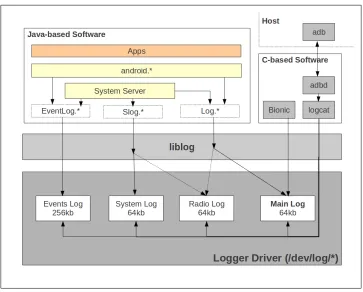
Logger 35
Other Notable Androidisms 37
Hardware Support 38
The Linux Approach 38
Android's General Approach 39
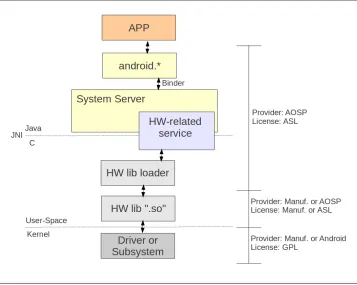
Loading and Interfacing Methods 40
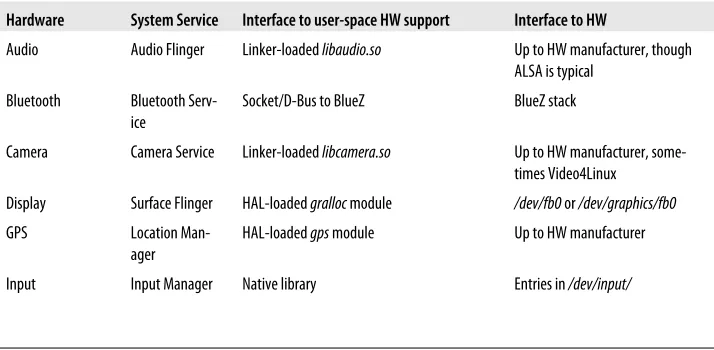
Device Support Details 42
Native User-Space 43
Filesystem layout 44
Libraries 45
Init 47
Toolbox 48
Daemons 49
Command-Line Utilities 50
Dalvik and Android's Java 50
Java Native Interface (JNI) 52
System Services 53
Service Manager and Binder Interaction 55
Calling on Services 57
A Service Example: the Activity Manager 57
Stock AOSP Packages 57
System Startup 59
3. AOSP Jumpstart . . . 63
Getting the AOSP 63
Inside the AOSP 65
Build Basics 68
Build System Setup 68
Building Android 69
Running Android 73
Using ADB 75
Mastering the Emulator 79
4. The Build System . . . 85
Comparisons With Other Build Systems 85
Architecture 87
Configuration 88
envsetup.sh 91
Main Make Recipes 96
Cleaning 98
Module Build Templates 98
Output 102
Build Recipes 104
The Default droid Build 104
Seeing the Build Commands 105
Building the SDK for Linux and MacOS 105
Building the SDK for Windows 106
Building the CTS 106
Building the NDK 108
Updating the API 109
Building a Single Module 110
Building Out of Tree 110
Basic AOSP Hacks 112
Adding an App 112
Adding a Native Tool or Daemon 113
Adding a Native Library 114
Adding a Device 115
Preface
Android's growth is phenomenal. In a very short time-span, it has succeeded in be-coming one of the top mobile platforms in the market. Clearly, the unique combination of open source licensing, aggressive go-to-market, and trendy interface is bearing fruit for Google's Android team. Needless to say, the massive user uptake generated by An-droid has not gone unnoticed for handset manufacturers, mobile network operators, silicon manufacturers, and app developers. Products, apps and devices "for," "com-patible with," or "based on" Android seem to be coming out ever so fast.
Beyond its mobile success, however, Android is also attracting the attention of yet another, unintended crowd: embedded systems developers. While a large number of embedded devices have little to no human interface, a substantial number of devices which would traditionally be considered "embedded" do have user interfaces. For a goodly number of modern machines, in addition to pure technical functionality, de-velopers creating user-facing devices must also contend with human-computer inter-action (HCI) factors. Therefore, designers must either present users with an experience they are already familiar with or risk alienating users by requiring them to learn a lesser known or entirely new user experience. Before Android, the user interface choices available to the developers of such devices were fairly limited and limiting.
Clearly, embedded developers prefer offering users an interface they are already familiar with. Although that interface might have been window-based in the past—and hence a lot of embedded devices were based on classic window-centric, desktop-like or desk-top-based interfaces—Apple's iOS and Google's Android have forever democratized the use of touch-based iPhone-like graphical interfaces. This shift in user paradgims and expectations, combined with Android's open source licensing, have created a ground-swell of interest for Android within the embedded world.
de-velopers seriously entertaining the use of Android in their system were essentially re-duced to starting with Android's source code.
The purpose of this book is to remedy to that situation and enable you to embed An-droid in any device. You will therefore learn about AnAn-droid's architecture, how to nav-igate its source code, how to modify its various components, and how to create your own version for your particular device. In addition, you will learn how Android inte-grates into the Linux kernel and how to leverage Android's Linux heritage. For instance, we will discuss how to take "classic" Linux components such as glibc and BusyBox and package them as part of Android. Along the way, you will learn day-to-day tips and tricks, such as how to use Android's repo tool and integrate with or modify Android's build system.
Conventions Used in This Book
The following typographical conventions are used in this book: Italic
Indicates new terms, URLs, email addresses, filenames, and file extensions.
Constant width
Used for program listings, as well as within paragraphs to refer to program elements such as variable or function names, databases, data types, environment variables, statements, and keywords.
Constant width bold
Shows commands or other text that should be typed literally by the user.
Constant width italic
Shows text that should be replaced with user-supplied values or by values deter-mined by context.
This icon signifies a tip, suggestion, or general note.
Using Code Examples
This book is here to help you get your job done. In general, you may use the code in this book in your programs and documentation. You do not need to contact us for permission unless you’re reproducing a significant portion of the code. For example, writing a program that uses several chunks of code from this book does not require permission. Selling or distributing a CD-ROM of examples from O’Reilly books does require permission. Answering a question by citing this book and quoting example code does not require permission. Incorporating a significant amount of example code from this book into your product’s documentation does require permission.
We appreciate, but do not require, attribution. An attribution usually includes the title, author, publisher, and ISBN. For example: “Embedded Android by Karim Yaghmour (O’Reilly). Copyright 2011 Karim Yaghmour, 9781449308292.”
If you feel your use of code examples falls outside fair use or the permission given above, feel free to contact us at [email protected].
Safari® Books Online
Safari Books Online is an on-demand digital library that lets you easily search over 7,500 technology and creative reference books and videos to find the answers you need quickly.
With a subscription, you can read any page and watch any video from our library online. Read books on your cell phone and mobile devices. Access new titles before they are available for print, and get exclusive access to manuscripts in development and post feedback for the authors. Copy and paste code samples, organize your favorites, down-load chapters, bookmark key sections, create notes, print out pages, and benefit from tons of other time-saving features.
O’Reilly Media has uploaded this book to the Safari Books Online service. To have full digital access to this book and others on similar topics from O’Reilly and other pub-lishers, sign up for free at http://my.safaribooksonline.com.
How to Contact Us
Please address comments and questions concerning this book to the publisher: O’Reilly Media, Inc.
1005 Gravenstein Highway North Sebastopol, CA 95472
800-998-9938 (in the United States or Canada) 707-829-0515 (international or local)
We have a web page for this book, where we list errata, examples, and any additional information. You can access this page at:
http://www.oreilly.com/catalog/9781449308292
To comment or ask technical questions about this book, send email to: [email protected]
For more information about our books, courses, conferences, and news, see our website at http://www.oreilly.com.
Find us on Facebook: http://facebook.com/oreilly Follow us on Twitter: http://twitter.com/oreillymedia
CHAPTER 1
Introduction
Putting Android on an embedded device is a complex task involving an intricate un-derstanding of its internals and a clever mix of modifications to the Android Open Source Project (AOSP) and the kernel on which it runs, Linux. Before we get into the details of embedding Android, however, let's start by covering some essential back-ground that embedded developers should factor in when dealing with Android, such as Android's hardware requirements and the legal framework surrounding Android and its implications within an embedded setting. First let's look at where Android comes from and how it's developed.
History
The story goes* that back in early 2002 Google's Larry Page and Sergey Brin attended
a talk at Stanford about the development of the then-new Sidekick phone by Danger Inc. The speaker was Andy Rubin, Danger's CEO at the time, and the Sidekick was one of the first multi-function, Internet-enabled devices. After the talk, Larry went up to look at the device and was happy to see that Google was the default search engine. Soon after, both Larry and Sergey became Sidekick users.
Despite its novelty and enthusiatic users, however, the Sidekick didn't achieve com-mercial success. By 2003, Rubin and Danger's board agreed it was time for him to leave. After trying out a few things, Rubin decided he wanted to get back into the phone OS business. Using a domain name he previously-owned, android.com, he set out to create an open OS for phone manufacturers. After investing most of his savings on the project and having received some additional seed money, he set out to get the company funded. Soon after, in August 2005, Google acquired Android Inc. with little fanfare.
Between its acquisition and its announcement to the world in November 2007, Google let little to no information out about Android. Instead, the development team worked furiously on the OS while deals and prototypes were being worked on behind the scenes. The initial announcement was made by the Open Handset Alliance (OHA), a group of companies unveiled for the occasion with its stated mission being the devel-opment of open standards for mobile device and Android being its first product. A year later, in September 2008, the first open source version of Android, 1.0, was made available.
Several Android versions have been released since then, and the OS's progression and development is obviously more public. As we will see later, though, much of the work on Android continues to be done behind closed doors. Table 1-1 provides a summary of the various Android releases and the most notable features found in the correspond-ing AOSP.
Table 1-1. Android Versions
Version Release date Codename Most notable feature(s) Open source
1.0 September 2008 Unknown Yes
1.1 February 2009 Unknown Yes
1.5 April 2009 Cupcake On-screen soft keyboard Yes
1.6 September 2009 Donut Battery usage screen and VPN
support Yes
2.0, 2.0.1, 2.1 October 2009 Eclair Exchange support Yes
2.2 May 2010 Froyo Just-In-Time (JIT) compile Yes
2.3 December 2010 Gingerbread SIP and NFC support Yes
3.0 January 2011 Honeycomb Tablet form-factor support No
3.1 May 2011 Honeycomb USB host support and APIs No
4.0 December 2011 (projected) Ice-Cream Sandwich Merged phone and tablet
form-factor support Yes (projected)
Features and Characteristics
Google advertizes the following features about Android: Application framework
The application framework used by app developers to create what is commonly-referred to as Android apps. The use of this framework is documented online at http://developer.android.com and in books like O'Reilly's Learning Android. Dalvik Virtual Machine
Dalvik interprets .dex files. These files are generated by the dx utility using the .class files generate by the Java compiler part of the JDK.
Integrated browser
Android includes a WebKit-based browser as part of its standard list of applica-tions. App developers can use the WebView class to use the WebKit engine within their own apps.
Optimized graphics
Android provides its own 2D graphics library but relies on OpenGL ES for its 3D capabilities.
SQLite
This is the standard SQLite database found at http://www.sqlite.org and made available to app developers through the application framework.
Media support
Android provides support for a wide range of media formats through StageFright, its custom media framework. Prior to 2.2, Android used to rely on PacketVideo's OpenCore framework.
GSM telephony support
The telephony support is hardware dependent and device manufacturers must provide a HAL module in order to enable Android to interface with their hardware. HAL modules will be discussed in the next chapter.
Bluetooth, EDGE, 3G, and WiFi
Android includes support for most wireless connection technologies. While some are implemented in Android-specific fashion, such as EDGE and 3G, others are provided in the same as in plain Linux, as in the case of Bluetooth and WiFi. Camera, GPS, compass, and accelerometer
Interfacing with the user's environment is key to Android. APIs are made available in the application framework to access these devices, and some HAL modules are required to enable their support.
Rich development environment
This is likely one of Android's greatest assets. The development environment avail-able to developers makes it very easy to get started with Android development. A full SDK is freely available to download along with an emulator, an Eclipse plugin, and a number of debugging and profiling tools.
In addition to its basic feature-set, the Android platform has a few characteritics that make it an especially interesting basis for embedded use. Here's a quick summary: Broad app ecosystem
At the time of this writing there were 200,000 apps in the Android Market. This compares quite favorably to the Apple App Market's 350,000 apps and ensures that you have a large pool to choose from should you want to prepackaged appli-cations with your embedded device.†
Consistent app APIs
All APIs provided in the application framework are meant to be forward-compat-ible. Hence, custom apps you develop for inclusion in your embedded system should continue working in future Android versions. In contrast, modifications you make to Android's source code are not guaranteed to continue applying or even working in the next Android release.
Replaceable components
Because Android is open source, and as a benefit of its architecture, a lot of its components can be replaced outright. For instance, if you don't like the default app Launcher (home screen), you can write your own. More fundamental changes can also be made to Android. The GStreamer‡ developers, for example, were able
to replace StageFright, the default media framework in Android, with GStreamer without modifying the app API.
Extendable
Another benefit from Android's openness and its architecture is that adding sup-port for additional features and hardware is relatively straightforward. You just need to emulate what the platform is doing for other hardware or features of the same type. For instance, you can add support for custom hardware to the HAL by adding a handful of files.
Customizable
If you'd rather use existing components, such as the existing Launcher app, you can still customize them to your liking. Whether it be tuning their behavior or changing their look and feel, you are again free to modify the AOSP as needed.
Development Model
When considering whether to use Android, it's crucial that you understand the rami-fications its development process may have on any modirami-fications you make to it or any dependencies you may have towards its internals.
† Bare in mind that you likely need to enter into some kind of agreement with an app's publisher before you can package that app. The app's availability in the Android Market doesn't imply the right for you as a 3rd party to redistribute it.
Differences With "Classic" Open Source Projects
Android's open source nature is one of its most trumpeted features. Indeed, as we've just seen, many of the software engineering benefits that derive from being open source apply to Android.
Despite its licensing, however, Android is unlike most open source projects in that its development is mostly done behind closed doors. The vast majority of open source projects, for example, have public mailing lists and forums where the main developers can be found interacting with each other, and public source repositories providing access to the main development branch's tip. No such thing can be found for Android. This is best summarized by Andy Rubin himself: “Open source is different than a com-munity-driven project. Android is light on comcom-munity-driven, somewhat heavy on open source.”
Whether we like it or not, Android is mainly developed within Google by the Android development team and the public is not privy to either internal discussions or the tip of the development branch. Instead, Google makes code-drops every time a new version of Android ships on a new device, which is usually every 6 months. For instance, a few days after the Samsung Nexus S was released in December 2010, the code for the new version of the Android it was running, 2.3/Gingerbread, was made publicly available at http://android.git.kernel.org/.
Obviously there is a certain amount of discomfort within the open source community with the contined use of the term "open source" within the context of project whose development model contradicts the standard modus operandi typically associated with open source projects, especially given Android's popularity. The open source com-munity has not historically been well served by projects that had adopted a similar development model.
been a true open source project, a public mailing list archive would exist where all this information, or pointers to it, would be available.
That being said, it's important to remember how significant a contribution Google is making by distributing Android under an open source license. Despite its awkward development model from an open source community perspective, it remains that Goo-gle's work on Android is a godsend for a large number of developers. Plus, it has ac-complished one thing no other open source projects was ever able to: create a massively successful Linux distribution. It would, therefore, be hard to fault Android's develop-ment team for their work.
Furthermore, it can easily be argued that from a business and go-to-market perspective a community-driven process would definitely knock the wind out of any product an-nouncements Google would attempt to release, making it impossible to create "buzz" around press announcements and the like since every new feature would be developed in the open. That is to say nothing of the non-deterministic nature of community-driven processes that can see a group of people take years to agree on the best way to implement a given feature set. And, simply based on track record, Android's success has definitely benefited from Google's ability to rapidly move it forward and generate press interest based on releases of cool new products.
Feature Inclusion, Roadmaps, and New Releases
In brief, there is no publicly available roadmap for features and capabilities in future Android releases. At best, Google will announce ahead of time the name and approx-imate release date of the next version. Usually, you can expect a new Android release to be made in time for the Google I/O conference, which is typically held in May, and another release by year end. What will be in that release, though, is anyone's guess. Typically, however, Google will choose a single manufacturer to work with on the next Android release. During that period, Google will work very closely with that single manufacturer's engineers to ready up the next Android version to work on a targeted upcoming flagship device. During that period, the manufacturer's team is reported to have access to the tip of the development branch. Once the device is put on the market, the corresponding source code dump is made to the public repositories. For the next release, they choose another manufacturer and start over.
plans are that both the phone and tablet form factor support will be merged into the upcoming Android 4.0/Ice-Cream Sandwich release.
Ecosystem
As of June 2011:• 400,000 Android phones are activated each day, up from 300,000 in December 2010 and 200,000 in August of that same year.
• The Android Market contains arond 200,000 apps. In comparison, the Apple App Store has 350,000 apps.
• More than a third of all phones sold in the US are based on Android.
Android is clearly on the upswing. In fact, Gartner predicted in April 2011 that Android would hold about 50% of the smartphone market by 2015. Much as Linux disrupted the embedded market about a decade ago, Android is poised to make its mark. Not only will it flip the mobile market on its head, eliminating or sidelining even some of the strongest players, but in the embedded space it is likely going to become the de-facto standard UI for a vast majority of user-centric embedded devices.
An entire ecosystem is therefore rapidly building around Android. Silicon and system-on-chip (SoC) manufacturers such as ARM, TI, Qualcomm, Freescale, NVidia and TI have added Android support for their products, and handset and tablet manufacturers such as Motorola, Samsung, HTC, Sony-Ericsson, LG, Archos, DELL, ASUS, etc. ship an ever-increasing number of Android-equipped devices. This ecosystem also includes an increasing number of diverse players, such as Amazon, Verizon, Sprint and Barnes&Nobles, creating their own application markets.
Grass-roots communities and projects are also starting to sprout around Android, even though it is developed behind closed doors. Some of those efforts follow in the footsteps of phone modders, which essentially rely on hacking the binaries provided by the man-ufacturers to create their own modifications or variants, while others have a more open source tint to them, relying on the Android sources to create their own forks or addi-tions. The xda-developers.com online forum, for instance, is traditionally frequented by modders, while the cyanogenmod.com site hosts an Android fork which modifies the Android sources to provide additional features and enhancements. Other Android forks include Replicant (http://replicant.us), which aims at replacing as many of the Android components with Free Software as possible, and MIUI (http://en.miui.com/), which provides some cool UI hacks.
A Word on the Open Handset Alliance
consumers a richer, less expensive, and better mobile experience. Together we have developed Android™, the first complete, open, and free mobile platform."
Beyond the initial announcement, however, it is unclear what role the OHA plays. For example, an attendee at the "Fireside Chat with the Android Team" at Google I/O 2010 asked the panel what privileges were confered to him as a developer for belonging to a company which is part of the OHA. After asking around the panel, the speaker essen-tially answered that they didn't know because they aren't the OHA. Hence, it would appear that OHA membership benefits are not clear to the Android development team itself.
The role of the OHA is further blurred by the fact that it does not seem to be a full-time organization with board members and permanent staff. Instead, it's just an "alliance." In addition, there is no mention of the OHA within any of Google's Android an-nouncements, nor do any new Android announcements emanate from the OHA. In sum, one would be tempted to speculate that Google likely put the OHA together mainly as a marketing front to show how much industry support there was for Android, but that in practice it has little to no bearing on Android's development.
Getting "Android"
There are two main pieces required to get Android working on your embedded system: an Android-compatible Linux kernel and the Android Platform.
While the proper term to identify the source code corresponding to the Android distribution running on top of an Android-compatible kernel is "Android Platform," it is commonly referred to as "the AOSP"—as is the case in fact throughout this book—even though the Android Open Source Project proper, which is hosted at http://android.git.kernel.org/, contains a few more components in addition to the Platform, such as sample Linux kernel trees and additional packages that would not typ-ically be downloaded when the Platform is fetched using the usual repo command.
Hacking Binaries
Lack of access to Android sources hasn't discouraged passionate modders from actually hacking and customizing Android to their liking. For example, the fact that Android 3.x/Honeycomb isn't available hasn't precluded modders from getting it to run on the Barnes&Noble Nook. They achieved this by retrieving the executable binaries found in the emulator image provided as part of the Honeycomb SDK and used those as-is on the Nook, albeit forfeiting hardware accelaration. The same type of hack has been used to "root" or update versions of various Android components on actual devices for which the manufacturer provides no source code.
Legal Framework
Like any other piece of software, Android's use and distribution is constricted by a set of licenses, intellectual property restrictions, and market realities. Let's look at a few of these.
Code Licenses
As we discussed earlier, there are two parts to "Android": an Android-compatible Linux kernel and an AOSP release. Even though it is modified to run the AOSP, the Linux kernel continues to be subject to the same GNU GPLv2 license that it has always been under. As such, remember that you are not allowed to distribute any modifications you make to the kernel under any other license than the GPL. Hence, if you take a kernel version from android.git.kernel.org and modify it to make it run on your system, you are allowed to distribute the resulting kernel image in your product only so long as you abide by the GPL and, therefore, make the sources used to create the image, including your modifications, available to recipients under the terms of the GPL.
applications that run on top of the Linux kernel and distribute them under the license of your choice.
These rules and their applicability are generally well understood and accepted within open source circles and by most companies that opt to support the Linux kernel or use it as the basis for their products. In addition to the kernel, a large number of key com-ponents of Linux-based distributions are typically licensed under one form or another of the GPL. The GNU C libary (glibc) and the GNU compiler (GCC), for example, are licensed under the LGPL and the GPL respectively. Important packages commonly used in embedded Linux systems such as uClibc and BusyBox are also licensed under the LGPL and the GPL.
Not everyone is comfortable with the GNU GPL, however. Indeed, the restrictions it imposes on the licensing of derived works can pose a serious challenge to large organ-izations, especially given geographic distribution, cultural differences amongst the var-ious locations of development sub-units, and the reliance on external subcontractors. A manufacturer selling a product in North America, for example, might have to deal with dozens, if not hundreds, of suppliers to get that product to the market. Each of these suppliers might deliver a piece which may or may not contain GPL'd code. Yet the manufacturer whose name appears on the item sold to the customer will be bound to provide source to GPL components regardless of which supplier originated them. In addition, processes must be put in place to ensure engineers that work on GPL-based projects are abiding by the licenses.
When Google set out to work with manufacturers on their "open" phone OS, therefore, it appears that very rapidly it became clear that the GPL had to be avoided in as much as possible. In fact, other kernels than Linux were apparently considered, but Linux was chosen because it already had strong industry support, particularly from ARM silicon manufacturers, and because it was fairly well isolated from the rest of the system, so that its GPL licensing would have little impact.§
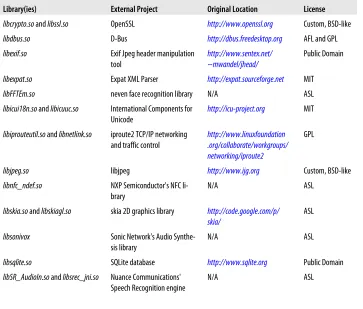
It was decided, though, that every effort would be made to make sure that the vast majority of user-space components would be based on licenses that did not pose the same logistical issues as the GPL. That is why the vast majority of the components created by Google for the AOSP are published under the Apache License 2.0 (a.k.a. ASL) with some key components, such as the Bionic library and the Toolbox utility, licensed under the BSD license. Some classic open source projects are also incorporated, mostly as-is, into the AOSP within the external/ directory. The assumption is that their distribution in binary form should not pose any problems since they aren't meant to be typically customized by the OEM (i.e., no derived works are expected to be created) and are readily available for all to download at android.git.kernel.org, thereby comply-ing, if applicable, with the GPL's requirement that redistribution of derivative works contibue being made under the GPL.
Unlike the GPL, the ASL does not require that derivative works be published under a specific license. In fact, you can choose whatever license best suits your needs for the modifications you make. Here are the relevant portions from the ASL (the full license is available at http://www.apache.org/licenses/):
• "Subject to the terms and conditions of this License, each Contributor hereby grants to You a perpetual, worldwide, non-exclusive, no-charge, royalty-free, ir-revocable copyright license to reproduce, prepare Derivative Works of, publicly display, publicly perform, sublicense, and distribute the Work and such Derivative Works in Source or Object form."
• "... You may add Your own copyright statement to Your modifications and may provide additional or different license terms and conditions for use, reproduction, or distribution of Your modifications, or for any such Derivative Works as a whole, provided Your use, reproduction, and distribution of the Work otherwise complies with the conditions stated in this License."
Furthermore, the ASL explicitly provides a patent license grant, meaning that you do not require any patent license from Google for using the ASL-licensed Android code. It also imposes a few "administrative" requirements such as the need to clearly mark modified files, to provide recipients with a copy of the ASL license, to preserve NO-TICE files as-is, etc. Essentially, though, you are free to license your modifications under the terms that fit your purpose. The BSD license that covers Bionic and Toolbox allows similar binary-only distribution.
Hence, manufacturers can take the AOSP and customize it to their needs while keeping those modifications proprietary if they wish, so long as they continue abiding by the rest of the provisions of the ASL. If nothing else, this dimishes the burden of having to implement a process to track all modifications in order to provide those modifications back to recipients who would be entitled to request them had the GPL been used in-stead.
Adding GPL-licensed components
Although every effort has been made to keep the GPL out of Android's user-space in as much as possible, there are cases where you may want to explicitly add GPL-licensed components to your Android distribution. For example, you want to include either glibc of uClibc which are two POSIX-compliant C libraries—in contrast to Android's Bionic which is not—because you would like to run pre-existing Linux applications on Android without having to port them over to Bionic. Or you may want to use BusyBox in addition to Toolbox since the latter is much more limited in functionality that the former.
with some additional GPL packages, remember that you must follow the licenses' re-quirements.
Branding Use
While being very generous with Android's source code, Google controls most Android-related branding elements more strictly. Let's take a look at some of those elements and their associated terms of use. For the official list along with the official terms, have a look at http://www.android.com/branding.html.
Android Robot
This is the familiar green robot seen everywhere around all things Android. Its role is similar to the Linux penguin and the permissions for its use are similarly per-missive. In fact Google states that it "can be used, reproduced, and modified freely in marketing communications." The only requirement is that proper attibution be made according to the terms of the Creative Commons Attribution license. Android Logo
This is the set of letters in custom typeface that spell out the letters A-N-D-R-O-I-D and that appear during the device and emulator bootup, and on the android .comwebsite. You are not authorized to use that logo under any circumstance. Android Custom Typeface
This is the custom typeface used to render the Android logo and its use is as re-stricted as the logo.
"Android" in Official Names
As Google states, "the word 'Android' may be used only as a descriptor, 'for An-droid'" and so long as proper trademark attribution is made. You cannot, for in-stance, name your product "Foo Android" without Google's permission. As the FAQ for the Android Compatiblity Program (ACP), which we will cover later in this chapter, states: "... if a manufacturer wishes to use the Android name with their product ... they must first demonstrate that the device is compatible." Brand-ing your device as beBrand-ing "Android" is therefore a privilege which Google intends to police. In essence, you will have to make sure your device is compliant and then talk to Google and enter into some kind of agreement with them before you can advertize your device as being "Foo Android."
"Droid" in Official Names
You may not use "Droid" alone in a name, such as "Foo Droid" for example. For some reason the author hasn't yet entirely figured out, "Droid" is a trademark of Lucasfilm. Achieve a Jedi rank you likely must before you can use it.
"Android" in Messaging
Google's Own Android Apps
While the AOSP contains a core set of applications which are available under the ASL, "Android"-branded phones usually contain an additional set of "Google" applications that are not part of the AOSP, such as the "Android Market", YouTube, "Maps and Navigation", Gmail, etc. Obviously, users expect to have these apps as part of Android, and you might therefore want to make them available on your device. If that is the case, you will need to abide by the ACP and enter in agreement with Google, very much in line with what you need to do to be allowed to use "Android" in your product's name. We will cover the ACP shortly.
Alternative App Markets
Though the main app market is the one hosted by Google and made available to users through the "Android Market" app installed on "Android"-branded devices, other play-ers are leveraging Android's open APIs and open source licensing to offer their own alternative app markets. Such is the case of online merchants like Amazon and Barnes&Noble, as well as mobile network operators such as Verizon and Sprint. There is, in fact, nothing to the author's knowledge that precludes you from creating your own app store. There is even at least one open source project, FDroid Repository (http: //f-droid.org/repository/), that provides both an app market application and a corre-sponding server backend under the GPL.
Oracle v Google
As part of acquiring Sun Microsystem, Oracle also acquired Sun's intellectual property (IP) rights to the Java language and, according to Java creator James Gosling,‖ it was clear during the acquisition process that Oracle intended from the onset to go after Google with Sun's Java IP portfolio. And in August 2010 it did just that, filing suit against Google, claiming that it infringed on serveral patents and commited copyright violations.
Without going into the merits of the case, it's obvious that Android does indeed heavily rely on Java. And clearly Sun created Java and owned a lot of intellectual property around the language it created. In what appears to have been an effort to anticipate any claims Sun may put forward against Android, nonetheless, the Android development team went out of its way to make the OS use as little of Sun's Java as possible. Java is in fact comprised mainly of three things: the language and its semantics, the virtual machine that runs the Java bytecode generated by the Java compiler, and the class library that contains the packages used by Java applications at run time.
The official versions of the Java components are provided by Oracle as part of the Java Development Kit (JDK) and the Java Runtime Environment (JRE). Android, on the other hand, relies only the Java compiler found in the JDK. Instead of using Oracle's Java VM, Android relies on Dalvik, a VM custom-built for Android, and instead of using the official class library, Android relies on Apache Harmony, a clean-room re-implementation of the class library. Hence, it would seem that Google did every rea-sonable effort to at least avoid any copyright and/or distribution issues.
Still, it remains to be seen where these legal proceedings will go. And it likely will take a few years to get resolved. In the interim, however, it appears that the judge presiding over the case wants to get the matter resolved in earnest. In May 2011, he ordered Oracle to cut its claims from 132 down to 3 and ordered Google to cut their prior art references down from several hundreds to 8. According to Groklaw,# he even seems
to be asking the parties whether "they anticipate that a trial will end up being moot." Another indirectly related, yet very relevant, development is that IBM joined Oracle's OpenJDK efforts in October 2010. IBM had been the main driving force behind the Apache Harmony, which is the class library used in Android, and its departure pretty much ensures the project has become orphaned. How this development impacts An-droid is unknown at the time of this writing.
Incidently, James Gosling joined Google in March 2011.
Hardware and Compliance Requirements
In principle, Android should run on any hardware that runs Linux. Android has in fact been made to run on ARM, x86, MIPS, SuperH, and PowerPC, all architectures sup-ported by Linux. A corrolary to this is that if you want to port Android to your hardware, you must first port Linux to it. Beyond being able to run Linux, though, there are few other hardware requirements for running the AOSP, apart from the logical requirement of having some kind of display and pointer mechanism to allow users to interact with the interface. Obviously, you might have to modify the AOSP to make it work on your hardware configuration, if you don't support a peripheral it expects. For instance, if you don't have a GPS, you might want to provide a mock GPS HAL module, as the Android emulator does, to the AOSP. You will also need to make sure that you have enough memory to store the Android images and a sufficiently powerful CPU to give the user a decent experience.
In sum, therefore, there are few restrictions if you just want to get the AOSP up and running on your hardware. If, however, you are working on a device that must carry "Android" branding or must include the standard Google-owned applications found in typical consumer Android devices such as the Maps or Market applications, you need to go through the ACP that I mentioned earlier. There are two separate yet
plementary parts to the ACP: the Compliance Definition Document (CDD) and the Compliance Test Suite (CTS). Even if you don't intend to participate in the ACP, you might still want to take a look at the CDD and the CTS, as they give a very good idea about the general mindset that went into the design goals of the Android version you intend to use.
Every Android release has its own CDD and CTS. You must therefore use the CDD and CTS that match the version you intend to use for your final product. If you switch Android releases mid-way through your project, because for instance a new Android release comes out with cool new features you'd like to have, you will need to make sure you comply with that release's CDD and CTS. Keep in mind also that you need to interact with Google to confirm compliance. Hence, switching may in-volve jumping through a few hoops and potential product delivery de-lays.
The overarching goal of the ACP, and therefore the CDD and the CTS, is to ensure a uniform ecosystem for users and application developers. Hence, before you are allowed to ship an "Android"-branded device, Google wants to make sure that you aren't frag-menting the Android ecosystem by introducing incompatible or crippled products. This, in turn, makes sense for manufacturers since they are benefiting from the com-pliance of others when they use the "Android" branding. For more detail about the ACP, have a look at http://source.android.com/compatibility/.
Note that Google reserves the right to decline your participation in the Android ecosystem, and therefore be able to ship the "Android Market" app with your device and use the "Android" branding. As stated on their site: "Unfortunately, for a variety of legal and business reasons, we aren't able to automatically license Android Market to all compatible devices."
Compliance Definition Document
The CDD is the policy part of the ACP and is available at the ACP URL above. It specifies the requirements that must be met for a device to be considered compatible. The lan-guage in the CDD is based on RFC2119 with a heavy use of "MUST," "SHOULD," "MAY," etc. to describe the different attributes. Around 25 pages in length, it covers all aspects of the device's hardware and software capabilities. Essentially, it goes over every aspect that cannot simply be automatically tested using the CTS. Let's go over some of what the CDD requires.
Software
This section lists the Java and Native APIs along with the web, virtual machine and user interface compatibility requirements. Essentially, if you are using the AOSP, you should readily conform to this section of the CDD.
Application Packaging Compatibility
This section specifies that your device must be able to install and run .apk files. All Android apps developed using the Android SDK are compiled into .apk files, and these are the files that are distributed through the Android Market and installed on users' devices.
Multimedia Compatibility
Here, the CDD describes the media codecs (decoders and encoders), audio recording, and audio latency requirements for the device. The AOSP includes the StageFright multi-media framework, and you can therefore conform to the CDD by using the AOSP. However, you should read the audio recording and latency sections, as they contain specific technical information that may impact the type of hardware or hardware con-figuration your device must be equipped with.
Developer Tool Compatibility
This section lists the Android-specific tools that must be supported on your device. Basically, these are the common tools used during app development and testing: adb, ddms, and monkey. Typically, developers don't interact with these tools directly. In-stead, they usually develop within the Eclipse development environment and use the Android Development Tool (ADT), plugin which takes care of interacting the lower-level tools.
Hardware Compatibility
This is probably the most important section for embedded developers as it likely has profound ramifications on the design decisions made for the targeted device. Here's a summary of what each subsection spells out.
Display and Graphics
• Your device's screen must be at least 2.5" in physical diagonal size. • Its density must be at least 100dpi.
• Its aspect ratio must be between 4:3 and 16:9.
• It must support dynamic screen orientation from portrait to landscape and vice-versa. If orientation can't be changed, it must support letterboxing since apps may force orientation changes.
Input Devices
• Your device must support the Input Method Framework, which allows devel-opers to create custom on-screen, soft keyboards.
• It must provide at least one soft keyboard.
• It can't include a hardware keyboard that doesn't conform the API. • It must provide "HOME," "MENU," and "BACK" buttons.
• It must have a touchscreen, whether it be capacitive or resistive. • It should support independent tracked points (multi-touch) if possible. Sensors
While all sensors are qualified using "SHOULD," meaning that they aren't com-pulsory, your device must accurately report the presence or absence of sensors and must return an accurate list of supported sensors.
Data Connectivity
The most important item here is an explicit statement that Android may be used on devices that don't have telephony hardware. This was added to allow for An-droid-based tablet devices. Furthermore, the document says that your device should have hardware support for 802.11x, Bluetooth, and NFC. Ultimately, your device must support some form of networking that permits a bandwidth of 200Kbits/s.
Cameras
Your device should include a rear-facing camera and may include a front-facing one as well.
Memory and Storage
• Your device must have at least 128MB for storing the kernel and user space. • It must have at least 150MB for storing user data.
• It must have at least 1GB of "shared storage," essentially meaning the SD card. • It must also provide a mechanism to access shared data from a PC. In other words, when the device is connected through USB, the content of the SD card must be accessible on the PC.
USB
This requirement is likely the one that most heavily demonstrates how user-centric "Android"-branded devices must be, since it essentially assumes the user owns the device and therefore requires you to allow users to fully control the device when it's connected to a PC. In some cases this might be a show-stopper for you, as you may not actually want or may not be able to have users connect your embedded device to a user's PC. Nevertheless, the CDD says that:
• It must implement the Android Debug Bridge (ADB) protocol as provided in the adb command over USB.
• It must implement USB mass storage, thereby allowing the device's SD card to be accessed on the host.
Performance Compatibility
Although the CDD doesn't specify CPU speed requirements, it does specify app-related time limitations that will impact your choice of CPU speed. For instance:
• The Browser app must launch in less than 1300ms. • The MMS/SMS app must launch in less than 700ms. • The AlarmClock app must launch in less than 650ms.
• Relaunching an already running app must take less time than the original launch.
Security Model Compatibility
Your device must conform to the security environment enforced by the Android ap-plication framework, Dalvik, and the Linux kernel. Specifically, apps must have access and be submitted to the permission model described as part of the SDK's documenta-tion. Apps must also be constrained by the same sandboxing limitations they have by running as separate processes with distinct UIDs in Linux. The filesystem access rights must also conform to those described in the developer documentation. Finally, if you aren't using Dalvik, whatever VM you use should impose the same security behavior as Dalvik.
Software Compatibility Testing
Your device must pass the CTS, including the human-operated CTS Verifier part. In addition, you device must be able to run specific reference applications from the An-droid Market.
Updatable Software
There has to be a mechanism for your device to be updated. This may be done over-the-air (OTA) with an offline update via reboot. It also may be done using a "tethered" update via a USB connection to a PC, or be done "offline" using removable storage.
Compliance Test Suite
Per-missions, etc. Once the tests are done, they will generate a .zip file containing XML files and screen-shots that you need to submit to [email protected].
Development Setup and Tools
There are two separate sets of tools for Android development: those used for application development and those used for platform development. If you want to set up an ap-plication development environment, have a look at Learning Android or Google's online documentation. If you want do platform development, as we will do here, your tools needs will vary, as we will see later in this book.
At the most basic level, though, you need to have a Linux-based workstation to build the AOSP. In fact, at the time of this writing, Google's only supported build environ-ment is 64-bit Ubuntu 10.04. That doesn't mean that another Ubuntu version won't work or that you won't be able to build the AOSP on a 32-bit system, but essentially that configuration reflects Google's own Android compile farms configuration. An easy way to get your hands dirty with AOSP work without changing your workstation OS is to create an Ubuntu virtual machine using your favorite virtualization tool. I typically use VirtualBox, since I've found that it makes it easy to access the host's serial ports in the guest OS.
CHAPTER 2
Internals Primer
As we've just seen, Android's sources are freely available for you to download, modify, and install for any device you choose. In fact, it is fairly trivial to just grab the code, build it, and run it in the Android emulator. To customize the AOSP to your device and its hardware, however, you'll need to first understand Android's internals to a certain extent. So we'll get a high-level view of Android internals in this chapters, and get the opportunity in later chapters to dig into parts of internals in greater detail, including tying said internals to the actual AOSP sources.
The discussion in this book is based on Android 2.3.x/Gingerbread. Although Android's internals have remained fairly stable over its lifetime up to the time of this writing, critical changes can come unannounced thanks to Android's closed development process. For instance, in 2.2/ Froyo and previous versions, the Status Bar was an integral part of the System Server. In 2.3/Gingerbread, the Status Bar was moved out of the System Server and now runs indepedently from it.*
App Developer's View
Given that Android's development API is unlike any other existing API, including any-thing found in the Linux world, it's important to spend some time understanding what "Android" looks like from the app developers' perspective, even though it's very differ-ent from what Android looks like for anyone hacking the AOSP. As an embedded developer working on embedding Android on a device, you might not have to actually deal directly with the idiosyncracies of Android's app development API, but some of your colleagues might. If nothing else, you might as well share a common linguo with
app developers. Of course, this section is merely a summary, and I recommend you read up on Android app development for more in-depth coverage.
Android Concepts
Application developers must take a few key concepts into account when developing Android apps. These concepts shape the architecture of all Android apps and dictate what developers can and cannot do. Overall, they make the users' life better, but they can sometimes be challenging to deal with.
Components
Android applications are made of loosely-tied components. Components of one app can invoke/use components of other apps. Most importantly, there is no single entry point to an Android app: no main() function or any equivalent. Instead, there are pre-defined events called intents that developers can tie their components to, thereby ena-bling their components to be activated on the occurrence of the corresponding events. A simple example is the component that handles the user's contacts database, which is invoked when the user presses a Contacts button in the Dialer or another app. An app therefore can have as many entry points as it has components.
There are four main types of components: Activities
Just as the "window" is the main building block of all visual interaction in window-based GUI systems, activities are the building block in an Android app. Unlike a window, however, activities cannot be "maximized," "minimized," or "resized." Instead, activities always take the entirety of the visual area and are made to be stacked up on top of each other in the same way as a browser remembers web-pages in the sequence they were accessed, allowing the user to go "back" to where he was previously. In fact, as described in the previous chapter, all Android devices must have a "BACK" button to make this behavior available to the user. In contrast to web browsing, though, there is no button corresponding to the "forward" browsing action; only "back" is possible.
One globally defined Android intent allows an activity to be displayed as an icon on the app launcher (the main app list on a phone.) Because the vast majority of apps want to appear on the main app list, they provide at least one activity that is defined as capable of responding to that intent. Typically, the user will start from a particular activity and move through other end up creating a stack of activities all related to the one they originally launched; this stack of activities is a task. The user can then switch to another task by clicking the HOME button and starting another activity stack from the app launcher.
Services
typically remains active for the duration required by its caller. Most importantly, though, services can be made available to components outside an app, thereby exposing some of that app's core functionality to other apps. There is usually no visual sign of a service being active.
Broadcast Receivers
Broadcast receivers are akin to interrupt handlers. When a key event occurs, a broadcast receiver is triggered to handle that event on the app's behalf. For instance, an app might want to be notified when the battery level is low or when "airplane mode" (to shut down the wireless connections) has been activated. When not han-dling a specific event for which they are registered, broadcast receivers are other-wise inactive.
Content Providers
Content providers are essentially databases. Usually, an app will include a content provider if it needs to make its data accessible to other apps. If you're building a Twitter client app, for instance, you could give other apps on the device access the tweet feed you're presenting to the user through a content provider. All content providers present the same API to apps, regardless of how they are actually imple-mented internally. Most content providers rely on the SQLite functionality inclu-ded in Android, but they can also use files or other types of storage.
Intents
Component Lifecycle
Another central tenant of Android is that the user should never have to manage task switching. Hence, there is no task-bar or any equivalent functionality in Android. In-stead, the user is allowed to start as many apps as he wants and "switch" between apps by clicking HOME to go to the home screen and clicking on any other app. The app he clicks may be an entirely new one, or one that he previously started and for which an activity stack (a.k.a. a "task") already exists.
The corrollary to, or consequence of, this design decision is that apps gradually use up more and more system resources as they are started, which can't go on forever. At some point, the system will have to start reclaiming the resources of the least recently used or non-priority components in order to make way for newly-activated components. Yet still, this resource recycling should be entirely transparent to the user. In other words, when a component is taken down to make way for new one, and then the user returns to the original component, it should start up at the point where it was taken down and act as if it was waiting in memory all along.
To make this behavior possible, Android defines a standard lifecycle components. An app developer must manage her components' lifecycle by implementing a series of call-backs for each component that are triggered by events related to the component life-cycle. For instance, when an activity is no longer in the foreground (and therefore more likely to be destroyed than if it's in the foreground), its onPause() callback is triggered. Managing component lifecycles is one of the greatest challenges faced by app devel-opers, because they must carefully save and restore component states on key transi-tional events. The desired end result is that the user never needs to "task switch" be-tween apps or be aware that components from previously-used apps were destroyed to make way for new ones he started.
Manifest File
If there has to be a "main" entry point to an app, the manifest file is likely it. Basically, it informs the system of the app's components, the capabilities required to run the app, the minimum level of the API required, any hardware requirements, etc. The manifest is formatted as an XML file and resides at the top-most directory of the app's sources as AndroidManifest.xml. The apps' components are typically all described statically in the manifest file. In fact, apart from broadcast receivers, which can be registered at runtime, all other components must be declared at build time in the manifest file.
Processes and Threads
Linux process. Hence, developers should avoid making long or blocking operations in standard components and use threads instead.
And because the user is essentially allowed to activate as many components as he wants, several Linux processes are typically active at any time to serve the many apps con-taining the user's components. When there are too many processes running to allow for new ones to start, the Linux kernel's Out-Of-Memory (OOM) killing mechanisms will kick in. At that point, Android's in-kernel OOM handler will get called and it will determine which processes must be killed to make space.
Put simply, the entirety of Android's behavior is predicated on low-memory conditions. If the developer of the app whose process is killed by Android's OOM handler has implemented his components' lifecycles properly, the user should see no adverse be-havior. For all practical purposes, in fact, the user should not even notice that the process housing the app's components went away and got recreated "automagically" later.
Remote Procedure Calls (RPC)
Much like many other components of the system, Android defines its own RPC/IPC†
mechanism: Binder. So communication across components is not done using the typical System V IPC or sockets. Instead, components use the in-kernel Binder mechanism, accessible through /dev/binder, which will be covered later in this chapter.
App developers, however, do not use the Binder mechanism directly. Instead, they must define and interact with interfaces using Android's Interface Definition Language (IDL). Interface definitions are usually stored in an .aidl file and are processed by the aidl tool to generate the proper stubs and marshalling/unmarshalling code required to transfer objects and data back and forth using the Binder mechanism.
Framework Intro
In addition to the concepts we just discussed, Android also defines its own development framework, which allows developers to access functionality typically found in other development frameworks. Let's take a brief look at this framework and its capabilities. User Interface
UI elements in Android include traditional widgets such as buttons, text boxes, dialogs, menus, and event handlers. This part of the API is relatively straight-for-ward and developers usually find their way around it fairly easily if they've already coded for any other UI framework.
All UI objects in Android are built as descendants of the View class and are organized within a hierarchy of ViewGroups. An activity's UI can actually be specified either
statically in XML (which is the usual way) or declared dynamically in Java. The UI can also be modified at runtime in Java if need be. An activity's UI is displayed when its content is set as the root of a ViewGroup hierarchy.
Data Storage
Android presents developers with several storage options. For simple storage needs, Android provides shared preferences, which allows developers to store key-pair values either in a data-set shared by all components of the app or within a specific separate file. Developers can also manipulate files directly. These files may be stored privately by the app, and therefore inaccessible to other apps, or made readable and/or writeable by other apps. App developers can also use the SQLite functionality included in Android to manage their own private database. Such a database can then be made available to other apps by hosting it within a content provider component.
Security and Permissions
Security in Android is enforced at the process level. In other words, Android relies on Linux's existing process isolation mechanisms to implement its own policies. To that end, every app installed gets its own UID and GID. Essentially, it's as if every app is a separate "user" in the system. And as in any multi-user Unix system, these "users" cannot access each others' resources unless permissions are explicitely granted to do so. In effect, each app lives in its own separate sandbox.
To exit the sandbox and access key system functionality or resources, apps must use Android's permission mechanisms, which require developers to statically de-clare the permissions needed by an app in its manifest file. Some permissions, such as the right to access the Internet (i.e. use sockets), dial the phone, or use the camera, are predefined by Android. Other permissions can be declared by app developers and then be required for other apps to interact with a given app's com-ponents. When an app is installed, the user is prompted to approve the permissions required to run an app.
Access enforcement is based on per-process operations and requests to access a specific URI,‡ and the decision to grant access to a specific functionality or resource
is based on certificates and user prompts. The certificates are the ones used by app developers to sign the apps they make available on the Android Market. Hence, developers can restrict access to their apps' functionality to other apps they them-selves created in the past.
The Android development framework provides a lot more functionality, of course, than can be covered here. I invite you to read up on Android app development elsewhere or visit developer.android.com for more information on 2D and 3D graphics, multi-media, location and maps, Bluetooth, NFC, etc.
App Development Tools
The typical way to develop Android applications is to use the freely available Android Software Development Kit (SDK). This SDK, along with Eclipse, its corresponding Android Development Tools (ADT) plugin, and the QEMU-based emulator in the SDK, allow developers to do the vast majority of development work straight from their workstation. Developers will also usually want to test their app on real devices prior to making it available on the Android Market, as there usually are runtime behavior dif-ferences between the emulator and actual devices. Some software publishers take this to the extreme and test their apps on several dozens of devices before shipping a new release.
Even if you aren't going to plan to develop any apps for your embedded system, I highly suggest you set up the development environment used by app developers on your workstation. If nothing else, this will allow you to validate the effects of modifications you make to the AOSP using basic test applications. It will also be essential if you plan on extending the AOSP's API and therefore create and distribute your own custom SDK. To set up an app development environment, follow the instructions provided by Google at the developer kit site just mentioned, or have a look at the book Learning Android (O'Reilly).
Native Development
While the majority of apps are developed exclusively in Java using the development environment we just discussed, certain developers need to run some C code natively. To this end, Google has made the Native Development Kit (NDK) available to devel-opers. As advertized, this is mostly aimed at game developers needing to squeeze every last possible bit of performance out of the device their game is running on. And as such, the APIs made available within the context of the NDK are mostly geared towards graphics rendering and sensor input retrieval. The infamous Angry Birds game, for example, relies heavily on code running natively.
Another possible use of the NDK is obviously to port over an existing codebase to Android. If you've developed a lot of legacy C code over several years (a common sit-uation for development houses that have created applications for other mobile devices), you won't necessarily want to rewrite it in Java. Instead, you can use the NDK to compile it for Android and package it with some Java code to use some of the more Android-specific functionality made available by the SDK. The Firefox browser, for instance, relies heavily on the NDK to run some of its legacy code on Android.
the APIs made available through the NDK are mostly geared towards game develop-ment.
Sometimes embedded and system developers coming to Android expect to be able to use the NDK to do platform-level work. The word "native" in the NDK can be mis-leading in that regard, because the use of the NDK still involves all of the limitations and requirements that I've said to apply to Java app developers. So, as an embedded developer, remember that the NDK is useful for app developers to run C code that they can call from their Java code. Apart from that, the NDK will be of little to no use for the type of work you are likely to undertake.
Overall Architecture
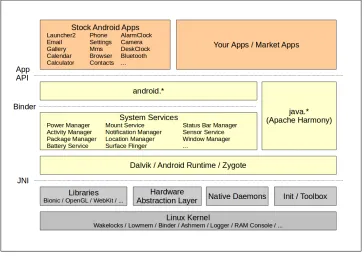
Figure 2-1 is probably one of the most important diagrams presented in this book, and I suggest you find a way to bookmark its location as we will often refer back to it, if not explicitly then implicitely. Although it's a simplified view—and we will get the chance to enrich it as we go—it gives a pretty good idea of Android's architecture and how the various bits and pieces fit together.
[image:39.504.71.435.54.311.2]System, no GTK, no BusyBox, and so on. Many veteran Linux and embedded Linux practitioners have indeed noted that Android feels very alien. Though the Android stack starts from a clean slate with regards to user-space, we will discuss how to get "legacy" or "classic" Linux applications and utilities to coexist side-by-side with the Android stack.
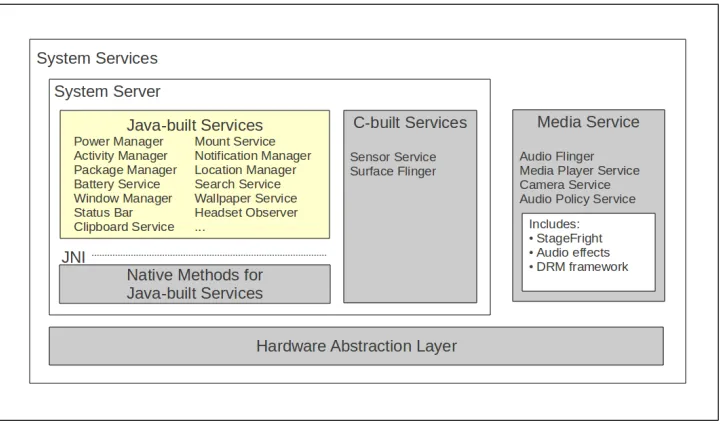
The Google developer documentation presents a different architectural diagram from that shown in Figure 2-1. The former is likely well suited for app developers, but omits key information that must be understood by embedded developers. For instance, Google's diagram and developer documentationthere offer little to no reference at the time of this writing to the System Server. Yet, as an embedded developer, you need to know what that component is, because it's one of the most important parts of Android and you might need to extend or interact with it directly. This is especially important to understand because you'll see Google's diagram presented and copied in several documents and presentations. If nothing else, remember that the System Server is rarely if at all exposed to app developers and that the bulk of information out there is aimed at app developers, not developers doing platform work.
Let's take a deeper look into each part of Android's architecture, starting from the bottom of Figure 2-1 and going up. Once we are done covering the various components, we'll end this chapter by going over the system's startup process.
Linux Kernel
The Linux kernel is the center-piece of all distributions traditionally labeled as "Linux," including mainstream distributions such as Ubuntu, Fedora, and Debian. And while it's available in "vanilla" form from the Linux Kernel Archives, most distributions apply their own patches to it to fix bugs and enhance the performance or customize the behavior of certain aspects of it before distributing it to their users. Android, as such, is no different in that the Android developers patch the "vanilla" kernel to meed their needs.
Android differs from standard practice, however, in relying on several custom func-tionalities that are significantly different from what is found in the "vanilla" kernel. In fact, whereas the kernel shipped by a Linux distribution can easily be replaced by a kernel from kernel.org with little to no impact to the rest of the distribution's compo-nents, Android's user-space components will simply not work unless they're running on an "Androidized" kernel. As I had mentioned in the previous chapter, Android kenels are, in sum, forks from the mainline kernel.