June 2010
Copyright © ITT Visual Information Solutions All Rights Reserved
External
Development
Guide
The IDL®, IDL Advanced Math and Stats™, ENVI®, and ENVI Zoom™ software programs and the accompanying procedures, functions, and documentation described herein are sold under license agreement. Their use, duplication, and disclosure are subject to the restrictions stated in the license agreement. ITT Visual Information Solutions reserves the right to make changes to this document at any time and without notice.
Limitation of Warranty
ITT Visual Information Solutions makes no warranties, either express or implied, as to any matter not expressly set forth in the license agreement, including without limitation the condition of the software, merchantability, or fitness for any particular purpose. ITT Visual Information Solutions shall not be liable for any direct, consequential, or other damages suffered by the Licensee or any others resulting from use of the software packages or their documentation.
Permission to Reproduce this Manual
If you are a licensed user of these products, ITT Visual Information Solutions grants you a limited, nontransferable license to reproduce this particular document provided such copies are for your use only and are not sold or distributed to third parties. All such copies must contain the title page and this notice page in their entirety.
Export Control Information
The software and associated documentation are subject to U.S. export controls including the United States Export Administration Regulations. The recipient is responsible for ensuring compliance with all applicable U.S. export control laws and regulations. These laws include restrictions on destinations, end users, and end use.
Acknowledgments
ENVI® and IDL® are registered trademarks of ITT Corporation, registered in the United States Patent and Trademark Office. ION™, IONScript™,
ION Java™, and ENVI Zoom™ are trademarks of ITT Visual Information Solutions. ESRI®, ArcGIS®, ArcView®, and ArcInfo® are registered trademarks of ESRI. Portions of this work are Copyright © 2008 ESRI. All rights reserved.
Numerical Recipes™ is a trademark of Numerical Recipes Software. Numerical Recipes routines are used by permission. GRG2™ is a trademark of Windward Technologies, Inc. The GRG2 software for nonlinear optimization is used by permission.
NCSA Hierarchical Data Format (HDF) Software Library and Utilities. Copyright © 1988-2001, The Board of Trustees of the University of Illinois. All rights reserved.
NCSA HDF5 (Hierarchical Data Format 5) Software Library and Utilities. Copyright © 1998-2002, by the Board of Trustees of the University of Illinois. All rights reserved.
CDF Library. Copyright © 2002, National Space Science Data Center, NASA/Goddard Space Flight Center. NetCDF Library. Copyright © 1993-1999, University Corporation for Atmospheric Research/Unidata. HDF EOS Library. Copyright © 1996, Hughes and Applied Research Corporation.
SMACC. Copyright © 2000-2004, Spectral Sciences, Inc. and ITT Visual Information Solutions. All rights reserved. This software is based in part on the work of the Independent JPEG Group.
Portions of this software are copyrighted by DataDirect Technologies, © 1991-2003. BandMax®. Copyright © 2003, The Galileo Group Inc.
Portions of this computer program are copyright © 1995-1999, LizardTech, Inc. All rights reserved. MrSID is protected by U.S. Patent No. 5,710,835. Foreign Patents Pending.
Portions of this software were developed using Unisearch’s Kakadu software, for which ITT has a commercial license. Kakadu Software. Copyright © 2001. The University of New South Wales, UNSW, Sydney NSW 2052, Australia, and Unisearch Ltd, Australia.
This product includes software developed by the Apache Software Foundation (www.apache.org/).
MODTRAN is licensed from the United States of America under U.S. Patent No. 5,315,513 and U.S. Patent No. 5,884,226. QUAC and FLAASH are licensed from Spectral Sciences, Inc. under U.S. Patent No. 6,909,815 and U.S. Patent No. 7,046,859 B2. Portions of this software are copyrighted by Merge Technologies Incorporated.
Support Vector Machine (SVM) is based on the LIBSVM library written by Chih-Chung Chang and Chih-Jen Lin (www.csie.ntu.edu.tw/~cjlin/libsvm), adapted by ITT Visual Information Solutions for remote sensing image supervised classification purposes.
IDL Wavelet Toolkit Copyright © 2002, Christopher Torrence.
IMSL is a trademark of Visual Numerics, Inc. Copyright © 1970-2006 by Visual Numerics, Inc. All Rights Reserved. Other trademarks and registered trademarks are the property of the respective trademark holders.
External Development Guide 3
Contents
Chapter 1
External Development Overview
... 11
About This Manual ... 12
Supported Inter-Language Communication Techniques in IDL ... 13
Dynamic Linking Terms and Concepts ... 20
When Is It Appropriate to Combine External Code with IDL? ... 22
Skills Required to Combine External Code with IDL ... 23
IDL Organization ... 27
External Definitions ... 29
Interpreting Logical Boolean Values ... 30
Compilation and Linking Details ... 31
Contents External Development Guide
Part I: Techniques That Do Not Use IDL’s Internal API
Chapter 2
Using SPAWN and Pipes
... 37
Chapter 3
Using CALL_EXTERNAL
... 43
The CALL_EXTERNAL Function ... 44
Passing Parameters ... 54
Using Auto Glue ... 56
Basic C Examples ... 58
Wrapper Routines ... 62
Passing String Data ... 64
Passing Array Data ... 68
Passing Structures ... 70
Fortran Examples ... 72
Chapter 4
Remote Procedure Calls
... 77
IDL and Remote Procedure Calls ... 78
Using IDL as an RPC Server ... 79
Client Variables ... 80
Linking to the Client Library ... 81
Compatibility with Older IDL Code ... 83
The IDL RPC Library ... 85
RPC Examples ... 110
Part II: IDL’s Internal API
Chapter 5
IDL Internals:
Types
... 113
Type Codes ... 114
Mapping of Basic Types ... 116
External Development Guide Contents
Chapter 6
IDL Internals:
Keyword Processing
... 121
IDL and Keyword Processing ... 122
Creating Routines that Accept Keywords ... 123
Overview Of IDL Keyword Processing ... 124
The IDL_KW_PAR Structure ... 126
The IDL_KW_ARR_DESC_R Structure ... 129
Keyword Processing Options ... 130
The KW_RESULT Structure ... 132
Processing Keywords ... 133
Cleaning Up ... 136
Keyword Examples ... 137
The Pre-IDL 5.5 Keyword API ... 144
Chapter 7
IDL Internals:
Variables
... 151
IDL and Internal Variables ... 152
The IDL_VARIABLE Structure ... 153
Scalar Variables ... 156
Array Variables ... 157
Structure Variables ... 159
Heap Variables ... 164
Temporary Variables ... 165
Creating an Array from Existing Data ... 172
Getting Dynamic Memory ... 174
Accessing Variable Data ... 176
Copying Variables ... 177
Storing Scalar Values ... 178
Obtaining the Name of a Variable ... 180
Looking Up Main Program Variables ... 181
Contents External Development Guide
Chapter 8
IDL Internals:
String Processing
... 183
String Processing and IDL ... 184
Accessing IDL_STRING Values ... 185
Copying Strings ... 186
Deleting Strings ... 187
Setting an IDL_STRING Value ... 188
Obtaining a String of a Given Length ... 189
Chapter 9
IDL Internals:
Error Handling
... 191
Message Blocks ... 192
Issuing Error Messages ... 195
Looking Up A Message Code by Name ... 201
Checking Arguments ... 202
Chapter 10
IDL Internals:
Type Conversion
... 205
Converting Arguments to C Scalars ... 206
General Type Conversion ... 207
Converting to Specific Types ... 208
Chapter 11
IDL Internals:
UNIX Signals
... 209
IDL and Signals ... 210
Signal Handlers ... 213
Establishing a Signal Handler ... 214
Removing a Signal Handler ... 215
UNIX Signal Masks ... 216
Chapter 12
IDL Internals:
Timers
... 221
IDL and Timers ... 222
External Development Guide Contents
Canceling Asynchronous Timer Requests ... 225
Blocking UNIX Timers ... 226
Chapter 13
IDL Internals: Files and Input/Output
... 229
IDL and Input/Output Files ... 230
File Information ... 232
Opening Files ... 236
Closing Files ... 239
Preventing File Closing ... 240
Checking File Status ... 241
Allocating and Freeing File Units ... 243
Detecting End of File ... 245
Flushing Buffered Data ... 246
Reading a Single Character ... 247
Output of IDL Variables ... 248
Adding to the Journal File ... 249
Chapter 14
IDL Internals: Miscellaneous
... 251
Dynamic Memory ... 252
Exit Handlers ... 255
User Interrupts ... 256
Functions for Returning System Variables ... 257
Terminal Information ... 258
Ensuring UNIX TTY State ... 260
Type Information ... 261
User Information ... 263
Constants ... 264
Macros ... 265
Part III: Techniques That Use IDL’s Internal API
Chapter 15
Adding System Routines
... 269
IDL and System Routines ... 270
The System Routine Interface ... 272
Contents External Development Guide
Example: Doing a Little More (MULT2) ... 274
Example: A Complete Numerical Routine Example (FZ_ROOTS2) ... 277
Example: An Example Using Routine Design Iteration (RSUM) ... 286
Registering Routines ... 296
Enabling and Disabling System Routines ... 299
LINKIMAGE ... 307
Dynamically Loadable Modules ... 309
Chapter 16
Callable IDL
... 323
Calling IDL as a Subroutine ... 324
When is Callable IDL Appropriate? ... 325
Licensing Issues and Callable IDL ... 328
Using Callable IDL ... 329
Initialization ... 331
Diverting IDL Output ... 337
Executing IDL Statements ... 339
Runtime IDL and Embedded IDL ... 340
Cleanup ... 341
Issues and Examples: UNIX ... 342
Issues and Examples: Microsoft Windows ... 358
Chapter 17
Adding External Widgets to IDL
... 369
IDL and External Widgets ... 370
WIDGET_STUB ... 371
WIDGET_CONTROL/WIDGET_STUB ... 372
Functions for Use with Stub Widgets ... 374
Internal Callback Functions ... 377
UNIX WIDGET_STUB Example: WIDGET_ARROWB ... 379
Appendix A
Obsolete Internal Interfaces
... 385
Interfaces Obsoleted in IDL 6.3 ... 386
Interfaces Obsoleted in IDL 5.5 ... 388
Interfaces Obsoleted in IDL 5.2.1 ... 401
External Development Guide Contents Obsolete Error Handling API ... 411
External Development Guide 11
Chapter 1
External Development
Overview
This chapter discusses the following topics:
About This Manual . . . 12
Supported Inter-Language Communication Techniques in IDL . . . 13
Dynamic Linking Terms and Concepts . . . . 20
When Is It Appropriate to Combine External Code with IDL? . . . 22
Skills Required to Combine External Code with IDL . . . 23
IDL Organization . . . 27
External Definitions . . . 29
Interpreting Logical Boolean Values . . . 30
Compilation and Linking Details . . . 31
About This Manual External Development Guide
About This Manual
The External Development Guide describes options for using code not written in the IDL language alongside IDL itself. It is divided into three parts:
Part I: Techniques That Do Not Use IDL’s Internal API
This section discusses techniques that allow IDL to work together with programs written in other programming languages, using IDL’s “public” interfaces. Little or no familiarity with IDL’s internal interfaces is required. For many users, the techniques in this section will solve most problems that require IDL to use — or be used by — other programs. Topics covered in Part I include:
• Letting IDL programs interact with other programs via pipes.
• Incorporating COM objects and ActiveX controls into IDL programs. • Incorporating Java objects into IDL programs.
• Using IDL as a Remote Procedure Call server on a UNIX system.
• Calling routines written in other programming languages from within IDL using the CALL_EXTERNAL function.
Part II: IDL’s Internal API
This section describes IDL’s internal implementation in enough detail to allow you to write an IDL system routine in another compiled programming language (usually C) and link it with IDL.
Part III: Techniques That Use IDL’s Internal API
This section describes the process of combining IDL with code written in another programming language. Topics covered in Part III include:
• Creating a system routine using the interface described in Part II and linking that routine into IDL at runtime.
• Calling IDL as a subroutine from another program (“Callable IDL”). • Adding user-defined widgets to IDL widget applications.
External Development Guide Supported Inter-Language Communication Techniques in IDL
Supported Inter-Language Communication
Techniques in IDL
IDL supports a number of different techniques for communicating with the operating system and programs written in other languages. These methods are described, in brief, below.
Options are presented in approximate order of increasing complexity. We
recommend that you favor the simpler options at the head of this list over the more complex ones that follow if they are capable of solving your problem.
It can be difficult to choose the best option — there is a certain amount of overlap between their abilities. We highlight the advantages and disadvantages of each method as well as make recommendations to help you decide which approach to take. By comparing this list with the requirements of the problem you are trying to solve, you should be able to quickly determine the best solution.
Translate into IDL
Advantages
All the benefits of using a high level, interpreted, array oriented environment with high levels of platform independence.
Disadvantages
Not always possible.
Recommendation
Writing in IDL is the easiest path. If you have existing code in another language that is simple enough to translate to IDL, this is the best way to go. You should
investigate the other options if the existing code is sufficiently complex, has desirable performance advantages, or is the reference implementation of some standardized package. Another good reason for considering the techniques described in this book is if you wish to access IDL abilities from a large program written in some other language.
Supported Inter-Language Communication Techniques in IDL External Development Guide
SPAWN
The simplest (but most limited) way to access programs external to IDL is to use the SPAWN procedure. Calling SPAWN spawns a child process that executes a specified command. The output from SPAWN can be captured in an IDL string variable. In addition, IDL can communicate with a child process through a bi-directional pipe using SPAWN. More information about SPAWN can be found in Chapter 2, “Using SPAWN and Pipes” or in the documentation for “SPAWN” (IDL Reference Guide).
Advantages
• Simplicity
• Allows use of existing standalone programs.
• Data can be sent to and returned by the program via a pipe, making sophisticated inter-program communication possible quickly and easily.
Disadvantages
• Can be a slow when transferring large datasets. • Programs may not have a useful user interface.
Recommendation
SPAWN is the easiest form of interprocess communication supported by IDL and allows accessing operating system commands directly.
Microsoft COM and ActiveX
IDL supports the inclusion of COM objects and ActiveX controls within IDL applications running on Microsoft Windows systems by encapsulating the object or control in an IDL object. Full access to the COM object or ActiveX control’s methods is available in this manner, allowing you to incorporate features not available in IDL into IDL programs. For more information, see Chapter 2, “Overview: COM and ActiveX in IDL” (IDL Connectivity Bridges).
Advantages
• Integrates easily with an important interprocess communication mechanism under Microsoft Windows.
• May support a higher level interface than the function call interfaces supported by the remaining options.
External Development Guide Supported Inter-Language Communication Techniques in IDL
Disadvantages
• Only supported under Microsoft Windows.
Recommendation
Incorporate COM objects or ActiveX controls into your Windows-only IDL application if doing so provides functionality you cannot easily duplicate in IDL. Use the IDL ActiveX control if you are writing a Windows-only application in a language that supports ActiveX and you wish to use IDL to perform computation or graphics within a framework established by this other application.
Sun Java
IDL also supports the inclusion of Java objects within IDL applications by
encapsulating the object or control in an IDL object. Full access to the Java object is available in this manner, allowing you to incorporate features not available in IDL into IDL programs. For more information, see Chapter 5, “Using Java Objects in IDL” (IDL Connectivity Bridges).
Advantages
• Integrates easily with all types of Java code. • Can easily leverage existing Java objects into IDL.
Disadvantages
• Only supported under Microsoft Windows, Linux, Solaris, and Macintosh platforms supported in IDL.
Recommendation
Incorporate Java objects into your IDL application if doing so provides functionality you cannot easily duplicate in IDL.
UNIX Remote Procedure Calls (RPCs)
UNIX platforms can use Remote Procedure Calls (RPCs) to facilitate communication between IDL and other programs. IDL is run as an RPC server and your own program is run as a client. IDL’s RPC functionality is documented in Chapter 4, “Remote Procedure Calls”.
Supported Inter-Language Communication Techniques in IDL External Development Guide
Advantages
• Code executes in a process other than the one running IDL, possibly on another machine, providing robustness and protection in a distributed framework.
• API is similar to that employed by Callable IDL, making it reasonable to switch from one to the other.
• Possibility of overlapped execution on a multi-processor system.
Disadvantages
• Complexity of managing RPC servers.
• Bandwidth limitations of network for moving large amounts of data. • Only supported under UNIX.
Recommendation
Use RPC if you are coding in a distributed UNIX-only environment and the amount of data being moved is reasonable on your network. CALL_EXTERNAL might be more appropriate for especially simple tasks, or if the external code is not easily converted into an RPC server, or you lack RPC experience and knowledge.
CALL_EXTERNAL
IDL’s CALL_EXTERNAL function loads and calls routines contained in shareable object libraries. IDL and the called routine share the same memory and data space. CALL_EXTERNAL is much easier to use than either system routines
(LINKIMAGE, DLMs) or Callable IDL and is often the best (and simplest) way to communicate with other programs. CALL_EXTERNAL is also supported on all IDL platforms.
While many of the topics in this book can enhance your understanding of
CALL_EXTERNAL, specific documentation and examples can be found in Chapter 3, “Using CALL_EXTERNAL” and the documentation for “CALL_EXTERNAL” (IDL Reference Guide).
Advantages
• Allows calling arbitrary code written in other languages. • Requires little or no understanding of IDL internals.
External Development Guide Supported Inter-Language Communication Techniques in IDL
Disadvantages
• Errors in coding can easily corrupt the IDL program.
• Requires understanding of system programming, compiler, and linker.
• Data must be passed to and from IDL in precisely the correct type and size or memory corruption and program errors will result.
• System and hardware dependent, requiring different binaries for each target system.
Recommendation
Use CALL_EXTERNAL to call code written for general use in another language (that is, without knowledge of IDL internals). For safety, you should call your CALL_EXTERNAL functions within special IDL procedures or functions that do error checking of the inputs and return values. In this way, you can reduce the risks of corruption and give your callers an appropriate IDL-like interface to the new
functionality. If you use this method to incorporate external code into IDL, We highly recommend that you also use the MAKE_DLL procedure and the AUTO_GLUE keyword to CALL_EXTERNAL.
If you lack knowledge of IDL internals, CALL_EXTERNAL is the best way to add external code quickly. Programmers who do understand IDL internals will often write a system routine instead to gain flexibility and full integration into IDL.
IDL System Routine (LINKIMAGE, DLMs)
It is possible to write system routines for IDL using a compiled language such as C. Such routines are written to have the standard IDL calling interface, and are
dynamically linked, as with CALL_EXTERNAL. They are more difficult to write, but more flexible and powerful. System routines provide access to variables and other objects inside of IDL.
This book contains the information necessary to successfully add your own code to IDL as a system routine. Especially important is Chapter 15, “Adding System Routines”. Additional information about system routines can be found in Chapter 3, “Using CALL_EXTERNAL” and in the documentation for “LINKIMAGE” (IDL Reference Guide).
Supported Inter-Language Communication Techniques in IDL External Development Guide
Advantages
• This is the most fully integrated option. It allows you to write IDL system routines that are indistinguishable from those written by ITT Visual Information Solutions.
• In use, system routines are very robust and fault tolerant.
• Allows direct access to IDL user variables and other important data structures.
Disadvantages
• All the disadvantages of CALL_EXTERNAL.
• Requires in-depth understanding of IDL internals, discussed in Part II of this manual.
Recommendation
Use system routines if you require the highest level of integration of your code into the IDL system. UNIX users with RPC experience should consider using RPCs to get the benefits of distributed processing. If your task is sufficiently simple or you do not have the desire or time to learn IDL internals, CALL_EXTERNAL is an efficient way to get the job done.
Callable IDL
IDL is packaged in a shareable form that allows other programs to call IDL as a subroutine. This shareable portion of IDL can be linked into your own programs. This use of IDL is referred to as “Callable IDL” to distinguish it from the more usual case of calling your code from IDL via CALL_EXTERNAL or as a system routine (LINKIMAGE, DLM).
This book contains the information necessary to successfully call IDL from your own code.
Advantages
• Supported on all systems.
• Allows extremely low level access to IDL.
Disadvantages
External Development Guide Supported Inter-Language Communication Techniques in IDL • IDL imposes some limitations on programming techniques that your program
can use.
Recommendation
Most platforms offer a specialized method to call other programs that might be more appropriate. Windows users should consider the ActiveX control or COM
component. UNIX users should consider using the IDL RPC server. If these options are not appropriate for your task and you wish to call IDL from another program, then use Callable IDL.
Dynamic Linking Terms and Concepts External Development Guide
Dynamic Linking Terms and Concepts
All systems on which IDL runs support the concept of dynamic linking. Dynamic linking consists of compiling and linking code into a form which is loadable by programs at run time as well as link time. The ability to load them at run time is what distinguishes them from ordinary object files. Various operating systems have different names for such loadable code:
• UNIX: Sharable Libraries
• Windows: Dynamic Link Libraries (DLL)
In this manual, we will call such files sharable libraries in order to have a consistent and uniform way to refer to them. It should be understood that this is a generic usage that applies equally to all of these systems. Sharable libraries contain functions that can be called by any program that loads them. Often, you must specify special compiler and linker options to build a sharable library. On many systems, the linker gives you control over which functions and data (often referred to as symbols) are visible from the outside (public symbols) and which are hidden (private symbols). Such control over the interface presented by a sharable library can be very useful. Your system documentation discusses these options and explains how to build a sharable library.
Dynamic linking is the enabling technology for many of the techniques discussed in this manual. If you intend to use any of these techniques, you should first be sure to study your system documentation on this topic.
CALL_EXTERNAL
CALL_EXTERNAL uses dynamic linking to call functions written in other languages from IDL.
LINKIMAGE and Dynamically Loadable Modules (DLMs)
These mechanisms use dynamic linking to add external code that supports the standard IDL system routine interface to IDL as system routines.Callable IDL
Most of IDL is built as a sharable library. The actual IDL program that implements the standard interactive IDL program links to this library and uses it to do its work. Since IDL is a sharable library, it can be called by other programs.
External Development Guide Dynamic Linking Terms and Concepts
Remote Procedure Calls (RPCs)
The IDL RPC server is a program that links to the IDL sharable library. The IDL RPC client side library is also a sharable library. Your RPC client program links against it to obtain access to the IDL RPC system.
When Is It Appropriate to Combine External Code with IDL? External Development Guide
When Is It Appropriate to Combine External
Code with IDL?
IDL is an interactive program that runs across numerous operating systems and hardware platforms. The IDL user enjoys a large amount of portability across these platforms because IDL provides access to system abilities at a relatively high level of abstraction. The large majority of IDL users have no need to understand its inner workings or to link their own code into it.
There are, however, reasons to combine external code with IDL:
• Many sites have an existing investment in other code that they would prefer to use from IDL rather than incurring the cost of rewriting it in the IDL language. • It is often best to use the reference implementation of a software package
rather than re-implement it in another language, risk adding incorrect behaviors to it, and incur the ongoing maintenance costs of supporting it. • IDL may be largely suitable for a given task, requiring only the addition of an
operation that cannot be performed efficiently in the IDL language.
A programmer who is considering adding compiled code to IDL should understand the following caveats:
• We attempt to keep the interfaces described in this document stable, and we endeavor to minimize gratuitous change. However, we reserve the right to make any changes required by the future evolution of the system. Code linked with IDL is more likely to require updates and changes to work with new releases of IDL than programs written in the IDL language.
• The act of linking compiled code to IDL is inherently less portable than use of IDL at the user level.
• Troubleshooting and debugging such applications can be very difficult. With standard IDL, malfunctions in the program are clearly the fault of ITT Visual Information Solutions, and given a reproducible bug report, we attempt to fix them promptly. A program that combines IDL with other code makes it difficult to unambiguously determine where the problem lies. The level of support ITT Visual Information Solutions can provide in such troubleshooting is minimal. The programmer is responsible for locating the source of the difficulty. If the problem is in IDL, a simple program demonstrating the problem must be provided before we can address the issue.
External Development Guide Skills Required to Combine External Code with IDL
Skills Required to Combine External Code
with IDL
There is a large difference between the level at which a typical user sees IDL compared to that of the internals programmer. To the user, IDL is an easy-to-use, array-oriented language that combines numerical and graphical abilities, and runs on many platforms. Internally, IDL is a large C language program that includes a compiler, an interpreter, graphics, mathematical computation, user interface, and a large amount of operating system-dependent code.
The amount of knowledge required to effectively write internals code for IDL can come as a surprise to the user who is only familiar with IDL’s external face. To be successful, the programmer must have experience and proficiency in many of the following areas:
Microsoft COM
To incorporate a COM object into your IDL program, you should be familiar with COM interfaces in general and the interface of the object you are using in particular.
Microsoft ActiveX
To incorporate an ActiveX control into your IDL widget application, you should be familiar with COM interfaces in general and the interface of the control you are using in particular.
Sun Java
To incorporate a Java object into your IDL program, you should be familiar with Java object classes in general and the methods and data members of the object you are using in particular.
UNIX RPC
To use IDL as an RPC server, a knowledge of Sun RPC (Also known as ONC RPC) is required. Sun RPC is the fundamental enabling technology that underlies the popular NFS (Network File System) software available on all UNIX systems, and as such, is universally available on UNIX. The system documentation on this subject should be sufficient.
Skills Required to Combine External Code with IDL External Development Guide
ANSI C
IDL is written in ANSI C. To understand the data structures and routines described in this document, you must have a complete understanding of this language.
System C Compiler, Linker, and Libraries
In order to successfully integrate IDL with your code, you must fully understand the compilation tools being used as well as those used to build IDL and how they might interact. IDL is built with the standard C compiler used (and usually supplied) by the vendor of each platform to ensure full compatibility with all system components.
Inter-language Calling Conventions (C++, Fortran, …)
It is possible to link IDL directly with code written in compiled languages other than C although the details differ depending on the machine, language, and compiler used. It is the programmer’s responsibility to understand the inter-language calling
conventions and rules for the target environment—there are too many possibilities for ITT Visual Information Solutions to actively document them all. ANSI C is a standard system programming language on all systems supported by IDL, so it is usually straightforward to combine it with code written in other compiled languages. You need to understand:
• The conventions used to pass parameters to functions in both languages. For example, C uses call-by-value while Fortran uses call-by-reference. It is easy to compensate for such conventions, but they must be taken into account. • Any systematic name changes applied by the compilers. For example, some
compilers add underscores at the beginning or end of names of functions and global data.
• Any run-time initialization that must be performed. On many systems, the real initial entry point for the program is not main(), but a different function that performs some initialization work and then calls your main() function. Usually these issues have been addressed by the system vendor, who has a large interest in allowing such inter-language usage:
• If you call IDL from a program written in a language other than C, has the necessary initialization occurred?
• If you use IDL to call code written in a language other than C, do you need to take steps to initialize the runtime system for that language?
External Development Guide Skills Required to Combine External Code with IDL Alternatives to direct linking (Microsoft COM or Active X) exist on some systems that simplify the details of inter-language linking.
C++
We are often asked if IDL can call C++ code. Compatibility with C has always been a strong design goal for C++, and C++ is largely a superset of the C language. It certainly is possible to combine IDL with C++ code. Callable IDL is especially simple, as all you need to do is to include the idl_export.h header file in your C++ code and then call the necessary IDL functions directly. Calling C++ code from IDL (CALL_EXTERNAL, System Routines) is also possible, but there are some issues you should be aware of:
• As a C program, IDL is not able to directly call C++ methods, or use other object-oriented features of the C++ language. To use these C++ features, you must supply a function with C linkage (using an extern “C” specification) for IDL to call. That routine, which is written in C++ is then able to use the C++ features.
• IDL does not initialize any necessary C++ runtime code. Your system may require such code to be executed before your C++ code can run. Consult your system documentation for details. (Please be aware that this information can be difficult to find; locating it may require some detective work on your part.) Fortran
Issues to be aware of when combining IDL with Fortran:
• The primary issue surrounding the calling of Fortran code from IDL is one of understanding the calling conventions of the two languages. C passes
everything by value, and supplies an operator that lets you explicitly take the address of a memory object. Fortran passes everything by reference (by address). Difficulties in calling FORTRAN from C usually come down to handling this issue correctly. Some people find it helpful to write a C wrapper function to call their Fortran code, and then have IDL call the wrapper. This is generally not necessary, but may be convenient.
• IDL is a C program, and as such, does not initialize any necessary Fortran runtime code. Your system may require such code to be executed before your Fortran code can run. In particular, Fortran code that does its own input output often requires such startup code to be executed. Consult your system
documentation for details. One common strategy that can minimize this sort of problem is to use IDL’s I/O facilities to do I/O, and have your Fortran code limit itself to computation.
Skills Required to Combine External Code with IDL External Development Guide
Operating System Features and Conventions
With the exception of purely numerical code, the programmer must usually fully understand the target operating system environment in which IDL is running in order to write code to link with it.
Microsoft Windows
You must be an experienced Windows programmer with an understanding of Windows APIs and DLLs.
UNIX
You should understand system calls, signals, processes, standard C libraries, and possibly even X Windows depending on the scope of the code being linked.
External Development Guide IDL Organization
IDL Organization
In order to properly write code to be linked with IDL, it is necessary to understand a little about its internal operation. This section is intended to give just enough
background to understand the material that follows. Traditional interpreted languages work according to the following algorithm:
while (statements remaining) { Get next statement.
Perform lexical analysis and parse statement. Execute statement.
}
This description is accurate at a conceptual level, and most early interpreters did their work in exactly this way due to its simplicity. However, this scheme is inefficient because:
• The meaning of each statement is determined by the relatively expensive operations of lexical analysis, parsing, and semantic analysis each and every time the statement is encountered.
• Since each statement is considered in isolation, any statement that requires jumping to a different location in the program will require an expensive search for the target location. Usually, this search starts at the top of the file and moves forward until the target is found.
To avoid these problems, the IDL system uses a two-step process in which
compilation and interpretation are separate. The core of the system is the interpreter. The interpreter implements a simple, stack-based postfix language, in which each instruction corresponds to a primitive of the IDL language. This internal form is a compact binary version of the IDL language routine. Routines written in the IDL language are compiled into this internal form by the IDL compiler when the .RUN executive command is issued, or when any other command requires a new routine to be executed. Once the IDL routine is compiled, the original version is ignored, and all references to the routine are to the compiled version. Some of the advantages of this organization are:
• The expensive compilation process is only performed once, no matter how often the resulting code is executed.
• Statements are not considered in isolation, so the compiler keeps track of the information required to make jumping to a new location in the program fast. • The binary internal form is much faster to interpret than the original form.
IDL Organization External Development Guide • The internal form is compact, leading to better use of main memory, and
allowing more code to fit in any memory cache the computer might be using.
The Interpreter Stack
The primary data structure in the interpreter is the stack. The stack contains pointers to variables, which are implemented by IDL_VARIABLE structures (see “The IDL_VARIABLE Structure” on page 153). Pointers to IDL_VARIABLEs are referred to as IDL_VPTRs. Most interpreter instructions work by removing a predefined number of elements from the stack, performing their function, and then pushing the IDL_VPTR to the resulting IDL_VARIABLE back onto the stack. The removed items are the arguments to the instruction, and the new element represents the result. In this sense, the IDL interpreter is no different from any other postfix language interpreter. When an IDL routine is compiled, the compiler checks the number of arguments passed to each system routine against the minimum and maximum number specified in an internal table of routines, and signals an error if an invalid number of arguments is specified.
At execution time, the interpreter instructions that execute system procedures and functions operate as follows:
1. Look up the requested routine in the internal table of routines. 2. Execute the routine that implements the desired routine. 3. Remove the arguments from the stack.
4. If the routine was a function, push its result onto the stack.
Thus, the compiler checks for the proper number of arguments, and the interpreter does all the work related to pushing and popping elements from the stack. The called function need only worry about executing its operation and providing a result.
External Development Guide External Definitions
External Definitions
The file idl_export.h, found in the external/include subdirectory of the IDL distribution, supplies all the IDL-specific definitions required to write code for inclusion with IDL. As such, this file defines the interface between IDL and your code. It will be worth your while to examine this file, reading the comments and getting a general idea of what is available. If you are not writing in C, you will have to translate the definitions in this file to suit the language you are using.
Warning
idl_export.h contains some declarations which are necessary to the compilation process, but which are still considered private to ITT Visual Information Solutions. Such declarations are likely to be changed in the future and should not be depended on. In particular, many of the structure data types discussed in this document have more fields than are discussed here—such fields should not be used. For this reason, you should always include idl_export.h rather than entering the type definitions from this document. This will also protect you from changes to these data structures in future releases of IDL. Anything in idl_export.h that is not explicitly
discussed in this document should not be relied upon.
The following two lines should be included near the top of every C program file that is to become part of IDL:
#include <stdio.h> #include "idl_export.h"
Interpreting Logical Boolean Values External Development Guide
Interpreting Logical Boolean Values
IDL is written in the C programming language, and this manual therefore discusses C language functions and data structures from the IDL program. In this documentation, you will see references to logical (boolean) arguments and results referred to in any of the following forms: True, False, TRUE, FALSE, IDL_TRUE, IDL_FALSE, and possibly other permutations on these. In all cases, the meaning of true and false in this manual correspond to those of the C programming language: A zero (0) value is interpreted as “false”, and a non-zero value is “true”.
When reading this manual, please be aware of the following points:
• Unless otherwise specified, the actual word used when discussing logical values is not important (i.e. true, True, TRUE, and IDL_TRUE) all mean the same thing.
• Internally, IDL uses the IDL_TRUE and IDL_FALSE macros described in “Macros” on page 265, for hard-wired logical constants. These macros have the values 1, and 0 respectively. This convention is nothing more than
reflection of the need for a consistent standard within our code, and a desire to keep IDL names within a standard namespace to avoid collisions with user selected names. Otherwise, any of those other alternative names might have been used with equally good results.
• We don’t use the IDL_TRUE and IDL_FALSE convention in the text of this book because it would be unnecessarily awkward, preferring the more natural True/TRUE and False/FALSE.
• The convention for truth values in the IDL Language differ from those used in the C language. It is important to keep the language being used in mind when reading code to avoid drawing incorrect conclusions about its meaning.
External Development Guide Compilation and Linking Details
Compilation and Linking Details
Once you’ve written your code, you need to compile it and link it into IDL before it can be run. Information on how to do this is available in the various subdirectories of the external subdirectory of the IDL distribution. References to files that are useful in specific situations are contained in this book.
In addition:
• The IDL MAKE_DLL procedure, documented in the IDL Reference Manual, provides a portable high level mechanism for building sharable libraries from code written in the C programming language.
• The IDL !MAKE_DLL system variable is used by the MAKE_DLL procedure to construct C compiler and linker commands appropriate for the target platform. If you do not use MAKE_DLL to compile and link your code, you may find the value of !MAKE_DLL.CC and !MAKE_DLL.LD helpful in determining which options to specify to your compiler and linker, in conjunction with your system and compiler documentation. For the C
language, the options in !MAKE_DLL should be very close to what you need. For other languages, the !MAKE_DLL options should still be helpful in determining which options to use, as on most systems, all the language compilers accept similar options.
• The UNIX IDL distribution has a bin subdirectory that contains platform specific directories that in turn hold the actual IDL binary and related files. Included with these files is a Makefile that shows how to build IDL from the shareable libraries present in the directory. The link line in this makefile should be used as a starting point when linking your code with Callable IDL— simply omit main.o and include your own object files, containing your own main program.
• A more detailed description of the issues involved in compiling and linking your code can be found in this book under “Compiling Programs That Call IDL” on page 342.
Recommended Reading External Development Guide
Recommended Reading
There are many books written on the topics discussed in the previous section. The following list includes books we have found to be the most useful over the years in the development and maintenance of IDL. There are thousands of books not
mentioned here. Some of them are also excellent. The absence of a book from this list should not be taken as a negative recommendation.
The C Language
Kernighan, Brian W. and Dennis M. Ritchie. The C Programming Language, Second Edition. Englewood Cliffs, New Jersey: Prentice Hall, 1988. ISBN 0-13-110370-9. This is the original C language reference, and is essential reading for this subject. In addition, you should study the vendor supplied documentation for your compiler.
Microsoft Windows
The following books will be useful to anyone building IDL system routines or applications that call IDL in the Microsoft Windows environment.
Petzold, Charles. Programming Windows, The Definitive Guide to the Win32 API, Microsoft Press, 1998. ISBN 157231995X (Supersedes: Programming Windows 95). Richter, Jeffrey. Programming Applications for Microsoft Windows. Microsoft Press, 1999. ISBN 1572319968 (Supersedes: Advanced Windows, Third Edition).
The Microsoft Developer Network (MSDN) supplies essential documentation for programming in the Windows environment. This documentation is part of the Visual C++ environment. More information on the MSDN is available at
http://msdn.microsoft.com.
Sun Java
Flanagan, David. Java in a Nutshell, Fourth Edition, O’Reilly & Associates, March 2002. ISBN 0596002831. This book provides an accelerated introduction to the Java language and key APIs.
In addition, you should study the Java tutorials and documentation provided on the Sun’s Java website (http://www.java.sun.com).
UNIX
Stevens, W. Richard. Advanced Programming in the UNIX Environment. Reading, Massachusetts: Addison Wesley, 1992. ISBN 0-201-56317-7. This is the definitive
External Development Guide Recommended Reading reference for UNIX system programmers. It covers all the important UNIX concepts and covers the major UNIX variants in complete detail.
Rochkind, Marc J. Advanced UNIX Programming (Second Edition). Boston: Addison-Wesley Professional, 2004. ISBN 0-13-141154-3. This volume is also extremely well written and does an excellent job of explaining and motivating the fundamental UNIX concepts that underlie the UNIX system calls.
The vendor-supplied documentation and manual pages should be used in combination with the books listed above.
X Windows
The X Windows series by O’Reilly & Associates contains all the information needed to program for the X Window system. There are several volumes—the ones you will need depend on the type of programming you are doing.
Scheifler, Robert W. and James Gettys. X Window System. Digital Press. This is purely a reference manual, as opposed to the O’Reilly books which contain a large amount of tutorial as well as reference information. This book is primarily useful for those using XLIB to draw graphics into Motif Draw Widgets and for those who need to understand the base layers of X Windows. Motif programmers may not require this information since Motif hides many of these details.
There are many other X Windows books on the market with varying levels of quality and usefulness. Note that most X Windows books are updated with each version of the system. (X Version 11, Release 6 is the current version at this printing.)
Part I: Techniques
That Do Not Use IDL’s
Internal API
External Development Guide 37
Chapter 2
Using SPAWN and
Pipes
IDL’s SPAWN procedure spawns a child process to execute a command or series of commands. General use of SPAWN is described in detail in the IDL Reference Guide. This section describes how to use SPAWN to communicate with the spawned child process using operating system pipes.
By default, calls to the SPAWN procedure cause the IDL process to wait until the child process has finished before continuing, with output sent to the standard output or captured in an IDL variable. Alternatively, IDL can attach a bidirectional pipe to the standard input and output of the child process, and then continue without waiting for the child process to finish. The pipe created in this manner appears in the IDL process as a normal logical file unit.
Once a process has been started in this way, the normal IDL input/output facilities can be used to communicate with it. The ability to use a child process in this manner allows you to solve specialized problems using other languages and to take advantage of existing programs.
External Development Guide In order to start such a process, use the UNIT keyword to SPAWN to specify a named variable in which the logical file unit number will be stored. Once the child process has done its work, use the FREE_LUN procedure to close the pipe and delete the process.
When using a child process in this manner, it is important to understand the following points:
• Closing the file unit causes the child process to be killed. Therefore, do not close the unit until the child process completes its work.
• A pipe is simply a buffer maintained by the operating system with an interface that makes it appear as a file to the programs using it. It has a fixed length and can therefore become completely filled. When this happens, the operating system puts the process that is filling the pipe to sleep until the process at the other end consumes the buffered data. The use of a bidirectional pipe can lead to deadlock situations in which both processes are waiting for the other. This can happen if the parent and child processes do not synchronize their reading and writing activities.
• Most C programs use the input/output facilities provided by the Standard C Library (stdio). In situations where IDL and the child process are carrying on a running dialog (as opposed to a single transaction), the normal buffering performed by stdio on the output file can cause communications to hang. We recommend calling the stdio setbuf() function as the first statement of the child program to eliminate such buffering.
(void) setbuf(stdout, (char *) 0);
It is important that this statement occur before any output operation is executed; otherwise, it may not have any effect.
Example: Communicating with a Child Process via
an Operating System Pipe
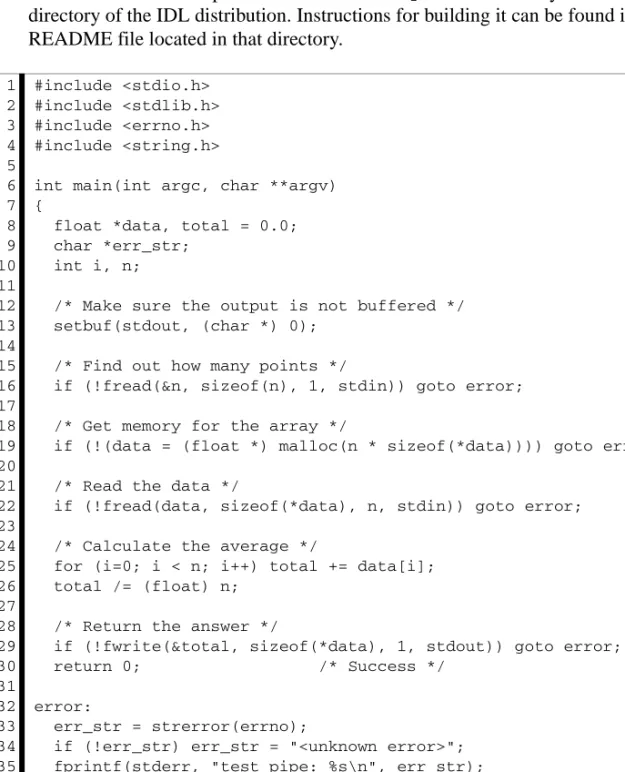
The C program shown in the following example (test_pipe.c) accepts floating-point values from its standard input and returns their average on the standard output. In actual practice, such a trivial program would never be used from IDL, since it is simpler and more efficient to perform the calculation within IDL itself. The example does, however, serve to illustrate a method by which significant programs can be called from IDL.
In the interest of brevity, some error checking that would normally be included in such a program has been omitted. For example, a real program would need to check
External Development Guide
the non-zero return values from fread(3) and fwrite(3) to ensure that the desired amount of data was actually transferred.
The code for this example can be found in the spawn subdirectory of the external
directory of the IDL distribution. Instructions for building it can be found in the README file located in that directory.
C 1 2 3 4 5 6 7 8 9 10 11 12 13 14 15 16 17 18 19 20 21 22 23 24 25 26 27 28 29 30 31 32 33 34 35 36 37 #include <stdio.h> #include <stdlib.h> #include <errno.h> #include <string.h>
int main(int argc, char **argv) {
float *data, total = 0.0; char *err_str;
int i, n;
/* Make sure the output is not buffered */ setbuf(stdout, (char *) 0);
/* Find out how many points */
if (!fread(&n, sizeof(n), 1, stdin)) goto error; /* Get memory for the array */
if (!(data = (float *) malloc(n * sizeof(*data)))) goto error; /* Read the data */
if (!fread(data, sizeof(*data), n, stdin)) goto error; /* Calculate the average */
for (i=0; i < n; i++) total += data[i]; total /= (float) n;
/* Return the answer */
if (!fwrite(&total, sizeof(*data), 1, stdout)) goto error; return 0; /* Success */
error:
err_str = strerror(errno);
if (!err_str) err_str = "<unknown error>"; fprintf(stderr, "test_pipe: %s\n", err_str);
return 1; /* Failure */ }
External Development Guide This program performs the following steps:
1. Reads a long integer that tells how many data points to expect, because it is desirable to be able to average an arbitrary number of points.
2. Obtains dynamic memory via the malloc() function, and reads the data into it. 3. Calculates the average of the points.
4. Returns the answer as a single floating-point value.
Since the amount of input and output for this program is explicitly known and because it reads all of its input at the beginning and writes all of its results at the end, a deadlock situation cannot occur.
The following IDL statements use test_pipe to determine the average of the values 0 to 9:
Executing the IDL TEST_PIPE procedure gives the result:
Average = 4.50000
This mechanism provides the IDL user a simple and efficient way to augment IDL with code written in other languages such as C or Fortran. It is, however, not as efficient as writing the required operation entirely in IDL. The actual cost depends primarily on the amount of data being transferred.
IDL 1 2 3 4 5 6 7 8 9 10 11 12 13 14 15 16 17 18 19 PRO test_pipe
; Start test_pipe. The use of the NOSHELL keyword is not ; necessary, but serves to speed up the start-up process. SPAWN, ’test_pipe’, UNIT=UNIT, /NOSHELL
; Send the number of points followed by the actual data. WRITEU, UNIT, 10L, FINDGEN(10)
; Read the answer. READU, UNIT, ANSWER ; Announce the result. PRINT, ’Average = ’, ANSWER
; Close the pipe, delete the child process, and deallocate the ; logical file unit.
FREE_LUN, UNIT END
External Development Guide
For example, the above example can be performed entirely in IDL using a simple statement such as the following:
External Development Guide 43
Chapter 3
Using
CALL_EXTERNAL
This chapter discusses the following topics:
The CALL_EXTERNAL Function . . . 44 Passing Parameters . . . 54 Using Auto Glue . . . 56 Basic C Examples . . . 58 Wrapper Routines . . . 62
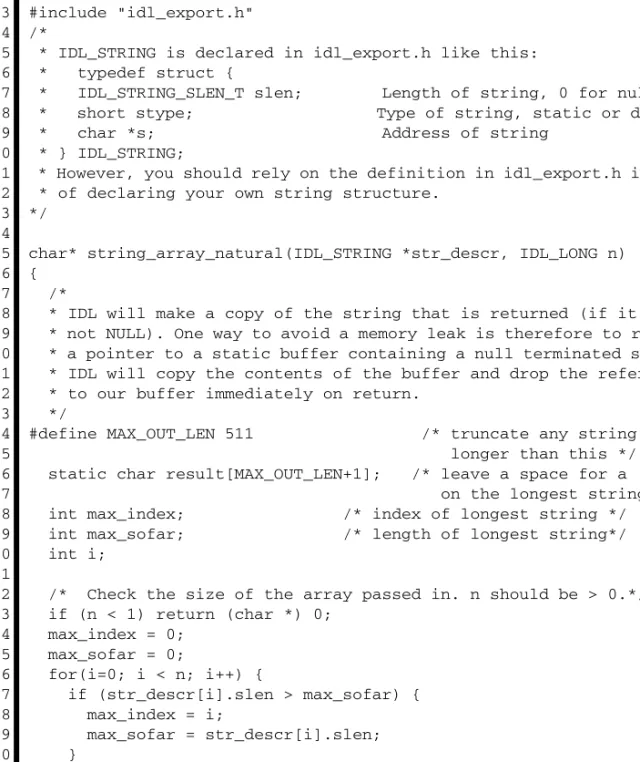
Passing String Data . . . 64 Passing Array Data . . . 68 Passing Structures . . . 70 Fortran Examples . . . 72
The CALL_EXTERNAL Function External Development Guide
The CALL_EXTERNAL Function
IDL allows you to integrate programs written in other languages with your IDL code, either by calling a compiled function from an IDL program or by linking a compiled function into IDL’s internal system routine table:
• The CALL_EXTERNAL function allows you to call external functions (written in C/C++ or Fortran, for example) from your IDL programs. You should be comfortable writing and building programs in the external language being used, but significant knowledge of IDL’s internals beyond basic type mapping between the languages is generally not necessary.
• An alternative to CALL_EXTERNAL is to write an IDL system routine and merge it with IDL at runtime. Routines merged in this fashion are added to IDL’s internal system routine table and are available in the same manner as IDL built-in routines. This technique is discussed in Chapter 15, “Adding System Routines”. To write a system routine, you will need to understand the IDL internals discussed in later sections of this book.
This chapter covers the basics of using CALL_EXTERNAL from IDL, then discusses platform-specific options for the UNIX and Windows versions of IDL. It can be helpful to refer to the documentation for “CALL_EXTERNAL” (IDL Reference Guide) when reading this material.
The CALL_EXTERNAL function loads and calls routines contained in shareable object libraries. Arguments passed to IDL are passed to this external code, and returned data from the external code is automatically presented as the result from CALL_EXTERNAL as an IDL variable. IDL and the called routine share the same process address space. Because of this, CALL_EXTERNAL avoids the overhead of process creation of the SPAWN routine. In addition, the shareable object library is only loaded the first time it is referenced, saving overhead on subsequent calls. CALL_EXTERNAL is much easier to use than writing a system routine. Unlike a system routine, however, CALL_EXTERNAL does not check the type or number of parameters. Programming errors in the external routine are likely to result in
corrupted data (either in the routine or in IDL) or to cause IDL to crash. See
“Common CALL_EXTERNAL Pitfalls” on page 51 for help in avoiding some of the more common mistakes.
Example Code in the IDL Distribution
This chapter contains examples of CALL_EXTERNAL use. All of the code for these examples, along with additional examples, can be found in the call_external
External Development Guide The CALL_EXTERNAL Function subdirectory of the external directory of the IDL distribution. The C language examples use the MAKE_DLL procedure, and can therefore be easily run on any platform supported by IDL. To build the sharable library containing the external C code and then run all of the provided examples, execute the following IDL
statements:
PUSHD, FILEPATH(’’,SUBDIRECTORY=[’external’,’call_external’,’C’]) ALL_CALLEXT_EXAMPLES
POPD
Additional information on these examples, including details on running the individual examples, can be found in the README file located in that directory.
CALL_EXTERNAL Compared to UNIX Child Process
In many situations, a UNIX IDL user has a choice of using the SPAWN procedure to start a child process that executes external code and communicates with IDL via a pipe connecting the two processes. The advantages of this approach are:
• Simplicity.
• The processes do not share address space, and are therefore protected from each other’s mistakes.
The advantages of CALL_EXTERNAL are:
• IDL and the called routine share the same memory and data space. Although this can be a disadvantage (as noted above) there are times where sharing address space is advantageous. For example, large data can be easily and cheaply shared in this manner.
• CALL_EXTERNAL avoids the overhead of process creation and parameter passing.
• The shareable object library containing the called routine is only loaded the first time it is referenced, whereas a SPAWNed process must be created for each use of the external code.
Compilation and Linking of External Code
Each operating system requires different compilation and link statements for producing a shareable object suitable for usage with CALL_EXTERNAL. This is even true between different implementations of a common operating system family. For example, most UNIX systems require unique options despite their shared heritage. You must consult your system and compiler documentation to find the appropriate options for your system.
The CALL_EXTERNAL Function External Development Guide The IDL MAKE_DLL procedure, documented in the IDL Reference Guide, provides a portable high level mechanism for building sharable libraries from code written in the C programming language. In many situations, this procedure can completely handle the task of building sharable libraries to be used with CALL_EXTERNAL. MAKE_DLL requires that you have a C compiler installed on your system that is compatible with the compiler described by the IDL !MAKE_DLL system variable. The IDL !MAKE_DLL system variable is used by the MAKE_DLL procedure to construct C compiler and linker commands appropriate for the target platform. If you do not use MAKE_DLL to compile and link your code, you may find the contents of !MAKE_DLL.CC and !MAKE_DLL.LD helpful in determining which options to specify to your compiler and linker, in conjunction with your system and compiler documentation. For the C language, the options in !MAKE_DLL should be very close to what you need. For other languages, the !MAKE_DLL options should be helpful in determining which options to use, as on most systems, all the language compilers accept similar options.
AUTO_GLUE
As described in “Passing Parameters” on page 54, CALL_EXTERNAL uses the IDL Portable Calling Convention to call external code. This convention uses an (argc,
argv) style interface to allow CALL_EXTERNAL to call routines with arbitrary numbers and types of arguments. Such an interface is necessary, because IDL, like any compiled program, cannot generate arbitrary function calls at runtime.
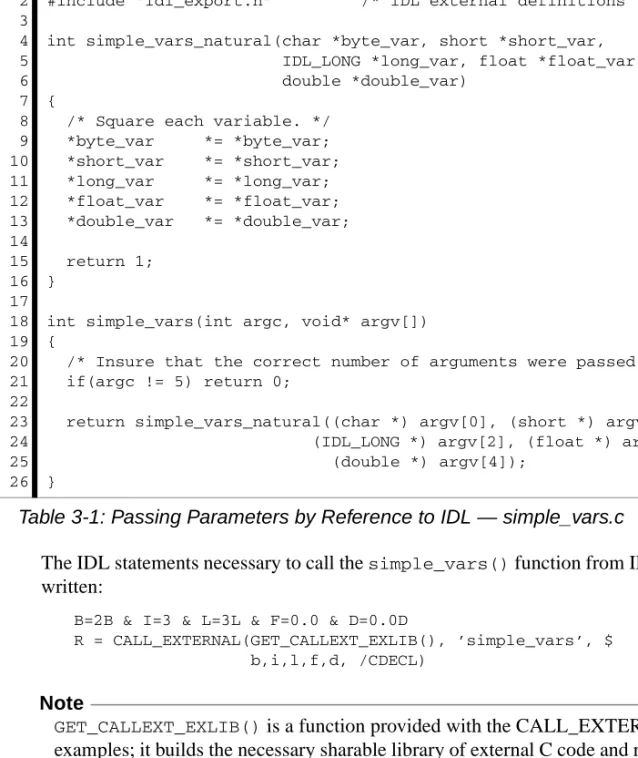
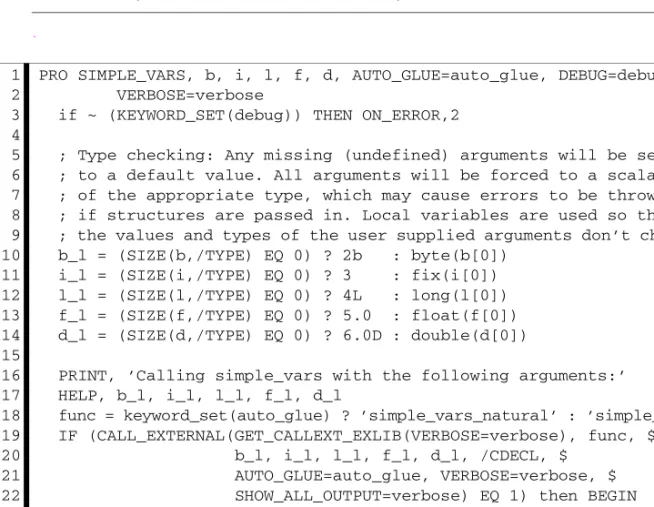
Of course, most C functions are not written to the IDL portable convention. Rather, they are written using the natural form of argument passing used in compiled programs. It is therefore common for IDL programmers to write so-called glue functions to match the IDL calling interface to that of the target function. On systems that have a C compiler installed that is compatible with the one described by the IDL !MAKE_DLL system variable, the AUTO_GLUE keyword to CALL_EXTERNAL can be used to instruct IDL to automatically write, compile, and load this glue code on demand, and using a cache to preserve this glue code for future invocations of functions with the same interface.
AUTO_GLUE thus allows CALL_EXTERNAL to call functions with a natural interface, without requiring the user to write or compile additional code.
AUTO_GLUE is described in the documentation for “CALL_EXTERNAL” (IDL Reference Guide), as well as in “Using Auto Glue” on page 56. The examples given in “Basic C Examples” on page 58 show CALL_EXTERNAL used with and without AUTO_GLUE.
External Development Guide The CALL_EXTERNAL Function
Input and Output
Input and output actions should be performed within IDL code, using IDL’s built-in input/output facilities, or by using IDL_Message(). Performing input/output from code external to IDL, especially to the user console or tty (e.g. stdin or stdout), may generate unexpected results.
Memory Cleanup
IDL has a strict internal policy that it never performs memory cleanup on memory that it did not allocate. This policy is necessary so that external code which allocates memory can use any memory allocation package it desires, and so that there is no confusion about which code is responsible for releasing allocated memory. Note
The code that allocates memory is always responsible for freeing it. IDL allocates and frees memory for its internal needs, and external code is not allowed to release such memory except through a proper IDL function documented for that purpose. Similarly, IDL will never intentionally free memory that it did not allocate. As such, IDL does not perform any memory cleanup calls on the values returned from external code called via the CALL_EXTERNAL routine. Because of this, any dynamic memory returned to IDL will not be returned to the system, which will result in a memory leak. Users should be aware of this behavior and design their
CALL_EXTERNAL routines in such a manner as not to return dynamically allocated memory to IDL. The discussion in “Passing String Data” on page 64 contains an example of doing this with strings.
Memory Access
IDL and your external code share the same address space within the same running program. This means that mistakes common in compiled languages, such as a wild pointer altering memory that it does not own, can cause problems elsewhere. In particular, external code can easily corrupt IDL’s data structures and otherwise cause IDL to fail. Authors of such code must be especially careful to guard against such errors.
Argument Data Types
When using CALL_EXTERNAL to call external code, IDL passes its arguments to the called code using the data types that were passed to it. It has no way to verify
The CALL_EXTERNAL Function External Development Guide independently that these types are the actual types expected by the external routine. If the data types passed are not of the types expected by the external code, the results are undefined, and can easily include memory corruption or even crashing of the IDL program.
Warning
You must ensure that the arguments passed to external code are of the exact type expected by that routine. Failure to do so will result in undefined behavior.
Mapping IDL Data Types to External Language Types
When writing external code for use with CALL_EXTERNAL, your code must use data types that are compatible with the C data types used internally by IDL to represent the IDL data types. This mapping is the topic of Chapter 5, “IDL Internals: Types”.By-Value and By-Reference Arguments
There are two basic forms in which arguments can be passed between functions in compiled languages such as C/C++ and Fortran. To use CALL_EXTERNAL successfully, you should be comfortable with these terms and their meanings. In particular, Fortran programmers are often unaware that Fortran code passes
everything by reference, and that C code defaults to passing everything by value. By default, CALL_EXTERNAL passes arguments by reference (unless this behavior is explicitly altered by the use of the ALL_VALUE or VALUE keywords), so no special action is typically required to call Fortran code via CALL_EXTERNAL.
Warning
You must ensure that the arguments passed to external code are passed using the correct method — by value, or by reference. Failure to do so will result in undefined behavior.
Arguments Passed by Value
A copy of the value of the argument is passed to the called routine. Any changes made to such a value by the called routine are local to that routine, and do not change the original value of the variable in the calling routine. C/C++ pass everything by value, but have an explicit address-of operator (&) that is used to pass addresses of variables and get by-reference behavior.