Replication in Archaeological Information Systems
Nisha Joseph, Damian Green, John Cosmas, Take ItegakiDepartment of Electronic and Computer Engineering Brunel University, Uxbridge. UB8 3PH. UK
Abstract. This paper describes the 3DMURALE database, which follows a generic database structure, for the storage of a wide range of data, applicable on a diversity of excavations. The database stores 3D models of buildings, stratigraphy, statues and artifacts and is accessed through a newly developed GIS entitled Strat. This research database is accessible via the Internet 24/7 and can store and retrieve multiple campaign data concurrently. This paper discusses the problem of remote replication, on sites without high-speed access and proposes a viable Replication Tool.
Keywords: Database, Replication, Binary data
Introduction
This paper presents a new database system, 3DMURALE, which seeks to fulfil the needs of not just one archaeological campaign but may be of use on any archaeological campaign. The database follows a system design, which allows replication and is designed to efficiently accommodate various types of archaeological data. Therefore, this database would be ideal in a modern archaeological campaign, which not only deals with textual data but also multimedia data such as images, 3D data, photogrammetric models and video. The paper also discusses various important issues in the development of sophisticated multimedia databases.
Terminology
In an increasingly inter-connected world moving towards greater integration of information systems, one finds a plethora of databases following different systems and standards in the field of archaeology. Archaeologists are yet to agree on the rules which could ensure that archaeological database systems are standardized which would make it possible to inter-link them and make them accessible globally.
In 1995, Arroyo-Bishop stated, “We cannot allow a myriad of databases to develop independently, each with their own dif-ferent themes, structures, indexes and vocabularies” (Arroyo-Bishop et al. 1995). Contrary to Arroyo-(Arroyo-Bishop’s aspirations, examples of individual database systems appear regularly, for example Akasheh (2002) recently presented another archaeo-logical database specific to their excavations, at the Amman Cultural Heritage conference.
Before development of digital storage system for archaeologi-cal data can commence, terminology needs to be unambiguous and clearly defined.
A number of confusing and potentially misleading terms have come into use to define the elements that make up archaeological sites (Barker 2001). Words such as feature, artefact, find,
strati-graphic unit, context and layer are terminology commonly used in archaeology. Some of these terms are interchangeable, for example layer and stratigraphic unit, whereas others are not so clearly defined, for example, feature and context. A ‘context’ is defined by Barker as an omnibus term for all stratigraphic units (layers, features, strata and so on) found in an excavation.
Arroyo-Bishop defines features as being part of stratigraphic units. Since features are often used to describe immovable arte-facts, i.e. buildings on site, Arroyo-Bishop’s method does not apply in all cases.
In order to define the structure for a generic database model, the terminology which archaeologists employ needs to be agreed upon. Efforts are being made in this direction with the develop-ment of the CIDOC conceptual reference model (Crofts, Nick et al. 2001). But the development of the Strat GIS required data-base structure to be established before any recording or storage took place (Green 2002).
The 3DMURALE database adopts the following hierarchy: Project Æ Site Æ Excavation Unit Æ Stratum Æ Find A Project consists of Sites, which in turn consist of Excavation Units, which are composed of Strata, which would contain Finds. Features are being described as external immovable arte-facts in the 3DMURALE database.
The Database System
From a requirement analysis of archaeological users, it was established that the 3DMURALE Database should follow a rep-licated system design where the data is maintained in a central database and during an excavation season, the new data is en-tered into the local databases in the laptops or personal com-puters of the archaeologists. Once the season ends, the newly entered data is uploaded from the local databases to the central database.
The 3DMURALE database handles storage and retrieval of text, 2D and VRML image information of archaeological content such as excavation units in the site, specifications of the strata, buildings, artefacts, parts of artefacts, photographs, stratigraphic drawings and documents.
Thus the main design issues are concerned with what types of underlying database systems should be used for the central and local databases, how large the units data should be represented and managed in each of the central and local databases and what functionality is required of the replication tool that is over and above the functionality that is provided by current commercially available replication tool.
Likely candidates for database platforms included MySQL, PostgreSQL, MS-Access, MS-SQL Server 2000. A database system intended for archaeologists must be as low-cost as possi-ble. Using the prevalent open source databases can bring down the cost of the archaeological information system.
Database Cost
Alpha Five Version 5 askSam Professional 5 Microsoft Access 2002 Paradox 10 PostgreSQL MySQL SQL Server 2000 Standard Edition
Oracle9i Standard Edition
$349 $395 $339 $489 Free Free $4,999 per processor $15,000 per processor
Table 1. Database Cost Comparison.
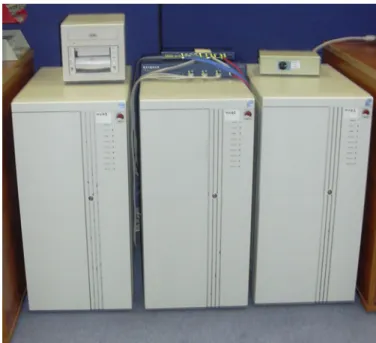
The 3DMURALE database makes its content available by remote Internet access for other archaeological researchers and members of the public. Three physically separate database servers are used as shown in Figure 1. Similar databases investi-gated include “ABCD”, a relational database containing infor-mation about records of macrofossil plant remains from archaeo-logical deposits throughout the British Isles. In ABCD, data are stored in a series of 14 tables linked by common fields. ABCD uses Paradox software for interrogating and manipulating the data. (Tomlinson 1996). The details about the archaeological sites, excavation units in the site, the specifications of the strata, the photographs and facts about the different features and finds are entered into the database during the course of excavation.
The database chosen for the 3DMURALE is Post-greSQL, which has the advantage of being free and open-source, thus making this system as low cost as possible. It is one of the most advanced and well-supported open source and advanced object relational databases.
Figure 1. The 3DMURALE Database Servers.
Replication
Archaeological sites rarely have the ideal network capabilities for high-speed remote data transmission. Due to the nature of sites, they are often in remote locations often without any con-nection to the Internet. The uploading of this data to a central database, which consists of large database sets which result from advanced photogrammetric surveying and photographing is a major issue. It may be argued that the immediate upload of this data is not of great importance. Data is often analysed after the excavation allowing time to be spent on the actual excavation, which can often only be carried out during a limited time-period. Burning of the updated database to a CD-ROM, which is then sent by traditional mail methods or transported back with the excavation crew may often be the only plausible method.
Some archaeological sites may have access to a modem con-nection, albeit sporadic. 3D models of stratigraphy or buildings are often in the realms of Megabytes or hundreds of Megabytes. Using a low bandwidth line to transmit this data is impractical. If laptops are used during the excavation season, once returned to the academic or professional institution, replication becomes more reliable owing to a less intermittent connection and higher bandwidth. The ideal would be to have a low-cost high-bandwidth wireless data communication device such as a satel-lite device, which could be used instantly or on a daily basis for the uploading of the database.
The Stratigraphic Visualization Tool (“STRAT Tool”) is used for the purpose of recording and visualizing data on archaeologi-cal stratigraphy. This tool is used by the archaeologists to insert, query and visualise information from the local Microsoft Access database. The STRAT Tool is developed in Microsoft Visual C++ and connects to the database using ODBC.
For migration of both database schema and data from Micro-soft Access to a PostgreSQL database, certain Micro-software such as pgAdmin, Access2PgConverter, exportSQL, the MDB Tools
exist. However, none supports replication of data on a selective basis. That is to say, the user cannot specify a particular record in a table and any related information regarding that row to be replicated into another database.
ExportSQL is a Microsoft Access module that exports an Ac-cess Database into a PostgreSQL database (Pavlinusc, 2001). It exports all tables in a MS-Access database file into two text files: one containing SQL instructions to delete the new tables to be created, and the other with SQL instructions to create and insert data into the new tables. It is useful in exporting the schema from Access to other databases but does not include the capability of migrating data.
PgAdmin is a general-purpose tool for designing, maintain-ing, and administering PostgreSQL databases. It runs under Windows 95/98/ME and NT/2K. PgAdmin, installed along with pgMigration v1.4.12 (the Database Migration Wizard Plugin for pgAdmin) is capable of transporting both schema and data. But pgAdmin is not capable of handling the data types such as the ‘OLEObject’ type used in the Access database. Binary data, such as photographs and 3D models of scanned buildings, artifacts and stratigraphy are stored using this data type. PgAdmin is not a promising option, as it would restrict the application from utiliz-ing the binary object data type, provided in the Access database. The Access2PgConverter is an application that converts Ac-cess database to conform to the PostgreSQL definition for table names and fieldnames (de Groot 2003). It translates tables, que-ries, forms, reports and modules in Access applications. After translation the PgAdmin Migration Wizard should be employed to replicate the data to PostgreSQL.
MDB Tools is an open source suite of libraries and utilities used to read MDB database files making the data available on other platforms. Microsoft Access stores data in MDB files. Specifically, MDB Tools includes programs to export schema and data to other databases such as Oracle, Sybase, PostgreSQL, others, and MySQL. MDB Tools includes an SQL engine for performing simple SQL queries. A sparse but functional ODBC driver is also included. MDB Tools currently has read-only sup-port for Access 97 (Jet 3) and Access 2000/2002 (Jet 4) formats. Access 2000 support is a recent addition and may not be as com-plete as Jet 3 support.
A replication tool entitled the “Replicator” was investigated for its applicability, since it was described as a tool capable of supporting replication of virtually any database (Davies 1998). Replicator is designed to work with any database, and therefore has to be told which databases and which tables it is supposed to manage, what parent/child relationships exist between tables, and with what frequency it should check for changes. These instructions are contained in a configuration file. What is re-quired is a system, which uploads recent data regardless of the contents of the destination database. Since the database is ac-cessed by multiple users, a system, which merely duplicates data, is inappropriate.
Consequently, for the replication of data from the local data-base, (stored in the Microsoft Access Database) to the central database, (the postgreSQL database), a replication software tool is being developed. The replication tool selectively accesses the
archaeological tables in the local database and replicates to the central database without loss of data-integrity. Similarly, it is capable of downloading table data such as Project and Sites to the local database.
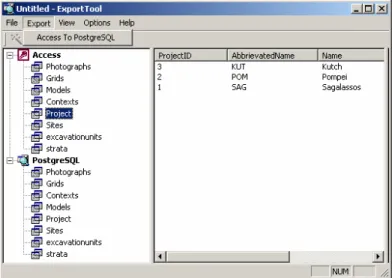
The replication tool under development appears as shown in Figure 2. On selecting the specific rows in the Projects table and selecting the export option from the menu, it is possible to trans-fer all the related information about the projects, sites and so on from the local Access database to the central postgreSQL data-base.
Figure 2. The STRAT Replication Tool.
Similarly a user of the tool is able to selectively download in-formation about a specific site or project from the central data-base to the local datadata-base.
Future enhancements sought for the replication tool include • Generic upload. The access database need not be of
predefined structure. The tool has the intelligence to handle any table
• Upload based of search criteria. E.g. Projects done between dates x and y or with Project IDs > 2000 can be uploaded.
• Configuration of the ODBC settings from the appli-cation - auto configuration -for PostgreSQL database • File Open option for Access Databases rather than
specifying them in the ODBC settings which would make it a handy tool for the archaeologists to handle.
Storing Binary Data
An archaeological information system, from which the visu-alisation tools retrieves data needs the Polaroid photographs, 3d models and images to be made available to the front end tools which will go on to process this data. There are two ways of storing this type of data, which is binary data.
• It can be stored in the file system and a path of the location of the file can be provided in the database • It can be stored in the database itself
The choice on whether to store binary data in a database is completely a question of the requirements for each specific pro-ject. So the question is not whether to choose the database which provides the additional functionality, but whether the needs of the project demand the increased functionality of the database. If the application requires with absolute certainty that the data cannot be modified without the appropriate constraints, then it makes sense to place it in the database.
So, it comes down to the continual trade-off of functional-ity/requirements vs. performance/simplicity.. By storing images in the DB, the application has better control over them. The chances of the files getting deleted accidentally are not there if this method is opted. Additionally, backups and restores are less complicated. Backing up a site would be easier if the second method is adopted as it would mean that the database does not have to open and close the files each time and this makes the backup process faster. On the other hand, if these binary files are large and are being updated frequently, putting them in the data-base can create a real nightmare of a storage problem. The sys-tem can be slowed down even to crawling speeds when the hits are very high. The performance of the database when either of these methods is adopted needs to be investigated to a greater extent.
PostgreSQL database provides two distinct ways to store bi-nary data. Bibi-nary data can be stored in a table using Post-greSQL's binary data type bytea, or by using the Large Object feature which stores the binary data in a separate table in a spe-cial format, and refers to that table by storing a value of type OID in the table. So as to determine which method is appropriate the limitations of each method should be considered. The bytea data type is not well suited for storing very large amounts of
binary data. While a column of type bytea can hold up to 1 GB of binary data, it would require a huge amount of memory (RAM) to process such a large value. The Large Object method for storing binary data is better suited to storing very large val-ues, but it has its own limitations. Specifically deleting a row that contains a Large Object does not delete the Large Object. Deleting the Large Object is a separate operation that needs to be performed. Large Objects also have some security issues since anyone connected to the database can view and/or modify any Large Object, even if they do not have permissions to view/update the row containing the Large Object (PostgreSQL 2003).
Shapiro etal. explore the performance issues while working with Binary Large Objects in various databases. Binary Large Object or BLOB as it is commonly referred to, is a collection of binary data stored as a single entity in a database management system (DBMS). BLOBs are used primarily to hold multimedia objects such as images, videos and sound, though they can also be used to store programs or even fragments of code. Not all Database Management Systems support BLOBs. A BLOB has no structure, which can be interpreted by the database man-agement system but is known only by its size and location.
Large data objects can be stored in a field with the OLE Ob-ject data type in a Microsoft Access table. Some large binary data objects cannot be represented, however, if they do not have an OLE server that understands the data being stored.
Conclusion
The database system described in this paper can be used for the storage of all forms of archaeological objects. It is ge-neric enough that its usage need not be restricted to 3DMURALE, but can be extended to various archaeological campaigns.
Acknowledgements
This work was carried out as part of 3DMURALE, a European Union funded project (Proposal number: IST-1999-20273).
References
ARROYO-BISHOP, D. and LANTADA ZARZOSA, M.T., 1995. To be or not to be: will an object-space-time GIS/AIS become a scientific reality or end up an archaeological entity? Archaeology and Geographi-cal Information Systems. Taylor & Francis, London:43-53.
AKASHEH, T., 2002. Archaeological Information System and Databas-ing for Petra Monuments. Proceedings Multimedia and Cultural Heri-tage Amman, Royal Scientific Society, Amman, Jordan, 29 September - 2 October 2002.
BARKER, P., 2001. Techniques of Archaeological Excavation, Third Edition, Fully Revised. Routledge, London (EC4P 4EE, ISBN 0-415-15152).
CROFTS, N., DIONISSIADOU, I., DOERR, M., STIFF, M., 2001. Definition of the CIDOC object-oriented Conceptual Reference Model v3.2.1 (http://cidoc.ics.forth.gr).
DAVIES, S., 1998. Replicator (http://www.sdc.com.au). DE GROOT, D., 2003. Access2pgconverter (http://www.talon.nl). GREEN, D. et al., 2001. A Real Time 3D Stratigraphic Visual Simula-tion System For Archaeological Analysis And Hypothesis Testing. Proceedings VAST 2001.
GREEN, D.,2001. Moving Towards the 3D Visualisation and Auto-matic Correlation of Stratigraphic layering. Harl, O. (ed.), Proceed-ings Workshop6 – Archäologie und Computer (CD).
HARRIS, E., 1989. Principles of Archaeological Stratigraphy. Aca-demic Press Ltd.
MDB, 2003. MDB Tools Unlocking your data. (http://mdbtools.sourceforge.net).
PAVLINUSIC, D., 2003. ExportSQL (http://www.rot13.org/~dpavlin/sql.html).
POSTGRESQL, 2003. Storing Binary Data.
(http://developer.postgresql.org/docs/postgres/jdbc-binary-data.html). SHAPIRO, M., 1999. Managing Databases with Binary Large Objects. (http://storageconference.org/1999/1999/papers/18shapir.pdf). TOMLINSON, P., 1996. A review of the archaeological evidence for food plants from the British Isles: an example of the use of the Ar-chaeobotanical Computer Database (ABCD).