“I Added ‘!’ at the End to Make It Secure”:
Observing Password Creation in the Lab
Blase Ur, Fumiko Noma, Jonathan Bees, Sean M. Segreti, Richard Shay,
Lujo Bauer, Nicolas Christin, Lorrie Faith Cranor
Carnegie Mellon University{bur, fnoma, jbees, ssegreti, rshay, lbauer, nicolasc, lorrie}@cmu.edu
ABSTRACT
Users often make passwords that are easy for attackers to guess. Prior studies have documented features that lead to easily guessed passwords, but have not probed why users craft weak passwords. To understand the genesis of common password patterns and un-cover average users’ misconceptions about password strength, we conducted a qualitative interview study. In our lab, 49 participants each created passwords for fictitious banking, email, and news web-site accounts while thinking aloud. We then interviewed them about their general strategies and inspirations. Most participants had a well-defined process for creating passwords. In some cases, partic-ipants consciously made weak passwords. In other cases, however, weak passwords resulted from misconceptions, such as the belief that adding “!” to the end of a password instantly makes it secure or that words that are difficult to spell are more secure than easy-to-spell words. Participants commonly anticipated only very targeted attacks, believing that using a birthday or name is secure if those data are not on Facebook. In contrast, some participants made se-cure passwords using unpredictable phrases or non-standard cap-italization. Based on our data, we identify aspects of password creation ripe for improved guidance or automated intervention.
1. INTRODUCTION
Despite decades of research investigating passwords, many users still make passwords that are easy for attackers to guess [9, 22, 35, 62]. Predictable passwords continue to cause problems, as evi-denced by the recent release of celebrities’ private photos obtained in part through a password-guessing attack on Apple’s iCloud [11, 37]. While most everyone would prefer a world without the burden of remembering a portfolio of passwords [18, 53], passwords are familiar, easy to implement, and do not require that users carry any-thing. As a result, passwords are unlikely to disappear entirely in the near future [7]. Although expecting users to remember complex and distinct passwords for dozens of accounts is absurd, single-sign-on systems, software password managers, and biometrics [4] promise to reduce this burden. Passwords also remain useful for frequently accessed accounts, as master passwords for password managers, and as an integral part of two-factor authentication.
Copyright is held by the author/owner. Permission to make digital or hard copies of all or part of this work for personal or classroom use is granted without fee.
Symposium on Usable Privacy and Security (SOUPS)2015, July 22–24, 2015, Ottawa, Canada.
Researchers have identified common, predictable choices that re-sult in easy-to-guess passwords [9, 22, 35, 62]. While some users may be making informed cost-benefit analyses and creating weak passwords for low-value accounts, other users may have miscon-ceptions about what makes a good password. Existing security ad-vice [10,28,36,49,73] and real-time feedback [1,12,15,32,59,63] may be insufficient in disabusing users of these misconceptions.
To understand where users fall short in their attempts to cre-ate passwords, we conducted the first qualitative laboratory study of the process of password creation. Whereas analyses of large sets of passwords can reveal common patterns, a qualitative study is better suited to discern precisely why these patterns appear be-cause researchers can probe the rationale behind behaviors through context-based follow-up questions. Prior lab studies of passwords have focused on password management [2, 20, 27, 29, 52, 55], how users cope with password-composition requirements [45,66], novel password systems [19], and the external validity of password stud-ies [16]. In this paper, we report on the first lab study focusing ex-clusively on how users craft and compose passwords step-by-step.
We conducted in-person lab sessions with 49 participants, each of whom created passwords for a banking website, news website, and email account in a think-aloud, role-playing scenario. We also explored participants’ general strategies and inspirations. This en-abled us to pinpoint participants’ misconceptions and identify strate-gies that seem both usable and secure against large-scale guessing attacks, such as an offline attack [6, 31, 70].
We found that most participants had a well-defined process for creating passwords. Commonly, participants either had a base word or a systematic human “algorithm” for generating passwords based on the site. While many strategies led to predictable passwords, some participants successfully mixed unrelated words or crafted unique phrases to create more secure passwords. Some participants desired passwords of different security levels across the three web-sites, yet nearly half did not, indicating that some people may rou-tinely waste effort creating and remembering strong passwords for low-value accounts. Participants struggled to create passwords that matched their desired security levels, sometimes creating strong passwords that they inteded to be weak, and vice versa.
Participants were concerned primarily with targeted attacks on their passwords, rather than large-scale, automated attacks. As a re-sult, some participants believed the (common) name of their pets or birthdays would be strong passwords because they had not posted that information on their Facebook page, not accounting for the types of automated guessing attacks often seen in the wild when sites like LinkedIn [9], eHarmony [57], Gawker [5], or Adobe [43] had their password databases compromised.
We identified numerous other security misconceptions. Most participants knew that dictionary words make bad passwords, yet
others incorrectly expected common keyboard patterns (e.g., “qw-erty” or “1qaz2wsx”) to be a secure replacement. Some participants had learned that phrases make secure passwords, yet chose obvious phrases (e.g., “iloveSiteName”). Commonly, participants believed that adding a digit or symbol to the end of a password would make it secure, whereas such an action is very predictable. Other par-ticipants conflated difficulty for users with difficulty for attackers, such as thinking that words that are hard to spell are secure.
In contrast, some participants employed strategies that resulted in strong passwords. These strategies included combining unre-lated words or developing unique phrases. Whereas many par-ticipants insecurely capitalized the first letter of their password in deference to the rules of grammar, others employed non-standard capitalization to make far stronger passwords. Whereas some par-ticipants ill-advisedly used the website name as a core part of their password, others used songs and concepts they associate with the site. These related concepts would be far less obvious to attackers. Many misconceptions we identified might derive from misinter-pretations of well-meaning security advice. For example, some participants seem to have misconstrued the idea that “a strong pass-word should contain letters, digits, and symbols” as the false state-ment “anypassword that contains letters, digits, and symbols is secure.” Similarly, the admonition to avoid dictionary words in passwords does not mention birthdays or keyboard patterns, which some participants incorrectly believed to be secure. Building on our results, we discuss aspects of abstract password guidance and data-driven tools that could help users create better passwords by avoiding the misconceptions we observed in this study.
We next discuss related work in Section 2. Then, we present our methodology in Section 3. We present our findings in Section 4, discuss their implications in Section 5, and conclude in Section 6.
2. RELATED WORK
Password-based authentication remains ubiquitous for online ac-counts [7]. Even if passwords are replaced with devices that do not rely on human memory [41, 53], the deployment of such systems and subsequent decline of passwords would be gradual. Even re-cent multi-step authentication systems, such as two-factor authenti-cation systems from Google [26] and Microsoft [40], tend to retain passwords as one part of the approach.
The literature on passwords is vast; below, we briefly discuss the most relevant prior work. However, prior studies of password char-acteristics focus post-facto on passwords that have already been created, in contrast to our qualitative focus on passwords in the process of being created. Prior studies with a similar qualitative approach have generally examined complementary topics, such as password management and novel password systems.
2.1 Analyses of Password Characteristics
Many password databases have been leaked in recent years [5, 9, 43, 57]. Both the popular press and academics have mined these password corpora to identify common passwords characteristics. For example, popular media reported on the leaked set of RockYou passwords, noting the most common password was “123456” [62]. Researchers found that RockYou passwords commonly included digit sequences, names, and phrases about love [69].Researchers have also focused on the semantic content of pass-words [60, 64]. Historically, researchers have found that some of the most prevalent semantic themes in passwords include names and locations [39], as well as dates and years [65]. Researchers have also noted love, animals, and money as common semantic themes [64]. While two-word Amazon payphrases are not as pre-dictable as general English text, common themes include music,
television, and sports [8]. Combining multiple words and substitut-ing characters are also common strategies [30].
Other studies have entailed collecting passwords created under controlled conditions in online studies. For example, our group has used this technique to study password-composition policies [31,38, 51] and password-strength meters [59]. While controlled experi-ments can be used to collect some behavioral metrics, our qualita-tive methods allow us to collect far more explanatory data.
We also aim to understand password characteristics. However, qualitatively observing password creation as it happens, rather than after the fact, lets us not just learnwhatusers do, but alsowhy.
2.2 Laboratory Studies
Other laboratory studies have focused on complementary aspects of the password ecosystem. These aspects have included password-management practices [2, 20, 27, 29, 52, 55] and how users respond to password-creation requirements [45, 66].
Researchers have studied how users recall multiple passwords. Their participants learned six passwords each, including text pass-words and graphical passpass-words. Participants were asked to au-thenticate two weeks later [13]. Researchers have also explored automatically increasing password strength. Participants created passwords in the lab, and the system added random characters, which participants could shuffle until arriving at a configuration they liked. The authors found that inserting two random characters increased security, yet adding more characters hurt usability [19].
More recently, researchers interviewed 27 participants about their strategies for password management and usage. Participants had an average of 27 accounts and five passwords. They often made trade-offs between following password advice and expending too much effort [55]. While our methods resemble those of prior lab studies, we are the first to focus on how users create passwords.
3. METHODOLOGY
To uncover precisely how average users construct passwords, we conducted face-to-face interviews in our lab. Participants created passwords for three different types of accounts we hypothesized would elicit different security levels. Each participant created all three passwords under a single password-composition policy that we randomly assigned from three possibilities. Participants en-gaged in a think-aloud process while creating each password and answered follow-up questions about their processes, decisions, and general habits related to password creation. The study was ap-proved by the Carnegie Mellon University IRB.
3.1 Recruitment and Logistics
We recruited participants for a study on passwords through ads on our local Craigslist and flyers at public places in and around Carnegie Mellon University’s Pittsburgh campus. Each session was designed to last between 45 minutes and one hour. We compensated participants $25 for the session. The study took place in a room in our laboratory with either one or two moderators. Participants used a laptop from our lab for the study. We audio-recorded the interviews and subsequently transcribed them.
3.2 Study Protocol
We began the study with demographics questions. We then asked participants to create passwords for three websites while thinking aloud. Next, we asked participants about their general password-creation approach and strategies. Finally, we had participants recall each of their three passwords. The text below provides more detail about each step, and the appendix contains the full interview script.
Figure 1: The design of the news (top), banking (middle), and email (bottom) sites for which participants made passwords.
Our demographic questions included age, gender, and occupa-tion. We also asked about familiarity with different computer de-vices and Internet usage in order to understand the context in which participants created and recalled passwords. In order to introduce participants to the technique of thinking aloud, we next had them perform a warm-up activity in which they thought aloud while craft-ing a slogan for a bumper sticker.
We then asked participants to create passwords on three different websites, which we assumed would be of different value to partic-ipants. These were mock-up websites that we created for the pur-pose of this study. The three sites, presented in randomized order in the study, were a news website (“National Daily Times”), a banking website (“First Trust National Bank”), and an online email website (“SwagMail”). Figure 1 shows each site’s visual design.
We hypothesized that participants would view the password for the news website as having minimal value, whereas the banking and email account passwords would be of higher value. That is, participants would find those accounts more important to protect. Because participants each created three passwords, we could exam-ine the passwords’ similarity. Previous research documented that users often reuse passwords verbatim or with minor, predictable modifications [14, 17, 20, 72].
We asked participants to role-play and “pretend that [they] are actually creating new passwords to sign up for new services” and act as if they will “need to use those passwords again to log in to the account [they] sign up for.” Furthermore, so that we could understand precisely where in the process of password creation par-ticipants came up with different ideas, as well as in what order, we had participants think aloud when creating their password.
Each participant created passwords for all three accounts under a single password-composition policy assigned round-robin from the following three possibilities:
• 1class6: passwords must include at least 6 characters;
• 2class8: passwords must include at least 8 characters, among which are at least 2 of the following: a lowercase letter, an uppercase letter, a digit, a symbol;
• 3class12: passwords must include at least 12 characters, among which are at least 3 of the following: a lowercase letter, an uppercase letter, a digit, a symbol.
As participants met each requirement, a checkmark appeared next to the requirement, as shown in Figure 2. Participants needed
Figure 2: As participants created a password, checkmarks in-dicated which requirements they had completed. The password appeared as asterisks.
to re-enter their password correctly before proceeding. We chose the 1class6 and 2class8 policies to represent minimal and typical password-composition policies, respectively. We chose 3class12 as a policy that has relatively complex requirements, yet prior re-search studies have found to be reasonably usable [51]. We expect policies that require longer passwords to see increasing adoption in the real world given the vulnerability of passwords containing eight or fewer characters [24, 54]. We chose to have participants create all three passwords under a single composition policy because we were more interested in how a single participant’s behavior differed across sites of potentially different value, as opposed to how a par-ticipant’s behavior changed across password-composition policies. We then asked participants about their general strategies for cre-ating passwords and whether the strategies they employed in the study resembled their usual behavior. We excluded from further analysis behaviors they said were atypical. We also asked whether and how they make modifications if they reuse a password, and whether an account of theirs had ever been compromised.
The final part of our study tested password recall. First, to dis-tract participants so that they would think about something other than their passwords for a few minutes, we asked participants to count backward from 100 in increments of seven. Then, we asked participants to log on using each of their three study passwords. We gave each participant up to five attempts to do so, simulating the rate-limiting that many websites use to prevent online attacks.
3.3 Analysis of Password Security
To inform our qualitative analyses of password-creation behav-iors, we needed an objective metric of password security. We there-fore measured each password’s guessability, or how quickly an attacker would guess that password in a large-scale guessing at-tack [6, 31, 70], using the software tool Hashcat [54]. This tool is widely used by attackers [22, 23, 24, 34, 44] and, relative to other guessing approaches, is generally successful at guessing a large fraction of target password sets in the configuration we used [61]. We made 100 trillion (1014) guesses against participants’ pass-words, which represents about 6 hours of guessing on a single mod-ern GPU (AMD R9 290x) for passwords stored unsalted using the NTLM hash function, 3 weeks for passwords stored using SHA256, and 904 years for passwords stored using SHA512crypt.
Hashcat takes as input a word list and a set of mangling rules, or transformations (e.g., “add a 1 at the end” or “change every A to @”) to apply to word list entries. It is impossible to model ev-ery attacker or to study all word lists. We thus chose settings and training data that prior work found to represent a reasonable step
beyond Hashcat’s default configuration [61]. Our word list com-prised large sets of leaked passwords and natural-language dictio-naries. The passwords were taken from breaches of MySpace [48], RockYou [62], and Yahoo! [21]. We used dictionaries found effec-tive in past studies [31, 70]: all single words in the Google Web corpus [25]; the UNIX dictionary; and a 250,000 word inflection dictionary [50]. The combined set of passwords and dictionar-ies contained 19.4 million unique entrdictionar-ies, ordered by descending frequency. The mangling rules comprised the “generated2” set in-cluded with oclHashcat and a Hashcat translation of rules originally released by Trustwave SpiderLabs [58] for the tool John the Ripper. Although this approach simulates a large-scale guessing attack, it does not simulate an attacker who knows personal details of the user. Therefore, members of our research team manually examined the study passwords alongside participants’ think-aloud transcrip-tions. If the password was derived primarily from a date significant to the participant or the name of a participant’s family member or pet, we marked the password as vulnerable to a targeted attack. Similarly, if the password was mostly derived from the name of the website on which the participant was making a password, we marked it as vulnerable to an attack targeted to that site. Automated cracking methods do not natively support these sorts of highly tar-geted attacks, necessitating this limited manual analysis.
3.4 Qualitative Analysis
Because our objective was to gain a nuanced perspective on how users craft passwords, we relied heavily on qualitative methods. Rather than approach the study with well-defined hypotheses or very targeted research questions, we instead chose to let partici-pants’ strategies and misconceptions emerge from the data.
To that end, one member of the research team first tagged each self-contained thought, representing a distinct password-creation strategy or behavior, mentioned by any participant either during the think-aloud portion of password creation or in response to an interview question. For example, one of the tagged thoughts was, “swap the g for a $ because gold is something related to money.” We identified 546 thoughts across our 49 participants.
The members of the research team then collaboratively analyzed these thoughts in a process derived from affinity diagramming [3]. The members of the research team began with each of the 546 thoughts, as well as the corresponding password, printed out on an individual piece of paper. We then iteratively grouped these thoughts into distinct clusters, continuously refining, collapsing, and separating clusters. These clusters represented thoughts the team felt related closely to each other. At the end of our full-group session, we had grouped these 546 thoughts into 18 initial clusters, with themes such as using the website itself as inspiration for a password or adding random characters to a password.
While these clusters represented closely related behaviors, they conflated secure and insecure actions. To separate successful strate-gies from security misconceptions, two members of the research team went back through all quotes in each cluster and discussed whether that particular behavior would be beneficial for security, negatively impact security, or whether the security impact was un-certain. As a result, we split some clusters to distinguish between secure variants of a strategy and those that were likely predictable by attackers, transforming the initial 18 clusters into 25 clusters.
Finally, within each of the 25 clusters, we performed an addi-tional round of affinity diagramming to further disambiguate dis-tinct behaviors from each other. For instance, within the broad cat-egory of “use words inspired by the website,” we created distinct sub-clusters of “passwords derived from the website name,” “words a participant associates with the site,” “phrases a participant
asso-ciates with the site,” “songs the participant assoasso-ciates with the site,” “people the participant associates with the site,” “emotions the par-ticipant associates with the site,” and “descriptions of the website’s visual design/logos.” This process resulted in 122 distinct behav-iors that we report within the context of the 25 broad themes.
In addition to our formative analysis of strategies for creating passwords, we had more targeted research questions related to how participants approach creating and managing passwords. We based these questions on a combination of prior work and our own ex-pectations and experiences. These targeted questions covered the security levels participants desired for different websites, the reuse of whole passwords or elements thereof [14,72], the order in which participants would think of different chunks of their password [60], and how participants manage passwords [18, 55]. We tagged each instance of a participant discussing or exhibiting behaviors related to these areas. Using the same group process we used to analyze creation strategies, we again clustered these behaviors.
Throughout the paper, we focus on reporting the theme captured by each cluster of behaviors and providing relevant quotes where illustrative. In a few cases, we report the frequency of different behaviors to provide a better sense of our data; these frequencies are not intended to suggest that any quantitative analyses of our data are appropriate. To protect participants, some of whom might have used their real passwords in the study, we adopt Fahl et al.’s suggestion and report in this paper sanitized passwords that replace potentially personalized information with analogous content [16].
3.5 Limitations
Our study suffers from limitations typical of small-scale, qual-itative studies. We used a small sample that is not representative of any larger population. For instance, more participants than aver-age have technical backgrounds. Despite these limitations, qualita-tive studies offer rich insight into not justwhatusers do, butwhy. Password characteristics have been very widely studied post-facto, yet the moment-to-moment decisions of password creation had not previously been studied in such depth.
A lab study can only capture a sliver of the many ways in which people use passwords, limiting ecological validity. For example, we had participants create three passwords in succession, whereas password creation for different sites is often spread out over time. Furthermore, we test password recall during the same lab session it was created, albeit following a distraction task. In contrast, users need to recall passwords very frequently for some accounts, yet infrequently for others. Similarly, some users log into accounts using different devices or using password managers, which we do not test. However, only two of the 49 participants reported that they normally use password managers.
Our participants made passwords for a study, not a real account. As a result, they had little incentive to make the passwords hard to guess or easy to remember. To gauge the generalizability of differ-ent types of password studies, Fahl et al. compared studdiffer-ents’ actual university single-sign-on passwords with passwords the same stu-dents created for an online or lab study [16]. They found passwords from lab studies to be acceptable proxies for real passwords.
4. RESULTS
Our participants generally wished to create strong passwords, at least for some accounts; they just did not always know how to do so. Even worse, they sometimes wrongly believed their choices were contributing to a strong password even when these choices were actually making the password more predictable. In this section, we discuss the passwords participants actually made, alongside their considerations and micro-decisions along the way.
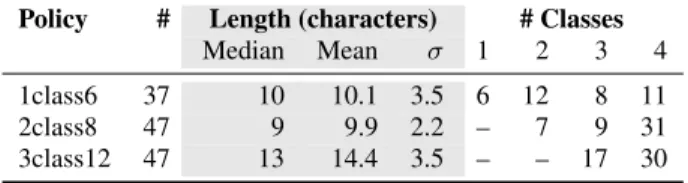
Table 1: The average length and number of character classes in unique passwords participants created.
Policy # Length (characters) # Classes
Median Mean σ 1 2 3 4
1class6 37 10 10.1 3.5 6 12 8 11
2class8 47 9 9.9 2.2 – 7 9 31
3class12 47 13 14.4 3.5 – – 17 30
We begin by describing our 49 participants in Section 4.1. We then briefly summarize the characteristics and guessability of the passwords they created in Section 4.2. Even though many partic-ipants made passwords that exceeded the minimum requirements of their assigned password-composition policy, roughly half of the passwords were vulnerable to an automated guesing attack or to a targeted attack. Next, in Section 4.3, we describe participants’ de-sired security level for each of the three sites for which they were creating passwords. Unfortunately, the value participants assigned to accounts diverges from what a security researcher might expect. The main contributions of this paper rest in the qualitative anal-yses we detail in the subsequent sections. In Section 4.4, we ex-plore participants’ security considerations, as well as their abstract, broad approaches for generating a password. We found that par-ticipants try to create passwords to match their perceived value of different accounts. We also found that some participants reused passwords or base elements verbatim across sites. We highlight general approaches and human algorithms participants used to craft a password. Some approaches, such as generating a unique phrase, appear secure and also memorable to participants. Sadly, other par-ticipants unwittingly employed very predictable approaches.
Despite their desire to create secure passwords, many partici-pants struggled to distinguish approaches that increase password security from those that make a password easier to guess. In Sec-tion 4.5, we delve into participants’ low-level strategies and micro-decisions. Subtle differences often separated choices that increased security from those that made passwords predictable. For example, basing a password on a song or visual image the participant asso-ciates with the website for which he or she is creating a password is far better than using a password like “iloveSiteName!” Many of participants’ misconceptions can be viewed as twisted interpreta-tions of advice about how to create a strong password.
4.1 Participants
We interviewed 49 participants, 21 male and 28 female. Their ages ranged from 19 to 63. Young participants were overrepre-sented relative to the general population as the mean age was 31 and the median 24. Of the 49 participants, 24 were students, 13 of whom studied a technical discipline like engineering. Of the non-student participants, 16 were employed in a variety of occupations, while the other 9 were currently unemployed or retired. All par-ticipants used text passwords regularly and were frequent Internet users. To preserve anonymity, we refer to each participant as PN.
4.2 Password Characteristics and Security
The 49 participants each created 3 passwords, resulting in a data set of 147 passwords, of which 131 were unique. No participant created the same password as any other participant, but 13 partici-pants reused a password verbatim across two or three of the three accounts. When we report password characteristics and guessabil-ity in this subsection, we report on unique passwords, counting a password that a participant reused multiple times only once.Table 2: The number of passwords created under each policy that were vulnerable to ageneralattack of1014guesses using
Hashcat, as well as the number manually identified as vulner-able to asite-specificattack using the website name, or a user-specificattack. We also present the number that appearsecure
against all three attacks.
Vulnerable to attacks
Policy # General specificSite- specificUser- Secure
1class6 37 21 0 0 16
2class8 47 19 2 3 23
3class12 47 10 8 3 26
The quantitative metrics we report in this subsection are not in-tended to suggest generalizability, which would be inappropriate for a small-scale, qualitative study. Instead, we present these num-bers to give a broad sense of the passwords our participants created. Participants often significantly exceeded the requirements spec-ified by their assigned password-composition policy, as shown in Table 1. For example, the median length of a 1class6 password was 10 characters, rather than 6, and 84% of 1class6 passwords in-cluded multiple character classes despite the lack of any character-class requirement. Although 2character-class8 passwords were only required to contain characters from two distinct character classes, 66% of these passwords contained all four character classes.
Across password-composition policies, 38% of the passwords participants created were guessed within1014guesses in the auto-mated guessing attack using Hashcat. Table 2 gives an overview of how many passwords created under each composition policy were vulnerable to attack. Sanitized examples of passwords vulnerable to this automated guessing areTyrone1975 (1class6),Gandalf*8 (2class8), and Triptrip1963(3class12). In contrast, sanitized ex-amples of passwords that were not guessed include5cupsoftoys (1class6),AfNaHiLoco(2class8), and7301Poplarblvd$(3class12). Using lists of common passwords, six passwords were trivially cracked, including three 1class6 passwords (gabriel,password, and qwerty), two 2class8 passwords (1Qazxsw2andPassword1!), and one 3class12 password (Newspaper123). None of the other pass-words were among the most commonly used passpass-words [9, 35].
Our automated, large-scale Hashcat attack did not specifically focus on site-specific information, such as the name of the site on which an account was being created. We manually evaluated vulnerability to site-specific attacks, considering a password to be vulnerable if the name (e.g., “First Trust Bank” or “1sttrust”) or function of the site (e.g., “email” or “breakingnews”) was the ma-jority of the password. We marked ten additional passwords (e.g., 1234SwagMail@andnationaldailytimesP@ss2) as vulnerable.
In addition to general attacks, passwords can also be guessed in attacks targeted to a user’s personal information. We manually ex-amined passwords not guessed by Hashcat alongside participants’ explanations to determine whether a password would be vulner-able to a user-specific attack. We marked passwords vulnervulner-able if the name of the participant, immediate family member, or pet, or a date or geographic location of well-known significance to the participant, formed the majority of the password. We marked six additional passwords (e.g., structuredFirstname.Lastname715and hOMETOWN!123) as vulnerable.
4.3 Security Level of Each Site
On the assumption that some or all of the participants would cre-ate fundamentally different types of passwords based on their
de-sired security for an account, we had participants create passwords for three types of accounts we expected would be of different value: a news site, a banking site, and an email account. We hypothesized that most participants would consider the account on the news site effectively worthless, yet attribute more value to the other accounts. In stark contrast to our hypothesis, 21 of the 49 participants (43%) considered all three accounts to be of about equal value. Al-though access to a user’s email account can often be used to reset the passwords to his or her other accounts, many participants shared P21’s opinion that an “email [account] is not important.”
Many of these participants felt the password for the banking ac-count was similarly not much more important than the password for a news site. Although consumer financial protections in the United States would minimize or completely mitigate financial harms of an online banking account compromise, and while additional secu-rity features (e.g., secusecu-rity questions) might also help to secure a banking account, few participants explicitly mentioned these fac-tors. P22 was one of the few who did, saying, “Email usually gets the highest security because even if they break into the bank ac-count, the bank often requires you to send something like a special code they sent to your email.” Other participants noted that they did not have much money in their bank account and thus did not care about that account. For instance, P48 noted, “As a college student, I don’t have a lot of money to worry about.” This is despite the fact that identity theft can be ruinous to one’s future creditworthiness.
Some of these participants who viewed accounts to be of equal value reused the same passwords verbatim across these sites. Other participants used an identical password-generation technique across these three accounts. P34 was an example of the latter approach, saying he did not “want the same password as with email” for his banking password or the news site. As a result, he cycled through the names of his three brothers, appending “24!” to each to arrive atJoey24!,Johnny24!, andJimmy24!as his passwords.
Seven participants (14%) felt that their news account was low-value and that their email and banking accounts were of equal (high) value. In some cases, participants reused passwords across ac-counts they considered to be of the same security level. P44 ex-plained, “I use the same password [as banking] with email because I don’t want to remember many passwords.” P32 similarly said, “One thing I do a lot is use the same password that are for things about the same security purposes.” While such a strategy might be prudent for low-value accounts [18, 42], it may open important accounts to attack. These seven participants felt the news account was worthless. P28, who considered the news site a “junk website,” said her approach for “junk websites will be something that’s just easy to remember. If it happens to get stolen it won’t make that much of a difference.”
Another 11 participants (22%) considered the news account and email account low-value, yet felt the banking account was impor-tant. As P30 explained, “[Email] is not important to me.” Similarly, P41 said, “I don’t care about the security of [the news] account,” and also said she is “not too concerned about email getting hacked.” The remaining 10 participants (20%) considered all three ac-counts to be of different value. All thought the news site was lowest value. Eight of the 10 participants considered their banking ac-count more valuable than their email acac-count, while the other two felt their email account was more valuable. P3 said he used “an easier password” for the news account because it “does not have financial” implications, but wanted email “to be a little bit secure.” Many of these participants felt strong pressure to create a secure password. For example, P23 wanted her banking password “to be very secure because if there’s any security risk then I would be losing a great deal of money.” Similarly, P18 explained,
“[Creat-ing a bank“[Creat-ing password] stresses me out, bank“[Creat-ing more than even [health] lab results, because I think it’s a combination of the fear of identity theft, and draining an account, and relaxing too much, and constantly watching it. I know I want a really strong password. Thinking through how I want to create that is tough.”
Sadly, many participants struggled to craft passwords whose ac-tual guessability matched their desired security level. For example, P6 was one of the ten participants who assigned different values to all three accounts. Unfortunately, the only one of her three pass-words that was not guessed was her password for the news account, which she intended to be the least secure password. Her pass-word for the news account combined dictionary pass-words from two languages with unpredictable capitalization, yet she expected the password to be predictable because it contained dictionary words. In an attempt to craft more secure passwords for the other two ac-counts, she used permutations of her name and her birthday. Both of these passwords that were intended to be secure were guessed.
Overall, 57% of participants did differentiate across accounts re-garding the desired security of their password. Unfortunately, as we detail in the subsequent sections, many of the behaviors these participants thought improved security dramatically had at most a modest impact. The remaining 43% of participants did not differ-entiate across accounts, potentially resulting in them inefficiently expending their finite memory for passwords [18] on passwords for low-value accounts and thus limiting their ability to remember strong passwords when password strength actually matters.
4.4 General Approach to Password Creation
Of the 49 participants, 43 (88%) said they had a well-defined process for creating passwords that they put into action during the study. In this section, we delve into the approaches we observed.
While password reuse has been studied previously [14, 55], un-derstanding how our participants reused passwords provides es-sential context. First, we discuss the 13 participants whose gen-eral strategy centered on verbatim reuse of a single password. We then discuss the 10 participants who had a base keyword that they reused across sites, making small modifications per password. We also outline other participants’ general algorithms for crafting a password, including the order in which they chose different ele-ments to combine into a password. Finally, we briefly mention how password-management strategies [55], impacted participants’ expectations and approaches.
4.4.1 Password Reuse
Password reuse is a major threat to password security because the compromise of one account can lead to the subsequent com-promise of other accounts for which the user has chosen the same username and password [14]. We found that even when partici-pants expressed a desire to behave securely, they still reused pass-words. Only three participants said that, in the abstract, they would never reuse passwords. The other 46 participants said they gener-ally reused passwords. While reusing the same throwaway pass-word for low-value accounts can be an efficient coping strategy, reuse across high-value accounts is risky [18, 42].
In our study, three participants (6%) created a single password and reused it across all three sites because they worried about their ability to remember multiple distinct passwords. Notably, P26, one of the three participants to reuse a single password for all three ac-counts, had said, “For online banking and things, I try to make my passwords a little more secure,” yet reused a password consisting of an obvious keyboard pattern (“1Qazxsw2”) for all three sites.
Ten other participants (20%) created only two distinct passwords across the three accounts. Three of these participants had the same
password for the email account and banking site, six participants shared a password for the news site and email account, and one par-ticipant used the same password for the news site and banking site. These participants usually failed to see this behavior as potentially problematic. For instance, P2 said he saw “no security downside” in using the same password for the news and email accounts.
Some participants knew in the abstract that password reuse is a poor idea, yet did so anyway. Often, participants found remember-ing distinct passwords to be too difficult. For example, P6 said it is “very difficult to remember all different passwords.” Therefore, she has five distinct passwords that she reuses. P19 reused passwords for accounts she does not think are “that important” and “anything that does not have anything to do with my credit card.”
Other participants noted that they had never experienced prob-lems due to password reuse. P1 explained, “I know [password reuse] is a terrible idea, but it does not keep me awake at night....I have never seen any negative consequences.” Similarly, P9 said she “usually uses the same password for many things,” but is not con-cerned “because [she has] been using the same password for a long time” and had yet to experience a problem. P45 felt he “should be” worried about consequences of password reuse, yet does not worry. A number of participants said they did not feel password reuse was a problem because the password they reuse is strong. P2 said he reuses passwords “all the time...if the password is a good one.” P35 said similarly, “My [reused] password is not easily guessed,” while P49 explained, “No one can guess my [reused] password.” Unfortunately, if any site on which that password is reused is com-promised and the system administrators do not follow industry best practices (i.e., passwords are salted and hashed using a slow hash funtion like bcrypt [46]), these participants may have multiple ac-counts compromised if the attacker guesses the password in an of-fline attack. Notably, during the study, two of these three quoted participants made passwords that they believed were strong, yet were guessed in the general attack using Hashcat.
4.4.2 Element Reuse
Although they did not reuse passwords wholesale, ten partici-pants usually had a long substring in common across their pass-words, while eight additional participants sometimes used a com-mon string across passwords. While reusing a base element can still result in strong passwords if modifications and additions to the shared elements are non-trivial, predictable modifications to a base element are common [14, 72]. In those cases, if a single password is compromised, the rest will follow quickly.
In an example of element reuse, P27 used the street name from a former address as his starting point. His email, news, and bank-ing passwords in the study were thuscedarville1,cedarville2, and cedarville3a, respectively. He explained, “I would just go one num-ber up....That way, if I’m having a problem rememnum-bering [a pass-word], at least I’ll have a base and figure it out from there.” He said he would just try increasing digits until landing on the correct password. Notably, he desired for his banking password to be more secure than the others, yet did not achieve this goal. He said, “For a bank, for a little more security, I click it up one number...and add something like another letter.” His belief that adding a single “a” on the end makes the password more secure seems misguided. Un-fortunately, Hashcat rules to append single characters onto the end of the password are common in lists of mangling rules [34, 54, 58]. P10 also began with a common substring, a mnemonic. His pass-words were thusATdim12nd#,ATdim12sw#, andATdim12ft#. The two letters that varied represented the names of the sites (National Daily Times,Swagmail, andFirstTrust). P15 adopted a similar strategy, using “1234” as his starting point and appending a
vari-ant of the site name. His passwords were1234Nat’lDailyTimes, 1234SwagMail@, and1234FirstTrustNat’lBank.
A common misconception was that making minor or incremental additions to common substrings would result in secure passwords. For example, P37 said she did not care about security for the news site or email account. Therefore, she usedTyroneandgabrielas those passwords, respectively, drawing on names of family mem-bers. However, “because security is required for a bank account,” she added Tyrone’s birth year, resulting inTyrone1975for the bank-ing site. Unfortunately, the common technique of appendbank-ing a re-cent year to a password does not make it secure against a trawling, large-scale attack, let alone against an attacker who researches the user’s family members. Similarly, P44 uses the same 8-letter base word across all of his passwords (both in the study and in daily life). For the news account he deemed unimportant, he appended “123.” Instead, for the two accounts he wanted to be secure, he appended “1974,” his birth year, falling into the same trap as P37. Lists of mangling rules used by attackers frequently include rules that append years to entries in the word list [34, 54, 58].
Other participants expected that character substitutions would similarly transform their typical base password into something more secure. For example, P45 took his shared news and email pass-word, ninjakick44ninjakick!, removed the repetition, and instead performed character substitions to arrive at n1nj@k1ck! as his banking password. He explained, “I want my banking password to be extra secure... I replaced letters with symbols and numbers to make it secure.” Unfortunately, such substitutions are very pre-dictable [60] and provide uncertain security benefit [67].
Similarly, P49 turned her shared news and email password Ele-phant0215!, which she expected to be weak, into the banking pass-word@El3phant4225, which she expected to be strong. In par-ticular, she performed a predictable character subsitution, yet also replaced her birthday (02/15), which she expected to be “linked to my bank account,” with her favorite four-digit sequence. She also changed the ending exclamation point into a leading “@” because it reminds her of Twitter. While neither password was guessed by Hashcat and both are thus at least moderately secure, these types of modifications would not in general reliably transform an otherwise weak password into a strong one.
Similarly, P22 “[does] not worry about security for the news ac-count,” so he used “two unrelated words (jungle and salmon) fol-lowed by digits” to createjunglesalmon711. In the spectrum of passwords we observed for this study, “junglesalmon” is actually a relatively strong starting point because of the combinatorics of combining two unrelated words, yet P22 assumed it was weak be-cause it contained dictionary words. To make a banking password, which he hoped would be strong, he prepended “R” and appended “@$” to the string he believed was insecure, expecting the resul-tantRjunglesalmon711@$to be secure. As with P49, neither pass-word was guessed by Hashcat; both are fairly secure. However, P22’s misconception that minor changes to a password he believes is weak can make the password secure is troubling, especially when the capital letters and symbols are in predictable positions [38].
4.4.3 Algorithm for Password Creation
Most participants had an algorithm they always used to make a password. Rather than relying on reuse, these approaches followed conceptual patterns. For example, P3 always used a word, a year, and an emoticon. For low-security accounts, the word was a place she had visited. For high-security accounts, she used a “magic” word because she “want[s] it to be secure.” Her resultant passwords wereCroatia2011:-p,Patagonia2014:-), andHocusPocus;-)2003. P7 always used words she associated with the site followed by a
single digit and an exclamation point. P19 stuck with a consistent order, “usually one capital, followed by lowercase letters, and a number or symbol.”
In some cases, participants unwittingly created some passwords they believed to be strong and others they believed to be weak, yet the supposedly strong passwords were easier to guess. P35 was one such participant. As an English teacher, she liked to use “longer word[s]. It’s what teachers expect from students, which is what made me think of it.” Her algorithm was to add a digit onto a single long word. Her email and banking passwords, which she expected to be secure, wereLikelihood4andDeliberation9. Both were guessed by Hashcat since “likelihood” and “deliberation” are in attackers’ dictionaries, even if not in students’ lexicons.
In contrast, she said, “I do not care about the security” for the news site and wanted to write “I journal.” Because journaling is as-sociated with newspapers, she said, “I think using a word related to the site would lessen the security.” To make the word a little longer, she changed “journal” to “journalistic,” resulting in the password Ijournalistic?8. This password, intended to be the weakest, was actually the strongest. While the participant associated the phrase “Ijournal” with a news site, this association is far from obvious.
In other cases, participants made passwords of similar strength despite expecting some to be far more secure than others. For ex-ample, none of P18’s three passwords were guessed by Hashcat, yet she believed her news password was relatively weak and “sim-ple” and her email and banking passwords were “really strong.” Her approach to password creation was to pick words of signifi-cance to her and to write them in mnemonic form, usually followed by a symbol and some digits. The letters in her news password, tdVc$567, stood for “the da Vinci Code,” while the letters in her email password,Tjks&987, represented the first names of her “sib-lings [and dog] in birth order.” Her banking password,_EmiLt345, which she deemed to be the strongest, was based on the name of a “friend who lives out of the country,” which is why she felt that password was strongest. However, all three passwords were strong; none were guessed by Hashcat.
Most participants said they developed their password-creation al-gorithm on their own, but 12 participants (24%) had read articles giving advice about creating secure passwords or attended an or-ganizational security-training class. Unfortunately, both types of participants fell victim to misconceptions about security. P36, for example, had attended security training provided by her university and was taught to use phrases in passwords. As a result, in the study, she decided to useilove1sttrust! as the password for the “First Trust National Bank.” Although the participant believed this to be a “secure” password because it contained a phrase, “ilove” is a very common substring in passwords, and the name of the site, even slightly modified, is very predictable. The institutional secu-rity training, while correct in intent, fell short in helping P36 create secure passwords.
4.4.4 Order in Which Elements Are Chosen
One of the most common password structures when multiple character classes are required is a series of letters followed by a digit and a symbol [70, 71]. P44’s approach was common among our participants: “I always put a capital letter at the beginning and numbers at the end.”
Our think-aloud protocol let us unpack the order in which partici-pants chose different elements of their passwords. We analyzed the order in which participants discussed each element of their pass-word during its creation. The vast majority of participants first thought of a word, followed by digits and symbols. Their final passwords reflected this order.
For example, among passwords for banking accounts, which par-ticipants frequently deemed the most valuable, 29 parpar-ticipants cre-ated passwords containing letters, digits, and symbols. In 27 of these cases (93%), participants first chose the word they would use. In the remaining two cases, the participant first thought of the digit(s) they would use, followed by the word. Seventeen ad-ditional passwords contained letters and digits, but not symbols. For fifteen of these passwords (88%), the participant first chose the word; in only two cases did the participant first choose the number. The consistency with which participants first chose a word to use, followed by digits and symbols, is particularly notable because for 82% of banking passwords, the order in which participants de-cided on elements is the order those elements appeared in their final passwords. In essence, the password is built from left to right as participants think of elements. Because passwords that begin with a word and end with digits and symbols are most common, one way to induce users to create stronger passwords might be to encourage them to scramble the elements of their password or, even better, to nestle digits and symbols into the middle of the words.
4.4.5 Password Management
Users’ password-management strategies [18, 55] are central to their ability to use distinct, complex passwords for each account. We found that 17 of our 49 participants (35%) simply memorize their passwords without writing them down or storing them any-where. For these participants, the memorability of the password is of paramount concern. In contrast, only two participants (4%) used a third-party password manager (KeyPass and LastPass, respec-tively), and only 6 participants (12%) used their browser to store passwords. Consistent with what prior research has shown [55], the remaining participants mixed memorization, writing passwords down, and storing passwords in ad-hoc ways on their computer.
A few participants had other considerations that impacted pass-word creation. Two participants regularly reset their passpass-words, leading them to care greatly about the security of their email ac-count. P29 uses a “family password” for her bank account to en-able her parents to access it. As a result, she wants that password to be memorable to her parents, too.
4.5 Strategies and Misconceptions
Finally, we delve into micro-decisions participants made in the course of making a password. We documented micro-decisions through both the think-aloud protocol and the targeted questions in response to participants’ behaviors and interview responses. We pay particular attention to participants’ misconceptions.
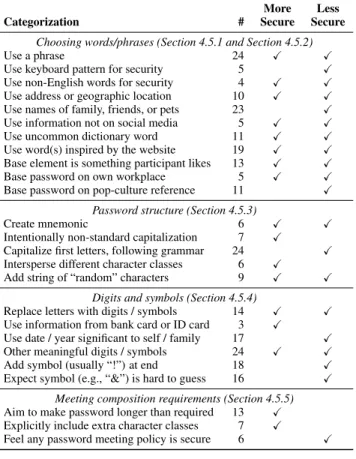
As discussed in Section 3, our qualitative clustering of password-creation strategies enabled us to identify 122 distinct behaviors within the context of 25 broader themes. Table 3 presents the 25 broad themes we identified and how many of our 49 participants exhibited behaviors in each of those themes. As our analysis was purely qualitative, these counts should not be interpreted as gener-alizable to larger populations or comparable statistically. Instead, we provide these to give the reader a better sense of our data.
As shown in Table 3, we evaluated the security impact of each password-creation strategy based on the overall guessability of the passwords that employed that technique, as well as the frequency with which those techniques appear in passwords leaked in major breaches [21,48,60,62]. In some cases, different applications of the same strategy had very different impacts on security—sometimes beneficial and sometimes detrimental. For many passwords, how-ever, the application of a particular strategy itself did not cause ei-ther a substantial increase of decrease in security. We do not ex-plicitly call out these neutral impacts in the table.
Table 3: The categorization of participant strategies that re-sulted from our qualitative data analysis, along with how many participants (#) exhibited that behavior. Check marks denote that we observed instances of that behavior that made a pass-word substantiallymoreorlesssecure.
Categorization # SecureMore SecureLess
Choosing words/phrases (Section 4.5.1 and Section 4.5.2)
Use a phrase 24
Use keyboard pattern for security 5
Use non-English words for security 4
Use address or geographic location 10
Use names of family, friends, or pets 23
Use information not on social media 5 Use uncommon dictionary word 11
Use word(s) inspired by the website 19
Base element is something participant likes 13
Base password on own workplace 5
Base password on pop-culture reference 11
Password structure (Section 4.5.3)
Create mnemonic 6
Intentionally non-standard capitalization 7
Capitalize first letters, following grammar 24
Intersperse different character classes 6
Add string of “random” characters 9
Digits and symbols (Section 4.5.4)
Replace letters with digits / symbols 14
Use information from bank card or ID card 3
Use date / year significant to self / family 17
Other meaningful digits / symbols 24
Add symbol (usually “!”) at end 18
Expect symbol (e.g., “&”) is hard to guess 16
Meeting composition requirements (Section 4.5.5) Aim to make password longer than required 13
Explicitly include extra character classes 7
Feel any password meeting policy is secure 6 The 25 broad themes we identified conceptually fit into four even broader approach areas. The first area, detailed further in Sections 4.5.1 and 4.5.2, centers on how participants chose the primary content, often semantically significant, that served as the foundation of the password. Usually after choosing this founda-tional content, participants imbued the password with addifounda-tional structure (Section 4.5.3) through capitalization, mixing character classes, and added “randomness.” Participants had varied strategies for using digits and symbols (Section 4.5.4) and meeting, or in-tentionally exceeding, the requirements of a password-composition policy (Section 4.5.5).
4.5.1 Choosing Words and Phrases
Choosing words to form the base element of a password was a crucial step in password creation. Our participants most often chose words based on personal topics (e.g., addresses, names, birthdays), associations to the site, their hobbies, nearby items, past events, keyboard patterns, work, and religion. As P23 explained, “I like to come up with words that mean something to me, something that I like, like the name of my favorite author, or a candy that I like to eat.” Other participants used nearby objects for inspiration. For instance, P28 built her password around the product number of a camera on a shelf in our lab. Some participants correctly knew to avoid using their employer’s name, their own name, their own birth-day, or a single dictionary word. However, beyond these correct conceptions of high-level topics to avoid, participants fell victim to a number of misconceptions.
Many of these misconceptions were related to participants not understanding the automated nature of password-guessing attacks. They knew to avoid personal items about themselves, yet thought names and dates related to family members were fine. P6 structured her password around her name, yet placed a birthday (MMDD) in between her first and last name. She expected “a malicious person will try my birthday and my name, so I will not use my birthday...I will use...my pet dog’s birthday.” Unfortunately, automated attack-ers often try all possible birthdays rather than targeting a particular user’s birthday [34,58,65]. Similarly, P7 built her password around the name of her dog, “Goldie.” She expected “hackers cannot guess [it] because I have no pictures of him on my Facebook account.” Although her dog’s name is not on Facebook, it is a common pet name, making it a very likely target for attackers [60, 64].
Misunderstandings about attackers also impacted the character-istics participants expected to be secure. For instance, P2 based his password around the Mahavishnu Orchestra, noting that he ex-pected attackers would not be able to guess his password because “this band name is hard to spell.” Because automated attackers use wordlists, words being hard to spell makes no difference for the attacker, only for the user. In crafting the passwordpurplep@nts, P11 wanted to pick words that were secure, and she picked purple as “a color that is not often used, unlike red or white.” Unfortu-nately, purple is just as common on word lists as are red and white. Many participants had heard to avoid dictionary words in making passwords. As a result, P26 used the keyboard pattern1Qazxsw2 as a password she intended to be secure. She said, “For online banking, I try to make my passwords a little more secure, so I like to follow a pattern on a keyboard.” Similarly, P23 based the banking password she hoped would be secure around a keyboard pattern, which she mistakenly considered to be “random letters.” Keyboard patterns are an easy target for automated attacks [54, 60, 64].
In contrast, other participants had developed approaches to word selection that resulted in much more secure passwords. For the banking website, P39 wanted to base his password around a song that he associates with money, and “the first song that comes to mind is Gold Digger. The phrase would be, ‘I ain’t saying she’s a gold digger.”’ He transformed this phrase into a mnemonic and added three random characters. P4 similarly based her password, $0.02CentShow, on a music album that she associates with money. She chose to spell “2 cent” as “$0.02Cent” to be harder to guess. P28 created the complex passwordLCiinf3-n, explaining, “I usu-ally create a sentence and take all the first letters,” which is often considered good advice as long as the sentence is unique [36, 49].
Other participants sadly undervalued the importance of choos-ing unique phrases when constructchoos-ing a password. P17 chose the common aphorism “be the change” as the basis for one password, yet believed it to be secure because “someone wouldn’t think [the phrase] necessarily applies to me.” Similarly, P46 used a mnemonic of the famous opening line fromA Tale of Two Cities(“It was the best of times, it was the worst of times”) as the basis for her pass-word. In contrast, P28 securely created a completely unique phrase to describe what was happening while she was creating a password. A few participants crafted passwords that combined words from multiple languages, which may or may not be a secure strategy based on the languages and words chosen. For example, P6 used a Hawaiian word in her password, expecting its juxtaposition with English to be unpredictable. Other participants created strong pass-words by combining unrelated pass-words. P40 unintentionally created a reasonably secure password when he wanted to make a “short and simple” password for his low-value news account. He combined two unrelated words, “tossed in a few symbols,” and appended “whooo” in craftingSqu@shC2ndywhooo.
4.5.2 Deriving Passwords from a Website
Using the website or service for which they were creating an ac-count as inspiration was participants’ second most common strat-egy after using personal names and dates. We found a sharp di-chotomy of secure and very insecure instances of this strategy.
Many participants simply used the name of the site as a core component of their password, making such passwords easy tar-gets for site-specific attacks. For instance, P36 had “heard that, instead of using words and numbers, using a phrase is more se-cure,” so she created the passwordIlove1sttrust!for the First Trust National Bank. Unfortunately, the name of the site is extremely predictable. Other participants used predictable word associations. For instance, P33 created the password+Money369. She used the word money “because it is a bank,” and she used an increasing pat-tern on the number pad to represent an account balance she hoped would also be increasing.
In contrast, other participants used much more distant word asso-ciations in crafting far more secure passwords. These participants, like P38, avoided “the name of the service or the type of service because that would be too easy to guess.” Many of these partici-pants were inspired not just by the purpose of the site, but also the site’s visual design (see Figure 1 in Section 3). For example, P13 said, “I saw the website logo picture and found a brown building on the left. So I used ‘left’ ‘brown’ as keywords followed by my favorite number and a symbol that looks like a building” in crafting LEFTbrown8!as his news password. Similarly, the news site logo reminded P32 of New York, which itself reminded her of “108.” As a result, she created the passwordnewyorkONE008, in which she added a 0 and mixed digits and capital letters for security. P39 used creative capitalization and uncommon punctuation to turn the lyrics from the Queen song “The Invisible Man” into a secure pass-word. He chose this song as the basis for a secure email password “because I want the password to be invisible,” using a distant asso-ciation with the goal of the password as inspiration.
4.5.3 Capitalization, Punctuation, and Structure
As they decided how to integrate capital letters and other struc-tures, many participants predictably capitalized the first letter of the password and added a single punctuation mark at the end. While in some cases participants said they did so out of laziness or simply because it is easy to remember, others said that years of schooling had inculcated the idea that capital letters come at the beginning and punctuation comes at the end. For example, P36 ended her password with an exclamation point “because that is how a sen-tence ends.” These participants did not recognize that following the rules of grammar is detrimental to password security [47, 54, 60].
In contrast to the many participants who said they usually capi-talize the first letter of passwords, some participants used far more creative approaches. For example, P13 crafted the password 8AX-Ewater<based on the two items he associated with the job he had 8 years ago. He explained, “The security of an email account is important to me, so I capitalize some words and include a symbol that looks like an axe.” The less predictable capitalization and less common symbol made his password stronger. Similarly, P31 knew to structure a password unpredictably, so he capitalized the “E” in baldErdash49“to randomize the password for security.”
4.5.4 Use of Digits and Symbols
The most common, and most troubling, misconception we ob-served around the use of digits and symbols is that their inclusion automatically makes a password secure. We hypothesize this mis-understanding stems from advice that strong paswords contain dig-its and symbols (to increase the space of potential passwords)
be-ing misinterpreted as somethbe-ing akin to the assertion that includbe-ing digits and symbols makes a password secure. Participants with this misunderstanding were well intentioned. For instance, P6 said, “I want to prevent others from predicting passwords, so I want to use all four types of [characters] for my password.” Unfortunately, she did so in very predictable ways, with a capital letter at the beginning and a digit and a symbol at the end.
Many participants thought simply adding a symbol at the end of the password made it secure. As P45 said, “I added ‘!’ at the end to make it secure.” P34 felt that “usually numbers and a sym-bol will make the password strong.” Therefore, he appended “24!” to each password, which otherwise were just the names of his three siblings. Users must be disabused of the notion that digits and sym-bols are a silver bullet for password security.
Years were common among participants’ passwords. Unfortu-nately, years and dates are also well represented among top guesses by cracking tools [65]. Most of our participants did not seem to realize how predictable years are. For example, P49 made the pass-wordIts1987“because [he] was born in [that year].” Similarly, P25 appended “68” onto her full name to create her password because she was born in 1968. Perhaps even more predictably, P36 created the passwordIloveNDT2014!“since it’s 2014.”
Participants who used dates or years in their passwords com-monly seemed to think only about threats from targeted attacks. For instance, P6 explained, “I think a malicious person will try my birthday and my name, so I will not use my birthday itself...I will use family information, such as my sister’s birthday or my par-ents’ birthday, or my pet dog’s birthday.” Compared to using her own birthday, P6’s choices would give less of an advantage to an attacker in a user-specific attack, yet would do little to thwart a general attack.
Other choices of digits and symbols were more novel. Some participants used long sequences of digits and symbols that would be hard to predict. For instance, P9 used her student ID number from when she was in high school as the beginning of a password that was not guessed. In many other cases in which the digits or symbols were predictable, other parts of the password contributed enough unpredictability to make the password secure overall. P21 craftedbAMBANG5$555, combining his father’s hometown with “5” because it “is a lucky number” and “$” “because it is a bank account.” P42 also used the “dollar sign for money because this is a banking account.” Her password,ilovebillyC$1, used the 1 at the end because Billy is her boyfriend and “he’s number 1” in her book. A handful of other participants used digits to mirror meta-aspects of thir password. For instance, P46 included “2” inLethe+Styx27 because “there are two rivers (Lethe and Styx)” in the password, yet the “7” was random.
4.5.5 Meeting Requirements
One aspect where many participants came up short was decid-ing what to do when they did not meet a length requirement. The aforementioned transformation of “journal” into “journalistic” was a creative and accidentally effective approach of meeting a length requirement. In contrast, many participants simply tacked on a pre-dictable number and symbol. Having decided to associate a piggy bank with the banking website, P8 came up with “pink piggy,” yet found it was not long enough. Therefore, she added “1!,” which is the most predictable ending for a password [60]. However, such predictable additions to a password have the added benefit of meet-ing digit and symbol requirements, which is why P2 said he always appends “1@.” P49 found that “elephant” was not long enough and she said, “I don’t want to choose another word,” so she added num-bers. This moment in password creation is ripe for a more