An Enhanced SharePoint Authentication using
Kerberos
S.Vanitha1, J.Jayachitra2, K.Elavarasi3
1
Assistant Professor, 2Associate Professor, 3Senior Lecturer 123IFET College of Engineering
Abstract— Kerberos is the widely deployed authentication protocol. This document gives you comparison between NTLM and Kerberos authentication. And it gives information on how Kerberos authentication plays a vital role in authentication and delegation scenarios, and the situations where Kerberos authentication should be used or may be required in solution designs. Scenarios include business intelligence implementations which secure access to external data sources such as SQL Server. The document also shows how to configure Kerberos authentication end-to-end within your environment, including scenarios that use various service applications in Microsoft SharePoint Server. Additional tools and resources are described to help you test and validate Kerberos configuration.
Index Terms—NTLM, authentication protocols, SharePoint, Delegation Scenarios, Solution designs, Kerberos
I. INTRODUCTION
People still use paper forms like Dairy Reports, Leave Applications, Purchase Orders, invoices etc. People on various locations send these forms to the HO using Email. Searching a specific document from those entire documents or creating a report using all those documents at the year/month end is very difficult. And it’s too difficult to carry folders to any other place. An online form is easy to fill and submit. A central storage location for all the forms will make the entire reporting task easier.
While doing a project if there is no central place to manage all your projects then there will not be any coordination between any two teams and especially when teams located on two different locations.
The Microsoft Windows SharePoint Services (WSS) 3.0 and Microsoft Office SharePoint Server (MOSS) 2007 are designed to centralize company information and help team members collaborate more efficiently [1]. Users can access all the information that their individual user accounts are allowed to see from the SharePoint websites. Because of this design you need to make sure that authentication is swift, secure and fits company policies.
In this paper we are providing the information on the basics of using Kerberos in a SharePoint environment. Windows NTLM and Kerberos authentication protocols are the most widely used protocols for authentication .But comparing to windows NTLM, Kerberos plays a vital role in single sign on. Due to that Kerberos is more suitable for SharePoint authentication process. This paper will give you an overview to work from in your own environment.
We will begin with describing the SharePoint and its environment in Section II. Then, we will present a brief
overview of the NTLM and Kerberos Authentication protocols and comparison between them in Section III. Then, in Section IV, we will examine the procedure for configuring Kerberos authentication in SharePoint environment. In Section V we will provide the testing details for SharePoint. Finally, we will summarize our conclusions.
II SHAREPOINT
In the introductory part we discussed the importance and efficiency of SharePoint and Kerberos authentication protocol. In this section we will see the brief discussion on SharePoint.
A.Wwhat is SharePoint?
SharePoint is a web-based intranet that can help improve your organization’s effectiveness by streamlining the management of data, storage of data and access to data.
SharePoint is a document management system. SharePoint provides a single, central storage point where all your data can be stored. SharePoint is fully searchable, finding your file quickly is a doddle, not matter how much data you have. SharePoint also allows you plenty of control over your data you can manage who has access to certain areas.
SharePoint acts as a communication platform. User can share information quickly, easily and effectively. User can create internal postings, new features and announcements, and publish them in an instant. Users can even sign up to an ‘alert’ feature.
SharePoint boots the efficiency and effectiveness of the documents. User can share information across Division, Departments, Teams or groups. SharePoint maintains security and eliminate errors [2].
Since SharePoint are designed to centralize company information and help team members collaborate more efficiently. Users can access all the information that their individual user accounts are allowed to see from the SharePoint websites. Because of this design you need to make sure that authentication is swift, secure and fits company policies.
III NTLM VS KERBEROS
Whenever you create a new SharePoint website, one of the questions SharePoint asks you is to select your authentication protocol. It can be either NTLM or Kerberos.
B. What Is NTLM?
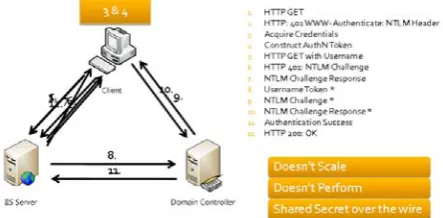
level of a computer network. This protocol is implemented as a challenge-response sequence. A challenge response sequence can be simple-the server presents a challenge or a question and the client provides an answer, or a response! The right answer lets you in [3].
The problem with such protocols is that a malicious listener can eavesdrop and capture the response, and thus replay it back to the server whenever any access is requested. The server then has no way of verifying who the real client was. Thus to make challenge response more secure, various techniques have been invented over the years. For instance, you could have multiple responses, and multiple challenges between a server and a client. Or you could have the response being valid only for certain duration of time. Yet another mechanism could be to use a one-way hash algorithm, which you can encrypt easily, but not decrypt easily. Thus, only encrypted versions of the password are sent over the wire [4].
NTLM uses some of these mechanisms and comes in two flavors. NTLM v1 and NTLM v2.
1. NTLM v1
NTLM v1 involves the server sending an 8-byte random number. The client performs a computation using a one-way algorithm, involving a secret known to only the client and the server, i.e., the password, and the 8-byte random number. This computed hash is then sent to the server. Since the computation algorithm, the password, and the 8-byte random number are all available on the server, the identity of the client is thus established.
2. NTLM v2
NTLMv1 has a huge shortcoming. The 8-byte randomly generated sequence is prone to a dictionary attack. Thus, NTLM v2 is a strengthened protocol built using similar mechanisms. In addition to NTLM v1, an MD4 hashed 8-byte client challenge is appended to the 8-8-byte server challenge. Thus, it is backwards compatible with NTLM v1, because the least 8-byte half of the hash results can be utilized for NTLM v1 clients, and is immune to dictionary attacks.
Now NTLM v2 sounds like a pretty secure protocol, and in fact, if you read the innards of this protocol, it sounds like the work of Coke-can glassed scientists, yet it has a few significant problems.
Fig 1 NTLM Authentication Mechanism
B. What Is Kerberos?
Kerberos is an open standard, not invented by Microsoft, but instead devised by the engineers at MIT and adopted by more than just Windows.
There are three players in Kerberos: the Key Distribution Center (KDC), a client, and a service server [5]. In my example scenario, the KDC would be a domain controller, and the service server is a SharePoint Web Front End. The client, of course, is user and user computer.
When you logon to a Kerberos-enabled Windows 2000 or better network in the morning, you provide a username and password along with a domain to establish your identity to the computer network. By doing so, you would request a Ticket Grant Ticket (TGT) from the authenticating server, which is the KDC or the domain controller.
Later in the day, when you try accessing a resource on the network, you would present the TGT, an authenticator (client ID plus timestamp) and Server Principal Name (SPN) of the target server [5]. This creates an access token for the client user.
Using this ticket, you may access various resources on the given server. In addition, using the TGT, you can create other session tickets on the network, all this while not passing your password and allowing the server to pass your identity to another server-something NTLM couldn’t do!
Note that this is a vastly simplified representation of Kerberos; there is much else that happens behind the scenes.
Fig 2 Kerberos Mechanism
C. Kerberos vs. NTLM
Now that you understand the basics of both Kerberos and NTLM, you can make a fair comparison of both. You should consider these various points when choosing between NTLM and Kerberos.
1. NTLM v1 is unsecure-don’t use it.
2. NTLM v2 security is comparable to Kerberos, except 3. ..Except, NTLM v2 cannot allow a server to pass the
client’s identity to another server on the same network. 4. Kerberos requires the client and accessed resources to be on the same domain. This makes it unsuitable for Internet-based scenarios, or with browsers such as Safari or Firefox.
5. Pairing smartcards or Windows CardSpace with Kerberos will let you use Kerberos-based authentication over the Internet. In this case, your client certificate is mapped to an AD identity that never leaves the domain. However, the certificate can be accepted over the Internet.
6. Kerberos is susceptible to a single point of failure. If the KDC goes down, nobody can authenticate.
7. Kerberos is more secure than NTLM v2 in one regard-tickets can be revoked.
NTLM Kerberos
Cryptography Symmetric Symmetric and/or Asymmetric
Trusted 3rd Party Domain
Controller
Domain Controller with KDC Domain Controller and Enterprise CA Supported Clients
Windows 9x,Me,NT, 2000 and above.
Windows 2000 and above
Features Slow auth(pass thru) Ticketing No mutual AuthN Mutual AuthN
No delegation Delegation Proprietary Open Standard
Lamer data protection
Cryptographic data protection
Table 1 NTLM vs Kerberos
IV CONFIGURING KERBEROS IN SHAREPOINT
A.Using Kerberos in SharePoint
Kerberos is a secure protocol that grants authentication tickets if the client’s request to the Key Distribution Center (KDC) contains valid user credentials and a valid Service Principal Name (SPN). Kerberos is the preferred authentication type for SharePoint [3] because it is faster, more secure, and reduces the number of errors you can get with username and passwords than NTLM. If the SharePoint website uses external data (located on different servers than your SharePoint server itself) ex. to SQL databases through web parts the SharePoint server needs Kerberos to delegate the client credentials (the credentials are never sent over the wire, only tickets which the KDC keeps track of).
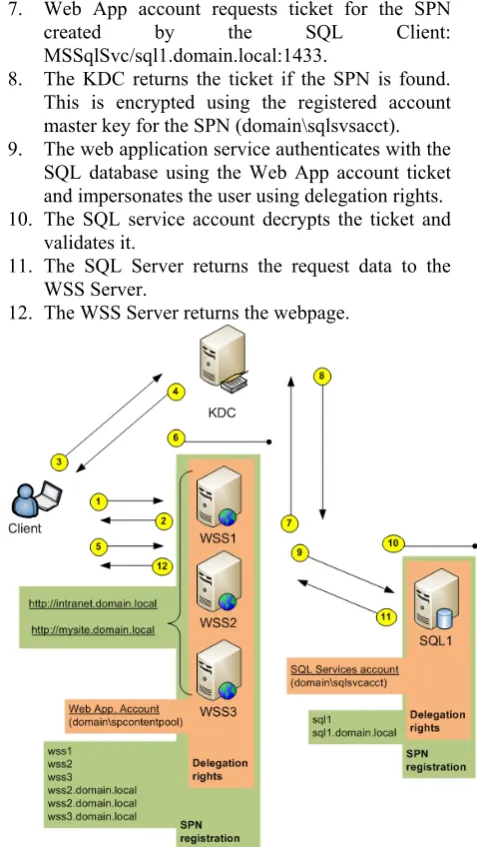
So what is happening between the client and the servers when you try to access a Kerberos enabled website? This scenario shown in Figure 3 is made up of Windows SharePoint Services 3.0 which also is the base for MOSS. The Kerberos technology is the same – we just have more services and roles in MOSS.
1. Client accesses http://intranet.domain.local using anonymous credentials.
2. The WSS Server returns IIS error 401.2 but also returns a WWWAuthenticate header.
3. Client requests a ticket for the SPN created by the
local internet browser: HTTP/intranet.domain.local
4. The KDC returns the ticket if the SPN is found. This is encrypted using the registered account master key for the SPN (domain\spcontentpool). 5. Client authenticates with the ticket for the web
application.
6. The Web App account decrypts the ticket and validates it.
7. Web App account requests ticket for the SPN created by the SQL Client: MSSqlSvc/sql1.domain.local:1433.
8. The KDC returns the ticket if the SPN is found. This is encrypted using the registered account master key for the SPN (domain\sqlsvsacct). 9. The web application service authenticates with the
SQL database using the Web App account ticket and impersonates the user using delegation rights. 10. The SQL service account decrypts the ticket and
validates it.
11. The SQL Server returns the request data to the WSS Server.
12. The WSS Server returns the webpage.
13. Figure 3: Kerberos in SharePoint flow
If Kerberos is not configured for SQL communications step 6 jumps to step 12. And remember the ticket granting only happens at first logon and lasts until timeout. Check out the links section for a flowchart in larger scale with built-in text on the arrows.
B. Configuring Kerberos in SharePoint
To make our implementation as painless as possible we need to have all the building blocks ready. Every Active Directory and every server has a unique IP address [6]. This must be registered in DNS server and no duplicates of this must exist in the forward or reverse lookup zone for Kerberos to work. Also all clients and servers must have the correct date and time as Kerberos uses this too for validation of the tickets and access to an internal DNS Server.
Before installing SharePoint create appropriate users in Active Directory.
Information needed for setting up Kerberos in a SharePoint environment.
The Service Class of the SPN (HTTP for WSS/MOSS web applications. MSSQLSvc for a default instance of SQL Server)
The host names of your SPNs (only hostname. Usually FQDN without the domain-part)
The Fully Qualified Domain Name (FQDN) of all web applications and servers
The port numbers or your SPNs (no port for WSS and MOSS web applications. 1433 for SQL)
The Active Directory accounts for your SPNs (Service and application pool accounts)
C. Enable Kerberos for SQL communications
Before installing Microsoft SharePoint ensure that SQL communication is working. The configuration database is located on SQL Server and if the connection is broken, it must be fixed before the SharePoint sites are up and running again. If there is any change in the authentication after the initial installation at least shut down the SharePoint services first to avoid data loss [4].
Enabling Kerberos between the SharePoint frontend server(s) to SQL Server by:
Configuring the SPNs for it
Configuring Trust for delegation, to impersonate users for other services.
It is not necessary to enable Kerberos for SQL communications if the user only need to authenticate clients to the SharePoint frontend and not other data connections/Excel Services/SQL Reporting Services.
D Configure Service Principal Names (SPNs) in Active Directory
The Service Principal Name mappings are used by Kerberos to allow a delegation of a service to impersonate a specific user account. An SPN contains a Service Class, hostname and sometimes a port number. Some examples are
HTTP/intranet.domain.local and MSSqlSvc/sql1.domain.lo cal:1433. It is good practice to register both the hostname and FQDN of web applications even though user intend to use only one of them.
To configure Service Principal Names user can use several tools. I prefer the SetSPN-tool that is installed in Windows Server 2008 by default. For Windows Server 2003 it can be found in the Support tools on the installation CD-ROM or in the resource kit downloadable from Microsoft. ADSIedit tool can also be used to configure SPNs, but it takes a little more work navigating through Active Directory and editing the items and changing their ServicePrincipalName.
1. Command for registering a SPN:
setspn.exe -A HTTP/intranet.domain.local DOMAIN\Account
2. Command for listing SPN for an account: setspn.exe –LDOMAIN\Account
3. Command for deleting a SPN:
setspn.exe –D HTTP/intranet.domain.local DOMAIN\Account
Trust for delegation
SPN registrations for Accounts (MOSS)
Computer Account
WSS1 YES
Computer Account
WSS2 YES
Computer Account
WSS3 YES
Computer Account SQL1
Computer Account
<sql service> YES MSSQLSvc/sql1:1433 Service Account
<Farm Service> YES HTTP/wss1
HTTP/wss1
HTTP/wss2
HTTP/wss3
HTTP/wss1.domain.local
HTTP/wss2.domain.local
HTTP/wss3.domain.local
Application Pool Account <SSP Admin>
YES HTTP/sspadmin HTTP/sspadmin.domain.local
Application Pool
Account <My site> YES
HTTP/mysite
HTTP/mysite.domain.local Application Pool
Account <Web app> YES
HTTP/intranetz
HTTP/intranet.domain.local
Table 2 Delegation and SPNs for MOSS
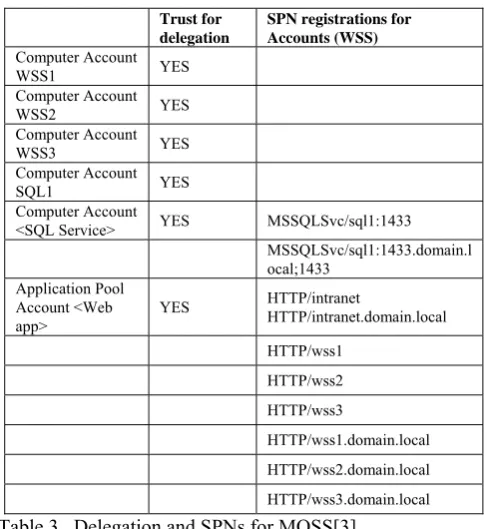
Note: Only register the SPN to a single account, else will get duplicate SPN registrations.
Trust for delegation
SPN registrations for Accounts (WSS)
Computer Account
WSS1 YES
Computer Account
WSS2 YES
Computer Account
WSS3 YES
Computer Account
SQL1 YES
Computer Account
<SQL Service> YES MSSQLSvc/sql1:1433 MSSQLSvc/sql1:1433.domain.l ocal;1433
Application Pool Account <Web app>
YES HTTP/intranet HTTP/intranet.domain.local
HTTP/wss1
HTTP/wss2
HTTP/wss3
HTTP/wss1.domain.local
HTTP/wss2.domain.local
HTTP/wss3.domain.local
Table 3. Delegation and SPNs for MOSS[3]
IV.5 Configure “Trust for delegations” on the computer/user accounts
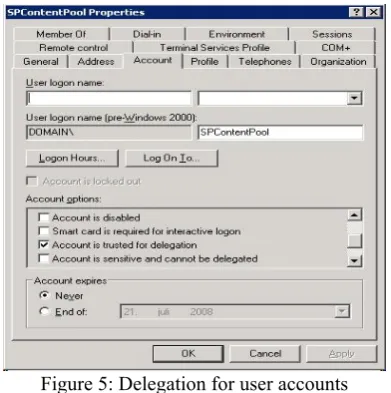
Next delegation rights for the computer and user accounts should be set in Active Directory. The table above shows the delegation rights.
Figure 4: Delegation for computer account
Figure 5: Delegation for user accounts
IV.6 Configure Component Services on the SharePoint servers
For setting the correct security for the accounts by simply entering into the Control Panel, Component Services, Computers, My Computer, DCOM Config and
edit the properties of the “IIS WAMReg Admin Service”. Edit “Launch and Activate” in the Security tab and give “Local Activation” rights for all the application pool accounts [20].
While user is in Component Services set the “Default Impersonation Level” to “Delegate” by editing the properties of “My Computer”.
IV.6 Enable Kerberos for web applications and Shared Service Provider (SSP)
To use Kerberos user must enable this through the Central Administration for web applications. User can
choose between NTLM and Kerberos for the individual web applications on the Authentication Providers page
which will be found in the Application Management pane.
Follow this path for the configuration:
Central AdministrationApplication Management Authentication providers
Choose the web application using Kerberos for, e.g. :
[1]
Click “Default”
Choose/check the Kerberos option:
Restart your IIS with iisreset /noforce in a command prompt on your web front end servers.
In MOSS the Shared Service Provider must also be configured and user has to do this in a command prompt. TheSetSharedWebServiceAuthn-command does not exist in WSS. Navigate to the 12-hive bin directory (usually placed in C:\Program Files\Common Files\Microsoft Shared\web server extensions\12\bin) and run the
command:stsadm.exe -o SetSharedWebServiceAuthn – negotiate
VTEST THE SHAREPOINT ENVIRONMENT
Simply check the security event log for Kerberos logon events. Check that the domain account used is succeeding. If the account is getting a log on failure, please check the following:
Date and time is set correctly on all servers
That the account is not locked in the domain
The service or application pool is running with the correct account
Delegation is configured correctly on the computer- and user accounts
The SPNs are configured correctly in Active Directory
No duplicates on the servers must exist in the DNS forward and reverse zones
DNS servers are specified correctly on all servers
V.1. Known Internet Explorer issue
While using non-default ports on your IIS Virtual servers please make sure that version of Internet Explorer 6 or earlier is patched and configured to include port numbers in SPNs. The Central Administration will contain
a non-default port number. This will avoid getting an error message saying this is the error if using an old or unconfigured version of Internet Explorer.
VICONCLUSIONS
Microsoft Windows SharePoint can be used in complex environments where secure authentication with Kerberos is needed. With this article I hope to have explained the “big picture” of Kerberos in a SharePoint setup. The tools and base configurations are available so you can start using the great features of SharePoint dual-hop authentication yourself.
REFERENCES
[1] MICROSOFT TECHNET: PLAN FOR ADMINISTRATIVE AND SERVICE ACCOUNTS
[2] MICROSOFT TECHNET:CONFIGURE KERBEROS AUTHENTICATION [3] MICROSOFT TECHNET SETSPN-TOOL DOCUMENTATION: SETSPN
OVERVIEW
[4] MICROSOFT DOWNLOAD SETSPN-TOOL: WINDOWS2000 SERVERAND WINDOWS SERVER 2003SP232-BIT
[5] MICROSOFT TECHNET: TROUBLESHOOTING KERBEROS DELEGATION [6] MICROSOFT SUPPORT: HOW TO TROUBLESHOOT THE "CANNOT
GENERATE SSPI CONTEXT" ERROR MESSAGE
[7] MICROSOFT SUPPORT: INTERNET EXPLORER 6 CANNOT USE THE KERBEROS AUTHENTICATION PROTOCOL TO CONNECT TO A WEB SITE THAT USES A NON-STANDARD PORT IN WINDOWS XP AND IN WINDOWS SERVER 2003
[8] JESPER M.CHRISTENSEN BLOG: KERBEROS IN SHAREPOINT FLOW WITH BUILD-IN TEXT
[9]J ESPER M.CHRISTENSEN BLOG: TROUBLESHOOTING THE KERBEROS ERROR KRP_AP_ERR_MODIFIED
[10] Das Debashreet, “RFID Deployment in INDIAN RAILWAYS: A case-study of ETransportInitiative in India”, In proceedings of International Conference on Electronic Transport, IndiaICET2011. [11] Landt Jeremy, utoid.mit.edu/pickup/RFID_Papers/008.pdf
[12] Sailendra K.,ǁREID: RFID Enabled Indane Distribution, Glotec Meeting at Tokyo, February 2008.
[13] Hoepman JH and JoostenRieks, “Practical Schemes For Privacy & Security Enhanced RFID, Security Theory and Practices”. Springer, 2010.
[14] SongBoyeon and Mitchell J. Chris,ǁRFID Authentication Protocol for Low-cost Tags,Proceedings of the first ACM conference , portal.acm.org,2008.
[15] Steiner G.Jennifer, Neuman Clifford and Schiller I. Jeffrey, “ Kerberos: An Authentication Service for Open Network Systems”, Proc. Winter USENIX Conference, Citeseer,1988.
[16] Piramuthu Selwyn, ―RFID mutual authentication protocols, Elsevier, Science Direct,2010.
[17] MitrokotsaAikaterini, Rieback R. Melanie and Tanenbaum S. Andrew , ―Classifying RFID Attacks and Defenses, Information Systems – Springer,…, 2010.
[18] S.A. Weis, S.E. Sarma, R.L. Rivest, and D.W. Engels. Security and Privacy Aspects of Low-Cost Radio Frequency Identification Systems. In Proc. of Security in Pervasive Comp., volume 2802 of LNCS, pages 201–212, 2004.
[19] D. Henrici and P. M¨uller. Hash-based enhancement of location privacy for radiofrequency identification devices using varying identifiers. In Proc. of PERSEC’04, pages 149–153. IEEE Computer Society, 2004.
[20] Eman El-Emam , Magdy Koutb, Hamdy Kelash, and Osama Farag Allah,” An authentication protocol based on Kerberos”, IJCSNS International Journal of Computer Science and Network Security,
VOL.9 No.8, August 2009
[21] Debashreet Das and Rasmita Rautray,”Authenticating RFID Readers through Kerberos”, International Journal of Advances in Science and Technology, Vol. 2, No.5, 2011
[22] Nitin et al. “Security Analysis and Implementation of JUIT—Image Based Authentication System Using Kerberos Protocol”. Proceedings of the 7th IEEE/ACIS International Conference on Computer and Information Science, (ICIS 2008).
[23] http://www.kerberos.org/index.html
[24] William Stallings, “Cryptography and Network Security principles and practices”, fourth edition. Pearson Prentice Hall, (2006). pp. 401-419, pp. 433-435.
[25] S. Nagendrudu , S. Swarnalatha ,” Provably Secure and Blind sort of Biometric Authentication Protocol using Kerberos”,In ternational
journal of advanced scientific research and technology, issue 2, volume 2 (april 2012)