™
Search & Rescue
FOR
by Brad Hill
™
Search & Rescue
FOR
Google Search & Rescue For Dummies Published by
Wiley Publishing, Inc. 111 River Street Hoboken, NJ 07030-5774
www.wiley.com
Copyright © 2005 by Wiley Publishing, Inc., Indianapolis, Indiana Published by Wiley Publishing, Inc., Indianapolis, Indiana Published simultaneously in Canada
No part of this publication may be reproduced, stored in a retrieval system or transmitted in any form or by any means, electronic, mechanical, photocopying, recording, scanning or otherwise, except as permit-ted under Sections 107 or 108 of the 1976 Unipermit-ted States Copyright Act, without either the prior written permission of the Publisher, or authorization through payment of the appropriate per-copy fee to the Copyright Clearance Center, 222 Rosewood Drive, Danvers, MA 01923, (978) 750-8400, fax (978) 646-8600. Requests to the Publisher for permission should be addressed to the Legal Department, Wiley Publishing, Inc., 10475 Crosspoint Blvd., Indianapolis, IN 46256, (317) 572-3447, fax (317) 572-4355, or online at
http://www.wiley.com/go/permissions.
Trademarks:Wiley, the Wiley Publishing logo, For Dummies, the Dummies Man logo, A Reference for the Rest of Us!, The Dummies Way, Dummies Daily, The Fun and Easy Way, Dummies.com, and related trade dress are trademarks or registered trademarks of John Wiley & Sons, Inc. and/or its affiliates in the United States and other countries, and may not be used without written permission. Google is a trademark of Google, Inc. All other trademarks are the property of their respective owners. Wiley Publishing, Inc., is not associated with any product or vendor mentioned in this book.
LIMIT OF LIABILITY/DISCLAIMER OF WARRANTY: THE PUBLISHER AND THE AUTHOR MAKE NO REP-RESENTATIONS OR WARRANTIES WITH RESPECT TO THE ACCURACY OR COMPLETENESS OF THE CON-TENTS OF THIS WORK AND SPECIFICALLY DISCLAIM ALL WARRANTIES, INCLUDING WITHOUT LIMITATION WARRANTIES OF FITNESS FOR A PARTICULAR PURPOSE. NO WARRANTY MAY BE CRE-ATED OR EXTENDED BY SALES OR PROMOTIONAL MATERIALS. THE ADVICE AND STRATEGIES CON-TAINED HEREIN MAY NOT BE SUITABLE FOR EVERY SITUATION. THIS WORK IS SOLD WITH THE UNDERSTANDING THAT THE PUBLISHER IS NOT ENGAGED IN RENDERING LEGAL, ACCOUNTING, OR OTHER PROFESSIONAL SERVICES. IF PROFESSIONAL ASSISTANCE IS REQUIRED, THE SERVICES OF A COMPETENT PROFESSIONAL PERSON SHOULD BE SOUGHT. NEITHER THE PUBLISHER NOR THE AUTHOR SHALL BE LIABLE FOR DAMAGES ARISING HEREFROM. THE FACT THAT AN ORGANIZATION OR WEBSITE IS REFERRED TO IN THIS WORK AS A CITATION AND/OR A POTENTIAL SOURCE OF FUR-THER INFORMATION DOES NOT MEAN THAT THE AUTHOR OR THE PUBLISHER ENDORSES THE INFOR-MATION THE ORGANIZATION OR WEBSITE MAY PROVIDE OR RECOMMENDATIONS IT MAY MAKE. FURTHER, READERS SHOULD BE AWARE THAT INTERNET WEBSITES LISTED IN THIS WORK MAY HAVE CHANGED OR DISAPPEARED BETWEEN WHEN THIS WORK WAS WRITTEN AND WHEN IT IS READ.
For general information on our other products and services, please contact our Customer Care Department within the U.S. at 800-762-2974, outside the U.S. at 317-572-3993, or fax 317-572-4002. For technical support, please visit www.wiley.com/techsupport.
Wiley also publishes its books in a variety of electronic formats. Some content that appears in print may not be available in electronic books.
Library of Congress Control Number: 2005924613 ISBN-13: 978-0-7645-9930-9
ISBN-10: 0-7645-9930-5
Manufactured in the United States of America 10 9 8 7 6 5 4 3 2 1
About the Author
Brad Hillhas worked in the online field since 1992 and is regarded as a pre-eminent advocate of the online experience. As a best-selling author of books and in his columns, Hill reaches a global audience of consumers who rely on his writings to help determine their online service choices.
Brad’s books include a Publishers Weeklybestseller and a Book-of-the-Month catalog selection. Brad’s titles in the For Dummiesseries include Internet Searching For Dummies, Building Your Business with Google For Dummies,
and Yahoo! For Dummies. He operates the Search Report Web site (www.TheSearchReport.com) and is a staff blogger at WeblogsInc (www.weblogsinc.com).
Brad is often consulted in the media’s coverage of the Internet. He appears on television and radio Webcasts and is quoted in publications such as
Business Week,the New York Times,and PC World.
Author’s Acknowledgments
Every book is a partnership of author and editor. Susan Pink is the editor of this book and a collaborator in other projects as well. Her keenness, careful reading, and incisive comments shine through every paragraph . . . except for the extra chapter I slipped in at the last second. You’ll know it when you see it. Besides being an unusually fine editor who makes me look a lot better than I would without her, Susan has a gift for remaining calm during the most intense deadline crises. She also laughs at all the right times.
Colin Banfield had the challenging job of technical editor. His insights were invaluable.
Many thanks to Tom Stocky at Google for his unflinching willingness to answer my seemingly endless, detailed questions.
Melody Layne at Wiley Publishing nursed this project from the start, getting it off the ground quickly and helping shape its focus. I’m very thankful. Mary Corder pulled me into the For Dummiesfamily several years ago, and is, by now, sick of seeing her name pop up in my acknowledgments. But I am for-ever grateful, so she’ll have to deal with it.
Many thanks to all the copy editors and production experts who pored over every page of the manuscript.
Publisher’s Acknowledgments
We’re proud of this book; please send us your comments through our online registration form located at www.dummies.com/register/.
Some of the people who helped bring this book to market include the following:
Acquisitions, Editorial, and Media Development
Project Editor:Susan Pink Acquisitions Editor:Melody Layne Technical Editor:Colin Banfield Editorial Manager:Carol Sheehan Media Development Supervisor:
Richard Graves
Editorial Assistant:Amanda Foxworth Cartoons:Rich Tennant
(www.the5thwave.com)
Composition Services
Project Coordinator: Adrienne Martinez Layout and Graphics: Carl Byers,
Barry Offringa, Julie Trippetti
Proofreaders: Leeann Harney, Jessica Kramer, Joe Niesen, TECHBOOKS Production Services
Indexer: TECHBOOKS Production Services Special Help
Tom Stocky
Publishing and Editorial for Technology Dummies
Richard Swadley,Vice President and Executive Group Publisher Andy Cummings,Vice President and Publisher
Mary Bednarek,Executive Acquisitions Director Mary C. Corder,Editorial Director
Publishing for Consumer Dummies
Diane Graves Steele,Vice President and Publisher Joyce Pepple,Acquisitions Director
Composition Services
Contents at a Glance
Introduction ...1
Part I: Jumping Into Google ...9
Chapter 1: Google Saves the Day, Every Day ...11
Chapter 2: Reclaiming Your Time from Wasteful Searching ...21
Part II: Taming Google ...49
Chapter 3: Recovering the Facts: Using Google as an Answer Engine ...51
Chapter 4: Froogle and Google Catalogs Rescue Your Gift List ...65
Chapter 5: Saving Yourself from TV News with Google News ...85
Chapter 6: Preserving Online Conversations with Google Groups ...97
Chapter 7: Mapping the Web’s Terrain ...125
Part III: Specialty Searching ...133
Chapter 8: Searching the Neighborhood ...135
Chapter 9: Shining the Search Spotlight on Specialty Categories ...167
Chapter 10: The Professional Rescue Team at Google Answers ...175
Chapter 11: Experimenting in Google Labs ...193
Part IV: Putting Google to Work ...211
Chapter 12: Lifelines: Googling from Anywhere ...213
Chapter 13: Reclaiming Your Lost Stuff: Google Desktop to the Rescue ...225
Chapter 14: Saved by a Thread: Reinventing E-mail with Gmail ...233
Chapter 15: Giving Your Visitors a Leg Up: Google on Your Site ...245
Part V: The Business of Google ...253
Chapter 16: Bringing Google and Its Users to Your Site ...255
Chapter 17: Stimulating Your Business with AdWords ...269
Chapter 18: Rescuing Your Revenue with Google AdSense ...285
Part VI: The Part of Tens ...301
Chapter 19: Ten Alternative Googles ...303
Chapter 20: Ten More Alternative Googles ...331
Chapter 21: Ten Google Games ...345
Chapter 22: Ten Sites and Blogs about Google ...363
Table of Contents
Introduction ...1
About This Book ...2
Conventions Used in This Book ...2
What You’re Not to Read ...3
Foolish Assumptions ...4
How This Book Is Organized ...4
Part I: Jumping Into Google ...4
Part II: Taming Google ...5
Part III: Specialty Searching ...5
Part IV: Putting Google to Work ...6
Part V: The Business of Google ...6
Part VI: The Part of Tens ...6
Icons Used in This Book ...7
Where to Go from Here ...7
Part I: Jumping Into Google ...9
Chapter 1: Google Saves the Day, Every Day . . . .11
Beyond Keywords ...12
Finding all sorts of stuff ...12
Hidden strengths ...15
Answers of all sorts ...16
Portable information butler ...17
And now for something completely different ...17
Google the Business Partner ...18
Google for Programmers ...19
The Greatness of Google ...19
Chapter 2: Reclaiming Your Time from Wasteful Searching . . . .21
Setting Preferences ...22
The international Google ...24
Searching for non-English pages ...25
G-rated searching ...26
Opening the floodgates ...26
New windows ...27
Basic Web Searches ...27
Breaking Down Web Search Results ...33
The Google cache ...33
Similar pages ...34
Indented results ...35
Using Advanced Search ...35
Using multiple keywords ...36
Other Advanced Search features ...38
Searching Shorthand: Using Operators ...40
Typing standard search operators ...40
Understanding special Google operators ...42
A Picture Is Worth a Thousand Keywords ...44
Advanced Image Searching ...45
Part II: Taming Google ...49
Chapter 3: Recovering the Facts: Using Google as
an Answer Engine . . . .51
Search Engines and Answer Engines ...52
What, Where, When, and How in Google ...52
Knowing Your Words ...55
Invading People’s Privacy ...58
Tracking Packages ...60
Google at the Movies ...60
Stock Quotes, Math, and the Weather ...62
Chapter 4: Froogle and Google Catalogs Rescue Your Gift List . . . . .65
Google’s Approach to Online Shopping ...66
Searching and Browsing in Froogle ...67
Search results in Froogle ...70
Froogle search operators ...72
Froogle Advanced Search ...76
About Google Catalogs ...77
Searching Google Catalogs ...78
Advanced Searching in Google Catalogs ...83
Chapter 5: Saving Yourself from TV News with Google News . . . . .85
Googling the Day’s News ...86
Searching for News ...89
Customizing Google News ...93
Chapter 6: Preserving Online Conversations
with Google Groups . . . .97
In Praise of Usenet ...98
Welcome to the Pre-Web ...99
Usenet Newsgroups versus Google Groups ...103
Browsing and Searching Google Groups ...105
Browsing the Groups directory ...105
Browsing Usenet exclusively ...107
Searching Google Groups with keywords ...107
Using Advanced Groups Search ...108
Using operators in Google Groups ...111
Reading Messages and Threads ...114
Posting Messages through Google Groups ...116
Replying to a message ...117
Starting a new topic ...120
Keeping Track of Your Groups Activity ...121
Creating a Group ...123
Chapter 7: Mapping the Web’s Terrain . . . .125
Relaxing into Browsing Mode ...125
Understanding Google Directory ...127
Submitting a Web Page to the Directory ...130
Part III: Specialty Searching ...133
Chapter 8: Searching the Neighborhood . . . .135
Finding the What and Where in Google Local ...137
Identifying the address in Google Local ...137
Working with Google Local results ...140
A final thought about Google Local ...142
Using the Glorious Google Maps ...143
Dragging, zooming, and otherwise having too much fun ...143
Local search in Google Maps ...145
Finding your way from here to there ...149
Seeing the Real Picture with Satellite Images ...152
Local Searching from Orbit: The Wonders of Google Earth ...154
Google Earth: What it is and isn’t ...154
The Google Earth cockpit ...155
Basic flying techniques ...157
Global village: local searching in Google Earth ...160
Plotting your course ...162
Miscellaneous Google Earth features ...163
The Upshot of Local Search in Google ...165
Chapter 9: Shining the Search Spotlight
on Specialty Categories . . . .167
Finding the Specialty Searches ...168
U.S. Government Searches ...169
Linux and BSD Searches ...171
Mac and Microsoft Searches ...172
Chapter 10: The Professional Rescue Team at Google Answers . . .175
Creating an Account and Logging In ...176
Posting and Canceling Questions ...178
Comments and Conversations ...184
Clarifying Questions and Evaluating Answers ...187
Clarifying and modifying a question ...187
Fine-tuning and rating answers ...188
Adding a comment ...189
Good Questions at the Right Prices ...189
Good questions = good answers ...190
Putting your money where your query is ...192
Chapter 11: Experimenting in Google Labs . . . .193
Keyword Suggestions ...194
Standing on the Shoulders of Giants ...195
Video without the Video ...197
Real-Time Rides ...199
Building Google Sets ...201
The Mythical Internet Library Comes to Life ...203
Horrors! A New Home Page! ...206
Keeping a Record of Your Searches ...209
Part IV: Putting Google to Work ...211
Chapter 12: Lifelines: Googling from Anywhere . . . .213
Installing the Google Toolbar ...214
Choosing Toolbar Options ...216
Navigation and productivity options ...217
Search options ...218
More options ...219
Using AutoFill ...220
The toolbar pop-up blocker ...221
Googling in the Firefox Browser ...222
Searching from the Desktop with the Deskbar ...223
Chapter 13: Reclaiming Your Lost Stuff:
Google Desktop to the Rescue . . . .225
The In(dex) and Out(put) of Desktop Searching ...226
What Google Can and Can’t Find in Your Computer ...227
Downloading and Installing Google Desktop ...228
Daily Use of Google Desktop ...230
Personalizing Google Desktop ...231
Chapter 14: Saved by a Thread: Reinventing E-mail with Gmail . . .233
Why Webmail, and Why Gmail? ...234
Gmail Availability ...235
It’s All About Conversations ...236
Writing Mail ...239
Sorting with Labels ...241
Customizing Gmail ...243
Chapter 15: Giving Your Visitors a Leg Up: Google on Your Site . . .245
Free Google on Your Site ...246
Customizing Your Free Google ...247
Site-Flavored Google Search ...250
Part V: The Business of Google ...253
Chapter 16: Bringing Google and Its Users to Your Site . . . .255
The Google Crawl ...256
Getting into Google ...257
Luring the spider ...258
On your own ...260
Keeping Google Out ...260
Building Your PageRank Through Networking ...262
Incoming links and PageRank ...262
Human networking ...262
Trading content ...264
Optimizing Your Site for Google ...264
It’s all about keywords ...265
Effective site design ...266
The folly of fooling Google ...267
Chapter 17: Stimulating Your Business with AdWords . . . .269
Understanding the AdWords Concept ...270
Creating an Account and Your First Ad ...274
Activating Your Account ...278
Managing Your Campaigns ...279
Viewing your campaign reports ...280
Editing your campaign ...281
Starting a new campaign ...283
More About Keywords ...283
Chapter 18: Rescuing Your Revenue with Google AdSense . . . .285
The AdSense Overview ...287
Determining Your Site’s Eligibility ...288
Getting Started: Opening an AdSense Account ...291
Useful AdSense Terms to Know ...292
Creating Your AdSense Ads ...294
Choosing an ad type and ad layout ...295
Choosing colors ...297
AdSense Channels and AdSense Reports ...299
Removing Ads and Exiting the Program ...300
Part VI: The Part of Tens ...301
Chapter 19: Ten Alternative Googles . . . .303
Bare-Bones Results ...304
Finding the Freshest Google ...305
The Amazing TouchGraph ...307
Visualizing related sites ...307
Visual keyword sets ...313
Google by E-mail ...316
Google Ultimate Interface ...317
GAPS, GARBO, and GAWSH ...320
Proximity searching with GAPS ...322
Relation browsing with GARBO ...324
Search by host with GAWSH ...325
Chatting with Google ...326
Flash with Floogle ...327
Quotes with Your Search Results...329
Fabulous Searches with Xtra-Google ...329
Chapter 20: Ten More Alternative Googles . . . .331
Google Cartography ...331
Newsmap ...333
Thumbshots and Open Directory ...334
SketchWeb ...335
BananaSlug ...336
YaGoohoo!gle ...337
LostGoggles ...338
Soople ...339
WebCollage ...342
Babelplex ...343
Chapter 21: Ten Google Games . . . .345
In Pursuit of the Googlewhack ...345
The Random Googlelaar ...348
Capture the Map ...350
Squabbling Keywords ...351
More Random Searching ...355
Mangle ...355
Random Google page ...356
Random Web Search ...357
Google Backwards ...358
Gettin’ in the Hood with Gizoogle ...359
A Google Time Machine ...360
Google Poker ...361
Chapter 22: Ten Sites and Blogs about Google . . . .363
The Unofficial Google Weblog ...363
Google Watch...364
Webmaster World: Google ...365
Google PageRank ...366
Google Weblog ...366
Elgoog ...366
Googlepress ...367
Search Engine Showdown ...367
Google Blog — Live ...367
Google Blogoscoped ...368
Introduction
F
ew Internet phenomena have rivaled Google. Not even Yahoo! of 1994 and 1995 could claim the importance in so many lives that Google can claim. Amazon, eBay, Napster — all are milestones, but Google is a uniquely big wheel. It has been adopted quickly, its user base is of global scope, and it has influence on society at large. (A marketing survey reported that Google was a more recognized brand than Coca-Cola and Starbucks.) No online activ-ity has become as deeply embedded in our culture and language as Googling. The first wave of euphoria has ended. Google was launched, took over the world of Internet searching, became a public company, and settled down to life as an established Internet powerhouse. Google’s millions of users were ecstatic over the uncannily useful search results and no-fluff interface, andGooglingbecame part of the language and part of the Internet lifestyle. Google enlightened the online citizenry, and other Internet companies, by demon-strating that online searching could be profoundly rewarding and profitable. Google is now entering a second major phase of its existence.
Now a new stage begins. Users take for granted Googling and its great results. Competitors have wakened from their slumber and are battling Google fiercely for mindshare and search traffic. New search-related services are being intro-duced at a record pace. Innovation is in the air. Standards of search accuracy and relevance have been raised, and consumers know that the next great development might not come from Google.
The result of this increased competitiveness has been remarkable at Google. Always a brainy outfit that values invention for its own sake, regardless of what the marketplace seems to need, Google has expanded its Ph.D.-encrusted staff and dramatically increased the pace of its development of new products. Since the publication of Google For Dummies,Google has launched Google Local, Google Video, Google Suggest, Google Scholar, Gmail, Google Deskbar, and Google Desktop Search. The company has made extensive overhauls to Google Toolbar, Froogle, Google Groups, Blogger.com, and Google Free. Google has acquired photo-editing company Picasa and satellite-imaging company Keyhole. Google has been busy.
to the many features and services beneath the service and around its edges. It never fails: When somebody asks me how I can stretch Googling into an entire book, the conversation ends with them saying, “I didn’t know that!” This book is that conversation.
About This Book
My intent in these pages is to reveal the inner depths and hidden features of the Googling lifestyle, and to rescue you from the overwhelmed feeling of information overload. Actually, this book’s title has a double meaning: As Google rescues its users from a hopeless glut of online content, so does it save information from being lost in poor, wrongly worded searches. Google accomplishes that last part by providing many specialized features and tools, all of which are available to us, but many of which are not publicized much. Most people are unaware of Google’s most powerful and precise tools. Even in the core service — the Web search engine — Google silently and without hype includes features that, when known, make daily Googling faster, more powerful, and more targeted.
Most people are astonished when they discover these brilliant Google fea-tures. Getting fast stock quotes or word definitions; finding shops in the local neighborhood; searching through pages in thousands of mail-order cata-logues; finding files on government and military sites; locating certain file types; Googling over the phone; navigating search results without using the mouse; searching only the titles of Web pages; playing Google games at innu-merable Google fan sites; plumbing the amazing Google Groups (one of the most remarkable reference resources in the world); using Google as a phone book; highlighting a word on any Web page and launching a Google search from that page; using the Google Toolbar to block pop-up ads . . . I could go on. And, in fact, I do for the next few hundred pages.
So, what is this book about? Without conceit, I can tell you that these pages are about your virtual life, your online intelligence, and your informed citizen-ship in the Internet nation. Whichever translation of this book you are read-ing, whatever country you live in, the beneficent informational power of Google belongs as much to you as to anyone.
Conventions Used in This Book
Web addresses, also called URLs, look like this:
www.google.com
When I use an unusual term for the first time, I italicizeit.
Google keywords appear italicizedwhen embedded in text, and some-times appear below a paragraph like this:
keywords google search
What You’re Not to Read
This book is not technical, so I don’t need to warn you away from difficult parts. But don’t feel as if you must read straight through from start to finish. This isn’t a novel. Google’s many services fall naturally into distinct chapters, and it’s natural to be interested in some things more than others.
For the Google beginner, Chapters 1 and 2 are probably the most important. But if you have lots of experience with basic Googling, those two chapters might be the least important. However, don’t blow off Chapter 2 too quickly. It contains power-search information that can teach practically anyone some-thing valuable about making Google’s results more targeted and precise. That said, experienced users should pick and choose from the Table of Contents. Many readers are probably interested in Google’s new services, especially those introduced after the publication of Google For Dummies.They are Google Local, Google Maps, and Keyhole (all three bundled into Chapter 8, the local search chapter), Google Video, Google Suggest, and Google Scholar (packed into Chapter 11, the Google Labs chapter), the Google Deskbar (Chapter 12), and Gmail (Chapter 14).
Part V is mostly for Web site owners and bloggers, though it might be of inter-est if you aren’t aware of Google’s business services. The three chapters in this section contain a great deal of new information about AdWords, AdSense, and the general business of getting a site into Google, keeping it there, and pushing it up the results page. These topics are thoroughly summarized; for in-depth coverage of exhaustive (or is it exhausting?) detail, please look at
Building Your Business with Google For Dummies.
Foolish Assumptions
Google has so few requirements that, in writing about it, I don’t need to make many assumptions. Which is a good thing, because I have a long track record of mistaken assumptions. For example, right now I’m assuming that you’ve taken this book to the bookstore coffee bar, and are dripping caramel macchi-ato all over the pages. That’s what I’d be doing if I were you.
More realistically, I do assume that you can get on the Internet and operate a Web browser. Occasionally it’s helpful to check which browser you’re using, including the version number of that browser, and I blithely assume you can do that. Basic Internet navigation skills — such as visiting a Web site, filling in online forms, and following on-screen download instructions — are useful when exploring Google’s many services. I’m quick to assume that you know all that stuff. You also need to know how to install programs if you are to use Google Toolbar, Google Deskbar, Keyhole, and a few others. Fortunately, most modern computers make installation quite easy, and Google provides instruc-tions on its download pages.
So I guess I am assuming a fair amount about your ease of movement online, but honestly, nothing in this book is difficult. If Google were hard, it wouldn’t be so popular.
How This Book Is Organized
This book employs a new and startling organizational system by which words are gathered into sentences, which in turn form paragraphs, and the whole shebang is printed on pages. Just turn the page, and . . . more words! I’ve col-lected thousands of the finest words in circulation, and strung them together in a manner that occasionally approaches coherence.
The book’s chapters are organized into five parts, as follows.
Part I: Jumping Into Google
Throwing keywords hastily into Google is easy enough and delivers some-what successful results. Studies have shown, however, that a surprising number of searchers are unsatisfied with the first page or two of results, and generally don’t look deeper than that. Indeed, searching page after page of search results is often a waste of time; it’s better in many cases to start a new search. That’s where search operators and other tricks come in handy. These advanced (but easy) features give you better ways to narrow your search, often making that second attempt unnecessary.
This part is not merely a summary. To the contrary, I get very detailed about search operators (they can improve your life, trust me), finding certain types of documents, the Advanced Search page, and individualized preferences. Don’t skim past these chapters if you know basic Googling! This part is stocked with tips and little-known facts about Google’s underpublicized features.
Part II: Taming Google
In Part II you discover image search, Google Directory, Google News, Froogle, and Google Groups. In addition, Chapter 3 covers the many ways in which Google can be used as an answer engine. An answer engine differs from a Web search engine by directly delivering basic facts instead of links to Web pages that might, or might not, contain the basic facts you’re looking for. Many people don’t realize that Google can dish out answers and facts in ways that make your information-stoked life much easier.
Chapters 4 through 7 are focused on the main non-Web engines operated by Google — the ones linked from the home page. Those other engines are Google Images (photos galore), Google News (an interactive global news-stand), Google Groups (an archive of nearly twenty-five years of Internet dis-cussion groups), Froogle (a shopping directory and search site), and Google Directory.
Part III: Specialty Searching
Part IV: Putting Google to Work
Part IV starts by describing two ways in which Google can be put to work in uncommon fashion. First, and for many most importantly, Google can attach to Web browsers in various ways, offering one-click searching from anywhere on the Web. I venture to say that the Google Toolbar is the single most impor-tant Google service beyond the basic search engine, and I strongly recom-mend that you read Chapter 12. The second method of searching from afar is the Google Deskbar, which resides on your computer desktop, independent of the browser.
Speaking of the desktop, Chapter 13 explores Google Desktop, a major new service that allows users to search their own computers, Google style. Google Desktop requires an easy download and is free.
Gmail created more Google-related fuss than any other service to come out of Google in the last two years. There is good reason for all the commotion; Gmail provides a new way of tackling Web-based e-mail and offers a ton of storage. It works beautifully, and Chapter 14 explains all the ins and outs. Finally, Chapter 15 illuminates the simple method by which site owners can put a Google search box on their pages and customize how search results appear.
Part V: The Business of Google
Part V is about Google’s business services, so it is mostly about advertising. Chapter 17 covers AdWords (a way of advertising to searchers using key-words that relate to the advertiser’s products), and Chapter 18 centers on AdSense, a way for professional Web sites of all types to run Google AdWords ads and make money doing it. Before those productive chapters, Chapter 16 explains how Google trolls the Web for sites to include in its massive index, and how your Web site can get favorable treatment.
Part VI: The Part of Tens
Part VI is almost all recreational. Chapters 19 through 22 take you all over the Web, trying Google-related sites developed by individuals who took advantage of Google’s standing invitation to build alternate search interfaces. Google’s index is available to any programmer, and some of the results are spectacu-larly successful — improvements, even, on Google’s own pages. There are even Google-related games; if you’ve ever wondered what Googlewhacking is, head to Chapter 21. The book’s final chapter (and I won’t tolerate any high-fiving at the mention of the final chapter) points to sites and Weblogs about
Icons Used in This Book
See how big these pages are? We have to put something in these wide mar-gins, so we came up with icons. Figuring that they might as well be more than just decorative, we assigned meaning to the pictures you see marking some paragraphs.
This book is full of these things. They remind you to tip your waitress. Also, these icons indicate that the paragraph contains an especially usable nugget of information.
I throw in a lot of these, too, but I forget why. It’ll come to me.
Rarely, I slip into the kind of technobabble that makes people avoid me at parties. Just slap me when I get like that. And feel free to ignore these para-graphs if you’re not interested — they don’t contain anything you need to know.
Using Google is considerably safer than leaping out of an airplane with a sack full of bowling balls, so I don’t often have reason to issue warnings. But when I do, get the kids to a safe place and board up the windows.
Where to Go from Here
I don’t know about you, but I’m going to lie down. It’s 2 in the afternoon, for goodness sake, and time for a nap. If you’re in the mood to keep reading, do it quietly.
Starting at the beginning never hurts, but if you’re ready for the advanced stuff, I suggest leaping to the section on search operators in Chapter 2. In the mood for fun, straight off? Go to the chapters in Part VI. I know I’ve men-tioned it before, but Chapter 8 is a great place to discover something new from Google — local searching.
In this part . . .
I
n the first part of Google Search & Rescue For Dummies,I introduce Google’s basic search functions, which any-body can try by going to the Google home page. Ah, but by introduce,I mean that this part dives into keyword skills of which most people are unaware, to reveal dozens of ways to maximize your daily Google experience. Google is good when you know just the bare minimum. Imagine how much better it can get for a laser-minded, Web-addicted power user who can blast apart a results page with a few simple search operators. Are you ready for this? Because that’s what Part I is all about.
Chapter 1 sets you up with the overview; Chapter 2 goes way beyond basic keyword plodding by revealing search operators, the Advanced Search page, and Google Prefer-ences. Get ready to hone your skills, sharpen your results, and project your mind over the vast global information matrix, diving down like a hawk to spear your personal bits of wisdom as they scurry through the tangled under-growth of hidden knowledge. Oh, the power of simple tools . . . like the home cappuccino maker, for example, which I’ve been using rather too much lately. But forget that. The simple tools at hand are single-word commands that bend the mighty Google to your will and rescue once-lost information from the abyss of ignorance.
Chapter 1
Google Saves the Day, Every Day
In This Chapter
Getting an overview of Google’s many services and search realms
Uncovering the hidden side of Google’s business services
Introducing Google’s tools for programmers
Understanding why Google is better . . . much better
Y
ou’re about to embark on an adventure that will stimulate your mind and gratify the most urgent desires of your soul. Then, when you’ve fin-ished watching American Idol,you’ll start discovering Google.I know what you’re saying: You’ve already discovered Google. Who hasn’t? Not since the early Web days of 1994 and 1995, when everybody surfed through Yahoo!, have people flocked so overwhelmingly to a search engine as they do to Google. Google not only revitalized the search industry but also saved worthy information from obscurity and rescued countless users from the frus-tration of futile searching.
During the time since Yahoo! got the ball rolling, many keyword-oriented search engines have come. Many have gone. Some remain, offering specialty searches or emulating Google. (Imitation and flattery — you know the drill.) Now, with Googlinga common term in the mainstream vernacular, general searching of the Web has become standardized into a universal ritual. Anybody wanting to find an online destination follows this three-step process:
1. Go to Google.
2. Type a few words related to the search goal. 3. Click the search results to visit relevant Web sites.
Note:The Google home page is located, naturally, at this URL:
www.google.com
Any user, worldwide, can use that page to get the American version of Google. However, Google operates national versions of its service, using the domain suffix unique to those countries. Again, each of these national ver-sions can be called up by anyone in any country. Here are a few examples:
www.google.ca (Canada) www.google.fr (France) www.google.co.uk (England)
Beyond Keywords
The term search engine,so apt for the lumbering, early-generation monsters that crunched through the Web looking for sites, seems only fractionally fit-ting for Google. Rather, Google should be called an information engine. Or a knowledge life-form. The stuff you get from Google might come from its vast and smart index of Web pages, or it might come from other indices seam-lessly woven into the core data dump. Some of the usefulness that you can pry out of Google, such as Weblogging, comes from autonomous companies that Google has acquired and put under its service umbrella. However you use Google, greater awareness of what’s under the hood is certain to make your online life easier, better informed, and more fluid.
The following sections furnish a quick survey of Google’s information engine, including and beyond general keyword searching.
Finding all sorts of stuff
In Google, basic Web searching couldn’t be simpler. The next chapter covers the basics, plus powerful ways of grabbing the information you want quickly. In addition to offering traditional Web searching, Google blends other types of searching into the basic keyword process:
Newsgroup reader:Newsgroups make up the portion of the Internet called Usenet, which is far older (and probably still bigger in some mea-sure) than the Web. It has more than fifty thousand groups, organized by topic, covering everything from astrophysics to David Letterman. Usenet is a hangout for academicians, pornographers, armchair pundits, and nearly everyone else. It’s a wild-and-wooly realm that’s normally accessed through a dedicated computer program called a newsgroup reader.Outlook Express and other e-mail programs contain newsgroup-reading features. Google got into the act by purchasing the old Deja News, the groundbreaking company that first put Usenet on the Web. Google presents a deep archive of searchable newsgroup messages. Furthermore, it lets you establish an identity and post messages to groups, all through your Web browser. See Chapter 6.
Image finder:The Web is a picturesque place. Every photograph and drawing that you see on a Web page is a distinct file residing at a specific Internet location, and Google knows how to search that tremendous store of images. See Chapter 2.
Life without Google
In my life as an online citizen (no, I don’t get out much), two destinations are indispensable. One is Yahoo!, a gargantuan domain that provides more free services than a sane person would try to count. The other is Google, which makes my virtual movements faster and more exact than ever. Online life without either is incon-ceivable. The amazing thing is that Google has been around only since the fall of 1999. Yahoo! has been building its reputation and service platform for more than ten years. (May 1, 2005, was Yahoo!’s tenth birthday.) And it can be argued that Google has embedded itself into the lifestyles of ordinary Internet citizens and the business practices of companies more pro-foundly and securely than Yahoo! has. Whereas Yahoo! spent millions on the “Do you Yahoo!?” ad campaign, everybody started saying “Google this” and “Google that” with little or no formal advertising from Google.
Yahoo! is certainly more diversified than Google, with a portion of its empire devoted to nearly every activity in which a person could engage online: playing games, booking travel,
researching stocks, meeting a soul mate, chat-ting about nothing, watching music videos — on and on and on. Yahoo! operates the most popu-lar G-rated, legal, free activity platform on the open Internet; in March 2005 Yahoo! had 165 million registered users and 345 million unique monthly visitors. With all this, Yahoo! has, until recently, forsaken its roots as a search engine and left the fertile field of keyword matching open to Google.
I wrote Yahoo! For Dummiesand Google For Dummies.Each service is a cornerstone of the Internet. Prediction is a risky business, but when I’m in a divining mood, I can easily see Google becoming the most important online ser-vice in history, approaching the geek-idealist’s dream of indexing every bit of human knowl-edge and virtual expression, with an awareness of the surrounding context and with each con-tribution ranked by its peers and instantly accessible. A foolish vision? The surprising part is how closely Google is chasing it already.
Shopping assistant: This is one of Google’s huge, underappreciated strengths. For a long time, Froogle was unknown by just about every-body (who hadn’t read Google For Dummies,that is). Then Google moved it from obscurity to the home page of the British and American sites, and everybody saw the light. Comparisons to Yahoo! Shopping are difficult to avoid. The two services differ crucially, in that you never actually buy things through a Google transaction system as you some-times can in Yahoo!. (For example, Google has no Google Wallet for stor-ing credit card information for one-click purchasstor-ing.) Google has two main shopping services, Froogle and Google Catalogs. You use Froogle to find shopping sites that sell things you want. Google Catalogs — arguably the more fun of Google’s two shopping services — gives you a paper-free sense of accessing a mail-order universe. See Chapter 4.
Local search engine: Most search pundits and consumer focus groups agree that local searching will eventually be just as important as global Web searching. By local searching,I mean a searching for stuff that exists in a physical neighborhood — on streets near your home. All the big search engines are getting into local action, and Google is flat-out win-ning the race as of this writing. I’m not saying so to sell this book; nobody else has put together a combination of local search, local map-ping, and local photography as Google has — and this is just the begin-ning. See Chapter 8.
The mythical Internet library
The World Wide Web was developed to bring order to the chaotic Internet, which had been lurking in academia and the government since the 1960s. Because the Internet was regarded primarily as an information source — more than an entertainment medium or a community space — it was natural to imagine the quick construction of a universal, all-inclusive online library. Through the years, I’ve often heard people mistakenly speak of the Internet as an information realm in which one could find any-thing, read any book, and access all knowledge.
But the truth splintered away from that ideal. First, the Web became a distinct and autonomous entity with its own content, disre-garding for the most part the academic material that was already online. Second, regular folks who stormed into the new virtual playground
were interested in other, more recreational pur-suits than learning. So the mecca of unlimited access to knowledge withered away from reality — and even from the imagination.
International newsstand:In one of the most dramatic additions to the Google spectrum of features, Google News has replaced Yahoo! News as the default headline engine on countless screens. Almost unbelievable in its depth and range, Google News presents continually updated links to established news sources in dozens of countries, putting a global spin on every story of the day. See Chapter 5.
These features (except for Google Directory) hook into Google’s home page, and it is easy to transfer a search from one of these engines to another. (Just click the links above the keyword box after entering a keyword.) At the same time, each of these engines stands on its own as an independent search tool. Other features, sketched next, exist more in the background but are no less important than the high-profile search realms.
Hidden strengths
You might be surprised to find what Google can tell you if prompted in cer-tain ways. Active Googlers stumble across some of these features in the course of daily rummaging, because Google spits out information in unre-quested configurations when it thinks you need it. (Yes, Google does seem like a thinking animal sometimes.) Other chapters describe exactly how to coax explicit types of search results from the site. Here, my aim is to briefly summarize power features you might not be aware of:
Document repository:Most people, most of the time, search for Web pages. But many other types of viewable (or listenable) pieces of con-tent are available on the Internet. For example, almost every modern computer comes with the capability to view PDF files, which are docu-ments such as articles, white papers, research texts, and financial state-ments that retain their original formatting instead of being altered to fit a Web page. Google includes documents other than Web pages in its gen-eral search results and also lets you narrow any search to a specific file type. See Chapter 2.
Government and university tracker:Not to get all paranoid on you, but if you’re into watching your back, the first of these features could prove helpful. More benignly, Google reserves distinct portions of its search engine for government domains and another for university domains. This arrangement has uses explored in Chapter 9.
Keyword suggestion tool: One of the great (if unrecognized) difficulties of high-quality Internet searching is finding the useful keyword or keyphrase. Google Suggest offers productive keyphrase suggestions as you type in the keyword box.
These and other new aspects of the Google experience came from a dedi-cated technology incubation project called Google Labs. Remember when entire businesses were built solely on cultivating online ideas? Most of them crashed and burned, adding to the rubble of the exploded Internet bubble. Google is modestly, but importantly, continuing the incubating tradition by evolving ways of enhancing its information engine. See Chapter 11.
Answers of all sorts
One problem with the Web as an information source is the question of authen-ticity. Anybody can put up a Web site and publish information that might or might not be factual. True expertise is difficult to verify on the Web.
Two solutions exist to the verification problem: standard reference sources and on-demand professional research services. Neither is likely to be found on a typical Web site, professional and authoritative though that site might be. The desire for reference-style answers has given birth to dedicated
answer enginessuch as Answers.com (formerly Gurunet).
Google, recognizing that its users sometimes need a quick answer rather than a list of Web sites that might (or might not) contain that answer, has built answer-engine capability into its Web engine. In some cases Google delivers the answer directly; in other cases it links you to an outside site that displays your answer. Some of the answers supplied by Google include eminently practical information such as stock quotes, the weather, movie show times, calculator functions, word definitions, phone book information, delivery ser-vice tracking, and airport status.
The second solution to the verification problem, on-demand professional research, is provided at Google Answers. Google Answers is . . . well, the answer. Staffed by a large crew of freelance researchers in many subjects, Google Answers lets you ask questions and receive customized answers — for a price. How much? That’s up to you; an auction system is used whereby you request an answer for a specified price, and individual researchers either take on your question or not. See Chapter 10.
Portable information butler
Google provides excellent results for the lazy, one-stop Internet searcher. And don’t we all deserve a search engine that works hard on our behalf? Well, Google goes beyond the call of duty by following you around even after you’ve left the site. Only if you want it to, of course.
You can rip the Google engine right out of its site (so to speak) and take it with you while traipsing around the Web in three main ways:
Google Toolbar:If you’re aware of Google Toolbar, you’re probably using it. You should be, anyway. If this is the first you’ve heard of it, today is the first day of the rest of your online citizenship. Internet life will never be the same. Google Toolbar bolts right into your browser, up near the top where your other toolbars reside. It enables you to launch a Google search without surfing to the Google site. I bet that in some dic-tionaries a picture of the Google Toolbar is next to the definition of cool.
See Chapter 12.
Google Deskbar: Deskbar takes independence even further by separat-ing Google from the Web browser entirely. Google Deskbar sits right on your computer desktop, and displays search results in its own window. See Chapter 12.
Google searching is made easy and portable by Mozilla browsers — Firefox and Netscape, which incorporate search bars within the browser that are naturally configured (and can be customized) to take your search queries directly to Google.
Google’s portable features insinuate the service into your online life more deeply than merely bookmarking the site. Google will take over your mind. But that’s a good thing.
And now for something
completely different
The Google empire is young and relatively small compared to the Yahoo! powerhouse. In building itself out, Google has made a few key acquisitions:
Blogger.com: One of the most used platforms for Weblogging (easy online journaling), Blogger.com provides easy tools for creating online journals and amateur news sites.
Keyhole:A satellite-imaging company, Keyhole offers a subscription ser-vice through which users can view the earth and zoom down to see details with amazing precision.
All three of these companies operate somewhat independently of Google, while definitely being under Google’s direction. For the Google user searching with Google, Blogger and Picasa don’t play any part in the Google experience. Keyhole is somewhat integrated with Google Local (see Chapter 8).
Google the Business Partner
With the Google AdWords program, Internet advertising has been brought to the masses — and boy, people are eating it up.
AdWords (see Chapter 17) is a revolutionary system that lets anybody with a Web site advertise for a reasonable cost on the Google search results page. This exposure, on one of the Internet’s most highly trafficked domains, was inaccessible and unthinkably expensive in the past.
AdWords is stunningly innovative but also complicated. Here’s the gist: You hook a small ad to certain keywords and assign a price you’re willing to pay. That price is based on clickthroughs,which occur when a Googler conducts a search with one of your keywords, sees your ad on the results page, and clicks the ad to visit your Web site. Other site owners might have hooked their ads to the same keyword(s); if they offered a higher price per click-through, their ads are listed above yours. No matter how much you pay, your final bill is determined by actual visits to your site, and you can set a limit to the total amount you pay.
All this is handled automatically, making AdWords a surprisingly sophisti-cated system. The complexities are explained in Chapter 17. AdWords isn’t a search service, but the program is definitely part of the Google lifestyle for entrepreneurial types with Web sites ready for increased traffic.
Google for Programmers
All search engines operate by building an index of both Web pages and the content of those pages. This index is constructed with the help of bots (soft-ware robots), sometimes called spiders or crawlers. The index is a search engine’s prime asset, the ever-shifting body of information that the engine matches against your keywords to deliver results. The formula that each search site uses to compile and search the index is a closely guarded secret. Although Google doesn’t breathe a word about its indexing formulas, it does do something else that’s unprecedented and exciting. Google has released its application programming interface (API) to the public. An API enables soft-ware programmers to incorporate one program or body of data into another program. For example, Microsoft releases its Windows APIs to authorized developers who write stand-alone Windows software. Google’s API lets soft-ware geniuses write programs that can access Google’s index directly, bypass-ing the familiar interface at Google’s site.
The public API is more important than it might seem at first. In the short time that the API has been available, many alternate Googles have sprung up, each a legitimate and authorized new method of Googling. A few people have cre-ated instant-message conduits to Google, so you can launch a search while chatting in certain IM programs. Some graphic presentations of Google search results that are being developed are, frankly, mind-blowing. These and many other Google stunts are explored in Chapters 19 and 20.
Google’s expansion through third-party development lends variety to a search experience that is basically a rather drab chore — no matter how skillfully accomplished. And, like other Google innovations, the public API will probably serve to drive Google even deeper into the mass consciousness of the Internet community. Google will take over your soul. This, too, is a good thing.
If you’re of a particularly geekish mindset or have some programming skills, you should know about Google Code, a clearinghouse for the publication of Google APIs. Check it here:
code.google.com
The Greatness of Google
calls. (In typing that little quip, I wasn’t sure how to spell Hawking’s first name. Naturally, I Googled it.)
Google’s success depends to some extent on the size of its index, which has long passed the billion-page mark — Google claims to have the largest Web search index in the world.
But the big index is hardly the entire story. More important is a certain intelli-gence with which the index interprets keywords. Google’s groundbreaking innovation in this department is its capability to not only find pages but also rank them based on their popularity. The legendary Google page rank is deter-mined largely by measuring how many links to that page exist on other sites all over the Web. The logic here is simple and hard to refute: Page A links to page B for one reason only, and that is because page B contains something worthwhile. If pages C, D, E, F, and G also link to page B, odds increase that page B has something important going for it. If five-hundred thousand pages link to page B, it is without question truly important in some way.
This explanation is grossly simplified, and Google isn’t divulging details. But the backlink feature is the advantage that makes Google search results so fantastic. Google can still dish up a clunker from time to time, frequently because of poor keywords entered by the user. And dead pages haven’t been eliminated. But when it comes to finding basic information or Web destina-tions, Google delivers stunning results with incredible speed and accuracy. Beyond Google’s legendary indexing algorithm lies another aspect to its suc-cess. Users like Google not only for the quality of its results but also for the speed and reliability with which they are delivered. In Google’s early days, as I was getting to know the service, my first and strongest impression was
speed!Google receives hundreds of millions of daily search queries. It distrib-utes the ponderous computing strain placed upon its system by using a gigantic global network of computers. How many? Google doesn’t say, but the figure is certainly in the tens of thousands. Google values numbers more than pricey quality, and its computers are average machines. The software linking them keeps the system robust, and when a computer fails (which happens every day), others pick up the slack. So part of Google’s winning formula lies in raw computing horsepower and resiliency to system failures.
Chapter 2
Reclaiming Your Time from
Wasteful Searching
In This Chapter
Setting your Google preferences
Choosing keywords and searching the Web
Interpreting and using the search results page
Illuminating features of the search results page
Graduating to advanced searching
Discovering the convenience and power of search operators
Searching for images
T
his is where we get down to business. Searching for sites, finding files, wrangling with results, and generally raiding Google for all it’s worth. You might be thinking, “I know how to search Google. You type a few words, press Enter, blink rapidly, and view the results.” I won’t comment on disturbing facial tics, but that process is essentially correct. And if you’re impatient to explore more esoteric stuff, feel free to skip this chapter. I won’t be hurt, bitter, or resentful. (And if I amhurt, bitter, or resentful, you’ll never know it, so don’t trouble yourself over my misery.)Now, for those of you remaining, I’m going to send you each a million dollars. Which pales beside the wealth of useful information that follows in these pages. I get the basics out of the way quickly and lead you straight to the finer points of the search results page, advanced searching, narrowing your search results in various ways, and other life-altering techniques.
Setting Preferences
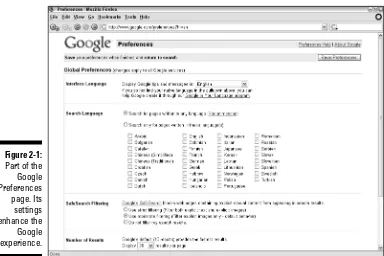
Many people breeze through Google umpteen times a day without bothering to set their preferences — or even being aware that there are preferences to set. A recent Internet study asked users whether they would rather set Google preferences or get bathed in chocolate syrup. Sentiment was overwhelmingly against setting Google preferences. But I’m here to tell you that the five set-tings on the Preferences page (see Figure 2-1) enhance the Google experience far more than the effort required to adjust them.
To adjust Google preferences, click the Preferences link on the Google home page or go here:
www.google.com/preferences
If you set your preferences and later return to the Preferences page by manu-ally entering the preceding URL, your browser displays an unadjusted Preferences page (without your settings). That’s because yourPreferences page has a distinct URL with your preferences built in to it. For example, after selecting English as Google’s default language for your visits, the URL
appears like this:
www.google.com/preferences?hl=en
Figure 2-1:
Your best bet for reaching the Preferences page after first setting your prefer-ences (when you want to readjust them, for example) is to use the Preferprefer-ences link on the home page.
A single basic process changes one preference or several. Just follow these steps:
1. Go to the Preferences page.
As mentioned, just click the Preferences link on the home page or go directly to www.google.com/preferences.
2. Use the pull-down menus, check boxes, and radio buttons to make your adjustments.
3. Click the Save Preferences button.
4. In the confirmation window (which merely says “Your preferences have been saved” and is unnecessary), click the OK button.
The next sections describe what you can accomplish on the Preferences page.
How Google remembers your preferences
When you set preferences in Google, the site is customized for you every time you visit it, as long as you’re using the same computer through which you set the preferences. To provide this convenience, Google must place a cookie(a small information file) in your computer. The site and the cookie high-five each other whenever you visit Google, and then the site appears according to your settings. For this system to work, the reception of cookies must be turned on in your browser.
Some people are militantly anti-cookie, claim-ing that the data files represent an invasion of computer privacy. Indeed, some sites plant cookies that track your Internet movements and identify you to advertisers.
The truth is, Google’s cookie is fairly aggressive. It gets planted when you first visit the site, whether or not you visit the Preferences page. Once planted, the Google cookie records your clicks in Google and builds a database of visitor behavior in its search results pages. For
example, Google knows how often users click the first search result and to what extent they explore results lower on the page. Google uses this information to evaluate the effectiveness of its service and to improve it.
As to privacy, Google does indeed share aggre-gate information with advertisers and various third parties and even publicizes knowledge about how the service is used by its millions of visitors. The key word is aggregate.Google’s privacy policy states that individual information is never divulged except by proper legal proce-dure, such as a warrant or a subpoena, or by individual consent. The privacy policy is pub-lished on this page:
www.google.com/privacy.html
The international Google
If you’re reading the English-language edition of this book, you probably enjoy Google in its default English interface. If you’re reading the Icelandic edition of this book, please send me a copy — I want to see whether my jokes are funnier in a chilly language. Whatever your native language, you should know that you can get Google to appear in one of dozens of languages unpro-nounceable by George W. Bush (besides English, I mean).
Interface Language is the first Google preference, and it adjusts the appear-ance of certain pages — specifically, the home page, the Preferences page, the Advanced Search page, and many Help pages and intrasite directories. Changing the interface language does not alter the language on the search results page or the search results themselves. (To change the language on those pages, you use the Search Language preference, up next.)
The Interface Language preference changes the Interface Language list in the pull-down menu! So if you choose an obscure language that uses an unfamil-iar alphabet while playing around (it’s irresistible), you might have trouble finding your way back to the mother tongue by means of the drop-down menu. But Google does provide a link to Google in English on the home page of most non-English language interfaces.
Google is nothing if not occasionally silly, and Interface Language offers a few must-try languages:
Elmer Fudd: First on my favorites list, Elmer Fudd (or should I say Ewmew Fudd) capriciously changes all Rs and Ls to Ws. On the home page, Groups is now Gwoups, and Directory has been cartoonized to Diwectowy. Most hilariously of all, the I’m Feeling Lucky button is dena-tured to I’m Feewing Wucky. Before changing the language menu back to its original state, be sure to ponder the difference between Twaditional and Simpwified Chinese.
Pig Latin:Ouyay owknay owhay isthay orksway.
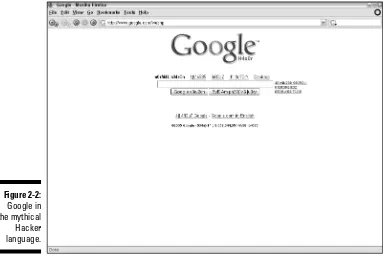
Hacker:Changes alphabet letters to numerals and symbols wherever possible (pretty much everywhere), rendering a semicoherent page best comprehended after several bags of potato chips and a six-pack of soda. (See Figure 2-2.)
Interlingua:A vaguely Euro blend of tourism-speak roughly understand-able by nearly everyone.
Klingon:If I have to explain it, you don’t watch enough Star Trek.In fact, the folks at Google should bone up on their reruns, too, because the term is Klingonese, not Klingon. (Have they no honor?)
Most non-English interface languages present a version of the Google home page tailored to that language. In some cases, the Froogle and Desktop links are missing, à la 2004 — or the Google News link might be missing. It’s a shame, because I long to see “Fwoogle” in the Elmer Fudd language. If you usually navigate Google from the home page, have some familiarity with English, and are trying to decide between your native language and English, you might get more convenience from English.
Searching for non-English pages
After you have the Google interface speaking your language, you can turn your attention to searching for Web pages written in certain languages. The language you search fordoesn’t need to match the language you search
in.In other words, the first two preferences can be set to different languages. Furthermore, you can select more than one language in the Search Language setting, whereas the Interface Language preference, naturally, can be only one language at a time.
Use Search Language to narrow your search results by language. Choosing French, for example, returns Web pages written only in French. Use the check boxes to select as many languages as you want.
Figure 2-2:
If you don’t select any languages, leaving the Search Language preference in its default setting, your search results do not discriminate based on language. You’re likely to see an international array of pages if you rummage through enough results.
G-rated searching
Google uses a filter called SafeSearch to screen out pornography from Web page and image searches. In its default setting (moderate), SafeSearch applies fairly strict filtering to image searches and leaves Web search results unedited. Change the setting to strict for harsher filtering of images and clean Web page searches. You can turn off the filter entirely for an unbiased search session. You select the filtering strength on the Preferences page, as shown in Figure 2-1. SafeSearch operates automatically but can be modified manually by the Google staff. They accept suggestions of sites and images that should be sub-ject to the adult-content filter. If you come across any obsub-jectionable material through a Google search (with SafeSearch set to moderate or strict), feel free to send a link to the offending page or image to the following e-mail address:
Opening the floodgates
You can increase the number of search results that appear on the page, rais-ing it from the default ten results. I think it’s a good idea, so I keep my prefer-ence set at the maximum — one hundred results per page.
Google is fast no matter how many results per page you request. The only thing that might hold you back is your modem speed. If you access the Internet using a high-speed connection (cable modem, DSL, corporate, or university connec-tion), you might as well set the results number to 100 and be done with it.
New windows
The Results Window setting is an important preference setting in my life. It consists of a single check box which, when checked, opens a Web page in a new window when you click a search result. This is a useful way of staying anchored in the search results page, from which you might want to sample several Web pages that match your keywords. Without this preference, your browser opens the Web pages in the same window that Google is in, forcing you to Back-button your way back to Google if you want to see the search results again. And if you drill deeply into a site, it becomes even more diffi-cult to get back to Google.
If you dislike multiple browser windows cluttering your desktop, leave the Results Window box unchecked. If you prefer a hybrid experience in which you sometimes want to anchor at Google while exploring several search hits, leave the box unchecked and get in the habit of right-clicking search result links when you want a new window. Choose Open in New Window from the right-click (shortcut) menu that your browser displays.
If you use a browser that displays Web pages in tabs within a master window, such as Firefox, Netscape, or Opera, Google can still open results in a new window for you. The Google search aids in Firefox (one of which is built in to the browser and the other of which is a version of the Google Toolbar called Googlebar) also can be set to open Google’s search results in a new tab — my favored setting. But that setting works only when you enter keywords into the built-in Google keyword box or the Googlebar. See Chapter 12 for the whole deal about Google toolbars.
Basic Web Searches
Searching the Web is when you draw close to the life-form called Google. Entering a keyword is like venturing near the multilimbed Goddess of
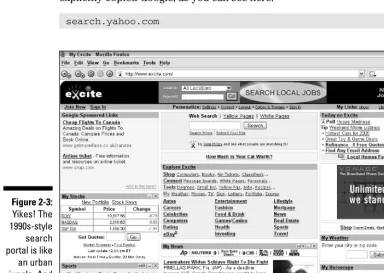
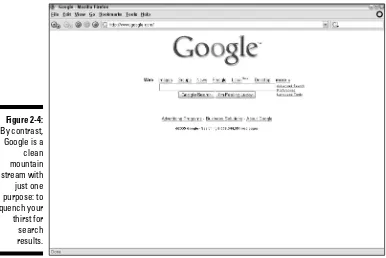
The Google home page is a reactionary expression against the 1990s trend that turned search engines into busy, all-purpose information portals. (See Figures 2-3 and 2-4.) Yahoo!, Lycos, Excite, and others engaged in portal wars in which victory seemed to depend on which site could clutter the page with the most horoscopes, weather forecasts, news headlines, and stock market bulletins. This loud and lavish competition resulted from the failure of plain search engines to earn the traffic and money necessary to keep their busi-nesses afloat. They piled more features onto their pages and, in some cases, ruined their integrity by selling preferred placement in search results. During this mad gold rush, some specialty engines retained their primary focus on Web searching.
These days, in the reborn era of pure search, Google is not the only engine with a streamlined, gunk-free home page. In fact, major competitors such as Yahoo! and MSN Search have followed Google’s design lead on their search engine pages. In the former case, it’s not too much to say that Yahoo! has explicitly copied Google, as you can see here:
search.yahoo.com
Figure 2-3:
Google has embraced the purity of searching with an ad-free, horoscope-absent home page that leaves no doubt that searching is the task at hand. And its search results are so good that it has singly reshaped the search industry. Lycos, Excite, Netscape, and others barely register on anybody’s radar as search engines, attractive though they may be as broad Internet portals. Some of them use the Google engine to deliver Web search results. In fact, until 2004, Yahoo! used Google search results in response to user queries. Since then, Yahoo! has developed its own search engine. Still, for mil-lions of people who discovered or rediscovered the rewards of Internet searching through Google, to search something is to Google it.
Figure 2-4:
By contrast, Google is a clean mountain stream with just one purpose: to quench your thirst for search results.
How insensitive!
Rules dictating when to use uppercase or low-ercase letters have taken a beating in the Internet’s linguistic culture. The prevailing dialect of chat rooms, message boards, and e-mail dis-cards the uppercase start to sentences as if it
So let’s get to it. A six-year-old would find the Google home page easy to use. When you log on to Google’s home page, the mouse cursor is already waiting for you in the keyword search box. Type a word — any word. Or more than one. Or type a sentence in plain English. Press Enter or click the Google Search button. The results are on your screen within seconds.
Note the I’m Feeling Lucky button next to the Google Search button. Clicking it instead of