Formulae Trainer for Visually Impaired
R.Priyakanth
#1, Mahesh Babu Katta
#2, P.Ravinder
#3, Hannah Margarate
*4#
Assistant Professor, Department of Electronics and Communication Engineering,
#BVRIT Hyderabad College of Engineering for Women, Bachupally, Hyderabad, Telangana, India.
*Software Engineer, V& V Testing Domain, Capgemini India Pvt. Ltd., Hyderabad, , Telangana, India.
Abstract— With a motivation of giving training for people with different disabilities in different aspects, the proposed formulae trainer was made such that the visually challenged people can be trained easily with different mathematical formulae. This is implemented by interfacing Emic2 (text to speech converter) with Arduino Uno. In this trainer, the user is having an option of listening differently categorized mathematical formulae, as well as he or she can hear the formula for the input which he gives with the help of Braille keyboard. This learning aid helps the visually impaired to train themselves even in the absence of the tutor.
Keywords—Visually Impaired, Arduino, Assistive Technology, Education, EMIC2, Braille.
I. INTRODUCTION
Two modes of communication involved in mathematics instruction [2] and discourse are speech and graphical presentation. As a contribution to the continuing progress of proper assessment and instructional procedures and resources for children with visual impairment, there is a need for designing easy methods to assist them with some gadgets which are more helpful for understanding and recollecting different mathematical formulae. Ozgur [3] stated that they prepared the audio books of many books in the university library and helped to the education of visually impaired students.
Any adaptive device or service that increases participation, achievement or independence for a student with a disability may be considered Assistive Technology (AT).Teachers need to know how to solve learning problems that relate to vision disabilities. They need to understand not only assistive technologies, but also how to work around inaccessible features of the curriculum and the learning environment [6]. In today's educational practices, teachers of students with visual impairments are required to demonstrate competencies in the use of assistive technology so they can adequately meet the diverse needs of their students [9].
Many technologies are used as instructional tools, particularly educational computer software that is used to teach, reinforce, and practice basic academic skills or basic mathematics. Such programs are often inaccessible both to individuals who are blind or visually impaired [7]. As an
alternative to inaccessible tools, a device is designed for recalling all the formulae of different streams of mathematics using Arduino Technology.
Arduino is an open-source electronics platform based on easy-to-use hardware and software. It's intended for anyone making interactive projects. Arduino senses the environment by receiving inputs from many sensors, and affects its surroundings by controlling lights, motors, and other actuators. Instructions can be given to Arduino by writing code in the Arduino Integrated Development Environment (IDE).
II. SOFTWARE,COMPONENTS USED AND
INTERFACED FOR DEVICE DEVELOPMENT
This Mathematical formulae training device is built based on Arduino Technology, with different modules interfaced.
A. Arduino Uno
The Arduino Uno is a microcontroller board based on the ATmega328. It has 14 digital input/output pins (of which 6 can be used as PWM outputs), 6 analog inputs, a 16 MHz crystal oscillator, a USB connection, a power jack, an ICSP header, and a reset button. It contains everything needed to support the microcontroller. It can be simply connected to a computer with a USB cable or can be powered with an AC-to-DC adapter or battery to get started. The Uno differs from all preceding boards in that it does not use the FTDIUSB-to-serial driver chip. Instead, it features the Atmega8U2 programmed as a USB-to-serial converter.
The Uno is the latest in a series of USB Arduino boards, and the reference model for the Arduino platform
B. EMIC 2
The Emic 2 Text-to-Speech Module [5] is an unimpeded, multi-language voice synthesizer that converts a stream of digital text into natural sounding speech output. Using the commonly familiar DECtalk text-to-speech synthesizer engine, Emic 2 provides full speech fusion capabilities for any embedded system via an easy command-based interface. Its features include:
Nine pre-defined voice styles comprising male, female, and child
Dynamic control of speech and voice characteristics, including pitch, speaking rate, and word emphasis
Industry-standard DECtalk text-to-speech synthesizer engine (5.0.E1)
On-board audio power amplifier and 1/8‖ (3.5 mm) audio jack
C. FonixDECtalk Software
DECtalk converts ASCII text into speech without special or proprietary hardware. The most important features of DECtalk text-to-speech (TTS) technology are described below.
1. High-Quality Speech
Represents the newest in speech synthesis technology.
Requires only a standard sound card for audio output.
Provides three different voices.
Voice pitch, rate of speech, and word/phrase emphasis can be controlled by programming.
2. Word Pronunciation Accuracy
Accurately reads ASCII text from a variety of sources, including electronic mail and word processors.
3. Letter, Word, and Clause Modes
Provides normal clause buffering for normal speech.
Speaks letters, words, phrases, clauses, paragraphs, and even whole documents. Speaks single characters straight away. Can end speech immediately (buffered text doesn't have to complete processing).
4. Pronunciation Heuristics
Recognizes and pronounces non-word sequences, together with sequences with uppercase initials (e.g., FBI and AAA) and sequences without vowels (e.g., CBS and NBC).
D. Connections – EMIC2
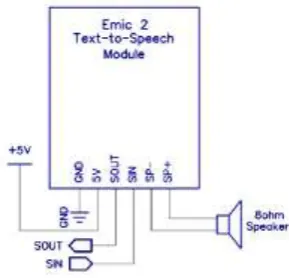
Emic 2 interfaces to a host microcontroller or computer system by means of only four connections (GND, 5V,SOUT, SIN). extra connections (SP+, SP-) are available for direct interfacing to an 8Ω speaker. A 3.5mm audio jack provides a single-ended output for easy connection to headphones, amplified speakers, or other audio equipment as shown in the Fig. 1.
Fig. 1. Connections (EMIC2)
E. Interfacing Emic2 With Arduino
Arduino library is used for interfacing the Emic2 Text-to-Speech module. With this library, one can change the characteristics of the speech on the module through the use of methods and operators, for a less technical and more normal way of control.
An instance of the EMIC2 class has to have been created before utilizing the Emic 2 module. Then the instance gets initialized by calling begin(uint8_t rx_pin, uint8_t tx_pin, uint8_t cs_pin) with arguments the RX and TX pins of the (software) serial port, and optionally the CS pin for the chip select line of the SD card.
The class provides, among others, methods for setting the voice, the language, and the parser. It also provides methods for tweaking parameters that are independent of the choice of parser, such as volume and speaking rate.
Parameters that are dependent to the choice of parser are set by sending a direct command to the module, by using the sendCmd method.A message can be sent by calling the speak method on an instance of the class, with argument any type of data.
For example
emic.speak("I'm the Emic 2 Module");
The speak method can also read files from an SD Card. By providing a filename as an argument, the method will read the file in the emic2 folder and it will send a message to the Emic 2 module for every line in the file. For example
emic.speak("greeting.txt",SD_C); Special use of operators that they act upon an instance of the class can further simplify the process of interfacing with the module:
~emic; - pauses/unpauses playback !emic; - stops playback
++emic; - raises volume level by 1dB --emic; - lowers volume level by 1dB emic += value; - raises volume level by value dB
emic >> value; - increases speaking rate by value words/minute
emic << value; - decreases speaking rate by value words/minute
F. Connecting Emic2 to Arduino
Connecting the Emic 2 to the Arduino is very straightforward, requiring only four wires as shown in Fig. 2.
Fig. 2. Connections (EMIC2) with Arduino
There is an option of writing a small wrapper class to handle various commands. This is used at the beginning of the sketch to configure the voice parameters and later on to speak the text.
emic2TtsModule.init(); emic2TtsModule.setVolume(5);
emic2TtsModule.setWordsPerMinute(120); emic2TtsModule.setVoice(BeautifulBetty);
Application Ideas:
Reading Internet-based data streams (such as e-mails or Twitter feeds)
Conveying status or sensor results from robots, scientific equipment, or industrial machinery Language learning or speech aids for educational environments
G. Interfacing USB Keyboard with Arduino
USB is instance of USB class which need to be invoked every time as it calls other function. onkeydown function is called when any key is pressed on keyboard, this function converts key into ASCII and also checks for special keys like alt, control, shift by calling printkey function, it then calls onkeypressed function which puts the character in its original form onto the screen of serial monitor using serial.print function.
onkeyup function is called when key is released. onkeyup and onkeydown together determines that a key has been pressed and onkeypress function prints it on serial monitor.
Getting output
After interfacing and successfully compiling the code and uploading into Arduino, serial monitor window is opened by clicking on the top right of
Arduino IDE to see the output of any input from keyboard.
H. LCD Interfacing with Arduino
LCD screen is connected to Arduino and the output is made to display on LCD screen rather than in serial monitor.
To obtain output in LCD there is a need for including liquid crystal library and take an instance of class liquid crystal giving the number of pins on the board on which the device is connected.
lcd.begin() is added in void setup for the purpose of initialization and to print lcd.print() command is used, with LCD taken as name of instance.
I. Connecting Push Button Switches To Arduino
To connect a 4 pin push button switch with the Arduino, one Resistor of 1kΩ can be used and an LED to check the status of the switch.
The connection of a switch is made by first connecting LED with the longer end into pin 10 and shorter end to the GND of the Arduino. The resistor is connected with one end in +5 V and the other end connected with one of the terminals of the switch and the other corresponding terminal to GND. The corresponding terminal is usually on the same side as the first one.
Connecting the first terminal (the one with the resistor) to pin 2 on the Arduino and program can be loaded .
int d=2; // to store on or off value void setup()
{
pinMode(2,INPUT); pinMode(10,OUTPUT); }
void loop() {
d=digitalRead(2); if(d==0)
{digitalWrite(10,HIGH);} else
{digitalWrite(10,LOW);} }
The working of push button switch can be observed by the glowing of the LED.
Fig. 3. Push button connection with Arduino Uno
Fig. 4. Basic connections of Arduino Uno and EMIC2
III. PROBLEM ADDRESSED AND SOLUTION
Visually impaired people face problems while updating themselves with different formulae. So the proposal in this paper is to provide the visually impaired people, with a handheld device which makes use of text to speech conversion technique. This provides them an option of listening to differently categorized mathematical formulae.
They can operate this trainer device in two modes. In first mode, each push button is allotted to a specific category of mathematics viz., Algebra, 2D and 3D Geometry, Trigonometry etc. A Braille script is given as a label just beside each pushbutton as in Fig. 5. The user will select the category recognizing Braille script given on the keys and pushes the button to listen to the formulae.
Second mode of operation is that the user is given with an option of entering the request for the formula required with a USB keyboard and based on this input the specific formula will be spelled out. As the visually impaired individuals may communicate through the software, they may also communicate through the hardware products. The example for this is the Braille input-output hardware.
Braille [4] is a special system which allows the visually impaired individuals to access to the texts. Braille is an necessary tool for teaching literacy skills and will serve as an all-time skill. Audio books are normally recorded using human voice, and can be accessed using dedicated computer software, devices, or mainstream tools like MP3 players. The various devices allow options in features such as searching an audio file [8].
Visually impaired people can listen to these formulae in both the modes with the help of headphones or an 8Ω speaker connected to EMIC2 module.
Fig. 5: Top view of the Formulae Trainer
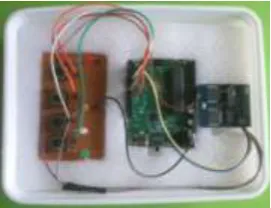
Fig. 6. Formulae Trainer Device
This work device shown in Fig. 6 is done based on the third application idea mentioned above with respect to EMIC2.
This trainer can also be provided with an LCD display such that it can be used by people with no visual disabilities. The formulae can be displayed on the LCD display interfaced.
This idea is not restricted to mathematics and can be extended to any field. This trainer device which is an assistive can be programmed in such a way that it suits a specific curriculum of schools for visually impaired.
IV. CONCLUSION
Assistive technology helps students who are visually impaired with and without additional disabilities increase their access to the general curriculum and improve their academic performance. It is important to thoughtfully consider what devices, tools and technologies will be appropriate to meet the student’s individual and unique learning needs. AT devices should not give students an unfair advantage, but instead, should provide them with the independence to compete effectively with peers. This device is not restricted to only mathematical formulae but can be designed making it suitable to any curriculum for visually impaired or challenged.
REFERENCES
[1] Book:Marion A. Hersh, Michael A. Johnson (2008). Assistive Technology for Visually Impaired and Blind People. Springer-Verlag London Limited.
[3] Ozgur, A.Z.,Kiray, H.S.,(2007). ―Evaluating Audio Books As Supported Course Materials In Distance Education: The Experiences Of The Blind Learners‖, The Turkish Online Journal Of Educational Technology – TOJET, ISSN: 1303-6521, Volume TUIK , (2002)
[4] NiluferYurtaya , YukselYurtaya , M. FatihAdaka ,‖An Education Portal for Visually Impaired‖,ICEEPSY 2014,Procedia - Social and Behavioral Sciences 171 ( 2015 ),p1097 – 1105, Published by Elsevier Ltd
[5] EMIC 2 Text-to-Speech Module.
http://www.parallax.com/downloads/emic-2-text-speech-module-documentation
[6] RuchiPermvattana, Helen Armstrong, Iain Murray, ―E-Learning For The Vision Impaired: A Holistic Perspective‖,International Journal of Cyber Society and Education Pages 15-30, Vol. 6, No. 1, June 2013
[7] Ike Presley, Frances Mary D'Andrea, ― Assistive Technology for students who are blind or visually impaired: A Guide to Assesment‖,American Foundation for the Blind(AFB) Press, 2009, NY.
[8] Lisa R. Tebo, M.Ed., OTR/L, ATP, ― A Resource Guide to Assistive Technology for Students with Visual Impairment‖, Capstone project,Bowling Green State University