COBOL LANGUAGE
SPECIFICATIONS
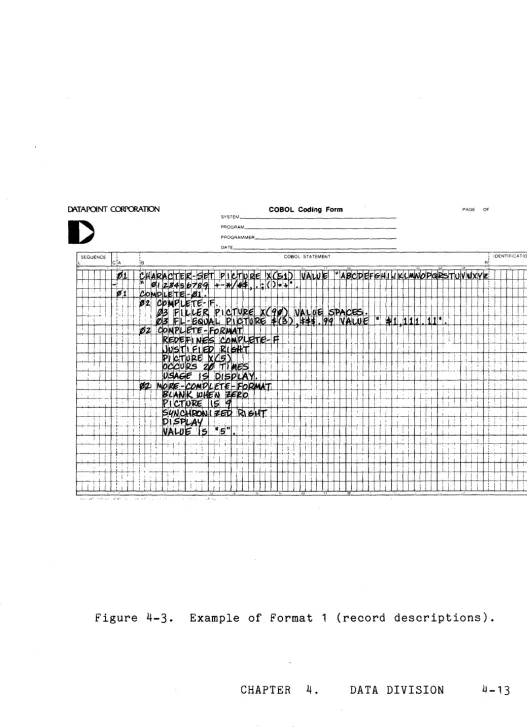
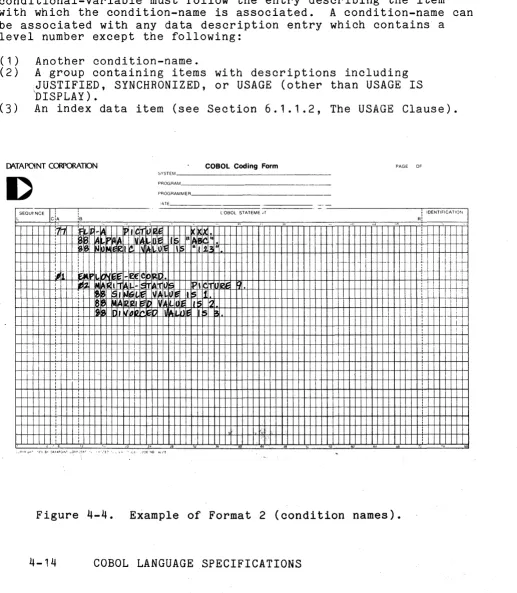
" .
COBOL
User's Guide
Version 1
August. 1976
Model Code No. 50233
DATAPOINT CORPORATION'
The
leader in dispersed data
processin3~MCOBOL LANGUAGE SPECIFICATIONS COBOL
User's Guide
Version 1
August, 1976
DATAPOINT CORPORATION
D ATE: Oc to b e r 1 2, 1 976
Erra ta to:
Reference:
Change:
Reference:
Add:
He ference :
Change:
Change:
From:
To:
COBOL MANUAL
Version 1
August, 1976
Model Code 50233
Page 1-1, Section 1~2
CLUASES to CLAUSES
Page 6-13, Section 6~3
(LIB version 2~1 or later) to end of third
paragragh in section~
Appendix C, page C-1
COBOL <sf>{,<cf>}{,clf}{,rlf}{;options} to
COBOL <sf>{,<cf>}{,rlf}{,clf}{;options}
First sentence in first paragraph of Files section:
<sf> is the name of the source file; <cf>, the final command object file; <clf>, a user
relocatable library file; <rlf>, the COpy library file ...
<sf> is the name of source file; <cf>, the final command object file; <rlf>, a user relocatable
library file; <clf>, the COpy library file~
DATAPOINT CORPORATION
D ATE: Oc to b e r 1 2, 1 976
Erra ta to:
Reference:
COBOL HANUAL Version 1 August, 1976 Model Code 50233
Add: New paragraph following 3rd paragraph:
Re ference:
When the called subprogram is an assembler language program, the addresses of the
identifiers specified in the USING list are put together into an argument list in the COBOL program and the subroutine is called with (HL)
pointing to this argument list. It is up to the
programmer to ensure that the number and type of arguments agree between the calling and called routines .•
Page 5-7, Section 5~3
Add: under Formation and Evaluation Rules after item (5):
(6) If the exponent involved in the exponentiation operation contains no decimal point, all values for the exponent and the base
are valid. If the exponent contains a decimal
point, all values for the exponent are valid; however, only non-negative values for the base
are valid in this context~
DATAPOINT CORPORATION
D ATE : Oc to b e r 1 2, 1 9 7 6
Erra ta to:
Reference:
COBOL MANUAL Version 1
August, 1976
Model Code 50233
New Appendix
Add: Appendix F~ COBOL System Overlay Functions
Parser Overlays
BA - Parser initializing Overlay BC - Identification Division Overlay BE - Environment Division Overlay BG - Data Division Parse Overlay BI - Procedure Division Parser Pass BK - Main Table re-organization
BM - Procedure Division Parser Pass 2 BQ - Parser Termination Overlay
Error message generation
BZ/OA/ZA - Error Message Generation
Symbol Table Overlays
DA - Node Linking Phase DC - Picture Analysis Phase DE - Size Computation Phase
DG - Procedure Division Name Generation Phase
Merge Overlays
FA - Build Symbol Table Chains FC - File Attribute Merge
FK - Data Division Attribute Merge
FM - Build 110 table
Translation Ovelays
KA - Control Translation KD - Arithmetic Translation KG - I/O Translation
Index Generation/Optimization Overlay
OE - Subscript/Index Generation and Optimization
PIT Generation Overlays
PA - Parameter PIT Generation PC - Data Division PIT Generator PE - Literal Allocation
PG - FDB PIT Generation
PK - Procedure Division PIT Generator PM - GET PIT Generation
PO - PUT PIT Generation PP - UPDATE PIT Generation
PW - Generate Prologues & Sort Segments
PZ - Subscript Finalization
Object Program Generation Overlays
WA - OPG initialization WC - OPG Pass 1
WE - OPG Pass 2
WG - OPG Listing Pass WI/WJ - Recycle OPG WM - Generate /SYM file
WO - Generate XREF sort file WQ - Sort and print XREF WX - Generate TXC file
Termination Overlays
DATE: January 24, 1977
Addendum to: Cobol User's Guide
Version 1
Model 1150233
Add: Sections 6.6,6.6.1, 6.7,6.7.1,6.7.2,6.7.3,
6.7.4, and Appendix G.
Section 6.6 DOS Command-line Interface Feature
The DOS Command-line interface featur~
gives the COBOL programmer access to the DOS command line (MCR$).
Section 6.6.1 The COMMAND-LINE Special Variable
Pre-defined in every COBOL program is a variable named COBOL-LINE which has the
characteristics of a 79 character alphanumeric
string i.e., PICTURE X(79). This variable does
not occupy storage but simply defines the interface to the programmer.
COMMAND-LINE can be used in any place that a regular alphanumeric variable can be used e.g., MOVE, DISPLAY, or ACCEPT, statements. When the COBOL program starts, COMMAND-LINE contains the information entered by the user to
the DOS command interpretor. Information moved
into COMMAND-LINE will be there after the
program completes, unless an abort occurs during execution.
Section
6.7
SPECIAL 1/0 FeatureThe SPECIAL 1/0 feature allows the COBOL
programmer to interface to unsupported 1/0
Section 6.7.1 Environment Division Considerations
For files that are maintained on unsupported I/O devices, the device
specification in the ENVIRONMENT DIVISION has
the form .
SELECT <filename> ASSIGN TO
SPECIAL -<rtnname>[-<integer>]
<rtnname> is the name of a SNAP2 program that will perform the operations; <integer> is the number of bytes to be reserved in the File
Descriptor Block (FDB) for the file. If
<integer> is not specified, no space will be reserved.
Section 6.7.2 Procedure Division Considerations
OPE~, CLOSE, READ, and WRITE statements may be used with SPECIAL files.
Section 6.7.3 I/O Subroutine
Associated with each SPECIAL file is a SNAP2 program to perform the actual operations; more than one file can be associated with a
single program. This program is called once for
every OPEN, CLOSE, READ, or WRITE operation. The address of the File Descriptor Block is passed in (HL) and a code specifying what
operation is to be performed is passed in (A). The file IFDBDEF/TXT, which defines the format of a File Descriptor Block, contains the
definitions or these codes.
Section 6.7.4 Reserve Area
In each File Descriptor Block associated with a SPECIAL file is a block of memory called
the Reserve Area. The size of this area is
specified in the SELECT clause for the file. Initially, the area. contains binary zeros; the
area is supplied so~ely for the use of the I/O
sub-routine and its contents are not interogated or modified by the COBOL runtime system.
PREFACE
Datapoint COBOL adheres to the American National Standard and
contains the following modules (See American National Standard
x3.23 1900):
NUCLEUS, LEVEL 1
TABLE FACILITIES, LEVEL 2
SEWUENTIAL ACCESS, LEVEL
RANDOM ACCESS, LEVEL 1
SORTING FACILITIES, LEVEL 2
SEGMENTATION, LEVEL
LIBRARY FACILITIES, LEVEL 2
AND: Selected Features from Level 2 of Nucleus, Sequential
Access and Random Access:
NAME QUALIFICATION
FULL CONTINUATION FOR WORDS AND LITERALS
COMPLETE FIGURATIVE CONSTANTS
ARITHMETIC EXPRESSIONS
EXTENDED FILE OPTIONS
AND: Non-ANSI Extensions:
GEDIT FORMAT FILES
CASSETTES
DATABUS AND EBCDIC NUMERIC FORMATS
INDEXED SEQUENTIAL FILE ACCESS
CALLING PRE-COMPILED SUB-PROGRAMS
Acknowledgment
"Any organization interested in using the COBOL specifications as
the basis for an instruction manual or for any other purpose is
free to do so. However, all such organizations are requested to
reproduce this section as part of the introduction to the
document. Those using a short passage, as in a book review, are
requested to mention 'COBOL' in acknowledgment of the source, but
need not quote this entire section.
"COBOL is an industry language and is not the property of any
company or group of companies, or of any organization or group of
organizations.
"No warranty, expressed or implied, is made by any contributor or
by the COBOL Committee as to the accuracy and functioning of the
programming system and language. Moreover, no responsibility is
assumed by any contributor, or by the committee, in connection
therewith.
"Procedures have been established for the maintenance of COBOL.
Inquiries concerning the procedures for proposing changes should
be directed to the Executive Committee of the Conference on Data
System Languages.
"The authors and copyright holders of the copyrighted material
used herein:
FLOW-MATIC (Trademark of'Sperry Rand Corporation), Programming for
the UNIVAC I and II, Data Automation Systems copyrighted
1958, 1959, by Sperry Rand Corporation; IBM Commercial
Translator Form No. F28-8013, copyrighted 1959 by IBM; FACT,
DSI 27A5260-2760, copyrighted 1960 by Minneapolis-Honeywell.
have specifically authorized the use of this material in
whole, or in part, in the COBOL specifications. Such
authorization extends to the reproduction and use of COBOL
TABLE OF CONTENTS
1. OVERALL LANGUAGE CONSIDERATIONS
1.1 Introduction
1.2 Notation Used in Formats and Rules 1 .2. 1 Words
1.2.2 Level Numbers
1.2.3 Brackets, Braces, and the Alternator 1.2.4 The Ellipsis
1.2.5 Format Punctuation 1.3 Language Concepts
1.3.1 Cobol Character Set
1.3.2 Characters Used in Words 1.3.3 punctuation Character 1.3.4 Editing Characters
1.3.5 Characters Used in Arithmetic Expressions 1.3.6 Characters Used in Relations
1.3.1 Separators 1.4 Character String
1.4.1 Words 1.4.2 Data Name
1.4.3 Condition-Name 1.4.4 Procedure-Name
1.4.5 Figurative Constants 1.4.6 Special Registers 1.4.1 Mnemonic Names 1.4.8 Reserved Words 1.4.9 Literals
1.4.10 PICTURE Character String 1.4.11 NOTE Character String
1.5 Concept of Computer Independent Data Description 1.5.1 Logical Record and File Concept
1.5.2 Concept of Levels
1.5.3 Concept of Data Classes
1.5.4 Character Representation and Radix 1.5.5 Algebraic Signs
1.5.6 Overall Structure of a COBOL Source Program 1.5.1 Uniqueness of Data Reference
1.5.1.1 Qualification 1.5.1.2 Subscripting 1.5.1.3 Indexing 1.6 Reference Format
1.6.1 Reference Format Representation
1.6.2 Division, Section, and Paragraph Formats 1.6.3 Data Division Entries
2. IDENTIFICATION DIVISION 2-1
2.1 Structure 2-1
2.2 The PROGRAM-ID Paragraph 2-2
3. ENVIRONMENT DIVISION 3-1
3.1 Structure 3-1
3.2 Configuration Section 3-1
3.2.1 The SOURCE-COMPUTER Paragraph 3-2
3.2.2 The OBJECT-COMPUTER Paragraph 3-2
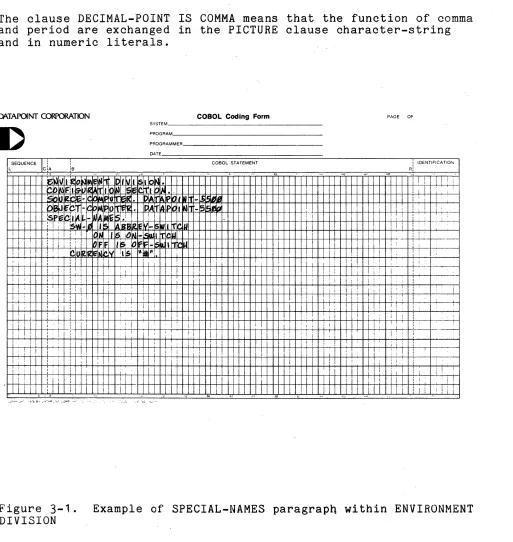
3.2.3 The SPECIAL-NAMES Paragraph 3-2
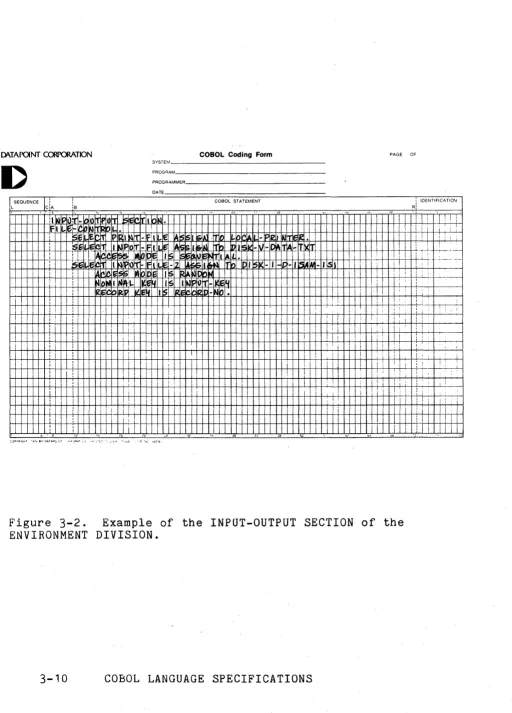
3.3 The Input-Output Section 3-5
3.3.1 The FILE-CONTROL Paragraph 3-5
3.3.2 Tne SELECT Clause 3-6
3.3.3 The ASSIGN Clause 3-6
3.3.4 The RESERVE Clause 3-7
3.3.5 The FILE LIMIT Clause 3-7
3.3.6 the ACCESS MODE Clause 3-7
3.3.7 The PROCESSING MODE Clause 3-7
3.3.8 The ACTUAL KEY Clause 3-7
3.3.9 The NOMINAL KEY Clause 3-d
3.3.10 The RECORD KEY Clause 3-8
3.4 The 1-0 CONTROL Paragraph 3-d
3.4.1 The RERUN Clause 3-b
3.4.2 The SAME AREA Clause 3-9
3.4.3 The APPLY Clause 3-9
4. DATA DIVISION 4-1
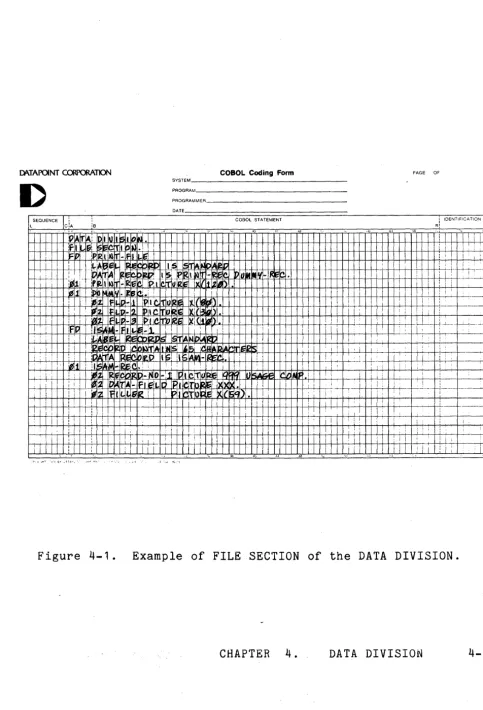
4.1 File Section 4-2
4.1.1 The Complete File Description Entry Skeleton 4-3
4.1.2 Tne BLOCK CONTAINS Clause 4-3
4.1.3 The DATA RECORDS Clause 4-4
4.1.4 The LABEL RECORDS Clause 4-4
4.1.5 The LINAGE Clause 4-4
4.1.6 The RECORD CONTAINS Clause 4-5
4.1.7 The VALUE OF Clause 4-6
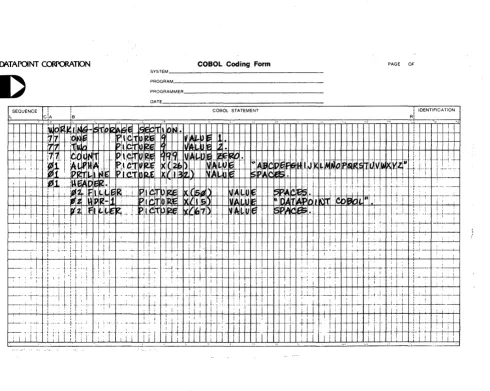
4.2 Working-Storage Section 4-8
4.2.1 Noncontiguous Working-Storage 4-8
4.2.2 Working-Storage Records 4-8
4.2.3 Initial Values 4-8
4.2.4 The Skeletal Format of the Working-Storage Section 4-9
4.3 Linkage Section 4-10
4.4 Data Description 4-10
4.4.1 The Complete Data Description Entry Skeleton 4-11
4.4.2 Level-Number 4-15
4.4.3 The data-name or FILLER Clause 4-15
4.4.4 The REDEFINES Clause 4-16
4.4.6 The J~STIFIED Clause 4.4.7 The PICTURE Clause
4.4.8 The S1NCHHONIZED Clause 4.4.9 The USAGE Clause
4.4.10 The VALU~ Clause
5. PROCEDURE DIVISION
5.1 Procedure Division Structure 5.2 Statements and Sentences
5.2.1 Conditional Statements and Sentences 5.2.2 Imperative Statements and Sentences
5.2.3 Compiler Directing Statements and Sentences 5.3 Arithmetic Expressions
5.4 Conditions
5.4.1 Relation Condition 5.4.2 Sign Condition 5.4.3 Class Condition
5.4.4 Condition Name Condition 5.4.5 Switch Status Conditon
5.4.6 Evaluation Rules for Conditions 5.5 Conditioal Statements
5.5.1 The IF Statement 5.6 Arithmetic Statements 5.6.1 The GIVING Option 5.6.2 The ROUNDED Option
5.b.3 The SIZE ERROR Option
5.6.4 Overlapping Operands 5.6.5 The ADD Statement 5.6.6 The COMPUTE Statement
5.b.7 The DIVIDE Statement
5.6.8 The MULTIPL1 statement 5.6.9 The SUBTRACT Statement 5.7 Procedure Branching Statements
5.7.1 The GO TO Statement 5.7.2 The ALTER Statement 5.7.3 The PERFORM Statement 5.7.4 The STOP Statement 5.7.5 The EXIT Statement
5.b Data Manipulation Statements 5.8.1 The MOVE Statement
5.b.2 The EXAMINE Statement 5.9 Input-Output Statements
5.9.1 The OPEN Statement 5.9.2 The START Statement 5.9.3 The SEEK Statement 5.9.4 The READ Statement 5.9.5 The WHITE Statement 5.9.6 'The REWRITE; Statement
5.9.7 The ACCEPT Statement 5-39
5.9.8 The DISPLAY Statement 5-40
5.9.9 The CLOSE Statement 5-40
5.10 Table Manipulating Statements 5-43
5.11 Program Linkage Statement 5-43
5.12 Compiler Directing Statements 5-43
5.12.1 The ENTER Statement 5-43
5.12.2 The NOTE Sentence 5-44
b. SPECIAL FEATURES 6-1
6.1 Table Handling Facility 6-1
6.1.1 Data Division Considerstions 6-1
6.1.1.1 The OCCURS Clause 6-1
6.1.1.2 The USAGE Clause 6-2
6.1.2 Procedure Division Considerations 6-3
6.1.2.1 Relation Condition 6-3
b.1.2.2 Overlapping Operands 6-3
6.1.2.3 The SET Statement b-3
6.2 The Sort Facility 6-5
6.2.1 Environment Division Considerations 6-5
6.2.1.1 The FILE-CONTROL Paragraph 6-5
6.2.1.2 The I-a-CONTROL Paragraph 6-6
6.2.2 Data Division Considerations 6-7
6.2.2.1 The Sort File Description - Complete Entry
Skeleton 6-7
6.2.3 Procedure Division Considerations 6-d
6.2.3~1 The SORT Statement 6-8
6.2.3.2 The RELEASE Statement 6-11
6.2.3.3 The RETURN Statement 6-12
6.3 The COBOL Source Library Feature 6-13
6.3.1 The COpy Statement 6-13
6.3.2 Valid Locations for the COpy Statement 6-14
6.4 The Sub-Program Feature 6-15
6.4.1 The CALL Statement 6-15
6.4.2 The USING Option 6-16
6.4.3 The EXIT PROGRAM Statement 6-17
6.5 The Segmentation Feature 6-17
6.5.1 Segment Classification 6-18
6.5.2 Structure of Program Segments 6-18
6.5.3 Restrictions on Program Flow 6-19
Appendix A. COMPOSITE LANGUAGE SKELETON
Appendix B. ERROR MESSAGES
Appendix C. COMPILATION PROCEDURE
Appendix E. RESERVED WORDS
CHAPTER 1~ OVERALL LANGUAGE CONSIDERATIONS
1~1 Introduction
This manual contains specifications for the Datapoint subset
of the American National Standard COBOL~ COBOL, the common
business-oriented language, is designed for solving business
problems using an English-like programming language~ The
elementary components of a COBOL program are words and other
character strings~ These components are combined into entities
called entries and sentences~ These entries and sentences are
then combined into the paragraphs, sections, and divisions of a
COBOL program~ In this manual we define the format and meaning of
each of these entities~
This chapter specifies the general features of the COBOL language,
and defines the general concepts used in COBOL~
1~2 Notation Used in Formats and Rules
A General Format is the specific arrangement of the elements
of a clause or a statement~ A clause or a statement consists of
elements~ Elements consist of upper case words, lower case words, level numbers, brackets, braces, the alternator, connectives and
special characters~ Throughout this manual a format is shown
adjacent to information defining the clause or statement~ When
more than one specific arrangement is permitted, the general
format is separated into numbered formats~ CLAUSES MUST BE
WRITTEN IN THE SEQUENCE GIVEN IN THE GENERAL FORMATS~ (Clauses
that are optional must appear in the sequence shown if they are
used~) In certain cases, stated explicitly in the rules
associated with a given format, the clauses may appear in
sequences other than that shown~ Applications, requirements or
restrictions are shown as rules~
1.2.1 Words
All underlined upper-case words are called key words and are
required when the functions of wh~ch they are a part are used.
Upper-case words which are not underlined are optional to the user
and mayor may not be present in the source program. Upper-case
words, whether underlined or not, must be spelled correctly.
Lower-case words, in a general format, are generic terms used to
represent COBOL words that must be supplied by the user. Except
for the list of words following, such lower-case words occuring in a general format are replaced, in an actual program, by a single COBOL word:
a. statement
b. imperative-statement
c. arithmetic-expression
d. character-string
e. comment-entry
f. condition
g. literal
These exceptions represent combinations of COBOL words constructed in accordance with the definitions specified in Section 5.2 of the Procedure Division for statement, and imperative-statement.
Condition is defined in Section 5.4 of the Procedure Division.
Arithmetic expression is defined in Section
5.3
of the ProcedureDivision. Definition for the term character-string is given in
Section 4.4.8 of the Data Division. Comment-entry is defined in
Section 2.1 of the Identification Division. Literal is defined in
Section 1.4.9 of this chapter.
Where generic terms are repeated in a general format, a number or letter appendage to the term serves to identify that term for explanation or discussion.
1.2.2 Level Numbers
When specific level-numbers appear in data descriptions entry formats, those specific level-numbers are required when such
1.2.3 Brackets, Braces, and the Alternator
when a portion of a general format is enclosed in brackets, [], that portion maybe included or omitted at the user's choice. Braces, {}, enclosing a portion of a general format means a
selection of one of the options contained within the braces must
be made. In both cases, the alternatives to be selected are
separated from each other by the alternator, :. When brackets or
braces enclose a portion of a format but only one possibility is shown, the function of the brackets or braces is to delimit that portion of the format to which a following ellipsis applies (see The Ellipsis, below).
1.2.4 The Ellipsis
In text, the ellipsis ( ..• ) may show the omission of a
portion of a source program. This meaning becomes apparent in
context.
In the general format, the ellipsis represents the position at
which repetition may occur at the user's option. The portion of
the format that may be repeated is determined as follows:
Given .... in a clause or statement format, scanning right to left, determine the] or } immediately to the left of the ... ; continue scanning right to left and determine the logically matching [ or
{; the ... applies to the words between the determined pair of delimiters.
1.2.5 Format Punctuation
The punctuation characters, comma and semicolon, are shown in
some formats. However, a semicolon must not appear immediately
preceding the first clause of an entry or paragraph. The use of
these punctuation characters for each division is as follo~s:
Identification Division.
Although not expressly shown in the formats within this division, the comma and semicolon may be used within the
comment-entry. The paragraph itself must terminate with a
period followed by a space.
Environment Division. Where a comma is shown in the formats,
it is optional and may be included or omitted by the user. Where a semicolon is shown in.the formats, it is optional and
may be included or omitted by the user. The paragraph itself
must terminate with a period followed by a space.
Data Division. Where a comma is shown in the formats, it is
optional and may be included or omitted by the user. Where a
semicolon is shown in the formats, it is optional and may be
included or omitted by the user. The paragraph itself must
terminate with a period followed by a space.
Procedure Division. A comma used between parentheses for
subscripting or indexing.is required. Elsewhere in the
formats, it may be omitted. A comma must not appear
immediately following the first word of a statement. If
desired, a semicolon can be used between statements.
Use of Certain Special Characters in Formats:
The characters '+', '-',
'>',
'<', ':',
when appearing in formats,although not underlined, are required when such formats are used.
1.3 Language Concepts
1.3.1 Cobol Character Set
Character
0,1, ••• ,9
A,B, ••• ,Z
+
*
/ = $"
( )>
<
Meaning digit letterspace (blank) plus sign
minus sign (hyphen) asterisk
stroke (virgule, slash) equal sign (equals) currency sign
comma (decimal point) semicolon
period (decimal point) quotation mark
left parenthesis right parenthesis greater than symbol less than symbol
1.3.2 Characters Used in Words
A word is a sequence of not more than 30 characters. Each
character is selected from the set
'A', 'B',
'C', ... ,'Z', '0',
'1', ... , '9', '-', except that the '-' may not appear as the
first or last character in a word. A word is delimited by
separators.
1.3.3 Punctuation Character
The following characters are used for punctuation:
Character
"
()
CHAPTER 1.
Meaning comma semicolon period
quotation mark left parenthesis right parenthesis
1.3.4 Editing Characters
Editing characters are single characters or fixed two-character combinations belonging to the following set:
Character
B
o
+
CR DB
Z
it
$
Meaning space zero plus minus credit debit
zero suppress check protect currency sign
comma (decimal point) period (decimal pOint)
1.3.5 Characters Used in Arithmetic Expressions
The following character combinations are used in arithmetic expressions:
Character
+
*
/**
Meaning addition subtraction multiplication division
exponentiation
1.3.6 Characters Used in Relations
The following characters are used in relations:
Character
<
=
>
1.3.1 Separators
The space and the punctuation characters, when not contained
within quotation marks, are separators. Where a space is used,
more than one may be used, except for the restrictions set forth in this chapter.
A character-string is delimited on the right by a space, period, right parenthesis, comma, or semicolon.
The use of punctuation characters in connection with character-strings is defined as follows:
(1) A space must follow a period, comma and semicolon when any of these punctuation characters are used to delimit a
character-string.
(2) A space must neither immediately follow a left parenthesis nor immediately precede a right parenthesis.
1.4 Character String
A character string is a sequence of contiguous characters which form a literal, a word, a PICTURE character-string, or a NOTE character-string.
1.4.1 Words
A word is a sequence of not more than 30 characters. Each
character is selected from the set 'A', 'B', ... , 'Z', '0', '1',
... , '9', '-', except that the '-' may not appear as the first or
last character in a word.
1.4.2 Data Name
A data-name is a word that contains at least one alphabetic character and that names an entry in the Data Division, including file description entries.
1.4.3 Condition-Name
A condition-name is a word with at least one alphabetic character, which is assigned to a specific value within the
complete set of values that a data item may assume. The data item
itself is called a conditional variable. Each condition-name must
be unique, or be made unique through qualification. A conditional
variable may be used as a qualifier for any of its
condition-names. If references to a conditional variable require
indexing, subscripting or qualification, then its condition-names also require the same combination of indexing, subscripting or qualification (see Uniqueness of Data Reference, Section 1.5.7).
In addition to being described 'in the Data Division,
condition-names may also be defined in the SPECIAL-NAMES paragraph within the Environment Division, where a condition-name may be
given to the ON status or OFF status, or both, of hardware or operating system conditions.
A condition-name is used in conditions as an abbreviation for the relation condition; this relation condition posits that the
associated conditional variable is equal to the value to which that condition-name is assigned.
1.4.4 Procedure-Name
A procedure-name is a word which is used to name a paragraph
or section in the Procedure Division. Procedure-names composed
only of the digits '0' through '9' are equivalent if, and only if,
they are composed of the same number of digits and have the same value.
1.4.5 Figurative Constants
Certain constants, called figurative constants, have been
assigned fixed data-names. These data-names must not be bounded
by quotation marks when used as figurative constants. The
singular and plural forms of figurative constants are equivalent and may be used interchangeably.
ZERO ZEROS ZEROES SPACE SPACES HIGH-VALUE HIGH-VALUES LOW-VALUE LOW-VALUES QUOTE QUOTES
ALL literal
Represents the value 0, or one or more of the character 0, depending on context.
Represents one or more blanks or spaces.
Represents one or more of the
character that has the highest value in
the collating sequence, namely octal 0377.
Represents one or more of the
character that has the lowest value in the collating sequence, namely octal 0.
Represents one or more occurrences
of the quotation mark character. The word
QUOTE cannot be used in place of a quotation mark in a source program to bound a nonnumeric literal.
Represents one or more of the string of
characters comprising the literal. The
literal must be either a nonnumeric literal or a figurative constant other
than ALL literal. When a figurative
constant is used, the word ALL is redundant and is used for readibility only.
When a figurative constant represents a string of one or more characters, the length of the string is
determined by the compiler from context according to the following rules:
(1) When a figurative constant is associated with another data item, as when the figurative constant is moved to or compared with another data item, the string of characters specified by the
figurative constant is repeated character by character on the right until the size of the resultant string is equal to the size in characters of the associated data item.
(2) When a figurative constant is not associated with another data item, as when the figurative constant appears in a DISPLAY,
EXAMINE, or STOP statement, the length of the string is one
character. The figurative constant ALL literal may not be used
with DISPLAY, EXAMINE, or STOP.
A figurative constant can be used any place where a literal
appears in -the format, except that whenever the literal is restricted to having only numeric characters in it, the only figurative constant permitted is ZERO (ZEROS, ZEROES).
1.4.6 Special Registers
Special registers are data items generated by the compiler to
support the use of certain COBOL features. Seven such special
registers may be generated by the Datapoint COBOL compiler.
(1) TALLY. The word TALLY is the name of a special register whose
implicit description is that of an integer of five digits, without an operational sign, and whose implicit USAGE is
computational. The primary use of the TALLY register is to
hold information produced by the EXAMINE statement. The word
TALLY may also be used as a data-name wherever an elementary data item of integral value may appear.
(2) LINAGE-COUNTER. The word LINAGE-COUNTER is the name of a
special register generated for each FD with a LINAGE clause. The implicit description of a LINAGE-COUNTER is that of an integer without an operational sign whose implicit USAGE is computational and whose size is sufficient to hold the maximum
number of lines specified in the LINAGE clause. A
LINAGE-COUNTER may not be explicitly modified by the COBOL program.
The value of a LINAGE-COUNTER represents the current line
number on a logical page. This value is set to one when the
file is opened and reset to one after advancing (to the top of
the) page. When a WRITE statement to a file with a LINAGE
clause is executed, the value of the LINAGE-COUNTER is incremented either by the value specified in the ADVANCING option or by one if, no ADVANCING option is specified.
See The LINAGE Clause, Section 4.1.5, and The WRITE Statement, Section 5.9.5.
(3) DATE. The word DATE is the name of a special register which
holds the date. Its implicit description is that of an
integer of six digits without an operational sign, and whose
implicit USAGE is computational. The value of a date is
represented by two digits for the year in the century, two for
the month in the year, and two for the day of the month. The
value of DATE may be made accessible to a COBOL program by
Statement, Section 5.9.7.)
(4) FILE-NAME. The word FILE-NAME is the name of a special
register generated for each FD assigned to a disk file. Its
implicit description is that of a group item containing the three elementary items - MAIN-NAME, EXTENSION, and
DRIVE-NUMBER. The FILE-NAME of a disk file can be set by a
program to specify the exact file to open before it is opened, and can be read after a file is opened for use in headings,
name verification, etc. The three components of a FILE-NAME
correspond to the DOS components of a name.
(5) MAIN-NAME. The word MAIN-NAME is the name of a special
register generated as the first component ofa FILE-NAME. Its
implicit description is that of an alphanumeric item of eight
characters whose implicit USAGE is display. This register
holds the main name portion of a DOS disk file name.
(6) EXTENSION. The word EXTENSION is the name of a special
register generated as the second component of a FILE-NAME. Its implicit description is that of an alphanumeric item of
three characters whose implicit USAGE is display. This
register holds the extension portion of a DOS disk file name.
(7) DRIVE-NUMBER. The word DRIVE-NUMBER is the name of a special
register generated as the third component of a FILE-NAME. Its
implicit description is that of an alphanumeric item of two
characters whose implicit USAGE is display. This register
holds either two digits for an explicit DOS drive number or two spaces for an implicit DOS drive specification (i.e., all drives).
1.4.7 Mnemonic Names
Mnemonic names are the means of relating system-names with problem-oriented names, and, also, the status of software switches
with condition-names. (See Section 3.2.3, The SPECIAL-NAMES
Paragraph.),
.
1.4.8 Reserved Words
A specified list of words which may be used in COBOL Source Programs, but which may not appear in the programs as user-defined
words. See Appendix E for a complete list of reserved words.
There are three types of reserved words, as,shown below:
(1) Key Words. A key word is a word whose presence is required
when the format in which the word appears is used in a source
program. Within each format, such words are uppercase and
underlined.
Key Words are of three types:
a. Verbs such as ADD, R~AD, ENTER.
b. Required words, which appear in statement and entry
formats.
c. Words which have a specific functional meaning such as
NEGATIVE, SECTION,'TALLY, etc.
(2) Optional Words. Within each format, uppercase words that are
not underlined are called optional words and may appear at the
user's option. The presence or absence of each optional word
within a format does not alter the compiler's translation. Misspelling of an optional word, or its replacement by another word of any kind is not allowed.
(3) Connectives. There are three types of connectives:
a. Qualifier connectives that are used to associate a
data-name or a paragraph-name with its qualifier: OF, IN.
b. Series connectives that link two or more consecutive
operands: , ( comma) .
c. Logical connectives that are used in the formation of
conditions: AND, OR, NOT, AND NOT, OR NOT.
1.4.9 Literals
A literal is a string of characters whose value is implied by an ordered set of characters of which the literal is composed. Every literal belongs to one of two types, numeric or nonnumeric.
Non-numeric Literals
A non-numeric literal is defined as a string of any allowable characters in the ASCII character set, excluding the character
can contain 1 through 120 characters. The value of a non-numeric literal is the string of characters itself, excluding the
quotation marks. Any spaces enclosed in the quotation marks are
part of the non-numeric literal and, therefore, are part of the
value. All non-numeric literals are category alphanumeric (See
the PICTURE Clause, Section 4.4.8).
Numeric Literals
A numeric literal is defined as a string of characters chosen from
the digits 0 through 9, the plus sign, the minus sign, and the
decimal point. Numeric literals of 1 through 18 digits in length
are allowed. The rules for formation of numeric literals are as
follows:
(1) A literal must contain at least one digit.
(2) A literal must not contain more than one sign character. If a
sign is used, it must appear as the leftmost character of the
literal. If the literal is unsigned, the literal is positive.
(3) A literal must not contain more than one decimal point. The
decimal point is treated as an assumed decimal point, and may appear anywhere within the literal except as the rightmost
character. If the literal contains no decimal point, the
literal is an integer.
The value of a numeric literal is the algebraic quantity
represented by the characters in the numeric literal. Every
numeric literal is category numeric (See the PICTURE Clause, Section 4.4.8).
If a literal conforms to the rules for the formation of numeric literals, but is enclosed in quotation marks, it is a non-numeric literal and it is treated as such by the compiler.
1.4.10 PICTURE Character String
A PICTURE character-string consists of certain combinations
of characters in the COBOL character set used as symbols. The
allowabl~ combinations are explained under the PICTURE clause (See
Section 4.4.8).
1.4.11 NOTE Character String
A NOTE character-string may consist of any characters from
the ASCII character set. This character string is normally
terminated with a period followep"by a space.
1.5 Concept of Computer Independent Data Description
To make data as computer-independent as possible, the characteristics or properties of the data are described in relation to a Standard Data Format rather than an
equipment-oriented format. This Standard Data Format is oriented
to general data processing applications and uses the decimal system to represent numbers (regardless of the radix used by the computer) and the remaining characters in the COBOL character set to describe non-numeric data items.
1.5.1 Logical Record and File Concept
The approach taken in defining file information is to distinguish between the physical aspects of the file and the
conceptual characteristics of the data contained within the file.
Physical Aspects of a File:
The physical aspects of a file describe the data as it appears on the input or output media and include such features as:
(1) The grouping of logical records within the physical
limitations of the file medium.
(2) The means by which the file can be identified.
Conceptual Characteristics of a File:
The conceptual characteristics of a file are the explicit
definition of each logical entity within the file itself. In a
COBOL program, the input or output statements refer to one logical record.
logical record. A COBOL logical record is a group of related information, uniquely identifiable, and treated as a unit.
A physical record is a physical unit of information whose size and recording mode is convenient to a particular computer for the
storage of data on an input or output device. The size of a
physical record is hardware dependent and bears no direct
relationship to the size of the file of information contained on a device.
A logical record may be contained within a single physical unit; or several logical records may be contained within a single
physical unit; or a logical record may require more than one physical unit to contain it. There are several source language methods available for describing the relationship of logical
records and physical units. Once the relationship has been
established, the control of the accessibility of logical records as related to the physical unit is carried out implicitly by the
object program. In this manual references to records mean to
logical records, unless the term 'physical record' is specifically used?
The concept of logical record is not restricted to file data but is carried over into the definition of working storage and
constants. Thus, working storage and constants may be grouped
into logical records and defined by a series of data description entries.
Record Concepts
The Record Description consists of a set of data description
entries which describe the characteristics of a particular record. Each data description entry consists of a level number followed by a data-name, if required, followed by a series of independent
clauses, as required.
1.5.2 Concept of Levels
A level concept is inherent in the structure of a logical
record. This concept arises from the need to specify subdivisions
of a logical record for the purpose of data reference. Once a
subdivision has been specified, it may be further subdivided to permit more detailed data referral.
The most basic subdivisions of a record, that is, those not
further subdivided, are called elementary items; consequently, a record is said to consist of a sequence of elementary items, or the record itself may be an elementary item.
In order to refer to a set of elementary items, the elementary
items are combined into groups. Each group consists of a named
sequence of one or more elementary items. Groups, in turn, may be
combined into groups of two or more groups, etc. Thus an
elementary item may belong to more than one group.
Level Numbers
A system of level numbers shows the organization of elementary
items and group items. Since records are the most inclusive data
items, level numbers for records start at 1 or 01. Less inclusive
data items are assigned high~r (not necessarily successive) level
numbers not greater in value than
49.
There are special levelnumbers
77
and88
which are exceptions to this rule (see below).Separate entries are written in the source program for each level number used.
A group includes all group and elementary items following it until a level number less than or equal to the level number of that
group is encountered. The level number of an item, either
elementary or a group item, immediately following the last
elementary item of the previous group, must be that of one of the groups to which the prior elementary item belongs.
Two types of entries exist for which there is no true concept of
levels. These are:
(1) Entries that specify noncontiguous Working-Storage items.
(-2) En tries that specify condi tion-names.
Entries that specify noncontiguous Working-Storage items, which are not subdivisions of other items, and are not themselves
subdivided, have been assigned the special level number
77.
Entries that specify condition-names, to be associated with a
particular value of a conditional-variable, have been assigned the
1.5.3 Concept of Data Classes
The five categories of data items (see Section 4.4.8, The
PICTURE Clause) are grouped into three classes: alphabetic,
numeric, and alphanumeric. For alphabetic and numeric, the
classes and categories are synonymous. The alphanumeric class
includes the categories of alphanumeric edited, numeric edited and
alphanumeric (without editing). Every elementary item belongs to
one of the classes and further to one of the categories. The
class of a group item is treated at object time as alphanumeric regardless of the class of elementary items subordinate to that group item.
1.5.4 Character Representation and Radix
The value of a numeric item is represented in zoned decimal
format. Since this representation is actually combinations of
bits, it is commonly called binary-coded decimal. The ASCII
binary code (a binary-coded decimal form) is also used to
represent characters and symbols that are alphanumeric items. The
size of an elementary data item or group item is the number of characters in the Standard Data Format representation of the item.
1.5.5 Algebraic Signs
Algebraic signs are used for two purposes:
(1) To show whether the value of an item involved in an operation
is positive or negative; and
(2) To identify the value of an item as positive or negative on
an edited report for external use.
Since the method of representing an operational sign is standard, an indication that an operational sign is associated with an item is sufficient.
Editing sign control characters are used to display the sign of an
item and are not operational signs. These editing characters are
available through the use of the PICTURE clause.
1.5.6 Overall Structure of a COBOL Source Program
A COBOL source program is composed of four divisions: the
Identification Division, the Environment Division, the Data
Division, and the Procedure Division. Each division is mandatory
and must appear in order. Each division has additional structure
as shown in the following format:
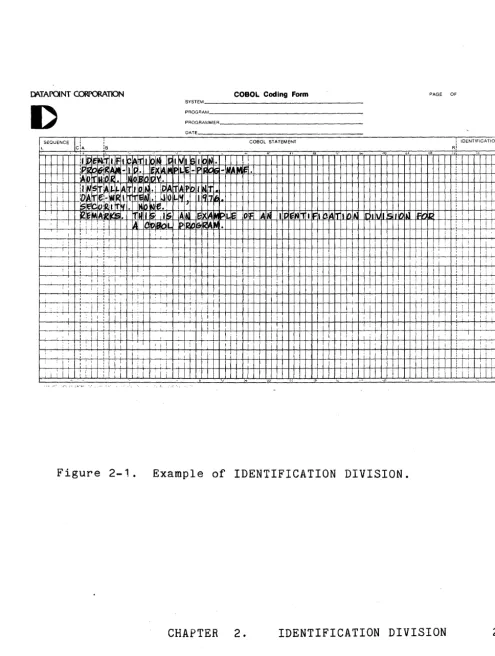
IDENTIFICATION DIVISION.
PROGRAM-ID. program-name. [AUTHOR. [comment-entry] ... ]
[INSTALLATION. [comment-entry] ... ] [DATE-WRITTEN. [comment-entry] ... ] [SECURITY. [comment-entry] .•. ] [REMARKS. [comment-entry] ... ]
ENVIRONMENT DIVISION. CONFIGURATION SECTION.' SOURCE-COMPUTER. entry OBJECT-COMPUTER. entry [SPECIAL-NAMES. entry] [INPUT-OUTPUT SECTION. FILE-CONTROL. {entry} ...
[l-Q-CONTROL. entry]]
DATA DIVISION. [FILE SECTION.
{file description entry
{record description entry} .•. } ... ] [WORKING-STORAGE SECTION.
[data description entry] .. . [record description entry] ... ] [LINKAGE SECTION.
[data description entry] .•. [record description entry] ... ]
PROCEDURE DIVISION [USING .•. ]. {[section-name SECTION [priority].] {paragraph-name. {sentence} ••. } .•• } .•.
Each division is completely specified in subsequent chapters. In brief, the purpose of each division is as follows:
The Environment Division is divided into a required
Configuration Section and an optional Input-Output Section.
The Configuration Section defines the computer configuration used to compile and to execute the program.
The Input-Output Section defines the assignment of files to devices.
The Data Division is used to define the storage used by the program. It is divided into a File Section where storage associated with files is described, a Working-Storage Section where non-file storage is described, and a Linkage Section where storage defined in other COBOL programs is described
(see Section 6.4, The Sub-Program Feature). All sections are
optional.
The Procedure Division contains sentences which define the
processing performed by the program. Sentences are collected
to form paragraphs. Paragraphs may be collected to form
sections.
1.5.7 Uniqueness of Data Reference
Every name used in a COBOL source program must be unique, either because no other name has the identical spelling, or because the name can be made unique through a syntactically correct combination of qualifiers, subscripts or indices.
Identifier is the term used to reflect that a data-name, if not unique in a program, must be followed by a syntactically correct combination of qualifiers, subscripts or indices necessary to
ensure uniqu~ness. The general formats for identifiers are:
Format 1
data-name-1 [{OF I IN} data-name-2] ..•
[(subscript-1 [, subscript-2 [, subscript-3]])]
are:
Format g
data-name-3 [{OF I IN} data-name-4] ...
[(index-name:' [{;-I -} integer]
[, index-name-2 [{+ I -} integer]
[, index-name-3 [{+' I -} integer]]])]
Restrictions on qualification, subscripting and indexing
(1) The commas shown in both formats are required.
(2) A data-name must not itself be subscripted nor indexed when that data-name is being used as an index, subscript, or qualifier.
(3) Indexing is not permitted where subscripting is not permitted. (4) An index may be modified,only by the SET and PERFORM
statements. Data items described by the USAGE IS INDEX clause
permit storage of the values of index-names as data without
conversion. Such data items are called index data items.
(See The USAGE Clause, 'Section 6.1.1.2.)
The details of the process by which a data-name is made unique through qualification, subscripting, and indexing now follow.
1.5.7.1 Qualification
Every name used in a COBOL source program must be unique, either because no other name has the identical spelling, or because the name exists within a hierarchy of names such that the name can be made unique by mentioning one or more of the higher levels of the
hierarchy. The higher levels are called qualifiers and this
process that specifies uniqueness is called qualification. Enough
qualification must be mentioned to make the name unique; however, it may not be necessary to mention all levels of the hierarchy. The name associated with a level indicator is the highest level
qualifier available for a data-name. A section-name is the
highest (and the only) qualifier available for a paragraph-name. Thus level indicator names and section-names must be unique in
themselves as they cannot be qualified. Subscripted or indexed
data-names and conditional variables, as well as procedure-names
and data-names, may be made unique by qualification. The name of
a conditional variable can be used as a qualifier for any of its
condition-names. Regardless of the available qualification, no
Qualification is performed by following a data-name or a
paragraph-name by one or more phrases composed of a qualifier
preceded by IN or OF. IN and OF are logically equivalent. The
general formats for qualification are:
Format 1
{data-name-1 I condition-name}
[{OF I IN} data-name-2] •.•
Format
g
paragraph-name [{OF I IN} section~name]
The rules for qualification are as follows:
(1) Each qualifier must be of a successively higher level and within the same hierarchy as the name it qualifies.
(2) The same name must not appear at two levels in a hierarchy. (3) If a data-name or a condition-name is assigned to more than
one data item in a source program, the data-name or
condition-name must be qualified each time it is referred to in the Piocedure, Environment, and Data Divisions (except
REDEFINES where, by definition, qualification is unnecessary). (4) A paragraph-name must not be duplicated within a section.
When a paragraph-name is qualified by a section-name, the word
SECTION must not appear. A paragraph-name need not be
qualified when referred to from within the same section. (5) A data-name cannot be subscripted when it is being used as a
qualifier.
(6) A name can be qualified even though it does not need qualification; if there is more than one combination of
qualifiers that ensures uniqueness, then any such set can be used.
1.5.7.2 Subscripting
Subscripts can be used only when reference is made to an
individual element within a list or table of like elements that have not been assigned individual data-names (see Section 6.1.1.1, The OCCURS Clause).
The subscript can be represented either by a numeric literal that is an integer, or by the special register TALLY, or by a
data-name. The data-name must be a numeric elementary item that
represents an integer. When the subscript is represented by a
data-name, the data-name may be qualified but not subscripted.
The subscript may contain a plus sign. The lowest possible
subscript value is 1. This value' points to the first element of
the table. The next sequential elements of the table are pointed
to by subscripts whose values are 2, 3, . . . . The highest
permissible subscript value, in any particular case, is the maximum number of occurrences of the item as specified in the OCCURS clause.
The subscript, or set of subscripts, that identifies the table element is enclosed in parentheses immediately following the
terminal space of the table element data-name. The table element
data-name appended with a subscript is called a subscripted data
name or an identifier. When more than one subscript appears
within a pair of parentheses, the subscripts must be separated by
commas. A space must follow each comma, but no space may appear
between the left parenthesis and leftmost subscript or between the
right parenthesis and rightmost subscript. The format is:
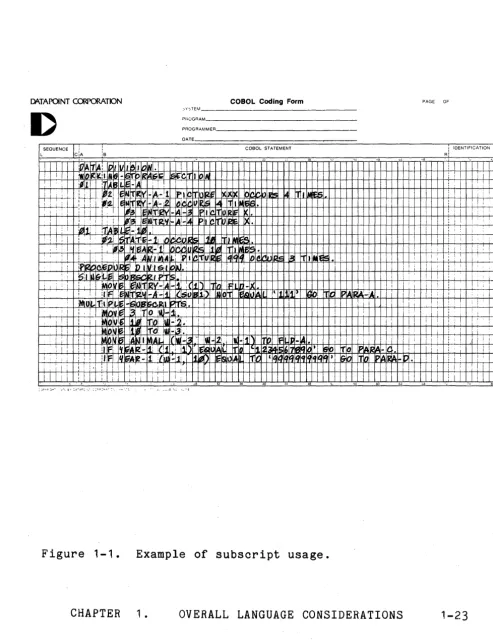
[)c\TAPaNT COO'ORATION COBOL Coding Form PAGE OF oYSTEM _ _ _ _ _ _ _ _ _ _ _ _ _
PHOGRAM, _ _ _ _ _ _ _ _ _ _ _ _ PROGRAMMER _ _ _ _ _ _ _ _ _ _ _
DATE SEQUENCE
L CiA
COBOL STATEMENT
I I ,
! I!
I : I : I tioVIB ffAlI12V-:A _I L :( 11
' " 11rIJ iflln -JL I I : 1 I: I i i
i : : I !A I' "i~ !~i ~T 0 iW-lj i l l j I I I : ' l I : i ~ 0 Vl~ ~ Ij 1101 lUl-!~.· : i : ! I i ' I i I
1 i i i II/HIE It:~ -rO! Jill .i3" I : ! I ! ;
~ !: I I II F' l'II;IAr<:-i; :(!! I ii!) I£~IIIAIL 1T11l"11~1" 171.!!~~ t ~Io ITo IP~IRA-Il I !
i : _ i : ' :1 F iq~2-1 ,fiU!_!ji 11~f) ~ls1"IAII 111J ' , Sio IT~ p~I~A - '" •
i : ' I ' I : 11 : I i i I : I ; " i
I Iii : J : I i : I ; i; I
Figure 1-1. Example of subscript usage.
[image:45.618.76.570.103.746.2]1.5.7.3 Indexing
References can be made to individual elements within a table of
like elements by specifying indexing for that reference. An index
is assigned to that level of the table by using the INDEXED BY
clause in the definition of a table. A name given in the INDEXED
BY clause is known as an index-name and is used to refer to the
assigned index. An index-name must be initialized by a SET
statement before it is used as a table reference (see Section 6.1.2.3, The SET Statement).
Direct indexing is specified by using an index-name in the form of
a subscript. Relative indexing is specified when the index-name
is followed by the operator + or -, followed by an unsigned
integral numeric literal all enclosed in the parentheses
immediately after the terminal space of the data name. The
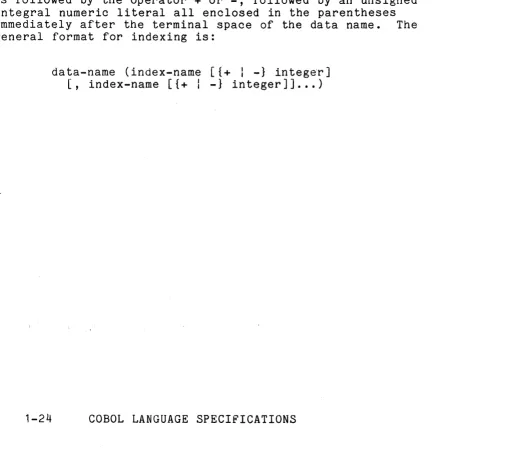
general format for indexing is:
data-name (index-name [{+ I -} integ~r]
[image:46.613.46.567.294.746.2]DA.TAPaNT C~TION COBOL Coding Form PAGE OF SySTEM _ _ _ _ _ _ _ _ _ _ _ _
PROGRAMI _ _ _ _ _ _ _ _ _ _ _ _ PROGRAMMER _ _ _ _ _ _ _ _ _ _ _
DATE
L SEOUENCE CiA
ls
COSOL STATEMENT : IDENTIFICATION
RI
i
! ill 1 :1 AlfllllJ;Hi I I I i
, : :
i ' i I L I I
I J ; iii i I
;
I1~DIE~-I'. I; '1
! I
: i : i : ++l-I---f-++4++-f-:+-HH-+-++++-+-HH-+-++.+t-++-H--I-+++++++-~+-+-+--+---1_t-+-+i +:---r--+--i I i
:p!'" ... , .. In n V I V( 5" ~ltJ • +' +-' -!-f----T-+-+!--f-t--f-I - t - ' H
is I N ~L Ie -II~ (lIE'J( .' ' , i i
i I , ! :
I I
i 'I I:
: i ilF IT~Bt,6 ... !/j !l,~IDeb(-IA '1~ll:f!K·8 '~ltE~-lc lelGlvAL If~ ~Iqq ~~ :i~ ~I}( I iii
,
I , i ! i
,
I
1
,
,
I : : i ! I
i J I : j : i ! I
I
-;--1 , :
1 : : i i
" " " l8 ·'1 \. • 0 4. 48 , .
;...vl'l,s ... • • ~7", E.y ,-,"" AP:' ' • . )"'PJ . . ; ' · · , '··.:"'L •. 'CE"·) "el"
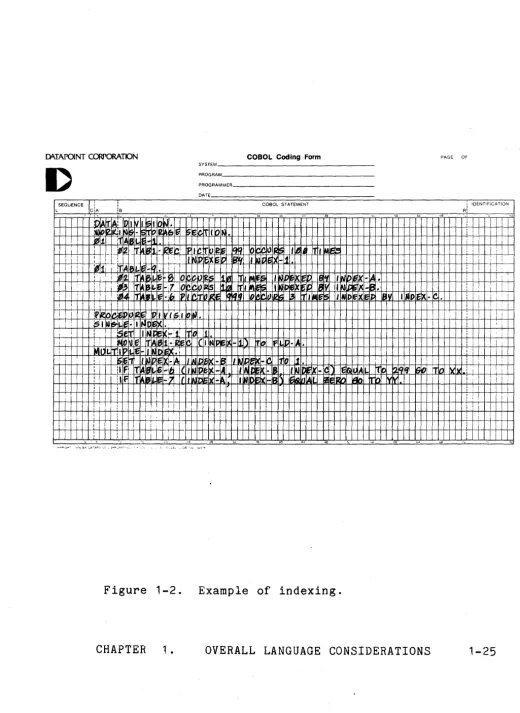
Figure 1-2. Example of indexing.
[image:47.621.53.573.75.787.2]1.6 Reference Format
The reference format, which provides a standard method for describing COBOL source programs, is described in terms of
character positions in a line on an input-output medium. The
input to the Datapoint COBOL compiler is from a GEDIT-compatible
disk file. Each record from the file is treated as if it were 72
characters long. Shorter records will have blanks appended;
longer records will be trunca ted ;after the 12nd character has been
read. In the latter case the additional characters in the record
will be treated as commentary and ignored in the processing of the
program. Within these definitions, the Datapoint COBOL compiler
accepts source programs written in reference format and produces an output listing in reference format.
The rules for spacing given in the discussion of the reference format take precedence over all other rules for spacing.
The division of a source program must be ordered as follows: the
Identification Division, then the Environment Division, then the
Data Division, then the Procedure Division. Each division must be
written according to the rules for the reference format.
1.6.1 Reference Format Representation
Margin Margin Margin Margin Margin
L C A B R
I I I
1 1 1 I
1
7
I I I I
1 I
2 3 I 4
5 I
6 I
7
8 I9 I 0 1 2 I
3 2
I I I I I I I I I I
Sequence Number Area I Area A I Area B
I I
I I
Margin L
Margin C
Margin A
Margin B
Margin R
Continuation Area
designates the first, or left-most, character position of a line.
designates the seventh character position relative to Margin L.
designates the eighth character position relative to L. designates the twelfth character position relative to L. designates the seventy-second, or right-most, character
position of a line.
The sequence number area occupies the six character positions beginning at Margin L.
The continuation area occupies one character position beginning at Margin C.
Area A occupies four character positions beginning at Margin A.
Area B occupies sixty-one character positions beginning at Margin B.
Sequence Numbers
A sequence number, consisting of six digits in the sequence number area, may be used to label a source program line.
Continuation of Lines
Any sentence or entry that requires more than one line is continued by starting subsequent line(s) in Area B. 'These
subsequent lines are called the continuation line(s). The line
being continued is called the continued line. Any word or literal
may be broken in such a way that part of it appears on a continuation line.
A hyphen in the continuation area of a line indicates that the first nonblank character in Area B of the current line is the successor of the last nonblank character of the preceding line
successor of the last nonblank character of the preceding line
without any intervening space. However, if the continued line
contains a nonnumeric literal without a closing quotation mark, the first nonblank character in Area B of the continuation line must be a quotation mark, and the continuation starts with the
character immediately after that quotation mark. All spaces at
the end of the continued line are considered part of the literal. Area A of a continued line must be blank.
If there is no hyphen in the continuation area of a line, it is assumed that the last character in the preceding line is followed by a space.
Blank Lines
A blank line is one that is blank from Margin C to Margin R,
inclusive. A blank line can appear anywhere in the source
program, except immediately preceding a continuation line. (See
Continuation of Lines, above.)
Comment Lines
Commentary on lines containing an asterisk in the Continuation
Area may be inserted anywhere in a COBOL Source Program exc~pt
immediately preceeding a continuation line. Any combination of
characters may be placed in Areas A and B. The line will be
listed but will have no further effect on compilation.
Lines containing a slash in the Continuation Area cause a new page to be started in the source listing and then are treated as if the Continuation Area contained an asterisk.
See also Section 5.12.2, The NOTE Statement.
1.6.2 Division, Section, and Paragraph Formats
Division Header
The division header starts in Area A with the division-name, is
followed by a space, then the word DIVISION, then a period. After
section or paragraph-header or paragraph-name (that is before the next line without a hyphen in the continuation area and with a nonblank character in Area A), except:
PROCEDURE DIVISION USING
Section Header
The name of a section starts in Area A of any line except the
first line of a division reference format, is followed by a space, then the word SECTION, then optionally a space followed by a
priority number, then a period followed by a space. After the
section-header, no text may appear before the following
paragraph-header or paragraph-name (that is before the next line without a hyphen in the continuation area and with a nonblank character in Area A), except:
The COpy statement may be present.
A section consists of paragraphs in the Environment and Procedure Divisions, and Data Division entries in the Data Division.
Paragraph-names, but not section-names, are permitted in the Identification Division.
Paragraph-Header, Paragraph-Name and Paragraph
A paragraph consists of a paragraph-name followed by one or more
sentences, or a paragr~ph-header followed by one or more entries.
A paragraph-header starts in Area A of any line following the
first line of a division or a section. The name of a paragraph
starts in Area A of any line following the first line of a
division or a section and ends with a period followed by a space.
The first sentence or entry in a paragraph begins in Area B of either the same line as the paragraph-name or paragraph-header or
the next nonblank line. Successive sentences or entries either
begin in Area B of the same line as the preceding sentence or entry or in Area B of the next nonblank line.
A sentence consists of one or more statements, an entry consists of one or more clauses; all sentences and entries must be followed by a period followed by a space.
When the sentences or entries of a paragraph require more than one line they may be continued as described in Continuation of Lines,