© 2014, IJCSMC All Rights Reserved
376
Available Online atwww.ijcsmc.com
International Journal of Computer Science and Mobile Computing
A Monthly Journal of Computer Science and Information Technology
ISSN 2320–088X
IJCSMC, Vol. 3, Issue. 9, September 2014, pg.376 – 387
RESEARCH ARTICLE
COMPARE USABILITY AND SECURITY OF
GRAPHICAL USER AUTHENTICATION APPROACHES
ABSTRACT
Today, authentication technology is the main measure to guarantee information security, and the most common and
convenient authentication method in use is the alphanumeric password. However, their inherent defects led to the
development of graphical password as an alternative. Graphical password which uses images as passwords, rather
than alphanumeric characters is motivated particularly by the fact that it is generally easier for users to remember
and recall images than words, and it is conceivable that graphical password would be able to provide better security
than alphanumeric password. Authentication, authorization and auditing are the most important issues of security
on data communication. In particular, authentication is the life of every individual essential closest friend. The user
authentication security is dependent on the strength of user password. A secure password is usually random,
strange, very long and difficult to remember. For most users, remember these irregular passwords are very difficult.
To easily remember and security are two sides of one coin. Graphical password authentication technology is the use
of click on the image to replace input some characters. The graphical user interface can help user easy to create and
remember their secure passwords. However, in the graphical password system based on images can provide an
alternative password, but too many images will be a large database to store issue.
In this thesis, a study of various schemes of graphical user authentication is made and also several challenges in
graphical authentication are discussed.
Keywords: Graphical password, Authentication, Security, Usability, Password space
1. INTRODUCTION
Various graphical password schemes have been proposed as alternatives to text-based passwords. Research and experience have
shown that text based passwords are fraught with both usability and security problems that make them less than desirable solutions.
Psychology studies have revealed that the human brain is better at recognizing and recalling images than text; graphical passwords
are intended to capitalize on this human characteristic in hopes that by reducing the memory burden on users, coupled with a larger
full password space offered by images, more secure passwords can be produced and users will not resort to unsafe practices in order Radhika
Department of Computer Science & Engineering
Gurgaon Institute of Technology & Management,
Gurgaon
Siddhartha Sankar Biswas
Department of Computer Science & Engineering
Gurgaon Institute of Technology & Management,
Gurgaon
© 2014, IJCSMC All Rights Reserved
377
to cope. In this paper, we compare several graphical password scheme based upon security and usability. According to our research
Cued Click Points (CCP) is more secure, usable, memorable. It can be viewed as a combination of PassPoints , Passfaces , and Story.
A password consists of one click-point per image for a sequence of images. The next image displayed is based on the previous click
point so users receive immediate implicit feedback as to whether they are on the correct path when logging in. CCP offers both
improved usability and security.
A preliminary security analysis of this new scheme is also presented. Hotspots (i.e., areas of the image that users are more likely to
select) are a concern in click-based passwords, so CCP uses a large set of images that will be difficult for attackers to obtain. For
CCP, hotspot analysis requires proportionally more effort by attackers, as each image must be collected and analyzed individually.
CCP appears to allow greater security than PassPoints; the workload for attackers of CCP can be arbitrarily increased by augmenting
the number of images in the system .As with most graphical passwords, CCP is not intended for environments where
shoulder-surfing is a serious threat.
2. LITERATURE REVIEW
Among the earliest attempts to investigate password vulnerability was the study by Morris andThompson[1], in 1979 . They
implemented a dictionary search and character string searches to guess users passwords. The former took less time compared with
the latter approach and managed to guess one third of users‟ password. With the character string search method, it was found that
out of 3289 passwords with no constraints during password creation, 86% were less than six characters long and found in
dictionaries or name lists.
Klien [2] conducted an experiment to crack UNIX users‟ passwords and reported that he managed to crack up to 25% of users‟
passwords from a total set of 13,797 accounts. Klein suggested that users should change their passwords periodically, add more
constrains to the password itself (i.e. combining both numeric and special characters) and that a password based system should use a
password checker. Over a three years period, Bishop and Klien [2] later reported that they were able to crack approximately 40% of
users‟ passwords. They also proposed a Protective Password Checker (PPC). PPC checks every character inserted by users whilst
typing their password and determines the appropriateness of it based upon the password creation rules setup within the system.
Spafford[3] discussed four criteria for making users‟ passwords secure. These were through users‟ education, system-generated passwords assigned to users, scanning users‟ passwords periodically and finally discarding users‟ weak passwords during registration; with each of the criteria having their own strengths and weaknesses. From the collected 13,787 users‟ passwords, it was reported that the average length of users‟ password was 6.8 characters. Comparing the collected passwords with various dictionaries, it was reported that 20% of users‟ passwords were found. Identifying human and organisational factor that contributed to the
security and usability of password based authentication system were studied by Adams et al. Two studies were implemented,
combining an online questionnaire (139 respondents) and later a semi-structured interview (30 users). They reported that users had
to remember many passwords (averagely four), which resulted in reduced memorability, users writing down their passwords and
using easy to guess passwords. Users had also shown limited awareness about security as they misunderstood the level of
information sensitivity within their organisation and had not given serious attention towards security. The authors claimed that users
insecure practices were actually influenced from the employed security mechanism (i.e. both implementation and design), not on the
user itself.
Cartens et al. [4] conducted a survey and evaluated the human impact of password practices. They asked participants the type of
password each participant had, total number of password they needed to remember and frequency of forgetting their passwords. From the collected data, they summarized that users‟ memorability (ability to recall their password correctly) was reduced over time
and the amount of time they spent at work had a direct influence with their memorability capabilities where they unable to apply
using different passwords for different sites and use easy to guess passwords.
Schneier[5] analyzed MySpace3 users‟ passwords and found nearly 65% of the users‟ passwords were 8 characters long or less. He
also reported that some users had passwords that were more than nine characters long, but these passwords were easy to predict.
81% of users‟ passwords were combination of letters and numbers, with only 1.3% and 9.6% of users‟ passwords formed using
© 2014, IJCSMC All Rights Reserved
378
revealed the top 20 common passwords included „password1‟ and „abc123‟. However, one positive finding with his analysis was that less than 4% of users‟ passwords were found in the dictionary.
Singh et al.[6] investigated PIN sharing (in a banking context). One of many password guidelines which says „password should not or never be shared to anyone‟ were violated as it was found sharing of pin between couples (e.g. spouse, partner) and between
people of certain disability with their carers or retail clerk were common practices.
Florencio and Herley[7] investigated users‟ password habits on the web. With nearly half a million users monitored over a three
month period, they revealed that users have an average password length of 6.5 characters (i.e. the same across 3.9 different sites).
The study also revealed that users have, on average, 25 accounts that require a password, requiring an average of 8 passwords to be
entered per day. They also reported that users often forgot their passwords and would use less secure passwords unless they were
specifically asked not to do so.
Zhang et al.[8] investigated the impact of having multiple passwords. Participants in their study (grouped into conditions named „first letter‟, „password rule‟ and „control rule‟) had to create four unique passwords associated to four different accounts and
needed to log back into each of their account after 7 days. From the collected data, the authors concluded the major reason for recall
error was due to the interference (i.e. not using right password on the right account), with other minor reasons including number
requirement errors (i.e. omitting or adding number or special characters), case errors (i.e. not using uppercase or lowercase rightly)
and errors caused by forgetting the password itself.
Hoonakker et al.[9] examined end-users‟ password practices by using a combination of structured interview and web-based survey
methods. They started their study by interviewing a number of people over the phone and from results of the focus group, the authors
then conducted a web-based survey by questioning employees of a large organisation. With a total of 836 respondents, the authors
claim that the human is „the weakest link‟ as they found participants use the same password all the time, use simple passwords,
re-use their old passwords regularly, write down their passwords (either on paper or electronically without any protection) and shared
their passwords with others.
Bonneau and Preibusch[10] investigated password implementations of 150 websites. They reported many of the surveyed websites still did not encrypt users‟ password during transmission, store users‟ passwords in plain text and provide little or no protection
towards brute-force attack. By first investigating users‟ password for lower security site and then, comparing with their high-security
site, the authors managed to prove that users use similar or reuse their passwords across many accounts.
Inglesant and Sasse[11] investigated the problems faced by users to cope with password policies setup in their organization and the
ways they coped with it.
Patrick, et al.[12] pointed out three major areas where human-computer interaction is important: authentication, developing secure
systems and security operations. Here we focus our attention to the various authentication techniques. The most common computer
authentication method for a user is to submit a username and a text password. The vulnerabilities of the alphanumeric method of
authentication have been well known. One of the major problems is the difficulty in remembering passwords
3. OVERVIEW OF AUTHENTICATION METHODS
We classify authentication mechanisms according to the following categories, primarily based on Renaud's model Something you
know (recall): A secret is shared between the user and the system. Users must recall and correctly enter their secret to authenticate
themselves. Anyone who knows or guesses the secret will also be able to authenticate as the original user. Examples include
passwords and PINs (Personal Identification Numbers).
Something you recognize (recognition): The user and the system share a secret. The system provides cues and the user must
correctly recognize the secret. Anyone able to recognize the secret will be able to authenticate as the original user. Graphical
passwords where users must recognize pre-selected images from a set of decoys fall into this category. Cued recall systems combine
recall and recognition. Users must recognize the cue presented by the system and then use this cue to recall the secret shared with the
© 2014, IJCSMC All Rights Reserved
379
Something you are (static biometrics): Biometrics measure some unique physical characteristic of the user. These are more
difficult to forge than the first two categories but introduce additional concerns. They may require specialized equipment, are
difficult or impossible to change if compromised, and have potential privacy implications (e.g., they may make it difficult to create
different identities for various purposes, and they enable organizations to cross-reference information about a user). Static biometrics
include fingerprint, iris, and facial scans, among others.
Something you do (behavioral biometrics): Some unique behavioral characteristic of the user can also be measured. Users
authenticate by repeating the required action.
Examples include handwritten signatures and keystroke dynamics.
Something you have (tokens): Users must carry a token to be presented for authentication. Anyone who gains access to the token
will be able to authenticate as the original user. These are often combined with a PIN or password to offer some protection in case
the token is lost or stolen. A smart card, i.e., a card with embedded microprocessor chip, is an example of a token used for
authentication.
Where you are (location-based authentication): Location information can be used to determine if a user is attempting to
authenticate from an approved location. This is typically used as a secondary check to identify suspicious login activities. Approved
locations may be specific, such as a user's office, or more general, such as identifying the city or country of origin.
We can divide the authentication methods into three main areas:
Token based authentication
Biometric based authentication
Knowledge based authentication
A token could be a small physical device that is owned by an authorized user of computer services to ease him in authentication. The
token may be used in addition to a password or used in place of passwords to prove that the user is who they claim to be. The token
acts like an electronic key to access something. Token based techniques, such as bank-cards, smart-cards and key-cards are widely
used. Many of the token-based authentication systems also use knowledge based techniques so as to enhance the security. For
example, ATM cards are constantly used together with a PIN number. So, token based authentication deals with what the
user/person has.
Biometrics refers to the identification of human beings by their traits or characteristics. The authentication techniques based on
biometric such as fingerprints, iris recognition, or face recognition, are not yet very widely adopted. The major drawback of these
approaches is that such systems could be very expensive, and the process of identification can be slow and sometimes often
unreliable. However, this type of authentication methods can provide the highest level of security. So, biometric based authentication
deals with what the user/person is. Knowledge based authentication methods can be considered as the most widely used
authentication methods and include both text-based and picture-based authentication mechanism. In knowledge-based techniques, a
user might be challenged with a set of images and the user passes the authentication by identifying and recognizing the images he or
she selected during registration phase or a user might be asked to reproduce something that he or she created or selected earlier
during the registration phase. So, knowledge based authentication deals with what the user/person knows. As we can see, graphical
© 2014, IJCSMC All Rights Reserved
380
4. BACKGROUND TO THE RESEARCH
4.1 Users’ Problems with Passwords
Users’ propensity to handle alphanumeric passwords insecurely arises largely from long-term memory (LTM) limitations. Users
have difficulty remembering complex, pseudo-random passwords over time. The Power Law of Forgetting describes rapid forgetting
soon after learning, followed by very slow decay over the long-term. Psychological theories have identified decay over time and
interference with other information in LTM as underlying reasons for forgetting. A user is likely to forget a password that is not used regularly, as the memory is not “refreshed” or “activated” sufficiently often. When users have multiple passwords, today practically
a universal condition, interference becomes a possibility. The user may either jumble the elements of the different passwords or
remember the password but confuse which system it corresponds to.
Users normally cope with password memory problems by decreasing the complexity and number of passwords, thereby reducing password security. A secure password should be 8 characters or longer, random, with upper-case characters, lowercase characters, digits, and special characters. Such passwords lack meaningful content and can be learned only by rote memorization, a weak way of
remembering. Generally, users ignore such password recommendations, using instead short, simple passwords that are relatively
easy to DISCOVER using dictionary attacks or attacks based on knowledge of the user. Recent surveys have shown that users often
choose, short, alphabetic-only passwords consisting of personal names of family or friends, names of pets, and even the word “password”. Users typically write down their passwords, share passwords with others, and use the same password for multiple
systems, sometimes with a single digit added on the end. While poor password practices may be largely attributed to memory
problems, there are other factors as well. Some users are naïve about the power of a modern dictionary attack or about the scope of
the damage that may occur if their computer is breached. Even if users are somewhat knowledgeable about security, their
motivations may get in the way of good practices; they want to get real work done and therefore view authentication as an enabling
task that should be gotten over with as quickly as possible. A single-minded focus on immediate work goals, at the expense of
security, places users at risk of widespread damage to their digital assets.
4.2 Graphical Password Systems
There are several graphical password systems based on recognition. For example, Passfaces[13] worked as follows in Brostoff and
Sasse’s empiricial study. To create a password the user chooses four images of human faces from a large portfolio of faces. When
logging in, the user sees a 3x3 grid with nine faces, consisting of one face previously chosen by the user and eight decoy faces. The
user must recognize and click anywhere on the previously chosen face. This procedure is repeated with different target and decoy
faces, for a total of four rounds. Only if the user chooses all four correct faces, will he or she successfully log in. Empirical evidence
from a field trial shows that Passfaces may be more memorable than alphanumeric passwords. Evidence from another similar
system, Déjà Vu , suggests that initially choosing the images from the portfolio is a rather slow process, but the images are easier to
remember over time. However, the drawback of all such passwords based on image recognition is that only a small number of
images can be displayed, e.g., nine images, one of which is a chosen image. Therefore, an attacker has a 1-in-9 chance of guessing
the image. To reduce that chance the login process uses several rounds of recognition. To obtain security similar to that of
8-character alphanumeric password (over an alphabet of 64 8-characters), 15 or 16 rounds with 9 faces each would be required. This
could make the login slow and tedious. Also, using faces as the images has been shown to lead to passwords with very low entropy
because people choose faces in predictable ways. Graphical passwords based on cued recall were first discussed by Blonder. In such
a scheme the user chooses several locations in an image to create a password. To log in the user must click on or close to those
locations. There are no multiple rounds of images, just a single image. In an implementation of this scheme the image had predefined
click objects or regions that were outlined by thick boundaries. The users chose the password from these objects and logged in using
them (although thick boundaries were not visible when logging in). A click anywhere within the boundary was considered correct. A
problem with this scheme was that the number of predefined click regions was relatively small so the password had to be quite long
to be secure (e.g., 12 clicks). Also, the use of pre-defined click objects or regions required simple, artificial images, for example
cartoon-like images, instead of complex, real-world scenes. PassPoints[14], is based on Blonder's idea of representing the password
by multiple clicks on a single image. However, it overcomes some of the limitations of his scheme: There are no artificial predefined
© 2014, IJCSMC All Rights Reserved
381
any place in the image as a click point. After a sequence of click points (i.e., pixels) is chosen (a "password"), the system
cryptographically hashes ("encrypts") the password and calculates a tolerance region around the chosen pixels. When logging in, to
make a valid click the user will have to click within this tolerance. The size of this tolerance can be varied, but for the password
space to be large the tolerance should not be too large, e.g., 2 to 5 mm around each chosen pixel. To log in the users must click
within the tolerance of their chosen click points. Their memory is cued by the image as they enter their password. The system or the
user could provide the image. The main requirement is that it be a complex image that is visually rich enough to have many
potentially memorable click places. Without artificial predefined boundaries, more intricate images, such as natural scenes, can be
used. An intricate image has hundreds of memorable points, and this means that the PassPoints scheme provides a very large
password space, even with a moderate number of click points. Consider for example an image of size 330 х 260 mm2 with tolerance
regions of size 6 х 6 mm2; assuming that at least a quarter of the image consists of memorable places, this leads to more than 590
memorable tolerance regions. With 5 click points, this yields 5905= 7.15 х 1013 possibly memorable passwords; with 6 click points it yields 4.22 х 1016 possibly memorable passwords, which is
larger than the number of all possible Unix-style passwords of length 8 over a 64-character alphabet (that number being 2.81 х
1014). Thus, attacking the PassPoints scheme by brute-force search is as hard or harder than attacking a random Unix password.
Similarly, recognition-based passwords (e.g., Passfaces) would need to have many rounds (14 or 15) in order to provide a password
space of size comparable to PassPoints with 5 click points. Other attacks against the PassPoints scheme, and graphical passwords in
general, are still an open problem of research. One danger would be that many users choose salient objects, rather than more random
click points. However, we do not know whether the danger is greater or less than using high frequency words in alphanumeric
password systems. Another consideration is that a classical dictionary attack cannot be mounted against graphical passwords as they
can be for alphanumeric passwords. It remains to be seen if systematic attacks, similar to a dictionary attack, can be devised for use
against graphical passwords.
4.3 SECURITY ANALYSIS OF GRAPHICAL AUTHENTICATION
Enough research is yet to be undertaken to study the difficulty of cracking graphical passwords. As graphical passwords are still not
widely used in real world applications, there is no report on real cases of breaking graphical passwords. Here we brief exam some of
the possible techniques for breaking graphical passwords and try to do a comparison with text-based passwords.
4.3.1 Brute force search
The main defense measure against brute force search is to have a sufficiently large password space. Text-based passwords have a
password space of 94N, where N is the length of the password, 94 is the number of printable characters (shift and non-shift keys
excluding SPACE) on a standard keyboard. Some graphical password techniques have been shown to provide a password space
similar to or larger than that of text-based password. Recognition based
graphical passwords tend to have smaller password spaces than the recall based methods. It is more difficult to carry out a brute
force attack against graphical passwords than text-based passwords. The attack programs need to automatically generate accurate
mouse motion to imitate human input, which is particularly difficult for recall based graphical passwords. Overall, in terms of brute
force attacks, it is believed that a graphical password has less vulnerability than a text-based password.
4.3.2 Dictionary attacks
It is impractical to carry out dictionary attacks against graphical passwords as recognition based graphical passwords involve mouse
input instead of keyboard input. For some recall based graphical passwords , it is possible to use a dictionary attack but an automated
dictionary attack will be much more complex than a text based dictionary attack. More research is needed in this area. However, it is
evident that graphical passwords have less vulnerability to dictionary attacks than text-based passwords.
4.3.3 Spyware
Except for few cases, key listening or key logging spyware cannot be used to break graphical passwords. It is not clear whether
mouse tracking" spyware will be an effective tool against graphical passwords. However, motion of the mouse alone is not enough
to break graphical passwords. Such information has to be correlated with application information, such as window location, its
© 2014, IJCSMC All Rights Reserved
382
4.3.4 Shoulder surfingLike text based passwords, most of the graphical authentication methods are vulnerable to shoulder surfing. Until now, only a few
recognition-based methods claim to resist shoulder-surfing. None of the recall-based based methods are considered should-surfing
resistant.
4.3.5 Social engineering
It is less convenient for a user to give away graphical passwords to another person as compared to text based passwords. For
instance, to tell a graphical password to others over the phone would be very difficult. Even if an attacker is to set up a phishing
website so as to obtain graphical passwords from targeted users, it would be more time consuming to set up such sites. Overall, it is
more difficult to break graphical passwords using the traditional attack methods like brute force search, dictionary attack, and
spy-ware. As graphical passwords are still not widely deployed, an in-depth research and studies that investigates possible attack
methods are still needed.
5. RESULT AND DISCUSSION
5.1 Analysis of the Password Space
We distinguish that password systems have both theoretical and effective password spaces. The former space includes the set of all
(theoretically) possible passwords. The vast majority of user choices tend to fall into a much smaller subset of the full theoretical
password space, known as the effective password space. To illustrate, consider the set of all possible 8-character alphanumeric
passwords. Including symbols, there are 95 keyboard characters to choose from, giving a theoretical password space of
958X6:6X10¹⁵ possible permutations. The effective password space is much smaller since many character combinations are
unlikely to be selected by users (e.g., seemingly random character strings such as \R9&ig3q/"). To offer some perspective, there are
approximately 1 million (106) words in the English language [73]. The effective password space is an approximation, based on
probability estimations that given passwords are chosen by users. Passwords with probabilities higher than some agreed upon
threshold make up the effective password space.
An important security goal of authentication mechanisms is to maximize the effective password space; we would like the effective
password space to include as much of the theoretical password space as possible (ideally, all of it). Since the effective password
space is determined by user behaviour, the design of a system involves us- ability as well. Ideally, passwords should be secure
without sacrificing the usability of the system. In practice, increasing one often reduces the other, so typically a middle-ground must
be found where both the security and usability of the system are acceptable. Measures of the effective password space are imprecise
approximations. One approach that may help is to identify classes of passwords that have higher probability of being chosen by
users. In this case, a proximity function (a measure of similarity between items) may be useful. With text passwords, there is no
single, obvious measure of what makes two passwords similar: Words or letters in the same positions? Common pet names or
birthdays? Some other measure? One possible measure is the \edit distance": the minimum number of operations (substitution,
removal, or insertion of a single character) required to transform one string of characters into another. The edit distance, however,
does not take into account the semantic meaning of passwords and may not be a very helpful metric for measuring the similarity of
passwords.
In this section, we analyze the two main categories of the graphical password techniques from several perspectives. We focus mainly
on security and usability but also take into consideration system and communication issues. For security, we focus on password
space and the strength of the password. For usability, we focus on the easiness of registration and easiness of authentication.
5.1.1 Recognition based techniques
Security: The password space of the recognition based techniques largely depends on the size of the content. Most recognition based
techniques do not consider the order of the selection. They often involve many rounds of authentication with users going through
© 2014, IJCSMC All Rights Reserved
383
So the password space for recognition based technique is a function of total number of pictures:password _ space = f (s ×n)
Table 5.1: Variable Representations For Recognition Based Techniques
The chances of creating weak password are high in recognition based password. The work by Davis, et al. found obvious patterns
among the PassFace password . For example, most users tend to choose faces of people from the same race.
Random art could be one solution toward weak password; in which user has no familiarity to any of the picture password. However
doing so may decrease the usability by making the password hard to remember.
Usability. Content (pictures), spatial layout of the content, and input devices are all important factors that influence usability. For example, users’ favorite pictures tend to be easier to remember but also easier to be guessed by attackers. Too many distraction
pictures tend to slow down the authentication process. Several existing techniques are proven to have usability due to the crowded
content arrangement.
Other issues: Overly large storage requirement is a significant issue for recognition based techniques, since the size of a typical
picture is much larger than the equivalent text. In order to achieve the larger password space, thousands of pictures need to be stored
at one time. Sending large number of pictures over the network is also a problem for low speed networks.
5.1.2 Recall Based Techniques
Security. It is considerably difficult to calculate the password space of a recallbased technique, since there are many variations in
recall based techniques. Here we demonstrate a general mathematical model. Some of the most important elements that determine
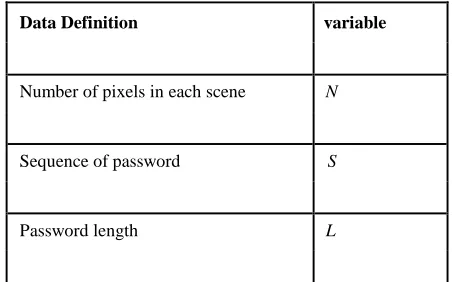
the password space of a recall based technique are listed in table 5.2.
The maximum password space that a recall based technique can have is extremely large, since certain techniques requires
the user not only have the proper shape of drawing or clicking, but also the sequence of drawing . If the drawing allows the same
pixel be chosen multiple times, the password space for a specific password length l is: max = nl
For n pixels on the scene, the total password space is defined as:n ≤ space ≤∑n nl
Data Definition variable
Number of pixels in each scene N
Sequence of password S
© 2014, IJCSMC All Rights Reserved
384
Table 5.2: Variable Representations For Recall Based Techniques
If a password scheme does not allow the drawing to pass the same pixel multiple times, or if it requires mouse clicking to match the
pre-registered sequence, the password space is the smallest:
min = n
In general, the password space for recall based approach is:
n ≤ space ≤∑n nl
l=1
Usability: A major complaint in recall based graphical passwords is that it is difficult to draw shapes with mouse. Most users are not
familiar with using mouse as a drawing tool. However, on mobile devices, stylus pen is a good choice for such technique.
5.2 USABILITY IN RECALL-BASED TECHNIQUES
One of the major arguments for graphical authentication is that images are much more easier to remember than text strings. Some
research papers presented preliminary user studies to support this. However, current user studies involves only a small number of
users and are still very limited. But it is still difficult to be convinced that graphical passwords are easier to remember than text based
passwords as we do not have enough evidence. A major complaint among the users of graphical authentication procedure is that the
registration process and log-in process take too much time, especially in recognition-based approaches. For instance, in the
registration phase, a user has to pick few images from a larger number of image sets. Then in the authentication phase, a user has to
identify a few pass-images by scanning through all the images displayed. Users may find this process long and tedious. Due to this
users often find graphical passwords less convenient than text based passwords. And also most users are not familiar with the
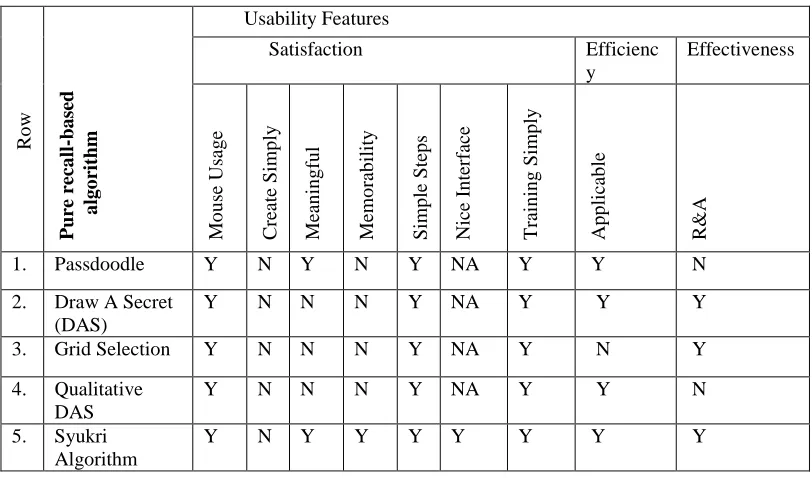
graphical passwords. We can make a comparison table among all based algorithms in two categories as pure and cued
recall-based algorithm that you can find in tables below:
Data Definition Variable
Number of pictures in each page N
Number of scene/rounds of authentication S
Distraction image in each scene D
© 2014, IJCSMC All Rights Reserved
385
Table 5.3: The Usability Features In Pure Recall-Based Techniques
Table 5.4: The Usability Features In Cued Recall-Based Techniques
R o w P ure re ca ll -ba sed a lg o rit hm Usability Features
Satisfaction Efficienc y Effectiveness Mo u se Usag e C rea te Simp ly Me an in g fu l Me m o rab ilit y Simp le Step s Nice I n ter fac e T rain in g Simp ly Ap p licab le R& A
1. Passdoodle Y N Y N Y NA Y Y N
2. Draw A Secret (DAS)
Y N N N Y NA Y Y Y
3. Grid Selection Y N N N Y NA Y N Y
4. Qualitative DAS
Y N N N Y NA Y Y N
5. Syukri Algorithm
Y N Y Y Y Y Y Y Y
R o w Cued r ec a ll -ba sed Alg o rit hm Usability Features
Satisfaction Efficien cy Effectivene ss Mo u se Usag e C rea te Simp ly Me an in g fu l Click ab le Po in ts Me m o rab ilit y Simp le Step s Nice I n ter fac e T rain in g Simp ly Pleasan t Pictu re Ap p licab le R & A
1. Blonder Y Y N Y Y Y N Y N Y N
2. Pass Point Y Y N Y Y Y Y Y Y Y Y
3. Background Y N Y N Y N N N N N Y
4. PASSMAP Y Y Y Y Y Y N Y N Y N
5. Passlogix v-go
© 2014, IJCSMC All Rights Reserved
386
Table5.5 STRENGTH AND WEAKNESS OF RECALL-BASED ALGORITHMS
Algorithms Pure Cued Strength Weakness Recall Recall
based based Algorith
m Algorithm
Harder to crack due to a People were less likely to recall the order in which Passdood
le theoretically much larger they drew a doodle than the resulting image. number of possible
doodle passwords than text passwords
Draw A User can draw a simple The users tend to choose frail graphical passwords Secret image or picture on grid , that are vulnerable to the graphical dictionary attack
of size say N*N. when compare to passdoodle is more than harder to Crack
Qualitati
ve The image which has This model have more entropy than previous DAS DAS more area of interest but it has less memorable than the original one
(Hot Spot) could be more useful as a background image
Syukri user drawing their Not everybody is familiar with using mouse as a Algorithm signature using mouse writing device
and there is no need to memorize one’s signature and signatures are hard to fake
Blonder Blonder which a
This scheme was that the
pre-determined image number of predefined click regions was relatively and prederermined click small so the password had to be quite long to be points. the method is secure.
secure according to a millions of different region
PassPoint The user is choosing The login time, in this method is longer than
several points on picture alphanumeric method in a particular order
Background Both background image Memory decaying over a week is one of the major DAS and the drawing grid can Problems
(BDAS) be used
PASSMAP Users are relatively easy It is respect to Brute Force Attacks
© 2014, IJCSMC All Rights Reserved
387
6. CONCLUSION
The proposed Cued Click Points [13] scheme shows promise as a usable and memorable authentication mechanism. By taking advantage of users’ ability to recognize images and the memory trigger associated with seeing a new image, CCP has advantages
over PassPoints in terms of usability. Being cued as each image is shown and having to remember only one click-point per image
appears easier than having to remember an ordered series of clicks on one image. In our small comparison group, users strongly
preferred CCP. We believe that CCP offers a more secure alternative to PassPoints. CCP increases the workload for attackers by
forcing them to first acquire image sets for each user, and then conduct hotspot analysis on each of these images. Furthermore, the system’s flexibility to increase the overall number of images in the system allows us to arbitrarily increase this workload.
Future work should include a thorough assessment of the viability of CCP as an authentication mechanism, including a long term
study of how these passwords work in practice and whether longer CCP passwords would be usable. The security of CCP also
deserves closer examination, and should address how attackers might exploit the emergence of hotspots.
REFERENCES
[1] Morris and Thompson. Password security: a case history, In Communication of the ACM Volume 22 Issue 11, Nov. 1979.
[2] Daniel Klein's paper "A Survey of, and Improvements to, Password Security" (Unix Security Workshop II, USENIX Association, 1990)
[3] Eugene H. Spafford and Annie I. Antón; The Balance Between Security and Privacy; chapter 8, pp. 152–168 in Controversies in Science and Technology, Volume II; ed. D. L. Kleinman, K. A. Cloud-Hansen, C. Matta, and J. Handelsman; Mary Ann Liebert, Inc., New York, NY; 2008.
[4] Carstens, et al.; Understanding human memory limitations and the impact of password authentication practices on information security - 2000.
[5] B. Schneier, and J.Wallner, "Towards a Secure System Engineering Methodology," New Security Paradigms Workshop, September 1998, pp. 2-10
[6] http://www.ijarcsse.com/docs/papers/Volume_3/6_June2013/V3I6-0660.pdf
[7] Dinei Florencio and Cormac Herley: A large-scale study of web password habits Proceedings of the 16th international conference on World Wide Web Pages 657-666.
[8] David Zhang , Online joint palmprint and palmvein verification, Expert Systems with Applications: An International Journal, v.38 n.3, p.2621-2631, March, 2011.
[9] Hoonakker, P., Bornoe, N. and Carayon, P., Password Authentication from a Human Factors Perspective: Results of a Survey among End-Users.
[10] Joseph Bonneau, Cormac Herley, Paul C. van Oorschot, Frank Stajano. The quest to replace passwords: a framework for comparative evaluation of Web authentication schemes. Technical Report Number 817, University of Cambridge Computer Laboratory, March 2012.
[11]T. Valentine, "An evaluation of the Passface personal authentication system," Technical Report, Goldsmiths College, University of London 1998.
[12] A. Dirik, N. Menon, and J. Birget: Modeling user choice in the Passpoints graphical password scheme. In 3rd ACM Conference on Symposium on Usable Privacy and Security (SOUPS), July 2007.