Modeling the
Enterprise Storage Management System
Prepared By:
Dan Glasser, Madeline Hardojo, Anand Surandam, Nate Wells for
Computer Science 466/866 – Software Design Methodology Dr. Mohamed Fayad
Abstract:
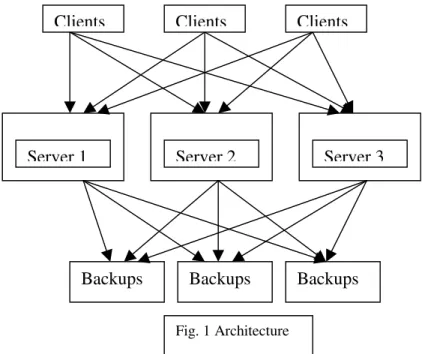
The ever-expanding data storage requirements force research groups to be on their toes in inventing new techniques for storage. The ability of computers to interact with each other over a network necessitates accessing of data stored across network. Proliferation of security attacks force companies to safe guard their data by performing backups regularly. Lincoln Telephone Company required a system that will address all these issues and manage data stored across network effectively. The system is built on a 3-tier client server model. The motivation is to come up with a good model that is enduring and can be used to implement the system. We considered both traditional and stability models in describing the system. We found that traditional model has lot of inefficacies that are being addressed by the stability model. We also found that stability model actually exemplifies the goals and the purpose of the system.
Table of Contents
Abstract: ...i
I. Introduction:... 1
II. Use Case Model:... 2
A. Use Case Diagram... 2
1. Stability Model... 2
2. Traditional Model... 3
B. Use Case Description ... 4
III. CRC Cards... 20
IV. Traditional Class Diagram ... 25
A. Description of the Traditional Class Diagram... 26
V. Stability Class Diagram... 27
A. Description of Stability Diagram ... 28
VI. Comparison Between Traditional and Stability Class Diagrams... 29
VII. Sequence Diagram ... 30
VIII. State Transition Diagrams... 50
IX. Analysis and Design Patterns ... 55
A. Analysis Patterns... 55
B. Design Patterns... 59
X. Object Oriented Heuristics... 63
XI. Lesson Learned... 64
XII. References... 65
I. Introduction:
The Enterprise Storage Management System is designed to be used by large companies that operate large internal, distributed networks. It is designed to offer convenient access to electronic data stored by the company as well as providing a means to easily provide several layers of data protection.
Due to the expanse of the network and the business, it is not feasible for all the data required by the company to be stored in one place. Instead of having to look for the data in different locations, the transfer of information is simplified by providing one uniform interface that provides access to all the data stored electronically by the company. Even though this interface will make it appear that all the data lies in one single location, the data can actually be distributed to different locations, which reduces the risk of lost of data due to catastrophes, such as fire.
The second purpose of the Enterprise Storage Management System is to provide safe storage of the company’s data. This is mainly achieved by the backup of the data used by the company. Again, the data at one location can be backed up to a physically separate location to guard against local loss of data.
The Enterprise Storage Management System is designed to adapt to physical changes in the network, such as the addition of storage devices. It also is designed to increase the efficiency of the storage of electronic data by using compression techniques and by archiving inactive files. It can be installed with minimal changes to the network infrastructure as well as little or no training of the basic users of the network. Once installed and configured, it will operate on its own with minimal human supervision.
The process of designing this system started with a detailed analysis of the problem statement. This involved the development of a use case diagram, which showed the underlying and crucial aspects of the problem. This helped immensely later in the design of a stability model. A detail description of each use case was written with the aid of this use case diagram. With the core knowledge of the problem from the use case diagram and use case descriptions, a traditional class diagram was developed, along with the complementary CRC cards.
By again using the knowledge of the problem situation, the EBT’s and BO’s were identified and the whole process was repeated. This included the development of a stability model and the CRC cards that go along with it. This model represented a complete and stable model of the system. In order to fully understand and evaluate the behavior of this design, behavior diagrams, including sequence diagrams and state transitions diagrams, were used. By examining these diagrams, the correctness of the design was confirmed.
As a final step, the whole process was examined to come up with Design and Analysis Patterns that will help speed this process on separate projects. Two EBT’s were patterned: Storage and Efficiency. Two BO’s were also patterned: Schedule and Compression.
II. Use Case Model:
A. Use Case Diagram 1. Stability Model
0..* 0..*
Manage Backup Data
Administrator Operator Server Client <<include>> 0..* Request Data <<include>> 0..* <<include>> <<include>> <<include>> 0..* 0..* 0..* Perform Backup Request Backup <<include>> <<extend>> <<extend>> kind-of <<extend>> <<extend>> <<include>> <<extend>> <<extend>> Distributed / Centralized Backup Backup Data Report Backup Failures Monitor File System Recover Data Create Reports Archive Data Automatic Backup Manual Backup Minimize Space waste Schedule Tasks Retrieve Data Preserve Data Perform compression 1
1 Control File System
0..* <<include>> <<extend>> <<extend>> <<extend>> <<extend>> Switch Backup Disks Identify Resource Identify Bad Disk Format Disk
2. Traditional Model 0..* 0..* 0..* 0..* 0..* Control File System
Manage Backup Data Perform Backup Request Backup 0..* <<include>> Administrator <<include>> <<extend>> <<extend>> <<extend>> <<extend>> <<extend>> <<extend>> kind-of <<extend>> <<extend>> <<include>> <<extend>> <<extend>> Distributed / Centralized Backup Backup Data Report Backup Failures Monitor File System Recover Data Create Reports Switch Backup Disks Identify Resource Archive Data Automatic Backup Manual Backup Identify Bad Disk Format Disk Delete Resource Add Resource
Server 1 1
B. Use Case Description Use Case No.: 1
Use Case Title: Backup Data Actors/Roles
Actors Roles
Administrator Data Manager
Operator Data Protector
Server Backup Performer
Classes:
Class Attributes Operations
Data
Protection Data PreserveData()
Data Backup Data CopyDevice()
User ID, Name, Type, Password,
Permission GetUserType(), SetUserType()
Storage Location Deposit(), Withdraw()
Administrator ID, Name, Type, Password,
Permission BackupData()
Operator ID, Name, Type, Password,
Permission BackupData()
Allocator Statistics AllocateDisk()
Disk System Disk System Type, Total Size, Total
Free Space GetFreeSpace(), AllocateSpace(), getDiskID()
Backup Type Name BackupData()
Regular Type Name SendData()
Disk Backup Log, Compression Type Backup()
Primary Device Type StoreData()
Secondary Device Type RestoreData()
Computer MachineID, numDisk, total Space TransferData() Server ServerID, machineID, processed RequestedData() EBTs: Data Protection, Storage
BOs: User, Data Backup, Allocator, Primary, Secondary
IOs: Disk System, Backup, Regular, Disk Backup, Administrator, Operator, Computer, Server
Description:
1. Backup request is generated from the users (Administrator or Operator) through the Allocator.
2. For efficiency, Allocator allocates disk to where the backup data will be backup. 3. Allocator identifies the resource to find out whether there is a space in the Disk
backup.
4. If there is a space, the backup request will pass to the Disk System.
5. The Disk system will indicate where is the location of the data to be backup in the regular disk system.
6. The Disk backup will facilitate the request to Data Backup, retrieve the data from the location in regular disk system and copy it the backup disk system.
7. Disk System will record the location of the backup data in the backup disk system.
Alternatives:
4. If there is no space, Allocator will create an error log to the users to let the users know about the problem
Use Case No.: 2
Use Case Title: Distributed/Centralized Backup Actors/Roles
Actors Roles
Administrator Data Manager
Operator Data Protector
Classes:
Class Attributes Operations
Data Protection Data PreserveData()
Data Backup Data CopyDevice()
User ID, Name, Type, Password,
Permission GetUserType(), SetUserType()
Storage Location Deposit(), Withdraw()
Administrator ID, Name, Type, Password,
Permission BackupData()
Operator ID, Name, Type, Password,
Permission BackupData()
Allocator Statistics AllocateDisk()
Disk System Disk System Type, Total Size, Total
Free Space GetFreeSpace(), AllocateSpace(), getDiskID()
Backup Type Name BackupData()
Regular Type Name SendData()
Disk Backup Log, Compression Type Backup()
Primary Device Type StoreData()
Secondary Device Type RestoreData()
EBTs: Data Protection, Storage
BOs: User, Data Backup, Allocator, Primary, Secondary
IOs: Disk System, Backup, Regular, Disk Backup, Administrator, Operator Description:
1. Backup request is generated from the users (Administrator or Operator) through the Allocator.
2. For efficiency, Allocator allocates disk to where the backup data will be backup. 3. Allocator identifies the resource to find out whether there is a space in the Disk
backup.
4. If there is a space, the backup request will pass to the Disk System.
5. If the backup wanted is a Distributed backup, the Administrator will assign more than one backup disk as location of backup data.
6. The Disk system will indicate where is the location of the data to be backup in the regular disk system.
7. The Disk backup will facilitate the request to Data Backup, retrieve the data from the location in regular disk system and copy it the backup disk system.
8. Disk System will record the location(s) of the backup data in the backup disk system.
Alternatives:
4. If there is no space, Allocator will create an error log to the users to let the users know about the problem
5. If the backup wanted is a centralized backup, the Administrator will assign one (and only one) backup disk as location of backup data.
Use Case No.: 3
Use Case Title: Manual Backup Actors/Roles
Actors Roles
Administrator Data Manager
Operator Data Protector
Classes:
Class Attributes Operations
Data
Protection Data PreserveData()
Data Backup Data CopyDevice()
User ID, Name, Type, Password, Permission GetUserType(), SetUserType()
Storage Location Deposit(), Withdraw()
Administrator ID, Name, Type, Password, Permission BackupData() Operator ID, Name, Type, Password, Permission BackupData()
Allocator Statistics AllocateDisk()
Disk System Disk System Type, Total Size, Total
Free Space GetFreeSpace(), AllocateSpace(), getDiskID()
Backup Type Name BackupData()
Regular Type Name SendData()
Disk Backup Log, Compression Type Backup()
Primary Device Type StoreData()
Secondary Device Type RestoreData()
EBTs: Data Protection, Storage
BOs: User, Data Backup, Allocator, Primary, Secondary
IOs: Disk System, Backup, Regular, Disk Backup, Administrator, Operator Description:
1. Users (Administrator or Operators) will specify which file to be protected and send the request through the server to Allocator.
2. For efficiency, Allocator allocates disk to where the backup data will be backup. 3. Allocator identifies the resource to find out whether there is a space in the Disk
backup.
5. The Disk system will indicate where is the location of the data to be backup in the regular disk system.
6. The Disk backup will facilitate the request to Data Backup, retrieve the data from the location in regular disk system and copy it the backup disk system.
7. Disk System will record the location of the backup data in the backup disk system.
Alternatives:
4. If there is no space, Allocator will create an error log to the users to let the users know about the problem
Use Case No.: 4
Use Case Title: Automatic Backup Actors/Roles
Actors Roles
Server Automatic Backup Performer
Classes:
Class Attributes Operations
Data
Protection Data PreserveData()
Data Backup Data CopyDevice()
Computer MachineID, numDisk, totalSpace TransferData()
Storage Location Deposit(), Withdraw()
Server ServerID, machineID, processId ProcesRequest()
Allocator Statistics AllocateDisk()
Disk System Disk System Type, Total Size, Total Free
Space GetFreeSpace(), AllocateSpace(), getDiskID()
Backup Type Name BackupData()
Regular Type Name SendData()
Disk Backup Log, Compression Type Backup()
Primary Device Type StoreData()
Secondary Device Type RestoreData()
EBTs: Data Protection, Storage
BOs: Data Backup, Allocator, Primary, Secondary
IOs: Disk System, Backup, Regular, Disk Backup, Computer, Server Description:
1. When an item in the schedule due, the scheduler will process request to the Allocator through the server.
2. For efficiency, Allocator allocates disk to where the backup data will be backup. 3. Allocator identifies the resource to find out whether there is a space in the Disk
backup.
4. If there is a space, the backup request will pass to the Disk System.
5. The Disk system will indicate where is the location of the data to be backup in the regular disk system.
6. The Disk backup will facilitate the request to Data Backup, retrieve the data from the location in regular disk system and copy it the backup disk system.
7. Disk System will record the location of the backup data in the backup disk system.
8. If the automatic backup successful, it will add entry to the backup log that contains the time of the backup.
Alternatives:
4. If there is no space, Allocator will create an error log to the users to let the users know about the problem.
5. If the automatic backup not successful (because of the network), it will
immediately e-mail an error log that contains the time of the attempted backup to the system administrator.
Use Case No.: 5
Use Case Title: Schedule Tasks Actors/Roles
Actors Roles
Operator Task Scheduler
Classes:
Class Attributes Operations
User ID, Name, Type, Password, Permission GetUserType(), SetUserType() Operator ID, Name, Type, Password, Permission ScheduleTask()
Efficiency AutomateProcess()
Schedule ScheduledTask, ScheduleOfTask AddSchedule() EBTs: Efficiency
BOs: User, Schedule IOs: Operator
Description:
1. Operator will select “Schedule Tasks” interface on the system 2. Operator will choose a file to be backup automatically
3. If a schedule for that file exists, the current schedule will be displayed.
4. Operator can modify the schedule either by the time or the period of the backup should be repeated.
5. The new schedule will be saved. Alternatives:
3. If the schedule for the selected file does not exist, the schedule will generate an empty schedule.
Use Case No.: 6
Use Case Title: Archive Data Actors/Roles
Actors Roles
Server Data Archiver
Classes:
Class Attributes Operations
Efficiency AutomateProcess()
Computer MachineID, numDisk, totalSpace TransferData() Server ServerID, machineID, processId ProcesRequest()
Primary Device Type StoreData()
Regular Type Name SendData()
Disk System Disk System Type, Total Size,
Total Free Space GetFreeSpace(), AllocateSpace(), getDiskID()
Storage Location Deposit(), Withdraw()
Data Management Data TransferData()
Facilitator MachineID, DiskID, dataArray RetrieveData
Secondary Device Type RestoreData()
Backup Type Name BackupData()
Disk Backup Log, Compression Type Archive() EBTs: Efficiency, Storage
BOs: Primary, Schedule, Data Management, Secondary
IOs: Server, Computer, Regular, Backup, Disk System, Facilitator Description:
1. When an item “Compress Dormant File” is due on the schedule, scheduler will notify the server
2. The server will call the Facilitator to search through the Regular and Backup disk system in the disk system for files that have not been used for a period of time (specified by Operator in the Schedule task use case).
3. If a file is found, it will take the location, either in the Regular and Backup disk system, and pass the location to the Perform Compress action (Use case called “Perform Compress”)
Alternatives:
3. If no files are found, it will create a log that say “Compress 0 files”
Use Case No.: 7
Use Case Title: Perform Compression Actors/Roles
Actors Roles
Server Compression Performer
Classes:
Class Attributes Operations
Computer MachineID, numDisk, totalSpace TransferData() Server ServerID, machineID, processed ProcesRequest()
Efficiency MinimizeWaste()
Compression Method CompressObject()
Disk Backup Log, Compression Type Backup(), Compress()
Backup TypeName BackupData()
Storage Location Deposit()
Disk System Disk System Type, Total Size, Total
Free Space GetFreeSpace(), AllocateSpace(), getDiskID() EBTs: Efficiency, Storage,
BOs: Compression
Description:
1. When a file is found (from the Use Case No. 6), an empty space will be identified. 2. If there exist empty space, the file is going to be compress according to the
method specified in Compression.
3. The compressed file will be saved to the empty space in the backup disk. 4. The location of the compression will be stored in the Storage
5. The original file will be deleted from the disk system.
6. A log of the files that were compressed and the time of compression will be created.
Alternatives:
2. If there is not enough space for compressed file, an error log will be generated instead of the compression
Use Case No.: 8
Use Case Title: Identify Resource Actors/Roles
Actors Roles
Server Resource Identifier
Classes:
Class Attributes Operations
Storage Location Deposit(), Withdraw()
Efficiency AutomateProcess()
Allocator Statistics AllocateDisk()
Secondary Device Type RestoreData()
Disk System Disk System Type, Total Size, Total
Free Space GetFreeSpace(), AllocateSpace(), getDiskID()
Backup Type Name BackupData()
EBTs: Storage, Efficiency BOs: Allocator, Secondary IOs: Disk System, Backup Description:
1. The device that is being used for backup is full or a device becomes corrupt that needs to be removed from the network.
2. The Administrator chooses a device from the available sets of devices.
3. Once the device is chosen, two options are available. Administrator can either add the device as a new backup device to the network or delete the device from the network.
4. If “ Add device” is chosen, then the device is formatted with the appropriate file system by class Disk System. Now the device is ready to replace the device that is full.
5. The administrator adds the device to the network.
6. If “ Delete Device” is chosen, then the data in the device can be backup if needed. 7. The device is deleted from the network.
Alternatives:
5. If there is a network problem, the “ add device” fails. The administrator is sent an appropriate message.
7. If there is a network problem, the “ delete device” fails. The administrator is sent an appropriate message.
Alternatives:
Use Case No.: 9
Use Case Title: Switch Backup Disk Actors/Roles
Actors Roles
Server Backup Disk Switcher
Classes:
Class Attributes Operations
Storage Location Deposit(), Withdraw()
Secondary Device Type RestoreData()
Disk System Disk System Type, Total Size,
Total Free Space GetFreeSpace(), AllocateSpace(), getDiskID()
Backup Type Name BackupData()
Primary Device Type StoreData()
Regular Type Name SendData()
Computer MachineID, numDisk,
totalSpace TransferData()
Server ServerID, machineID, processed ProcesRequest()
Allocator Statistics AllocateDisk()
EBTs: Storage
BOs: Primary, Secondary, Allocator
IOs: Disk System, Computer, Server, Regular, Backup Description:
1. When the allocator notices that the current backup disk or regular disk is full (From “ Identify Resource” use case), the allocator will mark the current backup or regular disk so that it will not be used anymore.
2. If another disk in the Disk system is found, the allocator will write to the new disk instead.
3. The Disk System will save the modification to reflect in the file system. Alternatives:
1. If there is no more disk in the Disk system is found, the allocator will notify the Administrator and suggest another disk to be added and create an error for the request.
Use Case No.: 10
Use Case Title: Delete Resource Actors/Roles
Actors Roles
Server Resource Removal Performer
Classes:
Class Attributes Operations
Disk System Disk System Type, Total Size,
Total Free Space GetFreeSpace(), AllocateSpace(), getDiskID() Disk DiskID, DiskSpace, SpaceUsed FormatDisk()
Computer MachineID, numDisk, totalSpace TransferData() Server ServerID, machineID, processed ProcesRequest()
Allocator Statistics AllocateDisk()
EBTs: Storage BOs: Allocator
IOs: Disk System, File, Computer, Server Description:
1. A disk is physically removed from the network.
2. Allocator detects whether the changes is in Backup Disk System or in Regular Disk System.
3. If the current Backup or Regular disk is the one being removed, the allocator will call Identify Resource to allocate a new disk to ‘replace’ the disk being removed. 4. Allocator copies the Disk ID that being removed and pass the information to the
Disk System.
5. The Disk system will modify the information to reflect the current network condition.
Alternatives:
2. If the disk being removed is not being used currently, continue to the 4th step of description.
Use Case No.: 11
Use Case Title: Add Resource Actors/Roles
Actors Roles
Server Resource Attacher
Classes:
Class Attributes Operations
Storage Location Deposit(), Withdraw()
Disk System Disk System Type, Total Size,
Total Free Space GetFreeSpace(), AllocateSpace(), getDiskID() Disk DiskID, DiskSpace, SpaceUsed FormatDisk()
Computer MachineID, numDisk,
totalSpace TransferData()
Server ServerID, machineID, processed ProcesRequest()
Allocator Statistics AllocateDisk()
EBTs: Storage BOs: Allocator
IOs: Disk System File, Computer, Server Description:
1. A disk is physically added to the network.
2. Allocator detects whether the changes is in Backup Disk System or in Regular Disk System.
3. If the disk that is added has not been formatted, the allocator will format the disk (Use case called “ Format Disk” )
4. Allocator copies the Disk ID that being added and pass the information to the Disk System.
5. The Disk system will modify the information to reflect the current network condition.
Alternatives:
3. If the disk that is added has been formatted, go to the 4th step of the description.
Use Case No.: 12
Use Case Title: Format Disk Actors/Roles
Actors Roles
Server Disk Formatter
Classes:
Class Attributes Operations
Storage Location Deposit(), Withdraw()
Disk System Disk System Type, Total Size,
Total Free Space GetFreeSpace(), AllocateSpace(), getDiskID() Disk DiskID, DiskSpace, SpaceUsed FormatDisk()
Computer MachineID, numDisk, totalSpace TransferData() Server ServerID, machineID, processed ProcesRequest()
Allocator Statistics AllocateDisk()
:EBTs: Storage BOs: Allocator
IOs: Disk System File, Computer, Server Description:
1. A new disk that has been added has not been formatted.
2. The Allocator will get the ID of the disk to be formatted and pass the information to the Disk System.
3. The Disk system will get the type of disk and format the disk according to its type.
4. If the formatting successful, an email to the administrator will be sent. Alternative:
3. If the formatting not successful, an error log will be generated.
Use Case No.: 13
Use Case Title: Identify Bad Disk Actors/Roles
Actors Roles
Operator Bad Disk Seeker
Classes:
Class Attributes Operations
Storage Location Deposit(), Withdraw()
Efficiency AutomateProcess()
User ID, Name, Type, Password,
Permission GetUserType(), SetUserType()
Operator ID, Name, Type, Password,
Permission ScheduleTask()
Disk System Disk System Type, Total Size, Total
Free Space GetFreeSpace(), AllocateSpace(), getDiskID() Disk DiskID, DiskSpace, SpaceUsed FormatDisk()
Schedule ScheduledTask, ScheduleOfTask PerformTask() EBTs: Storage, Efficiency
BOs: Allocator, User, Schedule IOs: Operator, Disk System, Disk Description:
1. Either when Operator request for scan disk or a schedule for scan disk is due, Allocator will run a scan disk program and inspect the whole disk system for bad disk
2. If a bad disk is found, Allocator will:
a. switch disk if the bad disk is found is being used currently and ‘delete’ the bad disk from the network (file system will mark the disk is being
removed, even if it is not physically removed)
b. ‘delete’ disk if the bad disk is not being used currently (file system will mark the disk is being removed, even if it is not physically removed) 3. Allocator will pass the Disk ID of the bad disk to the System Disk.
4. System Disk will save the modification on the structure of the disks.
5. A report will be generated for the operator/administrator to alert them of the inoperative disk to be removed physically from the network.
Alternatives:
2. If there is no bad disk found, a report will be generated that say “ No Bad Disk” to mark a successful scan disk.
Use Case No.: 14
Use Case Title: Monitor File System Actors/Roles
Actors Roles
Administrator File System Controller
Classes:
Class Attributes Operations
Storage Location Deposit(), withdraw()
Data Management Data TransferData()
Facilitator DataArray, DiskID, MachineID RetrieveData(), StoreData() Disk system Type, TotalSize, TotalSpace GetDiskID
Disk DiskID, Space, SpaceUsed FormatDisk
File ID, Name, Type, Size GetFileName, getFileSize,
open, close, append
User ID, Name, Type, Passwd,
Permission getUserType
Permission
Allocator Statistics fixBadDisk
EBTs: Storage
BOs: Data Management, User, Allocator
IOs: Facilitator, Disk System, Disk, File, Administrator Description:
1. Administrator routinely performs check on the file systems and the storage devices for faults by running monitorFiles.
2. The check on the file systems is logged into log files.
3. If the check returns errors, Allocator runs fixBadDisk, which performs a check on all the files on all the file systems for faults and fixes all of them
4. A report is generated and is duly sent to both administrator and operator. This will help them either to decide to format the disk or replace the disk if the number of faults is high
Alternatives:
3. If the check doesn’ t return errors, a report is sent to administrator and operator. The result of the check is stored in log files.
Use Case No.: 15
Use Case Title: Minimize Space Waste Actors/Roles
Actors Roles
Administrator File System Controller
Classes:
Class Attributes Operations
Efficiency minimizeWaste()
Compression Method compressObject
DiskBackup log, compressionType backup(),compress(),archive()
Disk diskId,diskSpace,spaceUsed formatDisk()
Backup TypeName BackupData()
User ID, Type, Name, Passwd,
Permission GetUserType()
Administrator backupData()
EBTs:Efficiency
BOs:Compression, User
IOs:DiskBackup, Disk, Backup, Administrator Description:
1. Efficiency performs continual searching for space usage on storage disks. Backup returns the total space required for the data storing.
2. Before storing the data for backup, Efficiency scans the disk for minimizing space storage.
3. Compression performs de-fragmentation on the disk.
4. After performing step 3, Compression runs compressObject to perform compression on the data to be stored as backup.
Alternatives:
3. If de-fragmentation is not needed, step 3 is not performed and step 4 is carried out after step 2.
Use Case No.: 16
Use Case Title: Create Reports Actors/Roles
Actors Roles
Administrator File System Controller
Classes:
Class Attributes Operations
Storage Location deposit(),withdraw()
Primary DeviceType storeData()
Secondary DeviceType restoreData()
Regular TypeName storeData()
Backup TypeName BackupData()
DiskBackup log,
compressionType Backup(),archive(),compress(),report_stats() Administrator BackupData(),monitorFiles(),createReports()
User ID, Type, Name,
Passwd, Permission GetUserType() EBTs:Storage
BOs:Primary, Secondary,User
IOs:Regular, Backup, DiskBackup, Administrator Description:
1. Administrator runs createReports on a weekly, monthly or even daily basis. 2. createReports gathers data from the log files.
3. The data gathered from the data files are used to perform statistical operations 4. Administrator can get reports on backup performed during a time-period, bad
disks identified, compression techniques applied, new storage devices added, etc. Alternatives:
1. If there are no activities in the time-period selected, an empty report is sent to administrator
Use Case No.: 17
Use Case Title: Report Backup Failures Actors/Roles
Actors Roles
Server Backup Failure Reporter
Classes:
Class Attributes Operations
Storage Location deposit(), withdraw()
Compression Method compressObject()
DiskBackup log, compressionType backup(), compress(), archive()
Server serverId, machineId,
EBTs: Storage BOs:Compression IOs: DiskBackup, Server Description:
1. Operator selects one of the following backup options. Automatic, Manual, Distributed and Centralized backups.
2. After selecting the option, the DiskBackup runs backup function that will perform backup of data.
3. If the backup process is not successful, the reason for the failure is logged into the error log file.
4. A failure report is being sent to operator and administrator Alternatives:
3. If the backup process is successful, “ Backup Successful” is displayed and the corresponding message is logged into log file
Use Case No.: 18
Use Case Title: Recover Data Actors/Roles
Actors Roles
Operator Data recovery requester
Server Request Processor
Classes:
Class Attributes Operations
Storage Location Withdraw()
Data Protection Data PreserveData()
Secondary DeviceType RestoreData()
User ID, Type, Name, Passwd, Permission GetUserType() Operator ID, Type, Name, Passwd, Permission BackupData()
Disk Backup Log, CompressionType Restore()
Backup TypeName BackupData()
Primary Device Type StoreData()
Regular TypeName StoreData()
Facilitator MachineId, DiskID, dataArray StoreData() Disk System DiskSystemType, TotalSize,
TotalSpace getDiskID
EBTs: Storage, Data Protection BOs: User, Primary, Secondary
IOs: Operator, Server, Regular, Backup Description:
1. Operator receives a request of restoring a file. Operator will choose the data to be restored and send the request to the server.
2. Server sends the request to Facilitator to locate the backup data. 3. Facilitator sends the requested data information to the disk system. 4. The disk system will seek for the data in it collection of disk backup. 5. If file is found in the backup and,
b. If it is not compressed, pass the location to disk system
6. Disk system copies the data to the regular disk, overwriting the corrupted data in the regular disk.
7. Send a message to operator that the data has been restored. Alternatives:
4. If no file of the requested data is found, it will send an error message to operator and state that restoration data has failed.
Use Case No.: 19
Use Case Title: Preserve Data Actors/Roles
Actors Roles
Operator Data Preserver
Classes:
Class Attributes Operations
Storage Location deposit(), withdraw()
Compression Method compressObject()
DiskBackup Log,compressionType backup(),compress()
DiskSystem disksystemtype,totalsize,totalspace allocateSpace()
Operator backupData()
User ID, Type, Name, Passwd,
Permission GetUserType()
EBTs:Storage
BOs:Compression,User
IOs:DiskBackup, DiskSystem, Operator Description:
1. Operator performs backup on a regularly basis. One of the following options is selected – Manual, Automatic, Distributed and Centralized.
2. DiskBackup runs backup function to backup the data in one of the available storage devices.
3. If the backup is successful, “ backup successful” message is displayed and message is logged into a log file.
4. The backup function, in turn, incorporates integrity constraints that preserve data. 5. If there is an integrity violation, an error message is displayed and the message is
logged into log file Alternatives:
3. If the backup is not successful, “ backup failed” message is displayed and the message is logged into a log file.
Use Case No.: 20
Use Case Title: Retrieve Data Actors/Roles
Actors Roles
Server Request Performer Classes:
Class Attributes Operations
Storage Location Deposit(), Withdraw()
Data Management Data TransferData()
Facilitator MachineID, DiskID, DataArray retrieveData
User ID, Name, Type, Password,
Permission GetUserType()
Server ServerID, machineID,
requestedData, ProcessID ProcessRequest() Client ClientID, machineID,
requestedData,, disked SendRequest()
Computer MachineID, numDisk, TotalSpace GetData, transferData Disk System DiskSystemType, TotalSize,
TotalSpace getDiskID
EBTs: Storage
BOs: User, Data Management
IOs: Facilitator, Disk System, Computer, Server, Client Description:
1. A client would like to use some data and send request to server to fetch the requested data.
2. Server processes the request and through Computer, it request for the data from facilitator.
3. Facilitator sends the requested data information to the disk system. 4. The disk system will seek for the data in it collection of disk. 5. If data is found and is a:
a. Compressed file, the file will be uncompressed, then it will be passed to Facilitator
b. Not a compress file, it will be passed to the facilitator.
6. Facilitator send the requested data to the computer to satisfy the client’ s request Alternatives:
5. If data is not found anywhere in the system, an error message will be generated to say that the data is not exist.
III. CRC Cards
Storage (Secure Storage)
Responsibility Collaboration
Client Service
To allow files to be saved
and used upon request Data Management Primary
Secondary
Deposit Data Withdraw Data
Efficiency (System expeditor)
Responsibility Collaboration
Client Service
To expedite the processes of
storing and managing data Allocator Compression Schedule
Organize Data
Data Protection (Security Insurer)
Responsibility Collaboration
Client Service
To provide security to the
data management system Data Backup Preserve Data
Data Management (Storage Manager)
Responsibility Collaboration
Client Service
To provide organization to
the backup system Storage
Facilitator Transfer Data
Primary (Primary Storage)
Responsibility Collaboration
Client Service
To provide for regular
storage for the system Storage
Regular Store Data
Secondary (Secondary Storage)
Responsibility Collaboration
Client Service
To provide for secondary
storage for the system Storage
Compression (Disk Space Maximizer)
Responsibility Collaboration
Client Service
To provide efficiency by maximizing disk space in
the system Disk Backup Efficiency Compress Object
Schedule (Automator)
Responsibility Collaboration
Client Service
To automatically manage the system by scheduling
and performing tasks Disk Backup Efficiency Schedule Task Perform Task
Data Backup (Data Protector)
Responsibility Collaboration
Client Service
To provide data protection
by backing-up the data Disk Backup
Data Protection Copy Data
Disk Backup ()
Responsibility Collaboration
Client Service
Backup the data in the disk system by copying the data from regular disks to backup disks. Regular Backup Data Backup Schedule Compression Backup Compress Report Stats Archive Results Restore Data
User (System user)
Responsibility Collaboration
Client Service
To provide a system user
with access to the system Administrator
Operator Login to the System
Allocator (Allocator)
Responsibility Collaboration
Client Service
Assigns location for backup
data efficiently Facilitator
Disk System Back Up Data Generates Report Archives Data Compresses Data
Disk System (Disk Container)
Responsibility Collaboration
Client Service
Allow an interface to a
collection of disks Facilitator Disk
Backup Disk Regular Disk
Allocate Free Space Set Disk Id
Retrieve Disk Id
Backup Disk (Secondary Storage)
Responsibility Collaboration
Client Service
Provide an interface to
backup data Disk System
Regular Disk Back up Data Restore Data
Regular Disk (Primary Storage)
Responsibility Collaboration
Client Service
Provide an interface to
available information Backup Disk
Disk System Store Data to Backup
Disk (Storage Media)
Responsibility Collaboration
Client Service
Provide physical space for
storage of data Disk System
File Format Disk Provide disk information
Facilitator (Facilitator)
Responsibility Collaboration
Client Service
Smooth the progress of data
retrieval Disk System
Computer Retrieving Data Storing Data
Computer (Data Requestor)
Responsibility Collaboration
Client Service
To handle the requests for
information by the user Facilitator Server Client
Send Requests for Data Transfer Data
Server (Request Processor)
Responsibility Collaboration
Client Service
Process the clients’ requests
for data Computer
Client Process Requests for Data
Client (Data Accessor)
Responsibility Collaboration
Client Service
To provide the user with
access to the desired data User Server Computer
Sends the Users’ Data Request
User (Data Utilizer)
Responsibility Collaboration
Client Service
To provide the human users access to the system and its
data Administrator Operator Client
Identifies the User and Permissions
Administrator (Data Manager)
Responsibility Collaboration
Client Service
To provide an administrator access to the system for backing up files and for monitoring purposes
User Back up Data
Monitor Files
Operator (Data Protector)
Responsibility Collaboration
Client Service
To give an operator access to the system to backup
File (Data Holder)
Responsibility Collaboration
Client Service
To store data securely and
efficiently Disk Saves Data
Allows Efficient Access to Data
IV. Traditional Class Diagram 1..* 1 Client File Storer space DiskSet Container Data requestor DiskSet Container 1 facilitator allocator can be stores 1 1..* 1 1..* 1 1..* 1 part of 1..* 1 kind of kind of retrieve data Disk System diskSystemType diskSpace diskSize getFreeSpace allocateSpace getDiskId Allocator back_up compress report_stats archive schedule Computer machineId numDisk diskId totalSpace getData transferData getMachineId getTotalSpace Client clientId requestedData machineId diskId sendRequest Disk diskId diskSpace spaceUsed formatDisk File fileId fileName fileType fileSize getFileSize getFileName open close append User userId userName userType userPassword userPermission getUserType Facilitator machineId diskId dataArray retrieveData storeData Backup Disk typeName backupData restoreData Regular Disk typeName storeData Administrator Operator request data kind of allocates Storage media User backupData monitorFile backupData fa cil ita tor serverId machineId requestedData processesId processRequest Server
A. Description of the Traditional Class Diagram
The most important class in the diagram is the Disk System class. The whole system is designed to provide safe data storage on the disk system. The responsibility of every other class in the diagram involves accessing or administering the Disk System. The disk system class simply consists of a collection of Disks. This does not refer to a bunch of floppy disks, but rather a collection of disks that are physically attached together to form a single, coherent system. These disks store information in Files..
There are two kinds of Disk Systems, Backup Disk Systems and Regular Disk
Systems. Files are stored directly to the Regular Disk. Information is stored to a Backup
Disk only through backup procedures. The information on a Backup Disk can only be used to restore lost or damaged data on Regular Disks.
There are two classes, Allocator and Facilitator, which administer the Disk Systems. They do just what their names suggest. The Allocator class determined what portion of the disk system should be used in what manner. It is in charge of choosing which disks to use as backup disks and which to use as regular disks. It also handles the automatic and manually requested backup of data. The Facilitator class interfaces with the disk systems by providing a channel through which data can be read and written.
Everything that accesses the Disk Systems through the Facilitator is thought of as
a Computer. This simplification is possible because even human users of the system
will actually be accessing it through a Computer. Instead of considering the actions of a human, it is better to consider the corresponding actions of the Computer which the human is using as an interface.
There are two basic kinds of Computers, Servers and Clients. Servers are
computers that store data or programs for use by many Clients. They both need access to the Facilitator and the Disk Systems. Clients can be other Computers, or they can in fact be human users of the system. The human users can be split into to categories:
Operators and Administrators. Operators are just the basic users of the system who
require normal access to the Disk System. Administrators must have access to the entire operating parameters of the system. They must be able to control the methods of backup, times of automatic backup, and access to the disk systems. They must also monitor the file system in order to be able to react promptly to any incident.
V. Stability Class Diagram 1 accessed by 1 1 Storage location Efficiency scheduleTask performTask Schedule scheduledTasks scheduleOfTasks copyDevice DataBackup log compressionType backup compress report_stats archive restore Disk Backup Disk DiskID DiskSpace SpaceUsed formatDisk DiskSystem DiskSystemType TotalSize TotalSpace getFreeSpace allocateSpace getDiskID Computer machindID numDisk Disked totalSpace getData transferData getMachineID getTotalSpace File fileID fileName fileType fileSize getFileSize getFileName open close append Client clientID requestedData machineID diskID sendRequest User ID Name Server serverID machineID requestedData processID processRequest reportFailure performBackup deposit withdraw backupData monitorFiles createReports Administrator backupData Operator data Data Management transferData statistics allocateDisk fixBadDisk Allocator Secondary DeviceType restoreData Primary DeviceType storeData Method compressObject Compression Data Protection data preserveData minimizeWaste automateProcess Facilitator retrieveData storeData MachineID DiskID daraArray backupData Backup typeName storeData Regular typeName facilitates orders makes efficient kind of kind of handles achieves kind of kind of * * 1 1 1..* 1..* 0..* 0..* kind of * 1 1 * 1 1 1 1 automater uses organizer organizer organizer collector inter-face automater read / restore * 1 write / restore from 1 * 1 * collection of uses uses interface facilator facilitator 1 1..* data requester requests data from kind of kind of can be user 1 client retrieves data from allocator allocator facil-ator 1 * storage media 1 * data holder storage media stores back_up back_up back_up back_up back_up primary
storage secondary storage disk container disk container disk container protector condenser con-denser 1 client can be 1 user
A. Description of Stability Diagram
There are three EBT’ s in our model: Data Protection, Storage, and Efficiency. These three things exemplify the purpose of the Enterprise Storage Management System. The system is designed to safely store data efficiently.
Data Protection is achieved specifically in this case by backing up the data.
There are many methods of protecting data, encryption being one example, but Data
Backup is the only method used in this system.
Storage can be classified as Primary storage or Secondary storage. Primary
storage is the part of storage that is directly accessed by any entity that requests data to be read or stored. The secondary storage is used solely to provide a location where copies of primary data can be stored securely.
In order to provide easy access to the data stored in the system, there must be a system of Data Management. This describes a specific method, or a set of rules, that is followed to determine where to store data, how to store it, where to find requested data, and how to transfer data back and forth between the storage location and the client.
Efficiency of the system can be measured in two critical areas: time and space.
Both are key qualities of computer systems. To ensure efficient use of storage space, the data can be Compressed, which will store the data is the smallest possible space. To make sure system operations are done on a timely basis, a Schedule is used. The schedule will initiate system operations at regular intervals. Operations can also be initiated whenever certain environmental variables require action by the system. For example, the system data can be backed up automatically everyday at midnight or whenever a process is terminated prematurely. An Allocator is used to achieve efficient use of both time and space. The allocator decides which disk in the system should be active, meaning data is kept together more, decreasing fragmented data and search time due to the locality of the data.
The only remaining BO is the User. The reason the user is a BO is because in the context of this system, a user is a human being. A human being is not replaceable by something different that would perform the same task. There is no EBT that corresponds to a user because a human being is purely an actor in this system. The main role of a user would be to initialize the system and define its operating parameters and conditions. Once the system is running, a user can initiate specific system operations and other things. However, the design of the system (which is what the stability model aims to capture) is to run independently of human supervision, or equivalently, without a user. The User is included in the diagram purely for the sake of completeness, because users do interact with the system, even though the offer no functionality to the system.
The IO portion of the diagram is almost the same as the traditional diagram. As mentioned before, User and Allocator were moved to the BO section. The only addition to the IO portion is the class Disk Backup. This class performs all backup duties of the systems. Previously, in the traditional diagram, the Allocator class handled this. However, through the development of the EBT’ s, it was discovered that the Allocator class had, in fact, two completely separate responsibilities. Thus, it could not be mapped to a single EBT. Notice that the Disk Backup class operates independently from the Facilitator class, which conducts regular data transfers. This compartmentally of the system increases the data security of the system.
VI. Comparison Between Traditional and Stability Class Diagrams
As discussed in the description of the Stability Class Diagram, the Stability Class Diagram includes that additional IO class called Disk Backup. This class is an important addition to the model of the system. Without it, the Allocator class was in charge of two unrelated activities. By incorporating this class, it is possible to implement the system is a way that is more Object Oriented in nature.
With this exception, the functionality of the two models is the same. In fact, when actually building this system, the either model could be followed with the same end result, again with the exception of the Disk Backup class. This is because when actually coding a program, it generally is not productive to make classes out of EBT’ s or even most BO’ s. This is simply because the coding of a program is based on a given
programming language and compiler. These certainly are industrial objects. Therefore, there is no point to implement an EBT using a programming language. After a finite amount of time, the entire program, including that EBT, will need to be implemented using a newer, better programming language. This replacement is exactly what an EBT is designed to protect against. So it is best to not even implement EBT’ s or most BO’ s.
Again, with the exception of the Disk Backup class, either class diagram would have worked to implement this design. This certainly begs the question of why do the stability diagram at all. There are two answers to this. First of all, the stability model did in fact lead to the addition of the Disk Backup class, which will lead to a better
implementation. Secondly, with a stability model in hand, a programmer has a much better idea at the underlying issues of designing the system. This will lead to better coding and a more efficient implementation.
VII. Sequence Diagram
Use Case 1: Backup Data
Description: There is a request to server to backup a certain file. Server passes the data information to storage to be located whereabouts in the Disk system. When the location of the data is found, the Disk Backup sends the data to be stored in the Disk System. The backup can occur now. When the backup has finished, the information is passed all the way to the user.
Data Back-upped Data Back-upped Data Back-upped Data Back-upped Data Back-upped Start Backup Send the data to store Get the data to be backup Locate space to backup Locate the Data Process the Request Request for Backup :Data
Protection :Disk Backup :Storage EBT BO Server :Disk System :Allocat or IO BO EBT Message that data has been back-upped :User IO
Use Case 2: Distributed/Centralized Backup
Description: There is a request from Administrator to server to backup a certain file. Previously, the administrator has decided whether the data will be backup distributed or centralized. Server passes the data information to storage to be located whereabouts in the Disk system. When the location of the data is found, the Disk Backup sends the data to be stored in the Disk System. The backup can occur now. When the backup has finished, the information is passed all the way to the user.
Start Backup Send request to Backup Data Back-upped Data Back-upped Data Back-upped Data Back-upped Data Back-upped Send the data to store Get the data to be backup Locate space to backup Locate the Data Process the Request Specify Whether data can be distributed :Data
Protection :Disk Backup :Storage Administrator EBT BO Server :Disk System :Allocat or IO BO EBT Message that data has been back-upped
Use Case 3: Manual Backup
Description: Operator would like to backup a certain file in the system. This request is passed to the Server along with the information of the file to be back-upped. Server passes the data information to storage to be located whereabouts in the Disk system. When the location of the data is found, the Disk Backup sends the data to be stored in the Disk System. The backup can occur now. When the backup has finished, the information is passed all the way to the user.
Start Backup Send request to Backup Data Back-upped Data Back-upped Data Back-upped Data Back-upped Data Back-upped Send the data to store Get the data to be backup Locate space to backup Locate the Data Process the Request Choose file to be back-upped :Data
Protection :Disk Backup :Storage Operator EBT BO Server :Disk System :Allocat or IO BO EBT Message that data has been back-upped
Use Case 4: Automatic Backup
Description: In automatic Backup, there is a schedule that manages when a certain file has to be backup. When there is a file to be backup, it will send request to the server. Server passes the data information to storage to be located whereabouts in the Disk system. When the location of the data is found, the Disk Backup sends the data to be stored in the Disk System. The backup can occur now. When the backup has finished, the information is passed all the way to the user.
Message that data has been back-upped Start Backup A request backup item in the scheduler is due Server Send request to Backup Data Back-upped Data Back-upped Data Back-upped Data Back-upped Data Back-upped Send the data to store Get the data to be backup Locate space to backup Locate the Data Process the Request :Data
Protection :Disk Backup :Storage EBT BO :Disk System :Allocat or IO BO EBT :Schedule BO
Use Case 5: Schedule Tasks
Description: To create a schedule, operator simply needs to choose what file want to be scheduled. The Efficiency will bring up the schedule, if exist, or create a schedule, if it did not exist. The Operator will then assign a time and interval of the file to be backup. The schedule will then be updated and stored.
Assign Time and period of task Select a file to be backup Operator :Efficiency EBT :Schedule BO Open a schedule for
the task Update
Schedule Save Schedule Report that scheduling is successfull
Use Case 6: Archive Data
Description: After a certain time, there is a need to archive the dormant file. This period of time is stored in the schedule. When the time comes, schedule will send a request to the server. Server will then request to look for all the dormant files in the Disk system. When found, the information of the file will be return to the server for later to be compressed. Locate dormant file Process Request Request to search for dormant files A request to compress dormant file is due in schedule :Schedule BO Server :Storage EBT :Facilitator IO :Disk System IO Locate dormant file File located Return file Return file Return file
Use Case 7: Perform Compression
Description: When a dormant file found, the server will request that the file should be compressed and then stored. The compression will then compress the file according to the compression method specified. It will then ask the Allocator to allocate a space in disk backup. The Disk backup will backup the file and pass the location of the original file to the disk system. The disk system will delete the file and let the Disk backup know when it has finished. The server will be notified that the files have been successfully
compressed. File Compressed File Saved File Back-upped File Deleted Delete File Start Backup Get the Data
to be backup Compress
File Locate space to save file Request to compress file Server :Efficiency EBT :Compression BO :Allocator BO :Disk Backup IO :Disk System IO Start Deleting File Saved
Use Case 8: Identify Resources
Description: When allocator detected that the disk is almost full, it will warn the administrator. The administrator then choose the device to be tend and send request to allocator. If the request is to add device, then a device is to be added (Use Case 11). If the request is to remove device, then a device is to be removed (Use Case 10). The allocator then let the administrator know that the request has been processed.
t Request Processed Disk Changed Switch Disk [Remove] Change disk Disk Formatted Format Disk Type Get Disk Type [add device] Format Disk Send request Pass the location of resource Disk full detected Administrator :Allocator BO :Disk System IO Choose the resource
Use Case 9: Switch Backup Disk
Description: When allocator detected that the current disk that is being used is almost full, it will tell the disk system to not using the current disk. The disk system will remove the disk from the system (not physically). When allocator detected that the resource has decreased, it will tell the Disk system to replace the current disk. The disk system will then update the network and pass the information to allocator.
Network Updated Resource Decreased
Mark Current disk not to be used
Replace the current Disk :Allocator BO :Disk System IO Threshold size of disk detected
Remove the Disk
Use Case 10: Delete Resource
Description: Upon the manual removal of resources to the network, the disk must be configured and the network updated. The allocator class gets the disk type (backup or regular disk) from the disk system information. Then, if it is necessary, the switch disk will be initiated. Then, Allocator copies the Disk ID information and passes it to the disk system. Finally, the network is configured and the system recognizes the added
resource. Storage decreased Disk Removal detected by system Manually Remove disk Switch Disk Resource Deleted Update Network Disk Info Disk changed Disk type [if being used] Change Disk Get disk type
:Allocator :Disk
System :Storage
Administrator
Use Case 11: Add Resource
Description: Upon the manual addition of resources to the network, the disk must be configured and the network updated. The allocator class gets the disk type (backup or regular disk) from the disk system information. Then, if it is necessary, the new disk is formatted. Then, Allocator copies the Disk ID information and passes it to the disk system. Finally, the network is configured and the system recognizes the added resource. Storage increased New disk detected by system Manually Add disk Format Resource Added Update Network Disk Info Disk Formatted Disk type Format Disk Get disk type
:Allocator :Disk
System :Storage
Administrator
Use Case 12: Format Disk:
Description: First the Allocoter gets the disk ID. Based on this information, it asks for the disk type from the disk system. Then, the disk can be formatted. The format is done by the disk system and the allocator will in turn send a message to the administrator of the successful operation.
Format Get disk ID
Notification Disk Formatted Disk type Format Disk Get disk type
:Allocator :Disk
System Administrator
BO IO
Use Case 13: Identify Bad Disk
Description: The operator will request the ScanDisk operation from the system. The Allocator will run the scandisk program in search of any bad disks. Any bad disks found will then be removed from the system. To do this, the allocator sends the disk ID to the disk system which will modify the system to show that the bad disk is no longer
available. The results of the scandisk are then passed back to the Operator.
Run Scandisk Scandisk results Scan disk Changes saved Disk ID :Allocator :Disk System Operator Remove any bad disks Save any changes BO IO IO
Use Case 14: Monitor File System
Description: The administrator is in charge of monitoring the file system. That person performs the monitor files function of the system to start the process. The allocator will first run a scandisk to find any bad disks. From there it will try fix the bad disks which will be carried out by the Disk System. Once the faults are fixed, a full report of system faults is created for the administrator.
Run Scandisk System Fault report Monitor files Faults fixed :Allocator :Disk System Administrator
Fix any bad
disks Fix faults in
system
BO IO
Use Case 15: Minimize Space Waste
Description: To maintain efficiency in the system, it is important to maximize the space usage when storing any files. Once the amount of space required is determined, it scans the disk system for a location that will maximize storage capacity. Compression and defragmentation are performed by “ Compression” and the data can then be backed up. By maximizing disk organization and minimizing storage requirements efficiency is maintained in the system.
Space usage minimized Backup data Compress Object Defragment if necessary Compress Maximize space usage Space required
Scan disk to maximize storage :Disk
Syste
:Compression :DiskBacku
IO IO BO :Efficiency EBTUse Case 16: Create Reports
Description: Create Reports is a simple operation performed by the administrator to keep up to date with the system’ s performance. The reports are gathered from the system’ s data log stored by the disk backup. The statistical information is then passed back to the administrator. Get data from log Statistical Info report Create Reports :Disk
Backu
Administrator IO IOUse Case 17: Report Backup Failures
Description: Reporting backup failures is done when an operator attempts to backup data, but is not successful. The operator first attempts to backup some data. The system starts back up and storage stores the data (if all goes well). However, if the data could not be backed up for any reason, that message is sent out to both the administrator and the operator. Failure Message Success / Failure Message Back up Data Data Backed-up Start Backup Process Choose Backup Option :Storage :Disk
Backu
Operator IO EBT IO Administrator IOUse Case 18: Recover Data
Description: It is crucial to the system that the stored data can be protected, so when files are corrupted it needs to restore the file integrity. The operator receives the request and forwards it to the server, which then accesses the facilitator. The facilitator locates the data information and passes it to the disk system, which will locate the actual stored data. That data is then retrieved from the disk backup (uncompressed if necessary) and passes the location back to the disk system. Disk system overwrites the corrupted data and a message is then sent back to the operator that the data has been restored.
Uncompress if necessary
Overwritten Overwrite File
File location Find requested data Data Info Locate Data Operator Restore File integrity Data was restored Restore Data :Server IO IO :Data
Protect
EBT :Facilitator IO :Disk System IO :Disk Backup IOUse Case 19: Preserve Data:
Description: The Operator performs a routine backup and chooses which backup option to perform. Disk Backup starts the backup operation and the data is then stored. The data is then preserved verifying the constraints are met. The operator is also informed of the success of the backup.
Data Backed-up Preserve Data Success / Failure Message Back up Data Start Backup Process Choose Backup Option :Storage :Disk
Backu
Operator IO EBT Verify Preservation Constraints are met DataPreserved
Use Case 20: Retrieve Data
Description: First, a client makes a request for some data. The server handles the request and passes it to the facilitator through a computer. The facilitator then tries to retrieve the data from the disk system. The disk system looks in storage for the requested data. It is then uncompressed (if necessary) and sent back to the Facilitator. The data is passed back to the server through the computer and onto the client.
:Server IO IO :Computer IO :Disk System IO :Client Access Data :Storage EBT Process Request Data Request :Facilitator IO Get data
Get data Find stored data Data Uncompress if necessary Return data Return data Return data Return data
VIII. State Transition Diagrams
State transition diagrams do not need to be made for each class in the stability model. Some of the classes clearly are passive classes, laying idle until their services are requested. The behavior of other classes can be modeled by the state transition diagram of a related class. The following tables divide the classes appearing in the stability model accordingly.
Active Classes Passive Classes
Allocator Facilitator Efficiency Disk File Compression Data Management Disk System Schedule Storage
General Class Related Classes
Computer Server
Client User
Administrator Operator
Data Protection Data Backup
Disk Backup
Storage Primary Storage
Secondary Storage Regular
Backup
Using these tables, the behavior of each relevant aspect of the system can be modeled with state transition diagrams of the following classes:
1. Allocator 2. Facilitator 3. Efficiency 4. Computer 5. Data Protection
Allocator
The Allocator class is in charge of determining where in the disk system new data is to be stored. Aside from this, it performs three specialized tasks for the system. When a new disk is physically added to the system, it will automatically detect the new disk, and initiate all of the tasks needed to fully integrate the new disk into the system. When a full disk is detected, it interrupts data being written to that disk and finds an empty disk to activate and write to. When a defective disk is detected, it backs up the data on that disk and replaces that disk with an empty disk.
backup bad disk detected
replace bad disk done backing up pause full disk detected activate empty disk found
activate done preparing new disk detected format disk and add to system
regular activity preparing disk
finding empty disk