7415
VULNERABILITY ANALYSIS ON THE IMAGE-BASED
AUTHENTICATION: THROUGH THE WM_INPUT MESSAGE
1KYUNGROUL LEE, 2KANGBIN YIM
1R&BD Center for Security and Safety Industries (SSI), Soonchunhyang University, Asan, South Korea
2Department of Information Security Engineering, Soonchunhyang University, Asan, South Korea
E-mail: 1[email protected], 2[email protected]
ABSTRACT
We verified the exposure of the mouse data using the WM_INPUT message handler that extracts the mouse-inputted data to analyze the vulnerability of the image-based authentication. Consequently, the mouse data were exposed on most of the banking and payment sites of South Korea. Therefore, we proved that the safety of the authentication information is vulnerable, even when image-based authentication is applied.
Keywords: Vulnerability analysis, Mouse data, Image-based authentication, WM_INPUT message
1. INTRODUCTION
The mouse, one of the input devices, facilitates a user application with more convenience and a greater editing capability compared with the keyboard [1]. Previously, the identification (ID)/password-based authentication was mainly used whereby the user inputs the password using the keyboard. The keyboard information, however, can be exposed by attackers, thereby causing a keyboard security problem [11, 12] furthermore, the password can be guessed [10]. As the problem of the keyboard-data exposure has been consequently revealed, more secure authentication methods have been required.
Image-based authentication has emerged
as a way of solving the previously described problem. The image-based authentication is an authentication method that uses the specific coordinates of screen-displayed clicked image as the authentication information [13]. This method solves the problem of the ID/password-based
authentication because the authentication
information is not inputted from the keyboard; accordingly, the image-based authentication method is increasingly applied.
Nevertheless, the mouse data can also be exposed, and this occurs in the same way as the keyboard-data problem. The first emergence of the mouse-information exposure is due to the easy online attainment of mouse loggers. Moreover, the problem regarding the highest-level attack is the exposure of the mouse coordinates through the
usage of the GetCursorPos() function which is one of the Windows application programming interfaces (APIs). That is, it appears the image-based authentication overcomes the problem of keyboard-information exposure based on the ID/password-based authentication, but this method is also problematic due to the corresponding exposure of the mouse authentication information [14].
Therefore, an analysis of the vulnerability posed by the tracing of the mouse position for which the WM_INPUT message handler [15], one of the keyboard and mouse messages supported by the Microsoft Windows operating system (OS), is used was performed for this paper. Further, a demonstration of the mouse-data safety is presented based on the high-priority services such as the e-commerce and Internet-banking services, whereby the proof-of-concept tool is implemented.
2. RELATED WORK
2.1 Image-based authentication
The image-based authentication utilizes the click information of a screen-displayed image as the password. This authentication is mostly used for e-commerce and Internet-banking services where sensitive user information is inputted. For this reason, the displayed image and the mouse position that constitute the most important information must be protected [2, 3].
7416 and the representative types are the virtual keyboard and keypad.
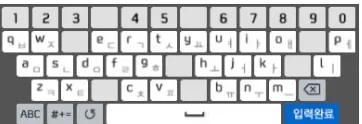
Figure 1: Example of the mage-based authentication
As shown in Figure 1, the user inputs the password by clicking on the letter or number corresponding to the registered password based on the screen-displayed image. Namely, the image-based authentication is closely related to the image and the clicked mouse information. Nevertheless, the corresponding researches on the information security are insufficient. Consequently, this paper presents an assessment of the security of the image-based authentication that was conducted image-based on the mouse information.
2.2 Existing attack techniques of the mouse
data exposure
The mouse logger, which is a compound word comprising he mouse and the logger, displays the mouse movements as coordinates, and records the history of specific features such as the click information [4].
The information that is obtained from the usage of the mouse logger includes the coordinate position, cursor confirmation, and input window, and it is possible to decide whether or not the information is exposed in a comprehensive manner. The coordinate position denotes the position of the mouse coordinate, and the cursor confirmation and the input window denote the cursor output and the input-window output, respectively, at the post-recording replay time. Therefore, if this information is exposed, the user-inputted mouse information is also exposed, thereby neutralizing the image-based authentication.
Consequently, the attacker can trace the mouse movements using the mouse logger, so the
mouse-data exposure has been researched using a mouse logger that is easy to obtain from the Internet. As a result, this research verified that, regarding many Internet-banking services, the passwords can be stolen through the exposing of the mouse data [5]. As shown in Table 1, four representative mouse loggers were used to evaluate mouse-data exposure for six Internet-banking services. In terms of the evaluation, one mouse logger did not obtain the coordinate position; however, the remaining mouse loggers extracted the cursor confirmation and the input window as well as the coordinate position, thereby making it possible to expose the password.
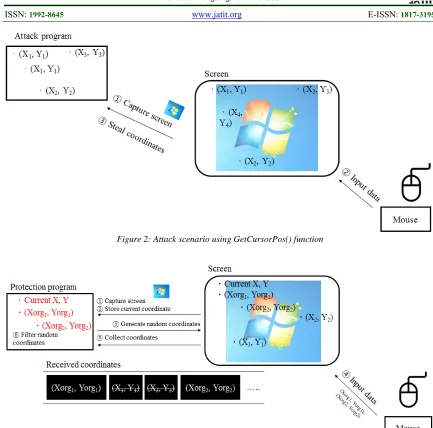
The Microsoft Windows OS provides various APIs to manage and support the mouse position, and the GetCursorPos() function provides the current mouse position in the form of the x and y coordinates. Thus, if the attacker collects the x and y coordinates by calling the GetCursorPos() function periodically, he or she can trace the user-inputted mouse movements. The detailed attack process, also shown in Figure 2, is described as follows:
Phase 1: The attacker captures the screen.
Phase 2: The periodically calling of the GetCursorPos() function to extract the coordinates.
Phase 3: The click information is extracted by the event handler to show the clicked-image coordinates.
Phase 4: The attacker can steal the user-inputted authentication information by aggregating the extracted screen image, mouse coordinates, and clicked position.
[image:2.612.105.286.126.188.2]As a result, this study verified the password exposure by exposing the mouse data on a real e-commerce site [6].
Table 1: Result of the mouse-logger mouse-data exposure
Mouse
Loggers Company A Company B Company C Company D Company E Company F
Logger A O O O X O O
Logger B O O O X O O
Logger C X X X X O O
7417
Figure 2: Attack scenario using GetCursorPos() function
Figure 3: Defense scenario using SetCursorPos() function
2.3 Existing defense techniques of the mouse
data exposure
As previously mentioned, the attack techniques has been for the neutralization of the image-based authentication for which the calling of the GetCursorPos() function in enacted have been researched.
This attack is exploits a vulnerability that can be obtained using the onscreen x and y coordinates in the calling of the GetCursorPos() function. To counteract this vulnerability, a defense technique that can prevent the mouse position exposure has been studied [6]. This technique is the disturbance of the attacker by the random generation of arbitrary coordinates, but it does not prevent the extraction of the mouse position so the attacker cannot know the correct coordinates. The
detailed defense process, also shown in Figure 3, is described as follows:
Phase 1: The protection program displays the screen image for the password selection.
Phase 2: The current mouse position, which is the start position, is stored to track the actual mouse position.
7418 Phase 4: Lastely, the protection program obtains the real mouse positions by self-filtering the generated random coordinates.
Accordingly, it is possible to protect against the attack without exposing the mouse position.
3. VULNERABILITY ANALYSIS
As described previously, the image-based authentication has problems that are related to the exposure of the mouse data. The password is stolen through the replaying of the mouse coordinates for which the mouse logger, which records the coordinates, is used. In particular, mouse loggers can be easily obtained from the Internet, making this type of attack a serious vulnerability, because the attacker does not need to implement attack tools. The Windows OS manages the mouse position to create the events according to the user mouse input, and the mouse position is obtained by calling the GetCursorPos() function in the event handler. Therefore, the attacker can track the mouse movements by calling this function periodically, thereby enabling the theft of the user-inputted password.
For the GetCursorPos() function attack counteraction, a defensive method that hides the real mouse position by generating random positions has been researched. The Windows OS provides the SetCursorPos() function to set the mouse position, and it can set random mouse positions by calling this function. This technique prevents the mouse-position exposure by mingling the real and random mouse positions.
The SetCursorPos() function defense technique, however, is a high-level defense technique. For this reason, if the attacker traces the mouse data that are inputted using the mouse device, instead of the OS-managed mouse location, additional vulnerabilities can be revealed that lead to the mouse-data exposure, and these new vulnerabilities can neutralize the image-based authentication. Therefore, for this paper, an analysis of this vulnerability was performed through a verification of the mouse-data exposure using the WM_INPUT message handler, which is the keyboard and mouse messages that are supported by the Microsoft Windows OS.
3.1 Attack scenario
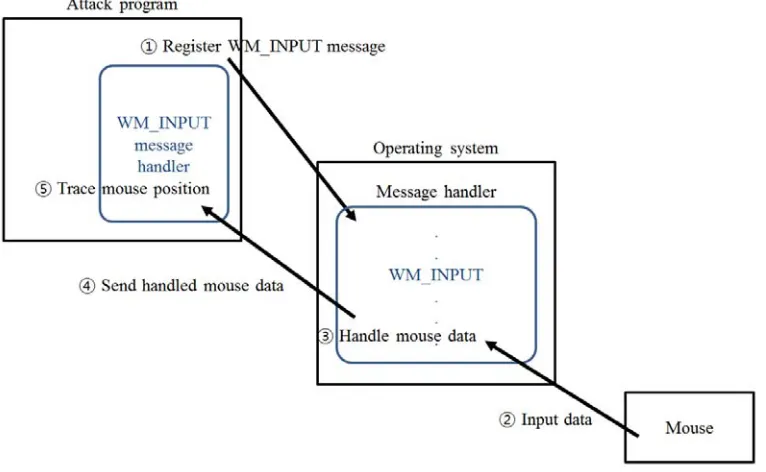
The Microsoft Windows OS provides the WM_INPUT message to support the user-inputted keyboard data and the mouse position [7]. When the WM_INPUT message handler is registered, the
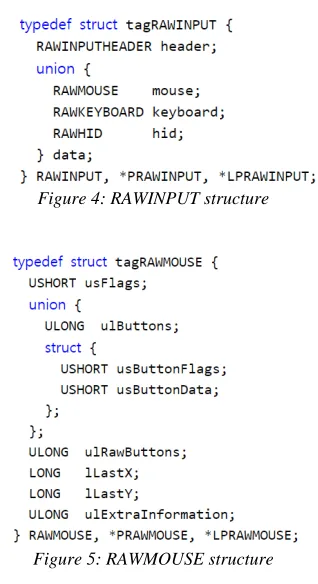
[image:4.612.341.500.285.577.2]handler receives the information that is inputted from the keyboard and mouse in the form of the RAWINPUT structure [8]. The RAWINPUT structure that is shown in Figure 4 shares the data of the mouse, keyboard, and human interface device (HID). The transferred mouse data in the form of the RAWMOUSE structure is shown in Figure 5 [9]. The usButtonFlags in the RAWMOUSE structure denotes the status of the mouse buttons, and the lLastX and lLastY denote the relative mouse-position coordinates. Therefore, the attacker can trace the mouse position by periodically collecting the lLastX and lLastY after the registration of the WM_INPUT message handler. Figure 3 shows an attack scenario, and the detailed attack process is described as follows:
Figure 4: RAWINPUT structure
Figure 5: RAWMOUSE structure
7419 When the attacker starts the attack, the attack program captures the displayed image and obtains the current mouse position. Accordingly, if the relative coordinates that are transmitted by the OS via the handler are collected based on the obtained current position, the mouse-position movements can be tracked.
Phase 2: The user moves the mouse device to choose a position corresponding to the registered password in the screen-displayed image. In this movement process, the relative coordinates, which are the mouse data, are transferred from the mouse device to the OS. The relative coordinates include the screen-relative x and y coordinates. The number of the x coordinate is positive during the right-direction movement, and negative during the left-direction movement. The number of y coordinate is negative during the upward movement, and it is positive during the downward movement.
Phase 3: When the OS receives the data from the mouse device, the system processes the received data that are to be system-managed. In this process, the OS calculates the mouse coordinates that are to be managed, and carries out the process to transfer the mouse data to the application program.
Phase 4: The OS transfers the handled mouse data to the attack program that registered the WM_INPUT message event.
Phase 5: The attack program receives the relative coordinates from the OS. The program traces the mouse movements by calculating the relative coordinates based on the absolute coordinates. Because the absolute coordinate are called current coordinates, they are stored in the phase 1.
Based on the attack scenario, an analysis of the possibility of the mouse-data exposure in the image-based authentication was performed. The analysis result shows that the user-inputted mouse data can be captured, and the mouse movements can be successfully tracked. It is necessary, however, to analyze the attack vector in the situations where the defense technique using the SetCursorPos() function described in the section 2.3 is applied.
3.2 Analysis of the attack vectors
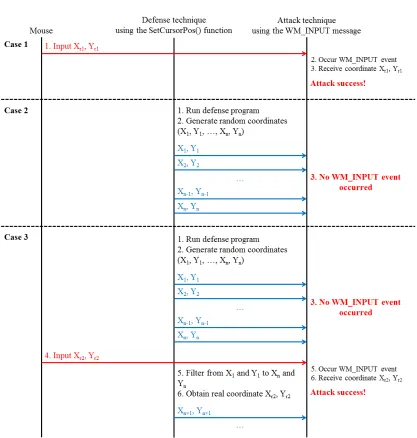
In this paper, the three attack vectors that are shown in Figure 7 are defined as follows: the
no-defense technique, the running-defense
[image:5.612.116.499.442.678.2]technique, and the mouse input between the random-coordinate generation.
7420
Figure 7: Analysis of the attack vector between the mouse, the defense technique using the SetCursorPos() function, and the attack technique using the WM_INPUT message
The no-defense technique is a vector in which the proposed attack technique steals the coordinates when the mouse data are inputted in the case of an inactive defense program. In this vector, the OS enacts the WM_INPUT event upon the
transferal of the mouse data (Xr1, Yr1), and then the
event handler receives the inputted mouse data (Xr1,
Yr1). Therefore, the attacker succeeds using this
vector.
The running-defense technique is a vector that bypasses the defense technique by filtering generated random coordinates of the defense program while the defense program is running. In the case of the vector of the no-defense technique,
7421 The mouse-input vector between the generated random coordinates is a vector that obtains the coordinates when the coordinates are transferred from the mouse device during generation of the random coordinates. When the defense program generates the random coordinates, such as the vector of the running-defense technique, the OS does not invoke the WM_INPUT event that receives the mouse data. At this point, if the mouse
data (Xr2, Yr2) is inputted, the attack program
receives the inputted mouse data (Xr2, Yr2) from the
registered WM_INPUT message handler. Therefore, the attacker succeeds using this vector.
3.3 Experiment result
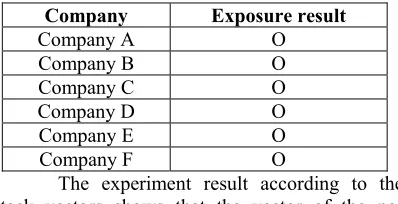
The proof-of-concept tool that traces the mouse position using the WM_INPUT message handler was implemented based on the previously described attack scenario and the attack vector of the no-defense technique, and Figure 8 shows the experiment result. The result shows the exposure of the mouse data in terms of a virtual keyboard that has been applied on a real e-commerce website, and Table 2 shows that the proposed attack technique was used to evaluate mouse-data exposure to six Internet-banking services. As a result, the mouse data ware exposed on the all websites.
[image:7.612.143.246.415.463.2]Figure 8: Experiment result
Table 2: The exposure result of mouse data using the WM_INPUT MESSAGE
Company Exposure result
Company A O
Company B O
Company C O
Company D O
Company E O
Company F O
The experiment result according to the attack vectors shows that the vector of the
no-defense technique is the same as the result shown in Figure 8. Here, all the user-inputted mouse data were exposed.
The experiment result of the vector of the running-defense technique is shown in Table 3. The result shows the collection of the WM_INPUT events and the received coordinates upon the generation of the random coordinates of 10, 100, 1000, 10000, and 100000. Consequently, all the cases do not invoke any events or received coordinates.
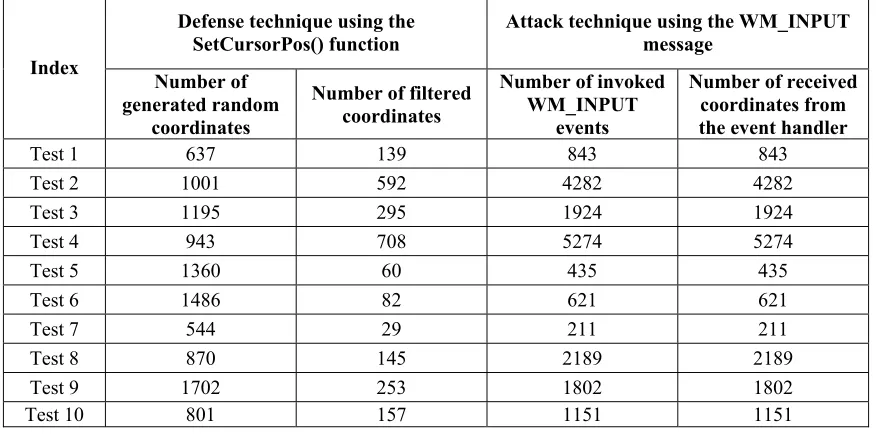
The experiment result of the vector of the mouse input between the generations of the random coordinates, for which a total of 10 tests was experimented with, is shown in Table 4. To analyze the correlation between the generated random coordinates and the received coordinates, the number of the generated random coordinates, the number of the filtered coordinates, the number of the invoked WM_INPUT events, and the number of the received coordinates from the event handler were collected, and the random coordinates were generated every 5ms.
The overall result shows a difference between the number of the filtered coordinates and the number of the coordinates that were received from the WM_INPUT message handler. The corresponding reason is the difference between the attainments of the current coordinates every 5ms in the defense technique and the number of the coordinates that were transferred from the mouse.
In the comparison of the number of the coordinates that were received from the WM_INPUT event handler and the number of the invoked WM_INPUT events, all of the 10 tests are the same. Therefore, the attack program receives all WM_INPUT messages invoked from the OS, meaning the attacker can track the mouse movements.
Table 3: Experiment result according to the attack vector of the running defense technique
Number of generated
random coordinates WM_INPUT events Number of invoked Number of received coordinates from the event handler
10 0 0
100 0 0
1,000 0 0
10,000 0 0
[image:7.612.97.296.497.599.2]7422
Table 4: Experiment result according to the attack vector of the mouse input between the generation of the random coordinates
Index
Defense technique using the
SetCursorPos() function Attack technique using the WM_INPUT message
Number of generated random
coordinates
Number of filtered coordinates
Number of invoked WM_INPUT
events
Number of received coordinates from the event handler
Test 1 637 139 843 843
Test 2 1001 592 4282 4282
Test 3 1195 295 1924 1924
Test 4 943 708 5274 5274
Test 5 1360 60 435 435
Test 6 1486 82 621 621
Test 7 544 29 211 211
Test 8 870 145 2189 2189
Test 9 1702 253 1802 1802
Test 10 801 157 1151 1151
4. CONCLUSION
The exposure of the mouse data from the usage of the WM_INPUT message handler, which extracts the mouse data to analyze the vulnerability of the image-based authentication, has been verified in this paper. As a result, the mouse data were exposed on most of the Internet-banking and e-commerce sites of South Korea. Therefore, it has been proven that the safety of the authentication information is not ensured even if the image-based authentication is applied, and the corresponding attack countermeasures will be studied in the future.
DISCLOSURE:
A part of this paper was presented at
International Workshop on Convergence
Information Technology (IWCIT), December 21-23, Busan, South Korea.
ACKNOWLEDGMENTS:
This research was supported by the Basic Science Research Program through the National Research Foundation of Korea (NRF) that is funded
by the Ministry of Education
(NRF-2015R1D1A1A01057300).
REFERENCES:
[1] Wikipedia, “Computer Mouse”, 03/05/2018,
retrieved from
https://en.wikipedia.org/wiki/Computer_mouse
[2] Wikipedia, “Virtual Keyboard”, 03/05/2018,
retrieved from
https://en.wikipedia.org/wiki/Virtual_keyboard
[3] Ankit Parekh, Ajinkya Pawar, Pratik Munot,
and Piyush Mantri, “Secure authentication using
anti-screenshot virtual keyboard”, International
Journal of Computer Science Issues, Vol. 8, No. 5, 2011, pp. 534-537.
[4] Z. Minchev, G. Dukov, and S. Georgiev, “EEG
spectral analysis in serious gaming: An ad hoc
experimental application”, International
Journal BIO Automation, Vol. 13, No. 4, 2009,
pp. 79-88.
[5] Hyeji Lee, Yeunsu Lee, Kyungroul Lee, and
Kangbin Yim, “Security Assessment on the
Mouse Data using Mouse Loggers”,
International Conference on Broad-Band Wireless Computing, Communication and
Applications (BWCCA), November 5-7, 2016,
pp.387-393.
[6] Kyungroul Lee, Insu Oh, and Kangbin Yim, “A
Protection Technique for Screen Image-based
Authentication Protocols Utilizing the
SetCursorPos function” World conference on
Information Security Applications (WISA),
August 23-25, 2018.
[7] MSDN, “WM_INPUT message”, 03/05/2018,
retrieved from https://msdn.microsoft.com/ko-kr/library/windows/desktop/ms645590(v=vs.85) .aspx
[8] MSDN, “RAWINPUT structure”, 03/05/2018,
https://msdn.microsoft.com/ko-7423 kr/library/windows/desktop/ms645562(v=vs.85) .aspx
[9] MSDN, “RAWMOUSE structure”, 03/05/2018,
retrieved from https://msdn.microsoft.com/ko-kr/library/windows/desktop/ms645578(v=vs.85) .aspx
[10]Cheng-Chi Lee, Li-Hua Li, and Min-Shiang
Hwang, “A Remote User Authentication
Scheme Using Hash Functions”, ACM SIGOPS
Operating Systems Review, Vol. 36, No. 4, 2002, pp. 23-29.
[11]Kyungroul Lee, Youngtae Choi, Hyeungjun
Yeuk, and Kangbin Yim, “Password Sniff by Forcing the Keyboard to Replay Scan Codes”,
Joint Workshop on Information Security (JWIS),
Aug. 5-6, 2010, pp. 9.
[12]Kyungroul Lee and Kangbin Yim, “Keyboard
Security: A Technological Review”,
International Conference on Innovative Mobile and Internet Services in Ubiquitous Computing (IMIS), Jun. 30 – Jul. 2, 2011, pp. 9-15.
[13]Takada Tetsuji and Hideki Koike, “Awase-E:
Image-based authentication for mobile phones
using user’s favorite images”, International
Conference on Mobile Human-Computer Interaction, Sep. 8-11, 2003, pp. 347-351.
[14]R. E. Newman, P. Harsh, and P. Jayaraman,
“Security analysis of and proposal for
image-based authentication”, International Carnahan
Conference on Security Technology (CCST),
Oct. 11-14, 2005, pp. 141-143.
[15]Kyungroul Lee and KangbinYim,
“Vulnerability Analysis on the Image-based Authentication: through the WM_INPUT
message”, International Workshop on
Convergence Information Technology (IWCIT),