585-313-203 108647314 January 2000 Issue 2
Intuity™ CONVERSANT® System
Version 7.0
Copyright and Legal Notices
Copyright Copyright © 2000 by Lucent Technologies. All rights reserved.
Printed in the USA.
This material is protected by the copyright laws of the United States and other countries. It may not be reproduced, distributed, or altered in any fashion by any entity (either internal or external to Lucent Technologies), except in accordance with applicable agreements, contracts or licensing, without the express written consent of the Business Communications Systems (BCS) Global Learning Solutions (GLS) organization and the business management owner of the material.
Copyright and Legal Notices
Trademarks Lucent Technologies has made every effort to supply the following trademark information about company names, products, and services mentioned in the Intuity CONVERSANT documentation library:
• Adobe Systems, Inc. — Trademarks: Adobe, Acrobat.
• AT&T — Registered trademarks: Truevoice.
• CLEO Communications — Trademarks: LINKix.
• Hayes Microcomputer Products, Inc. — Trademarks: Hayes, Smartmodem.
• Intel Corporation — Registered trademarks: Pentium.
• Interface Systems, Inc. — Trademarks: CLEO.
• International Business Machines Corporation — Registered trademarks: IBM, VTAM.
• Lucent Technologies — Registered trademarks: 5ESS, AUDIX,
CONVERSANT, DEFINITY, Voice Power. Trademarks: FlexWord, Intuity, Lucent.
• Microsoft Corporation — Registered trademarks: Excel, Internet Explorer, Microsoft, MS, MS-DOS, Windows, Windows NT.
• Minnesota Mining and Manufacturing — Trademarks: 3M.
Copyright and Legal Notices
• Novell, Inc. — Registered trademarks: Novell.
• Oracle Corporation — Trademarks: OBJECT*SQL, ORACLE, ORACLE*Terminal, PRO*C, SQL*FORMS, SQL*Menu, SQL*Net, SQL*Plus, SQL*ReportWriter.
• Phillips Screw Co. — Registered trademarks: Phillips.
• Santa Cruz Operation, Inc. — Registered trademarks: UnixWare.
• UNIX System Laboratories, Inc. — Registered trademarks: UNIX.
• Veritas Software Corporation — Trademarks: VERITAS.
• Xerox Corporation — Trademarks: Ethernet.
Limited Warranty Lucent Technologies provides a limited warranty on this product. Refer to the “Limited Use Software License Agreement” card provided with your package. Lucent Technologies has determined that use of this electronic data delivery system cannot cause harm to an end user's computing system and will not assume any responsibility for problems that may arise with a user's computer system while accessing the data in these document.
Copyright and Legal Notices
United States FCC Compliance Information
Part 15: Class A statement. This equipment has been tested and found to comply with the limits for a Class A digital device, pursuant to Part 15 of the FCC Rules. These limits are designed to provide reasonable protection against harmful interference when the equipment is operated in a commercial environment. This equipment generates, uses, and can radiate
radio-frequency energy and, if not installed and used in accordance with the instructions, may cause harmful interference to radio communications. Operation of this equipment in a residential area is likely to cause harmful interference, in which case the user will be required to correct the
interference at his own expense.
Canadian Department of Communications (DOC) Interference Information
This digital apparatus does not exceed the Class A limits for radio noise emissions set out in the radio interference regulations of the Canadian Department of Communications.
Le Présent Appareil Nomérique n’émet pas de bruits radioélectriques dépassant les limites applicables aux appareils numériques de la class A préscrites dans le reglement sur le brouillage radioélectrique édicté par le ministére des Communications du Canada.
European Union Declaration of Conformity
Copyright and Legal Notices
Telecom New Zealand Ltd Warning Notices
GENERAL WARNING: The grant of a Telepermit for any item of terminal equipment indicates that only Telecom has accepted that the item complies with minimum conditions for connection to its network. It indicates no endorsement of the product by Telecom, nor does it provide any sort of warranty. Above all, it provides no assurance that any item will work correctly in all respects with other items of Telepermitted equipment of a different make or model, nor does it imply that any product is compatible with all of Telecom’s network services.
IMPORTANT NOTICE: Under power failure conditions, this device may not operate. Please ensure that a separate telephone, not dependent on local power, is available for emergency use.
AUTOMATIC RE-ATTEMPTS TO THE SAME NUMBER: Some parameters required for compliance with Telecom’s Telepermit requirements are dependent on the equipment (PC) associated with this device. The associated equipment shall be set to operate within the following limits for compliance with Telecom specifications:
• There shall be no more than 10 call attempts to the same number within any 30 minute period for any single manual call initiation, and,
Copyright and Legal Notices
AUTOMATIC CALLS TO DIFFERENT NUMBERS: Some parameters required for compliance with Telecom’s Telepermit requirements are dependent on the equipment (PC) associated with this device. In order to operate within the limits for compliance with Telecom specifications, the associated equipment shall be set to ensure that automatic calls to different numbers are spaced such that there is not less than 5 seconds between the end of one call attempt and the beginning of the next attempt.
USER INSTRUCTIONS (AUTOMATIC CALL SETUP): This equipment shall not be set up to make automatic calls to the Telecom "111" emergency service.
CALL ANSWERING (AUTOMATIC ANSWERING EQUIPMENT): Some parameters required for compliance with Telecom’s Telepermit requirements are dependent on the equipment (PC) associated with this device. In order to operate within the limits for compliance with Telecom specifications, the associated equipment shall be set to ensure that calls are answered between 3 and 30 seconds of receipt of ringing.
Copyright and Legal Notices
Your Responsibility for Your System’s Security
You and your system manager are responsible for the security of your system and for preventing unauthorized use. You are also responsible for reading all installation, instruction, and system administration documents provided with this product in order to fully understand the features that can introduce risk of toll fraud and the steps that can be taken to reduce that risk. Lucent
Technologies does not warrant that this product is immune from or will prevent unauthorized use of common-carrier telecommunication services or facilities accessed through or connected to it. Lucent Technologies will not be responsible for any charges that result from such unauthorized use.
Lucent Technologies Fraud Intervention and Corporate Security
If you suspect that you are being victimized by toll fraud and you need technical support or assistance, call the Lucent Technologies National Customer Care Center Toll Fraud Intervention Hotline at 1 800 643-2353. Aside from whether immediate support is required, all toll fraud incidents involving Lucent products or services should be reported to Lucent Corporate Security at 1 800 821-8235. In addition to recording the incident, Lucent Corporate Security is available for consultation on security issues,
Copyright and Legal Notices
Documentation Ordering Information
To order a document, contact the Lucent Technologies Publications Center and specify the 9-digit document number, the issue number, and the issue date.
Write, Call, or Fax
Lucent Technologies Publications Center 2855 N. Franklin Road
Indianapolis, IN 46219
Voice 1 800 457-1235 International Voice 317 322-6791 FAX 1 800 457-1764 International FAX 317 322-6699
World Wide Web
Use a web browser to reach one of the following sites. Click Documents and follow the instructions at the site.
• Organizations within Lucent Technologies http://www.cic.lucent.com
Copyright and Legal Notices
Standing Orders
Contents
Copyright and Legal Notices
ii
About This Book
xxii
Overview . . . xxii
Intended Audience . . . xxiii
How to Use This Book . . . xxiii
Conventions Used in This Book . . . xxv
Terminology . . . .xxv
Safety and Security Alert Labels . . . xxxiii
Getting Help . . . xxxiv
Technical Assistance. . . . xxxv
Related Resources. . . xxxvi
1 Application Design Considerations
1
Overview . . . 1
Designing a Successful Application . . . 2
Application Development Tools . . . 2
2 Application Structure
7
Overview . . . 7Application Components . . . 8
Directory Structure for Applications . . . 9
Conventions for Naming Files and Programs . . . . 10
Coding Style . . . . 14
3 TAS Script Instructions
17
Overview . . . . 17Transaction State Machine . . . . 18
The Script and Call Progression . . . . 19
Call Progression Starting Conditions . . . 20
Script Control . . . 20
TSM Control. . . 21
Script Termination . . . 21
Data Storage . . . . 22
Script Conventions . . . . 26
Destination and Source Arguments . . . 28
Arguments to Script Instructions . . . 28
Address Modes . . . 29
Script Instructions . . . . 33
Voice Output Instructions. . . 33
Data Gathering Instructions . . . 48
Data Manipulation Instructions . . . 59
String Instructions . . . 65
Flow Control Instructions . . . 68
Voice Coding Instructions . . . 82
Dial Pulse and Speech Recognition Script Instructions. . . 89
Network Interface Instructions . . . 102
Miscellaneous Instructions. . . 114
Script Development . . . 118
Transaction Control Header Files . . . 119
Defining User Memory . . . 120
Identification of Events. . . 120
Source File. . . 121
Wait Conditions . . . 122
Speech-Flushing Instructions . . . 123
Wait-Causing Instructions . . . 124
Troubleshooting Scripts . . . 130
Check the Status of talk Instructions . . . 130
Erase Arguments in the ttdelim Instruction . . . 133
Speech String Matching Failures. . . 135
Loss of Touch Tones . . . 135
4 Data Interface Processes
138
Overview . . . 138Introduction to the Data Interface Process. . . 139
Message Queues. . . 141
Types of DIPs . . . 143
Bulletin Board . . . 145
Writing the DIP . . . 147
Step 1: Define Data to be Passed Between the DIP and the TSM Script . . . 148
Step 2: Initialize the DIP to the System . . . 154
Step 3: Send and Receive Messages . . . 161
Step 4: Implement the Application-Specific Processing . . . 170
Step 5: Define and Add Logger Errors. . . 170
Step 6: Add Error Reporting . . . 171
Step 7: Add Trace Messages. . . 171
Step 8: Compile and Execute the DIP . . . 173
Troubleshooting . . . 176
TTS_DIP . . . 182
Message Interfaces with tts_dip . . . 183
5 IRAPI
186
Overview . . . 186Introduction to the IRAPI . . . 188
Library Overview . . . 189
Manual Pages for Commands and Parameters. . . 190
Library Parameters . . . 190
Application Structure and Control . . . 191
Resource Allocation. . . 193
Voice Input and Output . . . 194
IRAPI Organization . . . 197
IRAPI with Intuity CONVERSANT System Features . . . 211
Application Organization . . . 212
Application Control . . . 216
Application Dispatch Process . . . 217
Application Dispatch API . . . 218
IRAPI Run-Time Services . . . 224
Application Framework . . . 225
Run-Time Services . . . 247
Application Management. . . 347
Debugging Applications . . . 349
Performance and System Tuning for IRAPI Applications . . . 354
Resource Management . . . 354
Disk Performance . . . 359
RM Tunable Parameters . . . 362
Global Parameters. . . 367
6 Message Logger
368
Overview . . . 368Overview of the Message Logger . . . 369
Message Logger Purpose . . . 369
Message Classes . . . 370
Message Logger Development . . . 370
Message Logger Structure . . . 371
Message Content and Format Specification . . . 373
Compiling the Messages in the DIP. . . 376
Testing a Single Error Message. . . 380
Testing Several Error Messages . . . 381
Adding and Changing Explain Message Text . . . 382
Using the Text Editor to Add Messages. . . 383
Using the Command Line To Add Messages. . . 384
Appendix A: Application Example
386
Overview . . . 386
Sample Script — Script Builder Action Steps . . . 387
Sample Script — TAS Script Language . . . 391
Sample External Function . . . 395
Sample DIP . . . 397
APPLmsg File . . . 404
logAPPL.h File . . . 406
Appendix B: Summary of TAS Script Instructions
408
Overview . . . 408TAS Script Instruction Syntax . . . 409
and. . . 409
atoi . . . 410
background . . . 411
case . . . 413
chantype . . . 414
dbase . . . 416
decr . . . 418
dipname . . . 419
dipnum . . . 420
dipterm. . . 421
dtitos . . . 425
dtstoi . . . 428
event . . . 430
exec . . . 437
execu . . . 441
extend . . . 442
getinput . . . 451
getIRAPIparam, getIRAPIparamstr . . . 454
goto . . . 456
hbridge. . . 457
hundsec . . . 458
ibrl . . . 459
incr . . . 460
itoa . . . 461
jmp . . . 461
label . . . 462
listenall. . . 463
load . . . 465
mul . . . 466
nap. . . 466
no_rts. . . 467
not . . . 469
nwitime. . . 470
or . . . 471
phreserve. . . 473
quit . . . 476
recog_cntl . . . 477
recog_init . . . 478
recog_start. . . 479
recog_stop . . . 481
resource_alloc . . . 482
rts. . . 484
say . . . 485
scrinst . . . 488
setalk . . . 490
setattr. . . 491
setcca . . . 492
setIRAPIparam, setIRAPIparamstr . . . 494
setparam . . . 496
setstring . . . 500
setttfl . . . 501
sleep . . . 502
sp_alloc . . . 503
sr_talkoff . . . 506
strcmp . . . 508
strcpy . . . 510
strlen . . . 510
subprog . . . 511
talkresume . . . 516
tchars . . . 518
tfile . . . 519
tflush . . . 520
tic . . . 523
tnum. . . 547
trace. . . 549
tstop . . . 550
ttclear . . . 552
ttdelim . . . 553
ttintr . . . 557
ttmask . . . 558
tttime . . . 559
vc . . . 560
vctime . . . 565
Appendix C: C-Library Functions
566
Overview . . . 566Purpose . . . 567
C-Library Function Locations . . . 567
libspp.so Functions . . . 569
db_init . . . 569
db_pr . . . 570
et_send . . . 573
mesgrcv . . . 576
mesgsnd . . . 583
startup . . . 586
VSerror . . . 589
VSstartup . . . 590
VStoname . . . 593
VStoqkey . . . 594
libalerter.a Function . . . 598
threshold . . . 598
liblog.a Functions . . . 608
expandLog . . . 608
logDstPri . . . 614
logMsg . . . 621
Glossary
624
About This Book
Overview
This book, is a reference for people who develop applications for the Intuity CONVERSANT system using the transaction assembler script (TAS) language, C language, and/or Intuity Response Application Programming Interface (IRAPI). It provides information about designing software
About This Book Intended Audience
Intended Audience
The intended audience for this book includes:
• End customer application developers — This group is responsible for creating and maintaining applications on the Intuity CONVERSANT system environment.
• Custom application developers — This group is responsible for creating applications to be used in the Intuity CONVERSANT system environment for end-user customers. This audience includes any of the custom application development organizations within Lucent Technologies.
• Application distributors — This group distributes and implements
applications for end-users. This audience includes independent software vendors (ISVs).
How to Use This Book
This book is organized into the following chapters:
About This Book How to Use This Book
• Chapter 2, Application Structure — Provides an outline of the directory structure and naming conventions you should use when developing application programs.
• Chapter 3, TAS Script Instructions — Explains the TSM process, the script conventions, the instructions used by a script, and the
application-dependent functions that you can use in a script.
• Chapter 4, Data Interface Processes — Explains the data interface process (DIP) interfaces between the TSM and a host or local database. This chapter describes both hard-coded and dynamic DIPs.
• Chapter 5, IRAPI — Describes the Intuity Response Application Programming Interface.
• Chapter 6, Message Logger — Describes how to add or modify system messages and their associated text.
• Appendix A, Application Example — Provides a complete example of the application-dependent code and the files that an application developer must develop for any speech application.
• Appendix B, Summary of TAS Script Instructions — Contains manual pages for each script instruction, including the syntax, arguments, and examples.
About This Book Conventions Used in This Book
• Glossary — Defines the terms, abbreviations, and acronyms used in system documentation.
• Index — Alphabetically lists the principal subjects covered in the book.
Conventions Used in This Book
Understanding the typographical and other conventions used in this book is necessary to interpret the information.
Terminology
• The word “type” means to press the key or sequence of keys specified. For example, an instruction to type the letter “y” is shown as
Type y to continue.
• The word “enter” means to type a value and then press ENTER. For example, an instruction to type the letter “y” and press ENTER is shown as
About This Book Conventions Used in This Book
• The word “select” means to move the cursor to the desired item and then press ENTER. For example, an instruction to move the cursor to the start test option on the Network Loop-Around Test screen and then press ENTER is shown as
Select Start Test.
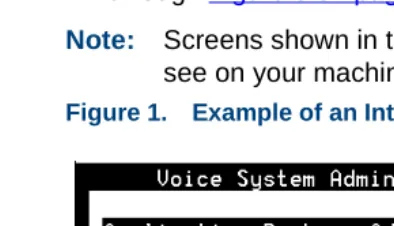
• The Intuity CONVERSANT system displays menus, screens, and windows. Menus allow you to select options or to choose to view another menu, screen, or window (Figure 1 on page xxvi). Windows and screens both show and request system information (Figure 2 on page xxvii through Figure 5 on page xxix).
Note: Screens shown in this book are examples only. The screens you see on your machine will be similar, but not exactly the same.
About This Book Conventions Used in This Book
Figure 2. Example of an Intuity CONVERSANT Window Showing Information
About This Book Conventions Used in This Book
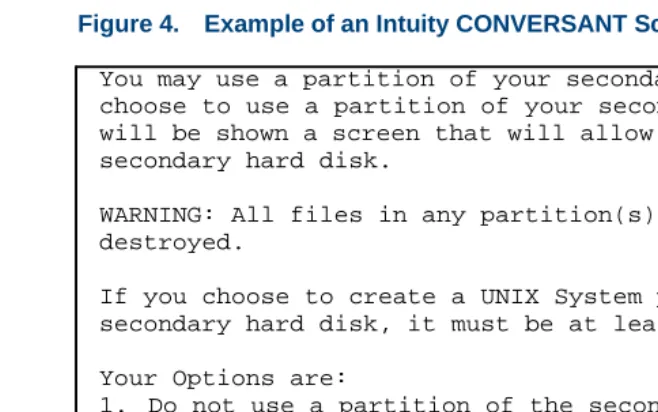
Figure 4. Example of an Intuity CONVERSANT Screen Requesting Information
You may use a partition of your secondary hard disk. If you choose to use a partition of your secondary hard disk you will be shown a screen that will allow you to partition your secondary hard disk.
WARNING: All files in any partition(s) you delete will be destroyed.
If you choose to create a UNIX System partition on your secondary hard disk, it must be at least 40 MBs.
Your Options are:
1. Do not use a partition of the secondary hard disk for the UNIX System.
2. Use a partition of the secondary hard disk for the UNIX System.
About This Book Conventions Used in This Book
Figure 5. Example of an Intuity CONVERSANT Screen Showing Information
Keyboard and Telephone Keypad Representations
• Keys that you press on your terminal or PC are represented as small capitalized B O L D text. For example, an instruction to press the enter key is shown as
Press E N T E R.
In order to install UnixWare, you must reserve a partition (a portion of your hard disk’s space) on your primary hard disk for the UNIX System.After you press ‘ENTER’ you will be shown a screen that will allow you to create new partitions, delete existing partitions or change the active partition of your primary hard disk (the partition that your computer will boot from).
WARNING: All files in any partition(s) you delete will be destroyed. If you wish to attempt to preserve any files from an existing UNIX System, do not delete its partition(s).
About This Book Conventions Used in This Book
• Two or three keys that you press at the same time on your terminal or PC (that is, you hold down the first key while pressing the second and/or third key) are represented in small capitalized B O L D text. For example, an instruction to press and hold the Alt key while typing the letter “d” is shown as
Press A LT + D.
• Function keys on your terminal, PC, or system screens, also known as soft keys, are represented as small capitalized B OL D text followed by the function or value of that key enclosed in parentheses. For example, an instruction to press function key 3 is shown as
Press F 3 (Choices).
• Keys that you press on your telephone keypad appear in small capitalized B O L D text. For example, an instruction to press the first key on your telephone keypad is shown as
Press 1 to record a message.
Cross References
About This Book Conventions Used in This Book
Screen Displays • Values, system messages, field names, prompts that appear on the screen, and simulated screen displays are shown in typewriter-style constant width type, as in the following examples:
Enter the number of ports to be dedicated to outbound traffic in the Maximum Simultaneous Ports field.
Alarm Form Update was successful. Press <Enter> to continue.
• The sequence of menu options that you must select to display a specific screen or submenu is shown as follows:
Start at the Intuity CONVERSANT main menu and select:
In this example, you would access the Intuity CONVERSANT main menu and select the Vocie System Administration menu. From the Voice System Administration menu, you would then select the Configuration Management option.
About This Book Conventions Used in This Book
Other Typography • Commands and text you type in or enter appear in bold type, as in the following examples:
Enter change-switch-time-zone at the enter command: prompt. Type high or low in the Speed: field.
• Command variables are shown in bold italic type when they are part of what you must type in, and in blue italic type when they are referred to, for example:
Enter ch ma machine_name, where machine_name is the name of the call delivery machine you just created.
About This Book Conventions Used in This Book
Safety and Security Alert Labels
This book uses the following symbols to call your attention to potential problems that could cause personal injury, damage to equipment, loss of data, service interruptions, or breaches of toll fraud security:
data, service interruptions, or breaches of toll fraud security: !
CAUTION:
Indicates the presence of a hazard that if not avoided can or will cause minor personal injury or property damage, including loss of data.
WARNING:
!Indicates the presence of a hazard that if not avoided can cause death or severe personal injury.
!
DANGER:
Indicates the presence of a hazard that if not avoided will cause death or severe personal injury.
!
SECURITY ALERT:
About This Book Getting Help
Getting Help
The Intuity CONVERSANT system provides online help to assist you during installation, administration, and application development tasks.
To use the online help:
• Press F 1 (Help) when you are in a menu or window.
The first time you press F 1, the system displays information about the currently active window or menu.
~ When you are in a window, the help explains the purpose of the window and describes its fields.
~ When you are in a menu, the help explains how to use menus. If you press F 1 again, the system displays a General Help screen that explains how to use the online help.
• Press F 2 (Choices) when you are in a field.
The system displays valid field choices either in a pop-up window or on the status line directly above the function keys.
About This Book Technical Assistance
Technical Assistance
Contact Numbers Technical assistance on the Intuity CONVERSANT product is available through the following telephone contacts:
• In the United States, call 1-800-242-2121.
• In Canada, call one of the following numbers, depending on your location:
~ 1-800-363-1882 for assistance in Quebec and eastern Canada
~ 1-800-387-4268 for assistance in Ontario and western Canada
• In any other country, call your local distributor or check with your project manager or systems consultant.
Web Site The following customer support web site contains technical resources: http://www.lucent.com/enterprise/selfservice
About This Book Related Resources
Related Resources
Additional documentation and training material is available for you to learn more about the Intuity CONVERSANT product.
Training To obtain training on the Intuity CONVERSANT product, contact the BCS Education and Training Center at one of the following numbers:
• Organizations within Lucent Technologies (904) 636-3261
• Lucent Technologies customers and all others (800) 255-8988 You can also view information on Intuity CONVERSANT training at the Global Learning Solutions (GLS) web site at one of the following web links:
• Organizations within Lucent Technologies http://training.gls.lucent.com
• Lucent Technologies customers and all others http://www.lucenttraining.com
The courses listed below are recommended. Other courses are available.
• For technicians doing repairs on Intuity CONVERSANT V7.0 systems
About This Book Related Resources
• For technicians and administrators
~ BTC344M, Intuity CONVERSANT V7 Administration Overview (CD-ROM)
• For application developers
~ BTC128H, Introduction to Script Builder
~ BTC166H, Introduction to Voice@Work
~ BTC204H, Intermediate Voice@Work
~ BTC301H, Advanced CONVERSANT Programming
Documentation Appendix A, "Documentation Guide," in Intuity CONVERSANT System Version 7.0 System Description, 585-313-204, describes in detail all books included in Intuity CONVERSANT documentation library and referenced in this book.
Note: Always refer to the appropriate book for specific information on planning, installing, administering, or maintaining an Intuity CONVERSANT system.
Additional Suggested Documentation
It is suggested that you also obtain and use the following book for information on security and toll fraud issues:
About This Book Using the CD-ROM Documentation
Obtaining Printed Versions of the Documentation
See Documentation Ordering Information on page ix of Copyright and Legal Noticesfor information on how to purchase Intuity CONVERSANT
documentation in printed form. You can also print documentation locally from the CD-ROM (see Printing the Documentation on page xl).
Using the CD-ROM Documentation
Lucent Technologies ships the documentation in electronic form. Using the AdobeAcrobat Reader application, you can read these documents on a Windows PC, on a Sun Solaris workstation, or on an HP-UX workstation. Acrobat Reader displays high-quality, print-like graphics on both UNIX and Windows platforms. It provides scrolling, zoom, and extensive search capabilities, along with online help. A copy of Acrobat Reader is included with the documents.
Note: When viewing documents online, it is recommended that you use a separate platform and not the Intuity CONVERSANT system.
Setting the Default Magnification
About This Book Using the CD-ROM Documentation
Adjusting the Window Size
On HP and Sun workstations, you can control the size of the reader window by using the -geometry argument. For example, the command string acroread -geometry 900x900 mainmenu.pdf opens the main menu with a window size of 900 pixels square.
Hiding and Displaying Bookmarks
By default, the document appears with bookmarks displayed on the left side of the screen. The bookmarks serve as a hypertext table of contents for the chapter you are viewing. You can control the appearance of bookmarks by selecting View | Page Only or View | Bookmarks and Page.
Using the Button Bar
The button bar can take you to the book’s Index, table of contents, main menu, and glossary. It also lets you update your documents. Click the corresponding button to jump to the section you want to read.
Using Hypertext
Links Hypertext links appear in other sections or books. blue underlined text. These links are shortcuts to
Navigating with Double Arrow Keys
The double right and double left arrows ( and ) at the top of the Acrobat Reader window are the back and forward functions. The go-back button takes you to the last page you visited prior to the current page. Typically, you use to jump back to the main text from a cross reference or illustration.
Searching for
About This Book Using the CD-ROM Documentation
Displaying Figures If lines in figures appear broken or absent, increase the magnification. You might also want to print a paper copy of the figure for better resolution.
Printing the
Documentation Note: For information on purchasing printed copies of the documents, see Obtaining Printed Versions of the Documentation on page
xxxviii.
If you would like to read the documentation in paper form rather than on a computer monitor, you can print all or portions of the online screens.
Printing an Entire Document
To print an entire document, do the following:
1 From the documentation main menu screen, select one of the print-optimized documents. Print-print-optimized documents print two screens to a side, both sides of the sheet on 8.5x11-inch or A4 paper.
2 Select File | Print.
3 Enter the page range you want to print, or select All. Note that the print page range is different from the page numbers on the documents (they print two to a page).
4 The document prints.
About This Book How To Comment on This Book
Printing Part of a Document
To print a single page or a short section, you can print directly from the online version of the document.
1 Select File | Print.
2 Enter the page range you want to print, or select Current. The document prints, one screen per side, two sides per sheet.
How To Comment on This Book
While we have tried to make this document fit your needs, we are interested in your suggestions for improving it and urge you to send your comments to us.
Comment Form A comment form, available in paper and electronic versions, is available via the documentation CD-ROM. To use the comment form:
1 Select Comments from the Main Menu of the CD-ROM.
2 Follow the instructions provided on the CD-ROM to do one of the following:
~ Print the paper version of the form, complete it, and either fax or mail it to us.
About This Book How To Comment on This Book
Contact Us Directly If you prefer not to use the comment form, you can contact us directly at the following address or fax number.
Note: Direct your correspondence to the attention of the Lucent Technologies Intuity CONVERSANT writing team. Be sure to mention the title of the book on which you are commenting. Lucent Technologies
GLS Information Development Division Room 22-2H15
1
Application Design Considerations
Overview
1
Application Design Considerations Designing a Successful ApplicationDesigning a Successful Application
A successful application meets the following criteria:
• The end user can easily access and use the service offered.
• The end user is provided with the necessary information.
To design an application to meet these criteria, you must consider the overall system including the Intuity CONVERSANT system, the end user, and the data source (may be a separate host machine). See Intuity CONVERSANT System Application Design Guidelines, 585-310-670, for more information about designing applications.
Application Development Tools
The product offers different tools you may use to develop applications. These include Script Builder, IRAPI, and a graphical, PC-based software development tool.
1
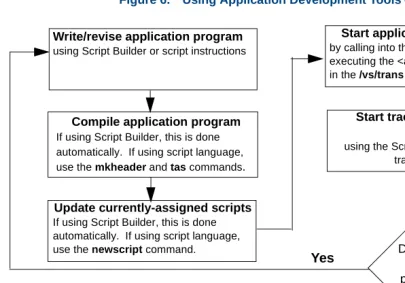
Application Design Considerations Application Development ToolsFigure 6. Using Application Development Tools — Example
Compile application program
If using Script Builder, this is done automatically. If using script language, use the mkheader and tas commands. Write/revise application program
using Script Builder or script instructions
Update currently-assigned scripts
If using Script Builder, this is done automatically. If using script language, use the newscript command.
Start application on a channel
by calling into that channel or by executing the <application_name>.T file in the /vs/trans directory.
Start trace on a process or channel
using the Script Builder menus or the trace command.
Does trace find problems?
Put the application in service. No
1
Application Design Considerations Application Development ToolsThis book describes applications created using an editor to write scripts in the tas instruction language and compiling them with the tas command and by using IRAPI, and C-language code.
Note: See Intuity CONVERSANT System Version 7.0 Application Development with Script Builder, 585-313-206, for information on developing applications with Script Builder.
See Using Voice@Work, 585-313-207, for information on developing applications with the graphical tool.
The standard set of tools available to the application developer include the UnixWare operating system, speech administration tools, tas commands, and debugging tools.
UnixWare Operating
System Tools The UnixWare tools include the vi editor, and standard UNIX commands such as grep, cat, etc.
1
Application Design Considerations Application Development ToolsFile Processing Program Tools
Several commands/programs are designed to help you process files for application development. These include:
• mkheader — This command creates files for the application to define memory used by the TAS script (see Chapter 3, TAS Script Instructions).
• tas — This program accepts a file in script source code and produces a TSM executable file (see Chapter 3, TAS Script Instructions).
• newscript — This command processes changes to all currently assigned scripts. If you write an application using script language and use tas to assemble the script, you must use newscript to ensure that the most recent version of the script is used.
Speech Administration Tools
Commands such as add, copy, erase, list are among those tools available to develop/edit speech files located in the default filesystem,
1
Application Design Considerations Application Development ToolsDebugging Tools Debugging tools include trace, truss, debug, and untas. The trace script instruction monitors specific DIPs and/or channels while the script is running and stores the information in a buffer; use the trace command to display this information.
For more information about the trace script instruction, see Appendix B, Summary of TAS Script Instructions (408). See Appendix A, “Summary of Commands,” in Intuity CONVERSANT System Version 7.0 Administration, 585-313-501, for more information about the trace command.
The irTrace(3IRAPI) functions support a variety of tracing operations including:
• channel level tracing
• process level
• all errors tracing
2
Application Structure
Overview
This chapter provides application developers with the information required to name, organize, and structure files when developing an application. It contains an overview of the basic tools available with the system, and includes information to help you:
• Develop speech files and application programs
• Organize files
• Establish naming conventions for files
2
Application Structure Application ComponentsApplication Components
Each application used with the Intuity CONVERSANT system consists of one or more of the following program components:
• Script
A script functions as a set of instructions the transaction state machine (TSM) process uses to run the application.
• Data interface process (DIP)
A DIP performs operations not easily performed in script instructions, such as extensive calculations or interfacing to a host machine. You must write a DIP module in C-language. Writing a DIP also requires an understanding of the UnixWare operating system. See Chapter 4, Data Interface Processes, for more information on writing a DIP.
• IRAPI library functions
These functions provide high-level, C-language interfaces to accomplish both voice-processing and telephony functions.
• extend functions
The extend function is a TSM instruction that executes customer-written, C-language code.
2
Application Structure Directory Structure for ApplicationsDirectory Structure for Applications
When developing applications for use with the Intuity CONVERSANT system, it is important to understand the directory structure for application
components.
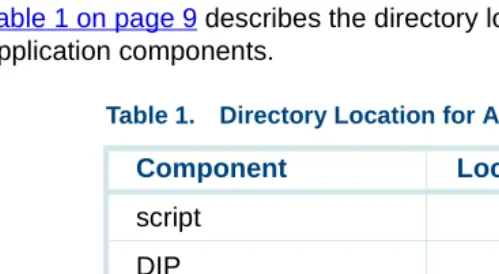
Table 1 on page 9 describes the directory location of the most common application components.
Table 1. Directory Location for Application Components
Component Location
script DIP
2
Application Structure Conventions for Naming Files and ProgramsConventions for Naming Files and Programs
To make files easy to identify and to meet the requirements of the application compiler, the system uses naming conventions for the files and programs. Most of the naming conventions consist of prefixes and suffixes that make the programs and files easy to classify into a group or type. The application name is often part of the name of the file or the program.
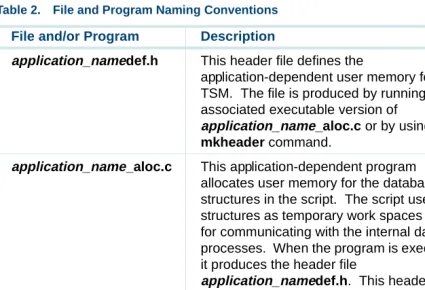
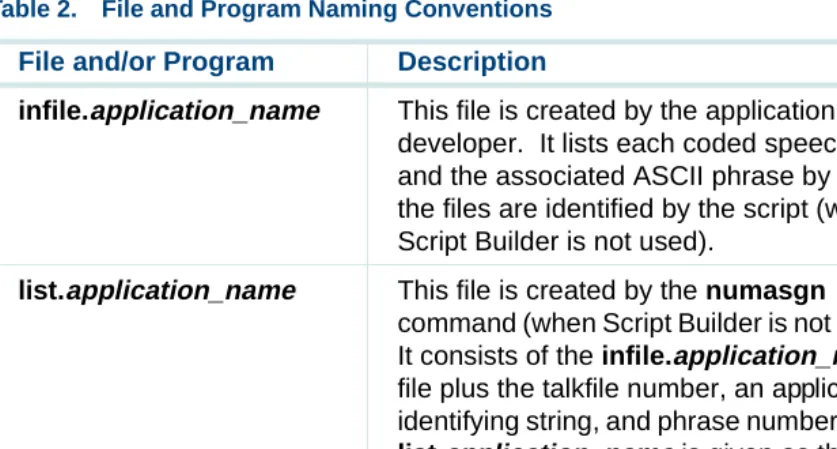
Table 2 on page 10 describes files and program names; information provided by the application developer is shown in bold-italics.
Table 2. File and Program Naming Conventions
File and/or Program Description Examples
name.c This is a C-language source program. hostmeas.c or
msg1hlr.c
name.o This is a compiled C-program in which
external references are not resolved.
hostmeas.o or msg1hdlr.o
2
Application Structure Conventions for Naming Files and Programsname.h This is a header file that contains structures and identifier definitions that do not require space allocation. This allows separately developed modules to use the same header files without repeating header file
references in several places.
et.h or hwrtype.h
DIPN Each DIP is referenced by the name DIPN
where N is a number or a word. See Chapter 4, Data Interface Processes, for more information on DIPs.
DIP0 or DIP_test
application_name.t This is a script source file for
application_name.
stock.t
application_name.T This is an executable TAS script that has been processed using the tas command with application_name.t as an argument, or an executable IRAPI application transaction definition file created with the defService command.
stock.T
Table 2. File and Program Naming Conventions
File and/or Program Description Examples
2
Application Structure Conventions for Naming Files and Programsapplication_namedef.h This header file defines the
application-dependent user memory for the TSM. The file is produced by running the associated executable version of
application_name_aloc.c or by using the mkheader command.
stock_aloc.c
application_name_aloc.c This application-dependent program allocates user memory for the database structures in the script. The script uses the structures as temporary work spaces and for communicating with the internal data processes. When the program is executed, it produces the header file
application_namedef.h. This header file defines the addresses of variables used by TSM. The mkheader command is used in creating and executing this program.
stock_aloc.c
application_name.D This file contains descriptions of application variables that normally are used as event counters.
stock.D
Table 2. File and Program Naming Conventions
File and/or Program Description Examples
2
Application Structure Conventions for Naming Files and Programsinfile.application_name This file is created by the application developer. It lists each coded speech file and the associated ASCII phrase by which the files are identified by the script (when Script Builder is not used).
infile.stock
list.application_name This file is created by the numasgn command (when Script Builder is not used). It consists of the infile.application_name
file plus the talkfile number, an application-identifying string, and phrase numbers. The list.application_name is given as the argument of the tfile script instruction (Chapter 3, TAS Script Instructions).
list.stock
application_name.pl This is the talkfile created by Script Builder. stock.pl
Table 2. File and Program Naming Conventions
File and/or Program Description Examples
2
Application Structure Coding StyleCoding Style
Establishing a consistent coding style makes the programs and scripts readable by other developers and makes debugging and maintaining them easier and quicker. Recommendations are made here concerning define statements, enum definitions, labels, and inline comments.
Define Statements Define statements used in naming addresses and numerical data make the program more understandable by explaining a value. For example, referring to the value -10 as MISTAKE is easier to interpret and understand:
#define MISTAKE ( -10)/* 1 of 15 values returned by getname */ . .
. .
jmp(r.3==MISTAKE, CORRECT)
You can put define statements in the header files and in the program by using C-language #include statements that link the definitions to the program code during assembly or compilation. Use a define statement only once for the same memory location or value. By convention, define statements are in uppercase letters. They may have underscores (_), but no embedded spaces.
2
Application Structure Coding StyleNote: If your script contains a large number of define statements, TAS may report messages such as the following during compilation, where script.t is the script source file and 1068 is the line in which the define appears:
script.t: 1068: too much defining
The limit to the number of define statements that a script can have depends on the number of defined macros and their size. If this type of message appears, reduce the number of define statements in your script.
The C preprocessor symbol __TAS__ is defined for TAS scripts. It may be used in source files used by both TAS and the C compiler.
Enum Definitions The tas compiler supports C-language enum constant definitions commonly used in header files. Therefore, you can use enum constant names
whenever you use a #define constant.
Script Labels A label is a C-style identifier followed by a colon (:). It marks the instructions that follow it. By convention, labels for major blocks of code are in uppercase letters. Labels for subordinate blocks of code are in lowercase letters. All labels must begin with an alphabetic character.
2
Application Structure Coding StyleGREET:
talk(“hello”) rts( )
GET_ID:
/* COMMENTS */
jmp( r.3 == 0, strt_idloop ) ...
strt_idloop:
getinput( ch.DG, 9) ...
rts( )
The uppercase labels GREET and GET_ID identify major blocks of code or subroutines. The lowercase label, strt_idloop, identifies a block of code under the main subroutine GET_ID.
Inline Comments Inline comments should either precede or be to the right of those lines of code where an explanation would be useful. For example, an appropriate comment for a goto script instruction or a subroutine call might be “cleanup routine” or “send voice response” to reflect the destination. Or, using the example given above for script labels, the comments for the GET_ID subroutine might be:
GET_ID:
/* This subroutine collects digits from the caller */ jmp( r.3 == 0, strt_idloop )
3
TAS Script Instructions
Overview
3
TAS Script Instructions Transaction State MachineTransaction State Machine
The transaction state machine (TSM) software process is an IRAPI application that manages the execution of tas language applications. A tas language application is comprised of a set of script instructions and commands. These script instructions, running within the TSM software, are a sequence of library function calls that manage the low level interactions required to operate the system. At any one time, the system may run several occurrences of the same script as well as the execution of several scripts concurrently within the TSM process.
Based on the arguments in the script instructions, TSM uses IRAPI function calls to send messages to the system devices and other software processes that control the access to system hardware or a local or host database. A TSM script begins to execute when a call is recognized by the Application Dispatch (AD) process on a channel to which a TSM application is assigned. TSM gains control of the channel for the script and processes script functions through the IRAPI. TSM returns ownership of the channel to the AD process when the call ends.
3
TAS Script Instructions The Script and Call ProgressionA script can be assembled (using tas), loaded, changed, or replaced without affecting the other scripts running on TSM or other IRAPI applications running on the system. To insure that TSM loads the revised script, the newscript command should be used (see Appendix A, “Summary of Commands,” in Intuity CONVERSANT System Version 7.0 Administration, 585-313-501, for more information about newscript).
The Script and Call Progression
This section describes how the system processes a call using a TSM script.
1 The system accepts a call from the central office or switch on a tip/ring or E1/T1 circuit card.
2 The tip/ring circuit card or E1/T1 circuit card then signals the tip/ring interface process (TRIP) or T1 interface process (TWIP), respectively, that it has accepted the call.
3 TRIP/TWIP signals the AD process it has accepted the call.
4 AD checks a service table to determine the service and process required for the call. In this example, TSM is the selected process.
5 TSM reads the script instructions and allows the script to control the sequence of events during a call.
6 AD takes control when the call has ended.
3
TAS Script Instructions The Script and Call ProgressionCall Progression Starting Conditions
Before the script takes control, the following sequence of conditions must be met:
• A caller dials and reaches the system’s incoming telephone facility.
• The software recognizes the ringing condition.
• AD checks an internal table to determine the script to run for the call.
• All script memory is set to zero and the time-outs are set to their default values.
Script Control
When all the starting conditions are met, the script takes control and typically executes the following functions during the call:
• Answers the incoming line (takes it off hook)
• Sends recorded voice messages to the caller
• Listens to touch-tone signals
• Accesses information from the host or from the disk
• Sends information to a host or a local database
• Records transaction events on disk
• Takes action when a caller does not respond
3
TAS Script Instructions The Script and Call ProgressionTSM Control
TSM terminates an active script if one of the following conditions exists:
• The script executes a quit instruction.
• The maintenance software provides commands to seize control of equipment at any time, thereby terminating transactions on one or more channels without notice.
• A program error causes a script to terminate, such as when a goto or quit is missing after the last instruction.
Script Termination
When the script ends, TSM performs the following functions:
• Puts the telephone line on hook if the script did not disconnect
• Stops voice play
• Discards any pending messages from the host
• Sends the CDH a message about the transaction and a copy of the event memory
3
TAS Script Instructions Data StorageData Storage
The script has the following four areas where it temporarily stores data for each call it handles. TSM clears these areas at the beginning of a new call.
• User memory
User memory is a work area for the script to store database information, global variables, and data sent to and from the host.
The script writer is responsible for partitioning user space. This must be done carefully by assigning data addresses or by using the tool
mkheader, discussed in Chapter 2, Application Structure, andIntuity CONVERSANT System Version 7.0 Administration, 585-313-501. Each script is allocated 512 bytes for user space, but automatic allocations ensure up to 51,200 bytes if script data defines require additional space.
• Event memory
The event memory contains a record of the events that occurred for each transaction. Event memory consists of 100, 32-bit integers.
• Registers
3
TAS Script Instructions Data StorageRegister r.0 (and occasionally r.1 and r.2) is a return register that can be used to indicate the results of a specific instruction. For example, the dbase instruction (described under Script Instructions on page 33) sets
r.0 to a positive number on successful completion, which indicates the message contents. In general, a negative number indicates that the instruction failed. For example, if a database instruction that is supposed to receive data did not return any data, then r.0 is set to -2 after an instruction time-out period (45 seconds by default). See the nwitime instruction later in this chapter or in Appendix B, Summary of TAS Script Instructions.
Registers can also be used for indirect addressing.
Note: Because most of the instructions store return values in r.0, it is recommended that this register not be used for general purposes. Register r.2 and r.3 are used to pass information to subroutines when a subroutine call is made with up to two arguments specified. The called subroutine reads the first field of information from r.3 and the second field from r.2.
• Stacks
3
TAS Script Instructions Call Data CollectionCall Data Collection
Both the script and TSM collect call data during a transaction. The script can store application data in event memory and save any application-related data. The data might be response time, user ID, request types, number of invalid selections, and an event counter. TSM collects generic data such as the script name, channel number, start time, and stop time and stores it in a call data record.
At the end of a call, TSM copies the generic data it has collected and the contents of event memory into a call data record and sends it to call data handler (CDH). Call data is stored in the ORACLE database.
The reports generated from the database are available to the system operator (see “Reports” in Chapter 8, “Daily Administration”, Intuity CONVERSANT System Version 7.0 Administration, 585-313-501).
3
TAS Script Instructions Call Data CollectionThe following is an example of the .D file syntax, where WS refers to a tab or blank space and STR refers to the literal string STR:
event_number [WSSTR] [WSlabel_string]
The following is an example of the .D file syntax, where event memory 1 stores string data and displays it under the label “User Name”:
1 STR User Name
A sufficient amount of event memory space for storage of the strings should be allocated. This includes 1 byte for the null character at the end. In addition, the contents of one event counter should not overlap the contents of another event counter. You should also make sure the script copies the string starting at the event counter specified in the .D file.
3
TAS Script Instructions Script ConventionsScript Conventions
This section provides rules that must be followed when writing scripts. They include the syntax, argument structure and types, and address mode and format for script instructions.
Script Syntax The syntax used for a script instruction is an instruction mnemonic followed by any required and optional arguments enclosed in parentheses. There are some conventions that appear only in this book and are not part of an actual script. Brackets ([ ]) indicate an optional argument for an instruction and the less-than or greater-than symbols (< >) indicate a label instruction for a program segment.
Table 3 on page 26 lists the characters used in the script syntax.
Table 3. Script Syntax Characters
Character Meaning Example
parentheses ( )
Encloses arguments in an instruction load (ch.ONE,ch.TWO)
3
TAS Script Instructions Script Conventionscomma ,
Optional character that separates the arguments of an instruction
(you may also use spaces to separate arguments, but the use of commas is strongly encouraged)
tchars (ch.ONE, ’F’)
period .
Required syntax character that separates an argument type and argument value
r.1 — argument type is a register, register number is 1
asterisk * or
ampersand &
Preceding a type, signifies that the value is the number of a script register containing the user space address; type without an asterisk or ampersand signifies that the value is an address
*ch.1 — character string at address in register 1
ch.1024 — character string at address 1024
Table 3. Script Syntax Characters
3
TAS Script Instructions Script ConventionsDestination and Source Arguments
The address modes are represented in Table 4 on page 28.
Arguments to Script Instructions
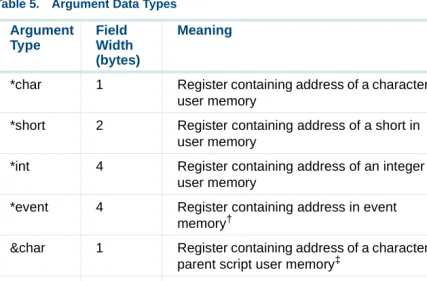
Acceptable abbreviations for argument types are shown in the Table 5 on page 30. The following is an example of an argument format, where type is one of the argument types listed in Table 5 on page 30, and # is a numerical value or a define statement or an enum symbol:
type.#
You may write numerical values in decimal (256) or hexadecimal (0x100) notation. See Define Statements on page 14 in Chapter 2, Application Structure, for additional information about define statements.
Table 4. Destination and Source Addresses
Address Modes
type.dst All types except immediate and time type.src All types
3
TAS Script Instructions Script ConventionsAddress Modes
The data types are summarized in Table 5 on page 30. The values associated with character, short, and integer types represent user space addresses defined in the script or in header files.
Most of the script instructions do not check data typing. Thus, in most instances, the outcome of using character, short, or integer typing has no effect on the outcome of the instruction. The instructions are sensitive, however, to the contents of the specified user space locations. If characters are required, a null-terminated ASCII string must start at the specified address. Similarly, a short integer (2 bytes) or long integer (4 bytes) must start at the specified address if the instruction requires an integer value. The subsequent instruction descriptions indicate when character values result in or are required by the ctype.dest or ctype.src descriptions. The type.dest or type.src descriptions require short or long integer values. Only the atoi and itoa instructions convert characters to integers and integers to characters.
Although most instructions allow character typing for integer values and integer typing for character values, this practice should be avoided. Integer types must be assigned to even user space byte addresses while character strings may begin at even or odd locations. The integer types are assigned values ranging from -32768 to 32767 (short) and -2147483648 to
3
TAS Script Instructions Script ConventionsIn general, an integer variable type (int or short) may be used anywhere that an integer constant (immed) is used. Integer variables allow more flexibility with instruction arguments, but TSM requires more time to retrieve the integer variable values.
Table 5. Argument Data Types
Argument Type
Field Width (bytes)
Meaning Example
immed* — Actual value, for example, a number, string, or string address
4, ”xyz”, 64,”ABC” time 4 Operating system time value. A value
following (.) is ignored.
t.0
reg 4 Contents of script register r.1
char 1 Character address in user memory ch.VARIABLE
short 2 Short address in user memory sh.SHORT
int 4 Integer address in user memory int.NUMBER
event 4 Address in event memory2 ev.1
3
TAS Script Instructions Script Conventions*char 1 Register containing address of a character in user memory
*ch.1
*short 2 Register containing address of a short in user memory
*sh.1
*int 4 Register containing address of an integer in user memory
*int.1
*event 4 Register containing address in event memory†
*ev.1
&char 1 Register containing address of a character in parent script user memory‡
&ch.1
&short 2 Register containing address of a short in parent script user memory3
&sh.1
&int 4 Register containing address of an integer in parent script user memory3
&int.1
script - Name of script (string). A value following (.) is ignored.3
script.o
Table 5. Argument Data Types
Argument Type Field Width (bytes) Meaning Example
3
TAS Script Instructions Script ConventionsNumbers following the dot (.) in argument specification may also be expressed as simple arithmetic expressions involving addition and subtraction of integer constants. For example, the argument
char.VARIABLE+12 refers to the character string starting at the user memory &script - Name of nearest parent script (string). Null
string if there is no parent script. A value following (.) is ignored.3
&script.o
X - Data passed via the exec instruction. A value following (.) is ignored. See exec in Appendix B, Summary of TAS Script Instructions.
X.0
Chan 4 The channel number on which the script is running. A value following (.) is ignored.
Ch.0
* The immed argument type specification is optional. Arguments with no type specification are assumed to be immed.
† Event memory is write-only for the script, since the buffer for this data is maintained inside the IRAPI library, not TSM.
‡ See details for the subprog instruction in Appendix B, Summary of TAS Script Instructions. Table 5. Argument Data Types
Argument Type
Field Width (bytes)
Meaning Example
3
TAS Script Instructions Script Instructionsoffset 12 bytes after the offset defined by the VARIABLE symbol. You can also use C-preprocessor # define symbols, positive and negative numbers, and parenthetical expressions.
Script Instructions
The following sections detail the script instructions according to similarities in functionality.
Voice Output Instructions
In this section, instructions that control speech output are described. These instructions send voice data to the Tip/Ring, E1/T1, and speech and signal processing (SSP or SP) circuit cards. Each description is followed by a brief example using that instruction. An example at the end of this section illustrates how the instructions described here might be used in a script.
• tfile("listfile 1"[,"listfile2" ...])
3
TAS Script Instructions Script InstructionsEach phrase in the talkfile is identified by a unique number and string in the phrase listfile. Because TAS uses this information, the tfile instruction must be specified in the script before the first voice output instruction. The phrase listfile usually is named application_name.pl. Phrases in the primary listfile are not bound to the talkfile when the script is compiled. They will be played from the talkfile currently in effect when the talk instruction is executed. However, any additional listfiles given in the file instruction have the talkfile and phrase number bound when the script is compiled. Phrases selected from these listfiles are not affected by changes in the talkfile that occur during script execution.
The following is an example of the tfile instruction: tfile("list.stocks")
This instruction tells the TAS to use the list.stocks speech database for the next transaction.
• tchars(ctype.src[,type.inflection])
The tchars instruction puts its first argument into a queue for speaking. The first argument is a null terminated string of alphanumeric characters. This character string is spoken character-by-character, for example, letters and digits. The second argument, when specified, controls the speech inflection.
3
TAS Script Instructions Script InstructionsTable 6. Speech Inflection Values
Inflection One Phrase Multiple Phrases
r Rising Rising on first;
medial on others
m Medial Medial on all
f Falling Falling on last;
medial on others
t Falling Rising on first;
3
TAS Script Instructions Script InstructionsThe following example of the tchars instruction directs the script to speak the contents of INITIALS with falling inflection on the last character and medial inflection on all other characters.
tchars(INITIALS,’f’)
• tnum(type.src[,type.inflection])
The tnum instruction puts the phrases that speak the numeric value, specified by the first argument, in a queue. It interprets the numeric value of the first argument and selects recorded phrases that say the number in a natural way. For example, 202 is a number that is spoken as a single phrase — two-hundred-two. The second argument, when specified, controls the speech inflection.
Note: The tnum instruction does not interpret numeric values in any language other than English because the rule