555-230-521
Comcode 108596545
Issue 4
December 1999
DEFINITY
Enterprise Communications Server
Release 8
All Rights Reserved Printed in U.S.A. Notice
Every effort was made to ensure that the information in this book was complete and accurate at the time of printing. However, information is subject to change.
Your Responsibility for Your System’s Security
Toll fraud is the unauthorized use of your telecommunications system by an unauthorized party, for example, persons other than your com-pany’s employees, agents, subcontractors, or persons working on your company’s behalf. Note that there may be a risk of toll fraud associated with your telecommunications system and, if toll fraud occurs, it can result in substantial additional charges for your telecommunications services.
You and your system manager are responsible for the security of your system, such as programming and configuring your equipment to pre-vent unauthorized use. The system manager is also responsible for reading all installation, instruction, and system administration docu-ments provided with this product in order to fully understand the fea-tures that can introduce risk of toll fraud and the steps that can be taken to reduce that risk. Lucent Technologies does not warrant that this product is immune from or will prevent unauthorized use of com-mon-carrier telecommunication services or facilities accessed through or connected to it. Lucent Technologies will not be responsible for any charges that result from such unauthorized use.
Lucent Technologies Fraud Intervention
If you suspect that you are being victimized by toll fraud and you need technical support or assistance, call Technical Service Center Toll Fraud Intervention Hotline at 1 800 643-2353.
Federal Communications Commission Statement
Part 15: Class A Statement. This equipment has been tested and found to comply with the limits for a Class A digital device, pursuant to Part 15 of the FCC Rules. These limits are designed to provide reasonable protection against harmful interference when the equipment is operated in a commercial environment. This equipment generates, uses, and can radiate radio-frequency energy and, if not installed and used in accor-dance with the instructions, may cause harmful interference to radio communications. Operation of this equipment in a residential area is likely to cause harmful interference, in which case the user will be required to correct the interference at his own expense.
Part 68: Network Registration Number. This equipment is registered with the FCC in accordance with Part 68 of the FCC Rules. It is identi-fied by FCC registration number AS593M-13283-MF-E.
Part 68: Answer-Supervision Signaling. Allowing this equipment to be operated in a manner that does not provide proper answer-supervision signaling is in violation of Part 68 Rules. This equipment returns answer-supervision signals to the public switched network when: Answered by the called station
Answered by the attendant
Routed to a recorded announcement that can be administered by the CPE user
This equipment returns answer-supervision signals on all DID calls forwarded back to the public switched telephone network. Permissible exceptions include when a call is unanswered, a busy tone is received, and a reorder tone is received
Canadian Department of Communications (DOC) Interference Information
This digital apparatus does not exceed the Class A limits for radio noise emissions set out in the radio interference regulations of the Canadian Department of Communications.
dépassant les limites applicables aux appareils numériques de la class A préscrites dans le reglement sur le brouillage radioélectrique édicté par le ministére des Communications du Canada.
European Union Declaration of Conformity
The “CE” mark affixed to the DEFINITY® equipment described in this book indicates that the equipment conforms to the following Euro-pean Union (EU) Directives:
Electromagnetic Compatibility (89/336/EEC) Low Voltage (73/23/EEC)
Telecommunications Terminal Equipment (TTE) i-CTR3 BRI and i-CTR4 PRI
For more information on standards compliance, contact your local dis-tributor.
Trademarks
See the Preface of this document for a list of applicable trademarks and registered trademarks.
Ordering Information
Call: Lucent Technologies BCS Publications Center
Voice 1 800 457-1235 International Voice 317 322-6416 Fax 1 800 457-1764 International Fax 317 322-6699
Write: Lucent Technologies BCS Publications Center P.O. Box 4100
Crawfordville, IN 47933
Order: Document No. 555-230-521 Comcode 108596545 Issue 4, December 1999
You can be placed on a Standing Order list for this and other docu-ments you may need. Standing order will enable you to automatically receive updated versions of individual documents or document sets, billed to account information that you provide. For more information on standing orders, or to be put on a list to receive future issues of this document, contact the Lucent Technologies Publications Center.
Lucent Technologies National Customer Care Center
Lucent Technologies provides a telephone number for you to use to report problems or to ask questions about your call center. The support telephone number is 1-800-242-2121. For technical support, customers outside the United States should call their Lucent Technologies Repre-sentative or Distributor.
European Union Declaration of Conformity
Lucent Technologies Business Communications Systems declares that the equipment specified in this document conforms to the referenced European Union (EU) Directives and Harmonized Standards listed below:
EMC Directive89/336/EEC Low Voltage Directive73/23/EEC
The “CE” mark affixed to the equipment means that it conforms to the above Directives.
Heritage Statement
Lucent Technologies—formed as a result of AT&T’s planned restruc-turing—designs, builds, and delivers a wide range of public and private networks, communication systems and software, consumer and busi-ness telephone systems, and microelectronics components. The world-renowned Bell Laboratories is the research and development arm for the company.
Comments
To comment on this document, return the comment card at the front of the document.
Acknowledgment
Call Vectoring/Expert Agent Selection (EAS) Guide 555-230-521 December 1999 Contents
iii
Contents
Contents iii
Preface — About this Document xvii
■ Contents and Organization of the Guide xvii ■ Intended Audience and Use of the Guide xx ■ Conventions Used in this Document xx
■ Trademarks xx
■ Related Documents xxi
Administration Documents xxi
Installation, Upgrades, and Maintenance
Documents xxii
Call Center Documents xxiv
End Users xxv
■ How to Get Help xxv
■ How to Make Comments About
this Document xxvi
1
Call Vectoring and Expert AgentSelection Overview and Exercises 1-1
■ Introduction 1-1
Exercises to test your knowledge of Call
Vectoring and EAS Basics 1-2
■ What is Call Vectoring? 1-3
■ Call Vectoring Features 1-6
■ Benefits of Call Vectoring 1-8
■ EAS Basics 1-10
Skill-Related (EAS) Terms 1-10
Benefits of the EAS Feature 1-11
DEFINITY ECS/switch EAS Summary of
Capabilities 1-13
Call Vectoring/Expert Agent Selection (EAS) Guide 555-230-521 December 1999 Contents
iv
■ Evaluation of Exercise D —
Call Vectoring with Other Features 1-22 ■ Exercise E: Call Vectoring Benefits and Applications 1-23 ■ Evaluation of Exercise E: Call
Vectoring Benefits and Applications 1-24 ■ Exercise F — EAS (Expert Agent
Selection) with DEFINITY ECS/switch 1-25 ■ Evaluation of Exercise F —
EAS with DEFINITY ECS/switch 1-26
2
Creating and Editing Call Vectors —The Basics 2-1
■ Introduction 2-1
■ Methods for Entering a Vector On-Line 2-1 ■ Call Vector Form — Basic Screen Administration 2-2
■ Inserting a Vector Step 2-5
■ Deleting a Vector Step 2-6
■ How to Create and Construct a Vector 2-6 Step 1: Queuing a Call to the Main Split 2-7 Step 2: Providing Feedback and
Delay Announcement 2-8
Step 3: Repeating Delay Announcement
and Feedback 2-10
Step 4: Queuing a Call to a Backup Split 2-11 Step 5: Checking the Queue Capacity 2-12 Step 6: Checking for Non-Business Hours 2-13
3
Call Vectoring Fundamentals 3-1■ Introduction 3-1
■ Call Management 3-1
Call Flow 3-2
Caller Control 3-3
Call Queuing to Splits 3-4
Agent Work Mode 3-5
Calling Party Feedback 3-6
Dialed Number Identification Service (DNIS) 3-7
■ Vector Processing 3-7
Vector Directory Number 3-8
Vector Control Flow 3-14
Call Vectoring/Expert Agent Selection (EAS) Guide 555-230-521 December 1999 Contents
v
4
Call Vectoring On-Site Customer Applications 4-1■ Introduction 4-1
■ Example 1 - Customer Service Center 4-3 ■ Example 2 - Automated Attendant 4-4 ■ Example 3 - DIVA and Data/Message Collection 4-5 ■ Example 4 - Distributed Call Centers 4-8
■ Example 5 - Help Desk 4-10
■ Example 6 - Insurance Agency/Service Agency 4-11 ■ Example 7 - Warranty Service (with EAS) 4-15 ■ Example 8 - Resort Reservation Service (with EAS) 4-19
Placing the Reservation 4-19
Call-Back Provisions 4-22
■ Examples 9 through 13 - Attendant Routing 4-23 Example 9 - Local Attendant Group Access Code 4-24 Example 10 - Incoming Trunk Calls to
Attendant Group 4-24
Example 11 - Incoming LDN Calls 4-25
Example 12 - QSIG CAS 4-25
Example 13 - Night Station Service 4-26
■ Vector Exercises 4-27
Exercise 1: Emergency and Routine Service 4-27 Exercise 2: Late Caller Treatment 4-29 Exercise 3: Messaging Option 4-31
5
Basic Call Vectoring 5-1■ Introduction 5-1
■ Command Set 5-2
■ TREATMENT Commands 5-2
announcement Command 5-3
wait-time Command 5-5
Multiple Audio or Music Sources on Delay 5-6
busy Command 5-8
disconnect Command 5-9
converse-on split Command 5-9
■ ROUTING Commands 5-12
Call Vectoring/Expert Agent Selection (EAS) Guide 555-230-521 December 1999 Contents
vi
messaging split Command 5-15
route-to number Command 5-16
■ BRANCHING/PROGRAMMING Commands 5-19 goto step and goto vector Commands 5-19
stop Command 5-21
■ Vector Chaining 5-22
6
Advanced Vector Routing -- EWTand ASA (DEFINITY G3V4 and DEFINITY ECS) 6-1
■ Introduction 6-1
■ Command Set 6-2
■ Expected Wait Time (EWT) 6-2
EWT for a Split 6-3
EWT for a Call 6-3
Passing EWT to a VRU 6-4
The EWT Algorithm 6-4
When to Use Wait Time Predictions 6-5
Examples 6-6
Factors that Affect the Value of EWT 6-9
Troubleshooting EWT 6-10
■ Rolling Average Speed of Answer (ASA) 6-10 Rolling ASA Split Calculation 6-11
Rolling ASA VDN Calculation 6-11
Rolling ASA Considerations 6-12
Example 6-12
■ VDN Calls 6-13
Counted Calls 6-13
Example 6-14
7
ANI /II-Digits Routing and CallerInformation Forwarding (CINFO) 7-1
■ Introduction 7-1
■ Command Sets 7-2
■ ANI Routing 7-3
ANI Routing Example 7-4
Vector Routing Tables with ANI 7-4
Call Vectoring/Expert Agent Selection (EAS) Guide 555-230-521 December 1999 Contents
vii
II-Digits Routing Example 7-8
■ Caller Information Forwarding 7-9
Detailed Operation 7-9
CINFO Vector Example 7-11
CINFO Interactions 7-12
8
Information Forwarding(DEFINITY ECS/switch Release 6.3 and newer) 8-1
■ Introduction 8-1
■ Benefits of Enhanced Information Forwarding 8-2
■ Network Requirements 8-4
■ Enhanced Information Forwarding 8-4 Forwarding of Call-Related Information 8-5 Forwarding Collected Digits with Interflowed Call 8-5 Forwarding Accumulated In-VDN Time 8-5 Transport via Globally-Supported Methods 8-6 Providing LAI Backward Compatibility 8-7 ■ Determining User Information Needs 8-8
A Quick Example 8-10
■ Simple Troubleshooting for Information Forwarding 8-11
9
Adjunct (ASAI) Routing 9-1■ Introduction 9-1
■ Functions and Examples 9-2
Sending the Call Route Request 9-2 Awaiting the Response to the Call Route Request 9-6 Receiving and Implementing the Call Route 9-7
■ Phantom Calls 9-8
How Do Phantom Calls Work? 9-8
How Are Phantom Calls Used? 9-9
How Do Phantom Calls Affect Call Vectoring? 9-10
Phantom Call Administration 9-10
■ Single-Step Conference 9-11
How Does SSC Work With Call Vectoring? 9-11 ■ Multiple Outstanding Route Requests 9-12
Call Vectoring/Expert Agent Selection (EAS) Guide 555-230-521 December 1999 Contents
viii
10
Call Prompting 10-1■ Introduction 10-1
■ Command Set 10-2
■ Touch-Tone Collection Requirements 10-2 ■ Call Prompting Digit Entry -- collect digits Command 10-3 Removing Incorrect Digit Strings 10-4 Entering Variable-Length Digit Strings 10-4
Entering Dial-Ahead Digits 10-5
■ Functions and Examples 10-5
Treating Digits as a Destination 10-6 Using Digits to Collect Branching Information 10-7 Using Digits to Select Options 10-10 Displaying Digits on the Agent’s Set 10-10 Passing Digits to an Adjunct 10-12 Creating Service Observing Vectors 10-13 ■ Dial-Ahead Digits -- collect digits Command 10-14 ■ ASAI-Requested Digit Collection 10-18 ■ ASAI-Provided Dial-Ahead Digits
--collect digits Command 10-18
11
Look-Ahead Interflow (LAI) 11-1■ Before You Start 11-2
■ Example of Two Switch Configuration 11-3
■ Command Set 11-4
■ How Traditional Look-Ahead Interflow Works 11-6
Example 1: Traditional LAI 11-7
Receiving Switch Operation 11-8
■ How Enhanced LAI Works 11-10
The Simple Way to Achieve FIFO 11-10 Detailed Information About the interflow-qpos
Conditional 11-10
When Does a Call Not Interflow? 11-12
How is the Minimum EWT Set? 11-13
Call Vectoring/Expert Agent Selection (EAS) Guide 555-230-521 December 1999 Contents
ix
Example 4: LAI in a Tandem Switch Configuration 11-16
Sending Switch Operation 11-16
Tandem Switch Operation 11-17
Far End Switch Operation 11-17
■ DNIS and VDN Override in an LAI Environment 11-18
Answering Agent’s Display 11-18
Originator’s Display 11-19
■ LAI with Network ADR 11-19
■ Multisite Applications for Enhanced LAI 11-21
■ LAI Considerations 11-21
■ Troubleshooting for LAI 11-22
12
Best Service Routing (BSR) 12-1■ Introduction 12-1
■ Benefits of Best Service Routing 12-2
■ Before You Start 12-5
Switch Requirements 12-5
Network Requirements 12-6
■ Terms to Know 12-7
■ Single-Site BSR 12-10
Command Set 12-11
How BSR Determines the Best Resource 12-12 Example 1: Basic Single-Site BSR 12-14 User Adjustments in Single-site BSR 12-17 Example 2: Single-Site BSR with Adjustments 12-18 ■ Planning and Administering Single-Site BSR 12-22
Planning 12-22
Administration 12-22
■ Troubleshooting for Single-Site BSR 12-24
■ Multi-site BSR 12-24
Multi-site BSR Command Set 12-25
Multi-site BSR Applications 12-27
Call Vectoring/Expert Agent Selection (EAS) Guide 555-230-521 December 1999 Contents
x
Example 4: Multi-site BSR with Limited Trunking 12-37 Example 5: Multi-site BSR with Slow Networks 12-43 Example 6: Handling Excessive Wait Times 12-47 ■ Planning and Administering Multi-Site BSR 12-47 Define the Purpose of the Application 12-47 Select or Create the Elements of the
Application Plan 12-48
Administer the Application on the Switch 12-48 ■ Troubleshooting for Multi-Site BSR 12-51
■ Tips for Writing BSR Vectors 12-52
13
Attendant Vectoring 13-1■ Introduction 13-1
■ Command Set Overview 13-2
■ Attendant Vectoring Overview 13-3
Vector Form 13-3
TN Assignments 13-4
Restrictions 13-4
Attendant Queue 13-4
Hunt Group Queue 13-4
Redirecting Calls to Attendant VDNs 13-5
Night Service 13-5
Attendant VDNs 13-6
■ Attendant Vectoring and Attendant VDNs 13-7 Intercept Attendant Group Calls 13-7
Allow Override 13-8
Interflow Between Vectors 13-8
Music Source 13-9
■ Attendant Vectoring and Multiple Queueing 13-9 Restrict queueing to only one type of queue 13-9 Allow multiple priority queueing within hunt queues 13-9 Allow multiple hunt group queueing 13-9
■ TREATMENT Commands 13-10
announcement Command 13-10
busy Command 13-10
disconnect Command 13-10
Call Vectoring/Expert Agent Selection (EAS) Guide 555-230-521 December 1999 Contents
xi
■ ROUTING Commands 13-11
queue-to attd-group Command 13-11
queue-to attendant Command 13-12
queue-to hunt-group Command 13-12
route-to number Command 13-13
■ BRANCHING/PROGRAMMING Commands 13-13
goto step Command 13-14
goto vector Command 13-14
stop Command 13-14
14
Expert Agent Selection 14-1■ Introduction 14-1
■ Expert Agent Selection (EAS) Terminology 14-2 ■ What is Expert Agent Selection (EAS)? 14-4
■ The EAS Advantage 14-5
Skill-based Call Distribution 14-5 Greatest Need Call Distribution 14-5 Percent Allocation Call Distribution 14-5 ACD Queuing and Vector Commands 14-6 ■ EAS-PHD — 20 Skills/16 Skill Levels 14-6 ■ DEFINITY ECS Administration for the EAS Feature 14-6 System Parameters Customer Option 14-6
Dial Plan 14-6
VDN Form 14-7
Vector Form 14-7
Hunt Group Form 14-7
Agent Login ID Form 14-7
Station Form 14-7
■ Identifying Caller Needs 14-8
DNIS/ISDN Called Party 14-9
Call Prompting/VRU Digits/CINFO Digits 14-10
Host Database Lookup 14-10
Direct Agent Calling 14-10
■ Functions and Examples 14-11
Administering Skills 14-11
Call Vectoring/Expert Agent Selection (EAS) Guide 555-230-521 December 1999 Contents
xii
Logical Agent Capability 14-20
Delivering the Call to the Skill Queue 14-21 Routing the Call to an Agent 14-25
■ Interactions Involving EAS 14-32
Feature Interactions 14-32
Adjunct Interactions 14-38
■ Other Forms that Support EAS Agent LoginID 14-42 ■ Upgrading to the DEFINITY
ECS/switch EAS Environment 14-46
A
Call Vectoring Commands A-1■ Introduction A-1
■ Command Description/Reference A-1
■ Command/Option Summary A-3
■ Command Job Aid A-6
■ Command Directory A-16
■ Adjunct Routing Command A-17
■ Announcement Command A-24
■ Busy Command A-26
■ Check Command A-28
■ Collect Digits Command A-34
■ Consider Command A-39
■ Converse-on Command A-45
■ Disconnect Command A-56
■ Goto Step Command A-58
■ Goto Vector Command A-65
■ Messaging Command A-72
■ Queue-to Command A-76
■ Reply-best A-81
■ Route-to Command A-83
■ Stop Command A-92
■ Wait-time Command A-94
B
Call Vectoring Management and Monitoring B-1■ Introduction B-1
■ Implementation Requirements for the
Call Vectoring/Expert Agent Selection (EAS) Guide 555-230-521 December 1999 Contents
xiii
■ Enabling the Vector Disconnect Timer B-8 ■ Upgrading to a Call Vectoring Environment B-8
■ Changing and Testing a Vector B-9
C
Considerations for the Vectoring Features C-1■ Introduction C-1
■ Basic Call Vectoring Considerations C-1 ■ Call Prompting Considerations C-2 ■ Adjunct Routing Considerations C-3 ■ Transferring Calls to VDNs Considerations C-4 ■ VDN Return Destination Considerations C-4
User Scenario — Remote Access with
Host Provided Security C-6
User Scenario — Saving in Trunk Facilities
Between Call Centers C-8
D
Advanced Multi-Site Routing D-1■ Introduction D-1
■ Application Architecture in Multi-Site BSR D-1
■ User Adjustments D-2
■ Status Polling in BSR D-4
How Long Do Status Polls Take? D-4
Intelligent Polling D-5
■ Efficient Polling Patterns in Large Networks D-6 How Many Switches Should One Switch Poll? D-6 Which Remote Switches Should Each Switch Poll? D-8 ■ Considerations for Low Volume Splits and Skills D-10
Minimizing Variations in Wait Time D-11 ■ Advanced Information Forwarding D-15
Non-QSIG Protocol D-16
QSIG Trunk Group D-16
“Send Codeset 6/7 LAI IE” Option Interactions D-17
E
Troubleshooting Vectors E-1■ Introduction E-1
■ Criteria for Success/Failure of
Call Vectoring Commands E-2
Call Vectoring/Expert Agent Selection (EAS) Guide 555-230-521 December 1999 Contents
xiv
■ Unexpected Command Operations E-9
■ Converse Command Debugging E-17
■ Tracking Unexpected Vector Events E-19
Display Events Form E-20
Display Events Report E-21
Summary of Vector Events E-22
■ Clearing Events E-34
F
Functional Differences for the DEFINITY G2 and the DEFINITY ECSCall Vectoring and EAS F-1
■ Introduction F-1
■ Differences in Command Function F-2 Queue-to Split and Check Split F-2
Goto Step and Goto Vector F-4
Route-to Number F-5
Announcement F-6
Wait-time F-7
Busy F-7
■ General Call Vectoring Functional Differences F-8 ■ Differences in Defining/Interpreting Split Flows F-11
CMS R3 Standards F-11
■ EAS Differences Between the
DEFINITY G2 and the DEFINITY ECS F-13
G
Interactions Between CallVectoring/EAS and BCMS/CMS G-1
■ Introduction G-1
■ CentreVu CMS/BCMS Tracking in a
Call Vectoring Environment G-2
Defining and Interpreting Call Flows G-2 ■ Using CentreVu CMS and BCMS Reports to Evaluate
Call Vectoring Activity G-13
CentreVu CMS Reports G-13
BCMS Reports G-14
■ Using CMS in an EAS Environment G-15
Call Vectoring/Expert Agent Selection (EAS) Guide 555-230-521 December 1999 Contents
xv
H
Operation Details for the Route-to Command H-1■ Introduction H-1
I
Detailed Call Flow and Specificationsfor Converse—VRI Calls I-1
■ Introduction I-1
■ Converse Call Placement I-2
■ Data Passing I-3
■ VRU Data Collection I-6
■ Script Execution I-7
■ Data Return I-7
■ Script Completion I-10
■ DEFINITY ECS/switch Data Collection I-10
J
Security Issues J-1■ Introduction J-1
■ Remote Access J-2
Front-Ending Remote Access J-2
Replacing Remote Access J-3
■ EAS J-3
■ Limiting Outside Access Using
VDN COR Restrictions J-4
■ Vector Initiated Service Observing J-4
■ Voice Response Integration J-5
■ Attendant Vectoring J-5
K
Setting Up a Call Center K-1■ Introduction K-1
■ Call Vectoring/Non-EAS Option K-2
■ Call Vectoring/ EAS Option K-11
L
Converting a Call Center to EAS L-1■ Introduction L-1
■ Step 1: Pre-EAS Cutover Administration
for the System L-2
■ Step 2: Pre-EAS Cutover
Administration for the CentreVu CMS L-6 ■ Step 3: Pre-EAS Cutover Administration for AUDIX L-6 ■ Step 4: Pre-EAS Cutover Administration
Call Vectoring/Expert Agent Selection (EAS) Guide 555-230-521 December 1999 Contents
xvi
■ Step 5: Pre-EAS Cutover Administration for ASAI L-7
■ Step 6: EAS Cutover L-7
M
Feature Availability M-1■ Introduction M-1
N
Improving Performance N-1■ Introduction N-1
■ Looping Examples N-3
Audible Feedback N-3
Lookahead Interflow N-4
Check N-6
■ Other Examples N-8
After Business Hours N-8
Lookahead Interflows N-9
■ Relative Processing Cost of Vector Commands N-10
O
DEFINITY Call Center Capacities forCall Vectoring, EAS and Related ACD Software O-1
■ Introduction O-1
■ DEFINITY ECS R8 Capacities O-2
■ DEFINITY ECS R7 and DEFINITY ECS
R6.3 Capacities O-6
■ DEFINITY ECS R5, DEFINITY ECS
R6.1, and DEFINITY ECS R6.2 Capacities O-10 ■ DEFINITY G3V2, DEFINITY G3V3, and
DEFINITY G3V4 Switch Capacities O-12 ■ DEFINITY G3V1 Switch Capacities O-14 ■ CentreVu CMS Maximum Capacities O-15
GL
Glossary and Abbreviations GL-1Preface — About this Document
xvii Contents and Organization of the Guide
Call Vectoring/Expert Agent Selection (EAS) Guide 555-230-521 December 1999
Preface — About this Document
Contents and Organization of the
Guide
This guide discusses the DEFINITY Enterprise Communications Server (ECS) Call Vectoring and Expert Agent Selection (EAS) features. The chapters are grouped in the following categories:
n Overview/Introductory Material -- Chapter 1 through Chapter 4 n Call Vectoring Options -- Chapter 5 through Chapter 13 n Expert Agent Selection -- Chapter 14
n Reference Materials -- Appendix A through Appendix O
The following table gives a brief description of each chapter and appendix in this book.
Title Contents
Chapter 1 Call Vectoring and Expert Agent Selection Overview and Exercises
High-level description of vectoring and EAS.
Includes exercises and reading that is prerequisite to attending
Instructor-led course(s).
Chapter 2 Creating and Editing Call Vectors — The Basics
Brief tutorial and examples on how to create vectors using the SAT terminal interface.
Call Vectoring/Expert Agent Selection (EAS) Guide 555-230-521 December 1999 Preface — About this Document
xviii Contents and Organization of the Guide
Chapter 4 Call Vectoring On-Site Customer Applications
Examples of how Call Vectoring can be implemented on-site.
Chapter 5 Basic Call Vectoring Detailed information on the Basic Call Vectoring option, including
commands specific to the option.
Chapter 6 Advanced Vector Routing -- EWT and ASA (DEFINITY G3V4 and DEFINITY ECS)
Detailed information on the Advanced Vectoring Routing option, including commands specific to the option.
Chapter 7 ANI /II-Digits Routing and Caller Information Forwarding (CINFO)
Detailed information on vectoring use of ANI/II-Digits and CINFO, including commands specific to these options.
Chapter 8 Information Forwarding (DEFINITY ECS/switch Release 6.3 and newer)
Detailed information on the use of the Information Forwarding option, including commands specific to the option.
Chapter 9 Adjunct (ASAI) Routing Detailed information on Call Vectoring use of ASAI routing capabilities.
Chapter 10 Call Prompting Detailed information on the use and implementation of the Call Prompting option, including commands specific to the option.
Chapter 11 Look-Ahead Interflow (LAI) Detailed information on Call Vectoring use of LAI, including special considerations and troubleshooting.
Chapter 12 Best Service Routing (BSR) Detailed information on implementing BSR, including examples,
troubleshooting, and BSR vector-writing tips.
Chapter 13 Attendant Vectoring Detailed information on the use of Attendant Vectoring option, including commands specific to the option. Note that Attendant Vectoring is used in non-call center environments.
Chapter 14 Expert Agent Selection Detailed information on the EAS feature, including interactions with other features and examples of implementation.
Appendix A Call Vectoring Commands Complete, detailed list and definition of each vectoring command, including a Job Aid.
Call Vectoring/Expert Agent Selection (EAS) Guide 555-230-521 December 1999 Preface — About this Document
xix Contents and Organization of the Guide
Appendix B Call Vectoring Management and Monitoring
Additional information on
implementing and upgrading to Call Vectoring.
Appendix C Considerations for the Vectoring Features
Additional considerations for Basic Call Vectoring, Call Prompting, Adjunct Routing, and VDNs.
Appendix D Advanced Multi-Site Routing Extremely detailed information on BSR and advanced routing to multiple sites.
Appendix E Troubleshooting Vectors Error messages.
Appendix F Functional Differences for the DEFINITY G2 and the DEFINITY ECS Call Vectoring and EAS
Differences between the DEFINITY G2 and DEFINITY ECS Call Vectoring.
Appendix G Interactions Between Call Vectoring/EAS and BCMS/CMS
Information regarding how CMS and BCMS report on vectoring.
Appendix H Operation Details for the Route-to Command
Detailed information on use of the route-to command.
Appendix I Detailed Call Flow and
Specifications for Converse—VRI Calls
Detailed information on vectoring and VRI calls.
Appendix J Security Issues Issues to be aware of regarding the security of your site in relation to the use of Call Vectoring.
Appendix K Setting Up a Call Center Worksheets to assist in the initial set up of a call center.
Appendix L Converting a Call Center to EAS Worksheets to assist in the implementation of EAS in a call center.
Appendix M Feature Availability Listing of with which switch different Call Vectoring options are available.
Appendix N Improving Performance Tips on improving the performance of the DEFINITY ECS/switch.
Appendix O DEFINITY Call Center Capacities for Call Vectoring, EAS and Related ACD Software
Tables listing the different capacities of the switch that are related to call center.
Call Vectoring/Expert Agent Selection (EAS) Guide 555-230-521 December 1999 Preface — About this Document
xx Intended Audience and Use of the Guide
Intended Audience and Use of the
Guide
The guide is intended primarily for personnel who opt to use Call Vectoring and/or EAS. You should use this guide as an information source for implementing Call Vectoring and/or EAS. A knowledge of Automatic Call Distribution (ACD) is assumed.
The level of your expertise in Call Vectoring and/or EAS should determine how you use the guide. Users who are unfamiliar with Call Vectoring should read the overview, then study the tutorial. Users who will be using EAS should read Chapter 1 and Chapter 14. Users who want to learn more about Call Vectoring should review Chapter 5 through Chapter 13 in order to get a good grasp of how the Call Vectoring features function. Finally, advanced users of Call Vectoring and/or EAS may only find it necessary to periodically reference a specific appendix (such as Appendix A, which contains a set of Call Vectoring/EAS command “manual pages”) to get the information needed.
Users who want to set up a Call Center (EAS and non-EAS) should read Appendix K, and users who want to convert a Call Center to EAS should read Appendix L.
Conventions Used in this Document
This document uses the following conventions:
NOTE:
Draws attention to information that you must heed.
!
CAUTION:
Denotes possible harm to software, possible loss of data, or possible service interruptions.
!
WARNING:
Denotes possible harm to hardware or equipment.
Indicates when system administration may leave your system open to toll fraud.
Trademarks
Call Vectoring/Expert Agent Selection (EAS) Guide 555-230-521 December 1999 Preface — About this Document
xxi Related Documents
n Conversant® is a registered trademark of Lucent Technologies. n DEFINITY® is a registered trademark of Lucent Technologies. n INFORMIX® is a registered trademark of Informix Software, Inc.
n Microsoft®, MS®, MS-DOS®, and Windows® are registered trademarks of Microsoft Corporation.
n NetWare®, Novell®, OPEN LOOK®, and UnixWare® are registered trademarks of Novell, Inc.
n Solaris® is a registered trademark and SolsticeTM is a trademark of Sun Microsystems, Inc.
n UNIX® is a registered trademark of Novell, Inc. in the United States and other countries, licensed exclusively through X/Open Corporation.
n X Window SystemTM is a trademark and product of the Massachusetts Institute of Technology.
When used in this book, these trademark and registered trademark product names are shown in italics. If the name is used in a block of text that already incorporates italics, then the appropriate symbol is included in the call-out.
Related Documents
The following documents may include information related to the DEFINITY ECS/switch ACD feature.
Administration Documents
The primary audience for these documents consists of DEFINITY ECS/switch
administrators who work for external customers and for Lucent’s dealers. The satisfaction and needs of our external customers is the primary focus for the documentation.
DEFINITY ECS/switch Release 8 — Administrator’s Guide, 555-233-502, Issue 2
Provides complete step-by-step procedures for administering the switch, plus feature descriptions and reference information for SAT screens and commands.
DEFINITY ECS/switchSystem’s Little Instruction Book for basic administration, 555-230-727, Issue 5
Call Vectoring/Expert Agent Selection (EAS) Guide 555-230-521 December 1999 Preface — About this Document
xxii Related Documents
DEFINITY ECS/switch System’s Little Instruction Book for advanced administration, 555-233-712, Issue 2
Provides step-by-step procedures for adding trunks, adding hunt groups, writing vectors and recording announcements.
DEFINITY ECS/switchSystem’s Little Instruction Book for basic diagnostics, 555-230-713, Issue 2
Provides step-by-step procedures for baselining your system, solving common problems, reading alarms and errors, using features to troubleshoot your system, and contacting Lucent.
DEFINITY ECS/switch Release 8 — Overview, 555-230-024, Issue 8
Provides a brief description of the features available with DEFINITY ECS/switch R8. This book does not provide a general overview of the switch nor of basic telephony.
DEFINITY ECS/switch Release 8 — Reports, 555-230-511, Issue 6
Provides detailed descriptions of the measurement, status, security, and recent change history reports available in the system and is intended for administrators who validate traffic reports and evaluate system performance. Includes corrective actions for potential problems.
DEFINITY ECS/switch Release 8 — System Description, 555-230-211, Issue 5
Provides hardware descriptions, system parameters, lists of hardware required to use features, system configurations, and environmental requirements.
DEFINITY ECS/switch What’s New in R8, 555-233-752, Issue 1
Provides a detailed overview and information on basic administration for the new functionality in this release.
Installation, Upgrades, and Maintenance
Documents
Lucent technicians, design center employees, and customer self-maintainers are the primary audiences for these documents.
DEFINITY ECS/switch Release 8 — Administration for Network Connectivity, 555-233-501, Issue 2
Call Vectoring/Expert Agent Selection (EAS) Guide 555-230-521 December 1999 Preface — About this Document
xxiii Related Documents
DEFINITY ECS/switch Release 8 — ATM Installation, Upgrades, and Administration, 555-233-106, Issue 1
Step-by-step instructions for how to install, upgrade, and administer ATM switches.
DEFINITY ECS/switch Release 8 — Installation and Maintenance for Survivable Remote EPN, 555-233-102, Issue 3
Describes how to install, cable, test, and perform maintenance on a Survivable Remote Expansion Port Network (SREPN). Provides power, ground, and fiber connections.
DEFINITY ECS/switch Release 8 — Installation and Test for Multi-Carrier Cabinets, 555-230-112, Issue 7
Provides procedures and information for hardware installation and initial testing of multi-carrier cabinets.
DEFINITY ECS/switch Release 8 — Installation and Test for Single-Carrier Cabinets, 555-230-894, Issue 5
Provides procedures and information for hardware installation and initial testing of single-carrier cabinets.
DEFINITY ECS/switch Release 8 — Installation for Adjuncts and Peripherals, 555-230-125, Issue 6
Provides procedures and information for hardware installation and initial testing of the DEFINTY ECS adjunct and peripheral systems and equipment.
DEFINITY ECS/switch Release 8 — Installation, Upgrades and Additions for Compact Modular Cabinets, 555-230-128, Issue 5
Provides procedures and information for hardware installation and initial testing of compact modular cabinets.
DEFINITY ECS/switch Release 8 — Maintenance for R8r, 555-230-126, Issue 5
Provides detailed descriptions of the procedures for monitoring, testing, troubleshooting, and maintaining the DEFINITY ECS R8r . Included are maintenance commands, step-by-step trouble-clearing procedures, the procedures for using all tests, and explanations of the system’s error codes.
DEFINITY ECS/switch Release 8 — Maintenance for R8si, 555-233-105, Issue 2
Call Vectoring/Expert Agent Selection (EAS) Guide 555-230-521 December 1999 Preface — About this Document
xxiv Related Documents
DEFINITY ECS/switch Release 8 — Maintenance for R8csi (Compact Modular Cabinets), 555-204-129, Issue 5
Provides detailed descriptions of the procedures for monitoring, testing, troubleshooting, and maintaining the DEFINITY ECS R8csi. Included are maintenance commands, step-by-step trouble-clearing procedures, the procedures for using all tests, and explanations of the system’s error codes.
DEFINITY ECS/switch Release 8 — Upgrades and Additions for R8r, 555-230-121, Issue 6
Provides procedures for an installation technician to convert DEFINITY ECS/switch Communications System or DEFINITY ECS/switch to DEFINITY ECS/switch Release 8. Includes upgrade considerations, lists of required hardware, and step-by-step upgrade procedures. Also includes procedures to add control carriers, switch node carriers, port carriers, circuit packs, auxiliary cabinets, and other equipment.
DEFINITY ECS/switch Release 8 — Upgrades and Additions for R8si, 555-233-104, Issue 2
Provides procedures for an installation technician to upgrade an existing DEFINITY ECS/switchCommunications System or DEFINITY ECS/switch to DEFINITY ECS/switch Release 8. Included are upgrade considerations, lists of required hardware, and
step-by-step upgrade procedures. Also included are procedures to add control carriers, switch node carriers, port carriers, circuit packs, auxiliary cabinets, and other equipment. Task-oriented Technician Documentation New electronic information for customer service engineers who perform G3r upgrades.
Call Center Documents
These documents are issued for DEFINITY ECS/switch Call Center applications. The intended audience is DEFINITY ECS/switch administrators.
DEFINITY ECS/switch Release 8 — Call Vectoring/EAS Guide, 585-230-521, Issue 4
Provides information on how to write, use, and troubleshoot vectors, which are command sequences that process telephone calls in an Automatic Call Distribution (ACD)
environment.
DEFINITY ECS/switch Release 8 —Guide to ACD Call Centers, 555-233-503, Issue 2
Provides feature descriptions and some implementation guidance for call center features.
DEFINITY ECS/switch — Basic Call Management System (BCMS) Operations, 555-230-706, Issue 2
Call Vectoring/Expert Agent Selection (EAS) Guide 555-230-521 December 1999 Preface — About this Document
xxv How to Get Help
End Users
The primary audience for these documents consists of people who use the phones and attendant consoles.
DEFINITY ECS/switch Console Operations, 555-230-700, Issue 5
Provides operating instructions for the attendant console. Included are descriptions of the console control keys and functions, call-handling procedures, basic system
troubleshooting information, and routine maintenance procedures.
DEFINITY ECS/switch Release 8 — Console Operations Quick Reference, 555-230-890, Issue 4
Provides operating instructions for the attendant console. Included are descriptions of the console control keys and functions, call handling, basic system-troubleshooting
information, and routine maintenance procedures.
How to Get Help
For those times when you need additional help, the following help services are available. You may need to purchase an extended service agreement to use some of these help services. See your Lucent Technologies representative for more information.
n Lucent Technologies Centers of Excellence — Asia/Pacific
65-872-8686
— Western Europe/Middle East/South Africa 441-252-391-889
— Central/Eastern Europe 361-270-5160
— Central/Latin America/Caribbean 1-303-538-4666
— North America 1-800-248-1111 n DEFINITY Helpline
1-800-225-7585
n Lucent Technologies Toll Fraud Intervention 1-800-643-2353
n Lucent Technologies National Customer Care Center Support Line 1-800-242-2121
Call Vectoring/Expert Agent Selection (EAS) Guide 555-230-521 December 1999 Preface — About this Document
xxvi How to Make Comments About this Document
How to Make Comments About
this Document
We provide reader comment cards at the back of this document. While we have tried to make this document fit your needs, we are interested in your suggestions for improving it and urge you to complete and return a reader comment card. If the reader comment cards have been removed from this document, please send your comments to:
Lucent Technologies Global Learning Solutions Room 22-2H15
Call Vectoring and Expert Agent Selection Overview and Exercises
1-1 Introduction
1
Call Vectoring/Expert Agent Selection (EAS) Guide 555-230-521 December 1999
1
Call Vectoring and Expert Agent
Selection Overview and Exercises
NOTE:
This chapter provides knowledge that is prerequisite to attending an Instructor-led Training (ILT) course.
Introduction
This chapter teaches you basic terminology and concepts behind call vectoring. It also summarizes the benefits of Call Vectoring, and it identifies example vectors in the reference section of the guide that illustrate these benefits.
The sections included in this chapter are: n What is Call Vectoring?
n Call Vectoring Features n Benefits of Call Vectoring n EAS Basics.
Upon completion of this chapter, you will be able to: n Describe the function of Call Vectoring n Describe Call Vectoring components n Describe Call Vectoring commands
n Describe how call vectors are created and how they process calls n Describe Call Vectoring relationships with ACD, Call Prompting, ASAI
Call Vectoring/Expert Agent Selection (EAS) Guide 555-230-521 December 1999 Call Vectoring and Expert Agent Selection Overview and Exercises
1-2 Introduction
1
n Describe Call Vectoring benefits n Describe the EAS feature n Define terms related to EAS
Exercises to test your knowledge of Call
Vectoring and EAS Basics
At the end of the chapter are a series of exercises that you can use to demonstrate your knowledge of the information presented in this chapter.
In most cases you should be able to complete this chapter and the associated exercises in one hour.
All of the exercises that you need to complete to be ready for the Instructor Led Training are found in this chapter. Prior to completing the exercises, you should read the chapter, as it introduces the concepts and skills associated with Call Vectoring and EAS, and provides instruction on their application.
Call Vectoring/Expert Agent Selection (EAS) Guide 555-230-521 December 1999 Call Vectoring and Expert Agent Selection Overview and Exercises
1-3 What is Call Vectoring?
1
What is Call Vectoring?
Call Vectoring is the process of defining vector programs that determine how a specific call should be routed and what call treatment that call is to be given.
NOTE:
Sample vectors are provided throughout this manual to illustrate vectoring features and capabilities. Because they are simplified to clearly demonstrate specific features, they are not complete and should not be used without modification at your call center.
Call Vectoring provides a highly flexible approach for managing incoming call traffic to the DEFINITY Enterprise Communications Server (ECS). By using a series of
user-defined commands (vectors), you can direct or route internal and network calls as desired thereby determine how these calls are processed (call treatment). Calls can be directed to on- or off-network destinations, to Automatic Call Distribution (ACD) agents, or to various other treatments. Call Vectoring also can be used with CallVisor ASAI.
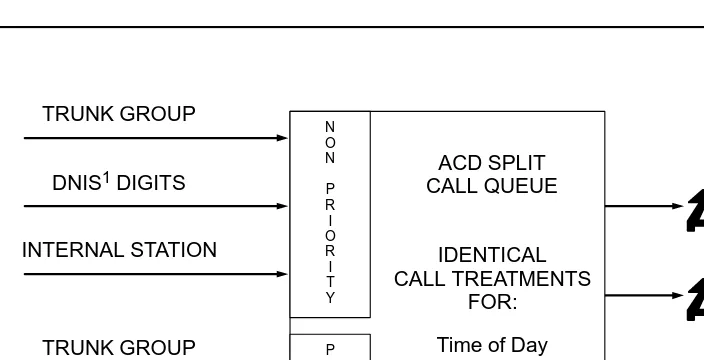
Call Vectoring enhances traditional ACD call processing, which is illustrated in Figure 1-1.
1. Dialed Number Identification Service 2. Direct Inward Dialing
Figure 1-1. Traditional ACD Call Processing
ACD SPLIT CALL QUEUE
IDENTICAL CALL TREATMENTS
FOR:
Time of Day Announcements Intraflow Interflow N O N P R I O R I T Y P R I O R I T Y TRUNK GROUP
DNIS1 DIGITS
INTERNAL STATION
TRUNK GROUP
DID2 DIGITS
Call Vectoring/Expert Agent Selection (EAS) Guide 555-230-521 December 1999 Call Vectoring and Expert Agent Selection Overview and Exercises
1-4 What is Call Vectoring?
1
As Figure 1-1 illustrates, the traditional ACD approach is rather limited in the way it handles queued calls (that is, all calls within a specific queue receive identical
announcements, intraflow parameters, etc.). Call Vectoring, on the other hand, permits each call to be treated uniquely according to a number of factors, including the number the caller dials, the number the caller calls from, the number of calls in queue, and the time of day and/or day of the week. This even applies to all calls that are ultimately handled by the same agent group.
Call Vectoring is comprised of three basic components: n Vector Directory Numbers
n Vectors
n Vector commands
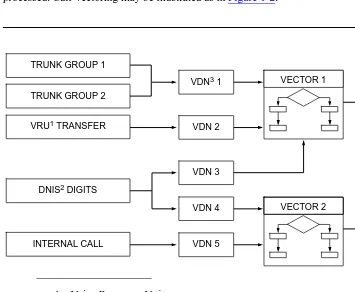
Working together, these components direct incoming calls and ASAI event reports and requests to the desired answering destinations, and they specify how each call is processed. Call Vectoring may be illustrated as in Figure 1-2.
1. Voice Response Unit
2. Dialed Number Identification Service 3. Vector Directory Number
Figure 1-2. Call Vectoring
TRUNK GROUP 1
TRUNK GROUP 2
VDN3 1
VRU1 TRANSFER VDN 2
DNIS2 DIGITS
VDN 3
VDN 4
VDN 5 INTERNAL CALL
VECTOR 1
Call Vectoring/Expert Agent Selection (EAS) Guide 555-230-521 December 1999 Call Vectoring and Expert Agent Selection Overview and Exercises
1-5 What is Call Vectoring?
1
As Figure 1-2 illustrates, an incoming call to the DEFINITY ECS/switch with Call Vectoring enabled is first directed to a Vector Directory Number (VDN). A VDN is an internal telephone number that, in turn, directs the call to a specific vector. The VDN represents the call type or category (for example, billing, customer service, etc.), and thus, it defines the service desired by the caller. Multiple VDNs may point to the same or to different vectors, depending upon whether the relevant calls are to receive the same or different treatment.
The vector is a set of commands that define the processing of a call. The processing a call receives depends on the commands in the vector. For example, a call can be queued and then routed to another destination.
Screen 1-1 shows an example of a vector.
Screen 1-1. Vector Example
Each individual vector can contain up to 32 command steps. Multiple vectors can be chained together to extend processing capabilities or to process calls to the same or different answering destinations. Any number of calls can use the same multiple vectors and process steps independently. Understanding your goals and planning your system before you begin writing vectors is crucial. A planning guide is provided in Appendix K, ‘‘Setting Up a Call Center’’.
1. goto step 3 if calls-queued in split 9 pri l < 20 2. busy
3. queue-to split 9 pri l
4. wait-time 12 seconds hearing ringback 5. announcement 2921
Call Vectoring/Expert Agent Selection (EAS) Guide 555-230-521 December 1999 Call Vectoring and Expert Agent Selection Overview and Exercises
1-6 Call Vectoring Features
1
Call Vectoring Features
Call Vectoring provides the following features:
n Basic Call Vectoring allows you to “program” (write vector steps for) the type of processing applied to a call by arranging a set of vector commands in the desired sequence. Depending on the command, you can do the following:
— Place the call in queue until an agent is available to answer the call. — Provide a recorded information or delay announcement to the caller. — Allow the caller to leave a recorded message.
— Access a Voice Response Unit (VRU) to start a script.
n Call Prompting allows you to collect digits and give some call control to the caller. Specifically, this feature allows callers with touch-tone or rotary phones to enter digits that are subsequently processed by the vector. Among other tasks, Call Prompting allows the caller to do the following:
— Select one or more options from a menu in order to access recorded information or be routed to the correct split or agent.
— Enter an extension to which a call can be routed.
— Provide the call center with data (such as a credit card number) that the center can use to process the call. This data also can be displayed on the voice terminal of the agent who answers the call.
n G3V4 Enhanced provides for the following:
— Specification of a priority level with the oldest-call-wait conditional. — Use of enhanced comparators.
— Use of wildcards in digit strings for matching collected digits and ANI or II-digits.
— Use of Vector Routing Tables.
— Multiple Audio/Music Sources for use with the wait-time command. n Advanced Vector Routing allows you to route calls based on three additional
conditions:
— Rolling Average Speed of Answer for a split, skill, or VDN. — Expected Wait Time for a split (skill) or for a call.
— The number of calls that are active in a specified VDN. n ANI/II Digits Routing allows you to route calls based on either:
— The caller identity (ANI) or,
— The type of line where the call was originated (II-digits).
Call Vectoring/Expert Agent Selection (EAS) Guide 555-230-521 December 1999 Call Vectoring and Expert Agent Selection Overview and Exercises
1-7 Call Vectoring Features
1
n Enhanced Information Forwarding allows you to forward the following information with each call: ANI, II-Digits, CINFO, ASAI-provided user information, Look-Ahead Interflow (LAI) information (such as VDN name), Universal Call ID (UCID), Best Service RoutingTM data, Collected Digits, and elapsed in-VDN time
n Look-Ahead Interflow allows the call center to intelligently off-load some or all calls to another ACD switch. When this feature is enabled, a call arriving at a vector that is unable to handle the call (due to preset limits) can interflow to a switch in a remote location whenever the latter switch is able to receive the call. By using this feature, you can establish a “load balancing” of calls among multiple locations primarily for lower-traffic, reduced-agent staffing periods. By using a certain conditional in a vectoring command, you can reduce processing and achieve First-In First-Out (FIFO) call distribution across the call center sites. n Best Service Routing™ (BSR) allows the DEFINITY ECS/switch to compare
specified splits or skills, determine which will provide the best service to a call, and deliver the call to that resource. If no agents are currently available in that split or skill, the call is queued. BSR is available in single-site and multi-site versions. Single-site BSR compares splits or skills on the DEFINITY ECS/switch where it resides to find the best resource to service a call. Multi-site BSR, activated via the Look-Ahead Interflow feature, extends this capability across a network of DEFINITY ECS/switches, comparing local splits or skills, remote splits or skills, or both, and routing calls to the resource that provides the best service. To respond to changing conditions and operate more efficiently, BSR monitors the status of the specified resources and adjusts call processing appropriately.
n Adjunct Routing provides you with a means of evaluating calls before the calls are processed and implementing complex call center applications. Specifically, this feature allows a DEFINITY ECS/switch to request instructions from an associated adjunct, which is a processor that performs one or more tasks for another processor (the switch, in this case). The adjunct makes a routing decision according to agent availability and/or caller information sent by the switch, and it returns the routing response to the switch. By using this feature, the call center ensures that each call is delivered to the appropriate destination.
Call Vectoring/Expert Agent Selection (EAS) Guide 555-230-521 December 1999 Call Vectoring and Expert Agent Selection Overview and Exercises
1-8 Benefits of Call Vectoring
1
Benefits of Call Vectoring
Coupled with Automatic Call Distribution (ACD), Call Vectoring enables calls to be processed at a faster rate within an intelligent, real-time system. As a result, Call Vectoring provides an appreciable cost saving to the user.
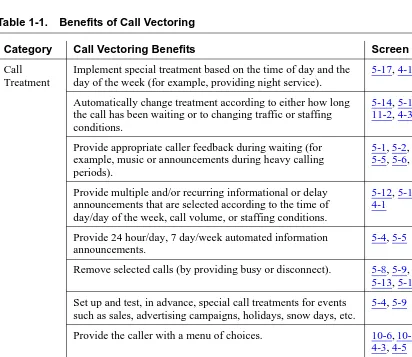
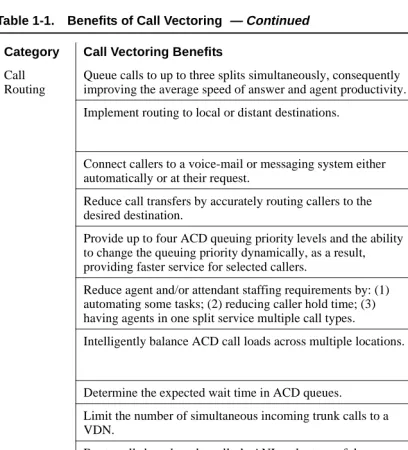
Table 1-1 summarizes the benefits of Call Vectoring. The last column in Table 1-1 identifies the vector(s) [via the appropriate screen(s)] in the reference portion of the manual that illustrate(s) these benefits.
Table 1-1. Benefits of Call Vectoring
Category Call Vectoring Benefits Screen
Call Treatment
Implement special treatment based on the time of day and the day of the week (for example, providing night service).
5-17, 4-1
Automatically change treatment according to either how long the call has been waiting or to changing traffic or staffing conditions.
5-14, 5-16, 11-1, 11-2, 4-3, 4-4
Provide appropriate caller feedback during waiting (for example, music or announcements during heavy calling periods).
5-1, 5-2, 5-3, 5-4, 5-5, 5-6, 5-7
Provide multiple and/or recurring informational or delay announcements that are selected according to the time of day/day of the week, call volume, or staffing conditions.
5-12, 5-14, 11-1, 4-1
Provide 24 hour/day, 7 day/week automated information announcements.
5-4, 5-5
Remove selected calls (by providing busy or disconnect). 5-8, 5-9, 5-10, 5-13, 5-16 Set up and test, in advance, special call treatments for events
such as sales, advertising campaigns, holidays, snow days, etc.
5-4, 5-9
Provide the caller with a menu of choices. 10-6, 10-7, 10-11, 4-3, 4-5
Execute a VRU script. 5-10, 4-8
Notify callers of their expected delay in queue. 6-3, 6-4
Provide multiple audio/music sources. 5-6, 5-7
Call Vectoring/Expert Agent Selection (EAS) Guide 555-230-521 December 1999 Call Vectoring and Expert Agent Selection Overview and Exercises
1-9 Benefits of Call Vectoring
1
Call Routing
Queue calls to up to three splits simultaneously, consequently improving the average speed of answer and agent productivity.
5-11, 4-1, 4-4
Implement routing to local or distant destinations. 5-14, 10-1, 10-2, 11-1, 4-2, 4-3, 4-4, 4-5 Connect callers to a voice-mail or messaging system either
automatically or at their request.
5-13, 5-12, 4-3, 4-5
Reduce call transfers by accurately routing callers to the desired destination.
10-1, 10-2, 4-3
Provide up to four ACD queuing priority levels and the ability to change the queuing priority dynamically, as a result, providing faster service for selected callers.
4-1, 4-3, 4-4
Reduce agent and/or attendant staffing requirements by: (1) automating some tasks; (2) reducing caller hold time; (3) having agents in one split service multiple call types.
5-4, 5-5, 10-1, 10-11, 10-12, 4-2, 4-3
Intelligently balance ACD call loads across multiple locations. 11-1, 11-2, 11-5, 12-12, 12-15, 12-18, 4-5, D-2 Determine the expected wait time in ACD queues. 6-3, 6-5 Limit the number of simultaneous incoming trunk calls to a
VDN.
6-7
Route calls based on the caller’s ANI or the type of the originating line.
7-1, 7-3, 7-4
Route calls based on CINFO digits provided by the network. 7-5 Information
Collection
Provide customized and/or personalized call treatment via information collection and messaging.
10-1, 10-6, 10-11, 4-2, 4-3, 4-5 Collect information for use by an adjunct or by agent display. 10-7, 4-5 Collect caller entered or customer database provided CINFO
digits from the network.
7-5
Table 1-1. Benefits of Call Vectoring — Continued
Category Call Vectoring Benefits Screen
Call Vectoring/Expert Agent Selection (EAS) Guide 555-230-521 December 1999 Call Vectoring and Expert Agent Selection Overview and Exercises
1-10 EAS Basics
1
EAS Basics
Expert Agent Selection (EAS) allows Call Center managers to match caller needs to the skills/talents of the agents. This ability ensures that the best service possible is provided to each caller.
EAS builds on the Call Vectoring and Automatic Call Distribution (ACD) features of the DEFINITY ECS/switch in order to route incoming calls to the correct agent on the first try.
This section describes the features and functionality of EAS on the DEFINITY ECS/switch, including the following topics:
n Skill-related terms
n EAS features and benefits (The EAS Advantage) n DEFINITY ECS/switch EAS Summary.
Skill-Related (EAS) Terms
Agent skill
The type of call a particular agent can handle. With EAS, an agent can be assigned up to four skills each, with a primary (level 1) or a secondary (level 2) skill level. With EAS-PHD, an agent can be assigned as many as 20 skills.
Skill level
For each agent skill, a skill level may be assigned. With EAS-PHD, skill levels can range from 1 to 16, with 1 being the highest skill level (also known as highest-priority skill). Without EAS-PHD, skill levels may be defined as primary (level 1) or secondary (level 2), with primary being the highest-priority skill. When calls are queued for more than one of the agent’s skills and the agent’s call-handling preference is by skill level, the agent receives the oldest call waiting for the agent’s highest level skill. If an agent’s
call-handling preference is by greatest need, the agent receives the highest-priority, oldest call waiting for any of that agent’s skills, regardless of skill level.
Top agent
An agent in a given skill who has the skill assigned as top skill.
Top skill
Call Vectoring/Expert Agent Selection (EAS) Guide 555-230-521 December 1999 Call Vectoring and Expert Agent Selection Overview and Exercises
1-11 EAS Basics
1
Caller needs
The reason(s) a customer calls your call center. Caller needs are determined by the VDN number that the caller dialed, by Call Prompting, or by Automatic Number Identification (ANI) database lookup.
You define caller requirements in the vector in order to route calls to an ACD agent with particular skill(s) to match the needs of the caller. These caller needs/skills become active for an ACD call whenever a queue to the
main skill
orcheck backup skill
vector command is executed and the threshold condition is met.Skill
A specific caller or business need of your call center. You define your skills based on the needs of your customers and your call center. You specify skills by skill numbers, which are assigned to agents and are referenced in vectors in order to match caller needs with an agent skilled to handle those needs.
When configuring your call center for skills, a particular skill number always has the same meaning, whether it is an agent skill, VDN skill, or skill hunt group.
Skill hunt group
Calls route to specific skill hunt groups, and these skill hunt groups are usually based on caller needs. Agents are not assigned to a skill group; instead, they are assigned specific skills that become active when they log in.
VDN skill preference
Up to three skills can be assigned to a VDN. Calls use VDN skills for routing based on the preferences you specify in the vector. VDN skill preferences are referred to in the vector as “1st,” “2nd,” and “3rd.”
Benefits of the EAS Feature
Benefits to your call center
Because the EAS feature allow you to match caller needs to the agent who has the appropriate skill(s) to handle the call, your call center can achieve the following:
n Maximum profitability.
n Greater customer satisfaction because the caller reaches on the first call an agent with the necessary skill(s) to handle the call.
n Greater responsiveness to customer needs because you can base call distribution on either skill level or greatest need.
Call Vectoring/Expert Agent Selection (EAS) Guide 555-230-521 December 1999 Call Vectoring and Expert Agent Selection Overview and Exercises
1-12 EAS Basics
1
n Improved agent performance because supervisors have the option to have agents handle calls based on either skill level or greatest need. For agents, it offers an opportunity to learn new skills.
n Ability to track the number of calls handled by particular skills from the Vector Directory Number (VDN) perspective. You can see whether vectors are performing as expected.
Skill-based call distribution
With EAS, call distribution is based on agent skills. Caller needs are determined by the vector directory number called or by voice prompting.
An agent who has at least one of the skills that a caller requires is selected to handle the call. You assign skills and skill levels to agents to determine which types of calls go to which agents and to determine the order in which agents serve waiting calls.
Greatest need call distribution
With EAS for DEFINITY ECS, you have the option of basing call distribution on greatest need instead of skill level. You can distribute the highest-priority, oldest call waiting to an agent with an appropriate skill, even if that skill is not the agent’s highest-priority skill.
Percent allocation call distribution
Percent allocation enables you to assign a percentage of an agent’s time to each of the agent’s assigned skills, to comprise a total of 100% of the agent’s staffed time. Percent allocation then selects the call that is the best match for an agent’s administered skill percentages.
Percent allocation is available with CentreVu Advocate. For more information, see the CentreVu Advocate User Guide (585-210-927).
ACD queuing and vector commands
Call Vectoring/Expert Agent Selection (EAS) Guide 555-230-521 December 1999 Call Vectoring and Expert Agent Selection Overview and Exercises
1-13 EAS Basics
1
DEFINITY ECS/switch EAS Summary of
Capabilities
Use the lists that follow to compare the capabilities of:
n DEFINITY Enterprise Communications Server (ECS) with EAS n DEFINITY Generic 3 Version 2 to 4 switch with EAS.
DEFINITY Enterprise Communications Server
(ECS) with EAS
The following EAS capabilities are specific to the DEFINITY ECS:
n Agents can be assigned a call-handling preference of “skill level” or “greatest need” (EAS only).
n “Most Idle Agent” can optionally apply across an agent’s skills.
n The “Most Idle Agent” (MIA) list can include or exclude agents in After Call Work (ACW). For Generic 3 switches, the MIA list includes agents in ACW, but not agents in AUX.
n Agents can be assigned as many as 20 skills. Each skill can be assigned one out of 16 different skill levels (EAS-PHD only).
DEFINITY Enterprise Communications Server
(ECS) and DEFINITY Generic 3 with EAS
These capabilities are common to DEFINITY ECS and the DEFINITY Generic 3 switch: n Have Logical Agent capability.
n Any voice terminal can be used as an ACD terminal for any skill. Agents can be reached by dialing their login ID. Name, COR, and coverage path follow the agent to the voice terminal into which the agent is currently logged.
n Agents are assigned skills and automatically take calls for those skills when they log in.
n An agents’s skills can be changed while they are logged in (ECS and G3V4). n Primary and secondary priority levels are associated with the skills an agent is
assigned.
n Call prompting in a vector can be used to determine a caller’s needs. n Skills are assigned to agents.
Call Vectoring/Expert Agent Selection (EAS) Guide 555-230-521 December 1999 Call Vectoring and Expert Agent Selection Overview and Exercises
1-14 EAS Basics
1
DEFINITY Generic 3
These capabilities are specific to the DEFINITY Generic 3 switch:
n The MIA list is determined within a single skill. Agents in multiple skills who are on a call for one skill continue to move up the idle agent list in their other skills. n The agent’s skill can be changed through CentreVu CMS while the agent is logged
Call Vectoring/Expert Agent Selection (EAS) Guide 555-230-521 December 1999 Call Vectoring and Expert Agent Selection Overview and Exercises
1-15 Exercise A — Call Vectoring Basics
1
Exercise A — Call Vectoring Basics
Read the items below and complete as directed. If needed, refer back to the Vectoring Basics sections of this chapter.
When you finish, compare your answers to those presented on the back of the page.
In the space provided, write the term being described.
1. Specific types of call processing designated for predetermined types of calls are referred to as
_______________________________________________________
2. Specific types of call processing designated for predetermined types of calls are referred to as
_______________________________________________________
3. Customer-defined, multistep call processing tables that direct calls to network or off-network destinations, ACD splits or specific call treatments are called
_______________________________________________________
4. Soft DEFINITY ECS/switch station numbers which are not assigned a physical equipment location are called
_______________________________________________________
5. Vectoring allows the name attached to the originally called VDN to either change or remain the same as vector processing (through the ROUTE TO command) redirects the call to another VDN. This capability is called
_______________________________________________________
6. Call Vectoring is comprised of three basic components; list them.
_______________________________________________________
_______________________________________________________
Call Vectoring/Expert Agent Selection (EAS) Guide 555-230-521 December 1999 Call Vectoring and Expert Agent Selection Overview and Exercises
1-16 Evaluation of Exercise A — Call Vectoring Basics
1
Evaluation of Exercise A — Call
Vectoring Basics
1. Specific types of call processing designated for predetermined types of calls are referred to as
__Call Treatments______________________________________________
2. Customer-defined, multistep call processing tables that direct calls to network or off-network destinations, ACD splits or specific call treatments are called
__Call Vectors_________________________________________________
3. Soft DEFINITY ECS/switch station numbers which are not assigned a physical equipment location are called
__VDNs (Vector Directory Numbers)_______________________________
4. Vectoring allows the name attached to the originally called VDN to either change or remain the same as vector processing (through the ROUTE TO command) redirects the call to another VDN. This capability is called
__VDN Display Override_________________________________________
5. Call Vectoring is comprised of three basic components; list them.
__Vectors_________________________________________________________
__Vector commands________________________________________________
Call Vectoring/Expert Agent Selection (EAS) Guide 555-230-521 December 1999 Call Vectoring and Expert Agent Selection Overview and Exercises
1-17 Exercise B — Call Vectoring Commands
1
Exercise B — Call Vectoring
Commands
Read the items below and complete as directed.
When you finish, compare your answers to those presented on the back of this page.
In the space provided, write the term that is being described.
1. The command that requests call routing information from an adjunct processor or r