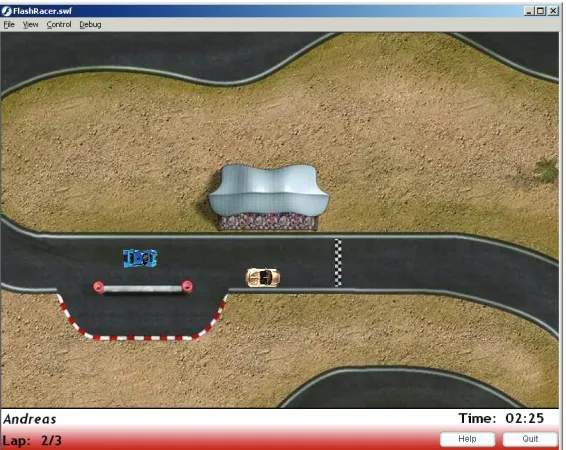
Model-Driven Development of
Interactive Multimedia Applications
Towards Better Integration of Software Engineering and Creative DesignAndreas Pleuß
Model-Driven Development of
Interactive Multimedia Applications
Towards Better Integration of Software Engineering and Creative DesignAndreas Pleuß
Dissertation
an der Fakultät für Mathematik, Informatik und Statistik
der Ludwig–Maximilians–Universität
München
vorgelegt von
Andreas Pleuß
geboren in Würzburg
Contents
Abstract xv
1 Introduction 1
2 Interactive Multimedia Applications 5
2.1 Basic Terms and Definitions . . . 5
2.1.1 Multimedia . . . 5
2.1.2 Multimedia vs. Multimodality . . . 7
2.1.3 Multimedia Applications . . . 7
2.1.4 Multimedia Applications vs. Web and Hypermedia Applications . . . 8
2.2 Multimedia Application Development . . . 9
2.3 Implementation Technologies and Tools . . . 10
2.3.1 Frameworks and APIs . . . 11
2.3.2 Declarative Languages . . . 12
2.3.3 Authoring Tools . . . 13
2.4 Classification . . . 19
2.4.1 Existing Classifications . . . 19
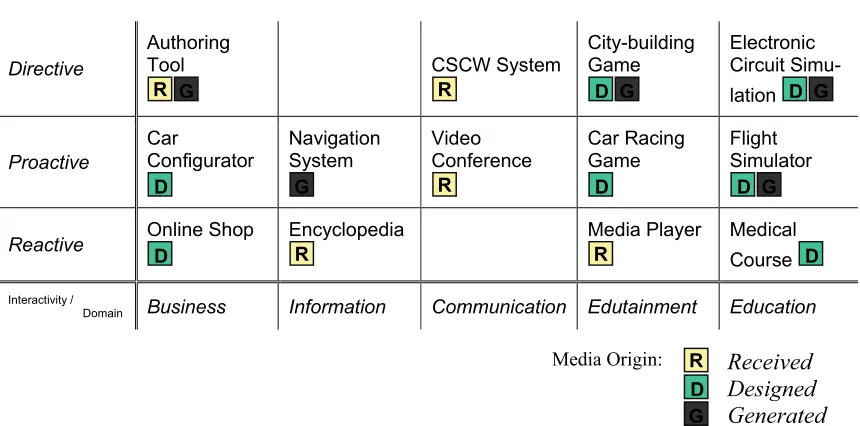
2.4.2 A Classification for this Thesis . . . 20
2.5 Conclusions for this Thesis . . . 22
3 Problem Statement and Proposed Solution 25 3.1 Current Problems in Multimedia Application Development . . . 25
3.1.1 Interdisciplinary Roles . . . 28
3.1.2 Authoring Tools . . . 30
3.2 Analyzing the Spectrum of Possible Solutions . . . 30
3.3 Proposed Solution: A Model-Driven Approach . . . 33
3.4 A Short Introduction into Model-Driven Engineering . . . 34
3.4.1 Models, Metamodels, and Modeling Languages . . . 34
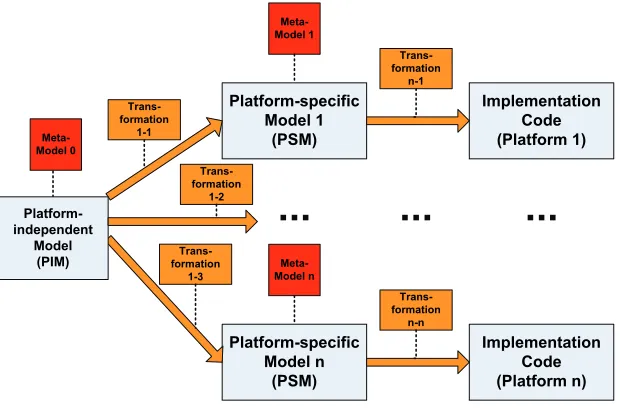
3.4.2 Model-Driven Development . . . 37
3.4.3 Practical Application and Profiles . . . 40
3.5 An Illustrating Example Scenario . . . 43
4 Related Modeling Approaches 47 4.1 User Interface Modeling . . . 47
4.1.1 General Concepts . . . 48
4.1.2 Concrete Examples . . . 51
4.2 Web Engineering . . . 61
4.3 Multimedia Modelling . . . 63
4.3.1 HyDev . . . 64
4.3.2 OMMMA . . . 68
4.3.3 Code Generation . . . 74
4.4 Discussion . . . 75
5 Modeling Multimedia – MML Core Principles 79 5.1 Basic Decisions and Language Engineering . . . 79
5.1.1 Scope . . . 80
5.1.2 Language Definition . . . 80
5.1.3 Notation . . . 81
5.1.4 Custom Icon Design . . . 82
5.1.5 Basic Technical Metamodeling Principles . . . 84
5.2 Modeling Media Components . . . 86
5.2.1 Rationale . . . 86
5.2.2 Media Types and Media Components . . . 87
5.2.3 Interfaces . . . 89
5.2.4 Media Representations . . . 91
5.2.5 Artifacts and Instances . . . 92
5.2.6 Keywords for Media Representations . . . 94
5.2.7 Media Parts . . . 95
5.2.8 Inner Properties . . . 98
5.2.9 Part Artifacts . . . 100
5.2.10 Variations . . . 101
6 MML – A Modeling Language for Interactive Multimedia Applications 103 6.1 MML – Task Model . . . 103
6.2 MML – Structural Model . . . 105
6.3 MML – Scene Model . . . 107
6.4 MML – Presentation Model . . . 113
6.4.1 Abstract User Interface . . . 114
6.4.2 UI Realizations . . . 118
6.4.3 Sensors . . . 120
6.5 MML – Interaction Model . . . 123
6.5.1 Rationale . . . 123
6.5.2 MML Interaction Model based on UML Activity Diagrams . . . 126
6.5.3 Temporal Synchronization . . . 129
6.6 Model Interrelations and Modeling Process . . . 132
6.6.1 Modeling Process . . . 132
6.6.2 Conceptual Interrelations . . . 135
6.7 Modeling Tool Support . . . 136
7 Integrating Creative Design: From MML to Flash 141 7.1 A Metamodel for Flash and ActionScript . . . 141
7.1.1 Flash Metamodel Basics . . . 142
7.1.3 ActionScript . . . 147
7.2 A General Structure for Flash Applications . . . 152
7.2.1 Principles . . . 152
7.2.2 Scenes . . . 153
7.2.3 Complete Structure . . . 156
7.3 Transformations . . . 158
7.3.1 Round-Trip-Engineering . . . 161
7.3.2 A Tool for Extracting Flash Models from Flash Applications . . . 164
7.4 Working with the Code Skeletons in the Authoring Tool . . . 164
8 Validation 173 8.1 Platform Independence: Transformations to other Platforms . . . 174
8.1.1 Code Generation for Java . . . 175
8.1.2 Code Generation for SVG/JavaScript . . . 176
8.1.3 Code Generation for FlashLite . . . 176
8.2 External Validation . . . 178
8.2.1 MML in the Course “Multimedia-Programming” . . . 179
8.2.2 MML in Project Theses . . . 183
8.2.3 Conclusions . . . 187
8.3 Internal Validation . . . 187
8.3.1 Comparison to General Criteria for Modeling Languages . . . 188
8.3.2 Comparison to the Goals of This Thesis . . . 191
8.3.3 Comparison to Other Approaches . . . 193
9 Outlook: Towards Better Integration of Software Engineering and Creative Design 197 9.1 Creative Design in Software Development . . . 197
9.2 Vision: Models as Central Hub . . . 198
9.3 First Steps . . . 199
10 Summary and Conclusions 203 10.1 Summary . . . 203
10.2 Contributions . . . 204
10.3 Future Work . . . 204
10.4 Conclusions . . . 206
A Multimedia Taxonomy by Hannington and Reed 207 B ActionScript Class MovieClip – Documentation 209 B.1 Properties . . . 209
B.2 Properties Inherited from Class Object . . . 211
B.3 Operations . . . 211
B.4 Event Handling Operations . . . 214
C Transformation from MML to Flash Model 217
D Questionnaire 221
List of Figures
1.1 Examples for multimedia applications today. (From left to right, starting in the top row: Rich Internet Application [Goo], E-Learning [Jungwirth and Stadler03], Enter-tainment [Hilliges et al.06], EnterEnter-tainment on mobile devices [Tavares], InfoEnter-tainment
in cars [Inf], Instrumented Environments [Bra]) . . . 2
2.1 Technical media: Classes and examples based on [Hoogeveen97] and MHEG [ISO97b]. 6 2.2 Classification of media according to [Fetterman and Gupta93]. . . 6
2.3 Multimedia applications in the value chain. . . 9
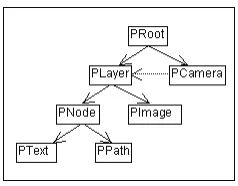
2.4 Structure in the Piccolo framework . . . 12
2.5 MHEG-5 class hierarchy from [MHE]. . . 13
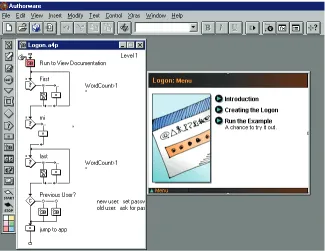
2.6 A screenshot of Adobe Authorware. . . 15
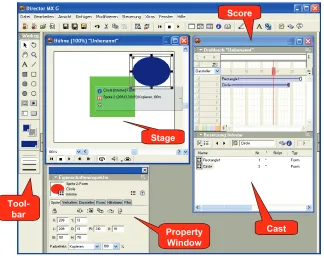
2.7 A screenshot of Adobe Director. . . 16
3.1 RepresentationOf relationship according to [Favre04c] . . . 35
3.2 ConformsTorelationship according to [Kurtev et al.06] . . . 35
3.3 The basic idea of MDA . . . 37
3.4 OMG Metadata Architecture according to [Obj05] . . . 39
3.5 Technical Spaces according to [Kurtev et al.06] . . . 40
3.6 Notation options for UML stereotypes. . . 41
3.7 Screenshot from the example Racing Game application. . . 44
3.8 Example: Wheels of a racing car defined as independent inner parts. . . 45
3.9 The generated skeletons including placeholders can be directly opened and edited in the Flash authoring tool. . . 46
4.1 Model-based User Interface Development Environments according to [Szekely96, da Silva00] . . . 48
4.2 The CAMELEON reference framework according to [Calvary et al.02, Calvary et al.03] 50 4.3 Example ConcurTaskTree Model from [Wu06b] . . . 52
4.4 Extract from the UsiXML metamodel [Usi06] showing the UsiXML models. . . 53
4.5 Relationships between different models in UsiXML . . . 54
4.6 Example for a Context-sensitive task model in Dynamo-Aid. . . 55
4.7 Example for a Context-specific dialog model calculated from task models in Dynamo-Aid. . . 56
4.8 Web Engineering approaches according to [Schwinger and Koch03] . . . 61
4.11 Extract from HyDev instance model for the virtual museum application taken from
[Pauen et al.98a] . . . 66
4.12 Extract from HyDev representation model for the virtual museum application taken from [Pauen et al.98a] . . . 67
4.13 Screenshot from the automotive information system example for OMMMA [Engels and Sauer02] . . . 68
4.14 OMMMA class diagram from [Engels and Sauer02] for the example automotive in-formation system . . . 69
4.15 OMMMA sequence diagram from [Engels and Sauer02] for the example automotive information system . . . 70
4.16 OMMMA presentation diagram from [Engels and Sauer02] for the top level view. . . 71
4.17 OMMMA presentation diagram from [Engels and Sauer02] for the cockpit view. . . 72
4.18 OMMMA statechart diagram from [Engels and Sauer02] for the example automotive information system . . . 72
4.19 Approach from [Depke et al.99] interpreted as kind of MDE approach. . . 76
5.1 The trade-off in icon design illustrated by two alternative notations. . . 83
5.2 Notations for Abstract Interaction Objects based on Canonical Abstract Prototypes (CAP). . . 84
5.3 MML metamodel - Root Elements . . . 85
5.4 MML metamodel - Media Types . . . 88
5.5 Icons for MML Media Components. . . 89
5.6 Interfaces for Media Components. . . 91
5.7 Example for Media Representation. . . 92
5.8 MML metamodel for Media Representation. . . 92
5.9 Illustrating example of abstraction layers of Media Components . . . 93
5.10 Media Artifacts. . . 94
5.11 Examples for Keywords for Media Representations: The left hand side shows the MML example models, the right hand side corresponding example situations at runtime. 96 5.12 Metamodel for Media Parts. . . 97
5.13 Icons for MML Media Components and Media Parts (some Media Parts do not have an icon representation yet). . . 97
5.14 Illustration of different abstraction layers of media and their inner structure. In MML structure diagrams the white colored model elements need not to be specified in the model. The light yellow colored model elements are modeled only optionally. . . 99
5.15 MML Example: Media Parts and Inner Properties. . . 99
5.16 Specifying Part Artifacts. . . 101
5.17 Example: Individual vs. unique Part Artifacts. . . 102
5.18 Metamodel for Inner Properties and Part Artifacts. . . 102
5.19 Metamodel for Variations. . . 102
5.20 Example: Variations. . . 102
6.1 Task Diagram for the Racing Game Example. . . 104
6.2 MML metamodel - Tasks . . . 104
6.3 Domain Classes for the Racing Game example. . . 106
6.4 MML metamodel for classes reused from UML. . . 106
6.6 Complete Structure Diagram for the Racing Game example . . . 108
6.7 MML metamodel for MML Structure Diagram Elements. . . 108
6.8 MML metamodel for Media Components in the Structure Diagram. . . 109
6.9 MML Scene Diagram. . . 109
6.10 Metamodel for MML Scene Diagram elements. . . 111
6.11 Class representation of SceneIntro. . . 112
6.12 Icons for Abstract Interaction Objects. . . 115
6.13 Metamodel for MML Abstract Interaction Objects. . . 115
6.14 MML Presentation Diagram containing the Presentation Unit for the SceneGame. . 117
6.15 MML Presentation Diagram including UI Realizations for the SceneGame. . . 119
6.16 Metamodel for MML Presentation Models. . . 121
6.17 MML Presentation Diagram for the SceneGameenhanced with Sensors. . . 123
6.18 MML Metamodel for Sensors. . . 124
6.19 MML Interaction Diagram for Entry Operationstartof SceneGame. . . 127
6.20 Metamodel for MML-specific actions. . . 128
6.21 MML Interaction Diagram for operationmainof SceneGame. . . 130
6.22 Simplified extract from the UML metamodel for Activities. . . 131
6.23 Metamodel defining the integration of Activities and Scenes. . . 131
6.24 MML Interaction Diagram for operationshowof SceneIntro. . . 132
6.25 Typical modeling process for MML models. . . 133
6.26 “Essence” of MML. . . 136
6.27 Tree editor for MML generated with EMF. . . 137
6.28 MML Structure Model in Magic Draw . . . 138
6.29 MML Presentation Model in Magic Draw. . . 139
6.30 Steps for visually creating EMF-compliant MML models. . . 139
7.1 The Flash Authoring Tool . . . 144
7.2 Timeline and Stage (containing some Tweens) in the Authoring Tool . . . 145
7.3 Metamodel for the Timeline Elements in Flash . . . 146
7.4 Metamodel for the Library Elements in Flash . . . 147
7.5 Metamodel for the specific Media Formats in Flash . . . 148
7.6 Metamodel for the Elements on the Stage in Flash . . . 149
7.7 Metamodel for Files and Folders . . . 149
7.8 Metamodel for ActionScript . . . 151
7.9 Proposed Structure applied to the Racing Game example. . . 157
7.10 Transformation of MML models into Flash application skeletons. . . 160
7.11 The generated files in the file explorer. . . 165
7.12 The generated application skeleton can be directly executed. The user can trigger transitions between the Scenes as far as specified in the MML model. . . 165
7.13 The generated FLA file for the SceneGame. . . 166
7.14 The generated foldermedia. . . 167
7.15 Replacing the generated placeholder forCarAnimation. . . 169
7.16 CarAnimationin SceneGame. . . 170
7.17 Media files need just to be replaced in the file explorer. . . 170
7.18 The final result. . . 171
8.2 Blockout example on the Flash Lite platform. . . 178
8.3 Development process for the practical project in 2006 . . . 180
8.4 Screenshots from the result of Team 1 in 2006. . . 181
8.5 Screenshots from different results in 2007. . . 183
8.6 Screenshot of the StyleAdvisor application for a hairdresser. . . 184
8.7 Example for a learning application with transcript. . . 185
8.8 Screenshots from the authoring tool for the Unterrichtsmitschau. . . 186
8.9 Example for a learning application with transcript. . . 187
8.10 MML in terms of the Model Driven Architecture. . . 193
9.1 Simplified user interface design process and used tools in practice (based on [Ziegler08].198 9.2 Models as central hub in the development integrating different specific development steps and tools. . . 199
9.3 Using XAML as “central hub”. . . 201
List of Tables
2.1 Overview on the spectrum of multimedia applications . . . 22
3.1 Applied development methods in web and multimedia industry [Lang and Fitzgerald05] 27 4.1 Temporal operators in CTT on tasks T1, T2. The binary operators are listed with descending priority. . . 52
5.1 Media Component Standard Interfaces . . . 90
6.1 AIO and Sensor Standard Interfaces . . . 125
7.1 Flash versions and MML support . . . 161
8.1 Coverage of the examples from section 8.2. . . 192
Abstract
The development of highly interactive multimedia applications is still a challenging and complex task. In addition to the application logic, multimedia applications typically provide a sophisticated user interface with integrated media objects. As a consequence, the development process involves different experts for software design, user interface design, and media design. There is still a lack of concepts for a systematic development which integrates these aspects.
This thesis provides a model-driven development approach addressing this problem. Therefore it introduces the Multimedia Modeling Language (MML), a visual modeling language supporting a design phase in multimedia application development. The language is oriented on well-established software engineering concepts, like UML 2, and integrates concepts from the areas of multimedia development and model-based user interface development.
MML allows the generation of code skeletons from the models. Thereby, the core idea is to generate code skeletons which can be directly processed in multimedia authoring tools. In this way, the strengths of both are combined: Authoring tools are used to perform the creative development tasks while models are used to design the overall application structure and to enable a well-coordinated development process. This is demonstrated using the professional authoring tool Adobe Flash.
MML is supported by modeling and code generation tools which have been used to validate the approach over several years in various student projects and teaching courses. Additional prototypes have been developed to demonstrate, e.g., the ability to generate code for different target platforms. Finally, it is discussed how models can contribute in general to a better integration of well-structured software development and creative visual design.
Kurzzusammenfassung
Die hier beschriebene Arbeit geht von der vielbeschriebenen Forderung nach einem strukturierten
Entwicklungsprozess für Multimedia-Anwendungen aus. Dazu wird mit der Multimedia
Model-ing Language(MML) eine graphische Modellierungssprache speziell für Multimedia-Anwendungen vorgeschlagen, sowie ein darauf basierender modellgetriebener Entwicklungsprozess. MML unter-stützt eine strukturierte, explizite Integration von Software-Design, User-Interface-Design und Medien-Design.
Eine wichtige Zielsetzung der Arbeit ist die Einbeziehung etablierter Multimedia-Autorenwerk-zeuge in den modellgetriebenen Entwicklungsprozess mit MML. Dazu werden aus den MML-Model-len automatisch Codegerüste generiert, die dann direkt im Autorenwerkzeug geöffnet und weiterver-arbeitet werden können. Dadurch werden die Vorteile von Modellen und die Vorteile von Autoren-werkzeugen vereint.
Introduction
With upcoming graphical and auditive capabilities of personal computers in the mid of the 90s, the term “multimedia” emerged to a hype. The idea of multimedia raised expectations on very intelligent and intuitive user interfaces making use of speech input and output, gestures and complex graphics to provide complex information in a very convenient way, like in science fiction movies. Related to that were overrated expectations on the content and the impact of multimedia systems, like in e-learning where some authors painted the scenario that people will learn much more continuously and efficiently due to omnipresent multimedia learning software. Like any “buzz word” the term “multimedia” was used for product promotion and hence in a very ambiguous way. For example, personal computers just equipped with a CD-Rom drive were called “multimedia systems”.
Similar as described by the Hype Cycleby Gartner [Gartner], a phase of disillusion followed. Most existing applications could not meet the expectations. While the implementation of multimedia became easier by increasing support in toolkits and programming languages, its usage was still lim-ited because of its complexity [Mühlhäuser and Gecsei96, Bulterman and Hardman05]. In addition, there was no common understanding of its precise meaning. This lead some authors to the statement that “Multimedia is dead. In fact, it never really existed.”[Reisman98] (see also [Hirakawa99, Gonza-lez00]).
Multimedia Applications Today Nowadays, multimedia capabilities are used in a much more nat-ural and mature way. One reason for this is certainly the evolved implementation support. It has become much easier now (on implementation level) to integrate multimedia and application logic. From the viewpoint of multimedia, this allows to enhance multimedia applications with more sophis-ticated interactivity and application logic. For instance, multimedia authoring tools likeFlash[Flaa] nowadays include a powerful object-oriented programming language. From the viewpoint of con-ventional software development, the better integration leads to easier enrichment of applications with
multimedia user interfaces. For instance, the frameworkFlex [Kazoun and Lott07] aims to enable
Figure 1.1: Examples for multimedia applications today. (From left to right, starting in the top row: Rich Internet Application [Goo], E-Learning [Jungwirth and Stadler03], Entertainment [Hilliges et al.06], Entertainment on mobile devices [Tavares], Infotainment in cars [Inf], Instrumented Envi-ronments [Bra])
interfaces for Ubiquitous Computing, break new grounds by investigating into much more intelligent and complex user interfaces using different media, new interaction techniques, and individual ele-ments precisely tailored to the concrete tasks to be fulfilled by the user [Marculescu et al.04]. In this way, user interfaces step by step approach the initial vision described above.
Accordingly, the application area of multimedia has expanded to almost all areas of software appli-cations. Classical examples include E-Learning, Entertainment, Computer Games, Simulations, and Arts. Today, additional areas are, for instance, Rich Internet Applications like the well-knownGoogle
Maps[Goo], Car Infotainment Systems, Entertainment Software, also on various devices beyond the
Personal Computer, and various research prototypes for new user interfaces or for applications in ambient environments. Figure 1.1 shows some examples.
Multimedia Application Development A ‘multimedia application’ in the sense of this thesis is hence any kind of application with a multimedia user interface. ‘Multimedia user interface’ here basi-cally means that the user interface is not restricted to standard widgets (like buttons, text fields, etc.), but makes use of individual graphics, animations, video, sound, 3D graphics, etc. The underlying application logic can be of any complexity. In particular, in an advanced, highly interactive appli-cation the media objects are tightly connected to the appliappli-cation logic: Examples like Google Maps demonstrate that media objects on the one hand can be used as elements for user input, on the other hand they are dynamically calculated and modified by the application logic.
systematic, and finally successful development process. This thesis aims to fill this gap by providing an integrated and tailored model-driven development approach.
Approach in this Thesis This thesis provides a model-driven development approach to address these challenges. To integrate the different developer groups and the artifacts they produce, it proposes a “design phase” to plan and specify the application preliminary to its implementation. For this, it uses a modeling language that integrates software design, user interface design, and media design into a single, consistent language. As no such language exists so far, it introduces theMultimedia Modeling Language(MML) which integrates different existing modeling concepts, like the Unified Modeling Language (UML) and concepts from model-based user interface development (MBUID), and adds new modeling concepts which are specific for interactive multimedia. The language is defined as a standard-compliant metamodel and is supported by a visual modeling tool.
MML models can be automatically transformed into code skeletons. As MML is platform-independent, it is possible to generate code for any target platform. In particular, existing multimedia authoring tools are supported as target platforms: The generated code skeletons can be loaded di-rectly into the authoring tool where they can be processed and finalized by user interface and media designers. Hence, established professional tools for the creative, visual design are fully integrated into the model-driven development process. This is demonstrated in detail by a fully implemented transformation for the authoring tool Adobe Flash. In this way, the approach supports both: Sys-tematic model-driven development for planning, structuring and integration of the different aspects of multimedia applicationsandprofessional support for the creative visual media and user interface design.
Thesis Structure The central theme throughout this work is the integration of creative, visual user interface and media design with systematic Software Engineering methods.
At first, chapter 2 examines the basic definitions and the current practice in context of multimedia application development. In turns out that the basic theme – the integration of software development and creative design – is reflected in all aspects of multimedia development. For instance, common implementation technologies are multimedia authoring tools like Flash or Director which strongly support the creative design. However, they do neither support a development process nor a systematic structure of the application in terms of Software Engineering.
Chapter 3 examines this problem in more detail. It turns out that existing literature as well as existing studies on industrial practice clearly confirm the lack of adequate systematic, integrated de-velopment methods. In particular, two specific challenges are discussed. First, the need to integrate different kinds of design usually performed by different experts: interactive multimedia application
development requires software design, media design, and user interface design. Second, the final
implementation is often performed with multimedia authoring tools which must be integrated into a development process.
code generated from the models. This means that the models are used to specify and automatically generate the application’s overall structure and the relationships between its different parts while the authoring tool is used for the concrete creative design by filling out the placeholders. In this way, the strengths of models (systematic planning of the overall structure) and the strengths of authoring tools (creative design) are combined.
Chapter 4 then analyzes existing modeling approaches which can be used for such a model-driven approach. It turns out, that there is a large amount of modeling approaches which target some as-pects of multimedia applications. The chapter gives a comprehensive overview and structures them into three identified research areas: user interface modeling, web engineering, and existing modeling approaches from multimedia domain. However, none of this approaches is sufficient to model inter-active multimedia applications: they either support only standard user interfaces or only multimedia documents without advanced interactivity and application logic.
Due to the lack of a sufficient modeling language, the chapters 5 and 6 introduce theMultimedia Modeling Language(MML). It integrates the concepts found in the related work and extends them where necessary. Therefore, chapter 5 first presents the preliminary considerations for the language design and then introduces concepts for modeling advanced media properties which have not been addressed in existing modeling approaches yet. Subsequently, chapter 6 presents the resulting over-all language under strong consideration of existing concepts from chapter 4. it is concluded by an overview on the modeling process and the implemented tool support.
On that base, chapter 7 shows the transformation from MML models into code skeletons for a multimedia authoring tool. The example platform here is Flash, as it is one of the most important professional multimedia authoring tools today. The chapter also illustrates by screenshots how to work with the skeletons directly in the authoring tool.
Chapter 8 addresses the validation of the proposed approach. First, several transformations to other target platforms are shown to demonstrate the platform independence of MML. The next section describes several projects for the external validation followed by a section on the internal validation.
Chapter 9 provides an outlook by generalizing the idea from this thesis to combine the strengths of models and of tools for visual creative design. The model thereby acts as a kind of “central hub”. The idea is illustrated by a real-world project in industry which provides a first step into this direction.
Interactive Multimedia Applications
This chapter discusses the characteristics of multimedia applications and elaborates the required def-initions for this thesis. Therefore, the first section discusses basic terms and definitions based on existing literature. As this thesis deals with the development of multimedia applications, the second section provides a more detailed look on multimedia applications from that point of view. In addition, a third section introduces existing technologies for implementation and selects the platform Flash as running example in this thesis. Based on the discussion above, the fourth section presents a clas-sification of multimedia applications from the viewpoint of development. Finally, the fifth section summarizes the most import findings and derives a resulting definition for this thesis.
2.1
Basic Terms and Definitions
This section introduces central terms likemultimedia, and multimedia applicationsand shows how they differ from associated terms likemultimodalityandhypermedia.
2.1.1 Multimedia
The term medium has its origin in the Latin word medius which means ‘in the middle’. Today it
has in general the meaning of ‘intermediary’ or ‘mean’ but is overloaded with many specific mean-ings in different contexts. Concerning the context of computer technology, the MHEG standard [ISO97b, Meyer-Boudnik and Effelsberg95] distinguishes between five categories oftechnical media. Figure 2.1 illustrates this classification with examples. The termmultimediaapplies to the category ofperception media, which is related to the way how a human being can perceive a piece of infor-mation, e.g. visually or auditory. Visual media can then be further refined e.g. in text, still images, animations, and movies. Auditory media are music, sound, and speech [Steinmetz00]. The remaining human senses – touch, smell, and taste – are still rarely used for digital media today. These kinds of media are sometimes also referred to asmedia types[Engels and Sauer02] to distinguish frommedia objects. A media object is a concrete unit of information on one or more channels of information [Henning01], i.e. of a specific media type.
Representation Medium Representation Medium
Transm ission Medium
Presentation Medium Interchange Medium Processing Medium
Softw are Tools Storage Medium
Mem ory Stick Output Medium
Coaxial Cable Tw isted Pair Optical Fibre Input Medium Microphone Keyboard Harddisk Auditive CD-Rom Cam era Screen Mouse Printer Medium Tactile Floppy Visual Paper Taste MPEG Sm ell ASCII JPEG OCR Air PC CPU MIDI TV ... ... ... ... ... ...
Figure 2.1: Technical media: Classes and examples based on [Hoogeveen97] and MHEG [ISO97b].
Continuous
(time based) Sound Video
Photo Text Graphics
Animation
Discrete (space based)
Captured from real world
Synthesized by computers
Figure 2.2: Classification of media according to [Fetterman and Gupta93].
A classification of media useful for the context of this work is provided by [Fetterman and
Gupta93]: They distinguish on the one hand between discrete media and continuous media.
Contin-uous mediahave a temporal dimension, i.e. their representation changes dynamically over the time, like audio, video or animation. Discrete mediaare time-independent, like text, image and graphics.
On the other hand they distinguish between captured media and synthesized media.Captured media
are captured via sensors and digitalization from the real world, like usually audio, video, and images (photos).Synthesized mediaare created with the computer, like text, graphics, and animation. Thus, synthesized media often have an explicit inner structure as it can be stored during the development process (for instance, a vector graphics consists of graphic primitives while for captured images this information is initially not available). A corresponding matrix categorizing media (types) is shown in figure 2.2.1
Various definitions have been provided for the termmultimedia. A popular definition2is provided by Steinmetz and Nahrstedt [Steinmetz and Nahrstedt04]:
A multimedia document is characterized by information which is coded in at least one continuous (time-dependent) and one discrete (time-independent) medium.
As observed by Boll [Boll01] most alternative definitions mainly emphasize on the integrative
1Although sound is often captured in practice, it can also be synthesized like MIDI files. 2
aspect of multimedia documents like in the early work of [Bulterman et al.91]:
Multimedia documents consist of a set of discrete data components that are joined to-gether in time and space to present a user (or reader) with a single coordinated whole.
An analysis from Boll [Boll01] of existing definitions in research work and standards identifies as the main characteristics the integrative aspect in conjunction with temporal and spatial composition:
A multimedia document is a media element that forms the composition of continuous and discrete media elements into a logically coherent multimedia unit. [Boll01]
2.1.2 Multimedia vs. Multimodality
A term related with multimedia is multimodality. In the context of human-computer interaction,
modalityrefers to the human communication channels for input and output, like seeing, hearing, touch, taste, smell. Thus, multimodality basically has a very similar meaning than multimedia. According to some authors multimedia implies "multisensory", "multimodal", and "multichannel" [Hoogeveen97]. However, the common understanding in the research community often is often different. [Coutaz and Caelen91] provides a taxonomy of multimodality and discusses the difference to multimedia. Ac-cording to them, multimodal systems analyze the semantics of information while multimedia systems only encapsulates the information into typed chunks. These chunks can be manipulated but a multi-media system does not consider their inner semantics. However, this distinction might not be always sufficient as today also typical multimedia applications (e.g. [Grana et al.05, Felipe et al.05, Ozcan et al.05]) and standards like MPEG-7 [Salembier and Sikora02] deal with the semantics of data.
Typical examples of multimodal applications which formed the common understanding of multi-modality usually combine speech input with pointing or gestures [Bolt80, Cohen et al.97]. [Coutaz and Caelen91] mention this difference stating that “multimedia information is the subject of the task (it is manipulated by the user) whereas multimodal information is used to control the task”. Other work goes one step further into this direction and just associates multimodality as input and multimedia as output:
Multimodal systems process combined natural input modes – such as speech, pen, touch, hand gestures, eye gaze, and head and body movements – in a coordinated manner with multimedia system output. [Oviatt99]
The understanding in this thesis conforms to this last definition which allows a clear distinction be-tween the development support: Multimodality requires interaction design and complex algorithms for analyzing the semantics of user input while multimedia focuses on design and integration of media objects.
2.1.3 Multimedia Applications
Thus, the viewpoint of understanding multimedia as kinds of documents is clearly no longer suf-ficient today. In contrast, the original vision associated with multimedia, to create highly interactive, intelligent, and usable systems, often requires a tight integration with complex application logic. Ex-amples are many of the most successful applications these days, like Google Maps [Goo] and others mentioned in section 1.
Basically, multimedia can be combined with any kind of application today. This means, that an application provides a (usually more sophisticated) multimedia user interface instead of standard user interfaces only. Typical reasons for this are [Hoogeveen97]:
• to enhance efficiency and productiveness of the user interface, • to achieve more effective information and knowledge transfer, or
• an enhanced entertainment value.
This leads to the termmultimedia application: Generally, an application (or application software) is defined as a kind of software which directly serves the user [Microsoft03]. A multimedia application in broadest sense is any kind of software which directly serves the user and provides a multimedia user interface.
According to [Steinmetz and Nahrstedt04], a multimedia application enables the user to interact with multimedia data.
A more comprehensive definition of multimedia applications is provided by [Engels and Sauer02]:
Multimedia applications can be defined as interactive software systems combining and presenting a set of independent media objects of diverse types that have spatio-temporal relationships and synchronization dependencies, may be organized in structured compo-sition hierarchies, and can be coupled with an event-based action model for interaction and navigation.
Consequently, multimedia applications integrate two aspects [Mühlhäuser and Gecsei96]:
multi-media authoring (which corresponds to the document character)andsoftware programming (like for
conventional applications). This is an important characteristic which has strong impact on multimedia application development and has to be frequently taken up during this thesis.
Section 2.5 will come back to the term “multimedia application” and provide a definition for this thesis from the viewpoint of development.
2.1.4 Multimedia Applications vs. Web and Hypermedia Applications
Web and multimedia are often named in the same breath. This is probably caused by the fact that in the 90’s both were dominating innovations and future applications were expected to support both [Lang01a]. In fact, web and multimedia applications have in common that they differ from traditional business applications, e.g. in terms of the target audience and their entertaining character [Balzert and Weidauer98]. In addition, common implementation technologies like Flash (sec. 2.3.3) support both, web and multimedia. Thus, companies focusing on these technologies often developed both kinds of applications. However, despite these definitely relevant commonalities in the development, web and multimedia are still independent properties of an application.
Examples:
Companies: Media Industry Multimedia Companies
Service Providers
Results: Text, Image, Video, 3D Graphics
Multimedia Application
Infrastructure
Development Tools: Photoshop, Illustrator, 3D Studio Max
Authoring Tools (see section 2.3)
C/C++ Content
Production
Distribution Platform Provision Application
Production
Figure 2.3: Multimedia applications in the value chain.
other hand, many multimedia applications have no additional need for web support compared to other kinds of application. Thus, in the context of application development, web and multimedia properties have to be distinguished.
Applications combining the hypertext concept with multimedia are referred to as hypermedia
applications. [Lang01a] defines hypermedia information systems as the intersection of hypertext sys-tems, web information syssys-tems, and multimedia syssys-tems, i.e. requiring hypermedia to fulfill all three properties. However, often hypermedia is described as superset of multimedia and hypermedia appli-cations [Zendler98, Gonzalez00]. In practice, often the latter interpretation is used which means that the term hypermedia is applied to all applications with either hypertext and/or multimedia character-istics.
2.2
Multimedia Application Development
This work deals with the development of multimedia applications. Thus, a more detailed characteri-zation of multimedia applications is conducted from that point of view to gain a better understanding of multimedia applications.
The upper part of figure 2.3 shows multimedia applications in the value chain and assigns
ex-amples to each step according to [Hussmann07, Osswald03, Steinmetz and Nahrstedt04]. Content
Production means the production of the actual content, e.g. a movie or the learning content in a learning application. Often, the content itself has some economic value. As the content has to be represented by any media, Content Production in our context means the production of media objects, e.g. text, videos, 3D animations, etc.
Application Production means the production of the multimedia application from single media objects. It includes the selection and integration of media objects, creating the application’s user in-terface and interaction, as well as the application logic. Finally,Distribution Platform Provisionrefers to those services which are necessary to run the multimedia application in the target environment. This includes the infrastructure of networks and target platforms, hosting on servers, etc.
“Multimedia Applications” as defined in this work are thus the result of the Application Production step. Infrastructure software and system software required for Distribution Platform Provision arenot
The last row in figure 2.3 shows examples for implementation technologies typically required in each step. They are explained in the following.
The production of media objects in the first step requires very different processes and tools de-pending on the media type. Synthesized media is created and processed by specific authoring tools.
For example 3D animations are created with 3D authoring tools like3ds Max[3DS] orMaya[May].
2D animations are often created withFlash[Flaa]. Graphics are created for instance withIllustrator
[Ill] orCorelDRAW[Cor].
Captured media is usually captured from the real world but further processing and post-editing is usually performed in authoring tools as well. Video is edited in video editing software likePremiere
[Pre] orFinal Cut[Fin]. Sound is edited (and can also be created) with audio editing tools and MIDI
Sequencers like Cubase [Cub] or Reason [Rea]. Images are edited with image editing tools like
Photoshop[Phoa] orPaint Shop Pro[Pai]. An comprehensive overview on such tools can be found e.g. in [Zendler98].
As shown by these examples, the production of media objects is supported by various very specific authoring tools for the different media types. These authoring tools focus on efficient, creative, and visual media design and are well established. At this point in the development, only the creative media design is important – programming and software development knowledge are hardly relevant there.
In contrast, software for the last step in the value chain, Distribution Platform Provision, is usually developed like conventional software using conventional programming languages like C/C++. This
holds also for infrastructure software in the broadest sense like Multimedia Database Management
Systems(MMDBMS, [Narasimhalu96, Zendler98] or player software like theFlash player[Adobed]. Such software provides general functionality independent from the actual content and the actual ap-plication. The development of such software requires mainly programming skills and only few (or no) creative visual design.
The development tasks in the Application Production step (the focus of this work) combine the aspects of both areas: On the one hand, creative design is required. The developers have to create a user interface and to integrate the content. Therefore, they often have to post-edit existing content or to create additional content. On the other hand, the developers have to create the application logic and the interactivity similar to conventional software development. Thus, authoring tools and conventional programming are both required in this step. An overview on the different implementation technologies and tools for application production is given in the next section 2.3.
2.3
Implementation Technologies and Tools
This section briefly provides an overview on typical technologies and tools for implementing interac-tive multimedia applications, i.e. for the second step in figure 2.3 (the focus of this thesis).
They can be classified into three categories [Engels and Sauer02]:
1. Frameworks and APIs, 2. Declarative Languages, and 3. Authoring Tools.
2.3.1 Frameworks and APIs
There are several frameworks and APIs (Application Programming Interface) supporting the devel-opment of multimedia applications with conventional programming languages. They usually address specific programming languages or target platforms.
DirectX A popular example is DirectX from Microsoft [Microsofta]. It is a collection of APIs
for the operating system Windows and the game console XBox. The APIs provide support for all
media types, including creation and rendering of 2D and 3D graphics and animation (DirectDraw,
Direct3D,DirectAnimation), playback and recording of audio (DirectSound,DirectMusic), playback
and processing of video and other streaming media (DirectShow; now part of the platform SDK).
The basic functionality of DirectX is rather low level and can be classified as system software. It abstracts from concrete hardware devices and allows the programmer to access hardware components and functionality via standard interfaces defined by DirectX. However, it also provides more high level multimedia functionality and is often directly used by developers. The API provides objects and interfaces in the style of the MicrosoftComponent Object Model(COM, [Box98]). It can be used with different programming languages like C++, Visual Basic or C#. DirectX is commonly used for game development [Sherrod06, Luna08] and other performance-dependent applications.
Java Media Framework An example for the programming language Java are theJava Media APIs
[Microsystems] provided by Sun. Similar to DirectX they consists of different APIs for different
media types. It includes among others theJava Media Framework(JMF) which supports video and
audio, theJava Advanced Imaging API (JAI) supporting images, the Java 2D API supporting 2D
graphics and images as well, and theJava 3D APIsupporting 3D graphics and animations. Some of
them like Java 2D and Java Sound from the JMF have become part of the standard Java distribution. There is no specific support for 2D animations. The APIs are platform-independent. However, there are performance packs for some selected platforms (Windows, Linux, and Solaris) which provide access to the platform’s native media libraries.
The programming style is rather heterogeneous depending on the media type. The JMF interprets the media objects as abstract data sources and data sinks which are processed in processing chains. They use several software design patterns to implement the concepts. The API structure and the available examples mainly target the development of applications to create and edit media objects – i.e. software for the first step in the value chain from section 2.2 – instead of applications with multimedia user interfaces. This might also be a reason why 2D animation is not supported although it is important for multimedia user interfaces and e.g. a core element in professional authoring tools like Flash (see sec. 2.3.3).
Piccolo Besides the Java Media APIs, several other Java frameworks exist which mainly focus on
a specific media type. An example for 2D animations is Piccolo developed by Human-Computer
Interaction Lab at University of Maryland [Bederson et al.04, of Maryland]. It is the successor of the frameworkJazzprovided by the same group and focuses in particular on zoomable graphical user interfaces. There is also a version for the programming language C# available.
In general, Piccolo structures user interface elements in terms of ascene graph, i.e. as a hierarchi-cal structure of nodes (figure 2.4). Piccolo nodes are for instance a graphic (classPPath), an image
(PImage) or text (PText)). A camera node (PCamera) represents a viewport to other nodes and can
Figure 2.4: Structure in the Piccolo framework
by class inheritance. In that way the framework supports implementing graphics and animations for user interfaces on a high level of abstraction.
Java and Piccolo will be used as an example platform later in section 8.1.
2.3.2 Declarative Languages
Some languages exist which aim to support declarative specification of multimedia applications. They adhere to the viewpoint that multimedia applications can be seen as kind of documents (see sec. 2.1.3). Interactivity and application logic are sometimes supported by the declarative language itself but often added by external program code e.g. written in a scripting language.
Basically, it can be useful to use a declarative language in combination with an authoring tool, analogous to e.g. visual tools for HTML. This gives the developer the possibility to edit the documents either visually using the authoring tool or directly in the declarative code. As several declarative formats are also defined as official standard, this would cause the effect that the authoring tool becomes compliant to a standard. However, most existing professional authoring tools use proprietary binary file formats yet (see sec. 2.3.3). SMIL (explained in the following) is also supported by a commercial tool but this has not become very relevant in professional practice today.
SMIL An important standard in this category is theSynchronized Multimedia Integration Language
(SMIL, [Bulterman et al.05, Bulterman and Rutledge04]), an XML-based language defined by the
World Wide Web Consortium (W3C). It supports the integration and synchronization of different multimedia objects into a whole multimedia application in declarative way. Basic concept is the spatio-temporal integration of media objects. For the spatial aspect, each SMIL document specifies multipleregionson the presentation screen. The different media objects then can be assigned to these regions. For the temporal aspect it is possible to define e.g. sequential or parallel presentation of different media objects.
It is possible to define event handling for user events like mouse clicks, e.g. to start and stop the presentation. However, complex behavior it not intended in SMIL. As SMIL is an XML format it can of course be accessed by scripting and programming languages like any other XML document, e.g. using JavaScript. However, there is no further support for scripting language integration into SMIL presentations. Thus, SMIL focuses on multimedia presentations but hardly on interactive applications as considered in this work. SMIL presentations can be played with browsers and with several media players like the RealPlayer or Quicktime Player.
! ! ! ! ! " ! ! ! !#### !!!! $% $% $% $% &%!# &%!# &%!# &%!# '''' % % % % & & & & ( ( ( (
Figure 2.5: MHEG-5 class hierarchy from [MHE].
and edit the corresponding SMIL code directly so that developers can choose the preferred view for a task.
MHEG-5 Another standard in this category is the MHEG-5 standard. It is mainly used for inter-active television. It supports audio, video, graphics, bitmaps, and text. It also provides interinter-active user interface objects like buttons, sliders, or text input, as well as different kinds of events. How-ever, detailed specification of behavior is not defined in the standard and depends on the engine which executes the MHEG application [Marshall08]. MHEG defines a class hierarchy for multimedia appli-cations shown in figure 2.5.
2.3.3 Authoring Tools
The third category are multimedia authoring tools. They are very important in practice as multimedia application development is a creative, visual task and should thus be supported by visual tools. More-over, developers like multimedia designers and user interface designers often are not familiar with text-based declarative languages or programming languages. For these reasons, authoring tools are an important implementation technology in industrial practice [Britton et al.97, Tannenbaum98, Engels and Sauer02, Bulterman and Hardman05, Hannington and Reed07] and will be considered more in detail in this work.
Advanced authoring tools allow to embed programming code into the developed application to define the application logic. It is also possible that the authoring tools just encapsulates a declarative language or programming language. In that case the same result can be created by either using the authoring tool or by editing the respective language directly (see sec. 2.3.2).
accord-ing to theirauthoring paradigm (orauthoring metaphor) used to solve this challenge. A common classification [Boles and Schlattmann98, Henning01, Engels and Sauer02] distinguishes between:
• Frame-based(screen-based,card-based) authoring tools, • Graph-basedauthoring tools, and
• Timeline-basedauthoring tools.
The following sections briefly introduce each of these classes. An additional analysis and com-parison of the different classes can be found in [Bulterman and Hardman05]. A reference model for authoring tools is presented in [Lorenz and Schmalfuß98].
Frame-based Authoring Tools
Frame-based authoring tools represent the application by different frames or screens which contain the actual user interface content and the spatial layout. When the application is executed the different screens are by default presented in sequential order. It is usually possible to control the order of the frames by additional scripting code or hyperlinks. Actually, all classes of authoring tools are frame-based but the other classes use an additional visual metaphor (flowchart or timeline) to specify the frame’s order and duration.
The content of each frame is usually edited visually by dragging and dropping user interface elements provided by the tool. The properties of each user interface element are displayed and can be edited in a property window. Furthermore it is possible to add script code to the user interface elements, e.g. to handle user input.
There are many examples which fall into this category. A classical example isApple HyperCard
[Hyp]. In HyperCard the application is represented as a stack of cards. Each card corresponds to a screen shown to the user. It is possible to define a background for the cards containing user in-terface elements common to multiple cards. Supported user inin-terface elements are images, buttons and textfields. Buttons and textfields can be associated with scripts which are specified in the built-in object-oriented scripting languageHyperTalk[Apple88]. Scripts can either be event handlers associ-ated with user interface events, like clicking a button or opening a new card from the stack, or functions to be called from other elements. The scripting code can control the application’s navigation as well as read and write the properties of user interface elements.
Over the years there has been a large number of frame-based authoring tools. Most of them have the same basic functionality like HyperCard. A popular example with practical relevance isToolbook
[Too] originally produced byAsymetrix and now by SumTotal Systems. It is mainly used to create
e-learning content like interactive multimedia presentations. Advanced features of the current version 9.5 are for instance: templates for various types of questionnaires, easy creation of software simulation (e.g. for user interface prototyping) through a screen recorder and a specific simulation editor view, and support for multiple target platforms like mobile devices.
Graph-based Authoring Tools
Graph-based authoring tools provide the same basic functionality like frame-based tools but in ad-dition visually represent the application’s temporal behavior in terms of a graph. The most popular
example ([Britton et al.97, Hannington and Reed07] for this class isAuthorware [Aut] fromAdobe
(formerlyMacromedia) which uses flowcharts. Thus, most authors call this class more specifically
Figure 2.6: A screenshot of Adobe Authorware.
Figure 2.6 shows a screenshot of Authorware. The window on the left hand side shows the
flowchart. The nodes in the graph are called Icons and define the content and behavior of the
ap-plication to be developed. Several icons represent content to be displayed on the apap-plication’s user interface: A Display Icon is associated with text and graphics. The Movie Icon, the Sound Icon,
and the Video Icon represent other media content. In figure 2.6 the window on the right hand side
shows the content associated with the Display Iconselected in the flowchart. There are also prede-fined components (Knowledge Objects) providing common functionality like multiple choice tests for e-learning applications.
Other icons can be used to manipulate existing content: The Animation Icon allows to define
animations while theErase Iconallows to remove content from the application’s user interface. The
Decision Icon is used to control branch the flowchart based on variable values or calculations. The
Calculation Iconis used to calculate values and manipulate data or global variables. User interaction is supported by theWait Iconwhich causes the application to wait for user input and theInteraction Iconwhich is used to branch the flowchart depending on the user’s input. It is also possible to structure the flowchart hierarchically to handle complex flows.
Authorware includes a scripting language (Authorware Scripting Language, AWS) and supports also Java Script in the latest versions so that it is possible to script more complex functionality. Basi-cally, the flowchart in Authorware visually defines the application’s basic behavior and can be inter-preted as a kind of visual programming. Of course, complex applications may require much scripting code so that the flowchart becomes less meaningful.
Similar to Toolbook presented above 2.3.3, Authorware is mainly used fro creating applications with limited interaction. The main application areas are e-learning applications and multimedia pre-sentations like tutorials, help systems, or product prepre-sentations. In addition, it is often used for user interface prototyping [Britton et al.97, Hannington and Reed07].
Hard-Stage
Cast Score
Tool-bar
Property Window
Figure 2.7: A screenshot of Adobe Director.
man05] mentions two approaches from academic area:Firefly[Buchanan and Zellweger05] provides
automatic “temporal layout” for multimedia documents based on temporal relationships which can be specified as directed graph by the developer. Eventor[Eun et al.94] aims to combine the flowchart-based and the timeline-flowchart-based (see below) authoring paradigm. In addition, [Bulterman and Hard-man05] mentions that the concept of Timed Petri Nets has been discussed extensively in research literature as candidate for specifying temporal behavior, however, there is no implementation as an authoring tool yet.
Timeline-based Authoring Tools
Timeline-based authoring tools provide the same basic functionality like frame-based tools but ad-ditionally visually represent the application’s temporal dimension by the metaphor of a timeline. Usually the timeline consists of several tracks. Each track is associated with some content of the application, e.g. a media object. The timeline visualizes the periods when a certain track becomes active, e.g. is displayed or played.
Many of todays most popular professional authoring tools are timeline-based. Director and
Flash, both produced by Adobe, are the most important examples from this category [Hannington and Reed07]. Thus, they are both briefly introduced here. The subsequent comparison shows, that Flash is probably the most important professional authoring tool today. For this reasons it is selected as example platform for this thesis.
Director Figure 2.7 shows an annotated screenshot of Director. It uses metaphors from the area of
movie production. The window on the bottom right hand side shows theCast Members. These are
instance of a Cast Member) on the stage. The stage (top left in fig. 2.7) represents the application’s user interface.
The timeline is called the Score(top right in fig. 2.7). It is horizontally divided intoChannels
which are associated to Sprites. The channel in the score visualizes when and how long its associated Sprite appears on the user interface. In addition, there are special Effect Channels for effects and filters which apply to the whole Stage. In horizontal dimension the Score is divided intoFrames.
A frame represents a point of time. Theplayback head on top of the Score determines the frames
currently displayed on the stage. It is possible to place the playback onto a frame to shows or edit its content. Playing the application (either for testing purpose in the authoring tool or when executing the final application) means that the playback head moves along the timeline and frame after frame is displayed (i.e. the corresponding content on the stage).
AKeyframeis a kind of frame where the associated content on the stage has been explicitly defined by the developer. The developer can specify any frame to be a Keyframe. The content of other (simple) frames is automatically derived from its foregoing Keyframe and can not be directly manipulated by the developer. It is possible to animate the content on the user interface by interpolations (called
Tweeningin Director). Tweenings are always defined between two Keyframes (an example for Flash is shown later in figure 7.2).
Director supports a scripting language calledLingo. It is an object-based programming language and can be used to control the application, its content and their properties, as well as to add interaction and application logic. Scripts can be added only as event handlers. However, Director triggers an event when the application starts which can be used as kind of “main” method.
Director applications are compiled into theShockwave format which is interpreted by a player. The player is available as plugin for web browsers. It is also possible to export the application as an executable file which is often used to distribute Director applications as multimedia CD-Roms.
Flash The Flash authoring tools provides very similar authoring concepts like Director. In the last years it has become a very popular platform. The term “Flash” is often also used to denote the technology as a whole or the format of the resulting applications. In fact, Flash is the name of the authoring tool which uses a proprietary file format with the file extensionFLA. For execution the FLA files have to be compiled intoShockwave Flashfiles (SWF)3. SWF is a binary file format interpreted by the Flash player which is available as plugin for web browsers.
Compared to Director, Flash provides exceeding support for creating 2D vector graphics and animations. An important concept areMovieClips. Each MovieClip owns a local timeline of its own. The frames on its internal timeline can contain any kind of content just like the application’s main timeline, i.e. graphics, animations, audio, video, etc. It is also possible to hierarchically nest multiple MovieClips up to any depth. Once a MovieClip has been created by the developer it can be instantiated multiple times on the stage or within other MovieClips. In this way it is possible to create animations of any complexity.
The scripting language in Flash is calledActionScript. The first version of ActionScript was an object-based scripting language. It is close to the third edition of the ECMAScript standard [Ecm99]. ActionScript2 introduced in 2003 provides in addition object-oriented mechanisms. It is possible to define class files (similar to class files in Java) and to associate them with a MovieClip. This causes that every instance of this MovieClip is associated with a corresponding ActionScript object. Besides, scripts can be added to frames on the timeline or as event handler to media instances on the stage. ActionScript enables to control the whole application and its contents. It is thus possible to
3
develop a complete Flash application only by programming ActionScript and without usage of the visual authoring tool features. In the latest version of ActionScript, ActionScript 3, the step towards object-orientation has been completed and several inconsistencies from earlier versions have been removed.
More detailed information on the Flash authoring tool will be given later in chapter 7.1 as Flash is selected as example platform for this thesis. The next section explains the reasons why Flash is currently the probably most important authoring tool in industrial practice.
Director vs. Flash According to studies in industry [Britton et al.97, Hannington and Reed06, Han-nington and Reed07] as well as personal experience, the most important authoring tools are Author-ware, Flash, and Director. Authorware seems to be less optimal as typical example platform for this thesis as its graph-based paradigm is quite exotic and it is also rarely used to create highly interactive applications. The following paragraph will compare Flash and Director and give a brief overview on their background.
Director was one of the first products of the companyMacroMindwhich was renamed to
Macro-media in 1992 after a merge with the producer of Authorware (see sec. 2.3.3). The first version
emerged in 1997 fromFutureSplash, a tool for 2D animations by the companyFutureWave Software
which was acquired by Macromedia. While Flash originally addressed vector graphics and animations only, Director has always been developed as a multimedia authoring tool. Thus, in the nineties Di-rector was the probably most popular authoring tool for professional multimedia developers [Britton et al.97, Hannington and Reed07].
In the end of the nineties Macromedia put their focus towards web technologies and emphasized on Flash. After Macromedia was acquired by Adobe in 2005 this trend continues. Since 2002 only two new versions of Director have been released (2008: version 11) while four version of Flash have
been released during the same period (2008: version 10, calledFlash CS4). As mentioned above
major revisions have been made on ActionScript which has now emerged to a fully object-oriented Java-like programming language. In general, the technology around Flash seems to move more
to-wards better support for programming and software development. An important example is theFlex
framework [Kazoun and Lott07, Gruhn07]. This framework enables conventional software develop-ers to develop applications with Flash user interfaces in a conventional Eclipse-based development environment independent from the Flash authoring tool. Flex is intended to be used for development of so-called Rich Internet Applications(see sec. 4.2). However, the drawback in terms of creative media design and user interface design is that there is no visual development support for Flex.
According to a study published by Adobe the browser penetration on desktop PCs currently lies at already around 99% [Adobee]. Moreover, Adobe aims to establish Flash as platform for multi-platform development4. TheFlash Liteplayer is a lightweight version of the Flash player for mobile phones and other devices with limited computing power (see 8.1.3).
In summary, Director is the more traditional multimedia authoring tool and is still relevant. How-ever, there seems to be a clear trend that Adobe relies more and more on Flash. Flash provides various new features and extensions, like ActionScript 3 or multi-platform development, which are not avail-able for Director and seems thus more promising for the future. Thus, Flash is chosen in this work as best example for an up-to-date professional authoring tool.
4
2.4
Classification
The introduction in chapter 1 has already mentioned several typical examples for multimedia applica-tions today. This section aims to provide a more detailed understanding of the spectrum of multimedia applications by a suitable classification.
2.4.1 Existing Classifications
Two kinds of classifications can be found in the literature: The first type are classifications based on the application domain. The second type are classifications based on multiple facets. Both are explained in the following.
Classifications based on the Application Domain A large part of the existing literature on multi-media applications addresses the spectrum of applications by lists of examples which are classified into some larger example domains. For instance, [Boll01] lists the areas:
• Multimedia teaching and training
• Distributing and trading of multimedia content
• Mobile multimedia applications
[Tannenbaum98] identifies six application areas:
• Scientific Data Analysis, Research and Development, Experimentation, and Presentation
• Instruction in School and Elsewhere
• Business Applications
• Entertainment
• Enabling Technology for Persons with Special Needs
• Fine Arts and Humanities
As part of a detailed taxonomy (explained below) [Hannington and Reed02] proposes:
• Multimedia information systems:databases, information kiosks, hypertexts, electronic books, and multimedia expert systems
• Multimedia communication systems: computer supported collaborative work, videoconfer-encing, streaming media, and multimedia teleservices
• Multimedia entertainment systems: 3D computergames, multiplayer network games, info-tainment, and interactive audio-visual productions
• Multimedia business systems: immersive electronic commerce, marketing, multimedia pre-sentations, video brochures, and virtualshopping
• Multimedia educational systems: electronic books, flexible teaching materials, simulation systems, automatic testing, and distance learning
![Figure 1.1: Examples for multimedia applications today. (From left to right, starting in the toprow: Rich Internet Application [Goo], E-Learning [Jungwirth and Stadler03], Entertainment [Hilligeset al.06], Entertainment on mobile devices [Tavares], Infotainment in cars [Inf], Instrumented Envi-ronments [Bra])](https://thumb-us.123doks.com/thumbv2/123dok_us/8149772.1358962/18.595.130.471.106.317/multimedia-applications-application-entertainment-hilligeset-entertainment-infotainment-instrumented.webp)
![Figure 2.5: MHEG-5 class hierarchy from [MHE].](https://thumb-us.123doks.com/thumbv2/123dok_us/8149772.1358962/29.595.126.476.100.360/figure-mheg-class-hierarchy-from-mhe.webp)
![Table 3.1: Applied development methods in web and multimedia industry [Lang and Fitzgerald05]](https://thumb-us.123doks.com/thumbv2/123dok_us/8149772.1358962/43.595.87.537.91.316/table-applied-development-methods-multimedia-industry-lang-fitzgerald.webp)
![Figure 3.4: OMG Metadata Architecture according to [Obj05]](https://thumb-us.123doks.com/thumbv2/123dok_us/8149772.1358962/55.595.124.493.103.346/figure-omg-metadata-architecture-according-to-obj.webp)