osters are important for distributing information about research to peers in biology and other fields. Scientific organizations meet annually and researchers attend and often present their results orally or in a poster format. Because poster presentations are becoming more commonly used at scientific meetings and science fairs, many colleges, and now high school classrooms, are requiring their students to construct posters as a method of improving written, visual, and verbal communication skills. However, many students are never taught the spe-cific characteristics that constitute a good poster.
Typically, posters provide an efficient means of conveying a brief outline of background information, methods, and discussion while being more specific about the study results. Posters are often comprised of the typical sections of a published paper (that is, Abstract, Introduction, Materials and Methods, Results, Discussion, Acknowledgments, and References). However, a poster is usually brief and lacks much of the discussion-type detail presented in journal articles. It is left up to the abilities of the poster presenter to elaborate on other important details or implications of the research.
Posters should be an artistic and colorful representa-tion of research, that tends to demonstrate the author’s creativity and pride. Posters have numerous characteris-tics that make them appealing to the reader, including the use of photos, graphs, tables, background, and text colors, characters used to highlight components, etc. For example, pictures (color or black and white) are a great way to convey information (one picture is worth a
thou-sand words). Background color is of paramount impor-tance because certain colors obscure text, inhibit reading, and thus the dissemination of the findings (for example, white text on light blue background).
The exercise of constructing and presenting a poster is important because it uses an inquiry-based procedure to develop written and oral communication skills about scientific ideas in accordance with the National Science Education Standards (National Research Council, 1996). Specifically, the poster construction project addresses Content Standard A (science as inquiry through a con-ceptual framework) and Content Standard B (by guiding learning through orchestrating discourse among students about their projects).
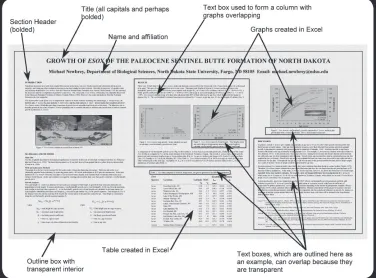
Our objectives are to introduce criteria for construct-ing posters with the style and quality of professional scientific meetings and to provide a conceptual frame-work for constructive critique. In this paper we will not concentrate on the specific sections of the poster, but rather the physical components that comprise it and how to format them(Figure 1). We have tested our poster suggestions and procedure (Newbrey & Baltezore, 2005; procedure available on the Web) on approximately 100 high school students who were required to construct, critique, and present their laboratory research in poster format to their peers. In addition, a large number of col-lege students have successfully constructed a poster from these instructions using the various versions of Microsoft PowerPoint, such as PowerPoint 2000 (1999). Some of the high school students constructed posters in as little as 45 minutes, however most spent several hours putting together a good first draft using components prepared from class papers.
Layout & Content
When presenting at scientific meetings, the organi-zation usually provides some specifications about the size of a poster (four feet by three feet, etc.). Scientific
P
H
O
W
-T
O
-D
O
-I
T
M
I C H A E LG . N
E W B R E YJ
O A NM . B
A LT E Z O R EMICHAEL G. NEWBREY is a Ph.D. candidate in the Departments
of Biological Sciences and Geosciences, NSF GK-12 Graduate Teaching Fellow, North Dakota State University, Fargo, ND 58015; e-mail: [email protected]. JOAN M.
BALTEZORE is a biology instructor in the Science Department,
West Fargo High School, West Fargo, ND 58078; e-mail: [email protected].
Poster
Presentations
:
organizations will also provide information about the criteria used to judge posters for competition. We have included information for judging and critiquing posters modified from the Society of Vertebrate Paleontology Annual Meeting Guidelines for presenters (Eberth, 2004), because the information provides important criteria necessary for designing a good poster and developing an assessment rubric.
Criteria for Judging Posters
Layout
A poster title is descriptive and should be placed high on the poster so that it can be read 15 feet away. The title is fol-lowed by the author information, name(s) and affiliation(s) in a smaller font size. The content of the poster should be brack-eted with an Introduction at the beginning and a Conclusion (may also be contained in the Discussion) at the end. These sec-tions are critical because they are often the only sections that are read. Some orga-nizations require a brief Abstract prior to the Introduction. The flow of information through the poster should be explicit and organized in columns. Text in the body,
graphs, tables, and figure and table captions should be dis-cernable from at least three feet away. A poster should dem-onstrate creativity expressed in the study design.
Content Critique
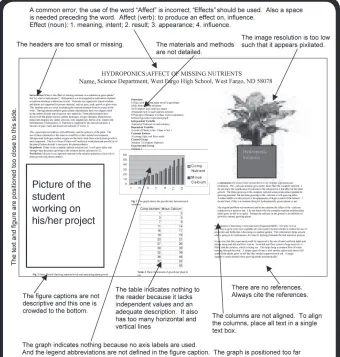
Does the Introduction provide the basis of investigation and the direction/approach to answer the question being con-sidered? Is the methodology of the investigation clear? Are the results presented and are they understandable? Do the results support the conclusions drawn or are there possible alterna-tives in interpretation? Do the conclusions follow from the original intent, given in the Introduction? The poster should be self-explanatory, so that the main points are communicated without the presenter being there. This is very important! Each illustration may have a short title with a more detailed caption below. Posters should be proofread for correct spell-ing and grammar and the poster should show creativity in presentation of the material. In the classroom, encourage the students to proofread other students’ posters to learn skills in critique (Figure 2) and improve self examination as supported by the National Science Education Standards (National Research Council, 1996) Content Standard B by working together as colleagues.
Characteristics of a Poster
The poster characteristics in this article are provided to design and create a poster in Microsoft PowerPoint, how-ever, other programs such as Adobe Photoshop 5.0 (1998) or Freelance Graphics 9.8 (2003) can also be used. We selected PowerPoint because it is commonly available. We suggest that the reader peruse this document in its entirety and then, if necessary, use the technical procedure provided on the Web
site to create a poster. Consider this document as a guide for determining characteristics of a poster. Also, creators of post-ers will experience difficulties when working with any soft-ware, so we encourage students to save their documents often and save them on two separate memory devices.
Layout Characteristics
Start by setting the size (i.e., 48” x 36” or 122 cm x 91 cm) of the poster and choose the orientation of the slide by selecting either portrait or landscape. Usually, posters are pre-sented in landscape format because most easels and poster-display panels will accommodate a landscape orientation.
Background
The background color can function to catch a reader’s eye from a distance but also, more importantly, to highlight the text of the poster. We suggest a very dark color or a light color to contrast the text of the poster. A good “very” dark color is dark blue (for example, set: red, green, blue to 0,0,102) or dark green, dark gray, and dark purple because they are soft and easy to look at. You may choose “very” light colors as a background with more choices in color, but make sure the colors are not too bright.
Fill effects can also be used as a background, such as a “gradient, texture, or JPEG picture” as a background. A gradi-ent is a change in color over a distance. Gradigradi-ents can provide an aesthetic effect of two color extremes while retaining the characteristic of a subtle change in color to facilitate readabil-ity. We suggest that the top be black in color to highlight the title, while the second dark color represents the middle and perhaps bottom.
Textures and pictures can provide an excellent back-ground in some cases but be aware that “busy” textures may
Figure 1.
Poster presented at the XVI International Union for Quaternary Research Congress
make reading the text on the poster difficult. Texture is the fine aggre-gation or non-aggreaggre-gation of back-ground color. An image can also be imported as background fill and can have very aesthetic effects. However, this is inadvisable for most pictures because of their non-regular shifts in extreme colors, which may obscure light or darkly-colored text. The pic-ture should posses the qualities of being either very light or dark to contrast the text.
Title & Author information
The title should be as short as possible, as well as interesting and informative. Use either Times New Roman or Ariel fonts and set the color to either a very dark (such as black text on a light background) or very light text (such as white on a dark background). Contrast is impor-tant for reading from a distance so that people reading the poster don’t have to strain their eyes. The text size of the title should be 60 pt or larger and “Font Style” should be bold. Titles should be all capital letters for readability. If you choose not to have all capital letters, use a larger font size. Use the same font throughout the poster; this is a common problem seen at professional meetings.
On the line below the title, reset the text size to approximately 70% of the title text size (for example, if the title text is 60 pt [48” x 36” poster], then the following line should be 45 pt). The name and work/school address should follow. Use this
for-mat: Name, Science Department, West Fargo High School, West Fargo, ND 58078, E-mail: [email protected].
Body
The text representing the body of the poster should be formatted into equal width columns with each column a single text box (Figure 3). Proceed by typing in the text box or “Copy” and “Paste Special” as unformatted text to eliminate tab and hard return errors. The embedded tabs and hard returns make formatting difficult or impossible in PowerPoint text boxes (i.e., unwanted and un-adjustable spacing, long tab distances, etc.). We recommend that columns of text within the poster not be outlined by a four-sided box because too many lines distract the reader. If a box is necessary to high-light a point,set the line thickness so that it is thick enough to be viewed after enlargement, at a distance (4 pt or more).
The main body of the text should be of the same font and colors with sizes commonly set at 18 to 25 pt (preferably 20 or larger for 48” x 36” poster). Text can be highlighted using
the colors yellow or blue; other soft colors will work also, but never use red for text because it is too hard to read and the ink can bleed. Text box height can be manipulated by adding hard returns after the text. Leave space for figures within the column by placing a series of hard returns to move the text down the column. Use separate text boxes as figure captions. Text boxes can overlap each other, but obscure each other if they have “Fill” and are non-transparent. Left justify the text in the text box with the left margin of the figure.
Graphs & Tables
Graphs and tables are excellent ways to communicate findings in a concise manner and can convey a relationship at a glance. All text should be legible from a distance of at least three feet and all axes should be concisely and clearly labeled using a single line.
Tables are very useful in conveying the data and results in a consistent format. It is standard journal practice to use as few lines as possible in a table. Most tables can be constructed in one to three horizontal lines. Do not use vertical lines;
Figure 2.
This poster has a variety of grammatical, graphical, and formatting errors. Some are pointed
most journals and societies do not approve of the use of vertical lines in finished products. Too many lines can distract the reader and make it difficult for the eye to follow.
Pictures
Good pictures can dress up a poster and stimu-late the interest of potential readers. Good pictures may show your study area, study design, effects, results, con-ceptual models, flow charts, graphs, etc. and must have the resolution necessary to appear in focus when enlarged. Poor pictures will only detract from the qual-ity of the poster and, thus, your reputation. Digital cameras are great for gen-erating pictures that lend themselves well to enlarge-ment. JPEG format pictures of greater than 3 megabytes are preferable, however, 1.5 megabytes will function quite well. Images of a TIFF
format will withstand more edits while retaining their quality and, hence, are preferred. To select a picture from the Web, save the picture to a file, and then follow the instructions for inserting the picture from a file. Do not “Copy” and “Paste.” This procedure should ensure the highest quality picture pos-sible for the poster and will help prevent problems with low resolution when it is enlarged. Never use someone’s pictures or written material without proper citation of the material. All too often students misunderstand how to properly acquire and cite material taken from the Web and, as such, plagiarize someone else’s work.
If you feel the need to draw the reader’s attention to an aspect of a picture or a characteristic on a graph or table, use an arrow perhaps in conjunction with bolded text. Arrows can be very useful for pointing out key aspects or identifying attributes. Do not overuse arrows or the reader will become desensitized to their presence.
Printing the Poster
To determine if the product can be read at a distance, print the poster on an 8.5” x 11” (21.6 x 29.7 cm) sheet of paper. The body of the text should be easily read on the 8.5” x 11” printout. However, for full size posters the file can be printed to larger-display sizes on digital plotters at universities and commercial printers. At North Dakota State University, poster printing costs run from $15.00 to $25.00 depending on size and whether the paper has a matte or glossy finish. Glossy finish is more expensive, but produces sharper con-trasts than matte finish. Inform your students that often a revised version of the poster may be necessary because digital
Figure 3.
A diagram showing the different components of a poster. In the figure some of the text boxes are outlined
plotters do not always print as the poster appears on the screen (e.g., misplaced text and colors). Errors can occur from the inability of some print drivers to interpret the coding of characteristics within the poster.
Fliers
Fliers should contain the title, names, all contact infor-mation, abstract, meeting information (i.e., name, date, and location of the meeting), and an image of the poster on a single 8.5” x 11” sheet of paper. Because presenters cannot always visit with all interested persons and their audience may want to remember the results and contact information, fliers can be very useful in disseminating relevant information. We have referenced fliers up to three years later to cite the research; poster titles, authors, and meeting information are necessary to construct a proper citation. Fliers can be printed in color and are often available for distribution while the post-er is displayed, howevpost-er, flipost-ers can also be made available on a Web site. In our experience, we have printed approximately 60 fliers for meetings with an attendance of about 1,500 people. However, this is largely variable depending on the general interest and applicability of the topic. Students should be aware of the usefulness of fliers and perhaps be required to construct fliers for an assignment. In addition, students should be required to provide a peer review of their fellow students’ fliers. The reviews themselves could be graded on the basis of their assessments.
Conclusion
Constructing posters can help students develop better written and oral communication skills, and poster creation expertise that will be beneficial in future work or academic endeavors. At the conclusion of the exercise, encourage stu-dents to present their posters to their classmates. Often, a researcher at a meeting will approach a poster presenter and request a short, concise oral presentation about the research
rather than read the entire poster content. This presentation usually conveys the presenter’s communication skills, and often prospective employers will remember both the good and bad presentations and posters. Emphasize this to your students because it can make a difference in obtaining future employment. The students can present their posters to their peers in the classroom setting even with small classroom bud-gets. Posters can be presented with a digital projector or, with less optimal results, an overhead projector, by printing the posters on overhead projector transparencies. This experience is applicable to students of many academic interests because many companies and corporations use posters for internal training and passive education.
Acknowledgments
We are appreciative of the reviews provided by Jennifer Newbrey and Kim McVicar of North Dakota State University, and three anonymous reviewers. We would like to thank the GraSUS program, which is a GK-12 program supported by the National Science Foundation Project DGE-0086445, and North Dakota State University for paying for the printing costs incurred for posters created by the Advanced Biology students at West Fargo High School, West Fargo, North Dakota, which significantly enhanced this procedure.
References
Adobe Photoshop. (1998). Adobe Photoshop 5.0. Adobe. San Jose, CA.
Eberth, D. (2004). Society awards: SVP student poster prize. Society of Vertebrate Paleontology. Available online at : http:// www.vertpaleo.org/awards/poster.html.
Excel 2000. (1999). Microsoft Excel, Microsoft Office 2000. Microsoft Corporation. http://www.microsoft.com.
Freelance Graphics. (2003). Freelance Graphics, SmartSuite Release 9.8. Lotus Software, IBM Software Group. Cambridge, MA.
National Research Council. (1996).
National Science Education Standards. Washington, DC: National Academy Press.
Newbrey, M.G. & Ashworth, A.C. (2003). A new method to estimate early Holocene mean annual temperature using
growth characteristics of fossil Perca
flavescens (yellow perch). Reno, NV: XVI International Union for Quaternary Research Congress
Newbrey, M.G. & Baltezore, J.M. (2005).
Procedure To Construct Professional Quality Posters. The file is available to download in Adobe PDF and Microsoft Word formats at: http://www.ndsu. edu/grasus/baltezore/.
PowerPoint 2000. (1999). Microsoft PowerPoint, Microsoft Office 2000. Microsoft Corporation. http://www. microsoft.com.