VCAA ASSESSMENT ONLINE
ON DEMAND
GENERAL INFORMATION
Table of Contents
1. What is On Demand Testing?
3
2. What On Demand Tests are Available?
4
2.
1
Linear Test
4
2.
2
Adaptive Test
4
3. How On Demand is Delivered?
5
3.1 The Central Server
5
3.2 The School Server
5
4.
Resources
4.1 Support for Schools
4.2 How to Register for On Demand Testing?
6
6
6
1. What is On Demand Testing?
On Demand Testing is an online resource for teachers to use when, where and how they choose. It puts teachers in the driving seat as they control the entire process from test selection, to analysis and use of the assessment data the program will produce. It is optional, time saving and able to be administered to a single student and/or a whole class. It offers a number of advantages including the capacity for automatic marking and computer generated reports.
This resource:
• provides access to a range of computer-based assessments that are easy to administer to individuals or groups of students
• has choices of tests across a range of learning areas and levels
• includes assessment tasks that can be marked by the computer, providing immediate results
• provides the option to offer the tests in printed form to students • offers feedback in the form of class and individual student reports.
Tests are designed to link to the outcomes of the Victorian Essential Learning Standards (VELS). Both general skills tests and dimension specific tests are available.
Many questions in the tests are multiple choice. Students may also be required to enter short answers on the keyboard, use the mouse to ‘drag and drop’ answers, use an on-screen calculator or answer by locating a ‘hot spot’ on screen that corresponds to the answer. The tests are automatically marked by computer providing immediate class and student reports.
Uses of the Tests Include:
• Pre and post testing of students around a topic • Assessing new intake or late arrival students
• Identifying strengths or weaknesses of individual students • Corroborating teacher judgements
• Assisting in forward planning of teaching programs
2. What On Demand Tests are Available?
Currently there are tests available in the Domains of Mathematics and English. The tests cover Standard Levels 2 to 6. The range of tests includes both linear and adaptive tests.
2.1 Linear Tests
In these tests students receive the same questions in the same order during the test. Students' responses are saved and scored by the computer. Teachers are able to view and analyse results through a number of different reports.
2.2 Adaptive Tests
Adaptive tests deliver sets of questions to students that vary according to student ability. Depending on the responses given in the previous questions, the system automatically presents easier or more difficult questions to each student. Teachers often find these computer-based tests determine a student’s performance level quickly and accurately.
3. How On Demand is Delivered?
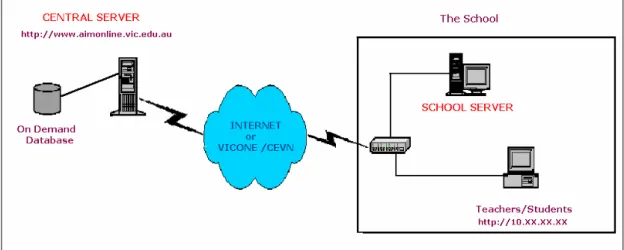
The On Demand Testing program uses software developed by the Victorian
Curriculum and Assessment Authority (VCAA). This software is referred to as VCAA Assessment Online. There are two components to the VCAA Assessment Online application – the Central Server and the School Server (see Figure 1.1)
Figure 1.1 VCAA Assessment Online
3.1 The Central Server
The Central Server is essentially a database that stores all public questions and tests the VCAA has created for the On Demand Testing program. The Central Server is available via the internet and can be accessed from the following web address:
http://www.aimonline.vic.edu.au
Each school is provided with a unique username and password for the Central Server site from where they can search, preview and download tests to their school. Contact the VCAA help desk on 1800 827 721 if you do not have the appropriate login for this site.
3.2 The School Server
The School Server is the other component of VCAA Assessment Online. The school is required to install software on a compatible server at the school. This software is supplied free by the VCAA. In government schools, this software is installed on the CASES21 server. Once this software has been installed and configured, schools can download tests from the Central Server. The School Server must be set up in order to receive downloaded tests from the Central Server.
The School Server operates on the school’s local network and relies on the internet only for downloading tests from the Central Server. Once the software is installed and configured, a dedicated website address is used to enable all users (Teachers and Students) to access the application within the school’s network via an Internet Explorer browser. This is the School Server homepage. The address for the School
Server is unique in each school but will consist of four groups of digits, such as, http://123.45.67.89 (NB: this is just an example).
Teacher and students access the School Server application and sit the tests within the school’s local area network (LAN) and do not rely on the internet during this time. In government schools, the School Server is accessible from the curriculum network even though the server resides on the CASES server on the administration network. Tests that are downloaded remain permanently on the School Server. You will need to import student details and create user accounts for other teachers at your school before you start testing online. Setting up test sessions, sitting tests and viewing reports are other functions available on the school server. All test results and student information is stored locally on the School Server.
4. R
esources
4.1 Support for Schools
A Teacher Training Guide for On Demand testing is available from the following link.
http://www.vcaa.vic.edu.au/prep10/ondemand/docodownload.html
Telephone support and email support are also available to schools and teachers. The VCAA Assessment Online Helpdesk is contactable on 1800 827 721 or email
4.2 How to Register for On Demand Testing?
To register for On Demand testing, please complete the online registration form on
the VCAA website at
https://registration.vcaa.vic.edu.au/school/eoilogin.asp
Schools will need to provide their VCAA School Code to complete this registration. Your school’s VCAA code can be provided to you from the VCAA Assessment Online Helpdesk by phone, 1800 827 721, or email