TWO LEVEL AUTHENTICATED GRAPHICAL
PASSWORD SYSTEM FOR AN APPLICATION.
Rashmi Thawani
1, Priyanka Rao
2, Soniya Rajgire
3,
Prof.A.J.Jadhav
4, Aditi Jadhav
51,2,3,4,5
IT, Jspm’s Rajarshi Shahu College of Enginnering, (India)
ABSTRACT
Today Information Technology has become part of our day-today life. Information Technology means use of computers and internet to store the information. So all the organizations, industries and also individuals are using computers to store and share or communicate the information. So here security is much important while storing and communicating the information over internet or through computer. For this security various techniques are available. Among them the most common and easy to use is a password.
For security purpose every application provides user authentication. From ancient days, secret data or code is used for hiding and this gives security to information. Most traditional approach is in which we have to pass username and password. Authentication process is divided into Token based authentication, Biometric based authentication and Knowledge based authentication. In today's changing world when we are having number of networks and personal account some sort of easy authentication schema needs to be provided.
In the proposed system we are selecting the images from Google drop box API which gets downloaded at runtime and this becomes our password. There is a shoulder attach system which is a combination of 2 colors and 1 number. By proper selection the e-learning site opens.
Keywords:
Password, Graphical password, Shoulder attach system, alphanumeric password,
security primitive .
I. INTRODUCTION
The information stored by the computer systems are valuable and need to be protected. Password can be easily
cracked by malpractices like online guessing attack, online dictionary attack and shoulder surfing attacks. The
problem of security arises because passwords are expected to include two requirements: 1) Passwords should be
easy and memorable, 2) Passwords should be secure, i.e. they should be hard to guess.Users often end up
ignoring the requirements, which leads to poor password practices. This problem has led to innovations to
improve passwords.
Standard security technique now used is graphical password, i.e., passwords that are based on images rather than
alphanumeric text. The idea is to use images which will be easy to memorize.The main motto is to provide user
II. OVERVIEW OF THE AUTHENTICA-TION METHODS
Current authentication methods can be divided into three main areas:
• Token based authentication • Biometric based authentication • Knowledge based authentication
Token based authentication-
Techniques such as bank cards and smart cards are widely used. For example, ATMcards are generally used
together with a PIN number.
Biometric based authentication-
Techniques such as fingerprints, iris scanner or facial recognition systems are not yet widely adopted because
such systems can be expensive and the identification process can be slow and often unreliable. But, this type of
technique provides the highest level of security.
Knowledge based authentication-
Widely used techniques are text-based and picture-based passwords. The picture-based techniques is further
divided into two categories: recognition-based and recall-based graphical techniques. Using recognition-based
techniques, a user is presented with a set of images and the user passes the authentication by recognizing and
identifying the images he or she selected during the registration stage. Using recall-based techniques, a user is
asked to reproduce something that he or she created or selected earlier during the registration stage.
III. EXISTING WORK
A. Graphical Password
In his scheme, one predetermined image is presented to a user and user needs to select one or more
predetermined positions on the displayed image in order to access the resource [1]. The drawback of this scheme
is that users will not be able to click arbitrarily on the background.
Sonia Chiasson et al. [2] proposed Cued Click Points (CCP). In this a password consists of one click-point for
every image for a sequence of 5 images. Based on the previous click-point the another image gets displayed and
users receive quick feedback whether they are on the correct path when logging in. A wrong click leads down to
an incorrect path with an indication of authentication failure only after the final click. The time when they see a
wrong image, they know that the recent click-point was wrong and can terminate this attempt and try again from
the beginning.
Dhamija and Perrig [3] proposed a graphical authentication scheme in which a certain number of images from a
set of random pictures are selected by the users at the time of registration. Then user has to identify the
previously selected images for authentication. A set of pictures are presented on the interface to the users, some
are taken from their portfolio, and some images are selected randomly. Users have to select their images, for
successful authentication.
B. Recall based techniques
Pass Points: This scheme is same as clued click point but an improvement over Pass Points is that the users get
immediate feedback about an error when trying to log in.
This technique has two phases. First is a registration phase and second is a login phase
Registration Phase-
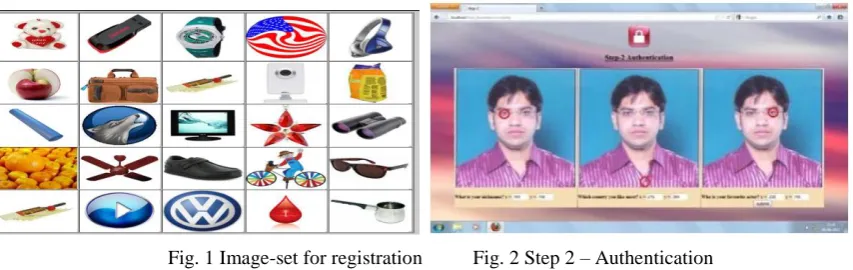
Firstly, user creates his profile by entering personal details and username, he gets a set of 25 images as shown in
Fig. 1.The user then has to select any number of images from this set.
This selection will act as the password of his first step of authentication.
Now he is presented with a set of questions and the selected image. The user has to select any three questions
from the set. To answer each question he will click on any point of the image. So for three questions there will
be three region of answers (ROA) within the image and each question will be associated with an ROA. Each
ROA is described by a square.
Login Phase-
In step-1, a user is asked for his user name and graphical password (correct selection of images in a correct
sequence). After supplying this, independent of whether or not it is correct, in step-2 authentication, the user is
presented with the set of three questions and the pre-selected image.
Fig. 1 Image-set for registration Fig. 2 Step 2 – Authentication
The user has to click on the correct ROAs according to the order of questions. After the successful entries in
both steps the user is allowed to access his account.
IV.PROPOSED SYSTEM.
In the proposed system, knowledge based authentication with the combination of both recognition and recall
based approach is used. Here we strive upon two level authentication with referring Dhamija and Perrig [3]
concept in which the images are selected randomly and users have to re-select images at the time of login. Here
we add an additional step with providing another more secure and resistant system known as shoulder shifting
system.
The proposed system provides resistance against all types of attacks like shoulder surfing attack and dictionary
attack. Here user is expected to recognize the images selected from Drop box API at runtime and recall the code
to successfully hit the combination pattern and unlock the system. The whole procedure is explained below.
The proposed system consists of two phases as
A. Registration phase.
B. Login phase
A. Registration phase:
Steps involved in registration phase are as follows:
2. ASCII values of the username are generated.
3. Further the Addition of the ASCII values are done, then the average of added values are calculated using
which the user name set is generated.
4. This username set is set of images in the drop box.
5. We are using Google drop box API for the same purpose.
6. User will select 4 Images from image list.
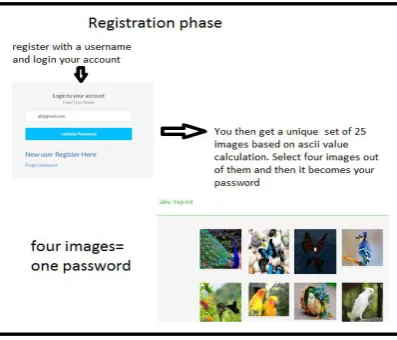
7. The registration process will take place as shown in the Fig 2.
Fig 1.Registration phase
In above figure, user enters the name and registers itself for the site. Now the ASCII value for user say example
Aditi gets calculated as explained in step 3. So the ASCII value for Aditi comes out to be 43 Index is 4, and so
the images of set D are displayed to user in next phase.
In the figure above the user is asked to select four images in registration phase which he has to recognize at the
time of login again. These four images are stored in the database as Pass1,Pass2,Pass3,Pass4.
Fig 2.Image selection as password.
B. Login phase
Steps involved in registration phase are as follows:
1. At the time of login, if the selection of images from different set matches, the next level of the
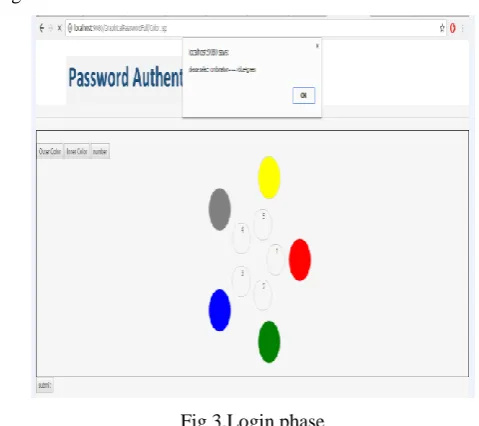
2. The next level of authentication is the color combination pattern which
which has inner colored ring with a number and an outer colored ring as shown in fig 3., which when
arranged in proper order unlocks the system.
3. When the user is done with first level, the color combination pattern will be unlocked by merging
appropriate color rings.
Fig 3.Login phase
4. If match found the system of e-learning will be opened.
V. IMPLEMENTATION AND DISCUSSION
We believe that proposed system is promising and unique for two reasons:
1. It combines recognition and recall based approach for passwords trying to achieve the best of both
approaches.
2. It provides multi-factor authentication (image selection, arrangement of colored rings in proper order and
recalling of the number) in a friendly way.
VI. CONCLUSION
In the proposed system we make use of both recognition and recall based system. We strive to develop a secure
two level authentication system for the areas where security is the major concern, which at the same time is not
so hectic or does not proves to be overhead for the users.
REFERENCES
[1] G. E. Blonder, "Graphical passwords," in Lucent Technologies, Inc., Murray Hill, NJ, U. S.
Patent-5559961, Ed. United States, 1996.\
[2] Sonia Chiasson, P.C. Van Oorschot, and Robert Biddle, “Graphical Password Authentication Using Cued
Click Points”, 12th European Symposium on Research in Computer Security (ESORICS), 2007,
[3] R. Dhamija, and A. Perrig. “Déjà Vu: A User Study Using Images for Authentication”. In 9th USENIX
Security Symposium, 2000.
[4] Graphical Passwords: A Survey XiaoyuanSuo Ying Zhu G. Scott. Owen Department of Computer Science
Georgia State University [email protected], [email protected], [email protected]
[5] A New Graphical Password: Combination of Recall & Recognition Based Approach Md. AsrafulHaque,
Babbar Imam
[6] Authentication schemes for session passwords. Weinshall and Kirkpatrick
[7] 3-Level Password Authentication System. Lalu Varghese, Nadiya Mathew, Sumy Saju, Vishnu K Prasad.
[8] Hash Visualization: a New Technique to improve Real-World Security Adrian Perrig Adrian
[email protected] Dawn Song Dawn [email protected]
[9] S. Akula and V. Devisetty, "Image Based Registration and Authentication System," in Proceedings
ojlv1idwes Instruction and Computing Symposium, 2004.
[10] G. E. Blonder, "Graphical passwords," in Lucent Technologies, Inc., Murray Hill, NJ, U. S. Patent, Ed.