© 2019, IRJET | Impact Factor value: 7.211 | ISO 9001:2008 Certified Journal
| Page 323
Secure Android Application Development and Security Assessment
Vandana.H.K
1,
Dr. H.D. Phaneendra
21
Student, MTech- Information Technology, The National Institute of Engineering, Mysuru-09
2
Professor
& Head, Dept. of CS&E, The National Institute of Engineering, Mysuru-09
---***---
Abstract - Nowadays mobile has taken a main part in everyday life of an individual, all important information are stored in mobile database and accessible by mobile applications. Even online transactions are through mobile applications; hence, mobile security requires the main priority. Android applications undergo static and dynamic analysis during security testing. These analysis requires tools like apktool, adb, BurpSuite, Drozer, dex2jar, JDGui and jadX. This paper consists of step-wise procedure for an android application security assessment through which vulnerabilities can be found and solutions to overcome vulnerabilities.
Key Words: BurpSuite, apktool, Drozer, CORS, Verbose Server Banner, Root Detection,AndroidManifest.xml.
1. INTRODUCTION
Mobile plays an important part in recent years and replaced personal computer to more extent. Applications are built for every need including e-commerce, online transactions, health care, etc. These applications consists of sensitive data of an individual and needs to be secured. Only securing android device is not enough one should also look into that each application is secured or not.
Android application undergo static and dynamic analysis during security assessment. Generally, static analysis of an android application consists of source code review, side channel leakage, reverse engineering etc. Dynamic analysis consists of review of interception of api between application and server. Static analysis requires apktool, dex2jar, jadx, JDGUI tools. Dynamic analysis requires adb, Drozer, BurpSuite tools.
2. METHODS
2.1Method-I
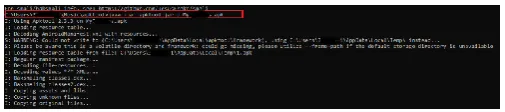
Once an android application is given for security assessment, it will be in .apk form. Apktool is the tool utilized for reverse engineering of an android application where we can decompile full source code into .smali form. Even modifying and recompiling .apk is easy using this tool. Download the apktool for free from google as it is an open source. Once installed, using following command in terminal you can reverse engineer the .apk file.
Fig -1: Result of >apktool; command
Fig-2: Result of >java –jar apktool.jar d –s application_name.apk; command
2.1.1Problem A
[image:1.595.308.564.187.361.2]Consider an example for Dangerous permissions used vulnerability, as “write_external_storage” permission set as shown in figure 3. This permission allows the application to store the application data onto the external storage like memory card, which is accessible to all other applications. Anything stored in the external storage is accessible to all the application irrespective the device is rooted or not. Confidentiality of the sensitive data is compromised, as the data is openly accessible.
Fig -3: AndroidManifest.xml where write_external_storage permission is set.
Solution A
[image:1.595.307.560.385.441.2]© 2019, IRJET | Impact Factor value: 7.211 | ISO 9001:2008 Certified Journal
| Page 324
application to work properly. [6] Provide knowledge about all uses-permission in android.
2.1.2Problem B
Consider debuggable flag enabled vulnerability as shown in fig- 4,the debug tag in AndroidManifest.xml defines whether the application can be debugged or not. If the application can be debugged then it can provide plenty of information to an attacker since the local storage of the application is accessible to attacker and it will also make easy in gaining intercepted API between application and server. Attacker needs to have physical access to rooted devices or there should be a malware app running in background, which can read through unencrypted sensitive data saved within sandbox of the app. Proxy can be adjusted and interception can be done using Burp Suite, this will explained in next method.
Fig -4: AndroidManifest.xml where debuggable and allowBackup flags are set to true
Consider allowBackup flag enabled vulnerability as shown in figure 4, this flag allows anyone to backup your application data via adb. It allows users who have enabled USB debugging to copy application data off of the device. Android backups rely on the Android Debug Bridge (ADB) command to perform backup and restore. ADB, however, has been a soft target for attacker and is still not trusted by respected developers. The idea that someone can inject malicious code into your backup data is unsettling. Attackers can read its internal sensitive data like password, tokens etc. and modify these sensitive data or configurations.
Even though the flag is set to false or flag is only removed, attacker can modify them and recompile .apk file ,as shown in following steps
Step 1: Open AndroidManifest.xml file in text editor and add android:debuggable=”true” inside <application> tag as shown in fig- 4.
Step 2: Recompile the above modified files using following command.
>java –jar apktool b modified_folder –o modified_app_name.apk
Step 3: The new .apk formed should be signed by apk signer application before installing into mobile.
Solution B
It is recommended that Android applications that are not in the production state are expected to have this attribute set to true to assist the testers and developers however before
the actual release of the application this tag should be set to false. It is also recommended to Set android:allowBackup=false in Androidmanifes.xml or even better is to remove that tag.
Fig -5: AndroidManifest.xml where debuggable and allowBackup flags are set to false
2.1.3Problem C
Consider Improper export of android application components vulnerability as shown in figure 5, The Android application exports a component for use by other applications, but does not properly restrict which applications can launch the component or access the data it contains. Intents can be used to launch an activity, to send it to any interested broadcast receiver components, and to communicate with a background service. Intents messages should be reviewed to ensure that they does not contain any sensitive information that could be intercepted.If access to an exported Activity is not restricted, any application will be able to launch the activity. This may allow a malicious application to gain access to sensitive information, modify the internal state of the application, or trick a user into interacting with the victim application while believing they are still interacting with the malicious application.If access to an exported Service is not restricted, any application may start and bind to the Service. Depending on the exposed functionality, this may allow a malicious application to perform unauthorized actions, gain access to sensitive information, or corrupt the internal state of the application.
Fig -6: Drozer utility used to list activities exported in the target application.
© 2019, IRJET | Impact Factor value: 7.211 | ISO 9001:2008 Certified Journal
| Page 325
com.isi.testapp.MainActivity is the home screen which in order to be launched, it should be exported. Here, com.isi.testapp.Welcome is the name of the activity which is triggered after the login screen. Using Drozer, launch that activity.
Fig -7: Drozer utility used to exploit vulnerabilities
This command provides an appropriate intent in the background in order to launch the activity, which is to bypass authentication during logging in to an application.
Solution C
It is recommended to make android:exported=false for unwanted functionalities in AndroidManifest.xml.
Fig -8: AndroidManifest.xml where exported flag set to false
2.2Method-II
After all static analysis, let’s see how BurpSuite will be used for security assessment. Download the BurpSuite-Community Edition for free from google as it is an open source. Set every settings required to intercept the traffic, exchanged between application and server. Proxy settings is similar to what we set during web application pentesting , but the change is instead of localhost we choose all interface option. In mobile device, we have to set proxy according to machine IP address, which has burpsuite running on it.
Here we discuss some basic vulnerabilities, which are found during this assessment.
2.2.1Problem D
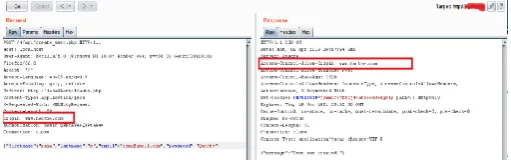
Consider, Cross Origin Resource Sharing(CORS) vulnerability where CORS defines whether resources on other domains can interact with this server. An attacker can place malicious JavaScript on his domain that can exploit the unrestrictive CORS policy to access sensitive data on this server or perform sensitive operations without the user’s knowledge. Additionally, an attacker could exploit security vulnerabilities on other domains to compromise services on this server. The CORS policy relaxes the Same Origin Policy, an important security control that isolates potentially malicious resources to its respective domain name. If a script attempts to violate the Same Origin Policy by interacting with another domain, modern browsers will check a server’s CORS policy by issuing a “pre-flight request”. The browser allows the interaction only if the server responds with an Access-Control-Allow-Origin header that
lists the script’s domain or a wildcard match (*). A wildcard match allows interaction from any other domain, which allows any malicious content to retrieve content from this server or perform user actions.
[image:3.595.307.563.245.325.2]An unrestricted CORS policy allows an attacker to access sensitive data or perform unauthorized user actions without user knowledge. Malicious JavaScript can perform these actions even if the server uses Cross Site Request Forgery tokens. Hence, an attacker can access sensitive data of victim. This vulnerability comes under category M3-Insecure Communication.
Fig -9: Access-Control-Allow-Origin header in response reflecting injected Origin in request
Solution D
[image:3.595.306.563.523.606.2]The Access-Control-Allow-Origin header should not be set to a wildcard match. In most cases, this header can be safely removed. However, if the application requires a relaxation of the Same Origin Policy, the Access-Control-Allow-Origin header should whitelist only domains that are trusted by this server.
Fig -10: Whitelisting trusted domains for server
Fig -11: Access-Control-Allow-Origin header in response reflecting only trusted domains.
2.2.2Problem E
© 2019, IRJET | Impact Factor value: 7.211 | ISO 9001:2008 Certified Journal
| Page 326
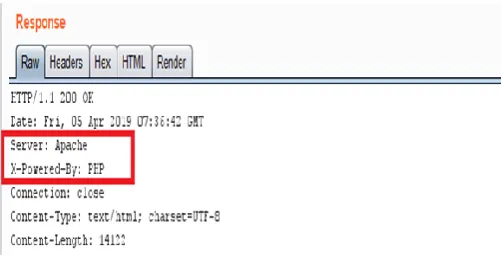
to the web server, analyze the response, and compare it to the database of known signatures. By knowing the information about the server, an attacker can plan attacks in future, with the information obtained. There may be publically known exploits and vulnerabilities associated with the server hosted, whose information gets disclosed in the banner. Verbose server banners provide additional information that allows an attacker to perform targeted attacks to the specific technology stack in use by the application and underlying infrastructure. This vulnerability comes under category W6 – Security Misconfiguration.
[image:4.595.309.560.348.484.2]Fig -12: Server banner disclosure (not secured)
Fig -13: Server Apache has above configurations in it’s httpd.conf file
Fig -14: PHP has above configurations in its php.ini file
Solution E
Verbose server information should be removed from all HTTP responses. This can be performed by modifying the server's configuration files .It is recommended to use generic error message response from server, so that server banner is not disclosed in the error message response from the server.
Fig -15: Changing configurations of Server Apache in its httpd.conf file
Fig -16: Changing configurations of PHP in its php.ini file
Fig -17: Server banner after changing configurations of servers.
2.2.3Problem F
© 2019, IRJET | Impact Factor value: 7.211 | ISO 9001:2008 Certified Journal
| Page 327
Fig -18: Cookie with no httponly or secure flags
Solution F
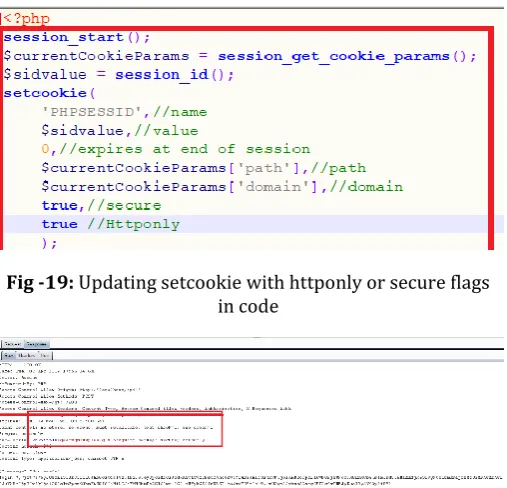
[image:5.595.37.291.250.494.2]The secure flag and Http only flag should be set on all cookies that are used for transmitting sensitive data when accessing content over HTTPS.
Fig -19: Updating setcookie with httponly or secure flags in code
Fig -20: Cookie with httponly or secure flags.
2.2.4Problem G
Consider, lack of root detection vulnerability where the application will not detect rooted android device. Android implements containerization so that each app is restricted to its own sandbox. A regular app cannot access files outside its dedicated data directories, and access to system APIs is restricted via app privileges. As a result, an app’s sensitive data as well as the integrity of the OS is guaranteed under normal conditions. However, when an adversary gains root access to the mobile operating system, the default protections can be bypassed completely. Attacker should have physical access on the device, however rooted device remotely accessible in case user root SSH not protected. Applications on a rooted device run as root outside of the android sandbox. This can allow applications to access sensitive data contained in other apps or install malicious software negating sandboxing functionality. The risk of malicious code running as root is higher on rooted devices, as many of the default integrity checks are disabled.
Solution G
Developers of apps that handle highly sensitive data should therefore consider implementing checks that either prevent the app from running under these conditions, or at least warn the user about the increased risks.
3. CONCLUSIONS
This paper provides basic vulnerabilities found during security assessment and solutions for developers to overcome them. The main aim of this paper is to provide basic improvements that can be done during an android application development so that during security assessments, tester can concentrate on major vulnerabilities rather than spending time on testing these basic vulnerabilities.
ACKNOWLEDGEMENT
I would like to thank Dr. H.D. Phaneendra, Professor & Head, Dept. of CS&E at NIE, Mysore for his guidance and support in doing case study of the above paper.
REFERENCES
Karthick S, Dr. Sumitra Binu- “Android Security Issues and Solutions”- International Conference on Innovative Mechanisms for Industry Applications (ICIMIA 2017).
[1] Igor Khokhlov, Leon Reznik -“Android System Security
Evaluation”- 2018 15th IEEE Annual Consumer Communications & Networking Conference (CCNC).
[2] Sebastian Lekies, Martin Johns and Walter Tighzert –
“The State of the Cross-domain Nation”- 2011 IEEE Security.
[3]
https://www.medianova.com/en-blog/2019/02/20/a- technical-introduction-to-cors-cross-origin-resource-sharing. [Online]
[4]
https://technumero.com/disable-server-signature-by-editing-htaccess-apache/. [Online].
[5] Cheng-Liang Kuo , Chung-Huang Yang-“Security Design