University of South Carolina
Scholar Commons
Theses and Dissertations
5-2017
Situational Intuition: Hierarchical Modes of User
Experience in Human-Computer Interaction
Simon Tarr
Follow this and additional works at:https://scholarcommons.sc.edu/etd
Recommended Citation
Situational Intuition:
Hierarchical Modes of User Experience in Human-Computer Interaction
by
Simon Tarr
Bachelor of Arts
The Pennsylvania State University, 1994
Master of Fine Arts Ohio University, 1997
Submitted in Partial Fulfillment of the Requirements
For the Degree of Doctor of Philosophy in
Library and Information Science
College of Information and Communications
University of South Carolina
2017
Accepted by:
Samantha K. Hastings, Major Professor
Jennifer Arns, Committee Member
Sara Schneckloth, Committee Member
Paul Solomon, Committee Member
DEDICATION
ACKNOWLEDGEMENTS
It takes a village to raise a researcher, and I am grateful for the kindness and
wisdom of many people on this journey.
Thank you first to my advisor, Samantha K. Hastings, for your unfailing optimism
and just the right insight into each problem along the way. Thank you also to the
members of my committee, Jennifer Arns, Sara Schneckloth, and Paul Solomon—you
were a dream team to work with as this project developed.
Thank you to supportive colleagues from the University of South Carolina and
other institutions: Peter Chametzky, Heidi Rae Cooley, Mark Garrett Cooper, Mary
Dalton, Laura Kissel, Ben Levin, C. Melinda Levin, Evan Meaney, and Jeffu Warmouth.
Thank you to my dear, dear friends: Kathleen Maltarich, Mark Maltarich, ZuZu
Maltarich, Luke Maltarich, Jennifer Whetstone-Jackson, Grant Jackson, Ava Jackson,
and Leila Jackson. Your camaraderie and love have been a source of joy and laughter that
sustains me week after week.
Thank you to my parents, Criss and Diane Tarr. You made me into a pretty good
student from the very beginning.
Thank you, Jen Tarr. This unusual endeavor took so much time and energy from
both of us, and would never have been possible without your love and patience. You
ABSTRACT
This dissertation examines the ways in which novice users teach themselves
highly complex software with no prior experience, and how the user experience (UX) of
such software affects the information-seeking processes of those who are actively trying
to use it.
This qualitative study examined novice undergraduate students beginning to use
complex digital non-linear video editing software as they sought to attain proficiency.
Data collected in the form of interviews before and after the assigned task of the study,
observation of the participants in process, and concurrent think-aloud narration by the
participants, provide evidence for a newer extended definition of intuition. This study
also proposes a new hierarchical model of UX that could account for this augmented
TABLE OF CONTENTS
DEDICATION ... iii
ACKNOWLEDGEMENTS ... iv
ABSTRACT ... v
LIST OF FIGURES ... viii
CHAPTER 1: INTRODUCTION ... 1
Problems and Purpose ... 1
Research Questions ... 2
Organization and Structure ... 3
CHAPTER 2: LITERATURE REVIEW ... 4
Survey and History of Digital Non-Linear Editing ... 4
Psychology, Human Interface Guidelines, and User Experience ... 12
Schema, Artifacts, and Sense-making ... 17
Gaps and Conceptual/Theoretical Perspective ... 23
CHAPTER 3: METHODS ... 25
Situated Knowledge and Related Assumptions ... 25
Role of the Researcher ... 27
Methodological Approach ... 28
Study Design, Expert Validation, and Reliability ... 37
Risks and Benefits ... 44
Ethical Issues ... 45
Limitations ... 46
Study Significance ... 47
CHAPTER 4: ANALYSIS ... 48
Participants and Process ... 48
The Aware Group ... 52
The Average Group ... 58
The Abandon Group ... 60
Shared Perceptions ... 73
CHAPTER 5: DISCUSSION AND IMPLICATIONS ... 75
Expertise, Intuition, and Complex Systems ... 75
Hierarchies of User Experience ... 79
Reflection ... 84
Limitations ... 85
Implications and Future Research ... 87
Conclusion ... 90
REFERENCES ... 92
APPENDIX A—OPENING INTERVIEW QUESTIONS ... 99
APPENDIX B—CLOSING INTERVIEW QUESTIONS ... 100
LIST OF FIGURES
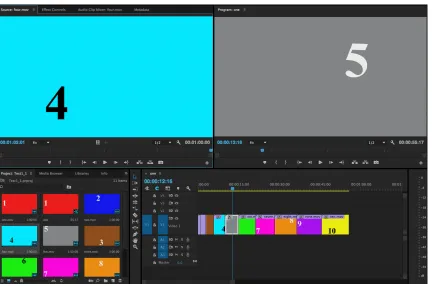
Figure 3.1 Three sample frames from the assigned video editing task. ...38
Figure 4.1 An example of a complete task from a participant in the Aware Group ...53
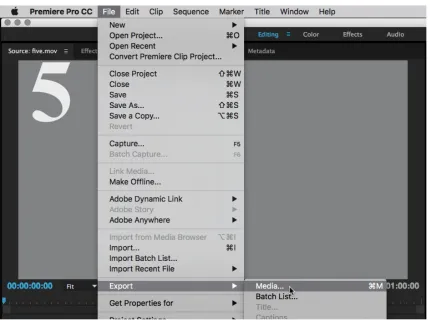
Figure 4.2 The “export media” command.. ...62
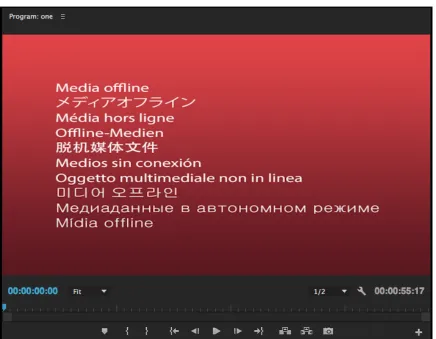
Figure 4.3 The “media offline” warning.. ...64
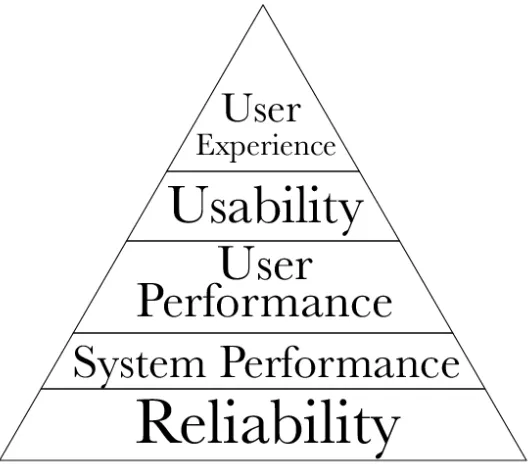
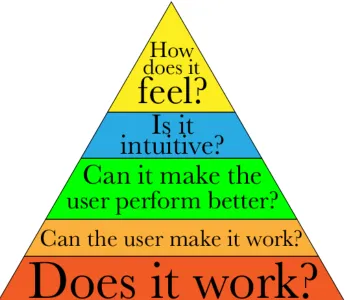
Figure 5.1 MacDonald and Atwood’s historical phases, visualized as a hierarchy. ...81
CHAPTER 1
INTRODUCTION
Problems and Purpose
Media production technology has converged around the personal computer. As a
result, many disparate processes in media production workflows such as screenwriting,
cinematography, sound recording and mixing, animation, post-production, distribution—
each of which used to have its own discrete, unique tool set—now are centered around
the computer, and their skills are mapped onto the interfaces of pointer-and-screen (and
in increasingly frequent cases, touch). Careers in the media industries have changed along
with technology. Newcomers to media production fields are faced with a seemingly
endless and ever-changing array of tools that they feel they need to master. Professionals
already established in the field need to spend time and resources keeping up with
changing trends, sometimes retraining completely.
Take, for example, film editing (I will use the terms “motion picture editing,”
“film editing,” and “video editing” interchangeably, as is the custom in media production
fields). To be clear, film editing is not about technical prowess. It is first and foremost a
function of mind, but the technology cannot be ignored, particularly because the process
is complex. This has always been true, ever since motion pictures were shot and edited on
film. For the many decades of film editing, tools and techniques were so specialized and
systems. Now anyone with even an entry-level computer (and more recently, mobile
devices) can easily gain access to the primary tools to edit a film, but conceptually the
intellectual process is just as complex and difficult as it ever was, regardless of
fundamental changes in the user experience of the process.
This leads to the general questions underpinning this study. How do users
approach and then learn a new and complex professional software tool? How does the
user experience of such software affect that process? Drawing on my own professional
background as a filmmaker and media arts teacher, I am particularly interested in how
these general questions manifest themselves in the technologies of motion picture editing,
a particularly complex and difficult process for new users. By examining this particular
subset of novice users undergoing their initial introduction to a highly complex user
experience designed for professionals, I hope to gain insight into sense-making aspects of
information-seeking behavior, but specific to complex software user experiences.
Research Questions
In this study of undergraduate students beginning to use digital non-linear editing
software, I will be looking into the information-seeking behaviors of novice users as they
seek to attain proficiency in a complex software system, specifically using professional
motion picture editing as the site to examine this phenomenon.
There are two research questions guiding this study.
RQ1: In what ways do users teach themselves how to use complex professional
RQ2: In what ways does the user experience (UX) of professional software affect
the information-seeking processes of users who are actively seeking to learn how to use
it?
Organization and Structure
Using professional motion picture editing software as a prototypical example of a
highly complex software system, this dissertation is organized in the following way.
Chapter 2 presents a survey of interconnected histories of motion picture post-production
and user experience that informed the creation of these research questions. The research
literature review then examines the psychological underpinnings of user experience and
how human interface guidelines for software design evolved alongside strides in
understanding human-computer interaction. An examination of affordances, expertise,
schema and sense-making give a framework to situate the theories at play considering
these research questions. After situating the role of the researcher, Chapter 3 explains the
research methods and study design to describe a way to begin to answer the research
questions, including processes for site and participant selection, and steps to ensure data
reliability. Chapter 4 presents the results and analysis of the data collected in the study,
concluding in Chapter 5 with a discussion of implications for research in UX and
CHAPTER 2
LITERATURE REVIEW
This literature review will first survey the history and evolution of motion picture
editing as its technological basis shifted from physical/chemical to digital. Next, it will
introduce the landscape of user experience as a superset of user interface (UI) and
human-computer interaction (HCI). Finally, it will outline current theories of learning,
memory, and information behavior (IB) germane to this research.
I have selected studies that are directly relevant, and will present them here, using
Lecompte and Preissle's components of a literature review as a method in and of itself to
build an argument and situate this study in a theoretical landscape (1993).
Survey and History of Digital Non-Linear Editing
Motion pictures were originally captured on film—long strips of plastic with
perforations, coated in a photosensitive emulsion. This film is sent through a camera that
takes twenty-four still images per second, chemically inscribing the images into the film's
emulsion. Twenty-four images per second uses up quite a bit of film, between 36 and 90
feet per minute, depending on the width (or, “gauge”) of the film. Motion pictures are
typically filmed out of sequence, and each sequence may be filmed multiple times (or
"takes”) depending of the performance of an actor or success of the crew. Therefore, for
simply recounting plot events in order. As Soviet filmmaker and theorist Sergei
Eisenstein explored in his classic films and then explained in his 1949 book Film Form,
the concept of “montage” in its many forms, plays upon the juxtaposition of sequenced
moving images to create further synthesized meaning, much in the way that a writer
might take liberties with space and time in order to create a more complete and resonant
story (242).
Since the inception of motion pictures, the method used to edit films consisted of
making a copy of the footage to work with by chemically duplicating the strip of film,
then literally cutting the duplicated strip of film apart at each different take, and finally
splicing it back together with a tape or cement adhesive. This method was laborious and
expensive. Laborious, because it usually took a professional editor and many assistants a
significant amount of time to piece together a completed version of a film due to the
enormous physical constraints of handling and organizing countless thousands of feet of
film. Expensive, because highly skilled labor is costly, and because of the considerable
expense of the film stock and chemistry to make workprints of the film to edit.
Magnetic videotape was a development of the television age to store and
broadcast programs, and in the 1980s when videotape decks were affordable outside of
television stations it became common for some motion picture editors, especially those
with lower budgets, to have film labs transfer the original motion picture film to tape
instead of printing a copy onto a film workprint. Using two videotape decks (one to play
and one to record), the editor could copy the desired shots into sequence and build the
several dozen thousand feet of film, and it was a simple matter to make a new draft of a
film: just insert a fresh tape and start over.
However, along with the advantages, there were also many disadvantages to this
method. First, even the most expensive, highest quality videotape machines could not
come close to matching the image quality of film. Second and most importantly,
videotape is linear. This is to say, videotape must be recorded and played back in real
time, and a program must be built in sequential order. If an editor wanted to add a
five-minute shot to a scene on actual film, she could splice that shot onto the end of the film
and her work on that idea is completed. On video she would need to copy that
five-minute shot into the sequence, and it would take five five-minutes. Using film, if she edited a
two-minute shot after that first five-minute shot, and then changed her mind to decide she
actually wanted the two-minute shot to come first, she could simply un-tape the film and
move it to the front of the first shot, and that action would take a few seconds. But on
videotape she would have to start over, copy the two-minute shot first, and then copy the
five-minute shot after it. One final frustration of editing on videotape came at the end of
the entire production. To be able to use the edits from the video on the original film to
create a theatrical release, editors had to make an "edit decision list" (EDL) of timecode
numbers: a log that matched a number assigned to each frame of video back to a
numbered frame from the film. Specialized technicians would then cut the original film
negatives according to the numbers in the EDL database to create the final version of the
motion picture. This process was cumbersome and fraught with error.
film editing process. In 1984, Lucasfilm Ltd. unveiled EditDroid, an $87,000 terminal
that could edit film using an array of laser discs containing a film’s footage. Personal
computing had still not reached critical mass in the marketplace, let alone ubiquity, and
the concept of using a computer for something as specialized as film editing seemed so
far-fetched that EditDroid even made ripples in popular media. Described in Discover
magazine:
Seated at its controls like Luke Skywalker piloting his spaceship, the film editor
can rearrange footage almost as easily as a text editor at a word processor can
juggle words and phrase—inserting and deleting frames, taking a sequence from
one place and shifting it to another. (Gannes, 76)
EditDroid did not find its way into many film editing suites, possibly because it
was not much of a speed or cost improvement, or maybe because of the abrasive tone that
Lucas took when EditDroid was introduced. Describing traditional film editing, he said,
“anybody who's worked with film realizes what a stupid nineteenth century idea it is"
(77). A unionized guild of film editors might not jump at the opportunity to embrace an
invention predicated on a wholesale dismissal of an industry's standard process.
Nevertheless, the notion of modifying a mechanical/physical process into a digital one
was introduced and the path forward for the industry was set.
It would be five years before Massachusetts startup Avid, Inc. released the first
version of its Media Composer software for the Apple Macintosh IIx. The underlying
technology was a significant improvement from what was available in 1984. The
and flexible storage such as hard disks and rewritable optical discs, though expensive,
were available.
Of all the features that Avid foregrounded in its promotional materials, one stands
out: the user experience for established editors. In the first promotional video Avid
released in 1990, several professional editors were shown working with the Media
Composer, and then they described the experience in terms that other editors would
understand. In the video, editor Tom Schachte explains, "you don't have to learn to type
on the keyboard, you don't have to pay attention to timecode numbers. Just like editing
film, your reactions can be based purely on reacting to the picture" (1990). Basil Pappas
continues this comparison with traditional film-based editing equipment by testifying that
"the idea of the timeline graphically [lays] it out just like a synchronizer" (1990). A
“synchronizer” was a sprocketed device that allowed multiple strips of picture and sound
to stay in sync, with the added benefit of giving the editor the ability to stand over the
film being edited and see the large sections of the film laid out in a glance. The
“timeline” has been a nearly universal interface element since the beginning of digital
editing, and it also allows the user to glance at large stretches of time at once. This key
conceptual element to editing film quickly and efficiently, which was not available in
linear video editing, was built into Media Composer from the beginning and was
inherited by software that followed.
Avid's early strategy of targeting film editors was not just a marketing strategy.
The entire user experience paradigm of the Media Composer application was designed
segment of video is called a "clip" or a "subclip," named for the clipped ends of film, and
they are arranged in Media Composer within folders named "bins," named after large
metal bins used to hang film sequences before they are spliced into sequence. Locking
multiple tracks together in the timeline was referred to as "ganging," which is how editors
referred to locking tracks together in a synchronizer, and making fine adjustments to an
already-edited clip in a sequence activated a mode called "trimming," which is exactly
what one did with a blade when using film. Taken as a whole, this process became known
in opposition to the linear real-time videotape editing as "digital non-linear editing"
(DNLE), or sometimes just called "non-linear editing," even though the original method
of cutting and splicing film was already non-linear.
The decision to create a user experience specific to film editors worked. By the
mid 1990s, Media Composer was the de facto DNLE standard, making its way into
post-production facilities and even film schools around the world despite its high price. User
experience design, by signaling the long-standing tools of film editors, had smoothed the
transition and had facilitated an entire industry's shift to a new platform.
In 1998, Apple Computer, Inc. purchased the assets of an unreleased application
called Final Cut from Macromedia, Inc. Apple finished the application's development,
and released it as Final Cut Pro 1.0 in 1999 to stabilize their position in the professional
video market. With dwindling market share in personal computing and limited cash flow,
Apple's future at the time was very much in question. Avid had just announced that it
would be releasing Media Composer for Microsoft Windows, with certain advanced
features available for Windows exclusively. However, just as film editors were loath to
non-linear editors proved largely unwilling to migrate to the Windows platform, and
Apple’s new editing software found a receptive audience.
The user experience for Final Cut Pro from its introduction through version 7 was
similar to the one pioneered by Avid with Media Composer. Bins, clips, and trimming
were all present; it even had icons with tiny pixel-based sprocket holes representing
footage, just as Media Composer did. It was simple for editors who were used to Avid
software to make the switch to Final Cut Pro, and it was made even more attractive with a
significantly lower price, and the ability to run on computers without special added
hardware. Now instead of an editing system that cost as much as a house, a filmmaker
could set up a digital editing system for a few hundred dollars, using their current
computer. By 2011, Final Cut Pro had captured 54% of the video editing market share
according to research film SCRI, with Avid and several other competitors fighting over
the remaining users (Pogue, 2011).
The user interface for Media Composer has remained largely unchanged since its
original version, offering slight revisions to update the graphics over the years. This
strategy to maintain familiarity and security for industry professionals is in keeping with
the larger user experience strategy that initially lured film editors to digital platforms.
Apple appeared to be following the same path with Final Cut Pro, leaving both the user
interface and the user experience consistent through its first seven versions.
However, in 2011, Apple unveiled a major revision to Final Cut Pro—such a
change that they skipped two version numbers and labeled it version 10, using the Roman
graphic interface. But packaged with the improvements was a completely new user
experience. Apple promoted this new user experience as "revolutionary." This is not a
new claim for a technology company, but Apple went further to describe the software as
"a whole new production" that "breaks free from the restrictions of old-fashioned timeline
tracks." In promotional videos, Apple described Media Composer as "traditional," and
"built on old organization concepts" (2011). Final Cut Pro X had no "bins" but instead
had "events" (a concept borrowed from Apple’s own consumer applications iPhoto and
iMovie). There were no nods to film images or terminology—no ornamental sprocket
holes, no "tracks" in the timeline to evoke the concept of discrete channels of image or
sound. Apple's claim was clear: future editors would work in a new way, and current
editors should get used to it.
The response was dramatic. While many editors agreed that there were many
positive aspects to the new program, the industry moved away from Final Cut Pro X,
partially because many functions still necessary for professional work were removed, but
also because of the user experience. One editor and educator noted that Final Cut Pro X
was a "brilliant program, provided the user can essentially forget everything they've
learned" (Cheng, 2012). Apple has since released several updates to Final Cut Pro X that
replaced functions that had been removed, but the damage had been done. Professionals
and educators, unsure that the new software would be worth the time to learn and leery of
a company that would try to rewrite an industry’s workflows in a single software release,
took refuge in other software.
These differences in user experience, and their relation to widespread adoption are
experience, sense-making, and learning as they relate to professional media software and
processes.
Psychology, Human Interface Guidelines, and User Experience
User experience (UX) is often used as a synonym for user interaction (UI) or
human-computer interaction (HCI). However, Bargas-Avila and Hornbæk (2011) specify
further and describe UX as a separate and emerging phase of HCI that focuses on
affective, emotional dimensions (2689). This evolution of how UX is considered has been
proceeding, and Law, et. al. (2009) conducted surveys on industry and academic
perceptions of UX in the hopes of refining its scope toward a more comprehensive
definition. Hassenzahl and Tractinsky (2006) mapped out what they saw as a research
agenda for the entire discipline to flesh out UX as a multi-faceted framework to consider
HCI from experiential, emotional, and holistic points of view (95).
MacDonald and Atwood (2013) extended a historical analysis by Kaye and
Sengers (2007) of how human-computer interaction is evaluated and they describe five
distinct phases that emerged since the 1940s: the System Reliability Phase, from the
1940s to 1950s, the System Performance Phase in the 1950s and 1960s, the User
Performance Phase in the 1960s-1970s, and the Usability Phase from the 1980s to the
2000s, and the User Experience Phase from the 2000s to the present. These phases
described the limiting factors of what would have been considered successful
technological use for the respective periods. For example, during the reliability phase of
HCI the computers would break with startling regularity, so the reliability of the
that they weren’t breaking regularly (system performance phase), how efficiently a
human could perform now that the user no longer has to wait around for the computer
(user performance phase), how readily a user could learn to use the system without
extensive training (usability phase), and ultimately how users feel as they are engaging
with the computer (user experience phase). MacDonald and Atwood presented these
phases as part of a call for better, more holistic ways of considering and evaluating user
experience, as the current state of examining and evaluating HCI is too limited.
For those who develop software, companies often publish Human Interface
Guidelines, often referred to as a “HIG.” This practice was started by Apple, which
published the Macintosh Human Interface Guidelines in 1992, updating it regularly (in
2016 it was called the OS X Human Interface Guidelines) and even spinning off a
separate HIG for its mobile operating system iOS, a distinctly different experience from
the desktop UX. In an attempt to unify the look-and-feel of applications from various
developers, other companies began publishing HIGs. As of this writing, there are HIGs
for Microsoft Windows, Oracle Java, and different Linux interface environments such as
KDE, GNOME, and Ubuntu. In March 2015, Apple published a HIG for the Apple
Watch, codifying how designers should consider “glances” at a tiny wrist-based screen
(11).
One Apple UX example that remains unchanged over twenty years is the use of
“metaphors.” The Apple HIG begins by enjoining software developers to consider end
users’ prior knowledge of the world around them into their designs. For example, users
“organize their hard disks in a way that is analogous to the way they organize file
A newer addition to the Apple HIG is the concept of the “mental model.” Apple
specifies that users always have a preconceived notion of the job they are trying to
accomplish with a piece of software, and that the user experience should support that.
Be aware of the model’s inherent metaphors, which represent conceptual
components of the task. In the letter-writing example, the metaphors include
letters, mailboxes, and envelopes. In the mental model of a task related to
photography, the metaphors include photographs, cameras, and albums. Strive to
reflect the user’s expectations of task components, organization, and workflow in
your window layout, menu and toolbar organization, and use of panels. (28)
Given the examples in the evolution of Final Cut Pro to Final Cut Pro X, it would
seem that Apple violated a fundamental principle of their own HIG. But this is not all that
surprising, as prominent technology blogger John Gruber writes: "the HIG is dead. It died
long ago. And it was Apple that killed it" (2011). Gruber responds to complaints about a
proliferation of non-HIG-compliant applications that accompanied the recent popularity
of Apple products by pointing out that Apple itself always felt free to experiment with
interfaces, particularly in their major applications, for example Final Cut Pro.
Another notable evolution in the HIG is a greater emphasis on the importance of
intuition in software design. This stands to reason, since if manuals are seldom used and
the primary tool to learn a program is the software itself, the means to use the software
should be apparent. Apple again relies on the more recent concept of the mental model to
admonish software designers to create intuitive interfaces, and in this context they mean
What does intuition really mean when it comes to how we think about a new situation,
and how can it apply to user experiences with software?
In psychology, Gibson developed the concept of “affordances” to help explain
visual perception; an affordance is a specific relationship between a being and its
environment that presents an opportunity for a specific action (1979). Norman adapted
the concept of affordances in his first edition of The Psychology of Everyday Things
(1988), later released in paperback as The Design of Everyday Things (1990), and applied
it to describe the relationship between a person and a physical object that enumerates the
possible actions by the person on that object. For example, a mug affords drinking, due to
its ability to hold liquid, but its weight also creates an affordance for keeping papers on a
desk from blowing away. The affordance to drink only exists, however, when the
relationship with a person allows it: if a person lacks the motor control to use an
open-topped container, or to hold the mug by its handle, the affordance to drink no longer
exists because that relationship precludes it.
Norman’s concept of affordances was introduced when interaction design was
pre-digital, and it caught on in nascent graphic design and software development
communities, but without real understanding of the concept (1999). Designers might add
a button or a digital interface element, and refer to it as an “affordance,” and would
misuse the term to refer to an interface element that had been designed to be intuitive.
But Norman insisted that user interfaces on a screen could not be affordances, they are
merely signals that indicate possible perceived affordances (1999). Significant revision
was necessary in his 2013 edition of The Design of Everyday Things to correct this, and
(p. 28). A digital example would be a common sliding pane on a smartphone, invisible
until the user swipes down, containing a summary of the day’s appointments, weather,
and other notifications.
The information pane that slides down affords users views of that information, but
the small graphical element that communicates that there is something to do at that edge
of the screen is a signifier that there is an available action. This pairing of signifier and
affordance may indeed be considered to be intuitive elements for the user to interact with,
in the sense that Apple means: the interface elements comport with users’ mental models
of how an interaction should occur. However, the conflation of affordance with intuition
breaks down quickly. Consider the prior example of a sliding pane on a smartphone, to be
intuitively swiped by the user. A signifier may point to an affordance in the design that is
perfectly understood by the user, but any hope of intuition in that design is predicated on
users’ prior knowledge of smartphones. While so ubiquitous at the time of this writing as
to seem nearly obvious, fifteen years ago there were no examples of featureless glass
screens for our fingers to skitter across. Herbert Simon was blunt about intuition from a
point of view of problem-solving and expertise when he wrote that “intuition is nothing
more and nothing less than recognition” (1992).
If intuition is a function of relative levels of expertise and familiarity, then what
happens when disconnects occur, for example when completely new and untrained user
encounters a complex problem such how to use a professional software program that
assumes a high level of expertise? This interaction between users and software,
communicate affordances will come into play. HIG documents give some clues as to how
users are intended to use software, but only general use software that consumers might
need for everyday activities. But software developers design applications for professional
and highly specialized use, where mental models may not readily exist and where an
intuitive course of action or affordance might not be available to users. One of the aims
of this dissertation will be to try and discover what aspects of UX influence new users’
entry into more complex professional applications, and how they learn to wield them as
tools when typical affordances and signifiers are missing, thereby diminishing the
possibility of a so-called intuitive experience.
Schema, Artifacts, and Sense-making
Learning how to use professional software is difficult. Understanding how users
approach this difficulty represents complex territory in HCI and learning because
professional software applications present two learning problems at the same time. First,
the user needs to use a process to solve a problem (“I must turn these hours of video into
a short, compelling program”), and second, the user needs to learn to use an artifact (“I
must learn this software in order to solve this problem”). There are some learning
theories that apply to the first problem solving process and others that apply to the artifact
learning process. This section looks at both categories.
Many aspects of learning are related to memory, and applicable theories derive
from cognitive psychology. In 1932, Bartlett published his seminal work on
remembering, which introduced schema theory, proposing that certain patterns form in
the mind, and those schemata inform what we remember. This theory is still important to
memory, and also to theories of teaching and learning. When schema theory is applied to
learning, researchers apply the concepts of memory to describe both the formation of new
schemata in the learner as well as how new information is incorporated into a learner's
pre-existing schemata (Swanson, 2012).
Implicit learning is a learning theory that extends schema theory. Introduced by
Reber in 1989, implicit learning describes knowledge acquisition processes that occur
outside of independently concerted and deliberate attempts to acquire such knowledge.
This process does not rely on conscious recollection; in other words, giving an exam on
such material would not reveal the learner's understanding. However, this mode of
learning is critical for language acquisition (Conway, et al, 2010). Research in this area
may be important to testing how users react to a given UX to solve a problem.
In addition to problem-solving and process-oriented theories of learning, theories
that apply to artifacts are also applicable to this project. Activity theory in particular, as
introduced by Bødker in 1989, proposes that the study of the use of an artifact is the only
way to understand that artifact. Bødker's body of work is of particular interest to this
study, as it focuses more on professional users than casual ones. Bødker later singles out
software as useful to study using activity theory, since, though the software is an artifact,
the user tends to focus on the activity being accomplished through the artifact, rather than
on the artifact itself (1991).
Ryan found that users changed their patterns of use when learning artifacts
through exploration alone, molding their expectations to their understanding of what the
artifacts longitudinally, but does not reveal information about initial discovery and how
this is facilitated through the user experience.
Kurtz claims that perceived usability, specifically the aesthetics of a user
interface, had no effect on learning (2010). However, those results are not relevant to this
study, since those experimental variables had significant shortcomings. The variable user
interfaces that were presented to test subjects were limited to only surface aspects of user
interface and aesthetic appearance rather than UX or usability. The study examined only
very basic aspects of layout and design, and did not take into account the multivariate
nuances of UX. Using any HIG, the user interface examples presented in Kurtz’s study as
"high beauty," "medium beauty," or "low beauty" would all be considered aesthetically
unpleasing examples.
Peterson, Madsen and Kjær demonstrated that becoming accustomed to the use of
a technology is an evolutionary process (2002). Performing a three-month study of two
families with new television sets with video recorders, Peterson, et al. interviewed the
participating families about their use of the new home theater technology, and also
observed the families during hands-on sessions using the television systems. This study
used a functionalist theoretical framework, looking at a social system in action and
seeking to describe it in order to understand and analyze how the families in the study
learned to use the new television system. The methodology of Peterson, et al.'s study was
ethnographic and interpretive, using observations over an extended period to draw
inductive conclusions. Peterson, et al.'s study is important from the perspective of
learning, specifically the long-term evolutionary nature of human-computer interaction
relates to the process of system learning related to the user experience, or how (or even
if) it contributes to success in learning the system.
Law, et al. demonstrated that despite attempts to create international standards for
and definitions of components of user experience, UX remains an elusive, variable field
to pin down (2009). Using a survey of 275 experts in UX from across academia and
industry, Law, et al. asked questions about definitions of aspects of UX, and about
participants’ feelings about those definitions. This study had a functionalist framework,
attempting to analyze a complex system, with an interpretive methodology, inductively
determining a population's opinions about a subject by analyzing many survey results
where individuals registered many different opinions. The results indicated that user
experience is highly subjective and particularized, making general definitions of the field
difficult. The particular focus on inconsistencies in how UX terminology is applied helps
clarify and taxonomize the field, but does not help to understand how it is used.
Wiedenbeck and Zila (1997) demonstrated that combining a directed exercise
with users' exploration of a new software application increased the users' success in
learning that software, regardless of background experience. One hundred and two
students with varying levels of computer expertise learned a new piece of software and
were then tested on the use of the software after being given specific tasks to accomplish.
This particular study had a behaviorist theoretical underpinning, seeking to perform a
controlled test to reliably explain and predict a phenomenon. It points to a positivist
methodology, using a precise experiment to describe human action and behaviors.
affect successful learning as it relates to HCI, but it does not address UX at all, let alone
how it relates to the process or success.
In 1980, Dreyfus and Dreyfus proposed a multi-stage model of skill acquisition,
which describes levels of mental activity as learners progress from the ranks of novice to
master (p. 15). The Dreyfus model, and the studies that underpin it, specifically pertains
to the development of training procedures. For example, the Dreyfus study was designed
to improve aircraft piloting in the US Air Force, generalized to developmental training (p.
16). However, the development of expertise as a user acquires skills as a novice may be
an important byproduct when considering what role UX plays in the process.
Indeed, piloting aircraft may be an apt comparison to the kinds of complex
processes that comprise this study. Sarter and Woods (1991), examined a phenomenon of
expertise commonly used in military and aviation circles as “situational awareness,” a
contextually-aware, time-sensitive ability to gather and filter information in
performance-critical and information-dense domains such as an airplane cockpit or combat scenario.
They identify a robust feedback mechanism as a critical prerequisite to allow situational
awareness to emerge (Sarter & Woods 1991). As an example in the context of a flight
deck, such a feedback mechanism would certainly be, at least in part, the interface with
the aircraft. Related industries have approaches to designing interfaces with situational
awareness in mind (Endsley 1988, Endsley & Jones 2004) to guide aeronautics industries,
military applications, power grid infrastructure and medical instrumentation. However,
the concept of situational awareness might share some similarities with complex user
processes where lives are not on the line, such as the professional video editing processes
Dervin’s body of research on sense-making was an initial impetus for this study,
providing a compelling model to consider information-seeking behavior as a journey to
traverse one or more “gaps” in the seeker’s understanding (1983). The sense-making
model developed by Dervin encompasses much of the entire process of living and
learning: the information-seeker’s past and present, the contours of the knowledge to be
sought and known-unknowns, the complications caused by unknown-unknowns, the list
stretches on (1999). This concept of a gap in knowledge that is affected by ontology is
important for this study, in terms of attempting to define the depth and complexity of the
unknown as well as the means by which a user might attempt to traverse such a gap.
However, sense-making as a model can be unwieldy simply because it attempts to
account for virtually everything in the information-seeking process. In a previous study
that I conducted, which served structurally as somewhat of a pilot study for this one, a
small cohort of undergraduate users who were similarly inexperienced were introduced to
DNLE software by editing a segment from a 1958 television program. The results of that
study suggest that users’ past experiences act as a kind of “cultural filter” that
dramatically affect how they approach new complex tools, and that modeling specific
filters that can account for privilege in information behavior might allow researchers to
consider privilege more effectively than by generically ascribing it to “past experiences”
in an overly complex model (Tarr 2015).
That previous study raised a number of issues that I have integrated into the
design of this dissertation. It was a pilot study in the sense that I tested processes of site
were very different. The previous study focused on the results of the users’ tasks, and
examined them in light of their backgrounds, specifically looking for connections to their
pasts that might indicate that current models of information-seeking behavior should be
updated. Since that study focused on the end results of the editing task, and participants
recalled experience of the process of using the software, but did not include direct
observation of the participants’ activity while interacting with the UX. This dissertation
will gather much more observational data during the editing process. While the end
results of the participants’ tasks will certainly be examined in this study, the task that
participants are set to is simpler and less content-based, since this study is concerned with
studying aspects of user experience, rather than examining the content produced.
Gaps and Conceptual/Theoretical Perspective
In addition to the several gaps in the literature that I have presented here, there are
no studies that relate specifically to professional media production software as it relates
to UX. The study that I am proposing will fill these gaps by looking at a group of new
users as they begin to use an unfamiliar piece of professional software, and by observing
their user experience as it relates to their endeavor to make sense of it and gain
proficiency.
I suspect that there is a complicated relationship between highly complex tasks
and complex tools used to perform those tasks, and that relationship is informed and
negotiated by the user experience of the tool. To put this in terms of this study: the act of
editing a motion picture is complex and difficult, and the software used to edit motion
pictures is complex and difficult to use. While the act and the tool to perform the act are
along with its user experience, plays a significant part in the success of a new practitioner
in both learning the mechanics of the software, and learning the craft that is enabled by
the software. This literature influenced me to conduct this study in such a way that I will
record and observe participants as they are involved in a set of basic tasks that can only
CHAPTER 3
METHODS
Situated Knowledge and Related Assumptions
I come to this research project with many personal and professional investments. I
got my first filmmaking degree from Penn State in 1994, where I was taught to edit
movies first by taping strips of film together, and then by copying bits of videotape from
one machine to another. I found both of these processes frustrating; they took much of the
joy out of the process of editing for me. Later, when I went to Ohio University to work on
my Master of Fine Arts degree in film, I was particularly interested in the Avid Media
Composer, which at the time was starting to take the motion picture post-production
industry over completely. In fact, the progression from editing film to linear video to
digital non-linear process as described in the past chapter is an evolution that I personally
experienced my own career.
For my first job in 1997, I returned to Penn State to administer a lab, where I
maintained and repaired two Avid Media Composers that had been donated by wealthy
alumni. These two machines were shared by scores of students who would do most of
their editing using the older methods, only using the Media Composer for their final
polished version. The students had to learn the creative concept of editing one way, and
then learn how to use the Avid software by way of the most common method to teach
buttons, with a few thousand pages of manuals sitting in a handsome box on the desk
nearby for orientation and reference.
Over the years, those manuals got smaller. Soon they disappeared completely,
replaced by on-demand help systems. The way that people looked for information to
learn how to use the software was changing. However, I noticed that the methods of
teaching didn’t change. Computers got much faster in the mid-2000’s, and professional
software got much cheaper. Instead of buying a film editing system for the cost of a
house, people could get it for the cost of a monthly cell phone contract.
When I was hired by the University of South Carolina in 2006, there were
hundreds of students coming into the media arts program, but there was a curricular
bottleneck—everyone had to take a class called Digital Media Art Fundamentals, but
there weren’t enough sections offered. The art department was spending a fortune hiring
temporary faculty to teach a flotilla of sections of 15 people each. Even then students
often couldn’t get into the class, as a result they would become frustrated and switch to
another major. My first year at USC, I taught four sections of this entry-level course. I’d
get squashed into a little computer lab with 15 or 20 machines, and teach what was
expected. By the end of the course, the students weren’t particularly skilled technically,
and I hadn’t been able to spend nearly enough class time on important subjects like
aesthetics or content.
I devised a method to drastically change how students gained technical
proficiency. I made short, targeted online videos that students could follow at their own
get students to be “just good enough to be dangerous.” The key is that the videos didn’t
actually teach specific software very much. Instead they taught how to learn how to
figure out any software. We were then able to spend the time in class working on
high-level concepts. I changed the course to seat one hundred undergraduates, and quickly
everything got better.
Based on my experiences in academic fields and the literature on both active
learning (Bonwell and Eison 1991) and implicit learning (Reber 2004), I have developed
an assumption about the process of learning how to use software: that it is generally
better to learn those processes through relevant directed tasks outside of a classroom
environment. Based on my experience as a professional filmmaker and the literature on
user experience (Peterson 2002) and human interface guidelines (Apple 1992), my
presumption is that the user experience of a piece of software is designed purposefully to
be learned and used in a way that is gradual and cumulative. These led to my interest in
this study to investigate how UX facilitates that accumulation of knowledge, and to apply
that new understanding to a better integration of that process into a comprehensive
understanding of how we develop expertise.
Role of the Researcher
With respect to this study, its site and participants, I bring several subjective
personae to the project that must be considered in its design and execution. First and
foremost, I have status issues that are right out in front of me all the time. It is critical to
acknowledge and deal with up front is the fact that I am a professor, and that the people
in this study are students. No amount of good rapport or kind, casual collegiality can take
write them letters of recommendation. I must take care, as the ironic weakness of my
position is the fact that I wield a great deal of power.
However, this subjectivity as a professor and filmmaker puts me in a strong
position to pay attention to many details that might escape researchers who are not
experts in this craft, who do not also have to be concerned about newcomers to the craft,
or who may not approach software and design with the critical eye of a user. If I attend to
and keep this power that I wield observed and in check, it can be a source of strength and
creation of knowledge. My position as an expert, and the opportunity to help shape
newcomers to the film and media industries, means that I can look critically at the design
of the tools used in that industry, as well as how students are brought into the field, in a
trustworthy way.
Methodological Approach
I used an action research approach to this study, selecting one class that I teach as
the site of this study. Describing the specific details of this site will make clear why it
was the right choice for this particular study. Action research serves three primary
purposes: to improve a practitioner’s understanding of their specific practice, to improve
the conditions that inform that practice, and through these to improve that practitioner’s
approach to the practice itself (Kemmis 2009). This approach raises a complicated
question. If the focus of the study is the user experience of NLE software, and if the
students in question are going to be teaching themselves how to use this software, then
why should this be an action research study?
variety of tools. For example, in one project, students were assigned a location in the
surrounding neighborhoods and presented visualizations of that space twenty years in the
future. However, students were not told how to accomplish this. A major part of the
project is to imagine the content, decide the best way to create those static and moving
images, and then gain the skills in the specific tools necessary to accomplish the project.
As stated earlier, it is clear from the literature that learning a technological skill is
an evolutionary process of accustomization (Peterson, et al 2002), that this process works
better when active rather than abstract learning is involved (Bonwell and Eison 1991),
and when the process is outside a traditional classroom setting (Reber 2004). In the
course that serves as the site of this study, the specific mechanics of learning any given
piece of software are self-directed by the students. Thus, the students are indeed at the
helm of their own learning of the tools. But every aspect of how that process integrates
into and impacts the larger course design is critical to the success of the project, the class,
and ultimately each students’ development of expertise.
My approach to this study comes from my background and profession as an
educator, and while I hope the findings of this study may be put to educational use, the
study itself is not pedagogical. This research is intended to examine the experiences of
the novice user subjected to a complex user experience, and is therefore designed to
examine new users before they have learned the complex professional software they
intend to use. The focus of this study is on how the design of the user experience adds to
the understanding of that process. This self-directed learning process is inextricably
entwined with the course I teach where the novice students undertake that process. I
entwined with self-directed learning by novices. For these reasons, action research is the
best methodological approach for this study.
Employing a battery of qualitative methods to collect data, described in detail
below, this study is not intended to produce generalizable findings that can be applied to
large populations. Rather, it is designed to intensively understand the novice experience
by deeply examining new users in a human-computer interaction designed for
professional use.
Site Selection
There are several criteria that a site would need to have to be suitable for this
study, action research notwithstanding. By applying Patton’s selection strategy of
criterion sampling, which prioritizes satisfaction of specific criteria, this site would fulfill
the most important needs (2007).
Since this study hinges on digital non-linear editing as a process, the software to
be tested should be an application that is commonly accepted as a professional industry
standard. There are three pieces of software that fit that bill: Avid Media Composer,
Apple Final Cut Pro, and Adobe Premiere Pro.
Media Composer was the original NLE that met widespread use, but still retains
many aspects of its original intent to lure editors from traditional film-based cutting. As a
result, the system is extremely technical and relies heavily on archaic celluloid film
editing jargon—not an ideal candidate for newcomers. Final Cut Pro usurped Media
Composer as the dominant software in the early 21st century. However, in 2011, Apple
Pro X, and older versions of Final Cut Pro are no longer not legally available for
purchase. This leaves Adobe Premiere Pro (sometimes referred to simply as “Premiere”),
which has been growing in popularity both in the industry and in educational settings.
There needs to be a sufficient number of possible participants with no prior
experience in using Premiere (or any professional digital video editing software), in order
to focus only on participants’ initial responses to the UX. Those participants would also
need to have a specific desire to learn to use Premiere either to go into filmmaking fields
or to accomplish specific professional video editing tasks, rather than just to pass a test
for the class or add a line to their resume. This will ensure that there is a significant
inherent drive in the participants to learn the software and retain that knowledge. Since
the intersection of these two groups of potential participants in such a course might be
small, the course will need to be relatively large (n>75).
Finally, the participants and I would also need access to a computer or computers
that have Premiere installed (any such machines would have to be sufficiently powerful
to adequately run the software).
My class at the University of South Carolina, Digital Media Art Fundamentals, is
a 100-person class where novice students gain proficiency in professional media
production tools (including Premiere) and then apply those tools to media art projects. To
perform these tasks in the class, students are able to use many different computer labs on
campus that have machines with Premiere installed, including a small lab which I have
access to administer. Even if this study were not based in action research, this course
Participant Selection
Turning again to the criteria that lead to Digital Media Art Fundamentals as the
choice of situation for the study, I again apply Patton’s (2007) selection strategies. I first
used criterion sampling to reduce the pool of potential participants, and then purposeful
random sampling to arrive at "reasonable coverage" of the phenomenon, which I plan to
address in this study (p. 246).
Because undergraduate students come from varying educational backgrounds,
some of their high schools will have provided them opportunities to become familiar with
professional media software, either through a class or a workshop, or even a school
television station. Therefore, it was necessary to reduce the pool of possible participants
from students in the Digital Media Art Fundamentals class down to people who have not
previously used any professional video editing software, not only Premiere as a specific
application. Participants need to have had no prior professional video editing software
experience because several common interface idioms are shared across several high-end
video editing applications. If a participant was familiar with a different program, they
might know what sort of structures to look for in advance, and that would make this
study’s data less useful.
Students that take Digital Media Art Fundamentals come from different parts of
the University—some are looking to be filmmakers, others might be hoping to become
web designers, graphic artists, sound designers. Still others might be computer science,
business, or philosophy majors taking the course to fulfill a general education
desire to gain that skill independently of taking the course. Another way of putting it:
some students take this course in spite of one of the skill proficiencies acquired, including
video editing, and someone with a disinclination or ambivalence to the specific skill
would be a less ideal participant in this study.
Past experience teaching this course suggests that an estimated 70-80% of the
students will not have experience with professional video editing software. Separately,
about half of a given class is more interested in filmmaking skills than other skills. These
sets of possible participants might intersect to varying degrees, but typically represent a
significant number of students from the class. If there are one hundred students in a class,
then the pool of possible participants might be as many as twenty or thirty. Of that set,
my initial estimate was that ten to fifteen people would be willing to participate in the
study, in which case I would invite all those who indicate willingness to participate.
However, in the case that the pool of potential and willing participants is over twenty,
there could have been some data management problems stemming from having such a
large pool, and then I would take a purposeful random sample of ten to fifteen. As Patton
(2007) indicates, a qualitative study such as this focuses more on the depth of analysis of
a smaller but more intensively studied sample, in which case a purposeful random sample
of potential participants would be appropriate to reasonably describe the phenomenon
being explored, while still maintaining confidence in the data.
In order to first determine the interest level in media art in general and video
editing specifically, I observed a discussion thread in the class Facebook group where
students would introduce themselves to the other students, talk about their major, their
widely from students across many different majors. Observing these self-introductions
served as a first opportunity to identify experienced users who would not fit the criteria
for this study. Comments such as “I have always really enjoyed shooting and editing
videos for projects” or even as forthcoming as “I have worked a little in the field using
filmmaking programs such as Adobe Premiere” would flag someone as having too much
advanced knowledge for this study. Similarly, people who identified themselves as
having a strong primary interest in a field that is not related to or does not involve
professional video editing were also considered as less suitable for this study. For
example, I considered someone who indicated that they “would like to work in the
finance industry” or “my dream is to design sports apparel” to be less suitable for this
study due to a generally lower level of motivation to gain the particular set of skills at the
heart of the study. This left students who expressed a general desire to either move into
filmmaking and media careers, or a desire to augment their other fields in ways that
specifically use media and filmmaking skills. This resulted in an initial pool of 31
potential participants.
This first pool of participants then received a preliminary questionnaire (after
receiving initial consent forms) with two questions to further narrow the participant pool:
“have you ever edited motion pictures before” and “have you ever used Adobe Premiere
Pro before?” There was a follow-up question that asked, “if you have edited motion
pictures before, but have not used Adobe Premiere Pro, what programs have you used” in
order to determine if potential participants had used another professional program such as
prior experience editing motion pictures with a professional video editing program were
invited to participate: a total of 21 people. In addition, there were two people who
described particularly strong desires to learn how to learn editing skills, but had disclosed
limited experience with basic consumer programs. They were invited to participate, but
declined. Eight other invited participants also declined due to concerns about time
constraints or disinterest in participating. This resulted in a total of thirteen participants
who met the criteria of showing specific interest in learning how to use professional
video editing software, while reporting no prior experience in using such tools.
There are some important limitations and assumptions to declare when
considering these participants. First, every possible participant has applied and been
accepted to university study, and has the means to attend. This is a massive privilege that
cannot be ignored. Second, I am assuming that all potential participants have basic
facility with modern computing devices, and can perform the basics of mouse/pointer
use, understand interface items like windows and menus, and can find their way around a
computer desktop. At the time of this writing, this might be a reasonable assumption,
especially given the previous caveat of all participants being university students.
However, future versions of this study might consider people of an age variance where
this is not a reasonable assumption.
Data Collection
I used multiple methods to collect data from my participants, because as Greene
explains (2007), different aspects of data complement each other when different methods
are applied in a single study. This study combined interviews, observation, and a
After the participants were selected, I conducted interviews with each of them.
The interviews were loosely structured, with the goal of gaining access to each
participant’s unobservable past (Weiss, 1994). The interviews confirmed the participants’
lack of experience with professional video editing software, and also gathered their
stories about their relationship with computers and software, their comfort level with
technology, and what kinds of prior activities they have had with other computer
technology and software in their lives. As the conversations evolved in the interviews,
there were further follow-up questions and discussions about other activities and hobbies
that the participants might have had.
Concerning the validity of interview data, Weiss (1994) indicates that researchers
can reasonably assume that we will hear the truth in interviews, but not necessarily the
entire truth or the exact truth, and that absent corroboration with other evidence the
quality of the interview process itself is a primary safeguard of the validity of the
acquired data. Since participants in this study have a reasonable assurance of
confidentiality, and the nature of the questions being asked are not likely to incriminate
or embarrass the participants or their loved ones, there is high confidence that the
collected interview data is reliable. Nevertheless, there is an assumption in this research
that the self-reported data in interview are implicitly valid.
After the interview phase of the study, participants began the main phase of the
study: a set of tasks to perform on their first time encountering a professional video
editing application (the exact design of these tasks, as well of how they evolved through
described what they were attempting to do as they did it, using a concurrently analyzed
think-aloud protocol to gain information about the users’ thought processes as they
discover how the software works (Ericsson and Simon, 1980). The participants’ actions
on the computer were recorded using a piece of software called Screenflow, which was
designed for recording screencasts for tutorials. Since Screenflow can record all action on
screen, I have completely synchronized data of exactly what the users were doing, as well
as what they were saying to themselves while they did it. Third, while the set of tasks
were taking place, I observed the participants nearby, taking extensive field notes of the
larger setting that would not have been captured in the recordings. The observation field
notes are a central, overarching set of data that serve to connect all of the other
information in an attempt to tie it together and make sense of it (Bodgan and Biklen,
2007). Finally, I conducted a second interview with the participants, allowing them to
reflect on their experience and how they felt about their performance of the task.
This made a total of thirteen recorded task sessions and observations, along with
thirteen interviews, to create a corpus of data to analyze.
Study Design, Expert Validation, and Reliability
The task observation section of the study took place in a lab that was set aside for
only this use during the period of the study. It was equipped with an Apple Macintosh
computer with 64-bit quad-core processors, 8 gigabytes of RAM, high-speed internal and
external storage drives, and a high-definition monitor. The computer used in the study
had ten sample video clips in a folder on the desktop. These sample clips, which I
designed and animated, had file names such as “one.mov,” “two.mov,” “three.mov,” etc.,