Issue 8
V-2001A
SINGLE ZONE (PLUS) PAGE CONTROL UNIT
INTRODUCTION
The V-2001A provides telephone system access to a single zone of one-way paging.
“WARNING: To reduce the risk of fire or electric shock, do not expose this equipment to rain or moisture.”
“WARNING: Shock Hazard - Do Not Open.” “AVIS: Risque de Choc Electrique ne pas Ouvrir.”
“PELIGRO: Corriente Electrica - No Abra.” “CAUTION: To reduce the risk of fire replace only with same type 1A, 125V fuse. 1A, 125V may be replaced by a 0.5A, 250V provided voltage selector is set for 230V.”
“DANGER: Afin de réduire le risque de feu, remplacez le fusible par le même type de fusible à 1A, 125V. On peut utiliser un fusible à 0.5A, 250V pourvu que le sélecteur
ďalimentation soit fixé sur 230V. Ne pas ouvrir.”
“VORSICHT: Zur verringerung von
feuergefahr die sicherung nur mit derselben type 1A, 125V ersetzen. Statt 1A, 125V Kann 0.5A, 250V Benutzt werden, vorausgesetzt, die spannung ist auf 230V eingestellt. Nicht öffnen.”
“PELIGRO: Para reducir el peligro de incendio remplazarlo unicamente con un fusible del mismo tipo 1A, 125V. El fusible de 1A, 125V podra ser remplazado por uno de 0.5A, 250V si el selector de voltaje esta puesto en 230V. No abres.”
SPECIFICATIONS
Access Methods
• Electronic Key System (C. O. Line Position)
• PABX (Loop Start Trunk Port)
• 1A2 Key Systems (400 type line card required)
• 600 Ohm Page Port
• Dedicated Single Line Telephone(s)
Features
• Pre-Page Alert Tone
• Page override capability (Using C. O. line position or loop start trunk port)
• Switchable battery feed for loop start operation
• RJ-11 for Tip and Ring connections
• AGC on all voice outputs
• Provides audio for up to 150 Valcom one-way amplified speaker assemblies
• Background music input
• Voice operated VOX to mute music during page
• Easily accessible music and tone volume controls
• Supplies 20 Valcom power units for powering Valcom one-way amplified
speakers (1 Amp -24VDC); Additional power supplies are required for a quantity of speakers using over 20 power units
• Page with music outputs (2 provided); music mutes during page
• Page without music output
• Battery backup input (Use Valcom VPB-260 battery backup supply)
• Time clock/single tone (Contact closure activated)
• Night ring/warble tone (Closure or 90VAC activated)
Priority sequence of tones: Page overrides music
Night ring mixes with music and page Time clock mixes with music and page
• Individual switches for selection of night ring and time clock tones per output
• May be used with 25 or 70 Volt amplifiers
• AC powered, 115 or 230VAC
• Internationally recognized power connector
• AC input fused at 1 Amp @ 115VAC, 60Hz or 0.5 Amp @ 230VAC, 50Hz
• 115/230 Volt selector switch for international use
• UL listed
Dimensions/Weight
• 7.06"H x 9.00"W x 2.40"D
(17.93cm H x 22.86cm W x 6.10cm D)
• Weight: 3.7 lbs. (1.68 kg)
Nominal Specifications
Input Impedance: 600 Ohms
Input Level: -10dBm nominal
Voice Switch Sensitivity: -21dBm Music Source Input Impedance: 8 to 600 Ohms Music Input Level: -10dBm nominal
Output Impedance: 8 Ohms
Output Level: -10dBm nominal
DC Output: 1 Amp at -24VDC
Nominal Power Requirements
Voltage: Current: 115VAC 1.0 Amp230VAC 0.5 Amp
Battery Backup
The V-2001A is equipped with a standard 3-prong polarized MOLEX connector to allow connection of a fused output (3 Amp) battery backup supply (Valcom VPB-260 or equivalent) in case of AC power failure. Backup time will be a function of system usage.
• Use a cord set consisting of a minimum 18 AWG cord and grounding type attachment plug rated a minimum of 15A, 250V. The cord set should have the appropriate safety approvals for the country in which the equipment will be installed and should be marked HAR.
• The socket outlet shall be installed near the equipment and shall be easily accessible.
NOTE: The AC line cord of the VPB-260 and the AC line cord of the V-2001A should be plugged into the same AC circuit.
Environment
Temperature: 0 to +40° C
Humidity: 0 to 85% non-precipitating
INSTALLATION
NOTE: The telephone system referred to in this manual is the customer premise
equipment such as an electronic key system, a PABX or a dedicated single line
telephone(s). The V-2001A is not intended for direct or indirect connection to the public telephone network or to PABX analog station ports. When used with a customer premise telephone system such as a key system or PABX system, these units are interfaced to the system via a fully protected page port or system central office port, which is a fully protected interface device. Also, the host system must be configured to disallow central office trunk conferencing in order to prevent indirect connection to the public network.
Precautionary Designations
CAUTION: To reduce the risk of electric shock, Do not remove cover.
No user serviceable parts inside. Refer servicing to qualified service personnel.
This symbol indicates that dangerous voltage constituting a risk of electric shock is present within this unit.
This symbol indicates that there are important operating and maintenance instructions in the literature accompanying this unit.
CAUTION
Mounting
The V-2001A was designed for wall or table mounting. Secure unit to wall studs or a suitable brace away from heat sources or strong
magnetic fields (Motors, fans, power supplies, etc.) with the control and terminal strip
accessible. Four wood screws are included for mounting.
Power Connections
NOTE: This equipment must be installed near an AC power outlet due to the power cord being used as a disconnect device.
• The V-2001A is provided with a NEMA 5-15 cord set for North American use.
• Connect cord set to unit via IEC 320 female connector located on one end of cord set to IEC 320 male appliance coupler located on the V-2001A.
• For 115VAC use, verify fuse rating of 1 Amp and voltage selector switch displays 115V.
• For 230VAC use, verify fuse rating of 0.5 Amp and voltage selector switch displays 230V.
After all required connections
have been made, plug the cord
set into appropriate AC wall
outlet.
CONNECTIONS
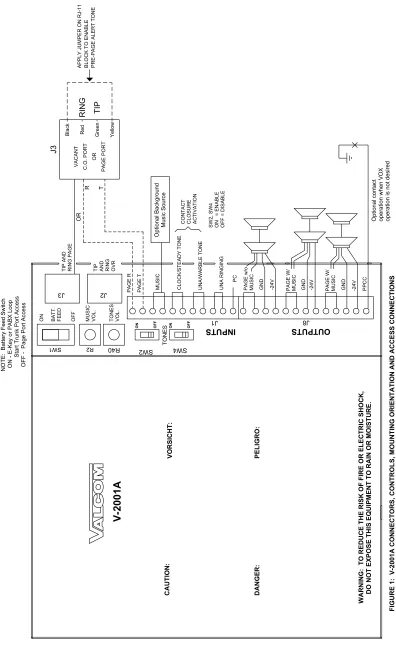
Refer to Figure 1.
Electronic Key or PABX Access
When using the V-2001A with an electronic key system, C. O. line position or PABX trunk port, the battery feed switch (SW1) must be ON.Pre-Page Alert Tone Option
The Pre-Page Alert Tone may be used when accessing the unit from an electronic key system, C. O. Line position, PABX Trunk Port or a Page Port with a contact closure. Page Ports must provide a contact closure output. To enable the pre-page alert tone feature, place a jumper on the yellow and black leads (outer pair of RJ-11) of J3. (See Figure 1).
NOTE: The pre-page alert tone operates on the primary paging input only.
Operation: Press line key (Electronic key
system) or dial trunk access code (PABX) to connect to the paging speakers. Make announcement. The V-2001A automatically disconnects from page.Page Port Access
When accessing the V-2001A from a telephone system page port, the battery feed switch (SW1) must be OFF.
Operation
:
Follow the telephone system manufacturer's instructions for access to external paging. Make announcement. The V-2001A automatically disconnects from page.The V-2001A voice switching circuit is activated when the person making the page begins to speak. When the page is completed or the person stops speaking for more than two seconds, the paging circuit turns off. Other functions of the unit remain the same.
Background Music
Background music may be connected to the V-2001A when using either access method. Background music mutes on the "page + music" outputs when a page is made.
Connect the output of a low level music source to the screw terminals marked "Music" on the input terminal strip on the V-2001A. Adjust music volume control on the V-2001A to the desired level.
Night Ring and Single Tones
Night ringing (Electronic warble tone) over paging is activated by a common audible contact closure or 90VAC ring voltage.A single tone (Time clock) over paging is provided when the V-2001A is connected to a contact closure.
Tone Options
Operation: Night Ring & Single Tones PAGE WITHOUT MUSIC OUTPUTS: SW2 SW4 No Tones OFF OFF Tones ON ON PAGE WITH MUSIC OUTPUTS: SW2 SW4 No Tones OFF Tones ON
Page Override
Page override requires the use of a vacant C. O. line position, vacant loop start trunk port or dedicated single line telephone set for access (In addition to the page port, vacant C. O. line position or vacant loop start trunk port used for primary access of the V-2001A).
Using a modular telephone cord, connect the V-2001A RJ11 jack labeled "Tip and Ring OVR" to the phone system vacant C. O. line position or vacant loop start trunk port.
Operation
: Press line key (Electronic key system) or dial trunk access code (PABX) for page override access to connect to paging speakers (Overriding page in progress). Make announcement. The V-2001A disconnects when phone is hung up, re-establishing the overridden page announcement.Connection of One-way Amplified
Speakers
The Valcom V-2001A provides external power of 20 power units (1 Amp -24VDC) to operate one-way amplified speakers. Additional power supplies are required for a quantity of speakers using over 20 power units. When using
additional power supplies, make certain:
1) The -24VDC outputs are not connected to each other.
2) Each speaker is connected to only one power source.
Volume Adjustments
The page volume is set by the speakers. Adjust speakers 1/3 to 1/2 volume initially, test and reset if necessary for correct page volume.
There are two volume controls for individual adjustment of:
• Background music
• Tones (Warble/single tone) Clockwise adjustment increases volume, counter clockwise adjustment decreases volume.
TECHNICAL ASSISTANCE
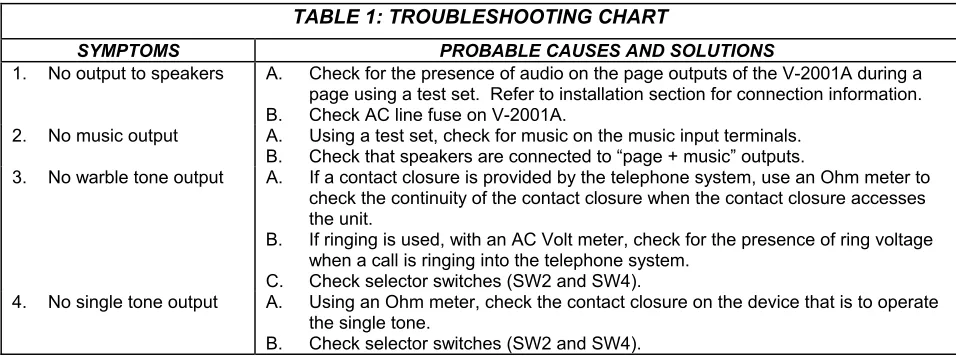
When trouble is reported, verify power is being supplied to the unit and there are no broken connections. Check voltages for proper polarity to the one-way amplified speakers. Table 1 identifies symptoms of some possible problems with solutions. If a spare unit is available, substitute a spare unit for the suspected defective unit.
Assistance in troubleshooting is available from the factory. When calling, you should have a telephone test set, several clip leads, a VOM available and call from the job site. Call (540) 563-2000 and press 1 for Technical Support or visit our website at
http://www.valcom.com.
The V-2001A is not field repairable. Valcom equipment contains no user serviceable parts inside. Valcom, Inc. maintains service facilities in Roanoke, VA. Should repairs be necessary, attach a tag to the unit clearly stating your company name, address, phone number, contact person and the nature of the problem. Send the unit to:
Valcom, Inc.
J3 J2 SW 4 SW 2 SW
1 R2 R40
ON OF F MU SI C VO L. TO NE S VO L. J1 J8 BAT T . FE E D TI P AN D RI NG PA G E TI P AN D RI N G OV R PAG E R PAG E T MUSI C CL OCK/ ST E A DY T O NE UN A /WARBLE T O N E PC -24V GND -24V GN D PAG E W/ MU S IC PAGE W / MUSI C IN PU
TS S UT TP OU
T R OR O pti onal Ba ckgro un d Mu si c S ou rc e N O T E
: B
at te ry F eed Sw itch O N E -Ke y o r PA BX Loop S tart Trun k Po rt Ac ce ss O F F
- Pag
e Po rt A cc es s V -20 01A CAUTIO N : VO RSIC HT : DANGE R : PELIG RO : WAR N IN G: TO RED U C E TH E R ISK OF FI RE O R EL EC TRIC S H OC K, D O NOT EX POSE TH IS EQUI PMEN T TO R A IN OR MOIS TU R E . FIGURE 1
: V-20
01
A CONNE
CTORS, CONTROLS, MOUN
TI NG OR IE N T A T IO N AN D A C C E S S C O N N E C T IO NS UNA RI N G IN G PA G E w /o MU SI C
GND -24V PP
C C O ptio nal co nt ac t operation when V O X
operation is not
de si re d CONT A C T C LO S URE AC T IVA T ION TO NES ON OF F ON OF F SW 2, SW 4 O N = ENABLE O
FF = D
TABLE 1: TROUBLESHOOTING CHART
SYMPTOMS PROBABLE CAUSES AND SOLUTIONS
1. No output to speakers A. Check for the presence of audio on the page outputs of the V-2001A during a page using a test set. Refer to installation section for connection information. B. Check AC line fuse on V-2001A.
2. No music output A. Using a test set, check for music on the music input terminals. B. Check that speakers are connected to “page + music” outputs.
3. No warble tone output A. If a contact closure is provided by the telephone system, use an Ohm meter to check the continuity of the contact closure when the contact closure accesses the unit.
B. If ringing is used, with an AC Volt meter, check for the presence of ring voltage when a call is ringing into the telephone system.
C. Check selector switches (SW2 and SW4).
4. No single tone output A. Using an Ohm meter, check the contact closure on the device that is to operate the single tone.
B. Check selector switches (SW2 and SW4).
NOTE: The contact closure operation of the V-2001A can be tested with a length of wire connected between
the two terminals of either the UNA/warble or clock/steady tone inputs.
VALCOM LIMITED WARRANTY
Valcom, Inc. warrants its products to be free from defects in materials and workmanship under conditions of normal use and service for a period of one year from the date of shipment. The obligation under this warranty shall be limited to the replacement, repair or refund of any such defective device within the warranty period, provided that:
1. inspection by Valcom, Inc. indicates the validity of the claim;
2. the defect is not the result of damage, misuse or negligence after the original shipment;
3. the product has not been altered in any way or repaired by others and that factory sealed units are unopened (a service charge plus parts and labor will be applied to units defaced or physically damaged); 4. freight charges for the return of products to Valcom are prepaid;
5. all units ‘out of warranty’ are subject to a service charge. The service charge will cover minor repairs (major repairs will be subject to additional charges for parts and labor).
This warranty is in lieu of and excludes all other warranties, expressed or implied and in no event shall Valcom, Inc. be liable for any anticipated profits, consequential damages, loss of time or other losses incurred by the buyer in connection with the purchase, operation or use of the product.
This warranty specifically excludes damage incurred in shipment. In the event a product is received in damaged condition, the carrier should be notified immediately. Claims for such damage should be filed with the carrier involved in accordance with the F.O.B. point.
Headquarters: In Canada
Valcom, Inc. CMX Corporation 5614 Hollins Road 35 Van Kirk Drive #11 and 12 Roanoke, VA 24019-5056 Brampton, Ontario L7A 1A5