Master’s Paper for the M.S. in I.S degree. November, 2006. 76 pages. Advisor: Deborah Barreau
This paper documents the planning, design, implementation, and preliminary evaluation of the Multimedia Story Builder and Multimedia Story Player – two applications that together are used to create, edit, manage, and deliver web-based multimedia
presentations. These applications incorporate simple and intuitive interfaces, extensive functionality, multiple presentation methods, and support for multiple media types, all of which represent improvements over similar systems. The results of a preliminary
usability test and suggestions for future testing and development are also described.
Headings:
Web Interface Design User Interface Design
THE DESIGN, IMPLEMENTATION, AND EVALUATION OF THE MULTIMEDIA STORY BUILDER AND MULTIMEDIA STORY PLAYER CONTENT
MANAGEMENT AND DELIVERY SYSTEMS
by
Thomas C. Jackson
A Master’s paper submitted to the faculty of the School of Information and Library Science of the University of North Carolina at Chapel Hill
in partial fulfillment of the requirements for the degree of Master of Science in
Information Science.
Chapel Hill, North Carolina November 2006
Approved by
Table of Contents
Overview of the Project 3
Introduction 4 Background and Application Justification 6
Intended User Group 18 Business Requirements 21 Functional Specifications 25 Use Case Scenarios 33 Design Decisions 41 Risk Assessment and Management 52
Risk Entry Key 52 Implementation and Testing 56
Lessons Learned 66
Notes 67
Table of Figures
Figure 1: The Sound Slides GUI 8
Figure 2: The Slide Show Pro Director GUI 9
Figure 3: The Windows Movie Maker GUI 11
Figure 4: Worldwide ubiquity of web-deliverable multimedia software 15
Figure 5: A media table with media boxes on it 44
Figure 6: The metadata editor with a media box in it 46
Figure 7: A presentation editor table and its multimedia presentation editor 47
Figure 8: Comparison of QuickTime and Windows Media player control interfaces 49
Figure 9: The MMSP GUI during playback of a sequential presentation 50
Overview of the Project
Introduction
The Multimedia Story Builder (MMSB) and Multimedia Story Player (MMSP) represent an attempt to improve upon existing multimedia presentation applications (MPAs) and the way in which users interact with and manipulate digital media files in general. Within the scope of this project, an MPA is defined as any application that provides functionality for the creation, manipulation, and/or presentation of multimedia files. The MMSB incorporates several unique design decisions (detailed in the Design Decisions section of this paper) in an attempt to expand the potential user groups accommodated by most existing MPAs and to increase the productivity of the users of these applications. Specifically, the MMSB and MMSP together, comprise a start-to-finish application that facilitates the creation, management, and delivery of web-based multimedia presentations. A multimedia presentation or story, as defined within the scope of this project, is a sequential, synchronized composition or a freely navigable gallery of audio, photo, video, flash, and/or text media.
controlled via the Multimedia Story Player, which functions in a manner similar to a standard movie player such as a QuickTime player or Windows Media player.
A multimedia presentation that is created as a media gallery also may contain any number and/or combination of media elements, but functions more as a browser such as that found in a typical online photo gallery. This type of presentation is comprised of a set of multimedia elements, which may be viewed in any order and which are not bound by individual timings or a defined presentation time. In order to accommodate these criteria, a gallery-based presentation utilizes the Multimedia Story Player to display a navigable list of media to the user, which may include thumbnails or icons representing each asset. This gallery provides the MMSP’s users with the ability to freely select and view these media assets.
Background and Application Justification
The inspiration for this project originated from a multimedia documentary storytelling class offered by the UNC-CH School of Journalism and Mass
Communication. The objective of this class is to tell stories about people from unique places and cultures around the world using web-delivered multimedia presentations. Creating and managing these multimedia stories is a problem that both students and instructors face every year in this class. The recurring nature of this problem is the result of several factors: 1) existing MPAs offer limited functionality, can only accommodate a limited set of media types, and/or are difficult to use effectively, 2) the production process and file management that are required for each presentation are independent of the application used to create the presentation, resulting in a disconnected and
Functional Limitations of Existing MPAs
Currently, there are many existing MPAs and single-medium presentation
applications (SMPAs) available for free or for purchase (Appendix A). Because of the limited types of media they can accommodate, however, SMPAs are inherently inadequate for the creation of multimedia presentations. Common examples of such applications include audio players, such as WinAmp and Sonique, audio editing
applications, such as Acid Pro and Audacity, and photo slideshow applications, such as Able Photo Slide Show and Slide Show Pilot. All of these applications are inherently limited in that they can only manipulate and control a single type of medium (static visual, motion-visual, or aural). Additionally, any sort of interoperability between these applications may or may not be possible, limiting the potential for combining their functionality. These limitations of SMPAs make them an unacceptable solution for creating, managing, and/or controlling multimedia presentations, either by themselves or in conjunction with other SMPAs.
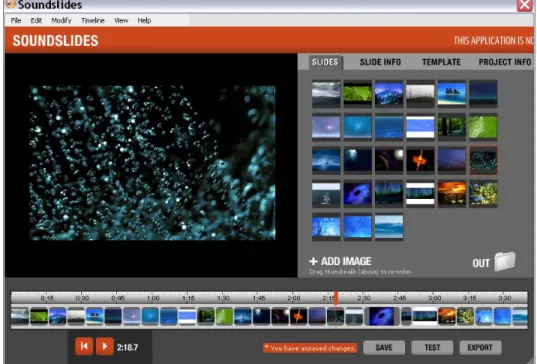
used in a presentation) and one presentation format (sequential presentations). Additionally, the extreme simplicity of the Sound Slides interface results in a limited feature set, lacking such functionality as explicit numeric temporal data manipulation (setting a medium’s start and end times numerically when editing a presentation) and timeline scaling. Sound Slides also has very limited support for the creation and manipulation of individual medium and multimedia presentation metadata.
Figure 1. The Sound Slides GUI
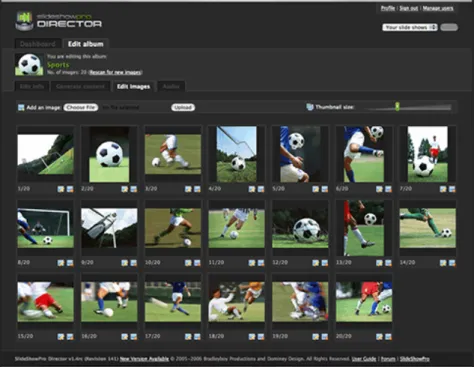
web-based application that uses drag and drop functionality to order a gallery’s photos. Like Sound Slides, Slide Show Pro is also limited to manipulating only photo and audio media, hindering its effectiveness as a complete MPA. Additionally, Slide Show Pro offers very little temporal editing capabilities (the sequential presentations display each photo for an equal amount of time), requires two separate applications to effectively create presentations (without Slide Show Pro Director, users must manually edit XML files to create presentations), and is limited to creating asynchronous sequential
multimedia presentations (the photos are displayed independently of the audio – they are not synchronized with it).
Figure 2. The Slide Show Pro Director GUI
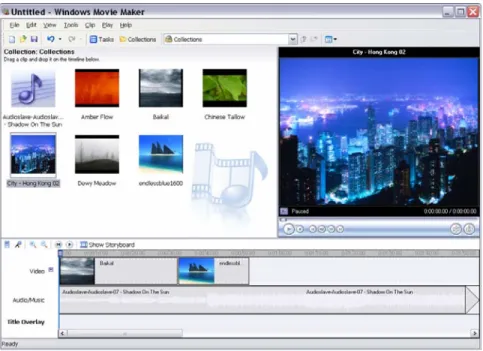
include photo and audio files, video files alone (which include audio and visual information, and thus are considered multimedia), or photo and video files. However, several MPAs accommodate photo, video, audio, and textual media. These applications include Windows Movie Maker (Figure 3), Apple’s I-Movie, Final Cut Pro, and Adobe Premiere. The latter two applications, while extremely robust and feature-rich, each exhibit some of the same problems the MMSB is attempting to address: they are both extremely complex and require an extensive knowledge of both the applications
themselves and of the process of multimedia editing. These characteristics severely limit the potential user groups of these applications and hinder their general practicality as an MPA. Conversely, Windows Movie Maker and Apple’s I-Movie proved to be excellent manifestations of the presentation-building goals of the MMSB. Both of these
applications provide their users with intuitive and simple GUIs, the ability to visually examine and edit temporal data, and simple techniques for media file and presentation manipulation. However, even though these applications exemplify most of the
Figure 3. The Windows Movie Maker GUI
Based on the information gathered during this project, it is clear that many existing MPAs offer limited functionality, accommodate a limited set of media types, and/or exhibit a complex or ineffective GUI. In many cases, these characteristics severely limit the usability and applicability of these MPAs for a broad range of users and thus
necessitate the creation of the MMSB.
Separation of Presentation Creation, Content Management,
and Project Management in Existing MPAs
makes sense for an MPA to include content and project management functionality in order to facilitate this media selection and organization process.
As previously discussed, Slide Show Pro is an example of an MPA that attempts to incorporate this functionality through the use of Slide Show Pro Director. The
combination of these two applications does a good job of facilitating the entire process of multimedia presentation creation, including the incorporation of content management. Additionally, because Slide Show Pro Director is web-based, it inherently facilitates consistent content management principles among multiple, distributed users. The disparate nature of the two applications, however, adds a certain degree of separation between defining the content for a presentation and actually creating that presentation. Where Slide Show Pro Director is responsible for selecting media assets and ordering them in a presentation, Slide Show Pro is accessed within the Flash IDE and is responsible for defining all non-content based information about a presentation. Additionally, Slide Show Pro Director does very little to provide communication channels between multiple users or to mitigate the risks of simultaneous use.
Unlike Slide Show Pro, however, most of the MPAs examined in this project did little or nothing to address content and project management. Sound Slides utilizes a computer’s local file system to store and select media for inclusion in a presentation. This functionality severely limits the potential for accommodating a distributed user group and provides no consistency among users’ organizational methods of media files. This type of content management is also utilized by Windows Movie Maker, Apple’s I-Movie, Final Cut Pro, Adobe Premiere, and many more of the MPAs examined in this project,
fact, besides Slide Show Pro and Slide Show Pro Director, no other MPA examined in this project incorporated content management techniques that accommodated multiple, distributed users.
Another option for integrating content and project management functionality into the multimedia presentation building process is to combine an existing MPA with a stand-alone multimedia content management and/or project management system. One example of a multimedia CMS that may be suitable for this role is the Multimedia Digital Library for On-line Search application, or MILOS. Some examples of project management applications that could potentially be combined with an existing MPA include Basecamp, DotProject, and Microsoft Project. The combination of these multimedia CMSs and project management applications with existing MPAs, however, leads to the same
problems that Slide Show Pro exhibits: a disconnected workflow for creating multimedia presentations, in which different tasks are accommodated by different applications. Additionally, the functionality provided by existing MPAs, content management systems, and project management systems may or may not be suitable for interaction with other applications in this type of piecemeal solution.
An effective MPA should incorporate the functionality necessary to accommodate content and project management, both of which are essential to the creation of
Restricted Usability of Existing MPAs
Most of the existing MPAs examined in this project are designed to address a very specific user group. The scope of these groups is primarily determined by a user’s previous experience with multimedia editing and his/her commitment to using and learning the application itself. Final Cut Pro and Adobe Premiere, for example, are designed to accommodate users with a fairly extensive knowledge of multimedia editing who are willing to invest a lot of time and effort in learning how to use an MPA. The primary benefit gained by catering to this user group is the ability to incorporate a broad range of functionality and advanced multimedia editing options, without overwhelming the applications’ intended users. Conversely, MPAs such as Sound Slides and Apple's I-Movie are designed to accommodate a more broad and diverse user group, including people with and without multimedia editing experience. These applications do not offer the extensive functionality of Final Cut Pro or Adobe Premiere, but they do provide many of the more commonly used features and multimedia editing capabilities. The MMSB is an attempt to accommodate the broadest user group possible, by providing functionality that is intuitive to the most novel of multimedia editors and by incorporating a selective feature set that still allows for the efficient creation of diverse multimedia presentations. If successful, the MMSB will represent an application that is both simple enough and complex enough to appeal to new and experienced multimedia editors alike.
Limited Flexibility, Accessibility, and Functionality of
Multimedia Presentations Created by Existing MPAs
The final characteristic exhibited by many existing MPAs that justifies the
functionally robust multimedia presentations. The accessibility of these presentations, as defined here, refers to a user’s ability to view the presentation without the need to install supplemental software or to change his/her computer settings. According to this
guideline, the application of choice for web-delivered multimedia content is Adobe’s Flash Player (Figure 4). Several existing MPAs already utilize Flash as a delivery medium, including Sound Slides, Slide Show Pro, EaseFlash Slide Show Generator, and Flash Photo Show. Many MPAs, however, utilize less pervasive multimedia technologies for their presentations, the most common of these being MPEG-4, Windows Media, and QuickTime. Examples of these MPAs include Slide Show To Go (Java), Windows Movie Maker (Windows Media format), ProShow Gold (Photodex Presenter format), and
Apple’s I-Movie (QuickTime Movie format). These and other applications that utilize presentation technologies other than Flash are inherently less accessible, and therefore less desirable as MPAs.
Another drawback exhibited by many of the multimedia presentations created by existing MPAs is their limited flexibility. The vast majority of MPAs create either sequential or gallery-based presentations, restricting their applicability to specific project types. Both gallery-based and sequential presentations exhibit their own individual advantages for displaying multimedia content in various contexts. Sequential
presentations are ideal for multimedia presentations in which each medium contributes to an overarching message or story. These presentations encourage a user to view a
presentation in the order and manner its creator wishes it to be viewed. Gallery-based presentations are better suited for displaying multimedia assets that relate to a specific theme or subject-area, but which are not intended to be viewed in any particular order or as part of an overarching message. The differing contexts to which these presentation types apply suggest that an MPA support both presentation methods in order to maximize its flexibility and applicability.
Of the MPAs examined in this project, Slide Show Pro is the only application that allows users to create both sequential and gallery-based presentations. However, as mentioned before, Slide Show Pro supports only photo and audio media and creates only asynchronous sequential presentations (the audio used in these presentations is more like ambient sound in that it is not synchronized with the photos – the audio segment that plays for the third photo in a presentation, for example, can vary depending on how the user has controlled the presentation up to that point). All other MPAs examined in this project were limited to creating either sequential or gallery-based multimedia
this limitation among existing MPAs provides further justification for the development of the MMSB and the functionality to support multiple multimedia presentation formats.
Summary: Justification for the Development of the MMSB
Intended User Group
Definition and Scope
The different functionalities of the MMSB and the MMSP result in a different user group for each part of the application. The MMSB is intended to facilitate the creation of online multimedia presentations, which may be used to convey a broad spectrum of information. As such, the user group for this part of the application is very diverse. This group will include anyone in the U.S. who wishes to manage and present web-accessible multimedia content. The MMSP is the player component of the application and as such, will cater to an even larger user group than the MMSB. Because the MMSP is
responsible for playing online multimedia presentations, it must be able to accommodate almost any person with web access. The diversity of the presentations that can be created with the MMSB makes it impossible to further limit the group of people that might be interacting with them via the MMSP. Additionally, the near-ubiquitous nature of the internet allows access to these presentations to people all over the world. (NOTE: The user group studied during the initial testing of this application is more focused and will be described in the Implementation and Testing section of this paper).
Psychological Characteristics
attitude toward using the application (or at least a preference for using the MMSB over other MPAs). Additionally, the interaction principles of the MMSB’s GUI are intended to make file manipulation and multimedia presentation creation simple, intuitive, and
enjoyable. These principles should positively affect the psychological state of the MMSB’s end-users. Unlike those of the MMSB, the end-users of the MMSP have no choice but to use it in order to view presentations created with the MMSB. The similarity of the MMSP’s functionality and graphical interface to those of standard multimedia playback applications, however, implies that users will feel at least as satisfied using the MMSP as they would using these other playback applications. This relationship also implies that MMSP users will not be psychologically reluctant to use it relative to using the other multimedia playback applications.
Knowledge and Experience
The users of the MMSB and MMSP will likely have at least a basic level of knowledge about computers and the internet. Both applications are primarily mouse-controlled, and as such, do not necessitate that a user be a proficient typist. MMSB users must be English-speaking, whereas users of the MMSP may speak any language included in the presentation he/she is controlling (which is left to the discretion of the
Physical Characteristics
Potential users of the MMSB will probably be 15 years of age and older (high school students, college students, and adults), with a fairly even distribution of males and
Business Requirements
Prior to developing the MMSB and MMSP, it was necessary to identify a set of business requirements to which the applications would adhere. These requirements specify the general principles and functionality the MMSB and MMSP must implement through their functional specifications. The business requirements for the MMSB and MMSP are the result of several informal interviews with Rich Beckman, the instructor for JOMC 491, Mike Schmidt, a professional multimedia website designer who is also enrolled in JOMC 491, and several other people with both limited and extensive
multimedia editing experience. The information gathered from these conversations was combined with the original goals of this project to formulate the list of business
requirements found below. Each business requirement has a unique identifier, a name, a description, and a list of related business requirements (indicated by their identifiers).
Business Requirement Entry Key
Name Name of this business requirement
Identifier Unique identifier for this business requirement Related rules ID(s) of business requirements related to this one
Description Description of this business requirement.
Name Application and Presentation Access Ubiquity Identifier MMSB-BR 001
Description Access to the application and the multimedia presentations it creates must be nearly ubiquitous to users and viewers (without a need to distribute the application software itself or its generated multimedia presentations). This will likely necessitate that both elements of the application are web accessible and deliverable.
Name Application and Presentation Deployment Ubiquity Identifier MMSB-BR 002
Related rules MMSB-BR 001, MMSB-BR 003, MMSB-BR 004
Description The MMSB must be built in such a way as to allow a broad spectrum of servers and server configurations to easily deploy it. The presentations generated by the MMSB must be accessible to most internet users utilizing only their currently installed software and computer settings. The minority of internet users who do not have the correct software and/or computer settings must be able to address this problem quickly and easily.
Name Application Use Restriction Identifier MMSB-BR 003
Relatedrules MMSB-BR 001, MMSB-BR 002, MMSB-BR 004
Description The use of each MMSB implementation for asset management and presentation building must be restricted to a specified person or controlled group of people.
Name Distributed User Support Identifier MMSB-BR 004
Related rules MMSB-BR 001, MMSB-BR 002, MMSB-BR 003, MMSB-BR 009
Description Due to the ubiquitous, distributed nature of the MMSB, there exists a need to handle simultaneous uses of the application’s asset
management and presentation-building functionality. Users must be aware of how their actions can affect others accessing the
Name Multimedia Asset Management Identifier MMSB-BR 005
Related rules MMSB-BR 006, MMSB-BR 007
Description Multimedia assets that will be used in the presentations created by the MMSB must be able to be organized, added to, deleted, moved, updated, and easily accessed. This must be done in a way that is simple, intuitive, and tightly integrated with the presentation-building functionality of the MMSB.
Name General and Medium-Specific Metadata Management Identifier MMSB-BR 006
Related rules MMSB-BR 007, MMSB-BR 005
Description The MMSB must be able to add, edit, and remove medium-specific and general metadata to all media that is uploaded using the
application. This metadata should describe information relevant to the asset’s file, the presentation of the asset, and the asset within the context of the MMSB.
Name Multimedia Presentation Creation Identifier MMSB-BR 007
Related rules MMSB-BR 008, MMSB-BR 010
Description The MMSB must allow users to create web-deliverable multimedia presentations in a simple and intuitive manner. This should be done in a way that minimizes the need for users to have in-depth medium-specific and multimedia editing knowledge.
Name Multimedia Presentation Flexibility Identifier MMSB-BR 008
Related rules MMSB-BR 007, MMSB-BR 010
Name Project Management Support Identifier MMSB-BR 009
Related rules MMSB-BR 004
Description The MMSB must be able to facilitate effective management of ongoing projects. Users should be able to access multimedia presentations they have been working on in their most recent state after exiting and returning to the application. Additionally, the MMSB should facilitate distributed communication between users working on the same presentation or working with the same media assets.
Name Multiple Language Presentation Support Identifier MMSB-BR 010
Related rules MMSB-BR 007, MMSB-BR 008
Description The MMSB must support presentations in multiple languages with minimal asset redundancy. This should apply to any asset’s
metadata that might show up in a presentation (captions, subtitles, descriptions, etc).
Name Support for Novel and Experienced Users Identifier MMSB-BR 011
Related rules MMSB-BR 001
Functional Specifications
After identifying the business requirements of the MMSB and MMSP, it was then necessary to outline the applications’ functional specifications. These specifications thoroughly describe the features and interactive principles of the MMSB and MMSP and are predominantly based on the business requirements and design decisions. They outline precisely how a user will interact with the MMSB and MMSP in order to perform various tasks. They also act as a guide for the development of the applications by specifically identifying what functionality needs to be developed. Below is a list of the functional specifications of the MMSB and MMSP. Each entry in this list includes a unique
identifier, a name, a description, a list of related business requirements (indicated by their identifiers), and a priority rating (which indicates the importance of developing a specific function, relative to the goals and business requirements of the MMSB and MMSP).
Priority Key (in decreasing order of importance):
Essential Very High High Medium Low Very Low Optional
Function Entry Key
Name Name of this application function
Identifier Unique Identifier for this application function
B.R. ID IDs of Business Requirements addressed by this function Priority Priority of this function (from table above)
Name Username and Password Login System Identifier MMSB-FS 001
B.R. IDs MMSB-BR 003 Priority Essential
Description The MMSB will utilize a username- and password-based login system in order to restrict access to the application to a specific user or user group. Both of these identifiers must be submitted and verified before a user is granted access to the MMSB. Usernames and passwords will be checked against a database of acceptable users for each implementation of the MMSB.
Name Hierarchical Media File Browser & Manager Identifier MMSB-FS 002
B.R. IDs MMSB-BR 002, MMSB-BR 005, MMSB-BR 006 Priority Essential
Description The MMSB will contain a hierarchical drop-down tree, which will contain every media file and its location within a flat file system. This file tree will utilize intuitive, medium-specific icons to identify the type of each media asset and will allow the user to organize and locate these assets quickly and easily. Additionally, the use of a flat file system for file storage eliminates the need for any database software to be installed on the server on which the MMSB is located. Additionally, this tree will be augmented with several standard file management controls, including a search feature and tools for creating directories and uploading, downloading, and deleting files.
Name Upload Tool
Identifier MMSB-FS 003
B.R. IDs MMSB-BR 001, MMSB-BR 005, MMSB-BR 006 Priority Essential
Name Multimedia Workspaces Identifier MMSB-FS 004
B.R. IDs MMSB-BR 005, MMSB-BR 011 Priority Essential
Description The MMSB will incorporate a multimedia workspace feature, which will allow users to select, arrange, view, and interact with multiple media files at once, in an intuitive and familiar manner. This feature is intended to emulate a physical workspace (a tabletop, for
example), by allowing a user to drag and drop media assets around a two dimensional space. Each multimedia workspace will have several sorting and arranging controls to facilitate the visual organization of media assets on the workspace. The MMSB will support multiple multimedia workspaces open and in use at the same time.
Name Multimedia Workspace To-Do/Notes System Identifier MMSB-FS 005
B.R. IDs MMSB-BR 004, MMSB-BR 009, MMSB-BR 011 Priority Medium
Description MMSB multimedia workspaces will include a to-do/notes system, which will allow users to write, edit, save, and delete tasks and/or notes relevant to a specific workspace. This system will also allow users to supplement specified entries with message boxes that will appear on the workspace surface itself (much like a post-it note). Furthermore, the workspace to-do/notes system will facilitate inter-user communication and distributed project management, by allowing users to save and distribute task-based information and workspace notes (when other users look at a loaded workspace’s to-do list or notes).
Name Save And Load Multimedia Workspaces Identifier MMSB-FS 006
B.R. IDs MMSB-BR 004, MMSB-BR 005, MMSB-BR 009 Priority High
Name Multimedia Workspace Media Boxes Identifier MMSB-FS 007
B.R. IDs MMSB-BR 005, MMSB-BR 011 Priority Essential
Description The MMSB’s multimedia workspaces will display and identify media files using media boxes. Media boxes will function as the container for individual media elements and will also provide users with both general and media-specific controls for each of the media within a multimedia workspace. A video box, for example, will provide users with video playback controls and methods for resizing, moving, and hiding the video. Media boxes will function much like traditional GUI windows and are intended to further emulate the action of placing physical media elements on a tangible two-dimensional workspace. Unlike traditional GUI windows, however, media boxes will exhibit several physically-modeled behaviors, in order to better simulate their role as physical objects. These behaviors will include momentum for individual media boxes, the ability to gather several media boxes, and an intuitive scaling and rotation method for each media box. Together, these functions will allow users to interact with the multimedia elements in the MMSB much like they would with a similar physical medium (such as a photograph), resulting in an extremely intuitive and naturally familiar interface.
Name Media File Metadata Editor Identifier MMSB-FS 008
B.R. IDs MMSB-BR 006, MMSB-BR 007, MMSB-BR 011 Priority Essential
Description The MMSB will include a media file metadata editor, which will be built into the multimedia workspace component of the application. The metadata editor will allow a user to view, edit, and save both general and medium-specific metadata for each media asset. All metadata that may be displayed in a multimedia presentation will allow for multiple languages. The metadata editor will also incorporate a file queue, which will enable a user to rapidly edit metadata for multiple files. Additionally, the metadata editor’s tight integration with the multimedia workspace feature will allow a user to transition seamlessly from organizing media assets to editing their metadata.
sequential media will contain duration and subtitles metadata. Photo assets will contain caption information.
Name Multimedia Presentation Builder Identifier MMSB-FS 009
B.R. IDs MMSB-BR 007, MMSB-BR 008, MMSB-BR 010 Priority Essential
Description The MMSB will incorporate a multimedia presentation builder, which will be used to create multimedia presentations from the media files uploaded to the MMSB’s media repository. The
presentation builder will include controls for adjusting the duration of a presentation, creating and editing metadata for a presentation, and previewing a presentation while it is still in development. The multimedia presentation builder will also be tightly integrated with the MMSB’s workspaces, allowing the user to easily move media assets between a workspace and the presentation builder.
Name Multimedia Presentation Timeline And Asset Viewer Identifier MMSB-FS 010
B.R. IDs MMSB-BR 007, MMSB-BR 008, MMSB-BR 011 Priority High
Description The timeline and asset viewer will be a component of the MMSB’s presentation builder and will provide the user with an intuitive way to build and organize the assets added to a multimedia presentation. The timeline and asset viewer will have two different display methods: timeline mode and gallery mode. When in timeline mode, the presentation timeline will show media boxes for each asset in the presentation, positioned and sized according to their start time and end time in the presentation. As such, users will be able to adjust the size and position of these media boxes to manipulate their
corresponding media files’ start and end times in the presentation. The timeline will also support several different zoom levels and media box interaction principles when in timeline mode. When in gallery mode, the presentation timeline will show a fixed-size media box for each asset in the presentation, in the order in which they will appear in the presentation – without any visual indicator of their start time or duration. The two modes of functionality provided by this timeline will facilitate the creation of both sequential
Name Save And Load Multimedia Presentations Identifier MMSB-FS 011
B.R. IDs MMSB-BR 004, MMSB-BR 007, MMSB-BR 008, MMSB-BR 009
Priority Essential
Description The MMSB will be able to save multimedia presentations in two different ways and will be able to load a saved presentation for editing. The MMSB will support saving presentations as stand-alone presentations, which will produce a folder containing copies all the assets used in the presentation and a multimedia player file setup to use those assets. This folder can then be moved to different locations and the presentation will maintain its functionality, however, any updates in the MMSB to the assets used in these stories will not propagate to the stand-alone presentations. The MMSB will also support saving dependent multimedia presentations, which will reference the media files uploaded to the MMSB and reflect future changes to those media files. Only the latter of these types of saved presentations will be able to be loaded for further editing in the MMSB.
Name Check In And Out Workspaces, Presentations, And Assets Identifier MMSB-FS012
B.R. IDs MMSB-BR 004, MMSB-BR 009 Priority Medium
Description When loaded or closed, saved MMSB multimedia workspaces and presentations will be labeled as checked out or checked in,
respectively. By requiring that a user check out a saved workspace or presentation prior to the editing process, only one person will be able to edit that workspace or presentation at a time. When a user loads a workspace or presentation (thereby checking it out), it will be recorded as checked out, and any subsequent requests to load that workspace or presentation by other users will be denied, until it is checked back in. For individual media assets, this check-in/check-out process will be applied to them only during the metadata editing process. Overall, this restriction will help to mitigate the probability of overwritten data caused by a distributed user group.
Name Multimedia Sequential Presentation Playback Identifier MMSB-FS 013
Priority Essential
Description The delivery aspect of the MMSB will be a multimedia player/viewer that is capable of displaying and controlling
presentations created by the MMSB. The player will be web-based and as such, will support progressive download, bandwidth
optimization, and on-demand loading of assets. The multimedia presentation player will also support a gallery mode, a sequential playback mode, and a dual mode (which will combine the sequential and gallery modes). When in sequential playback mode, the player will function like a typical movie player, such as a Windows Media Player or a Quicktime Player, and will control a sequential, timeline-based multimedia presentation. The player will enable the user to play, pause, and scrub through a multimedia presentation.
Additionally, it will allow a user to jump to specific times in the presentation and resume playback from these times. The sequential presentation player will also indicate to the user the total and current time of the presentation, the title of the presentation, and the loading progress of the presentation’s media.
Name Multimedia Gallery-Based Presentation Viewing Identifier MMSB-FS 014
B.R. IDs MMSB-BR 007, MMSB-BR 008, MMSB-BR 010 Priority Essential
Description The delivery aspect of the MMSB will be a multimedia player/viewer that is capable of displaying and controlling
presentations created by the MMSB. The player will be web-based and as such, will support progressive download, bandwidth
Use Case Scenarios
After identifying both the business requirements and the functional specifications for the MMSB and MMSP, it was then necessary to identify the use case scenarios for the applications. Each use case scenario describes a specific task for which someone might use the MMSB or MMSP as well as a list of steps that he/she would take to complete the task. The use case scenarios help to identify potential oversights in the list of functional specifications and business requirements. They also help give context to the proposed functionality of the MMSB and MMSP, which in turn, helps in determining whether the design decisions are appropriate. Below is a list of the most prominent use case scenarios of the MMSB and MMSP. Each entry in the list includes the name of the task the use case addresses, a list of related business rules and functional specifications (indicated by their respective identifiers), a precondition, a course of events taken by the user to complete the use case’s task, and a postcondition.
Use Case Scenario Entry Key
Task The task this use case addresses
B.R. IDs ID(s) of business rules related to this scenario Function IDs ID(s) of functionality related to this scenario
Precondition The state of the participating actors and system prior to this scenario Course of
Events Set of steps taken in this use case scenario to complete a specific task. Postcondition The state of the participating actors and system after the completion
Task Adding Media Assets and Viewing them in the MMSB B.R. IDs
Function IDs
Precondition John is a registered user of an implementation of the MMSB that contains no media assets, saved workspaces, or saved presentations. Course of
Events Trigger:on his computer using the MMSB, in preparation for creating a John wants to organize and view several media files he has multimedia presentation with them.
1. John navigates to the URL of the MMSB implementation that he is going to use to organize and view his media files.
2. The MMSB prompts John to verify his identity as a registered user of this MMSB implementation.
3. John provides the MMSB with his unique identification information.
4. The MMSB checks whether a registered user exists with the same identifying information that was provided by John. 5. The MMSB confirms John as a registered user and provides
him access to all the MMSB’s functionality.
6. John requests to add media files from his computer to the repository of media files stored by this MMSB.
7. The MMSB provides John with a way to select the files he wishes to add to the MMSB media repository.
8. John selects the files he wishes to add to the MMSB media repository and requests that they be added.
9. The MMSB prompts John to specify where he would like the files to be added (within the media repository).
10.John specifies where (within the media repository) the media files are to be added.
11.The MMSB copies the files from John’s computer to the location he specified (within the media repository).
12.The MMSB notifies John of the progress of the addition of each file (iterative for each file).
13.When all of his files have been added to the MMSB media repository, John finds a file he added by looking in the location that he requested the file to be added at.
14.John selects the media file and requests to view it.
15.The MMSB provides John with a set of media-specific controls for the requested file and shows John the media file.
16.Steps 12-14 are repeated for each media file that John added, without replacing the files he viewed from previous iterations. 17.John views and compares the media files within the context of
Postcondition The MMSB contains all the files John added to it, in the locations that he specified when he added them. All of the media files are displayed for John, along with a set of media-specific controls for each file.
Task Adding and Editing Metadata to the MMSB’s Media Files B.R. IDs
Function IDs
Precondition John and Jane are registered users of an implementation of the MMSB that contains several media files previously added to the media repository. These files may or may not already have user-defined metadata.
Course of
Events Trigger:several media files contained within an implementation of the John and Jane want to create and edit the metadata for MMSB in order to improve their accessibility and prepare them for use in a multilingual multimedia presentation.
1. John navigates to the URL of the MMSB implementation that contains the files he intends to edit.
2. The MMSB prompts John to verify his identity as a registered user of this MMSB implementation.
3. John provides the MMSB with his unique identification information.
4. The MMSB checks whether a registered user exists with the same identifying information that was provided by John. 5. The MMSB confirms John as a registered user and provides
him access to all the MMSB’s functionality.
6. John selects a media file from the MMSB’s media repository and requests to view its metadata.
7. The MMSB displays the requested media file, along with a media-specific controller, and shows John the categorized metadata that has been recorded for that file.
8. John examines the file’s metadata and decides to add some missing information. John enters the supplemental information into specific metadata categories. John also notices some inaccuracies in the file’s metadata and corrects them. When he is satisfied, John requests that the new metadata be saved. 9. The MMSB saves the edited version of the metadata as the
metadata associated with the current media file.
10.Steps 6-9 are repeated until John is satisfied with the metadata for each media file.
13.Jane repeats step 7.
14.Jane examines the file’s metadata, which now reflect the changes John made, and adds new language definitions for several metadata categories. Jane then translates the file’s existing categorical metadata into several languages, adds the translated metadata to their defined language-categories, and requests to save the new multilingual metadata.
15.The MMSB saves the edited version of the metadata as the metadata associated with the current media file.
16.Steps 13-15 are repeated until Jane is satisfied with the multilingual metadata for each media file.
17.Jane exits the MMSB.
Postcondition All the media files in this implementation of the MMSB have saved multilingual metadata that reflects the changes made by John and Jane.
Task Creating, Editing, and Saving a Multimedia Presentation B.R. IDs ID(s) of business rules related to this scenario
Function IDs ID(s) of functionality related to this scenario
Precondition Jane is a registered user of an implementation of the MMSB that contains several media files previously added to the media
repository. These files already have relevant metadata approved by Jane.
Course of
Events Trigger:MMSB and the files already in its media repository. Jane may or Jane desires to create a multimedia presentation using the may not have the time to complete the presentation all at once.
1. Jane navigates to the URL of the MMSB implementation that contains the files she intends to edit.
2. The MMSB prompts Jane to verify her identity as a registered user of this MMSB implementation.
3. Jane provides the MMSB with his unique identification information.
4. The MMSB checks whether a registered user exists with the same identifying information that was provided by Jane.
5. The MMSB confirms Jane as a registered user and provides her access to all the MMSB’s functionality.
6. Jane requests to create a new multimedia presentation using the media files stored in the MMSB.
7. The MMSB prompts Jane for initialization information about the presentation.
categorical metadata, then indicates when she is satisfied with the information.
9. The MMSB associates the information Jane provided with a new presentation and displays an interface for Jane to edit the newly created presentation.
10.Jane locates media files and adds them to the presentation in the order she desires them to be displayed (including their
chronological locations, if applicable).
11.As she works, Jane previews the presentation she is building to get a better sense of how it will be displayed to its end viewers. 12.Jane repeats steps 10-11 until she is satisfied with the
multimedia presentation or must stop working on it, at which point she requests to save it.
13.The MMSB saves the presentation and a copy of the multimedia player that will be used to control it (if specified by Jane, the MMSB will also copy the included assets into separate, stand-alone presentation folder).
14.Jane exits the MMSB, and links to the newly created multimedia presentation on her website.
15.At a later date, Jane repeats steps 1-5.
16.Jane requests to edit the multimedia presentation she was working on previously.
17.The MMSB loads the information about Jane’s presentation and opens the presentation editor in the same state as when Jane saved her presentation.
18.Jane continues working on the presentation (repeating steps 10-11 as necessary), and again requests to save it when she is satisfied.
19.Steps 13-14 are repeated.
Postcondition A new multimedia presentation has been created and is ready for viewing on the web. Additionally, the MMSB can now load this presentation for a user to edit it further.
Task Managing a Multimedia Project Among Distributed Users B.R. IDs ID(s) of business rules related to this scenario
Function IDs ID(s) of functionality related to this scenario
Precondition John and Jane are registered users of an implementation of the MMSB that contains several media files previously added to the media repository. These files already have user-defined metadata. John and Jane are in different physical locations and access the MMSB using different computers.
Course of
already in the MMSB.
1. Jane navigates to the URL of the MMSB implementation that contains the files she intends to edit.
2. The MMSB prompts Jane to verify her identity as a registered user of this MMSB implementation.
3. Jane provides the MMSB with his unique identification information.
4. The MMSB checks whether a registered user exists with the same identifying information that was provided by Jane. 5. The MMSB confirms Jane as a registered user and provides
her access to all the MMSB’s functionality.
6. Jane adds several media files to a new workspace, which she believes are relevant to the presentation she and John will be working on.
7. Jane creates some notes associated with the workspace, which ask John to approve her media choices and add any files to the workspace that he believes should be included in their
presentation.
8. Jane saves the workspace, and notifies John that he should take a look at it.
9. John repeats steps 1-5.
10.John loads the workspace Jane created and sees the files she has added to it, as well as the notes she created.
11.John creates a note about some of Jane’s media choices being potentially inappropriate and adds some additional media files that he believes should be included in their presentation. 12.John deletes the notes Jane wrote, saves the workspace, logs
out of the MMSB, and notifies Jane to take a look at his changes when she gets a chance.
13.Jane repeats steps 9-10.
14.Jane appends her rationale for including her chosen media files to the notes John created, saves the workspace and logs out. 15.John and Jane continue adding and replying to the workspace’s
notes until they are each satisfied with the media files on that workspace.
16.Jane repeats steps 1-5.
17.Jane uses the media files she and John have agreed upon to create media presentation with them (using the MMSB’s multimedia presentation-building functionality – see the use case: Creating, Editing, and Saving a Multimedia
Presentation).
Postcondition The MMSB contains a saved multimedia presentation that is the result of a collaborative effort by Jane and John. This presentation is ready for viewing on the web.
Task Viewing and Controlling a Sequential Multimedia Presentation B.R. IDs ID(s) of business rules related to this scenario
Function IDs ID(s) of functionality related to this scenario
Precondition A sequential multimedia presentation has been created and saved in the MMSB and has been made available for viewing on the web. Course of
Events Trigger:in this use case’s precondition and desires to view the presentation. John has learned of the multimedia presentation described 1. John navigates to the URL multimedia presentation and is
presented with the MMSP associated with that multimedia presentation.
2. The MMSP loads the media files and configuration information necessary to play the multimedia presentation John has requested to view. The MMSP continuously informs John of its progress during this loading process.
3. The MMSP informs John when it is ready to begin playback of the presentation.
4. John requests to start playing the presentation. 5. The MMSP begins playing the presentation.
6. When the presentation finishes playing, John wishes to view a specific segment of the presentation again. John scrubs
through the presentation in order to locate the desired segment. 7. When John finds the segment he wishes to view, he requests to begin playback of the presentation from the beginning of that segment.
8. The MMSP begins playback of the presentation from the point in time that John specified.
9. After watching the presentation some more, John requests to pause the playback of the presentation at a certain point in time.
10.The MMSP pauses the presentation’s playback. 11.John continues examining the presentation using the
aforementioned MMSP playback controls until he is satisfied, at which time he closes his web browser (thus closing the MMSP).
Task Viewing and Controlling a Gallery-Based Multimedia Presentation
B.R. IDs ID(s) of business rules related to this scenario Function IDs ID(s) of functionality related to this scenario
Precondition A gallery-based multimedia presentation has been created and saved in the MMSB and has been made available for viewing on the web. Course of
Events Trigger:in this use case’s precondition and desires to view the presentation. Jane has learned of the multimedia presentation described 1. Jane navigates to the URL multimedia presentation and is
presented with the MMSP associated with that multimedia presentation.
2. The MMSP loads the configuration information necessary to display the multimedia presentation Jane has requested to view. The MMSP then sequentially loads, organizes, and displays thumbnail images of the presentation’s media files. Additionally, the MMSP provides Jane with controls for navigating through these files.
3. Jane requests to view a media file by selecting the file out of the gallery.
4. The MMSP begins to load that media file, again keeping Jane informed of its progress.
5. When enough of the media file is loaded, the MMSP displays the media file and provides Jane with media-specific controls for that file.
6. Jane uses the controls to examine the media file to her
satisfaction and then requests to see the gallery of media assets again.
7. The MMSP closes the media file and removes its controller and returns to the media gallery that was displayed in step 2. 8. Jane requests to filter the gallery to only include photos related
to a specific subject (which Jane provides to the MMSP). 9. The MMSP compares the metadata of each photo to the
subject requested by Jane and filters the gallery to only include photo media related to Jane’s specified subject.
10.Jane uses the gallery controls to step through the filtered files, in order and one by one.
11.For each photo, the MMSP repeats steps 4-5.
12.When Jane is finished looking at the media files, she closes her web browser (thus closing the MMSP).
Design Decisions
In order to accommodate the broadest possible user group, the MMSB and MMSP incorporate design and interaction principles that attempt to maximize the intuitiveness with which a person can use the application to achieve his/her goals. Because the MMSB represents a particularly complex and potentially overwhelming application, special attention was paid to making it usable for people with or without extensive computer and multimedia experience. To achieve this, the interface of the MMSB attempts to replicate several interaction principles a user might experience when organizing multimedia objects in the real world. These principles include dragging, dropping, sliding, and placing multimedia objects on a two dimensional space in order to achieve various organizational and systemic functionality. Unlike the MMSB, the MMSP represents a far simpler and more pervasive type of application. Its user interface relies more heavily on preexisting standards set by existing multimedia players. Together, these guiding
principles will help to make the MMSB and MMSP an intuitive and effective tool for the management and creation of multimedia presentations.
Multimedia Story Builder Design Decisions
real-world physical objects – principles that are naturally intuitive to users with or without extensive multimedia or computer experience (Norman 8-11). In the MMSB, these principles are manifested in a user’s ability to drag, place, slide, and arrange objects freely in a virtual two-dimensional space, using the same methods that he/she would in the real world. These interaction principles significantly mitigate the need for users to have extensive experience with computers or multimedia editing and allow them to begin using the MMSB with little or no previous instruction.
In order for a user to manipulate a specific media file, it is necessary for him/her to first find, identify, and select it from all of the files in the MMSB’s media repository. This is achieved by providing the user with a hierarchical file tree, supplemented with medium-specific icons. This file tree contains all of the files in the MMSB’s media repository and is the starting point for all operations involving a specific media file. A hierarchical file tree was chosen for this part of the application for two reasons: 1) its ubiquity among existing digital file systems and 2) its accuracy in visually representing files and their locations in the MMSB’s media repository. Because hierarchical file trees are utilized in both Mac OS and Windows, it can be assumed that around 97% of MMSB users will have experience using them (“Market Share for Browsers…”). Additionally, because the MMSB stores its media using the traditional hierarchical filing system utilized by most operating systems, a hierarchical file tree accurately represents a file’s location in relation to other files and directories.
media-related actions in the MMSB are performed using this paradigm of movable objects within a two-dimensional space. This methodology has been shown to be an
exceptionally intuitive method for the informal organization and manipulation of files in systems similar to the MMSB and provides users with interaction principles that are familiar from their interactions with everyday objects (Agarawala 1290-1291).
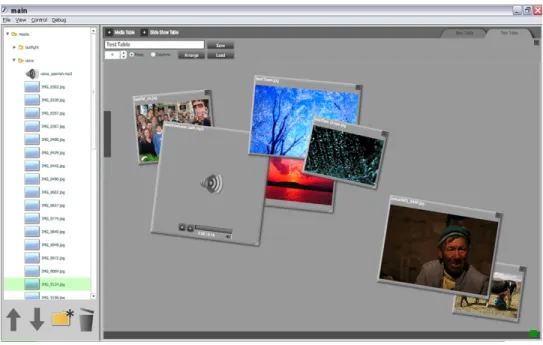
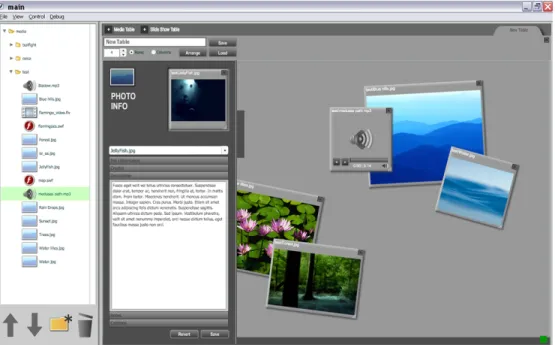
Figure 5. A media table with media boxes on it
The ability to move media boxes around a media table provides users with much of the organizational functionality afforded by manipulating physical objects on a real table top. Unlike in the real world, however, spatially organizing media boxes on a media table does not affect their digital organization in any way (except graphically on the screen). Despite this, support for spatial organization of files provides users with the functionality necessary to create various personally-relevant organizational scheme. These schemes can include such informal devices as stacks, piles, groups, and heaps of media boxes (Mander 628, 629).
functionality exhibited by MMSB media tables is something that users have identified as being important in previous studies that have examined similar digital interfaces (Grant, et al. 8,9).
In addition to the aforementioned sorting and arranging tools, all media tables also incorporate a to-do system that can be used to emulate the real-life Post-It note-based organizational systems already utilized by many people. To-do items within a media table’s to-do list can be added to, edited, and deleted. Additionally, users have the option of augmenting any of these items with a virtual Post-It note, which can be attached to the surface of the media table associated with that to-do item. This system incorporates the rigid and defined organizational structure of a traditional digital do system (via the to-do list), with the more informal structure of recording to-to-do items in the physical world (in this case, via digital Post-It notes). And, in providing the user with both of these functions, the MMSB further incorporates the already pervasive physical-world paradigm, but also augments with more traditional computer-based functionality.
medium-specific metadata form is provided to the user, which he/she may use to edit the metadata for the media file associated with the active media box (Figure 6). When a user is finished editing the metadata of a media file, he/she simply drags the media box out of the metadata editor or closes the media box altogether. This method of selecting a media file for editing adheres to the physical-world paradigm of manipulating objects in a two-dimensional space incorporated throughout the MMSB, increasing its intuitiveness within the overall functionality of the MMSB.
Figure 6. The metadata editor with a media box in it
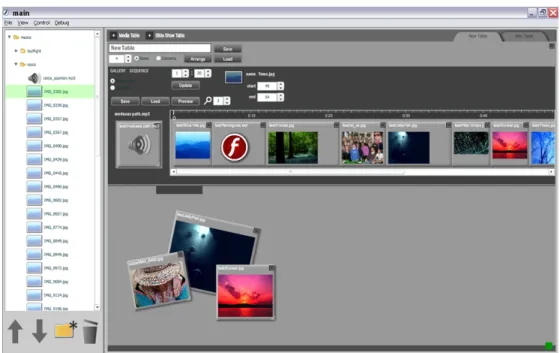
long opening, onto which media boxes can be placed. Media boxes placed on this timeline will be temporally ordered in a multimedia presentation in the same order as they appear spatially on the timeline (from left to right). Additionally, in sequential presentations, the duration of each media file will correspond to the width of that media file’s media box on the presentation editor’s timeline. This method of spatially-based temporal data manipulation has been shown to be effective in editing sequential
presentations and represents an interaction principle that fits with the overall interaction paradigm utilized by the MMSB (Bobrowicz 5-7).
Figure 7. A presentation editor table and its multimedia presentation editor
Together, media editor tables and presentation editor tables provide users of the MMSB with intuitive and consistent methods for viewing, organizing, and manipulating media files and creating and editing multimedia presentations. Additionally, the drag and drop principles that are thoroughly incorporated in the MMSB provide users with
minimize the time and effort required by these potential users to effectively operate the MMSB.
Multimedia Story Player Design Decisions
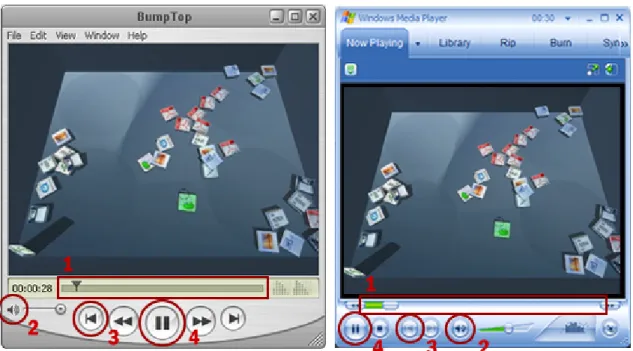
As previously mentioned, the design decisions for the MMSP are based on standards set by existing multimedia players. The relative ubiquity and graphical similarity of these players has familiarized many people with their operation and interaction principles (Figure 8). In fact, by only examining two such players, Windows Media and QuickTime, it can be assumed that around 97% of potential MMSP users will have experience using a preexisting multimedia player (“Market Share for Browsers…”). This is due to the fact that Windows Media and QuickTime players come standard on Windows and Mac OS, respectively, which together comprise 97% of the all personal computer operating systems (“Market Share for Browsers…”). This relative ubiquity of similar preexisting multimedia players among the intended user group of the MMSP warrants the
Figure 8. Comparison of QuickTime (left) and Windows Media (right) player control interfaces.
1. Scrubber Bar 2. Volume Icon 3. Reset Button Icon
4. Play/Pause Button (showing pause icon)
preexisting multimedia players, and as such, it is also a tool that should be familiar to users of the MMSP. The play, pause, and stop buttons will be identified through the use of standard playback icons. These should not only be familiar to users of the MMSP, but they should also help to provide consistent usability standards across a range of different languages.
Figure 9. The MMSP graphical user interface during playback of a sequential presentation
presentation will be identified primarily through standardized icons, minimizing the learning curve faced by new and multilingual users.
Risk Assessment and Management
The use of the MMSB as a solution for the creation and management of multimedia presentations and their assets inherently involves some risks. These risks, however, have been identified and mitigated where possible. Below is a list of these identified risks, and the steps that have, or will be taken to mitigate them. Each entry in the list includes a risk name, a probability that the risk will occur, a description of the potential impact of the risk, and a description of the risk itself. Additionally, each entry includes a name for the proposed solution to the risk, a description of the expected effectiveness of the proposed solution, and a description of the proposed solution.
Risk Entry Key
Risk The event that embodies this risk
Probability The probability of this risk event happening Impact The potential impact of this risk event Description The description of this risk
Solution The proposed or actual solution to this risk (if applicable) Effectiveness The expected effectiveness of this solution in mitigating this
risk
Description The description of this risk solution
Risk Loss of Data
Probability Variable (depending on implementation environment) Impact Major
persistent data stored by the MMSB, including media files, media metadata, presentation information, user and login information, and the scripts that comprise the MMSB itself. The risk of data loss is most significantly affected by factors outside of the MMSB, though, including the environment in which it is deployed and the
maintenance of this environment. As such, this risk extends beyond the scope of the MMSB.
Solution Iterative Versioning for Persistent Files Effectiveness Moderately Effective
Description Information and metadata files, including media metadata files, presentation information files, and user and login information files, will be iteratively saved and maintained. This process will result in the existence of several versions of each of the aforementioned files, mitigating the data loss that would result if one of these files was lost, corrupted, or otherwise rendered inaccessible. If the most recent version of one or more of these files is lost, a user will be able to retrieve that file in its most recent state prior to its current state. And, while this functionality would not allow the user to retrieve an exact copy of the file that was lost, it would allow the user to potentially retrieve a majority of the information contained in the lost file. This solution should be a sufficient method of file backup, considering the relative rarity of file loss and the limited
responsibility the MMSB has in addressing the risk of data loss.
Risk Overwritten Data or Undesired Changes by Other Users Probability High
Impact Moderate – Major
Description The risk of users overwriting or changing data created by other users in an undesired manner is a risk that is inherent to all applications that accommodate a user group greater than one person. The MMSB is no different from these applications and faces this problem in its media metadata files, media files, saved presentations, and saved workspaces. Because multiple users have the ability to access and manipulate all of these types of persistent data, they also have the ability to change them in a potentially undesirable way.
Solution Iterative Versioning for Persistent Files; User permissions Effectiveness Very Effective
inhibiting the chances of overwriting or changing persistent data in a manner that may be undesirable to another user (by necessitating that users be qualified to edit the information they are able to edit).
Risk Inability to Access the Application
Probability The probability of this risk event happening Impact Minor – Moderate
Description Because the MMSB is a restricted-use, web-delivered application, there is an inherent risk that users may not be able to access it for a variety of reasons. In order to access the MMSB, a user needs to have internet access, the correct software installed on his/her computer, and his/her login information. If a user is lacking any of these, he/she will not be able to access the MMSB and utilize its functionality. The potential implications of this include lost production time, the inability of a user to access the application permanently, and a delay in the updating or creation of existing multimedia presentations.
Solution Flat File Storage of Persistent Data; Login Information Reminder
Effectiveness Ineffective - Very Effective
Description Because the MMSB is a restricted-use, web-delivered application, there are several circumstances in which a user could lose access to the application. There is no way to allow a user access to the application if he/she does not have web access. The distributed nature of the MMSB demands that it be delivered via the internet, and as such, necessitates that its users have access to the internet. A user’s inability to the access the MMSB due to lost or forgotten login information is, however, something that can be mitigated. This will be done by incorporating functionality that allows a user to retrieve their login information, upon providing an alternate means of identification (and one that is not easily forgotten). Additionally, all persistent data related to the MMSB will be stored in a flat file structure, allowing authorized users to access it using applications other than the MMSB (such as FTP clients, web browsers, or SSH applications).
Risk External File Manipulation
Probability The probability of this risk event happening Impact The potential impact of this risk event
by the MMSB. Specific examples of this include deleting files included in a multimedia presentation using an FTP client, editing the metadata of a media file via a text editor and in a manner that is unrecognized by the MMSB, or editing the information file that defines a multimedia presentation via a text editor and in a manner that is unrecognized by the MMSB. These outside changes can have unpredictable and potentially detrimental effects on the functionality of the MMSB.
Solution Redundant File Validation Effectiveness Ineffective - Moderately Effective
Description A user has the ability to manipulate the files used by the MMSB with separate applications and in a nearly limitless number of ways. As such, this risk is difficult, if not impossible, to manage
effectively. Despite this, however, several steps will be taken in the programming of the MMSB to help mitigate the effects of this risk. Files will be confirmed as existing before every access attempt by the MMSB. If the file is found to be nonexistent, the MMSB will perform the same steps that are taken if that file is deleted using the MMSB. Additionally, the MMSB will generate metadata
automatically for media files that do not have metadata files already associated with them (which happens if a user uploads media to the MMSB media repository using an application other than the
Implementation and Testing
The MMSB was implemented and observed in JOMC 491 (the UNC-CH multimedia documentary journalism class described in the Background and Application Justification section of this paper) between November 2, 2006 and November 10, 2006. The MMSB was made available to the students enrolled in this class after they attended a brief (10 minute) presentation on its capabilities and interaction principles. The students then used the MMSB over the next three days to both manage and create multimedia presentations about the people and culture of Arequipa, Peru. The presentations were all sequential in nature and included photos, audio, video, and text media. Qualitative information about using the MMSB during this time period was informally gathered via email and directly gathered via face-to-face interviews (Appendix D) with the student users. This
information was then synthesized and analyzed in order to produce a cursory examination of the current usability of the MMSB and to identify potential areas for its improvement. This information is also meant to be used to suggest more formal and rigorous testing scenarios for evaluating the MMSB in the future.
Testing User Group
Definition and Scope