eB System Administration
Training Guide
P
ROGRESS
D
ATABASE
ON
W
INDOWS
NT S
ERVER
70-2822A MFG/PRO eB April 2001particular purpose. QAD Inc. shall not be liable for errors contained herein or for incidental or consequential damages (including lost profits) in connection with the furnishing, performance, or use of this material whether based on warranty, contract, or other legal theory.
Some states do not allow the exclusion of implied warranties or the limitation or exclusion of liability for incidental or consequential damages, so the above limitations and exclusion may not be applicable.
PROGRESS® is a registered trademark of Progress Software Corporation. Windows™ is a trademark of Microsoft Corporation.
MFG/PRO® is a registered trademark of QAD Inc. QAD, QAD eQ, and the QAD logo are trademarks of QAD Inc.
All other products and company names are used for identification purposes only, and may be trademarks of their respective owners.
© Copyright 2001 by QAD Inc. All Rights Reserved.
70-2822A QAD Inc. 6450 Via Real Carpinteria, California 93013 Phone (805) 684-6614 Fax (805) 684-1890 [email protected] http://www.qad.com/services/learn/
© Copyright 2001 by QAD Inc. All Rights Reserved.
Contents
P
REFACE. . . 7
Using This Guide . . . 8
Audience . . . 8
Location of MFG/PRO Manager Functions Information . . . 9
Organization . . . 9
Document Conventions . . . 10
C
HAPTER1
C
OMPONENTSANDC
ONFIGURATION. . . 11
Windows NT Basics . . . 13
Configuration Basics . . . 15
Client/Server Configuration . . . 18
Batch Mode Client . . . 20
PROGRESS Basics . . . 21
PROGRESS Executables . . . 25
PROGRESS Parameters . . . 26
PROGRESS Database Architecture . . . 27
MFG/PRO Basics . . . 31
MFG/PRO Code . . . 32
MFG/PRO Empty Databases . . . 34
Default Databases . . . 35
Main MFG/PRO Databases . . . 36
Other MFG/PRO Databases . . . 37
Installation Overview . . . 48
PROGRESS Server Installation . . . 49
MFG/PRO for Windows NT Server Installation . . . 52
MFG/UTIL Basics . . . 53
Database Sets . . . 55
Server Icons . . . 57
Server Media File Types . . . 58
Directory Structure on the Database Server . . . 60
PROGRESS Client Installation . . . 64
MFG/PRO for Windows Installation . . . 66
MFG/PRO Icons . . . 69
Sample Parameter File . . . 70
Sample Hosts File . . . 71
Sample Services File . . . 72
C
HAPTER3
D
ATABASEM
ANAGEMENT. . . 85
Data Movement . . . 87
Database Backups . . . 89
Delete and Archive . . . 93
Database Fragmentation . . . 95
Dump and Load . . . 99
Dump Procedure . . . 101
Load Procedure . . . 103
Bulk Load and Index Rebuild . . . 105
Special Dump/Load . . . 108
C
HAPTER4
P
ERFORMANCET
UNING. . . 111
CONTENTS V
© Copyright 2001 by QAD Inc. All Rights Reserved.
Using Promon to Set -B Parameter . . . 121
C
HAPTER5
M
ULTI-V
OLUMED
ATABASE. . . 123
Multi-Volume Overview . . . 125
Multi-Volume Components . . . 126
Multi-Volume Creation Steps . . . 127
Creating a Structure File . . . 128
Sample Structure File . . . 129
Determining Database and Extent Size . . . 130
Calculating the Structure File Extent Size Number . . . 131
Using Prostrct . . . 132
Creating a Void Multi-Volume Database . . . 133
Populating a Void Multi-Volume Database . . . 134
Copying a Populated Database to Void Database . . . 135
C
HAPTER6
S
YSTEMU
TILITIES. . . 137
Database Set Administration . . . 139
Compiling Programs . . . 141
Batch Processing with the PROGRESS Batch Client . . . 144
Using the NT Scheduler . . . 145
Using AT Command . . . 146
Establishing a Batch Mode Client Session . . . 147
PROGRESS Batch Program . . . 148
Preface
Using This Guide 8 Organization 9
Using This Guide
Use this guide for training information on MFG/PRO system administration, especially database management and related tasks.
Audience
These instructions are for the MFG/PRO system administrator who manages the MFG/PRO
MFG/PRO on Windows NT
Includes the following:
• Components and Configuration
• System Sizing
• Installation and Configuration
• MFG/PRO Manager Functions
– Control files, security, help, printers, batch, CIM
• System Management
– Database management, performance and tuning,
and administration utilities
PREFACE 9
© Copyright 2001 by QAD Inc. All Rights Reserved.
Location of MFG/PRO Manager Functions Information
Although it is involved with system administration, this training does not include the MFG/PRO Manager Functions (menu 36). For that information, refer to Manager Functions Training Guide.
Organization
This guide is organized as follows. 1 Components and
Configuration
Explains the basic concepts of PROGRESS and the MFG/PRO system.
2 System Sizing and Installation
Explains MFG/PRO hardware requirements and installation procedures.
3 Database Management Explains the common database management tasks, along with some step-by-step instructions. 4 Performance Tuning Explains options on how to boost PROGRESS and
MFG/PRO system performance.
5 Multi-Volume Database Explains how to set up a multi-volume database, which is recommended for best performance. 6 System Utilities Covers various utilities that support the MFG/PRO
application, particularly batch processing. 7 System Administration
Labs
Contains labs that reinforce classroom and self-study activities.
If you see: It means: monospaced
text
A command or file name. italicized
monospaced text
Italicized monospaced text indicates a variable name for a value you enter as part of an operating system command. For example, YourCDROMDir.
indented command line
A long command that you enter as one line (although it appears in the text as two lines).
C
HAPTER1
Components and
Configuration
Windows NT Basics 13 Configuration Basics 15 Client/Server Configuration 18 Batch Mode Client 20PROGRESS Basics 21 PROGRESS Executables 25 PROGRESS Parameters 26
PROGRESS Database Architecture 27 MFG/PRO Basics 31
MFG/PRO Code 32
MFG/PRO Empty Databases 34 Default Databases 35
Main MFG/PRO Databases 36 Other MFG/PRO Databases 37 Custom Side Databases 38
Components and
Configuration
• Windows NT Basics
• MFG/PRO Configurations
• Progress Components
• MFG/PRO Components
COMPONENTSAND CONFIGURATION 13
© Copyright 2001 by QAD Inc. All Rights Reserved.
Windows NT Basics
To manage MFG/PRO, you must know how to use some basic DOS commands. Refer to the list below as needed during this training course. Refer to your operating system manuals for more information.
Common DOS commands appear in the following table.
Windows NT Basics
• NT includes a DOS command line window
– You can enter standard DOS commands
– To create or modify text files in DOS (such as .bat
scripts), use the edit command
• Instead of DOS commands, you can use
Windows-based utilities
– For example, use Notepad to edit text files
• You can set up disks and directories to be
shared over the network
• To modify file attributes (such as Read Only),
use the DOS attrib command or Windows
Explorer
Change directory cd Change back one directory cd .. List files (long format) dir List files (a screen at a
time)
dir /p
List files (wide format) dir /w
File Attribute Commands: View attributes attrib FileName
Change attributes attrib FileName +/- (A, R, etc.) Other Commands:
Link (Map) a disk drive to a remote directory
net use X:\\ComputerName\Dir\FileName (Where X: is the drive name on the local machine.)
Open editor edit FileName
Copy a file copy OldFileName NewFileName
Move a file move OldDir\FileName NewDir\FileName View a file’s contents type FileName
View a file’s contents a page at a time
type FileName | more Send a file’s contents to
another file
COMPONENTSAND CONFIGURATION 15
© Copyright 2001 by QAD Inc. All Rights Reserved.
Configuration Basics
The next few slides outline configuration concepts both generally and specifically to MFG/PRO.
Configuration Basics
• MFG/PRO can run in the following
configurations
– Host-based mode
– Client/Server mode
• On a Windows NT database server, only
client/server mode is available
• A batch client is also available, which runs in a
noninteractive background host mode
Host-Based Configuration
• Host mode means the client process runs on
the same physical processor(s) as the
database server process
• MFG/PRO sessions run on dumb terminals or
terminal emulators
• MFG/PRO connects directly to the database
via a local directory path
• Host mode is not supported for MFG/PRO
COMPONENTSAND CONFIGURATION 17
© Copyright 2001 by QAD Inc. All Rights Reserved.
Client/Server Configuration
• Client/server means the client process runs on
a separate processor than the database server
process
– This configuration is necessary for Windows NT
• MFG/PRO for Windows sessions run on PCs
– Programs execute on the PCs but are typically
stored on a network file server
• MFG/PRO connects to the database through a
TCP/IP LAN network
• Clients can use either the graphical user
interface (GUI) or character-based interface
Client/Server Configuration
See MFG/PRO GUI Client Configuration in the eB Installation Guide, PROGRESS on Windows NT
Client/Server Configuration
File Server: Stores and Downloads MFG/PRO Windows Programs CLIENTS: SERVERS: PROWIN32 Batch Client PCs Running Windows TCP/IP Network (Required for Windows) Database Server: Runs MFG/PRO Databases and Certain Character Programs in Batch Mode C:\COMPONENTSAND CONFIGURATION 19
© Copyright 2001 by QAD Inc. All Rights Reserved.
Host-Based and Client/Server
Comparison
Host Client:
Windows Client/Server:
CPU:
Database Server
PC
Connection
Types:
Single user or
multiuser
Multiuser only
Connection
Parameters:
Requires DB
directory path
Requires network settings in
the Hosts and Services files
Session
Startup:
Uses O/S script
Uses icons, initialization file
(.ini), and parameter file (.pf)
Session
Interface:
Character only
Windows GUI or
Windows Character
Batch Mode Client
For information on scheduling MFG/PRO processes through the batch mode client, refer to Chapter 6, “System Utilities” in this training guide.
Batch Mode Client
• MFG/PRO supports batch mode clients
• Batch mode clients access the database server
through a direct, shared-memory connection
• Batch mode clients invoke MFG/PRO functionality
without an interactive client session
• Any needed input/output is read from, or sent to,
respective files
• Batch clients access the character-style programs
on the database server
COMPONENTSAND CONFIGURATION 21
© Copyright 2001 by QAD Inc. All Rights Reserved.
PROGRESS Basics
See PROGRESS Basics in the PROGRESS System Administration Reference for Progress Version 9.
config-09
PROGRESS Basics
• PROGRESS is both a RDBMS and 4GL programming
language
– Standard SQL commands can also be used
• The PROGRESS installation directory is referred to as
ProgressDir
– To identify version: cat ProgressDir/version
• PROGRESS version 9.1B as of Mon January 8, 2001
– To list installed products:
cat ProgressDir/progress.cfg
• PROGRESS offers various products/packages:
– Database server products or packages– Client and network connection products
Products/Packages
• Enterprise Database Server
– Contains RDBMS, server networking, and minimal
(Runtime) client product
• Workgroup Database Server
– Package is similar to Enterprise Database Server,
but without key performance aids such as
Before-Image Writers
COMPONENTSAND CONFIGURATION 23
© Copyright 2001 by QAD Inc. All Rights Reserved.
Client Products
• Client Networking
– Enables clients to access remote databases running
with the proper network parameters
– Runtime client, which executes compile 4GL
programs
• Query
– Tool for writing inquiries and reports (only compiles
programs that read, not write)
Administration
Products/Packages
• 4GL
– Available on Windows and UNIX
– Compiles any program, including those that write to
the database
– Provides database administration utilities
• ProVISION package
– Available on Windows only
– Includes 4GL and other development tools
• At least one license of 4GL or ProVISION
required for MFG/PRO installation and
administration
COMPONENTSAND CONFIGURATION 25
© Copyright 2001 by QAD Inc. All Rights Reserved.
PROGRESS Executables
See PROGRESS Executables in the PROGRESS System Administration Reference for Progress Version 9.
PROGRESS Executables
• PROGRESS has pre-generated executables
to perform tasks such as starting servers and
client sessions
• Executable files typically reside in the
ProgressDir/bin sub-directory
• The executable files typically begin with an
underscore
PROGRESS Parameters
See PROGRESS Parameters in the PROGRESS System Administration Reference for Progress Version 9.
PROGRESS Parameters
• Parameters instruct the executables how to
behave, such as how to handle hardware
– Example: _mprosrv
DbName
-B 2000
(starts a server with specified buffer memory)
• Parameters are specific to the PROGRESS
executable(s)
– Example: -B only applies to _mprosrv
• Each parameter takes affect at a specific point,
such as program startup
COMPONENTSAND CONFIGURATION 27
© Copyright 2001 by QAD Inc. All Rights Reserved.
PROGRESS Database Architecture
See PROGRESS Database Architecture in the PROGRESS System Administration Reference for Progress Version 9.
PROGRESS Database
Architecture
• As of Progress Version 9 all databases are
multi-volume in structure
– Note: For production, a multi-volume database
should be constructed to distribute I/O across
multiple channels (covered later in this training)
• Databases have a structure of logical files
called a schema
– A schema defines data storage and consists of:
• Tables (also called files): logical groupings of data,such as customer information
• Fields (called columns in other systems): the data elements within tables, such as address
Architecture
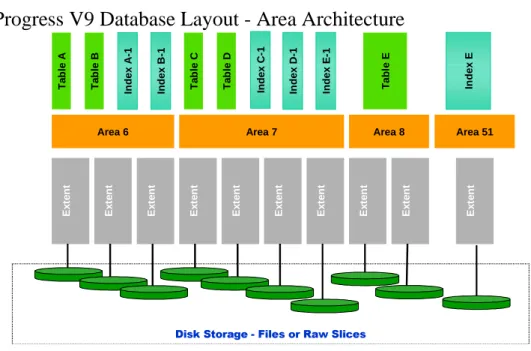
• Database logical files are created within
specific Data Storage Areas during the
database build
• Data Storage Areas are comprised of one or
more physical files known as database extents
• Database extents are created in specified
locations, and therefore can be directed to
specific I/O channels.
COMPONENTSAND CONFIGURATION 29
© Copyright 2001 by QAD Inc. All Rights Reserved.
Progress V9 Database Layout - Area Architecture
Area 6 Area 7 Area 8
Ex te nt Ex te nt Ex te nt Ex te nt Ex te nt Ex te nt Ex te nt Ex te nt Ex te nt 'LVN6WRUDJH )LOHVRU5DZ6OLFHV Ta b le A Ta b le B In dex A -1 Index B -1 Ta b le C Ta b le D Index C -1 In dex D -1 Index E -1 Ta b le E Area 51 Ex te nt In dex E
PROGRESS Database
Architecture
See Roll Backward Recovery in the PROGRESS System Administration Reference for Progress Version 9.
PROGRESS Database Files
• All databases use roll-backward recovery
– This Data Storage Area is the Primary Recovery Area
– The extents within this area contain snapshots of data
prior to each alteration
– If a transaction is aborted, the data from the .bx extent is
used to reset the database
• Other related files include:
– Empty Database (empty.db)
– Database Extent File (.d1, .d2, .dx, .a1, .b1)
– Database Definitions (.df)
– Data (.d)
COMPONENTSAND CONFIGURATION 31
© Copyright 2001 by QAD Inc. All Rights Reserved.
MFG/PRO Basics
See MFG/PRO Basics in the eB Installation Guide, PROGRESS on Windows NT.
MFG/PRO Basics
• MFG/PRO is a Global Supply Chain
Management software package from QAD Inc.
• MFG/PRO is written in PROGRESS 4GL
• Each MFG/PRO release requires a specific
version of PROGRESS
• MFG/PRO programs come in modules, so you
can purchase only the modules you need
• For version:
cat
EBInstallDir
/version.mfg
MFG/PRO Code
See MFG/PRO Code in the eB Installation Guide, PROGRESS on Windows NT.
MFG/PRO Code
•
Nonencrypted source code is:
– Readable and modifiable
– Stored as .p file in eBDir\ClientDir\LanguageDir\src
• Encrypted source code is:
– Encoded and non-modifiable
– A .p file in eBDir\ClientDir\LanguageDir\ xrc
– Maintenance programs are xrc, unless premium is
paid
• Source code programs are compiled to
produce executable code
COMPONENTSAND CONFIGURATION 33
© Copyright 2001 by QAD Inc. All Rights Reserved.
Void vs Empty Database
• Before we introduce the MFG/PRO databases,
keep in mind the distinction between void and
empty databases
• Void Database
– Contains only a header block
– Contains no schema
– The PROGRESS empty database is void
• Empty Database
– Copy of void database with schema file (.df) loaded
– Empty databases are empty of data
MFG/PRO Empty Databases
See MFG/PRO Databases in the eB Installation Guide, PROGRESS on Windows NT.
MFG/PRO Empty Databases
• MFGEMPTY is the empty, main MFG/PRO
database.
– Contains schema for most business data, such as
customers, vendors, items, etc.
• ADMEMPTY
– Contains schema for interface-related data
(browses, drill-downs, views, etc.)
– Schema for all the OBCM component data
• HLPEMPTY
– Schema for field, procedure, and cross-reference
help data
COMPONENTSAND CONFIGURATION 35
© Copyright 2001 by QAD Inc. All Rights Reserved.
Default Databases
• Copies of the empty databases are made and specific accumulations of predetermined data can be loaded into these copies to populate them.
• This predetermined data is stored as series of data files (.d files), located in sub-directories under the main MFG/PRO installation directory.
• Language specific files are loaded from a sub-directory beneath the language sub-directory. • There is one .d data file for each of the logical files created within the database when the
schema (structure) file (.df) is loaded.
• All complete set of .d files must be loaded into a database to produce the complete database contents.
Default Databases
mfgempty
hlpempty
admprod
hlpprod
+
\qad\mfg\*.d
+ \qad\us\mfg\*.d
+ \qad\admin\*.d
+ \qad\us\admin\*.d
+ \qad\us\fieldhlp.fhd
+ \qad\mfghelp\*.d
mfgprod
Empty Database
Data Directory
Built Database
Main MFG/PRO Databases
See MFG/PRO Databases in the eB Installation Guide, PROGRESS on Windows NT.
Main MFG/PRO Databases
• Mfgprod
– Empty except for language specific menus and
messages
– Used to make an empty production database
• YourProductionDb
– Copy of mfgprod to be used as your live database
• Mfgtrain (Built separately in specific language)
– Copy of mfgempty (or unused mfgprod) with training
data loaded from the mfgtrain subdirectory
• Mfgdemo (Built separate in specific language)
– Copy of mfgempty (or unused mfgprod) with
demonstration data loaded from the mfgdemo
subdirectory
COMPONENTSAND CONFIGURATION 37
© Copyright 2001 by QAD Inc. All Rights Reserved.
Other MFG/PRO Databases
See Support Databases in the eB Installation Guide, PROGRESS on Windows NT.
Other MFG/PRO Databases
mfghelp
(online help)admin:
(object components)admin:
(Views, Browses, UIB)Database:
Related Application Item:
%URZVH
Custom Side Databases
See MFG/PRO Databases in the eB Installation Guide, PROGRESS on Windows NT
Custom Side Databases
• If you customize MFG/PRO, you may need
additional logical files or fields to store data
manipulated by the custom program
• Never alter the standard MFG/PRO
databases
• Instead, copy and modify the PROGRESS
empty.db to include your custom schema
modifications
– When a client runs the custom code, it must
connect to the custom side database
C
HAPTER2
System Sizing and
Installation
Disk Space Requirements 41 Installation Overview 48
PROGRESS Server Installation 49
MFG/PRO for Windows NT Server Installation 52 MFG/UTIL Basics 53
Database Sets 55 Server Icons 57
Server Media File Types 58
Directory Structure on the Database Server 60 PROGRESS Client Installation 64
MFG/PRO for Windows Installation 66 MFG/PRO Icons 69
Sample Parameter File 70 Sample Hosts File 71 Sample Services File 72
System Sizing
• Disk
• Memory
• Database
• Network
SYSTEM SIZINGAND INSTALLATION 41
© Copyright 2001 by QAD Inc. All Rights Reserved.
Disk Space Requirements
The installation guide for your version of MFG/PRO details the minimum and recommended hardware and software requirements.
See Disk Space Requirement in MFG/PRO eB Installation Guide, PROGRESS on Windows NT
Disk Space Requirements
• MFG/PRO Database Server Software
– Approximately 1.25Gb (Without Character Code)
– Approximately 800Mb (Install with Server Software)
• Additional 800 Mb for each additional language • Additional 300 Mb if you load source code
cross-reference help
• MFG/PRO Windows Client Software
– 950Mb per language (including source code)
• PROGRESS Software (Per Installation)
See Memory Size Formula in MFG/PRO eB Installation Guide, PROGRESS on Windows NT
Memory Size Formula
• The memory size formula is:
[(6 x
Number_of_Concurrent_Users
) + 32 +
(
Number_of_DBs
x 48)] x 1.2 = Mb
• Example with 50 users and 2 production
databases:
SYSTEM SIZINGAND INSTALLATION 43
© Copyright 2001 by QAD Inc. All Rights Reserved.
See Database Size in MFG/PRO eB Installation Guide, PROGRESS on Windows NT
Database Size
• Production database size varies greatly
depending on business factors
– 2 to 4Gb is a typical production database size
• For a new MFG/PRO installation, size the extents
within each Data Storage Area to house the
current/expected data assigned to each Area,
while still considering overall database size.
• If converting from a legacy system, current
• MFG/PRO installations with minimal users need a minimum of four separate disk drives for acceptable system performance.
• A minimum of two separate controller channels.
• More disk drives and controller channels will be required for medium to large systems. • 2Gb drives are sufficient.
See Disk Layout in MFG/PRO eB Installation Guide, PROGRESS on Windows NT
Disk Layout Example
Disk Controller Channel 2
Disk 1 Disk 3 MFG/PRO Installation Directory – Programs – Utilities – System Files O/S PROGRESS Production Database Extents (.db, .d1, ...) Production Database Before-Image Extents (.b1, .b2 ...) Disk 4 Disk 2 Production Database Extents (.d2, .d3 …) Disk Controller Channel 1
SYSTEM SIZINGAND INSTALLATION 45
© Copyright 2001 by QAD Inc. All Rights Reserved.
See Gui Client Hardware in MFG/PRO eB Installation Guide, PROGRESS on Windows NT
Client PC Specs
• P233 or greater
• 64Mb RAM or greater
• 32-bit Network Interface Card
• 10–25Mb Local Disk Storage
• Super VGA Video
• Client must be able to “ping” the Database
Server machine
See Network Design and Optimization in MFG/PRO eB Installation Guide, PROGRESS on Windows NT
Local Area Network Specs
• 100Mbps Backbone
• 10Mbps Shared-Media Segments
• Maximum 10 Clients per Shared LAN Segment
(Depending on client activity)
• WAN use will require a supporting technology,
and should be avoided
SYSTEM SIZINGAND INSTALLATION 47
© Copyright 2001 by QAD Inc. All Rights Reserved.
Installation and
Configuration
Installation Overview
See Installation Overview and Installation Summary in MFG/PRO eB Installation Guide, PROGRESS on Windows NT
Installation Overview
• Install server PROGRESS and server MFG/PRO on
the database server machine and generate the
database sets and system icons
• Install client PROGRESS on a file server or on each
client machine (225-350MB/client)
• Install client MFG/PRO on a file server
• Establish the clients' network drives and set up each
client
• Tailor Services & Hosts files on the server and client
• Set up database command scripts in ProControl
• BACK UP!!!
SYSTEM SIZINGAND INSTALLATION 49
© Copyright 2001 by QAD Inc. All Rights Reserved.
PROGRESS Server Installation
Installing PROGRESS on the server is a prerequisite to the MFG/PRO installation.
PROGRESS Server Installation
• PROGRESS media contains all PROGRESS
products
– During installation, you type codes from the license
addendum to specify which products to extract
• Server requires:
– Enterprise database
SYSTEM SIZINGAND INSTALLATION 51
© Copyright 2001 by QAD Inc. All Rights Reserved.
MFG/PRO for Windows NT
Server Installation
• The Database Server installation is accomplished
through a series of separate installation processes
• The entire compliment of database build files and
executable code is spanned across several individual
component CDs
– Most Database Server files are on the Database Server CD
– Language specific files are on the Language CD
– Character executable code is on the Character Client CD
• Some CDs contain both Intel and Unix based install
MFG/PRO for Windows NT Server Installation
See Database Server Setup in MFG/PRO eB Installation Guide, PROGRESS on Windows NT
MFG/PRO for Windows NT
Server Installation
• Media is extracted, including database build files,
language specific files,and object/source code
– Code is character-based for use by noninteractive batch clients
– You can also run Windows Character sessions using code on the database server; however, to avoid contention, you should install and use a second set of character-based code on a separate file server
• An InstallShield wizard guides you through unloading and
then calls the MFG/UTIL installation utility
– MFG/UTIL is started only after the final CD is extracted – MFG/UTIL guides you through database creation and
SYSTEM SIZINGAND INSTALLATION 53
© Copyright 2001 by QAD Inc. All Rights Reserved.
MFG/UTIL Basics
See MFG/UTIL Reference Information in MFG/PRO eB Installation Guide, PROGRESS on Windows NT
MFG/UTIL Basics
• MFG/UTIL is the installation and configuration
utility
• MFG/UTIL is invoked by the install routine to:
– Build your production databases via the “MFG/PRO
Guided Setup” function
– Configure database set specifics, including network
parameters, to create start-up and shutdown icons
• After installation, use MFG/UTIL to administer
database builds, database sets, scripts, and
compilation
SYSTEM SIZINGAND INSTALLATION 55
© Copyright 2001 by QAD Inc. All Rights Reserved.
Database Sets
See Database Sets in MFG/PRO eB Installation Guide, PROGRESS on Windows NT
Database Sets
• MFG/PRO runs against a set of databases
– Includes the main database, the administration database (user interface and OBCM data), the help database (on-line help), and and additional/custom databases required
– You may have database sets for different purposes, such as production or training
• MFG/UTIL defines your database sets
– Example: Training set may consist of the databases mfgtrain, hlpprod, and admprod
• MFG/UTIL generates system icons and .bat files from the
set information
– Used for database startup, shutdown, and client sessions – The resulting .bat filenames consist of set name and extension – Includes client/server parameters (-H, -S, -N)
MFG/UTIL Database Set
Window
SYSTEM SIZINGAND INSTALLATION 57
© Copyright 2001 by QAD Inc. All Rights Reserved.
Server Icons
Take note of the server icons names on your system.
Server Icons
• MFG/UTIL creates start-up and shutdown icons
• The icons run .bat files (where xxxxxxxx = the
name of the database set):
–
xxxxxxxx
svst
• Starts a server process for each database in the set
–
xxxxxxxx
svsh
• Stops server processes for each database in the set
• As an option, you can include PROGRESS ProControl
commands or AdminServer commands in the .bat files
– NOTE: ProControl and the AdminServer is explained later inServer Media File Types
Table 2.1
Files Delivered with Media
Extension File Type Description
.p Source Code Uncompiled MFG/PRO program code. The xrc sub-directory includes encrypted, uneditable source code. The src sub-directory includes any nonencrypted, editable source code you have purchased.
Server Media File Types
• Delivered files:
– .p (source code) – .I (include) – .v (validation)
– .o (object-oriented source code) – .t (trigger source code)
– .w (widget source code) – .r (object code)
– .df (database definition) – .d (data)
– .qc (PROGRESS results join table) – .pl (procedure library)
– .tpl (template)
• Generated files:
– .db files/extents – .bat batch filesSYSTEM SIZINGAND INSTALLATION 59
© Copyright 2001 by QAD Inc. All Rights Reserved. Table 2.2
Other Database Files
.t Trigger Source Code
Uncompiled database trigger code. Triggers are programs that launch when a certain database event occurs.
.w Widget Source Code
Uncompiled programs relating to the Windows interface display. .r Compiled
(Object) Code
Machine-executable MFG/PRO programs created from compiling the source code.
.df Database Definition
ASCII text files that contain PROGRESS syntax for creating a database schema.
.d Database Data ASCII text files that contain field data, which you can load into a database with the appropriate schema.
.fd Bulk Load Description File
Text file used to execute a database bulk load. Contains the table names for the target database, along with the associated data files. .qc PROGRESS
Results Join Table
Table of relationships between database logical files for use in creating custom reports in the PROGRESS Results tool.
.pl Procedure Library Contains logic for several individual, interrelated program routines. .tpl Template Template used to create the system .bat files that start and stop your
databases.
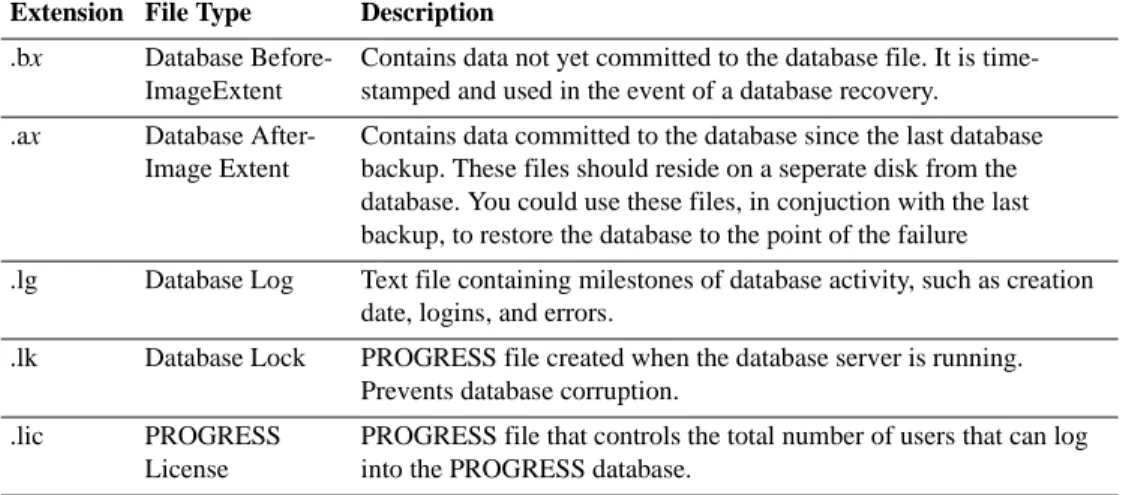
.db Database Contains the map to all the database extents, including the berofre-image and after berofre-image extents. A prodominately empty database is built during installation. Copies of this database can be made to use as production, or to be loaded with training or demonstration data. .dx Database Extent A physical file containing database data. A database may have
several extents, physically located on a specific I/O channels. Each extent is part of a Data Storage Area.
Extension File Type Description .bx Database
Before-ImageExtent
Contains data not yet committed to the database file. It is time-stamped and used in the event of a database recovery. .ax Database
After-Image Extent
Contains data committed to the database since the last database backup. These files should reside on a seperate disk from the database. You could use these files, in conjuction with the last backup, to restore the database to the point of the failure
.lg Database Log Text file containing milestones of database activity, such as creation date, logins, and errors.
.lk Database Lock PROGRESS file created when the database server is running. Prevents database corruption.
.lic PROGRESS License
PROGRESS file that controls the total number of users that can log into the PROGRESS database.
Directory Structure on the Database Server
The above illustration shows the major MFG/PRO sub-directories but excludes miscellaneous directories.
Directory Structure on the
Database Server
qadeB mfg mfghelp mfgdemo mfgtrain admin dmpprocs ldprocs triggers us mfg admin ad ar bbi uschrcl us ... src xrc ge mfg admin ad ar bbi gechrcl ge ... src xrcDefault data files (.d) for respective databases
Compiled code in module directories, plus source (src) and encrypted (xrc) code Additional languages have translated code/data files in a separate language directory Dump and load programs
Event-triggered routines
SYSTEM SIZINGAND INSTALLATION 61
© Copyright 2001 by QAD Inc. All Rights Reserved.
•
Start MFG/PRO session in single user
mode
• Perform the Field Help Load (36.4.19)
• Enter the language (us) and loadfile (fieldhlp.fhd)
• Complete load
•
Optional load
• Requires additional space (~300Mb)
• Map of MFG/PRO program and component
relationships
• Loaded from the MFG/UTIL utility
SYSTEM SIZINGAND INSTALLATION 63
© Copyright 2001 by QAD Inc. All Rights Reserved.
•
Run MFG/UTIL from eB Installation Directory
–
From
Database menu, select Load Data into Database
– Enter Path\HelpDB in the Physical Database field
– Specify eBDir\mfghelp as the Input Directory
– All Files(Tables) are selected by default – Select OK
– Complete load
•
Review
mfgutil.log
for errors
PROGRESS Client Installation
Take note of the directory for your installation of PROGRESS for Intel NT.
PROGRESS Client Installation
• Same media as the Progress Server installation
• Should be installed on a network file server,
providing bandwidth is adequate
• Installation directory must be network shareable
• Could be installed on each client
– Requires 225-350Mb disk space on each client
– Requires multiple upgrades at upgrade time
• If you install on a file server, make sure to follow
the PROGRESS network set-up instructions
SYSTEM SIZINGAND INSTALLATION 65
© Copyright 2001 by QAD Inc. All Rights Reserved.
MFG/PRO for Windows
Installation - Character Client
• Character code was installed during Database
Server installation
– Contains Character object code, and optional source code
– Does not contain database build files
– Contains character client setup routine
• Should be re-installed on a network file server
• Installation directory must be network shareable
• Installs a client version of MFG/UTIL to configure
database sets, connections, and parameter files for
the Character MFG/PRO sessions
MFG/PRO for Windows Installation
Take note of your MFG/PRO for Windows installation directory.
MFG/PRO for Windows
Installation - Gui Client
• Separate Windows Client CD
• Should be installed on a network file server
– Contains GUI object code, and optional source code
– Does not contain database build files
– Contains GUI client setup routine
• Installation directory must be network shareable
• Installs a client version of MFG/UTIL to configure
database sets, connections, and parameter files
for the GUI MFG/PRO sessions
SYSTEM SIZINGAND INSTALLATION 67
© Copyright 2001 by QAD Inc. All Rights Reserved.
See Character Client Setup and GUI Client Setup in MFG/PRO eB Installation Guide, PROGRESS on Windows NT
Windows Client Setup
• Map client(s) to the networked PROGRESS and
MFGPRO Client installation directories
• Run setup.exe, located in the appropriate MFGPRO for
Windows installation directory (on file server)
• Prompts for:
– Local installation directory (for a small number of files) – PROGRESS and MFG/PRO code directories
– Video resolution
– Invokes MFG/UTIL to prompt for database set information, including networking parameters
• Settings from first install can be saved to set up
subsequent clients in an Express Setup
Networking Parameters
• -H (Host name)
– Machine name where the database server is running
– Correlates to an IP address in the Hosts file
– May use DNS (Dynamic Name Search)
– Client must be able to “ping” the machine name
• -S (Service name)
– Symbolic name for a TCP/IP communication port
– Correlates to port number in the Services file
– Start database server with same symbolic name/port
number
• -N (Network type)
SYSTEM SIZINGAND INSTALLATION 69
© Copyright 2001 by QAD Inc. All Rights Reserved.
MFG/PRO Icons
The icon command line is also known as the shortcut.
MFG/PRO Icons
• Client Setup creates MFG/PRO start-up icons
– Runs a multiuser MFGPRO client session against the
databases in the database set
• Example icon command line:
p:\dlc\bin\prowin32 -pf c:\qad\training.pf
-ininame c:\qad\progress.svg
Component: Description:
p:\dlc\bin\prowin32 PROGRESS 32-bit Windows client executable
-pf Path and name of the parameter file containing
database connection and other parameters -ininame Path and name of the .ini file containing the path
Sample Parameter File
Understanding the Windows client parameter file can help you to better understand client/server connections.
Sample Parameter File
-db mfgtrain -H NTServ -S train91-srv -N tcp-db admprod -ld qadgui -H NTServ -S adm91-srv -N tcp -db hlpprod -ld qadhelp -H NTServ -S help91-srv -N tcp -cpinternal iso8859-1 -cpstream ibm850 -mmax 4096 -p mf.p
Parameter
Description
-db
Physical name of the database to connect to
-ld
Alternate logical name for the database
-H, -S, -N
Networking: Host, Service name, and Network type
-cp….
Code page definition parameters
-mmax
PROGRESS client memory management
-p
Indicates a program name to execute
SYSTEM SIZINGAND INSTALLATION 71
© Copyright 2001 by QAD Inc. All Rights Reserved.
Sample Hosts File
See Modifying Hosts and Services Files in MFG/PRO eB Installation Guide, PROGRESS on Windows NT
Sample Hosts File
# MFGPRO db hosts addresses and names
192.152.71.42
NTServ1192.152.71.43
NTServ2192.152.71.44
NTServ3192.152.71.45
NTServ4
Sample Services File
See Modifying Hosts and Services Files in MFG/PRO eB Installation Guide, PROGRESS on Windows NT
Sample Services File
#
#MFGPRO Database service names and sockets
help91-srv
2511/tcp # mfghelp database
train91-srv 2521/tcp # mfgtrain database
demo91-srv
2531/tcp # mfgdemo database
adm91-srv
2541/tcp # admin database
prod91-srv
2551/tcp # production database
Service Port
No./
Comment
Name
Protocol
SYSTEM SIZINGAND INSTALLATION 73
© Copyright 2001 by QAD Inc. All Rights Reserved.
Progress DataBase Startup
• MFG/PRO Database Server Installation produces
database startup .bat files based on the database
sets
– The user that activates these .bat files “own” the
database processes, and these process will end when
that user logs off
• To allow the system to own these processes – they
must be started as NT Services
• ProControl and the AdminServer are Progress
Utilities to control the databases as the SYSTEM
• The Utilities are listed in Control Panel -- Services
SYSTEM SIZINGAND INSTALLATION 75
© Copyright 2001 by QAD Inc. All Rights Reserved.
SYSTEM SIZINGAND INSTALLATION 77
© Copyright 2001 by QAD Inc. All Rights Reserved.
SYSTEM SIZINGAND INSTALLATION 79
© Copyright 2001 by QAD Inc. All Rights Reserved.
SYSTEM SIZINGAND INSTALLATION 81
© Copyright 2001 by QAD Inc. All Rights Reserved.
SYSTEM SIZINGAND INSTALLATION 83
© Copyright 2001 by QAD Inc. All Rights Reserved.
C
HAPTER3
Database Management
Data Movement 82 Database Backups 89 Delete and Archive 93 Database Fragmentation 95 Dump and Load 99
Dump Procedure 101 Load Procedure 103
Bulk Load and Index Rebuild 105 Special Dump/Load 108
Data Movement
• Backup
• Delete/Archive
• Dump/Load
• Bulk Load
DATABASE MANAGEMENT 87
© Copyright 2001 by QAD Inc. All Rights Reserved.
Data Movement
The above table summarizes the areas of database management covered in this chapter.
Data Movement
Types When What It Does Comment
Backup Regularly
(day, week).
Makes exact copy of database or of changes (after image). Restore as needed for recovery. Archive/ Delete
After data is not needed anymore. Frees up space in database. Temporary increase in disk usage until archive/delete. Back up before delete.
Dump/Load Installing new MFG/PRO version or recovery of database space.
Copies data from and to database sequentially into blocks. Time consuming. No database content affected.
Data Movement Methods
• Backup
– NT Administrative Tools Backup Exec or other
Windows NT backup utility
– PROGRESS utilities: probkup and prorest
• Delete and Archive
– Various MFG/PRO functions
• Dump and Load
– MFG/PRO
– PROGRESS Data Administration
– Proutil (load only)
DATABASE MANAGEMENT 89
© Copyright 2001 by QAD Inc. All Rights Reserved.
Database Backups
See Probkup/Prorest and Database Backups in the PROGRESS System Administration Reference, Progress Version 9
Database Backups
• You should do a full backup every night
– You can perform incremental backups (transactions
since last full backup), but they add complication
• Recommended method:
– Shut down the database server (off-line backup)
– Truncate the before-image file
– Use any NT file backup utility
• As an option, you can use Probkup/Prorest
– Only option if the server is running (on-line backup)
– Only backs up the .db and .bi files (or extents)
• Verify your backup strategy and integrity often
Backup Utilities
UTILITY TO WHAT TYPE VERIFY
NT Admin Tool Tape anything Full No
PROGRESS Tape or db and bi Incremental, No
probkup Disk extents only Full online*
UTILITY TO WHAT TYPE VERIFY
NT Admin Tool Tape anything Full No
PROGRESS Tape or db and bi Incremental, No
probkup Disk extents only Full online*
* When using probkup -online option: database server and after-imaging
DATABASE MANAGEMENT 91
© Copyright 2001 by QAD Inc. All Rights Reserved.
Backup Preparation
DO USE WHY
Shut down xxxxxxsvsh.bat Avoid data corruption.
the server proshut
Progress Utility PROGRESS backup using -online = _mprshut option avoids corruption.
Truncate your proutil This eliminates data from the .bi file,
.bi file but saves the file.
DO USE WHY
Shut down xxxxxxsvsh.bat Avoid data corruption.
the server proshut
Progress Utility PROGRESS backup using -online = _mprshut option avoids corruption.
Truncate your proutil This eliminates data from the .bi file,
Full vs Incremental Backups
• Full Backups Only (Recommended)
– Full database backups daily
– Restore: the most recent (good) full backup
• Full and Incremental Backups (Cumulative)
– Full database backup weekly (Friday) and incremental backups daily for all days since last full backup
• Example: on Monday, back up Monday changes, and on Tuesday, back up Monday and Tuesday changes
– Restore: the most recent full backup followed by the most recent incremental backup
• Full and Incremental Backups (NonCumulative)
– Full database backup weekly (Friday) and incrementalbackups daily for each day's changes
• Example: on Monday, back up Monday changes, and on Tuesday, back up only Tuesday changes
– Restore: the most recent full backup followed by each of the incremental backups in sequence
DATABASE MANAGEMENT 93
© Copyright 2001 by QAD Inc. All Rights Reserved.
Delete and Archive
For a full explanation of delete and archive functions, refer to the Manager Functions Training Guide.
Delete and Archive
• MFG/PRO includes delete/archive functionality
throughout the system
– You should delete and archive records within given
time periods.
• Delete/Archive functions use date and other
criteria to identify which records to delete
• Result:
– Deletes the data from the database.
– Produces a flat ASCII history file containing the raw
data that was deleted.
Delete and Archive (cont.)
• Archive/Delete should be run to trim excess
data to specific history retention period
– Contact users to determine what to delete
• Always run delete/archives in report mode first
to verify proper deletion
– For a report, set Delete and Archive flags to
No
• You can reload data into the database using
Archive File Reload
DATABASE MANAGEMENT 95
© Copyright 2001 by QAD Inc. All Rights Reserved.
Database Fragmentation
See Database Dump and Load in the PROGRESS System Administration Reference, Progress Version 9
Database Fragmentation
• A database has many different
logical files within it
– As records are added, the files become fragmented and no longer contiguous
– The files each contain
different types of data (parts, vendors, etc.)
• Fragmentation causes
inefficient logical file searches
• Fragmentation is increased by
delete/archive because the
location of deleted data is
reused for non-similar data
cm_mstr 1
vd_mstr 1
cm_mstr 2
pt_mstr 1
cm_mstr 3
vd_mstr 2
Searches
Use Dump/Load to Defragment
• By dumping a fragmented database, the contents of
the noncontiguous logical files are replicated to flat
ASCII data files (.d)
– cm_mstr.d file: “data1”,”data2”,”data3”,”data4” “data1”,”data2”,”data3”,”data4” “data1”,”data2”,”data3”,”data4” – vd_mstr.d file: “data1”,”data2”,”data3”,”data4” “data1”,”data2”,”data3”,”data4” – pt_mstr.d file: “data1”,”data2”,”data3”,”data4”
DATABASE MANAGEMENT 97
© Copyright 2001 by QAD Inc. All Rights Reserved.
Use Dump/Load to Defragment
• You load the dumped data files
into a copy of MFG/EMPTY
• As the data is loaded, the
target database grows in size
to accommodate the data
• The flat ASCII files contain
similar records, so they are
loaded together with all the
cm_mstr data, then the
vd_mstr data, etc.
• The reloaded database is as
contiguous as it can be
cm_mstr 1
cm_mstr 2
cm_mstr 3
vd_mstr 1
vd_mstr 2
pt_mstr 1
Searches
Dump/Load Benefits
Reasons for dumping and loading data:
• Reclaim disk space
• Maintain database integrity after delete/archive
• Reduce disk fragmentation
DATABASE MANAGEMENT 99
© Copyright 2001 by QAD Inc. All Rights Reserved.
Dump and Load
See Database Dump and Load in the PROGRESS System Administration Reference, Progress Version 9
Dump and Load
• Dump replicates database data into .d files
– File name is the logical file name with extension .d
– Dump does not delete any data from the database
• After a dump, you can load the .d files into an
empty database that has a schema but no data
(such as a copy of mfgempty.db)
• During a load, the empty database grows to the
required size
Types of Dumps and Loads
• There are four methods to dump a database
– MFG/PRO Dump/Load program (36.16.4) – PROGRESS Data Administration Dump – MFG/UTIL
– Proutil Dump (Binary Dump – Single file at a time)
• There are five methods to load a database
– MFG/PRO Dump/Load program (36.16.4) – PROGRESS Data Administration Load – MFG/UTIL
– PROUTIL Load (Binary Load – Loads a binary dump file) – PROUTIL bulk load
• Fastest due to index deactivation
• Either PROUTIL option requires separate index build • Requires the creation of a file descriptor file (.fd file)
DATABASE MANAGEMENT 101
© Copyright 2001 by QAD Inc. All Rights Reserved.
Dump Procedure
See Database Dump and Load in the PROGRESS System Administration Reference, Progress Version 9
See Dump and Load in the Manager Functions Training Guide
Dump Procedure
1
Check primary indexes
–
Proutil idxanal
–
To estimate the total dump time, you can identify
files that represent 5 – 10% of the data, dump
them, and time the process
2
Create a dump directory and check for
adequate disk space
Complete the following Lab: “Dumping Through PROGRESS Data Administration Tool.”
Dump Procedure (cont.)
3 Verify you are the only user on the system
– Use a single-user batch mode client connection at the
database server
– Multiuser network connection as only one logged on
• Move mf.p to prevent others from logging on• Network connection not recommended for large dump or load
4 Choose one of the following methods:
– In MFG/PRO, run Database File Dump/Load w/ Batch
– Use the PROGRESS Data Administration dump
– Use MFG/UTIL
DATABASE MANAGEMENT 103
© Copyright 2001 by QAD Inc. All Rights Reserved.
Load Procedure
See Database Dump and Load in the PROGRESS System Administration Reference, Progress Version 9
See Dump and Load in the Manager Functions Training Guide
Load Procedure
1 Prepare a copy of the empty MFG/PRO database
(mfgempty.db)
– Example:
DLC\prodb NewProdDb.db mfgempty2 If you want to bulk load, create a description file
– In Data Administration, Admin menu, choose Create
Bulk Loader Description File
3 Verify you are the only user on the system
– Single-user batch mode client connection at the
database server
– Multiuser network connection as only one logged on
• Move mf.p to prevent others from logging on• Network connection not recommended for large dump or load
Complete the following Labs: “Preparing the Training Database for Load,” and, “Loading Through PROGRESS Data Administration Tool.”
Load Procedure (cont.)
4 Choose one of the following methods:
– Run the Bulk Loader option of the PROGRESS
PROUTIL utility (recommended)
proutil DbName -C bulkload DescriptionFile
– Use the PROGRESS Data Administration load
• In Data Administration, Admin menu, choose Load Data and Definitions, then Table Contents
– Use the MFG/PRO Database File Dump/Load w/ Batch
– Use MFG/UTIL
5 If you used the bulk loader, rebuild the indexes
– Command: proutil
DbName
-C idxbuild
• NOTE: In the event of a load failure, start over
DATABASE MANAGEMENT 105
© Copyright 2001 by QAD Inc. All Rights Reserved.
Bulk Load and Index Rebuild
See Proutil Bulkload and Bulkload Descriptor File in the PROGRESS System Administration Reference, Progress Version 9
Complete the following Labs: “Creating the Bulk Loader Description File,” “Bulk Loading the Data,” and, “Rebuilding the Indexes.”
Bulk Load and Index Rebuild
• After a bulk load, rebuild database indexes
– You may also need to rebuild for system maintenance
– Use the idxbuild option of the PROUTIL utility
• The rebuild is quicker if disk space is available
for index sorting
– Requires 75% of the database size
– Use the -TB and -TM parameters to speed the sort
• If the resulting sort file will exceed the maximum
file size limit, use a multi-volume sort file
– Create a file to indicate the sort file extents
Database Load with Default Data
• MFG/PRO eB media contains special data
directories – Mfgtrain, Mfgdemo, Mfg, Admin, etc
• These directories contain non language specific
files only. Language specific files are located in
eBDir\LangDir\Mfg and eBDir\LangDir\Admin
• When loading a database with the data from a
MFG/PRO eB directory, you must compliment
the contents with the appropriate Language Files
• Loading a Database with this default data
requires 2 loads, one from the data directory, and
one for the specific language directory
DATABASE MANAGEMENT 107
© Copyright 2001 by QAD Inc. All Rights Reserved.