Web Development > Python Developer's Handbook See All Titles
Front Matter Table of Contents Index
About the Author
Python Developer's Handbook
André Dos Santos Lessa Publisher: Sams Publishing First Edition December 12, 2000 ISBN: 0-672-31994-2, 960 pages
Buy Print Version
The Python Developer’s Handbook is designed to expose experienced developers to Python and its uses. Beginning with a brief introduction to the language and its syntax, the book moves quickly into more advanced programming topics,
including embedding Python, network programming, GUI toolkits, JPython, Web development, Python/C API, and more. Python is an interpreted, object-oriented programming language. Its syntax is simple and easy to learn, and it encourages programmers to write and think clearly. The Python Developer’s Handbook is carefully written, well-organized introduction to this powerful, fast-growing programming language for experienced developers.
Last updated on 1/30/2002 Python Developer's Handbook, © 2002 Sams Publishing
Web Development > Python Developer's Handbook > Introduction See All Titles
< BACK Make Note | Bookmark CONTINUE >
152015024128143245168232148039199167010047123209178152124239215162145093180142147166131082
Introduction
When I was a little kid, I had this dream where a snake would rule and dominate the entire world (actually, I guess that a penguin was also part of the dream…but never mind). I didn't pay much
attention to the fact at that time because I thought the dream was caused by an overexposure to all those Japanese series that were popping up on the screens. Later, in my teenage years, there was this science project where I had to spend some time studying snakes to display at an exhibition. After analyzing Red Tail boas and coral snakes, I found this 3-year old giant of 10 feet, 40+ pounds. Instantly, I recognized that snake as being the same one that I had seen in my dream years before. Its name was Python, but at that time, I still couldn't figure out what was the relationship between that reptile and the world domination.
Fifteen years ago, I was trying to select a channel in my old TV set, when a special program caught my attention—A huge animated foot was dancing in the opening titles. After the program started, there were a group of funny guys who were playing jokes about parrots and lumberjacks. After watching tons of episodes and all their five films, I decided to write a book about them. I noticed that they were called Python too. Maybe that was the answer. That troupe would dominate the entire world. I wanted to let everyone know about it. Initially I had planned to write about the actors and their most famous sketches, but I had to abandon the idea when I realized that my editors wouldn't give me enough time to write a book of approximately 25,030 pages. That would be a nice bestseller, though.
Even though none of the previous facts has really happened, both have at least one thing in
common—the name Python. Python is also a scripting language whose name's origin has much to do with the English troupe than with the legless reptile. This book will guide you step-by-step through the universe of Python, a fantastic programming language that can help you to implement solutions for almost all types of IT challenges that you might face. Almost all IT-related tasks, such as the
manipulation of database systems, or the design of Web-driven applications can be managed using Python. Maybe that's the answer for my dream.
For the last couple of months, I've been trying to organize all the information about Python that I have available, arranging them in this book. I can't say that I have included every little thing in the book, but I do know that I have covered the most important aspects of the Python language. Note that along the 5-month development period of this book, Python had several version upgrades, which made things way more difficult to organize. So, I apologize if something important is missing.
to meet your needs. As you might agree with me, it is impossible to cover every single aspect of the language in such a complete and up-to-date way. That's why I choose to provide Web links to other sources of material that I think will be useful for your learning.
What this book covers? A short answer is
The book starts with a very extensive review of the language and the modules that come as part of the Python distribution. It goes through Object-Oriented Programming, Networking, Web Development, Graphical Interfaces, and other important topics. The last chapter covers JPython, a version of Python that runs in Java systems.
A long answer is
Chapter 1 explains what Python is, why Python must be used, where to get support and how to go through each installation process.
Chapter 2 is a complete review of the Python programming language. By the end of this chapter, you will learn how to create Python applications.
Chapter 3 shows which main modules extensions are currently available and for what purposes they can be used. The focus here is to expand your knowledge about the Python libraries, showing the resources that you already have available in the Python programming language.
Chapter 4 demonstrates how to handle exception situations and how to avoid error messages.
Chapter 5 introduces the OO methodology in a very complete and direct way. You will be able to easily create and use objects and classes in your programs after reading this chapter.
Chapter 6 discusses extending and embedding Python. You will learn how to extend Python methods using other languages and how to call Python methods from within other applications.
Chapter 7 explains objects interfacing and distribution. The information provided in this chapter explains objects distribution and how to use them from within other systems.
Chapter 8 shows all the database options available within Python. For those that don't know anything about database yet, it explains how databases work and how to execute basic SQL statements.
Chapter 10 explains basic network concepts and invites you to play with these concepts using Python programs.
Chapter 11 provides information concerning how to use Python for Internet development. It also introduces you to some well-known Python third-party Web applications.
Chapter 12 provides information concerning how to use Python for scripting programming.
Chapter 13 provides information concerning how to use Python for data parsing and manipulation, such as XML parsing and mail processing.
Chapter 14 shows what the available GUI options for graphic designing in Python are.
Chapter 15 provides Tkinter information. For those that don't know yet, Tkinter is the standard Python GUI.
Chapter 16 shows some performance suggestions, and guides you through the process of writing clean code within style.
Chapter 17 introduces a handful programming tools. You will learn how to go through all the
development stages without fear, including how to debug, compile, and distribute Python applications.
Chapter 18 demonstrates how easy it is to mix Java and Python using JPython.
Now that you know that you have a lot of interesting material to learn, I suggest you accept my hint: The best way to read this book is by sitting on a comfortable beach chair, or laying on your bed, and relaxing. If for some reason, if you think the topic is getting boring, just turn the page and go to another chapter until you find something that you like. Later, you can return to where you originally left. This book can be read from the start, or you can go directly to the chapter that teaches a specific
functionality. It's your choice!
So, what are you waiting for? Turn this page at once, and get ready to start dominating the world. Last updated on 1/30/2002 Python Developer's Handbook, © 2002 Sams Publishing
< BACK Make Note | Bookmark CONTINUE >
<= Return to book index
About the Author Acknowledgments
Tell Us What You Think! Introduction
I: Basic Programming 1. Introduction
Introduction to Python
Why Use Python?
Main Technical Features
Python Distribution
Installing and Configuring Python
Python and Other Languages
Patches and Bugs List
PSA and the Python Consortium
Summary
2. Language Review
Language Review
The Shell Environment
Programs
Built-In Data Types
Operators
Expressions
Control Statements
Data Structures
Functions and Procedures
Modules and Packages
Input and Output
File Handling
Summary
Code Example
3. Python Libraries
Python Libraries
Python Services
types
UserDict
UserList
traceback
linecache
pickle
cPickle
copy_reg
shelve
copy
marshal
imp
parser
symbol
token
keyword
tokenize
pyclbr
code
codeop
pprint
repr
py_compile
compileall
dis
new
site
user
__builtin__
__main__
The String Group
Miscellaneous
Generic Operational System
Optional Operational System
Debugger
Profiler
Internet Protocol and Support
Internet Data Handling
Restricted Execution
Multimedia
Cryptographic
SGI IRIX Specific
Sun OS Specific
MS Windows Specific
Macintosh Specific
Undocumented Modules
Summary
4. Exception Handling
Exception Handling
Standard Exceptions (Getting Help from Other Modules)
Raising Exceptions
Catching Exceptions
try/finally
Creating User-defined Exceptions
The Standard Exception Hierarchy
Summary
Code Examples
5. Object-Oriented Programming
Object-Oriented Programming
An Introduction to Python OOP
Python Classes and Instances
Methods Handling
Special Methods
Inheritance
Polymorphism
Encapsulation
Metaclasses
Summary
Code Examples
II: Advanced Programming
6. Extending and Embedding Python
Extending and Embedding Python
The Python/C API
Extending
Compiling and Linking Extension Modules
SWIG—The Simple Wrapper Interface Generator
Other Wrappers
Embedding
Summary
7. Objects Interfacing and Distribution
Object Interfacing and Distribution
Interfacing Objects
Introduction to COM Objects
Implementing COM Objects in Python
Distributing Objects with Python
Summary
Code Examples
8. Working with Databases
Working with Databases
Flat Databases
DBM (Database Managers) Databases
Object Serialization and Persistent Storage
The ODBC Module
ADO (ActiveX Data Objects)
Using SQL
Python DB API
Summary
9. Other Advanced Topics
Other Advanced Topics
Manipulating Images
Working with Sounds
Restricted Execution Mode
Scientific Computing
Regular Expressions
Threads
Summary
Code Examples
III: Network Programming 10. Basic Network Background
Networking
Networking Concepts
HTTP
Accessing URLs
FTP
SMTP/POP3/IMAP
Newsgroups—Telnet and Gopher
Summary
Web Development
Configuring Web Servers for Python/CGI Scripts
Third-Party Internet Applications
Other Applications
Site Management Tools
Summary
12. Scripting Programming
Web Programming
An Introduction to CGI
The cgi Module
Creating, Installing, and Running Your Script
Python Active Scripting
Summary
13. Data Manipulation
Parsing and Manipulating Data
XML Processing
XML-RPC
XDR Data Exchange Format
Handling Other Markup Languages
MIME Parsing and Manipulation
Generic Conversion Functions
Summary
IV: Graphical Interfaces 14. Python and GUIs
Python GUI Toolkits
The Tkinter Module
Overview of Other GUI Modules
Designing a Good Interface
Summary
15. Tkinter
Introduction to Tcl/Tk
Tkinter
Geometry Management
Handling Tkinter Events
Tkinter Widgets
Designing Applications
PMW—Python Mega Widgets
Tkinter Resources
V: Developing with Python
Chapter
16. Development Environment
Building Python Applications
Development Strategy
Integrated Development Environments
IDLE
Pythonwin
Summary
17. Development Tools
The Development Process of Python Programs
Compiling Python
Editing Code
Python Scripts
Generating an Executable Python Bytecode
Interpreter
Debugging the Application
Profiling Python
Distributing Python Applications
Summary
VI: Python and Java
Chapter
18. JPython
Welcome to JPython
Java Integration
Downloading and Installing JPython
The Interpreter
The JPython Registry
Creating Graphical Interfaces
Embedding
jpythonc
Running JPython Applets
Summary
VII: Appendixes A. Python/C API
Python/C API
The Very High Level Layer
Reference Counting
Standard Exceptions
Utilities
Abstract Objects Layer
Concrete Objects Layer
Initialization, Finalization, and Threads
Memory Management
Defining New Object Types
B. Running Python on Specific Platforms
Python on Win32 Systems
Python on MacOS Systems
Python on UNIX Systems
Other Platforms
C. Python Copyright Notices
Python 2.0 License Information
Python's Copyright Notice (version 1.6)
Python's Copyright Notice (until version 1.5.2)
Copyright Notice of the profile and pstats Modules
Copyright Notice of JPython with OROMatcher
Copyright Notice of JPython without OROMatcher
D. Migrating to Python 2.0
Python 1.6 or Python 2.0. Which One to Choose?
New Development Process
Enhancements
Web Development > Python Developer's Handbook > About the Author See All Titles
Make Note | Bookmark CONTINUE > 152015024128143245168232148039199167010047123209178152124239215162145090127105051247145253
About the Author
My name is André dos Santos Lessa. I decided to follow an IT career when I was just 11 years old; that happened the day I first saw a real computer—well, actually it was just a TK85. On my next birthday after that fateful day, I got a TK90X. Then came the MSX, 386, 486, and so forth. This long-time background has opened many doors (and Windows!) to me. I got both my graduate and my post-graduate degrees in the computer field.
At this time, I am an IT consultant with little more than eight years of professional IT experience, ranging from database administration to Web design. Currently, I work for Emplifi Inc., where I use my best technical skills to support projects at Deloitte Consulting.
As I really like undertaking new technologies, mostly anything Web related, I've created and designed some interesting sites for the Web. www.lessaworld.com, www.bebemania.com.br, and
www.alugueaqui.com.br are my little toys.
The most recent endeavour that I became part of is called iTraceYou.com, which is an
international and well-grounded project that brings a new security philosophy to good old services that we are used to. It is scheduled to be released by October, 2000.
I was born in Rio de Janeiro, Brazil, but I moved to the United States in 1998 in a quest for new
challenges for my career. When I am not working (just a few seconds per day), I try to spend some time with my wife Renata. Currently, we live in the city of Pittsburgh, and she is pregnant with our first child, who is called João Pedro.
If necessary, you can contact me by sending a note to my main email account, which is
Last updated on 1/30/2002 Python Developer's Handbook, © 2002 Sams Publishing
Make Note | Bookmark CONTINUE >
Web Development > Python Developer's Handbook > Acknowledgments See All Titles
< BACK Make Note | Bookmark CONTINUE >
152015024128143245168232148039199167010047123209178152124239215162145090127107186135200039
Acknowledgments
I would like to render my acknowledgments to the ones who most shared my life during the last few months while I wrote this book, giving me support and inspiration to conclude this beautiful work.
God
My parents, Neuza & Josué My wife, Renata
Thank you all!
In addition, I would like to express gratitude to my entire family and friends for being so friendly, and for supporting my wife and I in our decision to move to the United States.
… and of course, for sending Brazilian goodies and baby gifts to us by mail!
Beth, Bruno, Carol, Cleber, Dinda Teca, Djalminha, Gabriel Jorge, Gustavo, Jorge, Juliana, Lucas, Matheus, Ney, Patricia Beatriz, Penha, Rafael, and Victor. And if I forgot about you, consider yourself included in this list!
Thanks folks! (Valeu galera!)
Also, I would like to thank everyone at Macmillan for the patience and comprehension that they had every time I was late in my milestones.
A special thank you goes to my Technical Editor James Henstridge for providing outstanding suggestions and remarks about the contents of this book.
Rhonda, you were great correcting my English mistakes and reviewing my writings! Thanks Katie, thanks Mandie. I do know I gave you a lot of work, didn't I?
Dawn, Amy, Scott, even though we didn't have much contact, I know that you were all there every time this book needed you. God bless you all!
Last updated on 1/30/2002 Python Developer's Handbook, © 2002 Sams Publishing
< BACK Make Note | Bookmark CONTINUE >
Web Development > Python Developer's Handbook > Tell Us What You Think! See All Titles
< BACK Make Note | Bookmark CONTINUE >
152015024128143245168232148039199167010047123209178152124239215162145090127109039073237068
Tell Us What You Think!
As the reader of this book, you are our most important critic and commentator. We value your opinion and want to know what we're doing right, what we could do better, what areas you'd like to see us publish in, and any other words of wisdom you're willing to pass our way.
You can email or write me directly to let me know what you did or didn't like about this book—as well as what we can do to make our books stronger.
Please note that I cannot help you with technical problems related to the topic of this book, and that due to the high volume of mail I receive, I might not be able to reply to every message.
When you write, please be sure to include this book's title and author as well as your name and phone or fax number. I will carefully review your comments and share them with the author and editors who worked on the book.
Email: [email protected]
Mail:
Mark Taber
Associate Publisher Sams Publishing 201 West 103rd Street Indianapolis, IN 46290 USA
Last updated on 1/30/2002 Python Developer's Handbook, © 2002 Sams Publishing
< BACK Make Note | Bookmark CONTINUE >
Web Development > Python Developer's Handbook > I: Basic Programming See All Titles
< BACK Make Note | Bookmark CONTINUE >
152015024128143245168232148039199167010047123209178152124239215162145093180140053207029163
Part I: Basic Programming
Part I Basic Programming
Chapter 1 Introduction
Chapter 2 Language Review
Chapter 3 Python Libraries
Chapter 4 Exception Handling
Chapter 5 Object-Oriented Programming
Last updated on 1/30/2002 Python Developer's Handbook, © 2002 Sams Publishing
< BACK Make Note | Bookmark CONTINUE >
Web Development > Python Developer's Handbook > 1. Introduction See All Titles
< BACK Make Note | Bookmark CONTINUE >
152015024128143245168232148039199167010047123209178152124239215162145093180138002080231092
Chapter 1. Introduction
Nobody expects the Spanish Inquisition
This chapter explains to you why Python is considered to be a good language, why it should be used, what its main features are, where you can find support, and how to go through each installation process.
Last updated on 1/30/2002 Python Developer's Handbook, © 2002 Sams Publishing
< BACK Make Note | Bookmark CONTINUE >
Web Development > Python Developer's Handbook > 1. Introduction > Introduction to Python
See All Titles
< BACK Make Note | Bookmark CONTINUE >
152015024128143245168232148039199167010047123209178152124239215162145092168038024167188168
Introduction to Python
Python is an open source language that is getting a lot of attention from the market. It combines ease of use with the capability to run on multiple platforms because it is implemented focusing on every major operating system. Guido van Rossum created the language nearly 11 years ago and since then, Python has changed through the years, turning itself into one of the most powerful programming languages currently available.
Python is a good prototype language. In just a few minutes, you can develop prototypes that would take you several hours in other languages. It also embodies all object-oriented concepts as part of its core engine. Therefore, creating programming object-oriented applications in Python is much easier than it would be in other languages such as Java or C++.
As I just said, Python is an open source project. Consequently, it is truly free. No copylefts or
copyrights are involved in its license agreement. You can change it, modify it, give it away, sell it, and even freely distribute it for commercial use. Its copyright only protects the author from legal problems that might occur if someone decides to sue the author for errors caused by using Python, or if someone else tries to claim ownership of the language.
Maybe you still don't know Python, but many companies are out there using it. The problem is these companies don't want to go public talking about it because they think that using Python without getting the attention of their competitors is a good strategy. Okay, I know that you are curious to know who in the world is using Python. Organizations like Industrial Light and Magic, Yahoo!, Red Hat, and NASA are some of companies that run Python applications.
Note
You can always check out the latest news about Python by visiting
http://www.python.org/News.html.
official Web site, you can get a list of several development groups that are working hard to give Python some support to new technologies, such as XML and image processing.
Both Perl and Java already have a large group of programmers who are very devoted to their programming languages, and, today, Python is starting to get there.
Notice that Python is a language extremely easy to code if you have ever programmed before. Guido claims to have fun every time he has to do something using Python. Learning Python through this book will be exciting too. Soon, you will have some practice and understand the reason I say that.
In this chapter, I give you a quick overview of Python's main features. The other chapters of this book cover in detail the topics that I mention next.
Python!? What Is It?
Let's define Python:
Python is an interpreted, high-level programming language, pure object-oriented, and powerful server-side scripting language for the Web. Like all scripting languages, Python code resembles pseudo code. Its syntax's rules and elegant design make it readable even among multiprogrammer development teams. The language doesn't provide a rich syntax, which is really helpful. The idea behind that is to keep you thinking about the business rules of your application and not to spend time trying to figure out what command you should use.
Quoting Guido van Rossum—"Rich syntax is more of a burden than a help."
It is also true (and later you will have a chance to check it out) that Python is interactive, portable, easy to learn, easy to use, and a serious language. Furthermore, it provides dynamic semantics and rapid prototyping capabilities.
Python is largely known as a glue language that connects existing components. It is embeddable in applications from other languages (C/C++, Java, and so on), and it is also possible to add new modules to Python, extending its core vocabulary.
Python is a very stable language because it has been in the market for the last 10 years and also because its interpreter and all standard libraries have their source code available along with the binaries.
Distributing the sources for everyone is a good development strategy because it makes developers from all around the world work together. Anyone can submit suggestions and patches to the official
development team, led by Python's creator—Guido van Rossum.
Python was born in an educational environment, in the Christmas of 1989 at CWI in Amsterdam, Netherlands. Guido was a researcher at CWI at that time. Initially, it was just a project to keep him busy during the holidays. Later, it became part of the Amoeba Project at CWI. Its first public release was in February of 1991.
For a long time, Python's development occurred at CNRI in Reston, VA in the United States. In June of 2000, the Python development team moved to PythonLabs, a member organization of the BeOpen Network, which is maintained by the lead developers of the Python language, including Guido. On October 27, 2000 the entire PythonLabs Team has left BeOpen.com because of some mutual disagreements concerning the future of Python. The Team is now working for Digital Creations (the makers of Zope - http://www.digicool.com/), and Guido has just announced the idea of creating a non-profit organization called Python Software Foundation (PSF)in order to take ownership of future Python developments.
By the way, Python was named after the British comedy troupe Monty Python. It had a comedy series called Monty Python's Flying Circus on the BBC in the '70s. Guido is a huge fan.
As many Monty Python quotes are throughout the chapters of this book as in any other Python book. That is something of a standard behavior among Python authors, and I won't be the one who will try to change it.
Note
"Nobody expects the Spanish Inquisition" is one of the most famous quotes that is always recited by Guido. Each chapter of this book is headed by a famous Monty Python quote.
Last updated on 1/30/2002 Python Developer's Handbook, © 2002 Sams Publishing
Index terms contained in this section
ABC scripting language Amoeba Project
BBC (British Broadcasting Corporation) BeOpen Network
British Broadcasting Corporation (BBC) CNRI
code pseudo CWI
Industrial Light and Magic Internet
Python news Web site languages
scripting ABC Monty Python2nd Monty PythonÕ s Flying Circus NASA
news site, Python pseudo code Python
introduction to2nd PythonLabs
Red Hat
Rossum, Guido van2nd3rd4th scripting languages
ABC syntax Python Web sites
Python news Yahoo!
Web Development > Python Developer's Handbook > 1. Introduction > Why Use Python? See All Titles
< BACK Make Note | Bookmark CONTINUE >
152015024128143245168232148039199167010047123209178152124239215162145092168037200133079189
Why Use Python?
Let's take a look at an interesting scenario:
Imagine that you don't have a team of programmers who are professionally trained. In addition to that, you are in a position to choose a programming language that would be the best solution for projects that require GUI implementations and the use of complex routines along with OOP technology.
Unfortunately, and by chance, you don't have much money to spend in a big investment, well… If I were you, I would pick up Python as my choice.
But if you are simply a programmer who, for this moment, only wants to know what the significant advantages are that Python has to offer you, maybe you are asking yourself why you need this language if you already know many others.
The answer is quite simple. Although the original plan is not to turn Python into an all-purpose
language, you can easily do almost anything if you know how. The next couple of paragraphs list and explain why Python is a cool programming language and what things make Python more flexible than other languages.
Readability
Python's syntax is clear and readable. The way Python's syntax is organized imposes some order to programmers. Experts and beginners can easily understand the code and everyone can become
productive in Python very quickly. It is also important to mention that Python has fewer "dialects" than other languages, such as Perl. And because the block structures in Python are defined by indentations, you are much less likely to have bugs in your code caused by incorrect indentation.
It Is Simple to Get Support
The Python community always provides support to Python users. As we already know, Python code is freely available for everyone. Therefore, thousands of developers worldwide are working hard to find bugs and create patches to fix those bugs. Furthermore, many people are creating new enhancements to the language and sending them for approval.
Fast to Learn
long and strange lines of code. Therefore, less training is a direct result. Companies don't need to spend much time to have their programmers coding in Python. Once you start learning Python, you can do useful coding almost immediately. And after some practice, your productivity will suddenly increase. You can design a high-level, object-oriented programming code in a friendly and interpreted Python environment. This feature works great for small tasks.
Fast to Code
Python provides fast feedback in several ways. First, the programmer can skip many tasks that other languages require him to take. Therefore, it reduces both the cost of program maintenance and the development time. If necessary, Python enables a fast adaptation of the code. You can change the high-level layer of your application without changing the business rules that are coded within your modules. The interactive interpreter that comes with the Python distribution brings rapid development strategies to your project. In spite of traditional programming languages that require several distinct phases (such as compiling, testing, and running) and other scripting languages that require you to edit the code outside the execution environment, Python is a ready-to-run language. Every time you use Python's interactive interpreter, you just need to execute the code you have. A direct benefit of this feature over Perl is the way you can interactively test and play around with your code.
Python provides a bottom-up development style in which you can build your applications by importing and testing critical functions in the interpreter before you write the top-level code that calls the
functions.
The interpreter is easily extensible. It enables you to embed your favorite C code as a compiled extension module.
Reusability
Python encourages program reusability by implementing modules and packages. A large set of modules has already been developed and is provided as The Standard Python Library, which is part of the
Python distribution.
You can easily share functionality between your programs by breaking the programs into modules, and reusing the modules as components of other programs.
Portability
Besides running on multiple systems, Python has the same interface on multiple platforms. Its design isn't attached to a specific operational system because it is written in portable ANSI C. This means that you can write a Python program on a Mac, test it using a Linux environment, and upload it to a
features everywhere. However, you must know that some modules were developed to implement specific mechanisms of some operational systems and, of course, programs that use those modules don't work in all environments.
But, wait a minute. This problem affects only some specific modules. Usually, you can make most of your applications run on multiple platforms without changing one line of code. How many other languages can claim this type of behavior?
Python is well integrated with both UNIX and Windows platforms. The Macintosh environment also supports Python applications, even though it doesn't provide a full set of solutions yet. But don't worry. Developers are currently working on that.
Object-Oriented Programming
Usually, scripting languages have object-orientation support included in the language as an add-on. However, everything in Python, as in Smalltalk, is designed to be object-oriented. You can start programming using non-OO structures, but it doesn't take too long for you to find out that it is much simpler if you use its OO features. Some of the implemented OO functionality in Python is inheritance and polymorphism.
Overall Conclusion
The overall conclusion is that Python is a fantastic language that provides all these features for free. I assure you that if you want all these features in any other language, you will have to buy costly third-part libraries. Every detail in Python's project is third-part of a huge plan to have the most used and necessary features of other languages in a unique environment.
If someone asks which are the cases that Python doesn't provide the best solution, I would have just one answer: applications that require huge amounts of low-level data processing. That is said because, as you already know, Python is an interpreted language; and for that reason, it is proven to be a little bit slower than compiled languages. However, even in cases such as this, Python makes it easy to replace bottlenecks with C implementations, which speeds things up without sacrificing Python's features. If you have already decided that Python is exactly what you need, be sure to go through all the following chapters. It will be fun.
Last updated on 1/30/2002 Python Developer's Handbook, © 2002 Sams Publishing
Index terms contained in this section
ANSI C language, portable code
pseudo languages
portable ANSI C libraries
Standard Python, The portable ANSI C language pseudo code
Python
reasons for using2nd3rd4th reusability
Python
Standard Python Library, The
Web Development > Python Developer's Handbook > 1. Introduction > Main Technical Features
See All Titles
< BACK Make Note | Bookmark CONTINUE >
152015024128143245168232148039199167010047123209178152124239215162145092168035203035224155
Main Technical Features
Now that you already know many reasons why you should use Python, let's focus on some of its main technical features.
Automatic Memory Management
Python objects are collected whenever they become unreachable. Python identifies the "garbage," taking the responsibility from you.
Exception Handling
The exception handling support helps you to catch errors without adding a lot of error checking statements to the code. By the way, it is said that Python programs never crash; they always return a traceback message.
Rich Core Library
Many extension modules were already developed and became part of The Standard Python Library of tools, which can be used by programmers in any Python application. Besides those generic modules, we have others that are specific for particular platforms or environments. The Standard Python Library makes the tasks that are simple in theory also simple in practice.
In a short time, programmers can make their Python programs speak to HTTP, FTP, SMTP, Telnet, POP, and many other services because Python modules perform all the common daily tasks. You can download a Web page, parse HTML files, show windows on the screen, and even use—as part of your programs—built-in interfaces that were created to handle many operational system services.
Web Scripting Support and Data Handling
Python enables you to write CGI programs that work fine in several environments. Have you ever imagined switching platforms without changing the code? All right, it's possible if Python is the choice. There is even more: You can parse XML, HTML, SGML, and every other kind of text by using Python built-in classes and regular expression methods.
Python provides a huge list of useful built-in elements (the language's basic data structure) along with many special operations that are required to correctly process them. This list is as follows:
● Data types—such as strings, tuples, lists, hash tables, and so on
● Operations—like searching routine statements (in and not in), sorting, and so on Development Flow
Even though it doesn't have any compilation or linking process, Python supports byte compilation. The compiled code is saved in an intermediate language called bytecode that can be accessed by any system that has a Python virtual machine. This feature offers a kind of portability similar to the one that Java also offers. Applications can be used in several different systems without the need for compilation. Furthermore, you can create a standalone executable and securely distribute your applications. Clear Syntax and a Diversity of Useful Lexical Elements
The way Python is organized seems to encourage object-oriented programming because everything is an object. In addition to that, it has various helpful lexical elements, such as the following:
● Operator overloading—The same operator has different meanings according to the elements that
are being referenced.
● Dynamic typing—You don't need to assign types in your code. After you assign a value to an object, it instantly knows what type it should assume. You can even assign different types to the same variable within the same program.
● Name resolution—Each structure (module, class, and so on) defines its own scope of names.
● Indentation—There are no line-end markers as in Java and C++, where programmers need to
use semicolons. Python defines indentations by using block structures. Embeddable and Extendable
Python can be embedded in applications written in many other programming and scripting languages. Whenever you need to have a programmable interface for your applications, give Python a chance. Python is well known for easily gluing everything.
Objects Distribution
Python can be used to implement routines that need to talk to objects in other applications. For example, Python is a great tool to glue Windows COM components. Besides that, Python also has a few CORBA implementations that enable you to use cross-platform distributed objects, as well. Databases
Python has interfaces to all major commercial databases, provides several facilities to handle flat-file databases, and implements object-persistence systems that can save entire objects to files. But the greatest database feature is that Python defines a standard database API, which makes it easy to port applications to different databases.
GUI Application
You can create applications that implement graphical user interfaces (GUIs), which are portable to many system calls, libraries, and windowing systems such as Windows MFC, Macintosh, Motif, and UNIX's X Window System. This is possible because many GUI bindings were developed for Python. The Python distribution is bundled with Tkinter, a standard object-oriented interface to the Tk GUI API that has become the official GUI development platform for Python.
Introspection
You can develop programs in Python to help in the creation of other programs in Python. The most important examples are the Debugger and the Profiler. And there is even more: Python has an Integrated Development Environment (IDLE) developed using Python for use with Python. Third-Party Projects Integration
The Python Extension NumPy (Numerical Extensions to Python) along with the Python Library PIL (Python Imaging Library) prove that everyone who contributes to the language can make his projects almost a required complement to the standard Python distribution.
Last updated on 1/30/2002 Python Developer's Handbook, © 2002 Sams Publishing
Index terms contained in this section
data types Python distribution objects Python dynamic typing IDLEÓ
\t ?
Web Development > Python Developer's Handbook > 1. Introduction > Python Distribution See All Titles
< BACK Make Note | Bookmark CONTINUE >
152015024128143245168232148039199167010047123209178152124239215162145095017065193092224124
Python Distribution
At the time of this writing, the last official version of Python is version 2.0, released on October 16, 2000. Prior to that, we had version 1.6 final released on September 5, 2000, and version 1.5.2 released on April 13, 1999.
After release 2.0, Guido plans to work on two more 2. x releases that might be available by the end of 2000 or January 2001. After that, all his attention will be dedicated to a total Python redesign, a future project called Python 3000. Despite many rumors that have been spread in the Python community, Guido affirms that this mythical version is "not as incompatible as people fear."
This book was planned to be a Python 1.5.2 book. But it turned out to cover the migration from 1.5.2 to 2.0. That's why you will see much of the text focusing on release 1.5.2, and special notes about release 2.0.
The latest Python source codes for your UNIX, Windows, or Mac system are maintained under the CVS revision control system. CVS (Concurrent Version System) is a version control system that stores and manages the code that is in process of development. Remember! The source code available through CVS might be slightly different from the one released along with the last official release.
If you want to download the source code from CVS, go to http://www.python.org/download/cvs.html
and check out the instructions that show how to get the appropriate CVS client for your system. The Python CVS tree is currently hosted by SourceForge at http://sourceforge.net/projects/python/.
It is normal to have more than one Python installation in your system. You can install the official version in one location and build the CVS source code in some other location.
Guido van Rossum, the creator of Python, maintains high-quality Python documentation at Python's official Web site. You can download Python's documents from http://www.python.org/doc/. There are versions in HTML, PostScript, and PDF. Part of this documentation is included in the distribution packages.
The 1.5.2 distribution comes with five tutorials that you should wisely go through:
● The Library Reference
● The Language Reference
● Extending and Embedding Python
● The Python/C API
The new release 2.0 also contains the following manuals:
● Distributing Python Modules
● Installing Python Modules
● Documenting Python
The first two manuals above cover how to setup the the Python Distribution Utilities ("Distutils") in order to create source and built distributions. The former uses the module developer's point-of-view, and the latter uses the end-user's point-of-view.
The last manual shows how to follow some standard guidelines for documenting Python. Python's current documentation is also available for download at
http://www.python.org/doc/current/download.html.
More information about Python 2.0 documentation and downloading can be found at
http://www.PythonLabs.com. System Requirements
Python runs on many platforms. Its portability enables it to run on several brands of UNIX, Macintosh, Windows, VMS, Amiga, OS/2, Be-OS, and many others. Most all platforms, which have a C compiler, support Python. You can try to compile Python yourself in any architecture you want because the source code is distributed along with the binaries.
You should also have a text editor because sometimes it is easier to use an application like emacs, pico, notepad, or other similar one, instead of using the interpreter or the graphical development environment. If you are using emacs, make sure that python-mode is installed because it makes it a lot easier to develop Python code. See Chapter 17, "Development Tools," for details.
can carefully play around with it and if you want to go one step further, port it to another platform. If you are using UNIX, it's going to be necessary to have tar and the GNU gzip programs in-hand in order to unpack the downloaded files.
If you are using Windows, you must have WinZip available for the task.
GNU gzip is available at http://www.gnu.org/software/gzip/gzip.html and WinZip is available at
http://www.winzip.com.
Depending on the system that you are using, you might need to get a C compiler in case you have need to download the source code instead of the binary distribution.
Right now it is okay to use the binary distributions (whenever they are available), but when you become more confident with the language, you might want to build a Python version that uses your own extensions. So, you will need to have a C compiler.
Remember that you are free to use Python's source code any way you want. The full C source code is freely available for download.
Last updated on 1/30/2002 Python Developer's Handbook, © 2002 Sams Publishing
< BACK Make Note | Bookmark CONTINUE >
Index terms contained in this section
1.5.2 release (Python) tutorials
2.0 release (Python) manuals2nd code
source
Concurrent Version System (CVS); downloading Python;downloading
Concurrent Version System (CVS) CVSÓ
?
Web Development > Python Developer's Handbook > 1. Introduction > Installing and Configuring Python
See All Titles
< BACK Make Note | Bookmark CONTINUE >
152015024128143245168232148039199167010047123209178152124239215162145095017064180212149176
Installing and Configuring Python
Setting up Python in your system is a very easy process because all versions are freely available and highly documented. Check the following instructions that show how to download the files from the binary repository. Each distribution includes reference manuals that demonstrate in detail how to install and configure Python for that specific environment. See Chapter 17 for details about how to build Python from source code.
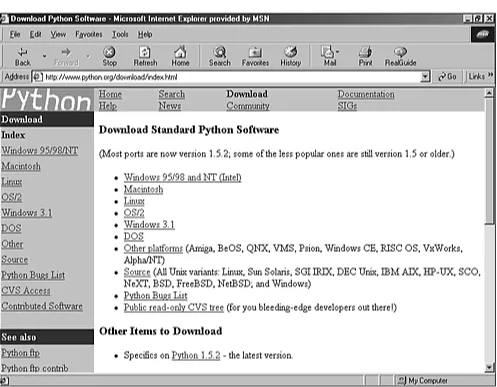
[image:33.612.59.556.359.746.2]Python's Web site—http://www.python.org/download—has a section that gives you access to all distributions that are available for download (see Figure 1.1).
Up-to-date versions for the most popular distributions are always available.
Keep this URL because we will go to the site later to download other Python items that we might need. UNIX Environment
The UNIX distribution is, in my opinion, the best distribution. It comes with POSIX bindings, and it supports environment variables, files, sockets, and so on. It is perfect for all flavors of UNIX.
Linux Installation
These days, all the major Linux distributions include Python, which makes your life simple because you don't have to download the files. Sometimes, Python is even automatically installed for you. Just make sure that you have the latest version.
If you already have Python installed in your machine, and you've got a new Python RPM package, you must execute the following command in order to update the RPM: (Note that this filename reflects the 1.5.2 version.)
rpm -Uhv python-1.5.2-2.i386.rpm
Otherwise, run the following command in your Linux prompt to install the RPM package.
rpm -ihv python-1.5.2-2.i386.rpm
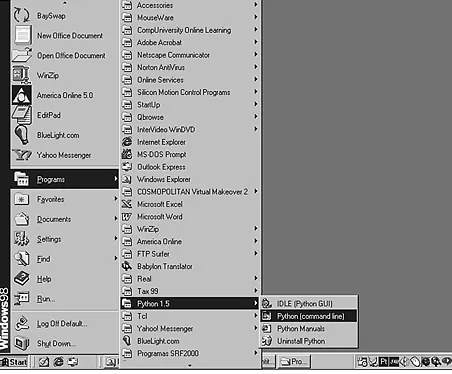
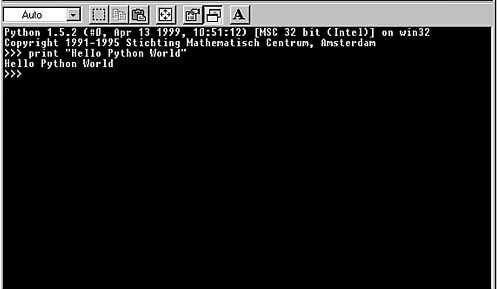
When the installation process is over, check to see whether everything went fine by typing python at the prompt. You should get access to the Python interpreter, and when you are satisfied, press Ctrl+D to leave it.
Perfect! Now you are ready to start coding in Python.
In case you are using a Linux system that doesn't offer RPM support, you need to download the source code and compile it in your machine. Or, check whether your Linux distribution included Python. Instructions for compiling Python are provided in Chapter 17.
If you are running a UNIX system other than Linux, you need to download the source code and compile it in your own machine.
Download the file py152.tgz from http://www.python.org/download/download_source.html. Note that this file corresponds to version 1.5.2. You might need to change the filename for the latest version. Following the instructions listed in the README file of the distribution will show you how to build and install the source code.
Macintosh Environment
MacPython is a Python version available for the Macintosh. Jack Jansen maintains it, and you can have full access to the entire documentation at his Web site. Currently, version 1.5.2 is available for
download at http://www.cwi.nl/~jack/macpython.html. Beta versions from version 1.6 are also available.
You can also download this distribution at Python's official Web site at
http://www.python.org/download/download_mac.html. The full distribution is available in one unique file that also contains Tkinter and an interactive development environment.
Windows Environment
The Win32 and COM extensions by Mark Hammond are the result of an excellent work that is
successfully reducing the distance between the overall performance of Python for UNIX and Python for Windows platforms. The following instructions show how to install the Python version for Windows systems. Note that to install the Win32 extensions, you need to install a separate package called Win32all-xxx.exe. You should replace the xxx with the number of the latest available release. The installation process is very straightforward within Win32 systems (Windows 95/98/2000 and NT). Go to the Python for Windows download page at
http://www.python.org/download/download_windows.html and choose a location. If the location you selected isn't available at the moment, choose a mirror site.
Let's download the py152.exe file (Python's version 1.5.2). Now that you have downloaded the file, save it to a location on your local hard disk.
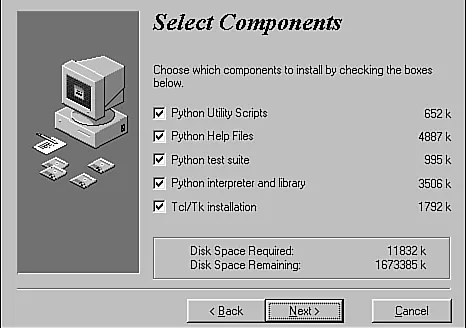
Double-clicking the file will launch an Installation Wizard as shown in Figure 1.2.
Select everything and confirm the selections. The installation process will start and after Python is installed, you will be asked if you also want to install Tcl/Tk (see Figure 1.3). I strongly suggest that you install it too because later you will learn how to create GUI interfaces using Tkinter. After you confirm it, the Wizard will guide you through Tcl's 8.0.5 for Windows installation. Choose the full installation, confirm it, and that's it. Your Windows system is fully configured to use both PythonWin and IDLE.
I suggest that you spend some time going through all the documentation that was installed in your machine.
Right now you might have everything already set up in your environment.
If you decide later to download and build the source code, download the same source code that is provided for UNIX systems at http://www.python.org/download/download_source.html.
Get the file py152.tgz and follow the instructions listed in the README file. It clearly explains how you could use Microsoft Visual C++ 5.0 to build the source code. See Chapter 17 for more details. If you are interested in downloading Python 2.0, the following link takes you directly to its download page.
http://www.pythonlabs.com/products/python2.0/download_python2.0.html
At PythonLabs, you have the source tarball available to build Python from the source in the platform of your choice. Note that if you are running Windows, you can download and run the Windows installer as well.
The following links cover the 2.0 distribution. News about Python 2.0
http://www.pythonlabs.com/products/python2.0/news.html
http://www.pythonlabs.com/doc/manuals/python2.0/
Python 2.0 - The new license
http://www.pythonlabs.com/products/python2.0/license.html
Note
A special note is necessary here to let you know that Python 2.0 doesn't run a separate Tcl/Tk
installer anymore. It installs all the files it needs under the Python directory. This was made to avoid conflicting problems with other Tcl/Tk installations that you might have on your system.
Last updated on 1/30/2002 Python Developer's Handbook, © 2002 Sams Publishing
< BACK Make Note | Bookmark CONTINUE >
Index terms contained in this section
code source
Python;downloading2nd3rd configuring
Python2nd3rd4th downloading
source code
Python2nd3rd Windows installer downloading:Python 2.0 installers
Tcl/Tk
Windows:downloading and running installing
Python2nd3rd4th Internet
Python source code Web site2nd3rd Jansen, Jack
links
installing Python MacPython
Python
installing and configuring2nd3rd4th Python 2.0
downloading links2nd
PythonLabs Web site
PythonWin Installation Wizard RPM package
installing Linux running
Windows insttaller source code
Python
downloading2nd3rd source tarball
tarball (source) Tcl/Tk installer Web sites
Python source code2nd3rd PythonLabs
Windows
installing Python2nd Windows installer
downloading and running wizards
PythonWin
Web Development > Python Developer's Handbook > 1. Introduction > Python and Other Languages
See All Titles
< BACK Make Note | Bookmark CONTINUE >
152015024128143245168232148039199167010047123209178152124239215162145095017069121013232009
Python and Other Languages
Scripting languages, as everyone knows, are slower than compiled languages. Python uses its
interpreter to manage most of the things you need to worry about when using compiled languages. The consequence is that you have a productive application in a short period. However, the application doesn't run as fast as a compiled version. Okay; it is slower, but who cares? Nowadays, the
development time is a great differential between companies. It doesn't matter whether an application runs slower or faster in Python than in other languages. The fact is that you have saved a considerable amount of time. And by the way, it's not as slow as many people say.
Python incorporates the best of scripting languages (Perl, Tcl, Awk) and systems languages (Java, C, C++). If you work in large projects, the use of Python will give you fast and reliable results.
However, Python doesn't beat other languages all the time. C and C++ are good for performance-critical modules of an application because they are system languages that talk almost directly to the processor. For that reason, many programmers create Python extensions using these languages when time is crucial for the project.
Python Versus C/C++
The following is a list of differences between Python and C/C++:
● Python's array constructs don't have the same number of problems that arrays written in C have.
● Most of the memory allocation and reference errors that we easily get when coding C/C++
programs are eliminated as Python performs automatic memory management.
● Python checks array references for boundary violations.
● In many cases, developing an application in Python requires much less code than an equivalent application in C.
In general, Python is a great tool to test C/C++ applications. Python adds some contribution to C/C++ projects by gluing components and handling interfaces to test them.
Python Versus Perl
Python is easier to learn than Perl, and it presents a more readable code. Perl is an excellent language too. Perl is great for work that requires text manipulation and data extraction, and it is also a great language for system administrators. The Windows distribution of Perl is apparently pretty good, so it can be used productively under Windows. However, Perl is much more productive when used in a UNIX environment. Python's productivity is platform-independent. Another important difference is that Python was designed to be fully object-oriented and Perl had object-orientation implemented later as an add-on to the language. One problem with Perl is that because "there's more than one way to do it," different programmers in large projects might know different subsets of the language and will not be able to read each other's code.
Python Versus Tcl
Python's syntax is much clearer than Tcl's. Besides, it is the fastest one, and it needs less C extensions than those Tcl requires when doing the same job. Similar to Tcl, Python uses Tk as its standard GUI. Also, Python has more data types than just strings.
Python Versus Smalltalk
The following list shows some differences between Python and Smalltalk:
● Python has scalability because it can handle small routines and large applications equally well.
● Python is much easier to learn than Smalltalk.
● Python enables the use of C and C++ code in programs that require a good performance because
it is extensible.
● As most of Smalltalk's users come from the scientific society, the Numeric Python Extension becomes helpful by covering many mathematical aspects and making them easily written in Python.
Python Versus Java
Python offers dynamic typing and a rapid development environment that requires less code and no compilation phase. Although Python runs slower than Java, it is the more portable one.
JPython
languages along with the entire universe of Java classes. The integration between JPython and Java is better than the integration between Python and C++ because JPython can use Java classes without needing a wrapper generator. Several other reasons why you should consider giving JPython a try are as follows:
● JPython is interactive, as is CPython.
● JPython applications can import Java classes directly and, whenever required, integrate Java classes with their own JPython classes.
● JPython compiles directly to Java bytecode, generating Java .class files, which can be used to create applets.
By the way, JPython programmers also refer to Non-Java Python as CPython in order to distinguish Python's Java Implementation from Python's C implementation.
Conclusion
Now, just imagine projects that require several layers of application design. Do you think that these projects'leaders have some kind of problem to scale up their applications? If you've been in a situation like that, have you ever thought about using the same language for all your needs? Are you going to have a programmer coding in JavaScript? (That language doesn't support exception handling.)
Say that you need to create some Java routines, using Servlets, for the back end. What if this
programmer doesn't know Java? Are you going to explain Java to him, or are you going to hire a Java programmer?
Nowadays, technology and projects are moving too fast. You don't have time to teach new technologies to the people who are coding your applications. This is one more reason to stick with Python. You have the flexibility to play in all bases and do almost everything using the same language.
I am sure you are satisfied now that you know the reasons why Python is a fantastic language. What are you waiting for? I strongly encourage you to use Python now.
For more information about Python versus other languages, check out the following URL:
http://www.python.org/doc/Comparisons.html.
Last updated on 1/30/2002 Python Developer's Handbook, © 2002 Sams Publishing
Index terms contained in this section
C programming language vs. Python
C++ programming language vs. Python
Java programming language vs. Python
JPython languages C and C++ vs. Python Java
vs. Python Perl
vs. Python Smalltalk vs. Python
Perl programming language vs. Python
Python
vs. C and C++ vs. Java vs. Perl vs. Smalltalk
Smalltalk programming language vs. Python
Web Development > Python Developer's Handbook > 1. Introduction > Patches and Bugs List
See All Titles
< BACK Make Note | Bookmark CONTINUE >
152015024128143245168232148039199167010047123209178152124239215162145095017068070190021124
Patches and Bugs List
In case you notice something bizarre happening while you are coding, you can check it out in order to find out whether it is a bug or not.
A query tool is provided by Python's official Web site to enable searches in the bug's list. Go to
http://www.python.org/search/search_bugs.html and perform your search. You will be able to identify which bugs are opened, resolved, and so on.
If you think that you might have caught a new bug, you can fill out a form to let the developer's team know about it. Remember to ALWAYS check the Python Bugs List before reporting a bug. It is also good to take a look at the current CVS tree before reporting any bugs.
If you have fixed a bug and want to submit your patch to the PSA team, follow the standard Patch Submission Guidelines at http://www.python.org/patches/.
Last updated on 1/30/2002 Python Developer's Handbook, © 2002 Sams Publishing
< BACK Make Note | Bookmark CONTINUE >
Index terms contained in this section
bug list Python finding bugs fixes bugs
Patch Submission Guidelines patches
Python Python
patches and bug list searching
bug fixes
Web Development > Python Developer's Handbook > 1. Introduction > PSA and the Python Consortium
See All Titles
< BACK Make Note | Bookmark CONTINUE >
152015024128143245168232148039199167010047123209178152124239215162145094054189115074029031
PSA and the Python Consortium
The Python Software Activity (PSA) was established by CNRI Inc. to be the home of Python and to guide its development according to the common interests of the Python development community. A large number of contributions are submitted periodically. The PSA Web site stores the official documentation and download area of Python distributions. PSA's creation has taken some of the responsibility that Guido had. As a result, a group is working to develop Python, instead of just one man. This fact helps propagate the maturity of Python's development strategy.
You can obtain more information about the PSA by visiting its official home page at
http://www.python.org (see Figure 1.4). That is the place where all the information about Python gets officially organized and published. Note that with the move of Guido and his team to PythonLabs, the future of PSA is uncertain. The information currently available says that CNRI, which manages the existing PSA, will determine its future at the end of the current membership term, on October 1, 2000.
Several Special Interest Groups (SIGs), hosted by PSA, are currently studying and developing special topics of Python, such as XML Processing, String Processing, Python in Education, Distributed
Objects, and many other important topics. To find out what newest groups are being formed and to participate in the discussions that are conducted in their mailing lists, take a look at
http://www.python.org/sigs/. Much of Python's real work takes place on Special Interest Group mailing lists.
Behind the PSA, a group of companies and individuals helps to propagate the Python voice. They work together, creating conferences and keeping their Web site up-to-date. If you want to be part of the PSA, get more details at http://www.python.org/psa/.
After you become a member of the PSA, you are eligible to have an account on the Web site
http://starship.python.net.
Today, this site is filled with information provided by many Python developers from all around the world.
The membership fees that are received by the Consortium members support the development of Python and JPython. Many organizations have already registered as part of the Consortium (for more
information, see http://www.python.org/consortium/).
The Corporation for National Research Initiatives (CNRI) is a nonprofit organization that hosts the Python Consortium. Check out its Web site at http://www.cnri.reston.va.us/.
Even with his transition to PythonLabs, Guido van Rossum remains the Technical Director of the Python Consortium, and BeOpen.com continues to be just a member.
Support and Help
Python has a Usenet newsgroup called comp.lang.python. This newsgroup is an excellent source of Python information and support. The guys who really know the language always hang out there. One of the best ways to keep yourself up-to-date to the Python world is to sign up for the Python
general mailing lists and to always check the newsgroup for some information that might be helpful for you.
Go to http://www.python.org/psa/MailingLists.html and look for the list that provides the level of information that you need. At this time, there are four main mailing lists:
Tutor is a list for beginners who have basic knowledge and need simple and straight answers.
JPython is a list that openly discusses the Python implementation for Java.
Announcements is a list that doesn't have huge traffic. The objective of this list is just to publish important notices to the Python community.
An open discussion mailing list generates an average of 100 daily messages and covers everything related to general Python discussion topics.
Python Conferences and Workshops
The Python community has organized many workshops and conferences to discuss Python hot topics. You can have access to the materials that were used for the presentations, and you can also download many technical documents provided by the people who have participated in the conferences and workshops.
http://www.python.org/workshops/.
Last updated on 1/30/2002 Python Developer's Handbook, © 2002 Sams Publishing
< BACK Make Note | Bookmark CONTINUE >
Index terms contained in this section
BeOpen.com CNRIÓ ?
Web Development > Python Developer's Handbook > 1. Introduction > Summary See All Titles
< BACK Make Note | Bookmark CONTINUE >
152015024128143245168232148039199167010047123209178152124239215162145094054191202066127114
Summary
Python is an interpreted, high-level programming language, pure object-oriented and powerful server-side scripting language for the Web. It is an open source project that doesn't have any copylefts or copyrights involved in its license agreement.
You should consider moving to Python because it is simple to get support from the Python community; it is fast to learn and code it; it offers object-oriented programming support; and it provides a readable, reusable, and portable coding language.
The main technical features that distinguish Python from the other languages are as follows:
● Automatic memory management
● Exception handling management
● Rich core library
● Web scripting support and data handling
● Rich built-in elements
● Clear syntax and useful lexical elements
● Embeddable and Extendable language
● Objects Distribution support
● Databases support
● GUI applications support
● Introspection
Python runs on many platforms, such as Microsoft Windows, Linux, and Macintosh. The source code and the documentation are freely downloadable. It is also available for downloading the binaries for some systems.
Python is always compared against other languages and, usually, it wins. Python has an implementation in Java called JPython.
Two institutions have guided the Python community along the last few years: the Python Software Activity (PSA) and The Python Consortium. The PSA took the responsibility of creating Python conferences and workshops and keeping the Python official Web site up and running, whereas The Python Consortium supported the development of Python and JPython. Today, the future of these two institutions is a little uncertain because Guido and his whole development team have moved to
BeOpen.com to support PythonLabs.com.
The Python community has been doing a great job by providing help to new Python aficionados. Most of this help is provided through the mailing lists, newsgroups, bug lists, and other available forms of support.
By the way, Python has nothing to do with those legless reptiles. It was named after the British comedy troupe Monty Python.
Last updated on 1/30/2002 Python Developer's Handbook, © 2002 Sams Publishing
< BACK Make Note | Bookmark CONTINUE >
Web Development > Python Developer's Handbook > 2. Language Review See All Titles
< BACK Make Note | Bookmark CONTINUE >
152015024128143245168232148039199167010047123209178152124239215162145094054190069171107214
Chapter 2. Language Review
Spam spam spam spam spam spam spam and spam!
This chapter offers a complete review of the Python programming language. After you finish reading it, you will understand and master the concepts of this language. Furthermore, you will learn everything that is necessary to write useful Python programs.
Last updated on 1/30/2002 Python Developer's Handb