Masters Thesis
The Reactive Virtual Trainer
Author:
Eike Dehling
Supervisors:
Dr. Job Zwiers Dr. Dennis Reidsma Ir. Herwin van Welbergen
Human Media Interaction Department of Electrical Engineering,
Mathematics and Computer Science University of Twente
Abstract
In this masters project, we set out to improve interaction of the virtual trainer with users. The goal was a trainer that supports a user with his workout goals like a real sports trainer: assist technically with an exercise and motivate the user to keep working hard. From this broad goal we have picked two main topics: we tried to make users perform exercises at a specified intensity and we have worked on motivating users by adjusting the feedback the trainer gives. We have developed and implemented a software architecture for the virtual trainer, and evaluated our work with the prototype.
Challenging a user with an exercise and motivating users during a workout are perhaps the most important tasks of a sports trainer. Working out at different intensities gives different training results: For example increased stamina or increased strength. Usually a human sports trainer looks at the users training goals and level of fittness to compile a workout that challenges the user and lets him achieve his goal. Many people sport not purely for fun, but to achieve some goal: For example lose weight or to be healthy. Those people sometimes rely on peers or the sports trainer for motivation.
To challenge a user, we started with two basic ideas: Performing an exercise faster is more intense and an exercise is most challenging when done at the optimal intensity. The trainer moves faster or slower, with the intention that the user picks up the change in speed. We measured the exercise speed using a wiimote and we measured the intensity using a heartrate sensor.
The evaluations showed that our prototype can influence the users speed in an intuitive way. To make users work out at a specific (optimal) intensity needs some more work, because the intensity of an exercise differs for each user.
Regarding motivation, we have applied aspects of several psychological models of motivation, politeness and mood to the virtual trainer. The trainer has a mood that is influenced by the users performance and the trainer chooses feedback of varying politeness, depending on that mood. We made videos of a baseline trainer and two trainer versions with motivational enhancements. We have showed these videos to users and asked them to compare the trainer versions on various aspects in a questionnaire.
Participants found the rude trainer and the friendly trainer more motivating than the baseline, the motivational factors competency and relatedness were rated higher. Participants found the rude trainer and the friendly trainer assisted them better. The rude trainer and the friendly trainer scored higher for positive character traits and the baseline trainer scored highest on negative character traits.
We have developed a software architecture for this project, looking at previous work in this area of software design. We have used a multi agent approach, where multiple agents generate behavior in parallel. The design has performed well, we did not encounter major issues, any changes needed during implementation fit in with the original design.
This project results in a system that intuitively influences the speed at which a user performs an exercise. Previous work only influenced users verbally. The other contribution is a trainer with aspects of several psychological models for generating feedback, which is new for virtual sports trainers. Finally, we have designed and implemented a software architecture for a sports trainer application.
Contents
1 Introduction 5
2 Related work 7
3 Functional design 9
3.1 Motivation and Tutoring . . . 9
3.2 Trainer Goals . . . 10
3.3 Intended environment . . . 11
3.4 Choice of sport . . . 11
3.4.1 Sports workout basics . . . 11
3.4.2 Feedback and sensors . . . 12
3.4.3 Description of some sports . . . 13
3.4.4 Choice . . . 13
3.5 Scenario . . . 14
3.6 Requirements . . . 15
3.7 Interaction model . . . 16
3.7.1 Politeness . . . 16
3.7.2 Mood . . . 16
3.7.3 When and on what error to give feedback . . . 18
3.7.4 Adjusting difficulty . . . 18
3.8 Example workout and feedbacks . . . 18
3.8.1 Exercises . . . 19
3.8.2 Feedbacks . . . 20
4 Architecture and implementation 22 4.1 Software design . . . 22
4.1.1 State diagram . . . 22
4.1.2 Architecture background . . . 23
4.1.3 Considerations for our architecture . . . 25
4.1.4 Modules . . . 27
4.1.5 Messages and interactions . . . 32
4.2 Implementation notes . . . 33
4.2.1 Bluetooth driver framework . . . 33
4.2.2 Threads . . . 34
4.2.3 Common base classes . . . 34
4.2.4 Event or timer based? . . . 34
4.2.5 Motion analyzer . . . 34
5 Evaluation 38
5.1 Background . . . 38
5.2 Evaluating speed adjustment . . . 39
5.3 Evaluating motivation . . . 40
6 Results 42 6.1 Speed influencing . . . 42
6.1.1 Pretests . . . 42
6.1.2 Can we do it? . . . 42
6.1.3 Keeping the heart rate within range . . . 43
6.1.4 Intuitiveness . . . 44
6.1.5 Review of the measurement method . . . 45
6.2 Motivational mechanisms . . . 45
6.2.1 Methodology . . . 46
6.2.2 Training experience . . . 46
6.2.3 Motivational factors . . . 48
6.2.4 Assistance factors . . . 49
6.2.5 Trainer character . . . 51
6.2.6 Free form comments . . . 52
7 Discussion and future work 54 7.1 Speed influencing . . . 54
7.2 Motivational mechanisms . . . 55
7.3 Trainer architecture . . . 56
8 Conclusions 57 8.1 Speed influencing . . . 57
8.2 Motivational mechanisms . . . 58
8.3 Trainer architecture . . . 59
8.4 Final words . . . 59
Appendices 61
A An aerobics class 61
B Motion capture: Making the trainer move 62
C Evaluation workout 64
D Motivation questionnaire 65
E Results: Speed adjustment feasibility 67
F Results: Keeping the heartrate in a range 69
G Results: Speed adjustment intuitiveness 73
H Results: motivation questionnaires 75
Chapter 1
Introduction
This masters thesis is about my work on the Reactive Virtual Trainer project. The reactive virtual trainer is an automated virtual reality sports coach. It has sensors to perceive how the user performs the exercise and an avatar on a screen that can give verbal feedback and demonstrate exercises. Such a system could be useful when doing a sports workout at home, for assisting a real sports trainer with coaching a group or in a more advanced version, for assisting rehabilitation at home as a virtual physiotherapist. Training with a virtual coach can be more fun than just sitting on a home trainer, furthermore when used to assist real sports coaches, might reduce the number of sports coaches required.
Our work was focussed on the interaction with the user. The goal was to develop a trainer that supports a user with his workout goals like a real sports trainer, by assisting technically with the execution of an exercise and motivating the user to keep working hard. From this broad goal we have picked two main topics on which we have worked. Firstly, we have tried to make users perform exercises at a specified intensity. According to sports workout theory working at different intensities gives different training results: for example increased stamina or an increase in muscle strength. Secondly, we have worked on motivating users by adjusting the feedback the trainer gives. We have broken these topics down into several research questions that contribute to developing a better virtual sports trainer:
1. How can we make a user perform a workout at a specified intensity?
1.1 How do we measure the exercise’s intensity?
1.2 Can we influence the exercise’s speed?
1.3 Is influencing the speed intuitive to the user?
1.4 Does the exercise speed influence the intensity?
1.5 Can we make the user do the exercise at a specific intensity?
2. Can we enhance a user’s motivation in a sports workout by changing the feedback?
2.1 How do users perceive a trainer that simply states mistakes versus a trainer that uses aspects of motivational theory to give feedback?
2.2 Do users prefer a polite trainer or a more rude trainer?
2.3 Does a trainer that uses aspects of motivational theory enhance motivation compared with a trainer that simply states mistakes?
3. How do we evaluate our improvements?
The first aspect we worked on was assisting the user, by making the exercise challenging. Specifically, we have worked on a way to influence the frequency at which users perform an exercise. By increasing the frequency of an exercise, the intensity is increased. The trainer uses a heart rate sensor to measure how intense an exercise is for a user and a Wii Remote to determine the frequency of motions. The trainer adjusts the intensity to try and optimally challenge a user. We have evaluated this system in three experiments with about 20 participants in total. The results have shown that we can intuitively influence the user’s speed (and thus the intensity). To optimally challenge each user requires some more work, as the intensity of an exercise varies a great deal per user.
Secondly, we have worked on motivating users during a workout. We have looked at models of mo-tivation and applied aspects of several psychological models of momo-tivation, politeness and mood to the virtual trainer to enhance the training experience. Our trainer prototype gives feedback on mistakes the user makes, and adjusts his feedback depending on whether the user does his best to improve his performance. To evaluate the effects of these motivational mechanisms, we made three videos of a user performing the same workout and the same mistakes with a trainer that respond differently to those mis-takes. We showed these videos to 16 users and gave them a questionnaire to rate the trainer on various aspects. The users found the trainers with motivational mechanisms more motivating. For example they felt more competent and said they felt closer to the trainer.
Finally, we developed a software architecture for implementing the virtual trainer application. The trainer was implemented using a multi-agent based approach, where the trainers behavior is produced by several cooperating agents.
Our first contribution is a trainer that does the exercise with the user and intuitively influences the users performance to challenge them. Previous work only influenced the user with verbal comments. The other contribution is a trainer with aspects of several psychological model for generating feedback, previous trainers have a rather simple system for generating audible or visual feedback. Finally, we have designed and implemented a working architecture for a sports trainer application.
Chapter 2
Related work
The idea of developing an virtual interactive trainer or coach is not new. Such systems have been developed for more than 10 years, becoming more advanced and intelligent over time. Perhaps workout and instruction videos were the first virtual trainers, current systems for example use computer vision technology, motion and bio sensors to perceive their users and have interaction models to generate different kinds of feedback when appropriate, using their virtual character.
Starting with the idea of making a truly interactive workout video, Davis and Bobick [1998] combined computer vision technology with recordings of feedback by a real coach. They demonstrated it was possible to develop an interactive virtual trainer with relatively simple technology. Compared to our work, they used much simpler methods but had similar goals.
An example of a more modern system is described by Babu et al. [2005]. Their computer vision system uses markers that can be tracked in 3D space. They have developed a virtual trainer that can demonstrate exercises, describe and show the user’s mistakes, and praise correct execution of exercises. Their goals were to give high quality feedback on exercises, to use the system as a virtual physiotherapist. Some projects have not developed a full interactive trainer application, but rather focussed on one aspect of a virtual trainer and researched how users respond to different solutions.
Chua et al. [2003] executed an experiment using a virtual Tai-Chi trainer, where users could see one or more virtual trainers from different angles. It is determined how effectively users learn the Tai-Chi movements. Showing the trainer from one angle taught users the Tai-Chi exercise just as good as viewing the trainer from multiple angles. Their application did not give feedback, the focus was to see if the possibilites given by virtual reality could enhance the learning process.
Similar experiments are described by IJsselsteijn et al. [2004]. A system is developed in which several parameters can be changed and enjoyment and effectiveness of the training are evaluated. They test a more or less immersive implementation and with or without a virtual coach that gives feedback on the user’s efforts. They evaluated motivational factors of their application in a similar way as we did, showing that a more immersive application can enhance performance. They compared their application with a coach to a version without a coach, to see if the presence of a coach would enhance performance. In contrast, we compared the effect on motivation of different styles of giving feedback.
There are many projects in the field of virtual tutors, which instruct students in general tasks. Tutoring systems have been in development for a long time, so there might be some interesting insights.
In the Jacob project [Evers and Nijholt, 2000] a similar system was developed, but with different goals. They have added multi modal interaction and focussed on software engineering aspects. It is interesting to see how they applied traditional software engineering principles like layering and model-view-controller to a virtual reality agent, where we used a multi agent approach.
Chapter 3
Functional design
This chapter focusses on the functional design of the trainer prototype and background information. First we give some background on motivation, coaching and tutoring. Then we define an environment and choose a suitable sport. Then we describe a possible scenario in which the trainer is used and from this develop requirements. Finally we discuss our interaction model and describe some exercises and feedback.
3.1
Motivation and Tutoring
Ryan and Deci [2000] discuss general motivational theory. People can have different motivations to do certain activities, for example because they are rewarded for doing that, because they feel it is necessary to do it, or because they enjoy doing it. In general, motivation can be split into two categories: intrinsic (enjoying something) and extrinsic (an external factor that compels you to do something). There are several levels of extrinsic motivation, from for example fear of punishment to adhering to personal values and ideals, ranging from totally external to more internalized. Motivation is much stronger if it is more internalized or even intrinsic.
Different factors can help internalizing motivation: relatedness, feeling related or connected to the instructor or group, perceiving that one is good at something, competent and feeling in control, au-tonomous.
Concretely, relatedness means there is a mutual respect and care between the instructor and partici-pant. Feeling connected to the instructor or group makes the participant want to leave a good impression and do his best. Feeling competent means that exercises need to be challenging but not to difficult, com-pliments from the coach can also support this feeling. Feeling in control means the instructor should not overly control everything the participant does, but rather support him autonomously, for example give advice, share insights and offer choice.
Brown and Levinson [1987] examined aspects of motivational theory from a linguistic point of view. Various politeness strategies and their effects on motivational factors are discussed. Utterances can use one or more of the politeness strategies depending on the situation. A model is proposed to select an appropriate utterance.
Face is the public image a person tries to project. There are two parts: positive face andnegative face. Positive face concerns someone’s competence, negative face concerns someone’s autonomy.
Speech acts that impact the student’s feeling of competence are calledpositive face threats, for example “You’re doing the exercise wrong!”. Utterances that impact the students autonomy, giving someone orders, are callednegative face threats, for example “Move your legs”.
Saying speech acts that are threats to someone’s positive or negative face in a more polite way to avoid that face threat, is calledface threat redressing.
Paleari et al. [2005] used a similar model of politeness, but also included an emotional state of the trainer in generating feedback. They generate feedback based on the users performance and whether the user is trying hard. This gives three basic responses: (a) The user does well, the agent gives positive feedback. (b) The user performs bad but does his best, the agent gives a supportive comment. (c) The user performs bad and does not seem to do his best, the agent will respond negatively.
Johnson et al. [2004] and Wang et al. [2005] give feedback on errors as they occur, but positive feedback only at the end of an exercise. Their research suggests that giving too much positive feedback decreases its impact and might make the student doubt the sincerity. Giving positive feedback only at the end of an exercise seems reasonable, tests can show whether this works well for this application.
Various research on virtual learning environments also looks into display of emotion by virtual tutors. For example the work of Yanghee [2005] shows that display of emotion by a tutor enhances relatedness and thus motivation. There are many possibilities to show emotion. For example complimenting good performance or becoming annoyed by poor engagement.
3.2
Trainer Goals
The goal of the trainer is to support the user to achieve his workout goals. The role of the trainer is that of a sports coach, it gives technical feedback on the execution of exercises, helps plan workouts and tries to motivate the user to keep working hard.
As explained, three things are important to keep people motivated: relatedness, autonomy and compe-tence. Relatedness means the user needs to feel socially connected to the coach or group. Other people are often a strong motivational factor to participate in sports and this effect also applies for virtual humans. Feeling competent means people feel they have achieved something, this good feeling is a strong motivator. Autonomy means people want to choose what they do, no one likes to do things they have to do, chores in the house or other things someone commanded them to do.
Making the user feel more autonomous can be done by letting the user choose certain things himself. For example the focus of the workout can be chosen by the user, one day he might want to work on his upper body and the next day the buttocks and lower extremities can be the focus.
While instructing, the trainer has to give comments on the users performance and execution of the exercises. Such comments can hurt the users feeling of autonomy or competence. Real coaches use various politeness strategies to avoid this. Instead of giving commands, the coach can offer suggestions for improvement or say things indirectly “Working harder trains your body more effectively”. Trainers use supportive comments as well for this purpose, if not overdone and made sincerely, after good performance, remarks like “we’re working really hard, this feels great!” motivate the user.
The difficulty of exercises is also important. If exercises are too easy, the user will get bored, on the other hand, if they are to hard it will frustrate the user. If the difficulty is right the user feels challenged and his sense of competence grows.
Some research suggests this relatedness can also appear between a human and a computer, this is called the persona effect. Research disagrees about how pronounced this effect is, Dehn and van Mulken [2000] are sceptical and theorize the entertainment value of an animated agent produces most of what is described as the persona effect, while Wang et al. [2005] and Paleari et al. [2005] are positive and ascribe their results to this effect. To trigger this persona effect, they added a personality and display of emotions to the trainer.
We will implement a personality in the trainer. The trainer will respond positive if performance is good, respond supportive if effort is high, but performance is lacking and respond negatively if effort and performance are bad. The intention here is, to trigger the student to work hard to please the trainer, at times were his performance is bad. Evaluation of the prototype will show whether this achieves the intended effect.
3.3
Intended environment
Recently, quite some home exercise games have been developed, so called exergaming applications. For the Nintendo Wii there is Wii Fit, Sony have developed the Eyetoy: Kinetic and there are several others. The reactive virtual trainer is intended for the same usage: an entertaining way of getting and staying fit at home. The system is intended to be used on a regular computer using commonly available hardware.
3.4
Choice of sport
In this section we motivate which sport our trainer application will use. We start with some basics on working out. Next we describe the types of feedback a coach can give, which sensors are available for the coach and finally compare several sports according to their possibilities for feedback and required sensors. This allows us to choose a sport which suits our possibilities and goals.
3.4.1 Sports workout basics
A sports program can have different goals: Building cardio vascular fitness, increasing strength, weight loss or getting a more muscular appearance. Each of these goals requires a different type of exercise, cardio exercises, weight training or even stretching. A complete fitness program combines these types of exercise to train all aspects of the body’s fitness. Each type of fitness exercise has some points to focus on for an effective workout. Below is a short overview of several different types of training and what is important for that type of training. [Fox and Mathews, 1987]
• Warming up warms up the muscles and prepares heart and lungs for exercise. During warming up the heart rate rises and oxygen transport to the muscles increases, allowing for more intense activities.
• Cardio vascular exercisetrains the hearts and lungs capability to transport oxygen towards the muscles. For cardio vascular exercise the exertion of heart and lungs is important. The exertion can be measured for example by the heart rate, or by the volume of air being breathed in and out. Depending on the exact training goals, exercises can be of short duration and high intensity, of long duration and lower intensity or various combinations of these two.
Depending on the type of training, the muscles will increase in maximum strength and size or will increase in endurance.
• Stretching Training stiffens and shortens muscles, decreasing flexibility and range of motion. Stretching restores muscles to their original length and restores flexibility. Stretching also helps muscles recover after a heavy workout.
A workout session usually starts with a warming up, to prepare the heart, lungs and muscles for the main workout. The workout then continues with strength training exercises, to increase muscle strength. After this are cardio fitness exercises, to train the cardio vascular fitness. To reduce muscle pains after a heavy workout, a session ends with some stretching. The strength training can be done after cardio vascular exercises, but muscles can be slightly fatigued from the cardio exercises, decreasing the efficiency of the strength training.
3.4.2 Feedback and sensors
A trainer can give different types of feedback, from assistance in compiling a workout program to moti-vational comments and feedback on the execution of motions. We start by describing what is meant by the different types of feedback the coach will give.
A trainer can motivate a sporter and incite him to train harder. This requires experience, to distinguish between an exhausted sporter who can not work harder and a sporter whose attention is wandering.
Beside motivation, feedback on the motions themself is important for many sports, to prevent injuries, to train the right muscles of even because the exact motions are the goal of the sport. The feedback on motions ranges from simple to very detailed, depending on the goal of the feedback. More detailed feedback requires the trainer to have better sensors. Giving the feedback can be done by demonstrating and explaining the motions or by giving a (short) verbal comment.
For many sports, compiling a workout is done using the student’s goals as input. During training, the workout can also be adapted to the students performance: If the student struggles to keep up, the coach can adjust the exercises and make them less intense. A combination of vital signals and observing the student is required to be able to assess performance.
A trainer can give feedback on the timing of the student. This can be explicit, telling the student to perform an exercise faster or slower, or implicit, by performing the exercise a little slower or faster than the student, such that the student adapts to the trainer’s rhythm.
Combining these types of feedback in the right way will be the challenge. A good coach will compile a challenging workout and push the student to perform at his best, but react quickly and adjust the exercises if they are too hard. A badly implemented trainer might compile a much too hard workout and scold the user for not performing well.
While the focus will be on the feedback the trainer gives, different types of feedback do require different sensors and varying degrees of accuracy. We will now describe different possible sensor solutions.
To give feedback with cardiovascular training exercises, the level of the sporter’s effort needs to be measured. This can be done with a heart rate sensor, or with a device that measures the volume of air being breathed in and out [Fox and Mathews, 1987].
To give feedback on the sporters motions, a sensor is needed that can determine the position of his limbs and the orientation of his joints. For this a motion capture suit or a system using a camera could be used. Alternatively, for the prototype, an operator could do this task.
“This topic is not yet well enough understood for there to be a standard solution”. Doing simple motion capture is possible, for example using colored markers to determine the position of limbs.
A motion capture suit (either with infrared markers and cameras or with motion sensors) does give precise and reliable results, however the user needs to wear a suit. This is less then ideal when doing physical exercises.
The preferred sensor solution for motion feedback is a camera based solution, however this limits the accuracy of input and therefore the level of detail of the feedback. So this will influence which sports the trainer can be used for.
Motivation can not be measured directly, this will have to be inferred from other measurements: for example whether the level of effort decreases, or whether motions get less precise, slower or smaller.
To give feedback on timing, we need to measure the timing of the students movements. This can be extracted from a computer vision system, or using motion sensors. The user could hold a simple motion sensor in their hands, for example a WiiMote controller.
3.4.3 Description of some sports
Sport or workout programs can combine many types of exercise into a full workout. Other sports only train one aspect. Team sports often emphasize cooperation and tactics, rather than individual strengths. These differences between sports place different demands on a trainer. We will discuss goals and feedback options of several (somewhat randomly) selected sports, to be able to choose a sport with interesting feedback possibilities for the virtual trainer.
We will restrict ourselves to choosing an individual sport that can be done inside. This is partly because of practical reasons: displaying a virtual trainer and setting up sensors is much easier inside. Nevertheless, these sports already offer enough potential to generate interesting feedback and restricting us to these sports should not limit potential of the virtual trainer.
Information about these sports is partially from literature, partially from personal experience.
• Yogawas originally a form of meditation, but of course the relaxing stretch exercises can also be used in a workout [Baptiste, 2002]. The exact shape of motions is important in yoga exercises and a coach gives detailed feedback about these motions. The coach compiles an exercise program for participant depending on their level of experience. There are simple yoga poses for beginners and difficult poses for advanced participants.
• Aerobics combines cardiovascular-, strength- and stretching exercises into a complete workout program. Usually aerobics is done in a group to the rhythm of music. The trainer selects exercises that are challenging, train the desired body parts, starts with enough warming up and finishes with cooling down and some stretching. Because the goal is improvement of cardiovascular fitness and strength and the exercises are usually simple and use only the body weight as resistance, the trainer mainly motivates sporters and gives simple feedback on motions.
• Weight training is pure strength training. Because heavy weights are used, injuries can easily occur. It is important that the coach explains motions and risk for injuries well and gives good feedback on this. The coach also assists in compiling a workout and with settings goals.
• A trainer needs to give little feedback with running and cycling in a gym: Some assistance in setting goals and some motivation. Most sporters do these exercises on their own.
3.4.4 Choice
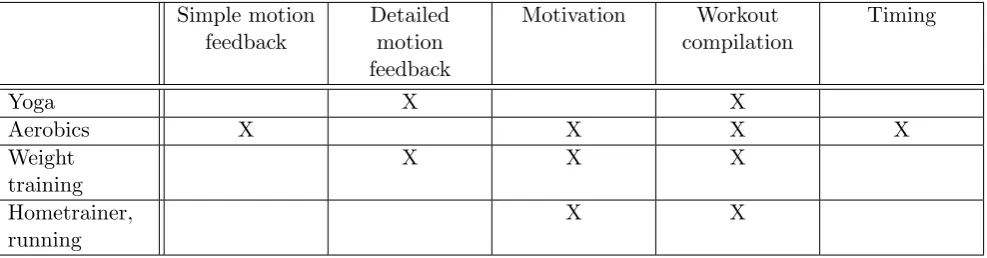
Simple motion feedback Detailed motion feedback Motivation Workout compilation Timing
Yoga X X
Aerobics X X X X
Weight training
X X X
Hometrainer, running
[image:15.595.61.555.71.200.2]X X
Table 3.1: Feedback options for different sports programs
Of the above mentioned sports, aerobics allows the most types of feedback. Weight training is close, but needs detailed motion feedback, which means the motion capture sensor will have to be much better. This might mean the focus of the project would go towards developing a motion sensor, instead of generating and combining feedback.
Summarizing, aerobics allows the most types of feedback and allows us to keep the focus on interaction with the user instead of on sensors. The combination of workout compilation, motivation, motion and timing feedback will give the opportunity for interesting interactions.
3.5
Scenario
The scenario is a prosaic description of a possible session of a student with the trainer, which allows us to extract requirements for the software prototype.
In the morning, you get out of bed. You stretch your arms and yawn. Your husband is making coffee in the kitchen and shouts “I’m taking a shower first!”. Sometimes you go for a run before breakfast, but it’s raining. You turn on the home entertainment system, web cam and television.
Your virtual trainer greets you, “Good morning! Time for a workout, eh?”. You choose to do a 30 minute core-body workout. The trainer selects a program of exercises that fits this goal. The trainer remembers you have been making good progress lately and some of the exercises were getting too easy. The trainer asks “Shall we make the exercises a little harder?” and you acknowledge.
The workout starts with some basic warming up exercises. The trainer demonstrates all the exercises and observes how you do the exercises through the web cam. After five minutes the trainer registers from your heart rate that you are warmed up and the main workout begins.
The first few exercises are easy, you have done them before. The trainer comments how good you are doing and continues the program.
The next exercise is a new aerobics exercise: double sidestep and squat-jump. The trainer demonstrates and explains what you are going to do: “From you current position, make two big sidesteps to the left, do a deep squat and jump up. Then do the same but to the right. Go!”
your legs more, make big side steps!” and exaggerates his own side steps. This time you manage, the trainer smiles and says “Good work!”.
3.6
Requirements
Based on the scenario we can extract requirements for the system such that it can carry out the previously described tasks. We have grouped the requirements and will discuss several requirements in more detail below.
1. Exercises and performances
1.1 Exercise program. The trainer can execute an exercise program: explain and demonstrate an exercise, carry it out together with the user and then go to the next exercise.
1.2 Exercise info. The trainer knows some details about exercises, for example a goal, how intense the exercise is and if possible ways to make the exercise more or less intense. This could be performing it slower, making the movements smaller or otherwise changing a part of the exercise.
1.3 Tracking performance. The trainer tracks a users performance during the exercises.
1.4 Reasoning about performance. The trainer can reason about current and recorded performance and deduce whether the user is working hard enough.
1.5 Adapt exercises. The trainer can adapt exercises to the users performance, making them easier or harder as needed.
2. Sensors
2.1 Bio sensors. The trainer has a heart rate sensor available to measure how intense an exercise is for a user, and whether the user is warmed up.
2.2 Operator interface. The trainer has a user interface where the operator can input mistakes the user makes.
2.3 Motion sensor. The trainer has a motion sensor to track the rhythm of the users movements.
3. Modalities
3.1 Visual representation The trainer has a visual representation or avatar. The avatar can demon-strate exercises, performs the exercises together with the user and can emphasize certain parts of an exercise to teach the user the correct way to do the exercise. The coach will have simple facial expressions to accompany feedback, for example smiling when he compliments the user. 3.2 Audio feedback. The trainer can give verbal feedback to the user, while choosing the exercise
program, explaining an exercise or commenting on the users performance.
4. Interaction
4.1 Interaction model. The trainer has an interaction model that produces feedback appropri-ate for the users current performance. It will give feedback on errors, give supportive or motivational comments, explain and demonstrate exercises.
3.7
Interaction model
In section 3.2 the goals of the trainer project were discussed. Starting with the main goal, to assist and motivate a user during a workout session, several subgoals were developed: the trainer needs to use politeness, the trainer will have a personality and mood, the user is presented with choices and the trainer will adjust the difficulty of exercises. In this chapter we go into more detail about these subgoals and combining them.
Real trainers give different feedback on the same mistakes depending on the users performance and their mood. If the user does well, give him positive feedback and show positive emotion. If the user does not do well, but tries hard, give supportive feedback. If the user does not do his best, the trainer can show negative emotion and will give strict or even annoyed comments.
A trainer can also use various politeness strategies to convey criticism and advice in ways that do not harm the social relation between the trainer and the user: criticism and advice can harm the users feeling of competence and autonomy. Whether and how much politeness is necessary depends on the type of criticism and the relation between the trainer and the user. Severe criticism needs a more polite approach, while small tips can just be said as they are.
These two approaches can be combined into one model for feedback, the trainers mood selects the level of politeness the trainer uses, like a real trainer. Depending on the mood, the trainer will then be more or less careful when giving feedback.
3.7.1 Politeness
We will use the politeness model from Johnson et al. [2004] and Wang et al. [2005] (Equations (3.1), (3.2)) to select an appropriate politeness strategy. In these formulas,P olitenessxis the amount we need
to redress positive or negative face threats. Distance refers to the social distance between the student and the trainer, whileP ower is the social power of the trainer over the student. T hreatx is the inherent
positive or negative face threat of this type of feedback. Augmentationx means the desired amount of
augmentation of the students positive or negative face. For example if the trainer thinks the user is not feeling competent, he might want to augment the users feeling of competence.
P olitenesspositive=Distance−P ower−T hreatpositive−Augmentationpositive (3.1)
P olitenessnegative=Distance−P ower−T hreatnegative−Augmentationnegative (3.2)
The social power and distance model the relation between the student and coach. They are usually implemented as constant parameters, but could be varied in time to simulate the student and coach getting to know each other. We will use fixed values.
The inherent face threats of feedbacks are a measure of how threatening that general type of feedback is to the users positive or negative face. Similarly, the polite feedback versions can also be ranked by how (non-)threatening that specific feedback is. The outcome of the formula then selects the appropriate polite feedback version.
To find polite feedback versions, recordings of sessions with an experienced instructor were analyzed by Johnson et al. [2004]. They categorized the feedbacks and identified the politeness tactics the real instructor used. Table 3.2 shows some examples. We can use their findings to produce polite versions of the feedbacks our coach gives, in a similar way a real trainer would give polite feedback.
3.7.2 Mood
Type of feedback Politeness strategies
Suggest action Bald on record, conventional indirectness, joint goal, student goal, question, suggestion, tutor goal
Explain concept Bald on record, positive politeness, attend to hearer, students goal, imperson-alized, off record
Explain tutorial Bald on record, tutor goal, joint goal, suggestion Socratic hint Socratic hint
Action feedback Bald on record, positive politeness
Table 3.2: Examples of types of feedback and employed politeness tactics employed by real trainers [Johnson et al., 2004]
setting this parameter. It can be a constant value, representing a desired level of politeness. In other research the desired politeness is changed dynamically, it can for example be adapted to the conversation partners politeness. Changing the politeness dynamically can have different effects, real humans also do this, if they become more familiar with someone, on purpose, or if they are in a bad mood.
Hofs et al. [2010] used linguistic analysis to let a tour guide mirror the users level of politeness. Mirroring the users level of politeness is intended to increase the humanness of the guide, making him appear more socially intelligent and create a more believable personality.
The tutor of Paleari et al. [2005] can give feedback in three different styles depending on the users performance: positive if the user performs well, supportive if the users performs bad but is doing his best and moody if the user is not doing his best. This might seem counterproductive, as politeness is designed to motivate the user and being moody because of bad performance should not help. However, this moody behavior can motivate the user even more. An explanation would be that the tutors apparent bad mood activates the social desire to keep him pleased, causing the student to work harder.
Our goal is to motivate the user, so we will try to use this motivating effect of giving moody feedback to our advantage. The rest of this section discusses how we implemented this idea in the trainer prototype. To include the model from Paleari et al. [2005], where the trainers mood and responses are influenced by the efforts of the user, we need to determine if the current performance is good and whether the user is doing his best.
To determine whether the user is doing his best, we need to define what we mean by doing his best. This could mean, working hard physically, or for example trying to follow the coaches instructions and do the exercise as good as possible. The second definition probably suits the trainer application best: physical effort and heart rate are already topics the trainer will give feedback on. So for trainer, doing your best will mean following the instructions.
A measure of trying to follow the coaches instructions would be the number of mistakes the user makes per time unit. We can track the number of mistakes a user makes per time unit and determine whether this is increasing or decreasing and use this to determine whether the user is doing his best to follow the coaches instructions. For example if the student previously made 2 mistakes during execution of an exercise and now makes 6 mistakes, his current performance is not good.
3.7.3 When and on what error to give feedback
When to give feedback was briefly discussed in the background chapter. Too frequent positive feedback might be annoying, become repetitive to users and have unwanted effects. Too much negative feedback might have bad effects as well: the user needs a little time to adapt to the coaches feedback, getting too frequent negative feedback might be annoying or make the user might feel he is not good at this sport.
To determine when to give negative feedback and about what error to give feedback, there are several relevant parameters: number and type of errors per time-unit, what feedback have we recently given and current performance. If performance is good, we can give feedback less frequently than when performance is bad. We can only give feedback on one error at a time, so we need to choose which error is currently most important. The higher the frequency of an error, the more important it is to give feedback on that error. The coach should not focus entirely on one error though, but also give feedback on less frequent errors from time to time.
Importance=F requency−A∗Improvement−B∗M entioned (3.3)
In formula (3.3), Importance is an importance score calculated for each type of error. F requency is the frequency we saw the error over the last time unit,Improvementis the change in frequency compared to the previous time unit (last 1 and 3 minutes). M entioned is the number of times we recently have given feedback on this type of error. The parameters A and B tune how much each of the variables affects the score of an error, changing behavior from only commenting on the most important error to commenting on errors alternatingly.
In the prototype we used the values A = 1, B = 5, which means after feedback on one mistake we favor giving feedback on some other mistake.
Every 30 seconds the trainer prototype calculates the score of all mistakes. If the highest scoring mistake has occurred at least once in the last minute, the trainer then gives feedback on that mistakes.
3.7.4 Adjusting difficulty
Exercises at a challenging yet doable difficulty level provide the most satisfaction when they are completed successfully. To have exercises that are easy enough for beginners and still challenging for more advanced users, the trainer needs exercises for each difficulty. This either means many exercises of varying difficulty, or the trainer needs to be able to change the difficulty of an exercise as needed. For practical reasons, we will implement changing the difficulty of exercises.
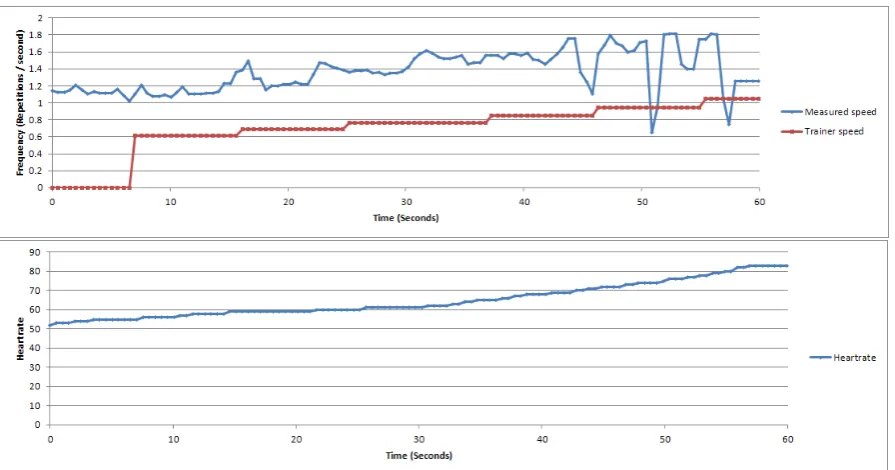
The most suitable mechanism for this, is changing the speed at which exercises are executed. By monitoring the heart rate, the coach knows whether the user is working hard and can adjust the difficulty accordingly. If the heart rate is too low the trainer increases his speed, if the heart rate is too high the trainer reduces his speed. There is an upper limit and a lower limit on the trainers speed to keep things reasonable. We hope the user will follow the trainers in increasing the speed, and also increase his own speed.
3.8
Example workout and feedbacks
A workout session consists of different parts. Each session will start with a warming up, to prepare the heart, lungs and muscles for the main workout. The workout then continues with strength training exercises, to increase muscle strength. After this are cardio fitness exercises, to train the cardio vascular fitness. To reduce muscle pains after a heavy workout, a session ends with some stretching.
states the goals of the exercise (warming up, strength training, cardio fitness). While doing the exercise, the trainer gives verbal feedback or stops the exercise if something needs to be demonstrated.
3.8.1 Exercises
Below we describe several exercises, explain how they are done and list the feedbacks a trainer could give.
Side Steps
Goal Warming up muscles, preparing heart and lungs for workout.
Instructions This exercise is for warming up. Stand with your arms hanging beside you. Step sideways with one leg and at the same time spread your arms. Then move your other leg to the new position and let your arms hang again. Then we repeat this in the opposite direction. We will repeat this a few times.
Feedback
• Incorrect movement with the arms or legs • Too small movements with the arms or legs • Movement of arms and legs not synchronized • Not working intensely enough
Jumping Jacks
Goal Warming up muscles, preparing heart and lungs for workout.
Instructions This exercise is for warming up. Stand with your arms hanging beside you. Jump and land with your legs standing wide apart, at the same time spread your arms. Now jump and land with the feet together and simultaneously move your arms close to your body again. We will repeat this a few times.
Feedback
• Incorrect movement with the arms or legs • Too small movements with the arms or legs • Not keeping the back straight
• Not working intensely enough
Squats
Goal Strength training for legs and buttocks.
Instructions This exercise trains the strength of your legs and buttocks. Stand with your arms stretched out in front of you. Now bend your knees and lower yourself, maintaining an upright position. Straighten your knees and stand up again. We will repeat this a few times.
Feedback
• Incorrect movement with the arms or legs • Too small movements with the arms or legs • Not keeping the back straight
Head-Shoulders-Knee-Toes
Goal Strength training for legs and buttocks.
Instructions This exercise trains the strength of your legs and buttocks. Stand up straight, touch the top of your head with both hands. Move your arms and touch your shoulders with your hands. Bend a little and touch your knees. Bend further until your hands touch your toes. Repeat in opposite order. At the end, jump and reach as far up with your hands as you can. We will repeat this a few times.
Feedback
• Incorrect movements • Too small movements
• Not keeping the back straight • Not working intensely enough
3.8.2 Feedbacks
Below is a list of all feedbacks the trainer can give for the example exercises.
• Incorrect movement of the arms (spoken + visual demonstration)
• Incorrect movement of the legs (spoken + visual demonstration)
• Incorrect movement (spoken + visual demonstration)
• Too small movement of the arms (spoken)
• Too small movement of the legs (spoken)
• Too small movement (spoken)
• Not keeping the back straight (spoken)
• Movement of arms and legs not synchronized (spoken)
• Not working intensely enough (spoken)
We will list polite feedback versions of “too small movement of the legs” as an example, the exact polite versions of the other feedbacks are left out of this report.
In the section that describes the interaction model, we mentioned different types of utterances and which politeness tactics can be used with that type of utterance. The feedbacks of the coach combine the suggest action and action feedback type of utterance, as they comment on the performance and suggest how to improve it. For “too small movement of the legs”, the action feedback is that the movement of the legs was to small, and the suggested action is to move the legs more. For the action feedback we can use the bald on record and positive politeness strategies, for the suggest action we can use the bald on record, conventional indirectness, joint goal, student goal, question, suggestion,and tutor goal strategies.
The action feedback can be said using different strategies, first bald on record:
• The movements of your legs are too small!
• You are not moving your legs enough!
Or it can be said using positive politeness:
• You’re doing great, but your legs do not move much.
The suggest action part has many ways to say it using the different strategies. First bald on record:
• Move your legs more!
• Make bigger movements with your legs!
• Move your legs as much as i do!
Or using indirectness:
• Can you see how big movements i make with my legs?
The trainer can motivate the user by referring to his, the users or joint goals:
• I make big motions with my legs, because i want to train them.
• Big movements with your legs train them better!
• Let’s make bigger movements with our legs to train them!
The feedback can be phrased as a question:
• Don’t you want to move your legs more?
• Can you move your legs more?
Or as a suggestion:
• You could make bigger movements with your legs!
Chapter 4
Architecture and implementation
This chapter discusses the technical design of the prototype software and the implementation of that design.
4.1
Software design
In this section different aspects of the prototype trainers software system are described. We present state diagrams for the prototype application, describe how the software is divided into modules, go into more detail for some of the modules where relevant and discuss communication between the modules.
[image:23.595.197.413.411.613.2]4.1.1 State diagram
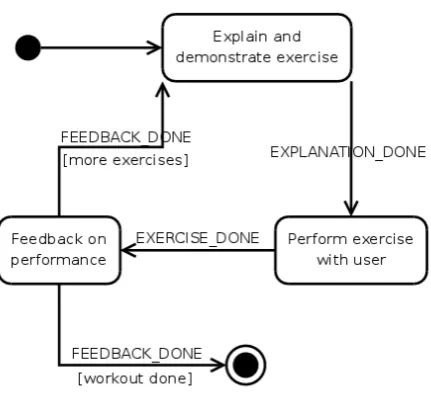
Figure 4.1: Program states during a workout session
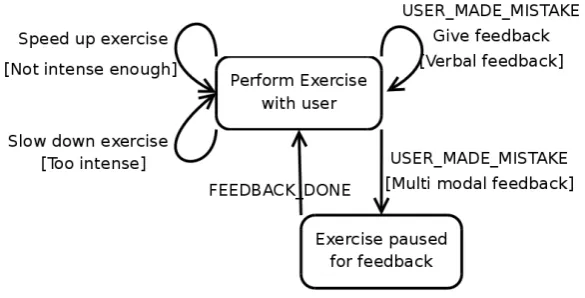
Figure 4.2: Interaction with the user during an exercise. This is a refinement of the “Perform exercise with user” state in figure 4.1. If the feedback is only spoken the trainer can continue doing the exercise in parallel, if the trainer needs to demonstrate an aspect of the exercise (this is labeled as multi-modal in the figure) execution of the exercise needs to be paused until the feedback is done.
The program starts by demonstrating and explaining the first exercise. The trainer then does the exercise together with the user and can give verbal feedback or additional instructions during the exercise. If the type of feedback requires it, the exercise can be paused and the trainer can for example demonstrate something. The intensity of the exercise is adjusted by speeding it up and slowing it down, the trainer will perform motions just before or after the user so the user adjusts his speed. After the exercise the trainer can give a motivational comment.
If the whole workout is done, the program stops. If the workout is not finished, the trainer will continue with the next exercise.
4.1.2 Architecture background
The virtual trainer is a type of software that is commonly called an embodied agent. There is much previous work on implementing embodied agents and there are different approaches that have proven successful, while other approaches have been superseded. Knowing the requirements of our software we can look at several options on implementing the reactive trainer and choose which features suit our application.
Wooldridge [2002] discusses several classes of agent designs and concrete examples, in order of com-plexity: Advantages, disadvantages and applications of the designs are discussed. Reactive agents are suited for very simple problems. Reasoning agents are mainly used in theoretical environments. Hybrid agents come from the realization that different tasks of an agent have different requirements and combine different layers, each with their own responsibilities.
Layered designs are quite flexible: they allow for complex behaviors and also quick responses if needed, however coordinating control between the different layers is a complex issue.
Figure 4.3: TouringMachines1: An example of a hybrid agent architecture.
Sloman [2003] has studied architectures of artificial and models of real minds, with a goal of under-standing and being able to design (parts of) an artificial mind. He describes different features, their role in agent architectures and presents example architectures for different applications. As the basis, infor-mation flows through three stages, from sensory modules through processing modules to action modules. The processing modules are divided into reactive, deliberative and reflective layers by the type of task they perform. Reactive and deliberative layers are the same concepts as in hybrid agents, the reflective layer contains learning tasks, which look at the performance of the system and attempt to learn from previous success or failure. There are some extra mechanisms, memory modules to store information, an alarms module to communicate with or alert other modules, information filters to filter inputs and a control module that decides which actions to execute.
Figure 4.4: The CogAff architecture [Sloman, 2003]
Not all (artificial) minds need all those modules, for example the class of reactive agents only has the lowest layer of processing modules, no memory and no information filters. Features can be selected depending on the requirements.
1TouringMachines agents controlled a mobile robot in a virtual world. Touring refers to the robot moving through the
[image:25.595.109.496.407.616.2]Th´orisson et al. [2004, 2008] describe a methodology to design software systems where a single external body is controlled by multiple internal functionalities. An additional goal is to support incremental development.
They propose to split functionality into modules, grouped into perception, decision/planning and action/animation modules. Within each group, modules are classified as low, medium or high level. Modules communicate using blackboards or a publish/subscribe mechanism. A blackboard is a module that stores and distributes messages and has a supervisor that decides who may handle a message. The state of the system should be in the messages exchanged using the blackboards, which implies stateless modules. They reason, if all data is in the messages, it is easier to later add modules that require access to that data.
4.1.3 Considerations for our architecture
There are several considerations that are important to discuss, to understand the reasoning behind the system architecture. We have discussed several other software architectures for agents and the issues they tried to address, we will try to apply their solutions to solve issues in our software design.
Each section below discusses some issues and how we will solve them.
Splitting functionality into modules
The interaction model described previously encompasses much functionality. Wooldridge [2002] discusses some monolithic approaches, using deductive logic and planning algorithms to achieve their goals. This resulted in poor performance, complicated planning algorithms or logic systems are not suited for solving problems in real-time. Sloman [2003], Th´orisson et al. [2004, 2008] split the behaviors into many smaller blocks communicating via messages, implementing the behavior using a sort of multi-agent system. This approach allows to change or add modules afterwards, giving a flexible, extensible design.
The modules we split the software into will have well defined responsibilities and we will attempt to keep modules from becoming too complex.
Timing requirements
Some modules require frequent updates and precise timing, for example the speed adjuster and wii input modules cooperate to predict timing of user motions and make the trainer move a little quicker. Doing this in real-time requires frequent inputs and adjustments.
Other modules do not have these strict timing requirements. For example updating the trainers mood or giving feedback needs to happen regularly, but it does not matter if it happens a few milliseconds earlier or later.
The software designs we discussed organize modules into layers, according to timing requirements and type of task. Input modules act immediately upon input events. A reactive layer for simple behaviors which require quick action. A deliberative layer for tasks that use some reasoning or planning to choose their actions. The trainer does not have reflective tasks (yet).
Communications system
There are several approaches for communication between modules. Sloman uses an alarms module to sig-nal other modules and (persistent) memory for storing and sharing data. Th´orisson uses blackboards and stateless modules, keeping as much state and data as practical in the messages that are exchanged. Some systems do without a central communication system, only passing messages directly between modules.
receive specific types of events and publish events so all registered modules receive their updates. The centralized messaging means, a module does not need to know who wants to receive his messages or is interested in his events. This can be useful if one module needs to send messages or events to many other modules, or if more modules are added later.
A blackboard is also a centralized communication system. There are different types of blackboards, but they have common goals: communication between many modules and storing the systems state. With some blackboards, modules need to poll for new messages, with others the modules have a callback. Some blackboards have filtering functions to limit unnecessary callbacks. As the state of the system is stored in the messages on the blackboard, multiple modules might receive a message, but only one can alter the systems state. Blackboards use a supervisor module to control this, which selects who may respond to a message.
While a blackboard is technically similar to a publish subscribe service, it has a different intended function: distributing and coordinating work orders versus exchanging messages.
Modules can also communicate directly, possibly using the observer pattern. This makes the system more tightly coupled, making later changes more difficult. But it does eliminate a possibly complex central communication system.
Our trainer is intended to be extendable, this means we need a blackboard or other central event service. Using a blackboard means modules exchange tasks or work orders, using a publish subscribe message framework modules exchange information. So far our system has been designed in terms of how information is processed through algorithms to provide data for the next algorithm, the data is central in our design. A publish subscribe messaging framework is most suited for this goal.
Avatar control
There are multiple modules competing for control of the avatar. Sometimes their interests conflict and we need to coordinate which module can control the avatar at which time. The avatar library can execute multiple behaviors in parallel, but only if they do not require control of the same body parts (for example, a facial expression can be in parallel with an arm gesture).
Depending on the state of the exercise, there are different interaction options and different modules can have control of the avatar. Figure 4.1 and 4.2 show the program states, as visible for the user, and illustrate what interaction options there are in what state during the workout.
Interaction of the avatar with the user should be a continuous process. This means, just like in reality, behaviors and motions transform smoothly to the next behavior. The avatar has a behavior scheduler that plans behaviors ahead to achieve this. The scheduler can interrupt or replace planned behaviors if needed.
Summarizing, we have the following issues:
• Coordinating control of the avatar functions between modules.
• Different modules can have control of the avatar, depending on system state.
• Interaction is continuous: behavior needs to be scheduled before it starts and may be interrupted a later time.
The avatar has a scheduler that can plan behaviors ahead and interrupt planned behaviors. Modules will schedule behaviors and interrupt running behavior for feedback as needed. Interrupting planned behavior means, that behavior and behaviors after it need to be re-scheduled. The avatar control module keeps track of scheduled behaviors and interruptions to re-schedule the interrupted behaviors.
module is programmed with the states in which it may control the avatar, and only produces behaviors in states were it is allowed to and when it want to control the avatar. For example, the error feedback module only schedules behavior during an exercise and at most twice per minute, except during the last repetitions of an exercise.
For each state one module is defined that controls advancing to the next state. To allow behaviors to be scheduled ahead of time, the avatar control module tracks when the behaviors of the current state are going to end and announces the upcoming state change. Modules can then queue behaviors for the next state and the avatar can smoothly transition to the next behavior.
Activating modules
The modules all need to do work at different intervals, or in response to different messages. We need a mechanism that activates the right module at the right time. For the modules that only need to be activated in response to messages this is trivial, we activate them when a relevant message is sent.
The rest of the modules needs to do processing at regular intervals, for example update some statistic every second. These modules can either run in their own thread of control or be activated using a timer. Conceptually they run in parallel and we will choose a suitable implementation.
4.1.4 Modules
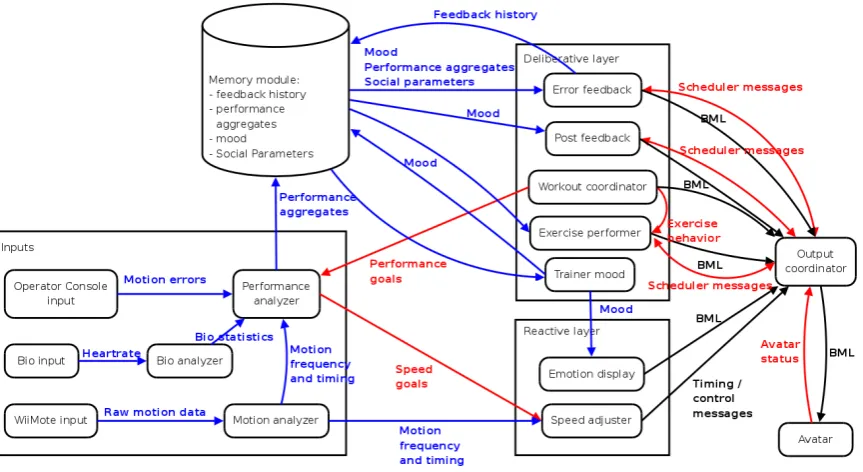
The system will consist of many small modules performing a part of the systems function. Below is a list of modules with a short description of their tasks, what modules they interact with and when they need to be activated. See figure 4.5 for an illustration of the modules and their interactions.
The grouping of modules into layers might be debatable. Currently, modules that only process input events and only are activated by events are in the “inputs” category. Modules in the processing stage are split into reactive and deliberative, depending on whether they do significant processing and use non-trivial algorithms to do their task.
The communication mechanism described before, a blackboard or a publish subscribe event module, is not present in the figure to avoid cluttering the image. It is used for communicating between modules nonetheless.
Low level input
Low level input modules receive input data directly from a sensor device or the operator. No further processing is done by the low level input modules, data is immediately forwarded to the input processing modules. These modules are activated by events.
• Wii input: reads motion data from the WiiMote controller. The WiiMote provides acceleration data on the X, Y and Z axis inm/s2.
• Bio input: reads raw heart rate data from a heart-rate sensor. The heart rate sensor transmits the current heart rate once per second.
Figure 4.5: The trainer architecture. Blue lines and text represent data messages, red lines and text are control messages and black lines and text are actions. BML is a kind of scripting language for behavior of an avatar. The system state related messages are left out, as they clutter the image to much. See the description of the output coordinator to read which modules transmit and receive those messages.
Input processing modules
The input processing modules process input data into a form the rest of system can use. These modules are activated by events.
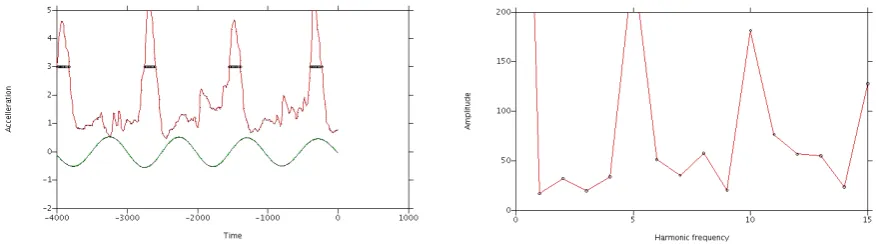
• Motion analyzer: processes motion data from the wii input module. Calculates frequency and timing of motions for the speed adjuster. See below for more details.
• Performance analyzer: processes input data from the operator console, bio and motion analyzer. All input data go through this module, which among other things calculates average number and type of errors. See below for details.
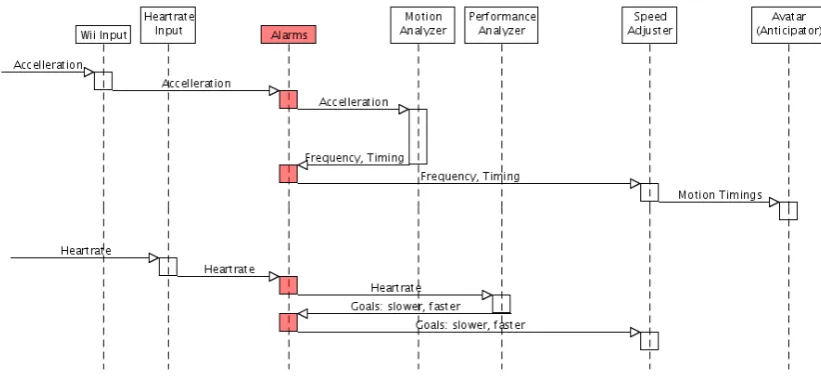
The motion analyzer cooperates with the performance analyzer and speed adjuster to implement the algorithm from 3.7.4 that adjusts the speed (and thus difficulty) of the exercise to optimally challenge the user. For this, the motion analyzer calculates a motion frequency and timing of motion extrema. The performance analyzer knows the exercise goals (how intense the exercise should be; this is set by the workout controller and can be different for every exercise) and uses the current exercise intensity to determine speed goals (slower, faster or ok), which are sent to the speed adjuster. The avatar then accepts predicted motion timing data from the speed adjuster and sets the timing of exercise motions.
Memory module
The memory module is used as a central data storage: Modules store data in it, which is processed further by other modules. This module is passive and does no processing of it’s own. It stores the following data:
• Trainer mood. Integer number, range [−5,5].
• Average number of errors over the last minute and last three minutes, for each type of error.
• Total average number of errors over the last minute and last three minutes. These are two numbers, the average number of errors per minute over the last and last three minutes, they are totals for all types of errors.
• History of feedbacks the trainer has given. This is a list of all feedbacks the trainer has given during this workout.
See figure 4.5 for an illustration of which module stores and accesses what data. The average number of errors per type and for all errors are stored on disk, so performance in the next workout can be compared to the current workout.
Reactive layer modules
Small, algorithmically simple behavioral modules that react directly to events from the input modules. Behavior of these modules can be controlled by the deliberative layer modules, by setting goals or parameters.
The speed adjuster was already discussed briefly with the input modules. It receives current motion timings and frequency from the motion analyzer and speed goals (accelerate, slow down or ok) from the performance analyzer. This timing of motions of the avatar is then advanced or retarded or alter the users speed. Over a time of 2 seconds, the timing of the avatar is advanced/retarded to the desired setting.
Deliberative layer modules
The deliberative layer modules use more elaborate algorithms than the reactive modules and their timing is less critical.
• Trainer mood: determines the trainers mood. Activated at an interval.
• Workout coordinator: Determine, explain and start exercises; programs other modules with the exercise goals and tracks the exercise status. Activated by events.
• Error feedback: gives feedback on mistakes the user makes. Determines when and about what mistake to give feedback. Activated at an interval.
• Post feedback: gives positive comments (if applicable) after an exercise. Activated by events.
• Exercise performerperforms the exercise with the user if needed.
The workout coordinator has a database of exercises, containing instructions and a demonstration, motions for the trainer, and some data about the exercise: goals (intended intensity), which muscle groups are trained, number of repetitions and duration. In the beginning, the user selects what the focus of the workout will be and the workout coordinator compiles exercises that fit the focus. The workout coordinator then proceeds to explain and start each exercise. Starting an exercise means transmitting exercise goals to the performance analyzer, giving the exercise performer the motions and broadcasting a state-change message that the exercise has started.
The exercise performer receives the exercise motions and data like number of repetitions from the workout coordinator. It executes the exercise together with the user.
The error feedback module uses the trainer mood to determine how ofter it will give feedback. We will use a linear relation, where a better mood means less feedback. The exact parameter needs to be determined by tests. To determine what feedback to give, it uses the algorithms from 3.7.3 and 3.7.1. From the memory module, the average number of errors per type and previous feedbacks are retrieved and the most important type of error is determined. The trainer mood and the selected error are then used to determine what feedback will be given. The error feedback module has a list of possible feedbacks per exercise, polite versions of those, and information about those feedbacks: inherent face threat for the type of feedback, face threat redress for the polite versions and whether the feedback is audio only or multi modal. The appropriate polite feedback is then determined and scheduled for output.
The post feedback gives supportive or positive comments after an exercise. It uses the trainer mood to determine what comment is given. It has a list of possible feedbacks, and for each feedback it has a mood when this feedback can be given.
Output coordinator
The output coordinator determines which module controls the speech and motions functions of the avatar, tracks when behaviors are finished and allows modules to schedule new behaviors. See 4.1.3 for a background of the algorithm. Activated only by events.
The output coordinator uses the avatar libraries scheduler to plan behaviors ahead and facilitate smooth transitions. Modules send behavior (BML scripts) through the output coordinator and indicate whether the behavior is exclusive, can run in parallel and if it needs to interrupt previously planned be-haviors. If behavior is interrupted, all future behaviors are cancelled. The output coordinator broadcasts a message so modules can re-schedule the cancelled behaviors.
All modules know the workout state and know when they may be activated, they only schedule new behaviors when they are allowed to take control of the avatar. Some modules have more heuristics, the error feedback only gives feedback once every (half) minute depending on the current performance.
For each state we define a module that is responsible for advancing the system to the next state. When that modules want to advance the system state, it first broadcasts a heads-up message for the upcoming state change. This allows modules to queue behavior for the next state, making for smoother transitions. When an upcoming state-change is announced, no more behavior is scheduled for the current state.
The output coordinator also signals modules when a scheduled behavior starts, finishes or is inter-rupted. If a behavior is interrupted, a module can for example re-schedule it. The module currently responsible for advancing the system state can announce the upcoming state change, if that modules last behavior of the current state starts.
If a behavior is interrupted while running, that behavior is cancelled. For technical reasons, it is not possible to pause and resume a behavior at a random point. This means that behavior start all over. This means it might be practical to cut behaviors that can be interrupted into smaller pieces, for example schedule each repetition of an exercise as a separate behavior.
imple-menting the software. The states in the program will be used so modules know when they may control the avatar. This gives us other states that what the user observes. Fewer states could be used if modules use additional heuristics to determine when they can be activated, for example the previous state or number of the current repetition. Using states to distinguish all situations where different sets of modules can be active makes it clearer what can happen and helps making the trainers behavior more consistent.
• Present workouts
• Explain exercise
• Exercise starting
• Perform exercise
• Exercise ending
• Exercise done
In the “present workouts” state the user can choose which workout he wants to do today. After the user has chosen a workout, the “explain workout” state is entered and the trainer explains the next exercise. The “exercise starting” state is for the first few repetitions of each exercise, letting the user get used to the exercise and not immediately bombarding him with mista
![Figure 4.4: The CogAff architecture [Sloman, 2003]](https://thumb-us.123doks.com/thumbv2/123dok_us/1191617.642404/25.595.167.449.119.209/figure-the-coga-architecture-sloman.webp)