project
PHILIP N. SMITH, DAVID F. BRAILSFORD, DAVID R. EVANS, LEON HARRISON, STEVE G. PROBETS AND PETER E. SUTTON Electronic Publishing Research Group
Department of Computer Science University of Nottingham Nottingham, NG7 2RD, U. K.
email:[email protected]
SUMMARY
The publication of material in ‘electronic form’ should ideally preserve, in a unified document representation, all of the richness of the printed document while maintaining enough of its underlying structure to enable searching and other forms of semantic processing. Until recently it has been hard to find a document representation which combined these attributes and which also stood some chance of becoming a de facto multi-platform standard.
This paper sets out experience gained within the Electronic Publishing Research Group at the University of Nottingham in using Adobe Acrobat software and its underlying PDF (Port-able Document Format) notation. TheCAJUN project1 (CD-ROM Acrobat Journals Using Networks) began in 1993 and has used Acrobat software to produce electronic versions of journal papers for network and CD-ROM dissemination. The paper describes the project’s progress so far and also gives a brief assessment of PDF’s suitability as a universal document interchange standard.
KEY WORDS Acrobat PostScript CD-ROM Networks Archiving Automatic linking
1 BACKGROUND TO THE CAJUN PROJECT
The aim of the CAJUN project was to disseminate ‘electronic’ versions of the Wiley journal, Electronic Publishing — Origination, Dissemination and Design (EP-odd), and the forthcoming Chapman and Hall journal, Collaborative Computing (CC), on CD-ROM and over networks.
EP-odd is currently formatted using troff [1] and LATEX [2], with the final output being rendered as PostScript using, respectively, the Adobe Transcript package and the public-domain program dvips. Part of the project involved revising the journal macros for these systems, in order to enable the automatic production of electronic forms of the jour-nals. It was also thought beneficial to gain experience with at least one journal from a non-computer science discipline, provided it was already published in PostScript. The Chapman and Hall journal Optical and Quantum Electronics (OQE) was selected for this purpose. This journal is currently being produced with Advent Desktop Publishing’s 3B2 software.
1
This project is jointly funded by John Wiley & Sons Ltd. and Chapman and Hall Ltd.
Various proprietary electronic document formats such as KnowledgeSet Corporation’s Knowledge Retrieval System, Dynatext’s Dynabook and Interleaf’s WorldView were con-sidered as vehicles for the CAJUN project but none of them provided the combination of page fidelity, flexibility and ease of generation which we sought. We wanted a format that would retain the ‘look and feel’ of a printed journal without resorting to cumbersome and inflexible bitmapped pages. There had to be support for fast and efficient browsing of documents, using hypertext links and text search mechanisms, within viewer software that would be available for all the popular hardware platforms. It was also important that we should be able to generate the underlying format easily from our PostScript and troff/LATEX sources. Most important of all, we wanted a format that was flexible enough to become a widely-used platform-independent standard, documented in the public domain, rather than just another proprietary system.
The preliminary announcement of Acrobat from Adobe Systems Inc., late in 1992, addressed many of our requirements and in January 1993 the CAJUN project acquired Acrobat software, under β-test conditions. It was decided to use this format for the remainder of the project.
2 WHAT IS ACROBAT?
Acrobat is the generic name for a suite of software operating on a document representa-tion called the Portable Document Format (PDF) [3], which has been developed by Adobe Systems Inc. The imaging model of PDF is very similar to that of Level 2 PostScript [4]. A PDF document contains a device-independent description of the appearance of each page, together with hypertext links, ‘yellow sticker’ annotations, bookmarks (a kind of electronic table of contents) and small thumbnail views of the document pages. All these extra features are aids to document navigation on a computer screen. The PDF format supports various forms of compression such as JPEG and CCITT fax for images, and overall LZW encoding. It allows all of this information, some of which will be ‘binary’ in nature, to be mapped to a 7-bit, base-85 ASCII representation, thus simplifying inter-platform network transportation. The PDF file structure differs from PostScript in that instead of being a simple series of page descriptions, it stores pages, hypertext features and other resources as randomly-accessible objects.
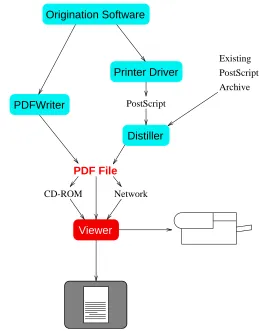
Figure 1gives an overview of the Acrobat publishing process. Since its appearance in 1984 PostScript has rapidly established itself as the industry-standard page description language. To convert a document for use with Acrobat the PostScript source is fed into a program called Distiller which translates PostScript into PDF. Distiller is an enhanced Level 2 PostScript interpreter which simplifies the page descriptions into the sequential, non-procedural language used in PDF, and builds the extra non-printable features accord-ing to parameters given to a new operator,pdfmark. This operator must appear in the PostScript program, but for the program to print without error on a standard PostScript printer, thepdfmarkoperator may be conditionally redefined in the program’s prologue simply to pop its arguments. Anything that can be described in PostScript can be distilled into a PDF document; any application that can generate PostScript can, at least indirectly, also generate PDF.
Existing
Archive PostScript
Network CD-ROM
PDFWriter PostScript
Printer Driver
Distiller
Viewer
PDF File
[image:3.612.171.430.96.427.2]Origination Software
Figure 1. The Acrobat publishing process
complex cases — for example, where an Encapsulated PostScript insert is to be included — it is necessary to produce the entire document as PostScript in the first instance and then to use Distiller to create PDF from the final PostScript output.
At present, PDF does not allow the underlying formatted text to be altered in any way — it is a fixed-page format. However it does provide the following ‘hyperfeatures’:
g Annotations — textual notes which may be added to the page, forming an electronic ‘yellow sticker’;
g Thumbnails — small JPEG-compressed images of each page which can optionally be displayed at the left-hand side of the screen;
g Links — clicking on a ‘button’ in a defined area of the page (e.g. a box around a word) causes a jump to some destination page (or to a different view of the current page);
g Bookmarks — a textual list, each entry of which is a link to a view of the document. The list has a hierarchical structure, any branch of which may be initially closed from view;
g Text search — scans the document for a given text string.
3 COMPLETING THE EP-odd POSTSCRIPT ARCHIVE
Although the long-term aim of CAJUN was to automate the production of PDF by re-processing source versions of journal papers with enhanced macros, the corresponding PostScript files offered a useful way to get started in advance of this automation, given that these files could be distilled directly to PDF.
PostScript was available for a small number of papers from OQE and about 80 papers for EP-odd. In the latter case problems arose straight away in that the EP-odd PostScript archive was not complete. In many cases gaps had been left in the printed text so that art-work could be ‘stripped in’ just before the journal was printed. To create a coherent PDF version of the document it was necessary to retrieve the original artwork from either the publisher or the author and to scan it in, using Adobe Illustrator software to vectorise the artwork wherever possible. The diagrams were saved as EPS and placed by hand into the existing PostScript for the paper (see below).
3.1 Scanning considerations
When scanning artwork, image resolution and the number of greyscale levels used must be balanced against storage size and the perceived quality of the image. Clearly, if the image can be curve-fitted accurately, the file size is reduced enormously and quality is also enhanced, particularly at high magnification. However, when curve-fitting is not possible, the options taken depend very much on the kind of image being scanned.
of less importance. For all these reasons material such as screen dumps or photographs can be left as bitmaps (with JPEG compression as an option), but line art should be converted out of bitmap form using software such as CorelDraw or Adobe Illustrator.
Factors influencing scanning resolution include file size and the avoidance of Moir ´e patterning. Another is the resolution of the output medium. As shown in Figure 1, the viewer can be used to print the document to a printer (PostScript or otherwise, using stan-dard printer drivers). For on-screen use, there is probably little point in having 1200dpi scans, but for printing to high end imagesetters this might be considered sensible — the owner of such a printer would be rather unhappy seeing images printed out at 300dpi. At the moment there is no support in PDF for multiple-resolution images as there is in OPI (Open Prepress Interface) [5]. With network dissemination in mind we favoured lower-resolution compact images.
3.2 The lost macros of EP-odd
Ideally psfig [6] would have been used to include the new EPS artwork in the troff and LATEX sources for the EP-odd papers. However, over the first five volumes there have been changes to the underlying software, and to the macros, which mean that reprocess-ing the source now, with the latest macros, results in pages where the line- and page-breaks are different to those in the already-published volume. Page fidelity was con-sidered to be of crucial importance and, sadly, some of the old versions of the macros had not been archived along with the source text. Our only recourse for obtaining identical appearance was to insert the EPS by hand, directly into the PostScript that had originally been used to print the journal. Fortunately it has proved possible to automate the produc-tion of PostScript and PDF (including all hyperlinks) for volumes 5 and 6 of EP-odd including all material for the Conference Proceedings of which this paper forms a part.
4 ADDITION OF HYPERSTRUCTURE
Having completed the PostScript archive of EP-odd and received PostScript versions of five OQE papers it was necessary to generate PDF versions of a sample of papers using Distiller, with appropriate inclusion of links, annotations, and bookmarks.
4.1 What hyperstructure should be added?
The choice of which items should be linked hypertextually and the visual appearance of link buttons was the subject of much debate. It was decided to use PDF intra-document
links,2from citations to references, from figure references to the actual figure or table and from footnote citations to the actual footnote itself. Any further embellishments could be added in the light of user reactions to the first release of the CD-ROM.
It was necessary to decide whether the linked text should be visibly distinct from the rest of the page, or invisible. Readers might, for example, be expected to realise that all citations are linked to the appropriate place. Acrobat only supports one kind of visible marking of the link: a black box drawn around the appropriate area of the page. This tends to clash with the surrounding text, particularly with the narrow line-spacing com-monly used in typeset journals. Instead it was decided to edit the PostScript to colour the
2
linked text and to indicate in the call of pdfmarkthat the usual box around the text should not be shown. Care had to be taken to choose a colour that rendered satisfactorily on greyscale monitors. It also had to be a colour that did not degrade too much due to dithering effects when rendered on a monochrome printer. Here again is a case for an OPI-style arrangement by which black might be substituted in place of the colour when printing out.
In addition it was necessary to decide what view of the document should be found at the destination of a link. Various options are available within PDF, which include:
g fitting an area of the page into the current window;
g fitting the width of the page to the width of the window and placing it with a specified position at the top of the window;
g positioning a specified point of the page at the top of the window whilst maintain-ing the current magnification.
The first two options allow the most control over what is actually seen by the viewer, but forcing the whole width of a page or a whole figure to appear in the window may result in poor image quality on lower-resolution (e.g. standard 640×480 VGA) displays. Retaining the magnification the viewer is currently using (which is presumably appropri-ate to the monitor in use) gets over this problem to some extent.
CAJUNβ-test sites provided feedback to the team at Nottingham using questionnaires and through regular project meetings. Consequently it was decided to mark-up all papers in the project according to the following guidelines:
g Buttons for links should be displayed in dark blue rather than being enclosed in a box. The shade of blue chosen is easy to distinguish on screen yet is dark enough to print clearly on a 300-dpi monochrome printer. Users of monochrome screen displays, probably small in number, will find it hard to distinguish the coloured text, but will at least know that all textual references are linked up.
g Link destinations should bring up a view of the document with the target material positioned at the top of the screen. The view should be at the current magnification, as this is the most comfortable for the reader.
g PDF bookmarks should be provided for all section headings at all levels. The desti-nation view, after following a bookmark, should be the same as for other links (i.e. beginning of section at top of page and current magnification).
4.2 At what stage should insertions be made?
The extra features can be inserted at various stages along the document’s generation path, using the viewer, editing the PostScript by hand before distilling, or using macros to automate the insertion ofpdfmarks into the PostScript.
4.2.1 Using the viewer
The Exchange viewer allows the user to create a button for a link by dragging out a box around the required area on the page. Drawingboxes3around words to be clicked on is tedious, inaccurate, inconsistent and subject to human error.
3
4.2.2 Insertions into the PostScript
pdfmark operators can be added to the PostScript and translated by Distiller into appropriate PDF constructs to generate the hypertext features. PostScript programs are tricky to edit safely (especially when bizarre transformations have been employed by the PostScript generation software) but final results for placement of buttons etc. are poten-tially much more accurate if done this way rather than with placement ‘by hand’ in the viewer. Furthermore, it is relatively easy to change allpdfmarks if the semantics of the operator change. Although PostScript is complex, documents generated by a given piece of software are all structurally similar, so insertion of the pdfmarks gets easier with experience. Of course, if a large corpus of PostScript is to be annotated, and provided that the items to be linked occur in the PostScript in a grammatically uniform way, then it is possible for a parser to insert the appropriate pdfmarks. Unfortunately, in our PostScript archive, there were occasions where several words appeared in the PostScript as one string. This meant that the string had to be broken up in order to find the location and dimensions of the specific word that was to be the button. For this reason, and given the relatively small amount of material to be transformed, we opted to amend the PostScript by hand.
4.2.3 Generation ofpdfmarks from source
It was, however, a principal aim of the project to automate the process of generating
pdfmarks from the troff or LATEX source. The EP-odd journal has been the main vehi-cle for our experiments in automating the ‘dropping down’ of PDF hypertextual informa-tion, from the source text into PostScript, by making use of thepdfmarkoperator within a set of enhanced formatting macros. In troff, the command \X is used to insert extra code into the PostScript, while the LATEX equivalent is the \specialcommand. The nature of the operands passed to thepdfmarkoperator depends on the type of structure being added, but here we concentrate on the generation of hypertext links from one part of a paper to another.
The links for reference citations, tables, figures and equations may be forward or backward references. In principle, all the processing can be achieved in a single pass, because the object-oriented structure of a PDF file does not dictate any ordering of the link objects within it. The locations of linked text and corresponding destinations could be gathered during processing of the source file and then written out inpdfmarkform at the end. However, the current version of thepdfmarkoperator, which encodes links for Distiller, establishes the source of the link implicitly, by requiring the pdfmark to appear within the PostScript for the page on which the button is to be located. This implies that if a link is to be forwards (e.g. from a citation to the actual reference at the end of the paper) the destination of the link will not be known at the time thepdfmark
The standard method of formatting references in troff is to use the refer pre-processor. Before the troff code for each reference at the end of the paper, refer writes a.]-macro call. This is modified in the revised macro set to write the position of the reference into an auxiliary file in the form of a PostScript dictionary. Thus as the file is processed, PostScript code representing the destination information is gathered in a separate file. At the same time, redefinitions of other macros called before and after the typesetting of citations (e.g. ‘[1]’), write down PostScript procedure calls into the main PostScript file. The only processing required after the single pass through troff is to insert the auxiliary PostScript file (and the procedure definitions) into the prologue of this main PostScript file.
The PostScript code which Distiller requires to make a link takes the following form:
[/Rect [<llx> <lly> <urx> <ury>] /Border [<border style>] /Page <page number> /View [<destination>] /LNK pdfmark
The value of the/Rectkey is the bounding box of the link button and this is calculated by the PostScript procedure calls either side of the citation text. Each executes the
currentpointoperator, thus giving the baseline position before and after the text. A fixed distance of 10 points is added to the second y-value to give<ury>. As well as cal-lingcurrentpoint, the procedure after the citation text looks up the destination coor-dinates and page number in the dictionary defined in the prologue. It then calls the
pdfmarkoperator to get Distiller to generate the link.
Although a more traditional two-pass process could be used in LATEX, it has been decided to employ the same methods as described above, using the same PostScript pro-cedures. The process is even neater, however, because dvips (unlike psdit) allows extra, document-specific, PostScript to be inserted into an existing PostScript prologue, so there is no need to build an auxiliary file and insert it at a later stage.
One difficulty with LATEX is finding the precise page positions of the destinations: LATEX leaves such decisions to the very last minute, particularly when floating figures are involved. Getting PostScript to give the destination position, as well as the button bound-ing box, was considered a possibility, but this would require a cumbersome extra pass through a PostScript interpreter before distillation. The solution we have adopted involves delving into the output routines of TEX to intercept the page just before output. Not surprisingly this has turned out to be a messy and difficult operation — and all of it necessitated, remember, by the need to lay down apdfmarkprocedure call at the source of a link, rather than being able to delay it until the destination has been encountered. Fortunately there is a possibility, in the near future, (see next section) that an enhanced version ofpdfmarkwill solve all our problems.
Generation ofpdfmarks for bookmark entries also requires extra processing in order to arrange them into a hierarchy reflecting that of the sections in the paper. This is also done with extra PostScript procedures defined in the prologue.
4.3 Generalising the processing of hypertext items
document, and on systems other than troff and LATEX. Applications wishing to generate PDF ‘hyperfeatures’ via distillation must be able to generate PostScript, so it is not unreasonable to use PostScript itself to do as much of the work as possible. On the contrary, this makes the application’s task easier, particularly as two-pass processing is not required.
A common factor for both troff and LATEX is that, being line oriented, neither of them can deliver the current position on the page to the same degree of accuracy that can be achieved with the PostScript currentpoint operator. It is for this reason that we chose to delay calculation of the button position to the PostScript stage. When version 2 ofpdfmarkbecomes available, with an optional argument for ‘source page number’, it will be possible to position allpdfmarks at the end of the PostScript file. Values for both the source and destination of a link will be determined usingcurrentpointand all of them can be stored in the PostScript dictionary ready for look-up at the end. There will be no need for troff and LATEX to calculate any values themselves.
This simplicity at the application end makes porting to other macro sets much easier; the real work is done by a standard set of PostScript procedures included in the prologue. Additionally, having amended the macros to include new facilities for passing down PostScript code, one can then alter their effect, in terms of the printed appearance of
links,4simply by adjusting or replacing the appropriate PostScript procedure.
5 ACROBAT IN CONTEXT
As discussed above, the placement of links into PDF files, starting from declarative mark-up, is made particularly awkward by the ‘concrete’ nature of PDF’s buttons and links and by the early binding to absolute page coordinates and to fixed page numbers. Other hypertext systems have also addressed this problem and the elegance of any solu-tion they propose seems directly related to the degree of abstracsolu-tion possessed by links within that system. We now survey a few such systems very briefly in order to highlight their strengths and weaknesses with respect to PDF.
World-Wide-Web (WWW) [7] is a good example of a networked hypertext system. A WWW document is written in HTML (Hypertext Mark-up Language) which describes the document at an abstract, structural, level (titles, headings, paragraphs etc.). HTML allows links to be specified in the mark-up, and these links can have a destination any-where on the Internet. Destination documents are specified using a Universal Resource Locator (URL) and an example of a paragraph containing such a link is shown below.
<p> In this paragraph there is a link from the word <a href=http://arrow.cs.nott.ac.uk/cajunintro.html#dest1> source
</a>
to an anchor named dest1 in the file cajunintro.html.
The WWW browser is responsible for formatting the document, which enables abstract links of this kind to be specified. In other words, the binding of links to formatted screen or page positions is carried out at a very late stage — there is no layout informa-tion within the HTML document itself.
WWW provides a more abstract method for specifying links than is currently avail-able in PDF but systems such as Guide [8] show the advantages of specifying buttons and
4
hidden information independent of any fixed location on a page. Like WWW, Guide’s hyperstructure is maintained in the mark-up describing the document and in this system the mark-up is based on troff notation. Guide implements inter-document links by the use of action buttons and also allows information to be hidden using a ‘folding paper’ approach. For example, the words ‘more details’ could be turned into a button. Upon selecting this button an example might then be inserted into the screen image of the document with all subsequent information being scrolled down the page. An example of a Guide document, with this type of button, is shown below. Here the button is specified between .Bu and .bU while the text to be revealed when the button is selected is bracketed between.Reand.rE.
.Bu 1 1 n Example .bU .Re .Nl EXAMPLE 1 .Nl rm myfile .Nl
removes myfile from the current directory .rE
Hypertext systems such as HyperCard [9], and NoteCards [10], stray away from a document model with sections and paragraphs, and instead use a card model as the basis for presenting information. Various interactive elements can be placed on the cards. Acrobat might be considered similar to this card model. An Acrobat document has a number of fixed pages which can be linked in any order. However, nothing is known about the contents of the page and so there can be no interaction with the elements thereon. Many products, including Intermedia [11] and Microcosm [12], allow links not only to text, but also to other media types such as video, musicetc.5Interestingly, both Intermedia and Microcosm allow links to be grouped (in webs or separate link-bases respectively) so that a whole set of links can be made active or inactive.
It will be plain from what has just been said that the design of PDF has deliberately been ‘bottom up’, with top priority being given to page fidelity, PostScript compatibility and high-quality rendering of fonts. The non-revisable page-based model currently adopted by Acrobat also means that buttons, ‘yellow stickers’ etc. have to be firmly anchored to definite page locations rather than logical elements of the document. The other systems we have mentioned point the way for future enhancements to PDF, particu-larly in the areas of abstract links, document shareability and multi-media capabilities.
6 DISSEMINATION OF PDF
6.1 File granularity
The PDF for our journal papers is in the form of a separate file for each paper. With inter-document links being unavailable until version 2.0 of Acrobat appears, we have adopted the temporary strategy of coalescing papers so as to make a single PDF docu-ment for each volume of the journal. Such a strategy causes few problems for
5
dissemination on CD-ROM where the capacity of around 650 MB is ample for containing many journal volumes. For network dissemination, though, this method is clearly not suitable — subscribers may have neither the disc space nor the inclination for pulling a multi-megabyte volume across the networks. For the time being, therefore, we are using paper-sized units for our network-based dissemination and awaiting the release of Acrobat version 2.0 to establish a standard platform-independent way of linking from one document to another.
6.2 CD-ROM dissemination
CD-ROMs are created from an IBM compatible PC using a Philips CD-Recorder (model CDD 521) and CDWRITE software. This software can write a DOS directory structure as an ISO 9660 [13] image to CD-ROM or to hard disc, or can simply copy an existing ISO 9660 image to CD-ROM. The CD-ROMs produced are of course readable by any machine with an ISO 9660-compatible drive and software.
PDF files are platform independent and experience has shown that Exchange software running on either the PC or the Macintosh has no problems in reading the same PDF files stored on the same ISO 9660 CD-ROM. However, until Acrobat is fully established in the marketplace, we also need to include program binaries of the Macintosh and PC viewers for subscribers to install on their hard discs. For the PC this is simply a matter of copying the viewer distribution floppies into the MS-DOS directory structure before writ-ing the CD-ROM. The viewer will then install from CD-ROM in the normal way. Also, clicking on PDF files launches Acrobat if it is not already running.
Unfortunately there are problems associated with using the CDWRITE software to transfer Macintosh binaries onto the ISO 9660 CD-ROM. These problems arise because in order that files should be correctly typed, the Macintosh requires features of ISO 9660 to be used which MS-DOS does not [14]. The work-around has included the develop-ment of an ISO 9660 editor to add in the extra information to the ISO 9660 image before it is actually written to the CD-ROM.
6.3 Network dissemination
Network dissemination falls into two categories — push methods and pull methods. Push-ing is the sendPush-ing of information by the publishers to subscribers. PullPush-ing is the accessPush-ing of information of choice by subscribers who log on to a service provided by the publish-ers.
The CAJUN proposal dealt solely with push methods, whereby the publishers would maintain a database of subscribers, and transfer PDF papers to these sites. A hierarchical directory structure was decided upon, to which each subscribing site should agree. Initial dissemination would occur by flattening the corpus of papers into a single file and send-ing this file from the publishers to the subscribers. The standard FTP file transfer methods [15] would be used to transfer the file. Tools to unpack this file into the appropriate directory structure would be provided. Upon each release of an issue, a new file would be disseminated, which would unpack into the appropriate place in the existing hierarchy.
suitable model for libraries, if an electronic subscription has been taken out for the entire journal contents, but it is not necessarily the best model for individuals wishing to browse through contents listings in order to acquire one or two papers of interest. In order to investigate ‘pull’ methods various network information retrieval (NIR) tools such as Archie, Gopher and World Wide Web are under evaluation. These tools use client-server models and, at the time of writing, an experimental service has been set up which gives access to free copies of six already-published EP-odd papers, in PDF form, via FTP or Gopher.
Clearly there is scope for a great deal more work in this area, especially if access to papers is to be restricted to registered subscribers or if detailed logging and accounting is to be introduced for all papers acquired in this way.
7 FURTHER WORK
Further work on the CAJUN project includes a final revision of the troff and LATEX mac-ros for EP-odd and for CC so that they can drop down the requiredpdfmarks and be used for the routine processing of all future papers. We also need to tidy up the PDF archive of all EP-odd papers. It is hoped that in the future more substantial work can be undertaken on the network dissemination issues, concentrating on pulling rather than pushing PDF files.
8 CONCLUSION
The CAJUN project has given invaluable insights into the use of Acrobat technology for journal publishing. Many of the problems faced and methods employed have been men-tioned in this paper but, in general terms, PDF already suits our purposes very well.
PDF could well exert an enormous influence on the future of electronic publishing, even in its present state, but future enhancements, both rumoured and promised, provide further opportunities. The format is at the moment very much page- and content-based and though the file structure is object-oriented to some extent, source and destination of links are still anchored to physical positions on the page rather than logical positions within the document’s structure. We look forward to new versions of PDF, and of Acro-bat software, to address some of these limitations. If plans to include logical structure go ahead, then more complex searching algorithms, content revisability and sophisticated database access become possible.
ACKNOWLEDGEMENTS
REFERENCES
1. J. F. Ossanna, ‘NROFF/TROFF User’s Manual’, Computing Science Technical Report No. 54, Bell Laboratories (11th October, 1976).
2. L. Lamport, LATEX: A Document Preparation System, Addison-Wesley, 1986.
3. Adobe Systems Incorporated, Portable Document Format Reference Manual, Addison-Wesley, Reading, Massachusetts, June 1993.
4. Adobe Systems Incorporated, PostScript Language Reference Manual, Addison-Wesley, Read-ing, Massachusetts, December 1990. Second edition.
5. Aldus, Open Prepress Interface Specification 1.2, June 1990.
6. N. Batchelder and Trevor Darrell, Psfig — A Ditroff Preprocessor for PostScript files, Com-puter and Information Science Dept., University of Pennsylvania, 1988. Internal Report. 7. World Wide Web, Further information can be obtained by retrieving a document with URL
http://info.cern.ch/hypertext/WWW/TheProjectinto a WWW browser (URL = ‘Universal Resource Locator’).
8. P. J. Brown, ‘A Hypertext System for UNIX’, Computing Systems, 2 (1), 37–53 (1989). 9. C. Kaehler, HyperCard Power: Techniques and Scripts, Addison-Wesley, 1988.
10. F. G. Halasz, T. P. Morgan, and T. H. Trigg, ‘NoteCards in a Nutshell’, in Proceedings of the ACM Conf. on Human Factors in Computing Science, ed. J. M. Carroll, and P. P. Tanner, pp. 45–52, April 1987.
11. N. L. Garrett, K. E. Smith, and N. Meyrowitz, ‘Intermedia: Issues, Strategies and tactics in the Design of a Hypermedia Document System’, in Proceedings of the Conference of Computer-Supported Cooperative Work, 1986.
12. H. Davis, W. Hall, I. Heath, G. Hill, and R. Wilkins, ‘The Design and Implementation of an Open Hypermedia System’, Computing Science Technical Report, Department of Electronics and Computer Science, University of Southampton (1992).
13. International Standards Organisation, ‘Information processing — Volume and file structure of CD-ROM for information interchange’, ISO 9660-1988 (1988).
14. Apple Computer Inc, CD-ROM and the Macintosh Computer, 1989.