New Classes of Applications in the Cloud.
Evaluating Advantages and Disadvantages of Cloud Computing for
Telemetry Applications
Anca APOSTU, Florina PUICAN, Geanina ULARU, George SUCIU, Gyorgy TODORAN
1, 2, 3
University of Economic Studies, Bucharest, Romania
4, 5
University Politehnica of Bucharest, Romania
[email protected], [email protected], [email protected], [email protected], [email protected]
Nowadays companies are moving some parts of their businesses to the cloud. Industry predictions are that this trend will continue to grow and develop even further in the coming few years. While Cloud computing is undoubtedly beneficial for mid-size to large companies, it is not without its downsides, especially for smaller businesses. This paper‘s aim is to deliver an analysis based on advantages and disadvantages of Cloud computing technology, in order to help organizations fully understand and adopt this new computing technology. Finally, to prove the advantages that Cloud technology can have for this domain, we are presenting a cloud application for telemetry, with a focus on monitoring hydro-energy. We consider that the way to attain the benefits of Cloud technology is to understand its strengths and weaknesses and adapt to them accordingly.
Keywords: Advantages, Architecture, Cloud Computing, Grid Computing, Telemetry
Introduction
Nowadays evolution has its premises on the fact that faster access to innovation drives higher productivity. The Web is recognized as epicenter of innovation. Rapid innovation powered by the Cloud has an advantage over traditional technology cycles: employees adapt to a continuous stream of manageable improvements better than they tolerate large, disruptive batches of change. Gradual iterations in bite-sized chunks substantially reduce change-management challenges. Conversely, employees are subjected to a painful re-learning cycle each time companies upgrade traditional software.
2. Cloud computing - actual context Because data is stored in the Cloud instead of on employee computers, Cloud computing enhances multiple users to access and contribute to projects simultaneously without worrying about using the same operating system, software, or browser. For example, instead of collaborating on a document by sending
back and forth revision after revision as attachments, documents are stored in the cloud. Co-workers can access the web-based document simultaneously in their browsers, and even make changes that other authorized users can see in real-time. Eliminating attachment round-trips by storing data in the cloud saves time and reduces frustrations for teams who need to work together efficiently.
Through synchronous replication, data and user actions are mirrored in nearly real-time across multiple data centers. If one data center becomes unavailable for any reason, the system is designed to instantly fall back to a secondary data center with no user-visible interruption in service.
Cloud provides extensive flexibility and control. Nevertheless, moving to the cloud doesn't mean that businesses lose control of their data or their technology. For example, the Google Apps Terms of Service explicitly state that customers retain ownership of their data in Google Apps.
Furthermore, cloud providers give controls so administrators can manage which
applications their users can access and how employees can use each service. They also allow administrators build custom functionality and integrations with other technologies.
Going detailed in the topic of Cloud Computing we must mention that Cloud Computing is split in three different categories according to [1]:
1. IaaS - Infrastructure as a Service: Virtual provision of computing power and/or memory. Source [2] mentions as prominent example of an IaaS service the Amazon WS service. 2. PaaS – Platform as a Service:
Provision of a runtime environment, like application servers, databases. In this area, paper [2] provides Google’s App Engine as probably the most prominent example.
3. SaaS – Software as a Service: Provision of usually browser based applications that can directly be used. Google Docs or the Customer Relationship Management software of salesforce.com might serve as examples.
3. Evolution is shown by new achievements - distributed computing versus grid computing
Cloud evolved from Grid computing, but the latter can function separately. Cloud definition usually superposes with Grid computing technology or more generally with distributed computing definition. From the end user perspective, the interest in what actually happens “behind the scenes” in Cloud is minimum, in comparison with system administrators who virtualize servers and handle applications in cloud. Grid Computing is the infrastructure on which cloud computing relies.
There are differences and similarities between the two mentioned technologies. Cloud and grid computing assure scalability, they are multitasking and share resources among a large number of end users. The differences come by analyzing
the computing model, data management, the visualization or security model. Grid Computing “enables resource sharing and coordinated problem solving in dynamic, virtual organizations” [3]. From computing model perspective, grid computing uses batch computation and via batches there are identified users and the number of processors required, whereas Cloud computing functions with resources shared by users in the same time.
Data management structure is very important to provide management implementation to the needed data and also fast and efficient data retrieval. Grid computing is using data ware schedulers [4], but Cloud might be challenged by the data handling from applications, without investing in the data access patters. Virtualization and encapsulation are very used in cloud and more intensively in grid computing, because the grid holds the control on the resources, without necessarily virtualizing them.
From the security model perspective, there might be a potential issue in cloud. For data protection, the users might desire to manage their own private keys, but for this, detailed private key management should be provided. Nevertheless, from Grid computing perspective resources are heterogeneous and have their autonomy. The security in Grid computing is assured in the infrastructure.
Our comparison between the two technologies puts in spot light the common share of visions and architectures, but also the differences between them at the data management and security model. We have identified the weaknesses that should be overcome by both technologies in order to speed up their evolution.
4. Analysis of advantages and disadvantages of cloud computing
In the following section we are presenting the main advantages and disadvantages of Cloud Computing applying them for telemetry applications.
A. Advantages of Cloud Computing
Speaking about advantages of Cloud Computing we present bellow the main benefits for businesses in general, focusing at some points on examples for small businesses:
Cost efficiency - Cloud computing is probably the most cost efficient method to use, maintain and upgrade, as explained in [5]. Traditional desktop software costs companies a lot, in terms of finance. Adding up the licensing fees for multiple users can prove to be very expensive for the establishment concerned. The cloud, on the other hand, is available at much cheaper rates and hence, can significantly lower the company’s IT expenses. Besides, there are many one-time-payments, pay-as-you-go and other scalable options available, which make it very reasonable for the company in question. Paper [6] adds up that it lowers the cost for smaller firms which intend to apply the compute-intensive techniques.
Almost Unlimited Storage. Storing information in the cloud gives you almost unlimited storage capacity.
Backup and Recovery. Since all the data is stored in the cloud, backing it up and restoring the same is relatively much easier than storing the same on a physical device. Furthermore, most cloud service providers are usually competent enough to handle recovery of information. Hence, this makes the entire process of backup and recovery much simpler than other traditional methods of data storage.
Automatic Software Integration. In the cloud, software integration is usually something that occurs automatically. This means that Cloud users don’t need to take additional efforts to customize and integrate their applications as per own preferences. This aspect usually takes care of itself.
Easy Access to Information. Once the users register in the cloud, they can
access the information from anywhere, where there is an Internet connection. This convenient feature lets users move beyond time zone and geographic location issues.
Quick Deployment. Lastly and most importantly, Cloud computing gives the advantage of quick deployment. Once opting for this method of functioning, the entire system can be fully functional in a matter of a few minutes. Of course, the amount of time taken here will depend on the exact kind of technology that is needed for the business.
Easier scale of services. It makes it easier for enterprises to scale their service according to the demand of clients.
Deliver new services. It makes possible new classes of applications and deliveries of new services that are interactive in nature.
B. Performance achievement with Cloud Technologies and Parallel Computing Among the benefits of Cloud Computing there can be mentioned the accessibility to customized virtual machines, the payment done for what it is used and efficient resource allocation. Cloud computing brings advantages not only to large companies, but also to small and medium-sized ones, by outsourcing data infrastructure. The data can be accessed from any location, from the clouds.
Better performance is achieved in the context of parallel computing with Cloud technologies. Applications that encounter latencies can overcome their deficiencies by utilizing technologies such as Apache Hadoop (a study on Apache Hadoop is presented in paper [7]), MapReduce (former CGL-MapReduce) and Dryad. Nevertheless, more complex applications, with higher expectations from the performance point of view, require communication paradigms and customized network settings such as MPI (Message
Passing Interface), a standardized API used to implement parallel applications.
The MPI implications for virtualized resources might be analyzed through its implementation. The analysis of performance achievement implies the understanding of the complex process of the application's adoption of MPI and its impact on cloud resources. MPI sustains I/O operations, collective communication and point-to-point communication [6]. The improvements of MPI on the application reflect the mapping of the processors from the clusters. The CPUs evaluation might provide indicators regarding this aspect. From the performance point of view we propose a comparison for different characteristics of the parallel computing technologies. From the programming languages perspective, for MPI, there are used C++, Java and C#, for Dryad there are C# and DryadLINQ, for MapReduce and Hadoop the main used language is Java. The data usage is assured by MPI, Dryad and MapReduce through directories, shared files and local disks and for Hadoop by HDFS. The communication is achieved in MapReduce by distribution network, in Hadoop by HDFS, in MPI and Dryad by files and TCP pipes. The failures are worked on differently according to what technology is used; for MPI there is OpenMPI and for Dryad the failure is handled by the re-execution of maps. Cloud technologies enhance the way Big Data is handled and the processes used for failures approaches. The minuses might be considered when the computation is moved to data and the parallel computing is done on the local storage.
C. Disadvantages of Cloud Computing In spite of its many benefits, as mentioned above, Cloud computing also has its disadvantages. Businesses, especially smaller ones, need to be aware of these aspects before going in for this technology. The main risks involved in Cloud Computing are:
Technical Issues. Though it is true that information and data on the Cloud can be accessed any time and from anywhere, there are moments when the system can have some serious malfunction. Businesses should be aware of the fact that this technology is always prone to outages and other technical issues. Even the best Cloud service providers run into this kind of trouble, in spite of keeping up high standards of maintenance.
Security in the Cloud. The other major issue of Cloud is represented by security. Before adopting this technology, beneficiaries should know that they will be surrendering all their company’s sensitive information to a third-party cloud service provider. This could potentially impose a great risk to the company. Hence, businesses need to make sure that they choose the most reliable service provider, who will keep their information totally secure. “Switching to the cloud can actually improve security for a small business”, as mentioned by Michael Redding, managing director of Accenture Technology Labs, cited by [8]. “Because large cloud computing companies have more resources, he says, they are often able to offer levels of security an average small business may not be able to afford implementing on its own servers” [8].
Prone to attack. Storing information in the cloud could make the companies vulnerable to external hack attacks and threats; therefore there is always the lurking possibility of stealth of sensitive data.
Possible downtime. Cloud computing makes the small business dependent on the reliability of their Internet connection.
Cost. At first glance, a cloud computing application may appear to be a lot cheaper than a particular software solution installed and run in-house. Still, the companies need to
ensure that the cloud applications have all the features that the software does and if not, to identify which are the missing features important to them. A total cost comparison is also required. While many cloud computer vendors present themselves as utility-based providers, claiming that they only charge for what customers use, Gartner says that this isn't true; in most cases, a
company must commit to a
predetermined contract independent of actual use. Companies need to look closely at the pricing plans and details for each application.
Furthermore, “the increase of the demand for computing resources has led to the deployment of cloud computing data centers and to a corresponding and significant increase of the total energy consumed by these infrastructures”, as paper [9] explains.
Inflexibility. Choosing a Cloud computing vendor often means locking the business into using their proprietary applications or formats. For instance, it is not possible to insert a document created in another application into a Google Docs spreadsheet. Furthermore, a company needs to be able to add and/or subtract Cloud computing users as necessary as its business grows or contracts.
Lack of support. Anita Campbell (OPEN Forum) writes, “Customer service for Web apps leaves a lot to be desired - all too many cloud-based applications make it difficult to get customer service promptly – or at all. Sending an email and hoping for a response within 48 hours is not an acceptable way for most of us to run a business” [10]. The New York Times writes: “The bottom line: If you need handholding or if you are not comfortable trying to find advice on user forums, the cloud probably is not ideal” [11].
Paper [12] adds up “some of the major technical risks, which include: multi-tenant
environment; internet as connection; system complexity and loss of control.” Also “new vulnerabilities inherent to Cloud computing include breaches from one virtual computing space to another, misappropriation of session security from web protocols, and limited encryption capabilities in many protocols.”
As paper [13] explains about adoption of Cloud computing, “it doesn't mean that every small business should immediately throw out all their servers and software and conduct all their business operations in the cloud”. Small business owners have different needs and different comfort levels. It may be more advantageous for you to use cloud computing only for certain applications. Or even not at all. Previously to adopting Cloud computing, business owners should consider how these disadvantages of cloud computing could affect their small business.
A very interesting comparative study based on cloud Computing is presented in paper [14] following a series of surveys conducted in Australia and Czech Republic at the end of 2011. The aim of this study was “to identify differences between adoption patterns in countries with different level of readiness for Cloud computing”. An interesting result of this research relates to changes in perception of adoption issues following a decision to adopt cloud services. The results indicate that “concerns about data security, IT governance, service availability and dependence on service provider are held by much lower number of respondents following adoption of cloud services”. Finally, the study indicates that “SaaS adoption is confined to a small number of relatively simple types of enterprise applications that include CRM, email and other types of collaboration software”. One can only say that Cloud computing is a complex and rapidly evolving concept, therefore companies should consider some important aspects when planning their initiative towards adopting this technology:
Understand what Cloud computing technology is, how it will evolve and under what circumstances it can offer value;
Evaluate models, architectures, technologies and IT organization best practices which are suitable for the companies which want to adopt Cloud computing in order to build
private cloud computing
environments.
Consider how IT will secure, manage and govern cloud services across public, community, private and hybrid environments.
Determine the which possibilities are for migrating applications to the cloud and if this brings value to the company and also determine opportunities to create “new cloud-optimized applications”[15].
Analyze the way in which Cloud computing will affect the strategy and direction of IT and identify the opportunities for the enterprise to “provide cloud services to customers or partners”.
D. Cloud Advantages for Telemetry Applications
After analyzing the advantages and disadvantages of Cloud, in this chapter we present a Cloud test platform for clean energy production telemetry, with focus on hydro-energy. We use different types of RTU’s (Remote Telemetry Units) and sensors that monitor and transmit important information from selected locations such as temperature, precipitation, water level in the dam, quantity of water captured during winter or summer.
The RTUs transmit sensor data over GSM/GPRS to our cloud platform where we can conveniently process the site specific data in near real-time, display it in our web-based visualization application and get detailed recommendations when and where to generate energy - resulting in optimized energy production and income.
Our system can be connected with other management systems to make better use of resources keeping in view other factors like energy price, consumption trends and to improve risk management [16].
Variable prices and rising costs of production are forcing energy producers to optimize production costs. Therefore "precision energy production", the optimized use of natural energy resources such as water, sun or wind is now indispensable. The growing environmental awareness of consumers further accelerates this process and promotes the usage of remote automatic monitoring system for field information such as the one we developed.
We will introduce SlapOS [17], the first open source operating system for Distributed Cloud Computing. SlapOS is based on a grid computing daemon called slapgrid which is capable of installing any software on a PC and instantiate any number of processes of potentially infinite duration of any installed software. Slapgrid daemon receives requests from a central scheduler the SlapOS Master which collects back accounting information from each process.
SlapOS[17] is an open source Cloud Operating system which was inspired by recent research in Grid Computing and in particular by Bonjour Grid [18], a meta Desktop Grid middleware for the coordination of multiple instances of Desktop Grid middleware. It is based on the motto that ”everything is a process”. SlapOS Master follows an Enterprise Resource Planning (ERP) model to handle at the same time process allocation optimization and billing. SLAP stands for “Simple Language for Accounting and Provisioning”.
This structure has been implemented for cloud-based automation of ERP and CRM software for small businesses and aspects are under development under the framework of the European research project “Cloud Consulting”. We will use our platform hosted on several servers
running Ubuntu Linux – Apache – MySQL template with current software release. On our cloud testing environment we provide the platform for processing information from hundreds different sensors, enabling the analysis of environmental data through a large sample of RTUs. In previous approaches RTUs were implemented in most cases on a local server and no company could aggregate enough sensor data to consider automating the production process and providing the required resilience [19].
E. Cloud Telemetry Components
Telemetry systems have a large area of usage, as presented for example in paper
[20], for “rain rate measurements” or for “distributed wells” in paper [21].
1) Cloud Architecture
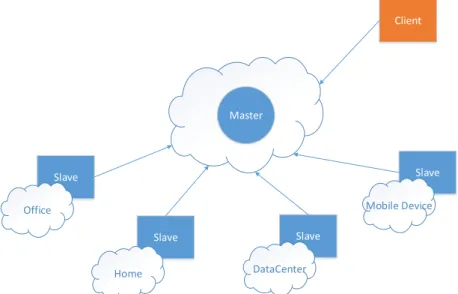
SlapOS is based on a Master and Slave design. Slave nodes request to Master nodes which software they should install, which software they show run and report to Master node how much resources each running software has been using for a certain period of time. Master nodes keep track of available slave node capacity and available software. Master node also acts as a Web portal and Web service so that end users and software bots can request software instances which are instantiated and run on Slave nodes.
Slave Slave Office Home Slave DataCenter Slave Mobile Device Master Client
Fig. 1 SlapOS Master – Slave Cloud Architecture
Master nodes are stateful. Slave nodes are stateless. More precisely, all information required to rebuild a Slave node is stored in the Master node. This may include the URL of a backup service which keeps an online copy of data so that in case of failure of a Slave node, a replacement Slave node can be rebuilt with the same data.
It is thus very important to make sure that the state data present in Master node is well protected. This could be implemented by hosting Master node on a trusted IaaS infrastructure with redundant resource. Or - better - by hosting multiple Master nodes on many Slave nodes located in different
regions of the world thanks to appropriate data redundancy heuristic. We are touching here the first reflexive nature of SlapOS. A SlapOS master is normally a running instance of SlapOS Master software instantiated on a collection of Slave nodes which, together, form a trusted hosting infrastructure. In other terms, SlapOS is self-hosted.
SlapOS Slave nodes are relatively simple compared to the Master node. Every slave node needs to run software requested by the Master node. It is thus on the Slave nodes that software is installed. To save disk space, Slave nodes only install the software which they really need.
Each slave node is divided into a certain number of so-called computer partitions. One may view a computer partition as a lightweight secure container, based on Unix users and directories rather than on virtualization. A typical bare-bone PC can easily provide 100 computer partitions and can thus run 100 RTU web portals or 100 sensors monitoring sites, each of which with its own independent database. A larger server can contain 200 to 500 computer partitions.
2) Telemetry Architecture
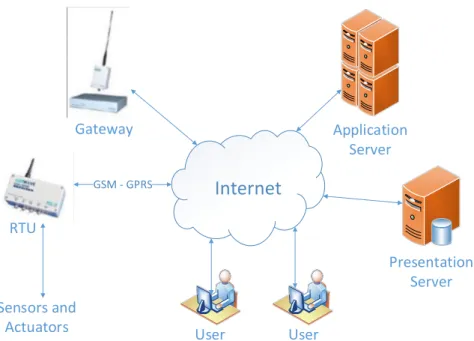
In Fig. 1 we present the general structure of the system that we are proposing for the tele-monitoring of installation sites in hydro power stations. At each of the
monitored installation site is mounted an installation built mainly from distant RTU, sensors and actuators. There will be used especially RTUs capable to communicate with the Gateway through GSM-GPRS and Internet. For the installation sites which are situated in no GSM coverage areas will be used RTUs in the UHF band of 430-440 MHz. These will communicate with the date concentrator through a bridge station (bridge) which will ensure the UHF-GPRS and GPRS-UHF conversion. In the relatively few instances when this will be
possible, the RTU-Gateway
communication will be held radio exclusively in the UHF band of 430-440 MHz.
Internet
Sensors and Actuators Gateway GSM - GPRS RTU Presentation Server Application Server User UserFig. 2 General structure of the tele-monitoring system
The key elements of the system are:
Gateway, which ensures the communication with the RTUs and available resource management;
Presentation Server (PS) which is hosted on a computer with server features (for example, unattended operation 24/24), equipped with a software packet focused mainly on data presentation in various forms, entirely available to users.
Application Server (AS), focused on special tasks, which PS can’t perform.
Practically, all system communication is done through Internet and this gives the system investment and mostly operational advantages. It is mentioned that the users can access the processed data, offered by the PS and AS anywhere and anytime, from any terminal with Internet access (PC, tablet, mobile phone etc.). The system’s central elements are configured and scaled so that they would allow a system takeover of 100 RTUs
5. Conclusions
We conclude that while Cloud computing technology can prove to be a great asset to companies, it could also cause harm if not understood and used properly.
We consider Cloud computing to be an opportunity for small businesses to balance the efforts implied by IT management of course limited by the disadvantages of Cloud, some of them presented in this paper. The first and most important concern is given by security issues related to having their business data in the Cloud or, in a simpler way, having their data out on the Internet. Nevertheless, the recommendation would be to begin adopting Cloud Computing for a smaller part of their business applications in order to be able to count down the benefits and also to identify the risks.
6. Future researches
“Companies that are dependent on the IT environment of today need to remain competitive and, in order to do this, they need to keep up with the most recent technologies such as Cloud computing, mobile devices and virtualization” [22]. As identified by Gartner’s Symposium/ITxpo in Orlando 2012 [15], Personal Cloud, Hybrid IT & Cloud Computing and Big Data will be between the most important ten strategic technology trends for 2013. Except for the much debated advantages of Cloud Computing these three trends represent major Cloud advances in the future and these will be subject for our future research.
References
[1] Chappell, D., A short introduction to cloud platforms: An enterprise-oriented view, White Paper, 13 pages, San Francisco, Chappell and Associates, 2008
[2] Marc Jansen, What does it service management look like in the Cloud? An ITIL based approach, Proceedings of the International Conference on Computers, Digital Communications
and Computing (ICDCC'11), Barcelona, Spain, September 15-17, 2011, pp. 87-92, ISBN: 978-1-61804-030-5
[3] I. Foster, C. Kesselman, J. Nick, S. Tuecke, The Physiology of the Grid: An Open Grid Services Architecture for Distributed Systems Integration. Globus Project, 2002.
[4] I. Raicu, Y. Zhao, I. Foster, A. Szalay. Accelerating Largescale Data Exploration through Data Diffusion, International Workshop on Data-Aware Distributed Computing, 2008. [5] P. Viswanathan, Cloud Computing – Is
it Really All That Beneficial? Advantages and Disadvantages of Cloud Computing,
http://mobiledevices.about.com/od/addi tionalresources/a/Cloud-Computing-Is-It-Really-All-That-Beneficial.htm [6] C. Evangelinos, C. Hill., Cloud
Computing for parallel Scientific HPC Applications: Feasibility of Running Coupled Atmosphere-Ocean Climate Models on Amazon's EC2, The First Workshop on Cloud Computing and its Applications (CCA’08), 2008, Chicago [7] E. G. Ularu, F. C. Puican, A. Apostu,
M. Velicanu, Perspectives on Big Data and Big Data Analytics, Database Systems Journal vol. III, no. 4/2012, pp.3-14, ISSN: 2069 – 3230
[8] O. EL Akkad, Outsource IT Headaches to the Cloud, The Globe and Mail, 11 November 2010.
[9] J. Rietz, R. Macedo, C. Alves, J. V. De Carvalho, Efficient Lower Bounding Procedures with Application in the Allocation of Virtual Machines to Data Centers, WSEAS Transactions on Information Science & Applications, Volume 8, 2011, Print ISSN: 1790-0832, E-ISSN: 2224-3402,
Available: http://www.wseas.us/e-library/transactions/information/2011/5 3-343.pdf
[10] A. Campbell, These Issues Need to be Resolved Before Cloud
Computing Becomes Ubiquitous, 11 August 2010, https://www.openforum.com/articles/ these-issues-need-to-be-resolved- before-cloud-computing-becomes-ubiquitous-1/
[11] D. H. Freedman, Thinking about moving to the Cloud? There are trade-offs, 21 September 2011, The New York Times
[12] J.L. Kourik, For Small and Medium Size Enterprises (SME) Deliberating Cloud Computing: A Proposed Approach, Proceedings of the European Computing Conference (ECC ’11) Paris, France, April 28-30, 2011,
Available: http://www.wseas.us/e-library/conferences/2011/Paris/ECC/ ECC-35.pdf
[13] S. Ward, 5 Disadvantages of Cloud Computing. Consider These Before You Put Your Small Business In the Cloud,
http://sbinfocanada.about.com/od/itm anagement/a/Cloud-Computing-Disadvantages.htm
[14] G. Feuerlicht, N. Margaris, Cloud Computing Adoption: A comparative study, Proceedings of the 1st WSEAS International Conference on Cloud Computing (CLC '12), Vienna, Austria, November 10-12, 2012,
Available: http://www.wseas.us/e-library/conferences/2012/Vienna/CO MPUTERS/COMPUTERS-71.pdf [15] Press Release, Gartner Identifies the
Top 10 Strategic Technology Trends for 2013,
http://www.gartner.com/newsroom/i d/2209615
[16] Z. Bocheng, "Design of Building Energy Monitoring and Management System," Second International Conference on Business Computing and Global Informatization (BCGIN), pp.645-648, Oct. 2012. [17] J.P. Smets-Solanes, C. Cerin, and R.
Courteaud, "SlapOS: A
Multi-Purpose Distributed Cloud Operating System Based on an ERP Billing Model," IEEE International Conference on Services Computing (SCC), pp.765-766, July 2011. [18] H. Abbes, C. Cerin, and M. Jemni,
“A decentralized and fault-tolerant Desktop Grid system for distributed applications” Concurrency and Computation: Practice and Experience volume 22, issue 3, pp. 261-277 2010.
[19] G.Suciu, C. Cernat, G. Todoran, G. Suciu, V. Poenaru, T. Militaru, and S. Halunga, "A solution for implementing resilience in open source Cloud platforms," 9th International Conference on Communications (COMM), pp.335-338, June 2012.
[20] D. Kandris, G. Kaltsas, C. Nomicos, Evaluation of Rain Rate Measurement Methods, Sensors and Systems, WSEAS / IASME International Conference on Energy, Environment, Ecosystems And
Sustainable Development
Vouliagmeni, Athens, Greece, July 12-14,
Available: http://www.wseas.us/e-library/conferences/2005athens/ee/pa pers/507-198.pdf
[21] E. F. Loshani, M. Sharifkhanim An Optimum Solution for Telemetry of Distributed Wells in South of Tehran, Proceedings of the 8th WSEAS International Conference on Signal
Processing, Robotics And
Automation, Cambridge, UK, February 21-23, 2009
[22] E.G. Ularu, F. Puican, A. Apostu, G. Suciu, A. Vulpe, Analytical databases for the Cloud and Virtualization, Proceedings of the IE 2013 International Conference, Bucharest, April 2013.
[23] Parts of the current paper have been
published in Conference
Proceedings: A. Apostu, F. Puican, G. Ularu, G. Suciu, G. Todoran,
Study on advantages and disadvantages of Cloud Computing – the advantages of Telemetry Applications in the Cloud, 13th WSEAS International Conference on
Applied Computer Science(Iwate - ACS '13) - ISI Proceedings, 23-25 April 2013, Morioka City, Iwate, Japan.
Anca APOSTU has graduated The Academy of Economic Studies from Bucharest (Romania), Faculty of Cybernetics, Statistics and Economic Informatics in 2006. She has a Master diploma in Economic Informatics from 2010 and in present she is a PhD. Candidate in Economic Informatics with the Doctor’s Degree Thesis: “Informatics solution in a distributed environment regarding unitary tracking of prices”. Her scientific fields of interest include: Economics, Databases, Programming, Information Systems, Information Security and Distributed Systems.
Florina Camelia PUICAN is a PhD. Student, in the third year, at the Institute of Doctoral Studies. Bucharest. In 2008, she graduated from Faculty of Business Administration with teaching in foreign languages (English), at the Academy of Economic Studies, Bucharest and in 2009, from Faculty of Mathematics and Computer Science, section Computer Science, University of Bucharest. From 2010, she holds a Master Degree obtained at Faculty of Business Administration with teaching in foreign language (English), at the Academy of Economic Studies, Bucharest. During her studies and work experience she undertook a wide range of skills in economics, information technology and information systems for business, design and management of information systems and databases.
Elena-Geanina ULARU graduated from the Faculty of Cybernetics, Statistics and Economic Informatics of the Academy of Economic Studies in 2008. She holds a Master Degree obtained at Faculty of Cybernetics, Statistics and Economic Informatics of the Academy of Economic Studies at the Academy of Economic Studies and is currently a Phd. Student, in the second year, at the Institute of Doctoral Studies, doing her research at the University of Economics from Prague.
George SUCIU graduated from the Faculty of Electronics, Telecommunications and Information Technology at the University “Politehnica” of Bucharest in 2004. He holds a Master diploma in Informatics Project Management from the Faculty of Cybernetics, Statistics and Economic Informatics of the Academy of Economic Studies Bucharest from 2010 and currently, his PhD work is focused on the field of Electronics Engineering and Cloud Communications. Also he is IEEE member and has received a type D IPMA certification in project management from Romanian Project Management Association / IPMA partner organization. He is the author or co-author of over 30 journal articles and scientific papers at conferences. His scientific fields of interest include: project management, electronics and telecommunication, cloud computing, big data, open source, IT security, data acquisition and signal processing. Known languages: German, French, English; He also has experience in project leading and participation in various
research projects (FP7, National Structural Funds), with more than 15 years activity in information and telecommunication systems.
Gyorgy TODORAN has graduated the Faculty of Electronics, Telecommunications at University “Politehnica” in Bucharest in 2000. He holds a Master degree in Quality Management (2001) and Strategic Management (2002) from the “Politehnica” University of Bucharest. Currently he is working on his Ph.D. thesis in security technologies with focus on open source, cloud computing, mobile and BYOD initiatives. He has more than 10 years of experience in commercial and governmental telecommunication systems, mainly in system administration, system management, design, project management, consulting.