Workstation Processors: A Comprehensive
Review
Tejas Muthal, Nancy Arora
U.G Student, Department of Electronics and Communication, Institute of Technology, Nirma University Gujarat, India
U.G Student, Department of Electronics and Communication, Institute of Technology, Nirma University Gujarat, India
ABSTRACT: The well-known processor designing powerhouse intel has numerous processors in the market. Only few of its processors are used extensively. Out of all not many are designated to work in a competitive environment. One such processor is the very famous Intel Core processor, on the other hand there is the less known Xeon Processor. Both these processors differ in terms of clock speed, number of cores, on board graphics, threads, cache, power consumed to name a few. Subsequently, the trade-off between clock speed and number of cores is brought into picture. Through this paper, we intend on grasping the context with which the Xeon processor was launched, how it fares in the present-day market, what are its specialties and the down sides when compared with the other processors in the market. The series of Intel Xeon processors has a power-efficient architecture designed to get an amazing utilization across any workload and provides high-speed connections between micro-processors and external memory or i/o hub. We ultimately draw a synopsis regarding its performance.
KEYWORDS: Intel Xeon, Processor Performance, Workstation, Xeon Platinum 8180M, Computer Architecture, Embedded Systems.
I. INTRODUCTION
The Xeon processors were introduced to power the non-consumer workstations. Such workstations were aimed at being premium products as compared to the consumer PCs with higher performance and dedicated uses like graphic designing, gaming, serving as a server to name a few. With the decline of the RISC processors in the late 90s, which were used in the workstations, Intel launched its first Xeon processor for the workstations/servers. The first processor in this line was named the “Pentium II Xeon”. This line of processor has coursed its way through numerous architectures, several cores, sockets to reach its final optimum state. Intel has claimed that, there is still room for improvement in the scope of cache utilization, hyper-threading algorithms and extended multi-socket support. The most recent development in this genre is that of the Xeon W Processor, released in January 2017. It is rumored that the former processor will be used in the apple iMac Pro Workstations. The latest Intel Xeon W processors comprises of a mammoth of 18 cores.
II. WHY XEON
The primary aspects which make manufacturers inclined to choose Xeon over any other workstation processor include, but are not limited to:
• Multi-Threading
• Multi-Core and Multi-Socket support
• Hyper Threading
The Xeon processors face competition in the workstation market by their own, core i7 processors as well as by the likes of AMD Ryzen and AMD Opteron processors. The discussion will be now be focused more on the various parameters which make the Intel Xeon, though quite expensive, the ideal choice over its counterparts. This topic is ambiguous, as very less people know the truth behind unlocking the true potential of their systems and acquiring the optimum configuration for a specific application. We hereby try, to resolve this issue in the best way possible.
A. Clock Speed versus Core Debate
The clock speed vs core debate got very tedious and complicated since the advent of Intel’s proprietary Turbo Boost technology. We need to understand some subsequently concepts. Before diving into these concepts, what we need to know is that an i7 processor there is in market has maximum 8 cores, while there exist Xeon processor with more than 20 cores. Are the more number of cores advantageous? Not always, let’s find out.
B. Performance Analysis
The performance of any processor is dependent on the time it takes to execute an instruction or for a calculation. The speed with which a processor executes an instruction is called the “clock speed”. The general idea is that higher the clock speed, better the performance. Here comes the concept of multi-threading. Some instructions/calculations are such that their execution is simpler, easier and faster when the work is divided in more than one cores. This gives rise to multiple cores. Execution of multi-threaded instructions is faster on processors with multiple cores. While executions that are single-threaded are not dependent on the number of cores on the processor. Hyper-threading is a concept solely introduced by Intel, which segregates every core into virtual and logical parts to further divide the workload among a single core itself. With reference to these, an intermediate conclusion is drawn that, multi-threaded processes work better with more cores, while single-threaded processes depend solely on the clock speed. Note that there are cases for a quad-core processor where certain instructions require two cores, in such cases the remaining two cores can function independently for the execution of single-threaded processes.
C. Turbo Boost
Turbo boost was introduced by Intel to increase the base clock speed of their processors when the need arises of accomplishing demanding tasks. The significant thing here is that the turbo boost clocking frequency depends on the number of cores that are being boosted. Turbo boost frequency will be maximum when only a single core is being boosted, whereas it will be relatively lesser when all the cores are under boost.
Table 1: Performance Comparison
Processor Parameter
Core Base clock All core Max.
count clock Clock Xeon E5 4 3.7 Ghz 3.8 Ghz 4.0 Ghz 1630 V4
Xeon E5 6 3.6 Ghz 3.8 Ghz 4.0 Ghz 1650 V4
For any process requiring 1-4 cores, the 1630 variant fares well with the maximum base clock speed, but if any process requires more than 4 cores, there is a limit in 1630 case. Improving the latter, Intel launched the 1650 processor, next in the E5 series. One might think the slightly lower base clock speed is a problem here, but both the above-mentioned processors share the same all-core turbo frequency. It is a general trend to observe dips in base clock speed with increase in number of cores as observed in 1660 significantly, yet it is useful in applications involving superior multi-threading.
Hence, it is interpreted by reasoning that more number of cores or higher base speed is not always the right option, it always depends on what user wishes to work on. Circling back to the initially made point that Intel’s Xeon processors have more number of cores than its i7 processor provides a definite advantage in execution of multi-threaded processes. Since 2014, 90% of all the instructions/calculations/processes are multi-threaded, providing Xeon based CPUs a natural upper hand.
III. XEON VERSUS OTHERS
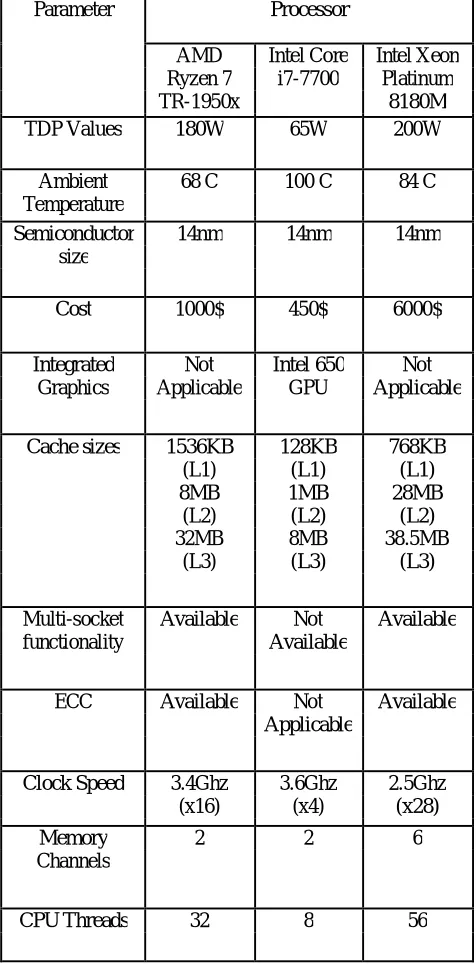
Here is a comparison of Xeon with its market’s competitors. Conclusions are drawn by taking into consideration the following factors
• Thermal Design Power
• Semiconductor size
• Cost
• Graphics on chip
• Cache Size
• Multi Socket Functionality
• ECC
• Over Clocking Functionality
• CPU Threads (Hyper Threading)
A. Parameter Description
The approach is simple, starting with defining each of the above terms, their optimum values, their impact on the processor performance and finally comparing them with Intel Xeon’s market competitors.
2) Semiconductor Size: Lesser the size of thesemiconductor, less bulky it is. It is also important to note that smaller is the size of the semiconductor chip, newer is the technology. Most of the chips built nowadays are built on the 14 nm.
Graphics on chip: Graphics on chips are available incertain processors that are oriented for consumer use and not industry or heavy work. This is because all the GPUs (or Graphical Processor Units) on the chips, though able, are only capable of functioning in a limited amount video demanding applications. For any process exceeding the capacity of the in-built GPU, the process is likely to fail. Hence most of the processors designed with the aim of powering industry grade computers or workstations are built without an in-built GPU and require an external GPU for executing video card demanding processes. An external GPU is several times powerful than an in-built GPU, because the external GPU works as a dedicated GPU.
4) Cache Utilization/Size: Cache is memory. RAM ismemory. The difference? Cache is easily accessible. Cache is that allocation of memory that is very close to the execution unit of a processor so that the time to taken to fetch data from such an allocation is very less. This time is known as latency. Cache is further divided into divisions, L1, L2, L3. L1 is the primary level cache nearest to the processor. It is bulkier in design and hence of lower capacity. L2 cache is a level down.
It is cache buried after the L1 cache in layman’s terms. It has more capacity compared to L1 cache and compact design. L3 cache is 2 levels down than L1. It has the maximum capacity out of the three cache levels and compact design.
5) Multi-Socket Functionality: Several high processingmachines such as servers and computers which do a lot of rendering and computer graphics are built with a motherboard that supports connection with 2 simultaneous CPUs. This feature increases processing performance very well, though the increase not directly twice as the increase is hampered by other features of the processor. There are several sockets produced by companies that support connection of 2 CPUs.
6) ECC Memory: Error correcting code memory or ECC isa type of memory capable enough of detecting and rectifying the simplest errors or data corruption. This functionality is quite expensive yet it is of utmost importance in places which cannot afford even the slightest of errors. Even processors without ECC can detect single bit errors by the use of a parity bit, but their functionality is restricted to detection and not rectification.
7) Over Clocking Functionality: Over clocking is a featureintroduced by certain chip manufacturers to encourage high end developers to unlock their processors’ true potential, though this would lead to higher heat dissipation and need for an effective cooling system. Such a feature is not available in certain systems, as they maybe intended for light usage or they may already have higher clock speeds and overclocking may not be safe for them or would not yield satisfactory improvement.
Table 2: Processor Comparison
Parameter Processor
AMD Intel Core Intel Xeon
Ryzen 7 i7-7700 Platinum
TR-1950x 8180M
TDP Values 180W 65W 200W
Ambient 68 C 100 C 84 C
Temperature
Semiconductor 14nm 14nm 14nm
size
Cost 1000$ 450$ 6000$
Integrated Not Intel 650 Not
Graphics Applicable GPU Applicable
Cache sizes 1536KB 128KB 768KB
(L1) (L1) (L1)
8MB 1MB 28MB
(L2) (L2) (L2)
32MB 8MB 38.5MB
(L3) (L3) (L3)
Multi-socket Available Not Available
functionality Available
ECC Available Not Available
Applicable
Clock Speed 3.4Ghz 3.6Ghz 2.5Ghz
(x16) (x4) (x28)
Memory 2 2 6
Channels
CPU Threads 32 8 56
IV. CONCLUSION
well justified in terms of the result that the product fetches. Having the maximum cores, best clock speed, most cache reserves are some of the compelling points in favor of the Xeon processor. Higher TDP values, expense and no overclocking are the downsides. The higher TDP values are balanced by the optimum working temperatures of the Xeon processor when compared with its AMD counterpart. Also, the proprietary Intel technologies like Turbo Boost, Speed Boost, Hyper-Threading make a user more likely to choose Xeon processors over the Ryzen processor. Such a processor when combined with a powerful GPU and necessary premium peripherals can give rise to a workstation, a server or a just a high-end computer with a dedicated purpose like computer graphics, industry software or just immersive gaming.
V. ACKNOWLEDGMENT
We express our gratitude to everybody who contributed and ensured the completion of this paper. We would like to specifically extend our thanks to Prof. Dhaval Shah, Department of Electronics and Communication, ITNU for rendering his guidance as and when required and hence enabling us to complete the paper in the stipulated timeframe.
We thank friends and family for their support and kind words of encouragement to see this paper through.
REFERENCES
1. Xeon", En.wikipedia.org,2017.[Online].Available: https://en.wikipedia.org/wiki/Xeon. [Accessed: 13- Sep- 2017]. 2. Multi-core processor", En.wikipedia.org, 2017. [Online].
3. Available: https://en.wikipedia.org/wiki/Multi-core_processor.[Accessed: 09- Sep- 2017].
4. W. George, "Actual CPU Speeds - What You See Is Not Always What You Get", Puget Systems. [Online]. Available: https://www.pugetsystems.com/blog/2015/07/09/Actual-CPU-Speeds---What-You-See-Is-Not-Always-What-You-Get-675/. [Accessed: 10- Sep- 2017]. For more information, see Table 1
5. Intel® Xeon® Platinum 8180 Processor (38.5M Cache, 2.50 GHz) Product Specifications", Intel® ARK (Product Specs), 2017. [Online]. Available: https://ark.intel.com/products/120496/Intel-Xeon-Platinum-8180-Processor-38_5M-Cache-2_50-GHz.[Accessed: 10- Sep- 2017]. 6. G. Create Pro, "Do I need lots of cores or a faster CPU clock speed? Cores, processors, GHz, multi-threading & hyper-threading explained –
Latest Apple Mac Pro News & Tips", Create.pro, 2017. [Online]. Available: http://create.pro/blog/need-lots-cores-faster-cpu-clock-speed-cores-ghz-multi-threading-hyper-threading-explained/. [Accessed: 12- Sep- 2017].For more information, seeII.B