Computer Vision Based Hand Gesture
Interfaces
Yash Velaskar1, Akshay Dulam1, Sagar Sureliya1, Shreyash Shenoy1, Chanda Chouhan2
Students, Department of Information Technology, Atharva College of Engineering, Mumbai, India1.
Assistant Professor, Atharva College of Engineering, Mumbai, India2
ABSTRACT: Considerable effort has been put toward the development of intelligent and natural interfaces between
users and computer systems. In line with this endeavor, several modes of information (e.g., visual, audio, and pen) that are used either individually or in combination have been proposed. The use of gestures to convey information is an important part of human communication. Hand gesture recognition is widely used in many applications, such as in computer games, machinery control (e.g., crane), and thorough mouse replacement. Computer recognition of hand gestures may provide a natural computer interface that allows people to point at or to rotate a computer-aided design model by rotating their hands. Hand gestures can be classified into two categories: static and dynamic. The use of hand gestures as a natural interface serves as a motivating force for research on gesture taxonomy, its representations, and recognition techniques. This paper summarizes the surveys carried out in human--computer interaction (HCI) studies and focuses on different application domains that use hand gestures for efficient interaction. This exploratory survey aims to provide a progress report on static and dynamic hand gesture recognition (i.e., gesture taxonomies, representations, and recognition techniques) in HCI and to identify future directions on this topic.
KEYWORDS: Human-Computer Interaction, Computer Vision, Gestures recognition,Gesture technologies,Static hand
gesture, Vision-based gesture recognition
I. INTRODUCTION
II. LITERATURE REVIEW
A lot of research is being done in the fields of Human computer Interaction (HCI) and its application in virtual environment. Researchers have tried detecting the virtual object to control system environment using video devices for HCI. By using the web cameras as the input device, various natural gestures can be detected, tracked and analyzed. To help achieve those gestures we used various image features and gesture Templates. Cootes et al [7] used Active Shape Models (ASM) to track deformable objects. M. Isard et al introduced random sampling filters [8] to address the need of represent multiple hypotheses while tracking. G. Kitagawa [9] applied Condensation algorithm in factored sampling to solve the problem of visual tracking in clutter. Hojoon Park [10] used index finger for cursor movement and angle between index finger and thumb for clicking events. Chu-Feng Lien [11] used only the fingertips to control the mouse cursor and his clicking method was based on image density, and required the user to hold the mouse cursor on the desired spot for a short period of time. A.Erdem et al [12], used fingertip tracking to control the motion of the mouse. A click of the mouse button was implemented by defining a screen such that a click occurred when a user’s hand passed over the region. Robertson et al [13], used another method to click. They used the motion of the thumb (from a ‘thumbs-up’ position to a fist) to mark a clicking event thumb. Movement of the hand while making a special hand sign moved the mouse pointer. Shahzad Malik [14] developed a real-time system which will trace the 3D position and 2D orientation of the thumb and index finger of each hand without the use of special color object or gloves. In 3D gaming Nasser H. Dardas et al. [15] developed a finger based gesture recognition system to control 3D game.
III. COMPONENTS
Human generated gesture:as a first step of implementation user will show one gesture. The gesture should be constant for some period of time, which is necessary for dynamic processing. These gestures should be already defined as valid gesture for processing.
Camera: Camera behaves as a digital eye of the system. It basically used to captures the scene that the user is looking at. The stream of video captured by the camera is passed to computing device which does the appropriate computer vision computation. The major functions of the camera are:
i. Captures user’s gestures and movement (used in reorganization of user gestures).
ii. Captures the scene in front and objects the user is interacting with (used in object reorganization and tracking). Image Processing Algorithm:This carries the major portion of implementation. First the captured image is
preprocessed by techniques like color space detection, color space conversion[YCrCb, HSV, RGB] & differentiation, Skin color detection using opencv[Emgu –cv wrapper] & finally line segment detection for finger detection. The algorithm will count the number of fingers shown by user, which will work as input for next processing.
Event Handling:Once the gesture is identified the appropriate command for it will be executed. This commands
will call the events for controlling the Home appliances Or Machine Operations.
Back to Capturing Gestures:Gesture recognition is a dynamic process so once particular gesture is identified and
appropriate control command is executed it will again go to capture next image and process it accordingly.
IV. USING THE TEMPLATE
This system could further be used effectively and independently for different purposes such as follows:
Control of consumer electronics
Interaction with visualization system
Control of mechanical systems
Computer games
Innovative applications could be designed in which gestures could be used to give commands to domestic devices like TV, lights, HI-FI systems, or garden gate closure.
commands would be disturbing, as well as for communicating quantitative information and spatial relationships. The idea is that the user should be able to control equipment in his environment as he is, and without need for specialized external equipment, such as a remote control.
Gesture Recognition System is not only beneficial for performing my computer task but its scope is very vast in day-to-day technical solutions.
1. Cyber net’s PowerPoint:
Cyber net in Ann Arbor, Mich., has created a gesture-recognition device that translates hand gestures into PowerPoint commands.
Cyber net’s latest research has focused on getting rid of the suit to make virtual worlds more realistic. That means creating software that can "read" a person's body movements and sync it with his virtual surroundings. A by-product of this research is the development of an interface that enables the user to control a PowerPoint presentation wirelessly with simple hand gestures. In fact, it makes use of a gesture recognition software and a camera and you can run an entire presentation without touching anything -- no remotes, no buttons, nothing.
2. Nokia’s Pod-Phone:
Nokia recently wanted to display its newest product, the Nokia 7100, to the European market, and it wanted to use cutting-edge technology to complement what it considered to be a cutting-edge phone. This led DTF to create what it calls a gesture-recognition interface (GRI) pod -- think of it as an extremely interactive kiosk.The GRI pod is a large, cocoon-shaped booth, with an opening on each side. The viewer leans back against a support and faces a built-in monitor. For the Nokia demonstration, a virtual Nokia phone bounced across the monitor; the viewer had to grab the phone before the demonstration would continue. The interaction with virtual objects in the real world was without helmets, no gloves or suits, just like reality. One has to just to turn on the phone for the demonstration to start." To give an extra dose of reality, olfactory sensors worked in tandem with the DVD presentation to create the smell of things onscreen.
3. Pointing Device:
Many gesture recognition systems are used as pointing devices. The use of the hand as a pointing device similar to a laser pointer. The system presented by Cantzler and Hoile is an example of this. Their system is designed to replace conventional 2D pointing devices like those such as touch pads, trackballs, and mice.
Information Objective
The system aims at controlling a particular application i.e Video player using hand gestures. The various operations that will be supported by this system are as follows:
Pause the video. Play the video.
Increase/Decrease volume of video. Switch between different videos. Exit the system.
V. SOFTWARE USED &METHODOLOGY ADAPTED
To develop an application based on sixth sense technology one can use
User Interface:The user could use either his left or right hand to form signs
Hardware Interfaces
i. A standard CCD or CMOS color camera will be used.
Software Interfaces
i. .NET Framework. ii. Emgu CV for Open CV. iii. Drivers of Camera.
Communications Interfaces:Parallel port interfacing.
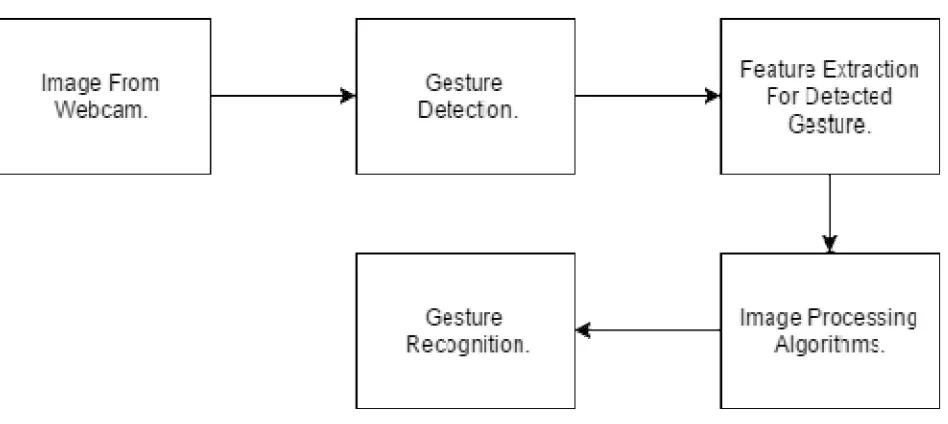
Fig 1. Hand Gesture Recognition Process.
Methods:
Initialization: It is basically a static approach. Different gestures are captured, enhanced, features are extracted and finally a gesture template or cluster model is created using different algorithm of artificial intelligence such as MLP with Feed Forward Network, Visual Memory, and K-Means Clustering etc. Figure 12 illustrate typical hand gesture training process [15] while figure 13 illustrates the use of k-means cluster algorithm. Figure 12. Hand gesture training process.
Fig 2. Overall program Flowchart
Acquisition: It is a real time approach where frames are captured using webcam or from a video input file.
1) Segmentation: In this technique each of the frames is processed separately. Before analysis: The image is smoothed, skin pixels are labeled, noise is removed and small gaps are filled. Image edges are found, and then a region detection algorithm is used to segment the target gesture from other background information. Finally features are extracted using popular methodology [Skin detections, Sift, SURF, FAST algorithms].
2) Pattern Recognition: Once the user’s gestures has been segmented and related features are extracted, it is compared with stored gesture templates or clustering model using different matching algorithm such as Hausdorff matching, Euclidean distance, hidden Markova model, Bag of Words, Hamming Distance, correlation based approach etc.
VI.RESULTS
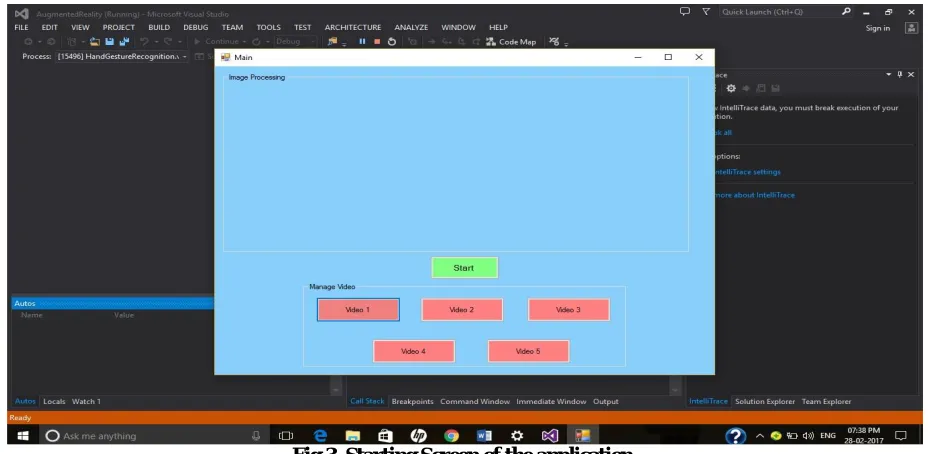
This is the first screen when the system starts executing. This screen enables the user to select the video he wants to play. Theuser has to click on “START” button to start the gesture capturing.
Fig 4. Gesture of Finger 1
When the user shows the finger 1 in front of the webcam then the video 1 starts to play. If the user shows the finger 1
again after the video starts playing, it will pause the video.
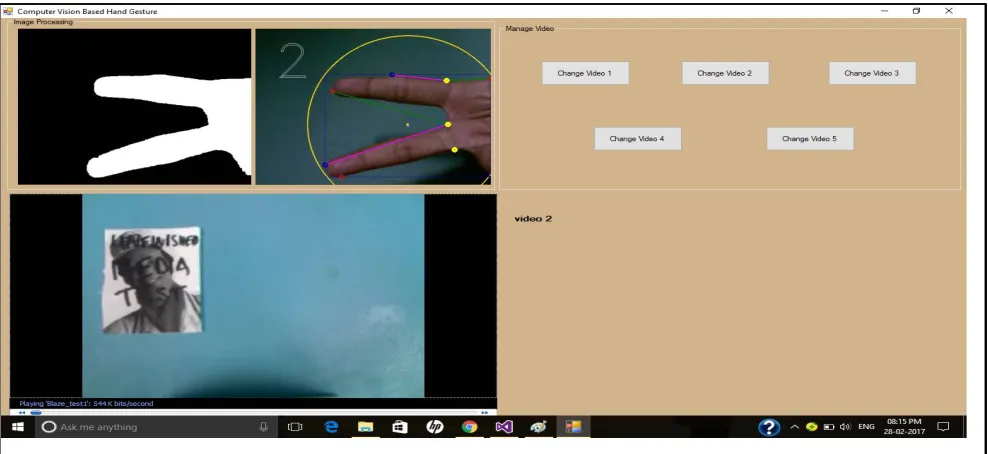
The given figure shows the output screen when the user shows 2 fingers in front of the webcam. The system starts playing the video 2 from saved path of videos. After the video starts playing, if the user shows the finger 2 again then the video starts playing again.
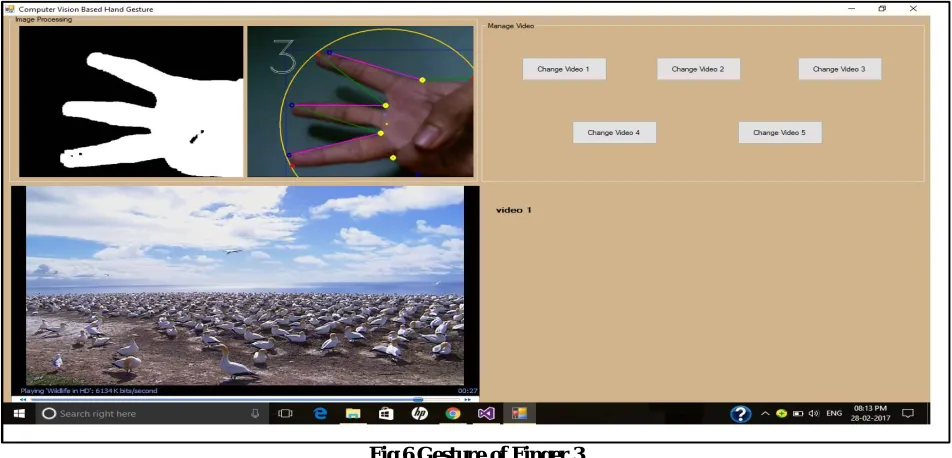
Fig 6 Gesture of Finger 3
The given figure shows the output screen when the user shows 3 fingers in front of the webcam. The system starts playing the video 3 from saved path of videos. After the video starts playing, if the user shows the finger 3 again then the volume of the video increases.
VII. CONCLUSION
Thus we propose to create a system that can identify human generated gestures and use this information for device control. The user performs a gesture in front of a camera, which is linked to the computer. The picture of the gesture is then processed to identify the gesture indicated by the user. Once the gesture is identified corresponding control action assigned to the gesture is actuated. Basically the purpose of this project is to develop new perceptual interfaces for human-computer-interaction based on visual input captured by computer vision systems, and to investigate how such interfaces can complement or replace traditional interfaces based on keyboards, mousses, remote controls, data gloves or speech.
REFERENCES
[1] A. Mulder, “Hand gestures for HCI”, Technical Report 96-1, vol. Simon Fraster University, 1996.
[2] F. Quek, “Towards a Vision Based Hand Gesture Interface”, pp. 17-31, in Proceedings of Virtual Reality Software and Technology, Singapore, 1994.
[3] Ying Wu, Thomas S Huang, “ Vision based Gesture Recognition : A Review”, Lecture Notes In Computer Science; Vol. 1739 , Proceedings of the International Gesture Workshop on Gesture-Based Communication in Human-Computer Interaction, 1999.
[4] K G Derpains, “A review of Vision-based Hand Gestures”, Internal Report, Department of Computer Science. York University, February 2004. [5] Richard Watson, “A Survey of Gesture Recognition Techniques”, Technical Report TCD-CS-93-11, Department of Computer Science, Trinity
College Dublin, 1993.
[6] Y. Wu and T.S. Huang, “Hand modeling analysis and recognition for vision-based human computer interaction”, IEEE Signal Processing Mag. – Special issue on Immersive Interactive Technology, vol.18, no.3, pp. 51-60, May 2001.
[8] M.A.Isard and A.Blake, ‘Visual tracking by stochastic propagation of conditional density’. In the 4th Proceedings European conference computer vision, pp.343 – 356, 15 April [1996], Cambridge, England.
[9] G.Kitawaga, ‘Monte Carlo Filter and Smoother for the Non – Gaussian Nonlinear State Space Models’. Journal of Computational and Graphical Statistics, Vol. 5, No. 1, 1996, pp.1 – 25.
[10] Hojoon Park, ‘ A Method for Controlling Mouse Movement using a Real – Time Camera’ 2008.
[11] Chu – Feng Lien, ‘ Portal Vision – Based HCI – A Real Time Hand Mouse System on the Handheld Devices’.
[12] A. Erdem, E. Yardimci, Y. Atalay, V. Cetin, ‘Computer vision based mouse, A. E. Acoustics, Speech, and Signal Processing’. Paper presented at the proceedings, (ICASS). IEEE International Conference, 2002.
[13] Robertson P., Laddaga R., Van Kleek M., ‘Virtual mouse vision based interface’, In the Proceedings of the nineth – international conference on intelligent user interfaces, pp. 177 – 183. Available from: ACM Portal: ACM Digital Library. [January 2004] 2894 International Journal of Engineering Research & Technology (IJERT) Vol. 2 Issue 12, December - 2013 IJERT ISSN: 2278-0181 IJERTV2IS120921 www.ijert.org
[14] Shahzad Malik, ‘Real-time Hand Tracking and Finger Tracking for Interaction’,CSC2503F Project Report. [18 December 2003].