Implementation of Embedded Web Server for
Wireless Sensor Networks
P. G. V. Suresh Kumar
Associate Professor, Department of IT & SC, AAiT, Addis Ababa University Addis Ababa, Ethiopia
Abstract ---This paper presents an implementation of a platform independent embedded web server and its integration into a network of wireless sensor nodes. The embedded web server is designed and built as an expansion module for one of the nodes in the wireless sensor network (WSN). It allows authorized Internet users to establish two-way communication with the sensor network. The server uses limited available hardware resources to implement an interface to the WSN node and to serve dynamic HTML pages to the remote user. This allows the user to monitor the operation of the WSN remotely, to periodically download the sensed data, and to change the operation mode of the network. In addition to providing monitoring and data collection services, the embedded web server can generate email alerts about critical Issues in the WSN, provide secure access to modules that change the operation of the WSN, shut down sensor nodes, and log data from the network into an on-board flash memory.
Keywords — wireless sensor network, embedded web server, Remote monitoring and control etc
I. INTRODUCTION
Conventional data collection and monitoring methods, which require physical presence at the research site, could in many cases be replaced by remote monitoring over the Internet. This requires the Internet infrastructure to be available at the site, and that some of the devices in the data monitoring and collection network are enabled. A web-enabled device has a web server either integrated during the design of the device or added later as an expansion board. To distinguish such a web server from its full-featured, personal computer based cousin, we call it an embedded web server (EWS). The name should also stress the fact that such a web server, in most cases, has
limited computational, storage, and energy resources available. Despite its hardware shortcomings, the EWS is expected to implement many of the services available on regular web servers. It has to be able to receive requests and commands from a remote Hypertext Transfer Protocol (HTTP) web client. It also has to be able to send the control and management interface of the web-enabled device in the form of Hypertext Markup Language (HTML) pages, through which the user can monitor and control the device. A web-enabled network device
allows the user to access the device using user friendly, platform independent and universally available web browsers. This eliminates the need for developing client software and it does not require the user to install additional software on her or his computer. Unlike the standard web browser, an embedded web server must have a relatively small footprint, both in terms of physical size and software size, to allow its easy integration into many devices. The user management interface should consist of standard HTML constructs, objects and images, and allow the user to interact with the device over the Internet. The device home page should provide the central navigation point to the device controls and data. The device should respond to user actions involving web page buttons, hot links, and other familiar browser controls. This paper describes a EWS built primarily to serve as a remote access and control interface to wireless sensor networks (WSN). The constraints in terms of available energy, storage and computational resources can even be more stringent in this case. Fortunately, some of the features that are almost invariably required of regular web servers (such as the ability to serve multimedia content) are not considered to be crucial in the case of embedded servers for WSN. However, such a server will still have to be able to serve dynamic HTML pages, provide two-way communication, and to deal with large amounts of data. In addition, it will be required to implement two different communication protocols – one to establish the connection with the Internet and the other one to communicate with the WSN nodes.
A. Related Research
any 32-bit CPU or DSP architecture. Tmote™ Connect is a wireless gateway application used to access Tmote wireless sensor modules through Ethernet. An Internet based remotely accessible Hardware-In-the-Loop Simulator (HILS) for robotics and mechatronics applications has been developed at the University of Alaska Fairbanks.
II. MOTIVATION
Fig. 1 shows the general overview of a typical WSN Developed in the SensE Laboratory at the University of Alaska Fairbanks. Our group is developing mostly cluster-based energy efficient WSNs for monitoring, data collection, and surveillance. The majority of our applications require the network to be completely autonomous and intelligent enough to make decisions concerning mode of operation changes on its own. However, we occasionally need to monitor the network Operation and collect the data for relatively short periods of time for offline processing and network analysis. The motivation for the development of the EWS was the need to allow on-demand, Internet-based insight into the operation of the sensor network and the data that has been collected, as well as to allow authorized users to change the operation mode of the sensor network. Because we are working on several different wireless sensor platforms we needed the EWS to be platform independent. Therefore, we prefer the server to be a separate device that can be used as an expansion board for the existing sensor nodes. One of the sensor nodes of a currently monitored network is attached (using a standard serial connection) to the Web server. In our terminology this node is called a EWS node. The EWS node is running the same software and implementing the same communication protocol as the rest of the sensor network nodes. The only difference is that, in addition to its normal functions, it can also forward messages from the EWS. To the central node of the network and vice versa. Various infrastructure scenarios called for the web server capable of working with both wired (Ethernet) and wireless (802.11b) interfaces. Also, we needed flexibility in obtaining the IP address for the EWS.
Figure 1. The general block diagram of a web enabled WSN
Figure 2. A prototype of WSN node
IP address that is visible from the other side of the University firewall. For on-campus wired or wireless Applications we needed the web server to be able to obtain an IP address from the DHCP server. Finally, for periodic visits to the WSNs employed in environments without Internet infrastructure, we needed the server to be able to operate in Adhoc ode by establishing point to point connection with a Wi-Fi enabled Personal Digital Assistant (PDA) or a notebook.
Our current wireless sensor node (Fig. 2) is based on a MSP430F1611 microcontroller from Texas Instruments (TI) and a 2.4 GHz transceiver from Nordic Semiconductor with a maximum data rate of 1 Mbps. This prototype platform is used both as a sensor node (with the sensors attached to an expansion port) and as a central node (with additional flash memory and an optional serial link to a PC for debugging and data collection). The sensor nodes periodically wake up from he low power mode to sample the environment and to communicate with the central node using a custom developed energy efficient protocol.
Each sensor node performs processing of data and sends the processed data to the central ode in the assigned time slot. It is important to note that if the Internet-based data collection is expected to be the primary mode of data collection hen the EWS should be interfaced directly with the central Node. Such a solution would not be more difficult to Implement, but it would be much more energy efficient because it would reduce the amount of data being transferred in the network. However, the main objective of our project was to design a portable and flexible solution that will allow periodic monitoring of the WSN operation, occasional changes of the operational modes, and intermittent data collection.
III. EMBEDDED WEB SERVER REQUIREMENTS
with the network. The user should be able to access the operational parameters of the network and to control The operation of the network by changing some of the Parameters. The interface is implemented and the collected data is displayed through a series of HTML-based pages. Those pages reside in the flash memory of the EWS. The size of the available memory will determine the complexity of the user interface, the number of concurrent users that will be able to access the web server, etc. When a user enters the IP address of the EWS, the server typically needs to copy the appropriate HTML page into the random access memory (RAM), to embed the data in the form of dynamic content into that page, and to send the final page to the browser. Therefore, the amount of available RAM, which is one of the limitations of many microcontrollers, will play an important role. The EWS also has to be able to store the collected data in the non-volatile memory (typically, flash memory) for network data analysis. The amount of available memory storage will directly determine how long the embedded server will be able to collect and store data and indirectly, the frequency and the resolution at which the data will be sampled by the sensor Network. Another issue of concern is the security in the device configuration and data monitoring. The EWS has to provide administrative privileges to permit access to certain network data and operational parameters only to authorized users.
IV. HARDWARE PLATFORMS AND INTERFACING
A. The Initial Solution
All the sensor nodes in our WSN are custom built and Based on microcontrollers from the TI MSP430 family of devices. Therefore, our first choice was to use a MSP430-based solution for a EWS. In that first phase of our project as a hardware platform we used a board developed by Olimex Limited, based on an MSP430F149 microcontroller and a CS8900A Ethernet chip from Crystal Semiconductor Corp. As a starting point for the firmware developed for this platform we
Used the basic TCP/IP implementation provided by TI and extended its capabilities to allow two-way communication. This solution is fully functional, but the TCP/IP stack and the web server itself have many limitations. The limitations, mostly caused by the limited hardware capabilities of the MSP430 B. An Improved Solution
An improved solution is based on an RCM3750 RabbitCoreTM module developed by Rabbit semiconductor. This module features a Rabbit 3000® microcontroller running at 22.1 MHz, with 512 KB of flash memory and 512 KB of SRAM memory. The module also includes a single-chip Ethernet controller from ASIX that implements 10/100Base-T connectivity and 1 MB of serial flash memory. The physical connection between the
Rabbit module and a WSN node is implemented using the standard UART interface. The communication protocol and its implementation will be briefly described in the following section.
V. SOFTWARE IMPLEMENTATION In addition to higher clock frequency and larger memory capacity, the RabbitCore offers some additional features that presented incentive for switching to this platform. The following table lists some of the advanced features and the Benefits gained.
Exploiting the above advantages over the MSP430, we developed an application programming interface to implement a secure and reliable HTTP server. A set of firmware programs was developed to monitor and control the WSN, and to collect the data sensed by the nodes of the sensor network. The firmware includes the protocol developed to implement the communication between the web server and the network. The data collection and retrieving techniques are developed; further, an extensive web-based user management interface is designed and all the web server controls are connected to this interface. The user interface features various forms which allow the user to fill in the information that comprises a request and to submit It to the server. The server application performs the requested Operation and sends the results to the client with the necessary dynamic content embedded into the initial web page. The level of complexity of programming increases greatly with the increase in demand for the dynamic nature of the user management interface. Several other features which should be considered in developing a reliable and robust web server include: user authentication and access control, amount of configurable data uploaded to the server, number of web pages, number of controls on the web page, etc. Each feature needs an application program to handle the requirement.
A. The Communication Protocol
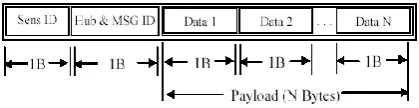
exchanged in the network. In addition to several message types.
Figure 3. Message format
Used to collect the actual sensor data, the other types of messages are implemented to: obtain the list of currently active nodes; to change the node’s radio bit rate, frequency channel, and the output power; to shut down a specific sensor node, etc. The exact format of the header and the number of bytes in the payload is variable and depends on the sensor network for Which the EWS is used.
B. Web Server Operating Modes
The web server can operate in one of the following three modes: snapshot mode, monitoring mode, and log mode. In the Snapshot mode the server passively listens to the requests for network parameters (data) from the clients. When the request is received, the server initiates communication with the EWS node. The embedded web server node forwards the request to the central node. The central node retrieves the most recently collected network data and responds to the EWS node which in turn forwards it to the server. The server processes the received data and presents the graphical representation of the parameter value to the client. Snapshot mode is used to display the current network data in near-real-time. In the Monitoring mode the server continuously monitors the network and actively collects the data from the network, as configured. When the server is operating in monitoring mode, the result shows a continuous live parameter values using a graphical representation of the data. The time between the requests depends on the frame period of the WSN. In the Log mode the server collects the request subset of network data for a given period of time. The data is stored in the EWS’ serial flash. The data can be remotely read from the flash and decoded and displayed using an application developed in MATLAB®. The RCM3750 has an Atmel Flash AT45DB081B, a serial interface 1 MB flash memory designed specifically for code and data storage applications. In log mode, the server collects data from the network and stores it on the serial flash.
C. EWS and WSN Controls
The web server supports three groups of users –Unregistered users can access the server and see the data if the server is already in the monitoring mode; administrators have unrestricted access to all server and sensor network controls; registered users can change the operation mode of the server, request
previously logged data, and have limited access to some of the embedded server controls.
A member of the administrator user group is allowed to access the WSN Controls. These pages allow various parameters of the radio (the number of address bytes, output power, communication channel, and the data bit rate) to be configured. Also, the administrator can select the types of data to be collected and the way the data are presented. The same pages allow a specific sensor node to be shut down.
The Web Server Controls allow an authorized user to change the operating mode of the server, erase the sessions with logged data from the flash memory, configure the email alerts, and set the time and date on the server. An example of one of the configuration pages presented to a user from the administrator group is given in Fig. 4. The user has an option to set the mode of operation (snapshot, log mode, or monitoring mode), change the types of data to be monitored or logged, change the data capture duration, or request the previously logged data. The EWS is capable of sending an email to an administrator or an authorized email user when certain conditions are met. The alert configuration page allows the authorized user to set those conditions. Typical configurations include sending an email: if the server does not respond to configured number of requests from the web server, if the server’s serial flash is full, if the sensor parameter values reach the set threshold. The server generates the appropriate subject and body of the email describing the reason for the email alert. It also includes a dynamically generated email body identifying the sensor node(s) which reached the set threshold.
D. Client- and Server-Side Scripting
We used client-side and server-side scripting to add dynamic behavior, visual effects and form validation to HTML pages served by the EWS. The scripts are typically mixed with the HTML code of the web document. HTML provides the user-interface and the scripts provide the logic to govern the dynamic behavior of the document.
The JavaScript is used to create a dynamic, interactive web-based application that runs entirely within a browser. Using JavaScript to add dynamic features to the web pages, such as reacting to user
events, comes with some is advantages. A browser with disabled or not implemented
Figure 4. One of the configuration pages in the Administrator domain
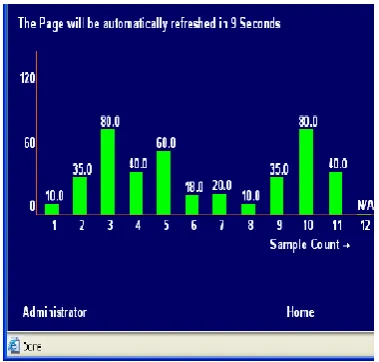
Figure 5. The page served by the EWS working in the monitoring mode. The page is automatically refreshed to display new data.
Gateway Interface (CGI) functions. In addition, the RabbitWeb, an add-on module for Dynamic C, uses a SSI-like scripting language. Fig. 5 shows a portion of the page generated when a user sends a request to monitor one of the parameters sent by one of the sensors over a given time interval. The data is displayed in a form of a sliding bar graph.
E. Email Alerts
The EWS is capable of sending an email to an authorized user from the web server in the case of the following events: the server stops responding, the server’s serial flash is full, or if the monitored data reaches the preset min/max thresholds.
F. Wireless Internet Connectivity
An optional kit adds wireless Internet connectivity to the RCM3750 Rabbit Core web server. This kit enables the EWS to operate in one of the two modes: an infrastructure mode or an ad-hoc mode.
The EWS operates in an infrastructure mode when the infrastructure is available in the EWS
vicinity, allowing the client to access the server from any place where the Internet connectivity is available. In the ad-hoc mode the EWS establishes a peer to peer connection with any 802.11b enabled device that has a browser installed. This mode of operation is suitable for periodic control or data collection visits to remote
WSN sites where Internet infrastructure does not exist. Fig. 6 shows a EWS with a wireless module working in the ad-hoc mode and serving pages to a Hewlett Packard iPAQ hx4700 PDA. When operating in infrastructure mode the Rabbit web server either issues a request to the DHCP server for an IP address or uses a previously assigned static one. If the DHCP server responds and assigns a valid IP address to the EWS, the server sends an email with this address to the administrator.
CONCLUSION AND FUTURE WORK We developed a flexible, embedded web server for monitoring, data collection, and control of WSNs. The server uses one of the sensor nodes to join the network and provide an authorized user access to a remote network of sensor nodes. The flexibility and portability of the system allows us to use it with sensor networks implemented using different hardware platforms.
It can also be easily changed to accommodate applications that do not even require the use of WSN. For example, we are currently testing a configuration that uses the EWS to provide the remote access to an array of temperature and humidity sensors to be used for the research of bugs capable of surviving extreme Alaskan winters.
ACKNOWLEDGEMENT
REFERENCES
[1] J. Hong-Taek, C. Mi-Joung, and J. W. Hong. (2000). “An
Efficient and Lightweight Embedded Web Server for Web-based Network Element Management,” International Journal of Network Management. 10, pp. 261-275.
[2] K. Tim et. all., “People, Places, Things: Web Presence for the Real World,” ACM MONET (Mobile Networks & Applications Journal).7(5), pp. 365-376.