Can Collaborative Software Development Benefit from Synchronous Groupware
Functions?
Gerardo Canfora
*,
Filippo Lanubile
°,
Teresa Mallardo
*
([email protected], [email protected], [email protected])*Research Centre On Software Technology, Department of Engineering, University of Sannio
Via Traiano, Pal. Ex-Poste - 82100 Benevento, Italy
°Department of Computer Science, University of Bari
Via Orabona 4 - 70126 Bari, Italy
Abstract
Large enterprise organizations have software development teams distributed over multiple geographical sites. Because of distance, enterprises face challenges which are similar to those that open source software (OSS) projects have experienced in the past. OSS projects overcame the problem of distance through both development practices and Collaborative Software Development (CSD) platforms, wholly made up of asynchronous tools. However, generic groupware platforms offer both same-time and different-time options for communication and collaboration.
We intend to understand whether distant developers can benefit from synchronous functions other than asynchronous functions for cross-sites cooperation. As a first step, this paper provides a comparison of CSD platforms and generic groupware with respect to supported functions. As a result we propose the extension of CSD platforms with synchronous functions, as those available in widespread groupware platforms.
1. Introduction
Over the last few years, large enterprise organizations have embraced global software development, where software projects are distributed over multiple geographical sites [14]. Developing software as a team is a challenge but adding physical separation among team members, often separated by a national boundary, makes it even more challenging.
Geographic distance has an impact on all the forms of cooperation within a team: communication, collaboration and coordination [8]. Communication is the core function of cooperation that allows information to be exchanged between team members. Distance has a negative effect for communication-intensive tasks such as requirements elicitation and negotiation, and on spontaneous
conversation [12], where people informally communicate valuable pieces of information. Collaboration is the creation and management of shared information to implement a common task. Distance affects collaboration because teams may fail to disseminate information and then miss reuse opportunities or work on the same problems that have been already solved at other locations. Coordination is the act of integrating tasks and organizational units to reach a common goal. The cost of coordination increases with distance, especially if there is a lack of standards and shared practices.
The main effect of cooperation issues caused by distance is speed [13]: cross-sites changes take much longer than changes that are all at single site. Distance can be offset by Internet-based technologies, which play the role of infrastructure for global software teams. One of the most effective technologies to enable distributed teamwork is Collaborative Software Development (CSD) platforms. Earliest CSD platforms were developed within open source software (OSS) projects because OSS projects, from the beginning, have been composed of dispersed individuals. However, OSS projects primarily rely on asynchronous tools for almost all communication and coordination services [16], partly because time-to-market is not a given priority.
Although many development tasks may be adequately supported with asynchronous collaborative technology, we argue that many other tasks need to be supported with synchronous tools. Same-time (synchronous) communication tools, such as those offered in generic groupware platforms, may help to resolve miscommunications, misunderstandings, and minor problems before the consequences become major. A small issue can take days of back-and-forth discussions over email to resolve, but a brief conversation can quickly clarify the problem [7].
We intend to understand whether distant developers can benefit from synchronous functions other than
asynchronous functions for cross-sites cooperation. As a first step, this paper provides a comparison of CSD platforms and generic groupware with respect to supported functions.
The next section describes the primary functions of CSD and presents some popular CSD platforms. Section 3 characterizes the main groupware functions and introduces some existing groupware systems. Finally Section 4 ends up with a discussion, and draws conclusions.
2. Collaborative Software Development
A CSD platform is an integrated toolset of task-specific solutions to support collaborative software engineering.
The software-engineering functions of a CSD platform can be classified according to the following taxonomy, adapted from [6]:
• Configuration management (CM). A CM tool includes the ability to manage change in a controlled manner, by checking components in and out of a repository, and the evolution of software products, by storing multiple versions of components, and producing specified versions on command.
• Bug and change tracking. This function is centered around a database, accessible by all team members, which includes information on defects found (who, when, where, severity) and related changes together with their status (approved, deferred, escalated, tested, released, and so on).
• Product and process modeling. This function encompasses the core features of what was called Computer Aided Software Engineering (CASE), from requirements management to visual modeling of both software artifacts and customized software processes.
• Programming tools. It includes code generators, compilers, debuggers, testing and code analysis tools that are usually used by single programmers.
• Project status. It allows team member to get an effective representation of project-related measures such as number of tasks (completed/in progress/not yet started), number of bugs (open/assigned/closed), and other indicators of how the project as a whole is doing.
• Scheduling and tasking. It defines and enacts the steps that must occur in terms of process and people during the course of software development. It includes task assignment, meeting scheduling, milestone planning, and role assignment.
• Knowledge center. This function is mostly document-driven and web-enabled, and allows team members to share explicit knowledge across a work unit. A knowledge center includes technical references, standards, frequently asked questions (FAQs) and
best practices. It may also include more sophisticated knowledge management activities to acquire tacit knowledge in explicit forms, such as expert identification and skills management [20].
• Notification services. It is a workflow function that allows team members to be notified of events (e.g., a change to an artifact or the completion of a task) that have an impact on their activities.
CSD platforms also include some generic collaborative functions, such as email (mostly for notification services), and mailing lists or web-based discussion forums to support communication among team members.
In the following, some well-known CSD platforms are described. We only include three of them just to highlight common features of a CSD multi-function platform.
SourceForge is one of the most widespread platforms for web-based collaborative software development [23]. The original mission of SourceForge was to enrich the open source community by providing a centralized place for developers to control and manage OSS projects development. To accomplish its mission, SourceForge offers a variety of free services: web interface for project administration, space for web content and CGI scripts, trackers (for reporting bugs, submitting support requests or patches to review, and posting feature requests), mailing lists and discussion forums, download notification of new releases, shell functions and compile farm, and CVS-based configuration management. Today, the free version of SourceForge supports over 50,000 hosted projects and over 500,000 registered users. There is also a commercial version for corporate use, called SourceForge Enterprise Edition [25], which adds features for tracking, measuring and reporting on software project activities.
SourceCast is another popular commercial platform for web-based collaborative software development [22]. It combines development tools, reporting, communication tools, administration, delivery, and document and file management. SourceCast is organized into three logical control areas. The first area, called My Pages, includes data about an individual user and the projects on which the user is either working or interested in tracking. The second area, called Projects, allows a user to define a new project and resources to support that project, including members, mailing lists, source code, issue tracking, file sharing, news, and discussion forums. The third area, called Administration, supports administrative functions, and includes e-mails posted about SCM and issue management activities that are logged in project mailing lists.
Rational Suite Enterprise [19] is a commercial CSD that supports teamwork by integrating the following tools: RequisitePro (a requirements management tool that includes a discussion feature), RUP (a web-enabled set of software engineering processes), Rose (a tool for visual
modeling according to UML), PurifyPlus (a set of automated runtime analysis tools for improving application reliability and performance), Robot (a tool to automate GUI functional testing), TestManager (a tool for managing testing artifacts), ProjectConsole (a tool for reporting project status and assessing development trends based on metrics), ClearCase (a version control tool), and ClearQuest (a defect and change-tracking tool).
3. Groupware
Groupware is software to enable group working for any business process [8]. The growth in use of corporate intranets has initially contributed to adopt this form of computer-mediated collaboration. Today, increasing delocalization is pushing enterprises towards extending the usage of groupware for inter-site cooperation.
Groupware covers a diversified range of functions, which are presented in the following on the basis of a classification, partly based on [8].
• Email. It is the most widespread groupware function. Email is so pervasive and low-cost that it does not need any formal plan for being introduced as the main facility for intra-site and inter-site communication. However, the low interactivity of email provides poor support for making initial contacts, developing trust, persuading and negotiating while working under strict deadlines or other forms of pressure [26].
• Discussion. It allows team members to set up a topic, post a new message or reply to an existing message, and thus share comments about that topic. This is done in an asynchronous manner, so discussants have the opportunity to reflect before posting. Discussions can be based on mailing lists, newsgroups, or web discussion forums.
− Mailing lists realize the discussion function using a list server to provide an email-based discussion. Participants subscribe to the discussion list and all posted messages are pushed on the mailboxes of subscribers. The advantage for users is that they can use their usual email program to send and read posted messages. Messages can be archived and accessed from a web browser.
− Newsgroups realize the discussion function using a NNTP server and a newsreader application. Discussion groups can be public as well as private. A discussion topic is represented as a thread where postings from participants are indented to represent replies to the first messages. Newsgroups are today integrated into the web to allow messages to be read and sent from a browser rather than a newsreader.
− Web discussion forums realize the discussion forum entirely as a web application, thus using no more than a web server and browsers. Analogously to newsgroups, discussions are threaded to make it easier to follow the flow of debate.
• Conferencing. It is a synchronous form of computer-mediated communication that is becoming increasingly popular for decision-making purposes other than for leisure time. There are different forms of real-time conferencing depending on the richness of communication media: text-conferencing, audio-conferencing, and video-conferencing. The most popular software applications supporting the conferencing function are instant messengers (such as AOL Messenger, Yahoo Messenger, or Microsoft Messenger), which include a presence awareness function to know who is online in the contact list. Instant messengers include today both text-based and audio-conferencing facilities. Desktop video-conferencing is also widely available with products such as Microsoft NetMeeting, but quality is still low without high bandwidth and full support for multicasting. Conferencing applications may have additional features such as:
− file transfer: similar to email attachments;
− white-boarding: a shared graphical bit-mapped area where to draw and type;
− application sharing: an application is open by one of the participants and the others can view a bit-map image of it and even take control and interact with it.
• Meeting support. This function provides additional support other than conferencing when a group meets to take decisions and generate tasks to implement ideas. Applications, which implements meeting support, are commonly known as Group Support Systems (GSS). They provide features to share calendars, schedule meetings, invite and remind participants, moderate a discussion, follow an agenda, take minutes, outline ideas, prioritize and vote between alternative solutions, and transform meeting outcomes into assigned tasks.
• Collaborative authoring. This function allows authors to work together on documents. A basic support is provided by common word processor, which include features for inserting annotations, highlighting changes, accepting or rejecting changes, and merging different versions. Some groupware applications enable authors to limit access and route documents to coauthors according a planned workflow. Other applications introduce synchronous features such as co-editing where coauthors can make edits to a document in real time.
Groupware also include functionality, which appeared among the CSD functions:
• configuration management;
• scheduling and tasking;
• knowledge center;
• notification services.
In the following, some multi-function groupware platforms are presented.
IBM Lotus products [17] are a well established family of groupware products (Notes, Domino, QuickPlace, SameTime) that offer a broad range of functionality for cooperation, both in asynchronous and synchronous mode. For many years, Lotus Notes has been the client/server leader as a messaging and collaboration platform. Then Lotus has reacted to the popularity of intranets by producing the Lotus Domino, which combines Notes and web server functionality.
The BSCW (Basic Support for Cooperative Work) system [2, 4] is a free web-based groupware platform. It supports cooperation through “shared workspaces”, i.e., repositories in which members of a group can upload/download objects (documents, hyperlinks, pictures, contact information), hold threaded discussions, and obtain information about activities of other workspace members to coordinate their own work. Although the BSCW system is mostly asynchronous, it also provides some synchronous features such presence awareness as well as interfaces to conferencing tools.
SharePoint Team Services and SharePoint Portal Server [21] are groupware platforms that use a web-based central repository for all project information, including documents, announcements, calendars, contacts, tasks, and discussions. While the former is aimed to support small or ad-hoc workgroups, the latter is a customizable corporate web portal intended for large workgroups, which need greater management over their information. SharePoint Team Services is strictly integrated with Office XP applications, including conferencing tools such as MSN Messenger, while SharePoint Portal Server requires the installation of additional components to enable same-time communication.
Groove [9] is a collaborative peer-to-peer (P2P) application for small or ad-hoc group interaction. It offers a set of predefined tools for desktop collaboration: communication tools such as threaded discussions, messaging, persistent chat, and audio-conferencing; content sharing tools such as shared files, shared pictures and shared contacts; joint activity tools such as group meetings, project management, browsing, co-presentation, co-review, and co-editing of Microsoft Word documents. All application logic and data are stored locally, and changes are automatically synchronized with members’ desktops, even if users work offline. Other than
being integrated with Microsoft Office, Groove can be integrated with SharePoint Team Services to provide replication and synchronization of shared spaces.
GroupSystems is a GSS initially developed at the University of Arizona [18] and then commercialized by GroupSystems.com [10]. It includes an integrated set of tools to support meetings: conferencing, brainstorming, categorizer, topic commenter, group outliner, alternative analysis, voting and survey. Participants can interact either verbally, if they are in a same room, or through network-connected computers, if they are located in different places.
4. Discussion and Conclusions
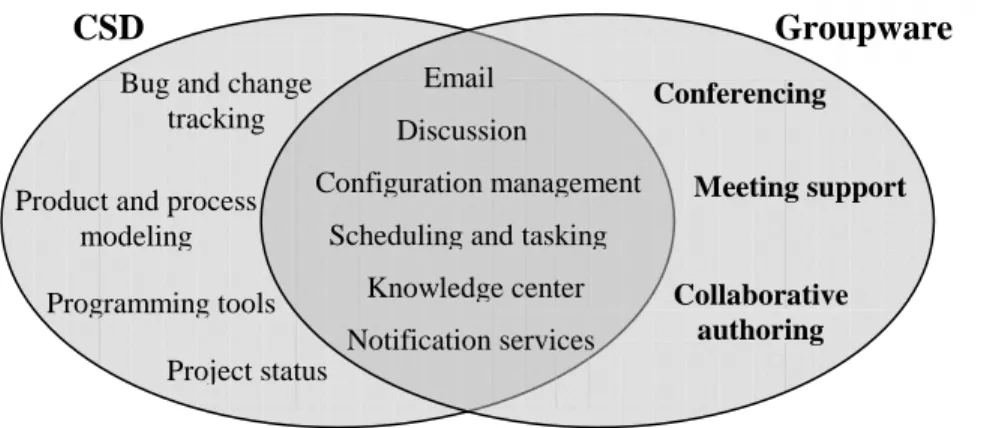
Figure 1 summarizes the functions that characterize representative CSD and groupware platforms. Synchronous functions are written in bold. As Figure 1 shows, some overlap does exist. However, typical CSD functions are all asynchronous and synchronous functions lie exclusively in the groupware area.
One of the reasons behind overlooking synchronous support in (state-of-the-practice) CSD platforms is that same-time interaction can be inconvenient when time zones differ. Time zone disparity between development sites can provide no common overlapping work hours. Even a time difference of few hours can be a challenge because of different time slots for lunch and different national holidays. Another problem that hinders synchronous communication is language differences. English is the common cross-border language for software business. However, non-native English-speaking people can find it difficult to understand, write or speak at the pace imposed by real-time communication with English-native partners.
Nevertheless, the growing popularity of agile software development approaches, such as Extreme Programming [3], remind us that development teams succeed because “the most efficient and effective method of conveying information to and within a development team is face-to-face conversation” [1]. Maintaining this high degree of interaction despite the geographical dispersion of a team is essential to success. In the scale of communication richness, synchronous groupware functions (such as conferencing, meeting support and collaborative authoring) are the closest to face-to-face interaction [6]. Of course, not every development activity requires intensive communication. For example, requirements gathering and negotiation involve stakeholders in a strong interaction but unit testing can be performed by programmers working in parallel.
James Highsmith suggests that there are two primary types of interaction: information transfer and shared creation [15]. Information needed for transfer is presented
to let somebody know rather than to be modified by joint action. On the contrary, shared creation (such as in problem solving, decision making, and feedback meetings) implies an active participation with the intent to add value. Collaboration tools need to be matched to the interaction needs: while interaction for information transfer can be effectively supported by asynchronous tools, shared creation is better enabled by synchronous tools (if face-to-face interaction is not viable or too expensive).
In the past few years there have been some researchers who have experienced the introduction of synchronous tools to support collaborative software development.
In [5], the authors discuss how they implemented the WinWin requirements negotiation approach above GroupSystems (for meeting support), and report a considerable improvement in negotiation time and stakeholders’ satisfaction with respect to manual negotiation.
Another empirical study, this time in the context of a laboratory experiment in distributed requirements engineering, found no differences between face-to-face
meetings and distributed meetings using a video-conferencing tool, while negotiating requirements.
An empirical study on implementing a GSS for inspections in an industrial environment resulted in more effective and efficient inspections than paper-based inspections, based on face-to-face meetings [24].
Herbsleb et al. have introduced a synchronous communication tool, called Rear View Mirror (RVM), into an industrial multi-site environment, as a surrogate of “corridor talks” [11]. Empirical data report an increasing degree of acceptance among the several teams where RVM was made available. The most popular feature was the group chat, which was used to overcome the lack of contextual information and informal communication.
The variety and maturity of collaboration tools has grown greatly during recent years. Providing effective technological support for global software development requires the extension of CSD platforms with synchronous functions, as those available in widespread groupware platforms.
Figure 1. CSD and Groupware functions
References
[1] Agile Alliance, Manifesto for Agile Software Development, 2001, http://www.agilemanifesto.org [2] W. Appelt, “WWW Based Collaboration with the BSCW System”, in Proc. of SOFSEM'99, Springer Lecture Notes in Computer Science 1725, 1999, p.66-78. [3] K. Beck, Extreme Programming Explained: Embrace Change, Addison-Wesley Pub Co, 1999.
[4] R. Bentley, W. Appelt, U. Busbach, E. Hinrichs, D. Kerr, S. Sikkel, J. Trevor, and G. Woetzel, “Basic Support for Cooperative Work on the World Wide Web”,
International Journal of Human-Computer Studies, Vol. 46, No. 6, June 1997, pp.827-846.
[5] B. Boehm, P. Grünbacher and R. O. Briggs, “Developing Groupware for Requirements Negotiation: Lessons Learned”, IEEE Software, Vol. 18, No. 3, May/June 2001, pp. 46-55.
[6] E. Carmel, Global Software Teams: Collaborating Across Borders and Time Zones, Prentice Hall PTR, San Francisco, CA, 1999.
[7] E. Carmel and R. Agarwal, “Tactical Approaches for Alleviating Distance in Global Software Development”, IEEE Software, Vol. 18, No. 2, March/April 2001, pp. 22-29.
CSD
Groupware
Email Discussion Meeting support Conferencing Collaborative authoring Configuration management Project status Product and processmodeling
Knowledge center Notification services Bug and change
tracking
Scheduling and tasking
[8] D. Chaffey, Groupware, workflow and intranets, Digital Press, Boston, Massachusetts, Woburn, 1998. [9] Groove Networks, http://www.groove.net
[10] GroupSystems.com, http://www.groupsystems.com [11] J. D. Herbsleb, D. L. Atkins, D. G. Boyer and M. Handel, “Introducing Instant Messaging and Chat in the Workplace”, Proc. of Conference on Human factors in computing systems (CHI), Minneapolis, Minnesota, USA, April 2002, pp. 171-178.
[12] J. D. Herbsleb and R. E. Grinter, “Architecture, Coordination, and Distance: Conway’s Law and Beyond”, IEEE Software, Vol. 16, No. 5, September/October 2001, pp. 16-20, pp.63-70.
[13] J. D. Herbsleb, A. Mockus, T. A. Finholt, and R. E. Grinter, “An empirical study of global software development: Distance and speed”, Proc. of International Conference on Software Engineering (ICSE), Toronto, Canada, May 2001, pp. 81-90.
[14] J. D. Herbsleb, and D. Moitra, “Global Software Development”, IEEE Software, Vol. 18, No. 2, March/April 2001, pp. 16-20.
[15] J. A. Highsmith, Adaptive Software Development: A Collaborative Approach to Managing Complex Systems, Dorset House, New York, NY, 2000.
[16] F. Lanubile, “Towards an Infrastructure for Distributed e-Business Projects”, Proc. of International
Conference on Advances in Infrastructure for Electronic Business, Science, and Education on the Internet (SSGRR), L’Aquila, Italy, August 2001.
[17] IBM Lotus Software, http://www.lotus.com
[18] J. F. Nunamaker, A. R. Dennis, J. S. Valacich, D. Vogel, J. F. George, “Electronic meeting systems”, Communications of the ACM, Vol. 34, No. 7, July 1991. [19] Rational Software, http://www.rational.com
[20] I. Rus and M. Lindvall, “Knowledge Management in Software Engineering”, IEEE Software, Vol. 19, No. 3, May/June 2002, pp. 26-38.
[21] Microsoft SharePoint Technologies Family, http://www.microsoft.com/sharepoint/
[22] CollabNet, http://www.collab.net [23] SourceForge.net, http://sourceforge.net
[24] M. van Genuchten, C. van Dijk, H. Scholten and D. Vogel, “Using Group Support Systems for Software Inspections”, IEEE Software, Vol. 18, No. 3, May/June 2001, pp. 60-65.
[25] VA Software, http://www.vasoftware.com
[26] E. V. Wilson, “Email Winners and Losers”, Communications of the ACM, Vol. 45, No. 10, October 2002, pp. 121-126.