Using Virtual Machines in Desktop Grid Clients for Application
Sandboxing
Attila Csaba Marosi, Péter Kacsuk {atisu, kacsuk}@sztaki.hu
MTA SZTAKI, Computer and Automation Research Institute of the Hungarian Academy of Sciences
H-1528 Budapest, P.O.Box 63, Hungary Gilles Fedak
[email protected] INRIA Futurs Orsay (91) France 4 rue Jacques Monod - Bat G
91893 Orsay Cedex France Oleg Lodygensky [email protected] Laboratoire de l’Accelerateur Lineaire Universite de Paris-Sud and IN2P3-CNRS
Bat. 200, Centre d’Orsay BP 34, 91898 ORSAY Cedex, France
CoreGRID Technical Report
Number TR-140
August 31st, 2008
Institute on Architectural Issues: Scalability,
Dependability, Adaptability
CoreGRID - Network of Excellence
URL: http://www.coregrid.net
Using Virtual Machines in Desktop Grid Clients for Application
Sandboxing
Attila Csaba Marosi, Péter Kacsuk
{atisu, kacsuk}@sztaki.hu
MTA SZTAKI, Computer and Automation Research Institute
of the Hungarian Academy of Sciences
H-1528 Budapest, P.O.Box 63, Hungary
Gilles Fedak
INRIA Futurs
Orsay (91) France
4 rue Jacques Monod - Bat G
91893 Orsay Cedex France
Oleg Lodygensky
Laboratoire de l’Accelerateur Lineaire
Universite de Paris-Sud and IN2P3-CNRS
Bat. 200, Centre d’Orsay
BP 34, 91898 ORSAY Cedex, France
CoreGRID TR-140
August 31st, 2008
Abstract
Desktop Grids harvest the computing power of idle desktop computers whether these are volunteer or deployed at an institution. Allowing foreign applications to run on these resources requires the sender of the application to be trusted, but trust in goodwill is never enough. An efficient solution is to provide a secure isolated execution environment, which does not constrain any additional burdens neither on administrators nor on users. Currently Desktop Grids do not provide such facility. In this report we describe our approach to provide a platform independent and transparent sandbox mechanism for Desktop Grids. We define the requirements for the transparency and present a prototype that fulfills these criteria.
This research work is carried out under the FP6 Network of Excellence CoreGRID funded by the European Commission (Contract IST-2002-004265).
1
Introduction
Originally, the aim of Grid research was to realize the vision that anyone could donate resources for the Grid, and anyone could claim resources dynamically according to their needs, e.g. in order to solve computationally intensive tasks. This twofold aim has been, however, not fully achieved yet. Currently, we can observe two different trends in the development of Grid systems, according to these aims.
Researchers and developers following the first trend are creating a service oriented Grid, which can be accessed by lots of users. To offer a resource for the Grid installing a predefined set of software (middleware) is required. This middleware is, however, so complex that it needs a lot of effort to install and maintain it. Therefore individuals usually do not offer their resources this way but, all resources are typically maintained by institutions, where professional system administrators take care of the complex environment and ensure the high-availability of the Grid. Offered resources are usually clusters of PCs rather than single resources.
A complementary trend can also be observed for realizing the other part of the original aim. According to this direction anyone can bring resources into the Grid, offering them for the common goal of that Grid. The most well-know example of such systems, or better to say, the original Internet-based distributed computing facility example is SETI@home [1]. In Grids following the concepts of SETI@home, a large number of PCs (typically owned by individuals) are connected to one or more central servers to form a large computing infrastructure with the aim of solving problems with high computing needs. Such systems are commonly referred to by terms such as Internet-based Distributed Computing, Public-Resource Computing or Desktop Grids; we will use the term Desktop Grid (DG). Unlike traditional Grids, which are based on complex architectures, volunteer computing has demonstrated a great ability to integrate dispersed, heterogeneous computing resources with ease, scavenging cycles from idle desktop computers. In DG systems anyone can bring resources into the Grid system, offering them for the common goal of that Grid. Installation and maintenance of the Grid resource middleware is extremely simple, requiring no special expertise. Therefore, large number of donors can contribute to the pool of shared resources. On the other hand, only a very limited user community (or target applications) can use those resources for computation. The most well-know example of such Grids is the SETI@home project in which about 4 millions of PCs have been involved. However, such Grids do not work as service, they cannot be used by anyone. Only one or few large scientific projects use exclusively the whole computational capacity. Those, who offer their computers, cannot use the system for their own goals. Because of this limitation, the Grid research community considers desktop Grids only as particular and limited solutions.
The common architecture of Desktop Grids typically consists of one or more central servers and a large number of clients. The central server provides the applications and their input data. Clients join the Desktop Grid voluntarily, offering to download and run tasks of an application with a set of input data. When the task ("work unit")has finished, the client uploads the results to the server where the application assembles the final output from the results returned by clients. A major advantage of Desktop Grids over traditional Grid systems is that they are able to utilize non-dedicated machines. Besides, the requirements for providing resources to a Desktop Grid are very low compared to traditional Grid systems using a complex middleware. Thus, a huge amount of resources can be gathered that were not available for traditional Grid computing previously. Even though the barrier may be low for resource providers, deploying a Desktop Grid server is a more challenging task because a central server creates a central point of failure and a potential bottleneck, while replicating servers requires more efforts. Users of scientific applications are usually only concerned about the amount of computing power they can get and not about the details how a Grid system delivers this computing power. Unfortunately existing applications may have to be modified in order to run on Desktop Grid systems, which make DGs less attractive for application developers than traditional Grid systems.
Desktop Grid clients usually simply fork a new process for each application they are executing, meaning that the application process has access to the same resources as the client itself. In an industrial environment sometimes the data on the computer (confidential information) is needed to be shielded off from the application code run by the client. To achieve this the client may be run as a restricted user that also restrict the processes created by it, but in industrial environments the platform used is often Windows and it is sometimes not enough to only rely on the operating system facilities to ensure isolation from the rest of the system. In a UNIX environment the sandboxing can be easily achieved, since there are several tools like BSD jail or chroot available. Unfortunately these tools are not available for Windows. According to our present knowledge there is no other similar mechanism for widely used versions of Windows (2000, 2003 or XP) either.
In this technical report we present our approach for providing a platform independent transparent sandbox for Desktop Grid clients. It is organized as follows: the next section introduces the two Desktop Grid systems our
approach is aimed at in the first place. Section 3 discusses related work, section 4 details the requirements for a transparent sandbox, details our approach and evaluates candidates. Section 5 gives performance evaluation of our prototype. Finally section 6 concludes the report.
2
Desktop Grids
Based on the environment where the Desktop Grid is deployed we can distinguish between two different Desktop Grid flavors. Global Desktop Grids (also known as Public Desktop Grids, Public Resource Computing) consist of a server which is publicly accessible over the Internet, and the attached clients are offered by their owners to help out projects they sympathize with. There are several unique aspects of this computing model compared to traditional Grid systems. First, clients may come and go at any time, and there is no guarantee that a client which started a computation will indeed finish it. Furthermore, the clients cannot be trusted to be free of either hardware or software defects or malicious intent, meaning the server can never be sure that an uploaded result is in fact correct. Therefore, redundancy is often used by giving the same piece of work to multiple clients and comparing the results to filter out corrupt ones. Local Desktop Grids are intended for institutional or industrial use. Especially for businesses it is often not acceptable to send out application code and data to untrusted third parties (sometimes, such as for medical applications, this is even forbidden by law). Thus, in a Local Desktop Grid the project and clients are usually shielded from the world by firewalls or other means and only known and trusted clients are allowed to offer their resources. This environment gives more flexibility by allowing the clients to access local resources securely and since the resources are not voluntarily offered the performance may be limited but more predictable. However, new security requirements arise in Local Desktop Grids that require authentication of clients and servers and establishing trust between parties. As we can see there is a huge difference between traditional Grids and Desktop Grids, but we also have to make a distinction between the publicly used Global Desktop Grids and the Local Desktop Grid concept.
2.1
XtremWeb
XtremWeb [2] is a research project belonging to light weight Grid systems. It’s a Free Open Source and non- profit software platform to explore scientific issues and applications of Global Desktop Grids, Global Computing and Peer to Peer distributed systems. The aim of the project is to investigate how a large-scale distributed system (LSDS) can be turned into a parallel computer with classical user, administration and programming interfaces possibly using fully decentralized mechanisms to implement some system functionalities. XtremWeb currently uses a module for LSM (Linux Security Module) called SBLSM to ensure application sandboxing, this method is for Linux only. The principle is to apply a security policy to a set of binaries processes. Every time a sandboxed process issues a system call, the module checks a dedicated variable and either grants or denies the request.
2.2
SZTAKI Desktop Grid
SZTAKI Local Desktop Grid (or SZTAKI LDG) [3] is based on BOINC [4] (which aims to provide an open infrastruc-ture for Public Resource Computing) and is aimed to satisfy the needs of both academic institutions and enterprises. But what if there are several departments using their own resources independently and there is a project at a higher organizational level (e.g. at a campus or enterprise level)? Ideally, this project would be able to use free resources from all departments. However, using BOINC this would require individuals providing resources to manually register to the higher level project which is a high administrative overhead and it is against the centrally managed nature of IT infrastructure within an enterprise. One of the enhancements of the SZTAKI Local Desktop Grid is hierarchy. It allows the use of Desktop Grid projects as building blocks for larger Grids, for example divisions of a company or departments of a university can form a company or faculty wide Desktop Grid. The hierarchical Desktop Grid al-lows a set of projects to be connected to form a directed acyclic graph. Work is distributed among the edges of the directed graph. SZTAKI LDG provides an extended security infrastructure using X.509 certificates for client, server authentication and automatic application deployment [5].
3
Related Work
Daniel Lombraña González et al. [6][7] persent a method to run legacy applications on BOINC using the standard BOINC Wrapper and a special starter application to set up the environment for the application. Tasks for one of their test applications have a rather long run time, and since the BOINC Wrapper does not provide checkpointing capabilities, they found that their task won’t complete if a client is not turned on for the necessary time to finish the job. They propose to use Virtual Machines (VM) for running these tasks since VMs provide a method to save their state and later resume. They chose to use VMware [8] Player. The drawback of their approach is that VMware player is only available on Intel/Windows and Intel/GNU/Linux platforms, and they are using a separate VM image (containing the operating system and the whole execution environment) for each task downloaded by a client. While this may be fine for experiments in dedicated environment, but for real-world deployment downloading couple hundred MB of extra data per task requires too much time and bandwidth. Also VMware Player is a desktop product, presenting a window at the user, it is not intended to run in the background and so to comply with the BOINC policy of no distraction for the user. VMware@Home [9] uses this approach too.
The Atlas physics application requires the Athena framework which is around 8GB and it is closely tied to a specific Linux distribution. In order to lift these limitations and be able to port the application to the BOINC platform LHC@Home [10] chose to use virtualization [11], but in a different way. They provide VMware images with all dependencies and a BOINC client pre-installed, meaning that they run the client inside the virtual machine.
Libvirt [12] is a toolkit to interact with the virtualization capabilities of recent versions of Linux (and other OSes) and with several virtualization software. While it is not a direct virtualization effort, it provides a fundamental com-ponent, an API, to manage and communicate with (running) virtual machines.
4
Transparent Sandbox
Sandboxes provide an isolated execution environment for applications. Unix-like systems have traditionally supported this by techniques and tools like chroot or BSD jail. Also there are (were) newer tools like LSM (Linux Security Mod-ule) which is utilized by XtremWeb. The problem with these solutions is that they are only available for Linux/BSD, while Desktop Grids are aimed at the general public utilizing any resources they can get (or are deployed inside a company), meaning it is not enough to provide a solution for a single platform. With the emergence of virtualiza-tion software (like VMware, VirtualBox, Bochs or QEMU) which are cross-platform (at least should be available for Linux, Microsoft Windows and Mac OS X) this problem could be solved.
However it is not a solution to simply take and use any of these existing tools, since Desktop Grid users cannot be expected to be Grid or operating system administrators thus to have the knowledge (or be willing) to deploy (on Figure 2) any "complicated" piece of software. Also Desktop Grids and their clients may be deployed at a company (LDG, Section 2) where the user of the computer has no knowledge or influence at in the background running Desktop Grid client. Usually these companies have high security standards, meaning it is not enough to rely on the operating system provided facilities to shield off the running application from the rest of the computer, so running applications inside sandboxes here is not optional. For the long term if the user notices any slowdown or the computer becomes less responsive while the sandbox is run the Desktop Grid client will be removed ("slowdown" on Figure 2). So in the first place a transparent sandbox should mean transparent for the user.
There are many already deployed Desktop Grid projects, for example there are more than 100 BOINC projects currently running. If applying a sandbox would require either to perform modifications to on the server deployed applications, for example they needed to be moved in a disk image no administrator can be expected to do this. Also there should be no restrictions for the Desktop Grid application whether it is run in a sandbox or just simply executed by the client meaning the same capabilities should be available that are normally provided by the client, namely: checkpoint and resume, suspend and continue, start and stop and to report data about the running application (percent complete, resources used, etc). These facilities should be available not just from a graphical interface, but also from an API-like one so the sandbox can be "remote controlled". So in the second place transparent sandbox should mean transparent for the system.
A sandbox should isolate the running application inside meaning should have no access to the resources of the host and should prohibit any outside connection. It should be also "bulletproof" thus no malicious application may render the sandbox unusable or requiring administrator intervention. This may be impossible to fulfill for any currently running task since an application might destroy it, but at least for the next task the sandbox should be once again
available (and the current one should be stopped and marked as failed). The transparency for the system criteria requires that the there is no restriction for the client whether running applications normally or inside a sandbox, thus it needs a "backdoor" to copy applications and input data into the sandbox and later to extract results from it to be uploaded to the server. It is n ot enough for this backdoor to provide a simple file put/get interface it also should enable to start or stop and to get status information about the work unit running. This backdoor should be one way, meaning the client can put and extract data from the sandbox, but the sandbox cannot reach the host via this interface.
Nowadays multi-core processors are becoming more a commodity so Desktop Grid clients may run more than one application at once (typically one for each core). In this case independent "copies" of the sandbox should be started for each application (running on different cores) meaning that the sandbox should provide instantiation. Worst case this means that a copy is made every time of an immutable sandbox ("base") and the copy is started for the application. Best case no copy is need to be made, just a thin overlay which references the base and every modification to the instance should be stored there. This would also lower the used disk space and the time required for creating new instances. By having an immutable sandbox we ensure the "bulletproof" criteria, since the instance can be thrown away whether the work unit finished successfully or not and a new instance can be created for the next one.
Any potentially to be used virtualization software must fulfill these requirements in order to be used as a transparent sandbox. By using some kind of virtualization, preferably virtual machines (VMs), as sandbox providing tool we would have several additional benefits:
• Simplified application development. Separate the host operating system from the guest, which allow to run the
same os (preferably Linux) on the guest regardless of the host os. This would allow to have a single version of the application, but it would still run on all resources connected.
• System-level checkpointing. VMs usually provide a method to save or serialize their current state to disk which
can be later used to resume the VM, thus running applications do not need to have the capability to checkpoint themselves. For example in the case of BOINC where each application implements its own checkpoint function (application-level checkpointing) this would mean that there is no need to write this non-trivial function. Com-bining system-level checkpointing with instantiation would allow easy migration of the task, if the same base image is used amongst clients, only the instance image needs to be migrated to a new client which would greatly reduce upload times and save bandwidth.
• Legacy applications. By having a separate operating system available inside the VM, applications could be
run whose source code is not available, so cannot be ported to any new platform, or those that have too many dependencies to be run on a volunteer’s computer.
• Enforce resource limits. Any application running is guaranteed not to exceed the resource limits (e.g.: memory,
disk or cpu) allocated for the VM.
When using virtualization software licensing issues apply, meaning that the software should be open source and freely redistributable at best, but worst case it must still allow the software to be deployed automatically with the Desktop Grid client. Manual download and installation might be too much of a task for any user. Also it should be able to run in the background without any windows or pop-ups presented at the user ("background" on Figure 2).
4.1
Architecture
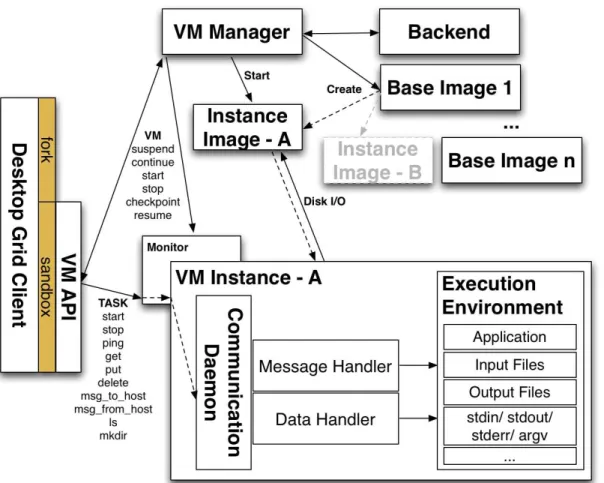
The main goal was to design a generic architecture that can be later integrated with DGs (especially with SZTAKI DG and XtremWeb). The basic concept is to provide tools and APIs which allow to create and start VM instances, upload input files and executables into the instance, start tasks using the uploaded files, request status information and when finished retrieve the output files. The architecture is shown on Figure 1, the main components are the following:
• The VM API is to hide the under laying architecture and to provide a simple API for creating VM instances
using the VM Manager and interacting with the created instances.
• The Backend stores meta data about the status of each created VM Instance. This allows the sandbox to be shut
down and resumed any time.
• The Base Image(s) serve as immutable basis for the sandbox. Each instance is created from one of these base
images. It contains a minimalist installation of a operating system (preferably Linux) and the Communication Daemon.
• The Instance Image(s) store the difference between the base image and the created instances. This way nothing
is written back to the Base Image whether something is created, modified or removed. Also checkpoints should be stored here.
• The Communication Daemon handles the communication and data transfer between the VM Instance and the
host. Communication is always initiated by the host, the daemon can only reply to requests, thus the host has to poll the daemon periodically for updates.
• The Execution Environment acts is where all application and task data is put and the task is run inside the VM
Instance.
Figure 1: Architecture of the sandbox
The client downloads a new task which consists of a binary executable, input files for the binary and several other files (libraries and other dependencies). Normally these are to be run by the client using a fork() based execution method, but we provide a sandbox based one. A separate sandbox for each task is created with the capability to suspend, continue, checkpoint and resume if requested by the client. For managing sandboxes a C API is provided and a JAVA API is being developed, now we detail the C API to demonstrate how the sandbox works. Sandboxes consist of a VM instance and a library providing the VM API to manage the instance. The VM API consists of two parts, first thevm_sb_*functions are to control tasks inside an instance, the remainingvm_*functions are to manage the instance(s). The functionality of this API is similar to the one provided by libvirt, but for our approach we did not need the complexity and most of the features ob libvirt, and so we choose to go with an own simpler one.
Thevm_initandvm_cleanupfunctions are called by the client on start up and before exit. Allvm_*functions operate on a VM_STATE structure which represents the VM Instance. The state and meta data of the instance is always
kept updated in the Backend, thus no need to serialize this structure manually. When needed any previous (not deleted) instance can be loaded usingvm_load.
First the sandbox is created by calling thevm_createfunction, which creates a new VM instance using a selected Base Image as basis. vm_startstarts the instance, the instance might not be available instantly, so the client waits and issuesvm_get_stateperiodically. When the instance is running the files of the current task are copied in to the sandbox inside the instance using thevm_sb_putfunction. Any disk operation is written to the instance image not the base image, this way even if a malicious application destroys somehow the VM Instance, it cannot make any damage to the Base Image or to any other existing instances.
Inside the VM Instance the Communication Daemon handles the incoming messages and passes them either to the Message Handler which is responsible for controlling the application or to the Data Handler which is responsible for moving data in or out from the instance. vm_sb_startis used to start the execution of the application, any additional parameters (e.g.: environment variables, command line, etc) are passed by this function. Since the sandbox cannot initiate outward communication the client needs to periodically poll the status of the running application using vm_sb_ping. After the application finished (whether successfully or failed) the output files are copied back to the client usingvm_sb_get, the sandbox will report the client that the application exited and the results can be uploaded to the server. After finished the VM Instance is not needed anymore, so first it is shutdown by issuingvm_stopand second it is deleted by callingvm_destroy.
The client may be instructed to suspend computation for example by local policies or user request. In this case the vm_suspendfunction suspends the VM Instance, but it still remains resident in memory waiting for vm_continueto continue operation. If the client is shutdown all running instances need to checkpoint, this is done viavm_checkpoint. Each checkpoint is assigned an unique id which can be used later to resume using vm_resume, or from the last checkpoint if the uuid is omitted.
There are messaging functions provided for sending custom messages from/to the instance., which can be used also to upload partial results to the host while the task is active. msg_from_hostfunction is for sending custom messages to the task running in the VM Instance, while themsg_to_hostis used to send a message from the task to the host. Since the VM Instance cannot initiate any communication outwards, the host needs to periodically call this function to check if there are any messages from the guest. A type is assigned for every task which identifies the DG the task is originating from. Currently BOINC and XTREMWEB types are supported (and UNKNOWN type is set as default). The Communication Daemon allows to install custom message/ data handlers for the different task types, this allows to easily extend and customize it according the needs of the selected DG.
4.2
Virtual Machines
Although we refer all tools described in this section as "virtual machines", we must distinguish two approaches. Pure emulation models the desired architecture/ platform from software. No code from the guest is ever run on the host cpu, everything is emulated. The biggest benefit is portability, since there is no dependency between the emulated platform and the hosting one, the trade-off is a significant performance loss, a typical example is Bochs [13]. The second approach is usually referred as "virtualization": it is used to implement a a virtual machine environment so that it provides simulation of the underlying hardware. There are several levels of virtualization which can be accomplished. Full virtualization provides a complete abstraction of the underlying hardware enabling execution of all software that runs on the raw hardware to be run in the virtual machine, examples for full virtualization are VMware and VirtualBox [14]. Hardware-assisted virtualization (or native virtualization) is a virtualization approach that enables efficient full virtualization using help from hardware capabilities (like AMD-V [15] or Intel VT [16]), primarily from the host processors. Paravirtualization presents a software interface to virtual machines that is similar but not identical to that of the underlying hardware. It may allow the virtual machines that run on it to achieve performance closer to non-virtualized hardware. However, operating systems must be explicitly ported. The best example for paravirtualization is XEN [17].
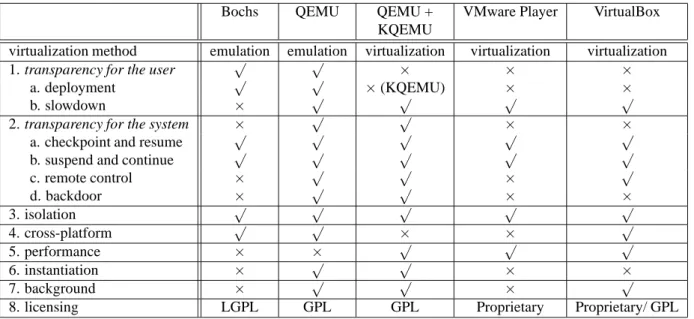
For our prototype we were looking at various tools available. At first we ruled out server-, para- and hardware-assisted virtualization tools (e.g.: VMware Server, XEN), since they require to be set up by an administrator and/or depend on the underlying architecture. Figure 2 displays those requirements that needs to be fulfilled by the used VM software in order that the sandbox is able to satisfy all requirements described in Section 4 (for example the bulletproof criteria, not displayed on the figure, depends on instantiation). Requirements for transparency are the first two (1., 2.), while 3-8. are general requirements for any candidate VM software. We found the following candidates:
Bochs QEMU QEMU + VMware Player VirtualBox KQEMU
virtualization method emulation emulation virtualization virtualization virtualization
1. transparency for the user √ √ × × ×
a. deployment √ √ ×(KQEMU) × ×
b. slowdown × √ √ √ √
2. transparency for the system × √ √ × ×
a. checkpoint and resume √ √ √ √ √
b. suspend and continue √ √ √ √ √
c. remote control × √ √ × √ d. backdoor × √ √ × × 3. isolation √ √ √ √ √ 4. cross-platform √ √ × × √ 5. performance × × √ √ √ 6. instantiation × √ √ × × 7. background × √ √ × √
8. licensing LGPL GPL GPL Proprietary Proprietary/ GPL
Figure 2: virtualization software showdown
Bochs It is an open source x86 emulator written in C++. It is running in user-space, and emulates the x86 processor with several I/O devices, and provides a custom BIOS. Bochs is highly portable, but rather slow since it emulates every instruction and I/O device. The primary author of Bochs reported 1.5 MIPS on a 400 MHz Pentium II, compared to the processor’s original speed of≈1100 MIPS.
QEMU [18] It is an open source processor emulator, released under the Lesser GNU Public License and BSD License. It is available on every major platform and is able to host every major platform and can boot many guest operating systems. It runs as a single user process and is intended as a desktop product, but can be run as a background process presenting no windows or terminals at the user. Since it is emulating the guest architecture the performance is far from native, but on x86 Windows/Linux it has an accelerator named KQEMU or QEMU Accelerator, which speeds up x86 emulation to near native level. This is accomplished by running user mode code directly on the host computer’s CPU, and using processor and peripheral emulation only for kernel mode and real mode code. QEMU implements overlay images, meaning it can keep a snapshot of the guest system, and write changes to a separate image file. If the guest system breaks, the original image or an earlier snapshot can be used to resume. It can save and restore the state of the running instance (checkpoint itself), also to an overlay image. QEMU does not need administrative rights to run. Implements copy-on-write disk image formats, meaning that images only use that much disk space what they actually use and supports compressing images. Has a console for managing running instances, and this console can be accessed either from an user interface or via a socket. It has support for virtual network card emulation, or can disable outside network at all, but still can forward a specific port to the host and bind it to a socket or port allowing one way communication with applications within the guest. It has a set of command line tools which provide full control over QEMU without having to run a separate graphical client.
VMware Player It is a free, but not open source x86 virtualization product with the limitation of not being able to create, only able to start VM images. It provides the appearance of full virtualization by using binary translation. It requires Windows or Linux to run (it is not available on Mac OS X) and has several components: a user-level application (VMApp), a device driver (VMDriver) for the host system, and a virtual machine monitor (VMM). I/O initiated by a guest system is trapped the the VMM and forwarded to the VMApp, which executes in the host’s context and performs the I/O using regular system calls, this way it achieves nearly native performance. VMware Player has a graphical interface and needs administrative rights to run on Windows. VMware does not implement support for overlay images.
VirtualBox [14] It is an x86 only virtualization software with optional support for hardware-assisted virtualization (through AMD-V and Intel VT). It has two versions a proprietary one and an open source edition, the notable difference between the two versions is support for enabling usb devices attached to the host for the guest. VirtualBox uses QEMU components, it tries to run as much code as possible native, but if problems arise it falls back to a dynamic recompiler, which based on QEMU, to emulate the x86 processor. Actually VirtualBox makes use of QEMU in two ways: first, some of the virtual hardware devices have their origin in the QEMU project. Secondly it utilizes the recompiler of QEMU as a fallback mechanism for situations where it’s Virtual Machine Manager (monitor) cannot correctly handle a certain situation. VirtualBox needs administrative privileges to run. It supports image cloning, but does not implement overlay images.
VMware Player seems to be a popular choice (by looking at section 3), but we found that it has too many short-comings to be used as basis for our sandbox. First of all it is only available on Windows and GNU/Linux, secondly it has limited ability to be remote controlled and to our best knowledge it has capability to instantiate VM Images (beside duplicating the image). It provides no interface to interact with applications inside a non-networked instance (other than cutting and pasting text), requires administrative privileges to run and is intended as a desktop product presenting a window at the user. Bochs is simply too slow to be used in any real-world deployment. VirtualBox on the other hand is a real candidate, but it lacks the support for overlay images, a method to access the guest without networking and requires administrative privileges for deployment and execution. Since it has to be deployed only once and the administrative privileges for execution is not an additional burden for most users (people are using virtual machine software every day that require administrative privileges) these are not necessary crucial defects, but the first two missing features are seriously limiting its usability.
According to [19] QEMU+KQEMU is performance wise behind VMware Player, but when when we chose to use virtualization we also decided to sacrifice performance for other benefits. We think the small performance advantage of VMware does not make up for the additional capabilities what QEMU provides: overlay images, copy-on-write image format, backdoor access and single user process instance. When using the optional KQEMU component, QEMU’s performance on x86 emulation speeds up to near native level, the only shortcoming is that the KQEMU component is not available on Mac OS/X, but this is also true for VMware Player. We decided to use QEMU with the optional KQEMU accelerator as basis for our prototype.
5
Performance
5.1
Application
To test the performance of our prototype we took a real-world application, currently run by the public BOINC project of SZTAKI also known by the name SZTAKI Desktop Grid (SZDG) [20]. The original intention of SZDG was to serve demonstration purposes among scientists mainly in Hungary and also worldwide to prove that it’s not necessary to have expensive hardware and truly monumental aims to catch the attention of the voluntary public. Soon after starting SZDG in early summer of 2005, the Computer Algebra Department of the Eötvös Loránd University applied for the project with their already developed and running single-threaded program: project BinSYS [21] which was modified to run on SZDG. The goal of BinSYS was to determine all of the binary number systems up to the dimension of 11. The difficulty in this is that the number of possible number-system bases explodes with the rising of the dimension. The input of the program is a huge, but finite part of the number space and the output is a bunch of matrices, or more precisely their characteristic polynomials fulfilling certain criteria. Further narrowing the criteria on these selected matrices, the resulting ones make up the generalized binary number systems of the given dimension. Knowing the complete list of these number systems the next step is to further analyze from the view of information theory. Sketching the integer vector of the vector space in the usual way and in the generalized number system, their form can greatly vary in length. Also the binary form of vectors close to each other can vary on a broad scale. With this in mind the research will continue further with the use of number systems in data compression and cryptography. The assumption was that the program will be able to handle the dimensions up to 11 on a few computers and by the time the cooperation has been started it has already finished up to dimension 9. The prediction has assumed that the processing of dimension 10 will last for about a year, yet it has been successfully finished by the end of the year 2005 with the help of the few thousand computers of volunteers joining the project. After this success the application has been further developed making it able to handle dimensions higher than 11 and also to break the barriers of the binary
world and process number systems with a base higher than 2.
5.2
Evaluation
BinSYS is a typical DG application, meaning the size of the executable and input files for tasks are minimal, while it has a rather long run time varying for each task. When using virtualization we have to take in account the overhead generated by the virtualization:
• Memory needed by the guest operating system. • Memory needed by the virtual machine itself. • CPU time overhead by the virtual machine. • Disk space used by the virtual machine image(s).
• Extra disk space used by the virtualization software binaries. • Time needed to create and start the virtual machine instance. • Time needed to copy files and start the task in the virtual machine.
The QEMU binaries occupy around 2 MB and we ended up with a 350 MB Debian GNU/Linux 4.0 compressed image created using the Debian Network based install image, the size can be further cut down by removing non needed files (like documentation) from each installed package. We ran the test on a Linux/ Windows XP machine with Pentium IV 2.53GHz processor and 1GB RAM, from that only 160MB was allocated for a virtual machine instance. The instance images size varied from a couple of MB to 150 MB depending on whether the VM had to checkpoint or not (checkpoints are written to the instance images).
Type Slowest run Fastest run Average time
Native Linux 711.06 sec 708.17 sec 710.20 sec Windows host, Linux Guest
Sandbox Normal Priority, -kernel-kqemu 747.56 sec 744.21 sec 745.12 sec Windows host, Linux Guest
Sandbox Below Normal Priority, -kernel-kqemu 759.76 sec 757.60 sec 758.71 sec Figure 3: Run-time (real, in seconds) of the test work unit
We ran each part of the test (shown on Figure 3) 20 times (chosen arbitrary). We used the same work unit for each run. While the VM Instance creation is done instantly, starting and stopping the instances takes time. We’ve found that around 50-60 seconds are needed to boot the image with only the minimal required services enabled, and around 20-22 seconds needed to shut down the instance. The results on Figure 3 do not include these times, they only show the real time the task was running, during the runs no checkpoints were made.
BOINC tasks consist of specially prepared binaries (application) and input files. The application is ought to implement an application-level checkpointing function and is constantly communicating with the client to report its used cpu time and status. The application asks and the client tells when is it time to checkpoint. BOINC applications have also a "fallback mode" implemented, if they are launched outside the client they enter the "standalone mode", thus they are able to run without the client. XtremWeb tasks have no such requirements, they are simple executables and input files.
Currently the sandbox does not provide a BOINC Core Client like environment, thus applications cannot be told when to checkpoint or to report CPU time directly. Instead the VM Instance is checkpointed and, since it is a single user process, the cpu time of the instance can be reported.
6
Conclusion and Future Work
In this report we presented an method to provide a secure and transparent sandbox for running (unstrusted) DG ap-plications. Our sandbox does not require modification or extra overhead from DG project administrators and can be easily integrated with DG clients, making it transparent for the users too. By leveraging existing open source tools it is ensured that the sandbox is robust and is available on a variety of platforms (MS Windows, GNU/Linux, Mac OS X). We’ve also implemented a prototype and evaluated the capabilities of our sandbox. Future work includes better BOINC Core Client integration, providing a JAVA API and XtremWeb integration.
7
Acknowledgments
The research and development published in this report is supported by the European Commission under contract number IST-2002-004265 (FP6 NoE, CoreGRID).
References
[1] D.P. Anderson, J. Cobb, E. Korpela, M. Lebofsky, and D. Werthimer. Seti@home: An experiment in public-resource computing. Communications of the ACM, 45(11):56–61, November 2002.
[2] Franck Cappello, Samir Djilali, Gilles Fedak, Thomas Herault, Frederic Magniette, Vincent Neri, and Oleg Lody-gensky. Computing on large-scale distributed systems: Xtremweb architecture, programming models, security, tests and convergence with grid. Future Generation Computer Systems, 21(3):417–437, 2005.
[3] Zoltán Balaton, Gábor Gombás, Péter Kacsuk, Ádám Kornafeld, Attila Csaba Marosi, Gábor Vida, Norbert Podhorszki, and Tamás Kiss. Sztaki desktop grid: a modular and scalable way of building large computing grids. In Workshop on Large-Scale and Volatile Desktop Grids, PCGrid 2007, 2007.
[4] D. P. Anderson. Boinc: A system for public-resource computing and storage. In Rajkumar Buyya, editor, Fifth IEEE/ACM International Workshop on Grid Computing, pages 4–10, 2004.
[5] Attila Csaba Marosi, Gábor Gombás, Zoltán Balaton, Péter Kacsuk, and Tamás Kiss. Sztaki desktop grid: Building a scalable, secure platform for desktop grid computing. In Making Grids Work, pages 363–374. Springer Publishing Company, Incorporated, July 2008.
[6] D. Lombraña González, F. Fernández de Vega, L. Trujillo, G. Olague, M. Cárdenas, L. Araujo, P. Castillo, K. Sharman, and A. Silva. Interpreted applications within boinc infrastructure, 2008.
[7] D. Lombraña González, F. Fernández de Vega, G. Galeano Gil, and B. Segal. Centralized boinc resources manager for institutional networks. In IPDPS 2008. IEEE International Symposium on Parallel and Distributed Processing, 2008., pages 1–8, April 2008.
[8] Jason Nieh and Ozgur Can Leonard. Examining VMware. 25(8):70, 72–74, 76, August 2000. [9] [email protected]://twiki.cern.ch/twiki/bin/view/EGEE/VMwareAtHome. [10] [email protected]://lhcathome.cern.ch/lhcathome/.
[11] Boinc and atlas.https://twiki.cern.ch/twiki/bin/view/LHCAtHome/BOINCAndAtlas. [12] Libvirt: Virtualization api.http://libvirt.org/.
[13] Bochs: think inside the bochs.http://bochs.sourceforge.net/. [14] Virtualbox.http://virtualbox.org/.
[16] Rich Uhlig, Gil Neiger, Dion Rodgers, Amy L. Santoni, Fernando C. M. Martins, Andrew V. Anderson, Steven M. Bennett, Alain Kagi, Felix H. Leung, and Larry Smith. Intel virtualization technology. Computer, 38(5):48–56, 2005.
[17] Paul Barham, Boris Dragovic, Keir Fraser, Steven Hand, Tim Harris, Alex Ho, Rolf Neugebauer, Ian Pratt, and Andrew Warfield. Xen and the art of virtualization. In SOSP ’03: Proceedings of the nineteenth ACM symposium on Operating systems principles, pages 164–177, New York, NY, USA, 2003. ACM.
[18] Fabrice Bellard. Qemu, a fast and portable dynamic translator. In ATEC’05: Proceedings of the USENIX Annual Technical Conference 2005 on USENIX Annual Technical Conference, pages 41–41, Berkeley, CA, USA, 2005. USENIX Association.
[19] Vmware@home: Virtualization for volunteer grid computing.https://twiki.cern.ch/twiki/pub/
LHCAtHome/LinksAndDocs/vmwareathome.pdf.
[20] Sztaki desktop grid public project.http://szdg.lpds.sztaki.hu/szdg. [21] Project binsys.http://compalg.inf.elte.hu/projects/binsys/.