TOPVIEW
Rel. 1.00 – 06/02/14Windows software for safety testers
Pag 1 of 16HT ITALIA SRL
Via della Boaria 40 - 48018 Faenza (RA)- Italy
Tel: +39-0546-621002 - Fax: +39-0546-621144
email: [email protected] - web: http://www.ht-instruments.com
1. INTRODUCTION OF TOPVIEW SOFTWARE
The TopView is a professional software designed for the management of data relative to multipurpose safety instrument of HT ITALIA and going to gradually replaced dedicated programs such as TopLink and EuroLink whose development is finished to the Win XP 32 bit platforms
Main features (reference 2.1.0.5 release)
Management of data transfer from instrument to PC
Analysis of downloaded data from multipurpose instruments Numerical/graphics visualizations od measured data
Real-time connections with instrument in USB and WiFi modes Creation of final reports in XLS and PDF format files
Customization of user data profiles Automatic search of updates
On-line update directly from the program
Management of HT Cloud system for protection data
Compliance with Win7 and Win 8 32 bit and 64 bit platforms Contextual help on line
Instrument not managed by TopView software (reference 2.1.0.5 release)
The TopView can manage the almost totality of multipurpose instrument of HT ITALIA also of not recently constructions and/or out of production, considering the herewith exceptions:
GENIUS HT5080 / HT5060 Use of PR50 software compliance up to Win XP 32 bit systems
MACROTEST 5030 Use of PR50 software compliance up to Win XP 32 bit systems
SKYLAB 9030 / 9020 Use of SKYLINK software compliance up to Win XP 32 bit systems
ENERGYTEST 2020 Use of ENERGYLINK software compliance up to Win XP 32 bit systems
TOPVIEW
Rel. 1.00 – 06/02/14Windows software for safety testers
Pag 2 of 16HT ITALIA SRL
Via della Boaria 40 - 48018 Faenza (RA)- Italy
Tel: +39-0546-621002 - Fax: +39-0546-621144
email: [email protected] - web: http://www.ht-instruments.com
2. MAIN SCREEN OF TOPVIEW SOFTWARE
Data Analysis allows to open a file of saved data for further analysis
PC Instrument-Connection allows to perform the download of data from the instrument via RS-232, USB or WiFi (actually for MACROTESTG3 and PQA820)
Settings allows to define a user profile, enable the notification of software updates and
choose the language
Help allows the access to the help on line of the program
Cloud allows the access to HTCloud database in which is possible to save the downloaded data in protection way (actually for PQA820)
TOPVIEW
Rel. 1.00 – 06/02/14Windows software for safety testers
Pag 3 of 16HT ITALIA SRL
Via della Boaria 40 - 48018 Faenza (RA)- Italy
Tel: +39-0546-621002 - Fax: +39-0546-621144
email: [email protected] - web: http://www.ht-instruments.com
Section PC-INSTRUMENT CONNECTION
Features
Detection of instrument connected to PC
Visualization of internal parameter of the connected instrument Real time acknowledgment of available COM ports
Access to the “Management devices” of the PC
Access to reserved area of HT website for download of the latest Firmware version Wizard steps to capture data from the instrument
Possibility to setting the internal parameters of the instrument by software Visualization of the internal status of the instrument with start/stop recordings Real time visualization of parameters (multimeter, waveforms) for recording models Management of internal markers (for dedicated instruments)
TOPVIEW
Rel. 1.00 – 06/02/14Windows software for safety testers
Pag 4 of 16HT ITALIA SRL
Via della Boaria 40 - 48018 Faenza (RA)- Italy
Tel: +39-0546-621002 - Fax: +39-0546-621144
email: [email protected] - web: http://www.ht-instruments.com
Section SETTINGS
TOPVIEW
Rel. 1.00 – 06/02/14Windows software for safety testers
Pag 5 of 16HT ITALIA SRL
Via della Boaria 40 - 48018 Faenza (RA)- Italy
Tel: +39-0546-621002 - Fax: +39-0546-621144
email: [email protected] - web: http://www.ht-instruments.com
AUTOMATIC UPDATE SEARCH
TOPVIEW
Rel. 1.00 – 06/02/14Windows software for safety testers
Pag 6 of 16HT ITALIA SRL
Via della Boaria 40 - 48018 Faenza (RA)- Italy
Tel: +39-0546-621002 - Fax: +39-0546-621144
email: [email protected] - web: http://www.ht-instruments.com
Section HELP
Features
Information regarding the installed version of software
Verify of the latest available upgrading of the software and real time download of it Link to the homepage of the www-ht-instruments.com website
TOPVIEW
Rel. 1.00 – 06/02/14Windows software for safety testers
Pag 7 of 16HT ITALIA SRL
Via della Boaria 40 - 48018 Faenza (RA)- Italy
Tel: +39-0546-621002 - Fax: +39-0546-621144
email: [email protected] - web: http://www.ht-instruments.com
Section CLOUD
Features
Access to the protected HTCloud database for authorized users
Download of saved data from the instrument (actually PQA820) connected to tablet/smartphones by means the use of HT Analysis APP
TOPVIEW
Rel. 1.00 – 06/02/14Windows software for safety testers
Pag 8 of 16HT ITALIA SRL
Via della Boaria 40 - 48018 Faenza (RA)- Italy
Tel: +39-0546-621002 - Fax: +39-0546-621144
email: [email protected] - web: http://www.ht-instruments.com
Section DATA ANALYSIS
Features
Import file from PC folders
Wizard procedure during a open file downloaded from a meter Management of data with final report creation
TOPVIEW
Rel. 1.00 – 06/02/14Windows software for safety testers
Pag 9 of 16HT ITALIA SRL
Via della Boaria 40 - 48018 Faenza (RA)- Italy
Tel: +39-0546-621002 - Fax: +39-0546-621144
email: [email protected] - web: http://www.ht-instruments.com DATA ANALYSIS – SAFETY SECTION
List of measures downloaded from the instrument with results and selected parameters
Print of measured results with possible including of logos, user data and preview
TOPVIEW
Rel. 1.00 – 06/02/14Windows software for safety testers
Pag 10 of 16HT ITALIA SRL
Via della Boaria 40 - 48018 Faenza (RA)- Italy
Tel: +39-0546-621002 - Fax: +39-0546-621144
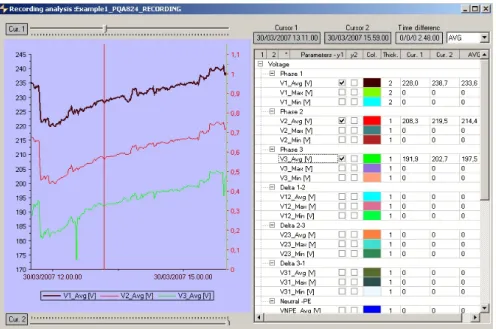
email: [email protected] - web: http://www.ht-instruments.com DATA ANALYSIS – ANALYZER SECTION
Graphic visualization of electrical parameters of a recordings with selection tree
structure
Numerical complete visualization of recorded data
TOPVIEW
Rel. 1.00 – 06/02/14Windows software for safety testers
Pag 11 of 16HT ITALIA SRL
Via della Boaria 40 - 48018 Faenza (RA)- Italy
Tel: +39-0546-621002 - Fax: +39-0546-621144
email: [email protected] - web: http://www.ht-instruments.com Real time visualization of waveforms, numerical values, voltage/current harmonic histograms and
vectorial diagram for each captured sample
Numeric/graphic visualization of Flicker parameters on input voltages (PQA823, PQA824,
TOPVIEW
Rel. 1.00 – 06/02/14Windows software for safety testers
Pag 12 of 16HT ITALIA SRL
Via della Boaria 40 - 48018 Faenza (RA)- Italy
Tel: +39-0546-621002 - Fax: +39-0546-621144
email: [email protected] - web: http://www.ht-instruments.com
Numeric/graphic visualization of unbalance parameters on
input voltages
Numeric/graphic visualization of inrush current with 10ms resolution (PQA823, PQA824,
SOLAR300N, HT9022 instruments)
TOPVIEW
Rel. 1.00 – 06/02/14Windows software for safety testers
Pag 13 of 16HT ITALIA SRL
Via della Boaria 40 - 48018 Faenza (RA)- Italy
Tel: +39-0546-621002 - Fax: +39-0546-621144
email: [email protected] - web: http://www.ht-instruments.com
Numeric visualization of voltage anomalies (dips, swells) with
10ms resolution
Numeric visualization of voltage spikes with 5s resolution
TOPVIEW
Rel. 1.00 – 06/02/14Windows software for safety testers
Pag 14 of 16HT ITALIA SRL
Via della Boaria 40 - 48018 Faenza (RA)- Italy
Tel: +39-0546-621002 - Fax: +39-0546-621144
email: [email protected] - web: http://www.ht-instruments.com
Section DATA ANALYSIS – PHOTOVOLTAIC TEST
Features
Access to an archive of PV modules just included
Possibility to download a database of PV modules periodically updated Creation of new PV modules and/or modify of existent ones
TOPVIEW
Rel. 1.00 – 06/02/14Windows software for safety testers
Pag 15 of 16HT ITALIA SRL
Via della Boaria 40 - 48018 Faenza (RA)- Italy
Tel: +39-0546-621002 - Fax: +39-0546-621144
email: [email protected] - web: http://www.ht-instruments.com Features
Possible configuration of the instrument by software
Creation of a list of PV modules to send to the instrument (SOLARI-V, I-V400) Setting of parameters for I-V curve and Efficiency tests (SOLARI-V)
TOPVIEW
Rel. 1.00 – 06/02/14Windows software for safety testers
Pag 16 of 16HT ITALIA SRL
Via della Boaria 40 - 48018 Faenza (RA)- Italy
Tel: +39-0546-621002 - Fax: +39-0546-621144
email: [email protected] - web: http://www.ht-instruments.com Features
Visualization of I-V curve in both OPC and STC conditions (SOLARI-V, I-V400) Visualization of maximum power OPC and STC curves (SOLARI-V, I-V400) Results shown in numeric and graphic forms
Customization and creation of final reports in PDF and XLS format files Possible modify of parameters and recalculation of results