-=:===-- -=:===--
_ _ _ 1 - - . . - --
--
- - -
-=
==:
--
--
-
-
-~--~-_
...
---~-
==
-=:=
-
':' -
Application Program
H20-018S-I144[J/14S[J Administrative Terminal System (ATS)
(144[J-CX-[J7X and 14S[J-CX-[J8X)
Terminal [Jperator's Manual
This system consists of control and functional programs that permit many different
text-processing activities to be carried on simultaneously through different terminals. This manual is a reference manual which includes all information required by a
This revision (H20-0l85-l) contains many clarifications and Minor
revisions to 1120-0185-0. It should be ~eviewed in its entirety. The
mos~ significant changes are:
1. In the section "Storage Reports" all references to the ATTNq
action should be replaced by references to ATTN !g, for Version 2 and later revisions of the program.
2. In the section "Storage and Retrieval from Tape", note that
there is a message "TAPE" printed at the terminal if there
are any errors in reading ~r writing magnetic tapes. The
transfer request should be repeated if this message occurs.
3. In the section "Upper- and Lowercase Chain Printer Output"
revised overstrike codes are provided in Version 2 and later revisions of the program to permit easy recognition of all 120 characters.
This publication was prepared for production using the IBM 1440/1460
AdMinistrative Terminal System. Page impressions for photo-offset
printing were obtained from a typewriter terminal and then reduced 15 percent.
Copies of this and other IBM publications can be obtained through IBM
Branch Offices. Comments on this publication should be addressed t:o:
CONTENTS
-INTRODUCTION
...
THE 'I.'ERMINAI.I . . . .
General ••••••••••••••••••••••••••••••••••••••••••••
The Attention Key •••••••••••••••••••••••••••••••••••••••
ENTERING TEXT ••••••••••••••••••••••••••••••••••••••••••• Uncontrolled Mode ••••••••••••••••••••••••••••••••••••••• AutoI'natic Mode •••••••••••••••••••••••••••••••••••••••••• Additional Lines ••••••••••••••••••••••••••••••••••••••••
Format Control ••••••••••••••••••••••••••••••••••••••••••
Tab Stops •••••••••••••••••••••••••••••••••••••••••••• Lines on a Page •••••••••••••••••••••••••••••••••••••• Printing Element Identification ••••••••••••••••••••••
PRINTING A DOCUMENT
•••••••••••••••••••••••••••••••••••••
Print,ing •••••••••••••••••••••••••••••••••••••••••••••••• Justification ••••••••••••••••••••••••••••••••••••••••••• Printing as Entered •••••••••••••••••••••••••••••••••••••
P~inting with Unit Numbers •••••••••••••••••••••••••••••• Printing a Particular Page •••••••••••••••••••••••••••••• Re p r i n tin g ••••••••••••••••••••••••••••••••••••••••••••••
CORRECTION PROCEDURES ••••••••••••••••••••••••••••••••••• Line Deletion ••••••••••••••••••••••••••••••••••••••••••• Character Erasing ••••••••••••••••••••••••••••••••••••••• Referencing Previously Entered Text ••••••••••••••••••••• Insertions •••••••••••••••••••••••••••••••••••••••••••••• Moving Sections of Text (Bulk Move) ••••••••••••••••••••• Erasing Sections of Text (Bulk Erase) •••••••••••••••••••
1 2 2 2 3 3 5 8 9 9 9 10 11 11 11 12 12 13 13 15 15 15 16 18 19 21
STOP CODES •••••••••••••••••••••••••••••••••••••••••••••• 23
SPECIAL MODES ••••••••••••••••••••••••••••••••••••••••••• 25
Heading Mode •••••• '... • ••••••• .. •••••••••• •••••••••••••••• 25
Footing Mode •••••• '. • • • • • • • • • • • • • • • • • • • • • • • • • • • • • • • • • • • • • 26
Line Centering •••• ~... 27
Form Letter Hode •• '. • • • • • • • • • • • • • • • • • • • • • • • • • • • • • • • • • • • • • 27
CLEARING \~ORKING STORAGE
...
28EXAMPLE ••••••••••• ~... ••••••••••••••••••• 29
STORING A DOCUMENT
II...
31Entering Text Into Permanent Storage •••••••••••••••••••• 31
Getting Text From Storage ••••••••••••••••••••••••••••••• 32
Deleting A Document From Storage •••••••••••••••••••••••• 33
Storage Reports •••.
t...
34Using Permanent Storage ••••••••••••••••••••••••••••••••• 36
Hints on Storing Documents •••••••••••••••••••••••••••••• 37
Storage and Retrieval From Tape ••••••••••••••••••••••••• 37
MESSAGE TRANSMISSION •••••••••••••••••••••••••••••••••••• 40
Transmitting Messages •••••••••••••••• ' . . . 40
Receiving Messages
0...
40Summary of Terminal Messages •••••••••••••••••••••••••••• 41
SYSTEM FAILURE •••• 0 • • • • • • • • • • • • • • • • • • ' . . . 44
Transmission Errors ••••••••••••••••••••••••••••••••••••• 44
Keyboard Lock •••••
0...
44SYSTEM SHUTDOWN ••••••••••••••••••••••••••••••••••••••••• 45
SPECIAL FEATURES
...
Keypunching ••••••••••••••••••••••••••••••••••••••••••••• Printing ~~li th Line Numbers •••••••••••••••••••••• It • • • • • • • Tape Output •••••••••••••••••••••••••••••••••••••••••••••
Upper- and Lowercase Chain Printer Output ••••••• ,I • • • • • • •
Special Peripheral Option ••••••••••••••••••••••••••••••• Input from Cards or Tape •••••••••••••••••••••••••••••••• Peripheral Program Selection ••••••••••••••••••••••••••••
Number 0 f Users ••••••••••••••••••••••••••••••••• ' . . . ..
DESK COMPUTER •••••••••••••••••••••••••••••••••••••••••••
Entering Numbers ••••••••••••••••••••••••••••••••. , •••••••
Addition •••••••••••••••••••••••••••••••••••••••••••••••• Subtraction ••••••••••••••••••••••••••••••••••••••••••••• Multiplication •••••••••••••••••••••••••••••••••••••••••• Division •••••••••••••••••••••••••••••••••••••••••••••••• Priority of Operations •••••••••••••••••••••••••••••••••• Parentheses ••••••••••••••••••••••••••••••••••••••••••••• Powers and Roots •••••••••••••••••••••••••••••••••••••••• Factorials •••••••••••••••••••••••••••••••••••••••••••••• Variables •••••••••••••••••••••••••••••••••••••••••••••••
46 46
48 48
49
50
52
53 53
55
55 57 57 57 57 58 58 59
IN'l~RODUCTION
ThE! IBM Administrative Terminal System CATS) consists of an IBM 1440
or 1460 Data Proc,essing System conn,Acted by telephone lines to terminals
which are similar to IBH SELECTRIC
Q.9typewri tars. Wi th the exception
of a few EJimple computer console functions, operation of the system
is obtained through the terminal keyboard.
The system, \"hen properly instructed, can save every keystroke made
by the operator.
To alter the text, the operator directs the system
to locate the characters to be changed and instructs i t in what manner
these are to be altered.
If a copy of a document is requested, the
system \'Till produce and transmit it to the terminal.
THE TERMINAL
GENERAL
The terminal is an IBM 2741 Communications Terminal which enables
characters to be transmitted to and received from a computer. The
terminal is identical to the conventional SELECTRIC typewriter, with
one exception: An Attention key replaces the Index key and makes
possible communication bet\'Teen the operator and the computer. The
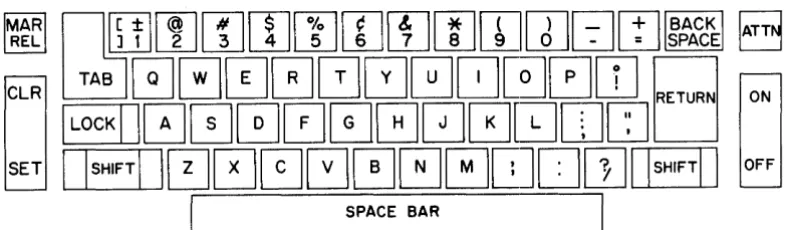
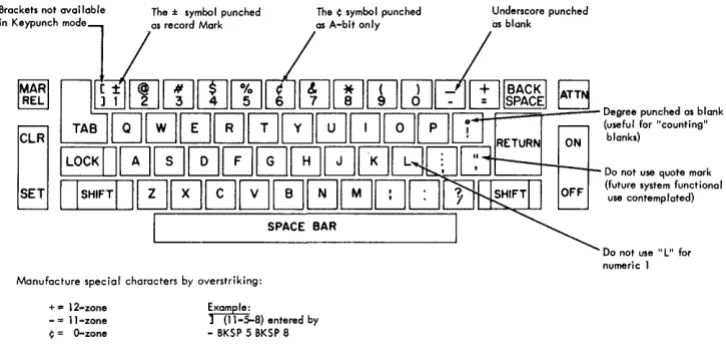
[image:6.615.136.529.269.384.2]layout of the typewriter keyboard is shown in Figure 1.
Figure 1. Admirustrative Terminal System keyboard
Operation of the 2741 COmMunications Terminal is described in the Svstem Reference Library Publication IBM 2741 Communications Terminal
(A24-34l5) • -
-THE ATTENTION KEY
Pressing the Attention key siqnals the computer that a request is
about to be transmitted. Rece~pt of the underscore-backspace from
the computer signifies that i t is ready to receive the request.
When the carrier rsturn key is pressed after an attention character has been received, the system analyzes and inter.prets the request.
If acceptable, the request is processed. If the request is
unacceptable, the system types a message indicating that the request must be repeated.
Each request for computer assistance is a sequence of characters that
begins with the Attention character. Unless otherwise specified, the
ENTERING TEXT
Characters or documents may be entered into the system in either of
two different modes. In the uncontrolled mode, the system assumes
no control over the format of the docurnentr--Fext entered in this mode is printed exactly as the system receives it. Normally, this mode is used when individual lines have a unique position on the page,
as in a chart or the heading of a letter. In the automatic mode, the
computer calculates line and paragraph formatting, the
formar---specifications being supplied by the terminal operator. Automatic
right margin justification is also a feature of this mode. Two special
modes (Heading and Footing) are described later in this manual.
Whenever a new document is to be typed with computer assistance, the first request which must be made is a request for either the
uncontrolled or the automatic modeo (The character seauence for these
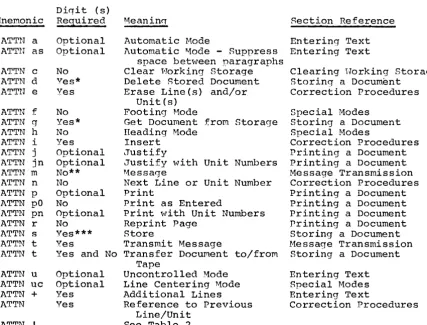
and all other operational requests will be found in Tables 1 and 2
at the end of the manual. The tables are cross-referenced to the
sections of this manual which describe each request in detail.)
When documents are entered into the system in either mode, they are entered into the Horking Storage belonging to the terminal from which
they are entered. ~'Jhile they are in the ~.vorkinq Storage of a terminal,
many things can be done to them. They may be p~inted, corrected, or
transmitted to some other terminal or output device. They may also
bc~ stored in the Permanent Storage of the system and then recalled
for further processing by any terminal.
In this and following sections, the attention, carrier return, tab, and backspace characters will be denoted by ATTN, CR, TAB, and BKSP, respectively.
UNCONTROLLED MODE
All text entered in the uncontrolled mode will be printed back exactly
as i t is entered. All tabs, backspaces, spaces, and carrier returns
will be saved by the COMputer whether text appears on the line or
not. Special care must be taken with the carrier return key, as extra
carrier returns will appear as blank lines on the printed document. The uncontrolled mode is especially suited for text requiring a unique
position on the page: formulas, tabular material, the inside address
of letters, etc.
The request for this mode is:
ATTN u CR
'<There AT,]~N signifies the first entry of a new line. The computer
responds by typing:
UNCONTROLLED MODE
to acknowledge receipt of the request.
-3-An example of copy prepared in the uncontrolled mode might be:
u
UNCONTROLLED MODE
Tovs --~-Bicycles Books Garnes Dolls Availability
2 weeks 6 weeks
3 months
5 days
Cost
$35.00 $ 5.00 $ 6.00 $ 4.95
Text that should not be broken up (such as the above example) is
sometimes split between pages. This can be avoided by typing the
number of the lines needed·on the page before the following text is
printed out. The above example might then appear:
u7
UNCONTROLLED HODE
Bicycles Books Games Dolls
Availabilitv
2 \-leeks 6 'Y'eeks 3 months 5 days
* Cost
$35.00 $ 5.00 $ 6.00 $ 4.95
Hhen the computer is preparing the text to be typed back to the terminal, the 7 following the u indicates that no more text should
be typed on the page unless there is space for seven lines. Thus,
the lines of copy shown would appear all on one page.
In a siMilar manner, a page may be ended at any point selected by the operator if the u is followed by a number greater than any possible
number of lines that could remain on the page. The number selected
is usually 99, as seldom will anyone be working with a page size that
would contain 99 lines of text. This request might appear as follows:
as stated previously by the district Director.
u99
UNCONTROLLED MODE CHAPTER II
Collection-Procedures
This causes the typeout to terminate before the ,;.yords CHAPTER II and eject to a new page.
All lines typed in the uncontrolled mode are numbered sequentially
by the computer. This is done internally; no line number appears on
the naper. This procedure allows the operator to refer to previously
entered text for correction or editing purposes.
NOTE: Even a line consisting solely of a carrier return character
AUTOMATIC MODE
The automatic mode is especially suited to straiqht text. The operator
specifies line width and other formatting requirements, but the
computer determines where each word will be printed on the page. If
so requested, the computer will also justify (make straight margins
on both i~he left and right sides of the text) the portions of a
document entered in the automatic mode. The operator is free to
s~ritch back and forth between the automatic and uncontrolled modes on the same document whenever necessary.
The automatic mode is requested by typing the sequence:
ATTN a CR
where AT,]~N signifies the first entry of a new 1 ine. The computer
responds to this request by typing:
AUTOHATIC HODE
Text in the automatic mode is manipulated and numbered by the computer
in "units I t . (1\ unit is agy segment of text, usually a sent,ence, that
is prefaced ana roITowed v a C'iou61ecarrIer return.)- If a unit
rs-tOo· long, corrections wilr-be difficult. In the automatic mode, the numbering of units is similar to the numbering of lines in the
uncontrolled mode. Three units might be typed as follows:
John Glenn has just boarded the mis-sile gantry.
His last words were to the effect that he wasn't nervous.
All control systems had been completely checked out.
When printing is requested, these units will be printed one following
the other to make the desired line width. A hyphen occurring as the
last character of a line ,.,ill be eliminated if the complete word is
formatted by the computer on a single line. Nhere hyphens are desired
reqardless of ~vhere formatted margins occur, the hyphenated word must
originally be entered as a single word without breaking i t with a carrier return.
Paragraphs are indicated in this mode by typing one or more tab
chj~racters at the beginning of the first unit of the paragraph. The number of tab characters typed on the first line of that unit controls
As Entered
The 77974Q assembler
does not yet read cards.
This has made program checkout difficult.
lAS Printed
The 77974Q assembler does
not yet read cards. This
has made program checkout difficult.
The first line of the first unit in the above (left) example began
with a single tab. The first unit was ended with a double carrier
return and the second unit was then entered with no tabs. vJhen printed
back in the example on the right, the paragraph was printed flush, with no indentations, and the two units were run together.
Indentation is specified in relation to the positions of the tab stops set by tIle operator (see "Format Control" in the section "Entering
Text"). A paragraph to be printed with the first line indented to
the second tab stop, for example, is indicated by typing exactly tw'o tab characters at the beginning of the first line of the first unit of that paragraph.
As Entered
The 77974Q assembler does not yet read caras.
This has made program checkout difficult.
11.s Printed
The 77974Q assembler does not yet
read cards. This has
made program checkout difficult.
The first line of the example above was indented two tab stops and, as the example on the right shows, two tabs were used when printing
back.
rulY
number of tabs may be used, and as long as the number isgreater than one, that many tab stops will be used to indent the first line of the paragraph.
If indentation to the first tab stop of all the lines following the first line of the printed paragraph is desired, then one tab character must be typed at the beginning of the second line of the first unit of that paragraph.
As .J::ntered
The 77974Q assembler does not yet read cards.
This has maae program checkout oifficult.
As Printed
The 77974Q assembler does not yet read cards. This has made program checkout difficult.
In the above example, only one tab was used on the first line and,
according to the rule, there is no first line indentation. The second
line of the first unit, however, is indented one tab stop and, when i t was printed back, all the lines except the first were indented one
stop. The second line of the first unit controls the indentation for
the entire paragraph. Any number of tabs, including one, may be
entered on this line and the body of the text will be indented that
far. No matter how many units make up the paragraph, only the second
line of the first unit need be indented for this type of format. T'he
By combining the indenting of the first line and the second line of
the first unit of a paragraph, i t
is
possible to get an indentedblocked paragraph.
As Entered !l.s Printed
cards.
The 77974Q assembler
does not yet read
Hargin
'1~his has made program checkout difficult.
The 77974Q assembler
does not yet read
cards. This has made
program checkout difficult.
In the above example, two tabs were used on the first line to cause
t.wo tabs to be used when printing back the first line. The two tabs
used on the second
line
of the first unit cause all following linesto be printed back with two tabs.
It
is
possible that a small portion of a paragraph will fallon onepage while the bulk of i t
is
carried over to the next. Thisis
obviously undesirable and tends to make reading more difficult. To
avoid this, numbers may be entered after the "a" in the request for
the automatic mode. For example:
ATTN a 7 CR
i.nstruct.s the computer to print no further text on the page unless
t~here are seven available lines remaining on the paper. Any number
up to 999 may be used with this request. Operators frequently find
i.t conv(i~nient to end a page with this action by using a larger number
of lines than could possibly be on the page, such as:
ATTN a 99 CR
For example, a page might end thus:
however, the situation
in
the departmentis rapidly improving.
a99
AUTOMATIC MODE
!!.~
!2
~ ~ ~ ~ ~ SecretaryThe key to good relations with your
secretary
is
basically appreciation.~'JARNING: BeforE: making an attention request in the automatic mode,
the current unit must be .ended by two carrier returns. If an attention
request (with the exception of ATTN BACKSPACE and ATTN Cn)
is
requestedbefore a unit has been ended, the computer will type:
hND YOUR UNIT
and ignore the request. In general, the correct action when the above
message
is
received is to depress the carrier return and then reenterIt is possible to suppress the one-line space that is normally inserted between paragraphs of text entered in the automatic mode when i t is printed. This is done by entering the letter "s" after the "a" in
the request for automatic mode. For example:
ATTn as
eR
When the following text is printed no spaces will be inserted between
paragraphs. This will continue for all text entered until an ATTN u
or ATTN a request without an tIs" is received. If i t is desired to
both suppress spaces between paragraphs and prevent a small section
of text from ap~earing at the bottom of a page, either of the follo~ling
requests may be used:
ATTN as DIGIT(S) CR
ATTN a DIGIT(S) s CR
"DIGIT(S)" is the minimum number of lines that must be available at the bottom of the page as described above.
ADDITIONAL LINES
It is often desirable to skip a specified number of lines when printing
a document. Perhaps space is needed for a chart, photograph, or
signature. It is possible to enter the desired number of lines while
in the uncontrolled mode by consecutive carrier returns. Alternatively,
the request:
ATTN + DIGIT(S) CR
will cause the computer to skip the number of lines specified by
DIGIT(S) when the document is printed. For example:
+8
,.,ill cause eight carrier returns to occur when the document is print:ed
back. This will result in 8 or 16 lines depending on the setting of
the single or double space selection lever.
If the request exceeds the number of lines remaining on a page, these
lines will be stepped off on the next page. If the number of additional
lines requested exceeds the number of lines specified for a page, a single blank page will be ejected with heading and footing if present.
In the automatic mode, the plus lines action is the only method of
insert~ng blank spaces on a page. The request is entered at the
left-hand margin as the first entry of a new unit. If the operator fails
to end the previous unit before entering the plus lines request, the! computer will type:
FORMAT CON'l'ROL
Tab Stopf'!,
If tabs are to be used, i t is necessary to convey the position of the
tab stops to the computer. This is done by the request:
ATTN! (sequence of dashes and t's) CR
This action is necessary to allow the computer to format the necessary
tabs for printout. Accuracy in indicating the required number of
st.ops is essential. An incorrect number of tabs transmitted to the
computer will cause errors in printout.
The entry of the tab stops might appear on the paper as follows:
l---t---t---t---tt---t-t
where the t indicates a tab stop which is set and the dash a tab stop
not set. Since ·the computer will retain the last setting of the tab
stops indefinitely, the tab setting action need be taken only once, or when i t is necessary to change the settings.
NOTh: The exclrunation mark (I) occupies the first character position,
which cannot be used for a tab stop.
HINT: It is often uesirable to have the first tab stop in the second
charactel.' position. rrhis allows block-style paragraphs to be entered
in a natural format.
'l'a.bs should be used in preparing a document only when necessary. Ta.bles and other material likely to be retrieved by several terminals should be typed using spaces so that variations in tab rack settings will not produce undesirable printing.
Lines on a Page
The computer mus·t be instructed how many lines are available on each
page. For example, if the paper has a capacity of only 40 lines and
there is a greater number of lines available for printing out, the number of available lines is conveyed to the computer by the action:
ATTN I DIGIT(S} CR
This will appear on the paper:
140
rl'ile computer will then divide the copy into pages of 40 lines each. This number includes, any heading or footing lines which may be printed
(see the section "Special Hodes") •
The number of lines per page may be set from 5 through 999. If a
number less than or greater than these limits is selected, the computer will type:
UNACCEP'l'ABLE NUHBER
Printing Element Identification
One of the features of the SELEc'rRIC typewriter terminal is that the printing elements may be interchanged to allow use of different
typefaces. This feature, however, causes an ambiguity with the numeral
one. For example, the L\lanifold element prints the numeral one when
the "1" key is depressed. However, when the Courier element is used,
the "1" key causes a right bracket to be typed, since the lowercase
"L" serves double duty by printing a
"1".
In order to have "l".s print as "l"s in system messages and storage reports (see "Storage Report" in the section "Storing the Document") the computer must know whichelement is currently being used. This information is conveyed by the
action
ATTN 1 1 CR
PRINTING A DOCUM~NT
Any of five types of printing requests may be made for text entered
int,o a Working Storage of a terminal. These are described below.
PRIN'rING
The request for printing is made by the action:
ATTN P DIGITS
cn
where DIGITS is the desired number of characters per line and is
between 30 and 130, inclusive. All text previously entered in the
j.\.utomatic mode will be printed wi th 'the indicated width or less. For
example, if the request ATTN p 45 CR is entered, the right-hand margin
will be 45 character positions from the left-hand margin. Since no
words are automaticall~' hyphenated, the majority of the lines will
be slightl.y less than 45 characters; however, a maximum line of 45
characters may be printed. Text entered in the uncontrolled mode
will be printed exactly as entered. If no digits are entered, the
computer will use a number of its own selection. The ATTN p request
would appear as follows:
When the print request is made, the computer will respond by typing:
SIGNAL WHEN READY
and wait for the operator to load fresh paper, an offset duplicating
mat, or a stencil~ During this idling period the keyboard is unlocked
and variable text may be entered just as when the stop printing request
(see the section "Stop Codes")
is
encountered. It is also possibleto stop all further printing by using BKSP ATTN. When the Attention
key is again depressed, the keyboard will be locked and printing will
begin. The underscore-backspace usually printed by the computer upon
receipt of this attention character is suppressed and does not appear on the printed document.
JUSTIFICA'rION
Justified printing is accomplished only with text entered in the
automatic mode. Text entered in the uncontrolled mode will be printed
exactly as entered. Justification is requested by the sequence:
ATTN j DIGITS eR
where DIGI'rS
is
the number of characters' desired on each line and isbet'ween 30 and 130, inclusive. If no digits are entered, the computer
will use a number of its own selection. When this request is received
by the computer, i t will respond by typing:
Fresh paper may then be loaded into the typewriter and any variable
text entered. Upon the next depression of the Attention key, the
keyboard will be locked and printing will begin. The
underscore-backspace usually printed by the computer upon receipt of this Attention character is suppressed and does not appear on the printed document.
Justification is accomplished by padding spaces between words. This
procedure will insert spaces from right to left on the first line and
from left to right on the second line and so forth. This technique
prevents anyone side of the printed area from appearing lighter or more open than tne other side.
NOTE: A word of caution is in order when underscoring. Since, to the
computer, a word is a group of characters separated by spaces, underscoring should always look like this (underscoring each word
before typing the next), an~ver-riKe·this. That is, a \vord to bE~
unuerscored should be typed, backspaced over, and then underscored
before going on to tne next word. Incorrect underscoring will produce
an unacceptable document when i t is printed. This rule of underscoring
should be observed when in tne automatic mode if there is a possibility of the text being separated when printed out.
PRINTING AS ~NTERED
Occasionally i t is desirable to be able to print the text exactly as
i t was entered. This allows the operator to check to be sure that
all the text was entered correctly, and that insertions, deletions,
and erasures were properly .executed. This request is made by the
sequence:
A'1'TN P ZERO CR
where ZERO is the number
o.
The computer will respond to this reque~stby typing:
SIGNAL \vHEN READY
printing will begin upon the next depression of the Attention key. In addition to the text, the computer will also type out all u, a,
+, h, and f requests. Stop codes within the text will print as
underscores and will not stop the printing. Heading and footing lines
will Hot be printed at the top and bottom of each page.
PRINTING WITH UNIT clUMBERS
In making corrections to documents i t is necessary to know the unit
numbers of each piece of text being cllanged. (Each line of text
entered in uncontrolled mode is considered a unit.) l'. special mode
of printing, with or without justification, is available that displays in the right margin of the page the unit number of the last unit of
text that begins on that line. (in a few rare cases, the unit number
may be omitted.) This mode of printing will occur whenever the lett~er
"n" is added to an ATTN p or A'l'TN j request. Any of the following
sequences can be used:
A'l'TN P n CR
ATTN P n ZERO CR ATTN P ZERO n CR
ATTN j n
cn
I.T'l'N j n DIGITS CR A'r1'N j DIGITS n CP.
Except for the unit numbers in the right margin, the prin-ted text will look exactly like that produced by the same attention request without the "nil included.
PRINTING A PARTICULAR PAGE
Sometimes i t will be necessary to begin printing on a particular line
or unit of a multipage document. This can be accomplished with either
the ATTN p or ATTN j action by following the line width with a tab
and then typing the line number where printing is to begin.
Examples are:
AT1'N P 65 TAB 397 CR
or
ATTN j 75 TAB 265 CR
In either of the above two examples, the number following the tab is
the line number of the first line to be printed. In effect, this
action allows the option of beginning a printout at any page that is desired, or to see the effect of formatting the last few lines or
units entered. From the line or unit number given, a full page will
be typed containing the number of lines given with the ATTN ! action
(see "Format Control" in the section "Entering Text"). Following
pages will be printed in order as usual. Heading and footing lines
will not be printed.
HEPRIN'l'ING
SometimE~s i t is desirable to reprint a page, either because multiple
copies are desired or because of a computer failure. In the latter
case, if the computer should fail while the document is being printed, the reprint action will begin printing at the top of the page where
failure occurred. With a multipage document, this feature is very
important to maintain proper page numbers as well as to get a complete
copy of the page. 1'he request for reprint is made by typing:
The canputer will respond to this request by typing:
SIGNAL WHEN READY
Upon depression of the Attention key, reprinting will begin from the top of the page last printed.
Note that this is a duplicating action; i t should be requested only
if the text was previously printed. Also, since the action is a
J:'equest for an exact duplicate, no line width is necessary or permitted.
is
requested when the text was not previously printed or the requestis
followed with digits to indicate a line width, the computer willtype:
ILLEGAL 1'.CTION
and ignore the request.
The reprint action may not be requested if lines were called out for
correction between the last printing and the reprint request. If the
operator inadvertently attempts this, the computer will type:
ILLEGAL ACTION
NOTE: If a reprint of a page is desired in a multipage document, the
printing of the rest of the pages must be aborted by the action, BKSP
CORREc'rION PROCBDURES
LINE DELETION
When entering text in the uncontrolled mode, the request:
ATTN CR
will erase the entire line being typed. This request may be made
anywhere on the line and is particularly useful in deleting lines containing tab and backspace characters entered when the tab stops
and margins are set. An example of a deletion might appear as:
What I really want to say is_
In the automatic mode, the delete request will erase the entire unit being entered, regardless of the number of lines that make up the
unit. An example of the deletion in the automatic mode might appear
as follows:
Some people, as you know, are careless with their money to the point where they give i t away indiscriminately to every beggar on tile street.
In the above example, the entire unit (all five lines) will be deleted
by the ATTN CR action.
The easiE~st way to delete a line or unit of text that has already
been completely entered is to use an erase request. (see "Erasing
Sections of Text (Bulk Erase)" below).
CHARACTER ERASING
It is possible to correct individual characters entered on the terminal. When a miskeying occurs, the operator may depress the httention key
and backspace as far as desired. As the printing element passes over
each character position, that character is erased from system storage.
The correct characters may then be entered. A typical correction
might look like this:
Hy aunt is a sag_person.
The backspace key on the terminal may be "typamatic", that is, i t
operates continuously as long as i t is depressed. If the operator
should backspace further than desired, typing must again begin where
the element stops. All characters, incorrect or not, passing under
the element by this procedure are erased.
When a Tab key is pressed, the printing element may move across many
character positions. When the operator attempts to erase by
attention-backspacing over a tab character, this should erase all the characters
that were covered by the tab. The second backspace given after
attention-backspacing over a tab would indicate the erasure of the character immediately to the left of the character position at the
beginning of the tab. These characters would almost certainly be far
to the left of the printing element and the rule that characters passing under the printing element during an attention-backspace
attention-backspacing over a tab character is not permitted. Should the operator inadvertently attempt to use the erase procedure incorrectly, the
computer will respond by typing:
LINE CANCELED
The operator must then enter that line again, not the entire unit in
automatic mode. To make a correction that would involve
attention-backspacing over a tab, the line or unit should be ended and then called out using the replacement feature as explained in the next section.
REFERENCING PREVIOUSLY ENTERED TEXT
As previously mentioned in the section "Entering Text", all text
entered into the system is numbered. In the uncontrolled mode i t is
numbered by the line; in the automatic mode i t is numbered by the
unit. To ascertain the number of a line or unit, the request:
A'rTN n CR
is entered as the first entry of a new line. The computer will respond
by typing:
NExrr NUMBER -- xxxx
where xxxx is the number of the next line to be entered. In other
words, if the operator has just finished typing line or unit number 17, the computer will type:
NEXT NUMBER -- 18
After the number of a line or unit is ascertained, the corresponding
text may be called out for erasing, editing, or deletion. To call
out the desired line or unit the operator enters:
ATTN DIGIT(S) CR
at the beginning of a new line, where DIGIT(S) is the number of the
desired unit. For example, if an error were found in the 15th unit
of the document, the computer would type out the erroneous unit upon
receiving the request ATTN 15 CR. The standard correction or deletion
procedures can then be applied as if the unit had just been typed.
l~n example might appear as follows:
The new look in fashion this year is bright colors, particularly orange and black, with modified bodice and three quarter length sleeps._
ves.
In the above example, unit 15 was called out to correct the incorrectly
spelled word "sleeves". The platen was rolled back manually, and the
attention-backspace procedure was used to correct the word.
To avoid unnecessary printing of large amounts of text, the computer can be instructed to stop printing after the last unique correct word
when calling out a line or unit. The request is:
wheJCe DIGIT(S) is the number of the line or unit and WORD is the last
unique valid word (or phrase) in the unit. Printing will stop following
the word and all subsequent text in that unit will be discarded. It
should be remembered that a word to the computer is separated by
spaces, tabs, stop codes, or carrier returns. For example:
Sanguinely, Tan said "Sibboleth".
'1'0 SJet the computer to stop printing before the incorrectly spelled word "sibboleth", the action for calling out this sentence would be:
AT'llN 2 TAB SAID
cn
NOlIE:: Since all shift characters are ignored vlhen making a comparison
for the indicated word, the word SAID may be entered in either upper-or lowercase with this action.
If the delete action (ATTN CR) is used when a line or unit is called
out, the deleted line or unit is automatically erased from system
storage. The computer will then renumber the following text as though
the deletec..l unit had never been entered.
If the opel:ator should inadvertently callout the wrong line ,. no harm
is done. In the uncontrolled mode, a carrier return may be made and
the correct line called out. In the automatic mode, a double carrier
return must be entered before another number is requested. Of course
if printing stopped on the word indicated in what was found to be the wrong line, that line must be retyped from that point to the end.
If the operator should accidentally attempt to request another number without indicating the end of a unit (double carrier return) when calling out text in the automatic modis, the computer will respond by typing:
END YOUR UN I'!'
This message would also be printed if a line consisting solely of a CR were called out in the uncontrolled mode and not "put back" (by pressing the return key with or without other characters) before
making a new attention request. In general, the correct action when
the above message is received is to depress the carrier return and
then re-enter the attention request.
In addition to calling out a line and stopping on a word, i t is
possible to replace words or phrases imbedded within a unit. This
is accomplished by the action:
ATTN DIGIT (S) TAB ORIGINAL TAB REPLACE!>1ENT CR
where ORIGINAL is the existing word or phrase and REPLACEr.1ENT is what
is to be inserted. The correction (REPLACEHENT) may be longer or
shorter than the original. It should be emphasized that the incorrect
word or phrase (ORIGINAL) must be exactly duplicated in the attention
request, including all errors, backspaces and overstriking. If a
phrase is entered (ORIGINAL), i t may not overlap a line in the original
entr:y of the unit designated. The comparison for phrases always
begins anew when the computer scans a tab, carrier return or stop
code in the original text stream. If the computer is successful in
locating the word or phrase to be replaced, the unit will be printed
with the correction (REPLACEHBNT) inserted. If the computer is not
successful, the original unit will be printed intact. In either case
HINT: Tab Characters at the beginning of a line may be replaced along
WIth
the first word of a line.It is illegal to callout lines containing operational requests (ATTN
a, l;1TTN u, etc.). Should the operator attempt this the computer vvill
type:
ILLEGAL l\CTION
The operator may then ask for another number.
HINT: These units may be displayed if an insertion request (see
I3eT0w) is made and then cancelled with ATTN CR.
If the operator attempts to callout a unit which contains a stop
code (see "Stop Codes") on other than the last line of the unit, the
unit in question will be printed only to the carrier return which forces the stop code to be on the last line.
If a line called out in the uncontrolled mode consists solely of a carrier return, the printing element will go into the upshift condition
and return to downshift. To the operator, the ball will appear to
"wiggle" •
It is possible that, while in one mode (the uncontrolled mode, for example) the operator might reference text entered in the other Mode
(the automatic mode). This would create a problem, since the computer
could not determine which mode should be used when the document is
printed. As a consequence, the computer checks for this possibility
and, should i t occur, responds by typing:
"AI' HODE REQUIRED or
"U" HOD1:; PJ:.:QUIRED
where "A" or "U" is the mode in effect when the line or unit was first
entered. After changing to the correct mode the text may be referenced
without difficulty.
INSER'l'IONS
Often in tables and sometimes in text i t is necessary to insert new
information. 'l'his is possible by the insertion request:
l\.T'l'N i DIGIT (8) CP.
where DIGI'r (8) is the nUlllber of the line or unit immediately preceding
the place where tne insertion is to be made. To reassure the operator
that tile text is being inserted in the proper place, the computer
types the first few words of the line or unit referenced. The next
line or unit entered will be inserted automatically after that point. All lines or units subsequent to where the insertion was made will
then be renumbered. If, after the computer types out the first few
It. is illegal to try to insert automatic mode units vlhen in the uncontrolled mode or uncontrolled mode lines when in the automatic
mode. If this is attempted, the computer will type:
"A" HOD1:; REQUIPED or
"U" NODE H1:;QUIRED
If: the unit of text being inserted is not ended properly (one carrier
return in uncontrolled mode, two carrier returns in automatic mode) before the next attention action is taken, an error message will be
printed on the terminal. If the message
END YOUR UNIT
is typed, the Carrier Retu~n Key should be struck the proper number
of times and the attention action typed again. If the message is
LINE CANCELLED
is typed the last line entered should be typed again. This message
does not delete earl~er lines of a unit in the automatic mode.
In addition to inserting text i t is possible to insert certain
operational requests. For example, conditional page ejection request
may be inserted. In the automatic mode, this action would appear as
follows:
ATTN i DIGIT(S) CR
ATTN a DIGIT(S) CR
Assume the paragraph beginning with unit 15 should not be printed
unless there are four lines left on the page. This might appear on
the terminal as follows:
i15
The problem on Broadway a4
Other actions that may be inserted in this manner are:
~TTN u DIGIT(S) CR ATTN uc CR
ATTN + DIGIT{S) eR
NOTE: If any attention action is inserted in the middle of a paragraph
Inthe automatic mode, the paragraph will be ended at that point.
HINT: When insertions are being made, i t is easiest to begin correcting
adOcument from the end. This will mean that there will be no changes
in the unit numbers of text that has not yet been corrected.
HOVING SECTIONS OF '!'EXT (BULK MOVE)
Occasionally i t is necessary to rearrange paragraphs or sections of a document into a different order from that used when the document
was created. Perhaps a table typed in the uncontrolled mode must be
inserted in the middle of text typed in the automatic mode. These
The operator must first decide after what point the new material is
to be placed. The insert request is then made referencing that line
or unit number. A small part of the text corresponding to that number
is typed out by the computer and the keyboard unlocked. To condition
the system to prepare for a bulk move request, the operator keys:
l\T'l'~'-l' DIGIT (S) TAB DIGrr (S)
cn
The first DIGIT(S) refers to the first line or unit of the section of text to be moved and the second DIGIT(S) refers to the last number
in that section. The second DIGIT(S) field may be omitted, in which
case only a single line or unit will be affected by the action.
The system will type out a single line consisting of a small part of the first and last lines or units indicated, stopping at the end of
that line. If this printout shows any error in line designation, the
entire request may be canceled by pressing the Carrier Return Key.
If there is no error, AT'l'N CR will cause the text to be erased from
LRASING SEC1'IONS OF 'l'EX'l' (BULK LRASE)
Erasing individual lines or units in a document is possible by callinlJ
out that line (see "Referencing Previously Entered Text"), then
st:riking tIle At-tention and Carrier Return Keys. In addi tion to being
time-consuming when many lines must be called out, this procedure
does not apply to lines beginning with the attention character. In
such cases the bulk erase should be used.
The bulk erase action is taken by typing:
ATTN e DIGIT(S) TAB DIGIT(S) CR
where the first DIGIT(S) refers to the first line or unit of the section of text to be erased and the second DIGIT(S) refers to the
last number in that section. The second DIGIT(S) field may be omitted,
in which case only a single line or unit will be affected by the
action. The system will type out a single line consisting of a small
portion of the first and last lines or units indicated, stopping at
the end of that line. At that point, ~le printout represents the
ent.ire section of text. If there is no question that the text is to
be erased or deleted, that line must. be deleted with J\1'TN C'R.. If the
operator does not wish the erasure to take place, only the CR should
be keyed. This is similar to deleting documents in permanent storage
(s€~e "DelE=ting a DoclL.'11ent from Storage" in the section "Storing a Document") and to moving sections of text discussed in the previous section.
'l'wo examples of bulk erase follow:
01847 9999
'5.4.8
Helpful Hints (1'0) 1'1any of the irritaNEXT NUMBER -- 1847
e27
+2 (TO) +2
NEXT NU1·1BLR
=-
1846WhE::n an erase is completed, the NEXT NUl1BER message is automatically
emi.tted. 'rhe act of erasing sections of text sometimes causes the
sys.tem to generate, automatically, an ATTN-a or I'lTTN-u necessary to
ins.ure proper formatting. 'l'hese are numbered, but because of their
aut.omatic generation may not be considered by the operator when
referring to other lines. The typing of the next number should aid
in ascertaining the correct numbers of text as stored in the computer.
The number 9999 may be used to indicate the last line of the document.
'l'his is useful when erasing from a given point to the end.
If the operator keys a secon~ field of DIGIT(S) which is not greater
than or equal to the first field, or i f any DIGIT(S) designates a number for text not yet keyed (except 9999), the system will type:
UNACCEPTABLE NUHBER
and ignore the erase request. The operator is then free to make any
desired system request. This action will cause the automatic deletion
of trailing AT11N-u and A1'TN-a lines at the end of the document. 1'he
terminal will be in the same mode as when the request was made.
-21-An example of a bulk move might be:
i347
B EXIT RETURN T
454 492
********************
NEXT NUMBER -- 671
(TO) XX14 DC =1
When a move is completed, the NEXT NUl"lBER message is printed
automatically. 'l'he act of moving uncontrolled mode text into automatic
mode sections causes the system to generate, automatically, the
ATTN-a's or ATTN-u's necessary to insure proper formatting. These are
numbered, but because of their automatic generation, may not be
considered by the operator when referring to other lines. The typing
of the next number should aid in ascertaining the correct numbers of text as stored in the computer.
The number 9999 may be used to indicate the last line of the document.
This would be useful when something is typed at -the end of a document,
then moved to its proper place. For example:
n
NEXT NUI-lBER -- 142
- - END OF SECTION 4
-i82
"A" MODE REQUIRED a
AU'1'OHATIC HaDE
i82
In summary, the system is
142 9999
NEXT ~UMBER -- 147
If the operator keys a second field of DIGIT(S) which is not greater than or equal to the first field, or if any DIGIT(S) designates a
number for text not yet keyed (except 9999), the system \vill type:
LINL CANCELED
and permit tne operator to select another range of llumbers wi thout~
taking the insert action again. It will also do this if the range
of numbers specified encompasses the number specified on the insert
request itself. If the operator does not wish to try another range
of numbers, the insert must be aborted with ATrrN CR action before any other action can be taken.
'1'his action will cause the automatic deletion of l\T'1'N-a anel l\'I'TN-u
lines at the end of the document. The terminal, however, \'1ill be
left in the same mode as when the action was ma.de. For example, i f
STOP CODES
Nhen the Bystem is in the process of printing a document, i t locks the keyboard, denying the operator access to the text until i t is
finished. Sometimes i t is desirable, however, to key variable
information, change printing elements, or alter margin stops. In
or,der to do this, the operator may key a "stop printing" request in
the: appropriate position. This is accomplished by giving the request:
ATTN ATTN CHARACTER
whe:re CHARACTER is any character except backspace, carrier, return,
or a shift:. This request, unlike most operational requests, may be
ent.ered anywhere on the page. (Nhen entering a stop code at the left
margin, the seque:nce SPACE, BKSP, ATTN, ATTN, CHARACTER, must be used
to differentiate i t from other requests beginning with ATTN.)
WARNING: If stop codes are included in text entered in the automatic
mode, this text should not be printed with the ATTN j action (justified
printing). The line containing the stop code will not be correctly
justified and will probably run past the right margin. Use the
uncontrolled mode to enter lines containing stop codes, if the document is to be printed with justification.
An example of a Stop Code might appear on the page as follows:
u
UNCONTROLLED HODE
It is our pleasure, Mr. , to welcome you to our organization and we know that you will appreciate the personal interest we take with our employees.
On the first line of the above unit, a stop code (ATTN ATTN COMr>iA.) ,,,,as entered after the ,",ord "Hr." Nhen this document is printed,
typing '''ill stop after the "'Tord "Mr." and a name may be entered. Upon depression of the attention key, printing will resume, beginning with the "," (cornna).
When the computer reaches this code, i t will stop printing and unlock
the keyboard. The terminal can then be operated without computer
assistance. It is not possible to enter operational requests while
the system is idling at a stop code. Upon depression of the attention
key, computer-con·trolled printing will resume. As explained above,
the normal erase and delete procedur1es are not available while at a
stop code. If an error should be made while variable text is being
inserted, or if a serious error should be found in previously printed text, the operator can eliminate all unnecessary printing that \'lOuld
normally follow by typing BKSP ATTN. When this exact sequence is
detected by the computer, i t unlocks the keyboard and does not print
the remaining text. The operator may then take any desired action.
When a line containing a stop code is called out, the platen will
index twice at the point at which the stop code was entered. A line
entered wi.th a stop code and called out might appear as follows:
Entered: Ne are happy to acknowledge your order
of for $400.00.
Called out: Ne are happy to acknowledge your order
of
If the operator attempts to callout a unit which contains a stop code on other than the last line of the unit, the unit in question
will be printed only to the
eR
which forces the stop code to be onSPECIAL HODBS
li~ADING ;;10Dl:.
It is often necessary for a heading, such as the title and chapter
heading of a book or manual, to appear on every page of a document
excl~pt the first. '1'his may be done automatically using the heading
modI;. Copy entered once in the heading mode will appear at the top
of I;very page of the document except the first.
The heading mode is like the uncontrolled mode in that all copy will
be ~yped back exactly as i t was entered. The mode is initiated by typing:
A'l"l'N h CR
Upon receipt: of this reques t, the computer wi 11 respond:
HEADING ;''10DE
A stop code entered in this mode has a special meaning. It is
interpreted as a request for automatic page numbering. If a stop
COdE~ is en'tered, tile page number will be printed on every page
(besrinning wi bl the second) immediately following the stop code. No
actual stop, however, will occur.
The following
is
an example of how the entered heading and printoutmay appear (h is tne result of typing ATTN h CR; similarly for ~,
i,
etc4') :
-il
HEADING i"iODI:.;
TOY HANUFACTURERS' CONFERENCE December 25, 1964
a
AUTOHATIC 1·10DE
The " __ " is a stop code and was entered by the sequence: DASH AT'rN
AT'l'N DASd. 'l'he top of page 2 of this document would be printed:
TOY HAl.\)UFAC'l'URLRS' CONI"ERENCE December 25, 1964
-2-have been very encouraging. It is anticipated that sales
and earnings will reach an all time high. Santa Claus is
'l'he heading is usually entered immediately following the initial
request for the automatic or uncontrolled mode. If new headings are
il1te:rspersc~d tllroughout a document, each will supersede the previous
heading when tile next page is printed. Heading lines end "lThen the
FoorlrING I10Dl:
When specific lines are to appear at the foot of every page of a dccumen t, the l~eques t :
ATTN f CR
may be made. This is a request for the special footing mode. When
the computer receives this request, i t responds by typing:
POOTING ~ODE
Unlike t.:.l,6 heading node, footing material is not suppressed on thE~
first page, but appears on every page, including the first. A stop
code ~ntered in this mode is interpreted as a request for automatic
page numbering. If a stop code is entered, a page number will be
printt:d on every page (including the first) immediately follovJing the
stop code. No actual stop, however, will take place.
The heading and footing modes are generally entered one after the
other at t.ne top of the first page. An example might be:
a
AurJ.10~lZ\T IC HOD};;
11
HhADING !'lOD}:;
hDUCATION IN AMERIC~
f
FOO'r ING l<10DJ::
a
AU'rOHATIC HODE
'11he huading and footing printed on each page of the document, after the first page, would be:
LDUCATION IN ABE RIC1\.
Page 65
'Llhe above page number was entered as:
Page ATTN ATTN SPACE CR
The footing mode text ends with an ATTN a, ATTN u, or ATTN h request. If new footings are interspersed throughout a document, minor page
LINE CbN~rLRING
l'
i
t:les and examples which should be centered often occur indocumentation. '1'0 indicate that the lines to be entered are to be
centered, tne operator must key:
l\'l'TN u c C F
The system will respond by typing:
UNCONTROLLED MODE
in
the usual fashion. All subsequent lines (not units) typed afterthis action will be automatically centered by the system depending on tile margin width specified on th,e print or justify request (see
the section "Printing a Document"). This special centering mode ends
when an ATTN a, u, h, or f request
is
made. Digits specifyingconditional page eject points may be entered following the uc just as witn a normal ullcontrolled mode request (see the section "Entering
'I'ex t") •
FORd LbTrl'hR NODI:.
'l'he normal procedure when printing a document is to request the printing, receive the message
SIGNAL t'1HEN IlliADY
and then depress the Attention key after the appropriate paper has
be€:l1 inserted into the machine. When a second copy of the document
is required, the procedure must be repeated.
Wilen working v.,i th a document SUCll as a form letter that must be printed
many times, i t is possible to abort the system message between printings
by entering the Form Letter Hode. The action:
A1'TN ! f CR
places the terminal in this mode. l\fter the form letter has been
printed, striking the Attention ~ey will cause i t to be printod again.
'l'lle: operator may exit from this mode by keying:
CLEARIi~G \'vORKING STORAGE
l'l.fter a docwnent has been finished and before the next document is entered, worKing storage (that part of the computer's memory that
stor~s tHe document while i t is being composed) must be cleared .. This is accomplished by typing:
Nl'TN c CP
This request destroys all material left in working storage and
disconnects tne terminal from the computer. When this request is
received by tn~ computer, i t responds by typing:
CLEARED
Lither the uncontrolled mode or the automatic mode recruest must be
made to enter a new document. If a document is to be-saved, i t must
be stored by the process described in the section "Storing a Document".
~'Vhen a terminal is in the cleared state the computer will not save characters or respond to operational requests until a document is initiated by the request for either the automatic or uncontrolled