2018 International Conference on Computer Science and Software Engineering (CSSE 2018) ISBN: 978-1-60595-555-1
Design of Immersion Virtual Simulation
Experiment Based on Haptic Feedback
Zheng Zhong, Hui-fang Shi, Fei-yue Xue, Yue Zhang,
Wei-dong Chen and Dong-bo Zhou
ABSTRACT
In order to improve the immersiveness and scene reality of current virtual simulation experiments, a haptic feedback-based design Stereoscopic virtual simulation resource construction scheme was designed, which is based on constructivism learning theory and situated cognition theory and takes advantage of VR technology combined with haptic feedback and binocular stereoscopic display technology And the experiment was validated by seed germination experiments in Middle School Experiment Teaching. The results show that students' interest in learning can be stimulated and the learners' behaviors and feelings can be satisfied.
INTRODUCTION
Current virtual simulation resources mainly use learner's vision as the main sensory feedback. Due to the limitations of the VR system design interface, the input method usually use gaze, gesture, interactive handles and so on, which lacking of high dimension information feedback and interaction, reducing the learner's real feeling in virtual world greatly [1]. In view of these problems in current teaching resources, such as unnatural interaction, visual fatigue, and weak immersion, this paper utilize haptic feedback and binocular stereoscopic display technology to design an immersive virtual simulation resource scheme
________________________
Zheng Zhong, Hui-fang Shi, Fei-yue Xue, Yue Zhang, Wei-dong Chen, Dong-bo Zhou National Engineering Research Center for E-learning, Central China Normal University, Wuhan, China
based on haptic feedback, which includes immersion simulation environment construction, scene comfort zone design, virtual scene layout and tactile interaction design. The simulation experiment combines vibrational haptic feedback with immersion environment and integrating various senses, and integrates a variety of senses to achieve an interactive experience can be seen and touched, which provides a new model for the construction of situational learning resources, inspires learners' interest and enthusiasm in learning, and satisfies their needs for better immersion.
DESIGN OF IMMERSION VIRTUAL SIMULATION EXPERIMENT
Design Process
According to the real world object production, including teaching content design, immersive virtual simulation environment construction and interaction design. Among them, the content design is the basis for the production of virtual simulation experiments, and the teaching knowledge points need to be split according to the teaching objectives; the immersive virtual simulation environment is required to simulate the binocular disparity of humans, and the binocular stereoscopic display technology is used to obtain the comfort zone of the VR environment. Then the layout of the experimental scene is completed; the haptic feedback is integrated into the interaction design, which can provide learners with a more realistic and complete tactile perception experience. The specific design process is shown in Fig 1.
BUILD AN IMMERSIVE VIRTUAL SIMULATION ENVIRONMENT
The immersive virtual simulation environment needs to simulate the binocular calibration of the left and right camera parameters and determine the disparity area and type. When setting the scene, it is also necessary to calculate the optimal comfort zone observed by the learner, and to rationally layout the interactive interface and three-dimensional model of the scene.
Binocular Parallax Type
Figure 1. Design flow of immersive virtual simulation resource.
According to the depth position of the object in the virtual scene (relative to the plane of the screen), the three-dimensional sense of people can distinguish the object's distance. Since the depth value determines the amount and type of parallax in the stereoscopic image, the parallax is divided into three types as shown in Fig. 2. These are zero parallax, positive parallax and negative parallax according to the depth position [2,3].
The positive parallax indicates that when the observed object is projected to the left and right eyes, it will have two focal points with the projection plane. Through the observation, it can be seen that the direction of the projection points of the left and right eyes does not change, resulting in the feeling that the object is deep into the screen.
Zero parallax, denoting that the projection points of the left and right eyes are exactly on the physical plane, and there is no difference between the two images acquired by the left and right eyes.
Negative parallax means that the projected point is out of the screen, parallax appears to be reversed, and the object being observed looks like a three-dimensional space floating between the eyes and the screen, giving rise to a feeling of being out of the screen.
Since the eyes of the left and right eyes are parallel and not vertically emitted, reasonable use of VR equipment and parallax to obtain the best 3D comfortable viewing area (the coupling area).
After the position of the user's viewpoint is calibrated in the virtual simulation scene, an area formed by parallax can be obtained. As shown in Fig. 3(a), the red box area is the positive parallax range, and the black box area is the negative parallax rang. The white plane intersected by the red box and the black box is a zero parallax plane. Fig.3(b) realistically simulates learners viewing.
Figure 2. Disparity Map.
[image:4.612.130.459.100.196.2]
(a) Division of parallax region in virtual scene (b) Viewing effect
Figure 3. Effect map of parallax region division.
Virtual Scene layout
The human eyes have the ability to sense image depth information. When observing objects in the real world, the line of sight usually gathers or stares at the object. Each eye lens will focus on the distance of the object. The contraction and focus of the eyeball become a habitual connection. In practical applications, when the operator is staring at the VR monitor, the eyes will also gather on the surface of the screen to ensure the sensitivity of the screen. The 3D illusion may be obtained according to the depth of focus.
When the user views the VR display device at a suitable distance, both sides of the screen surface (zero parallax plane) will show a clear picture. Due to the depth of field effect of the human eyes, it is no longer necessary to refocus in a certain range of depth of field and still possible to maintain a comfortable experience for a long period [4]. Due to the coupling between focusing and focusing, the coupling area becomes the most important combined space of 3D scenes, providing users with comfortable 3D effects. Students beyond the coupling area will feel uncomfortable, and as the discreteness increases, the human eyes become more prone to fatigue. When the critical point is reached, the user will not be able to fuse the left and right images, which also completely destroys the 3D visual effect.
When setting up the scene, it is necessary to determine the coupling region first. The coupling and decoupling zone of the immersive environment are determined by several tests, as shown in Table I.
TABLE I. OBSERVATION AREA AND COMFORT.
3D effect Zone In Front of
Screen Behind Screen
Comfortable stereoscopic feeling Coupled 0~-13cm 0~30cm
Strong stereoscopic feeling Decoupled -13~-23cm 30~80cm
Non-stereoscopic feeling Danger -23~-30cm 80~∞cm
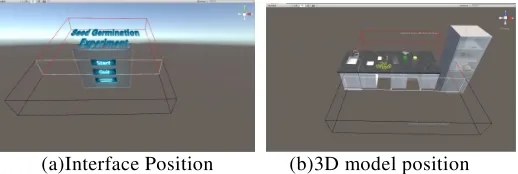
[image:4.612.102.492.593.683.2](a)Interface Position (b)3D model position
Figure 4. Layout of the three-dimensional scene.
It can effectively avoid visual fatigue and obtain a comfortable viewing angle by reasonably deploying the model position in the scene. Because the virtual scene contains two parts: the UI interaction interface and the three-dimensional model, the design methods are as follows:
In the operation process, the interactive interface does not need to follow the perspective to generate a three-dimensional effect. To avoid the inclination of the interaction interface, the interactive interface element is placed on the zero parallax surface, as shown in Fig. 4(a).
The initial position of the 3D model should be set within the positive parallax range of the coupling region (0~30cm), as shown in Fig. 4(b). This not only meets the learner's cognitive laws, but also can satisfy the interactive process by dragging, rotating, and zooming the three-dimensional model to the negative parallax region to obtain an omni-directional and multi-angle comfortable observation experience.
HAPTIC INTERACTION DESIGN
Immersive virtual simulation resources for learners to build a realistic learning environment, but more difficult to get the real operation experience, vision is only responsible for positioning, more real three-dimensional operation experience needs to match the body movements of the tactile interaction device. haptic feedback can optimize the sensory experience, and it is a kind of efficient representation of virtual simulation resources.
Haptic Interactive Forms
The haptic interaction and feedback methods commonly used in virtual simulation resources are mainly based on hand-held haptic feedback and wearable mobile haptic feedback.
Hand-held haptic feedback devices are most commonly used in virtual simulation systems, but because of their high degree of freedom of operation,
real-time representations of the penetration and pressure feedback between simulated objects in virtual simulation scenarios are not available [5].
The wearable haptic feedback device can provide the user with a more realistic and free tactile experience [6]. However, wearable and mobile haptic feedback devices only achieve partial haptic feedback. To obtain a more realistic tactile experience, more orientation haptic feedback methods are still needed.
Based on the analysis above, this study selected hand-held, force-feedback stylus feedback forms and used an interactive approach similar to VR handles: two-handed independent operation, 6-DOF spatial location tracking, button and vibration feedback, and LED display lights. This kind of feedback method is chosen because of the learners' operating habits. Its shape is similar to the stylus and consists of three keys: left, right, and middle. The operation method is similar to that of a mouse. It can personally set the vibration feedback effect and the LED lights will alternately change color accompanied with different vibration intensity to meet the learner's need for visual and tactile learning.
The specific stylus interaction design needs to emphasize two factors: visualization of the stylus and visualization of the ray length.
Visualization of the stylus: The mouse can control the cursor effect on a two-dimensional screen in a virtual scene so that the learner can observe its operation. This type of visualization has various forms, such as laser beams, hooks or hands, and can even be applied to different resources in the form of 3D tools. Applications in specific scenes include scalpels, pencils, and screwdrivers.
Visualization of stylus ray length: Since the ray length has three types which are fixed length, variable length, and mixed interactive pen. The initial length of the stylus is set to control the scene interaction and the vibration strength. In order to simulate the real tactile experience, this paper chooses a combination of variable length and mixed length.
Visualization of Stylus Ray length: Because the length of ray has fixed length, variable length, mixed length of three types, by setting the initial length of the stylus, control scene interaction and vibration dynamics. In order to simulate the real tactile experience, this paper chooses the interactive form with variable length and mixed length.
Haptic Interactive Feedback
With haptic feedback related technology, learners can gain different interactive experiences and achieve immersive immersion through the vibration strength and length of time of the stylus. The interaction mainly provides users with help, guidance, and timely feedback. The feedback not only includes the haptic feedback of the skin, but also integrates the visual and auditory experience to achieve a more natural and real interactive experience. Through the analysis of simulation resources and interactive actions of human hands in
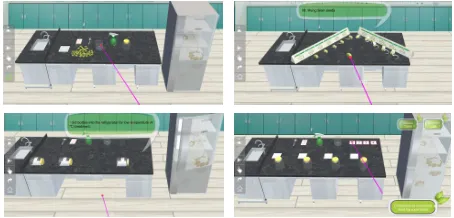
Figure 5. Effect figure of seed germination experimental scene.
real life, we summed up the interactions types of the force feedback tactile stylus in the virtual simulation scene: left-click control “drag”, middle-key control “click(crawling)”and right-click control "rotate".
The three interaction modes above are particularly important in the feedback process. Since the force feedback stylus can only give feedback to the hand in the form of vibration, it is necessary to specifically design the three vibration feedback interaction modes.
Click on the interactive operation, the stylus will appear a brief vibration, indicating the state of the click object.
When the drag operation is performed, the stylus will simulate the change of the real-life position. When the user picks up the model, the weight can be simulated by adjusting the size and frequency of the vibration force. The vibration and frequency of heavy objects objects are larger and faster in the dragging process.
During the rotation operation, the model structure of the rotating object can be viewed, and according to the real structure of the model surface, the magnitude of the feedback force is calculated through the haptic feedback model, and the vibration during the rotation process is continuously generated.
APPLICATION ANALYSIS OF THE SEED GERMINATION SIMULATION
According to the design scheme of the immersive haptic feedback simulation experiment, a virtual simulation experiment of seed germination in the middle school experimental teaching was designed and implemented. As shown in Fig. 5, the simulation experiment including four scenes which have test instrument, germination seed, automatic preview, and manual operation can realize a free shuttle between a real world and a virtual world.
In order to verify the effectiveness of the application, the student from a middle school seventh grade were selected as the research object, and this resource was used for teaching activities. Pre-testing and post-testing of germination knowledge, class observation, teacher and student after-class interviews and other methods were used to verify the feedback. According to
the learning situation in the classroom and the students’ learning feedback, we found that the integration of haptic feedback resources can bring new teaching experiences and stimulate students’ interest in learning:
(1)Strong expression of resource, easy to use, and breaking the time
and space boundaries of teaching
This teaching resource introduces seeds germination in the natural world into the classroom and helps middle school students to intuitively understand the experimental apparatus and conditions controlling necessary for seed germination, the growth state observation at different times, and the entire controlling of germination process. At the same time, integrating haptic feedback can enable learners to achieve a true, three-dimensional immersion. It is also possible to perform drag-and-drop, rotation and scaling operations on the models in seed germination experiments without time and space constraints, which helps to improve the quality of teaching and cultivate the students' experimental control ability and practical ability.
(2)Improving of learning efficiency and stimulating of learning
interest
The seed germination experiment has strict control conditions and long period. Simulation resources can provide a simulation very close to the real environment and haptic feedback experience, making the teaching content more vivid and real. In the manual operation scenario, the learner can freely combine the experimental conditions and formulate a personalized learning schedule, and complete the experimental results according to the experiment combination conditions. You can also develop personalized learning schedules and control the learning process flexibly. Maximize students' interest in learning, mobilize their enthusiasm for learning, give full play to their subjective initiative, and achieve good learning results.
(3)Good human-computer interaction
At present, virtual simulation resources focus more on the simulation aspect, ignoring the behavior and feelings of the learner as a learning subject, coupled with the lack of haptic feedback, it is difficult for students to obtain a real operating experience. The immersive scene coupled with haptic feedback can realize the interactive experience that can be seen and touched at the same time. The students are no longer passive learners but the active controllers and operators, which changes the teaching methods to a certain extent and optimizes the teaching resources of seed germination.
The immersive virtual simulation experiment based on haptic feedback not only enables students to reconstruct the existing knowledge structure, but also stimulates students' curiosity and enhances their understanding of the learning experience. It plays a very important role both in basic knowledge imparting and students' starting to operate ability exercising.
CONCLUSION
In this paper, the binocular stereoscopic display technology and haptic feedback technology are integrated into the virtual simulation experiment design. Through the construction of a virtual simulation environment, the reasonable layout of scene is explored in the visual comfort zone. And combining the diversity of tactile interactions with the authenticity of feedback, haptic feedback is applied to immersive virtual simulation resources and simulates real-world interactions. This idea can make the experimental process with high cost, long cycle, and unobservable become visual and concrete, and easy to strengthen students' acquirement and understanding of tacit knowledge.
ACKNOWLEDGMEN
This research is financially supported by Independent research project of informationize application in Central China Normal University (No. CCNU18IT0304). We would like to thank all teachers and students who participated in our inquiries.
REFERENCES
1. Lu Lu, Tian Feng, Dai Guozhong, Wang Hongan. A Study of the Multimodal Cognition and Interaction Based on Touch, Audition and Vision[J].Journal of Computer-Aided Design & Computer Graphics,2014,26(04):654-661.
2. He Wei. Unity Virtual Reality Development Code[M]. Beijing: China Railway Publishing House, 2016: 290-291.
3. Zhao Meng, Jin Yijun, Yin Yong. Deep Disparity Model and Depth Perception in Stereoscopic Display[J].Computer Engineering, 2011,37(17):271-273.
4. Tam W J, Speranza F, Yano S, et al. Stereoscopic 3DTV:visual comfort[J]. Broadcasting, IEEE Transactions on 2011, 57(2):335-346.
5. Wang Chen. Research on immersive haptic interactive teaching based on virtual reality[D]. Jilin University, 2017.
6. Grigore C. Burdea. Haptic Feedback for Virtual Reality. Prototyping Workshop, June 1999.