A Design Requirements Framework for Mobile
Learning Environments
David Parsons
Massey University, New Zealand Email: [email protected]
Hokyoung Ryu
Massey University, New Zealand Email: [email protected]
Mark Cranshaw
Southampton Solent University, United Kingdom Email: [email protected]
Abstract—This paper proposes a conceptual framework for mobile learning applications that provides systematic support for mobile learning experience design. It is based on a combination of a game metaphor and several studies of mobile learning contexts. Accounts of four mobile learning projects are used to explore the relationship between the framework and mobile learning design requirements in practice. By applying the framework to previous successful mobile learning implementations, we are better able to understand their key qualities. Similarly, the framework provides forward engineering support for the successful design of future mobile learning systems.
Index Terms - mobile learning, requirements, framework
I. INTRODUCTION
As mobile technologies have become pervasive, many researchers [e.g. 1,2] have questioned whether they can enhance learning experiences. It could be argued that mobile learning (M-learning) is an approach to electronic learning (E-learning) that simply utilises mobile devices, yet it can also be viewed as a quite different learning experience [3]. Indeed, M-learning can only be delivered with an awareness of the special limitations and benefits of mobile devices, so one cannot simply apply known design requirements from E-learning into the M-learning context.
This paper explores what factors and design requirements are crucial to the M-learning environment, and suggests how M-learning applications can be designed with an understanding of these factors and requirements. In our approach, we develop an M-learning framework for integrating relevant design requirements, grounded in best practices from the literature. This framework is both used as an analysis tool to help understand the critical success factors in previous mobile learning applications, and as a design tool for developing new systems. The following section reviews the
literature, identifying several structural factors and contexts for M-learning design. From this we introduce a framework for developing M-learning applications, which is described in section three. Sections four to seven analyse four different M-learning environments with the framework, showing how their different techniques and technologies can all be encompassed within the general structure of the framework. The final section provides some conclusions and proposals for further research.
II. DESIGN REQUIREMENTS FOR M-LEARNING
Portable communication devices are central to M-learning environments, giving access to the M-learning content. The design concerns of M-learning environments in general are thus combined with those of specific M-learning applications. We review these design concerns from four perspectives: generic mobile environment issues, learning contexts, learning experiences, and
learning objectives.
A. Generic mobile environment issues
The most important feature in the mobile environment is mobility itself. It enables us to be in contact while we are outside the reach of conventional communication spaces. Mobility can be conceptualised in different ways, i.e., mobility of the user, mobility of the device, and mobility of services, and these three aspects should be addressed both technically and contextually.
We should also understand that each user employs their mobile device in a different way. For instance, teenagers frequently use SMS to communicate, while professionals are more likely to be using corporate email. This feature – different user profiles and their roles in the use of mobile technologies – becomes even more
important in an M-learning environment. For instance, the use of SMS in M-learning has been identified as an effective tool to enhance both students’ learning experience and tutors’ instructing experience, yet the requirements of the two parties were quite different in terms of their previous experience of SMS [4]. A simple way of considering user roles and profiles is Löwgren and Stolterman’s classification: core, periphery, and context [5]. Core users are always learning with their mobile devices (e.g., students), and the periphery includes user roles that are not actively incorporated into the learning experience (e.g., tutors). The context is the surrounding user roles and society at large that are not directly involved in the learning experience, but still influence it in indirect and complex ways (e.g., parents or school). In terms of the different roles and profiles in the learning experience, there is a need to manage these relationships in a way that acknowledges the role of stakeholders, honours the integrity of all involved parties, and leads to a viable design.
Awareness of the constraints of the user interface is also vital. Mobile devices suffer from small screens, restrictive input methods and limited battery life. Therefore, the interface design for M-learning services must meet users’ needs without overloading them with unnecessary complexity, operating too slowly or consuming excessive power.
Successful mobile applications tend to employ many rich media objects [6], yet they should not distract from the learner’s experience. One of the commonly stated characteristics of M-learning content is that it should be delivered in short ‘nuggets’ rather than large units of information, which can be supported by appropriate use of different media types. These media types should support content appropriately. For instance, Luchini, Quintana and Soloway [7] stress the importance of the user participating in and learning about underlying concepts and processes, perhaps using simulation tools [8], rather than learning by rote.
One widely noted feature of mobile technologies is that they afford the possibility of perpetual contact. This sense of communication support tends to contribute to the other possibilities of M-learning in use. As a simple example, communication support has helped to meet the collective learning objectives of a field trip [9].
B. M-learning contexts
M-learning has been used as a pre and/or post activity to other types of learning [9,10], complementing the classroom experience. This may make us see the M-learning context as part of the traditional M-learning context [11]. However, some recent M-learning applications, e.g., the Ambient Wood project [9], reveal that the M-learning context is quite different from traditional learning. In this section, we review the contextual features that can be used to understand M-learning design requirements. We base these on Wang’s six dimensions of the M-learning context: identity, learner, activity, collaboration, spatio-temporal, and facility [12]. The first four of these would establish the situational contexts of M-learning, and the
last two would be associated with the environmental context.
Identities of M-learning users (e.g., learners, tutors) are a necessary contextual factor. This would be of value for the development of personalised learning experiences for individual stakeholders.
Several considerations of the learner should be made, because each user has different psychological properties that relate to their learning experience. For instance, highly self-motivated learners would probably improve their learning experience by using all the features that the system can provide.
The most promising feature of M-learning contexts is that one can collaboratively perform activities. Of course individual learning activities should be addressed in M-learning, but the collective learning experience can be enhanced by mobile systems. Such collaboration can take many forms. It may take place in a classroom or be a remote connection to a ‘live’ tutor [1]. Two-way interactions support the essential characteristics of a shared learning environment, and these virtual learning communities are good for both the organisation and the learner [13].
The spatio-temporal dimension means an awareness of time and/or location. Spatial location has been acknowledged as an effective environmental context in many applications, while the temporal context can deal with issues like scheduling collaborative interactions.
The context of facility can impact on the design of M-learning interfaces. Most current M-M-learning environments employ standard mobile devices using public carrier networks, but more innovative technologies (e.g., the Soundhorn in the Ambient Wood project) can enable a richer facility context.
C. Learning experience and objectives
Most of the literature regarding M-learning design has tended to simply map between M-learning contexts and learning objectives, such as individual learning or collective learning. However, as learning activities become a ubiquitous part of our lives, the focus of design and evaluation has turned towards the user’s learning experience. Preece et al. [14] claim that system designers should concern themselves with setting not only usability goals for their products, but also user experience goals to assess whether the product is, for example, enjoyable, satisfying and motivating.
competition, challenge and opposition, (v) interaction and (vi) representation or story. In reviewing M-learning experience we owe much to these six aspects but provide some further analysis for M-learning contexts.
We believe that the most basic component of learning experience is that it is an organised delivery of the contents. It may be equivalent to Prensky’s “rules”; yet it is concerned more with the contents than the logic behind the contents. Carefully organised content should enhance the learning experience by making sense of the material,
perhaps using a narrative framework. Goals and
objectives help the learner to engage. Generally, achieving goals is a big part of what motivates learners, and these goals and objectives could be adapted to match the situations and expertise of the learners. Goals and objectives are measured by outcomes and feedback. Prensky [17] claimed this factor has strong emotional and ego-gratification links, which are a big part of the attraction of games. Similarly in learning, feedback comes when something in the learning changes in response to what the learner does. It lets the learner know immediately what they have achieved. The narrative (representation or story) in learning experiences can be seen as an important structural factor in developing new or improved skills. A big advantage of narrative is that it can be complex and explorative. Following from Csikszentmihalyi [18], a learning environment that places narrative at the centre can help learners to reflect on what they have learned, enabling a sort of meta-learning, illuminating the very processes by which they learn and providing an organising structure for knowledge. Social interaction means group experiences or establishing some relevant collective learning. This helps the learner to develop appropriate social and team skills and assists team building in reaching joint learning objectives.
Finally, conflict, competition, challenge, and opposition
provide a dynamic for individual or collective problem solving. These factors can engage the learner, facilitating self-motivation and self-regulation.
III. AMETAPHOR-BASED FRAMEWORK
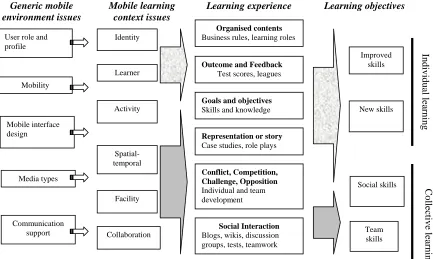
From our analysis of the four design perspectives, we have developed a design requirements framework for mobile learning environments that draws on both narrative and game metaphors. Figure 1 shows how the four M-learning design requirements; learning objectives, learning experience, M-learning contexts, and generic mobile environment design issues, interact. As an example of these interactions, consider M-learning for dynamic complex situations, such as rescue services or intensive care. These require the collective learning objectives, particularly developing team skills. This learning objective would be supported by the learning experiences conflict, competition, challenge, and opposition and social interaction. These learning experiences would require the corresponding M-learning contexts; including activity, spatio-temporal, facility and collaboration, which in turn would map in a context specific way to generic mobile design requirements.
To test the framework in detail, we applied it to four successful M-learning environments that had differing characteristics. These were; Ambient Wood [9], Thinking Tags [19], Uniwap mobile teacher training [20] and Mobile Learning Organiser [21]. The Ambient Wood project was based on children exploring a physical environment that included a number of devices that complemented the mobile components. Thinking Tags used infra red communication between ‘smart’ tags to simulate the spread of disease in the teaching of medical
Organised contents
Business rules, learning roles
Social Interaction
Blogs, wikis, discussion groups, tests, teamwork
Goals and objectives
Skills and knowledge Mobility
Mobile interface design User role and profile
Team skills Improved
skills
Social skills Identity
Facility Spatial-temporal
Activity Learner
Collaboration Mobile learning
context issues
Communication support Media types
Representation or story
Case studies, role plays
New skills
Outcome and Feedback
Test scores, leagues
Conflict, Competition, Challenge, Opposition
Individual and team development
In
d
iv
id
u
al
le
ar
n
in
g
C
o
lle
ct
iv
e
le
ar
n
in
g
Learning experience Learning objectives Generic mobile
environment issues
students. Uniwap used simple text messaging, digital pictures and digital portfolios to assist trainee teachers while on teaching practice, while Mobile Learning Organiser provided a mobile location aware information system for university students. Whereas in the first three examples we use the framework for a post-hoc analysis of mobile learning experiences, for the last example we see how the framework may be used for the analysis of new mobile learning system requirements. Despite the highly diverse nature of these experiments, we show in the following section how they can all be analysed within our framework.
For each example we have provided a table that maps the specific details of the M-learning environment to the components of the framework. Depending on the nature of the M-learning experience, the framework may be applied repeatedly at separate stages of the M-learning process. The Ambient Wood project has three stages; an initial experience in the wood, a group reflection and a return to the wood. In each stage we describe how the framework reflects the experience and environment. In contrast the Thinking Tags example has five stages, as the students are taken though a complex process of discovery learning, hypothesis formation and testing. In the Uniwap project there are two stages, the in-the-field
data gathering and the subsequent reflection However we have included a third stage that relates to the experience of the experiment itself, since this also involved reflection by the participants. Finally, the Mobile Learning Organiser project table is limited to a single stage because in this example the framework was used only in the analysis phase.
IV. APPLYING THE FRAMEWORK FOR UNDERSTANDING THE AMBIENT WOOD PROJECT
In the Ambient Wood project [9], a playful learning experience was developed where children could explore and reflect upon a physical environment that had been augmented with a medley of digital abstractions. The latter were represented in a number of ambient ways, designed to provoke children to stop, wonder and learn when moving through and interacting with aspects of the physical environment. A variety of devices and multi-modal displays were used to trigger and present the 'added' digital information, sometimes caused by the children's automatic exploratory movements, and at other times determined by their intentional actions. A field trip ‘with a difference’ was created, where children discover, hypothesise about and experiment with biological processes taking place within a physical environment.
TABLE I. ANALYSIS OF THE AMBIENT WOOD PROJECT
Objectives Learning experience Learning contexts Design issues
Stage1: Reporting and discovering
Individual learning
(improving skills)
Exploring, Reflecting, Communicating findings
Collective Learning
Discussing, Collaborating
Organised contents: Children
record environmental observations and report to facilitator
Outcome & Feedback: Various
sounds and images in particular parts of the woods. Readings from sensors
Goals and objectives
To explore the physical world, To discover different aspects of the habitat,
To discuss and reflect on findings
Social Interaction: Pair working
Identity: Children, Facilitators Learner: Children
Activity : To explore the field
(touching, looking, smelling, and listening), responding to stimuli and collecting data for further discussion, Reporting to facilitators via mobile devices,
Spatial-temporal: Partner
co-located same time, Facilitator remote same time
Facility: PDAs, Soundhorn,
Periscope, Probe tool, Wireless speaker, Personal computers, Wireless network
Collaboration: Pair working
User roles and profiles
Exploring the field (children) Data collecting (children) and supervising children (facilitators) in the field trip, Children and teachers in the classroom
Mobility: PDA
Interface design: Visualisation
software, Mobile software. Avoid information overload
Media: Image, Sound
Communication: WiFi, Sensor-based
technologies, Server technologies
Stage2: Reporting consolidating, hypothesising Collective learning
(team skills)
Consolidating Hypothesising Communicating
Conflict, competition, challenge, opposition: Discussing and
challenging the hypotheses
Social interaction: Whole group
forum to consolidate learning
Activity: Reviewing data collected,
predicting the outcome of environmental change,
Spatial-temporal: Co-located
place, same time
Collaboration: To confirm and
refute their hypotheses
Facility: Interactive board
User role: Participant in group
discussion (children)
Interface: Collaboration support,
Communication support
Media: Image, , tokens Communication: Verbal
communication support
Stage 3: Experimenting and reflecting Individual learning
(new skills)
Testing hypotheses
Collective learning (team skills)
Collaborative reasoning
Organised contents
Children return to wood, instructed to reason, hypothesize and experiment
Outcome and Feedback
Animations, data readings
Goals and Objectives
To construct hypotheses To predict impact of change To experiment
Activity
Children return to field and introduce environmental changes
Spatial-temporal
Co-located place, same time
Facility
As stage 1
Collaboration
Pair working
User role: Experimenter (children) Mobility: PDA
Interface: Environmental simulation Media: Visualisation software,
sensors, RFID tagged artefacts and readers
Communication: Wi-fi, Sensor based
From the individual learning perspective, the learning objectives are exploring, consolidating, hypothesising, experimenting, and reflecting the ecological system. Also, for their collective learning, they collaboratively discover a number of things about plants and animals living in the various habitats in the wood. Their experiences are later reflected upon in an area where children share their findings with each other and abstract these to hypotheses of what will happen to the wood in the long term under various conditions. Table I analyses the application in terms of our framework from a learning experience perspective, revealing how learning objectives
relate through learning experience and contexts to the generic mobile environment issues.
V. APPLYING THE FRAMEWORK FOR UNDERSTANDING THE THINKING TAGS PROJECT
Thinking tags were developed at the MIT Media Laboratory and have been used as communication devices in what are described as Participatory Simulations. The Tags are fully programmable mobile devices which communicate using infrared (IR) communication. Between fifteen and seventy five people
TABLE II. ANALYSIS OF PARTICIPATORY SIMULATIONS USING THINKING TAGS
Objectives Learning experience Learning contexts Design issues
Stage1:Initial interaction
Individual learning
Exploring Discovering
Collective Learning
Interacting Collaborating
Organised contents: High
school students meet in the context of a simulation
Outcome & Feedback: Double
digit numeric display, 5 LEDs
Goals and objectives
To engage in participatory simulation
To explore system dynamics
Social Interaction: One to one
interaction with any other participants
Identity: High school students Learner: High school students Activity : To engage in
participatory simulation of a dynamic system
Spatial-temporal: Co-located same
time,
Facility: Thinking tags Collaboration
Simulation participation
User roles and profiles
Simulation participant (student)
Mobility: Thinking tags Interface design: Interface:
Environmental simulation Simple output, “dial-in” input. Prevent feedback distracting from participation.
Media: Digital display, LED Communication: Resistive sensors,
IR
Stage2:Elucidation Individual learning:
Elucidating Questioning
Collective Learning:
Consolidating Communicating
Organised contents:
Group session with facilitators
Goals and objectives
To elucidate system dynamics
Social interaction: Whole group
forum
Identity: High school students,
facilitators
Activity: Explaining and discussing
participative experience
Spatial-temporal: Co-located
place, same time
Collaboration
Group working
User role:
Questioner( facilitator) Participant in group discussion (student)
Interface: Collaboration support,
Communication support
Communication: Verbal
communication support
Stage 3: Collaborative analysis:
Individual learning:
Analysing data Communicating
Collective Learning
Collaborative reasoning
Goals and objectives
Analyse individually collected data
Develop a coherent
understanding of whole system
Conflict, competition, challenge, opposition:
Discussing and challenging opinions
Social interaction: As above
Identity: As above
Activity: Reviewing individual data
and developing a collective understanding of system dynamics,
Spatial-temporal: Co-located
place, same time
Collaboration: Group working to
synthesise individual findings
User role:
Data retrieval (student) Participant in group discussion (student)
Interface: Collaboration support,
Communication support, data display
Media: Tool tags Communication: Verbal
communication support
Stage 4: Hypothesis formulation and experimental design Individual learning
(new skills) Experimental design Hypothesis formulation
Goals and Objectives
To construct hypotheses To design experiments to test hypotheses
Social interaction: As above
Activity
Students continue to work together to formulate hypotheses
Spatial-temporal
Co-located place, same time
Collaboration
Group working
User role: Participant in group
discussion (student)
Interface: Record hypotheses,
experiments
Communication: Verbal
communication support
Stage 5: Hypothesis testing
(new skills) Hypothesis testing
Organised contents
Students restart tags and return to the simulation
Outcome and Feedback
Double digit numeric display, 5 bicolor LEDs
Goals and Objectives
To test hypotheses To develop understanding of underlying algorithm To predict impact of change
Activity
Students reset tags and return to participatory simulation to test hypotheses.
Spatial-temporal
Co-located place, same time
Facility
As stage 1
Collaboration
Simulation participation
User roles and profiles
Simulation participant (student)
Mobility: Thinking tags Interface design: Interface:
Environmental simulation Simple output, “dial-in” input. Prevent feedback distracting from participation.
Media: Digital display, LED Communication: Resistive sensors,
can participate in a simulation. The aim is for the participants to interact and thus simulate a dynamic system. Each participant has a Tag and as the individuals interact, so do the Tags. Feedback is provided through a two digit digital display and an array of 5 bicolor LEDs. Participation of the individual in the dynamic interactive simulation helps gain a rich understanding of the system under study.
Colella, Borovoy and Resnick [20] describe the Participatory Simulation of a disease epidemic in which the participants are high school students. One Tag starts the disease propagation and the students can observe the virus jumping from Tag to Tag. Factors such as immunity are programmed into the simulation. The students come together as a group after an initial period of interaction where the focus is very much on using and improving individual skills, developing an understanding of the system by exploration and discovery through interaction with other participants and the mobile devices. They are then challenged to elucidate on their experience, considering issues such as whether some people are more susceptible to infection than others or whether the disease
has a latency period. The students retrieve information from their Thinking Tags using small sensor tools and work with the whole group to develop an understanding of the dynamics of the whole system. During these stages team and social skills are to the fore. The students then proceed to formulate hypotheses about the disease and design experiments to test them. The final stage sees the students resetting their tags and returning to the simulation to test the outcome of their work. The path from learning objectives through to mobile design issues is shown in Table II.
VI. APPLYING THE FRAMEWORK FOR UNDERSTANDING THE UNIWAP MOBILE TEACHER TRAINING PROJECT
Seppälä and Alamäki [21] describe a mobile learning project designed to assist in teacher training. The project used relatively simple technologies, short message service (SMS) and digital pictures, to enable students to create digital portfolios in a central database built from materials created in the field. Messaging was used to enable the trainees, who were widely distributed when training in different schools, to collaborate with each Objectives Learning experience Learning contexts Design issues
Stage1: Reporting and discovering
Individual learning
(improving skills)
Exploring, Reflecting, Communicating findings
Collective Learning
Pooling resources, Sharing learning with others
Organised contents: Trainees
record classroom observations and report to facilitator
Outcome & Feedback:
Messages and photographs sent to peers, supervisors and central database
Goals and objectives
To experience the workplace environment and discuss and reflect on findings
Social Interaction: sharing
immediate information with other trainees and supervisors
Identity: Trainees, Supervisors Learner: Trainees
Activity : To record and share
experiences of teacher training, Creating digital portfolios via mobile devices,
Spatial-temporal: Student and
teachers mostly remote but co-located when supervisors visit trainees in school
Facility: Mobile Phones (Nokia
Communicator 9210) and digital cameras
Collaboration: Supervisor support
via mobile device
User roles and profiles
Working in schools (trainees) Data collecting (trainees) and supervising students (supervisors) in schools.
Mobility: Mobile Phones (Nokia
Communicator 9210) and digital cameras
Interface design: Simple text
messaging and infra-red picture upload
Media: Image, Text
Communication: Cellular phone
network
Stage2: Reporting consolidating, hypothesising Collective learning
(team skills)
Consolidating Hypothesising Communicating
Conflict, competition, challenge, opposition:
Challenging assumptions, gaining self insight
Social interaction: Whole group
electronic forum to consolidate learning
Activity: Reviewing data collected,
organising information in the digital portfolio,
Spatial-temporal: Co-located
place, same time
Collaboration: To jointly reflect on
teaching experience
Facility: Central database of digital
portfolios
User role: Building a digital
portfolio(trainees)
Interface: Collaboration and
Communication support through central database accessed remotely
Media: Image, Text Communication: Verbal
communication support using mobile devices
Stage 3: Reflecting Individual learning
(new skills)
Understanding Reflecting
Collective learning (team skills)
Understanding the responses of others
Organised contents
Trainees asked to reflect on their mobile learning experience
Outcome and Feedback
Transcribed group interview
Goals and Objectives
To learn form the mobile learning process
Activity
Supervisors and trainees discuss the mobile learning experience
Spatial-temporal
Co-located place, same time
Facility
No devices used
Collaboration
Sharing experiences
User role: Experimenter (supervisor)
trainee
Mobility: n/a Interface: physical Media: sound recorder Communication: face to face
TABLE VI. REQUIREMENTS ANALYSIS FOR THE MOBILE HELPER PROJECT
Design issues Learning contexts Learning experience Objectives
User roles and profiles
New students - few ideas of where the classrooms, facilities etc. are located
Senior students - aware of locality information, but require more depth into personal studies, and assistance in multi-tasking.
Mobility support
Students roam the campus to attend all their different learning activities
Interface design
Visualisation software (Map) Mobile software
Avoid information overload
Media
Images, Sounds, Text
Identity
Junior students Senior students
Learner
Students
Activity
Navigation of the campus Obtaining contextual knowledge Social communication
Spatial-temporal
Location awareness, so the information given on the PDA is really relevant to their current location.
Morning: the lecture or tutorial information that they must attend; Afternoon: more individual study organisation
Organised contents
Lecture, tutorial, and lab information Assignments, assessments, library, and recreational information
Outcome & Feedback
Locational references Various sound alerts
Images and text in particular parts of the campus Web links to the current learning modules
Goals and objectives
To discover the locations of lecture, tutorial, and laboratory rooms (Junior students)
To be aware of the information that is relevant to organising their school life (Senior students)
Social Interaction
Discussing the current learning module (Senior students want to discuss directly with lecturers)
Improving learning situations
other and share their experiences. Feedback from the participants showed that the immediacy provided by the mobile devices was an important factor. Messages and pictures could be shared immediately with other students. The supervisors benefited from being able to access the material generated by the students in the shared database while travelling between work placements. Text messaging was used for information, supervision and feedback. Images were used to provide insights into the classroom experience, for example how the teachers actually looked in the classroom. An important aspect of the images was that the database enabled explanatory text to be included for each picture: “These comments about picture messages made them come alive to the people who were not present in actual teaching situations.” [21, p.335]. The analysis in Table III shows three stages, though the final stage was not part of the learning process per se, but the interviews that followed the experiment. However, since it appears that the reflective process of interviewing about the experiment helped the students to gain further insights into their experience, this stage has been included in the analysis.
VII.APPLYING THE FRAMEWORK FOR ANALYSING THE MOBILE HELPER PROJECT
In the three previous examples we took successful mobile learning projects and mapped their characteristics onto the framework. The purpose of this reverse engineering exercise was to attempt to validate the framework against previous work. However the intention of the framework is that it should also be able to provide us with a design guideline for forward engineering new mobile learning solutions. In Ryu et al [22] the framework was used as a guide for requirements gathering in a system intended to provide location aware learning support for university students. Table IV shows the results of this exercise in the context of the framework. Using the framework in requirements gathering helped to identify that junior and senior students had different needs in their mobile learning contexts. This insight enabled a system to be developed
that could meet the disparate needs of different learner identities. Note that in this case the table works through from the objectives to the design, whereas in the previous analyses we started with an existing design and worked our way back to the underlying objectives.
VIII.CONCLUSIONS AND FUTURE WORK
This paper discussed what design issues and contexts are important to M-learning. It incorporated best practice in learning research into a practical framework of M-learning design requirements based on Schwabe and Göth [16] but providing a broader view to take account of the learning context and objectives beyond a single application domain. This framework was then applied as a post–hoc analytical tool to three successful M-learning systems for the purposes of validation. It was also used as an analysis framework for the requirements phase of a mobile learning project. It is of course recognised that the framework has not yet been thoroughly assessed. Future work will involve the development of a generic design process to enable the application of the framework in a design context and the subsequent design and development of a complete M-Learning application.
REFERENCES
[1] T. Liu, H. Wang, J. Liang, T. Chan, H. Ko, and Y. J., "Wireless and mobile technologies to enhance teaching and learning," Journal of Computer Assisted Learning, no. 19, pp. 371-382, 2003.
[2] J. Massy, "Quality of eLearning Must Improve", BizMedia Ltd, 2002. Retrieved March, 2007, from http://www.learningcitizen.net/articles/QualityofeLearning mu.shtml.
[3] A. Kukulska-Hulme and J. Traxler, "Mobile teaching and learning," in Mobile Learning: A Handbook for Educators
and Trainers, A. Kukulska-Hume and J. Traxler, Eds.
London: Routledge, 2005.
and Mobile Technologies in Education (WMTE'02), Växjö, Sweden, 2002.
[5] J. Löwgren and E. Stolterman, Thoughtful Interaction
Design. Cambridge, MA: The MIT Press, 2005.
[6] M. Uther, "Mobile Internet Usability: What Can 'Mobile Learning' Learn From the Past?" presented at the IEEE International Workshop on Wireless and Mobile
Technologies in Education (WMTE'02), Växjö, Sweden,
2002.
[7] K. Luchini, C. Quintana, and E. Soloway, "Design
Guidelines for Learner-Centered Handheld Tools,"
presented at Human Factors in Computing Systems,
Vienna, Austria, 2004.
[8] V. Colella, "Participatory simulations: Building
collaborative understanding through immersive dynamic modeling," Journal of the Learning Sciences, vol. 9, no. 4, pp. 471-500, 2000.
[9] Y. Rogers, S. Price, G. Fitzpatrick, R. Fleck, E. Harris, H. Smith, C. Randell, H. Muller, C. O'Malley, D. Stanton, M. Thompson, and M. Weal, "Ambient Wood: Designing New Forms of Digital Augmentation for Learning Outdoors," presented at IDC 2004, College Park, Maryland, USA, 2004.
[10] L. Colazzo, A. Molinari, M. Ronchetti, and A. Trifonova, "Towards a Multi-Vendor Mobile Learning Management System," presented at the World Conference on
E-Learning, 2003.
[11] L. Liu and P. Khooshabeh, "Paper or Interactive? A Study of Prototyping Techniques for Ubiquitous Computing Environments," presented at Human Factors in Computing
Systems, Ft. Lauderdale, Florida, USA, 2003.
[12]Y. Wang, "Context Awareness and Adaptation in Mobile Learning," presented at the 2nd International Workshop on
Wireless and Mobile Technologies in Education, 2004.
[13]C. Leung and Y. Chan, "Mobile Learning: A New
Paradigm in Electronic Learning," presented at the 3rd IEEE International Conference on Advanced Learning
Technologies, 2003.
[14]J. Preece, Y. Rogers and H. Sharp. Interaction Design. New York, NY: John Wiley & Sons, 2002.
[15]K. Walker, "Learning on Location with Cinematic
Narratives," presented at 1st Workshop on Story
Representation, Mechanism and Context, New York, USA,
2004.
[16]G. Schwabe and C. Göth, "Mobile Learning with a Mobile Game: Design and Motivational Effects," Journal of
Computer Assisted Learning, vol. 21, pp. 204, 2005.
[17]M. Prensky, Digital Game-Based Learning. New York: McGraw-Hill, 2001.
[18]M. Csikszentmihalyi, Flow: The Psychology of Optimal
Experience. New York: HarperCollins, 1990.
[19]V. Colella, R. Borovoy and M. Resnick, “Participatory simulations: using computational objects to learn about dynamic systems” presented at the Conference on Human
Factors in Computing Systems (CHI 98) Los Angeles,
California, United States pp. 9 – 10, 1998, ACM Press [20]P. Seppälä & H. Alamäki, “Mobile learning in teacher
training”. Journal of Computer Assisted Learning no. 19, pp. 330-335, 2003.
[21]H. Ryu, R. Brown, A. Wong and D. Parsons. “Personal
Learning Organiser: Designing a Mobile learning experience for university students”, presented at the
Conference on Mobile Learning Technologies and
Applications (MoLTA), Auckland, New Zealand, pp.
23-20, 2007.
David Parsons was born in the United Kingdom in 1959. He holds an honours degree in music from the University of Sussex, UK (1981), a Certificate in Education from Garnett College, UK (1986), an MPhil in electronics and computer science from the University of Southampton, UK (1996) and a PhD in information technology from Nottingham Trent University, UK (1999).
He has worked both in the university sector and commercial software development, including academic posts at Southampton Solent University and professional roles at The Object People, BEA Systems and Valtech. His current role is as a Senior Lecturer in Information Systems, at Massey University, Auckland, New Zealand. He has published books on Object-Oriented Programming with C++ (London, Thomson, 1997) and Introductory Java (London, Thomson, 2003). His areas of research interest include mobile learning and agile software development.
Dr. Parsons is a member of the British Computer Society’s Software Practice Advancement group.
Hokyoung Ryu was born in South Korea in 1972. He holds a Masters degree in industrial engineering from Korea Advanced Institute of Science and Technology, Korea (1999) and a PhD in psychology from the University of York, UK (2004).
His current role is as a Lecturer in Information Systems, at Massey University, Auckland, New Zealand. His current research interests include human-computer interaction and mobile learning, publishing more than fifty peer-reviewed articles in conferences, journals, and book chapters. He is currently preparing to edit a book entitled “Innovative Mobile Learning”
Dr. Ryu is a member of the British Computer Society’s Human-Computer Interaction group.
Mark Cranshaw was born in the United Kingdom in 1955. He holds a BSc (Hons) in Applied Economics from North East London Polytechnic, UK (1979), a Certificate in Education from Garnett College, UK (1985), and an MSc in Computer Science from Brunel University, UK (1993).
He currently works for Southampton Solent University, Southampton, UK where he is Senior Lecturer in Computing and leader of the undergraduate computing programme in the Faculty of Technology. Current research interests include mobile learning and mobile application development.