955 | P a g e
SECURITY THREATS IN CLOUD COMPUTING
Mr. G. Nanda Kishor Kumar
1,
Mr. M. Naresh
2 1Associate Professor,
2Assistant Professor, Dept. of Computer Science Engineering
Malla Reddy Institute of Technology
ABSTRACT
As an embryonic technology, cloud computing has attracted more attention. More and more enterprises or government agencies started to explore cloud computing. However, with the extensive use of cloud computing, security issues came out on a growing scale. Today the world is using one of the most evolving and growing technology in the computing environment – Cloud Computing. Cloud computing has changed everybody’s vision. Cloud computing is a technology which is built on the virtualization, grid computing, distributed computing. There are number of models such as Software as a Service (Saas), Platform as a service (Paas), Infrastructure as a Service (Iaas) by which cloud computing is providing services to the cloud user and a large number of cloud service providers are available worldwide. But the serious limitation with cloud computing is its security. The paper begins with the introduction, architecture and security issues of cloud computing. Then the main focus is on the security threats of cloud computing and the countermeasures for the security problems.
Keywords: Cloud, Computing, Government, Technology, Security
I. INTRODUCTION
Cloud computing is the first among top 10 most important technologies and with a better prospect in the successive years. Cloud computing is an internet based computing which relies on sharing of the resources such as server, storage, applications through internet and the goal is to provide high performance computing. Cloud computing incorporates virtualization, on demand deployment, internet delivery of services and open source software. The three important characteristics that differentiate cloud computing from others are on demand, elastic and the service is managed by the provider. A cloud can be public cloud (which provide services to anyone on the internet) such as Amazon and the private cloud (provide limited services) such as data centers. There is no doubt that the convenience and low cost of cloud computing services have changed our daily lives; however, the security issues associated with cloud computing make us aware to cyber crimes. Hackers use a variety of techniques to gain access to clouds without legal authorization in order to achieve specific objectives and therefore gaining unauthorized access to the information stored in the cloud. Once the exact location of data is located, hackers steal private and sensitive information for criminal activities. Therefore, it is necessary to have a good understanding of cloud security policies in order to provide more secure services to cloud users.
II. CLOUD COMPUTING MODELS
956 | P a g e
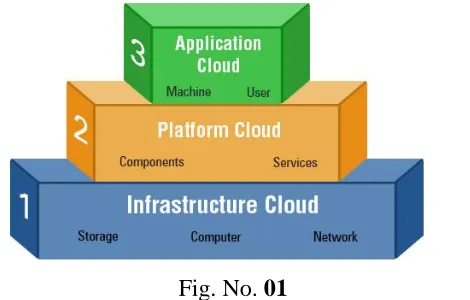
Fig. No. 01
Cloud computing models can be mapped with layers of business value pyramid as shown in below diagram:
a) Infrastructure as a Service (IaaS)
The infrastructure cloud provides storage and compute resources as a service which can be used by developers and IT organizations to deliver business solutions. IaaS has evolved from virtual private server (vps) concept. It provides complete flexibility to consumers in choosing desktops, servers or network resources. Consumers can customize the entire infrastructure package by selecting CPU hours, storage space, bandwidth etc. Rather than buying expensive servers and taking headache of setting up the data centers, IaaS cloud helps business in reducing IT CAPEX and OPEX by big proportion.IaaS contains sub-categories: Public, Private and Combination. Public cloud consists of shared resources, managed by service provider. By contrast, private cloud provides secure access to your resources and managed by organization it serves. The hybrid cloud is maintained by both internal and external providers.IaaS adds value to businesses through Business agility; Cost reduction; Reliability, Scalability; Privacy & governance; and single integrated user experience.
Basic characteristics of IaaS: o Resources distributed as a service
o Dynamic, on-demand scaling of resources o Utility based pricing model
o Concurrent users on a single piece of hardware
b) Platform as a Service (PaaS)
Platform as a Service (PaaS) Next level up in the pyramid is Platform cloud. PaaS delivers development/operating environments as a service. It includes set of tools and services designed to make coding and deploying the applications quickly and efficiently. PaaS is similar to SaaS except that, rather than being software delivered over the web, it is a platform for the development/deployment of that software, delivered over the web.Prime examples include Salesforce.com's Force.com, Azure from Microsoft and Google App Engine.
Basic characteristics of PaaS:
o Single environment to develop, test, deploy, host and maintain applications
o Web based UI designing tools to create, modify, test and deploy different UI scenarios o Multi-tenant architecture facilitating concurrent users
o Load balancing, security and failover capabilities for application to be deployed
957 | P a g e
o Tools to handle billing and subscription
c) Software as a Service (SaaS)
Top most layer of pyramid is functional layer or SaaS layer. This type of cloud delivers a single application through the browser to multiple users using a multitenant architecture. With SaaS, a provider sells an application to customers on license basis, in a “pay-as-you-go” model.On the customer side, they do not have to do upfront investment in servers or software development; on the provider side, with just one app to maintain, costs are low compared to conventional hosting. Salesforce.com, SRM, ERP as most common examples of SaaS based applications.
Characteristics of SaaS:
o Centralized web based access to company and commercial software o Entire business process shifting to cloud giving superior services to client
o No hassle of software upgrades and patches as they are managed by Service provider o Application Programming Interfaces (APIs) allow integration with different applications
III. ADVANTAGES & DISADVANTAGES OF CLOUD COMPUTING
Advantages (Pros)o Lower upfront costs and reduced infrastructure costs.
o Easy to grow your applications.
o Scale up or down at short notice.
o Only pay for what you use.
o Everything managed under SLAs.
o Overall environmental benefit of many users efficiently sharing large systems.
Disadvantages (Cons)
o Higher ongoing operating costs. Could cloud systems work out more expensive?
o Greater dependency on service providers. Can you get problems resolved quickly, even with SLAs?
o Risk of being locked into proprietary or vendor-recommended systems? How easily can you migrate to
another system or service provider if you need to?
o What happens if your supplier suddenly decides to stop supporting a product or system you've come to
depend on?
o Potential privacy and security risks of putting valuable data on someone else's system in an unknown
location?
o If lots of people migrate to the cloud, where they're no longer free to develop neat and whizzy new things,
what does that imply for the future development of the Internet?
o Dependency on a reliable Internet connection.
IV. CLOUD COMPUTING ARCHITECTURE
958 | P a g e
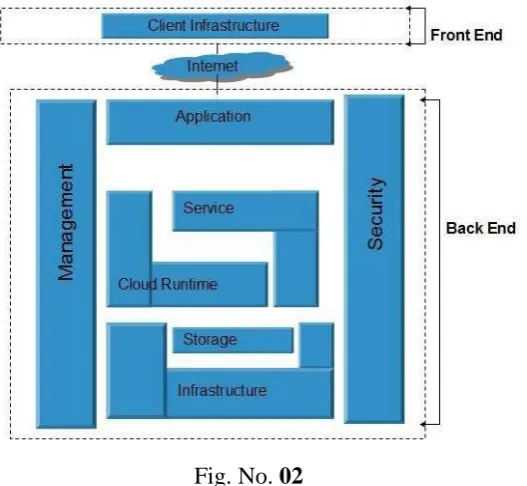
(servers, storage), a cloud based delivery, and a network (Internet, Intranet, Intercloud). Combined, these components make up cloud computing architecture.
Fig. No. 02
Cloud Computing architecture comprises of many cloud components, which are loosely coupled. We can broadly divide the cloud architecture into two parts:
Front End
Back End
Each of the ends is connected through a network, usually Internet. The following diagram shows the graphical view of cloud computing architecture:
Front End - The front end refers to the client part of cloud computing system. It consists of interfaces and applications that are required to access the cloud computing platforms, Example - Web Browser.
Back End - The back End refers to the cloud itself. It consists of all the resources required to provide cloud computing services. It comprises of huge data storage, virtual machines, security mechanism, services, deployment models, servers, etc.
Note
It is the responsibility of the back end to provide built-in security mechanism, traffic control and protocols.
The server employs certain protocols known as middleware, which help the connected devices to communicate with each other.
V. CLOUD COMPUTING INFRASTRUCTURE
959 | P a g e
Fig. No. 03
HYPERVISOR - Itis a firmware or low-level program that acts as a Virtual Machine Manager. It allows sharing the single physical instance of cloud resources between several tenants.
Management Software - It helps to maintain and configure the infrastructure.
Deployment Software - It helps to deploy and integrate the application on the cloud.
Network - It is the key component of cloud infrastructure. It allows connecting cloud services over the Internet. It is also possible to deliver network as a utility over the Internet, which means, the customer can customize the network route and protocol.
Server - The server helps to compute the resource sharing and offers other services such as resource allocation and de-allocation, monitoring the resources, providing security etc.
Storage - Cloud keeps multiple replicas of storage. If one of the storage resources fails, then it can be extracted from another one, which makes cloud computing more reliable.
INFRASTRUCTURAL CONSTRAINTS
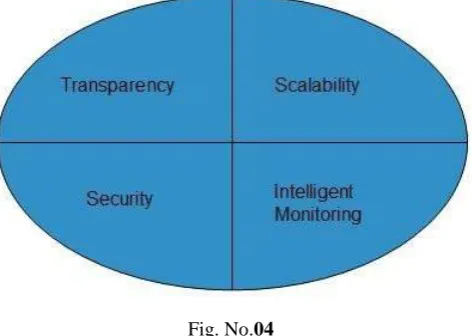
Fundamental constraints that cloud infrastructure should implement are shown in the following diagram:
Fig. No.04
Transparency - Virtualization is the key to share resources in cloud environment. But it is not possible to satisfy the demand with single resource or server. Therefore, there must be transparency in resources, load balancing and application, so that we can scale them on demand.
960 | P a g e
Intelligent Monitoring - To achieve transparency and scalability, application solution delivery will need tobe capable of intelligent monitoring.
Security - The mega data center in the cloud should be securely architected. Also the control node, an entry point in mega data center, also needs to be secure.
VI. SECURITY THREATS THE DIRTY DOZEN – 12 CLOUD SECURITY THREATS
Threat No. 1: Data breaches
Cloud environments face many of the same threats as traditional corporate networks, but due to the vast amount of data stored on cloud servers, providers become an attractive target. The severity of potential damage tends to depend on the sensitivity of the data exposed. Exposed personal financial information tends to get the headlines, but breaches involving health information, trade secrets, and intellectual property can be more devastating. When a data breach occurs, companies may incur fines, or they may face lawsuits or criminal charges. Breach investigations and customer notifications can rack up significant costs. Indirect effects, such as brand damage and loss of business, can impact organizations for years.
Cloud providers typically deploy security controls to protect their environments, but ultimately, organizations are responsible for protecting their own data in the cloud. The CSA has recommended organizations use multifactor authentication and encryption to protect against data breaches.
Threat No. 2: Compromised credentials and broken authentication
Data breaches and other attacks frequently result from lax authentication, weak passwords, and poor key or certificate management. Organizations often struggle with identity management as they try to allocate permissions appropriate to the user’s job role. More important, they sometimes forget to remove user access when a job function changes or a user leaves the organization.
Multifactor authentication systems such as one-time passwords, phone-based authentication, and smartcards protect cloud services because they make it harder for attackers to log in with stolen passwords. The Anthem breach, which exposed more than 80 million customer records, was the result of stolen user credentials. Anthem had failed to deploy multifactor authentication, so once the attackers obtained the credentials, it was game over. Many developers make the mistake of embedding credentials and cryptographic keys in source code and leaving them in public-facing repositories such as GitHub. Keys need to be appropriately protected, and a well-secured public key infrastructure is necessary, the CSA said. They also need to be rotated periodically to make it harder for attackers to use keys they’ve obtained without authorization.
Organizations planning to federate identity with a cloud provider need to understand the security measures the provider uses to protect the identity platform. Centralizing identity into a single repository has its risks. Organizations need to weigh the trade-off of the convenience of centralizing identity against the risk of having that repository become an extremely high-value target for attackers.
Threat No. 3: Hacked interfaces and APIs
961 | P a g e
The security and availability of cloud services -- from authentication and access control to encryption and activity monitoring -- depend on the security of the API. Risk increases with third parties that rely on APIs and build on these interfaces, as organizations may need to expose more services and credentials, the CSA warned. Weak interfaces and APIs expose organizations to security issues related to confidentiality, integrity, availability, and accountability.
APIs and interfaces tend to be the most exposed part of a system because they're usually accessible from the open Internet. The CSA recommends adequate controls as the “first line of defense and detection.” Threat modeling applications and systems, including data flows and architecture/design, become important parts of the development lifecycle. The CSA also recommends security-focused code reviews and rigorous penetration testing.
Threat No. 4: Exploited system vulnerabilities
System vulnerabilities, or exploitable bugs in programs, are not new, but they've become a bigger problem with the advent of multitenancy in cloud computing. Organizations share memory, databases, and other resources in close proximity to one another, creating new attack surfaces.
Fortunately, attacks on system vulnerabilities can be mitigated with “basic IT processes,” says the CSA. Best practices include regular vulnerability scanning, prompt patch management, and quick follow-up on reported system threats.
According to the CSA, the costs of mitigating system vulnerabilities “are relatively small compared to other IT expenditures.” The expense of putting IT processes in place to discover and repair vulnerabilities is small compared to the potential damage. Regulated industries need to patch as quickly as possible, preferably as part of an automated and recurring process, recommends the CSA. Change control processes that address emergency patching ensure that remediation activities are properly documented and reviewed by technical teams.
Threat No. 5: Account hijacking
Phishing, fraud, and software exploits are still successful, and cloud services add a new dimension to the threat because attackers can eavesdrop on activities, manipulate transactions, and modify data. Attackers may also be able to use the cloud application to launch other attacks.
Common defense-in-depth protection strategies can contain the damage incurred by a breach. Organizations should prohibit the sharing of account credentials between users and services, as well as enable multifactor authentication schemes where available. Accounts, even service accounts, should be monitored so that every transaction can be traced to a human owner. The key is to protect account credentials from being stolen, the CSA says.
Threat No. 6: Malicious insiders
The insider threat has many faces: a current or former employee, a system administrator, a contractor, or a business partner. The malicious agenda ranges from data theft to revenge. In a cloud scenario, a hellbent insider can destroy whole infrastructures or manipulate data. Systems that depend solely on the cloud service provider for security, such as encryption, are at greatest risk.
962 | P a g e
As the CSA notes, it's easy to misconstrue a bungling attempt to perform a routine job as "malicious" insider activity. An example would be an administrator who accidentally copies a sensitive customer database to a publicly accessible server. Proper training and management to prevent such mistakes becomes more critical in the cloud, due to greater potential exposure.
Threat No. 7: The APT parasite
The CSA aptly calls advanced persistent threats (APTs) “parasitical” forms of attack. APTs infiltrate systems to establish a foothold, then stealthily exfiltrate data and intellectual property over an extended period of time. APTs typically move laterally through the network and blend in with normal traffic, so they're difficult to detect. The major cloud providers apply advanced techniques to prevent APTs from infiltrating their infrastructure, but customers need to be as diligent in detecting APT compromises in cloud accounts as they would in on-premises systems.
Common points of entry include spear phishing, direct attacks, USB drives preloaded with malware, and compromised third-party networks. In particular, the CSA recommends training users to recognize phishing techniques.
Regularly reinforced awareness programs keep users alert and less likely to be tricked into letting an APT into the network -- and IT departments need to stay informed of the latest advanced attacks. Advanced security controls, process management, incident response plans, and IT staff training all lead to increased security budgets. Organizations should weigh these costs against the potential economic damage inflicted by successful APT attacks.
Threat No. 8: Permanent data loss
As the cloud has matured, reports of permanent data loss due to provider error have become extremely rare. But malicious hackers have been known to permanently delete cloud data to harm businesses, and cloud data centers are as vulnerable to natural disasters as any facility.
Cloud providers recommend distributing data and applications across multiple zones for added protection. Adequate data backup measures are essential, as well as adhering to best practices in business continuity and disaster recovery. Daily data backup and off-site storage remain important with cloud environments.
The burden of preventing data loss is not all on the cloud service provider. If a customer encrypts data before uploading it to the cloud, then that customer must be careful to protect the encryption key. Once the key is lost, so is the data.
Compliance policies often stipulate how long organizations must retain audit records and other documents. Losing such data may have serious regulatory consequences. The new EU data protection rules also treat data destruction and corruption of personal data as data breaches requiring appropriate notification. Know the rules to avoid getting in trouble.
Threat No. 9: Inadequate diligence
963 | P a g e
Operational and architectural issues arise if a company's development team lacks familiarity with cloud technologies as apps are deployed to a particular cloud. The CSA reminds organizations they must perform extensive due diligence to understand the risks they assume when they subscribe to each cloud service.
Threat No. 10: Cloud service abuses
Cloud services can be commandeered to support nefarious activities, such as using cloud computing resources to break an encryption key in order to launch an attack. Other examples including launching DDoS attacks, sending spam and phishing emails, and hosting malicious content.
Providers need to recognize types of abuse -- such as scrutinizing traffic to recognize DDoS attacks -- and offer tools for customers to monitor the health of their cloud environments. Customers should make sure providers offer a mechanism for reporting abuse. Although customers may not be direct prey for malicious actions, cloud service abuse can still result in service availability issues and data loss.
Threat No. 11: DoS attacks
DoS attacks have been around for years, but they've gained prominence again thanks to cloud computing because they often affect availability. Systems may slow to a crawl or simply time out. “Experiencing a denial-of-service attack is like being caught in rush-hour traffic gridlock; there is one way to get to your destination and there is nothing you can do about it except sit and wait,” the report said.
DoS attacks consume large amounts of processing power, a bill the customer may ultimately have to pay. While high-volume DDoS attacks are very common, organizations should be aware of asymmetric, application-level DoS attacks, which target Web server and database vulnerabilities.
Cloud providers tend to be better poised to handle DoS attacks than their customers, the CSA said. The key is to have a plan to mitigate the attack before it occurs, so administrators have access to those resources when they need them.
Threat No. 12: Shared technology, shared dangers
Vulnerabilities in shared technology pose a significant threat to cloud computing. Cloud service providers share infrastructure, platforms, and applications, and if a vulnerability arises in any of these layers, it affects everyone. “A single vulnerability or misconfiguration can lead to a compromise across an entire provider’s cloud,” the report said.
If an integral component gets compromised say a hypervisor, a shared platform component, or an application -- it exposes the entire environment to potential compromise and breach. The CSA recommended a defense--in-- defense-in-depth strategy, including multifactor authentication on all hosts, host-based and network-based intrusion detection systems, applying the concept of least privilege, network segmentation, and patching shared resources.
VII. CONCLUSION
964 | P a g e
problems. As the cloud computing is in continual development so the researchers have a lot of challenges in handling the security threats, energy resource management, interoperability and reliability in cloud computing and make it a successful technology.
REFERENCES
[1.] http://www.infoworld.com/article/3041078/security/the-dirty-dozen-12-cloud-security-threats.html [2.] http://research.ijcaonline.org/volume67/number3/pxc3886641.pdf
[3.] http://www.ejournal.aessangli.in/ASEEJournals/CE127.pdf
[4.] http://www.explainthatstuff.com/cloud-computing-introduction.html