ABSTRACT
CLAMANN, MICHAEL PETER. Adaptive Haptic Forces in a Virtual Environment Improve Fine Motor Skill Training. (Under the direction of David B. Kaber).
Investigations of technological interventions to retrain motor skills using haptic
control have included techniques that guide the patient (e.g., virtual fixtures) or challenge the
patient (e.g., error amplification). Virtual fixtures are force fields or channels presented by a
haptic device that prevent participants from deviating from a defined path based on expert
performance. Error amplification increases the magnitude of errors when participants deviate
from the desired path; that is, haptic forces are applied away from the desired path when
errors occur.
Other training systems have incorporated adaptive aiding with haptic guidance. With
adaptive aiding the intensity of virtual fixtures is modified (decreased) as operator
performance improves. There is evidence that providing guidance when needed is more
effective than a constant or fixed amount of assistance. Although haptic guidance has been
found to enhance performance when engaged, it may not accelerate learning. To date, studies
on learning effects of haptic guidance have not included adaptive aiding and haptic control
using error amplification.
This research prototyped and evaluated a system that combined error amplification
with adaptive aiding to determine the extent to which performance in a progressive error
Data collection included two phases, including: (1) unassisted drawing with a haptic device;
and (2) drawing with a form of haptic guidance. In both phases participants were trained to
draw a series of letter-like designs (letters from a foreign alphabet) with the non-dominant
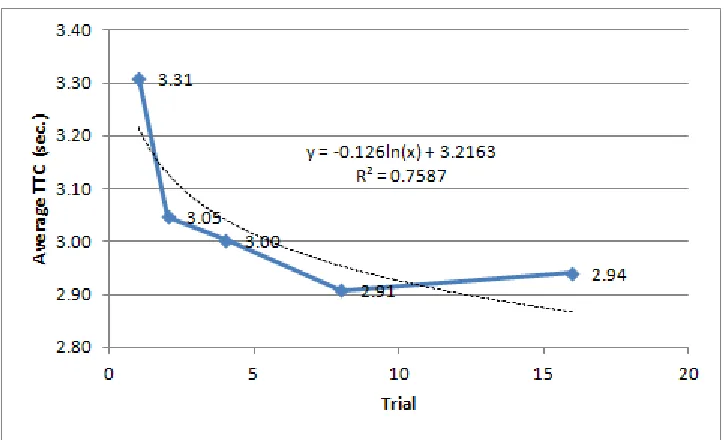
hand. Phase 1 was used to determine learning rates for participants drawing the letters
without guidance in order to inform adaptive aiding schedules for Phase 2. In Phase 2, each
participant received one of four forms of haptic guidance, including adaptive virtual fixtures,
static virtual fixtures, adaptive error amplification or static error amplification (following a
between-subjects experiment design). As participant performance improved under adaptive
conditions, haptic aiding was modified; virtual fixtures were reduced and error amplification
was increased. Improvements were measured objectively with comparisons of motion
trajectories to a template (accuracy) and task time (speed). An unassisted test was presented
after multiple training sessions. Performance was compared among the four guidance
conditions to determine how training with virtual fixtures compared to error amplification
with and without adaptive aiding, once haptic guidance is no longer engaged.
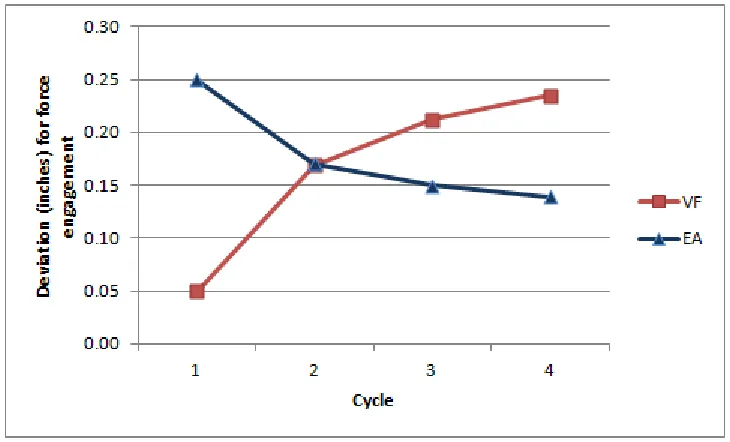
Results of the study were mixed. Task accuracy when training with virtual fixtures
was greater than the error amplification condition, but improved virtual fixture accuracy did
not transfer to the test scenario. Test accuracy following error amplification training was
greater. However, task speed improvements were higher for virtual fixtures than error
amplification. The error amplification condition provided more constant feedback, which
caused participants to more frequently evaluate their progress, especially at greater difficulty
These findings are expected to advance the design of VR systems for fine motor skill
training. Future writing tutors as well as training programs for occupational domains where
fine motor skills are required could benefit. Low level performance and learning data from
the experiment could be used as a basis for developing a motor capability classification
algorithm that could quickly assess a person’s level of fine motor skill. This algorithm could
be used in healthcare for determining appropriate therapy regimens for people recovering
from impairment or in industry for identifying training levels for jobs requiring fine motor
Adaptive Haptic Forces in a Virtual Environment Improve Fine Motor Skill Training
by
Michael Clamann
A dissertation proposal submitted to the Graduate Faculty of North Carolina State University
in partial fulfillment of the requirements for the degree of
Doctor of Philosophy
Industrial Engineering
Raleigh, North Carolina
2014
APPROVED BY:
_______________________________ ______________________________
David B. Kaber Yuan-Shin Lee
Committee Chair
BIOGRAPHY
Michael Clamann was born in Washington DC to H. Peter and Eva Clamann. He is
the grandson of Hans-Georg Clamann, a pioneer in the field of aerospace medicine.
Mr. Clamann received a dual degree in International Business and German from
James Madison University in Harrisonburg, Virginia. After graduation, he worked as a
software developer and designer until leaving the industry in the fall of 2000 to attend
graduate school at North Carolina State University in Raleigh North Carolina.
The author received his Masters (MS) in Experimental Psychology (Ergonomics) in
2002. Upon receiving his MS, Mr. Clamann went to work as a human factors consultant at
Booz Allen Hamilton in McLean, Virginia and later at Micro Analysis & Design (now Alion
Science and Technology) in Boulder, Colorado where he supported clients including the
FAA, NTSB, DoD, DIA and NASA.
In 2005, Mr. Clamann married Karin Swanson. They have three children, Kaitlyn,
Cameron and Nicole.
In 2009, the author returned to North Carolina State University to begin the Ph.D.
ACKNOWLEDGMENTS
I wish to thank several people for their assistance and support in the course of this
work. First, I thank my advisor and committee chair, Dr. David Kaber, who provided me
with the opportunity and support to complete this effort, as well as the ongoing guidance to
maintain the high standards of research that made this work possible.
I would also like to thank the members of my committee, Dr. Nancy Currie, Dr.
Yuan-Shin Lee and Dr. Chris Mayhorn for their advice and encouragement. I must also thank
Dr. Yahya Fathi and Dr. Jim Wilson for their help fulfilling the challenges of a graduate
degree.
My thanks also go to my colleagues in the Ergonomics Lab for their support,
including Brendan Corbett, Guk-Ho Gil, Will Heath, Wenqi Ma, Carl Pankok, Meghan
Rogers, Kinley Taylor, and Chad Uy. In particular, I am grateful to Dr. Wooram Jeon for
developing the complex software interfaces used for this work.
Finally, I would like to thank my friends Tim Armstrong, Mike Burkett, Joey Cape,
TABLE OF CONTENTS
LIST OF TABLES ... vi
LIST OF FIGURES ... viii
1 Introduction ... 1
1.1 Haptics for fine motor skill training ... 1
1.1.1 Types of haptic systems ... 4
1.2 Motor skill training... 6
1.3 Classification of haptic aiding ... 8
1.3.1 Guidance ... 8
1.3.2 Virtual fixtures ... 8
1.3.3 Adaptive aiding ... 11
1.3.4 Error amplification ... 12
1.4 Design of haptic writing tasks ... 14
1.4.1 Measuring handwriting performance ... 17
1.5 Summary ... 19
2 Methods ... 22
2.1 Apparatus ... 22
2.1.1 Task and interface ... 24
2.1.2 Haptic feature design ... 29
2.2 Experiment design ... 32
2.2.1 Participants ... 33
2.2.2 Conditions ... 34
2.2.3 Dependent variables ... 35
2.3 Procedures ... 39
2.3.1 Phase 1 procedures ... 39
2.3.2 Phase 2 procedures ... 42
2.4 Hypotheses ... 46
3 Results ... 51
3.1 Phase 1... 51
3.2 Haptic feature modeling ... 53
3.2.1 Adaptive ... 53
3.2.2 Static feature modeling ... 58
3.3 Phase 2... 58
3.3.1 Training ... 58
3.3.2 Testing... 65
3.3.3 Additional analyses ... 74
4 Discussion ... 87
4.1 Training ... 88
4.1.1 Accuracy ... 88
4.1.2 Speed ... 88
4.2 Testing ... 89
5 Conclusions ... 96
5.1 Applications ... 97
5.2 Caveats and future research ... 98
6 References ... 101
APPENDICES ... 106
Appendix A – Demographic Survey ... 107
Appendix B – Edinburgh Handedness Inventory ... 108
Appendix C – Informed Consent ... 109
Appendix D - Post Training Questionnaire ... 111
LIST OF TABLES
Table 1.1. Examples of haptic devices (adapted from Iwata, 2008) ... 4
Table 1.2. Summary of writing training studies and haptic aiding types ... 20
Table 2.1. Sample characters from Georgian Khutsuri alphabet (The Unicode Consortium, 2012) ... 26
Table 2.2. Summary of number of participants assigned to conditions ... 35
Table 2.3. Data fields recorded automatically by the simulation software ... 37
Table 3.1. Examples of average to baseline TTC ratios (ci) within trial cycles ... 56
Table 3.2. Average TTC (sec.) during training by cycle and condition ... 60
Table 3.3. Average deviation (in.) during training by cycle and condition ... 60
Table 3.4. Results of Kruskal-Wallis tests comparing effects of condition on speed for each cycle during training ... 62
Table 3.5. Results of Tukey's HSD tests comparing differences in speed by condition during training. (Note: Conditions with different grouping identifiers are significantly different at p<0.05.) ... 62
Table 3.6. Kruskal-Wallis results for differences in accuracy percent improvements from baseline across conditions ... 64
Table 3.7. Results of Tukey's HSD tests comparing differences in accuracy by condition during training. (Note: Conditions with different grouping identifiers are significantly different at p<0.05.) ... 64
Table 3.8. Average speed (sec.) during testing by cycle and condition ... 65
Table 3.9. Average deviation (in.) during testing by cycle and condition ... 66
3.10. Average force (N) during testing by cycle and condition ... 66
3.11. Results of repeated measures ANOVA tests for speed, accuracy and force ... 67
Table 3.12. Results of Wilcoxon signed-rank tests (Prob<S) comparing speed at baseline to subsequent test cycles (DF=31) ... 68
Table 3.13. Kruskal-Wallis results for differences in speed percent improvements from baseline across conditions (DF=4) ... 69
Table 3.14. Results of Tukey's HSD tests comparing differences in speed by condition during testing. (Note: Conditions with different grouping identifiers are significantly different at p<0.05.) ... 69
Table 3.16. Kruskal-Wallis results for differences in accuracy percent improvements from baseline across conditions (DF=4) ... 72 Table 3.17. Results of Tukey's HSD tests comparing differences in accuracy by condition during testing. (Note: Conditions with different grouping identifiers are significantly
different at p<0.05.) ... 72 Table 3.18. Summary of DV improvements from baseline test for all conditions ... 73 Table 3.19. Kruskal-Wallis results for differences in speed percent improvements from baseline across training strategies (DF=2) ... 74 Table 3.20. Kruskal-Wallis results for differences in accuracy percent improvements from baseline across training strategies (DF=2) ... 75 Table 3.21. Results of Tukey's HSD tests comparing differences in accuracy by training strategy during testing. (Note: Conditions with different grouping identifiers are significantly different at p<0.05.) ... 76 Table 3.22. Results of Wilcoxon signed-rank tests (Prob<S) comparing force baseline
LIST OF FIGURES
1
Introduction
1.1
Haptics for fine motor skill training
As innovation in computing power continues to advance, so does the sophistication of
modern input and output devices. In the past 40 years, the technology market has seen
computers grow from loud, room-filling devices requiring input from punch cards and
providing output on rolls of paper fed through dot matrix printers, to immersive virtual
environments (VE) with a variety of control devices such as wireless remotes with
accelerometers and gesture-based interfaces controlled by the operator’s movements (e.g.,
Microsoft Kinect). Haptic controls are another category of human-computer input devices
that have received substantial attention in recent years. In the context of VEs, haptic systems
include controls that combine sensing and motion capabilities to support user input and
provide feedback (Kern, 2009). Haptic systems can vary in complexity and capability. A
simple example of haptics is the vibration implemented in most cell phones that alerts us to
incoming messages and warns us when the battery needs to be recharged. More complex
implementations include virtual reality (VR) systems with haptic controls for surgical
training (Banerjee, Luciano, Lemole, Charbel & Oh, 2007; Liu, Tendick, Cleary &
Kaufmann, 2003) and teleoperations (Rosenberg, 1993).
Haptic systems also have tremendous potential for rehabilitation of fine motor skills
following injury or stroke. Past studies show that the brain’s motor planning and control
fine motor skills, a therapist will work with a patient to develop a customized regimen to help
him or her redevelop occupational or personal skills that are of value to the patient. Due to
this individual approach and the variety of goals and degrees of disability among patients,
regimens can vary greatly from one patient to another. A therapist may employ a variety of
low and high tech tools (manual and computer-based) to help patients achieve their
rehabilitation goals.
Demand for advanced rehabilitative technologies to help patients redevelop fine
motor skills is expected to continue. According to Reinkensmeyer and colleagues (2004),
80% of stroke survivors will experience a near-term loss of motor control, while 50% will
have some form of long-term loss. In 2004, such loss was observed in 2 million people
(Reinkensmeyer et al., 2004). As survival rates following strokes and traumatic brain injuries
continue to increase due to ongoing improvements in the medical field (Harwin et al., 2006),
there is increased demand for rehabilitative technologies. Ongoing technical innovations and
reductions in computer costs encourage the integration of automated aids in the medical
industry and present the possibility of enhancing resources available to therapists. One option
is to translate and augment physical rehabilitative technologies to systems with haptic
controls designed to help patients redevelop fine motor skills following an injury.
There are numerous immediate advantages to augmenting traditional rehabilitative
therapy tools with a computer-based system featuring haptic controls. First, automated
systems offer data recording and analysis, precision and endurance features that are beyond
agents for the therapist with accuracy and objectivity remaining unchanged even after
countless therapy sessions with a variety of patients. Furthermore, the scenarios and
properties of objects used within the system can be changed instantly with limited or no setup
and breakdown time. Virtual object surface friction, texture, resistance, size, etc. are all
parameters that can be modified by system commands. Haptic systems are also valuable in
medical environments because they can be used to precisely track and record patients’
recovery progress. With the increasing interest in electronic medical records (EMR), such
data recording capabilities may also be of particular value to clinicians.
In addition to the inherent enhancements provided as a component of a
computer-based system, a VR system with haptic controls can provide other practical benefits for
motor training. According to Cesqui et al. (2008), motor learning improvements occur when
individuals perform a regimen of prescribed movements, identify errors and correct them in
subsequent movements (Cesqui et al., 2008). This cycle of actions (within a feedback loop)
can be implemented with a haptic system. Consistent with these observations, incorporating
haptics in training system design has been shown to benefit sensorimotor task learning
(MacLean, 2008). Related to this, there are numerous types of haptic devices that can be used
for motor training. Selection should be based, in part, on training requirements such as the
task, body part being used to manipulate the device, and forces. The next section provides an
overview of different types of available haptic devices and features that can be considered as
1.1.1 Types of haptic systems
Iwata (2008) categorized haptic devices as full-body haptics, tactile displays, and
force displays.
Table 1.1 provides a summary of the categories and some examples of each.
Table 1.1. Examples of haptic devices (adapted from Iwata, 2008)
Category Examples
Full body haptic display
Treadmill, sliding device, moving footpad
Tactile display Vibration display, micropin array
Force display Exoskeleton, object-oriented, tool-handling
Full body haptic devices have been developed to study locomotion and facilitate
walking in VEs. Examples include treadmills, sliding devices and moving footpads (Kaber &
Zhang, 2011). Tactile displays are the most widely used haptic devices because they include
vibration displays, as implemented in most mobile phones. Tactile displays include simple
vibration displays as well as more complicated micropin arrays that simulate fine textures.
These interfaces typically communicate information (e.g., messages) and are implemented as
part of larger systems or other types of controls. According to Iwata (2008), a force display is
a “mechanical device that generates a reaction force from virtual objects” (p. 194). Force
displays can be controlled by or attached to different parts of the body, including the hand,
categories of force display summarizing available hand-operated devices. These include
exoskeletons, object-oriented devices, and tool handling devices. Exoskeletons are
collections of sensors and actuators attached to the operator’s body. They are often used in
telerobotic applications due to their advantage of being able to reproduce grasping forces.
The CyberGrasp by CyberGlove Systems (Figure 1.1, left) is a widely-used example of an
exoskeleton haptic device.
Figure 1.1. Examples of haptic interfaces including (from left to right) the CyberGrasp (photo: Wired), FEELEX (photo: University of Tsukuba), and Phantom Desktop (photo: SensAble Technologies)
Object-oriented haptic devices move or change form to communicate the shapes of
virtual objects. Most haptic interfaces restrict contact to a single point or small collection of
points that reproduce the sensation of interacting with a tool, but do not accurately
communicate dimension or texture. Object-oriented haptic interfaces, in contrast, allow the
operator to interact with the display using the whole hand. Iwata describes these devices as
“robotic graphics” (2008). An example of an object-oriented device is the FEELEX (Figure
University of Tsukuba, Japan. Another device includes the “tactor” displays built into
clothing (Kern, 2009) and seats of automobiles and airplanes that communicate warnings to
an operator by stimulating the skin (O’Malley & Gupta, 2008).
The last category of haptic control described by Iwata is tool-handling haptic devices.
These are the easiest to implement, which also makes them the most common. A simple
example includes force-feedback joysticks and game controllers. One of the more popular
examples of a tool-handling device is the pen-like Phantom by SensAble Technologies
(Figure 1.1, right). Phantom implementations are restricted to operations that can be
communicated through a single contact point using a haptic stylus or a thimble, so unlike the
exoskeleton and object-oriented devices, it can be challenging to implement grasping
motions. However, the Phantom provides 6 degrees of freedom of control and 3 degrees of
freedom of haptic feedback, and it is a very versatile device that can be used to simulate
operations that utilize tools like pens, scalpels or screwdrivers (O’Malley & Gupta, 2008). A
variation on the Phantom device was employed in the present research due to the nature of
the test task (letter drawing) and the characteristics of the haptic device.
1.2
Motor skill training
There are several general approaches to enhancing motor skill training. Two of those
approaches, described by Wickens, Lee, Liu and Gordon-Becker (2004), include simplifying
and guiding. The idea behind simplifying is to promote ease of individual learning of correct
behaviors by moderating the complexity of a task so as to reduce cognitive load and
lot before driving in traffic. This allows the student to learn the dynamics of vehicular control
without having to keep track of traffic rules and the risk of surrounding traffic. Guiding
approaches intervene so only correct behaviors can occur and prevent certain errors from
ever occurring. Citing Carroll & Carrithers (1984), Wickens et al. refer to this as a “training
wheels” approach in reference to the way these accessories can prevent a bike and individual
from falling over (p. 484). Both of these techniques can be effective early in the training
process (Wickens et al., 2004). As individual skills improve, simplification and guidance can
be reduced or eliminated; the novice driver may leave the parking lot, and the training wheels
can be removed from the bike.
However, these approaches also have potential problems. The use of simplified
versions of tasks in training may not transfer to real-world task performance. In addition,
some learners may become overly dependent on guidance, learning the dynamics of the
guidance system instead of the task itself. Wickens et al. (2004) suggest this occurs when the
individual does not acquire the skills replicated by the guidance during training. However,
there are strategies to prevent this from occurring. For example, instead of removing the
aiding all at once, the authors recommend an adaptive reduction in aiding that gradually
shifts the performance responsibility to the individual. Through this process, the trainees
should also be allowed to make errors so they can learn how to correct them. In fact, research
on error amplification suggests increasing some types of errors during training can reduce
1.3
Classification of haptic aiding
According to MacLean (2008), there are two key methods for implementing haptic
control in fine motor training systems, both of which borrow from the general simplification
and guidance approaches described in the prior section. One is to provide leading forces that
pilot the user along a trajectory, and the other is to orient the user’s attention by applying
force at specific locations. The two methods as well as some more recent approaches will be
described in the following sections. Unfortunately, the current literature varies in the
terminology used to describe these different methods. In an effort to use consistent
terminology throughout this work, the terms used in the following subsections may not
exactly match those used by the original authors, although the underlying conditions share
similar properties.
1.3.1 Guidance
Systems that lead the user along a path following an expert or teacher’s actual,
transmitted, recorded or simulated movements are referred to as guidance systems. In these
systems the control supplies the forward forces, and the user assumes a mostly passive role
while motions are physically played back through the control device. This technique
presently represents the most common form of automation-assisted therapy (Cesqui et al.,
2008; Reinkensmeyer et al., 2004).
1.3.2 Virtual fixtures
Virtual fixtures (VF) represent the other key method for implementing haptic features
maintain motions within specified boundaries (MacLean, 2008; Prada & Payandeh, 2009).
When implemented, VF constrain participants within boundaries that replicate expert
performance, but, in contrast to guidance schemes, the user still provides the force for
forward motion. The concept of VF was first proposed by Rosenberg (1993) for improving
operator performance in telerobotic systems. He described VF as “overlaying abstract
information on top of a workspace” (p. 76). This is analogous to using a French curve in a
manual drafting task or (using Rosenberg’s example) using a ruler to draw a straight line.
Rosenberg suggested that VF can improve precision and reduce mental workload by freeing
up resources normally used for fine motor coordination. In fact, since the time of
Rosenberg’s research, VF have been shown to improve task performance by increasing
speed, increasing precision and reducing mental workload (Prada & Payandeh, 2009).
Virtual fixtures can improve performance because although human operators are
generally not skilled at absolute judgment (Wickens et al., 2004), such as identifying a
specific point in space without a landmark, they are very good at sensing and modifying
small changes in force (MacLean, 2008). Therefore, by providing the user something
seemingly solid as a reference point, VF are effective aids for facilitating precision in task
performance.
Virtual fixtures that result in simple resistive forces or forces opposing user input are
often referred to as reactive forces (Prada & Payandeh, 2009). More recently, VF with
attractive forces have also been tested (Prada & Payandeh, 2009). In these systems, when the
return the control input to a trajectory defined by expert performance. Attractive force VF,
therefore, include characteristics of conventional VF and guidance systems.
In addition to employing VF to aid task performance, several researchers have also
incorporated VF with training tools for developing new skills (Dinse, Wilmzig & Kalisch,
2008; Srimathveeravalli, Gourishankar, Kumar & Kesavadas, 2009; Teo, Burdet & Lim,
2002). For example, Teo et al. (2002) developed a system to train novice and expert
participants to write Chinese calligraphy. In addition to the 2-dimensional drawing
component, the researchers included a force component to control the thickness of each line.
Drawing performance was evaluated in terms of accuracy, timing, force and smoothness.
Three novices with no background in Chinese and three experts in Chinese writing received
training using the system. All participants received two types of aiding including attractive
force and VF. Novice participants received guidance forces first and the expert participants
used VF followed by guidance forces to draw the characters. Both groups showed
improvement during training. However, the novice participants only showed improvements
in smoothness. Expert participants showed improvement in timing (i.e., changes in speed
within a single stroke). These results suggest that the type of haptic aiding and skill level may
affect task performance; however, since the experiment design did not test other
combinations of skill level (i.e., novice, expert) and aiding type (i.e., guidance, VF), it is
1.3.3 Adaptive aiding
One problem with implementing guidance or VF in training systems is that the forces
do not change over time. Despite their broad appeal, both systems may create a dependency
where the individual learns the dynamics of the haptic interface instead of the task. This
means that performance benefits achieved while using the system may not carry over to
unassisted conditions. Furthermore, experts and novices will perceive the same haptic
features unless there is some intervention or the task is discontinued. One recommendation is
to implement training programs that introduce strong haptic features initially and reduce
them over time as performance improves (MacLean, 2008). This strategy has been referred to
as adaptive aiding. Adaptive aiding strategies distribute the responsibility of force
application between the operator and the device, or, more specifically, the intensity of haptic
feedback is modified as individual performance improves (Huegel, 2009; Li, 2007). In these
systems, motor learning is encouraged by gradually reducing the participant’s dependency on
the automation as much as possible (Harwin et al., 2006). There is evidence that providing
haptic guidance when needed is more effective for task performance than implementing a
constant fixed amount of assistance (Li, Huegel, Patoglu & O'Malley, 2009, Reinkensmeyer
et al. 2004, Srimathveeravalli et al., 2009). The efficacy for implementing adaptive aiding as
a fine motor training strategy is also encouraging as the results of recent experiments show
learning with strategies that schedule increases in task difficulty over time are at least
comparable to VF alone (Srimathveeravalli et al., 2009). However, additional investigation
increases based on a predefined schedule) is required to determine the degree of advantage
achievable by adaptive VF.
Huegel (2009) investigated the learning effects of haptic guidance in a video game by
having participants perform a point-to-point reaching task using a joystick for position and
velocity control. Performance was recorded in terms of absolute error (i.e., path deviation)
and frequency of control input. Each participant completed 11 sessions of 42 trials each over
a one month period. Participants received either haptic, visual or no assistance from the
interface. Haptic assistance in the form of VF was reduced over time to coincide with
participant performance improvements. Exponential reductions in control gain were applied
when participants showed improvement across three successive trials. Using the
experimenters’ force calculations, this would translate into a maximum of 50% reduction in
force following 12 trials of increasing performance. Results revealed participants in the
performance-based adaptive aiding condition to significantly outperform those receiving no
guidance. However, performance improvements did not transfer to a post-test scenario in
which haptic assistance was not available. Huegel suggested that participants learned the
system dynamics of the augmented task instead of the target task and concluded that haptic
guidance that enhances task performance may not necessarily accelerate learning.
1.3.4 Error amplification
Another alternative to conventional VF for training motor skills is error amplification
(EA). While VF generally apply forces opposite to user input, EA applies additional forces
from a desired path. Error amplification has been shown to be a successful training approach
because it maintains the attention of the participant and increases the signal-to-noise ratio for
constructive sensory feedback (Cesqui et al., 2008). Furthermore, it has been hypothesized
that the motor system may adapt more rapidly and completely when performance error is
increased during training (Milot et al., 2010). There is also evidence that EA may provide
greater training benefits to unimpaired individuals by setting task difficulty to levels that
challenge individuals. Error amplification has also been identified as a viable approach for
motor skill training for patients recovering from brain injuries (Cesqui, et al., 2008).
Milot et al. (2010) performed a study where they compared learning effects of haptic
guidance and EA in a timing task. In their task, participants had to press a button using a
wrist motion to activate a flipper in a computer-based pinball simulation. The goal was to hit
a target with the ball, which required pressing the button at a precise time to achieve an
accurate trajectory. In the haptic guidance condition, the simulator would correct for errors
by speeding-up movements when the participants struck the button late and slowing them
down when they struck it early. The EA condition had the opposite effect; early attempts
were sped-up and late attempts were slowed down. Participants performing the task were also
classified based on their skill level at baseline. The results of the study showed that both
haptic guidance and EA provided similar learning improvements. Milot et al. results also
provided evidence that training may be more effective if the difficulty of a task is set based
on participant skill level. When divided into two groups, more skilled participants benefited
that motor learning is related to the difficulty of the training task as well as the performance
level of the trainee. As individual training performance improves, so does the ability to
process information along with the ability to handle greater task demands. Therefore, more
highly skilled participants benefit more from more demanding task conditions.
1.4
Design of haptic writing tasks
As discussed earlier, rehabilitation programs aimed at recovering fine motor skills
need to be customized according to individual patient needs and goals in order to maximize
learning. This makes developing general approaches to fine motor skill rehabilitation
challenging. However, Yancosek and Mullineaux (2011) showed that a vast majority of
patients retraining fine motor skills (90%) performed daily handwriting tasks, and they urged
that writing should be addressed as part of any rehabilitation plan. This suggests writing may
be a suitable training task for investigating the efficacy of different strategies for
implementing haptic forces and retraining fine motor skills since it may be applicable to a
larger percentage of patients. Although writing is neither an Instrumental nor a Basic Activity
of Daily Living (IADL; BADL) by itself, it is listed as a component of a person’s ability to
handle financial matters independently, which is an IADL (Lawton & Brody, 1969).
In addition, writing tasks require the highest degree of unilateral motor skill that most
people will ever need to achieve (Plakins, 1996). Therefore, techniques used to refine
handwriting skills may also have occupational training implications for tasks requiring high
degrees of unilateral motor skill, such as surgical and fine assembly tasks. If a VR system
unimpaired users to develop new fine motor skills or augment existing ones for occupational
tasks.
Many investigations of technological interventions to retrain motor skills using
techniques that assist the patient (e.g., VF) or challenge the patient (e.g., EA) have
incorporated writing as the test and/or training task. Several researchers have also used these
strategies to develop haptic tools for refining the fine motor skills specifically required for
writing tasks. For example, Mullins, Mawson and Nahavandi (2005) developed an early
low-cost haptic handwriting aid that generated assistive forces through a haptic stylus to help
participants form letters displayed on a conventional 2-dimensional computer monitor.
Template letters, words or sentences were input with a keyboard and played-back to the user
in the form of a Comic Sans MS font through a haptic device. Users could vary the speed of
the guidance as performance improved. Vishnoi, Narber, Duric and Gerber (2009) used a
guidance approach to develop a more sophisticated haptic interface to train writing skills.
Their system recorded the 3-dimensional motions of unimpaired individuals during a writing
task and translated them to a haptic workspace. The recordings could then be played-back to
guide individual movements along the correct 3-dimensional path, which included lifting the
stylus from the writing surface to draw characters combining multiple strokes. The strength
of the applied forces could be reduced according to user needs as writing performance
improved.
Solis, Avizzano and Bergamasco (2002) used adaptive aiding incorporating VF,
Japanese characters (p. 221). Similar to Vishnoi et al. (2009), characters were first drawn by
experts to define template strokes. When in use, their system introduced opposing forces
along 2-DOF of a custom haptic device with five linked segments in order to return to users
to the correct path when they deviated from the template. A key contribution of their work
was the real-time recognition of characters performed during the drawing task, allowing
individuals to draw characters on a horizontal surface without first entering them into the
system using another device. As introduced in a previous section, Teo et al. (2002) developed
a 6-DOF haptic system for teaching Chinese calligraphy to novice and expert users. Their
system was capable of guiding the participants through the entire character or producing VF
that would restrict movements but allow the participants to draw at their own pace. A study
testing the efficacy of the device for training unimpaired participants showed that learning
occurred across training trials for both systems, in particular for novice users. However,
because an unassisted condition was not included, it is not clear if there were any carry-over
effects from the training, and only 6 people participated in the study.
Although there are numerous examples of systems using VF or EA to train fine motor
skills, examples of studies comparing the two directly are limited, particularly for writing
tasks. A comparison of two haptic systems using a simple drawing task was performed by
Cesqui, et al. (2008) to help patients recover motor skills following a stroke. Their task
included tracing multiple straight lines from the center to the outward edge of a virtual fan
using active guidance (“active assistance”) and EA. Performance was evaluated using several
training, but one group received the active assistance followed by EA and the other received
the conditions in the opposite order. Participants were assigned to each group based on their
ability to complete a simple reaching task using the experiment apparatus without haptic
assistance. The degree of force applied during experiment trials was calibrated separately for
each participant following a clinical assessment of individual upper limb impairment in order
to ensure all participants could complete the reaching task. The results varied due mostly to
the differences in level of disability among the participants, however, all participants showed
some degree of improvement on the three performance measures (i.e., velocity peaks,
smoothness and deviation). There was also evidence that EA followed by active guidance
was a more effective training regimen than active guidance preceding EA, overall. However,
the researchers noted that this may have been due to a fatigue effect brought about by
assigning to the same group all participants who had difficulty performing the task without
haptic assistance. In addition, condition presentation order had an effect on the results when
participants were grouped according to three levels of impairment severity (mild, moderate
severe) based on the Chedoke Stroke Assessment score (Gowland et al., 1993). Participants
with more severe disabilities (i.e., lower Chedoke scores) benefited from active guidance
provided prior to the EA condition. These results were also consistent with Milot et al.
(2010) finding that participant ability determines the best form of training.
1.4.1 Measuring handwriting performance
The majority of previous systems incorporating writing and haptic guidance were
measured by comparing completed drawings to templates drawn by experts. However, prior
research on motor skill acquisition shows that training to automaticity should be evaluated
using multiple parameters, as some performance measures (e.g., speed) continue to improve
after accuracy improvements reach a plateau (Wickens & Hollands, 2000, p. 270). Therefore,
multiple measures should be used to evaluate changes in handwriting skill over time. Teo et
al.’s (2002) results incorporating accuracy, timing, force and smoothness suggest that
different performance measures may be influenced differently by various levels of participant
ability (e.g. expert, novice) and types of haptic aiding. Unfortunately, specific conclusions
cannot be drawn from their work because the experiment design was not balanced. However,
results did show that performance differences can be measured using variables other than
accuracy (i.e., smoothness and speed).
Chowriappa, Subrahmaniyan, Srimathveeravalli, Bisantz and Kesavadas (2009) tested
expert handwriting behaviors to develop models of automatic handwriting performance.
Using a WACOM™ Intuos tablet, the researchers collected coordinate, pressure and pen
orientation data from 22 experts writing a series of Latin and Tamil characters. They
determined that performance varied significantly among participants across all performance
measures; however, patterns were very similar. Deviations from model characters tended to
occur in the same locations among participants and they applied the lowest and highest forces
in the same locations. The researchers also observed that both speed and force increased
together while drawing a character segment, and then decreased. These results imply that
Previous work evaluating the efficacy of handwriting training using haptic devices
has evaluated performance following training but testing was limited to a single session.
Research results do not provide information on changes in performance over time (cf.,
Srimathveeravalli & Thenkurussi, 2005). Therefore, the question remains of how to model
handwriting performance changes during training and which aspects of performance can be
used to control adaptive aiding. To this end, one objective of the present research was to
identify and test suitable performance measures for these purposes.
1.5
Summary
Previous research demonstrates that systems using VF with adaptive aiding have
shown to be effective for improving fine motor task performance and as a tool for
psychomotor task training. There is also evidence favoring the use of EA in haptic training
systems, in particular for achieving greater levels of recovery more rapidly (Milot et al.,
2010). However, there is limited empirical work on the efficacy of EA to train writing skills,
and the efficacy of VF and EA with adaptive aiding as a training tool for a complex fine
motor task, like writing, requires additional investigation.
Table 1.2 provides a summary of the combinations of haptic training types tested in
the studies reviewed above in which participants received training in a writing task. While
prior research has sought to quantify the learning effects of haptic aiding in the form of
guidance, VF and EA, very few have incorporated adaptive aiding (e.g., Solis et al., 2002),
Table 1.2. Summary of writing training studies and haptic aiding types
Reference Guidance VF EA Adaptive
Mullins et al. (2009) Yes No No No
Vishnoi et al. (2009) Yes No No No
Solis et al. (2002) No Yes No Yes
Teo et al. (2002) No Yes No No
The literature reviewed for the present study shows that while haptic writing systems
have been designed with customizable speed (Mullins et al., 2009) and force parameters
(Vishnoi et al., 2009), researchers have not identified performance-based conditions for
adjusting levels of haptic guidance. Furthermore, while the haptic writing system developed
by Solis et al. (2002) was adaptive in the sense that it could modify guidance directions based
on predictions of user intent, it was designed to assist users during task performance. It was
not evaluated as a training tool. Based on the present review, learning effects of combining
adaptive aiding with a writing task have not been investigated.
While adaptive aiding has been shown to complement VF when used as a training
tool, the added value of adaptive aiding with EA in fine motor task training remains to be
investigated. Furthermore, although there are numerous studies including VF or EA, there is
limited information to compare the two techniques. A direct comparison of the two methods
could be used to inform future VR and haptic guidance design for training systems. The goal
of this study was to investigate the static and adaptive EA and to make comparisons with VF
Both impaired and unimpaired individuals can benefit from effective training systems
with haptic control for training and retraining fine motor skills, including those needed for
writing tasks. Patients recovering from a stroke or traumatic brain injury (TBI) may seek to
retrain fine motor skill to an affected hand, or they may wish to transfer existing skills to the
non-dominant hand. Unimpaired individuals performing occupational tasks requiring fine
motor skills such as medical procedures (e.g., surgeons, dentists, nurses), drafting (e.g.,
architectural, cartography, engineering), fine assembly and repair (e.g., jewelry, electrical
appliance), and precision machine operation may also benefit from additional vocational
training to improve work performance. In either case, it is also important to develop training
programs that are appropriate for a trainee’s skill level so the trainee realizes maximum
benefit from the training program.
In this work, the above areas were investigated, including a comparison of the
effectiveness of VF and EA with adaptive aiding relative to static VF and EA. During
experiment trials, participants learned to draw characters from a foreign alphabet using a
custom training apparatus and software. Representative models of fine motor learning were
developed to determine how to adaptively modify the degree of haptic aiding over time. Each
participant received one of four types of haptic features, including adaptive VF, adaptive EA,
static VF and static EA (i.e., between-subjects experiments were conducted). Comparisons
were made between tests administered both prior to and following training in order to assess
learning differences among the four haptic feature types. Details of the experiment tasks and
2
Methods
2.1
Apparatus
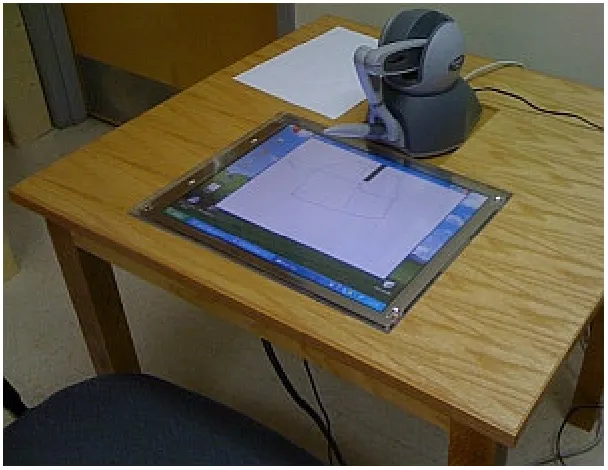
The haptic interface used in this study was designed to simulate a pen drawing
directly on a surface. Hardware included a Dell XPS 420 PC and a custom workstation
featuring a 19-inch flat screen monitor embedded in a tabletop (Figure 2.1). The embedded
monitor served as a virtual drawing surface. A haptic device featuring a stylus placed
immediately beyond the monitor was used to draw on the surface.
Figure 2.1. Workstation layout
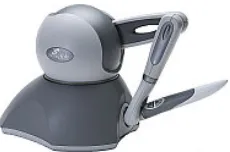
The Sensable Technologies PHANTOM® Omni® haptic device (Figure 2.2) was
device (MacLean, 2008) suitable for fine motor tasks (Iwata, 2008). Active haptic interfaces
include five basic components: (1) power sources and electronics, (2) sensors to measure the
position of the haptic device, (3) actuators to produce haptic forces, (4) drivers to facilitate
communications between the haptic device and its controlling computer, and (5) software to
control the haptic device (Robles De La Torre, 2008). The Phantom Omni has also been used
in previous studies investigating haptic control for training handwriting and fine motor skills
(e.g., Mullins et al., 2005; Vishnoi et al., 2009; Li et al, 2013). The Omni’s backdrive friction
(0.26N) has also been shown to be comparable to the friction produced by a pen on paper
(Chigira, Fujii & Valera, 2004); therefore, no additional friction forces were added to the
haptic interface to support the drawing task.
Figure 2.2. Sensable Technologies PHANTOM® Omni®
Although it provides an ample range of motion (160 mm wide by 70 mm deep) and
precision (0.055 mm), the Phantom Omni is mechanically different from a pen. The stylus is
connected to a fixed-base by two articulating arms and three gimbals and is, therefore, not
identical in weight or movement to a lightweight pen. Another limitation of systems that
not strictly identical to pen on paper (Robles De La Torre, 2008). Similar observations were
made by Srimathveeravalli et al. (2009), who also pointed out that writing in the virtual
world still represents a fine motor task.
The software application for the present study was developed using a Microsoft
Visual C++ environment, OpenGL for the graphical user interface (GUI) and Sensable’s
OpenHaptics® Software Development Kit (SDK) for haptic control. Sensable Technology’s
native drivers provided the communication links between the Phantom Omni and the
software. The Phantom Omni features a calibration utility that is executed automatically
when the stylus is connected to its base. Device calibration was confirmed following each
test trial using this technique.
2.1.1 Task and interface
The task required right-handed participants to replicate different characters from the
Georgian (Khutsuri) alphabet using the left hand only. Use of the non-dominant hand in a
writing task has been used in the past to simulate disability (Andree & Maitra, 2002) and
promote task difficulty in order to increase training effects (Srimathveeravalli et al., 2009).
Furthermore, it has also been verified that participants can gain proficiency in a repetitive
writing task when training with the non-dominant hand (Yancosek & Mullineaux, 2011). The
analysis of results in this study was focused observing differences in motor performance in a
test following training; therefore, it was important to design a task of sufficient complexity to
complex task should be used to quantify performance differences between a haptic training
condition and an unassisted condition.
Drawing characters from a foreign language, as form of novel task, has also been
used in other studies, such as Andree & Maitra (2002). Use of a foreign alphabet is intended
to normalize participant experience levels, increase the task challenge and reduce the effect
of lateral transfer (Andree & Maitra, 2002), in which training performed with one hand
transfers to the other. This means that the vast majority of U.S.-based right-handed
participants will have some left-handed proficiency when writing Latin characters due to any
existing handwriting experience. Use of the Georgian alphabet was intended to ensure all
participants had the same level of experience. Therefore, individuals familiar with the
Georgian alphabet were not permitted to participate in data collection. Each Georgian letter
was adapted from the Unicode Standard (The Unicode Consortium, 2012) to ensure
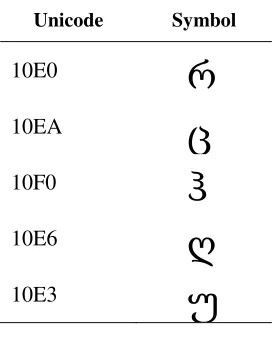
consistency. Five characters were included in the handwriting training program. Table 2.1
shows the character templates included in the training software. These characters were
selected for their similar complexity. Four of the characters were similar in size and could be
drawn using three curves. The fifth character consisted of four curves and was presented
Table 2.1. Sample characters from Georgian Khutsuri alphabet (The Unicode Consortium, 2012)
Unicode Symbol
10E0
რ
10EA
ც
10F0
ჰ
10E6
ღ
10E3
უ
Each test character was adapted from Georgian characters in the default font available
in Microsoft Office. Use of a standard vector font allowed the five characters to be scaled to
a large size without pixilation. Once their size was increased sufficiently using Microsoft
Word, they were converted to Bitmap (bmp) format and imported into the training software
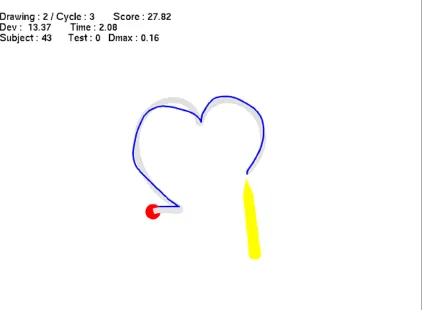
at a size of 300x300 pixels. Figure 2.3 depicts a screenshot of the drawing interface for each
completed letter. The gray character in the drawing frame is the template of the character
copied by the participant. The starting position is indicated by a red circle. Use of a fixed
starting position is consistent with Teo et al. (2002) and Solis et al. (2002) research and helps
participants orient a character so it can be completed within the workspace and reduces error
Figure 2.3. Reduced scale screenshot of the drawing interface with a completed character
The goal was for the participant to use the drawing frame to trace the character
template as accurately and quickly as possible. The Omni haptic stylus controlled a yellow
pencil-like cursor (see Figure 2.3), which indicated the relative location of the stylus on
screen. A haptic plane representing the drawing surface was rendered slightly above and
parallel to the surface of the monitor. This elevated drawing surface allowed participants to
apply a variable level of force to the stylus, which was recorded automatically during each
monitor’s surface. An adjustment utility was added to the interface allowing the cursor to be
moved on the x and y axes to reduce the parallax occurring between the cursor and stylus
point as a result of the vertical distance of the haptic plane from the monitor.
The participant’s trajectory while drawing was indicated by a blue line overlapping
the gray template. Both accuracy and speed were emphasized in the instructions provided to
the participants. Consequently, the two measures of performance were expected to improve
together. Each trial was initialized when the cursor contacted the starting position (i.e., the
cursor could touch and navigate the worksurface prior to initialization, but no line was drawn
until the cursor contacted the red circle). This approach allowed participants to comfortably
position the haptic stylus without penalty before writing. Contacting the starting position
communicated that the participant was ready to draw the character. The trial (drawing) began
when the cursor moved from the starting position and ended when the cursor was lifted from
the worksurface. During each trial, only the grey template, the participant’s drawing, the red
circle and the yellow cursor were visible. A score representing the product of task completion
time (sec.) and total deviation (in.) was presented to the participant at the end of each trial to
emphasize the speed and accuracy goals (see Figure 2.3). The score was cleared with the
initiation of each new trial and did not appear during a drawing. The score feedback was also
intended to motivate participants to further learning during trials under all conditions. Each
starting position was defined by the software. If a participant lifted the cursor from the
worksurface without completing the character, the drawing would be discarded and the task
with Wang et al. (2006). Each character was intended to be drawn completely as a
continuous line, similar to a written word without the letters i, j, t or x. Incorporating letters
composed of continuous lines is consistent with Srimathveeravalli et al. (2009) and reduced
the possibility of vibration at the haptic device due to instability in hand motion (Wang,
Zhang & Yao, 2006).
2.1.2 Haptic feature design
The VF and EA conditions in the training task were implemented using different
haptic features available in the OpenHaptics SDK. The VF condition implemented the
forcefield function. When the participant deviated from the template beyond a threshold
value (described later), cursor movement was blocked by reactive forces (in the form of a
rectangle) rendered parallel to a point on the character immediately opposite the cursor.
Forces increased based on forces applied to the haptic stylus, up to 3N (the maximum force
available to the Phantom Omni). From the participant’s perspective, the VF rendered a haptic
stencil that constrained writing within a specific threshold.
The EA condition used an adaptation of the OpenHaptics SDK “gravity well,” which
attracts a cursor toward a defined point in the interface, leading the user with positive forces.
Applied to the current study, the gravity wells provided attractive forces toward a distant
point parallel to the drawing template when the participant deviated beyond a threshold value
(also described later). In the EA condition, deviations from the template resulted in the stylus
The software included five separate templates for the characters that were traced by
participants during data collection (Table 2.1). Each template included a collection of
approximately 300 reference points placed at regular intervals along the character. The
reference points were invisible to participants. As the participant drew the character, the
software calculated the cursor’s distance from the template. Forces were applied when the
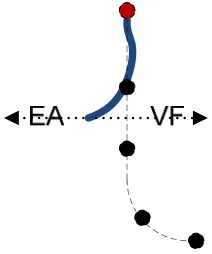
participant deviated from the reference points. Figure 2.4 illustrates the design in reduced
fidelity. The dashed line inside the template designates the ideal path traced by the
participant. The black circles represent various reference points, with the starting point in red.
The solid blue line represents a possible partial path drawn by a participant. As the
participant draws the character, the software tracks each reference point crossed by the
cursor. If the participant does not deviate from the template beyond a defined threshold
(called dMAX), no forces are applied. If the deviation goes beyond the threshold, the cursor is
blocked at the threshold point (VF) or the participant’s motion is repelled perpendicular to
the template (EA). Figure 2.4 shows a sample drawing that is fairly close to the template until
the cursor passes the second reference point. The dotted arrows labeled “EA” and “VF”
depict the direction of applied EA and VF forces as a result of the deviation. Both haptic
features apply forces perpendicular to the segment between the second and third reference
points. The VF apply forces toward the template equal to the forces applied through the
stylus until the cursor is returned within the threshold. The EA condition applies forces at a
Figure 2.4. Haptic force directions
The magnitude of the EA forces increased linearly with greater deviations. The forces
produced by EA followed the following formula, based on Hooke’s Law:
(1)
where kp represents stiffness and x and y represent the participant’s (current) and
nearest reference coordinate positions. The s and r subscripts specify the participant and
reference values, respectively. dMAX represents the threshold deviation at which forces are
applied. Therefore, the degree of force (Ff) applied is proportional to the extension beyond
the error threshold, which is dependent on the magnitude of deviations from reference points
on the template character and the maximum baseline deviations by the individual participant.
The formula shows that the reactive forces increase linearly until the maximum level
of force is reached. Some degree of free movement is also allowed before haptic forces are
perceived by the participant, which means responsibility for the highest level of accuracy
(i.e., lowest deviation from the template) can still be assigned to the participant when haptic
features are engaged. Maximum force output was limited to approximately 3N, based on the
Phantom Omni’s technical specifications. Stiffness (kp) was set to a constant value of 4,
identified through pilot testing. This value was determined to sufficiently perturb the stylus
during a deviation, but still permit corrections. (Specific details on force changes
implemented as part of the adaptive aiding during training are provided in Section 3.2.)
The main difference between the VF and EA conditions was in the direction of the
force. Virtual fixture forces moved toward the template. Error amplification force was
directed away from the template. The adaptive aiding condition increased the distance from
the template at which forces were engaged over time, which is consistent with the
recommendation that haptic training systems should provide strong guidance at first, and
reduce it over time until the user maintains most of the control (MacLean, 2008). The EA
condition, in contrast, reduced the distance at which forces were applied over time.
2.2
Experiment design
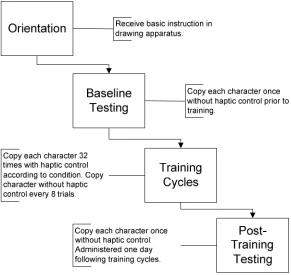
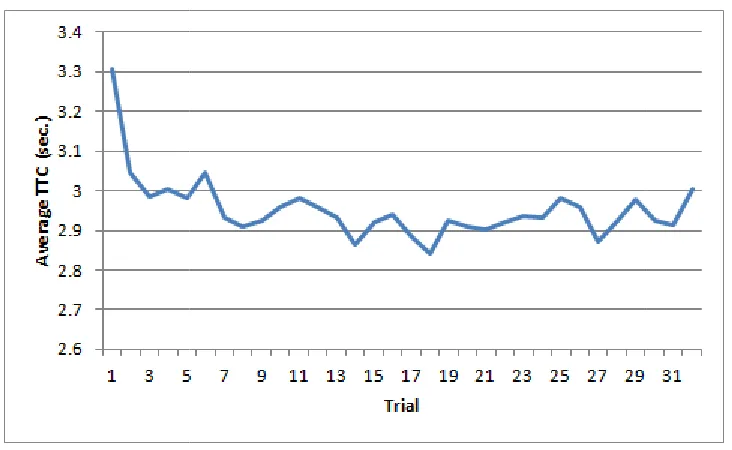
Data collection included two phases. In Phase 1, participants repeatedly traced the
Georgian characters using the experiment apparatus without haptic guidance in order to
identify learning curves for the dependent variables (see Section 3.1). These learning curves
enabled in the second phase. The goal of Phase 2 was to compare the learning effects of
adaptive VF and EA. The Phase 1 and Phase 2 procedures were kept as similar as possible to
facilitate comparisons between the two phases following data collection. The main difference
between the two phases was the absence of haptic aiding during Phase 1 and its presence
during Phase 2. The details of the two phases are provided in the following sections.
2.2.1 Participants
Nine participants were recruited to participate in Phase 1, and 32 participants were
recruited for Phase 2. A test of statistical power using the Phase 1 results (β=0.2) comparing
differences in speed and accuracy between the first and last trials was used to confirm the
sample size for Phase 2. Participants were not permitted to participate in both phases in order
to prevent training effects (learning of the Georgian letters) between phases. All participants
were required to be between 18 and 30 years old, have 20/20 or better vision (either corrected
or uncorrected), and exhibit right hand dominance with full mobility of both hands while
seated. Age was reported in a demographic questionnaire (Appendix A). The upper limit of
30 years was selected to account for the decreasing sensitivity in the sense of touch in older
adults that can occur due to a reduction in the density of Meissner corpuscles in the skin over
time (Thornbury & Mistretta, 1981). Previous work has also confirmed that sensitivity to
vibrations in the fingertips does not tend to vary due to age between 18 and 30 years
(Pongrac, 2008). Visual acuity was confirmed prior to data collection with a Snellen eye test.
Right hand dominance was also reported by participants through the demographic
Appendix B) administered using an online survey form prior to the first experiment session.
Participants were required to score a 90 or above on the Handedness Inventory in order to
participate in the study. The demographic questionnaire also included questions to screen out
participants familiar with the Georgian alphabet. Participants rated their familiarity with five
different alphabets (1 = not familiar; 5 = very familiar). Participants who self reported a 2 or
greater on the scale for the Georgian alphabet were not permitted to participate in the study.
No candidates were dismissed based on alphabet familiarity, however.
Participants were administered the Purdue Pegboard Test (Tiffin & Asher, 1948) to
ensure they could perform right and left-handed manual dexterity tasks within 1-standard
deviation of population norms (Lafayette Instrument Company, 1985). This test was
conducted to ensure that no participants had a functional impairment of the arms or hands.
2.2.2 Conditions
No independent variables (IV) were manipulated in Phase 1. In Phase 2, IVs included
the types of adaptive haptic features (2 levels; VF, EA) and aiding strategy (2 levels; adaptive
aiding, static aiding). The distribution of conditions and participants for the Phase 2
Table 2.2. Summary of number of participants assigned to conditions
Haptic Feature
VF EA
Adaptive 8 8
Static 8 8
Dependent variables
According to Srimathveeravalli and Thenkurussi (2005), “an expert’s skill in a virtual
environment can be represented using temporal position, velocity and force information” (p.
452). Consistent with this observation, past studies assessing handwriting and pattern
reproduction have used several types of performance measures including deviations from a
template or model (Cesqui et al., 2008; Chowriappa et al., 2009), task completion time
(Harwin, Patton & Edgert, 2006), number of peaks in vertical force (Teo et al., 2002;
Chowriappa et al., 2009) and number of velocity peaks in the speed profile (Cesqui et al.,
2008; Huegel 2009; Harwin et al., 2006; Teo et al., 2002; Vishnoi et al. 2009). For the
present study, the dependent variables (DV) included (1) total deviation from the template,
(2) time to task completion (TTC), and (3) average vertical force. The DV were calculated
and recorded for each trial (drawing) and averaged across trials. Participants were also asked
to complete a brief survey (Appendix D) following training to identify subjective preferences
among the four conditions.
Deviation from the template was used to control haptic forces applied during each
points per character) to calculate the root mean square error (RMSE) for each trial according
to the following formula:
(2)
where n represents the total number of reference points in the character and d is the
Euclidean deviation recorded at the reference point. Time to task completion represented the
elapsed time between moving the cursor from the starting position and lifting the cursor from
the worksurface and was expected to decrease with practice. Vertical force is a system
variable available within the OpenHaptics SDK (HD_CURRENT_FORCE), which was
recorded at regular intervals. The force profiles were expected to decrease with increased
practice (Teo et al., 2002). (These expectations were intended to provide a sense of how the
various response measures would trend through the two training phases as part of the
research. The major research hypotheses are identified in Section 2.4.)
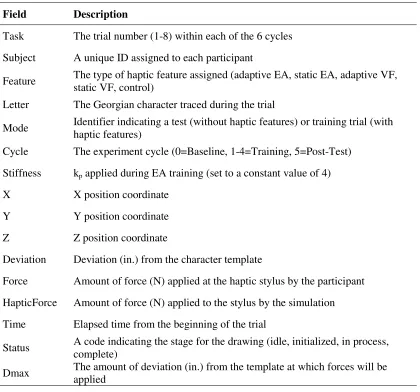
In addition to the DVs, several additional pieces of information were recorded
automatically by the computer systems used during experiment trials. This information was
collected to support the data analysis effort and to provide a basis for deriving additional
response measures for use in future studies. Table 2.3 lists the additional information
collected during each trial. Each data field was recorded at a rate of 100Hz, producing files of
Table 2.3. Data fields recorded automatically by the simulation software
Field Description
Task The trial number (1-8) within each of the 6 cycles
Subject A unique ID assigned to each participant
Feature The type of haptic feature assigned (adaptive EA, static EA, adaptive VF, static VF, control)
Letter The Georgian character traced during the trial
Mode Identifier indicating a test (without haptic features) or training trial (with haptic features)
Cycle The experiment cycle (0=Baseline, 1-4=Training, 5=Post-Test)
Stiffness kp applied during EA training (set to a constant value of 4)
X X position coordinate
Y Y position coordinate
Z Z position coordinate
Deviation Deviation (in.) from the character template
Force Amount of force (N) applied at the haptic stylus by the participant
HapticForce Amount of force (N) applied to the stylus by the simulation
Time Elapsed time from the beginning of the trial
Status A code indicating the stage for the drawing (idle, initialized, in process, complete)
Dmax The amount of deviation (in.) from the template at which forces will be applied
The DV were calculated for each test and training trial. The DV were normalized for
each participant by comparing training and test scores to baseline performance. This was
intended to account for variations in absolute performance among participants (e.g.,
precision, handwriting style). Lower RMSE deviation, lower vertical force profiles and
response measures possibly improving at different rates. Previous work on psychomotor task
performance shows that individuals continue to refine strategies after speed and accuracy
improvements approach an asymptote (Clamann & Kaber, 2012). Past studies comparing
visual and haptic guidance training methods also suggest that visual training is effective for
teaching the trajectory shape while haptic guidance is more effective for teaching temporal
aspects of the task (MacLean, 2008). Likewise, the two forms of haptic guidance were
expected to have different effects on the various response measures.
As an extension of the of the data analysis effort, participant results were split into
two performance-based classifications (i.e., high and low) following the examples set by
Cesqui et al. (2008) and Milot et al. (2010). Performance classifications were identified using
results from the baseline test speed and accuracy measures. Participants above the 50th
percentile in RMSE deviation and task time were included in the high performance group,
and the remaining participants were included in the low performance group. Additional
post-hoc analyses we