An Interface for Supporting Asynchronous Multi-Level
Collaborative Information Retrieval
Nyi Nyi Htun
SEBEGlasgow Caledonian University Glasgow, G4 0BA, Scotland, UK
[email protected]
Martin Halvey
Department of CIS University of Strathclyde Glasgow, G1 1XQ, Scotland, UK[email protected]
Lynne Baillie
Department of CS Heriot-Watt University Edinburgh, EH14 4AS, Scotland, UK[email protected]
ABSTRACT
A great deal of research into Collaborative Information Retrieval (CIR) has assumed that search team members have the same level of unrestricted access to information. However, case studies and observations from different domains including government, healthcare and legal, have suggested that CIR sometimes involves people with unequal access to information. This type of scenario has been referred to as Multi-Level CIR (MLCIR). In addition to supporting collaboration, MLCIR systems must ensure that there is no unintended disclosure of sensitive information, this is an under investigated area of research. In this paper we present re-sults of an evaluation of an interface we have designed for MLCIR scenarios. Pairs of participants used the interface under 3 different information access scenarios for a variety of search tasks. These scenarios included 1 CIR and 2 MLCIR scenarios, namely: full access (FA), document removal (DR) and term black-listing (TR). Design interviews were conducted post evaluation to obtain qualitative feedback from participants. Evaluation results showed that our interface performed well for both DR and FA scenarios but for TR, team members with less access had a nega-tive influence on their partner’s search performance, demonstrat-ing insights into how different MLCIR scenarios should be sup-ported. Design interview results showed that our interface helped the participants to reformulate their queries, understand their partner’s performance, reduce duplicated work and review their team’s search history without disclosing sensitive information.
Keywords
information retrieval; asynchronous collaboration; information access; interface design; non-uniform access
1.
INTRODUCTION
Collaborative Information Retrieval (CIR) involves people with shared information needs working together to search for infor-mation. A great deal of research in CIR, e.g. [12, 23, 34, 35], has focused on supporting seamless collaboration between searchers and enhancing overall search performance by means of different types of interface components and/or algorithms. A common assumption in CIR is that search team members have equal and unrestricted access to the same information. However, some anal-ysis [2, 3, 13, 18] has shown that this may not always be the case for a variety of reasons including security, privacy concerns, etc. In such cases, despite unequal access and shareability,
collabora-tive information search activities may need to be carried out to achieve outcomes [13]. This type of scenario is referred to as Multi-Level Collaborative Information Retrieval (MLCIR), a phrase first coined by Handel and Wang [13]. In their paper Han-del and Wang [13] presented a number of case studies and exam-ples from healthcare, business and government domains. One example involved a signal intelligence specialist and a human intelligence specialist working together to understand a new threat. Since they have non-uniform access to underlying infor-mation such as intelligence databases, the two specialists may have differing knowledge and may not be able to share any or part of it to one another. Nevertheless, the two specialists must work together to understand the threat. This example demonstrates the challenges of having non-uniform access in CIR.
A number of other researchers have also observed MLCIR scenar-ios in domains such as healthcare [18], crisis management [3] and legal search [2]. Findings from their observations provided in-sights of how non-uniform information access and organisational hierarchies can negatively impact collaboration. However, these findings [2, 3, 18] including those of Handel and Wang [13] have been based on observations and experience, and did not provide a systematic and reusable solution to solve the problems with MLCIR. To address this shortcoming, Htun et al. [16] conducted a simulated evaluation using a number of MLCIR scenarios. How-ever, their work did not go as far as a user evaluation.
To address this gap, using details from observations [2, 3, 13, 18] and design suggestions from previous literature, e.g. [1, 8, 11, 15, 23, 30], we designed a new interface for MLCIR. Previous litera-ture [13] suggested that the majority of MLCIR scenarios involve asynchronous collaborations, thus we designed the interface to support asynchronous collaboration on MLCIR. It should be noted that whilst there are similarities between CIR and MLCIR, the fundamental difference between the two is concerned with infor-mation flow, security and shareability. Thus, not all CIR interface components and concepts may be directly applicable to MLCIR which is something we investigate in this paper. To evaluate the use of our interface for MLCIR and the applicability of interface components we had, pairs of participants search the web using our MLCIR interface under 3 different information access scenarios for asynchronous collaboration tasks. The information access scenarios included 1 CIR scenario, and 2 MLCIR scenarios that were highlighted by Handel and Wang [13]. A number of existing evaluation metrics [28, 33], and questionnaires [6, 14] were used to assess search outcomes, participants’ perceptions and usability of the interface. Design interviews were conducted post evalua-tion to obtain qualitative feedback. The research quesevalua-tions we attempt to address through this evaluation are:
RQ1: How does support for CIR concepts impact search out-comes in MLCIR scenarios?
RQ2: How does support for CIR concepts impact user perception in MLCIR scenarios?
Permission to make digital or hard copies of all or part of this work for personal or classroom use is granted without fee provided that copies are not made or distributed for profit or commercial advantage and that copies bear this notice and the full citation on the first page. Copyrights for components of this work owned by others than ACM must be hon-ored. Abstracting with credit is permitted. To copy otherwise, or repub-lish, to post on servers or to redistribute to lists, requires prior specific permission and/or a fee. Request permissions from [email protected].
RQ3: How are the interface components that support CIR con-cepts used by participants on MLCIR?
RQ4: What is the overall utility of the interface and how can the design of the interface be improved for MLCIR?
The remainder of the paper is organised as follows. In Section 2, we discuss related work regarding CIR and MLCIR. In Section 3, we present our MLCIR interface and an example usage scenario. In Section 4, we describe our experimental setup. In Section 5, we present the results of our study. In Section 6, we discuss those results, providing design recommendations based on our findings from the study. Finally, we conclude this paper in Section 7.
2.
RELATED WORK
2.1
Collaborative Information Retrieval
Large numbers of people often engage in collaborative search activities [21, 22]. Working in collaboration for activities such as fact-finding and exploratory search is beneficial compared to individual search [26, 35]. However, collaborative search activi-ties that involve information sharing via conventional communi-cation channels e.g. email, telephone, etc. are often inefficient due to duplication of effort and difficulty in remote collaboration [22]. As a result, a lot of research has been conducted to provide effi-cient and practical systems to support CIR [1, 8, 12, 23]. Along-side CIR, there has also been research on Collaborative Infor-mation Seeking (CIS) e.g. [11, 20, 25, 27]. According to Shah [27] CIS is “a process of information seeking that is defined ex-plicitly among the participants, interactive, and mutually benefi-cial” (pp. 14) whereas Foster [7] defined CIR as “the study of the systems and practices that enable individuals to collaborate during the seeking, searching, and retrieval of information” (pp. 329). According to Golovchinsky et al. [10], collaborative search sys-tems can be categorised by four dimensions: intent (explicit or implicit), depth of mediation, concurrency (synchronous or asyn-chronous) and location (co-located or remote). In explicit collabo-ration, searchers’ intention is explicitly to collaborate for resolv-ing their shared information need. Collaboration is considered implicit when searchers have no intention to collaborate but their behaviour and search results are used by the system to inform new search results of other searchers. Depth of mediation refers to the involvement of algorithmic layers to assist in collaboration. Con-currency of collaboration is asynchronous when a search team performs their search activities at different times whereas in syn-chronous collaboration, team members perform search activities at the same time. In asynchronous collaboration, only “those who search later can benefit from the work of earlier collaborators” [10] pp. 2. Searchers can also be co-located or remotely located. Existing collaborative search systems vary in different dimen-sions. Examples include SearchTogether [23], CoSearch [1], Coagmento [11], ViGOR [12] and Físchlár-DiamondTouch [32]. SearchTogether [23] allows asynchronous collaboration for web search by enabling storage of all objects and actions performed at the end of a search session, this is provided through features like instant messaging and split-screen search. CoSearch [1] is de-signed for synchronous and co-located web search. It is aimed at allowing collaboration over multiple devices e.g. shared comput-ers and mobile devices. Coagmento [11], a system designed for CIS, exists as a Firefox plug-in and an Android app, and allows asynchronous and remote collaboration on both computers and mobile devices. Coagmento 2.0 [20] was recently introduced with a number of improvements to the previous version [11] including new features such as tagging, filtering the tags and searching the tags. Whilst SearchTogether, CoSearch and Coagmento support
text retrieval e.g. webpages, there has also been research conduct-ed into multimconduct-edia retrieval. For example, Halvey et al. [12] de-veloped a collaborative video retrieval system called ViGOR, which allows asynchronous and distributed collaboration. Smeaton et al. [32] developed a synchronous and co-located video retrieval system for multi-user, touch sensitive tabletops.
MLCIR examples, as discussed by Handel and Wang [13], con-tain explicit and remote collaborations, and the need for a highly dedicated algorithmic layer to control information flow, access and shareability. In terms of concurrency, however, both synchro-nous and asynchrosynchro-nous collaboration may take place. Since the majority of MLCIR examples [13] involve asynchronous collabo-ration, we designed our interface for supporting asynchronous MLCIR. Some CIR systems (e.g. [12, 23]) employed a number of different concepts for supporting collaboration; these concepts include: awareness, division of labour and persistence. Awareness provides the ability to understand individual team members’ ac-tions, search processes and search results reducing the need for lengthy communications. Division of labour enables team mem-bers to share certain work-load reducing duplicated work. Persis-tence of data provides the ability to save search sessions for later use and to conduct asynchronous collaborative search. We believe that some CIR concepts could be adopted for implementing an MLCIR system. However, nuanced difference between CIR and MLCIR means that it may not be easy for certain concepts to be directly applied to MLCIR, e.g. the awareness concept in CIR systems may allow searchers to share search results within a team without restrictions, which for MLCIR systems must be modified.
2.2
Multi-Level Collaborative Information
Retrieval
From CIR and CIS perspectives, researchers such as Pickens et al. [24], Shah et al. [31] and Soulier et al. [33], etc. have begun to study different roles in collaborative search activities and pro-posed a number of different algorithms to enhance search perfor-mance based on these roles. These research studies are closely related to MLCIR since MLCIR is also concerned with team members with different roles and different access to information. Pickens et al. [24] introduced an algorithm to support different roles: “miner and prospector” for collaborative search. Pickens et al. demonstrated that the algorithm allowed a team of searchers to find relevant information more efficiently and effectively, and to find relevant information that cannot be found while working individually. Shah et al. [31] introduced a different set of roles: “gatherer and surveyor”, and demonstrated similar effectiveness as Pickens et al.’s [24] “miner and prospector” role. Soulier et al. [33] introduced a number of algorithms that monitor users’ ac-tions and automatically suggest appropriate roles to optimise CIR performance. More recently, Tamine and Soulier [36] conducted a user study to investigate the impact of role assignment in CIR and found that roles limited the precision of the search results. Despite a great deal of research into different roles in CIR, their primary focus has been on division of labour aspect of CIR [19] instead of solving the problems with MLCIR which are rather concerned with information security, flow, access and shareability between collaborators [13].
To the best of our knowledge, no previous research studies have examined existing CIR concepts and components to provide a systematic and reusable solution for MLCIR. To address this shortcoming, using details from observations [2, 3, 13, 18] and design suggestions from previous literature, e.g. [1, 8, 11, 15, 23, 30], we implemented an MLCIR interface that supports asynchro-nous collaboration and evaluated the interface using pairs of users.
3.
MLCIR INTERFACE
3.1
Interface Description
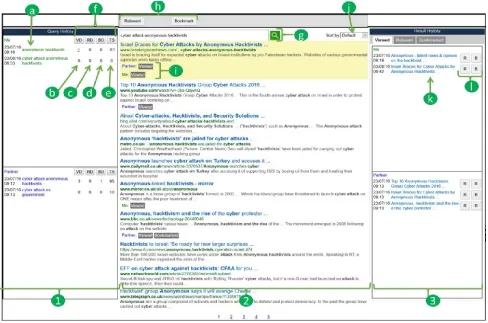
Figure 3 highlights the MLCIR interface that is evaluated in this paper. The interface was implemented using Google Web Toolkit1
and Bing search API2. The interface contains 3 main components:
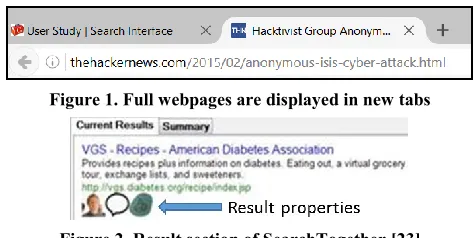
search (Figure 3: 2), query history (Figure 3: 1) and result history (Figure 3: 3). Rationale for these components emerged from a series of user studies we had conducted [15]. The search compo-nent (i.e. Figure 3: 2) contains a search box and search button (i.e. Figure 3: g), a toolbar (i.e. Figure 3: h), a result sort function (i.e. Figure 3: j), and a result area with viewed, relevant and book-marked labels (i.e. Figure 3: i). Results are fetched using the Bing search API in JSON format. The interface ensured that the webpages that are blocked or the webpages that contain blacklist-ed terms (see Section 4.1 for details) do not appear in the search results of team members who do not have full access to infor-mation. Clicking on a search result opens up a new tab within the browser window to display the full webpage (see Figure 1). The clicked result is then highlighted and marked as “viewed” (i.e. Figure 3: i). Users can then mark the page as relevant and/or bookmark the page if relevancy is uncertain, using the toolbar (i.e. Figure 3: h). The respective buttons in the toolbar can be clicked again to undo relevant or bookmark. Results can be sorted by using the result sort function (i.e. Figure 3: j) which allows sorting by a number of criteria: default, viewed, relevant and book-marked. Under each result (i.e. Figure 3: i), users can see whether
1 http://www.gwtproject.org
2 https://datamarket.azure.com/dataset/bing/search
[image:3.612.318.555.107.226.2]a particular result has been viewed, marked as relevant and/or bookmarked; these result properties are identified by team mem-bers’ names and colours. A similar design was used in Search-Together [23], where team members and result properties were identified with profile pictures and icons as shown in Figure 2.
Figure 1. Full webpages are displayed in new tabs
Figure 2. Result section of SearchTogether [23]
The query history component (i.e. Figure 3: 1) contains a history of team’s search queries (i.e. Figure 3: a), query properties (i.e. Figure 3: b, c, d, e) and a sort function (i.e. Figure 3: f). Queries between a pair of users are separated using different boxes, names and colours as shown in Figure 3: a. The approach of identifying team members with different colours and names has been used in previous collaborative search systems: CoSearch [1] and Coag-mento [11]. Both team members can see every query submitted by the team and can simply click the queries to re-submit. The search component then checks for blocked webpages and blacklisted terms before displaying the results. Query properties namely: number of viewed documents/webpages (VD), number of relevant documents/webpages (RD), number of bookmarked docu-ments/webpages (BD) and time spent on query (TS) are displayed next to each query as shown in Figure 3: b, c, d, e respectively. A search system implemented by Freyne et al [8] augmented search result properties such as: popularity, time spent, etc. next to each search result. Unlike Freyne et al.’s [8] interface, our interface augments query properties instead of result properties. Query history can be sorted based on query properties by using the tog-gle buttons as shown in Figure 3: f.
The result history component (i.e. Figure 3: 3) contains a history of viewed, relevant and bookmarked results separated into differ-ent tabs. The tabs display titles of the respective webpages (i.e. Figure 3: k) together with relevant and bookmark toggle buttons (i.e. Figure 3: l). A mouse hover on any of the title in the result history displays a tooltip with the related query that was used to obtain the respective webpage. Clicking on the title opens up a new tab within the same browser window to display the full webpage (see Figure 1). The relevant and bookmark toggle but-tons (i.e. Figure 3: l) have the same functionality as those from the toolbar (i.e. Figure 3: h). The interface ensures that the webpages that are blocked or the webpages that contain blacklisted terms do not appear in the result history of team members who do not have full access to information.
3.2
Example Usage Scenario
Figure 3. The interface utilised in the study: 1) query history component, 2) search component, 3) result history component, a) query, b) number of viewed documents/webpages, c) number of relevant documents/webpages, d) number of bookmarked docu-ments/webpages, e) time spent on query, f) query sort function, g) search box and button, h) toolbar, i) viewed, relevant,
book-marked labels, j) result sort function, k) titles of saved webpages, l) relevant and bookmark toggle buttons.
would to find troubleshooting documents across the company’s website. The customer may not find any relevant information because of their access level, bad search queries or information overloading. The customer finishes the search session after a while. The employee later browses the customer’s previous search session and continues searching. The employee looks at the cus-tomer’s query history and sees an overview of how many different results were seen, marked as relevant and bookmarked, and how long the customer spent on each query. If, for instance, the cus-tomer spent a long time in a particularly set of queries and viewed relatively higher number of results but did not find any relevant ones, the employee may be able to look further into such queries and help the customer find relevant results. Similarly, using the result history component, the employee may decide to look at the relevant and bookmarked results and help the customer find simi-lar results. The employee may find both overlapping and different results from the customer. The results that are marked as “viewed” only may be skipped and the results they are also marked as “relevant” or “bookmarked” may be reviewed. The employee may also find the results that contain sensitive infor-mation, but may or may not notice it and continues his/her search session anyway. Luckily, the backend of the interface scans through every result and ensures that the results that contain sensi-tive information (i.e. blacklisted words) or the results that exist only in the internal database (i.e. blacklisted documents) are not displayed in the customer’s side. This way, the employee can help the customer find the relevant results without the overhead of inadvertently disclosing sensitive information. The search
ses-sions are saved to allow asynchronous collaboration, thus both the customer and the employee can resume their search session at any time. The customer may later review the employee’s search ses-sion, reformulate his/her previous queries and find relevant results in the website this time. Throughout this scenario, the customer and the employee did not need to discuss their access and limita-tion, their results or even their search queries.
4.
EXPERIMENTAL SETUP
4.1
Information Access Scenarios
order effects, the order in which the information access scenarios are presented was rotated using Latin square counterbalancing. Prior to the study, 6 participants (4 from our research group) were asked to provide at least 20 queries for each of our search tasks (see Section 4.2). This generated a pool of the most likely queries for each task with 85 to 97 unique terms per task. Next, all the queries from this query pool were submitted to the Bing Search API3. We then selected at random 25 results from the top 50 for
each task. For the document removal scenario (i.e. DR in Table 1), this set of 25 results was used to block the results for one member of a search team (teams were pairs). For the term black-listing scenario (i.e. TR in Table 1), the top 10 most frequent terms in the query pool for each task was used to blacklist the queries for one member of a search team (teams were pairs). Thus, in the TR scenario all the webpages that contain any of the blacklisted terms are blocked for one member. To the best of our knowledge, no previous research studies have provided guidelines for the DR and TR scenarios based on the web. We believe that our approach of selecting the documents and terms for DR and TR was moderate and served as a starting point for evaluation of our interface. Each non-uniform access scenario had a team member with less access (i.e. either blacklisted terms or blacklisted results) and the other team member with full access. Access within a pair of participants was rotated so that each participant had a chance to experience having full access and non-full access in either the DR or TR scenario.
Table 1. Information access scenarios utilised in this study Code Access Scenario Access removed for a member
DR Document removal scenario Random 25 out of top 50 most likely result removed
TR Term blacklisting scenario Top 10 most likely terms re-moved FA Full access scenario -
4.2
Search Tasks
Table 2. Example search task Cyber-Attack
You are a central intelligence agent working with a national secu-rity agent to understand cyber-attacks, that were targeted at the US government facilities (including websites and computers), by the Anonymous hacktivists within the last 10 years. Thus, you and your partner need to search through any available documents to be able to analyse the attacks. However, you will be searching at a different time from your partner (i.e. before or after your partner). You and your partner may or may not have equal access to under-lying information.
Search and visit any documents you think are relevant. Once you find an interesting document, either mark it as relevant or book-mark it if you are unsure at the moment. Your main goal is to find as many relevant documents as possible. Your work must help your partner to continue searching.
You should search for the following information: what were the reasons for the attacks in the last 10 years and how the US government responded to the attacks.
Using the method of Borlund [4], 3 simulated work tasks were created based on the real-life MLCIR examples highlighted by Handel and Wang [13]. The 3 tasks were about: 1) cyber-attack, 2) crime investigation and 3) new robotic technology. An example
3 https://datamarket.azure.com/dataset/bing/search
of cyber-attack task can be found in Table 2. The tasks also in-formed the participants to find as many relevant documents as possible for their team. Since team members in MLCIR scenarios are unaware of their access, limitation and information shareabil-ity [13], we believed this strategy was appropriate. During the evaluation, participants performed all 3 search tasks. Tasks and information access scenarios were rotated between a pair of par-ticipants to simulate asynchronous collaboration. Both partici-pants started with different tasks and information access scenarios (i.e. without partner's query and search history), and later contin-ued searching the remaining tasks and information access scenari-os following their partner’s previous search session.
4.3
Participants
20 participants (10 pairs) were recruited from personal contacts, research group and university contacts for this study. This partici-pant pool size is similar to previous experiments [8, 17, 23, 24]. Participants were assigned partners for the study based on their availability. 8 pairs of the participants knew each other prior to the study and signed up together. Each participant received a £10 Amazon voucher on completion of the study; they were informed of this while being recruited. 8 females and 12 males participated in the study. The average age of the participants was 26.9 (S.D ± 4.08), ranging from 19 to 33. Of all participants, 1 reported spend-ing less than 6 hours per week usspend-ing search engines, 3 reported 6 to 10 hours per week, 1 reported 11 to 15 hours per week, 4 re-ported 16 to 20 hours per week and 11 rere-ported more than 20 hours per week. 15 participants reported that they had taken part in a collaborative search at least once using search systems like Google, Bing and Google Scholar, and tools such as social media and phones to share information.
4.4
Study Procedure
Once the participants signed up to participate in the study, they were assigned into pairs based on their availability. Once a pair of participants was assigned into an appropriate timeslot, an email containing an information sheet, a consent form and a demograph-ic questionnaire was sent to each of them. Prior to arriving for the study, the participants were asked to read the information sheet, sign the consent form and send back a digital copy, and then com-plete the demographic questionnaire.
was allocated for each task. Upon completion of each task, each participant was provided with a post-task questionnaire. A maxi-mum of 3 minutes was allocated to complete the questionnaire. The questionnaire included a NASA TLX questionnaire [14], and 3 additional 5-point Likert scale questions to assess participants’ 1) perception of their access level, 2) interest in the task and 3) familiarity with the task. Once participants completed the post-task questionnaire, they repeated the same steps for the remaining 2 search sessions using different information access scenarios and search tasks. Upon completion of all 3 search sessions, each par-ticipant was provided with a System Usability Scale [6]. A maxi-mum of 2 minutes was allocated to answer the SUS questionnaire. Finally, a design interview was conducted with both participants (see Section 4.6). The main researcher asked a series of open ended questions and took notes of participants’ responses. The responses were also recorded on an audio recorder, which were later transcribed for analysis. During the interview, participants were also provided with printouts of the interview questions and interface components, as well as empty sheets of paper so that the participants could reference, annotate and sketch while answering the questions. The total length of each study was 90 minutes.
4.5
Evaluation Metrics
To measure search outcomes (RQ1), we adopted some evaluation metrics proposed by Shah and González-Ibáñez [28] for CIS: recall, precision, f-measure, coverage, relevant coverage, unique coverage and unique relevant coverage. Following the approach of Shah and González-Ibáñez [28], we first created a pool of all webpages discovered by all of the participants. Next, a pool of relevant webpages was created by combining all the webpages that were marked as relevant by participants. Shah and González-Ibáñez [28] created the pool of relevant webpages by combining all the webpages that were either bookmarked or from where text snippets were collected. For us, since our interface had a relevant function, we used the relevant webpages instead. Coverage is the number of distinct webpages discovered by a pair of participants or by an individual participant. Relevant coverage is the number of webpages in the coverage that intersect with the pool of rele-vant webpages. Recall is relevant coverage/pool of relevant webpages. Precision is relevant coverage/coverage. F-measure is a harmonic mean of recall and precision which is represented by the formula: 2 . 𝑝𝑟𝑒𝑐𝑖𝑠𝑖𝑜𝑛 . 𝑟𝑒𝑐𝑎𝑙𝑙
(𝑝𝑟𝑒𝑐𝑖𝑠𝑖𝑜𝑛 + 𝑟𝑒𝑐𝑎𝑙𝑙). Unique coverage is the number of
distinct webpages discovered by a pair of participants only in a given case (e.g. only in the DR scenario) and not in any others, or by individuals in a given access (e.g. full access within the DR scenario) and not in the other. Unique relevant coverage is the number of webpages in the unique coverage that intersect with the pool of relevant webpages. Other evaluation metrics adopted for this study include those proposed by Soulier et al. [33] for CIR: number of queries and average query length. Number of queries is the total number of queries submitted by a pair of participants or by an individual participant. Average query length is the average number of words within the number of queries. NASA Task Load Index [14] and 3 addition questions were used to answer our sec-ond research question (RQ2). Feedback from design interview and System Usability Scale [6] were used to answer our third (RQ3) and fourth (RQ4) research questions.
4.6
Design Interview
The purpose of the design interview was to understand in detail how the interface had an impact on participants during search sessions. It was also designed to capture suggestions from partici-pants so that the interface can be further improved. The design interview consisted of 3 sections. In section 1, participant pairs
were asked a series of questions related to the query history com-ponent. In section 2, the pairs were asked a series of questions related to the search component. In section 3, the pairs were asked a series of questions related to the result history component. In all 3 sections, we asked the pairs how the component impacted their search sessions, which parts of the components were most/least useful and how the component could be improved. Participants’ responses were analysed using the Constant Comparative Method [9], a data analysis method of the Grounded Theory approach.
5.
RESULTS
Statistical comparisons were made between the 3 information access scenarios and between individuals with full access and non-full access within the document removal and term blacklist-ing scenarios. Dependent variables included all the metrics pre-sented in Section 4.5. For comparison between the information access scenarios, since data was paired, one-way repeated measures ANOVA was used for normally distributed data and Friedman and Wilcoxon Sign-Rank tests were used for non-normally distributed data. For comparison between individuals with full and non-full access within the DR and TR scenarios, since data was unpaired, one-way between groups ANOVA was used for normally distributed data and Mann-Whitney U test was used to non-normally distributed data. Results are presented in the following sub-sections. For reasons of space, some results with non-significant differences are not presented.
5.1
Search Performance
Statistical analysis showed that recall, precision and f-measure values differed significantly between the information access sce-narios (F(2,18) = 24.56, p<0.001, F(2,18) = 15.31, p<0.001 and F(2,18) = 24.22, p<0.001 respectively). Post hoc analysis, using a Bonferroni corrected alpha, showed that the term blacklisting (TR) scenario had significantly lower recall, precision and f-measure than both document removal (DR) scenario (p=0.001, p=0.001 and p<0.001 respectively) and full access (FA) scenario (p<0.001, p=0.001 and p<0.001 respectively) (see Table 3). There was no significant difference between the DR and FA scenarios. Looking at individual search performance for the DR scenario, no significant performance difference was found between individuals with full access and non-full access. However, for the TR scenar-io, individuals with full access had significantly higher recall (F(1, 11.307) = 10.952, p = 0.007), precision (F(1, 12.23) = 13.287, p = 0.003) and f-measure (F(1, 11.572) = 12.886, p = 0.004) than individuals with non-full access (see Table 3). It ap-pears that the TR scenario (i.e. blacklisting 10 most likely terms) had a significant negative impact on search performance than the DR scenario (i.e. removing random 25 out of top 50 most likely results). Surprisingly, individuals with full access in the TR sce-nario had less than half recall, precision and f-measure than those with full access in the DR scenario (see Table 3). While one would expect similar search performance between individuals with full access within the TR and DR scenarios, it appears that those with full access within the TR scenario were negatively influenced by their partner with non-full access.
5.2
Coverage
Table 3. Search performance metrics comparison between the information access scenarios, and between full and non-full access within TR. Bold and underline = statistically different pairs (p < .05). S.D = standard deviation.
DR TR FA DR TR
Full Non-full Full Non-full
recall Mean 0.226 0.068 0.232 0.125 0.129 0.059 0.018 S.D 0.095 0.034 0.068 0.058 0.071 0.037 0.013
precision Mean 0.186 0.030 0.203 0.198 0.176 0.053 0.016 S.D 0.078 0.014 0.088 0.091 0.099 0.030 0.013
f-measure Mean 0.197 0.040 0.204 0.150 0.143 0.053 0.016 S.D 0.073 0.017 0.060 0.070 0.071 0.031 0.012
Table 4. Coverage metrics comparison between the information access scenarios, and between full and non-full access within TR. Bold and underline = statistically different pairs (p < .05). S.D = standard deviation.
DR TR FA Full DR Non-full Full TR Non-full
coverage Mean S.D 128.500 236.900 36.136 85.448 137.700 66.500 69.746 19.873 69.700 117.600 36.670 54.923 136.800 65.824
relevant coverage Mean 23.200 6.800 24.000 13.100 12.900 5.800 1.900 S.D 10.130 3.584 8.206 7.078 7.218 3.882 1.663
unique coverage Mean 128.100 236.500 137.500 58.800 62.000 100.100 119.300 S.D 36.260 85.373 69.535 22.968 32.653 45.369 62.118
unique relevant coverage Mean 23.200 6.800 24.100 10.300 10.100 4.900 1.000 S.D 10.130 3.584 8.399 7.088 6.315 3.247 1.333 and p=0.002 respectively) (see Table 4). It appears that
blacklist-ing search terms forced the participants to discover a great number of diverse results. In terms of relevant coverage and unique rele-vant coverage, the TR scenario had significantly lower values in comparison with both DR (p<0.001 and p<0.001 respectively) and FA (p=0.001 and p=0.001 respectively) scenarios (see Table 4). Thus, in terms of discovering relevant results, teams within the TR scenario performed badly which confirms the findings pre-sented in Section 5.1. Looking at individuals’ coverage for the TR scenario, individuals with full access had significantly better relevant coverage (F(1, 12.2) = 8.53, p=0.013) and unique rele-vant coverage (U = 14.5, p=0.006) than those with non-full access (see Table 4). For the DR scenario, no significant difference was found between full and non-full access. Interestingly, individuals with full access within the TR scenario had almost double the coverage and unique coverage than those with full access within the DR scenario (see Table 4). In contrast for relevant coverage and unique relevant coverage, the opposite effect was found; this phenomenon was also discovered for recall, precision and f-measure. This shows the influence of the poorly performing part-ner on a team.
5.3
Query Submission
Participants submitted a significantly higher number of queries in the TR scenario in comparison with both DR (Z = -2.803, p=0.005) and FA (Z = -2.82, p=0.005) scenarios (see Table 5). Individuals with non-full access in the TR scenario submitted a significantly higher number of queries (F(1, 18) = 8.98, p=0.008) than those with full access (see Table 5). Average query length was not different between the information access scenarios nor between individuals. Individuals with full access within the TR scenario submitted almost double the amount of queries than those with full access within the DR scenario. We observed that blacklisting search terms for one team member resulted in both team members submitting a large amount of queries, thereby also discovering more results as presented in Section 5.2. To under-stand search term diversity between individuals, we further ana-lysed the number of unique terms submitted by individuals in a given access (e.g. full access within the document removal scenar-io) and not in the other. Term diversity was significantly higher
for individuals with non-full access than those with full access within the TR scenario (see Table 5). No significant difference was found between full and non-full access for the DR scenario.
5.4
Participants’ Perceptions
Table 5. Query submission metrics comparison between the information access scenarios, and between full and non-full access within TR. Bold and underline = statistically different pairs (p < .05). S.D = standard deviation.
DR TR FA DR TR
Full Non-full Full Non-full
number of queries Mean 11.100 26.600 10.700 6.100 5.200 11.300 17.800 S.D 4.677 6.293 5.100 3.213 2.394 3.945 5.613 term diversity
(words that are unique in a given access)
Mean - - - 9.600 7.900 8.500 14.500
S.D - - - 6.398 5.216 5.339 6.433
Table 6. Participants’ perception metrics comparison between the information access scenarios and between full and non-full ac-cess within DR and TR. Bold and underline = statistically different pairs (p < .05). S.D = standard deviation. For performance,
effort and frustration, the lower the better. For perception of access, 0 = strongly disagree and 5 = strong agree to the statement of
having higher access than partner.
DR TR FA Full DR Non-full Full TR Non-full
performance Mean S.D 7.750 14.950 4.363 4.763 5.330 4.122 8.900 7.900 7.600 4.812 12.600 5.060 17.300 3.164
effort Mean S.D 9.750 13.500 3.972 2.782 4.471 3.071 9.900 9.900 9.600 13.600 4.881 2.591 13.400 3.098
frustration Mean 7.200 12.250 7.900 6.800 7.600 10.800 13.700 S.D 4.851 5.169 5.119 4.614 5.296 3.853 6.075 perception of access Mean 3.000 S.D 1.026 2.250 3.350 2.500 1.209 0.988 0.972 3.500 0.850 2.300 1.252 2.200 1.229
5.5
Design Interview
Analysis of design interview transcripts using Constant Compara-tive Method [9] resulted in 5 main themes: query reformulation, knowledge of partner’s performance, reducing duplicated work, reviewing search results and improvements. Details of these themes are presented in the following sub-sections.
5.5.1
Query Reformulation
We found that the query history and result history components were used by most participants to reformulate their queries. 15 (75%) of the participants reported that they used the query history component. For example, one participant explained: “When I got stuck was when I really looked at what my partner has searched. Looking at my partner’s queries helped me overcome not being able to find anything” (P8). All 15 (75%) participants also men-tioned that they used a combination of at least two of the four query properties (i.e. number of viewed results, relevant results and bookmarked results, and time spent) to determine a useful query. 4 (20%) of the participants reported that they also used the relevant results from the result history component for query for-mulation. For example, one participant mentioned: “[The relevant tab] is very similar to how the query history affected my search. This came in handy if I was struggling to find the results.” (P15).
5.5.2
Knowledge of Partner’s performance
It appears that the query properties in the history component were able to provide the participants with an overview of their partner’s search performance. 14 (70%) of the participants explained that they mostly used the number of viewed results, relevant results and time spent to check search performance of their partner. That way, they were able to focus on a certain direction of search. For example, one participant explained: “I could find out how many relevant results [my partner] found and how long [my partner] spent on a particular search word. So I can either try to avoid it or go deeper into it.” (P12)
5.5.3
Reducing Duplicated Work
It appears that being able to see whether a search result was seen, marked as relevant and/or bookmarked by a partner helped reduce duplicated work. 16 (80%) of the participants reported that they
skipped the results that were only marked as “viewed” and not as “relevant” and/or “bookmarked”. For example, one participant mentioned: “The ‘viewed’ labels helped me. And just being able to see it at a glance that my partner has looked that these webpages already and if it says “viewed” not relevant, not bookmarked, I wouldn’t really bother to look at it.” (P7). This is most likely because the participants believed that a particular result is unim-portant if their partner had looked at it but did not mark it as rele-vant or did not bookmark it.
5.5.4
Reviewing Search Results
Having access to a persistent result history gave the participants an overview of their search session and allowed them to refine search results. 15 (75%) of the participants reported using the result history to review their team’s search results either to con-firm or to explore further. For example, one participant noted: “…like you can look back through what you have searched and decide if you now want to make something relevant or now you want to bookmark something.” (P8). It should be noted, though, that the result history displayed only the results that were not blacklisted and did not contain blacklisted terms.
6.
DISCUSSION
with full access within the term blacklisting scenario performed poorly compared to those with full access within the document removal scenario. Arguably, being aware of their partner’s search queries and results may have caused the individuals with full access to hinder their search performance.
In relation to our second research question (RQ2): “How does support for CIR concepts impact user perception in MLCIR sce-narios?”, we found that the participants had a significantly nega-tive response to the questions assessing their performance, effort and frustration for the term blacklisting scenario in comparison with the document removal and full access scenarios. This is related to a finding discussed for our first research question (RQ1). Due to the negative impact of the term blacklisting scenar-io on search performance, it appears that the participants had to put more effort to find relevant results and hence were more frus-trated. Surprisingly, we found that the individuals with non-full access within the document removal scenario thought they had higher access than those with full access. It appears that users’ perception of access and performance are not affected by our document removal scenario.
In relation to our third research question (RQ3): “How are the interface components that support CIR concepts used by partici-pants on MLCIR?”, here we discuss findings from the design interview. First, we found that the query history and result history components were used by participants to reformulate their search queries. For the query history component, it was found that the query properties (i.e. number of viewed results, relevant results and bookmarked results, and time spent) played an important role since most participants mentioned that they used the properties to determine a useful query. For the result history, relevant results were used in query formulation perhaps because the participants believed that relevant results contain keywords that are related to the search topic. Second, we found that the query properties in the query history component were used by participants to understand search performance of their partner. Understanding partner’s performance enabled the participants to focus on a certain direc-tion of search. Third, it was found that understanding the search results that were viewed, marked as relevant and bookmarked allowed the participants to reduce duplicated work. In our inter-face, we used a number of labels to show this information in the search results (e.g. Figure 3: j). Fourth, we found that the partici-pants used the result history component to review and refine their team’s search results. Note that the findings we discussed for this research question are not the explicit findings for asynchronous MLCIR only. A number of studies in both CIR and CIS [17, 23, 29], have used similar interface components and presented similar findings. Yet because of the differences between CIR/CIS and MLCIR, not all such findings could be applied to MLCIR. Our findings confirm reusability and demonstrate broader applicability of some existing components for designing MLCIR systems. To understand whether the participants used our interface differently between traditional CIR and MLCIR conditions, we further ana-lysed the number of clicks on queries in the query history compo-nent, number of times the query history was sorted, number of times results were sorted, and number of clicks on results in the result history component. No differences were found between traditional CIR and MLCIR conditions.
In relation to our fourth research question (RQ4): “What is the overall utility of the interface and how can the design of the inter-face be improved for MLCIR?”, the overall SUS score of the interface was 70.75, which is above average (68being the average [5]). For the second part of the research question, we discuss findings from the design interview. One participant suggested
linking the query properties and the result history so that one can, for instance, click on the number of relevant documents query property (Figure 3: d) to see what these documents are as in the result history (Figure 3: l). 6 (30%) of the participants suggested adding a comment function for search results. For example, a participant described: “Instead of me going back reading through the whole page, my partner can just say what I need to look here. So, for example, once I bookmark a page, there should be a popup where I can type in.” (P7). A similar component has been used in SearchTogether [23], where it is referred to as “page-specific metadata”. 2 (10%) of the participants suggested that the partner’s query history and result history should be displayed above self’s query history and result history. This is because during search sessions, users are more likely to be interested in their partner’s query and result histories rather than theirs.
While our findings informed new interface components, as well as reusability of some existing components, such findings have fall-en into 3 awarfall-eness types that were devised by Htun et al. [15] for MLCIR systems; these are: result awareness, team awareness and query awareness. We would like to confirm here that new MLCIR systems could base their design on these 3 awareness types re-gardless of their domain: healthcare, government, business, etc.
6.1
Limitations
While our evaluation results had shown a number of interesting findings, there are some limitations. First, while our results indi-cated that the document removal scenario had comparable search performance and collection coverage, it could be due to the amount of documents we blocked (i.e. removing random 25 out of top 50 most likely results). Perhaps blocking more documents may observe a different finding. However, since no previous guidelines existed prior to our study, our approach served as a starting point. Second, since we used a single interface to compare the 3 information access scenarios, the effect of each component could not be compared directly through hypothesis testing. How-ever, findings from the design interview provided a better under-standing of the impact of each component during search sessions. Finally, since the search sessions were performed across the open web and we did not have a qrel, we were unable to calculate our evaluation metrics as precisely as using a document collection. However, the method we used to calculate our evaluation metrics has successfully been used by pervious research studies [28, 33].
7.
CONCLUSION
gap when a search team does not have equal access to infor-mation. Overall participants rated the usability of the interface as above average. Findings from the design interview showed that using different components of the interface, participants were able to effectively reformulate their queries, obtain knowledge of their partner’s performance, reduce duplicated work and easily review their team’s search results. A number of design suggestions were also discussed in order to help improve the design of the current interface. In summary, we demonstrated and evaluated the first known interface to support asynchronous collaboration in MLCR scenarios. We showed that our interface has the ability to provide important information for users without disclosing sensitive in-formation during asynchronous collaboration. Besides, we provid-ed important new design suggestions and showprovid-ed reusability of certain CIR components and concepts for MLCIR interfaces, something that has never been done before. We believe that the findings, interface and design suggestions observed and demon-strated in this paper will serve as the guidelines for further inves-tigations into MLCIR.
8.
REFERENCES
[1] Amershi, S. and Morris, M. R.: CoSearch: a system for co-located collaborative web search. ACM SIGCHI 2008, 1647-1656.
[2] Attfield, S., Blandford, A., Makri, S.: Social and interac-tional practices for disseminating current awareness infor-mation in an organisational setting. IPM, 46(6), 2010, 632-645.
[3] Bjurling, B., Hansen, P.: Contracts for Information Sharing in Collaborative Networks. ISCRAM 2010, 1-5.
[4] Borlund, P.: The IIR evaluation model: a framework for evaluation of interactive information retrieval systems. In-formation research, 8(3), 2003, Key: citeulike:1188067. [5] Brooke, J.: SUS: a retrospective. Journal of usability
stud-ies, 8(2), 2013, 29-40.
[6] Brooke, J.: SUS-A quick and dirty usability scale. Usability evaluation in industry, 189(194), 1996, 4-7.
[7] Foster, J.: Collaborative information seeking and retrieval. Annual review of information science and technology, 40(1), 2006, 329-356.
[8] Freyne, J., Farzan, R., Brusilovsky, P., Smyth, B. and Coyle, M.: Collecting community wisdom: integrating social search & social navigation. ACM IUI 2007, 52-61.
[9] Glaser, B. G., Strauss, A. L. and Strutzel, E.: The Discovery of Grounded Theory; Strategies for Qualitative Research. Nursing Research, 17(4), 1968, 364
[10] Golovchinsky, G., Pickens, J. and Back, M.: A taxonomy of collaboration in online information seeking. arXiv preprint, arXiv:0908.0704, 2009.
[11] González-Ibáñez, R. and Shah, C.: Coagmento: A system for supporting collaborative information seeking. ASIS&T, 48(1), 2011, 1-4.
[12] Halvey, M., Vallet, D., Hannah, D., Feng, Y., Jose, J. M.: An asynchronous collaborative search system for online video search. IPM, 46(6), 2010, 733-748.
[13] Handel, M. J., Wang, E. Y.: I can't tell you what i found: problems in multi-level collaborative information retrieval. ACM CIR 2011, 1-6.
[14] Hart, S. G. and Staveland, L. E.: Development of NASA-TLX (Task Load Index): Results of empirical and theoreti-cal research. Advances in psychology, 52, 1988, 139-183. [15] Htun, N. N., Halvey, M. and Baillie, L.: How Can We
Bet-ter Support Users with Non-Uniform Information Access in
Collaborative Information Retrieval? ACM CHIIR 2017. DOI: http://dx.doi.org/10.1145/3020165.3020171.
[16] Htun, N. N., Halvey, M. and Baillie, L.: Towards Quantify-ing the Impact of Non-Uniform Information Access in Col-laborative Information Retrieval. ACM SIGIR 2015, 843-846.
[17] Joho, H., Hannah, D., Jose, J. M.: Comparing collaborative and independent search in a recall-oriented task. ACM IIiX 2008, 89-96.
[18] Karunakaran, A., Reddy, M.: The Role of Narratives in Collaborative Information Seeking. ACM GROUP 2012, 273–276.
[19] Kelly, R. and Payne, S.: Division of labour in collaborative information seeking: Current approaches and future direc-tions. Workshop on Collaborative Information Seeking, held at ACM CSCW 2013.
[20] Mitsui, M. and Shah, C.: Coagmento 2.0: A System for Capturing Individual and Group Information Seeking Be-havior. ACM JCDL 2016, 233-234.
[21] Morris, M. R.: Collaborative search revisited. ACM CSCW 2013, 1181-1192.
[22] Morris, M. R.: A survey of collaborative web search prac-tices. ACM CHI 2008, 1657-1660.
[23] Morris, M. R., Horvitz, E.: SearchTogether: an interface for collaborative web search. ACM UIST 2007, 3-12.
[24] Pickens, J., Golovchinsky, G., Shah, C., Qvarfordt, P., Back, M.: Algorithmic mediation for collaborative exploratory search. ACM SIGIR 2008, 315-322.
[25] Shah, C.: Collaborative Information Seeking: From ‘What?’and ‘Why?’to ‘How?’and ‘So What?’. Collabora-tive Information Seeking, 2015, 3-16. DOI: 10.1007/978-3-319-18988-8_1
[26] Shah, C.: Collaborative information seeking: The art and science of making the whole greater than the sum of all (Vol. 34). Springer Science & Business Media, 2012. [27] Shah, C.: Collaborative information seeking: A literature
review. Advances in librarianship, 32(2010), 2010, 3-33. [28] Shah, C., González-Ibáñez, R.: Evaluating the synergic
effect of collaboration in information seeking. ACM SIGIR 2011, 913-922.
[29] Shah, C. and Marchionini, G.: Awareness in collaborative information seeking. ASIS&T 61(10), 2010, 1970-1986. [30] Shah, C., Marchionini, G. and Kelly, D.: Learning design
principles for a collaborative information seeking system. ACM CHI EA 2009, 3419-3424.
[31] Shah, C., Pickens, J. and Golovchinsky, G.: Role-based results redistribution for collaborative information retrieval. IPM, 46(6), 2010, 773-781.
[32] Smeaton, A. F., Lee, H., Foley, C. and McGivney, S.: Col-laborative video searching on a tabletop. Multimedia Sys-tems, 12(4), 2007, 375-391.
[33] Soulier, L., Shah, C. and Tamine, L.: User-driven system-mediated collaborative information retrieval. ACM SIGIR 2014, 485-494.
[34] Soulier, L., Tamine, L. and Shah, C.: MineRank: Leverag-ing users’ latent roles for unsupervised collaborative infor-mation retrieval. IPM, 52(6), 2016, 1122–1141.
[35] Tamine, L. and Soulier, L.: Collaborative Information Re-trieval: Concepts, Models and Evaluation. ECIR 2016, 885-888.