APPLICATION OF KNOWLEDGE BASED ENGINEERING IN DESIGNING
AUTOMOBILE RIM AND MACROS IN CATIA
AHMAD RAMADHAN BIN AHMAD YUSOFF
This report is submitted
in fulfillment of the requirement for the degree of Bachelor of Mechanical Engineering (Automotive)
Faculty of Mechanical Engineering
UNIVERSITI TEKNIKAL MALAYSIA MELAKA
i
DECLARATION
I declare that this project report entitled “Application of Knowledge Based
Engineering in Designing Automobile Rim and Macros in CATIA” is the result
of my own work except as cited in the references
ii
APPROVAL
I hereby declare that I have read this project report and in my opinion this report
is sufficient in terms of scope and quality for the award of the degree of
Bachelor of Mechanical Engineering (Automotive).
Signature : ...
Name of Supervisor : ...
iii
To my beloved
iv
ABSTRACT
v
ABSTRAK
vi
ACKLOWLEDGEMENT
In the name of Allah most benevolent and most merciful, I would like to express my greatest gratitude sincerely to a wide range of people who have offered their assistance in completing my thesis.
First and foremost, I would like to thank to my supervisor, Dr. Shamsul Anuar B. Shamsudin, who has given me the guidance and unfailing support. Not to forget my parents for their moral and financial support. Without them, I would certainly have difficulties to complete this thesis successfully through the critical juncture.
vii
CONTENT
CONTENT PAGE
DECLARATION i
APPROVAL ii
DEDICATION iii
ABSTRACT iv
ABSTRAK v
ACKLOWLEDGEMENT vi
TABLE OF CONTENTS vii
LIST OF FIGURES ix
LIST OF TABLES xi
LIST OF ABBEREVATIONS xii
CHAPTER 1 1
INTRODUCTION 1
1.1 BACKGROUND 1
1.2 PROBLEM STATEMENT 3
1.3 OBJECTIVE 3
1.4 SCOPE OF PROJECT 4
1.5 GENERAL METHODOLOGY 4
CHAPTER 2 5
LITERATURE REVIEW 5
2.1 INTRODUCTION 5
2.2 COMPUTER AIDED DESIGN (CAD) / KNOWLEDGE BASED
ENGINEERING 5
2.2.1 SECONDARY DEVELOPMENT OF CATIA 6
viii
2.3 KNOWLEDGEWARE REPRESENTATION IN CATIA SYSTEM 8
2.4 USING A MACRO TO THE FURTHER DEVELOPMENT 10
2.5 SUMMARY 11
CHAPTER 3 12
METHODOLOGY 12
3.1 INTRODUCTION 12
3.2 GENERAL METHODOLOGY 12
3.3 STUDY ABOUT THE BASIC KNOWLEDGE OF THE
LANGUAGE IN CATIA SOFWARE 14
3.4 SELECTION OF LANGUAGE 15
3.5 TUTORIAL FOR CATSCRIPT 15
3.6 NEXT OBJECTIVE PLANNING 18
CHAPTER 4 20
DATA AND RESULT 20
4.1 INTRODUCTION 20
4.2 DESINGING RIM USING KNOWLEDGEWARE ADVISOR IN
CATIA SOFTWARE 20
4.3 CODING OF THE PROGRAM 28
4.4 CUSTOMIZATION OF AN ICON FOR THE PROGRAM 32
CHAPTER 5 33
DISCUSSION 33
5.1 INTRODUCTION 33
5.2 WRITING OF THE MACROS 33
5.3 PROBLEM ENCOUNTERED 37
CHAPTER 6 39
CONCLUSION AND RECOMMENDATION 39
6.1 CONCLUSION 39
ix
LIST OF FIGURES
Figure 1 Product life-cycle cost, design knowledge related to design process 2
Figure 2 Interface of COM 2
Figure 3 Influence of KBE usage on time of main design tasks. 6
Figure 4 Part modelling object tree 8
Figure 5 Classifying knowledge-the different dimensions. 9
Figure 6 Knowledgeware solution overview 10
Figure 7 The Flowchart of the currect progress of the project 13
Figure 8 The interface of CATIA macros enviroment 14
Figure 9 The script 16
Figure 10 InputBox 17
Figure 11 Massage Box 17
Figure 12 Flowchart of macros for the project 18
Figure 13 Reference book CATIA V5 Macro Programming 19
Figure 14 Basic design of the rim 21
Figure 15 Renaming the parameters 22
Figure 16 Applying formulas into the design 22
x
Figure 18 Coding for rule in rule editor 24
Figure 19 Design 1 25
Figure 20 Design 2 25
Figure 21 Design 3 26
Figure 22 Design table 27
Figure 23 The coding of the program 28
Figure 24 Selection of file to be selected 29
Figure 25 Inputbox asking for file location 29
Figure 26 Image for design 1 30
Figure 27 Image for design 2 30
Figure 28 Image for design 3 31
Figure 29 Saved image properties 32
Figure 30 Icon of the Macros 32
xi
LIST OF TABLE
Content Page
Table 1 Specification of the Wheel Rim design 24
xii
LIST OF ABBEREVATIONS
KBE Knowledge Based Engineering
AI Artificial Intelligence
CAD Computer Aided Design
CATIA Computer Aided Three-dimensional Interactive Application
COM Computer Object Model
CAM Computer Aided Machining
OLE Object Linking Embedding
VB Visual Basic
VBA Visual Basic for Application
KWA Knowledgeware Advisor
PKT Product Knowledge Template
1
CHAPTER 1
INTRODUCTION
1.1 THE BACKGROUND
Knowledge based engineering or also known as KBE stands at the cross point of diverse vital disciplines, such as artificial intelligence (AI), computer aided design (CAD) and computer programming. Nowadays, it is hard to find scientific books or journal that can be related to KBE. In addition, this topic did not enter into the mainstream academic research yet. To date, knowledge based engineering may become the potential asset where it can save the engineering cost and reduce the time for the product to be developed. Based on the literature survey, knowledge based engineering is defined in many ways, and in order to relate to this final year project’s topic, knowledge based engineering can be defined as a technology based on the use of dedicated software tools called KBE systems, which can record information and systematically reuse the product and process, with the final goal of reducing time and costs of product development by several means (Rocca 2012).
2
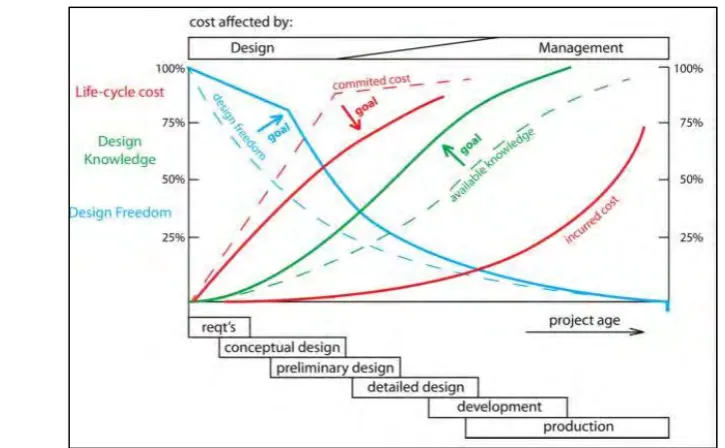
Figure 1 Product life-cycle cost, design knowledge related to design process (Verhagen et al. 2012)
Knowledgeware is not one specific CATIA workbench but several workbenches. The tools can be found on the standard toolbar in Part Design workbench. In short, Knowledgeware is a collection of tools that allow the designer or user to create or generate, manipulate the creations. CATIA Macros is one of the Automation which allows communication between several processes.
Figure 2 Interface of COM (Source: Dassault System)
Based on Figure 2, COM (Component Object Model) is the Microsoft standard to share objects among several applications. Automation is Microsoft
[image:15.595.116.532.502.636.2]3 For writing script in CATIA, there are three possible languages;
1. Visual Basic
2. VBA
3. CATScript
1.2 THE PROBLEM STATEMENT
In an industrial environment, mostly in design department, automation is rarely applied in order to solve problems that may occur during compilation of data. Based on experience in an industry, some engineers complain that the huge set collection of data (CAT Drawing CAT Part, CAT Product) needs to be open one by one and it lead to time wasting and inefficient work. The design part for case example for this project is the automotive tyre rim. For designer to design 3 rims with different specifications, it would take a long time to complete and decrease the focus for creative design task. . Hence, this project focuses on solving problems that industrial engineer facing by creating macros that automate repetitive tasks and speed up the design processes
1.3 THE OBJECTIVES
The objectives of this project are as follows:
1. To investigate the language of scripting that applied in CATIA macros.
2. To apply Knowledge Based Engineering for designing process of the
automotive rim.
3. To create a program that can facilitate or automate the capturing of multiple
images (looping process) by using CATIA macros.
4
1.4 SCOPE OF PROJECT
The scopes of this project are:
1. CATIA V5 software will be employed to run the program. It offers
Macros toolbar where the script can be written.
1.5 GENERAL METHODOLOGY
The actions that need to be carried out to achieve the objectives in this project are listed as below:-
1. Learning the language
Firstly, languages of macros that will be used for scripting need to be learnt. After selection of the language, the project can proceed to next phase to create macros.
2. Literature and Survey
To appreciate the problems and challenges encountered by the engineers, questions will be asked for further improvisation of the project objectives.
3. Analysis and proposed solution
Analysis will be presented on how the program will be executed by explaining the script line by line. Solutions will be proposed based on the analysis.
5
CHAPTER 2
LITERATURE REVIEW
2.1 INTRODUCTION
This chapter will describe about the scientific studies on the project. Since this project was not an experimental in nature, it is very challenging to find relevant references from the journals or books that are related to this project. Nevertheless, some reviews were found which has helped to understand the project were collected and summarized. Therefore, reviews for this study were quoted from the websiteb internet, thesis and journal.
2.2 COMPUTER AIDED DESIGN (CAD) / KNOWLEDGE BASED
ENGINEERING
For this project, CATIA software was used as the platform in order to address the problem. CATIA stands for Computer Aided Three-dimensional Interactive Application which is a multi-platform for CAD/CAM and CAE. It was developed by the French company, Dassault System and was written in the C++ programming language. CATIA was created in the late 1970s and early 1980s.
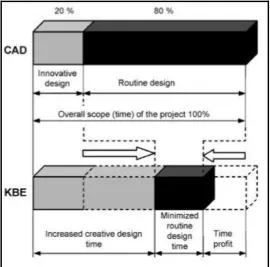
Knowledge Based Engineering system is a usage of proper computer software for obtaining and recycling knowledge on a product and process in a most integrated way. Therefore, it is especially beneficial in the event where the design is constantly develop. As stated by (Skarka 2007), creation of a good project depends largely on creativity of the designer himself. In other words, in order to have a good project, it is advised to devote, in optimal solution, much more that 20% of designing time for creative actions.
6
Figure 3 Influence of KBE usage on time of main design tasks. (Skarka 2007)
2.2.1 SECONDARY DEVELOPMENT OF CATIA
CATIA V5 is an open system for developing innovative macros for special needs. Macro is a code that written in certain programming language which can create, analyse modify etc. In Computer Aided Manufacturing (CAM) operations, macros is useful for generating the product as desired by designer. Macros are developed using CATScript, VBScript or VBA script. For developing a macro in CATIA V5, all we need is the inputs, outputs and necessary supporting data from user.
out-7 process application, Component Object Model (COM) will accessed to CATIA object.
Based on (Kong et al. 2012), in the CATIA environment, when the macro executed, CATIA is in a non-activated and variables cannot be stored between calling macro. This relatively simple approach can be completed in the CATIA environment. In in-out process applications, CATIA and external applications run in different process address space.
2.2.2 CATSCRIPT
8
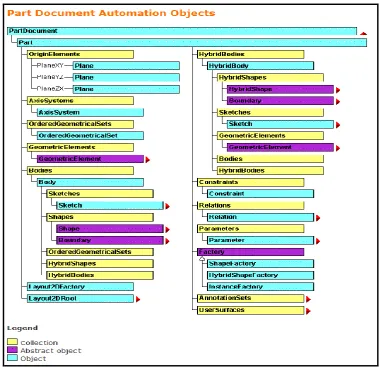
Figure 4 Part modelling object tree (Constantinovici 2013)
In CATIA, the part document automation objects are functioning to create certain part model, for example, to define the plane of sketch, creating 3D model, are all under a tree as shown in the figure above. The part object can be developed using macro programming for customization or automation in
CATIA V5.
2.3 KNOWLEDGEWARE REPRESENTATION IN CATIA SYSTEM
9
Knowledge advisor
Knowledge expert
Product knowledge template
[image:22.595.187.452.196.392.2] Business process knowledge template
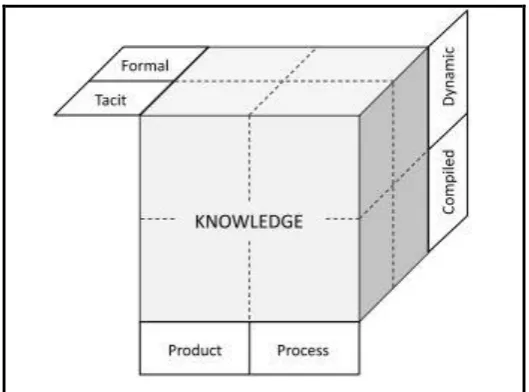
Figure 5 Classifying knowledge-the different dimensions.
(Source: (Chandrasegaran et al. 2013)
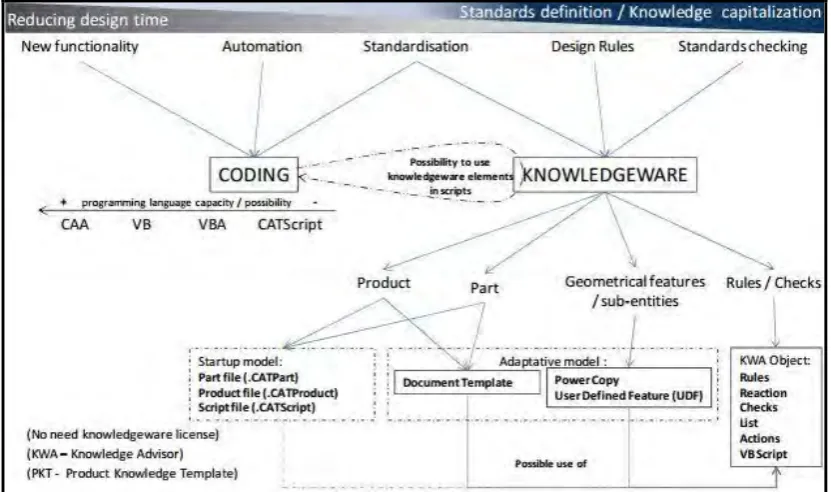
According to (Skarka 2007), these tools offers many utilities that permit automation of the choice of design features with the use of different forms of knowledge representation by ready-made tools:
Parameters: simple tool to parameterize a component.
Published parameters: defining relations.
Formulas: to determine the features using formula.
Design table: to define the product by dimensional families.
Rules and check: to implement determining product features in provisional
technique to match rules.
Power copy: document template-enable reuse of entities of product.
Reactions: which can add a behaviour to a component.
Set of equations: to solve equations and inequalities.
10 These functions allow to integrate the know-hows using the Knowledgeware language and to optimize them in order to facilitate technical decisions, reduce errors and automate design for maximum efficiency. Figure 6 below generally show the solution overview limited to KWA and PKT products.
Figure 6 Knowledgeware solution overview (Bodein 2009)
2.4 USING A MACRO TO THE FURTHER DEVELOPMENT
Users use macro recording a sequence of operation, automatically generated code and use certain language (VBScript/VBA/Catscript etc) as editing tools. It is customized interactive way. Automation interface can call “InputBox” and “MsgBox” function to get user input information and output.
11 to achieve the desire function, but also to record the macro method and obtain the required procedures.
2.5 SUMMARY