ISSN(Online): 2320-9801 ISSN (Print) : 2320-9798
I
nternational
J
ournal of
I
nnovative
R
esearch in
C
omputer
and
C
ommunication
E
ngineering
(An ISO 3297: 2007 Certified Organization)
Vol. 4, Issue 2, February 2016
Design of Wireless Module for Interfacing
Raspberry Pi With Bluetooth
Bhavini M. Chaudhari, Nehal G. chitaliya
M.E Student, Dept. of ECE, Sardar Vallabhbhai Institute of Technology, Vasad-Gujarat, India
Associate Professor, Dept. of ECE, Sardar Vallabhbhai Institute of Technology, Vasad-Gujarat, India
ABSTRACT: Now a days using multimedia applications is common in classroom teaching. As we know that use of chalk produces dust, which pollutes the air and causes hazardous effects on health. Teacher still have to write on a blackboard with chalk though it cannot fulfil the needs of efficient teaching and learning.
The proposed system aims to substitute laptops with Raspberry Pi which will not only drastically reduce the cost involved, but also will help achieving quality of service as the system will consume a smaller amount of power, yet will provide the same functionality as any other similar system does. The proposed system will be controlled by using a smart phone based remote control, thus adding to the convenience. System will be controlled by using a smart phone based remote control.We have to design an Android Bluetooth application from which we will connect with Raspberry Pi’s Bluetooth and display our files on projector which is connect with Raspberry Pi.
KEYWORDS: Raspberry Pi, Bluetooth, Android Application
I. INTRODUCTION
The proposed system will be controlled by using a smart phone based remote control.We have to design an Android Bluetooth application from which we will connect with Raspberry Pi’s Bluetooth and display our files on projector which is connect with Raspberry Pi.
Motivation:
Technology has taken center stage in schools and colleges. Students being taught using PowerPoint slides and Portable Document Files (PDF). For this, prerequisites include laptops that need to be connected to projectors and portable devices like pen drive. This is complex and waste some time. Requirement of a laptop for each and every class.
Advantages are:
• substitute laptops with Raspberry Pi which will not only drastically reduce the cost involved, but also will help achieving quality of service as the system will consume a smaller amount of power
• It is a simple circuit .the operating system used here is Raspbian OS. Raspbian OS has to be installed so that the image can be transmitted to the smart phone.An energy efficient portable system is proposed,
• Simple to implement, small size portable stand-alone device with its own power source, energy capable truly cheap for residential and personal use.
Why android?
The main theme is the appearance of smart phone. As a smart phone appears in market, controller has tremendous change in design and installment. Smart phone has remarkable power in computation as well as a very convenient operation wireless access by BLUETOOTH, with the help this powerful smart phone applications, the system becomes smarter and more intelligent [5]. Various application programs are open to market or developed. Android OS provides free SDK (Software Development Kit) which operates Video has a merit of open source. Furthermore, in an integrated development environment called Eclipse an Emulator is provided. Thus, we utilized this program without a smart phone or target board at first stage.
II. LITERATURE SURVEY
ISSN(Online): 2320-9801 ISSN (Print) : 2320-9798
I
nternational
J
ournal of
I
nnovative
R
esearch in
C
omputer
and
C
ommunication
E
ngineering
(An ISO 3297: 2007 Certified Organization)
Vol. 4, Issue 2, February 2016
literature [5] discussed about building a low cost stand-alone device which transmits data using Raspberry Pi with Bluetooth and has a resistive touch screen display providing a interface.
literature[2]discussed about design of hand held equipment. It is build using ARM 7 processor which can interface to wireless module and 7 inch touch screen. The data written on the screen is transferred to PC through RF module and also design, methods and software flow of hand-held terminal and remote terminal was included in this paper. In this paper also described the steps needed to be carried out for displaying the contents on the projector.
III. PROPOSED WORK
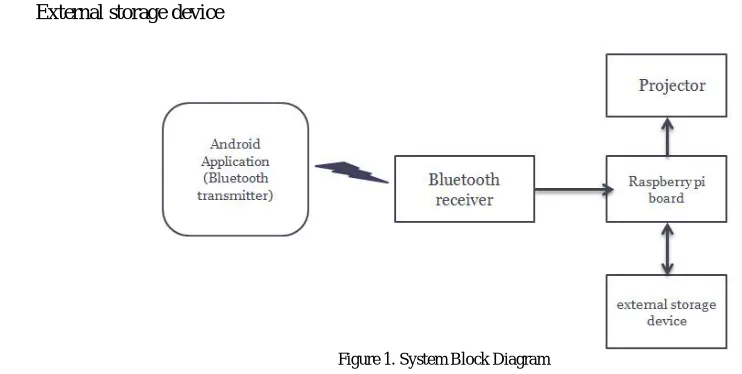
Proposed system Wireless Module for Interfacing Projector will be controlled by using a smart phone based remote control. We have to design an Android Bluetooth application from which we will connect Remote module.
Remote terminal includes:
Bluetooth Receiver
Raspberry-Pi Board
Projector
External storage device
Figure 1. System Block Diagram
System consists of mainly two parts:
A. Hand Held Module: Hand held module includes an Android application which is working as Bluetooth transmitter. B. Remote Module: Remote module working as Bluetooth receiver which receives the files and project it in larger form in projector.
IV. SYSTEM OVERVIEW
Overall objective of this project is to use Raspberry Pi and its Bluetooth interface to store files that have been sent from remote sources and view these files on the projector. Once Raspberry Pi has been set up and is ready to be used like a normal computer, applications can be installed thereby enabling to view all the Portable Document Files (PDF) and power-point presentations.
The next is to use a remote control to control these applications. Controlling of Raspberry Pi can be achieved using a smart phone which almost everyone carries today. Some readily available applications on the Google Play Store include NetIO and XBMC server allowing creation of customized remote control to control Raspberry Pi.
ISSN(Online): 2320-9801 ISSN (Print) : 2320-9798
I
nternational
J
ournal of
I
nnovative
R
esearch in
C
omputer
and
C
ommunication
E
ngineering
(An ISO 3297: 2007 Certified Organization)
Vol. 4, Issue 2, February 2016
System requires 650 mA@5v power supply. System works on Raspbian Os and programming is done in python scripting language. Whenever hand held device detects raspberrypi’s Bluetooth id it will be request for connection or pairing after that device will be ready for transfer files in real-time as it opens in Android Bluetooth application.
Project Implementation
The primary function of our project is:
Step 1: Setting up Raspberry Pi
Figure 2. Installation of Raspbian OS
Steps for installing OS in raspberry pi:
Step 1: Download NOOBS (New out of the box software) is an operating system.
Step 2: Once SD card has been formatted, drag all files in extracted NOOBS folder and drop them on the SD card drive.
Step 3: when this process has been finished, safely remove SD card and insert into raspberry Pi. plug in keyboard, mouse, monitor, USB power cable to pi. Also connect HD Display
Step 4: raspberry pi will boot, and install Raspbian
Step 5: logging and accessing the GUI, the default login for Raspbian username is “pi” and password is “raspberry”.
ISSN(Online): 2320-9801 ISSN (Print) : 2320-9798
I
nternational
J
ournal of
I
nnovative
R
esearch in
C
omputer
and
C
ommunication
E
ngineering
(An ISO 3297: 2007 Certified Organization)
Vol. 4, Issue 2, February 2016
Figure 3. Software flow of the Bluetooth communication
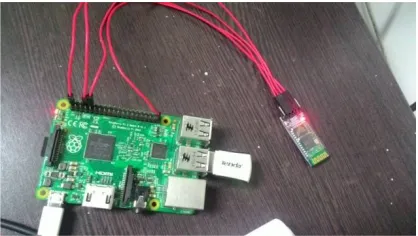
Step 2:Hardware interface between Raspberry Pi Board and Bluetooth
Figure 4. hardware interface between Raspberry Pi and Bluetooth
Figure 4 shows the hardware implementation of Raspberrypi and Bluetooth module.After installation of Raspbian OS I have install the drivers required for Bluetooth in the raspberrypi. The following commands will install the Bluetooth in Raspbian Os:
sudo apt-get install Bluetooth bluez
V. SIMULATION RESULTS
The simulation studies includes installation of Raspbian OS and installation of Bluetooth Dongle 4.0.
ISSN(Online): 2320-9801 ISSN (Print) : 2320-9798
I
nternational
J
ournal of
I
nnovative
R
esearch in
C
omputer
and
C
ommunication
E
ngineering
(An ISO 3297: 2007 Certified Organization)
Vol. 4, Issue 2, February 2016
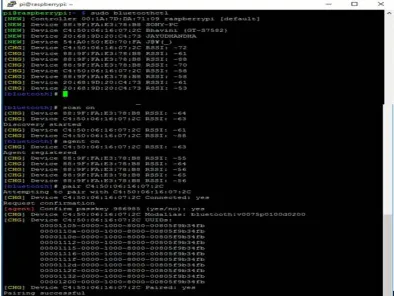
Figure 5. Bluetooth Driver Installation
2. If bluetooth-agent is not available, try bluetoothctl.
ISSN(Online): 2320-9801 ISSN (Print) : 2320-9798
I
nternational
J
ournal of
I
nnovative
R
esearch in
C
omputer
and
C
ommunication
E
ngineering
(An ISO 3297: 2007 Certified Organization)
Vol. 4, Issue 2, February 2016
VI. FUTURE EXPANSION
One android application should be developed which will control the Raspberrypi board remotely by Bluetooth from which we can live streaming mobile screen on projector. Live streaming of android application screen can be added where by android application we can open file and image, close file n image, save files and images.
Another future scope is powering the Raspberry Pi using a battery. For now, the Raspberry Pi needs to be connected to the power supply via the USB power port. But in case the power goes off, it would turn off the Pi abruptly. So, it would be better if the Raspberry Pi is connected to a backup battery power supply.
VII. CONCLUSION
This system will reduce the effort of person while giving the presentation in public or in conference. The whole presentation will be controlled through Bluetooth application. This system will be live streaming of presentation work. Vendor will easily control the presentation through its mobile application. In this our projector will be attached with raspberry Pi where the Bluetooth is also being attached. This will be a low cost, easy to use system.
REFERENCES
[1] Shekhar H. Bodake, V. G. Puranik,” Design Of Wireless Electric Board For Writing And Sketching Using ARM Based Embedded System”,International Conference For Convergence Of Technology, pg. 1-4, 2014.
[2] Mr. Shekhar H. Bodake, Dr. G. U. Kharat,” Design Of Wireless Electric Board For Writing And Sketching Using ARM Based Embedded System”, Asian Journal Of Convergence In Technology Volume1, Issue 1, pp. 1-7, August 2014.
[3] Dhaval Chheda,Divyesh Darde,Shraddha Chitalia,”Smart Projectors Using Remote Controlled Raspberry Pi” International Journal Of Computer Applications (0975 – 8887) Volume 82 – No 16,pp. 6-11, November 2013.
[4] Sayali Kale, Ruchira Gujar, Priyanka Karanje, Juili Cholachgudd, Prof. Meenal Mungi “ARM Based Interactive Electronic Board”, International Journal Of Engineering Research & Technology (IJERT), Vol. 2 Issue 2, , pp. 1-6, February- 2013.
[5] Gopinath Shanmuga Sundaram, Bhanuprasad Patibandala, Harish Santhanam, Sindhura Gaddam, Vamsi Krishna Alla, Gautham Ravi Prakash, Shiva Chaitanya Vishwakarma Chandracha, Sindhu Boppana and James M. Conrad, “Bluetooth Communication using a Touchscreen Interface with the Raspberry Pi” IEEE, pp 1-4,2013.
[6] Di WU,Yang Zhang, Baoding Zhou “Wireless Electric Board Based on an ARM-based Embedded System, “IEEE International conference computer science and information technology (ICCSIT) Volume 5, pp 268-270, September 2010.