EXTRACTION OF FACIAL FEATURES
USING A SIMPLE TEMPLATE BASED
METHOD
MRS. SUNITA ROY11 Ph.D. scholar in the Dept. of Computer Science & Engineering, University of Calcutta, Kolkata, India,
Email: [email protected]
PROF. SAMIR KUMAR BANDYOPADHYAY2
2
Professor of the Dept. of Computer Science &Engineering, University of Calcutta, Kolkata, India,
Email: [email protected].
Abstract
Nowadays detection of face [8] [9] including its various facial feature is becoming very effective in the process of face recognition system, behavioral classification system. There are several numbers of techniques like skin color - based segmentation [6] [12], principal component analysis [5] [11], template matching based [11] which are used to detect various facial features [1]. In this paper we will describe a very simple template matching based technique.
Keywords: Face detection, facial features detection, template matching, 2D- cross correlation, normalization.
1. Introduction
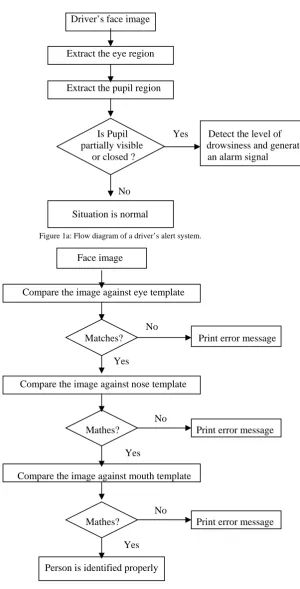
Human face and its various facial features have been considered as a very useful tool in the process of identification, behavioral classification, expression detection etc. Furthermore facial feature characteristics are very much effective in both biometric and forensic identification. Another most interesting thing is that among all the facial features, eye feature has more application domain. For example in various driver alert system we specially capture the eye portion [2] of the driver’s face image to determine the level of drowsiness and depending on the result we will generate an alarm signal to prevent the road accidents. Figure1a. shows the concept behind a driver’s alert system.
Driver’s face image
Extract the eye region
Extract the pupil region
Is Pupil Yes Detect the level of partially visible drowsiness and generate or closed ? an alarm signal
No
Situation is normal
Figure 1a: Flow diagram of a driver’s alert system.
Face image
Compare the image against eye template
No Matches? Print error message
Yes
Compare the image against nose template
No
Mathes? Print error message
Yes
Compare the image against mouth template
No
Mathes? Print error message
Yes
Person is identified properly
Figure 1b: Flow diagram of a person identification system.
2. Template matching based feature extraction technique
This is one of the very popular feature extraction processes [10]. Here we give two inputs, one is the input face image and another one is the feature template image like eye template. Hence to detect all the facial features we have to correlate the face image against all the feature template images. For example, to detect the eye we need to correlate the given image with the eye template and the best-correlated region will be marked as an eye. The following algorithm will show how the matching is performed.
Step 3: Make normalized 2D- cross correlation between these two images. Step 4: Determine the maximum correlation value.
Step 5: Draw a boundary around the region where the highest correlation has occurred.
2.1. Acquisition of input image
Image acquisition can be made directly by giving the input image in the standard format (.jpg, .png, .bmp etc) or the output of a camera can be used as the input of our algorithm. In MATLAB [7] we use ‘imread’
command to read an input image from a desired location containing that image. Now if the input image is represented by a three-dimensional space, we need to convert it into two-dimensional space using
‘rgb2gray’command. We should allow this conversion because in our algorithm we use 2D correlation operation.
2.2. Acquisition of template image
As our algorithm is based on template matching technique, we need a template image. With respect to this template image we make a search throughout the input image and return the area of the image where a best match occurs. Acquisition of the template image is same as the acquisition of the input image but in each different module we use a different template image whereas the input image is same. For example, if we want to extract the eye of a face, we should use an eye template but if we want to extract the mouth of a face, we use a mouth template.
2.3. Make normalized 2D- cross correlation between these two images
Correlation mask w (x , y) of size m n, with an image f (x, y) may be expressed in the form
C (x, y) = w (s, t) f (x + s, y + t) s t
where the limits of summation are taken over the region shared by w and f . This equation is evaluated for all values of the displacement variables x and y so that all elements of w visit every pixel of f , where f is assumed to be larger than w. When the input image f is larger than the template image, we say that it is normalized. Here
w is referred to as a template and correlation is referred to as template matching. The values of template cannot all be the same. The resulting matrix C contains the correlation coefficients, which can range in value from -1.0 to 1.0. In MATLAB we use ‘normxcorr2’ command to compute the normalized cross-correlation of two matrices. For example ‘normxcorr2(template, A)’ computes the normalized cross-correlation of the matrices template and A(input image).
2.4. Determine the maximum correlation value
The maximum value in matrix C will occurs when the normalized w and the corresponding normalized region in
f are identical. This indicates maximum correlation (i.e., the best possible match). We use ‘max’ command to get the maximum correlation value.
2.5. Draw a boundary around the region where the highest correlation has occurs
When we get the maximum correlation area in the input image, we make a boundary around the area. In MATLAB we can use ‘boundary’ command or ‘plot’ command to draw a boundary. We can also adjust the property of the boundary line, such as the line width, line color etc.
3. Experimental results
Input image Output image
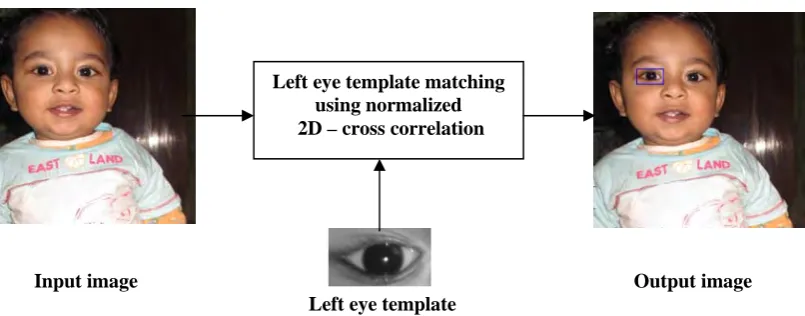
Left eye template
Figure 3a: Extraction of left eye using left eye template.
Input image Output image
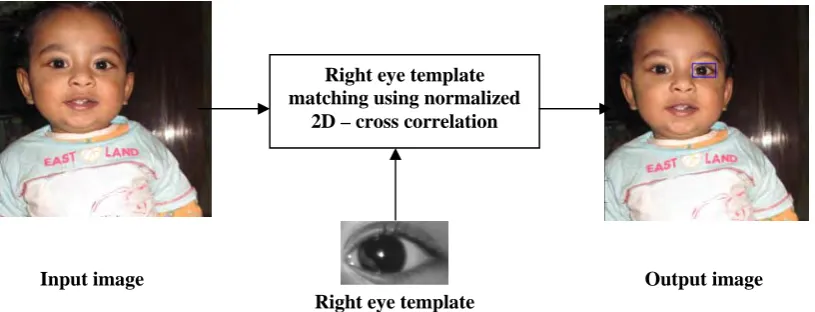
Right eye template
Figure 3b: Extraction of right eye using right eye template.
Input image Output image
Nose template
Figure 3c: Extraction of nose using nose template.
Input image Output image Mouth template
Figure 3d: Extraction of mouth using mouth template.
Right eye template matching using normalized
2D – cross correlation
Nose template matching using normalized 2D – cross correlation
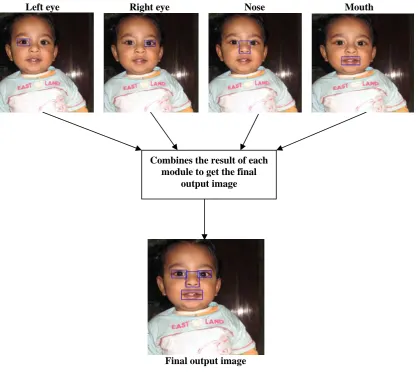
Left eye Right eye Nose Mouth
Final output image
Figure 3e: Extracted features from the input image.
4. Conclusion
In this paper we have described a very simple approach to detect various facial features. This approach is completely based on template matching technique. Also we have given some overview of popular applications where we operate on various facial features. After reading this paper the reader may get a clear overview of facial feature extraction process and apply them on various applications.
5. References
[1] Bhumika G. Bhatt, Zankhana H. Shah, "Face Feature Extraction Techniques: A Survey", National Conference on Recent Trends in Engineering & Technology, May 2011.
[2] N. Bhoi, M. Narayan Mohanty, “Template Matching based Eye Detection in Facial Image”, International Journal of ComputerApplications(0975 – 8887), Volume 12– No.5,
December 2010.
[3] Wen-Bing Horng* and Chih-Yuan Chen, "A Real-Time Driver Fatigue Detection System Based on Eye Tracking and Dynamic Template Matching", Tamkang Journal of Science and Engineering, Vol. 11, No. 1, pp. 65 72 (2008).
[4] I.Craw, d.Tock, and a.Bennett, ”Finding face features”,Proc.second European conf. Computer vision, pp92-96,1992. [5] M.Turk and a.Pentland,”Eigenfaces for recognition”, J.Cognitive Neuroscience, vol. 3, no. 1,pp71-86,1991.
[6] Sanjay singh et.al, “A robust skin color based face detection algorithm”, Tamkang Journal of Science and Engineering vol.6, no.4,pp227-234, 2003.
[7] R.Gonzalez and R.Woods, “Digital image Processing”, second edition, Prentice hall, 2002.
[8] Ming-Hsuan Yang, David J. Kriegman, Narendra Ahuja, “Detecting Faces in Images: A Survey”, IEEE Trans. PAMI, vol. 24, No.1, pp. 1-25, Jan 2002.
[9] Erik Hjelmas and Boon Kee Low, “Face Detection: A Survey”, Computer Vision and Image Understanding, 83, pp. 236-274, 2001. [10] I. Craw, H. Ellis, and J. R. Lishman, "Automatic extraction of face-feature", Pattern Recog. Lett. Feb. 1987, 183–187.
[11] Dr.Ch.D.V.Subba Rao ,Srinivasulu Asadi, Dr.Ch.D.V.Subba Rao “A Comparative study of Face Recognition with Principal Component Analysis and Cross-Correlation Technique”, International Journal of Computer Applications (0975 – 8887),Volume 10– No.8, November 2010.
[12] Prof. Samir K. Bandyopadhyay, "A method for face segmentation, facial feature extraction and tracking", IJCSET, ISSN: 2231-0711, vol 1, Issue 3, pp.137-139, April 2011.
Combines the result of each module to get the final