5
Cloud Virtualization: An Overview
Shweta A. Gode
Assistant Professor, Yashwantrao Chavan College of Engineering, Wanadongri, Nagpur- 440019, India shweta_amt80@rediffmail
Abstract— Cloud computing is one of today's most exciting technology because of its cost-reducing, flexibility, and scalability. With the fast growing of cloud computing technology, Data security becomes more and more important in it. In evaluating whether to move to cloud computing, it is important to compare benefits and also risks of it. Thus, security and other existed issues in the cloud cause cloud clients need more time to think about moving to cloud environments. But Security-related topics is one of the most arguable issues in the cloud computing which caused several enterprises looks to this technology uncertainly and move toward it warily. Virtualization is a term that refers to the abstraction of computer resources. The purpose of virtual computing environment is to improve resource utilization by providing a unified integrated operating platform for users and applications based on aggregation of heterogeneous and autonomous resources. More recently, virtualization at all levels (system storage, and network) became important again as a way to improve system security, reliability and availability, reduce costs and provide greater flexibility.
Keywords— Cloud computing; virtualization; vmware; para-virtualization.
1.
Introduction
Virtualization is another very useful concept. It allows abstraction and isolation of lower-level functionalities and underlying hardware. This enables portability of higher-level functions and sharing and/or aggregation of the physical resources. The virtualization concept has been around in some form since 1960s (e.g., in IBM mainframe systems). Since then, the concept has matured considerably and it has been applied to all aspects of computing – memory, storage, processors, software, networks, as well as services that IT offers. It is the combination of the growing needs and the recent advances in the IT architectures and solutions that is now bringing the virtualization to the true commodity level. Virtualization, through its economy of scale, and its ability to offer very advanced and complex IT
services at a reasonable cost, is poised to become, along with wireless and highly distributed and pervasive computing devices, such as sensors and personal cell-based access devices, the driving technology behind the next wave in IT growth .Not surprisingly there are dozens of
virtualization products, and a number of small and large companies that make them. Some examples in the operating systems and software applications space are VMware1, Xen - an open source Linux-based product developed Cloud Computing by XenSource2, and Microsoft virtualization products, to mention a few. Major IT players have also shown a renewed interest in the technology. Classical storage players such as EMC10, NetApp11, IBM12 and Hitachi13 have not been standing still either. In addition, the network virtualization market is teeming with activity.
2.
Literature
survey
and
background
knowledge
Virtualization, in computing, refers to the act of creating a virtual (rather than actual) version of something, including but not limited to a virtual computer hardware platform, operating system (OS), storage device, or computer network resources. It hides the physical characteristics of a resource from users, instead showing another abstract resource. Virtualization began in 1960s mainframe computers as a method of logically dividing the mainframes' resources for different applications. Since then, the meaning of the term has broadened. Virtualization is NOT a new idea of computer science. Virtualization concept comes from the component abstraction of system design, and it has been adapted in many system levels.
2.1 Virtualization Architecture
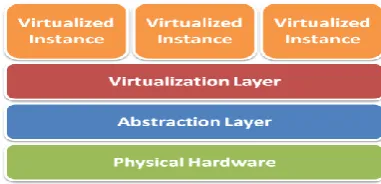
Fig.1: Architecture
OS assumes complete control of the underlying hardware. Virtualization architecture provides this illusion
6 layer which: Allows multiple Guest OS (Virtual Machines)
to run simultaneously on a single physical host and Provides hardware abstraction to the running Guest OSs and efficiently multiplexes underlying hardware resources.
2.2 Virtualization Types
There are two types of virtualization which are- Type 1 – Bare metal
VMMs run directly on the host's hardware as a hardware control and guest operating system monitor.
Type 2 – Hosted
VMMs are software applications running within a conventional operating system.
2.3 Virtualization Approaches
Full-Virtualization
VMM simulates enough hardware to allow an unmodified guest OS.
Fig. 2: Full Virtualization
Pros- Need not to modify guest OS Cons- Significant performance hit Example- KVM (TYPE 2)
Para-Virtualization
VMM does not necessarily simulate hardware, but instead offers a special API that can only be used by the modified guest OS.
Fig.3: Para Virtualization
Pros- Light weight and high performance Cons- Require modification of guest OS Example- Xen (TYPE 1)
2.4 Virtualization Techniques
Fig. 4: Virtualization Techniques
There are three virtualization techniques:-
Server Virtualization
Fig.5: Server Virtualization
Storage Virtualization
Fig.6: Storage Virtualization
Network Virtualization
7 2.5 Hardware Virtualization
Hardware virtualization or platform virtualization refers to the creation of a virtual machine that acts like a real computer with an operating system. Software executed on these virtual machines is separated from the underlying hardware resources. For example, a computer that is running Microsoft Windows may host a virtual machine that looks like a computer with the Ubuntu Linux operating system; Ubuntu-based software can be run on the virtual machine.
In hardware virtualization, the host machine is the actual machine on which the virtualization takes place, and the guest machine is the virtual machine. The words host and guest are used to distinguish the software that runs on the physical machine from the software that runs on the virtual machine. The software or firmware that creates a virtual machine on the host hardware is called a hypervisor or Virtual Machine Manager.
Different types of hardware virtualization include:
1. Full virtualization: Almost complete simulation of the actual hardware to allow software, which typically consists of a guest operating system, to run unmodified. 2. Partial virtualization: Some but not the entire target
environment is simulated. Some guest programs, therefore, may need modifications to run in this virtual environment.
3. Para virtualization: A hardware environment is not simulated; however, the guest programs are executed in their own isolated domains, as if they are running on a separate system. Guest programs need to be specifically modified to run in this environment.
Hardware-assisted virtualization is a way of improving the efficiency of hardware virtualization. It involves employing specially designed CPUs and hardware components that help improve the performance of a guest environment.
Hardware virtualization can be viewed as part of an overall trend in enterprise IT that includes autonomic computing, a scenario in which the IT environment will be able to manage itself based on perceived activity, and utility computing, in which computer processing power is seen as a utility that clients can pay for only as needed. The usual goal of virtualization is to centralize administrative tasks while improving scalability and overall hardware-resource utilization. With virtualization, several operating systems can be run in parallel on a single central processing unit (CPU). This parallelism tends to reduce overhead costs and differs from multitasking, which involves running several programs on the same OS. Using virtualization, an enterprise can better manage updates and rapid changes to the operating system and applications without disrupting the user. "Ultimately, virtualization dramatically improves the efficiency and availability of resources and applications in an organization. Instead of
relying on the old model of ―one server, one application‖ that leads to underutilized resources, virtual resources are dynamically applied to meet business needs without any excess fat.
Hardware virtualization is not the same as hardware emulation. In hardware emulation, a piece of hardware imitates another, while in hardware virtualization, a hypervisor (a piece of software) imitates a particular piece of computer hardware or the entire computer. Furthermore, a hypervisor is not the same as an emulator; both are computer programs that imitate hardware, but their domain of use in language differs.
2.6 Increased Flexibility by Virtualization
The impact of virtualization isn’t limited to server consolidation or the data canter. As workplace configurations change, more users are mobile or working remotely. There’s an increased need for flexibility in how you deliver applications and functionality. There are a number of ways you can leverage virtualization technology to deliver those benefits.
2.7 User State Virtualization
There’s always a risk inherent in business-critical data being stored on end-user machines. If a machine is lost, stolen or damaged, the cost in lost data and productivity often far exceeds the value of the machine itself.
Through user state virtualization (USV) technologies, such as Roaming Profiles and Folder Redirection, you can ensure that all user data is stored securely on centralized servers where you can back it up and protect it on a regular basis.
USV also gives your users the convenience of being able to access their data from any workstation. Their personal settings and data are also seamlessly available on any new machine or in any new location.
2.8 Application Virtualization
Deploying, managing and maintaining line-of-business applications can be one of the most costly and time-consuming aspects of client computing. Yet Microsoft Application Virtualization (App-V) lets us virtualize applications, as well. This helps you package, deploy and maintain applications in a centralized and streamlined way. App-V lets your users access any authorized application from any authorized device. Combined with USV, App-V lets you deliver a seamless end-user experience, while streamlining software maintenance and licensing practices.
8 Just as you can virtualize an entire server environment,
you can also deliver a complete desktop computing experience. Using Virtual Desktop Infrastructure (VDI) and Remote Desktop Services session virtualization, you can give your users anywhere access to a personalized, on-demand desktop computing environment, complete with their own applications and data. When you add RemoteFX, introduced with Windows Server 2008 R2 SP1, VDI becomes a full-fidelity experience. RemoteFX gives you a 3D virtual adapter, intelligent codec’s and the ability to redirect USB devices within VMs. There are also solutions such as Microsoft Enterprise Desktop Virtualization, or MED-V, which uses virtualization technology to help mitigate application-compatibility issues on the desktop, removing barriers to OS upgrades. The benefits of virtualization technology continue to grow. They certainly aren’t limited to the public cloud. By leveraging virtualization solutions across your infrastructure—from the public cloud to your data centre and desktops—you can realize savings in both time and money. You can also increase flexibility and agility.
3.
Importance Of Virtualization In Cloud
Computing:-
Cloud can exist without Virtualization, althoughit will be difficult and inefficient.Cloud makes notion of ―Pay for what you use‖, ―infinite availability- use as much you want‖. These notions are practical only if we have- lot of flexibility efficiency in the back-end. This efficiency is readily available in Virtualized Environments and Machines.
4.
Advantage and Limitations:-
Advantages:-
1. One of the top advantages of Virtualisation is that it requires less hardware to run the same type and amount of software which brings down overall costs.
2. Simple data recovery is another great advantage of this technology. For instance if your virtual server suddenly becomes corrupted you simply delete it and restore it from its virtual backup. You do not need to spend time and effort on restoring your entire system from scratch and then restore it from the latest backup. So a corrupted virtual system can be recovered in mere minutes.
3. Virtualisation provides you with a safe platform on which you can test various software configurations and on various platforms prior to deployment. So in effect you can tinker with the software until you get what you exactly want without inadvertently damaging your existing network.
4. Lower energy consumption since you’re running less computer hardware to accomplish the same type of work.
5. Better system security and reliability. Virtualisation systems do not crash due to corruption like device drivers or memory issues.
4.1 Limitations
1. Even though rare, physical failures when they do happen can be devastating. For instance if your primary hard disk which contained all your virtual and physical data is suddenly stolen, burnt, broken or corrupted then all your servers both virtual and physical will need to be restored.
2. Virtualisation is mainly dependent on processing power and memory. So you’ll need to factor in both much more memory and processing power into your Virtualisation strategy.
3. You’ll need to invest in training existing network administrators who do not have the skills to administer a virtual network.
4. When something goes wrong with a virtualized system it requires complex troubleshooting. This requires expertise and experience of working and troubleshooting Virtualisation problems.
5.
Conclusion
Virtualization is certainly not new. There has been consistent development of virtualization technology and capabilities for the past decade. The resulting intersection of increased functionality of virtualization software, increased power of computing hardware, and increased availability of network bandwidth has helped virtualization break through. And that has helped drive the virtualization-centric move to cloud computing. Now, cloud computing is certainly a powerful, transformational change in the information technology industry. The benefits are real, and quite substantial. With the near-constant conversation about cloud computing, though, it’s possible we might have lost sight of some of the other benefits of virtualization technology. Hence, we can conclude that ―VIRTUALIZATION‖ has been a boon to IT sector.
Acknowledgement
9
References
[1] Peter, M.,Timothy, G.:The NIST Definition of Cloud Computing (Draft).NIST Special Publication 800-145, 6–7.
[2] Shuai, Z.: Cloud Computing Research and Development Trend. In: 2010 Second International Conference on Future Networks, pp. 93– 97. IEEE Computer Society, Piscataway (2010).
[3] Shufen, Z.: Analysis and Research of Cloud Computing System Instance. In: 2010 Second International Conference on Future Networks, pp. 88–92. IEEE Computer Society, Piscataway (2010). [4] Xue, J.: The research of security mechanism in the cloud computing
platform based on virtualization technology, Master’s degree paper, vol. 2 (2010).
[5] History of Virtualization, http:/ /www.infobarrel.com / History of
Virtualization.
[6] Hanfei, D.: Formal Discussion on Relationship between Virtualization and Cloud Computing. In: The 11th International Conference on Parallel and Distributed Computing Applications and Technologies, pp. 448–453. IEEE Computer Society, Piscataway (2010).
[7] Sriya, S., Pradheep, E., Andrea, A., Miron, L.: Deploying virtual machines as sandboxes for the grid. In: Second Workshop on Real, Large Distributed Systems, pp. 7–12 (2005).