An Efficient QR Code Based Web
Authentication Scheme
Ajnas Muhammed
Department of Computer Science and Engineering
National Institute of Technology Rourkela
An Efficient QR Code Based Web
Authentication Scheme
Thesis submitted in partial fulfilment of the requirements of the degree of
Master of Technology
in
Computer Science and Engineering
(Specialization: Information Security)
by
Ajnas Muhammed
(Roll Number: 214CS2139)
based on research carried out under the supervision of Prof. Ramesh Kumar Mohapatra
April, 2016
Department of Computer Science and Engineering
National Institute of Technology Rourkela
Department of Computer Science and Engineering
National Institute of Technology Rourkela
Prof. Ramesh Kumar Mohapatra
Assistant Professor
April 20, 2016
Supervisor’s Certificate
This is to certify that the work presented in the thesis entitledAn Efficient QR Code Based Web Authentication Scheme submitted byAjnas Muhammed, Roll Number 214CS2139, is a record of the research carried out by him under my supervision and guidance in partial fulfilment of the requirements of the degree ofMaster of TechnologyinComputer Science and Engineering. Neither this thesis nor any part of it has been submitted earlier for any degree or diploma to any institute or university in India or abroad.
Dedication
Dedicated to my parents, teachers and all my dear friends
Declaration of Originality
I, Ajnas Muhammed, Roll Number 214CS2139hereby declare that this thesis entitled An Efficient QR Code Based Web Authentication Scheme presents my work carried out as a postgraduate student of NIT Rourkela and, to the best of my knowledge, contains no material previously published or written by another person, nor any material presented by me for the award of any degree or diploma of NIT Rourkela or any other institution. Any contribution made to this research by others, with whom I have worked at NIT Rourkela or elsewhere, is explicitly acknowledged in the dissertation. Works of other authors cited in this dissertation have been duly acknowledged under the sections “Reference” or “Bibliography”. I have also submitted my research records to the scrutiny committee for evaluation of my dissertation.
I am fully aware that in case of any non-compliance detected in future, the Senate of NIT Rourkela may withdraw the degree awarded to me on the basis of the present dissertation.
April 20, 2016
Acknowledgment
First, I would like to thank GOD for every help that he blessed upon me without any limitation. Without his blessing, I won’t be here where I am today. GOD IS GREAT.
My advisor Prof. Ramesh Kumar Mohapatra, His moral support for completing my thesis is something which I cannot express in words. I sincerely thank him for his support, motivation and enthusiasm. All my research time I experienced his guidance and help. I can not imagine having another better advisor than him. I also thank all my professors from the computer science department. They were ready to help me whenever I needed them. I thank all my classmates and friends at National Institute of Technology, Rourkela for their active support and cooperation.
I thank all my Department’s teaching and non teaching staffs who helped me in a lot of ways, providing all the necessary resources and support in the completion of my work.
Last but not the least, I thank all my family members, who always supported me in all my difficult situations. I especially thank my mother, my father, my brother and my sister for their love and moral support. Without their love and never ending prayers I have never been able to complete my work.
April 20, 2016 NIT Rourkela
Ajnas Muhammed
Abstract
Nowadays web authentication is the main and important measure which guarantees the information security and data privacy. Web authentication provides the basis of user accessibility and data security. In the last few years, frequent outbreaks in the password databases lead to a main concern in the data security. The default method for the web authentication is password only mechanism. There are many security problems associated with the password only approach. Many users have a tendency to reuse the same password in different websites. So when one password is being compromised, it may lead to the password break of the other websites due to the password reuse. In order to improve the security, Two factor authentication (TFA) is strongly recommended. But despite of this, TFA has not been widely accepted in the web authentication mechanism. Due to the high scale and drastic popularity of the mobile phone and an inbuilt function of the barcode scanning through camera lead to a new two factor authentication method. In this paper, the proposed two factor authentication protocol uses mobile phone with one or more camera as the second factor for the authentication.
The proposed TFA in web authentication counter various attacks such as man in the middle attack (MITM), phishing attacks and so on. Here password is the first factor and mobile is used as the second factor for the web authentication. The communication between the mobile phone and the PC is with the help of visible light. Visible light communication has many advantages as compared with other communication mechanisms. There is a less cellular cost in this scheme which indicates the user does not need cellular network or Wi-Fi for the authentication.
Contents
Supervisor’s Certificate ii Dedication iii Declaration of Originality iv Acknowledgment v Abstract vi List of Figures ix 1 Introduction 1 1.1 Introduction . . . 1 1.2 Motivation . . . 4 1.3 Structure of Thesis . . . 42 Two Factor Authentication (TFA) 5 2.1 Overview of authentication methods . . . 5
2.2 Two Factor Authentication . . . 6
2.2.1 Cellular Phone Based Web Authentication System Using 3-D Encryption . . . 6
2.2.2 Combined Web/Mobile Authentication . . . 7
2.2.3 A mobile based approach to strong authentication on Web . . . 7
2.2.4 Two factor authentication system with QR code . . . 7
2.2.5 Painless Migration from Passwords to Two Factor Authentication . 7 2.2.6 Secure OTP and Biometric Verification Scheme . . . 8
2.2.7 Two-way Graphic Password for Mobile User Authentication . . . . 9
3 The Proposed Scheme 10 3.1 Some terminologies . . . 12
3.1.1 Quick Response Code . . . 12
3.1.2 Diffie Hellman Key Exchange Algorithm . . . 13
3.1.3 Public Key Cryptography . . . 15
3.2 Assumption and thread model . . . 15
3.3 Registration . . . 16
3.4 Authentication . . . 17
3.5 Security analysis . . . 18
3.6 Design and Implementation Issues . . . 19
4 Implementation 21 4.1 Database Setup . . . 21 4.2 Layout Design . . . 23 4.2.1 Mobile phone . . . 23 4.2.2 Web browser . . . 28 5 Conclusion 31 References 32
List of Figures
1.1 Man In The Middle Attack. . . 2
2.1 Block diagram of the TFA scheme by Chang-Lung Tsai . . . 8
3.1 Block diagram of Proposed TFA. . . 11
3.2 QR code for NATIONAL INSTITUTE OF TECHNOLOGY, ROURKELA. 12 3.3 Diffie Hellman Algorithm. . . 14
3.4 Registration Phase of Proposed TFA. . . 16
3.5 Complete prototype of Proposed TFA. . . 17
4.1 User information from the server database . . . 22
4.2 Key information from the server database . . . 22
4.3 Front page of the mobile application . . . 23
4.4 Registration page before filling up the user information . . . 24
4.5 Registration after filling up the user information . . . 24
4.6 Email exists error. . . 24
4.7 Username exists error. . . 24
4.8 Completion of the registration . . . 25
4.9 Login page to enter a username. . . 26
4.10 Username not available in the mobile database. . . 26
4.11 Entering a valid username . . . 26
4.12 scanning the QR code with the help of mobile app . . . 26
4.13 Wrong QR code message. . . 27
4.14 Displaying the second QR code. . . 27
4.15 Web login page . . . 28
4.16 Invalid username or password . . . 28
4.17 Displaying the first QR code . . . 29
4.18 Browser is scanning the second QR code . . . 29
4.19 Logged in : Home page of username2 . . . 30
Chapter 1
Introduction
1.1
Introduction
The web authentication has become very much essential for the user’s daily business or in the corporate networks. So web authentication is the main security measure the protection of an individual’s data from the outside world. The web has many applications like checking mails, online shopping, financial account access, paying bills (phone bill, electricity bill) and electronic record retrieval, all through the web browser. As the uses increases vulnerabilities too will increase. So there are many security problems related to web authentication and web usage. A secure web authentication method is the one which we can count on. Web authentication is the first defence towards web security and data privacy. While there are various types of web authentication method, password only authentication is the default method of web authentication [1]. In normal case the web user uses password only authentication. In this method user enter his username/userid along with the password corresponding to the username in the application’s login page. The browser will send this to the server. The server checks whether the username-password combination is correct or not. If the username password pair is valid then the server will generate a session cookie in order to complete the authentication process else it will generate an error message.
The username, password submission can be done manually or automatically with the help of password manager. However, password only authentication won’t be sufficient for providing sufficient security and protection. Password only authentication can undergo many types of attack like password guessing attacks [2] [3] [4], phishing attack [5] [6] [7], man in the middle attack and shoulder surfing attack [8].
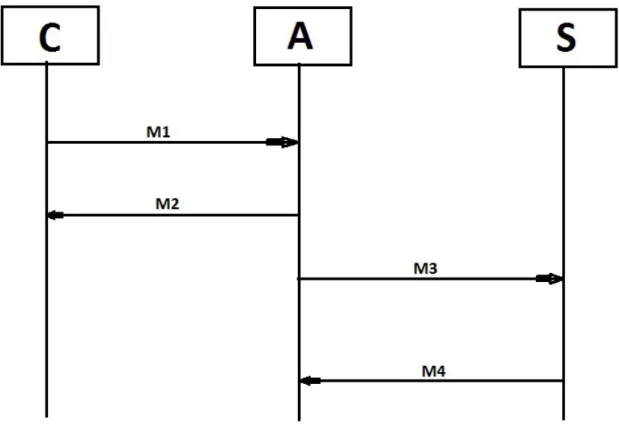
Figure 1.1 shows the block diagram of man in the middle attack. The man in the middle (MITM) [9] [10] [11] attack is one of the dangerous attack available in the web environment. In this, the attacker stands as a middle man in between the client and the server. The user will send his privileged information with the attacker thinking that the information going to the authentic server and similarly the server will communicate with the attacker thinking that the entity is the authentic client asking for service. So in turn attacker will get all the information from the client as well as from the server.
Chapter 1 Introduction
Figure 1.1: Man In The Middle Attack.
To improve the web security and to facilitate the password management, built in password managers were introduced. There are mainly two types of password manager [12]. The standalone password manager and the web based password managers. Some of the standalone password managers are 1password and KeePass. Some of the web based password managers are Lastpass, RoboForm, and PasswordBox. Web based password managers can be divided as web based auto filling managers and web only password manager. However, this type of password managers alone is not sufficient for providing security. It is not safe to keep password in password manager due to the insecurity in the computing environment and vulnerabilities in the password manager’s database.
The studies show that none of the password manager could not prevent the malware which is designed to steal the password from the password manager [13]. The studies show the number of vulnerabilities exists in the password managers which may lead to many serious password attacks. So the password manager could not make much impact on the password security.
Recent years, many of the prominent websites undergone many serious attacks due to the vulnerabilities in their website environment. Some of the prominent sites like Gmail [14], Yahoo [15] are still on the attack zone, which will endanger millions of the users private and protected information. The password reuse [16] [17] is another problem. Many are using the same password on different websites, so if the attacker gets the password form any website
Chapter 1 Introduction
will break the password protection of other websites.
The main method to counter both the MITM as well as phishing attack is the use of TLS/SSL protocol in the attacking environment. The security of HTTP (without TLS/SSL) over the TLS/SSL (HTTPS) depends mainly on the certificate’s validity [18], and its implementation. However, HTTPS could not be simply used in the website and in many of the websites it is not simply available. So in that case password only authentication may lead to a vulnerability.
The password only authentication is eventually not appropriate for these kinds of environment. So in order to improve security and reduce vulnerability, two factor authentication (TFA) is strongly promoted. Last few years, many TFA schemes were introduced based on the factors used for the authentication purpose. There are special hardware based TFA, which uses special hardware as the second factor for the authentication along with the password (or any other information as the first factor). Some of the special hardware based TFA’s (SecureID, SmartCard based) were introduced long time before, but they never reached public due to the portability problem and high cost of the hardware. Many banks are still using a TFA with the first factor as the password and the second factor as biometric fingerprints, which requires a fingerprint scanner. In the past few years, mobiles computing technology has become so advanced. Due to this, many mobile phone assisted TFA’s were also introduced [19] [20] [21] [22]. Many of the two factor authentication schemes are already available in some of the prominent websites. But most of them are relayed on the mobile network. They need a network connection (either cellular network or Wi-Fi) for communication, which may or may not always be available. The more used TFA is the one time password (OTP) [23]. In OTP, the user enters his username and password, then the server sent a one time password to the trusted mobile device and verifies it. But in order to receive that message the mobile phone should have a cellular network, which may not available always.
In this paper, the proposed TFA prototype also uses a mobile phone as a second factor for authentication along with the password. The proposed prototype uses the mobile camera and the barcode scanning property, which is an inbuilt in mobile camera for the authentication. In this scheme, first we have to make the phone trustworthy by registering the device prior to the authentication. While authentication this trusted device communicate with the PC directly with the help of visible light which is highly directional, short range, immune to the radio frequencies and fully observational. This will reduce the possibilities of the attacks and the cost of communication. In this scheme, we need a mobile phone with at least one camera in it which is universally available on the smart phones, a PC with a webcam which is available on the laptops and a remote server for providing the service. Here user need to capture the QR code from the browser by using mobile camera through the mobile application and process it and produce another QR code on the mobile screen and let the PC webcam to capture it. The main advantages of the scheme are, there is no need of internet or cellular
connection in the trustworthy mobile phone during the authentication, the whole scheme is relay on application layer so no need to modify the device’s or PC’s operating system or firmware and the scheme does not rely on the certificate (TLS/SSL) even though the use of such certificate protocol will enhance the security.
The main entities in this scheme are, mobile phone with a camera and android platform, a PC with a browser installed in it and a java based server for giving the authentication token or session cookies after the successful validation of the password and the QR code. Security analysis tells that this scheme will enhance the security in the case of the web authentication.
1.2
Motivation
Nowadays, web authentication is one of the important measures which guarantee the data privacy and information security on the websites. So web authentication needs to be secured. The more convenient and common method is password only authentication method. However, this method has many defects and so vulnerable to many attacks, which leads to the other alternatives such as TFA. Even though two factor authentication is costly due to the need of another separate hardware for the second factor authentication. Due to the popularity of the mobile phone in the market, which lead to propose a TFA, which uses the mobile phone as the second factor for the authentication. So it can be used to replace the traditional password only authentication mechanism. The main motivation lies on the fact that the web data need to be secured and the recent studies show that the password only authentication won’t be enough to provide the sufficient security to the user’s data. And also with the popularity of the mobile phone and the inbuilt function of mobile camera to scan the QR code lead to the proposed TFA. With this in mind that the two factor authentication, which uses negligible communication cost is likely to replace the traditional password only authentication method in the coming future.
1.3
Structure of Thesis
The remaining thesis is organized as follows. Chapter 2 gives an overview of the authentication methods and tokens, discuss various two factor authentication schemes and also various design implementation and security issues. Chapter 3 describes the proposed scheme for the web authentication. Chapter 4 gives the details of the proposed scheme’s implementation. Chapter 5 presents the results and observations. Chapter 6 concludes the thesis and give direction for future research issues.
Chapter 2
Two Factor Authentication (TFA)
2.1
Overview of authentication methods
Types of authentication method mainly depend on the authentication factors. We can divide the authentication factors into three categories:
a. Token Based Authentication. b. Biometric Based Authentication. c. Knowledge Based Authentication.
Token based authentication is also called “ something the user has ” authentication. In this authentication user has something with him like a token or a hardware such as an ATM card or a mobile phone. The token can be used in two ways. Token with the password and token without the password. The formal one is a two factor authentication scheme and the later one is a single factor authentication scheme. Many of the token based authentication system is also uses the knowledge based scheme (also called something the user knows) like the password or PIN or the PIN without ATM. Similarly, in case of web authentication using one time password (OTP), which uses the password as the first factor and the trustworthy mobile phone as the second factor for authentication. If a person has the password without the mobile phone or mobile phone without a password, then he cannot be treated as an authentic person. During biometric based authentication (also called something the user is), the procedure would use any of the biometric characteristics like fingerprints or retina for the authentication. In banking, authentic user need to give the password as well as his fingerprints to get into his web page. But in order to do that, the user needs special hardware like fingerprint scanner or retina scanner.
Taking any of the above two factors and uses that for the authentication will lead to the concept of Two Factor authentication. The advantage of two factor authentication on single factor is that it gives more security. Even one factor is compromised, the second factor will ensure the security. If an attacker need to access the user’s (who is using any one of two factor
Chapter 2 Two Factor Authentication (TFA)
authentication methods) data, then he needs both the authentication factors. For example, if Alice is using OTP (One time password) for the his web authentication, then Eve needs to get the username password combination and the trustworthy mobile device for the complete authentication process. If Eve has either the password or the trustworthy mobile device not both then he cannot get into the Alice’s account. The following sections will discuss more on Two Factor Authentication.
2.2
Two Factor Authentication
The usage of any of the above two factors for the authentication lead to the two factor authentication scheme. Compare to the single factor authentication, two factor authentication will provide more security in the authentication like OTP, fingerprint and so on. With the unpredictable popularity of the mobile phone there are many categories of TFA, which uses the mobile phone as the second factor for authentication like SMS messaging, non-interactive telephone call, smart phone bases application, etc. Due to the popularity of the mobile phone there are number of mobile based authentication schemes. These authentication methods are more secure than any single factor authentication scheme. So this will protect the user information from many attacks like password stealing attack, phishing attack and password guessing attack.
2.2.1
Cellular Phone Based Web Authentication System Using 3-D
Encryption
There is a user authentication system for web applications which uses using JME enabled cellular phone as an authentication token [24]. Most user authentication system uses the username and password to authenticate the users. However, since the internet has witnessed many attacks resulting the loss of sensitive information from the user’s computer by a technique known as masquerading. The attacker normally aims to impersonate the user even if we take protective measures like encryption, the sensitive information is directly stolen from the user’s Computer. In this system we need computer terminal and a JME enabled cellular phone connected using parallel network channels. The encryption algorithm used here takes a random challenge from the server and sent it to the mobile via SMS. Then the decrypted message sent to the server via SMS from the device which in turn authenticate the user. Now with the advancement of android platform, instead of JME enabled cell phone user can also use android phone for the authentication
Chapter 2 Two Factor Authentication (TFA)
2.2.2
Combined Web/Mobile Authentication
Another two factor authentication system is the combination of web based password only authentication system with a mobile based challenge response system [25]. As in normal TFA it is also a hybrid of both web and mobile authentication system. In this mobile is used as the second factor for authentication. After the successful validation of the username and the password the server will send a challenge to the trustworthy mobile device and the authentication is done based on the response. If the response is valid then the server will authenticate the user otherwise server provide an error message or challenge the device again. Here the challenge response is done with the help of cellular network.
2.2.3
A mobile based approach to strong authentication on Web
The increase of the phishing phenomenon shows that the web authentication need to be secured more as compared with the existing web authentication using the username/password mechanism. This lead to a new solution which contains both challenge/response process and the OTP. The server issues a challenge to authenticate the mobile device, typically a cell phone. The device then communicates with the other fixed parts via bluetooth connection. Once the mobile phone verified then it perform the authentication with the website. This authentication is done using a one time password, which can be only used once for a short period of time
2.2.4
Two factor authentication system with QR code
Now a days QR code also used for the web authentication purpose [26]. In this the user being asked to enter the username-password combination. If the credentials are valid, the server will generate a random QR code and sends this QR code to the user email address or users mobile phone as MMS. When the user gets the QR code, this has to be scanned properly by the web camera. Then that information will be sent to the server and checked for the verification and the validation. If the scanned QR code is verified then the user will directed to the web page. If the scanned QR code is not verified by the server, then the authentication process automatically fails and a warning message will be shown in the browser. There will be a time limit for the scanning of the QR code, that means if the QR code is not scanned correctly by the web camera then users can rescan the QR code within that limited time period. After that particular time limit the QR code will become invisible and the ”Request New QR Code” button will be visible and the procedure continues.
2.2.5
Painless Migration from Passwords to Two Factor Authentication
Ziqing Mao1, Dinei Florencio and Cormac Herley [27] proposed a simple two factor authentication prototype. In this when the user enters his username on the browser login
Chapter 2 Two Factor Authentication (TFA)
page, the server will generate a nonce N and display that nonce in the browser screen. Then the user enters that nonce and the password in the trusted device with the help of a mobile application. The application will calculate E(P,h(Kd,N)) and type this in the browser. The browser will send this to the server. The server decrypts and verifies the message if it valid then the authentication will complete successfully.
2.2.6
Secure OTP and Biometric Verification Scheme
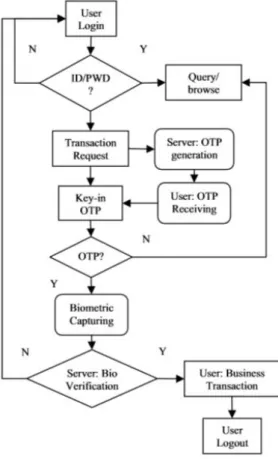
Secure OTP and biometric verification scheme for mobile banking [28] proposed by Chang-Lung Tsai and Chun-Jung Chen is another two factor authentication scheme. In this authentication, user need to enter the username and password on the web page. After the successful verification, the server will generate an OTP and transfer it to the trustworthy mobile devices. The server side will request the user to enter the key in the OTP within a limited amount of time. If the key entered is correct, the user will be requested to take new biometric data and upload this to the server side with a hash function in order to increase the security. The server will compare the uploaded data with the data available in the database and verifies the data. If the verification fails, then an error message will be shown else the authentication will complete successfully. Figure 2.1 shows the block diagram of the biometric verification scheme.
Figure 2.1: Block diagram of the TFA scheme by Chang-Lung Tsai
2.2.7
Two-way Graphic Password for Mobile User Authentication
Two factor authentication also uses graphic password [29]. In this scheme, when the user enters username-password pair. The server checks its validity. If the details are valid, the server sends the device a picture which is set before. When the user confirms the picture is the one which he is previously uploaded. Then the user drew certain shapes in the picture. The server confirms the picture if the shape is exactly the same which is drawn at the time of setup. The server uses machine learning technique to recognize the shape. The advantages of the graphic method is the user can easily remember the picture. In summary, Graphical Password authentication scheme offers an easier and stronger authentication as compared with the commonly used methods.
Chapter 3
The Proposed Scheme
The two factor authentication proposed in this thesis is mainly based on two things. First, the popularity of the mobile phone with a built in camera in it and secondly the QR code scanning functionality of the mobile camera which is inbuilt in every device. The proposed scheme assures the security of the web authentication in an efficient and cost effective manner. In this method, the password is used as the first factor and along with that a trustworthy mobile device is used as the second factor for authentication. As compared to the other mobile phone based TFA’s, the main advantage of the proposed scheme is, here we do not need neither cellular network nor the wireless connection for the authentication. So this scheme reduces the cost of communication. Here visible light is used for the communication between the PC and the trustworthy mobile phone. Visible light communication is more secure and convenient for the web authentication.
Visible light is secure due to the following reasons.
1. Fully observational: As the visible light is fully observational, it won’t allow the attacker to attack the communication channel without giving attention to the legitimate user.
2. Immune to the radio interfaces: Visible light is immune to the radio frequency interfaces This is due to the frequency spectrum variations. The bandwidth of the visible light ranges from 430 THz to 750 THz and the bandwidth of radio frequency ranges from 3 kHz to 300 GHz. So visible light bandwidth is much larger as compared with the radio frequency.
3. Short range: This property of the visible light protects the communication from the attacker who is far away from the procedure. If the attacker is coming closer then the authentic user can easily identify the attacker and take the necessary precautions. 4. Highly directional: Visible light is highly directional and fully observational. This
makes the visible light difficult to attack as compared with other communication mechanisms.
The Proposed Scheme
Figure 3.1: Block diagram of Proposed TFA.
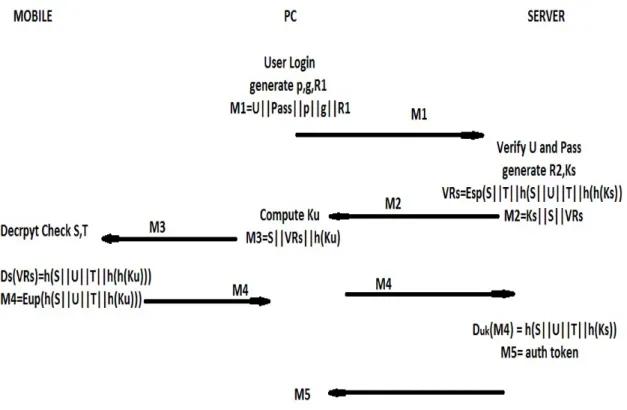
Figure 3.5 shows the normal authentication of the proposed scheme. The process consist of four entities (user, PC, mobile phone, and server)
i. The user enters the username-password pair in the login page with or without the help of the password managers.
ii. The web browser now sends the username, password along with the Diffie-Hellman dynamically generated information and the DH server public key.
iii. After the successful validation of the credentials, the server will generate its public key information and the shared secret based on the browser’s message. Then send back an identity vouch for the attestation of the device along with its Diffie Hellman public key.
iv. In browser side, it computes the key with the help of the reprieved message and encode the received message and the hash of the key generated into a QR code and display it. Then the trusted mobile device scans this QR code and check the validation with the help of public key cryptography.
v. Then another vouch is generated for the attestation of the server. Encode this vouch into QR code and display it on the device screen so that can be captured by the PC’s webcam.
vi. The browser transfer the message into the server and server check the validation of the vouch. If the vouch is valid then the server will create an authentication token and encrypt it with the shared key and the authentication process completes.
In this session, there are five topics to discuss. First, some of the terminology to understand the model, followed by the assumption and thread model, followed by the registration, then the authentication followed by security analysis and fallback mechanism. If the proposed model is not possible, then the fallback mechanism is performed.
Chapter 3 The Proposed Scheme
3.1
Some terminologies
There are few terminologies which should be familiar before discussing the proposed model.
1. Quick Response code.
2. Diffie Hellman key exchange algorithm. 3. Public key cryptography.
3.1.1
Quick Response Code
What is QR code
Quick Response (QR) code is a two dimensional barcode that can contain many information like any alphanumeric text and some URL’s that can redirect the user to that particular website. As compared with the one dimensional barcode, QR code contains more information than of 1D barcode of the same size. Decoding the QR code can dome with the mobile camera or with the help of QR code scanning tools. These types of codes can find in many places such as product labels, bills and electronic packings. The codes are small in size, and it can provide tracking information for products in the industry, routing data on a mailing label, or contact information on a business card.These codes are easy to recover even with the small damage in it.
Figure 3.2: QR code for NATIONAL INSTITUTE OF TECHNOLOGY, ROURKELA.
Chapter 3 The Proposed Scheme
How Does It work?
Any data (URL, vcard, text, email) can be converted into a Quick Response code with the help of any QR generator, most of them are available free online. Users simply need to enter the data, and the generator produces the respective QR code, which can then display on the screen or print it. Decoding is done with the QR reader. Mobile camera has the inbuilt functionality to read the QR code with the help of QR reader software, which is also freely available for most of the mobile platforms. Once the software is loaded, a user need to point the mobile camera toward the QR code and scans it. The software then interprets the code, and it will be displayed on the screen or if the code is a URL the mobile phone will launch the browser and display that particular web page.
Why is it so significant?
The idea linking spaces to the information is not a new one, but QR codes combine both the creation and the access easy with the help of QR generators and QR readers. As a result, QR codes can be displayed on any location and object in order to get information about it. In electronic packings for example, QR codes might appear on it in order to provide the details about the manufacturing location, dates, etc. QR codes posted on a building might offer visitors the history of the building itself or the corner on which it stands, and they might give the architect’s name or discuss the events happening in the city when the building was built. Because QR codes are so inexpensive, they can be put anywhere, even in some candy cover to show the details about that particular candy.
What are the downsides?
A QR code is so useful still, not everyone is aware of such code. As a result, not everyone who sees a QR code will not pull out the cell phone and scan it. Not every phone has the QR scanning software, so the software must download and test before use. Moreover, some QR code may direct the user to a page that does not display properly on a mobile phone. Taken as a whole, there are both sides for the QR code. Those who are aware of the QR code will take time to scan it and use it. But those who are not at all aware of it won’t use the QR code or QR scanner.
3.1.2
Diffie Hellman Key Exchange Algorithm
Prior to the invention of the public key cryptography, key exchange was one of the main problem in the cryptography. The first practical method for the key exchange over an insecure channel was introduced by Diffie-Hellman. For the symmetric encryption, two parties need to agree on a single key. So key exchange was very difficult in an insecure channel. If the channel is insecure then the attacker might attack the channel and obtain the
Chapter 3 The Proposed Scheme
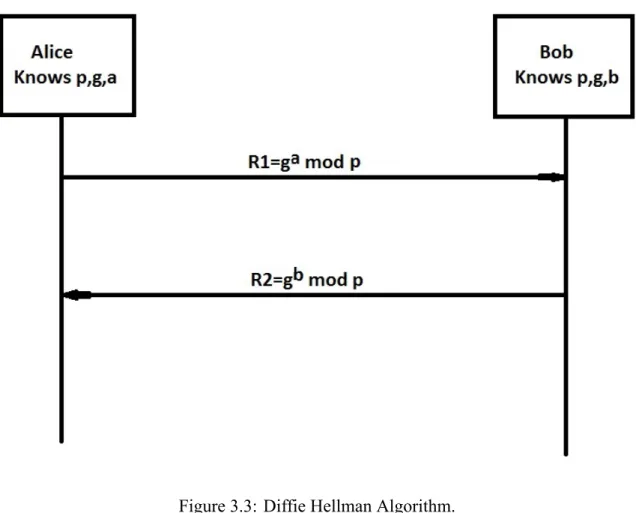
secret key. Once the attacker obtains the secret key, He can decrypt and encrypt any message that send through that channel. The figure 3.3 shows the Diffie Hellman algorithm in detail.
Figure 3.3: Diffie Hellman Algorithm.
DH key exchange algorithm
Steps in the algorithm
1. Alice and Bob agreed on two prime number p and g which is available in public. 2. Alice has a private data a, and sends Bob R1. Where
R1 =ga mod p (3.1)
3. Bob has another secret number b, and sends Alice R2. Where
R2 =gb mod p (3.2)
4. Alice computes
Keyalice = (R2)a mod p (3.3)
Chapter 3 The Proposed Scheme
5. Bob computes
Keybob = (R1)b mod p (3.4)
Both keys will be same so Alice and Bob will use these as the shared key
3.1.3
Public Key Cryptography
In public key cryptography, each entity will have a pair of public key and the private key. The formal one is public, called public key and the later one is kept as a secret and called a private key. Public keys are needed to be distributed in the system. This can be done through public key distribution channels. Although this channel is not required to provide security, it must provide authentication and integrity. The encryption in the public key cryptography is done with the public key of the receiver and the decryption is done with the private key of the receiver. That means anyone can do the encryption, but only the desired receiver can do the decryption with his private key (which is not available in public).
3.2
Assumption and thread model
The proposed scheme includes four entities (User, Mobile device, Browser). There are many assumptions on the proposed scheme. Mobile should have a back facing camera for capturing the QR code which is very popular today. The proposed model mainly depends on the camera and PC display link of communication between the trustworthy mobile device and the PC. We assume there is a secure operating system on mobile phone and mobile application is protected either with a password or pin or any sort of security measures. The Personal computer which communicates with the mobile device should have a webcam, which is universally available on the laptops. Another assumption is that there is a PC-server connection for completing the authentication process with the server. We assume that at the time of registration there exist a mobile phone-server connection in order to make the mobile device trustworthy. HTTPS is not necessary for the completion of the proposed authentication scheme, but the use of HTTPS protocol will enhance the security of the prototype. Here user can login from the different PC because even if the user is using a different PC, the server which provides the service should be the same which participated in the registration, but only one mobile can be used for the authentication because only that mobile is trustworthy for that particular server.
We assume that the adversary has the following capabilities.
i. The adversary can easily attack the communication and can make various attacks like MITM or phishing attack between PC and the server. While authentication, the PC-mobile communication is with the help of visible light so the adversary can not attack this communication.
Chapter 3 The Proposed Scheme
ii. The adversary can have either the trustworthy mobile phone or the username/password pair. But he cannot have both of it.
iii. The adversary can breach the web server database and can have either the user information table or the server key table to get the private key of the server but not both.
3.3
Registration
Registration is the first stage of the entire process. Through registration the user will make his phone as the trustworthy device prior to the authentication process. We assume that there are no attacks in the registration time. In order to complete the registration process, user needs to open the mobile application and connect the server through the web application. User need to enter the details like username, password, email and phone number to the application. When the register button got clicked the entire data will be saved in the server database along with the public key of the mobile device need to be saved in the server database. The user details and the key details should be saved in different table due to the security reason (explained in security analysis). In device database the server’s public key is being stored along with the identity of the server (S) and the identity of the user (U). The device key pair is generated at the time of the registration and the server key pair is generated during the deployment and the key information is shared with all the user. So the total process in registration phase is the updating of three tables. One in the device to store the key information and other two on the server to store the user data and key information.
Figure 3.4: Registration Phase of Proposed TFA.
The registration process is a one time process for each device-server pair. For the registration purpose user needs either cellular network or the Wi-Fi connection with the server. User need this network connection in order to do the database update in the server and in the device. By doing so, the mobile device will become the trustworthy device for the authentication purpose and so the registration process completes. Now the device is ready for the authentication phase.
Chapter 3 The Proposed Scheme
3.4
Authentication
Figure 3.5 shows the authentication protocol in detail. When the user enters a username (U), password (P) and the indication to use the two factor authentication with the respected server, the browser will initiate a DH key exchange with the corresponding server. After that browser generates its first message (M1) consist of username, password along with the public key information of the Diffie-Hellman (p, g) and the DH dynamically generated public key (R1) generated by the browser and sends this to the server.
Once the server gets the message M1, it extracts the username and password and verifies it. If the combination is valid, the server uses public information (p, g) and R1 to compute the shared secret (Ks) with the help of the DH private key of the server. Then for the attestation of the device, the server generates a message associated with a user account. The request consists of three data’s, the identity of the server (S), the time required to expire the request (in order to avoid the later misuse) and hash of S||T||U||h(h(Ks)). Then server generates the vouch request by encrypting the above message with the encryption key as the server private key (Sp). As the key is server’s private key, only the server can do the encryption. Then the server generates a message M2 with server identity S (for the identification of the server), vouch request (for the attestation of the server) and the DH public key R2 (for the generation of common secret key) and sent this message in the browser.
Chapter 3 The Proposed Scheme
Once the browser gets this message, it strip off R2 and compute the secret key (Ku) based on p, g, the DH private key of browser and R2. Then the browser creates another message M3 consist of server id (S) the vouch request (VR) and the hash of secret key generated by the browser. This message then encoded into a QR code and display that QR code in the browser and denoted as the first QR code (QR1).
Now with the help of mobile application, mobile device scan the QR code, decode it and then decrypt the vouch request with the help of the server public key which is already saved in the device database during the registration. Then starts the verification process. First, the device checks the server id S from the message M3 and the decrypted vouch request, then it checks the time (T). If both these checks are valid, then it computes hash of S||T||U||h(h(Ku)) and compare it with the decrypted vouch request. If any of the checks fails, then instead of comparing with the vouch request, the mobile application will generate an error message and display on the application’s screen.
If all the checks succeed, then mobile application will generate another vouch request demanding the attestation of the server. The vouch will be sent as a message M4, which contains the encrypted value of the h(S||T||U||h(Ku)) with the encryption key as the private key of the device. Which means only the trustworthy device can make this request for the attestation by the server. Then the vouch request is encoded into a QR code and displayed it on the mobile screen.
The browser then captures and decode the M4 with the help of webcam available on the PC and forward the message into the server for the decryption and verification of the message. Mean time server generates h(S||T||U||h(Ks)) ( all information are available on the server side) and compare this value with previously decrypted value of M4. If they are same indicating that the message came from the trustworthy authentic device, the server will generate a token or a session cookie, which is encrypted with the common shared key Ks and then forward it to the browser. When the browser receives this message, it decrypts the message with the shared secret key (Ku) and then completes the authentication process.
3.5
Security analysis
The main advantage of this protocol is this can effectively control the attacks like man in the middle attack and phishing attack. Assume that the protocol is completely implemented. There are two main parts of communication where an attacker can easily attack the system, mobile and PC communication and PC and server communication. In the formal one the communication is visible light communication. So the user can easily see this communication this will eliminate the man in the middle attack. Even if the attacker can eavesdrop two message M3 as well as M4 with the help of high resolution camera, the key which is secret and protected by the hash function which is unknown to the attacker. So this will make impossible for an attacker to eavesdrop the message.
Chapter 3 The Proposed Scheme
Suppose there is an attacker between PC and server, He can easily capture the password based on the network security protocol (TLS). However, in order to impersonate a valid user, the attacker need the user private key which is securely stored in the device database in which an attacker cannot get that. If the attacker launches a man in the middle attack in the remote PC- server communication channel, in that case the attacker needs to conduct two DH key exchanges, with PC as well as with the target server. But the attacker can easily identified by both server and device due to the private key protection provided by these entities. The VR (vouch request) is signed by server private key. If the attacker is having a genuine VR and a forged DH public key, then the secret key generated with the help of that forged key will be different from the key present in the vouch request. The device can easily detect them while comparing the two hash values. Similarly, when the device sends the signed message, it will be easily detected by the server while comparing the hash value in the server side.
Suppose if the attacker steals the trustworthy mobile device, he cannot obtain the full authenticity without knowing the particular user’s username-password pair. In device missing cases user can easily change the trustworthy device associated with the account with another unregistered mobile device. If the trustworthy device is compromised by the malware, still attacker cannot get the full authentication because of the hash function which will protect shared secret key from both M3 and M4.
3.6
Design and Implementation Issues
Security
The proposed model gives more security as compared with other authentication methods. We have thoroughly examined the security issues with Two factor authentication already in the above section.
Usability
One of the major concerns for two factor authentication is that QR code has the ability to send more information than in the text strings. Some research papers presented preliminary user studies to support this. However, current user studies involve only a small number of users and are still very limited. In this method user need not remember any extra details other than the username and the password. The usability of this method is exactly same as that of password only authentication. A major complaint of the proposed scheme is that the log-in process take more time as compared with the password only authentication. During the authentication phase, a user has to enter a password and the QR code scanning procedure should be done. The user needs a mobile phone with at least one back camera for the authentication purpose And most of the users are not familiar with this type of two
Chapter 3 The Proposed Scheme
factor authentication methods.
Communication and Storage
Two Factor authentication schemes require much more space for storage than text based passwords. On server side two tables need to be managed. One for saving the user’s information and the another for saving the key details along with the username. Similarly, in mobile phoned database, one table for saving the key information. These key information is needed for encryption and decryption of the vouch request.
Chapter 4
Implementation
The implementation of the proposed scheme is in the web environment. The following technologies are used in the implementation process:
• PHP as the programming tool for the web environment • MySQL for the database management
• Android for developing the mobile application • SQLite for database management in mobile • Apache server
• Java Scripts • HTML and CSS
Wampserver version 2.0 installed in windows 10 environment and for running the web pages, Google Chrome browser is used. The QR code scanning is achieved with the help of QR coding app of the official open source ZXing project and similarly QR code generation is also done with the help of the ZXing complete library.
4.1
Database Setup
The proposed model uses the MySQL for the management of database and PHP as a programming tool for the web environment. The mobile database management is done with the help of SQLite. There are two tables in the server database and one table in the device database. The tables in the server database can be saved within a single database or can be saved in different database but due to the security reasons both tables we cannot merge. If we merge both the table, then if the attacker get access to that table lead to the leak of user information and the key information. Here we used a single database for saving two tables. One table is used to save the user details like username, hash of the password and so on. The second table is used to save the key information with the username. Each table gets updated
Chapter 4 Implementation
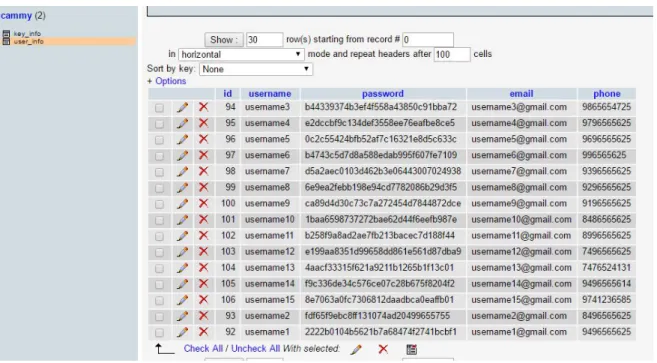
when a registration takes place. The figure 4.1 shows the user information and figure 4.2 shows the key information in a database table through phpMyAdmin().
Figure 4.1: User information from the server database
The database name given is Cammy. Cammy contains two tables. The first table is user-info, which contain 5 fields (id, username, md5(password), email, phone) as shown in figure 4.1. Even though the username is unique here, id is taken as a primary key.
Figure 4.2: Key information from the server database
The second table is key-info, which contains four fields as username, server public key and private key and device public key as shown in figure 4.2.
We have one more database in the mobile phone to store the key information in the device. When a user completes the successful registration, all the three databases will get updated.
Chapter 4 Implementation
4.2
Layout Design
The implementation is already done in server end and in a mobile app. In this section some of the screenshots are given in order to understand the layout design. There are two ends in the proposed two factor authentication scheme.
• Mobile phone. • Web Browser.
4.2.1
Mobile phone
Figure 4.3: Front page of the mobile application
On the mobile phone, we have an application (Cammy) for the completion of the Two factor authentication. Figure 4.3 shows the home page of the mobile application.
The mobile home page consists of two buttons: Login button and Register button as shown in figure 4.3. We use the REGISTRATION button for the new user’s, who have not done the registration yet in order to make the mobile device trustworthy for the completion of the authentication
Chapter 4 Implementation
Figure 4.4: Registration page before filling up the user information
Figure 4.5: Registration after filling up the user information
The register button will direct the user into the registration page (see figure 4.4) In register page we have five text fields. They are username, password, confirm password, email and phone number.
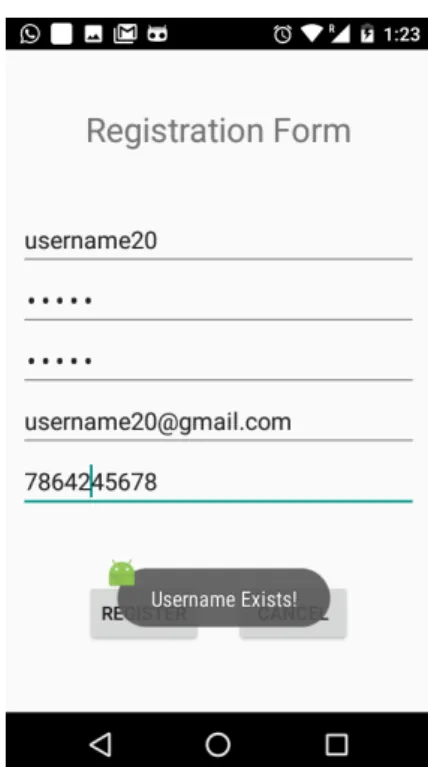
Figure 4.6: Email exists error. Figure 4.7: Username exists error.
Chapter 4 Implementation
Here the username, email and phone number should be unique. There are two password fields, one is just password field and the other is the confirm password field. This is used to check the matching of the password. The registration will get complete if all the above condition match.
There are mainly four types of errors possible in the registration phase. They are username exist, password mismatch, email exist, phone number exist. Figure 4.7 shows the username exist error and figure 4.6 shows the email exist error based on whether username or email is already available in the phone’s database or not. Similarly, there are two more errors to indicate the password mismatch error and the phone number exists error.
Figure 4.8: Completion of the registration
If there is no error, then three database update will take place (already discussed) and the mobile application will show a toast messages to indicate the successful saving of the data. Figure 4.8 shows the toast message after successful saving of the data. This is all about the registration.
If the user is already registered or completed registration, user needs to choose the login button which is available in the home page of mobile application.
Chapter 4 Implementation
Figure 4.9: Login page to enter a username.
Figure 4.10: Username not available in the mobile database.
Login page consists of a text field where the user is asked to enter a valid username, see figure 4.9. The validity of the username is checked with the help of the device database. If no match found, the user gets a popup message indicating that the username entered does not exist in the mobile database as shown in figure 4.10.
Figure 4.11: Entering a valid username
Figure 4.12: scanning the QR code with the help of mobile app
Chapter 4 Implementation
The figure 4.11 shows the login page after entering a valid username. If the username matched with the username in the database, then the application will start a QR scanner in order to capture the QR code as shown in figure 4.12.
On the login page we have another button called cancel button. If the user press this cancel button it will directly redirect the user into the starting page of the mobile application (figure 4.3) where user can participate in the registration process.
Figure 4.13: Wrong QR code message.
Figure 4.14: Displaying the second QR code.
When the application gets the scanned QR details, application will check the validity of QR code by checking how old the QR code is, checking whether the QR code is coming from the valid server or not and last check the validity of the vouch request generated by the server.
If any one of these checks violates, then the display will show an error message as shown in figure 4.13 and if every checks are valid then it will create another QR code for the attestation of the server and will display it on the mobile screen as shown in figure 4.14
Chapter 4 Implementation
4.2.2
Web browser
Figure 4.15: Web login page
When the user opens the login page it consist of two text fields. A text field to enter the username and a text field to enter the password. See figure 4.15. When the user press the login button, the server will check the validity of the credentials. If they are not valid then the browser will display an error message as shown in fiqure 4.16
Figure 4.16: Invalid username or password
Chapter 4 Implementation
The error message indicates either the username or password combination is wrong or it indicate the user is new on this website so he need to register before login.
Figure 4.17: Displaying the first QR code
If the username password combination is valid. The browser will display the first encoded message as a QR code as shown in figure 4.17. When the browser display QR code, the user need to scan the QR code with the help of the mobile app.
If the QR code is a valid code, then the mobile app displays another QR code (see figure 4.14) else it will display the error message (see figure 4.13)
When the mobile app displays the second QR code, the user need to scan the QR code displayed on the mobile screen. For that the user needs to click the next button available down the displayed QR code (From browser).
Figure 4.19: Logged in : Home page of username2
After the successful scanning the server will issue the authentication token and it will complete the authentication process. Then it will direct the user into his homepage with a logout button in it(figure 4.19). If the QR code displayed on the mobile phone is invalid, then the browser will show an error message and redirect the user into the login page
Chapter 5
Conclusion
Increasing use of the internet gives the importance to secure user’s authentication on the web page. Traditionally static passwords can more easily be accessed by an unauthorized intruder given enough attempts and time. So in order to obtain more security, more secure authentication methods should be used.
The proposed thesis is a Two Factor Authentication prototype which can be used to replace the existing password only authentication for the better safety and security of the user’s data. The proposed scheme uses Diffie Hellman key exchange algorithm for the exchange of keys. Encryption and decryption of the vouch is done with the help of an RSA public key cryptosystem. TFA uses visible light for the communication between the trusted mobile device and the PS. Here the cost of the communication is less as we used visible light rather than the radio frequency for the communication.
Results show that the two factor authentication has more usability and that is likely to replace the existing password only authentication in the near future. Even though it is taking more database for the authentication, security and usability will compensate that. Even as of today, many high security websites like banking, email used two factor authentication method for user login. Popularity of the portable mobile phone with android platform and the inbuilt property of the QR code scanning will promote the proposed two factor authentication scheme.
So with the advancement of technology and the popularity of the android platform will promote the use of the proposed model to obtain the security. Finally, the report concludes with the prototype implementation, simulation and synthesis results. The results in each phase of the implementation were covered and presented in this thesis.
References
[1] S. K. Sood, A. K. Sarje, and K. Singh, “Cryptanalysis of password authentication schemes: Current status and key issues,” inMethods and Models in Computer Science, 2009. ICM2CS 2009. Proceeding of International Conference on, Dec 2009, pp. 1–7.
[2] T. Kwon and J. Song, “Security and efficiency in authentication protocols resistant to password guessing attacks,” inLocal Computer Networks, 1997. Proceedings., 22nd Annual Conference on, Nov 1997, pp. 245–252.
[3] R. Kirushnaamoni, “Defenses to curb online password guessing attacks,” inInformation Communication and Embedded Systems (ICICES), 2013 International Conference on, Feb 2013, pp. 317–322.
[4] L. Zhang-Kennedy, S. Chiasson, and R. Biddle, “Password advice shouldn’t be boring: Visualizing password guessing attacks,” ineCrime Researchers Summit (eCRS), 2013, Sept 2013, pp. 1–11. [5] B. Wardman, T. Stallings, G. Warner, and A. Skjellum, “High-performance content-based phishing attack
detection,” ineCrime Researchers Summit (eCrime), 2011, Nov 2011, pp. 1–9.
[6] V. Kumar and R. Kumar, “Detection of phishing attack using visual cryptography in ad hoc network,” inCommunications and Signal Processing (ICCSP), 2015 International Conference on, April 2015, pp. 1021–1025.
[7] J. Chen and C. Guo, “Online detection and prevention of phishing attacks,” in2006 First International Conference on Communications and Networking in China, Oct 2006, pp. 1–7.
[8] H. Shin, D. Kim, and J. Hur, “Secure pattern-based authentication against shoulder surfing attack in smart devices,” in2015 Seventh International Conference on Ubiquitous and Future Networks, July 2015, pp. 13–18.
[9] R. K. Guha, Z. Furqan, and S. Muhammad, “Discovering man-in-the-middle attacks in authentication protocols,” inMILCOM 2007 - IEEE Military Communications Conference, Oct 2007, pp. 1–7. [10] M. Alicherry and A. D. Keromytis, “Doublecheck: Multi-path verification against man-in-the-middle
attacks,” in Computers and Communications, 2009. ISCC 2009. IEEE Symposium on, July 2009, pp. 557–563.
[11] Y. Wang, H. Wang, Z. Li, and J. Huang, “Man-in-the-middle attack on bb84 protocol and its defence,” in
Computer Science and Information Technology, 2009. ICCSIT 2009. 2nd IEEE International Conference on, Aug 2009, pp. 438–439.
[12] D. Ziegler, M. Rauter, C. Stromberger, P. Teufl, and D. Hein, “Do you think your passwords are secure?” inPrivacy and Security in Mobile Systems (PRISMS), 2014 International Conference on, May 2014, pp. 1–8.
References
[13] L. Zhang, Y. Liu, and Q. Ji, “The password security analysis of network forums,” in2015 IEEE 16th International Conference on Communication Technology (ICCT), Oct 2015, pp. 878–882.
[14] “real user details, ”www.realuser.com”.”
[15] J. Leyden, “Leak of ’5 meelllion gmail passwords’ creates security flap,” Sept 2014.
[16] M. M. Kassim and A. Sujitha, “Procurepass: A user authentication protocol to resist password stealing and password reuse attack,” in Computational and Business Intelligence (ISCBI), 2013 International Symposium on, Aug 2013, pp. 31–34.
[17] P. M. V, R. P, and A. G. A, “A secured authentication protocol which resist password reuse attack,” inInnovations in Information, Embedded and Communication Systems (ICIIECS), 2015 International Conference on, March 2015, pp. 1–5.
[18] S. Schoen, “Iranian man-in-the-middle attack against google demonstrates dangerous weakness of certificate authorities,” Augest 2011.
[19] M. Xie, Y. Li, K. Yoshigoe, R. Seker, and J. Bian, “Camauth: Securing web authentication with camera,” in2015 IEEE 16th International Symposium on High Assurance Systems Engineering, Jan 2015, pp. 232–239.
[20] G. Me, D. Pirro, and R. Sarrecchia, “A mobile based approach to strong authentication on web,” in2006 International Multi-Conference on Computing in the Global Information Technology - (ICCGI’06), Aug 2006, pp. 67–67.
[21] K. Renaud, “Web authentication using mikon images,” inPrivacy, Security, Trust and the Management of e-Business, 2009. CONGRESS ’09. World Congress on, Aug 2009, pp. 79–88.
[22] Q. Wang and Z. Qin, “Stronger user authentication for web browser,” in 2010 3rd International Conference on Advanced Computer Theory and Engineering(ICACTE), vol. 5, Aug 2010, pp. V5–539–V5–543.
[23] N. W. Wang and Y. M. Huang, “User’s authentication in media services by using one-time password authentication scheme,” in Intelligent Information Hiding and Multimedia Signal Processing, 2007. IIHMSP 2007. Third International Conference on, vol. 1, Nov 2007, pp. 623–626.
[24] S. Gupta, S. Sengupta, M. Bhattacharyya, S. Chattrejee, and B. S. Sharma, “Cellular phone based web authentication system using 3-d encryption technique under stochastic framework,” in2009 First Asian Himalayas International Conference on Internet, Nov 2009, pp. 1–5.
[25] A. Al-Qayedi, W. Adi, A. Zahro, and A. Mabrouk, “Combined web/mobile authentication for secure web access control,” in Wireless Communications and Networking Conference, 2004. WCNC. 2004 IEEE, vol. 2, March 2004, pp. 677–681 Vol.2.
[26] M. Eminagaoglu, E. Cini, G. Sert, and D. Zor, “A two-factor authentication system with qr codes for web and mobile applications,” inEmerging Security Technologies (EST), 2014 Fifth International Conference on, Sept 2014, pp. 105–112.
[27] Z. Mao, D. Florio, and C. Herley, “Painless migration from passwords to two factor authentication,” in
References
[28] C. L. Tsai, C. J. Chen, and D. J. Zhuang, “Secure otp and biometric verification scheme for mobile banking,” inMobile, Ubiquitous, and Intelligent Computing (MUSIC), 2012 Third FTRA International Conference on, June 2012, pp. 138–141.
[29] M. Jiang, A. He, K. Wang, and Z. Le, “Two-way graphic password for mobile user authentication,” inCyber Security and Cloud Computing (CSCloud), 2015 IEEE 2nd International Conference on, Nov 2015, pp. 476–481.