
judges will receive the submissions in real time, and can use the web tools to evaluate the work. Unlike existing programming contest environment which relies on Java or some sort of thick client, our work requires nothing more than an internet connection and a current browser (IE 6 and Firefox 1.0) on the client machine – not even a text editor!
Keywords: programming contest, web applications, real time, AJAX1, SAJAX2, XMLHttpRequest, Javascript, php
II.
REQUIREMENT ANALYSIS
Our project is designed to support ACM-style3 real time programming contest, and hence can be used for hosting contests that span over a few days as well. With the help from our instructor Greg Baker, we found out what is needed to support an “offline” contest for high school students4. Furthermore, Brad Bart has kindly discussed what is needed to host an ACM-style contest5. Since the requirements for “offline” contest is a subset of the ones for ACM, we will focus on the discussion of the latter. Table 1 lists the resulting requirements of our project. Most of the requirements have been completely implemented, and we left room for the
remaining features to be plugged in easily. For the list of current features, see section IV on page 6.
Table 1: Requirement Analysis6
Participants:
1. Authenticate themselves to the competition 2. View Problem Sets (includes expected outputs) 3. View Contest information (General info provided) 4. View time remaining
5. Select a problem
6. Work on solution code for selected problem (Coding)
1 AJAX: http://www.adaptivepath.com/publications/essays/archives/000385.php. See III(6) for brief discussion. 2 SAJAX: AJAX toolkit for PHP http://www.modernmethod.com/sajax/. See III(6) for brief discussion. 3 ACM-ICPC rules: http://icpc.baylor.edu/icpc/finals/About.htm
4 Requirements for offline contest researched by Vincent 5 Requirements for ACM-style contest researched by Alex 6 List contributed by Alex, following a group discussion
7. Compile solution code
a. View Compiling outputs (compile errors, etc.) 8. Test-run and Generate solution code’s contest output 9. Submit solution code for one of the problem
a. Method: Browser
b. Type: Java, C++, C, Python
c. Formatting: Editor-style (with tabs and coloring allowed) 10. View current marks (= time spent in ACM) / standings of self 11. View current marks (= time spent in ACM) / standings of all
12. Chat with one of judge who marked participant’s solutions to clarify problems
Judge:
1. Authenticate themselves to the competition 2. View Problem Sets
3. View Contest information (General info provided) 4. View time remaining
5. Select and View one of the submitted codes 6. Compile selected solution code
a. View Compiling outputs (compile errors, etc.)
7. Test-run and Generate selected solution code’s contest output 8. Compare participant’s output with Expected output
9. (View Expected output)
10. Judge participant’s solution code (using following criteria in precedence) a. “Yes - Correct Submission”
b. “No - Compilation Error” c. “No - Run-time Error” d. “No - Time-limit Exceeded” e. “No - Wrong Answer” f. “No - Formatting Error” 11. Comment participant’s solution code
12. View current marks (= time spent in ACM) / standings for all
13. Chat with participants (of selected solution code? With all participants?)
System
1. Notify judges of submitted code immediately
• Notify participants of finished marking of their submitted code
• Notify participants of judge’s msg in the chat area
III.
TECHNOLOGY EVALUATION / DESIGN
(1) Existing technologies for hosting programming contests
the details of the judging facilities as it is not a freely available solution. Participants can code directly in TopCoder’s environment.
Both solutions support real-time judging and contest participation (server-side compilation). Our project support real-time judging and submission while maintaining the accessibility from a simple browser.
Mooshak9 is a web-based programming contests manager and is freely available for download. In many aspects, it has functionalities similar to our work, and it adheres to ACM-ICPC rules as well. It does not use a database back end, but instead submissions are stored with file system along with metadata written in XML. Our system differs from Mooshak almost only by the user interface, notably most of the pages in Mooshak are frame-based. It also offers statistics which our project lack, such as memory/CPU cycles used, average response time of problems, etc.
(2) Programming language for server-side dynamic content
None of us knows PHP prior to taking CMPT470, but we determined that PHP is most suitable for our purpose. The majority of our pages will contain both static content and dynamic content, and PHP excels in embedding XHTML as part of the script. We made sure the code is as
separate from the static content as possible to enhance maintainability. PHP provides native support for maintaining sessions, and we find Python and Perl to be weaker in these aspects.
(3) Web server and database Backend
MySQL is chosen without a doubt because it is freely available, and can be installed readily with PHP without much trouble. MySQL has all the database functionality that we need for our purpose. We considered Zope for our application server. We need to make sure students cannot access other people’s submitted code, and Zope can achieve the security aspect easily. But since none of us know Zope, it might be too much overhead to learn Zope from scratch. Apache comes with the default Mandrake and is thus used.
I’ve tried our web application on MS. Window’s IIS to test portability, and it runs without problems. (4) Security 7 http://www.ecs.csus.edu/pc2/ 8 http://www.topcoder.com/ 9 http://www.ncc.up.pt/mooshak/
Suspecting it is the way cmpt470.cs.sfu.ca is setup, we can access our contest environment via
https://cmpt470.cs.sfu.ca/mx2/~vwchu/final/index. Furthermore, all the requests with sensitive data are done using POST instead of GET, and we check logon information whenever a page is requested – to make sure students cannot “accidentally” access judge’s pages. To avoid the annoying “Do you want to post POSTDATA again” message associated with requests using POST, requests are posted asynchronously10 using AJAX paradigm. See section III(6) for details. Essentially, we allow the user to bookmark certain pages, without having the security risks
associated with GET.
(5) Content Negotiation
Options +Multiview is enabled to allow content negotiation. Hence, the underlying
implementation language is hidden from the web application users. However, if the index page is requested with index.php, all subsequent links and pages opened will have extension .php. This is done to allow our web application to be installed on servers that do not support content negotiation.
(6) Pushing and pulling data
We considered the simpler conventional form “posting” method for saving student’s content on server, submitting clarification requests, or similar operations. However, in my opinion, this typical method suffers from two drawbacks. When the user refreshes a page, the same data will be posted again. Also, because the entire page is refreshed, the user cannot type or perform other actions on the same page at the same time. With the AJAX paradigm, where XMLHttpRequest is used to perform asynchronous server requests (See Figure 1), the user can submit information to the server, and pull information about events periodically. Because we do not have to refresh the entire page, we can create the illusion that the user is being notified about new events. This provides the support for the real time nature of online contest. SAJAX is a php toolkit that automatically generates part of the javascript to make this happen, and is freely available for use (See section V(3) for implementation details of our pages).
As an alternative, we considered displaying our pages with frames, but the user would inevitability see the flickering of the “status” frame because of constant refreshes.
Figure 1: AJAX programming model.
Reference: http://www.adaptivepath.com/publications/essays/archives/000385.php
(7) Rich Web Application
We considered building a thick client out of python initially to provide a rich experience for the user (real-time, user-interface interaction). However, this would require a python interpreter to be installed and limit the scope of the audience. We have chosen to use javascript, along with SAJAX and css, to provide an experience comparable to a thick client. All the pages conform to XHTML 1.0 strict standard.
(8) Graceful degradation
While we assume that judges use a supported browser, participants may use any browser that supports forms and basic html. However, not all the functionality would be available. For example, the participants will only be able to submit his/her solution to judges (not saved on server first), and he/she would have to manually refresh pages.
(9) Communication between web server and compiling server
Because of security concerns, submitted code can be compiled on a separate physical machine from the one where the web server is running. Currently, both servers are running on the same machine, but this can be changed easily by modifying the URL of the soap server. SOAP is used instead of XMLRPC because we need the support for more complex data types. We use
nusoap11, a “library” for php on both the compiling server and web server’s client pages to provide the necessary SOAP communication.
(10)Compiling Server
We chose to implement the compiling server in php (dispatching request to command line using passthru) because php can listen to soap request using nusoap without recompiling php. The language that is used to implement the server does not play a significant role because we need to make system calls to compile submitted code with other scripting languages as well. Currently only C++ compilation is supported for code submitted in contests. The compiler we are using is gnu g++ (gcc).
(11)Comprehensive Testing
We have allocated the last week before the project due date for testing.
IV.
FEATURES
This section is divided into four subsections.
A. General Info
More than one contest can be running at the same time (they have different contest ids). When a user logs on, he can choose which contest to participate in from the drop-down menu (Figure 2). Currently, all valid users can participate in any available contests – contests that have started and have not ended13. Only authenticated users can access any of the pages.
Figure 2: Choosing contest
B. Participant / Student View
(1) Interactive Menu12
After the student (contest participant) has logged in (the system will know the user is a student or a judge based on the database), a Mac-like interactive menu12 for student will be displayed at the top of each page. It is introduced to provide a rich web application experience (Figure 3).
11 NUSOAP: http://dietrich.ganx4.com/nusoap/index.php
12 Javascript derived from Google OS X that was available briefly (Google has now taken it down). The original
Figure 3: Mac-like Web Interface
(2) Contest Info13
The first page presented is the contest info page (Figure 4). As with all the pages in participant view, the top right corner will display the time left in the current contest13 (updated locally with java script every second and synchronized with server every 10 minutes).
Figure 4: Contest info page
(3) Problem Workspace13
The problem workspace allows participants to work on more than one problem at the same time. He/She can choose from the list of problems associated with the current contest (open more than one problems in different windows), and work on them in the provided editor at the same time. When view question is clicked, a separate window will open and display the problem.
Figure 5: Choosing which problem to work on
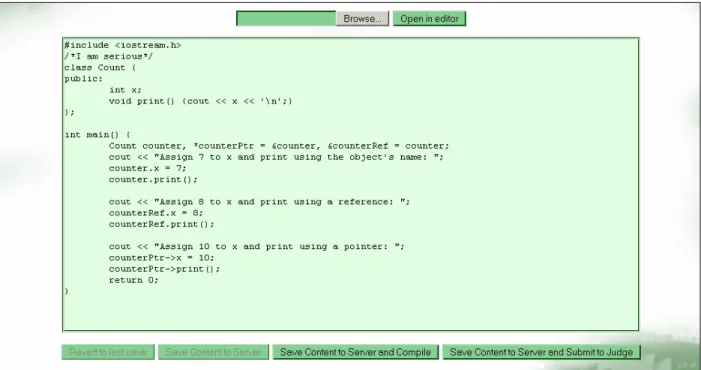
Figure 6 shows part of the student workspace. The student may choose a local file on the client machine, and open in editor without manual copying and pasting. I have adapted a javascript14 to support tabbing in the textarea in both Firefox and IE.
Figure 6: Program workspace
As changes to the editor are made, the buttons for saving will become available. The student may choose to save the modified code asynchronously to the server via POST, or revert to last save by loading the saved content asynchronously from the database. Implementation details of submission are addressed in section V(4).
Figure 7: Reverting or saving to server's copy
Student will also be notified if any of the status of his submissions or clarification request changes. An alert box (Figure 8) will be displayed, and the student is asked to visit the rank and clarification page for details.
Figure 8: Update Notification
From the workspace, the student can also compile his code, do a test execution15 and submit the code to the judge13. Like many other pages, if the student keeps the pop-up window for
submission opened, it will get updated automatically when the judge makes a response (Figure 9).
Figure 9: Submitting to judge
(4) Clarification Request13
Students are allowed to ask questions to judges. The clarification page lists the previous clarification requests from the current user, other users and responses from judges. The current postings listed in the page are updated continuously (Figure 10) without flickering (while the
student types a new request. New posts are added immediately without refreshing the entire page.
Figure 10: List of previous requests
(5) Submissions / Ranks16
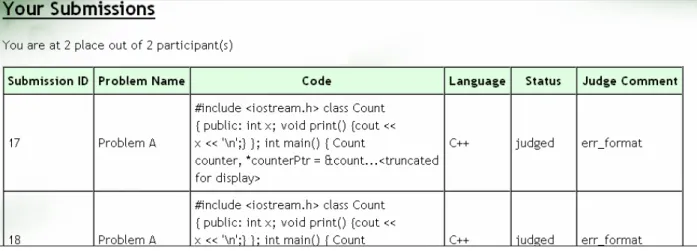
The rank page lists all the submissions by the participant in this contest (Figure 11). An excerpt of the submitted code associated with each submission is displayed in tabular format. The
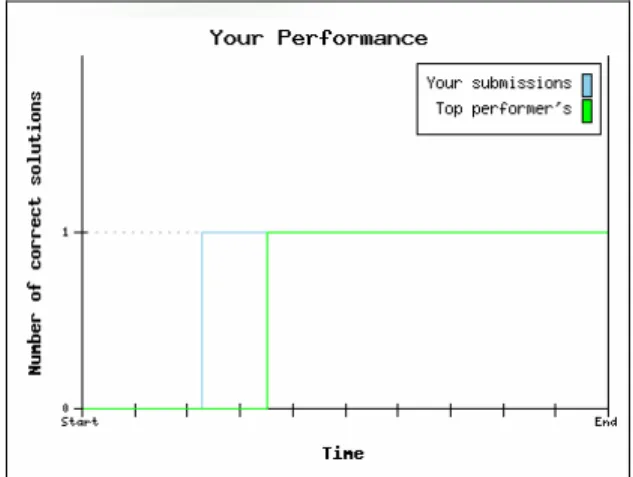
ranking (ascending order by the number of correct responses and descending order by the penalty minutes) is also displayed (Figure 12). As with all the other pages, the rankings are updated in real time.
Figure 11: All the submissions by the user
to the top performer – in terms of the number of correctly answered questions and the time it took (See Figure 13)
Figure 13: Individual Performance Graph
C. Judge View
Along with the interactive menu and the timer that the student view also has, judge view has additional features to support judging.
(1) Notification when a submission arrives13
Figure 14: List of submissions is updated immediately when a participant submits a solution
When a submission arrives, the judge can start judging immediately by clicking on the Judge link. Submissions that require judging will always be highlighted and stay on the top of the list, while the remaining ones stay in their submission order.
(2) Judging Logic
When the judge link is clicked15, a new window appears first presenting the code submitted by the student, and the compilation result of the code. If execution is successful, the execution result with the “standard input” defined along with the problem will be fed into the program. The result would be displayed. Furthermore, the difference of the student’s solution and the expected solution would also be displayed. Finally, the judge is given the option13 to select an appropriate response for the submission (If the submission is being rejudged, the previous response will be highlighted).
Judging different submissions from the same participant for the same question correct would only count as one correct submission. Also, the penalty points will be reversed if a solution judged incorrect is later rejudged as correct, and vice versa.
(3) Notification when a clarification request arrives13
Figure 15: List of clarifications is updated immediately when a participant submits a request Similar to judging, when a clarification request comes in, the judge can respond by clicking on the clarify link. Clarification requests that have not been handled will always be highlighted and stay on the top of the list.
(4) Ranks18
Judges can view the current ranks of the contestant, similar to what participants can generally see (Section IV.B(5)). Judges can also click on individual participants13 and view their performance report.
Figure 16: Participant's Performance Report
Figure 17: More performance graphs13
(5) Problem Management16
Allow judges to create, edit or update problems
(6) Login Management13
Allow judges to create, edit or update logins
D. Compiling / Execution Server
15Because the participant may only have a browser on the client machine, we want to provide the ability to compile their code on the server-side. A compiling/execution server is developed in php (using appropriate system calls to compile and execute the code), and it exposes a SOAP interface (Table 2).
Table 2: SOAP interface of the compiling server
function compile($name, $language, $sourcecode)
function execute($name, $language, $parameter, $pipedinput) function diff($name, $solution)
For all three functions, $name expects the submission id that is associated with the source code
(which is guaranteed to be unique by the client). This is required for the file naming and binary files management on the compiling server side.
(1) Compile
$language specifies the compiler to use for the submitted source code. $sourcecode can have
arbitrary length and hence SOAP is used instead of XMLRPC for this purpose. Compile creates a directory for each submission id, compiles the submitted source code in that directory and produce a binary.
(2) Execute
$parameter and $pipedinput are optional parameters and input respectively that the participant
or the judge can specify when they are executing the code. For the judge pages, we assume all the parameters and piped input are innocent (non-malicious).
(3) Diff
Diff is used by judges to compare the output produced by a submitted work (specified by the submission id, i.e. $name) and the expected output ($solution). Diff currently uses the diff function that comes with UNIX, but potentially we can use something more elaborate19 to produce a better-looking output for the judges.
V.
IMPLEMENTATION DETAILS
This section covers the details that are not yet discussed in previous sections, or areas that warrant further discussions.
(1) Three layers architecture
The project is separated into three logical layers - the html and javascript are responsible for user interface interactions, the php functions that the javascript calls via XHTTPRequest is responsible for updating the output, and the php functions access the database backend via mysqllib.php, mysqlconnection.php, and myutil.php.
(2) Database Setup13
We use phpMyAdmin to create the database backend for our project. Table 3: Database Tables
Table Description
contest Storing contest-related info such as contest start/end date
contestuser For storing information about which user can participate in which contest. Currently unused – see section VI(1)
login Storing user login information. Also store whether the user is a judge or a student messages Storing clarification messages from students and judges
problem Storing the problem question, expected solution, standard test input, etc score Storing the score a user obtained in a particular contest. This is done to avoid
querying and performing complex queries when the rank of a participant is desired. submission Submissions (code that are “saved” to server) are stored in this table. Also store
the status and judge’s response on a particular submission.
(3) SAJAX
As discussed in III(6) on page 4, the use of SAJAX toolkit facilitates asynchronous requests and retrieval. In Table 4, I’ve outlined what usually happens in our PHP pages.
Table 4: Typical sequence of events
Order Action Execution Language
5. We return to our wrapper (in step 3), and at the end of the wrapper we
call the “call-back” function we defined in step 2. Javascript 6. In the “call-back” function, we display the results we obtained from the
server by changing certain parts of the page (usually with
object.innerhtml, where object is an element in the XHTML page)
Javascript
(4) Submissions
Table 5 lists what happens when a participant saves his/her solution on the server. Table 5: (Implementation detail) Action taken when a participant saves his/her solution
Condition Action
There’s no “working copy” of the problem for this participant. Working copy is a copy that the participant has not submitted to the judge.
Create an new entry to the submission table and mark it as “started”
There is a “working copy” Update the working copy in the submission table
When the participant wishes to submit his solution to the judges, the status of the working copy is marked as “submitted”. (A working copy would always exist because the command is “save and submit to judges”.)
VI.
FUTURE WORK
(1) Restrict certain users to participate in certain contestsCurrently all users with valid logins can participate in any contests (chosen at the login page, and stay in the same contest until he/she logs out)
(2) Programming language support
Currently C++ is the only compilation language available on the server.
To better support contests that are held for an extended period of time, it might be better for judges and participants to receive E-mail or SMS notification when an event of interest occurs. Currently, the users must keep the page they’re interested in opened, or check manually by logging in at a later time. E-mail feature can be added easily, while SMS notification would require third-party web services.
(4) Improved “diff” / Automatic Judging
Currently, the diff function provided by the compiler server outputs a rather primitive output. In the future, we can use a more elaborate implementation of a diff19 function, and use the results to “suggest” response to the judges.
(5) Enhanced text editor
Although the current text editor supports tabbing, it would be much nicer if it supports additional editing aids such as code coloring.





![Strategic curriculum change, [by] Blackmore, Paul & Kandicko, Camille ed. (2012) [Book review]](data:image/gif;base64,R0lGODlhAQABAIAAAP///wAAACH5BAEAAAAALAAAAAABAAEAAAICRAEAOw==)